1
QUICK USER GUIDE DEFORMATION LASER
Range of Use
DN200 - DN400
Structure
1
2
3
4
5
1
2
3
4
5
1
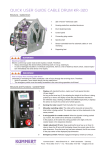
Clamping teeth
Spring hinge
Glass fiber rod
Laser
Batterie compartment
Mounting and Initial Operation
WARNING!
Improper Use
Use of the laser rod is possible in connection with the crawler F-200 only. Therefore:
- Mounting the laser rod onto other crawlers or cameras is prohibited. Damage resulting from improper use is not
covered by the manufacturer‘s warranty.
NOTE
2
1
The laser is being operated with a CR2 battery, which
is located in the front screw compartment (2) and must
be replaced from time to time.
Initial Operation Laser
The deformation measurement should be conducted after
the inspection while the crawler drives back to the starting
point. Therefore, the laser should/can be mounted in the
destination manhole.
1
2
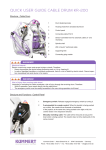
1. When turning the deformation laser on or off or
exchanging the battery, you must hold the device in the
correct places (1 and 2) as shown above.
WARNING!
Risk of injury!
Improper operation of the device may cause severe injuries due to the glass-fiber rod breaking.
Damage resulting from improper use is not covered by the
manufacturer‘s warranty.
2. To engage the laser (1), turn the threaded battery compartment (2) clockwise. To disengage the laser, turn it
counter-clockwise.
Mounting to the Crawler
1. Latch the four clamping teeth into the four allocated notches on the camera head. To do so, slightly pull the two
brackets of the laser fixture apart.
2. For dismounting, proceed in the reverse order.
Deformation Measurement
WARNING!
Damage to camera head and deformation laser
The Profi 3 software does not recognize whether the laser fixture is mounted onto the crawler or not. If the camera
head is being panned or tilted with the laser being mounted, the laser fixture can be lost in the pipe and/or damage
to the crawler and laser may occur. Therefore:
- Lock the camera head after mounting the laser onto the crawler via the software (click the yellow lock).
- Do neither pan nor tilt the camera head via software controls on the Profi 3.
- Avoid having the laser hit the pipe‘s inner wall by not steering the crawler manually.
- Dismount the laser prior to lowering the crawler into or lifting it out of a manhole.
2
1
The deformation measurement is conducted via the
Profi 3 software. To create a new deformation measurement, select the pipe/sewer section to be inspected in
the Live/TV inspection mode.
If the sewer section is yet to be surveyed, click on the
option New sewer section (1) and complete the survey.
3
Once the end of pipe has been entered, click on the
control button (2) and select the option New deformation measurement (3).
2
Click on the button Start. Click on the three dots in the
field End to open a number keyboard. Enter the position (1) that the crawler should drive back to.
To avoid the crawler driving back too far, we recommend a meter count of 0.5 m.
Click OK (2). The crawler now drives backwards and
conducts the laser measurement.
1
The recorded deformation measurement can be found
unter tab Deformation (1).
4
5
3
1
2
1
2
A colored chart (2) shows deformed areas.
The deformation‘s cross-section (3) and corresponding
video (4) display on the right-hand side.
When clicking anywhere in the chart (2), the video und
cross-section move to the respective spot.
Use the green plus sign (5) to enter additional information or capture photos, which will then be displayed in
the report.
To view the report, switch to the tab Report (1) and
Deformation measurement (2).
All entered information and photos are displayed according to their meter count.
KUMMERT
CREATING PROGRESS TOGETHER
Kummert GmbH * Albert-Einstein-Str. 8 * 97447 Gerolzhofen * Germany
Phone: +49 (0) 9382 / 9727 0 * Fax: +49 (0) 9382 / 9727 900 * [email protected]