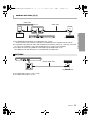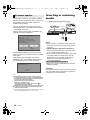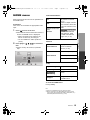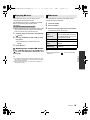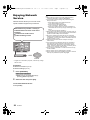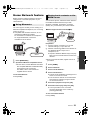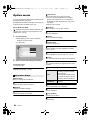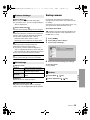
1
DMP-BDT460&360_EBGNGA-SQT0099.book 1 ページ 2014年1月28日 火曜日 午後3時57分 Operating Instructions Blu-ray DiscTM Player Model No. DMP-BDT460 DMP-BDT360 Firmware updates Panasonic is constantly improving the unit’s firmware to ensure that our customers are enjoying the latest technology. Panasonic recommends updating your firmware as soon as you are notified. For details, refer to “Firmware updates” (> 14) or http://panasonic.jp/support/global/cs/ (This site is in English only.) Thank you for purchasing this product. Please read these instructions carefully before using this product, and save this manual for future use. Model number suffix “EB” denotes UK model. EB GN SQT0099 GA until 2014/4/14 DMP-BDT460&360_EBGNGA-SQT0099.book 2 ページ 2014年1月28日 火曜日 午後3時57分 Precautions WARNING Unit To reduce the risk of fire, electric shock or product damage, ≥ Do not expose this unit to rain, moisture, dripping or splashing. ≥ Do not place objects filled with liquids, such as vases, on this unit. ≥ Use only the recommended accessories. ≥ Do not remove covers. ≥ Do not repair this unit by yourself. Refer servicing to qualified service personnel. ≥ Do not let metal objects fall inside this unit. ≥ Do not place heavy items on this unit. AC mains lead To reduce the risk of fire, electric shock or product damage, ≥ Ensure that the power supply voltage corresponds to the voltage printed on this unit. ≥ Insert the mains plug fully into the socket outlet. ≥ Do not pull, bend, or place heavy items on the lead. ≥ Do not handle the plug with wet hands. ≥ Hold onto the mains plug body when disconnecting the plug. ≥ Do not use a damaged mains plug or socket outlet. The mains plug is the disconnecting device. Install this unit so that the mains plug can be unplugged from the socket outlet immediately. [BDT460] [BDT360_for_Australia_and_New_Zealand] Small object Keep the Memory Card out of reach of children to prevent swallowing. CAUTION Unit ≥ This unit utilizes a laser. Use of controls or adjustments or performance of procedures other than those specified herein may result in hazardous radiation exposure. ≥ Do not place sources of naked flames, such as lighted candles, on this unit. ≥ This unit may receive radio interference caused by mobile telephones during use. If such interference occurs, please increase separation between this unit and the mobile telephone. [For[the[United[Kingdom,[Ireland,[Australia[and[New[Zealand] ≥ This unit is intended for use in moderate climates. [For[South[East[Asia] ≥ This unit is intended for use in tropical climates. Placement Place this unit on an even surface. To reduce the risk of fire, electric shock or product damage, ≥ Do not install or place this unit in a bookcase, built-in cabinet or in another confined space. Ensure this unit is well ventilated. ≥ Do not obstruct this unit’s ventilation openings with newspapers, tablecloths, curtains, and similar items. ≥ Do not place the unit on amplifiers/receivers or equipment that may become hot. The heat can damage the unit. ≥ Do not expose this unit to direct sunlight, high temperatures, high humidity, and excessive vibration. 2 SQT0099 Batteries Mishandling of batteries can cause electrolyte leakage and may cause a fire. ≥ Danger of explosion if battery is incorrectly replaced. Replace only with the type recommended by the manufacturer. ≥ When disposing of the batteries, please contact your local authorities or dealer and ask for the correct method of disposal. ≥ Do not mix old and new batteries or different types at the same time. ≥ Do not heat or expose to flame. ≥ Do not leave the battery(ies) in a car exposed to direct sunlight for a long period of time with doors and windows closed. ≥ Do not take apart or short circuit. ≥ Do not recharge alkaline or manganese batteries. ≥ Do not use batteries if the covering has been peeled off. Remove batteries if you do not intend to use the remote control for a long period of time. Store in a cool, dark place. Caution for AC Mains Lead (For the AC mains plug of three pins) For your safety, please read the following text carefully. This appliance is supplied with a moulded three pin mains plug for your safety and convenience. A 5-ampere fuse is fitted in this plug. Should the fuse need to be replaced please ensure that the replacement fuse has a rating of 5-ampere and that it is approved by ASTA or BSI to BS1362. Check for the ASTA mark Ï or the BSI mark Ì on the body of the fuse. If the plug contains a removable fuse cover you must ensure that it is refitted when the fuse is replaced. If you lose the fuse cover the plug must not be used until a replacement cover is obtained. A replacement fuse cover can be purchased from your local dealer. Before use Remove the connector cover. How to replace the fuse The location of the fuse differ according to the type of AC mains plug (figures A and B). Confirm the AC mains plug fitted and follow the instructions below. Illustrations may differ from actual AC mains plug. 1. Open the fuse cover with a screwdriver. Figure A Figure B Fuse cover 2. Replace the fuse and close or attach the fuse cover. Figure A Figure B Fuse (5 ampere) Fuse (5 ampere) 2014年1月28日 火曜日 午後3時57分 This unit adopts the following technology for copyright protection. Cinavia Notice This product uses Cinavia technology to limit the use of unauthorized copies of some commercially-produced film and videos and their soundtracks. When a prohibited use of an unauthorized copy is detected, a message will be displayed and playback or copying will be interrupted. More information about Cinavia technology is provided at the Cinavia Online Consumer Information Center at http://www.cinavia.com. To request additional information about Cinavia by mail, send a postcard with your mailing address to: Cinavia Consumer Information Center, P.O. Box 86851, San Diego, CA, 92138, USA. [For[Singapore] Complies with IDA Standards DB01017 [For[Vietnam] Suntech Restriction on use of unauthorized copied content A0141060313AE01A2 DMP-BDT460&360_EBGNGA-SQT0099.book 3 ページ Wireless LAN connection The following limits are in place regarding the usage of this unit. You must be aware of these limits before using this unit. Panasonic will in no way be responsible for any incidental damage which may arise due to a failure to obey these limits, or to any condition of use or disuse of this unit. ≥ Data transmitted and received over radio waves may be intercepted and monitored. ≥ This unit contains delicate electronic components. Please use this unit in the manner in which it was intended and follow the following points: – Do not expose this unit to high temperatures or direct sunlight. – Do not bend, or subject this unit to strong impacts. – Keep this unit away from moisture. – Do not disassemble or alter this unit in any way. [For[the[United[Kingdom[and[Ireland] Declaration of Conformity (DoC) Hereby, “Panasonic Corporation” declares that this product is in compliance with the essential requirements and other relevant provisions of Directive 1999/5/EC. Customers can download a copy of the original DoC to our R&TTE products from our DoC server: http://www.doc.panasonic.de Contact to Authorized Representative: Panasonic Marketing Europe GmbH, Panasonic Testing Centre, Winsbergring 15, 22525 Hamburg, Germany This product is intended to be used in the following countries. Austria, Belgium, Bulgaria, Cyprus, Czech Republic, Denmark, Finland, France, Germany, Greece, Hungary, Ireland, Italy, Iceland, Liechtenstein, Luxembourg, Malta, Netherlands, Norway, Poland, Portugal, Romania, Slovakia, Slovenia, Spain, Sweden, United Kingdom, Switzerland This product is intended for general consumer. (Category 3) The WLAN feature of this product shall exclusively be used inside buildings. This product on purpose to connect to access point of 2.4 GHz or 5 GHz WLAN. To dispose or transfer this unit The unit may keep the user settings information in the unit. If you discard this unit either by disposal or transfer, then follow the procedure to return all the settings to the factory presets to delete the user settings. (> 30, “To return all settings to the factory preset.”) ≥ The operation history may be recorded in the memory of this unit. Disposal of Old Equipment and Batteries Only for European Union and countries with recycling systems These symbols on the products, packaging, and/or accompanying documents mean that used electrical and electronic products and batteries must not be mixed with general household waste. For proper treatment, recovery and recycling of old products and used batteries, please take them to applicable collection points in accordance with your national legislation. By disposing of them correctly, you will help to save valuable resources and prevent any potential negative effects on human health and the environment. For more information about collection and recycling, please contact your local municipality. Penalties may be applicable for incorrect disposal of this waste, in accordance with national legislation. Note for the battery symbol (bottom symbol): This symbol might be used in combination with a chemical symbol. In this case it complies with the requirement set by the Directive for the chemical involved. SQT0099 3 DMP-BDT460&360_EBGNGA-SQT0099.book 4 ページ 2014年1月28日 火曜日 午後3時57分 Table of contents Precautions . . . . . . . . . . . . . . . . . 2 Getting started Playback Accessories . . . . . . . . . . . . . . . . . Unit and media care . . . . . . . . . . . Playable media. . . . . . . . . . . . . . . Control reference guide . . . . . . . . 5 5 6 8 Connections and settings Connecting to a TV . . . . . . . . . . Connecting to an amplifier/receiver . . . . . . . . . Connecting to the network . . . . . Settings . . . . . . . . . . . . . . . . . . . Inserting or removing media . . . . 14 HOME menu . . . . . . . . . . . . . . . . 15 Multi User Mode . . . . . . . . . . . . . 16 Playback . . . . . . . . . . . . . . . . . . . 17 Enjoying Network Service . . . . . . 20 Home Network feature . . . . . . . . 21 “HDMI CEC” . . . . . . . . . . . . . . . . 22 USB Sharing . . . . . . . . . . . . . . . . 23 10 10 12 13 Settings Option menu . . . . . . . . . . . . . . . . 24 Setup menu. . . . . . . . . . . . . . . . . 25 Reference Troubleshooting guide . . . . . . . . 30 Specifications . . . . . . . . . . . . . . . 35 Limited Warranty (ONLY FOR AUSTRALIA) . . . . . . . . . . . . . . . 39 4 SQT0099 2014年1月28日 火曜日 午後3時57分 Accessories Unit and media care Check the supplied accessories before using this unit. 1 Remote control ∫ Clean this unit with a soft, dry cloth Getting started [For[the[United[Kingdom[and[Ireland] (N2QAYB000961) [For[Australia[and[New[Zealand] (N2QAYB000957) ≥ Never use alcohol, paint thinner or benzine to clean this unit. ≥ Before using chemically treated cloth, carefully read the instructions that came with the cloth. Getting started DMP-BDT460&360_EBGNGA-SQT0099.book 5 ページ (N2QAYB000959) 2 Batteries for remote control 1 HDMI Cable [Except[the[United[Kingdom[and[Ireland] AC mains lead [For[the[United[Kingdom[and[Ireland] (K2CT2YY00098) [For[Australia[and[New[Zealand] Lens cleaner: RP-CL720AE ≥ This lens cleaner may not be available for sale in all countries, e.g. not available in Germany, please consult your Panasonic dealer for advice. ≥ This lens cleaner is sold as specific for DIGA, but can be used on this unit as well. ∫ Clean discs (K2CJ2DA00014) [For[South[East[Asia] See page 10 for more information. DO Connections and settings ∫ This unit’s lens [For[South[East[Asia] DO NOT R6/LR6, AA (Alkaline or manganese batteries) Point it at the remote control signal sensor on this unit. (> 8) ∫ Disc and card handling precautions ≥ Handle discs by the edges to avoid inadvertent scratches or fingerprints on the disc. ≥ Do not attach labels or stickers to discs. ≥ Do not use disc cleaning sprays, benzine, thinner, static electricity prevention liquids or any other solvent. ≥ [BDT460] [BDT360_for_Australia_and_New_Zealand] Clean any dust, water, or foreign matter from the terminals on the rear side of the card. ≥ Do not use the following discs: – Discs with exposed adhesive from removed stickers or labels (rented discs, etc.). – Discs that are badly warped or cracked. – Irregularly shaped discs, such as heart shapes. Settings Insert the batteries to the terminal so that it (i and j) matches those in the remote control. Reference ∫ Using the remote control Wipe with a damp cloth and then wipe dry with a dry cloth. Playback ≥ Product numbers are provided in these operating instructions correct as of February 2014. These may be subject to change. ≥ Do not use AC mains lead with other equipment. SQT0099 5 DMP-BDT460&360_EBGNGA-SQT0099.book 6 ページ 2014年1月28日 火曜日 午後3時57分 Playable media Device Media markings Device types BD-Video BD-RE BD BD-R DVD-Video DVD-R DVD DVD-R DL Contents format Video Video, JPEG, MPO Video, MKV, Xvid Video Video, AVCHD, MKV, Xvid, JPEG, MPO, AAC, FLAC, MP3, WAV, WMA DVD-RW Video, AVCHD — +R/+RW/+R DL Music CD CD CD-R CD-RW — MKV, Xvid, JPEG, MPO, AAC, FLAC, MP3, Music [CD-DA], WAV, WMA SD Memory Card (from 8 MB to 2 GB) AVCHD, AVCHD 3D, SDHC Memory Card (from 4 GB to 32 GB) MP4, SDXC Memory Card (48 GB, 64 GB) JPEG, MPO (Compatible with both mini and micro types) * SD USB Music [CD-DA] — USB devices (up to 2 TB) MKV, MP4, MPEG2, Xvid, JPEG, MPO, AAC, FLAC, MP3, WAV, WMA * [BDT460] [BDT360_for_Australia_and_New_Zealand] ≥ See pages 7 and 35 for more information on the types of content that can be played. 6 SQT0099 2014年1月28日 火曜日 午後3時57分 ∫ Types of discs that cannot be played by this unit Any other disc that is not specifically supported or previously described. ≥ DVD-RAM ≥ Super Audio CD ≥ Photo CD ≥ DVD-Audio ≥ Video CD and Super Video CD ≥ HD DVD ∫ Region management information The unit can play back BD-Video/DVD-Video discs of the following regions codes, including “ALL”: Example: BD-Video DVD-Video [For[the[United[Kingdom[and[Ireland] 2 [For[Australia[and[New[Zealand] 4 [For[South[East[Asia] 3 ∫ Finalize Any DVD-R/RW/R DL, +R/+RW/+R DL and CD-R/RW that are recorded by a recorder need to be finalized by the recorder to play on this unit. Please refer to the recorder’s instructions. ∫ BD-Video ≥ This unit supports high bit rate audio (Dolby® Digital Plus, Dolby® TrueHD, DTS-HD High Resolution AudioTM and DTS-HD Master AudioTM) adopted in BD-Video. ≥ [BDT360] If “Dolby D/Dolby D +/Dolby TrueHD” is set to “PCM” and “DTS Neo:6” is set to “Off”, the maximum possible number of Dolby® sound is 5.1ch PCM. (> 26, 27) ∫ 3D ≥ 3D videos and 3D still pictures can be played back when this unit is connected to a 3D compatible TV using a High Speed HDMI Cable. ≥ 2D video can be enjoyed as 3D virtually. (> 25) ∫ Music CD Operation and sound quality of CDs that do not comply with CD-DA specifications (copy control CDs, etc.) cannot be guaranteed to work. ∫ SD card [BDT460] [BDT360_for_Australia_and_New_Zealand] ≥ miniSD Cards, microSD Cards, microSDHC Cards and microSDXC Cards can be used, but must be used with an adaptor card. These are usually supplied with such cards, or otherwise customer provided. ≥ To protect the card’s contents, move the record prevention tab (on the SD card) to “LOCK”. ≥ This unit is compatible with SD Memory Cards that meet SD Card Specifications FAT12 and FAT16 formats, as well as SDHC Memory Cards in FAT32 format and SDXC Memory Cards in exFAT. ≥ If the SD card is used with incompatible computers or devices, recorded contents may be erased due to the card being formatted etc. ≥ Usable memory may be slightly less than the card capacity. ∫ USB device ≥ This unit does not guarantee connection with all USB devices. ≥ This unit does not support USB device charging. ≥ FAT12, FAT16, FAT32, and NTFS file systems are supported. ≥ This unit supports USB2.0 High Speed. ≥ This unit supports an HDD formatted in FAT32 and NTFS. If the HDD is not recognized, the power to the HDD may not be supplied. Supply power from an external source. ∫ BD-RE, BD-R Discs recorded in DR mode using Panasonic Blu-ray Disc recorders may not play back the audio etc., correctly. ≥ It may not be possible to play the above media in some cases due to the type of media, the condition of the recording, the recording method, and how the files were created. ≥ The producers of the disc can control how discs are played, so you may not always be able to control play as described in these operating instructions. Read the disc’s instructions carefully. SQT0099 7 Getting started DMP-BDT460&360_EBGNGA-SQT0099.book 7 ページ DMP-BDT460&360_EBGNGA-SQT0099.book 8 ページ 2014年1月28日 火曜日 午後3時57分 Control reference guide When other Panasonic devices respond to the remote control of the unit, change the remote control code. (> 30) e.g., [For[the[United[Kingdom[and[Ireland] e.g., [For[Australia[and[New[Zealand] 11 11 1 1 2 2 abc ㄅㄆㄇ 12 jkl mno 13 wxyz 14 12 abc ㄅㄆㄇ jkl mno 13 wxyz 14 PIP 3 ㄈㄉㄊ pqrs tuv 4 5 3 ㄈㄉㄊ pqrs 4 5 15 6 tuv 15 6 7 7 16 17 18 16 17 18 8 8 19 9 19 9 20 10 20 10 e.g., [BDT460_for_the_United_Kingdom_and_Ireland] 28 29 30 Pull to flip down the front panel. SD CARD 21 22 23 24 25 26 27 [For[Australia[and[New[Zealand] 8 SQT0099 1 2 3 4 5 6 7 8 9 10 11 12 13 14 15 2014年1月28日 火曜日 午後3時57分 Turn the unit on and off TV operation buttons You can operate the Panasonic TV using this unit’s remote control. Some buttons may not work depending on the TV. [Í TV] : Turn the TV on and off [AV] : Change input [i j VOL] : Adjust the volume Select title numbers, etc./Enter numbers or characters Cancel Change audio (> 17) Basic playback control buttons (> 17) [For[the[United[Kingdom[and[Ireland] Show Pop-up menu (> 17) [For[Australia[and[New[Zealand] Show the status messages (> 18) [For[South[East[Asia] Show USB Sharing menu (> 23) Show Top menu (> 17) Show Option menu (> 24) Coloured buttons (red, green, yellow, blue) Used for various purposes depending on the display Transmit the remote control signal Open or close the disc tray (> 14) [For[the[United[Kingdom,[Ireland[and[South[East[Asia] Show the status messages (> 18) [For[Australia[and[New[Zealand] Switch Secondary Video on/off (Picture-in-picture) (> 24) Show MiracastTM screen (> 21) Show the Home Screen of the Network Service (> 20) 16 Exit the Menu screen 17 [For[the[United[Kingdom[and[Ireland] Show Netflix screen (> 20) [Except[the[United[Kingdom[and[Ireland] Show Pop-up menu (> 17) 18 Show HOME menu (> 15) 19 [3, 4, 2, 1] : Move the highlight for selection [OK] : Confirm the selection (;1) : Frame-by-frame (> 17) 20 Return to previous screen 21 Disc tray (> 14) 22 Remote control signal sensor Distance: Within approx. 7 m Angle: Approx. 20e up and down, 30e left and right 23 [BDT460] [BDT360_for_Australia_and_New_Zealand] Blue LED It is possible to set the LED to turn on/off. (> 29) 24 [BDT460] [BDT360_for_Australia_and_New_Zealand] SD card slot (> 14) 25 [BDT460] V.OFF LED (Video off LED) It is possible to set the LED to turn on/off. (> 29) 26 USB ports (> 14) 27 Display 28 Open or close the disc tray (> 14) 29 Basic playback control switches (> 17) 30 Standby/on switch (Í/I) (> 13) Press to switch the unit from on to standby mode or vice versa. In standby mode, the unit is still consuming a small amount of power. Rear panel terminals (> 10–12) SQT0099 9 Getting started DMP-BDT460&360_EBGNGA-SQT0099.book 9 ページ DMP-BDT460&360_EBGNGA-SQT0099.book 10 ページ 2014年1月28日 火曜日 午後3時57分 Connecting to a TV Connections and settings Connect the AC mains lead after making all connections. ≥ Before making any connections, we recommend that you temporarily disconnect all the units from AC power. ≥ Use the High Speed HDMI cables. Non-HDMI-compliant cables cannot be utilized. It is recommended that you use Panasonic’s HDMI cable. When outputting 1080p or 24p (4K) signal, please use HDMI cables 5.0 meters or less. [Except[the[United[Kingdom[and[Ireland] The HDMI-compliant cable is supplied with this unit. [For[South[East[Asia] 2 AC mains leads are supplied. Thailand: With a label To a household mains socket HDMI cable ([Except[the[United[Kingdom[and[Ireland] supplied) [BDT460] HDMI IN [BDT360] AC mains lead (supplied) ≥ [BDT460] : Use HDMI AV OUT MAIN terminal. ≥ This unit consumes a small amount of AC power (> 35) even when turned off in standby mode. For the purpose of energy conservation, the unit should be disconnected if you will not be using it for extended period of time. Connecting to an amplifier/receiver Perform either one of the following connections in accordance with your amplifier/receiver input terminal. HDMI AV OUT HDMI cable [BDT460] ([Except[the[United[Kingdom[and[Ireland] supplied) HDMI IN HDMI OUT (ARC) HDMI cable HDMI IN (ARC) [BDT360] Amplifier/receiver ≥ [BDT460] : Use HDMI AV OUT MAIN terminal. ≥ Set “Digital Audio Output” (> 26). ≥ When connecting to a non-3D or 4K compatible amplifier/receiver, connect this unit to a TV, then connect the TV and the amplifier/receiver. Please note, however, that the audio can only be up to 5.1ch. ≥ When using the TV or amplifier/receiver that does not have the indication of “(ARC)” (non-ARC-compatible) on the HDMI terminal, the amplifier/receiver and TV must also be connected using an optical digital cable in order to enjoy the TV’s sound through the amplifier/receiver. 10 SQT0099 DMP-BDT460&360_EBGNGA-SQT0099.book 11 ページ 2014年1月28日 火曜日 午後3時57分 HDMI AV OUT SUB [BDT460] You can enjoy richer sound by using the HDMI AV OUT SUB terminal. HDMI cable HDMI cable HDMI IN HDMI IN Amplifier/receiver ≥ Set “HDMI(SUB) Output Mode” to “V.OFF(Video Off)”. (> 26) – Audio is output in high resolution regardless of compatibility of the amplifier/receiver with 3D. ≥ It is possible to play back 3D videos, 3D still pictures and 24p (4K) videos, etc., when the connected TV is 3D or 4K compatible, even if the amplifier/receiver is not 3D or 4K compatible. ≥ The HDMI connection using HDMI AV OUT MAIN supports HDMI CEC (> 22). The HDMI AV OUT SUB terminal is not compatible with the HDMI CEC. OPTICAL Optical digital cable OPTICAL IN Amplifier/receiver ≥ Set “HDMI Audio Output” to “Off” (> 26). ≥ Set “Digital Audio Output” (> 26). SQT0099 11 Connections and settings ([Except[the[United[Kingdom[and[Ireland] supplied) DMP-BDT460&360_EBGNGA-SQT0099.book 12 ページ 2014年1月28日 火曜日 午後3時57分 Connecting to the network The following services can be used when this unit is connected to broadband. ≥ Firmware can be updated (> 14) ≥ You can enjoy BD-Live (> 19) ≥ You can enjoy Network Service (> 20) ≥ You can access other devices (Home Network) (> 21) ≥ This unit supports Wi-Fi DirectTM and can make a wireless connection to wireless devices without router. You can use this function when enjoying Home Network feature, etc. Internet access is not available while connected via Wi-Fi DirectTM. (> 21, 28) For details about connection method, refer to the instructions supplied with the connected equipment. Wireless LAN connection This unit has built-in Wi-Fi® and can be connected to a wireless router. Wireless router, etc. Internet ≥ For up-to-date compatibility information on your wireless router, refer to http://panasonic.jp/support/global/cs/ (This site is in English only.) ≥ The unit is not compatible with public wireless LAN services (Hotspot etc.) provided in airports, stations, cafes, etc. ≥ See page 3 for the precautions for wireless LAN connection. LAN cable connection LAN Cable Broadband router, etc. Internet ≥ Use category 5 or above straight LAN cables (STP) when connecting to peripheral devices. ≥ Inserting any cable other than a LAN cable in the LAN port can damage the unit. 12 SQT0099 DMP-BDT460&360_EBGNGA-SQT0099.book 13 ページ 2014年1月28日 火曜日 午後3時57分 Settings ∫ About the wireless connection Easy Settings After connecting your new player for the first time and pressing [Í], the basic settings screen will appear. Preparation Turn on the TV and select the appropriate video input. 1 Press [Í]. Setup screen appears. 2 Follow the on-screen instructions to continue with the settings. Easy Network Setting After completing “Easy Settings”, you can perform “Easy Network Setting”. Select “Wired” or “Wireless” and press [OK]. If your SSID is not displayed; ≥ Search again by pressing the red button on the remote control. ≥ Stealth SSIDs will not be displayed; in this case, enter manually by using “Manual setting”. Press [HOME] > press [OK] to select “Setup” > select “Player Settings” > select “Network” and press [OK] > select “Network Settings” and press [OK] > select “Wireless Settings” and press [OK] > select “Connection Setting” and press [OK] > select “Manual setting” and press [OK] If your wireless network is encrypted; Encryption Key input screen will be displayed. Input the encryption key of your network. If your wireless router is supports WPS (Wi-Fi Protected SetupTM); You can easily set up a connection by pressing the green button on the remote control. Easy Network Setting Select a connection mode. Wired Wireless OK RETURN Follow the on-screen instructions to establish your connection settings. ≥ Refer to the operating instructions of the hub or router. ≥ Do not use this unit to connect to any wireless network for which you do not have usage rights. Using these networks may be regarded as illegal access. ≥ If you have trouble getting online on your PC after performing network settings on this unit, perform the network settings on your PC. ≥ Please be aware that connecting to a network without encryption may result in the leaking of data such as personal or secret information. * SSID: An SSID (Service Set IDentification) is a name used by wireless LAN to identify a particular network. Transmission is possible if the SSID matches for both devices. SQT0099 13 Connections and settings The following settings can be performed anytime in the Setup menu. (> 28, 29) Before beginning wireless connection setup ≥ Obtain your network name (SSID*). ≥ If your wireless connection is encrypted, please be sure that you know your encryption key. DMP-BDT460&360_EBGNGA-SQT0099.book 14 ページ 2014年1月28日 火曜日 午後3時57分 Inserting or removing media Playback Firmware updates Occasionally, Panasonic may release updated firmware for this unit that may add or improve the way a feature operates. These updates are available free of charge. This unit is capable of checking the firmware automatically when connected to the Internet via a broadband connection. When a new firmware version is available, the following message is displayed. e.g., [BDT460_for_the_United_Kingdom_and_Ireland] USB1 USB2 SD CARD Firmware Update New Version: X.XX Current Version: X.XX Do you want to start firmware update? For the update information, please visit the following website: http://panasonic.net/support/ Yes No OK RETURN DO NOT DISCONNECT the unit from the AC power or perform any operation while the update takes place. After the firmware is installed, “FIN” will be displayed on the unit’s display. Unit will restart and the following screen will be displayed. The firmware has been updated. Current Version: x.xx RETURN ≥ If downloading on this unit fails or this unit is not connected to the Internet, then you can download the latest firmware from the following website and burn it to a CD-R to update the firmware. http://panasonic.jp/support/global/cs/ (This site is in English only.) To show the firmware version on this unit. (> 30, “Firmware Version Information”) ≥ Downloading will require several minutes. It may take longer or may not work properly depending on the connection environment. ≥ If you do not want to check for the latest firmware version, set “Automatic Update Check” to “Off”. (> 30) 14 SQT0099 Notes ≥ When inserting a media item, ensure that it is facing the correct way, which is the right side facing up. ≥ [BDT460] [BDT360_for_Australia_and_New_Zealand] When removing the SD card, press the centre of the card and pull it straight out. ≥ If you connect a Panasonic product with a USB connection cable, the setup screen may be displayed on the connected equipment. For details, refer to the instructions for the connected equipment. [For[the[United[Kingdom,[Ireland[and[South[East[Asia] ≥ When you connect a USB HDD, use the right USB port (USB2). CAUTION Do not place objects in front of the unit. The disc tray may collide with objects when it is opened, and this may cause malfunction. DMP-BDT460&360_EBGNGA-SQT0099.book 15 ページ 2014年1月28日 火曜日 午後3時57分 HOME menu Videos/Photos/Music Major functions of this unit can be operated from the HOME menu. Disc Preparation Turn on the TV and select the appropriate video input. USB ≥ After network service introduction banner is shown, the HOME menu is displayed. – When connected to the network, the banner content may be changed. – You can disable the “Start-up Banner” (> 30). 2 Press [OK] or [3, 4, 2, 1] to select the item. ≥ If there are any other items, repeat this step. SD Card ≥ “USB1” indicates the left USB port, while “USB2” indicates the right one. (> 14) Network Network Service Displays the Home Screen of Network Service. (> 20) Connections and settings Press [Í] to turn on the unit. [BDT460] [BDT360_for_Australia_and_New_ [For[the[United[Kingdom,[Ireland[and[ Zealand] South[East[Asia] DLNA Client (> 21) HOME Network Blu-ray Disc Player Photos Setup Home Network Music Miracast (> 21) Media Renderer (> 22) Videos Setup Register 1st user Setup Player Settings (> 25) USB Management (> 19) [For[South[East[Asia] USB Sharing (> 23) Wallpaper Changes the background of HOME menu. To show the HOME menu Press [HOME]. ≥ Items to be displayed may vary with the media. ≥ Where necessary, set “Mixed Data Disc Option” when using a disc with both data files (MP3, JPEG, MKV, etc.) and Video (BDAV and AVCHD). (> 29) SQT0099 15 Playback 1 Play back the contents. (> 17) ≥ When multiple contents are recorded, select the types of contents or the title. DMP-BDT460&360_EBGNGA-SQT0099.book 16 ページ 2014年1月28日 火曜日 午後3時57分 Multi User Mode Multi User Mode allows individuals to customize settings and switch to their saved settings easily. Up to four people can use the unit with their own settings. The following settings can be personalized: ≥ The user icon ≥ The wallpaper of HOME menu ≥ The specific settings (> 24, 25) Personalizing a new user 1 2 Press [HOME]. 3 Select an item and change the settings according to the indications. The following items can be set. Press the coloured button that indicates new user personalization. Input Nickname Personalize a user name. Personalize a user icon. A HOME User 1 Network Blu-ray Disc Player Select Icon Photos Setup Music Videos Setup User 1 B Register 2nd user A The user name and icon currently selected B Personalize a new user and switch between users with coloured buttons. Select Wallpaper 4 Select from Illustrations The image can be selected from prepared illustrations. Create from Photos You can select a photo in recording media as an icon. (> 24, “Icon Registration”) Personalize a background of the HOME menu. ≥ In addition to the default wallpapers, you can select a photo in recording media as a wallpaper. (> 24, “Wallpaper”) Select “Confirm” and press [OK]. To change the personalized user information Select “Edit User Information” from Setup menu. (> 29) Switching the user information Press the coloured buttons in the HOME menu to switch to the user information corresponding to the button. 16 SQT0099 2014年1月28日 火曜日 午後3時57分 Playback 1 Insert the media. Playback starts depending on the media. 2 Select the item to play and press [OK]. Repeat this step if necessary. ≥ DISCS CONTINUE TO ROTATE WHILE MENUS ARE DISPLAYED. Press [∫STOP] when you have finished playback to protect the unit’s motor, your TV screen and so on. ≥ [BDT460] When the following conditions are met, a still picture will be played back in 4K. The resolution of the still picture will be changed automatically. – The unit is connected to a 4K compatible TV – “HDMI Video Format” is set to “Automatic” (> 26) – The still picture is being played back in 2D ≥ It is not possible to play back AVCHD and MPEG2 videos which have been dragged and dropped or copied and pasted to the media. ≥ To save on electricity, this unit is turned off automatically if there is no button operation for about 20 minutes when not playing back (such as when paused or displaying the menu, displaying still pictures, etc.). Operations during playback The following functions may not work depending on the media and contents. Stop Press [∫STOP]. The stopping point is memorized. Resume play function Press [1PLAY] to restart from this point. ≥ The point is cleared if the media is removed. ≥ On BD-Video discs including BD-J, the resume play function does not work. Pause Search/Slow motion Search While playing, press [SEARCH6] or [SEARCH5]. Slow motion While paused, press [SEARCH5]. The speed increases up to 5 steps. ≥ Music, MP3, etc.: The speed is fixed to a single step. ≥ Press [1PLAY] to revert to normal playback speed. Skip While playing or paused, press [:] or [9]. Skip to the title, chapter or track. Frame-by-frame While paused, press [1] (;1). ≥ Press and hold to fast forward. ≥ Press [1PLAY] to revert to normal playback speed. Changing audio Press [AUDIO]. You can change the audio channel number or soundtrack language, etc. Show top menu/pop-up menu Press [TOP MENU] or [POP-UP MENU]. Select the item and press [OK]. Press [;PAUSE]. ≥ Press [;PAUSE] again or [1PLAY] to restart play. SQT0099 17 Playback DMP-BDT460&360_EBGNGA-SQT0099.book 17 ページ DMP-BDT460&360_EBGNGA-SQT0099.book 18 ページ 2014年1月28日 火曜日 午後3時57分 Enjoying 3D video and photos Show the status messages While playing, press [STATUS]. The status messages give you information about what is currently being played. Each time you press [STATUS], the display information may change or disappear from the screen. ≥ Depending on media and contents, the display may change or not appear. e.g., BD-Video B A T1 C1 BD-Video 0:05.14 Play 0:20.52 C A B C D D T: Title, C: Chapter, PL: Playlist Elapsed time in the title Current position Total time e.g., JPEG Date Size Manufacturer Equipment 18 SQT0099 11.12.2007 500 X 375 1 / 26 Preparation Connect this unit to a 3D compatible TV. (> 10) ≥ Perform the necessary preparations for the TV. ≥ Play back following the instructions displayed on the screen. ≥ 3D Settings (> 25, 27) ≥ Please refrain from viewing 3D images if you do not feel well or are experiencing visual fatigue. In the event that you experience dizziness, nausea, or other discomfort while viewing 3D images, discontinue use and rest your eyes. ≥ 3D video might not output the way it is set in “HDMI Video Format” and “24p(4K)/24p Output” (> 26). ≥ When playing back 3D photos from “Photos” screen, select from the “3D” list. (Still pictures in “2D” are played back in 2D.) If “2D” and “3D” indications are not displayed, press the red button on the remote control to switch the view of playback contents. DMP-BDT460&360_EBGNGA-SQT0099.book 19 ページ 2014年1月28日 火曜日 午後3時57分 Enjoying BD-Live With “BD-Live” discs, you can enjoy bonus contents that use Internet access. For this BD-Live function, connection of a USB device is necessary along with Internet connection. [For[the[United[Kingdom,[Ireland[and[South[East[Asia] ≥ When USB devices are connected to both USB ports, disconnect both of them first, and then connect only the one you want to use. 1 Perform network connection and settings. (> 12, 13) 2 Connect a USB device with 1 GB or more free space. ≥ The USB device is used as the local storage. 3 Insert the disc. Slideshow Play a slideshow of photos and adjust various settings during the playback. 1 2 3 Select “Photos”. Select an item and press the green button. The following items can be set. Start Slideshow Start the slideshow. You can display still pictures in the selected folder one by one at a constant interval. Interval Change the display interval. Transition Effect Select the effect when sliding pictures. Repeat Play Set whether to repeat the slideshow. ∫ Deleting data on the USB device Select “USB Management” in the HOME menu (> 15), then select “BD-Video Data Erase” and press [OK]. Insert the media. ≥ Still pictures displayed as “ with this unit. ” cannot be played back Playback ≥ The usable functions and the operating method may vary with each disc, please refer to the instructions on the disc and/or visit their website. ≥ “BD-Live Internet Access” may need to be changed for certain discs (> 28). SQT0099 19 DMP-BDT460&360_EBGNGA-SQT0099.book 20 ページ 2014年1月28日 火曜日 午後3時57分 Enjoying Network Service Network Service allows you to access some specific websites supported by Panasonic. Network Service provides a variety of selected Internet services such as the following. ≥ Online movie rental service ≥ Video browsing service * XXXXX X XXXXXXXX XXXXXX XXXXX XXXXXXXXXXXXXXXXXXXX XXXXXXXXXXXXXXX MORE XXXXXXXXXXX XXXXXX, XXXX BACK 39°C XXXXXXXX Market XXXX XXXX Internet * Images are for illustration purposes, contents may change without notice. Preparation ≥ Network connection (> 12) ≥ Network settings (> 13) 1 Press [INTERNET]. [For[the[United[Kingdom[and[Ireland] ≥ Netflix can be accessed directly by pressing [NETFLIX] button. 2 Select the item and press [OK]. To exit from Network Service Press [HOME]. 20 SQT0099 ≥ When playing content in the media, Network Service cannot be accessed by pressing [INTERNET]. ≥ In the following cases, settings are possible using the Setup menu items. – When restricting the use of Network Service (> 29, “Network Service Lock”) – When correcting the displayed time (> 28, “Time Zone”, “Summer Time”) – When using another device such as a smartphone in combination with the unit by using a certain app on the device (> 28, “Remote Device Operation”) ≥ When using a slow Internet connection, the video may not be displayed correctly. A high speed Internet service with a speed of at least 6 Mbps is recommended. ≥ Be sure to update the firmware as soon as a firmware update notice is displayed on the screen. If the firmware is not updated, you may not be able to use Network Service function properly. (> 14) ≥ Network Service Home Screen is subject to change without notice. ≥ The services through Network Service are operated by their respective service providers, and service may be discontinued either temporarily or permanently without notice. Therefore, Panasonic will make no warranty for the content or the continuity of the services. ≥ Some features of websites or content of the service may not be available. ≥ Some content may be inappropriate for viewers. ≥ Some content may only be available for specific countries and may be presented in specific languages. 2014年1月28日 火曜日 午後3時57分 Home Network feature Before using the following features, be sure to configure the connected equipment on your Home Network. Using MiracastTM You can enjoy the content you are viewing on a Miracast-compatible smartphone, etc. on the big screen of your TV. ≥ Compatible with AndroidTM devices, ver. 4.2 and above and Miracast certified. For information on whether the smartphone, etc. supports Miracast, contact the manufacturer of the device. Player 1 2 Miracast compatible device Press [MIRACAST]. Operate the Miracast compatible device. ≥ On the device, enable Miracast and select this unit (DMP-BDT460 or DMP-BDT360) as the device to be connected. For details, refer to the instructions supplied with the device. Playing back contents on the DLNA server You can share photos, videos and music stored in the DLNA Certified media server [PC with Windows 7 installed, smartphone, recorders (DIGA), etc.] connected to your home network. ≥ About support format of DLNA (> 36). Player Server Preparation 1 Perform network connection (> 12) and network settings (> 13) of this unit. 2 Add the contents and folder to the libraries of the Windows Media® Player or the smartphone, etc. ≥ Playlist of Windows Media® Player can play back only the contents that are stored in the libraries. ≥ When connected to DIGA, register this unit to your DIGA. 1 2 3 4 Press [HOME]. Select “Network”. Select “Home Network”. Select “DLNA Client”. ≥ The list can be updated by pressing the red button on the remote control. ≥ The connection method can be switched to Wi-Fi Direct by pressing the green button on the remote control. To exit from Miracast Press [HOME]. 5 6 Select the equipment and press [OK]. Select the item to play and press [OK]. ≥ You may be able to use convenient functions depending on the content by pressing [OPTION]. To exit from Home Network Press [HOME]. SQT0099 21 Playback DMP-BDT460&360_EBGNGA-SQT0099.book 21 ページ DMP-BDT460&360_EBGNGA-SQT0099.book 22 ページ 2014年1月28日 火曜日 午後3時57分 “HDMI CEC” Using the Digital Media Controller You can use a smartphone or tablet as the Digital Media Controller (DMC) to playback contents from DLNA server on the Renderer (this unit). Possible applications: This unit supports “HDMI CEC” (Consumer Electronics Control) function. You can use this function by connecting the equipment with an HDMI cable*. See the operating instructions for connected equipment for operational details. * [BDT460] Only when connecting via an HDMI AV OUT MAIN terminal on this unit. Renderer * Server Controller * Server Renderer * + Controller * DMC compatible software should be installed. Preparation Perform steps 1 and 2. (> 21) 3 Perform the “Remote Device Settings”. (> 28) ≥ You can register up to 16 devices. 1 2 3 4 5 6 Press [HOME]. Select “Network”. Select “Home Network”. Preparation 1 Set “HDMI CEC” to “On” (> 29). (The default setting is “On”.) 2 Set the “HDMI CEC” operations on the connected equipment (e.g., TV). 3 Turn on all “HDMI CEC” compatible equipment and select this unit’s input channel on the connected TV so that the “HDMI CEC” function works properly. Repeat this procedure when the connections or settings are changed. Automatic input switching Power on link When the unit starts playback, the TV will automatically switch the input channel and the screen of the unit will be displayed. Additionally when the TV is off, the TV will automatically turn on. Select “Media Renderer”. Select “Home Network” or “Wi-Fi Direct” and press [OK], then follow the indications on the screen. Operate the DMC compatible devices. To exit from Media Renderer screen Press [HOME]. About DLNA and Media Renderer For more details, refer to the following website and the operating instructions for each of the equipment. http://panasonic.jp/support/global/cs/ (This site is in English only.) ≥ Wi-Fi Direct connection while using Home Network feature is only temporary, and the network connection method returns to the original setting when exiting. ≥ Depending on the device or connection environment, the data transfer rate may decrease. ≥ Depending on the contents and the connected equipment, playback may not be possible. ≥ Items displayed in grey on the display cannot be played back by this unit. 22 SQT0099 Power off link All connected equipment compatible with “HDMI CEC”, including this unit, automatically turns off when you switch the TV off. ≥ This unit supports the “HDMI CEC” (Consumer Electronics Control) function. However, operation cannot be guaranteed on all HDMI CEC devices. DMP-BDT460&360_EBGNGA-SQT0099.book 23 ページ 2014年1月28日 火曜日 午後3時57分 USB Sharing [For[South[East[Asia] This function allows you to copy content between the following media. Disc USB1 USB1/ USB2 USB2 ≥ You cannot set the media formatted to NTFS as a copy destination. ≥ Copying of files in all formats is not guaranteed. ≥ Videos on discs and copyrighted content on discs cannot be copied. ≥ Panasonic does not accept any responsibility for damages directly or indirectly due to any type of problems that result in loss of copying content (data), and does not guarantee any content if copying does not work properly. ≥ The recording and playback of content on this or any other device may require permission from the owner of the copyright or other such rights in that content. Panasonic has no authority to and does not grant you that permission and explicitly disclaims any right, ability or intention to obtain such permission on your behalf. It is your responsibility to ensure that your use of this or any other device complies with applicable copyright legislation in your country. Please refer to that legislation for more information on the relevant laws and regulations involved or contact the owner of the rights in the content you wish to record or playback. Preparation ≥ Insert the media. (> 14) 1 2 Press [USB SHARING]. 3 Select the folder or file to be copied and press the red button on the remote control. ≥ Press the red button on the remote control again to cancel. 4 5 Press [OK]. 6 Select “Yes” on the confirmation screen and press [OK]. Playback Select the copy source (e.g., USB1) and press [OK]. Select the copy destination (e.g., USB2) and press [OK]. ≥ When the destination contains a folder or file with the same name, you can change the option for resolving the conflict by pressing [OPTION]. SQT0099 23 DMP-BDT460&360_EBGNGA-SQT0099.book 24 ページ 2014年1月28日 火曜日 午後3時57分 Option menu Settings A variety of playback operations and settings can be performed from this menu. Available options differ depending on the playing contents and the condition of the unit. About Multi User Mode : Settings of the items with this indication are saved by the respective users registered in the HOME menu. (> 16) 1 Press [OPTION]. ≥ When playing music, select “Playback Settings” and press [OK]. e.g., BD-Video Operation Menu Soundtrack 1 ENG Dolby TrueHD 3/... Subtitle – Angle Off Repeat Play ∫ Repeat Play Select the item that you want to repeat. ≥ You can repeat the playback of a chapter, playlist, the entire disc, etc., but the items displayed will differ depending on the type of the media. ≥ Select “Off” to cancel. ∫ Random Select whether or not to play random. ∫ Start Slideshow Start the slideshow. ∫ Status Show the status messages. ∫ Rotate RIGHT ∫ Rotate LEFT Rotate the still picture. ∫ Wallpaper Set the still picture to the wallpaper of HOME menu. (> 15) Status Primary Video 1MPEG-4 AVC Secondary Video Zoom Top Menu ∫ Icon Registration Set the still picture as your user icon. (> 16) Pop-up Menu 2 ∫ Video The recording method of original video appears. Select an item and change the settings. To exit the screen Press [OPTION]. ∫ Primary Video The recording method of original primary video appears. ∫ Secondary Video Regarding Language : (> 36) Operation Menu ∫ Soundtrack Show or change the soundtrack. ∫ Audio channel Select the audio channel number. ∫ Subtitle Change the subtitle settings. ∫ Angle Select the number of the angle. Video Select on/off for images. The recording method of original video appears. ≥ During search/slow motion or frame-by-frame, only the primary video is displayed. Soundtrack Select on/off for audio and the language. ∫ Zoom Videos and pictures are magnified. ∫ Top Menu Display Top Menu. ∫ Pop-up Menu Display Pop-up Menu. ∫ Menu Display Menu. 24 SQT0099 DMP-BDT460&360_EBGNGA-SQT0099.book 25 ページ 2014年1月28日 火曜日 午後3時57分 Picture Settings ∫ Picture Mode Select the picture quality mode during play. ≥ If you select “User”, you can change settings in “Picture Adjustment”. ∫ Picture Adjustment Specific picture quality settings can be changed. ∫ Progressive Select the method of conversion for progressive output to suit the type of material being played. ≥ If the video is disrupted when “Auto” is selected, select either “Video” or “Film” depending on the material to be played back. ∫ 24p Movies and other material recorded on DVD-Video at 24p are output at 24p. ≥ Only when you have selected “24p(4K)” or “24p” in “24p(4K)/24p Output” (> 26) and play discs recorded at a rate of 60 fields per second. ≥ This may not work with the PAL contents. Setup menu Change the unit’s settings if necessary. The settings remain intact even if you switch the unit to standby. Some items are common to the Option menu. You can get the same effect with both menus. About Multi User Mode : Settings of the items with this indication are saved by the respective users registered in the HOME menu. (> 16) 1 2 3 Press [HOME]. Press [OK] to select “Setup”. Select “Player Settings”. Player Settings Picture Picture Mode Normal Picture Adjustment Sound HDMI Output 3D Language Network Ratings ∫ Reset to Default Picture Settings Return picture settings to the factory defaults. System OK RETURN ∫ Signal Format Original Keep original picture format. Side by side 3D picture format comprising of left and right screens. 2D to 3D Converts 2D pictures to 3D effect. ∫ Distance Set the amount of depth perception. 4 Select an item and change the settings. To exit the screen Press [HOME]. Picture ∫ Picture Mode (> left) ∫ Picture Adjustment Settings 3D Settings (> left) ∫ Graphic Display Level 3D position for the Option menu or message screen, etc. can be adjusted during 3D playback. SQT0099 25 DMP-BDT460&360_EBGNGA-SQT0099.book 26 ページ 2014年1月28日 火曜日 午後3時57分 ∫ HDMI Output Press [OK] to show the following settings: ¾HDMI Video Format The items supported by the connected devices are indicated on the screen as “¢”. When any item without “¢” is selected, the images may be distorted. ≥ If “Automatic” is selected, the best suited output resolution to the connected TV is automatically selected. ≥ To enjoy high-definition video up-converted to 1080p, you need to connect the unit directly to 1080p compatible HDTV (High Definition TV). If this unit is connected to an HDTV through other equipment, the other equipment must also be 1080p compatible. ¾24p(4K)/24p Output This setting is for selecting the output method for content recorded in 24p*1, such as movies. 24p(4K) Outputs signals by upconverting them to 4K*2. 24p Outputs in 24p. ≥ Connect the compatible TV for each (4K or 1080/24p) output to the HDMI AV OUT MAIN [BDT460]/HDMI AV OUT [BDT360] terminal of this unit. ≥ “24p(4K)” works only when playing back in 2D. ≥ When playing DVD-Video, set this setting to “24p(4K)” or “24p”, and then “24p” in “Picture Settings” (> 25) to “On”. ≥ When BD-Video/DVD-Video images other than 24p are played, images are output at 60p. ¾HDMI Colour Mode This setting is for selecting colour-space conversion of the image signal. ¾Deep Colour Output This setting is for selecting whether to use Deep Colour Output when a TV that supports Deep Colour is connected. ¾Contents Type Flag Depending on the playback content, the TV will output adjusting to the optimal method when a TV that supports this function is connected. 26 SQT0099 ¾ HDMI(SUB) Output Mode [BDT460] Set to output the video from the HDMI AV OUT SUB terminal or not. *1 *2 A progressive image recorded at a rate of 24 frames per second (motion-picture film). Many BD-Video movie contents are recorded in 24 frames/second in accordance with the film materials. A high resolution image/display technology of approximately 4000 (width) k 2000 (height) pixels. Sound ∫ Dynamic Range Compression You can listen at low volumes but still hear dialogue clearly. (Dolby Digital, Dolby Digital Plus and Dolby TrueHD only) ≥ “Automatic” is effective only when playing Dolby TrueHD. ∫ Digital Audio Output Press [OK] to show the following settings: ¾ Dolby D/Dolby D +/Dolby TrueHD ¾ DTS/DTS-HD Select the audio signal to output. ≥ Select “PCM”, when the connected equipment cannot decode the respective audio format. This unit decodes the audio format and transmits to the connected equipment. ≥ If you do not make proper settings the audio may be static or noisy. ¾ BD-Video Secondary Audio Select whether or not to mix the primary and secondary audio (including the button click sound). If “Off” is selected, the unit outputs the primary audio only. ¾ HDMI Audio Output This setting selects whether or not to output audio from HDMI. ≥ Select “Off” when the TV is connected to this unit via HDMI AV OUT terminal, and this unit is also connected to other devices, such as an amplifier/receiver via an OPTICAL terminal. DMP-BDT460&360_EBGNGA-SQT0099.book 27 ページ 2014年1月28日 火曜日 午後3時57分 ∫ PCM Down Conversion Select how to output audio with a sampling frequency of 96 kHz for the PCM output from the OPTICAL. ≥ If “On” is selected, the signals that are converted to 48 kHz are output. ≥ If “Off” is selected, and the connected equipment does not support 96 kHz, the sound will not be output normally. ≥ Signals are converted to 48 kHz despite the settings in the following cases: – when the signals have a sampling frequency of 192 kHz – when the disc has copy protection – when “BD-Video Secondary Audio” is set to “On” 3D ∫ 3D BD-Video Playback Select the playback method of 3D compatible video software. ∫ 3D AVCHD Output [BDT460] [BDT360_for_Australia_and_New_Zealand] Select the output method of 3D AVCHD videos. ∫ 3D Playback Message Set to display or hide the 3D viewing warning screen when playing back the 3D compatible video software. ∫ Graphic Display Level (> 25) ∫ Downmix ∫ DTS Neo:6 2ch (2.1ch) audio is expanded to 7ch (7.1ch). ≥ This function works when the following conditions are met: – Audio is output from the HDMI AV OUT terminal. – Audio recorded at 96 kHz or lower is output. – “Digital Audio Output” is set to “PCM” when audio other than PCM is output. Language ∫ Soundtrack Preference Choose the language for audio. ≥ If “Original” is selected, the original language of each disc will be selected. ≥ Enter a code (> 36) when you select “Other ¢¢¢¢”. ∫ Subtitle Preference Choose the language for the subtitle. ≥ If “Automatic” is selected and the language selected for “Soundtrack Preference” is not available, subtitles of that language will automatically appear if available on that disc. ≥ Enter a code (> 36) when you select “Other ¢¢¢¢”. ∫ Menu Preference Choose the language for the disc menus. ≥ Enter a code (> 36) when you select “Other ¢¢¢¢”. [Except[South[East[Asia] ∫ Subtitle Text Select a desired item according to the language used for MKV/Xvid subtitles text. ≥ This item is displayed only after playing back a file. [Except[Australia[and[New[Zealand] ∫ On-Screen Language Choose the language for menus and on-screen messages. SQT0099 27 Settings Select the downmix system of multi-channel to 2-channel sound. ≥ Select “Surround encoded”, when the connected equipment supports the virtual surround function. ≥ The downmix effect is not available when “Digital Audio Output” is set to “Bitstream”. ≥ The audio will be output in “Stereo” in the following cases: – AVCHD playback – Playback of secondary audio (including the button click sound). DMP-BDT460&360_EBGNGA-SQT0099.book 28 ページ 2014年1月28日 火曜日 午後3時57分 Network ∫ Easy Network Setting (> 13) ∫ Network Settings Perform network-related settings individually. Press [OK] to show the following settings: ¾LAN Connection Mode Select the LAN connection method. ≥ Select “Wireless Master” when you make a direct wireless connection between this unit and a Home Network device. Internet connection is not available when this item is selected. ¾Wireless Settings This allows the wireless router and connection settings to be set up. Current connection settings and connection state can be checked. Press [OK] to show the following settings: Connection Setting The wireless router connection wizard will be displayed. Double Speed Mode Setting (2.4GHz) Set the connection speed for a 2.4 GHz wireless format. ≥ If you connect using the “Double Speed Mode (40MHz)”, 2 channels use the same frequency band, and there is consequently a greater risk of reception interference. This can cause the connection speed to drop or become unstable. ¾IP Address / DNS Settings This is for checking the state of the network connection and setting the IP address and DNS-related. Press [OK] to show the respective setting. ¾Proxy Server Settings This is for checking the state of connection with the Proxy server and performing settings. Press [OK] to show the respective setting. ¾ Network Service Settings (> 20) Press [OK] to show the following settings: Time Zone Set the unit’s time to match your location. ≥ Some Network Service contents require the time zone to be set. Set time zone if necessary. Summer Time Select “On” when using summer time. [Except[South[East[Asia] ¾ Network Drive Connection It is possible to access the shared folder of equipment not compatible with DLNA, such as the Windows XP operating system, and play back video, still pictures, and music on this unit. For the setting and operation method of connected equipment, refer to the following website. http://panasonic.jp/support/global/cs/ (This site is in English only.) ¾ Remote Device Settings (> 20, 22) Press [OK] to show the following settings: Remote Device Operation Enable to operate the unit by DMC, etc. ≥ If “On” is selected, “Quick Start” will be activated. Device Name Entry Set the name of this unit to be displayed on the connected equipment. Registration Type Automatic Allow connections to all the equipment accessing this unit. Manual Set the permission for individual equipment connections accessing this unit. Remote Device List Registering/deregistering of the displayed equipment can be performed when “Manual” in “Registration Type” is selected. ¾ BD-Live Internet Access (> 19) You can restrict Internet access when BD-Live functions are used. ≥ If “Limit” is selected, Internet access is permitted only for BD-Live contents which have content owner certificates. 28 SQT0099 DMP-BDT460&360_EBGNGA-SQT0099.book 29 ページ 2014年1月28日 火曜日 午後3時57分 ¾ Screen Saver Function Ratings The following items use the same password. Don’t forget your password. ∫ DVD-Video Ratings Set a ratings level to limit DVD-Video play. ∫ BD-Video Ratings Set an age limit of BD-Video play. ∫ Network Service Lock You can restrict the usage of Network Service. System ∫ Easy Settings You can execute basic settings. ∫ TV Settings Press [OK] to show the following settings: ¾TV Aspect ¾ On-Screen Messages Choose whether to show status messages automatically. ¾ HDMI CEC Set to use “HDMI CEC” function when connected via HDMI cable to a device that supports “HDMI CEC”. ≥ Select “Off” when you do not want to use “HDMI CEC”. ∫ Unit Settings Press [OK] to show the following settings: When connected to a 4:3 aspect TV and playing 16:9 ratio image: The sides are cut off so the picture fills 4:3 Pan & Scan the screen. When playing BD-Video, video is output as “4:3 Letterbox”. Black bands appear at the top and bottom of the picture. When connected to a 16:9 widescreen TV and playing 4:3 ratio image: 16:9 Video is displayed as a 4:3 ratio image in the centre of the screen. 16:9 full Video is displayed as a horizontally stretched 16:9 image. ¾ Mixed Data Disc Option Select the playback contents on discs with both data files and Video. ≥ If “MP3/JPEG/MKV” is selected, data file can be played back. ≥ If “BDAV/AVCHD” is selected, BDAV and AVCHD can be played back. ¾ Front Panel Display Changes the brightness of the unit’s display. ≥ If “Automatic” is selected, the display is set to bright and only dimmed during playback. ¾ Blue LED [BDT460] [BDT360_for_Australia_and_New_Zealand] Set whether to light the blue LED in the centre of this unit when turned ON. ¾ HDMI(SUB) V.OFF LED Control [BDT460] Set to light the HDMI (SUB) V.OFF LED or not. ≥ This will light when “HDMI(SUB) Output Mode” (> 26) is set to “V.OFF(Video Off)”. ¾ Edit User Information Change the user information registered in the HOME menu. ¾ TV System Perform the setup so it matches the TV System of the connected TV. SQT0099 29 Settings Set to match the type of TV connected. 4:3 Letterbox This is to prevent image retention on the screen. ≥ When this is set to “On”: If a list of playback content is displayed and there is no operation for 10 minutes or more, the screen switches to HOME menu automatically. ≥ While playing and pausing, etc., this function is not available. DMP-BDT460&360_EBGNGA-SQT0099.book 30 ページ 2014年1月28日 火曜日 午後3時57分 ∫ Start-up Banner Select whether to display the banner after turning on this unit. (> 15) ∫ Quick Start Speed of start-up from standby mode is increased. ≥ When set to “On”, the internal control unit will be powered and the idle power consumption will increase so compared to when set to “Off”. (Power consumption > 35) Troubleshooting guide Reference Before requesting service, please perform the following checks. If the problem remains unresolved, consult your dealer for instructions. ∫ Unit does not respond to remote control or unit’s buttons. Disconnect the AC mains lead, wait 1 minute, then reconnect the AC mains lead. ∫ Remote Control Change the remote control code if other Panasonic products react to this remote control. ∫ Firmware Update (> 14) Do you have the latest firmware installed? Panasonic is constantly improving the unit’s firmware to ensure that our customers are enjoying the latest technology. (> 14) Press [OK] to show the following settings: ¾Automatic Update Check When this equipment remains connected to the Internet, it will check for the latest firmware version when it is turned on and you can update it if necessary. ¾Update Now You can update the firmware manually if a firmware update is available. ∫ System Information Press [OK] to show the following settings: ¾Software Licence Information about the software used by this unit is displayed. ¾Firmware Version Information Display firmware version of this unit and wireless LAN module. ∫ Default Settings This returns all values in the Setup menu and the Option menu to the default settings, except for some settings of network, ratings, remote control code, on-screen language*, etc. * [Except[Australia[and[New[Zealand] 30 SQT0099 The following do not indicate a problem with this unit: – Regular disc rotating sounds. – Image disturbance during search. – Image disturbance when replacing 3D discs. ∫ Cannot eject disc. 1 Turn the unit on. 2 Press and hold [OK], the yellow button and the blue button on the remote control at the same time for more than 5 seconds. – “00 RET” is displayed on the unit’s display. 3 Press [1] (right) repeatedly on the remote control until “06 FTO” is displayed on the unit’s display. 4 Press [OK]. General operation To return to the factory defaults. ¾ Select “Yes” in “Default Settings” in the Setup menu. (> left) To return all settings to the factory preset. ¾ Reset the unit as follows: 1 Turn the unit on. 2 Press and hold [OK], the yellow button and the blue button on the remote control at the same time for more than 5 seconds. – “00 RET” is displayed on the unit’s display. 3 Press [1] (right) repeatedly on the remote control until “08 FIN” is displayed on the unit’s display. 4 Press and hold [OK] for more than 5 seconds. DMP-BDT460&360_EBGNGA-SQT0099.book 31 ページ 2014年1月28日 火曜日 午後3時57分 The remote control does not work properly. ¾ Change the batteries in the remote control. (> 5) ¾ The remote control and this unit are using different codes. If “SET ” is displayed on the unit’s display when a button is pressed on the remote control, change the code on the remote control. Press and hold [OK] and the displayed number (“”) for more than 5 seconds. This unit does not recognize the USB connection correctly. ¾ Disconnect and re-connect the USB cable. If it still does not recognize the connection, turn this unit off and on again. ¾ USB devices may not be recognized by this unit when connected using the following : – a USB hub – a USB extension cable ¾ If you connect USB HDD to this unit, use the USB cable that is supplied with the HDD. [For[the[United[Kingdom,[Ireland[and[South[East[Asia] The TV screen turns black. ¾ In the following cases, HDMI authentication takes place and a black screen is displayed: – When “24p(4K)/24p Output” is set to “24p(4K)” or “24p”. – When the display is switched between 2D and 3D images. – [BDT460] When you quit the 4K playback of a still picture by displaying another screen, including the Home menu. Picture The images from this unit do not appear on the TV. Picture is distorted. ¾ An incorrect resolution is selected in “HDMI Video Format”. Reset the setting as follows: 1 Turn the unit on. 2 Press and hold [OK], the yellow button and the blue button on the remote control at the same time for more than 5 seconds. – “00 RET” is displayed on the unit’s display. 3 Press [1] (right) repeatedly on the remote control until “04 PRG” is displayed on the unit’s display. 4 Press and hold [OK] for more than 5 seconds. Set the item again. (> 26) – When Dolby Digital Plus, Dolby TrueHD, and DTS-HD® audio are not output properly, select “Yes” in “Default Settings” (> 30) and make proper settings. ¾ The unit and TV are using different video systems. 1 Turn the unit on. 2 Press and hold [OK], the yellow button and the blue button on the remote control at the same time for more than 5 seconds. – “00 RET” is displayed on the unit’s display. 3 Press [1] (right) repeatedly on the remote control until “05 P/N” is displayed on the unit’s display. 4 Press and hold [OK] for more than 5 seconds. The system switches from PAL to NTSC or vice versa. SQT0099 31 Settings You have forgotten your ratings password. You want to cancel the ratings level. ¾ The ratings level returns to the factory defaults. 1 Turn the unit on. 2 Press and hold [OK], the yellow button and the blue button on the remote control at the same time for more than 5 seconds. – “00 RET” is displayed on the unit’s display. 3 Press [1] (right) repeatedly on the remote control until “03 VL” is displayed on the unit’s display. 4 Press [OK]. ¾ When you connect a USB HDD, use the right USB port (USB2). (> 14) Reference The TV tuner mode is not displayed when the TV is turned on. ¾ This phenomenon may occur, depending on the TV setting, when “Quick Start” is set to “On”. ¾ Depending on the TV, this phenomenon may be prevented by reconnecting the HDMI cable to a different HDMI input terminal or by changing the HDMI auto connection setting. DMP-BDT460&360_EBGNGA-SQT0099.book 32 ページ 2014年1月28日 火曜日 午後3時57分 ¾ PAL discs cannot be correctly viewed on an NTSC TV. ¾ When “3D BD-Video Playback” in the Setup menu is set to “Automatic”, images may not be output depending on the connection method. After removing the disc from this unit, select “Set before play” in the Setup menu, and select “2D Playback” in the setup screen displayed when playing 3D discs. (> 27) A black band is displayed around the edge of the screen. The aspect ratio of the screen is abnormal. ¾ Confirm the “TV Aspect” is set properly. (> 29) ¾ Adjust the aspect setting on the TV. ¾ When outputting in 24p (4K), images may be distorted depending on the HDMI cable. Use an HDMI cable that supports 4K output. Cannot switch audio. ¾ The audio cannot switch, if “Digital Audio Output” is set to “Bitstream”. Set “Digital Audio Output” to “PCM”. (> 26) Video is not output. [BDT460] ¾ Video from the HDMI AV OUT SUB terminal is not output when the “HDMI(SUB) Output Mode” is set to “V.OFF(Video Off)”. (> 26) Video is not output in high-definition. ¾ Confirm that “HDMI Video Format” in the Setup menu is set properly. (> 26) 3D video is not output. ¾ Connect to a full high-definition TV. ¾ Is there a non-3D compatible amplifier/ receiver connected between this unit and a TV? (> 10) ¾ [BDT460] If there is a non-3D compatible amplifier/receiver connected to the HDMI AV OUT SUB terminal, set the “HDMI(SUB) Output Mode” to “V.OFF(Video Off)”. (> 11) ¾ Are the settings on this unit and the TV correct? (> 18) ¾ Is the amplifier/receiver that is connected between this unit and TV on? ¾ Depending on the connected TV, the video being played back might switch to 2D video due to changes in resolution etc. Check the 3D setting on the TV. 3D video is not output correctly as 2D. ¾ Select “Set before play” in the Setup menu, and select “2D Playback” in the setup screen displayed when playing 3D discs. (> 27, “3D BD-Video Playback”) ¾ Discs that have recorded titles with Side by side (2 screen structure) and that can be enjoyed in 3D are played back in accordance with the settings of the TV. 32 SQT0099 Audio Cannot hear the desired audio type. ¾ Check the connections and the “Digital Audio Output” settings. (> 10, 26) ¾ [BDT460] When connecting this unit to a TV via an HDMI AV OUT MAIN and to an amplifier/receiver via an HDMI AV OUT SUB, set “HDMI(SUB) Output Mode” to “V.OFF(Video Off)”. (> 11) ¾ To output audio from a device connected with an HDMI cable, set “HDMI Audio Output” to “On” in the Setup menu. (> 26) There is no sound coming out from the TV. [BDT460] ¾ Audio may not output from the TV when the amplifier/receiver is connected to the HDMI AV OUT SUB, and “HDMI(SUB) Output Mode” (> 26) is set to “V.OFF(Video Off)”. In such a case, output audio from the amplifier/ receiver. To output audio from the TV, set the “HDMI(SUB) Output Mode” to “Normal”. 2014年1月28日 火曜日 午後3時57分 Playback Disc cannot be played. ¾ The disc is dirty. (> 5) ¾ The disc is not finalized. (> 7) ¾ Confirm the “Mixed Data Disc Option” is set properly. (> 29) Still pictures (JPEG) do not play back normally. ¾ The images that were edited on the PC, such as Progressive JPEG, etc., may not be played back. I can’t play back BD-Live. ¾ Confirm that this unit is connected to the broadband Internet. (> 12) ¾ Confirm the “BD-Live Internet Access” settings. (> 28) ¾ Confirm a USB device is connected to the USB port. (> 14) ¾ Connect this unit to the network by a wired connection. Network I can’t connect to the network. ¾ Confirm the network connection and settings. (> 12, 13, 28) ¾ There may be interference that prevents the unit from detecting your home network. Place the unit and the wireless router closer to each other. This unit may be able to detect your network name (> 13, “SSID”). ¾ Check the operating instructions for each device and connect accordingly. When using wireless LAN connection, video from the DLNA Certified media server is not played back or video frames are dropped during playback. ¾ Higher transfer rate router such as 802.11n (2.4 GHz or 5 GHz)* wireless router may solve the problem. If you use 802.11n (2.4 GHz or 5 GHz)* wireless router, it is necessary to set the encryption type to “AES”. Simultaneous use with a microwave, cordless telephone etc. at 2.4 GHz may result in connection interruptions or other problems. ¾ On the “Wireless Settings” screen (> 28), the continuous lighting of at least 4 “Reception” indicators is the target for a stable connection. If 3 or fewer indicators are lit or the connection is being interrupted, change the position or angle of your wireless router and see if the connection state improves. If there is no improvement, connect to a wired network and perform the “Easy Network Setting” (> 13) again. Messages on the screeen Cannot play. ¾ You inserted an incompatible disc. Cannot play on this unit. ¾ You tried to play a non-compatible image. ¾ Re-insert the media. No disc inserted. ¾ The disc may be upside down. $ This operation is not available. ¾ Some operations are unsupported by the unit. (For example, reverse slow motion, etc.) IP address is not set. ¾ The “IP Address” in “IP Address / DNS Settings” is “---. ---. ---. ---”. Set the “IP Address”, “Subnet Mask”, and “Gateway Address”. (Select the automatic address acquisition if necessary.) The wireless access point currently has a low network security setting. It is recommended to change to a higher setting. ¾ Set a stronger network security level referring to the wireless router operating instructions. Reference DMP-BDT460&360_EBGNGA-SQT0099.book 33 ページ * [For[Australia[and[New[Zealand] 2.4 GHz band only SQT0099 33 DMP-BDT460&360_EBGNGA-SQT0099.book 34 ページ 2014年1月28日 火曜日 午後3時57分 Messages on the unit’s display NET ¾ While connecting to a network. No PLAY ¾ There is a viewing restriction on a BD-Video or DVD-Video. (> 29) ¾ The media is dirty or badly scratched. The unit cannot play. REMOVE ¾ The USB device is drawing too much power. Remove the USB device. SET (“ ” stands for a number.) ¾ The remote control and this unit are using different codes. Change the code on the remote control. Press and hold [OK] and the indicated number button at the same time for more than 5 seconds. U59 ¾ Temperature of this unit is hot and the unit switches to standby for safety reasons. Wait for about 30 minutes. Install or place this unit with good ventilation. H or F (“ ” stands for a number.) ¾ There is something unusual. ¾ Check the unit using the troubleshooting guide. If the service number remains displayed, do the following. 1 Disconnect the plug from the household mains socket, wait a few seconds, then reconnect it. 2 Press [Í/I] to turn the unit on. If the service number remains displayed despite doing the above, request service from the dealer. Inform the dealer of the service number when requesting service. 34 SQT0099 START ¾ The system is being restarted during the firmware update. Please do not turn off the unit. UPD/ (“ ” stands for a number.) ¾ The firmware is being updated. Please do not turn off the unit. FIN ¾ The firmware update is complete. [For[South[East[Asia] ¾ Copying is complete. DMP-BDT460&360_EBGNGA-SQT0099.book 35 ページ 2014年1月28日 火曜日 午後3時57分 Specifications File format File format General Extension Signal system PAL/NTSC Operating temperature range i5 oC to i35 oC Operating humidity range 10 % to 80 % RH (no condensation) Digital audio output Optical digital output (Optical terminal) HDMI AV output Output connector: [BDT460] Type A (19 pin) 2 system [BDT360] Type A (19 pin) 1 system [BDT460] [BDT360_for_Australia_and_ New_Zealand] SD card slot 1 system USB slot USB2.0: [For[the[United[Kingdom[and[Ireland] [For[South[East[Asia] 2 system MKV Xvid ≥ The video file and subtitles text file are [Except[South[East[Asia] inside the same folder, Subtitles text and the file names are file the same except for the “.SRT”, “.srt”, file extensions. “.SSA”, “.ssa”, ≥ Some MKV/Xvid files “.ASS”, “.ass” may not be played back correctly, depending on “.AVI”, “.avi” the video resolution, [Except[South[East[Asia] frame rate condition, Subtitles text subtitle format and so on. file “.SRT”, “.srt”, “.SUB”, “.sub”, “.TXT”, “.txt” mp4 “.MP4”, “.mov” (H.264+AAC) MPEG (TS/PS) [For[Australia[and[New[Zealand] Some mp4/MPEG files may not be played back correctly, depending on “.mpg”, “.mpeg”, the video resolution, “.m2ts”, “.mts”, frame rate condition and “.ts” so on. 1 system Ethernet Wireless LAN JPEG “.JPG”, “.jpg”, “.jpeg” ≥ MOTION JPEG and Progressive JPEG are not supported. ≥ You may not be able to play back the file if you have edited the folder structure or the file name on a PC or other device. MP3 “.MP3”, “.mp3” This unit supports ID3 tags, but only titles, artist names and album names can be displayed. FLAC “.FLAC”, “.flac” Maximum sampling rate: 192 kHz/24 bit WAV “.WAV”, “.wav” Maximum sampling rate: 192 kHz/24 bit MPO “.MPO”, “.mpo” 3D still picture AAC “.M4A”, “.m4a”, “.AAC”, “.aac” This unit supports ID3 tags. Maximum sampling rate: 48 kHz/320 kbps WMA “.WMA”, “.wma” This unit supports ID3 tags. Maximum sampling rate: 48 kHz/355 kbps 10BASE-T/100BASE-TX 1 system Standard Compliance: [For[the[United[Kingdom[and[Ireland] [For[South[East[Asia] IEEE802.11 a/b/g/n [For[Australia[and[New[Zealand] IEEE802.11 b/g/n Frequency range: [For[the[United[Kingdom[and[Ireland] [For[South[East[Asia] 2.4 GHz/5 GHz band [For[Australia[and[New[Zealand] 2.4 GHz band Security: WPATM/WPA2TM (Encryption Type: TKIP/AES, Authentication Type: PSK), WEP (64 bit/128 bit) LASER Specification Class 1 LASER Product Wave length: 785 nm (CDs)/ 660 nm (DVDs)/405 nm (BDs) Laser power: No hazardous radiation is emitted with the safety protection Power supply Reference “.MKV”, “.mkv” [For[the[United[Kingdom[and[Ireland] [For[Australia[and[New[Zealand] AC 220 V to 240 V, 50 Hz [For[South[East[Asia] AC 220 V to 240 V, 50 Hz/60 Hz Power consumption Approx. 18 W ≥ With certain recording states and folder structures, the play order may differ or playback may not be possible. Reference Power consumption Approx. 0.5 W in standby mode Power consumption [BDT460] Approx. 6 W in quick start [BDT360] Approx. 5.5 W standby mode Dimensions (WkHkD) Approx. 415 mmk43 mmk182 mm Mass Approx. 1.2 kg ≥ Specifications are subject to change without notice. SQT0099 35 DMP-BDT460&360_EBGNGA-SQT0099.book 36 ページ 2014年1月28日 火曜日 午後3時57分 Audio information Display languages list The audio output differs depending on which terminals are connected to the amplifier/receiver, and the settings on the unit. (> 26, “Digital Audio Output”) ≥ The number of channels listed is the maximum possible number of output channels when connected to amplifier/ receiver compatible with the respective audio format. Terminal Output channel *1 *2 “Digital Audio Output” “Bitstream” “PCM” HDMI AV Outputs using OUT*2 original audio*1 BD-Video : 7.1ch PCM*1 DVD-Video : 5.1ch PCM Dolby Digital/ OPTICAL DTS Digital SurroundTM Down-mixed 2ch PCM When “BD-Video Secondary Audio” is set to “On”, the audio will be output as Dolby Digital, DTS Digital SurroundTM or 5.1ch PCM. When “DTS Neo:6” is set to “Cinema” or “Music”, 2ch (2.1ch) audio can be expanded to 7ch (7.1ch) and output. (> 27) Supported format for DLNA ≥ File formats that are not supported by your DLNA server cannot be played. Video Container MKV Xvid* Video codec Audio codec H.264 MPEG-4 Advanced Simple Profile (ASP) AVCHD MP4 H.264 PS MPEG2 TS MPEG2 H.264 AAC DTS® PCM FLAC Vorbis Example of file extension .mkv .avi Dolby Digital .mts AAC .mp4, .mov Dolby Digital .mpg, .mpeg Linear PCM AAC .m2ts, .ts Dolby Digital Photo Format JPEG Example of file extension .jpg, .jpeg Audio Audio codec MP3 FLAC AAC WMA Linear PCM Example of file extension .mp3 .flac .m4a, .aac .wma — * Only when the file is transcoded by DLNA server. 36 SQT0099 Display Language Display Language Display Language ENG FRA DEU ITA ESP NLD SVE NOR DAN POR RUS English French German Italian Spanish Dutch Swedish Norwegian Danish Portuguese Russian JPN CHI KOR MAL VIE THA POL CES SLK HUN FIN Japanese Chinese Korean Malay Vietnamese Thai Polish Czech Slovak Hungarian Finnish ARA HIN PER IND MRI BUL RUM GRE TUR Arabic Hindi Persian Indonesian Maori Bulgarian Romanian Greek Turkish Others Language code list Language Code Language Abkhazian: 6566 Afar: 6565 Afrikaans: 6570 Albanian: 8381 Amharic: 6577 Arabic: 6582 Armenian: 7289 Assamese: 6583 Aymara: 6589 Azerbaijani: 6590 Bashkir: 6665 Basque: 6985 Bengali; Bangla: 6678 Bhutani: 6890 Bihari: 6672 Breton: 6682 Bulgarian: 6671 Burmese: 7789 Byelorussian: 6669 Cambodian: 7577 Catalan: 6765 Chinese: 9072 Corsican: 6779 Croatian: 7282 Czech: 6783 Danish: 6865 Dutch: 7876 English: 6978 Esperanto: 6979 Estonian: 6984 Faroese: 7079 Fiji: 7074 Finnish: 7073 French: 7082 Frisian: 7089 Galician: 7176 Georgian: 7565 German: 6869 Greek: 6976 Greenlandic: 7576 Guarani: 7178 Code Language Gujarati: 7185 Hausa: 7265 Hebrew: 7387 Hindi: 7273 Hungarian: 7285 Icelandic: 7383 Indonesian: 7378 Interlingua: 7365 Irish: 7165 Italian: 7384 Japanese: 7465 Javanese: 7487 Kannada: 7578 Kashmiri: 7583 Kazakh: 7575 Kirghiz: 7589 Korean: 7579 Kurdish: 7585 Laotian: 7679 Latin: 7665 Latvian, Lettish: 7686 Lingala: 7678 Lithuanian: 7684 Macedonian: 7775 Malagasy: 7771 Malay: 7783 Malayalam: 7776 Maltese: 7784 Maori: 7773 Marathi: 7782 Moldavian: 7779 Mongolian: 7778 Nauru: 7865 Nepali: 7869 Norwegian: 7879 Oriya: 7982 Pashto, Pushto: 8083 Persian: 7065 Polish: 8076 Portuguese: 8084 Punjabi: 8065 Quechua: 8185 Code Rhaeto-Romance: 8277 Romanian: 8279 Russian: 8285 Samoan: 8377 Sanskrit: 8365 Scots Gaelic: 7168 Serbian: 8382 Serbo-Croatian: 8372 Shona: 8378 Sindhi: 8368 Singhalese: 8373 Slovak: 8375 Slovenian: 8376 Somali: 8379 Spanish: 6983 Sundanese: 8385 Swahili: 8387 Swedish: 8386 Tagalog: 8476 Tajik: 8471 Tamil: 8465 Tatar: 8484 Telugu: 8469 Thai: 8472 Tibetan: 6679 Tigrinya: 8473 Tonga: 8479 Turkish: 8482 Turkmen: 8475 Twi: 8487 Ukrainian: 8575 Urdu: 8582 Uzbek: 8590 Vietnamese: 8673 Volapük: 8679 Welsh: 6789 Wolof: 8779 Xhosa: 8872 Yiddish: 7473 Yoruba: 8979 Zulu: 9085 2014年1月28日 火曜日 午後3時57分 “AVCHD”, “AVCHD 3D”, “AVCHD Progressive” and “AVCHD 3D/ Progressive” are trademarks of Panasonic Corporation and Sony Corporation. Java is a registered trademark of Oracle and/or its affiliates. Manufactured under license from Dolby Laboratories. Dolby and the double-D symbol are trademarks of Dolby Laboratories. For DTS patents, see http://patents.dts.com. Manufactured under license from DTS Licensing Limited. DTS, DTS-HD, the Symbol, & DTS and the Symbol together are registered trademarks, and DTS-HD Master Audio is a trademark of DTS, Inc. © DTS, Inc. All Rights Reserved. HDMI, the HDMI Logo, and High-Definition Multimedia Interface are trademarks or registered trademarks of HDMI Licensing LLC in the United States and other countries. This product is licensed under the AVC patent portfolio license and VC-1 patent portfolio license for the personal and non-commercial use of a consumer to (i) encode video in compliance with the AVC Standard and VC-1 Standard (“AVC/VC-1 Video”) and/or (ii) decode AVC/VC-1 Video that was encoded by a consumer engaged in a personal and non-commercial activity and/or was obtained from a video provider licensed to provide AVC/VC-1 Video. No license is granted or shall be implied for any other use. Additional information may be obtained from MPEG LA, LLC. See http://www.mpegla.com. MPEG Layer-3 audio coding technology licensed from Fraunhofer IIS and Thomson. SDXC Logo is a trademark of SD-3C, LLC. “DVD Logo” is a trademark of DVD Format/Logo Licensing Corporation. The Wi-Fi CERTIFIED Logo is a certification mark of the Wi-Fi Alliance. The Wi-Fi Protected Setup Mark is a mark of the Wi-Fi Alliance. “Wi-Fi”, “Wi-Fi Protected Setup”, “Wi-Fi Direct”, “Miracast”, “WPA” and “WPA2” are marks or registered marks of the Wi-Fi Alliance. DLNA, the DLNA Logo and DLNA CERTIFIED are trademarks, service marks, or certification marks of the Digital Living Network Alliance. Windows is a trademark or a registered trademark of Microsoft Corporation in the United States and other countries. Android is a trademark of Google Inc. Copyright 2004-2013 Verance Corporation. CinaviaTM is a Verance Corporation trademark. Protected by U.S. Patent 7,369,677 and worldwide patents issued and pending under license from Verance Corporation. All rights reserved. This product incorporates the following software: (1) the software developed independently by or for Panasonic Corporation, (2) the software owned by third party and licensed to Panasonic Corporation, (3) the software licensed under the GNU General Public License, Version 2.0 (GPL V2.0), (4) the software licensed under the GNU LESSER General Public License, Version 2.1 (LGPL V2.1), and/or (5) open source software other than the software licensed under the GPL V2.0 and/or LGPL V2.1. The software categorized as (3) - (5) are distributed in the hope that it will be useful, but WITHOUT ANY WARRANTY, without even the implied warranty of MERCHANTABILITY or FITNESS FOR A PARTICULAR PURPOSE. Please refer to the detailed terms and conditions thereof shown in the Player Settings menu. At least three (3) years from delivery of this product, Panasonic will give to any third party who contacts us at the contact information provided below, for a charge no more than our cost of physically performing source code distribution, a complete machine-readable copy of the corresponding source code covered under GPL V2.0, LGPL V2.1 or the other licenses with the obligation to do so, as well as the respective copyright notice thereof. Contact Information: [email protected] The source code and the copyright notice are also available for free in our website below. http://panasonic.net/avc/oss/bdplayer/AWBPM14A.html David M. Gay’s dtoa and strtod license The author of this software is David M. Gay. Copyright (c) 1991, 2000, 2001 by Lucent Technologies. Permission to use, copy, modify, and distribute this software for any purpose without fee is hereby granted, provided that this entire notice is included in all copies of any software which is or includes a copy or modification of this software and in all copies of the supporting documentation for such software. THIS SOFTWARE IS BEING PROVIDED “AS IS”, WITHOUT ANY EXPRESS OR IMPLIED WARRANTY. IN PARTICULAR, NEITHER THE AUTHOR NOR LUCENT MAKES ANY REPRESENTATION OR WARRANTY OF ANY KIND CONCERNING THE MERCHANTABILITY OF THIS SOFTWARE OR ITS FITNESS FOR ANY PARTICULAR PURPOSE. “UNICODE, INC. LICENSE AGREEMENT - DATA FILES AND SOFTWARE Unicode Data Files include all data files under the directories http://www.unicode.org/Public/, http://www.unicode.org/reports/, and http://www.unicode.org/cldr/data/. Unicode Software includes any source code published in the Unicode Standard or under the directories http://www.unicode.org/Public/, http://www.unicode.org/reports/, and http://www.unicode.org/cldr/data/. NOTICE TO USER: Carefully read the following legal agreement. BY DOWNLOADING, INSTALLING, COPYING OR OTHERWISE USING UNICODE INC.’S DATA FILES (““DATA FILES””), AND/OR SOFTWARE (““SOFTWARE””), YOU UNEQUIVOCALLY ACCEPT, AND AGREE TO BE BOUND BY, ALL OF THE TERMS AND CONDITIONS OF THIS AGREEMENT. IF YOU DO NOT AGREE, DO NOT DOWNLOAD, INSTALL, COPY, DISTRIBUTE OR USE THE DATA FILES OR SOFTWARE. COPYRIGHT AND PERMISSION NOTICE Copyright (c) 1991-2009 Unicode, Inc. All rights reserved. Distributed under the Terms of Use in http://www.unicode.org/copyright.html. Permission is hereby granted, free of charge, to any person obtaining a copy of the Unicode data files and any associated documentation (the ““Data Files””) or Unicode software and any associated documentation (the ““Software””) to deal in the Data Files or Software without restriction, including without limitation the rights to use, copy, modify, merge, publish, distribute, and/or sell copies of the Data Files or Software, and to permit persons to whom the Data Files or Software are furnished to do so, provided that (a) the above copyright notice(s) and this permission notice appear with all copies of the Data Files or Software, (b) both the above copyright notice(s) and this permission notice appear in associated documentation, and (c) there is clear notice in each modified Data File or in the Software as well as in the documentation associated with the Data File(s) or Software that the data or software has been modified. SQT0099 37 Reference DMP-BDT460&360_EBGNGA-SQT0099.book 37 ページ DMP-BDT460&360_EBGNGA-SQT0099.book 38 ページ 2014年1月28日 火曜日 午後3時57分 THE DATA FILES AND SOFTWARE ARE PROVIDED ““AS IS””, WITHOUT WARRANTY OF ANY KIND, EXPRESS OR IMPLIED, INCLUDING BUT NOT LIMITED TO THE WARRANTIES OF MERCHANTABILITY, FITNESS FOR A PARTICULAR PURPOSE AND NONINFRINGEMENT OF THIRD PARTY RIGHTS. IN NO EVENT SHALL THE COPYRIGHT HOLDER OR HOLDERS INCLUDED IN THIS NOTICE BE LIABLE FOR ANY CLAIM, OR ANY SPECIAL INDIRECT OR CONSEQUENTIAL DAMAGES, OR ANY DAMAGES WHATSOEVER RESULTING FROM LOSS OF USE, DATA OR PROFITS, WHETHER IN AN ACTION OF CONTRACT, NEGLIGENCE OR OTHER TORTIOUS ACTION, ARISING OUT OF OR IN CONNECTION WITH THE USE OR PERFORMANCE OF THE DATA FILES OR SOFTWARE. Except as contained in this notice, the name of a copyright holder shall not be used in advertising or otherwise to promote the sale, use or other dealings in these Data Files or Software without prior written authorization of the copyright holder.” (1) MS/WMA This product is protected by certain intellectual property rights of Microsoft Corporation and third parties. Use or distribution of such technology outside of this product is prohibited without a license from Microsoft or an authorized Microsoft subsidiary and third parties. [For[the[United[Kingdom[and[Ireland] (2) MS/PlayReady/Final Product Labeling This product contains technology subject to certain intellectual property rights of Microsoft. Use or distribution of this technology outside of this product is prohibited without the appropriate license(s) from Microsoft. [For[the[United[Kingdom[and[Ireland] (3) MS/PlayReady/End User Notices Content owners use Microsoft PlayReady™ content access technology to protect their intellectual property, including copyrighted content. This device uses PlayReady technology to access PlayReady-protected content and/or WMDRM-protected content. If the device fails to properly enforce restrictions on content usage, content owners may require Microsoft to revoke the device’s ability to consume PlayReady-protected content. Revocation should not affect unprotected content or content protected by other content access technologies. Content owners may require you to upgrade PlayReady to access their content. If you decline an upgrade, you will not be able to access content that requires the upgrade. (4) FLAC, WPA Supplicant The software licenses are displayed when “Software Licence” in the Setup menu is selected. (> 30) 38 SQT0099 DMP-BDT460&360_EBGNGA-SQT0099.book 39 ページ 2014年1月28日 火曜日 午後3時57分 Limited Warranty (ONLY FOR AUSTRALIA) Panasonic Warranty 1. The product is warranted for 12 months from the date of purchase. Subject to the conditions of this warranty Panasonic or its Authorised Service Centre will perform necessary service on the product without charge for parts or labour, if in the opinion of Panasonic, the product is found to be faulty within the warranty period. 2. This warranty only applies to Panasonic products purchased in Australia and sold by Panasonic Australia or its Authorised Distributors or Dealers and only where the products are used and serviced within Australia or it's territories. Warranty cover only applies to service carried out by a Panasonic Authorised Service Centre and only if valid proof of purchase is presented when warranty service is requested. 3. This warranty only applies if the product has been installed and used in accordance with the manufacturer’s recommendations (as noted in the operating instructions) under normal use and reasonable care (in the opinion of Panasonic). The warranty covers normal domestic use only and does not cover damage, malfunction or failure resulting from use of incorrect voltages, incorrect installation, accident, misuse, neglect, build-up of dirt or dust, abuse, maladjustment of customer controls, mains supply problems, thunderstorm activity, infestation by insects or vermin, tampering or repair by unauthorised persons (including unauthorised alterations), introduction of sand, humidity or liquids, commercial use such as hotel, office, restaurant, or other business or rental use of the product, exposure to abnormally corrosive conditions or any foreign object or matter having entered the product. 4. This warranty does not cover the following items unless the fault or defect existed at the time of purchase: (a) Cabinet Part(s) (e) DVD, Blu-ray or Recordable Discs (b) Video or Audio Tapes (f) Video / Audio Heads from wear and tear in normal use (c) SD cards or USB devices (g) Information stored on Hard Disk Drive, USB stick or SD card (d) User replaceable Batteries (h) DTV reception issues caused by TV Aerial / Cabling / Wall socket(s) etc 5. Some products may be supplied with Ethernet connection hardware. The warranty is limited on such products and will not cover (a) Internet and or DLNA connection / setup related problems (b) Access fees and or charges incurred for internet connection (c) The use of incompatible software or software not specifically stipulated in the product operations manual; and (d) Any indirect or consequential costs associated with the incorrect use or misuse of the hardware, its connection to the internet or any other device. 6. To claim warranty service, when required, you should: Telephone Panasonic’s Customer Care Centre on 132600 or visit our website referred to below and use the Service Centre Locator for the name/address of the nearest Authorised Service Centre. Send or take the product to a Panasonic Authorised Service Centre together with your proof of purchase receipt as a proof of purchase date. Please note that freight and insurance to and / or from your nearest Authorised Service Centre must be arranged by you. Note that home or pick-up/delivery service is available for the following products in the major metropolitan areas of Australia or the normal operating areas of the nearest Authorised Service Centres: Plasma/LCD televisions / displays (screen size greater than 103 cm) 7. The warranties hereby conferred do not extend to, and exclude, any costs associated with the installation, de-installation or re-installation of a product, including costs related to the mounting, de-mounting or remounting of any screen, (and any other ancillary activities), delivery, handling, freighting, transportation or insurance of the product or any part thereof or replacement of and do not extend to, and exclude, any damage or loss occurring by reason of, during, associated with, or related to such installation, de-installation, re-installation or transit. Panasonic Authorised Service Centres are located in major metropolitan areas and most regional centres of Australia, however, coverage will vary dependant on product. For advice on exact Authorised Service Centre locations for your product, please telephone our Customer Care Centre on 132600 or visit our website and use the Service Centre Locator. In addition to your rights under this warranty, Panasonic products come with consumer guarantees that cannot be excluded under the Australian Consumer Law. If there is a major failure with the product, you can reject the product and elect to have a refund or to have the product replaced or if you wish you may elect to keep the goods and be compensated for the drop in value of the goods. You are also entitled to have the product repaired or replaced if the product fails to be of acceptable quality and the failure does not amount to a major failure. If there is a major failure in regard to the product which cannot be remedied then you must notify us within a reasonable period by contacting the Panasonic Customer Care Centre. If the failure in the product is not a major failure then Panasonic may choose to repair or replace the product and will do so in a reasonable period of time from receiving notice from you. THIS WARRANTY CARD AND THE PURCHASE DOCKET (OR SIMILAR PROOF OF PURCHASE) SHOULD BE RETAINED BY THE CUSTOMER AT ALL TIMES Reference If you require assistance regarding warranty conditions or any other enquiries, please visit the Panasonic Australia website www.panasonic.com.au or contact by phone on 132 600 If phoning in, please ensure you have your operating instructions available. Panasonic Australia Pty. Limited ACN 001 592 187 ABN 83 001 592 187 1 Innovation Road, Macquarie Park NSW 2113 PRO-031-F11 Issue: 4.0 01-01-2011 SQT0099 39 DMP-BDT460&360_EBGNGA-SQT0099.book 40 ページ 2014年1月28日 火曜日 午後3時57分 [For\the\United\Kingdom\and\Ireland\customers[ Sales and Support Information Customer Communications Centre ≥ For customers within the UK: 0844 844 3899 ≥ For customers within Ireland: 01 289 8333 ≥ Monday–Friday 9:00 am – 5:00 pm (Excluding public holidays). ≥ For further support on your product, please visit our website: www.panasonic.co.uk Direct Sales at Panasonic UK ≥ Order accessory and consumable items for your product with ease and confidence by phoning our Customer Communications Centre Monday–Friday 9:00 am – 5:00 pm (Excluding public holidays). ≥ Or go on line through our Internet Accessory ordering application at www.pas-europe.com. ≥ Most major credit and debit cards accepted. ≥ All enquiries transactions and distribution facilities are provided directly by Panasonic UK. ≥ It couldn’t be simpler! ≥ Also available through our Internet is direct shopping for a wide range of finished products. Take a browse on our website for further details. (Inside of product) (Back of product) EU Manufactured by: Importer for Europe: Panasonic Corporation Kadoma, Osaka, Japan Panasonic Marketing Europe GmbH Panasonic Testing Centre Winsbergring 15, 22525 Hamburg, Germany Panasonic Corporation Web Site: http://panasonic.net C Panasonic Corporation 2014 p SQT0099 F0214QK0