Transcript
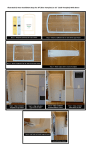
Illustrated EZ-Door Installation Steps for 28” Wide Door
Step 1 — Verify Box Contents 28” Shown Step 2 — Attach 12 adhesive tabs to back of the upper frame
Step 2 — Attach 8 adhesive tabs to back of the lower frame
Step 3 — Attach 4 glue dots to back of template
TERS
№ Е
3
эй»
A
Step 4 — Align installation
Step 5 — Align and place Step 6 — Align installation
template on top of door
Step 7 — Align and place
upper frame on door template bottom of door
lower frame on door
Step 8 — Caulk inside and outside edges of frames
Door with frames attached