1
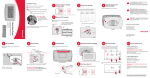
Installation is Easy
1
Label wires and remove your old thermostat
Turn OFF Power to Heating/
Cooling System
3
Install and wire your new thermostat
Label the wires using the supplied wire labels as you
disconnect them, then remove the old wallplate.
Set your new thermostat to match your heating/cooling
system
– This thermostat works with virtually all System
Types
Separate Wallplate from
New Thermostat
4
Label Wires with Tags
This thermostat contains a Lithium battery which
may contain Perchlorate material.
Perchlorate Material—special handling may apply,
See www.dtsc.ca.gov/hazardouswaste/perchlorate
Remove wallplate from the new thermostat.
MERCURY NOTICE: Do not place your old
thermostat in the trash if it contains mercury in a
sealed tube. Contact the Thermostat Recycling
Corporation at www.thermostat-recycle.org or 800238-8192 for information on how and where to
properly and safely dispose of your old thermostat.
or
– It is preset for the most common system
We are here to help.
Call 1-800-468-1502 for
wiring assistance before
returning the thermostat to
the store.
2
Remove Old Thermostat
Quick Start Guide
69-2722-02
Programmable Thermostat
RTH7400/RTH7500 Series
Remove old thermostat but leave wallplate with
wires attached.
Is there a sealed tube containing
mercury? If so, see back cover for
Leave wallplate in
proper disposal instructions.
place
M31545
Wire color might not match labels.
Automation and Control Solutions
Wire Labels
Honeywell International Inc.
This thermostat works on 24 volt or 750 mV systems. It will
NOT work on 120/240 Volt systems.
1985 Douglas Drive North
EM. HEAT AUX. HEAT
Golden Valley, MN 55422
http://yourhome.honeywell.com
50 60 70 80 F
Old thermostat
EM. HEAT
AUTO
6
Mount Wallplate
7
Connect Wires
MCR33763
NOTE: Jumper wire used on old thermostat? If yes, note
what letters the jumper connected and review in wiring
section.
8
Install Batteries
Install Thermostat onto Wallplate
Install thermostat onto the wallplate on the wall.
Install two AA alkaline batteries and remove tab.
Simply match wire labels.
Mount the new wallplate using the included screws
and anchors.
C
RC
15
If your system type is...
If your system type is:
q Single Stage Heat and Cool
Congratulations, you’re done!
Thermostat is set with energy saving schedule; see operating
manual to adjust schedule.
If your system type is:
q Multistage Heat and Cool
Go Back
Y
G
2012
Y2
Next
Done
q Heat Pump* without Backup Heat
q Heat Pump* with Backup Heat
M27519
MCR33842
MCR28101
R
Back of thermostat
Remove metal jumper if you have both R and Rc wires.
Turn Power Back ON
Press s or t to set time, then press DONE to save and
exit.
Labels don’t match? See Wiring Notes (over).
10:10
Have a Heat Pump system? See Wiring Notes (over).
or
Continue to step 12a to match your thermostat to your
system type.
*Heat Pump—an air conditioner that provides cooling in the
summer, and also runs in reverse in the winter to provide
heating.
Turn the power back on to the heating/cooling system.
Call 1-800-468-1502 for wiring assistance.
q Heat Only
q Cool Only
9
MCR28070
MCR28094
Day
W
W
6
W2
R
Y
Year
CONVENTIONAL
WIRE HOLE
G
11
Set Time and Date
Month
INSERT WIRES
THEN TIGHTEN SCREWS
CONVENTIONAL
10
Press s or t to set month, then press NEXT.
Press s or t to set day, then press NEXT.
Press s or t to set year, then press DONE.
SCREW
LABELED WIRES
® U.S. Registered Trademark.
© 2012 Honeywell International Inc.
69-2722—02 M.S. 05-12
Printed in Mexico
OFF
Cover
Drill 3/32-in. holes for plaster
Drill 3/16-in. holes for drywall
M28073
Wallplate
50 60 70 80
MCR33835
5
CAUTION: To avoid possible compressor damage,
do not run air conditioner if the outside temperature
drops below 50°F (10°C).
Done
Remove tab.
MCR27518
MCR33843
69-2722_A.indd 1
If you are not sure of your system type or if you have
other questions, call us toll-free at 1-800-468-1502.
5/7/2012 4:17:56 PM
12a
12b Preferences (optional)
System Setup
Wiring Notes
Use the Setup and Navigation steps in 12a to set Display Preferences.
Step 1
Press and release the left button.
Cool
System & Fan
PM
72
NOTE: Some functions may not appear due to
thermostat model or previous selections made.
Schedule
0300
Manual/Auto
0
Manual changeover (Heat/Cool/Off).
Changeover
1
Automatic changeover (Heat/Cool/Auto/Off). Automatically turns on Heat or Cool based on room
0320
Step 3
0330
1 Press s t to change setting.
Step 2
Press and hold the center button until the screen
changes (approximately 5 seconds).
2 Press NEXT to advance to next function.
3 Press DONE to save & exit.
0120
0500
Temperature Format
0
Fahrenheit
(°F/°C)
1
Celsius
Daylight Saving Time
0
Off: No adjustment for daylight saving time.
On/Off
1
On: Auto-change to daylight saving time (for areas that do not use the new 2007 DST calendar).
2
On: Auto-change to daylight saving time (2007 and beyond, for areas that use the new 2007 DST calendar).
Furnace Filter Change 0
Reminder
20
System
Fan Auto
Heat Off Cool
System
Fan
Done
MCR33840
Go Back
Next
Done
MCR33841
0530
0130*
Year Setting
20 = Year 20xx
(first two digits)
21 = Year 21xx
Year Setting
01 - 99 (i.e., 2001 - 2099)
(second two
1
Reminder in about 1 month
2
Reminder in about 3 months
3
Reminder in about 6 months
4
Reminder in about 9 months
5
Reminder in about 1 year
6
Reminder in about 3 years
Smart
1
On
Response®
0
Off
0190
Minimum Cool
50°F(other options: 51-99°F [11-37°C])
Clock Format
12 12-hour clock (i.e., “3:30 pm”)
Heat Pump
0
1
1
Gas or oil furnace: Standard gas/oil furnace (less than 90% efficiency).
Electric furnace: Electric heating systems.
Hot water or high-efficiency furnace: Hot water system or gas furnace (more than 90% efficiency).
Gas/oil steam or gravity system: Steam or gravity heat systems.
Emergency Heat
Settings 5, 9, 3, or 1 recommended. Other settings: 2, 4, 6, 7, 8, 10, 11, 12.
Cycle Rate (heat
The number indicates how frequently the system cycles on and off to maintain the set temperature.
Heating Cycle Rate 5
9
3
pumps only)
A higher number means the system is on and off for shorter amounts of time, a lower number means
longer on and off times. When these settings are set to match the system type, the thermostat controls
temperature more accurately.
* Functions set in Step 10.
R
2
2
W2
Y2
MCR32160
HEAT PUMP
C
Y
Aux
E
L
R
MCR33552
3
5
C
G
If your old thermostat had both V and VR wires, stop now and contact a
Y
qualified contractor for help.
3
If your old thermostat had separate O and B wires, attach the B wire to
O/B
RC
the C terminal. If another wire is attached to the C terminal, stop now
and contact a qualified contractor for help.
2
R
6
AUX
a qualified contractor for help.
6
E
If L terminal is used, C terminal wire must be connected (contact a
5
L
If your old thermostat had Y1, W1 and W2 wires, stop now and contact
Cooling changeover valve: Use this setting if you connected a wire labeled “O” to the O/B terminal (see
page 23).
R
G
Leave metal jumper in place, connecting R & Rc terminals.
Gas or oil heat: Use this setting if you have a gas or oil heating system (system controls fan operation).
Electric heat: Use this setting if you have an electric heating system (thermostat controls fan operation).
Heating changeover valve: Use this setting if you connected a wire labeled “B” to the O/B terminal (see
Rc
Alternate wiring (heat pump system only)
page 22).
only)
RC
RC
If labels do not match letters on thermostat, see Alternate wiring
(heat pump system only)
1
W
4. Push any excess wire back into the wall opening.
Heat/cool: Gas, oil or electric heating with central air conditioning.
2 Heat pump: Heat pump without backup or auxiliary heat.
3 Heat only: Gas, oil or electric heat without central air conditioning.
4 Heat only with fan: Gas, oil or electric heat without central air conditioning.
5 Hot water heat only (no fan): Gas, oil or hot water heat without central air conditioning.
6 Cool only: Central air conditioning only.
7 Heat pump: Heat pump with backup or auxiliary heating.
8 Heat/Cool Multiple stages: 2 heat stages (wires on W and W2), 2 cooling stages (wires on Y and Y2).
9 Heat/Cool Multiple stages: 2 heat stages (wires on W and W2), 1 cooling stage (wire on Y).
10 Heat/Cool Multiple stages: 1 heat stage (wire on W), 2 cooling stages (wires on Y and Y2).
Control
W
O/B
Select System
0
Y
3.If E and Aux do not each have a wire connected, use a small
piece of wire to connect them to each other.
01 - 31
Heating Fan
Y
HEAT PUMP
2. Use a screwdriver to loosen screws, insert wires into hole under
screw, then tighten screws until wire is secure.
Date Setting
1
G
W2
1. Match each labeled wire with same letter on new thermostat.
Temperature Limit
0640
Connect wires: Heat Pump
Labels don’t match?
(for heat pumps
0270
0610
G
3
Heat pump
01 - 12 (i.e., January - December)
Changeover Valve
0240
90°F(other options: 40-89°F [4-32°C])
Temperature Limit
C
Y2
Month Setting
Type
0180
Maximum Heat
24 24-hour clock (i.e., “15:30”)
digits)
0140*
0150*
0170
0600
If your old thermostat had only 1 C or C1 wire,
connect it to the C terminal. If your old thermostat
had 2 C or C1 wires, wrap each separately with
electrical tape and do not connect them.
C
x
Au
0120*
Settings & Options
If your old thermostat had both R and RH wires,
remove metal jumper. Connect the R wire to the
Rc terminal, and the RH wire to the R terminal.
Off (no reminder)
Technology
Function
Remove metal jumper connecting R and Rc only if
you must connect both R and Rc wires.
temperature. Note: System maintains minimum 3°F difference between heat and cool settings.
Clock & More
MCR33839
Alternate wiring (conventional systems)
G
6:30
Fan Auto
Y
System
Conventional system
O
72
Fri
Settings & Options
R
Function
Set To
5
contractor if there is no C wire).
6
piece of wire to connect them to each other.
4
MCR32161
If E and Aux terminals do not each have a wire connected, use a small
Customer assistance
For assistance with this product, please visit http://yourhome.honeywell.com
or call Honeywell Customer Care toll-free at 1-800-468-1502.
69-2722—02
69-2722_A.indd 2
5/7/2012 4:17:59 PM