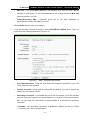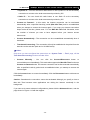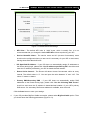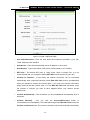
1
TL-WR710N
150Mbps Wireless N Mini Pocket Router - Advanced Edition
Rev: 1.0.1
1910011079
COPYRIGHT & TRADEMARKS
Specifications are subject to change without notice.
is a registered trademark
of TP-LINK TECHNOLOGIES CO., LTD. Other brands and product names are trademarks or
registered trademarks of their respective holders.
No part of the specifications may be reproduced in any form or by any means or used to make any
derivative such as translation, transformation, or adaptation without permission from TP-LINK
TECHNOLOGIES CO., LTD. Copyright © 2014 TP-LINK TECHNOLOGIES CO., LTD. All rights
reserved.
http://www.tp-link.com
FCC STATEMENT
This equipment has been tested and found to comply with the limits for a Class B digital device,
pursuant to part 15 of the FCC Rules. These limits are designed to provide reasonable protection
against harmful interference in a residential installation. This equipment generates, uses and can
radiate radio frequency energy and, if not installed and used in accordance with the instructions,
may cause harmful interference to radio communications. However, there is no guarantee that
interference will not occur in a particular installation. If this equipment does cause harmful
interference to radio or television reception, which can be determined by turning the equipment off
and on, the user is encouraged to try to correct the interference by one or more of the following
measures:
•
Reorient or relocate the receiving antenna.
•
Increase the separation between the equipment and receiver.
•
Connect the equipment into an outlet on a circuit different from that to which the receiver
is connected.
•
Consult the dealer or an experienced radio/ TV technician for help.
This device complies with part 15 of the FCC Rules. Operation is subject to the following two
conditions:
1) This device may not cause harmful interference.
2) This device must accept any interference received, including interference that may
cause undesired operation.
Any changes or modifications not expressly approved by the party responsible for compliance
could void the user’s authority to operate the equipment.
Note: The manufacturer is not responsible for any radio or TV interference caused by
unauthorized modifications to this equipment. Such modifications could void the user’s authority
to operate the equipment.
FCC RF Radiation Exposure Statement:
This equipment complies with FCC radiation exposure limits set forth for an uncontrolled
environment. End users must follow the specific operating instructions for satisfying RF exposure
compliance. This transmitter must not be co-located or operating in conjunction with any other
antenna or transmitter. This equipment has been SAR-evaluated for use in hand. SAR
measurements are based on a 5mm spacing from the body and that compliance is achieved at
that distance.
CE Mark Warning
This is a class B product. In a domestic environment, this product may cause radio interference, in
which case the user may be required to take adequate measures.
Canadian Compliance Statement
This device complies with Industry Canada license-exempt RSS standard(s). Operation is subject
to the following two conditions:
(1)This device may not cause interference, and
(2)This device must accept any interference, including interference that may cause undesired
operation of the device.
Cet appareil est conforme aux norms CNR exemptes de licence d’Industrie Canada. Le
fonctionnement est soumis aux deux conditions suivantes:
(1)cet appareil ne doit pas provoquer d’interférences et
(2)cet appareil doit accepter toute interférence, y compris celles susceptibles de provoquer un
fonctionnement non souhaité de l’appareil.
Industry Canada Statement
Complies with the Canadian ICES-003 Class B specifications.
Cet appareil numérique de la classe B est conforme à la norme NMB-003 du Canada.
This device complies with RSS 210 of Industry Canada. This Class B device meets all the
requirements of the Canadian interference-causing equipment regulations.
Cet appareil numérique de la Classe B respecte toutes les exigences du Règlement sur le
matériel brouilleur du Canada.
NCC Notice & BSMI Notice
注意!
依據 低功率電波輻射性電機管理辦法
第十二條 經型式認證合格之低功率射頻電機,非經許可,公司、商號或使用者均不得擅自變更頻
率、加大功率或變更原設計之特性或功能。
第十四條 低功率射頻電機之使用不得影響飛航安全及干擾合法通行;經發現有干擾現象時,應立
即停用,並改善至無干擾時方得繼續使用。前項合法通信,指依電信規定作業之無線電信。低功率
射頻電機需忍受合法通信或工業、科學以及醫療用電波輻射性電機設備之干擾。
減少電磁波影響,請妥適使用。
安全諮詢及注意事項
●請使用原裝電源供應器或只能按照本產品注明的電源類型使用本產品。
●清潔本產品之前請先拔掉電源線。請勿使用液體、噴霧清潔劑或濕布進行清潔。
●注意防潮,請勿將水或其他液體潑灑到本產品上。 ●插槽與開口供通風使用,以確保本產品的操作可靠並防止過熱,請勿堵塞或覆蓋開口。
●請勿將本產品置放於靠近熱源的地方。除非有正常的通風,否則不可放在密閉位置中。
●請不要私自打開機殼,不要嘗試自行維修本產品,請由授權的專業人士進行此項工作。
Продукт сертифіковано згідно с правилами системи УкрСЕПРО на відповідність вимогам
нормативних документів та вимогам, що передбачені чинними законодавчими актами
України.
Safety Information
z
When product has power button, the power button is one of the way to shut off the product;
when there is no power button, the only way to completely shut off power is to disconnect the
product or the power adapter from the power source.
z
Don’t disassemble the product, or make repairs yourself. You run the risk of electric shock
and voiding the limited warranty. If you need service, please contact us.
z
Avoid water and wet locations.
This product can be used in the following countries:
AT
BG
BY
CA
CZ
DE
DK
EE
ES
FI
FR
GB
GR
HU
IE
IT
LT
LV
MT
NL
NO
PL
PT
RO
RU
SE
SK
TR
UA
US
TP-LINK TECHNOLOGIES CO., LTD
DECLARATION OF CONFORMITY
For the following equipment:
Product Description: 150Mbps Wireless N Mini Pocket Router - Advanced Edition
Model No.: TL-WR710N
Trademark: TP-LINK
We declare under our own responsibility that the above products satisfy all the technical
regulations applicable to the product within the scope of Council Directives:
Directives 1999/5/EC, Directives 2004/108/EC, Directives 2006/95/EC, Directives 1999/519/EC,
Directives 2011/65/EU
The above product is in conformity with the following standards or other normative documents
ETSI EN 300 328 V1.7.1: 2006
ETSI EN 301 489-1 V1.9.2:2011& ETSI EN 301 489-17 V2.2.1:2012
EN 55022:2010
EN 55024:2010
EN 61000-3-2:2006+A1:2009+A2:2009
EN 61000-3-3:2008
EN 60950-1:2006+A11:2009+A1:2010+A12:2011
EN 62311:2008
The product carries the CE Mark:
Person is responsible for making this declaration:
Yang Hongliang
Product Manager of International Business
Date of issue: 2014
TP-LINK TECHNOLOGIES CO., LTD.
Building 24 (floors 1, 3, 4, 5), and 28 (floors 1-4) Central Science and Technology Park,
Shennan Rd, Nanshan, Shenzhen, China
CONTENTS
Package Contents..................................................................................................................................1
Chapter 1. Introduction.......................................................................................................................2
1.1
Overview of the Router .......................................................................................................2
1.2
Conventions ........................................................................................................................3
1.3
Main Features .....................................................................................................................3
1.4
Panel Layout .......................................................................................................................3
Chapter 2. Connecting the Router .....................................................................................................5
2.1
System Requirements.........................................................................................................5
2.2
Installation Environment Requirements ..............................................................................5
2.3
Connecting the Router ........................................................................................................5
2.3.1
Wireless Router Mode ............................................................................................6
2.3.2
Access Point Mode.................................................................................................6
2.3.3
Repeater Mode.......................................................................................................7
2.3.4
Client Mode.............................................................................................................8
2.3.5
WISP Client Router Mode ......................................................................................8
Chapter 3. Quick Installation Guide................................................................................................ 10
3.1
TCP/IP Configuration ....................................................................................................... 10
3.2
Quick Installation Guide ................................................................................................... 13
3.2.1
Wireless Router Mode ......................................................................................... 14
3.2.2
Access Point Mode.............................................................................................. 17
3.2.3
Repeater Mode.................................................................................................... 19
3.2.4
Client Mode.......................................................................................................... 21
3.2.5
WISP Client Router Mode ................................................................................... 23
Chapter 4. Configuration for Wireless Router Mode .................................................................... 27
4.1
Login ................................................................................................................................ 27
4.2
Status ............................................................................................................................... 27
4.3
Quick Setup...................................................................................................................... 30
4.4
WPS ................................................................................................................................. 30
4.5
Working Mode .................................................................................................................. 34
4.6
Network ............................................................................................................................ 35
4.6.1
WAN..................................................................................................................... 35
4.6.2
MAC Clone .......................................................................................................... 44
-I-
4.6.3
4.7
4.8
4.9
LAN...................................................................................................................... 45
Wireless ........................................................................................................................... 46
4.7.1
Wireless Settings................................................................................................. 46
4.7.2
Wireless Security................................................................................................. 48
4.7.3
Wireless MAC Filtering ........................................................................................ 51
4.7.4
Wireless Advanced .............................................................................................. 53
4.7.5
Wireless Statistics................................................................................................ 54
DHCP ............................................................................................................................... 55
4.8.1
DHCP Settings..................................................................................................... 55
4.8.2
DHCP Client List.................................................................................................. 56
4.8.3
Address Reservation ........................................................................................... 57
USB Settings.................................................................................................................... 58
4.9.1
Storage Sharing................................................................................................... 58
4.9.2
Media Server ....................................................................................................... 60
4.9.3
User Accounts...................................................................................................... 62
4.10 Forwarding ....................................................................................................................... 63
4.10.1 Virtual Servers ..................................................................................................... 64
4.10.2 Port Triggering ..................................................................................................... 65
4.10.3 DMZ ..................................................................................................................... 67
4.10.4 UPnP ................................................................................................................... 68
4.11 Security ............................................................................................................................ 69
4.11.1 Basic Security...................................................................................................... 69
4.11.2 Advanced Security............................................................................................... 70
4.11.3 Local Management .............................................................................................. 72
4.11.4 Remote Management .......................................................................................... 73
4.12 Parental Control ............................................................................................................... 74
4.13 Access Control ................................................................................................................. 76
4.13.1 Rule ..................................................................................................................... 76
4.13.2 Host ..................................................................................................................... 79
4.13.3 Target................................................................................................................... 81
4.13.4 Schedule.............................................................................................................. 83
- II -
4.14 Advanced Routing............................................................................................................ 85
4.14.1 Static Routing List................................................................................................ 85
4.14.2 System Routing Table.......................................................................................... 86
4.15 Bandwidth Control............................................................................................................ 87
4.15.1 Control Settings ................................................................................................... 87
4.15.2 Rule List............................................................................................................... 87
4.16 IP & MAC Binding ............................................................................................................ 89
4.16.1 Binding Setting .................................................................................................... 89
4.16.2 ARP List............................................................................................................... 91
4.17 Dynamic DNS................................................................................................................... 91
4.17.1 No-IP DDNS ........................................................................................................ 92
4.17.2 Comexe.cn DDNS ............................................................................................... 92
4.17.3 Dyndns org DDNS ............................................................................................... 93
4.18 System Tools.................................................................................................................... 94
4.18.1 Time Settings....................................................................................................... 95
4.18.2 Diagnostic ............................................................................................................ 96
4.18.3 Firmware Upgrade............................................................................................... 97
4.18.4 Factory Defaults................................................................................................... 98
4.18.5 Backup & Restore................................................................................................ 99
4.18.6 Reboot ................................................................................................................. 99
4.18.7 Password ........................................................................................................... 100
4.18.8 System Log........................................................................................................ 100
4.18.9 Statistics............................................................................................................. 101
Chapter 5. Configuration for Access Point Mode ....................................................................... 103
5.1
Login .............................................................................................................................. 103
5.2
Status ............................................................................................................................. 103
5.3
Quick Setup.................................................................................................................... 105
5.4
WPS ............................................................................................................................... 105
5.5
Working Mode .................................................................................................................110
5.6
Network ...........................................................................................................................110
5.6.1
5.7
LAN.....................................................................................................................110
Wireless .......................................................................................................................... 111
- III -
5.8
5.9
5.7.1
Wireless Settings................................................................................................112
5.7.2
Wireless Security................................................................................................113
5.7.3
Wireless MAC Filtering .......................................................................................116
5.7.4
Wireless Advanced .............................................................................................118
5.7.5
Wireless Statistics...............................................................................................119
DHCP ............................................................................................................................. 120
5.8.1
DHCP Settings................................................................................................... 120
5.8.2
DHCP Client List................................................................................................ 121
5.8.3
Address Reservation ......................................................................................... 122
USB Settings.................................................................................................................. 123
5.9.1
Storage Sharing................................................................................................. 123
5.9.2
Media Server ..................................................................................................... 125
5.9.3
User Accounts.................................................................................................... 127
5.10 System Tools.................................................................................................................. 129
5.10.1 Diagnostic .......................................................................................................... 129
5.10.2 Firmware Upgrade............................................................................................. 131
5.10.3 Factory Defaults................................................................................................. 132
5.10.4 Backup & Restore.............................................................................................. 132
5.10.5 Reboot ............................................................................................................... 133
5.10.6 Password ........................................................................................................... 134
5.10.7 System Log........................................................................................................ 135
Chapter 6. Configuration for Repeater Mode .............................................................................. 136
6.1
Login .............................................................................................................................. 136
6.2
Status ............................................................................................................................. 136
6.3
Quick Setup.................................................................................................................... 138
6.4
Working Mode ................................................................................................................ 138
6.5
Network .......................................................................................................................... 139
6.5.1
6.6
LAN.................................................................................................................... 139
Wireless ......................................................................................................................... 140
6.6.1
Wireless Settings............................................................................................... 140
6.6.2
Wireless Security............................................................................................... 142
6.6.3
Wireless MAC Filtering ...................................................................................... 144
- IV -
6.7
6.8
6.9
6.6.4
Wireless Advanced ............................................................................................ 146
6.6.5
Wireless Statistics.............................................................................................. 147
DHCP ............................................................................................................................. 148
6.7.1
DHCP Settings................................................................................................... 148
6.7.2
DHCP Client List................................................................................................ 150
6.7.3
Address Reservation ......................................................................................... 150
USB Settings.................................................................................................................. 152
6.8.1
Storage Sharing................................................................................................. 152
6.8.2
Media Server ..................................................................................................... 154
6.8.3
User Accounts.................................................................................................... 156
System Tools.................................................................................................................. 158
6.9.1
Diagnostic .......................................................................................................... 158
6.9.2
Firmware Upgrade............................................................................................. 159
6.9.3
Factory Defaults................................................................................................. 160
6.9.4
Backup & Restore.............................................................................................. 161
6.9.5
Reboot ............................................................................................................... 162
6.9.6
Password ........................................................................................................... 162
6.9.7
System Log........................................................................................................ 163
Chapter 7. Configuration for Client Mode.................................................................................... 164
7.1
Login .............................................................................................................................. 164
7.2
Status ............................................................................................................................. 164
7.3
Quick Setup.................................................................................................................... 166
7.4
Working Mode ................................................................................................................ 166
7.5
Network .......................................................................................................................... 167
7.5.1
7.6
7.7
LAN.................................................................................................................... 167
Wireless ......................................................................................................................... 168
7.6.1
Wireless Settings............................................................................................... 168
7.6.2
Wireless Security............................................................................................... 169
DHCP ............................................................................................................................. 172
7.7.1
DHCP Settings................................................................................................... 172
7.7.2
DHCP Client List................................................................................................ 173
7.7.3
Address Reservation ......................................................................................... 174
-V-
7.8
7.9
USB Settings.................................................................................................................. 175
7.8.1
Storage Sharing................................................................................................. 175
7.8.2
Media Server ..................................................................................................... 177
7.8.3
User Accounts.................................................................................................... 179
System Tools.................................................................................................................. 181
7.9.1
Diagnostic .......................................................................................................... 181
7.9.2
Firmware Upgrade............................................................................................. 183
7.9.3
Factory Defaults................................................................................................. 184
7.9.4
Backup & Restore.............................................................................................. 184
7.9.5
Reboot ............................................................................................................... 185
7.9.6
Password ........................................................................................................... 186
7.9.7
System Log........................................................................................................ 187
Chapter 8. Configuration for WISP Client Router Mode ............................................................. 188
8.1
Login .............................................................................................................................. 188
8.2
Status ............................................................................................................................. 188
8.3
Quick Setup.................................................................................................................... 191
8.4
Working Mode ................................................................................................................ 191
8.5
Network .......................................................................................................................... 192
8.6
8.7
8.8
8.5.1
WAN................................................................................................................... 192
8.5.2
MAC Clone ........................................................................................................ 201
8.5.3
LAN.................................................................................................................... 202
Wireless ......................................................................................................................... 203
8.6.1
Wireless Settings............................................................................................... 203
8.6.2
Wireless Security............................................................................................... 206
8.6.3
Wireless MAC Filtering ...................................................................................... 208
8.6.4
Wireless Advanced ............................................................................................ 210
8.6.5
Wireless Statistics...............................................................................................211
DHCP ............................................................................................................................. 212
8.7.1
DHCP Settings................................................................................................... 212
8.7.2
DHCP Client List................................................................................................ 213
8.7.3
Address Reservation ......................................................................................... 214
USB Settings.................................................................................................................. 215
- VI -
8.9
8.8.1
Storage Sharing................................................................................................. 215
8.8.2
Media Server ..................................................................................................... 217
8.8.3
User Accounts.................................................................................................... 219
Forwarding ..................................................................................................................... 220
8.9.1
Virtual Servers ................................................................................................... 221
8.9.2
Port Triggering ................................................................................................... 222
8.9.3
DMZ ................................................................................................................... 224
8.9.4
UPnP ................................................................................................................. 225
8.10 Security .......................................................................................................................... 226
8.10.1 Basic Security.................................................................................................... 226
8.10.2 Advanced Security............................................................................................. 227
8.10.3 Local Management ............................................................................................ 229
8.10.4 Remote Management ........................................................................................ 230
8.11 Parental Control ............................................................................................................. 231
8.12 Access Control ............................................................................................................... 233
8.12.1 Rule ................................................................................................................... 233
8.12.2 Host ................................................................................................................... 236
8.12.3 Target................................................................................................................. 238
8.12.4 Schedule............................................................................................................ 240
8.13 Advanced Routing.......................................................................................................... 242
8.13.1 Static Routing List.............................................................................................. 242
8.13.2 System Routing Table........................................................................................ 243
8.14 Bandwidth Control.......................................................................................................... 244
8.14.1 Control Settings ................................................................................................. 244
8.14.2 Rule List............................................................................................................. 244
8.15 IP & MAC Binding .......................................................................................................... 246
8.15.1 Binding Setting .................................................................................................. 246
8.15.2 ARP List............................................................................................................. 248
8.16 Dynamic DNS................................................................................................................. 248
8.16.1 No-IP DDNS ...................................................................................................... 249
8.16.2 Comexe.cn DDNS ............................................................................................. 249
- VII -
8.16.3 Dyndns org DDNS ............................................................................................. 250
8.17 System Tools.................................................................................................................. 251
8.17.1 Time Settings..................................................................................................... 252
8.17.2 Diagnostic .......................................................................................................... 253
8.17.3 Firmware Upgrade............................................................................................. 254
8.17.4 Factory Defaults................................................................................................. 255
8.17.5 Backup & Restore.............................................................................................. 256
8.17.6 Reboot ............................................................................................................... 256
8.17.7 Password ........................................................................................................... 257
8.17.8 System Log........................................................................................................ 258
8.17.9 Statistics............................................................................................................. 258
Appendix A: FAQ .............................................................................................................................. 260
Appendix B: Configuring the PC .................................................................................................... 265
Appendix C: Specifications ............................................................................................................. 268
Appendix D: Glossary ...................................................................................................................... 269
- VIII -
TL-WR710N
150Mbps Wireless N Mini Pocket Router - Advanced Edition
Package Contents
The following items should be found in your package:
¾
One TL-WR710N 150Mbps Wireless N Mini Pocket Router - Advanced Edition
¾
Quick Installation Guide
¾
One RJ-45 Ethernet Cable
¾
One Resource CD for TL-WR710N 150Mbps Wireless N Mini Pocket Router - Advanced
Edition, including:
• User Guide
• Other Helpful Information
) Note:
Make sure that the package contains the above items. If any of the listed items is damaged or
missing, please contact your distributor.
-1-
TL-WR710N
150Mbps Wireless N Mini Pocket Router - Advanced Edition
Chapter 1. Introduction
1.1 Overview of the Router
Small enough to fit in the average pocket, the TL-WR710N 150Mbps Wireless N Mini Pocket
Router - Advanced Edition is uniquely suited to provide robust wireless networking to travelers,
students, or anyone else for work or play.
Incredible Speed
TL-WR710N supports the newest 802.11n standards, and provides backward compatibility with
older 802.11b/g standards as well. The up-to-150Mbps wireless speed makes it ideal for handling
multiple data streams at the same time, which ensures your network stable and smooth.
Multiple Operation Modes
The TL-WR710N 150Mbps Wireless N Mini Pocket Router - Advanced Edition supports five
operation modes. Wireless Router mode creates an instant private wireless network and share
Internet to multiple Wi-Fi devices, which is suitable for most hotel and home network. Access Point
mode creates a wireless network for Wi-Fi devices. The wireless devices are exposed to the wired
network. Repeater mode extends your home wireless range by copying the same wireless name and
password. Client mode works as a wireless adapter for any Ethernet-enabled devices, such as Smart
TV, Game Console and PC. WISP Client Router mode accesses the Internet wirelessly in areas with
no wired ISP infrastructure
Reliable Security Protections
With multiple protection measures, including SSID broadcast control and wireless LAN
64/128/152-bit WEP encryption, WiFi protected Access (WPA2-PSK, WPA-PSK), as well as
advanced Firewall protections, the TL-WR710N 150Mbps Wireless N Mini Pocket Router Advanced Edition provides complete data privacy.
Flexible Access Control
The TL-WR710N 150Mbps Wireless N Mini Pocket Router - Advanced Edition supports Virtual
Server and DMZ host for Port Triggering, and then the network administrators can manage and
monitor the network in real time with the remote management function.
Since the Router is compatible with virtually all the major operating systems, it is very easy to
manage. Quick Setup Wizard is supported and detailed instructions are provided step by step in
-2-
TL-WR710N
150Mbps Wireless N Mini Pocket Router - Advanced Edition
this user guide. Before installing the Router, please look through this guide to know all the
Router’s functions.
1.2 Conventions
The Router or TL-WR710N mentioned in this guide stands for TL-WR710N 150Mbps Wireless N Mini
Pocket Router - Advanced Edition without any explanation.
Parameters provided in the pictures are just references for setting up the product, which may
differ from the actual situation.
You can set the parameters according to your demand.
1.3 Main Features
¾
Portable design, ideal for travel and home use
¾
Built-in power supply design without external power adapter
¾
Support Wireless Router, Access Point, Repeater, Client, WISP Client Router modes
¾
USB port supports charging for smart phone and tablet
¾
USB port supports storage sharing, media server function
¾
Pre-encryption prevents unauthorized access from users outside of the network
1.4 Panel Layout
Figure 1-1 TL-WR710N sketch
-3-
TL-WR710N
¾
150Mbps Wireless N Mini Pocket Router - Advanced Edition
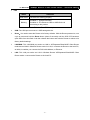
LED
Status
Solid Green
Indication
The device is working properly.
Condition 1: System is booting.
Blinking
Condition 2: The Ethernet Cable or USB Device is
connecting to the product.
Table 1-1 The LED Description
¾
USB: The USB port connects to a USB storage device.
¾
Reset:It is used to reset the Router to its factory defaults. With the Router powered on, use
a pin to press and hold the Reset button (about 5 seconds) until the SYS LED becomes
quick-flash from slow-flash. And then release the button and wait the Router to reboot to its
factory default settings.
¾
LAN/WAN: This LAN/WAN port works as LAN in AP/Repeater/Client/WISP Client Router
mode and as WAN in Wireless Router mode. As LAN, it connects the Router to the local PC;
as WAN, it enables you connect the DSL/cable Modem, or Ethernet.
¾
LAN: This LAN port works as LAN in Wireless Router/ AP/Repeater/Client/WISP Client
Router mode. It connects the Router to the local PC.
-4-
TL-WR710N
150Mbps Wireless N Mini Pocket Router - Advanced Edition
Chapter 2. Connecting the Router
2.1 System Requirements
¾
Each PC in the LAN needs a working Ethernet Adapter
¾
TCP/IP protocol must be installed on each PC
¾
Web browser, such as Microsoft Internet Explorer 5.0 or later, Mozilla Firefox, Apple Safari
¾
If the device is configured to Wireless Router/Access Point mode, you also need Broadband
Internet Access Service (DSL/Cable/Ethernet)
¾
One DSL/Cable Modem that has an RJ45 connector (which is not necessary if the Router is
connected directly to the Ethernet.)
2.2 Installation Environment Requirements
¾
Place the Router in a well-ventilated place far from any heater or heating vent
¾
Place the Router in a location where it can be connected to the various devices as well as to
a power source
¾
Avoid direct irradiation of any strong light (such as sunlight)
¾
Keep at least 2 inches (5 cm) of clear space around the Router
¾
Operating Temperature: 0℃~40℃ (32℉~104℉)
¾
Operating Humidity: 10%~90%RH, Non-condensing
2.3 Connecting the Router
Before installing the Router, please make sure your broadband service provided by your ISP is
available. If there is any problem, please contact with your ISP. To connect the Router, please
follow the steps below:
1.
Power off your PC, Cable/DSL Modem, and the Router.
2.
Locate an optimum location for the Router. The best place is usually at the center of your
wireless network. The place must accord with the Installation Environment Requirements.
3.
Plug the power plug in the electrical wall socket. The Router will start to work automatically.
After finishing the steps above, please choose the operation mode you need and carry out the
corresponding steps. There are five operation modes supported by this router: Wireless Router,
Access Point, Repeater, Client and WISP Client Router.
-5-
TL-WR710N
150Mbps Wireless N Mini Pocket Router - Advanced Edition
2.3.1 Wireless Router Mode
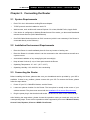
As a wireless router, TL-WR710N enables multi-user to share Internet via DSL/Cable Modem.
The default mode of TL-WR710N is Wireless Router. On this mode, the wired port LAN/WAN
works as WAN, it can be connected to DSL Modem or directly connected to a wired network with
an Ethernet cable. Computers could connect to the device by both wired way through the wired
port LAN and wireless way.
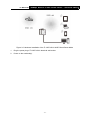
Figure 2-1 Hardware Installation of the TL-WR710N in Router Mode
1.
Connect the LAN/WAN port of TL-WR710N to the LAN Port on the DSL/Cable Modem.
2.
Connect the WAN port on the DSL/Cable Modem to the wired Internet.
3.
Plug the power plug of TL-WR710N in electrical wall socket.
4.
Power on the DSL/Cable Modem, PC(s) and notebook(s).
2.3.2 Access Point Mode
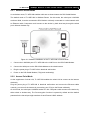
As the supplement of wired LAN, TL-WR710N enables the wired LAN to connect to the Internet
wirelessly.
Plug the power plug of TL-WR710N in electrical wall socket and connect the Ethernet cable
correctly, you can surf the Internet by connecting your PC(s) to the Router wirelessly.
On this mode, the wired port LAN/WAN works as LAN. Computer could connect to the device by
either wired or wireless way. The Pre-encryption function is opened by default and the default
password is the last unique eight numbers of each Router’s MAC address.
-6-
TL-WR710N
150Mbps Wireless N Mini Pocket Router - Advanced Edition
Figure 2-2 Hardware Installation of the TL-WR710N in AP Mode
1.
Connect the LAN or LAN/WAN port of TL-WR710N to the wired network port with an Ethernet
cable.
2.
Plug the power plug of TL-WR710N in electrical wall socket.
3.
Power on the PC(s) and notebook(s).
2.3.3 Repeater Mode
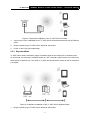
TL-WR710N is used to extend the range of wireless signal of the existing AP or wireless router.
On this mode, the wired port LAN/WAN works as LAN. Computer could connect to the device by
either wired or wireless way. The SSID of TL-WR710N should be the same as that of the device
you repeat.
Figure 2-3 Hardware Installation of the TL-WR710N in Repeater Mode
1.
Plug the power plug of TL-WR710N in electrical wall socket.
-7-
TL-WR710N
2.
150Mbps Wireless N Mini Pocket Router - Advanced Edition
Power on the notebook(s).
) Note:
It is recommended that you connect a PC/notebook to the LAN port of the Router with an Ethernet
cable, and then login the Router from the PC/notebook to set the Router in Repeater mode.
2.3.4 Client Mode
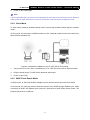
TL-WR710N is used as a wireless network card to connect the wireless network signal or wireless
router.
On this mode, the wired port LAN/WAN works as LAN. Computer could connect to the device by
either wired or wireless way.
Figure 2-4 Hardware Installation of the TL-WR710N in Client Mode
1.
Connect the PC to the LAN or LAN/WAN port of TL-WR710N router with an Ethernet cable.
2.
Plug the power plug of TL-WR710N in electrical wall socket.
3.
Power on the PC(s).
2.3.5 WISP Client Router Mode
In WISP mode, TL-WR710N enables multiple users to share Internet connection from WISP.
On this mode, the LAN port devices share the same IP from WISP through Wireless port. While
connecting to WISP, the Wireless port works as a WAN port at WISP Client Router mode. The
Ethernet port acts as a LAN port.
-8-
TL-WR710N
150Mbps Wireless N Mini Pocket Router - Advanced Edition
Figure 2-5 Hardware Installation of the TL-WR710N in WISP Client Router Mode
1.
Plug the power plug of TL-WR710N in electrical wall socket.
2.
Power on the notebook(s).
-9-
TL-WR710N
150Mbps Wireless N Mini Pocket Router - Advanced Edition
Chapter 3. Quick Installation Guide
This chapter will show you how to configure the basic functions of your TL-WR710N 150Mbps
Wireless N Mini Pocket Router - Advanced Edition using Quick Setup Wizard within minutes.
3.1 TCP/IP Configuration
The default IP address of the TL-WR710N 150Mbps Wireless N Mini Pocket Router - Advanced
Edition is 192.168.0.254. And the default Subnet Mask is 255.255.255.0. These values can be
changed as you desire. In this guide, we use all the default values for description.
Connect the local PC to the LAN port of the Router. And then you can configure the IP address for
your PC as the following steps:
1)
Set up the TCP/IP Protocol in "Obtain an IP address automatically" mode on your PC. If
you need instructions as to how to do this, please refer to Appendix B: "Configuring the PC”.
2)
Then the built-in DHCP server will assign IP address for the PC.
Then connect to the Router through wireless connection following the steps below:
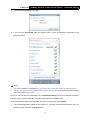
1)
Click the icon
at the bottom of your desktop. Click refresh button, and then select the
default SSID of the Router. Click Connect.
- 10 -
TL-WR710N
2)
150Mbps Wireless N Mini Pocket Router - Advanced Edition
Enter the Security key. Click OK.
3) If you can see Connected after the default SSID, you’ve successfully connected to the
wireless network.
) Note:
1.
2.
The default SSID and Password of your Router are on the label. Both are case-sensitive.
The pre-encryption function is enabled by default and the default Network key/Security key
is the Password on the label.
Now, you can run the Ping command in the command prompt to verify the network connection
between your PC and the Router. The following example is in Windows XP.
Open a command prompt, and type ping 192.168.0.254, and then press Enter.
¾
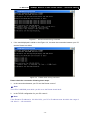
If the result displayed is similar to the Figure 3-1, it means the connection between your PC
and the Router has been established well.
- 11 -
TL-WR710N
150Mbps Wireless N Mini Pocket Router - Advanced Edition
Figure 3-1 Success result of Ping command
¾
If the result displayed is similar to the Figure 3-2, it means the connection between your PC
and the Router has failed.
Figure 3-2 Failure result of Ping command
Please check the connection following these steps:
1.
Is the connection between your PC and the Router correct?
) Note:
The LED of LAN/WAN ports which you link to on the Router should be lit.
2.
Is the TCP/IP configuration for your PC correct?
) Note:
If the Router's IP address is 192.168.0.254, your PC's IP address must be within the range of
192.168.0.1 ~ 192.168.0.253.
- 12 -
TL-WR710N
150Mbps Wireless N Mini Pocket Router - Advanced Edition
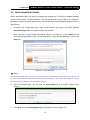
3.2 Quick Installation Guide
With a Web-based utility, it is easy to configure and manage the TL-WR710N 150Mbps Wireless
N Mini Pocket Router - Advanced Edition. The Web-based utility can be used on any Windows,
Macintosh or UNIX OS with a Web browser, such as Microsoft Internet Explorer, Mozilla Firefox or
Apple Safari.
1.
To access the configuration utility, open a web-browser and type in the default address
http://tplinklogin.net in the address field of the browser.
After a moment, a login window will appear, similar to the Figure 3-3. Enter admin for the
User Name and Password, both in lower case letters. Then click the OK button or press the
Enter key.
Figure 3-3 Login Windows
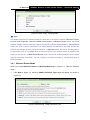
) Note:
If the above screen does not pop-up, it means that your Web-browser has been set to a proxy. Go
to Tools menu>Internet Options>Connections>LAN Settings, in the screen that appears, cancel
the Using Proxy checkbox, and click OK to finish it.
2.
After a successful login, you can click the Quick Setup menu to quickly configure your
Router.
Figure 3-4 Quick Setup
3.
Click Next, and then Working Mode page will appear, shown in Figure 3-5.
- 13 -
TL-WR710N
150Mbps Wireless N Mini Pocket Router - Advanced Edition
Figure 3-5 Quick Setup - Working Mode
) Note:
The Router supports five working modes for multi-user to access the Internet: Wireless Router,
Access Point, Repeater, Client and WISP Client Router. In Wireless Router mode, the device
enables multiple users to share the Internet connection via ADSL/Cable Modem. In Access Point
mode, this device can be connected to a wired network and transform the wired access into
wireless that multiple devices can share together. In Repeater mode, the device will relay data to
an associated root AP. In Client mode, the device will act as a wireless station to enable wired
host(s) to access AP. In WISP Client Router mode, the device enables multiple users to share
Internet connection from WISP. You can configure your device quickly by the following steps in
different modes.
3.2.1 Wireless Router Mode
When you choose Wireless Router on Working Mode page in Figure 3-5 , take the following
steps:
1.
Click Next in Figure 3-5, and then WAN Connection Type page will appear as shown in
Figure 3-6.
Figure 3-6 Quick Setup - WAN Connection Type
- 14 -
TL-WR710N
150Mbps Wireless N Mini Pocket Router - Advanced Edition
The Router supports three popular ways PPPoE, Dynamic IP and Static IP to connect to the
Internet. To make sure the connection type your ISP provides, please refer to the ISP. Make sure
the cable is securely plugged into the WAN port before detection.
¾
Auto Detect - If you don't know the connection type your ISP provides, use this option to
allow the Quick Setup to search your Internet connection for servers and protocols and
determine your ISP configuration.
¾
PPPoE - For this connection, you will need your account name and password from your ISP.
If you have applied ADSL to realize Dial-up service, you should choose this type. Under this
condition, you should fill in both the User Name and Password that the ISP supplied. Please
note that these fields are case-sensitive.
Figure 3-7 Quick Setup - PPPoE
¾
Dynamic IP - Your ISP uses a DHCP service to assign your Router an IP address for
connecting to the Internet. When the Router connects to a DHCP server, or the ISP supplies
you with DHCP connection, please choose this type. If you choose this type of connection, no
configuration should be set and you can go on with the wireless configuration in Figure 3-9.
¾
Static IP - This type of connection uses a permanent, fixed (static) IP address that your ISP
assigned. In this type, you should fill in the IP address, Subnet Mask, Default Gateway, and
DNS IP address manually, which are specified by your ISP. Then click Next and proceed to
Figure 3-9.
Figure 3-8 Quick Setup - Static IP
- 15 -
TL-WR710N
2.
150Mbps Wireless N Mini Pocket Router - Advanced Edition
Then, the Wireless page will appear as shown in Figure 3-9. Set the wireless parameters. It is
recommended that you rename an SSID, choose a Security Type and enter a Password.
Then click Next.
Figure 3-9 Quick Setup - Wireless
¾
Wireless Radio - Enable or disable the wireless radio choosing from the pull-down list.
¾
Wireless Network Name - Enter a string of up to 32 characters. The same name of
SSID (Service Set Identification) must be assigned to all wireless devices in your
network. The default SSID is set to be TP-LINK_XXXXXX (XXXXXX indicates the last
unique six numbers of each Router’s MAC address). But it is recommended strongly
that you change your networks name (SSID) to a different value. This value is
case-sensitive. For example, TEST is NOT the same as test.
¾
Region - Select your region from the pull-down list. This field specifies the region where
the wireless function of the Router can be used. It may be illegal to use the wireless
function of the Router in a region other than one of those specified in this field. If your
country or region is not listed, please contact your local government agency for
assistance.
¾
Mode - Select the desired mode. The default setting is 11bgn mixed.
• 11bg mixed - Select if you are using both 802.11b and 802.11g wireless clients.
• 11bgn mixed - Select if you are using a mix of 802.11b, 11g, and 11n wireless clients.
- 16 -
TL-WR710N
150Mbps Wireless N Mini Pocket Router - Advanced Edition
When 11bg mixed mode is selected, only 11bg mixed wireless stations can connect to
the Router. It is strongly recommended that you set the Mode to 11bgn mixed, and all of
802.11b/g/n wireless stations can connect to the Router.
) Note:
If 11bg mixed mode is selected in the Mode field, the Channel Width selecting field will turn
grey and the value will become 20M, which is unable to be changed.
¾
Channel Width - Select any channel width from the pull-down list. The default setting is
automatic, which can automatically adjust the channel width for your clients.
¾
Channel - This field determines which operating frequency will be used. The default
channel is set to Auto. It is not necessary to change the wireless channel unless you
notice interference problems with another nearby access point.
¾
Wireless Security - You can configure the security settings of your wireless network.
• Disable Security - The wireless security function can be enabled or disabled. If
disabled, the wireless stations will be able to connect the Router without encryption.
• WPA-PSK/WPA2-PSK - Input the password of your broadcast SSID.
• No Change - If you chose this option, wireless security configuration will not change.
3.
The Finish page is shown as Figure 3-10. Click the Reboot button to make your wireless
configuration take effect and finish the Quick Setup.
Figure 3-10 Quick Setup – Finish
3.2.2 Access Point Mode
When you choose Access Point on Working Mode page in Figure 3-5 , take the following steps:
1.
Click Next in Figure 3-5, and then Wireless page will appear as shown in Figure 3-11.
- 17 -
TL-WR710N
150Mbps Wireless N Mini Pocket Router - Advanced Edition
Figure 3-11 Quick Setup - Wireless
¾
Wireless Network Name - Enter a string of up to 32 characters. The same name of
SSID (Service Set Identification) must be assigned to all wireless devices in your
network. The default SSID is set to be TP-LINK_XXXXXX (XXXXXX indicates the last
unique six numbers of each Router’s MAC address). But it is recommended strongly
that you change your networks name (SSID) to a different value. This value is
case-sensitive. For example, TEST is NOT the same as test.
¾
Region - Select your region from the pull-down list. This field specifies the region where
the wireless function of the Router can be used. It may be illegal to use the wireless
function of the Router in a region other than one of those specified in this field. If your
country or region is not listed, please contact your local government agency for
assistance.
¾
Channel - This field determines which operating frequency will be used. The default
channel is set to Auto. It is not necessary to change the wireless channel unless you
notice interference problems with another nearby access point.
¾
Mode - Select the desired mode. The default setting is 11bgn mixed.
• 11bg mixed - Select if you are using both 802.11b and 802.11g wireless clients.
• 11bgn mixed - Select if you are using a mix of 802.11b, 11g, and 11n wireless clients.
When 11bg mixed mode is selected, only 11bg mixed wireless stations can connect to the
Router. It is strongly recommended that you set the Mode to 11bgn mixed, and all of
802.11b/g/n wireless stations can connect to the Router.
- 18 -
TL-WR710N
150Mbps Wireless N Mini Pocket Router - Advanced Edition
) Note:
If 11bg mixed mode is selected in the Mode field, the Channel Width selecting field will turn
grey and the value will become 20M, which is unable to be changed.
¾
Channel Width - Select any channel width from the pull-down list. The default setting is
automatic, which can automatically adjust the channel width for your clients.
¾
Wireless Security Mode - This option should be chosen according to the security
configuration of the AP you want to access. It is recommended that the security type is
the same as your AP’s security type.
¾
2.
Wireless Password - Input the password of your broadcast SSID.
Click the Next button. You will then see the Finish page.
If you don’t make any change on the Wireless page, you will see the Finish page as shown
in Figure 3-12. Click the Finish button to finish the Quick Setup.
Figure 3-12 Quick Setup - Finish
If there is something changed on the Wireless page, you will see the Finish page as shown
in Figure 3-13. Click the Reboot button to make your wireless configuration take effect and
finish the Quick Setup.
Figure 3-13 Quick Setup – Finish
3.2.3 Repeater Mode
When you choose Repeater Mode on Working Mode page in Figure 3-5 , take the following
steps:
1.
Click Next, and then Wireless Repeater page will appear as shown in Figure 3-14.
- 19 -
TL-WR710N
150Mbps Wireless N Mini Pocket Router - Advanced Edition
Figure 3-14 Quick Setup - Wireless
¾
Repeater Mode - In Repeater mode, the wireless repeater relays signal between its
stations and the root AP for greater wireless range.
•
Universal Repeater - In Repeater mode, the AP with WDS disabled will relay data to
an associated root AP. AP function is enabled meanwhile.
•
WDS Repeater - In WDS Repeater mode, the AP with WDS enabled will relay data to
an associated root AP. AP function is enabled meanwhile.
¾
Wireless Name of Root AP - The SSID of AP that you want to access.
¾
MAC Address of Root AP - The MAC address of AP that you want to access.
¾
Survey - Click this button, you can search the AP which runs in the environment.
¾
Region - Select your region from the pull-down list. This field specifies the region where
the wireless function of the Router can be used. It may be illegal to use the wireless
function of the Router in a region other than one of those specified in this field. If your
country or region is not listed, please contact your local government agency for
assistance.
¾
Wireless Security Mode - This option should be chosen according to the security
configuration of the AP you want to access. It is recommended that the security type is
the same as your AP’s security type.
- 20 -
TL-WR710N
¾
150Mbps Wireless N Mini Pocket Router - Advanced Edition
Wireless Password - If the AP your router is going to connect need password, you
need to fill the password in this blank.
2.
Click Survey button on the Wireless page as shown in Figure 3-14, and then AP List page will
appear as shown in Figure 3-15. Find the SSID of the Access Point you want to access, and
click Connect in the corresponding row. For example, the third item is selected. The target
network’s SSID will be automatically filled into the corresponding box which is shown as the
Figure 3-14.
Figure 3-15 AP List
) Note:
If you know the SSID of the desired AP, you can also input it into the field "SSID" manually.
3.
Click the Next button in Figure 3-14. You will then see the Finish page.
Because something has changed on the Wireless Repeater page, you will see the Finish
page as shown in Figure 3-16. Click the Reboot button to make your wireless configuration
take effect and finish the Quick Setup.
Figure 3-16 Quick Setup - Finish
3.2.4 Client Mode
When you choose Client on Working Mode page in Figure 3-5 , take the following steps:
1.
Click Next in Figure 3-5, and then Wireless Client page will appear as shown in Figure 3-17.
- 21 -
TL-WR710N
150Mbps Wireless N Mini Pocket Router - Advanced Edition
Figure 3-17 Quick Setup - Wireless
¾
Wireless Name of Root AP - Enter the SSID that you want to access.
¾
MAC Address of Root AP - Enter the MAC address of AP that you want to access.
¾
Survey - Click this button, you can survey the AP which runs in the environment.
¾
Region - Select your region from the pull-down list. This field specifies the region where
the wireless function of the Router can be used. It may be illegal to use the wireless
function of the Router in a region other than one of those specified in this field. If your
country or region is not listed, please contact your local government agency for
assistance.
¾
Wireless Security Mode - This option should be chosen according to the security
configuration of the AP you want to access. It is recommended that the security type is
the same as your AP’s security type.
¾
Wireless Password - If the AP your router is going to connect need password, you need
to fill the password in this blank.
2.
Click Survey button on the Wireless page as shown in Figure 3-17, and then AP List page will
appear as shown in Figure 3-18. Find the SSID of the Access Point you want to access, and
click Connect in the corresponding row. For example, the third item is selected. The target
network’s SSID will be automatically filled into the corresponding box which is shown as the
Figure 3-17.
- 22 -
TL-WR710N
150Mbps Wireless N Mini Pocket Router - Advanced Edition
Figure 3-18 AP List
3.
Click the Next button in Figure 3-19. You will then see the Finish page. Click the Reboot
button to make your wireless configuration take effect and finish the Quick Setup.
Figure 3-19 Quick Setup - Finish
3.2.5 WISP Client Router Mode
When you choose WISP Client Router Mode on Working Mode page in Figure 3-5 , take the
following steps:
1.
Click Next, and then WAN Connection Type page will appear as shown in Figure 3-20.
Figure 3-20 Quick Setup – WAN Connection Type
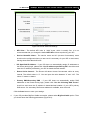
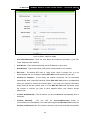
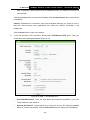
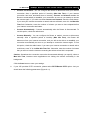
The Router supports three popular ways PPPoE, Dynamic IP and Static IP to connect to the
Internet. To make sure the connection type your ISP provides, please refer to the ISP. Make sure
the cable is securely plugged into the WAN port before detection.
- 23 -
TL-WR710N
¾
150Mbps Wireless N Mini Pocket Router - Advanced Edition
PPPoE - For this connection, you will need your account name and password from your
ISP.
If you have applied ADSL to realize Dial-up service, you should choose this type. Under
this condition, you should fill in both the User Name and Password that the ISP supplied.
Please note that these fields are case-sensitive.
Figure 3-21 Quick Setup - PPPoE
¾
Dynamic IP - Your ISP uses a DHCP service to assign your Router an IP address for
connecting to the Internet. When the Router connects to a DHCP server, or the ISP
supplies you with DHCP connection, please choose this type. If you choose this type of
connection, no configuration should be set and you can go on with the wireless
configuration in Figure 3-23.
¾
Static IP - This type of connection uses a permanent, fixed (static) IP address that your
ISP assigned. In this type, you should fill in the IP address, Subnet Mask, Default
Gateway, and DNS IP address manually, which are specified by your ISP. Then click
Next and proceed to Figure 3-23.
Figure 3-22 Quick Setup - Static IP
2.
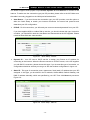
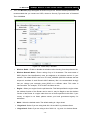
You can configure the basic settings for the wireless network on this page.
- 24 -
TL-WR710N
150Mbps Wireless N Mini Pocket Router - Advanced Edition
Figure 3-23 Quick Setup - Static IP
¾
SSID - The SSID of the AP your router is going to connect to as a client. You can also use
the search function to select the SSID to join.
¾
BSSID - The BSSID of the AP your router is going to connect to as a client. You can also
use the search function to select the BSSID to join.
¾
Survey - Click this button, you can survey the AP which runs in the current channel.
¾
Key type - This option should be chosen according to the AP's security configuration. It
is recommended that the security type is the same as your AP's security type.
¾
WEP Index - This option should be chosen if the key type is WEP (ASCII) or WEP (HEX).
It indicates the index of the WEP key.
¾
Auth type - This option should be chosen if the key type is WEP (ASCII) or WEP (HEX).It
indicates the authorization type of the Root AP.
¾
Password - If the AP your router is going to connect needs password, you need to fill the
password in this blank.
¾
Local SSID - Enter a value of up to 32 characters. The same Name (SSID) must be
assigned to all wireless devices in your network.
- 25 -
TL-WR710N
¾
¾
3.
150Mbps Wireless N Mini Pocket Router - Advanced Edition
Wireless Security Mode - You can configure the security settings of your wireless
network.
Wireless Password - Input the password of your Local SSID.
Click Survey button on the Wireless page as shown in Figure 3-20, and then AP List page will
appear as shown in Figure 3-24. Find the SSID of the Access Point you want to access, and
click Connect in the corresponding row. For example, the third item is selected. The target
network’s SSID will be automatically filled into the corresponding box which is shown as the
Figure 3-20. Then click Next.
Figure 3-24 AP List
4.
The Finish page is shown as Figure 3-25. Click the Reboot button to make your wireless
configuration take effect and finish the Quick Setup.
Figure 3-25 Quick Setup – Finish
) Note:
The operating distance or range of your wireless connection varies significantly based on the
physical placement of the Router. For best results, place your Router.
z
Near the center of the area in which your wireless stations will operate.
z
In an elevated location such as a high shelf.
z
Away from the potential sources of interference, such as PCs, microwaves, and cordless
phones.
z
Away from large metal surfaces.
Failure to follow these guidelines can result in significant performance degradation or inability to
wirelessly connect to the Router.
- 26 -
TL-WR710N
150Mbps Wireless N Mini Pocket Router - Advanced Edition
Chapter 4. Configuration for Wireless Router Mode
This chapter will show each Web page's key functions and the configuration way for Wireless
Router Mode of TL-WR710N.
4.1 Login
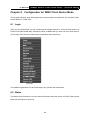
After your successful login, you can configure and manage the device. There are main menus on
the left of the web-based utility. Submenus will be available after you click one of the main menus.
On the right, there are the corresponding explanations and instructions.
Figure 4-1
The detailed explanations for each Web page’s key function are listed below.
4.2 Status
The Status page provides the current status information about the Router on Wireless Router
Mode. All information is read-only.
- 27 -
TL-WR710N
150Mbps Wireless N Mini Pocket Router - Advanced Edition
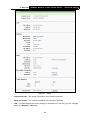
Figure 4-2
¾
Firmware Version - The version information of the Router’s firmware.
¾
Hardware Version - The version information of the Router’s hardware.
¾
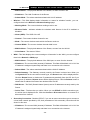
LAN - This field displays the current settings or information for the LAN, you can configure
them in the Network > LAN page.
• MAC Address - The physical address of the Router, as seen from the LAN.
• IP Address - The LAN IP address of the Router.
• Subnet Mask - The subnet mask associated with LAN IP address.
- 28 -
TL-WR710N
¾
150Mbps Wireless N Mini Pocket Router - Advanced Edition
Wireless - This field displays basic information or status for wireless function, you can
configure them in the Wireless > Wireless Settings page.
• Working Mode - The current wireless working mode in use.
• Wireless Radio - Indicates whether the wireless radio feature of the AP is enabled or
disabled.
• Name (SSID) - The SSID of the AP.
• Mode - The current wireless mode which the Router works on.
• Channel Width - The current wireless channel width in use.
• Channel - The current wireless channel in use.
• MAC Address - The physical address of the Router, as seen from the WLAN.
• WDS Status - The status of WDS connection.
¾
WAN - This field displays the current settings or information for the WAN, you can configure
them in the Network > WAN page.
• MAC Address - The physical address of the WAN port, as seen from the Internet.
• IP Address - The current WAN (Internet) IP Address. This field will be blank or 0.0.0.0 if the
IP Address is assigned dynamically and there is no connection to the Internet.
• Subnet Mask - The subnet mask associated with the WAN IP Address.
• Default Gateway - The Gateway currently used by the Router is shown here. When you
use Dynamic IP as the connection Internet type, the Renew button will be displayed here.
Click the Renew Button to obtain new IP parameters dynamically from the ISP. And if you
have got an IP address, Release button will be displayed here. Click the Release button to
release the IP address the Router has obtained from the ISP.
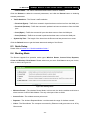
¾
DNS Server - The DNS (Domain Name System) server IP addresses currently used by the
Router.
¾
Traffic Statistics - The Router’s traffic statistics.
• Received (Bytes) - Traffic that counted in bytes has been received out from the WAN port.
• Received (Packets) - Traffic that counted in packets has been received out from the WAN
port.
• Sent (Bytes) - Traffic that counted in bytes has been sent out from the WAN port.
• Sent (Packets) - Traffic that counted in packets has been sent out from the WAN port.
¾
System Up Time - The length of the time since the Router was last powered on or reset.
Click the Refresh button to get the latest status and settings of the Router.
- 29 -
TL-WR710N
150Mbps Wireless N Mini Pocket Router - Advanced Edition
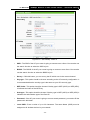
4.3 Quick Setup
Please refer to Section 3.2: "Quick Installation Guide."
4.4 WPS
WPS (Wi-Fi Protected Setup) can help you to quickly and securely connect to a network. This
section will guide you to add a new wireless device to an existing network quickly by function. The
WPS function is only available when the Operation Mode is set to Access Point. Select menu
“WPS”, you will see the next screen shown in Figure 4-3.
Figure 4-3
WPS
¾
WPS Status - To enable or disable the WPS function here.
¾
Current PIN - The current value of the device's PIN is displayed here. The default PIN of the
device can be found in the label or User Guide.
¾
Restore PIN - Restore the PIN of the device to its default.
¾
Gen New PIN - Click this button, and then you can get a new random value for the device's
PIN. You can ensure the network security by generating a new PIN.
¾
Disable PIN of this Device - WPS external registrar of entering the device’s PIN can be
disabled or enabled manually. If the device receives multiple failed attempts to authenticate
an external Registrar, this function will be disabled automatically.
¾
Add Device - You can add a new device to the existing network manually by clicking this
button.
To add a new device:
If the wireless adapter supports Wi-Fi Protected Setup (WPS), you can establish a wireless
connection between wireless adapter and device using either Push Button Configuration (PBC)
method or PIN method.
- 30 -
TL-WR710N
150Mbps Wireless N Mini Pocket Router - Advanced Edition
) Note:
To build a successful connection by WPS, you should also do the corresponding configuration of
the new device for WPS function meanwhile.
For the configuration of the new device, here takes the Wireless Adapter of our company for
example.
I.
By PBC
If the wireless adapter supports Wi-Fi Protected Setup and the Push Button Configuration (PBC)
method, you can add it to the network by PBC with the following two methods.
Method One:
Step 1: Keep the WPS Status as Enabled and click the Add Device button in Figure 4-3, then
the following screen will appear.
Figure 4-4
Add A New Device
Step 2: Choose “Press the button of the new device in two minutes” and click Connect.
Step 3: For the configuration of the wireless adapter, please choose “Push the button on my
access point or wireless router” in the configuration utility of the WPS as below, and
click Connect.
The WPS Configuration Screen of Wireless Adapter
- 31 -
TL-WR710N
150Mbps Wireless N Mini Pocket Router - Advanced Edition
Step 4: Wait for a while until the next screen appears. Click OK to complete the WPS
configuration.
The WPS Configuration Screen of Wireless Adapter
Method Two: Enter the PIN into my AP
Step 1:
For the configuration of the wireless adapter, please choose “Enter the PIN of this
device into my access point or wireless router” in the configuration utility of the WPS
as below, and click Connect.
The WPS Configuration Screen of Wireless Adapter
) Note:
In this example, the default PIN code of this adapter is 16952898 as the above figure shown.
Step 2:
Keep the WPS Status as Enabled and click the Add Device button in Figure 4-3.
- 32 -
TL-WR710N
Step 3:
150Mbps Wireless N Mini Pocket Router - Advanced Edition
Choose “Enter the new device's PIN” and enter the PIN code (take 16952898 for
example) of the wireless adapter in the field after PIN as shown in the figure below.
Then click Connect.
Figure 4-5 Add A New Device
Method Three: Enter the PIN from my AP
Step 1: Get the Current PIN code of the AP in Figure 4-3 (each AP has its unique PIN code. Here
takes the PIN code 12345670 of this AP for example).
Step 2: For the configuration of the wireless adapter, please choose “Enter the PIN of my
access point or wireless router” in the configuration utility of the WPS as below, and
enter the PIN code of the AP into the field after “Access Point PIN”. Then click Connect.
The WPS Configuration Screen of Wireless Adapter
) Note:
The default PIN code of the AP can be found in its label or the WPS configuration screen as
Figure 4-3.
- 33 -
TL-WR710N
150Mbps Wireless N Mini Pocket Router - Advanced Edition
You will see the following screen when the new device has successfully connected to the network.
Figure 4-6
) Note:
1) The WPS LED on the AP will light green for five minutes if the device has been successfully
added to the network.
2) The WPS function cannot be configured if the Wireless function of the AP is disabled. Please
make sure the Wireless function is enabled before configuring the WPS.
4.5 Working Mode
The Router supports five operation mode types: Wireless Router, Access Point, Repeater,
Client and Wireless Client Router. Please select one you want. Click Save to save your choice,
which is shown as Figure 4-7.
Figure 4-7 Wireless Working Mode Settings
¾
Wireless Router - The wireless Router Mode. In this mode, the device enables multi-user to
share Internet via DSL/Cable Modem. The only wired port works as WAN.
¾
Access Point - The wireless access point mode.
¾
Repeater - The wireless Repeater Mode. It could extend the range of wireless network.
¾
Client - The Client Mode. The computer connected by Ethernet could get access to an AP by
Client mode.
- 34 -
TL-WR710N
¾
150Mbps Wireless N Mini Pocket Router - Advanced Edition
WISP Client Router - In this mode, the device enables multiple users to share Internet
connection from WISP.
4.6 Network
Figure 4-8 the Network menu
There are three submenus under the Network menu (shown in Figure 4-8): WAN, MAC Clone
and LAN. Click any of them, and you will be able to configure the corresponding function.
4.6.1 WAN
Choose menu “Network → WAN”, and then you can configure the IP parameters of the WAN on
the screen below.
1.
If your ISP provides the DHCP service, please choose Dynamic IP type, and the Router will
automatically get IP parameters from your ISP. You can see the page as follow (Figure 4-9):
Figure 4-9
WAN – Dynamic IP
This page displays the WAN IP parameters assigned dynamically by your ISP, including IP
address, Subnet Mask, Default Gateway, etc. Click the Renew button to renew the IP
parameters from your ISP. Click the Release button to release the IP parameters.
- 35 -
TL-WR710N
¾
150Mbps Wireless N Mini Pocket Router - Advanced Edition
MTU Size - The normal MTU (Maximum Transmission Unit) value for most Ethernet
networks is 1500 Bytes. It is not recommended that you change the default MTU Size
unless required by your ISP.
¾
Use These DNS Servers - If your ISP gives you one or two DNS addresses, select Use
These DNS Servers and enter the primary and secondary addresses into the correct
fields. Otherwise, the DNS servers will be assigned dynamically from your ISP.
) Note:
If you find error when you go to a website after entering the DNS addresses, it is likely that
your DNS servers are set up improperly. You should contact your ISP to get DNS server
addresses.
¾
Host Name - This option specifies the Host Name of the Router.
¾
Get IP with Unicast DHCP - A few ISPs' DHCP servers do not support the broadcast
applications. If you cannot get the IP Address normally, you can choose this option. (It is
rarely required.)
Click the Save button to save your settings.
2.
If your ISP provides a static or fixed IP Address, Subnet Mask, Default Gateway and DNS
setting, select Static IP. The Static IP settings page will appear as shown in Figure 4-10.
Figure 4-10
WAN - Static IP
¾
IP Address - Enter the IP address in dotted-decimal notation provided by your ISP.
¾
Subnet Mask - Enter the subnet Mask in dotted-decimal notation provided by your ISP,
usually is 255.255.255.0.
¾
Default Gateway - Enter the gateway IP address in dotted-decimal notation provided by
your ISP.
- 36 -
TL-WR710N
¾
150Mbps Wireless N Mini Pocket Router - Advanced Edition
MTU Size - The normal MTU (Maximum Transmission Unit) value for most Ethernet
networks is 1500 Bytes. It is not recommended that you change the default MTU Size
unless required by your ISP.
¾
Primary/Secondary DNS - (Optional) Enter one or two DNS addresses in
dotted-decimal notation provided by your ISP.
Click the Save button to save your settings.
3.
If your ISP provides a PPPoE connection, select PPPoE/Russia PPPoE option. Then you
should enter the following parameters (Figure 4-11):
Figure 4-11
¾
WAN – PPPoE/Russia PPPoE
User Name/Password - Enter the User Name and Password provided by your ISP.
These fields are case-sensitive.
¾
Confirm Password - Enter again the Password provided by your ISP to ensure the
password you entered is correct.
¾
Secondary Connection - It’s available only for PPPoE Connection. If your ISP provides
an extra Connection type such as Dynamic/Static IP to connect to a local area network,
then you can check the radio button of Dynamic/Static IP to activate this secondary
connection.
• Disabled - The Secondary Connection is disabled by default, so there is PPPoE
connection only. This is recommended.
- 37 -
TL-WR710N
150Mbps Wireless N Mini Pocket Router - Advanced Edition
• Dynamic IP - You can check this radio button to use Dynamic IP as the secondary
connection to connect to the local area network provided by ISP.
• Static IP - You can check this radio button to use Static IP as the secondary
connection to connect to the local area network provided by ISP.
¾
Connect on Demand - In this mode, the Internet connection can be terminated
automatically after a specified inactivity period (Max Idle Time) and be re-established
when you attempt to access the Internet again. If you want your Internet connection
keeps active all the time, please enter “0” in the Max Idle Time field. Otherwise, enter
the number of minutes you want to have elapsed before your Internet access
disconnects.
¾
Connect Automatically - The connection can be re-established automatically when it
was down.
¾
Time-based Connecting - The connection will only be established in the period from the
start time to the end time (both are in HH:MM format).
) Note:
Only when you have configured the system time on “System Tools → Time” page, will the
Time-based Connecting function can take effect.
¾
Connect
Manually
-
You
can
click
the
Connect/Disconnect
button
to
connect/disconnect immediately. This mode also supports the Max Idle Time function as
Connect on Demand mode. The Internet connection can be disconnected automatically
after a specified inactivity period and re-established when you attempt to access the
Internet again.
Click the Connect button to connect immediately. Click the Disconnect button to disconnect
immediately.
Caution: Sometimes the connection cannot be terminated although you specify a time to
Max Idle Time because some applications are visiting the Internet continually in the
background.
If you want to do some advanced configurations, please click the Advanced button, and the
page shown in Figure 4-12 will then appear:
- 38 -
TL-WR710N
150Mbps Wireless N Mini Pocket Router - Advanced Edition
Figure 4-12 PPPoE Advanced Settings
¾
MTU Size - The default MTU size is “1480” bytes, which is usually fine. It is not
recommended that you change the default MTU Size unless required by your ISP.
¾
Service Name/AC Name - The service name and AC (Access Concentrator) name
should not be configured unless you are sure it is necessary for your ISP. In most cases,
leaving these fields blank will work.
¾
ISP Specified IP Address - If your ISP does not automatically assign IP addresses to
the Router during login, please click “Use IP address specified by ISP” check box and
enter the IP address provided by your ISP in dotted-decimal notation.
¾
Detect Online Interval - The Router will detect Access Concentrator online at every
interval. The default value is “0”. You can input the value between “0” and “120”. The
value “0” means no detect.
¾
Primary DNS/Secondary DNS - If your ISP does not automatically assign DNS
addresses to the Router during login, please click “Use the following DNS servers”
check box and enter the IP address in dotted-decimal notation of your ISP’s primary
DNS server. If a secondary DNS server address is available, enter it as well.
Click the Save button to save your settings.
4.
If your ISP provides BigPond Cable connection, please select BigPond Cable option. Then
you should enter the following parameters (Figure 4-13):
- 39 -
TL-WR710N
150Mbps Wireless N Mini Pocket Router - Advanced Edition
Figure 4-13 WAN – BigPond Cable
¾
User Name/Password - Enter the User Name and Password provided by your ISP.
These fields are case-sensitive.
¾
Auth Server - Enter the authenticating server IP address or host name.
¾
Auth Domain - Type in the domain suffix server name based on your location,
¾
MTU Size - The default MTU size is “1480” bytes, which is usually fine. It is not
recommended that you change the default MTU Size unless required by your ISP.
¾
Connect on Demand - In this mode, the Internet connection can be terminated
automatically after a specified inactivity period (Max Idle Time) and be re-established
when you attempt to access the Internet again. If you want your Internet connection
keeps active all the time, please enter “0” in the Max Idle Time field. Otherwise, enter
the number of minutes you want to have elapsed before your Internet access
disconnects.
¾
Connect Automatically - The connection can be re-established automatically when it
was down.
¾
Connect
Manually
-
You
can
click
the
Connect/Disconnect
button
to
connect/disconnect immediately. This mode also supports the Max Idle Time function as
Connect on Demand mode. The Internet connection can be disconnected automatically
- 40 -
TL-WR710N
150Mbps Wireless N Mini Pocket Router - Advanced Edition
after a specified inactivity period and re-established when you attempt to access the
Internet again.
Click the Connect button to connect immediately. Click the Disconnect button to disconnect
immediately.
Caution: Sometimes the connection cannot be terminated although you specify a time to
Max Idle Time because some applications are visiting the Internet continually in the
background.
Click the Save button to save your settings.
5.
If your ISP provides L2TP connection, please select L2TP/Russia L2TP option. Then you
should enter the following parameters (Figure 4-14):
Figure 4-14 WAN – L2TP/Russia L2TP
¾
User Name/Password - Enter the User Name and Password provided by your ISP.
These fields are case-sensitive.
¾
Dynamic IP/ Static IP - Choose either as you are given by your ISP. Click the Connect
button to connect immediately. Click the Disconnect button to disconnect immediately.
- 41 -
TL-WR710N
¾
150Mbps Wireless N Mini Pocket Router - Advanced Edition
Connect on Demand - You can configure the Router to disconnect from your Internet
connection after a specified period of inactivity (Max Idle Time). If your Internet
connection has been terminated due to inactivity, Connect on Demand enables the
Router to automatically re-establish your connection as soon as you attempt to access
the Internet again. If you wish to activate Connect on Demand, check the radio button.
If you want your Internet connection to remain active at all times, enter 0 in the Max Idle
Time field. Otherwise, enter the number of minutes you want to have elapsed before
your Internet connection terminates.
¾
Connect Automatically - Connect automatically after the Router is disconnected. To
use this option, check the radio button.
¾
Connect Manually - You can configure the Router to make it connect or disconnect
manually. After a specified period of inactivity (Max Idle Time), the Router will
disconnect from your Internet connection, and you will not be able to re-establish your
connection automatically as soon as you attempt to access the Internet again. To use
this option, check the radio button. If you want your Internet connection to remain active
at all times, enter "0" in the Max Idle Time field. Otherwise, enter the number of minutes
that you wish to have the Internet connecting last unless a new link is requested.
Caution: Sometimes the connection cannot be disconnected although you specify a time to
Max Idle Time, because some applications are visiting the Internet continually in the
background.
Click the Save button to save your settings.
6.
If your ISP provides PPTP connection, please select PPTP/Russia PPTP option. And you
should enter the following parameters (Figure 4-15):
- 42 -
TL-WR710N
150Mbps Wireless N Mini Pocket Router - Advanced Edition
Figure 4-15 WAN – PPTP/Russia PPTP
¾
User Name/Password - Enter the User Name and Password provided by your ISP.
These fields are case-sensitive.
¾
Dynamic IP/ Static IP - Choose either as you are given by your ISP and enter the ISP’s
IP address or the domain name.
If you choose static IP and enter the domain name, you should also enter the DNS
assigned by your ISP. And click the Save button.
Click the Connect button to connect immediately. Click the Disconnect button to
disconnect immediately.
¾
Connect on Demand - You can configure the Router to disconnect from your Internet
connection after a specified period of inactivity (Max Idle Time). If your Internet
connection has been terminated due to inactivity, Connect on Demand enables the
Router to automatically re-establish your connection as soon as you attempt to access
the Internet again. If you wish to activate Connect on Demand, check the radio button.
If you want your Internet connection to remain active at all times, enter “0” in the Max
- 43 -
TL-WR710N
150Mbps Wireless N Mini Pocket Router - Advanced Edition
Idle Time field. Otherwise, enter the number of minutes you want to have elapsed before
your Internet connection terminates.
¾
Connect Automatically - Connect automatically after the Router is disconnected. To
use this option, check the radio button.
¾
Connect Manually - You can configure the Router to make it connect or disconnect
manually. After a specified period of inactivity (Max Idle Time), the Router will
disconnect from your Internet connection, and you will not be able to re-establish your
connection automatically as soon as you attempt to access the Internet again. To use
this option, click the radio button. If you want your Internet connection to remain active at
all times, enter "0" in the Max Idle Time field. Otherwise, enter the number in minutes
that you wish to have the Internet connecting last unless a new link is requested.
Caution: Sometimes the connection cannot be disconnected although you specify a time to
Max Idle Time because some applications are visiting the Internet continually in the
background.
Click the Save button to save your settings.
4.6.2 MAC Clone
Choose menu “Network → MAC Clone”, and then you can configure the WAN MAC address
on the screen below, as shown in Figure 4-16:
Figure 4-16 MAC Address Clone
Some ISPs require that you register the MAC Address of your adapter. Changes are rarely
needed here.
¾
WAN MAC Address - This field displays the current MAC address of the WAN port. If your
ISP requires you to register the MAC address, please enter the correct MAC address into
this field in XX-XX-XX-XX-XX-XX format (X is any hexadecimal digit).
¾
Your PC's MAC Address - This field displays the MAC address of the PC that is managing
the Router. If the MAC address is required, you can click the Clone MAC Address To
button and this MAC address will fill in the WAN MAC Address field.
Click Restore Factory MAC to restore the MAC address of WAN port to the factory default
value.
- 44 -
TL-WR710N
150Mbps Wireless N Mini Pocket Router - Advanced Edition
Click the Save button to save your settings.
) Note:
1. Only the PC on your LAN can use the MAC Address Clone function.
2. If you change WAN MAC Address when the WAN connection is PPPoE, it will not take effect
until the connection is re-established.
4.6.3 LAN
Choose menu “Network → LAN”, and then you can configure the IP parameters of the LAN on
the screen as below.
Figure 4-17 LAN
¾
MAC Address - The physical address of the LAN ports, as seen from the LAN. The value
can't be changed.
¾
IP Address - Enter the IP address of your Router in dotted-decimal notation (factory default:
192.168.0.254).
¾
Subnet Mask - An address code that determines the size of the network. Normally use
255.255.255.0 as the subnet mask.
¾
IGMP Proxy - The Internet Group Management Protocol (IGMP) feature allows your devices
in LAN can watch TV.
) Note:
1.
If you change the IP Address of LAN, you must use the new IP Address to login to the Router.
2.
If the new LAN IP Address you set is not in the same subnet with the previous one, the IP
Address pool in the DHCP server will be configured automatically,while the Virtual Server and
DMZ Host will not take effect until they are re-configured.
- 45 -
TL-WR710N
150Mbps Wireless N Mini Pocket Router - Advanced Edition
4.7 Wireless
Figure 4-18 Wireless menu
There are five submenus under the Wireless menu (shown in Figure 4-18): Wireless Settings,
Wireless Security, Wireless MAC Filtering, Wireless Advanced and Wireless Statistics. Click
any of them, and you will be able to configure the corresponding function.
4.7.1 Wireless Settings
Choose menu “Wireless → Wireless Settings”, and then you can configure the basic settings
for the wireless network on this page.
Figure 4-19 Wireless Settings - Router
¾
Wireless Network Name - Enter a string of up to 32 characters. The same name of SSID
(Service Set Identification) must be assigned to all wireless devices in your network. The
default SSID is set to be TP-LINK_XXXXXX (XXXXXX indicates the last unique six numbers
of each Router’s MAC address). But it is recommended strongly that you change your
networks name (SSID) to a different value. This value is case-sensitive. For example, TEST
is NOT the same as test.
¾
Region - Select your region from the pull-down list. This field specifies the region where the
wireless function of the Router can be used. It may be illegal to use the wireless function of
- 46 -
TL-WR710N
150Mbps Wireless N Mini Pocket Router - Advanced Edition
the Router in a region other than one of those specified in this field. If your country or region
is not listed, please contact your local government agency for assistance.
¾
Mode - Select the desired mode. The default setting is 11bgn mixed.
• 11bg mixed - Select if you are using both 802.11b and 802.11g wireless clients.
• 11bgn mixed - Select if you are using a mix of 802.11b, 11g, and 11n wireless clients.
When 11bg mixed mode is selected, only 11bg mixed wireless stations can connect to the
Router. It is strongly recommended that you set the Mode to 11bgn mixed, and all of
802.11b/g/n wireless stations can connect to the Router.
) Note:
If 11bg mixed mode is selected in the Mode field, the Channel Width selecting field will turn
grey and the value will become 20M, which is unable to be changed.
¾
Channel Width - Select any channel width from the pull-down list. The default setting is
automatic, which can automatically adjust the channel width for your clients.
¾
Channel - This field determines which operating frequency will be used. The default channel
is set to Auto. It is not necessary to change the wireless channel unless you notice
interference problems with another nearby access point.
¾
Enable Wireless Router Radio - The wireless radio of the Router can be enabled or disabled
to allow wireless stations access. If enabled, the wireless stations will be able to access the
Router. Otherwise, wireless stations will not be able to access the Router.
¾
Enable SSID Broadcast - If you select the Enable SSID Broadcast checkbox, the wireless
router will broadcast its name (SSID) on the air.
¾
Enable WDS - You can select to enable WDS. With this function, the Router can bridge two or
more WLANs. If this checkbox is selected, you will have to set the following parameters as
shown below. Make sure the following settings are correct.
Figure 4-20 Wireless Settings – WDS Bridging
¾
SSID (to be bridged) - The SSID of the AP your Router is going to connect to as a client.
You can also use the search function to select the SSID to join.
- 47 -
TL-WR710N
¾
150Mbps Wireless N Mini Pocket Router - Advanced Edition
BSSID (to be bridged) - The BSSID of the AP your Router is going to connect to as a client.
You can also use the search function to select the BSSID to join.
¾
Survey - Click this button, you can survey the AP which runs in the current channel.
¾
Security Options - This option should be chosen according to the AP's security
configuration. It is recommended that the security type is the same as your AP's security
type.
¾
WEP Index - This option should be chosen if the key type is WEP (ASCII) or WEP (HEX). It
indicates the index of the WEP key.
¾
Auth Type - This option should be chosen if the key type is WEP (ASCII) or WEP (HEX). It
indicates the authorization type of the Root AP.
¾
Password - If the AP your Router is going to connect needs password, you need to fill the
password in this blank.
Be sure to click the Save button to save your settings on this page.
) Note:
1. The operating distance or range of your wireless connection varies significantly based on the
physical placement of the Router. For best results, place your Router.
z
Near the center of the area in which your wireless stations will operate.
z
In an elevated location such as a high shelf.
z
Away from the potential sources of interference, such as PCs, microwaves, and cordless
phones.
z
Away from large metal surfaces.
2. Failure to follow these guidelines can result in significant performance degradation or inability
to wirelessly connect to the Router.
4.7.2 Wireless Security
Choose menu “Wireless → Wireless Security”, and then you can configure the security
settings of your wireless network.
There are three wireless security modes supported by the Router: WPA/WPA2-Personal,
WPA/WPA2-Enterprise and WEP (Wired Equivalent Privacy).
- 48 -
TL-WR710N
150Mbps Wireless N Mini Pocket Router - Advanced Edition
Figure 4-21 Wireless Security
¾
Disable Security - The wireless security function can be enabled or disabled. If disabled, the
wireless stations will be able to connect the Router without encryption. But it’s strongly
recommended to choose one of the following modes to enable security.
¾
WPA-PSK/WPA2-Personal - It’s the WPA/WPA2 authentication type based on pre-shared
passphrase.
• Version - you can choose the version of the WPA-PSK security on the drop-down list. The
default setting is Automatic, which can select WPA-PSK (Pre-shared key of WPA) or
WPA2-PSK (Pre-shared key of WPA) automatically based on the wireless station's
capability and request.
• Encryption - When WPA-PSK or WPA is set as the Authentication Type, you can select
either Automatic, or TKIP or AES as Encryption.
) Note:
If you check the WPA-PSK/WPA2-PSK radio button and choose TKIP encryption, you will
find a notice in red as shown in Figure 4-22.
- 49 -
TL-WR710N
150Mbps Wireless N Mini Pocket Router - Advanced Edition
Figure 4-22
¾
WPA /WPA2-Enterprise - It’s based on Radius Server.
• Version - you can choose the version of the WPA security from the pull-down list. The
default setting is Automatic, which can select WPA (Wi-Fi Protected Access) or WPA2
(WPA version 2) automatically based on the wireless station's capability and request.
• Encryption - You can select Automatic, TKIP or AES.
• Radius Server IP - Enter the IP address of the Radius server.
• Radius Port - Enter the port that Radius server used.
• Radius Password - Enter the password for the Radius server.
• Group Key Update Period - Specify the group key update interval in seconds. The value
should be 30 or above. Enter 0 to disable the update.
¾
WEP - It is based on the IEEE 802.11 standard.
• Type - you can choose the type for the WEP security on the pull-down list. The default
setting is Automatic, which can select Shared Key or Open System authentication type
automatically based on the wireless station's capability and request.
• WEP Key Format - Hexadecimal and ASCII formats are provided here. Hexadecimal
format stands for any combination of hexadecimal digits (0-9, a-f, A-F) in the specified
length. ASCII format stands for any combination of keyboard characters in the specified
length.
• WEP Key (Password) - Select which of the four keys will be used and enter the matching
WEP key that you create. Make sure these values are identical on all wireless stations in
your network.
• Key Type - You can select the WEP key length (64-bit, or 128-bit, or 152-bit.) for
encryption. "Disabled" means this WEP key entry is invalid.
64-bit - You can enter 10 hexadecimal digits (any combination of 0-9, a-f, A-F, zero key is
not promoted) or 5 ASCII characters.
128-bit - You can enter 26 hexadecimal digits (any combination of 0-9, a-f, A-F, zero key is
not promoted) or 13 ASCII characters.
- 50 -
TL-WR710N
150Mbps Wireless N Mini Pocket Router - Advanced Edition
152-bit - You can enter 32 hexadecimal digits (any combination of 0-9, a-f, A-F, zero key is
not promoted) or 16 ASCII characters.
) Note:
If you do not set the key, the wireless security function is still disabled even if you have selected
Shared Key as Authentication Type.
Be sure to click the Save button to save your settings on this page.
4.7.3 Wireless MAC Filtering
Choose menu “Wireless → Wireless MAC Filtering”, and then you can control the wireless
access by configuring the Wireless MAC Filtering function, as shown in Figure 4-23.
Figure 4-23 Wireless MAC Filtering
To filter wireless users by MAC Address, click Enable. The default setting is Disable.
¾
MAC Address - The wireless station's MAC address that you want to access.
¾
Status - The status of this entry, either Enabled or Disable.
¾
Description - A simple description of the wireless station.
To Add a Wireless MAC Address filtering entry, click the Add New… button. The "Add or Modify
Wireless MAC Address Filtering entry" page will appear, shown in Figure 4-24:
Figure 4-24 Add or Modify Wireless MAC Address Filtering entry
- 51 -
TL-WR710N
150Mbps Wireless N Mini Pocket Router - Advanced Edition
To add or modify a MAC Address Filtering entry, follow these instructions:
1.
Enter the appropriate MAC Address into the MAC Address field. The format of the MAC
Address
is
XX-XX-XX-XX-XX-XX
(X
is
any
hexadecimal
digit).
For
example:
00-0A-EB-B0-00-0B.
2.
Give a simple description for the wireless station in the Description field. For example:
Wireless station A.
3.
Select Enabled or Disabled for this entry on the Status pull-down list.
4.
Click the Save button to save this entry.
To modify or delete an existing entry:
1.
Click the Modify in the entry you want to modify. If you want to delete the entry, click the
Delete.
2.
Modify the information.
3.
Click the Save button.
Click the Enable All button to make all entries enabled
Click the Disable All button to make all entries disabled.
Click the Delete All button to delete all entries.
Click the Next button to go to the next page.
Click the Previous button to return to the previous page.
For example: If you desire that the wireless station A with MAC address 00-0A-EB-B0-00-0B and
the wireless station B with MAC address 00-0A-EB-00-07-5F are able to access the Router, but all
the other wireless stations cannot access the Router, you can configure the Wireless MAC
Address Filtering list by following these steps:
1. Click the Enabled button to enable this function.
2. Select the radio button “Allow the stations specified by any enabled entries in the list to
access” for Filtering Rules.
3. Delete all or disable all entries if there are any entries already.
4. Click the Add New... button.
1) Enter the MAC address 00-0A-EB-B0-00-0B/00-0A-EB-00-07-5F in the MAC Address field.
2) Enter wireless station A/B in the Description field.
3) Select Enabled in the Status pull-down list.
4) Click the Save button.
5) Click the Back button.
The filtering rules that configured should be similar to the following list:
- 52 -
TL-WR710N
150Mbps Wireless N Mini Pocket Router - Advanced Edition
Figure 4-25 Filtering Rules
4.7.4 Wireless Advanced
Choose menu “Wireless → Wireless Advanced”, and then you can configure the advanced
settings of your wireless network.
Figure 4-26 Wireless Advanced
¾
Transmit Power - Here you can specify the transmit power of Router. You can select High,
Middle or Low which you would like. High is the default setting and is recommended.
¾
Beacon Interval - Enter a value between 20-1000 milliseconds for Beacon Interval here.
The beacons are the packets sent by the Router to synchronize a wireless network. Beacon
Interval value determines the time interval of the beacons. The default value is 100.
¾
RTS Threshold - Here you can specify the RTS (Request to Send) Threshold. If the packet
is larger than the specified RTS Threshold size, the Router will send RTS frames to a
particular receiving station and negotiate the sending of a data frame. The default value is
2346.
¾
Fragmentation Threshold - This value is the maximum size determining whether packets
will be fragmented. Setting the Fragmentation Threshold too low may result in poor network
performance because of excessive packets. 2346 is the default setting and is
recommended.
¾
DTIM Interval - This value determines the interval of the Delivery Traffic Indication Message
(DTIM). A DTIM field is a countdown field informing clients of the next window for listening to
- 53 -
TL-WR710N
150Mbps Wireless N Mini Pocket Router - Advanced Edition
broadcast and multicast messages. When the Router has buffered broadcast or multicast
messages for associated clients, it sends the next DTIM with a DTIM Interval value. You can
specify the value between 1-255 Beacon Intervals. The default value is 1, which indicates
the DTIM Interval is the same as Beacon Interval.
¾
Enable WMM - WMM function can guarantee the packets with high-priority messages being
transmitted preferentially. It is strongly recommended enabled.
¾
Enable Short GI - This function is recommended for it will increase the data capacity by
reducing the guard interval time.
¾
Enable AP Isolation - This function isolate all connected wireless stations so that wireless
stations cannot access each other through WLAN. This function will be disabled if
WDS/Bridge is enabled.
) Note:
If you are not familiar with the setting items in this page, it's strongly recommended to keep the
provided default values; otherwise it may result in lower wireless network performance.
4.7.5 Wireless Statistics
Choose menu “Wireless → Wireless Statistics”, and then you can see the MAC Address,
Current Status, Received Packets and Sent Packets for each connected wireless station.
Figure 4-27 Wireless Statistics
¾
MAC Address - The connected wireless station's MAC address
¾
Current Status - The connected wireless station's running status, one of STA-AUTH /
STA-ASSOC / STA-JOINED / WPA / WPA-PSK / WPA2 / WPA2-PSK / AP-UP / AP-DOWN /
Disconnected
¾
Received Packets - Packets received by the station
¾
Sent Packets - Packets sent by the station.
¾
Configure - The button is used for loading the item to the Wireless MAC Filtering list.
• Allow - If the Wireless MAC Filtering function enable, allow the station to access.
• Deny - If the Wireless MAC Filtering function enable, deny the station to access.
- 54 -
TL-WR710N
150Mbps Wireless N Mini Pocket Router - Advanced Edition
You cannot change any of the values on this page. To update this page and to show the current
connected wireless stations, click on the Refresh button.
If the numbers of connected wireless stations go beyond one page, click the Next button to go to
the next page and click the Previous button to return the previous page.
) Note:
This page will be refreshed automatically every 5 seconds.
4.8 DHCP
Figure 4-28 The DHCP menu
There are three submenus under the DHCP menu (shown in Figure 4-28), DHCP Settings,
DHCP Clients List and Address Reservation. Click any of them, and you will be able to
configure the corresponding function.
4.8.1 DHCP Settings
Choose menu “DHCP → DHCP Settings”, and then you can configure the DHCP Server on the
page as shown in Figure 4-29. The Router is set up by default as a DHCP (Dynamic Host
Configuration Protocol) server, which provides the TCP/IP configuration for all the PC(s) that are
connected to the Router on the LAN.
Figure 4-29 DHCP Settings
¾
DHCP Server - Enable or Disable the DHCP server. If you disable the Server, you must
have another DHCP server within your network or else you must configure the computer
manually.
- 55 -
TL-WR710N
¾
150Mbps Wireless N Mini Pocket Router - Advanced Edition
Start IP Address - Specify an IP address for the DHCP Server to start with when assigning
IP addresses. 192.168.0.100 is the default start address.
¾
End IP Address - Specify an IP address for the DHCP Server to end with when assigning IP
addresses. 192.168.0.199 is the default end address.
¾
Address Lease Time - The Address Lease Time is the amount of time a network user will
be allowed connection to the Router with their current dynamic IP Address. Enter the
amount of time in minutes and the user will be "leased" this dynamic IP Address. After the
time is up, the user will be automatically assigned a new dynamic IP address. The range of
the time is 1 ~ 2880 minutes. The default value is 120 minutes.
¾
Default Gateway (Optional) - It is suggested to input the IP address of the LAN port of the
Router. The default value is 192.168.0.254.
¾
Default Domain (Optional) - Input the domain name of your network.
¾
Primary DNS - (Optional) Input the DNS IP address provided by your ISP or consult your
ISP. Or consult your ISP.
¾
Secondary DNS (Optional) - Input the IP address of another DNS server if your ISP
provides two DNS servers.
) Note:
To use the DHCP server function of the Router, you must configure all computers on the LAN as
"Obtain an IP Address automatically".
4.8.2 DHCP Client List
Choose menu “DHCP → DHCP Client List”, and then you can view the information about the
clients attached to the Router in the screen as shown in Figure 4-30.
Figure 4-30 DHCP Client List
¾
Client Name - The name of the DHCP client
¾
MAC Address - The MAC address of the DHCP client
¾
Assigned IP - The IP address that the Router has allocated to the DHCP client
¾
Lease Time - The time of the DHCP client leased. After the dynamic IP address has expired,
a new dynamic IP address will be automatically assigned to the user.
- 56 -
TL-WR710N
150Mbps Wireless N Mini Pocket Router - Advanced Edition
You cannot change any of the values on this page. To update this page and to show the current
attached devices, click the Refresh button.
4.8.3 Address Reservation
Choose menu “DHCP → Address Reservation”, and then you can view and add a reserved
address for clients via the next screen (shown in Figure 4-31).When you specify a reserved IP
address for a PC on the LAN, that PC will always receive the same IP address each time when it
accesses the DHCP server. Reserved IP addresses should be assigned to the servers that
require permanent IP settings.
Figure 4-31 Address Reservation
¾
MAC Address - The MAC address of the PC for which you want to reserve an IP address.
¾
Reserved IP Address - The IP address reserved for the PC by the Router.
¾
Status - The status of this entry, either Enabled or Disabled.
¾
Modify - To modify or delete an existing entry.
To Reserve an IP address:
1.
Click the Add New… button. Then will pop-up.
2.
Enter the MAC address (in XX-XX-XX-XX-XX-XX format.) and IP address (in dotted-decimal
notation) of the computer for which you want to reserve an IP address.
3.
Click the Save button.
Figure 4-32 Add or Modify an Address Reservation Entry
To modify or delete an existing entry:
- 57 -
TL-WR710N
1.
150Mbps Wireless N Mini Pocket Router - Advanced Edition
Click the Modify in the entry you want to modify. If you want to delete the entry, click the
Delete.
2.
Modify the information.
3.
Click the Save button.
Click the Enable/Disable All button to make all entries enabled/disabled.
Click the Delete All button to delete all entries.
Click the Next button to go to the next page and Click the Previous button to return the previous
page.
4.9 USB Settings
Figure 4-33 The USB Settings menu
There are three submenus under the USB Settings menu (shown in Figure 4-33), Storage
Sharing, Media Server and User Accounts. Click any of them, and you will be able to configure
the corresponding functions.
4.9.1 Storage Sharing
Choose menu “USB Settings→Storage Sharing”, you can configure a USB disk drive attached
to the router and view volume and share such properties as share name, capacity, used space,
and free space on this page as shown below.
Figure 4-34 Storage Sharing
¾
Service Status - Indicates the Network Sharing service's current status. You can click the
Start button to start the Storage Sharing service and click the Stop button to stop it.
- 58 -
TL-WR710N
¾
150Mbps Wireless N Mini Pocket Router - Advanced Edition
Volume - The volume name of the USB drive the users have access to. Volume 1-8 is
mapping to USB port1, and Volume 9-16 is mapping to USB port2.
¾
Capacity - The storage capacity of the USB driver.
¾
Used - The used space of the USB driver.
¾
Free - The available space of the USB driver.
¾
Use% - The percentage of the used space.
¾
Shared - Indicates the shared or non-shared status of the volume. When the volume is
shared, you can click the Disable to stop sharing the volume; when volume is non-shared,
you can click the Enable button to share the volume.
Click the Start button to start the Network Sharing service.
Click the Stop button to stop the Network Sharing service.
Click the Eject Disk button to safely remove the USB storage device that is connected to USB
port. This takes the drive offline. A message (as shown in Figure 4-35) will appear on your web
browser when it is safe to detach the USB disk.
Figure 4-35 Safe Unplug Message
Click the Rescan button to start a new scan.
Follow the instructions below to set up your router as a file server:
1.
Plug an external USB hard disk drive or USB flash drive into this router.
2.
Click the Rescan button to find the USB drive that has been attached to the router.
3.
Click the Start button to start the Storage Sharing service.
4.
Click the Enable button under Shared to enable the disk to share.
5.
Click the Open the disk to visit the sharing disk.
) Note:
1.
The router can automatically locate new USB drive. But to display the information about your
USB device, you need to click the Rescan button manually.
2.
The new settings will not take effect until you restart the service.
- 59 -
TL-WR710N
3.
150Mbps Wireless N Mini Pocket Router - Advanced Edition
To unplug the USB drive, click Eject Disk button first. Simply pulling USB drive out of the
USB port can cause damage to the device and loss of data.
4.
Mounted volumes of each USB port are subject to the 8-volume limit. So you cannot access
more than 8 volumes on the USB storage device.
5.
If you change the storage settings during the storage connection is established, then the
changes will not take effect until the router or the client is rebooted.
4.9.2 Media Server
Choose menu “USB Settings→Media Server”, you can create media server that allows you to
share stored content with other computers and devices on your home network and on the Internet.
Figure 4-36 Media Server Setting
¾
Server Name - The name of this Media Server.
¾
Server Status - Indicates the Media Server’s current status, started or stopped. You can
click the Start button to start the Media Server and click the Stop button to stop it.
¾
Name - The display name of this folder.
¾
File System - The file system type on the partition can be FAT32 or NTFS.
¾
Folder - The real full path of the specified folder.
¾
Delete - You can delete the share folder by click Delete.
To set up your media server, please follow the instructions below:
1. Plug an external USB hard disk drive or USB flash drive into this router, and then the screen
will appear as shown in Figure 4-37.
Figure 4-37 Media Server Setting
- 60 -
TL-WR710N
150Mbps Wireless N Mini Pocket Router - Advanced Edition
2. Click the Start button to start the media server, and then the screen will appear as shown in
Figure 4-38.
Figure 4-38 Media Server Setting
3. Click the Add share folder button to specify a folder as the search path of media server. The
screen will then appear as shown in Figure 4-39.
Figure 4-39 Add New Folder
¾
Display Name - You can enter a display name for the share folder.
¾
Share entire partition - Choose this option and then the folders contained in this
partition will all be shared.
¾
Folder Location- Displays the location of this folder.
¾
Select - Check the radio button to select the folder to share.
¾
Folder - Displays folders that are in current path.
¾
Upper - Click this button to get into the upper folder.
¾
Save - Click this button to save your settings and the page will be redirected to the
media server configuration page.
- 61 -
TL-WR710N
¾
150Mbps Wireless N Mini Pocket Router - Advanced Edition
Back - Click this button to discard the settings and just go to the media server
configuration page.
4. Click the Scan All button to scan all the share folders immediately. You can also select the
Auto-scan, at same time, select an auto scan interval time by drop-down list. In this case, the
media server will auto scan the share folders.
) Note:
The max share folders number is 6. If you want share a new folder when the number has been
reached to be 6, you can delete a share folder and then add a new one.
4.9.3 User Accounts
You can specify the user name and password for Storage Sharing users on this page. Storage
Sharing users can use Internet Explorer to access files on the USB drive.
There are two default user accounts that can access the Storage Sharing. They are Administrator
and Guest (as shown in Figure 4-40). Administrator has read/write access to Storage Sharing
while Guest has read-only access to Storage Sharing.
Figure 4-40 User Account Management
Only Administrator can use a Web browser to transfer the files from a PC to the Writable shared
volume on the USB drive.
To add a new user account, please follow the steps below:
1.
Click Add New User button, and the screen will appear as shown in Figure 4-41.
2.
Self-define a User Name.
3.
Enter the password in the Password field.
4.
Choose the Storage Authority from the drop-down list, Read and Write or Read Only.
- 62 -
TL-WR710N
150Mbps Wireless N Mini Pocket Router - Advanced Edition
Figure 4-41 Add or Modify User Account
¾
User Name - Type the user name that you want to give access to the USB drive. The
user name must be composed of alphanumeric symbols not exceeding 15 characters in
length.
¾
Password - Enter the password in the Password field. The password must be composed
of alphanumeric symbols not exceeding 15 characters in length. For security purposes,
the password for each user account is not displayed.
¾
Storage Authority – Choose Read and Write or Read Only from the drop-down list to
assign access authority of Storage Sharing to the user.
¾
Save - You can click the Save button to save your settings.
¾
Back - You can click the Back button to discard the settings and just go to the media
server configuration page.
) Note:
Please restart the service for the new settings to take effect.
If you cannot use the new user name and password to access the shares, press Windows logo +
R to open the Run dialog box and type net use \\192.168.0.254 /delete /yes and press Enter.
(192.168.0.254 is your router's LAN IP address. If the LAN IP of the modem connected with your
router is 192.168.1.x, the default LAN IP of the router will automatically switch from 192.168.0.254
to 192.168.1.254 to avoid IP conflict; in this case, please try net use \\192.168.1.254 /delete /
yes.)
4.10 Forwarding
Figure 4-42 The Forwarding menu
- 63 -
TL-WR710N
150Mbps Wireless N Mini Pocket Router - Advanced Edition
There are four submenus under the Forwarding menu (shown in Figure 4-42): Virtual Servers,
Port Triggering, DMZ and UPnP. Click any of them, and you will be able to configure the
corresponding function.
4.10.1 Virtual Servers
Choose menu “Forwarding → Virtual Servers”, and then you can view and add virtual servers
in the screen as shown in Figure 4-43. Virtual servers can be used for setting up public services
on your LAN, such as DNS, Email and FTP. A virtual server is defined as a service port, and all
requests from the Internet to this service port will be redirected to the computer specified by the
server IP. Any PC that was used for a virtual server must have a static or reserved IP Address
because its IP Address may be changed when using the DHCP function.
Figure 4-43 Virtual Servers
¾
Service Port - The numbers of External Ports. You can type a service port or a range of
service ports (in XXX – YYY format, XXX is the start port number, YYY is the end port
number).
¾
Internal Port - The Internal Service Port number of the PC running the service application.
You can leave it blank if the Internal Port is the same as the Service Port, or enter a
specific port number when Service Port is a single one.
¾
IP Address - The IP Address of the PC providing the service application.
¾
Protocol - The protocol used for this application, either TCP, UDP, or All (all protocols
supported by the Router).
¾
Status - The status of this entry, either Enabled or Disabled.
¾
Modify - To modify or delete an existing entry.
To setup a virtual server entry:
1.
Click the Add New… button, the next screen will pop-up as shown in Figure 4-44.
2.
Select the service port you want to use from the Common Service Port list. If the Common
Service Port list does not have the service that you want to use, type the service port
number or service port range in the Service Port box.
3.
Type the IP Address of the computer in the IP Address box.
- 64 -
TL-WR710N
150Mbps Wireless N Mini Pocket Router - Advanced Edition
4.
Select the protocol used for this application, either TCP, UDP, or All.
5.
Select the Enabled to enable the virtual server.
6.
Click the Save button.
Figure 4-44 Add or Modify a Virtual Server Entry
) Note:
If your computer or server has more than one type of available service, please select another
service, and enter the same IP Address for that computer or server.
To modify or delete an existing entry:
1.
Click the Modify in the entry you want to modify. If you want to delete the entry, click the
Delete.
2.
Modify the information.
3.
Click the Save button.
Click the Enable/Disable All button to make all entries enabled/disabled.
Click the Delete All button to delete all entries.
Click the Next button to go to the next page and click the Previous button to return the previous
page.
) Note:
If you set the service port of the virtual server as 80, you must set the Web management port on
“Security → Remote Management” page to be any other value except 80 such as 8080.
Otherwise there will be a conflict to disable the virtual server.
4.10.2 Port Triggering
Choose menu “Forwarding → Port Triggering”, and then you can view and add port triggering
in the screen as shown in Figure 4-45. Some applications require multiple connections, like
Internet games, video conferencing, Internet calling and so on. These applications cannot work
- 65 -
TL-WR710N
150Mbps Wireless N Mini Pocket Router - Advanced Edition
with a pure NAT Router. Port Triggering is used for some of these applications that can work with
an NAT Router.
Figure 4-45 Port Triggering
Once the Router is configured, the operation is as follows:
1. A local host makes an outgoing connection using a destination port number defined in the
Trigger Port field.
2. The Router records this connection, opens the incoming port or ports associated with this
entry in the Port Triggering table, and associates them with the local host.
3. When necessary, the external host will be able to connect to the local host using one of the
ports defined in the Incoming Ports field.
¾
Trigger Port - The port for outgoing traffic. An outgoing connection using this port will trigger
this rule.
¾
Trigger Protocol - The protocol used for Trigger Ports, either TCP, UDP, or All (all
protocols supported by the Router).
¾
Incoming Ports - The port or port range used by the remote system when it responds to the
outgoing request. A response using one of these ports will be forwarded to the PC that
triggered this rule. You can input at most 5 groups of ports (or port sections). Every group of
ports must be set apart with ",". For example, 2000-2038, 2050-2051, 2085, 3010-3030.
¾
Incoming Protocol - The protocol used for Incoming Ports Range, either TCP or UDP, or
ALL (all protocols supported by the Router).
¾
Status - The status of this entry, either Enabled or Disabled.
¾
Modify - To modify or delete an existing entry.
To add a new rule, follow the steps below:
1.
Click the Add New… button, the next screen will pop-up as shown in Figure 4-46.
2.
Select a common application from the Common Applications drop-down list, then the
Trigger Port field and the Incoming Ports field will be automatically filled. If the Common
Applications do not have the application you need, enter the Trigger Port and the
Incoming Ports manually.
3.
Select the protocol used for Trigger Port from the Trigger Protocol drop-down list, either
TCP, UDP, or All.
- 66 -
TL-WR710N
4.
150Mbps Wireless N Mini Pocket Router - Advanced Edition
Select the protocol used for Incoming Ports from the Incoming Protocol drop-down list,
either TCP or UDP, or All.
5.
Select Enabled in Status field.
6.
Click the Save button to save the new rule.
Figure 4-46 Add or Modify a Port Triggering Entry
To modify or delete an existing entry:
1.
Click the Modify in the entry you want to modify. If you want to delete the entry, click the
Delete.
2.
Modify the information.
3.
Click the Save button.
Click the Enable All button to make all entries enabled.
Click the Disable All button to make all entries disabled.
Click the Delete All button to delete all entries.
) Note:
1.
When the trigger connection is released, the corresponding opening ports will be closed.
2.
Each rule is allowed to be used only by one host on LAN synchronously. The trigger
connection of other hosts on LAN will be refused.
3.
Incoming Port Range cannot overlap each other.
4.10.3 DMZ
Choose menu “Forwarding → DMZ”, and then you can view and configure DMZ host in the
screen as shown in Figure 4-47. The DMZ host feature allows one local host to be exposed to the
Internet for a special-purpose service such as Internet gaming or videoconferencing. DMZ host
forwards all the ports at the same time. Any PC whose port is being forwarded must have its
DHCP client function disabled and should have a new static IP Address assigned to it because its
IP Address may be changed when using the DHCP function.
- 67 -
TL-WR710N
150Mbps Wireless N Mini Pocket Router - Advanced Edition
Figure 4-47 DMZ
To assign a computer or server to be a DMZ server:
1.
Check the Enable radio button.
2.
Enter the IP Address of a local host in the DMZ Host IP Address field.
3.
Click the Save button.
) Note:
After you set the DMZ host, the firewall related to the host will not work.
4.10.4 UPnP
Choose menu “Forwarding → UPnP”, and then you can view the information about UPnP
(Universal Plug and Play) in the screen as shown in Figure 4-48. The UPnP feature allows the
devices, such as Internet computers, to access the local host resources or devices as needed.
UPnP devices can be automatically discovered by the UPnP service application on the LAN.
Figure 4-48 UPnP
¾
Current UPnP Status - UPnP can be enabled or disabled by clicking the Enable or Disable
button.
¾
Current UPnP Settings List - This table displays the current UPnP information.
• App Description - The description provided by the application in the UPnP request.
• External Port - The external port the Router opens for the application.
• Protocol - The type of protocol the Router opens for the application.
• Internal Port - The Internal port the Router opens for local host.
• IP Address - The IP address of the UPnP device that is currently accessing the Router.
- 68 -
TL-WR710N
150Mbps Wireless N Mini Pocket Router - Advanced Edition
• Status - The status of the port is displayed here. “Enabled” means that the port is still
active. Otherwise, the port is inactive.
Click Refresh to update the Current UPnP Settings List.
4.11 Security
Figure 4-49 The Security menu
There are four submenus under the Security menu as shown in Figure 4-49: Basic Security,
Advanced Security, Local Management and Remote Management. Click any of them, and you
will be able to configure the corresponding function.
4.11.1 Basic Security
Choose menu “Security → Basic Security”, you can configure the basic security in the screen
as shown in Figure 4-50.
Figure 4-50 Basic Security
¾
Firewall - A firewall protects your network from the outside world. Here you can enable or
disable the Router’s firewall.
z
SPI Firewall - SPI (Stateful Packet Inspection, also known as dynamic packet filtering)
helps to prevent cyber attacks by tracking more state per session. It validates that the
- 69 -
TL-WR710N
150Mbps Wireless N Mini Pocket Router - Advanced Edition
traffic passing through the session conforms to the protocol. SPI Firewall is enabled by
factory default. If you want all the computers on the LAN exposed to the outside world,
you can disable it.
¾
VPN - VPN Passthrough must be enabled if you want to allow VPN tunnels using IPSec,
PPTP, or L2TP protocols to pass through the Router’s firewall.
z
PPTP Passthrough - Point-to-Point Tunneling Protocol (PPTP) allows the Point-to-Point
Protocol (PPP) to be tunneled through an IP network. To allow PPTP tunnels to pass
through the Router, keep the default, Enable.
z
L2TP Passthrough - Layer 2 Tunneling Protocol (L2TP) is the method used to enable
Point-to-Point sessions via the Internet on the Layer 2 level. To allow L2TP tunnels to
pass through the Router, keep the default, Enable.
z
IPSec Passthrough - Internet Protocol Security (IPSec) is a suite of protocols for
ensuring private, secure communications over Internet Protocol (IP) networks, through
the use of cryptographic security services. To allow IPSec tunnels to pass through the
Router, keep the default, Enable.
¾
ALG - It is recommended to enable Application Layer Gateway (ALG) because ALG allows
customized Network Address Translation (NAT) traversal filters to be plugged into the
gateway to support address and port translation for certain application layer "control/data"
protocols such as FTP, TFTP, H323 etc.
z
FTP ALG - To allow FTP clients and servers to transfer data across NAT, keep the
default Enable.
z
TFTP ALG - To allow TFTP clients and servers to transfer data across NAT, keep the
default Enable.
z
H323 ALG - To allow Microsoft NetMeeting clients to communicate across NAT, keep
the default Enable.
Click the Save button to save your settings.
4.11.2 Advanced Security
Choose menu “Security → Advanced Security”, you can protect the Router from being
attacked by TCP-SYN Flood, UDP Flood and ICMP-Flood in the screen as shown in Figure 4-51.
- 70 -
TL-WR710N
150Mbps Wireless N Mini Pocket Router - Advanced Edition
Figure 4-51
¾
Advanced Security
Packets Statistics Interval (5~60) - The default value is 10. Select a value between 5 and
60 seconds from the drop-down list. The Packets Statistics Interval value indicates the time
section of the packets statistics. The result of the statistics is used for analysis by SYN Flood,
UDP Flood and ICMP-Flood.
¾
DoS Protection - Denial of Service protection. Check the Enable or Disable button to
enable or disable the DoS protection function. Only when it is enabled, will the flood filters be
enabled.
) Note:
Dos Protection will take effect only when the Traffic Statistics in “System Tool → Traffic
Statistics” is enabled.
¾
Enable ICMP-FLOOD Attack Filtering - Enable or Disable the ICMP-FLOOD Attack
Filtering.
¾
ICMP-FLOOD Packets Threshold (5~3600) - The default value is 50. Enter a value
between 5 ~ 3600. When the current ICMP-FLOOD Packets number is beyond the set value,
the Router will startup the blocking function immediately.
¾
Enable UDP-FLOOD Filtering - Enable or Disable the UDP-FLOOD Filtering.
¾
UDP-FLOOD Packets Threshold (5~3600) - The default value is 500. Enter a value
between 5 ~ 3600. When the current UPD-FLOOD Packets number is beyond the set value,
the Router will startup the blocking function immediately.
- 71 -
TL-WR710N
¾
150Mbps Wireless N Mini Pocket Router - Advanced Edition
Enable TCP-SYN-FLOOD Attack Filtering - Enable or Disable the TCP-SYN-FLOOD
Attack Filtering.
¾
TCP-SYN-FLOOD Packets Threshold (5~3600) - The default value is 50. Enter a value
between 5 ~ 3600. When the current TCP-SYN-FLOOD Packets numbers is beyond the set
value, the Router will startup the blocking function immediately.
¾
Ignore Ping Packet From WAN Port - Enable or Disable Ignore Ping Packet From WAN
Port. The default setting is disabled. If enabled, the ping packet from the Internet cannot
access the Router.
¾
Forbid Ping Packet From LAN Port - Enable or Disable Forbid Ping Packet From LAN Port.
The default setting is disabled. If enabled, the ping packet from LAN cannot access the
Router. This function can be used to defend against some viruses.
Click the Save button to save the settings.
Click the Blocked DoS Host List button to display the DoS host table by blocking.
4.11.3 Local Management
Choose menu “Security → Local Management”, you can configure the management rule in the
screen as shown in Figure 4-52. The management feature allows you to deny computers in LAN
from accessing the Router.
Figure 4-52 Local Management
By default, the radio button “All the PCs on the LAN are allowed to access the Router's
Web-Based Utility” is checked. If you want to allow PCs with specific MAC Addresses to access
the Setup page of the Router's Web-Based Utility locally from inside the network, check the radio
button “Only the PCs listed can browse the built-in web pages to perform Administrator
tasks”, and then enter each MAC Address in a separate field. The format for the MAC Address is
XX-XX-XX-XX-XX-XX (X is any hexadecimal digit). Only the PCs with MAC address listed can
- 72 -
TL-WR710N
150Mbps Wireless N Mini Pocket Router - Advanced Edition
use the password to browse the built-in web pages to perform Administrator tasks while all the
others will be blocked.
After click the Add button, your PC's MAC Address will be placed in the list above.
Click the Save button to save your settings.
) Note:
If your PC is blocked but you want to access the Router again, press and hold the WPS button
for more than 5 seconds to reset the Router to factory defaults.
4.11.4 Remote Management
You can configure the Remote Management function on this page. This feature allows you to
manage your Router from a remote location, via the Internet.
Figure 4-53 Remote Management
¾
Web Management Port - Web browser access normally uses the standard HTTP service
port 80. This router’s default remote management Web port number is 80. For greater
security, you can change the remote management Web interface to a custom port by
entering that number in this box provided. Choose a number between 1024 and 65535, but
do not use the number of any common service port.
¾
Remote Management IP Address - This is the current address you will use when
accessing your router from the Internet. The default IP Address is 0.0.0.0. It means this
function is disabled. To enable this function, change the default IP Address to another IP
Address as desired.
To access the router, you will type your router's WAN IP Address into your browser's Address (in
IE) or Location (in Navigator) box, followed by a colon and the custom port number. For example,
if your Router's WAN address is 202.96.12.8 and you use port number 8080, enter in your
browser: http://202.96.12.8:8080. You will be asked for the router's password. After successfully
entering the password, you will be able to access the router's Web-based utility.
) Note:
Be sure to change the router's default password to a very secure password.
- 73 -
TL-WR710N
150Mbps Wireless N Mini Pocket Router - Advanced Edition
4.12 Parental Control
Choose menu “Parental Control”, and you can configure the parental control in the screen as
shown in Figure 4-54. The Parental Control function can be used to control the internet activities
of the child, limit the child to access certain websites and restrict the time of surfing.
Figure 4-54 Parental Control Settings
¾
Parental Control - Check Enable if you want this function to take effect, otherwise check
Disable.
¾
MAC Address of Parental PC - In this field, enter the MAC address of the controlling PC, or
you can make use of the Copy To Above button below.
¾
MAC Address of Your PC - This field displays the MAC address of the PC that is managing
this Router. If the MAC Address of your adapter is registered, you can click the Copy To
Above button to fill this address to the MAC Address of Parental PC field above.
¾
Website Description - Description of the allowed website for the PC controlled.
¾
Schedule - The time period allowed for the PC controlled to access the Internet. For detailed
information, please go to “Access Control→ Schedule”.
¾
Modify - Here you can edit or delete an existing entry.
To add a new entry, please follow the steps below.
1.
Click the Add New… button and the next screen will pop-up as shown in Figure 4-55.
2.
Enter the MAC address of the PC (e.g. 00-11-22-33-44-AA) you’d like to control in the MAC
Address of Child PC field. Or you can choose the MAC address from the All Address in
Current LAN drop-down list.
3.
Give a description (e.g. Allow Google) for the website allowed to be accessed in the Website
Description field.
- 74 -
TL-WR710N
150Mbps Wireless N Mini Pocket Router - Advanced Edition
4.
Enter the allowed domain name of the website, either the full name or the keywords (e.g.
google) in the Allowed Domain Name field. Any domain name with keywords in it
(e.g.www.google.com) will be allowed.
5.
Select from the Effective Time drop-down list the schedule (e.g. Schedule_1) you want the
entry to take effect. If there are not suitable schedules for you, click the Schedule in red
below to go to the Advance Schedule Settings page and create the schedule you need.
6.
In the Status field, you can select Enabled or Disabled to enable or disable your entry.
7.
Click the Save button.
Click the Enable All button to enable all the rules in the list.
Click the Disable All button to disable all the rules in the list.
Click the Delete All button to delete all the entries in the table.
Click the Next button to go to the next page, or click the Previous button return to the previous
page.
Figure 4-55 Add or Modify Parental Control Entry
For example: If you desire that the child PC with MAC address 00-11-22-33-44-AA can access
www.google.com on Saturday only while the parent PC with MAC address 00-11-22-33-44-BB is
without any restriction, you should follow the settings below.
1.
Click “Parental Control” menu on the left to enter the Parental Control Settings page. Check
Enable and enter the MAC address 00-11-22-33-44-BB in the MAC Address of Parental PC
field.
- 75 -
TL-WR710N
2.
150Mbps Wireless N Mini Pocket Router - Advanced Edition
Click “Access Restriction → Schedule” on the left to enter the Schedule Settings page.
Click Add New... button to create a new schedule with Schedule Description is Schedule_1,
Day is Sat and Time is all day-24 hours.
3.
4.
Click “Parental Control” menu on the left to go back to the Add or Modify Parental Control
Entry page:
z
Click Add New... button.
z
Enter 00-11-22-33-44-AA in the MAC Address of Child PC field.
z
Enter “Allow Google” in the Website Description field.
z
Enter “www.google.com” in the Allowed Domain Name field.
z
Select “Schedule_1” you create just now from the Effective Time drop-down list.
z
In Status field, select Enable.
Click Save to complete the settings.
Then you will go back to the Parental Control Settings page and see the following list, as shown in
Figure 4-56.
Figure 4-56
4.13 Access Control
Figure 4-57 The Access Control menu
There are four submenus under the Access Restriction menu as shown in Figure 4-57: Rule,
Host, Target and Schedule. Click any of them, and you will be able to configure the
corresponding function.
4.13.1 Rule
Choose menu “Access Control→ Rule”, you can view and set Access Restriction rules in the
screen as shown in Figure 4-58.
- 76 -
TL-WR710N
150Mbps Wireless N Mini Pocket Router - Advanced Edition
Figure 4-58 Access Control Rule Management
¾
Enable Internet Access Control - Select the check box to enable the Internet Access
Restriction function, so the Default Filter Policy can take effect.
¾
Rule Name - Here displays the name of the rule and this name is unique.
¾
Host - Here displays the host selected in the corresponding rule.
¾
Target - Here displays the target selected in the corresponding rule.
¾
Schedule - Here displays the schedule selected in the corresponding rule.
¾
Action - Here displays the action the Router takes to deal with the packets. It could be Allow
or Deny. Allow means that the Router permits the packets to go through the Router. Deny
means that the Router rejects the packets to go through the Router.
¾
Status - This field displays the status of the rule. Enabled means the rule will take effect,
Disabled means the rule will not take effect.
¾
Modify - Here you can edit or delete an existing rule.
To add a new rule, please follow the steps below.
1. Click the Add New… button and the next screen will pop-up as shown in Figure 4-59.
2. Give a name (e.g. Rule_1) for the rule in the Rule Name field.
3. Select a host from the Host drop-down list or choose “Click Here To Add New Host List”.
4. Select a target from the Target drop-sown list or choose “Click Here To Add New Target
List”.
5. Select a schedule from the Schedule drop-down list or choose “Click Here To Add New
Schedule”.
- 77 -
TL-WR710N
150Mbps Wireless N Mini Pocket Router - Advanced Edition
6. In the Action field, select Deny or Allow.
7. In the Status field, select Enabled or Disabled to enable or disable your entry.
8.
Click the Save button.
Click the Enable All button to enable all the rules in the list.
Click the Disable All button to disable all the rules in the list.
Click the Delete All button to delete all the entries in the table.
You can change the entry’s order as desired. Fore entries are before hind entries. Enter the ID
number in the first box you want to move and another ID number in second box you want to move
to, and then click the Move button to change the entry’s order.
Click the Next button to go to the next page, or click the Previous button return to the previous
page.
Figure 4-59 Add or Modify Internet Access Restriction Entry
For example: If you desire to allow the host with MAC address 00-11-22-33-44-AA to access
www.google.com only from 18:00 to 20:00 on Saturday and Sunday, and forbid other hosts in
the LAN to access the Internet, you should follow the settings below:
1.
Click “Access Control → Host” in the left to enter the Host Settings page. Add a new entry
with the Host Description is Host_1 and MAC Address is 00-11-22-33-44-AA.
2.
Click “Access Control → Target” in the left to enter the Target Settings page. Add a new
entry with the Target Description is Target_1 and Domain Name is www.google.com.
3.
Click “Access Control → Schedule” in the left to enter the Schedule Settings page. Add a
new entry with the Schedule Description is Schedule_1, Day is Sat and Sun, Start Time is
1800 and Stop Time is 2000.
4.
Click “Access Control → Rule” in the left to return to the Access Restriction Rule
Management page. Select “Enable Internet Access Restriction” and choose "Deny the
packets not specified by any access Restriction policy to pass through the Router".
5.
Click Add New... button to add a new rule as follows:
- 78 -
TL-WR710N
z
150Mbps Wireless N Mini Pocket Router - Advanced Edition
In Rule Name field, create a name for the rule. Note that this name should be unique, for
example Rule_1.
z
In Host field, select Host_1.
z
In Target field, select Target_1.
z
In Schedule field, select Schedule_1.
z
In Action field, select Allow.
z
In Status field, select Enabled.
z
Click Save to complete the settings.
Then you will go back to the Access Restriction Rule Management page and see the following list.
Figure 4-60
Rule Settings
4.13.2 Host
Choose menu “Access Control → Host”, you can view and set a Host list in the screen as
shown in Figure 4-61. The host list is necessary for the Access Restriction Rule.
Figure 4-61 Host Settings
¾
Host Description - Here displays the description of the host and this description is unique.
¾
Information - Here displays the information about the host. It can be IP or MAC.
¾
Modify - To modify or delete an existing entry.
To add a new entry, please follow the steps below.
1.
Click the Add New… button.
2.
In the Mode field, select IP Address or MAC Address.
z
If you select IP Address, the screen shown is Figure 4-62.
1) In Host Description field, create a unique description for the host (e.g. Host_1).
- 79 -
TL-WR710N
150Mbps Wireless N Mini Pocket Router - Advanced Edition
2) In LAN IP Address field, enter the IP address.
z
If you select MAC Address, the screen shown is Figure 4-63.
1) In Host Description field, create a unique description for the host (e.g. Host_1).
2) In MAC Address field, enter the MAC address.
3.
Click the Save button to complete the settings.
Click the Delete All button to delete all the entries in the table.
Click the Next button to go to the next page, or click the Previous button return to the
previous page.
Figure 4-62 Add or Modify a Host Entry
Figure 4-63 Add or Modify a Host Entry
For example: If you desire to restrict the internet activities of host with MAC address
00-11-22-33-44-AA, you should first follow the settings below:
1.
Click Add New... button in Figure 4-61 to enter the Add or Modify a Host Entry page.
2.
In Mode field, select MAC Address from the drop-down list.
3.
In Host Description field, create a unique description for the host (e.g. Host_1).
4.
In MAC Address field, enter 00-11-22-33-44-AA.
5.
Click Save to complete the settings.
Then you will go back to the Host Settings page and see the following list.
- 80 -
TL-WR710N
150Mbps Wireless N Mini Pocket Router - Advanced Edition
Figure 4-64
Host Settings
4.13.3 Target
Choose menu “Access Control → Target”, you can view and set a Target list in the screen as
shown in Figure 4-65. The target list is necessary for the Access Restriction Rule.
Figure 4-65 Target Settings
¾
Target Description - Here displays the description about the target and this description is
unique.
¾
Information - The target can be IP address, port, or domain name.
¾
Modify - To modify or delete an existing entry.
To add a new entry, please follow the steps below.
1.
Click the Add New… button.
2.
In Mode field, select IP Address or Domain Name.
z
If you select IP Address, the screen shown is Figure 4-66.
1) In Target Description field, create a unique description for the target (e.g.
Target_1).
2) In IP Address field, enter the IP address of the target.
3) Select a common service from Common Service Port drop-down list, so that the
Target Port will be automatically filled. If the Common Service Port drop-down list
doesn’t have the service you want, specify the Target Port manually.
4) In Protocol field, select TCP, UDP, ICMP or ALL.
z
If you select Domain Name, the screen shown is Figure 4-67.
1) In Target Description field, create a unique description for the target (e.g.
Target_1).
- 81 -
TL-WR710N
150Mbps Wireless N Mini Pocket Router - Advanced Edition
2) In Domain Name field, enter the domain name, either the full name or the keywords
(for example Google) in the blank. Any domain name with keywords in it
(e.g.www.google.com) will be blocked or allowed. You can enter 4 domain names.
3.
Click the Save button.
Click the Delete All button to delete all the entries in the table.
Click the Next button to go to the next page, or click the Previous button return to the
previous page.
Figure 4-66 Add or Modify an Access Target Entry
Figure 4-67 Add or Modify an Access Target Entry
For example: If you desire to restrict the internet activities of host with MAC address
00-11-22-33-44-AA in the LAN to access www.google.com only, you should first follow the
settings below:
1.
Click Add New… button in Figure 4-65 to enter the Add or Modify an Access Target Entry
page.
2.
In Mode field, select Domain Name from the drop-down list.
3.
In Target Description field, create a unique description for the target (e.g. Target_1).
4.
In Domain Name field, enter www.google.com.
5.
Click Save to complete the settings.
- 82 -
TL-WR710N
150Mbps Wireless N Mini Pocket Router - Advanced Edition
Then you will go back to the Target Settings page and see the following list,
Figure 4-68
Target Settings
4.13.4 Schedule
Choose menu “Access Control → Schedule”, you can view and set a Schedule list in the next
screen as shown in Figure 4-69. The Schedule list is necessary for the Access Restriction Rule.
Figure 4-69 Schedule Settings
¾
Schedule Description - Here displays the description of the schedule and this description is
unique.
¾
Day - Here displays the day(s) in a week.
¾
Time - Here displays the time period in a day.
¾
Modify - Here you can edit or delete an existing schedule.
To add a new schedule, follow the steps below.
1. Click Add New... button shown in Figure 4-69 and the next screen will pop-up as shown in
Figure 4-70.
2. In Schedule Description field, create a unique description for the schedule (e.g.
Schedule_1).
3. In Day field, select the day or days you need.
4. In Time field, you can select all day-24 hours or you may enter the Start Time and Stop Time
in the corresponding field.
5. Click Save to complete the settings.
Click the Delete All button to delete all the entries in the table.
- 83 -
TL-WR710N
150Mbps Wireless N Mini Pocket Router - Advanced Edition
Click the Next button to go to the next page, or click the Previous button return to the previous
page.
Figure 4-70 Advanced Schedule Settings
For example: If you desire to restrict the internet activities of host with MAC address
00-11-22-33-44-AA to access www.google.com only from 18:00 to 20:00 on Saturday and
Sunday, you should first follow the settings below:
1.
Click Add New... button shown in Figure 4-69 to enter the Advanced Schedule Settings
page.
2.
In Schedule Description field, create a unique description for the schedule (e.g.
Schedule_1).
3.
In Day field, check the Select Days radio button and then select Sat and Sun.
4.
In Time field, enter 1800 in Start Time field and 2000 in Stop Time field.
5.
Click Save to complete the settings.
Then you will go back to the Schedule Settings page and see the following list.
Figure 4-71 Schedule Settings
- 84 -
TL-WR710N
150Mbps Wireless N Mini Pocket Router - Advanced Edition
4.14 Advanced Routing
Figure 4-72 The Advanced Routing Menu
There are two submenus under the Network menu (shown in Figure 4-72): Static Routing List
and System Routing Table. Click any of them, and you will be able to configure the
corresponding function.
4.14.1 Static Routing List
Choose menu “Static Routing”, and you can configure the static route in the next screen, shown
in Figure 4-73. A static route is a pre-determined path that network information must travel to
reach a specific host or network.
Figure 4-73 Static Routing
To add static routing entries, follow the steps below.
1.
Click Add New… shown in Figure 4-73, you will see the following screen Figure 4-74.
Figure 4-74 Add or Modify a Static Route Entry
2.
Enter the following data.
¾ Destination Network - The Destination IP Address is the address of the network or host
that you want to assign to a static route.
- 85 -
TL-WR710N
¾
150Mbps Wireless N Mini Pocket Router - Advanced Edition
Subnet Mask - The Subnet Mask determines which portion of an IP Address is the
network portion, and which portion is the host portion.
¾ Default Gateway - This is the IP Address of the gateway device that allows for contact
between the Router and the network or host.
3.
Select Enabled or Disabled for this entry on the Status drop-down list.
4.
Click the Save button to make the entry take effect.
Click the Delete button to delete the entry.
Click the Enable All button to enable all the entries.
Click the Disable All button to disable all the entries.
Click the Delete All button to delete all the entries.
Click the Previous button to view the information in the previous screen, click the Next
button to view the information in the next screen.
4.14.2 System Routing Table
Choose menu “Advanced Routing → System Routing Table”, and you can views all of the
valid route entries in use. The Destination IP address, Subnet Mask, Gateway, and Interface will
be displayed for each entry.
Figure 4-75
¾
Routing Table
Destination Network - The Destination IP Address is the address of the network or host to
which the static route is assigned.
¾
Subnet Mask - The Subnet Mask determines which portion of an IP address is the network
portion, and which portion is the host portion.
¾
Gateway - This is the IP address of the gateway device that allows for contact between the
Router and the network or host.
¾
Interface - This interface tells you whether the Destination IP Address is on the LAN &
WLAN (internal wired and wireless networks), the WAN (Internet).
Click the Refresh button to refresh the data displayed.
- 86 -
TL-WR710N
150Mbps Wireless N Mini Pocket Router - Advanced Edition
4.15 Bandwidth Control
Figure 4-76 The Bandwidth Control menu
There are two submenus under the Bandwidth Control menu as shown in Figure 4-76. Click any
of them, and you will be able to configure the corresponding function. The detailed explanations
for each submenu are provided below.
4.15.1 Control Settings
Choose menu “Bandwidth Control → Control Settings”, you can configure the Egress
Bandwidth and Ingress Bandwidth in the next screen. Their values you configure should be less
than 100000Kbps. For optimal control of the bandwidth, please select the right Line Type and ask
your ISP for the total bandwidth of the egress and ingress.
Figure 4-77 Bandwidth Control Settings
¾
Enable Bandwidth Control - Check this box so that the Bandwidth Control settings can take
effect.
¾
Line Type - Select the right type for you network connection. If you don’t know how to choose,
please ask your ISP for the information.
¾
Egress Bandwidth - The upload speed through the WAN port.
¾
Ingress Bandwidth - The download speed through the WAN port.
4.15.2 Rule List
Choose menu “Bandwidth Control → Rule List”, you can view and configure the Bandwidth
Control rules in the screen below.
- 87 -
TL-WR710N
150Mbps Wireless N Mini Pocket Router - Advanced Edition
Figure 4-78 Bandwidth Control Rule List
¾
Description - This is the information about the rules such as address range.
¾
Egress Bandwidth - This field displays the max and mix upload bandwidth through the WAN
port, the default is 0.
¾
Ingress Bandwidth - This field displays the max and mix download bandwidth through the
WAN port, the default is 0.
¾
Enable - This displays the status of the rule.
¾
Modify - Click Modify to edit the rule. Click Delete to delete the rule.
To add/modify a Bandwidth Control rule, follow the steps below.
Step 1: Click Add New… shown in Figure 4-78, you will see a new screen shown in Figure 4-79.
Step 2: Enter the information like the screen shown below.
Figure 4-79 Bandwidth Control Rule Settings
¾ Enable - Enable or disable the rule.
¾ IP Range - Interior PC address range. If both are blank (or 0.0.0.0), the domain is no
effective.
¾ Port Range - The port range which the Interior PC access the outside PC. If all are blank
(or 0), the domain is no effective.
¾ Protocol - Transport layer protocol, here there are All, TCP, UDP.
- 88 -
TL-WR710N
150Mbps Wireless N Mini Pocket Router - Advanced Edition
¾ Egress Bandwidth - The max and the min upload speed which through the WAN port,
default number is 0.
¾ Ingress Bandwidth - The max and the min download speed through the WAN port,
default number is 0.
Step 3: Click the Save button.
4.16 IP & MAC Binding
Figure 4-80 The IP & MAC Binding menu
There are two submenus under the IP & MAC Binding menu: Binding Setting and ARP List.
Click any of them, and you will be able to scan or configure the corresponding function. The
detailed explanations for each submenu are provided below.
4.16.1 Binding Setting
This page displays the IP & MAC Binding Setting table; you can operate it in accord with your
desire.
Figure 4-81 IP & MAC Binding Setting
¾
MAC Address - The MAC address of the controlled computer in the LAN.
¾
IP Address - The assigned IP address of the controlled computer in the LAN.
¾
Bind - Whether or not enable the ARP binding.
¾
Modify - Edit or delete item.
- 89 -
TL-WR710N
150Mbps Wireless N Mini Pocket Router - Advanced Edition
When you want to add or modify an IP & MAC Binding entry, you can click the Add New button
or Modify button, and then you will go to the next page. This page is used for adding or
modifying an IP & MAC Binding entry.
Figure 4-82 IP & MAC Binding Setting (Add & Modify)
To add IP & MAC Binding entries:
1.
Click the Add New.. button.
2.
Enter the MAC Address and IP Address.
3.
Select the Bind checkbox.
4.
Click the Save button to save it.
To modify or delete an existing entry:
1.
Find the desired entry in the table.
2.
Click Modify or Delete as desired on the Modify column.
To find an existing entry:
1.
Click the Find button (shown in Figure 4-81).
2.
Enter the MAC Address or IP Address.
3.
Enter the Find button in the next page (shown in Figure 4-83).
Figure 4-83 Find IP & MAC Binding Entry
- 90 -
TL-WR710N
150Mbps Wireless N Mini Pocket Router - Advanced Edition
Click the Enable All button to make all entries enabled.
Click the Delete All button to delete all entries.
4.16.2 ARP List
To manage the computer, you could observe the computers in the LAN by checking the
relationship of MAC address and IP address on the ARP list, and you could configure the items on
the ARP list also. This page displays the ARP List; it shows all the existing IP & MAC Binding
entries.
Figure 4-84 ARP List
¾
MAC Address - The MAC address of the controlled computer in the LAN.
¾
IP Address - The assigned IP address of the controlled computer in the LAN.
¾
Status - Enabled or Disabled of the MAC address and IP address binding.
¾
Configure - Load or delete item.
¾
Load - Load the item to the IP & MAC Binding list.
¾
Delete - Delete the item.
Click the Bind All button to bind all the current items, available after enable.
Click the Load All button to load all items to the IP & MAC Binding list.
Click the Refresh button to refresh all items.
) Note:
An item could not be loaded to the IP & MAC Binding list if the IP address of the item has been
loaded before. Error warning will prompt as well. Likewise, "Load All" only loads the items without
interference to the IP & MAC Binding list.
4.17 Dynamic DNS
The Router offers the DDNS (Dynamic Domain Name System) feature, which allows the hosting
of a website, or e-mail server with a fixed domain name (named by yourself) and a dynamic IP
- 91 -
TL-WR710N
150Mbps Wireless N Mini Pocket Router - Advanced Edition
address, and then your friends can connect to your server by entering your domain name no
matter what your IP address is. Before using this feature, you need to sign up for DDNS service
providers such as www.no-ip.com, www.comexe.cn, or www.dyndns.org. The Dynamic DNS
client service provider will give you a password or key.
4.17.1 No-IP DDNS
If the dynamic DNS Service Provider you select is www.no-ip.com, the page will appear as
shown in Figure 4-85.
Figure 4-85 No-IP DDNS Settings
To set up for DDNS, follow these instructions:
1.
Type the User Name for your DDNS account.
2.
Type the Password for your DDNS account.
3.
Type the Domain Name you received from dynamic DNS service provider.
4.
Click the Login button to log in the DDNS service.
Connection Status - The status of the DDNS service connection is displayed here.
Click Logout to log out the DDNS service.
) Note:
If you want to login again with another account after a successful login, please click the Logout
button, then input your new username and password and click the Login button.
4.17.2 Comexe.cn DDNS
If the dynamic DNS Service Provider you select is www.comexe.cn, the page will appear as
shown in Figure 4-86.
- 92 -
TL-WR710N
150Mbps Wireless N Mini Pocket Router - Advanced Edition
Figure 4-86 Comexe.cn DDNS Settings
To set up for DDNS, follow these instructions:
1.
Type the Domain Name received from your dynamic DNS service provider.
2.
Type the User Name for your DDNS account.
3.
Type the Password for your DDNS account.
4.
Click the Login button to log in to the DDNS service.
Connection Status -The status of the DDNS service connection is displayed here.
Click Logout to log out of the DDNS service.
4.17.3 Dyndns org DDNS
If the dynamic DNS Service Provider you select is www.dyndns.org, the page will appear as
shown in Figure 4-87.
- 93 -
TL-WR710N
150Mbps Wireless N Mini Pocket Router - Advanced Edition
Figure 4-87 Dyndns.org DDNS Settings
To set up for DDNS, follow these instructions:
1.
Type the User Name for your DDNS account.
2.
Type the Password for your DDNS account.
3.
Type the Domain Name you received from dynamic DNS service provider here.
4.
Click the Login button to log in to the DDNS service.
Connection Status -The status of the DDNS service connection is displayed here.
Click Logout to logout of the DDNS service.
4.18 System Tools
Figure 4-88 The System Tools menu
There are nine submenus under the System Tools menu: Time Settings, Diagnostic, Firmware
Upgrade, Factory Defaults, Backup and Restore, Reboot, Password, System Log and
- 94 -
TL-WR710N
150Mbps Wireless N Mini Pocket Router - Advanced Edition
Statistics. Click any of them, and you will be able to configure the corresponding function. The
detailed explanations for each submenu are provided below.
4.18.1 Time Settings
You can set time manually or get GMT from the Internet for the router on this page:
Figure 4-89 Time Settings
¾
¾
¾
Time Zone - Select your local time zone from this pull-down list.
Date - Enter your local date in MM/DD/YY into the right blanks.
Time - Enter your local time in HH/MM/SS into the right blanks.
To set time manually, follow the steps below:
1.
Select your local time zone.
2.
Enter the Date in Month/Day/Year format.
3.
Enter the Time in Hour/Minute/Second format.
4.
Click Save.
For automatic time synchronization:
1.
Enter the address of the NTP Server 1 or NTP Server 2.
2.
Click the Get GMT button to get GMT time from Internet if you have connected to Internet.
) Note:
This setting will be used for some time-based functions such as firewall. You must specify your
time zone once you login to the router successfully, if not, the time limited on these functions will
not take effect.
¾
The time will be lost if the router is turned off.
- 95 -
TL-WR710N
¾
150Mbps Wireless N Mini Pocket Router - Advanced Edition
The router will obtain GMT automatically from Internet if it has already connected to Internet.
4.18.2 Diagnostic
Choose menu “System Tools → Diagnostic”, you can transact Ping or Traceroute function to
check connectivity of your network in the following screen.
Figure 4-90
¾
Diagnostic Tools
Diagnostic Tool - Check the radio button to select one diagnostic too.
• Ping - This diagnostic tool troubleshoots connectivity, reachability, and name resolution to
a given host or gateway.
• Traceroute - This diagnostic tool tests the performance of a connection.
) Note:
You can use ping/traceroute to test both numeric IP address or domain name. If
pinging/tracerouting the IP address is successful, but pinging/tracerouting the domain name is not,
you might have a name resolution problem. In this case, ensure that the domain name you are
specifying can be resolved by using Domain Name System (DNS) queries.
¾
IP Address/Domain Name - Type the destination IP address (such as 202.108.22.5) or
Domain name (such as www.baidu.com).
¾
Pings Count - The number of Ping packets for a Ping connection.
¾
Ping Packet Size - The size of Ping packet.
- 96 -
TL-WR710N
¾
150Mbps Wireless N Mini Pocket Router - Advanced Edition
Ping Timeout - Set the waiting time for the reply of each Ping packet. If there is no reply in
the specified time, the connection is overtime.
¾
Traceroute Max TTL - The max number of hops for a Traceroute connection.
Click Start to check the connectivity of the Internet.
The Diagnostic Results page displays the result of diagnosis.
If the result is similar to the following screen, the connectivity of the Internet is fine.
Figure 4-91
Diagnostic Results
) Note:
Only one user can use this tool at one time. "Ping Count", "Ping Packet Size" and "Ping Timeout"
are Ping Parameters. "Traceroute Max TTL" is Traceroute Parameter.
4.18.3 Firmware Upgrade
The page allows you to upgrade the latest version firmware to keep your router up-to-date.
Figure 4-92 Firmware Upgrade
New firmware is posted at www.tp-link.com and can be downloaded for free. If the router is not
experiencing difficulties, there is no need to upgrade firmware, unless the new firmware supports
a new feature you need.
- 97 -
TL-WR710N
150Mbps Wireless N Mini Pocket Router - Advanced Edition
) Note:
1.
When you upgrade the router's firmware, you will lose current configuration settings, so make
sure you backup the router’s settings before you upgrade its firmware.
2.
Make sure that your computer is connected to the Internet through the cable when you
upgrade the firmware. To upgrade through wireless connection is not allowed.
3.
Set your IP address as static IP before upgrading.
To upgrade the router's firmware, follow these instructions:
1.
Download the latest firmware upgrade file from our website http://www.tp-link.com.
2.
Enter or select the path name where you save the downloaded file on the computer into the
2
File blank.
3.
Click the Upgrade button.
¾
Firmware Version - Displays the current firmware version.
¾
Hardware Version - Displays the current hardware version. The hardware version of the
upgrade file must accord with the current hardware version.
) Note:
The firmware version must correspond to the hardware. The upgrade process takes a few minutes
and the Router will restart automatically when the upgrade is completed. It is important to keep
power on during the entire process. Loss of power during the upgrade could damage the Router.
4.18.4 Factory Defaults
This page allows you to restore the factory default settings for the router.
Figure 4-93 Restore Factory Default
Click the Restore button to reset all configuration settings to their default values.
¾
The default User Name: admin
¾
The default Password: admin
¾
The default access: tplinklogin.net
) Note:
Any settings you have saved will be lost when the default settings are restored.
- 98 -
TL-WR710N
150Mbps Wireless N Mini Pocket Router - Advanced Edition
4.18.5 Backup & Restore
This page allows you to save current configuration of router as backup or restore the configuration
file you saved before.
Figure 4-94 Backup & Restore Configuration
¾
Click the Backup button to save all configuration settings as a backup file in your local
computer.
¾
To restore the router's configuration, follow these instructions:
• Click the Browse button to select the backup file which you want to restore.
• Click the Restore button.
) Note:
The current configuration will be covered with the uploading configuration file. The restoration
process lasts for 20 seconds and the router will restart automatically. Keep the router on during the
restoring process to prevent any damage.
4.18.6 Reboot
This page allows you to reboot the router.
Figure 4-95 Reboot the router
Click the Reboot button to reboot the router.
Some settings of the router will take effect only after rebooting, which include:
¾
Change LAN IP Address. (System will reboot automatically)
¾
MAC Clone (system will reboot automatically)
¾
DHCP service function.
¾
Static address assignment of DHCP server.
- 99 -
TL-WR710N
150Mbps Wireless N Mini Pocket Router - Advanced Edition
¾
Web Service Port of the router.
¾
Upgrade the firmware of the router (system will reboot automatically).
¾
Restore the router's settings to factory default (system will reboot automatically).
4.18.7 Password
This page allows you to change the factory default user name and password of the router.
Figure 4-96 Password
It is recommended strongly that you change the factory default user name and password of the
router. All users who try to access the router's Web-based utility or Quick Setup will be prompted
) Note:
The new user name and password must not exceed 14 characters in length and must not include
any spaces. Enter the new Password twice to confirm it.
Click the Save button when finished.
Click the Clear All button to clear all.
4.18.8 System Log
This page allows you to query the logs of the router.
- 100 -
TL-WR710N
150Mbps Wireless N Mini Pocket Router - Advanced Edition
Figure 4-97 System Log
¾
Refresh - Refresh the page to show the latest log list.
¾
Save Log - Click to save all the logs in a txt file.
¾
Mail Log - Click to send an email of current logs manually according to the address and
validation information set in Mail Settings. The result will be shown in the later log soon.
¾
Clear Log - All the logs will be deleted from this device permanently, not just from the page.
4.18.9 Statistics
The Statistics page displays the network traffic of each PC in LAN, including total traffic and traffic
of the last Packets Statistic Interval seconds.
- 101 -
TL-WR710N
150Mbps Wireless N Mini Pocket Router - Advanced Edition
Figure 4-98 Statistics
¾
Current Statistics Status - Enable or Disable. The default value is disabled. To enable, click
the Enable button. If disabled, the function of DoS protection in Security settings will be
ineffective.
¾
Packets Statistics Interval - The default value is 10. Select a value between 5 and 60
seconds in the pull-down list. The Packets Statistic interval indicates the time section of the
packets statistic.
¾
Sorted Rules - Here displays sort as desired.
Statistics Table:
IP Address
Total
Packets
Bytes
Current
The IP Address displayed with statistics
The total amount of packets received and transmitted by the
router.
The total amount of bytes received and transmitted by the router.
Packets
The total amount of packets received and transmitted in the last
Packets Statistic interval seconds.
Bytes
The total amount of bytes received and transmitted in the last
Packets Statistic interval seconds.
ICMP Tx
The total amount of the ICMP packets transmitted to WAN in the
last Packets Statistic interval seconds.
UDP Tx
The total amount of the UDP packets transmitted to WAN in the
last Packets Statistic interval seconds.
TCP SYN Tx
The total amount of the TCP SYN packets transmitted to WAN in
the last Packets Statistic interval seconds.
Click the Save button to save the Packets Statistic interval value.
Click the Auto-refresh checkbox to refresh automatically.
Click the Refresh button to refresh immediately.
- 102 -
TL-WR710N
150Mbps Wireless N Mini Pocket Router - Advanced Edition
Chapter 5. Configuration for Access Point Mode
This chapter will show each Web page's key functions and the configuration way for Access Point
Mode of TL-WR710N.
5.1 Login
After your successful login, you can configure and manage the device. There are main menus on
the left of the web-based utility. Submenus will be available after you click one of the main menus.
On the right, there are the corresponding explanations and instructions.
Figure 5-1
The detailed explanations for each Web page’s key function are listed below.
5.2 Status
The Status page provides the current status information about the Router on Access Point Mode.
All information is read-only.
- 103 -
TL-WR710N
150Mbps Wireless N Mini Pocket Router - Advanced Edition
Figure 5-2 Status
¾
Firmware Version - The version information of the Router’s firmware.
¾
Hardware Version - The version information of the Router’s hardware.
¾
Wired - This field displays the current settings or information for the LAN, you can configure
them in the Network > LAN page.
• MAC address - The physical address of the Router, as seen from the LAN.
• IP address - The LAN IP address of the Router.
• Subnet Mask - The subnet mask associated with LAN IP address.
¾
Wireless - This field displays basic information or status for wireless function, you can
configure them in the Wireless > Wireless Settings page.
• Working Mode - The current wireless working mode in use.
• Wireless Network Name - The SSID of the AP.
• Channel - The current wireless channel in use.
• Mode - The current wireless mode which the Router works on.
- 104 -
TL-WR710N
150Mbps Wireless N Mini Pocket Router - Advanced Edition
• Channel Width - The current wireless channel width in use.
• MAC Address - The physical address of the Router, as seen from the WLAN.
¾
Traffic Statistics - The Router’s traffic statistics.
• Received (Bytes) - Traffic that counted in bytes has been received out from the WAN port.
• Received (Packets) - Traffic that counted in packets has been received out from the WAN
port.
• Sent (Bytes) - Traffic that counted in bytes has been sent out from the WAN port.
• Sent (Packets) - Traffic that counted in packets has been sent out from the WAN port.
¾
System Up Time - The length of the time since the Router was last powered on or reset.
Click the Refresh button to get the latest status and settings of the Router.
5.3 Quick Setup
Please refer to Section 3.2: "Quick Installation Guide."
5.4 WPS
WPS (Wi-Fi Protected Setup) can help you to quickly and securely connect to a network. This
section will guide you to add a new wireless device to an existing network quickly by function. The
WPS function is only available when the Operation Mode is set to Access Point. Select menu
“WPS”, you will see the next screen shown in Figure 5-3.
Figure 5-3
WPS
¾
WPS Status - To enable or disable the WPS function here.
¾
Current PIN - The current value of the device's PIN is displayed here. The default PIN of the
device can be found in the label or User Guide.
¾
Restore PIN - Restore the PIN of the device to its default.
¾
Gen New PIN - Click this button, and then you can get a new random value for the device's
PIN. You can ensure the network security by generating a new PIN.
- 105 -
TL-WR710N
¾
150Mbps Wireless N Mini Pocket Router - Advanced Edition
Disable PIN of this Device - WPS external registrar of entering the device’s PIN can be
disabled or enabled manually. If the device receives multiple failed attempts to authenticate
an external Registrar, this function will be disabled automatically.
¾
Add Device - You can add a new device to the existing network manually by clicking this
button.
To add a new device:
If the wireless adapter supports Wi-Fi Protected Setup (WPS), you can establish a wireless
connection between wireless adapter and device using either Push Button Configuration (PBC)
method or PIN method.
) Note:
To build a successful connection by WPS, you should also do the corresponding configuration of
the new device for WPS function meanwhile.
For the configuration of the new device, here takes the Wireless Adapter of our company for
example.
II. By PBC
If the wireless adapter supports Wi-Fi Protected Setup and the Push Button Configuration (PBC)
method, you can add it to the network by PBC with the following two methods.
Method One:
Step 1: Keep the WPS Status as Enabled and click the Add Device button in Figure 5-3, then
the following screen will appear.
Figure 5-4
Add A New Device
Step 2: Choose “Press the button of the new device in two minutes” and click Connect.
Step 3: For the configuration of the wireless adapter, please choose “Push the button on my
access point or wireless router” in the configuration utility of the WPS as below, and
click Connect.
- 106 -
TL-WR710N
150Mbps Wireless N Mini Pocket Router - Advanced Edition
The WPS Configuration Screen of Wireless Adapter
Step 4: Wait for a while until the next screen appears. Click OK to complete the WPS
configuration.
The WPS Configuration Screen of Wireless Adapter
Method Two: Enter the PIN into my AP
Step 1: For the configuration of the wireless adapter, please choose “Enter the PIN of this
device into my access point or wireless router” in the configuration utility of the WPS
as below, and click Connect.
- 107 -
TL-WR710N
150Mbps Wireless N Mini Pocket Router - Advanced Edition
The WPS Configuration Screen of Wireless Adapter
) Note:
In this example, the default PIN code of this adapter is 16952898 as the above figure shown.
Step 2:
Keep the WPS Status as Enabled and click the Add Device button in Figure 5-3.
Step 3:
Choose “Enter the new device's PIN” and enter the PIN code (take 16952898 for
example) of the wireless adapter in the field after PIN as shown in the figure below.
Then click Connect.
Figure 5-5 Add A New Device
Method Three: Enter the PIN from my AP
Step 1: Get the Current PIN code of the AP in Figure 5-3 (each AP has its unique PIN code. Here
takes the PIN code 12345670 of this AP for example).
- 108 -
TL-WR710N
150Mbps Wireless N Mini Pocket Router - Advanced Edition
Step 2: For the configuration of the wireless adapter, please choose “Enter the PIN of my
access point or wireless router” in the configuration utility of the WPS as below, and
enter the PIN code of the AP into the field after “Access Point PIN”. Then click Connect.
The WPS Configuration Screen of Wireless Adapter
) Note:
The default PIN code of the AP can be found in its label or the WPS configuration screen as
Figure 5-3.
You will see the following screen when the new device has successfully connected to the network.
Figure 5-6
) Note:
1) The WPS LED on the AP will light green for five minutes if the device has been successfully
added to the network.
2) The WPS function cannot be configured if the Wireless function of the AP is disabled. Please
make sure the Wireless function is enabled before configuring the WPS.
- 109 -
TL-WR710N
150Mbps Wireless N Mini Pocket Router - Advanced Edition
5.5 Working Mode
The Router supports five operation mode types: Wireless Router, Access Point, Repeater,
Client and Wireless Client Router. Please select one you want. Click Save to save your choice,
which is shown as Figure 5-7.
Figure 5-7 Wireless Working Mode Settings
¾
Wireless Router - The wireless Router Mode. In this mode, the device enables multi-user to
share Internet via DSL/Cable Modem. The only wired port works as WAN.
¾
Access Point - The wireless access point mode.
¾
Repeater - The wireless Repeater Mode. It could extend the range of wireless network.
¾
Client - The Client Mode. The computer connected by Ethernet could get access to an AP by
Client mode.
¾
WISP Client Router - In this mode, the device enables multiple users to share Internet
connection from WISP.
5.6 Network
Figure 5-8 the Network menu
There is only one submenu under the Network menu (shown in Figure 5-8): LAN.
5.6.1 LAN
Choose menu “Network → LAN”, and then you can configure the IP parameters of the LAN on
the screen as below.
- 110 -
TL-WR710N
150Mbps Wireless N Mini Pocket Router - Advanced Edition
Figure 5-9 LAN
¾
MAC Address - The physical address of the LAN ports, as seen from the LAN. The value can
not be changed.
¾
Type - Choosing Smart IP (DHCP) to get IP address from DHCP server, or choosing static IP
to config IP address manually.
¾
IP Address - Enter the IP address of your system in dotted-decimal notation (factory default 192.168.0.254).
¾
Subnet Mask - An address code that determines the size of the network. Normally
255.255.255.0 is used as the subnet mask.
¾
IGMP Proxy - The Internet Group Management Protocol(IGMP) feature allows your devices in
LAN can watch TV.
) Note:
1. If you change the IP Address of LAN, you must use the new IP Address to login to the Router.
2. If the new LAN IP Address you set is not in the same subnet with the previous one, the IP
Address pool in the DHCP server will be configured automatically,while the Virtual Server and
DMZ Host will not take effect until they are re-configured.
3. When you choose the Smart IP(DHCP) mode, the DHCP Server function will be disabled.
5.7 Wireless
Figure 5-10 Wireless menu
- 111 -
TL-WR710N
150Mbps Wireless N Mini Pocket Router - Advanced Edition
There are five submenus under the Wireless menu (shown in Figure 5-10): Wireless Settings,
Wireless Security, Wireless MAC Filtering, Wireless Advanced and Wireless Statistics. Click
any of them, and you will be able to configure the corresponding function.
5.7.1 Wireless Settings
Choose menu “Wireless → Wireless Settings”, and then you can configure the basic settings
for the wireless network on this page.
Figure 5-11 Wireless Settings - AP
¾
Wireless Network Name - Enter a string of up to 32 characters. The same name of SSID
(Service Set Identification) must be assigned to all wireless devices in your network. The
default SSID is set to be TP-LINK_XXXXXX (XXXXXX indicates the last unique six numbers
of each Router’s MAC address). But it is recommended strongly that you change your
networks name (SSID) to a different value. This value is case-sensitive. For example, TEST
is NOT the same as test.
¾
Region - Select your region from the pull-down list. This field specifies the region where the
wireless function of the Router can be used. It may be illegal to use the wireless function of
the Router in a region other than one of those specified in this field. If your country or region
is not listed, please contact your local government agency for assistance.
¾
Channel - This field determines which operating frequency will be used. The default channel
is set to Auto. It is not necessary to change the wireless channel unless you notice
interference problems with another nearby access point.
¾
Mode - Select the desired mode. The default setting is 11bgn mixed.
• 11bg mixed - Select if you are using both 802.11b and 802.11g wireless clients.
• 11bgn mixed - Select if you are using a mix of 802.11b, 11g, and 11n wireless clients.
- 112 -
TL-WR710N
150Mbps Wireless N Mini Pocket Router - Advanced Edition
When 11bg mixed mode is selected, only 11bg mixed wireless stations can connect to the
Router. It is strongly recommended that you set the Mode to 11bgn mixed, and all of
802.11b/g/n wireless stations can connect to the Router.
) Note:
If 11bg mixed mode is selected in the Mode field, the Channel Width selecting field will turn
grey and the value will become 20M, which is unable to be changed.
¾
Channel Width - Select any channel width from the pull-down list. The default setting is
automatic, which can automatically adjust the channel width for your clients.
¾
Enable Wireless Router Radio - The wireless radio of the Router can be enabled or disabled
to allow wireless stations access. If enabled, the wireless stations will be able to access the
Router. Otherwise, wireless stations will not be able to access the Router.
¾
Enable SSID Broadcast - If you select the Enable SSID Broadcast checkbox, the wireless
router will broadcast its name (SSID) on the air.
Be sure to click the Save button to save your settings on this page.
) Note:
1. The operating distance or range of your wireless connection varies significantly based on the
physical placement of the Router. For best results, place your Router.
z
Near the center of the area in which your wireless stations will operate.
z
In an elevated location such as a high shelf.
z
Away from the potential sources of interference, such as PCs, microwaves, and cordless
phones.
z
Away from large metal surfaces.
2. Failure to follow these guidelines can result in significant performance degradation or inability
to wirelessly connect to the Router.
5.7.2 Wireless Security
Choose menu “Wireless → Wireless Security”, and then you can configure the security
settings of your wireless network.
There are three wireless security modes supported by the Router: WPA/WPA2-Personal,
WPA/WPA2-Enterprise and WEP (Wired Equivalent Privacy).
- 113 -
TL-WR710N
150Mbps Wireless N Mini Pocket Router - Advanced Edition
Figure 5-12 Wireless Security
¾
Disable Security - The wireless security function can be enabled or disabled. If disabled, the
wireless stations will be able to connect the Router without encryption. But it’s strongly
recommended to choose one of the following modes to enable security.
¾
WPA-PSK/WPA2-Personal - It’s the WPA/WPA2 authentication type based on pre-shared
passphrase.
• Version - you can choose the version of the WPA-PSK security on the drop-down list. The
default setting is Automatic, which can select WPA-PSK (Pre-shared key of WPA) or
WPA2-PSK (Pre-shared key of WPA) automatically based on the wireless station's
capability and request.
• Encryption - When WPA-PSK or WPA is set as the Authentication Type, you can select
either Automatic, or TKIP or AES as Encryption.
) Note:
If you check the WPA/WPA2-Personal radio button and choose TKIP encryption, you will find
a notice in red as shown in Figure 5-13.
- 114 -
TL-WR710N
150Mbps Wireless N Mini Pocket Router - Advanced Edition
Figure 5-13
¾
WPA /WPA2-Enterprise - It’s based on Radius Server.
• Version - you can choose the version of the WPA security from the pull-down list. The
default setting is Automatic, which can select WPA (Wi-Fi Protected Access) or WPA2
(WPA version 2) automatically based on the wireless station's capability and request.
• Encryption - You can select Automatic, TKIP or AES.
• Radius Server IP - Enter the IP address of the Radius server.
• Radius Port - Enter the port that Radius server used.
• Radius Password - Enter the password for the Radius server.
• Group Key Update Period - Specify the group key update interval in seconds. The value
should be 30 or above. Enter 0 to disable the update.
¾
WEP - It is based on the IEEE 802.11 standard.
• Type - you can choose the type for the WEP security on the pull-down list. The default
setting is Automatic, which can select Shared Key or Open System authentication type
automatically based on the wireless station's capability and request.
• WEP Key Format - Hexadecimal and ASCII formats are provided here. Hexadecimal
format stands for any combination of hexadecimal digits (0-9, a-f, A-F) in the specified
length. ASCII format stands for any combination of keyboard characters in the specified
length.
• WEP Key (Password) - Select which of the four keys will be used and enter the matching
WEP key that you create. Make sure these values are identical on all wireless stations in
your network.
• Key Type - You can select the WEP key length (64-bit, or 128-bit, or 152-bit.) for
encryption. "Disabled" means this WEP key entry is invalid.
64-bit - You can enter 10 hexadecimal digits (any combination of 0-9, a-f, A-F, zero key is
not promoted) or 5 ASCII characters.
128-bit - You can enter 26 hexadecimal digits (any combination of 0-9, a-f, A-F, zero key is
not promoted) or 13 ASCII characters.
- 115 -
TL-WR710N
150Mbps Wireless N Mini Pocket Router - Advanced Edition
152-bit - You can enter 32 hexadecimal digits (any combination of 0-9, a-f, A-F, zero key is
not promoted) or 16 ASCII characters.
) Note:
If you do not set the key, the wireless security function is still disabled even if you have selected
Shared Key as Authentication Type.
5.7.3 Wireless MAC Filtering
Choose menu “Wireless → Wireless MAC Filtering”, and then you can control the wireless
access by configuring the Wireless MAC Filtering function, as shown in Figure 5-14.
Figure 5-14 Wireless MAC Filtering
To filter wireless users by MAC Address, click Enabled. The default setting is Disabled.
¾
MAC Address - The wireless station's MAC address that you want to access.
¾
Status - The status of this entry, either Enabled or Disabled.
¾
Description - A simple description of the wireless station.
To Add a Wireless MAC Address filtering entry, click the Add New… button. The "Add or Modify
Wireless MAC Address Filtering entry" page will appear, shown in Figure 5-15:
Figure 5-15 Add or Modify Wireless MAC Address Filtering entry
- 116 -
TL-WR710N
150Mbps Wireless N Mini Pocket Router - Advanced Edition
To add or modify a MAC Address Filtering entry, follow these instructions:
1.
Enter the appropriate MAC Address into the MAC Address field. The format of the MAC
Address
is
XX-XX-XX-XX-XX-XX
(X
is
any
hexadecimal
digit).
For
example:
00-0A-EB-B0-00-0B.
2.
Give a simple description for the wireless station in the Description field. For example:
Wireless station A.
3.
Select Enabled or Disabled for this entry on the Status pull-down list.
4.
Click the Save button to save this entry.
To modify or delete an existing entry:
1.
Click the Modify in the entry you want to modify. If you want to delete the entry, click the
Delete.
2.
Modify the information.
3.
Click the Save button.
Click the Enable All button to make all entries enabled
Click the Disable All button to make all entries disabled.
Click the Delete All button to delete all entries.
Click the Next button to go to the next page.
Click the Previous button to return to the previous page.
For example: If you desire that the wireless station A with MAC address 00-0A-EB-B0-00-0B and
the wireless station B with MAC address 00-0A-EB-00-07-5F are able to access the Router, but all
the other wireless stations cannot access the Router, you can configure the Wireless MAC
Address Filtering list by following these steps:
1. Click the Enable button to enable this function.
2. Select the radio button “Allow the stations specified by any enabled entries in the list to
access” for Filtering Rules.
3. Delete all or disable all entries if there are any entries already.
4. Click the Add New... button.
• Enter the MAC address 00-0A-EB-B0-00-0B/00-0A-EB-00-07-5F in the MAC Address field.
• Enter wireless station A/B in the Description field.
• Select Enabled in the Status pull-down list.
• Click the Save button.
• Click the Back button.
The filtering rules that configured should be similar to the following list:
- 117 -
TL-WR710N
150Mbps Wireless N Mini Pocket Router - Advanced Edition
5.7.4 Wireless Advanced
Choose menu “Wireless → Wireless Advanced”, and then you can configure the advanced
settings of your wireless network.
Figure 5-16 Wireless Advanced
¾
Transmit Power - Here you can specify the transmit power of Router. You can select High,
Middle or Low which you would like. High is the default setting and is recommended.
¾
Beacon Interval - Enter a value between 20-1000 milliseconds for Beacon Interval here.
The beacons are the packets sent by the Router to synchronize a wireless network. Beacon
Interval value determines the time interval of the beacons. The default value is 100.
¾
RTS Threshold - Here you can specify the RTS (Request to Send) Threshold. If the packet
is larger than the specified RTS Threshold size, the Router will send RTS frames to a
particular receiving station and negotiate the sending of a data frame. The default value is
2346.
¾
Fragmentation Threshold - This value is the maximum size determining whether packets
will be fragmented. Setting the Fragmentation Threshold too low may result in poor network
performance because of excessive packets. 2346 is the default setting and is
recommended.
¾
DTIM Interval - This value determines the interval of the Delivery Traffic Indication Message
(DTIM). A DTIM field is a countdown field informing clients of the next window for listening to
broadcast and multicast messages. When the Router has buffered broadcast or multicast
- 118 -
TL-WR710N
150Mbps Wireless N Mini Pocket Router - Advanced Edition
messages for associated clients, it sends the next DTIM with a DTIM Interval value. You can
specify the value between 1-255 Beacon Intervals. The default value is 1, which indicates
the DTIM Interval is the same as Beacon Interval.
¾
Enable WMM - WMM function can guarantee the packets with high-priority messages being
transmitted preferentially. It is strongly recommended enabled.
¾
Enable Short GI - This function is recommended for it will increase the data capacity by
reducing the guard interval time.
¾
Enable AP Isolation - This function isolate all connected wireless stations so that wireless
stations cannot access each other through WLAN. This function will be disabled if
WDS/Bridge is enabled.
) Note:
If you are not familiar with the setting items in this page, it's strongly recommended to keep the
provided default values; otherwise it may result in lower wireless network performance.
5.7.5 Wireless Statistics
Choose menu “Wireless → Wireless Statistics”, and then you can see the MAC Address,
Current Status, Received Packets and Sent Packets for each connected wireless station.
Figure 5-17 Wireless Statistics
¾
MAC Address - The connected wireless station's MAC address
¾
Current Status - The connected wireless station's running status, one of STA-AUTH /
STA-ASSOC / STA-JOINED / WPA / WPA-PSK / WPA2 / WPA2-PSK / AP-UP / AP-DOWN /
Disconnected
¾
Received Packets - Packets received by the station
¾
Sent Packets - Packets sent by the station
¾
Configure - The button is used for loading the item to the Wireless MAC Filtering list.
You cannot change any of the values on this page. To update this page and to show the current
connected wireless stations, click on the Refresh button.
- 119 -
TL-WR710N
150Mbps Wireless N Mini Pocket Router - Advanced Edition
If the numbers of connected wireless stations go beyond one page, click the Next button to go to
the next page and click the Previous button to return the previous page.
) Note:
This page will be refreshed automatically every 5 seconds.
5.8 DHCP
Figure 5-18
The DHCP menu
There are three submenus under the DHCP menu (shown in Figure 5-18), DHCP Settings,
DHCP Client List and Address Reservation. Click any of them, and you will be able to configure
the corresponding function.
5.8.1 DHCP Settings
Choose menu “DHCP → DHCP Settings”, and then you can configure the DHCP Server on the
page as shown in Figure 5-19. The Router is set up by default as a DHCP (Dynamic Host
Configuration Protocol) server, which provides the TCP/IP configuration for all the PC(s) that are
connected to the Router in the LAN.
Figure 5-19 DHCP Settings
¾
DHCP Server - Enable or Disable the DHCP server. If you disable the Server, you must
have another DHCP server within your network or else you must configure the computer
manually.
- 120 -
TL-WR710N
¾
150Mbps Wireless N Mini Pocket Router - Advanced Edition
Start IP Address - Specify an IP address for the DHCP Server to start with when assigning
IP addresses. 192.168.0.100 is the default start address.
¾
End IP Address - Specify an IP address for the DHCP Server to end with when assigning IP
addresses. 192.168.0.199 is the default end address.
¾
Address Lease Time - The Address Lease Time is the amount of time a network user will
be allowed connection to the Router with their current dynamic IP Address. Enter the
amount of time in minutes and the user will be "leased" this dynamic IP Address. After the
time is up, the user will be automatically assigned a new dynamic IP address. The range of
the time is 1 ~ 2880 minutes. The default value is 120 minutes.
¾
Default Gateway (Optional) - It is suggested to input the IP address of the LAN port of the
Router. The default value is 192.168.0.254.
¾
Default Domain (Optional) - Input the domain name of your network.
¾
Primary DNS - (Optional) Input the DNS IP address provided by your ISP or consult your
ISP.
¾
Secondary DNS (Optional) - Input the IP address of another DNS server if your ISP
provides two DNS servers.
) Note:
1.
2.
To use the DHCP server function of the Router, you must configure all computers on the LAN
as "Obtain an IP Address automatically".
When you choose the Smart IP (DHCP) mode in Network → LAN, the DHCP Server
function will be disabled. You will see the page as below.
Figure 5-20 DHCP Settings
5.8.2 DHCP Client List
Choose menu “DHCP → DHCP Clients List”, and then you can view the information about the
clients attached to the Router in the screen as shown in Figure 5-21.
- 121 -
TL-WR710N
150Mbps Wireless N Mini Pocket Router - Advanced Edition
Figure 5-21 DHCP Client List
¾
Client Name - The name of the DHCP client
¾
MAC Address - The MAC address of the DHCP client
¾
Assigned IP - The IP address that the Router has allocated to the DHCP client
¾
Lease Time - The time of the DHCP client leased. After the dynamic IP address has expired,
a new dynamic IP address will be automatically assigned to the user.
You cannot change any of the values on this page. To update this page and to show the current
attached devices, click the Refresh button.
5.8.3 Address Reservation
Choose menu “DHCP → Address Reservation”, and then you can view and add a reserved
address for clients via the next screen (shown in Figure 5-22).When you specify a reserved IP
address for a PC on the LAN, that PC will always receive the same IP address each time when it
accesses the DHCP server. Reserved IP addresses should be assigned to the servers that
require permanent IP settings.
Figure 5-22 Address Reservation
¾
MAC Address - The MAC address of the PC for which you want to reserve an IP address.
¾
Reserved IP Address - The IP address reserved for the PC by the Router.
¾
Status - The status of this entry either Enabled or Disabled.
¾
Modify - To modify or delete an existing entry.
To Reserve an IP address:
1.
Click the Add New… button. Then Figure 5-23 will pop-up.
- 122 -
TL-WR710N
2.
150Mbps Wireless N Mini Pocket Router - Advanced Edition
Enter the MAC address (in XX-XX-XX-XX-XX-XX format.) and IP address (in dotted-decimal
notation) of the computer for which you want to reserve an IP address.
3.
Click the Save button.
Figure 5-23 Add or Modify an Address Reservation Entry
To modify or delete an existing entry:
1.
Click the Modify in the entry you want to modify. If you want to delete the entry, click the
Delete.
2.
Modify the information.
3.
Click the Save button.
Click the Enable/Disable All button to make all entries enabled/disabled
Click the Delete All button to delete all entries.
Click the Next button to go to the next page and Click the Previous button to return the
previous page.
5.9 USB Settings
Figure 5-24 The USB Settings menu
There are three submenus under the USB Settings menu (shown in Figure 5-24), Storage
Sharing, Media Server and User Accounts. Click any of them, and you will be able to configure
the corresponding functions.
5.9.1 Storage Sharing
Choose menu “USB Settings→Storage Sharing”, you can configure a USB disk drive attached
to the router and view volume and share such properties as share name, capacity, used space,
and free space on this page as shown below.
- 123 -
TL-WR710N
150Mbps Wireless N Mini Pocket Router - Advanced Edition
Figure 5-25 Storage Sharing
¾
Service Status - Indicates the Network Sharing service's current status. You can click the
Start button to start the Storage Sharing service and click the Stop button to stop it.
¾
Volume - The volume name of the USB drive the users have access to. Volume 1-8 is
mapping to USB port1, and Volume 9-16 is mapping to USB port2.
¾
Capacity - The storage capacity of the USB driver.
¾
Used - The used space of the USB driver.
¾
Free - The available space of the USB driver.
¾
Use% - The percentage of the used space.
¾
Shared - Indicates the shared or non-shared status of the volume. When the volume is
shared, you can click the Disable to stop sharing the volume; when volume is non-shared,
you can click the Enable button to share the volume.
Click the Start button to start the Network Sharing service.
Click the Stop button to stop the Network Sharing service.
Click the Eject Disk button to safely remove the USB storage device that is connected to USB
port. This takes the drive offline. A message (as shown in Figure 5-26) will appear on your web
browser when it is safe to detach the USB disk.
Figure 5-26 Safe Unplug Message
- 124 -
TL-WR710N
150Mbps Wireless N Mini Pocket Router - Advanced Edition
Click the Rescan button to start a new scan.
Follow the instructions below to set up your router as a file server:
1.
Plug an external USB hard disk drive or USB flash drive into this router.
2.
Click the Rescan button to find the USB drive that has been attached to the router.
3.
Click the Start button to start the Storage Sharing service.
4.
Click the Enable button under Shared to enable the disk to share.
5.
Click the Open the disk to visit the sharing disk.
) Note:
1.
The router can automatically locate new USB drive. But to display the information about your
USB device, you need to click the Rescan button manually.
2.
The new settings will not take effect until you restart the service.
3.
To unplug the USB drive, click Eject Disk button first. Simply pulling USB drive out of the
USB port can cause damage to the device and loss of data.
4.
Mounted volumes of each USB port are subject to the 8-volume limit. So you cannot access
more than 8 volumes on the USB storage device.
5.
If you change the storage settings during the storage connection is established, then the
changes will not take effect until the router or the client is rebooted.
5.9.2 Media Server
Choose menu “USB Settings→Media Server”, you can create media server that allows you to
share stored content with other computers and devices on your home network and on the Internet.
Figure 5-27 Media Server Setting
¾
Server Name - The name of this Media Server.
¾
Server Status - Indicates the Media Server’s current status, started or stopped. You can
click the Start button to start the Media Server and click the Stop button to stop it.
¾
Name - The display name of this folder.
¾
File System - The file system type on the partition can be FAT32 or NTFS.
¾
Folder - The real full path of the specified folder.
- 125 -
TL-WR710N
¾
150Mbps Wireless N Mini Pocket Router - Advanced Edition
Delete - You can delete the share folder by click Delete.
To set up your media server, please follow the instructions below:
1. Plug an external USB hard disk drive or USB flash drive into this router, and then the screen
will appear as shown in Figure 5-28.
Figure 5-28 Media Server Setting
2. Click the Start button to start the media server, and then the screen will appear as shown in
Figure 5-29.
Figure 5-29 Media Server Setting
3. Click the Add share folder button to specify a folder as the search path of media server. The
screen will then appear as shown in Figure 5-30.
- 126 -
TL-WR710N
150Mbps Wireless N Mini Pocket Router - Advanced Edition
Figure 5-30 Add New Folder
¾
Display Name - You can enter a display name for the share folder.
¾
Share entire partition - Choose this option and then the folders contained in this
partition will all be shared.
¾
Folder Location- Displays the location of this folder.
¾
Select - Check the radio button to select the folder to share.
¾
Folder - Displays folders that are in current path.
¾
Upper - Click this button to get into the upper folder.
¾
Save - Click this button to save your settings and the page will be redirected to the
media server configuration page.
¾
Back - Click this button to discard the settings and just go to the media server
configuration page.
4. Click the Scan All button to scan all the share folders immediately. You can also select
the Auto-scan, at same time, select an auto scan interval time by drop-down list. In this
case, the media server will auto scan the share folders.
) Note:
The max share folders number is 6. If you want share a new folder when the number has been
reached to be 6, you can delete a share folder and then add a new one.
5.9.3 User Accounts
You can specify the user name and password for Storage Sharing users on this page. Storage
Sharing users can use Internet Explorer to access files on the USB drive.
- 127 -
TL-WR710N
150Mbps Wireless N Mini Pocket Router - Advanced Edition
There are two default user accounts that can access the Storage Sharing. They are Administrator
and Guest (as shown in Figure 5-31). Administrator has read/write access to Storage Sharing
while Guest has read-only access to Storage Sharing.
Figure 5-31 User Account Management
Only Administrator can use a Web browser to transfer the files from a PC to the Writable shared
volume on the USB drive.
To add a new user account, please follow the steps below:
1.
Click Add New User button, and the screen will appear as shown in Figure 5-32.
2.
Self-define a User Name.
3.
Enter the password in the Password field.
4.
Choose the Storage Authority from the drop-down list, Read and Write or Read Only.
Figure 5-32 Add or Modify User Account
¾
User Name - Type the user name that you want to give access to the USB drive. The
user name must be composed of alphanumeric symbols not exceeding 15 characters in
length.
¾
Password - Enter the password in the Password field. The password must be composed
of alphanumeric symbols not exceeding 15 characters in length. For security purposes,
the password for each user account is not displayed.
- 128 -
TL-WR710N
¾
150Mbps Wireless N Mini Pocket Router - Advanced Edition
Storage Authority – Choose Read and Write or Read Only from the drop-down list to
assign access authority of Storage Sharing to the user.
¾
Save - You can click the Save button to save your settings.
¾
Back - You can click the Back button to discard the settings and just go to the media
server configuration page.
) Note:
Please restart the service for the new settings to take effect.
If you cannot use the new user name and password to access the shares, press Windows logo
+ R to open the Run dialog box and type net use \\192.168.0.254 /delete /yes and press Enter.
(192.168.0.254 is your router's LAN IP address. If the LAN IP of the modem connected with your
router is 192.168.1.x, the default LAN IP of the router will automatically switch from
192.168.0.254 to 192.168.1.254 to avoid IP conflict; in this case, please try net use
\\192.168.1.254 /delete / yes.)
5.10 System Tools
Figure 5-33 The System Tools menu
Choose menu “System Tools”, and then you can see the submenus under the main menu:
Diagnostic, Firmware Upgrade, Factory Defaults, Backup & Restore, Reboot, Password,
and System Log. Click any of them, and you will be able to configure the corresponding function.
The detailed explanations for each submenu are provided below.
5.10.1 Diagnostic
Choose menu “System Tools → Diagnostic”, and then you can transact Ping or Traceroute
function to check connectivity of your network in the following screen.
- 129 -
TL-WR710N
150Mbps Wireless N Mini Pocket Router - Advanced Edition
Figure 5-34
¾
Diagnostic Tools
Diagnostic Tool - Check the radio button to select one diagnostic tool.
• Ping - This diagnostic tool troubleshoots connectivity, reachability, and name resolution to
a given host or gateway.
• Traceroute - This diagnostic tool tests the performance of a connection.
) Note:
You can use ping/traceroute to test both numeric IP address or domain name. If
pinging/tracerouting the IP address is successful, but pinging/tracerouting the domain name is not,
you might have a name resolution problem. In this case, ensure that the domain name you are
specifying can be resolved by using Domain Name System (DNS) queries.
¾
IP Address/Domain Name - Type the destination IP address (e.g. 202.108.22.5) or Domain
name (e.g. http://www.tp-link.com).
¾
Pings Count - The number of Ping packets for a Ping connection. The default is 4.
¾
Ping Packet Size - The size of Ping packet. The default is 64.
¾
Ping Timeout - Set the waiting time for the reply of each Ping packet. If there is no reply in
the specified time, the connection is overtime. The default is 800.
¾
Traceroute Max TTL - The max number of hops for a Traceroute connection. The default is
20.
Click Start to check the connectivity of the Internet.
- 130 -
TL-WR710N
150Mbps Wireless N Mini Pocket Router - Advanced Edition
The Diagnostic Results page displays the result of diagnosis.
If the result is similar to the following screen, the connectivity of the Internet is fine.
Figure 5-35
Diagnostic Results
) Note:
Only one user can use this tool at one time. Options “Number of Pings”, “Ping Size” and “Ping
Timeout” are used for Ping function. Option “Tracert Hops” are used for Tracert function.
5.10.2 Firmware Upgrade
Choose menu “System Tools → Firmware Upgrade”, and then you can update the latest
version of firmware for the Router on the following screen.
Figure 5-36 Firmware Upgrade
¾
Firmware Version - This displays the current firmware version.
¾
Hardware Version - This displays the current hardware version. The hardware version of the
upgrade file must accord with the Router’s current hardware version.
To upgrade the Router's firmware, follow these instructions below:
1. Download
a
more
recent
firmware
upgrade
file
from
the
TP-LINK
website
(http://www.tp-link.com).
2. Type the path and file name of the update file into the File field, or click the Browse button to
locate the update file.
3. Click the Upgrade button.
- 131 -
TL-WR710N
150Mbps Wireless N Mini Pocket Router - Advanced Edition
) Note:
1.
New firmware versions are posted at http://www.tp-link.com and can be downloaded for free.
There is no need to upgrade the firmware unless the new firmware has a new feature you
want to use. However, when experiencing problems caused by the Router rather than the
configuration, you can try to upgrade the firmware.
2.
When you upgrade the Router's firmware, you may lose its current configurations, so before
upgrading the firmware please write down some of your customized settings to avoid losing
important settings.
3.
Do not turn off the Router or press the Reset button while the firmware is being upgraded,
otherwise, the Router may be damaged.
4.
The Router will reboot after the upgrading has been finished.
5.10.3 Factory Defaults
Choose menu “System Tools → Factory Defaults”, and you can restore the configurations of
the Router to factory defaults on the following screen.
Figure 5-37 Restore Factory Default
Click the Restore button to reset all configuration settings to their default values.
¾
The default User Name: admin
¾
The default Password: admin
¾
The default IP Address: 192.168.0.254
¾
The default Subnet Mask: 255.255.255.0
) Note:
All changed settings will be lost when defaults are restored.
5.10.4 Backup & Restore
Choose menu “System Tools → Backup & Restore”, and then you can save the current
configuration of the Router as a backup file and restore the configuration via a backup file as
shown in Figure 5-38.
- 132 -
TL-WR710N
150Mbps Wireless N Mini Pocket Router - Advanced Edition
Figure 5-38 Backup & Restore Configuration
¾
Click the Backup button to save all configuration settings as a backup file in your local
computer.
¾
To upgrade the Router's configuration, follow these instructions.
• Click the Browse… button to locate the update file for the Router, or enter the exact path
to the Setting file in the text box.
• Click the Restore button.
) Note:
The current configuration will be covered by the uploading configuration file. The upgrade process
lasts for 20 seconds and the Router will restart automatically. Keep the Router on during the
upgrading process to prevent any damage.
5.10.5 Reboot
Choose menu “System Tools → Reboot”, and then you can click the Reboot button to reboot
the Router via the next screen.
Figure 5-39 Reboot the Router
Some settings of the Router will take effect only after rebooting, which include:
¾
Change the LAN IP Address (system will reboot automatically).
¾
Change the DHCP Settings.
¾
Change the Wireless configurations.
¾
Change the Web Management Port.
¾
Upgrade the firmware of the Router (system will reboot automatically).
¾
Restore the Router's settings to factory defaults (system will reboot automatically).
¾
Update the configuration with the file (system will reboot automatically).
- 133 -
TL-WR710N
150Mbps Wireless N Mini Pocket Router - Advanced Edition
5.10.6 Password
Choose menu “System Tools → Password”, and then you can change the factory default user
name and password of the Router in the next screen as shown in Figure 5-40.
Figure 5-40 Password
It is strongly recommended that you should change the factory default user name and password
of the Router, because all users who try to access the Router's Web-based utility or Quick Setup
will be prompted for the Router's default user name and password.
) Note:
The new user name and password must not exceed 14 characters in length and not include any
spaces. Enter the new Password twice to confirm.
Click the Save button when finished.
Click the Clear All button to clear all.
- 134 -
TL-WR710N
150Mbps Wireless N Mini Pocket Router - Advanced Edition
5.10.7 System Log
Choose menu “System Tools → System Log”, and then you can view the logs of the Router.
Figure 5-41 System Log
¾
Refresh - Refresh the page to show the latest log list.
¾
Save Log - Click to save all the logs in a txt file.
¾
Mail Log - Click to send an email of current logs manually according to the address and
validation information set in Mail Settings. The result will be shown in the later log soon.
¾
Clear Log - All the logs will be deleted from this device permanently, not just from the page.
- 135 -
TL-WR710N
150Mbps Wireless N Mini Pocket Router - Advanced Edition
Chapter 6. Configuration for Repeater Mode
This chapter will show each Web page's key functions and the configuration way for Repeater
Mode of TL-WR710N.
6.1 Login
After your successful login, you can configure and manage the device. There are main menus on
the left of the web-based utility. Submenus will be available after you click one of the main menus.
On the right, there are the corresponding explanations and instructions.
Figure 6-1
The detailed explanations for each Web page’s key function are listed below.
6.2 Status
The Status page provides the current status information about the Router on Repeater Mode. All
information is read-only.
- 136 -
TL-WR710N
150Mbps Wireless N Mini Pocket Router - Advanced Edition
Figure 6-2 Status
¾
Firmware Version - The version information of the Router’s firmware.
¾
Hardware Version - The version information of the Router’s hardware.
¾
Wired - This field displays the current settings or information for the LAN, you can configure
them in the Network > LAN page.
• MAC address - The physical address of the Router, as seen from the LAN.
• IP address - The LAN IP address of the Router.
• Subnet Mask - The subnet mask associated with LAN IP address.
¾
Wireless - This field displays basic information or status for wireless function, you can
configure them in the Wireless > Wireless Settings page.
• Working Mode - The current wireless working mode in use.
• Wireless Name of Root AP - The SSID of Root AP.
• Channel - The current wireless channel in use.
• Mode - The current wireless mode which the Router works on.
- 137 -
TL-WR710N
150Mbps Wireless N Mini Pocket Router - Advanced Edition
• Channel Width - The current wireless channel width in use.
• MAC Address - The physical address of the Router, as seen from the WLAN.
¾
Traffic Statistics - The Router’s traffic statistics.
• Received (Bytes) - Traffic that counted in bytes has been received out from the WAN port.
• Received (Packets) - Traffic that counted in packets has been received out from the WAN
port.
• Sent (Bytes) - Traffic that counted in bytes has been sent out from the WAN port.
• Sent (Packets) - Traffic that counted in packets has been sent out from the WAN port.
¾
System Up Time - The length of the time since the Router was last powered on or reset.
Click the Refresh button to get the latest status and settings of the Router.
6.3 Quick Setup
Please refer to Section 3.2: "Quick Installation Guide."
6.4 Working Mode
The Router supports five operation mode types: Wireless Router, Access Point, Repeater,
Client and Wireless Client Router. Please select one you want. Click Save to save your choice,
which is shown as Figure 5-7.
Figure 6-3 Working Mode
¾
Wireless Router - The wireless Router Mode. In this mode, the device enables multi-user to
share Internet via DSL/Cable Modem. The only wired port works as WAN.
¾
Access Point - The wireless access point mode.
¾
Repeater - The wireless Repeater Mode. It could extend the range of wireless network.
¾
Client - The Client Mode. The computer connected by Ethernet could get access to an AP by
Client mode.
- 138 -
TL-WR710N
¾
150Mbps Wireless N Mini Pocket Router - Advanced Edition
WISP Client Router - In this mode, the device enables multiple users to share Internet
connection from WISP.
6.5 Network
Figure 6-4 the Network menu
There is only one submenu under the Network menu (shown in Figure 6-4): LAN.
6.5.1 LAN
Choose menu “Network → LAN”, and then you can configure the IP parameters of the LAN on
the screen as below.
Figure 6-5 LAN
¾
MAC Address - The physical address of the LAN ports, as seen from the LAN. The value
can't be changed.
¾
Type - Choosing Smart IP (DHCP) to get IP address from DHCP server, or choosing static IP
to config IP address manually.
¾
IP Address - Enter the IP address of your system in dotted-decimal notation (factory default 192.168.0.254).
¾
Subnet Mask - An address code that determines the size of the network. Normally
255.255.255.0 is used as the subnet mask.
¾
IGMP Proxy - The Internet Group Management Protocol(IGMP) feature allows your devices
in LAN can watch TV.
) Note:
1. If you change the IP Address of LAN, you must use the new IP Address to login to the Router.
2. If the new LAN IP Address you set is not in the same subnet with the previous one, the IP
Address pool in the DHCP server will be configured automatically,while the Virtual Server and
DMZ Host will not take effect until they are re-configured.
- 139 -
TL-WR710N
150Mbps Wireless N Mini Pocket Router - Advanced Edition
6.6 Wireless
Figure 6-6 Wireless menu
There are five submenus under the Wireless menu (shown in Figure 6-6): Wireless Settings,
Wireless Security, MAC Filtering, Wireless Advanced and Wireless Statistics. Click it, and
you will be able to configure the corresponding function.
6.6.1 Wireless Settings
Choose menu “Wireless → Wireless Settings”, and then you can configure the basic settings
for the wireless network on this page.
Figure 6-7 Wireless Settings - Repeater
¾
Repeater Mode - In Repeater mode, the wireless repeater relays signal between its stations
and the root AP for greater wireless range.
• Universal Repeater - In Repeater mode, the AP with WDS disabled will relay data to an
associated root AP. AP function is enabled meanwhile.
• WDS Repeater - In WDS Repeater mode, the AP with WDS enabled will relay data to an
associated root AP. AP function is enabled meanwhile.
¾
Wireless Name of Root AP - The SSID of AP that you want to access.
- 140 -
TL-WR710N
150Mbps Wireless N Mini Pocket Router - Advanced Edition
¾
MAC Address of Root AP - The MAC address of AP that you want to access.
¾
Survey - Click this button, you can search the AP which runs in the environment.
¾
Region - Select your region from the pull-down list. This field specifies the region where the
wireless function of the Router can be used. It may be illegal to use the wireless function of
the Router in a region other than one of those specified in this field. If your country or region
is not listed, please contact your local government agency for assistance.
¾
Wireless Security Mode - This option should be chosen according to the security
configuration of the AP you want to access. It is recommended that the security type is the
same as your AP’s security type.
¾
Wireless Password - If the AP your router is going to connect need password, you need to
fill the password in this blank.
Click Survey button on the Wireless page as shown in Figure 6-7, and then AP List page will
appear as shown in Figure 6-8. Find the SSID of the Access Point you want to access, and click
Connect in the corresponding row. For example, the third item is selected. The target network’s
SSID will be automatically filled into the corresponding box which is shown as the Figure 6-7.
¾
Figure 6-8 AP List
Be sure to click the Save button to save your settings on this page.
) Note:
1. The operating distance or range of your wireless connection varies significantly based on the
physical placement of the Router. For best results, place your Router.
z
Near the center of the area in which your wireless stations will operate.
z
In an elevated location such as a high shelf.
z
Away from the potential sources of interference, such as PCs, microwaves, and cordless
phones.
z
Away from large metal surfaces.
- 141 -
TL-WR710N
150Mbps Wireless N Mini Pocket Router - Advanced Edition
2. Failure to follow these guidelines can result in significant performance degradation or inability
to wirelessly connect to the Router.
6.6.2 Wireless Security
Choose menu “Wireless → Wireless Security”, and then you can configure the security
settings of your wireless network.
There are three wireless security modes supported by the Router: WPA/WPA2-Personal,
WPA/WPA2-Enterprise and WEP (Wired Equivalent Privacy).
Figure 6-9 Wireless Security
¾
Disable Security - The wireless security function can be enabled or disabled. If disabled, the
wireless stations will be able to connect the Router without encryption. But it’s strongly
recommended to choose one of the following modes to enable security.
¾
WPA-PSK/WPA2-Personal - It’s the WPA/WPA2 authentication type based on pre-shared
passphrase.
• Version - you can choose the version of the WPA-PSK security on the drop-down list. The
default setting is Automatic, which can select WPA-PSK (Pre-shared key of WPA) or
- 142 -
TL-WR710N
150Mbps Wireless N Mini Pocket Router - Advanced Edition
WPA2-PSK (Pre-shared key of WPA) automatically based on the wireless station's
capability and request.
• Encryption - When WPA-PSK or WPA is set as the Authentication Type, you can select
either Automatic, or TKIP or AES as Encryption.
) Note:
If you check the WPA/WPA2-Personal radio button and choose TKIP encryption, you will find
a notice in red as shown in Figure 6-10.
Figure 6-10
¾
WPA /WPA2-Enterprise - It’s based on Radius Server.
• Version - you can choose the version of the WPA security from the pull-down list. The
default setting is Automatic, which can select WPA (Wi-Fi Protected Access) or WPA2
(WPA version 2) automatically based on the wireless station's capability and request.
• Encryption - You can select Automatic, TKIP or AES.
• Radius Server IP - Enter the IP address of the Radius server.
• Radius Port - Enter the port that Radius server used.
• Radius Password - Enter the password for the Radius server.
• Group Key Update Period - Specify the group key update interval in seconds. The value
should be 30 or above. Enter 0 to disable the update.
¾
WEP - It is based on the IEEE 802.11 standard.
• Type - you can choose the type for the WEP security on the pull-down list. The default
setting is Automatic, which can select Shared Key or Open System authentication type
automatically based on the wireless station's capability and request.
• WEP Key Format - Hexadecimal and ASCII formats are provided here. Hexadecimal
format stands for any combination of hexadecimal digits (0-9, a-f, A-F) in the specified
length. ASCII format stands for any combination of keyboard characters in the specified
length.
- 143 -
TL-WR710N
150Mbps Wireless N Mini Pocket Router - Advanced Edition
• WEP Key (Password) - Select which of the four keys will be used and enter the matching
WEP key that you create. Make sure these values are identical on all wireless stations in
your network.
• Key Type - You can select the WEP key length (64-bit, or 128-bit, or 152-bit.) for
encryption. "Disabled" means this WEP key entry is invalid.
64-bit - You can enter 10 hexadecimal digits (any combination of 0-9, a-f, A-F, zero key is
not promoted) or 5 ASCII characters.
128-bit - You can enter 26 hexadecimal digits (any combination of 0-9, a-f, A-F, zero key is
not promoted) or 13 ASCII characters.
152-bit - You can enter 32 hexadecimal digits (any combination of 0-9, a-f, A-F, zero key is
not promoted) or 16 ASCII characters.
) Note:
If you do not set the key, the wireless security function is still disabled even if you have selected
Shared Key as Authentication Type.
6.6.3 Wireless MAC Filtering
Choose menu “Wireless → Wireless MAC Filtering”, and then you can control the wireless
access by configuring the Wireless MAC Filtering function, as shown in Figure 6-11.
Figure 6-11 Wireless MAC Filtering
To filter wireless users by MAC Address, click Enable. The default setting is Disabled.
¾
MAC Address - The wireless station's MAC address that you want to access.
¾
Status - The status of this entry, either Enabled or Disabled.
¾
Description - A simple description of the wireless station.
To Add a Wireless MAC Address filtering entry, click the Add New… button. The "Add or Modify
Wireless MAC Address Filtering entry" page will appear, shown in Figure 6-12:
- 144 -
TL-WR710N
150Mbps Wireless N Mini Pocket Router - Advanced Edition
Figure 6-12 Add or Modify Wireless MAC Address Filtering entry
To add or modify a MAC Address Filtering entry, follow these instructions:
1.
Enter the appropriate MAC Address into the MAC Address field. The format of the MAC
Address
is
XX-XX-XX-XX-XX-XX
(X
is
any
hexadecimal
digit).
For
example:
00-0A-EB-B0-00-0B.
2.
Give a simple description for the wireless station in the Description field. For example:
Wireless station A.
3.
Select Enabled or Disabled for this entry on the Status pull-down list.
4.
Click the Save button to save this entry.
To modify or delete an existing entry:
1.
Click the Modify in the entry you want to modify. If you want to delete the entry, click the
Delete.
2.
Modify the information.
3.
Click the Save button.
Click the Enable All button to make all entries enabled
Click the Disable All button to make all entries disabled.
Click the Delete All button to delete all entries.
Click the Next button to go to the next page.
Click the Previous button to return to the previous page.
For example: If you desire that the wireless station A with MAC address 00-0A-EB-B0-00-0B and
the wireless station B with MAC address 00-0A-EB-00-07-5F are able to access the Router, but all
the other wireless stations cannot access the Router, you can configure the Wireless MAC
Address Filtering list by following these steps:
1.
Click the Enable button to enable this function.
2.
Select the radio button “Allow the stations specified by any enabled entries in the list to
access” for Filtering Rules.
3.
Delete all or disable all entries if there are any entries already.
- 145 -
TL-WR710N
4.
150Mbps Wireless N Mini Pocket Router - Advanced Edition
Click the Add New... button.
• Enter the MAC address 00-0A-EB-B0-00-0B/00-0A-EB-00-07-5F in the MAC Address field.
• Enter wireless station A/B in the Description field.
• Select Enabled in the Status pull-down list.
• Click the Save button.
• Click the Back button.
The filtering rules that configured should be similar to the following list:
6.6.4 Wireless Advanced
Choose menu “Wireless → Wireless Advanced”, and then you can configure the advanced
settings of your wireless network.
Figure 6-13 Wireless Advanced
¾
Transmit Power - Here you can specify the transmit power of Router. You can select High,
Middle or Low which you would like. High is the default setting and is recommended.
¾
Beacon Interval - Enter a value between 20-1000 milliseconds for Beacon Interval here.
The beacons are the packets sent by the Router to synchronize a wireless network. Beacon
Interval value determines the time interval of the beacons. The default value is 100.
¾
RTS Threshold - Here you can specify the RTS (Request to Send) Threshold. If the packet
is larger than the specified RTS Threshold size, the Router will send RTS frames to a
particular receiving station and negotiate the sending of a data frame. The default value is
2346.
- 146 -
TL-WR710N
¾
150Mbps Wireless N Mini Pocket Router - Advanced Edition
Fragmentation Threshold - This value is the maximum size determining whether packets
will be fragmented. Setting the Fragmentation Threshold too low may result in poor network
performance because of excessive packets. 2346 is the default setting and is
recommended.
¾
DTIM Interval - This value determines the interval of the Delivery Traffic Indication Message
(DTIM). A DTIM field is a countdown field informing clients of the next window for listening to
broadcast and multicast messages. When the Router has buffered broadcast or multicast
messages for associated clients, it sends the next DTIM with a DTIM Interval value. You can
specify the value between 1-255 Beacon Intervals. The default value is 1, which indicates
the DTIM Interval is the same as Beacon Interval.
¾
Enable WMM - WMM function can guarantee the packets with high-priority messages being
transmitted preferentially. It is strongly recommended enabled.
¾
Enable Short GI - This function is recommended for it will increase the data capacity by
reducing the guard interval time.
¾
Enable AP Isolation - This function isolate all connected wireless stations so that wireless
stations cannot access each other through WLAN. This function will be disabled if
WDS/Bridge is enabled.
) Note:
If you are not familiar with the setting items in this page, it's strongly recommended to keep the
provided default values; otherwise it may result in lower wireless network performance.
6.6.5 Wireless Statistics
Choose menu “Wireless → Wireless Statistics”, and then you can see the MAC Address,
Current Status, Received Packets and Sent Packets for each connected wireless station.
Figure 6-14 Wireless Statistics
¾
MAC Address - The connected wireless station's MAC address
¾
Current Status - The connected wireless station's running status, one of STA-AUTH /
STA-ASSOC / STA-JOINED / WPA / WPA-PSK / WPA2 / WPA2-PSK / AP-UP / AP-DOWN /
Disconnected
- 147 -
TL-WR710N
150Mbps Wireless N Mini Pocket Router - Advanced Edition
¾
Received Packets - Packets received by the station
¾
Sent Packets - Packets sent by the station
¾
Configure - The button is used for loading the item to the Wireless MAC Filtering list.
You cannot change any of the values on this page. To update this page and to show the current
connected wireless stations, click on the Refresh button.
If the numbers of connected wireless stations go beyond one page, click the Next button to go to
the next page and click the Previous button to return the previous page.
) Note:
This page will be refreshed automatically every 5 seconds.
6.7 DHCP
Figure 6-15
The DHCP menu
There are three submenus under the DHCP menu (shown in Figure 6-15), DHCP Settings,
DHCP Client List and Address Reservation. Click any of them, and you will be able to configure
the corresponding function.
6.7.1 DHCP Settings
Choose menu “DHCP → DHCP Settings”, and then you can configure the DHCP Server on the
page as shown in Figure 6-16. The Router is set up by default as a DHCP (Dynamic Host
Configuration Protocol) server, which provides the TCP/IP configuration for all the PC(s) that are
connected to the Router in the LAN.
- 148 -
TL-WR710N
150Mbps Wireless N Mini Pocket Router - Advanced Edition
Figure 6-16 DHCP Settings
¾
DHCP Server - Enable or Disable the DHCP server. If you disable the Server, you must
have another DHCP server within your network or else you must configure the computer
manually.
¾
Start IP Address - Specify an IP address for the DHCP Server to start with when assigning
IP addresses. 192.168.0.100 is the default start address.
¾
End IP Address - Specify an IP address for the DHCP Server to end with when assigning IP
addresses. 192.168.0.199 is the default end address.
¾
Address Lease Time - The Address Lease Time is the amount of time a network user will
be allowed connection to the Router with their current dynamic IP Address. Enter the
amount of time in minutes and the user will be "leased" this dynamic IP Address. After the
time is up, the user will be automatically assigned a new dynamic IP address. The range of
the time is 1 ~ 2880 minutes. The default value is 120 minutes.
¾
Default Gateway (Optional) - It is suggested to input the IP address of the LAN port of the
Router. The default value is 192.168.0.254.
¾
Default Domain (Optional) - Input the domain name of your network.
¾
Primary DNS - (Optional) Input the DNS IP address provided by your ISP or consult your
ISP.
¾
Secondary DNS (Optional) - Input the IP address of another DNS server if your ISP
provides two DNS servers.
) Note:
1.
2.
To use the DHCP server function of the Router, you must configure all computers on the LAN
as "Obtain an IP Address automatically".
When you choose the Smart IP (DHCP) mode in Network → LAN, the DHCP Server function
will be disabled. You will see the page as below.
- 149 -
TL-WR710N
150Mbps Wireless N Mini Pocket Router - Advanced Edition
Figure 6-17 DHCP Settings
6.7.2 DHCP Client List
Choose menu “DHCP → DHCP Client List”, and then you can view the information about the
clients attached to the Router in the screen as shown in Figure 6-18.
Figure 6-18 DHCP Client List
¾
Client Name - The name of the DHCP client
¾
MAC Address - The MAC address of the DHCP client
¾
Assigned IP - The IP address that the Router has allocated to the DHCP client
¾
Lease Time - The time of the DHCP client leased. After the dynamic IP address has expired,
a new dynamic IP address will be automatically assigned to the user.
You cannot change any of the values on this page. To update this page and to show the current
attached devices, click the Refresh button.
6.7.3 Address Reservation
Choose menu “DHCP → Address Reservation”, and then you can view and add a reserved
address for clients via the next screen (shown in Figure 6-19).When you specify a reserved IP
address for a PC on the LAN, that PC will always receive the same IP address each time when it
accesses the DHCP server. Reserved IP addresses should be assigned to the servers that
require permanent IP settings.
- 150 -
TL-WR710N
150Mbps Wireless N Mini Pocket Router - Advanced Edition
Figure 6-19 Address Reservation
¾
MAC Address - The MAC address of the PC for which you want to reserve an IP address.
¾
Reserved IP Address - The IP address reserved for the PC by the Router.
¾
Status - The status of this entry either Enabled or Disabled.
¾
Modify - To modify or delete an existing entry.
To Reserve an IP address:
1. Click the Add New… button. Then Figure 6-19 will pop-up.
2.
Enter the MAC address (in XX-XX-XX-XX-XX-XX format) and IP address (in dotted-decimal
notation) of the computer for which you want to reserve an IP address.
3.
Click the Save button.
Figure 6-20 Add or Modify an Address Reservation Entry
To modify or delete an existing entry:
1.
Click the Modify in the entry you want to modify. If you want to delete the entry, click the
Delete.
2.
Modify the information.
3.
Click the Save button.
Click the Enable/Disable All button to make all entries enabled/disabled.
Click the Delete All button to delete all entries.
Click the Next button to go to the next page and Click the Previous button to return the previous
page.
- 151 -
TL-WR710N
150Mbps Wireless N Mini Pocket Router - Advanced Edition
6.8 USB Settings
Figure 6-21 The USB Settings menu
There are three submenus under the USB Settings menu (shown in Figure 6-21), Storage
Sharing, Media Server and User Accounts. Click any of them, and you will be able to configure
the corresponding functions.
6.8.1 Storage Sharing
Choose menu “USB Settings→Storage Sharing”, you can configure a USB disk drive attached
to the router and view volume and share such properties as share name, capacity, used space,
and free space on this page as shown below.
Figure 6-22 Storage Sharing
¾
Service Status - Indicates the Network Sharing service's current status. You can click the
Start button to start the Storage Sharing service and click the Stop button to stop it.
¾
Volume - The volume name of the USB drive the users have access to. Volume 1-8 is
mapping to USB port1, and Volume 9-16 is mapping to USB port2.
¾
Capacity - The storage capacity of the USB driver.
¾
Used - The used space of the USB driver.
¾
Free - The available space of the USB driver.
¾
Use% - The percentage of the used space.
- 152 -
TL-WR710N
¾
150Mbps Wireless N Mini Pocket Router - Advanced Edition
Shared - Indicates the shared or non-shared status of the volume. When the volume is
shared, you can click the Disable to stop sharing the volume; when volume is non-shared,
you can click the Enable button to share the volume.
Click the Start button to start the Network Sharing service.
Click the Stop button to stop the Network Sharing service.
Click the Eject Disk button to safely remove the USB storage device that is connected to USB
port. This takes the drive offline. A message (as shown in Figure 6-23) will appear on your web
browser when it is safe to detach the USB disk.
Figure 6-23 Safe Unplug Message
Click the Rescan button to start a new scan.
Follow the instructions below to set up your router as a file server:
1.
Plug an external USB hard disk drive or USB flash drive into this router.
2.
Click the Rescan button to find the USB drive that has been attached to the router.
3.
Click the Start button to start the Storage Sharing service.
4.
Click the Enable button under Shared to enable the disk to share.
5.
Click the Open the disk to visit the sharing disk.
) Note:
1.
The router can automatically locate new USB drive. But to display the information about your
USB device, you need to click the Rescan button manually.
2.
The new settings will not take effect until you restart the service.
3.
To unplug the USB drive, click Eject Disk button first. Simply pulling USB drive out of the
USB port can cause damage to the device and loss of data.
4.
Mounted volumes of each USB port are subject to the 8-volume limit. So you cannot access
more than 8 volumes on the USB storage device.
5.
If you change the storage settings during the storage connection is established, then the
changes will not take effect until the router or the client is rebooted.
- 153 -
TL-WR710N
150Mbps Wireless N Mini Pocket Router - Advanced Edition
6.8.2 Media Server
Choose menu “USB Settings→Media Server”, you can create media server that allows you to
share stored content with other computers and devices on your home network and on the Internet.
Figure 6-24 Media Server Setting
¾
Server Name - The name of this Media Server.
¾
Server Status - Indicates the Media Server’s current status, started or stopped. You can
click the Start button to start the Media Server and click the Stop button to stop it.
¾
Name - The display name of this folder.
¾
File System - The file system type on the partition can be FAT32 or NTFS.
¾
Folder - The real full path of the specified folder.
¾
Delete - You can delete the share folder by click Delete.
To set up your media server, please follow the instructions below:
1. Plug an external USB hard disk drive or USB flash drive into this router, and then the screen
will appear as shown in Figure 6-25.
Figure 6-25 Media Server Setting
2. Click the Start button to start the media server, and then the screen will appear as shown in
Figure 6-26.
- 154 -
TL-WR710N
150Mbps Wireless N Mini Pocket Router - Advanced Edition
Figure 6-26 Media Server Setting
3. Click the Add share folder button to specify a folder as the search path of media server. The
screen will then appear as shown in Figure 6-27.
Figure 6-27 Add New Folder
¾
Display Name - You can enter a display name for the share folder.
¾
Share entire partition - Choose this option and then the folders contained in this
partition will all be shared.
¾
Folder Location- Displays the location of this folder.
¾
Select - Check the radio button to select the folder to share.
¾
Folder - Displays folders that are in current path.
¾
Upper - Click this button to get into the upper folder.
¾
Save - Click this button to save your settings and the page will be redirected to the
media server configuration page.
¾
Back - Click this button to discard the settings and just go to the media server
configuration page.
- 155 -
TL-WR710N
150Mbps Wireless N Mini Pocket Router - Advanced Edition
4. Click the Scan All button to scan all the share folders immediately. You can also select the
Auto-scan, at same time, select an auto scan interval time by drop-down list. In this case, the
media server will auto scan the share folders.
) Note:
The max share folders number is 6. If you want share a new folder when the number has been
reached to be 6, you can delete a share folder and then add a new one.
6.8.3 User Accounts
You can specify the user name and password for Storage Sharing users on this page. Storage
Sharing users can use Internet Explorer to access files on the USB drive.
There are two default user accounts that can access the Storage Sharing. They are Administrator
and Guest (as shown in Figure 6-28). Administrator has read/write access to Storage Sharing
while Guest has read-only access to Storage Sharing.
Figure 6-28 User Account Management
Only Administrator can use a Web browser to transfer the files from a PC to the Writable shared
volume on the USB drive.
To add a new user account, please follow the steps below:
1. Click Add New User button, and the screen will appear as shown in Figure 6-29.
2. Self-define a User Name.
3. Enter the password in the Password field.
4. Choose the Storage Authority from the drop-down list, Read and Write or Read Only.
- 156 -
TL-WR710N
150Mbps Wireless N Mini Pocket Router - Advanced Edition
Figure 6-29 Add or Modify User Account
¾
User Name - Type the user name that you want to give access to the USB drive. The
user name must be composed of alphanumeric symbols not exceeding 15 characters in
length.
¾
Password - Enter the password in the Password field. The password must be composed
of alphanumeric symbols not exceeding 15 characters in length. For security purposes,
the password for each user account is not displayed.
¾
Storage Authority – Choose Read and Write or Read Only from the drop-down list to
assign access authority of Storage Sharing to the user.
¾
Save - You can click the Save button to save your settings.
¾
Back - You can click the Back button to discard the settings and just go to the media
server configuration page.
) Note:
Please restart the service for the new settings to take effect.
If you cannot use the new user name and password to access the shares, press Windows logo +
R to open the Run dialog box and type net use \\192.168.0.254 /delete /yes and press Enter.
(192.168.0.254 is your router's LAN IP address. If the LAN IP of the modem connected with your
router is 192.168.1.x, the default LAN IP of the router will automatically switch from 192.168.0.254
to 192.168.1.254 to avoid IP conflict; in this case, please try net use \\192.168.1.254 /delete /
yes.)
- 157 -
TL-WR710N
6.9
150Mbps Wireless N Mini Pocket Router - Advanced Edition
System Tools
Figure 6-30 The System Tools menu
Choose menu “System Tools”, and then you can see the submenus under the main menu:
Diagnostic, Firmware Upgrade, Factory Defaults, Backup & Restore, Reboot, Password,
and System Log. Click any of them, and you will be able to configure the corresponding function.
The detailed explanations for each submenu are provided below.
6.9.1 Diagnostic
Choose menu “System Tools → Diagnostic”, and then you can transact Ping or Traceroute
function to check connectivity of your network in the following screen.
Figure 6-31
¾
Diagnostic Tools
Diagnostic Tool - Check the radio button to select one diagnostic tool.
- 158 -
TL-WR710N
150Mbps Wireless N Mini Pocket Router - Advanced Edition
• Ping - This diagnostic tool troubleshoots connectivity, reachability, and name resolution to
a given host or gateway.
• Traceroute - This diagnostic tool tests the performance of a connection.
) Note:
You can use ping/traceroute to test both numeric IP address or domain name. If
pinging/tracerouting the IP address is successful, but pinging/tracerouting the domain name is not,
you might have a name resolution problem. In this case, ensure that the domain name you are
specifying can be resolved by using Domain Name System (DNS) queries.
¾
IP Address/Domain Name - Type the destination IP address (e.g. 202.108.22.5) or Domain
name (e.g. http://www.tp-link.com).
¾
Pings Count - The number of Ping packets for a Ping connection. The default is 4.
¾
Ping Packet Size - The size of Ping packet. The default is 64.
¾
Ping Timeout - Set the waiting time for the reply of each Ping packet. If there is no reply in
the specified time, the connection is overtime. The default is 800.
¾
Traceroute Max TTL - The max number of hops for a Traceroute connection. The default is
20.
Click Start to check the connectivity of the Internet.
The Diagnostic Results page displays the result of diagnosis.
If the result is similar to the following screen, the connectivity of the Internet is fine.
Figure 6-32
Diagnostic Results
) Note:
Only one user can use this tool at one time. Options “Number of Pings”, “Ping Size” and “Ping
Timeout” are used for Ping function. Option “Tracert Hops” are used for Tracert function.
6.9.2 Firmware Upgrade
Choose menu “System Tools → Firmware Upgrade”, and then you can update the latest
version of firmware for the Router on the following screen.
- 159 -
TL-WR710N
150Mbps Wireless N Mini Pocket Router - Advanced Edition
Figure 6-33 Firmware Upgrade
¾
Firmware Version - This displays the current firmware version.
¾
Hardware Version - This displays the current hardware version. The hardware version of the
upgrade file must accord with the Router’s current hardware version.
To upgrade the Router's firmware, follow these instructions below:
1.
Download
a
more
recent
firmware
upgrade
file
from
the
TP-LINK
website
(http://www.tp-link.com).
2.
Type the path and file name of the update file into the File field, or click the Browse button to
locate the update file.
3.
Click the Upgrade button.
) Note:
1.
New firmware versions are posted at http://www.tp-link.com and can be downloaded for free.
There is no need to upgrade the firmware unless the new firmware has a new feature you
want to use. However, when experiencing problems caused by the Router rather than the
configuration, you can try to upgrade the firmware.
2.
When you upgrade the Router's firmware, you may lose its current configurations, so before
upgrading the firmware please write down some of your customized settings to avoid losing
important settings.
3.
Do not turn off the Router or press the Reset button while the firmware is being upgraded,
otherwise, the Router may be damaged.
4.
The Router will reboot after the upgrading has been finished.
6.9.3 Factory Defaults
Choose menu “System Tools → Factory Defaults”, and you can restore the configurations of
the Router to factory defaults on the following screen.
- 160 -
TL-WR710N
150Mbps Wireless N Mini Pocket Router - Advanced Edition
Figure 6-34 Restore Factory Default
Click the Restore button to reset all configuration settings to their default values.
¾
The default User Name: admin
¾
The default Password: admin
¾
The default IP Address: 192.168.0.254
¾
The default Subnet Mask: 255.255.255.0
) Note:
All changed settings will be lost when defaults are restored.
6.9.4 Backup & Restore
Choose menu “System Tools → Backup & Restore”, and then you can save the current
configuration of the Router as a backup file and restore the configuration via a backup file as
shown in Figure 6-35.
Figure 6-35 Backup & Restore Configuration
¾
Click the Backup button to save all configuration settings as a backup file in your local
computer.
¾
To upgrade the Router's configuration, follow these instructions.
•
Click the Browse… button to locate the update file for the Router, or enter the exact path
to the Setting file in the text box.
•
Click the Restore button.
) Note:
The current configuration will be covered by the uploading configuration file. The upgrade process
lasts for 20 seconds and the Router will restart automatically. Keep the Router on during the
upgrading process to prevent any damage.
- 161 -
TL-WR710N
150Mbps Wireless N Mini Pocket Router - Advanced Edition
6.9.5 Reboot
Choose menu “System Tools → Reboot”, and then you can click the Reboot button to reboot
the Router via the next screen.
Figure 6-36 Reboot the Router
Some settings of the Router will take effect only after rebooting, including:
¾
Change the LAN IP Address (system will reboot automatically).
¾
Change the DHCP Settings.
¾
Change the Wireless configurations.
¾
Change the Web Management Port.
¾
Upgrade the firmware of the Router (system will reboot automatically).
¾
Restore the Router's settings to factory defaults (system will reboot automatically).
¾
Update the configuration with the file (system will reboot automatically.
6.9.6 Password
Choose menu “System Tools → Password”, and then you can change the factory default user
name and password of the Router in the next screen as shown in Figure 6-37.
Figure 6-37 Password
It is strongly recommended that you should change the factory default user name and password
of the Router, because all users who try to access the Router's Web-based utility or Quick Setup
will be prompted for the Router's default user name and password.
- 162 -
TL-WR710N
150Mbps Wireless N Mini Pocket Router - Advanced Edition
) Note:
The new user name and password must not exceed 14 characters in length and not include any
spaces. Enter the new Password twice to confirm.
Click the Save button when finished.
Click the Clear All button to clear all.
6.9.7 System Log
Choose menu “System Tools → System Log”, and then you can view the logs of the Router.
Figure 6-38 System Log
¾
Refresh - Refresh the page to show the latest log list.
¾
Save Log - Click to save all the logs in a txt file.
¾
Mail Log - Click to send an email of current logs manually according to the address and
validation information set in Mail Settings. The result will be shown in the later log soon.
¾
Clear Log - All the logs will be deleted from this device permanently, not just from the page.
- 163 -
TL-WR710N
150Mbps Wireless N Mini Pocket Router - Advanced Edition
Chapter 7. Configuration for Client Mode
This chapter will show each Web page's key functions and the configuration way for Client Mode
of TL-WR710N.
7.1 Login
After your successful login, you can configure and manage the device. There are main menus on
the left of the web-based utility. Submenus will be available after you click one of the main menus.
On the right, there are the corresponding explanations and instructions.
Figure 7-1
The detailed explanations for each Web page’s key function are listed below.
7.2 Status
The Status page provides the current status information about the Router on Client Mode. All
information is read-only.
- 164 -
TL-WR710N
150Mbps Wireless N Mini Pocket Router - Advanced Edition
Figure 7-2 Status
¾
Firmware Version - The version information of the Router’s firmware.
¾
Hardware Version - The version information of the Router’s hardware.
¾
Wired - This field displays the current settings or information for the LAN, you can configure
them in the Network > LAN page.
• MAC address - The physical address of the Router, as seen from the LAN.
• IP address - The LAN IP address of the Router.
• Subnet Mask - The subnet mask associated with LAN IP address.
¾
Wireless - This field displays basic information or status for wireless function, you can
configure them in the Wireless > Wireless Settings page.
• Working Mode - The current wireless working mode in use.
• Wireless Name of Root AP - The SSID of Root AP.
• Channel - The current wireless channel in use.
• Mode - The current wireless mode which the Router works on.
- 165 -
TL-WR710N
150Mbps Wireless N Mini Pocket Router - Advanced Edition
• Channel Width - The current wireless channel width in use.
• MAC Address - The physical address of the Router, as seen from the WLAN.
¾
Traffic Statistics - The Router’s traffic statistics.
• Received (Bytes) - Traffic that counted in bytes has been received out from the WAN port.
• Received (Packets) - Traffic that counted in packets has been received out from the WAN
port.
• Sent (Bytes) - Traffic that counted in bytes has been sent out from the WAN port.
• Sent (Packets) - Traffic that counted in packets has been sent out from the WAN port.
¾
System Up Time - The length of the time since the Router was last powered on or reset.
Click the Refresh button to get the latest status and settings of the Router.
7.3 Quick Setup
Please refer to Section 3.2: "Quick Installation Guide."
7.4 Working Mode
The Router supports five operation mode types: Wireless Router, Access Point, Repeater,
Client and Wireless Client Router. Please select one you want. Click Save to save your choice,
which is shown as Figure 7-3.
Figure 7-3 Working Mode
¾
Wireless Router - The wireless Router Mode. In this mode, the device enables multi-user to
share Internet via DSL/Cable Modem. The only wired port works as WAN.
¾
Access Point - The wireless access point mode.
¾
Repeater - The wireless Repeater Mode. It could extend the range of wireless network.
¾
Client - The Client Mode. The computer connected by Ethernet could get access to an AP by
Client mode.
- 166 -
TL-WR710N
¾
150Mbps Wireless N Mini Pocket Router - Advanced Edition
WISP Client Router - In this mode, the device enables multiple users to share Internet
connection from WISP.
7.5 Network
Figure 7-4 the Network menu
There is only one submenu under the Network menu (shown in Figure 7-4): LAN.
7.5.1 LAN
Choose menu “Network → LAN”, and then you can configure the IP parameters of the LAN on
the screen as below.
Figure 7-5 LAN
¾
MAC Address - The physical address of the LAN ports, as seen from the LAN. The value
can't be changed.
¾
Type - Choosing Smart IP (DHCP) to get IP address from DHCP server, or choosing static IP
to config IP address manually.
¾
IP Address - Enter the IP address of your system in dotted-decimal notation (factory default 192.168.0.254).
¾
Subnet Mask - An address code that determines the size of the network. Normally
255.255.255.0 is used as the subnet mask.
¾
IGMP Proxy - The Internet Group Management Protocol(IGMP) feature allows your devices
in LAN can watch TV.
) Note:
1.
If you change the IP Address of LAN, you must use the new IP Address to login to the Router.
2.
If the new LAN IP Address you set is not in the same subnet with the previous one, the IP
Address pool in the DHCP server will be configured automatically,while the Virtual Server and
DMZ Host will not take effect until they are re-configured.
- 167 -
TL-WR710N
3.
150Mbps Wireless N Mini Pocket Router - Advanced Edition
When you choose the Smart IP (DHCP) mode, the DHCP Server function will be disabled.
7.6 Wireless
Figure 7-6 Wireless menu
There are two submenus under the Wireless menu (shown in Figure 7-6): Wireless Settings and
Wireless Security. Click any of them, and you will be able to configure the corresponding
function.
7.6.1 Wireless Settings
Choose menu “Wireless → Wireless Settings”, and then you can configure the basic settings
for the wireless network on this page.
¾
Figure 7-7 Wireless Settings - Client
Enable WDS - The AP client can connect to AP with WDS enabled or disabled. If WDS is
enabled, all traffic from wired networks will be forwarded in the format of WDS frames
consisting of four address fields. If WDS is disabled, three address frames are used. If your
AP supports WDS well, please enable this option.
¾
Wireless Name of Root AP - Enter the SSID of AP that you want to access.
¾
MAC Address of Root AP - Enter the MAC address of AP that you want to access.
¾
Region - Select your region from the pull-down list. This field specifies the region where the
wireless function of the Router can be used. It may be illegal to use the wireless function of
the Router in a region other than one of those specified in this field. If your country or region
is not listed, please contact your local government agency for assistance.
- 168 -
TL-WR710N
¾
150Mbps Wireless N Mini Pocket Router - Advanced Edition
Enable Wireless Radio - The wireless radio of the AP can be enabled or disabled to allow or
deny wireless stations to access. If enabled, the wireless stations will be able to access the AP,
otherwise, wireless stations will not be able to access the AP.
¾
Survey - Click this button, you can search the APs.
) Note:
1.
The operating distance or range of your wireless connection varies significantly based on the
physical placement of the Router. For best results, place your Router.
z
Near the center of the area in which your wireless stations will operate.
z
In an elevated location such as a high shelf.
z
Away from the potential sources of interference, such as PCs, microwaves, and cordless
phones.
z
2.
Away from large metal surfaces.
Failure to follow these guidelines can result in significant performance degradation or inability
to wirelessly connect to the Router.
7.6.2 Wireless Security
Choose menu “Wireless → Wireless Security”, and then you can configure the security
settings of your wireless network.
There are three wireless security modes supported by the Router: WPA/WPA2-Personal,
WPA/WPA2-Enterprise and WEP (Wired Equivalent Privacy).
- 169 -
TL-WR710N
150Mbps Wireless N Mini Pocket Router - Advanced Edition
Figure 7-8 Wireless Security
¾
Disable Security - The wireless security function can be enabled or disabled. If disabled, the
wireless stations will be able to connect the Router without encryption. But it’s strongly
recommended to choose one of the following modes to enable security.
¾
WPA-PSK/WPA2-Personal - It’s the WPA/WPA2 authentication type based on pre-shared
passphrase.
• Version - you can choose the version of the WPA-PSK security on the drop-down list. The
default setting is Automatic, which can select WPA-PSK (Pre-shared key of WPA) or
WPA2-PSK (Pre-shared key of WPA) automatically based on the wireless station's
capability and request.
• Encryption - When WPA-PSK or WPA is set as the Authentication Type, you can select
either Automatic, or TKIP or AES as Encryption.
) Note:
If you check the WPA/WPA2-Personal radio button and choose TKIP encryption, you will find
a notice in red as shown in Figure 7-9.
- 170 -
TL-WR710N
150Mbps Wireless N Mini Pocket Router - Advanced Edition
Figure 7-9
¾
WPA /WPA2-Enterprise - It’s based on Radius Server.
• Version - you can choose the version of the WPA security from the pull-down list. The
default setting is Automatic, which can select WPA (Wi-Fi Protected Access) or WPA2
(WPA version 2) automatically based on the wireless station's capability and request.
• Encryption - You can select Automatic, TKIP or AES.
• Radius Server IP - Enter the IP address of the Radius server.
• Radius Port - Enter the port that Radius server used.
• Radius Password - Enter the password for the Radius server.
• Group Key Update Period - Specify the group key update interval in seconds. The value
should be 30 or above. Enter 0 to disable the update.
¾
WEP - It is based on the IEEE 802.11 standard.
• Type - you can choose the type for the WEP security on the pull-down list. The default
setting is Automatic, which can select Shared Key or Open System authentication type
automatically based on the wireless station's capability and request.
• WEP Key Format - Hexadecimal and ASCII formats are provided here. Hexadecimal
format stands for any combination of hexadecimal digits (0-9, a-f, A-F) in the specified
length. ASCII format stands for any combination of keyboard characters in the specified
length.
• WEP Key (Password) - Select which of the four keys will be used and enter the matching
WEP key that you create. Make sure these values are identical on all wireless stations in
your network.
• Key Type - You can select the WEP key length (64-bit, or 128-bit, or 152-bit.) for
encryption. "Disabled" means this WEP key entry is invalid.
64-bit - You can enter 10 hexadecimal digits (any combination of 0-9, a-f, A-F, zero key is
not promoted) or 5 ASCII characters.
128-bit - You can enter 26 hexadecimal digits (any combination of 0-9, a-f, A-F, zero key is
not promoted) or 13 ASCII characters.
- 171 -
TL-WR710N
150Mbps Wireless N Mini Pocket Router - Advanced Edition
152-bit - You can enter 32 hexadecimal digits (any combination of 0-9, a-f, A-F, zero key is
not promoted) or 16 ASCII characters.
) Note:
If you do not set the key, the wireless security function is still disabled even if you have selected
Shared Key as Authentication Type.
7.7 DHCP
Figure 7-10
The DHCP menu
There are three submenus under the DHCP menu (shown in Figure 7-10), DHCP Settings,
DHCP Client List and Address Reservation. Click any of them, and you will be able to configure
the corresponding function.
7.7.1 DHCP Settings
Choose menu “DHCP → DHCP Settings”, and then you can configure the DHCP Server on the
page as shown in Figure 7-11. The Router is set up by default as a DHCP (Dynamic Host
Configuration Protocol) server, which provides the TCP/IP configuration for all the PC(s) that are
connected to the Router in the LAN.
Figure 7-11 DHCP Settings
¾
DHCP Server - Enable or Disable the DHCP server. If you disable the Server, you must
have another DHCP server within your network or else you must configure the computer
manually.
- 172 -
TL-WR710N
¾
150Mbps Wireless N Mini Pocket Router - Advanced Edition
Start IP Address - Specify an IP address for the DHCP Server to start with when assigning
IP addresses. 192.168.0.100 is the default start address.
¾
End IP Address - Specify an IP address for the DHCP Server to end with when assigning IP
addresses. 192.168.0.199 is the default end address.
¾
Address Lease Time - The Address Lease Time is the amount of time a network user will
be allowed connection to the Router with their current dynamic IP Address. Enter the
amount of time in minutes and the user will be "leased" this dynamic IP Address. After the
time is up, the user will be automatically assigned a new dynamic IP address. The range of
the time is 1 ~ 2880 minutes. The default value is 120 minutes.
¾
Default Gateway (Optional) - It is suggested to input the IP address of the LAN port of the
Router. The default value is 192.168.0.254.
¾
Default Domain (Optional) - Input the domain name of your network.
¾
Primary DNS - (Optional) Input the DNS IP address provided by your ISP or consult your
ISP.
¾
Secondary DNS (Optional) - Input the IP address of another DNS server if your ISP
provides two DNS servers.
) Note:
1.
2.
To use the DHCP server function of the Router, you must configure all computers on the LAN
as "Obtain an IP Address automatically". This function will take effect until this device reboots.
When you choose the Smart IP (DHCP) mode in Network → LAN, the DHCP Server
function will be disabled. You will see the page as below.
Figure 7-12 DHCP Settings
7.7.2 DHCP Client List
Choose menu “DHCP → DHCP Client List”, and then you can view the information about the
clients attached to the Router in the screen as shown in Figure 7-13.
- 173 -
TL-WR710N
150Mbps Wireless N Mini Pocket Router - Advanced Edition
Figure 7-13 DHCP Clients List
¾
Client Name - The name of the DHCP client
¾
MAC Address - The MAC address of the DHCP client
¾
Assigned IP - The IP address that the Router has allocated to the DHCP client
¾
Lease Time - The time of the DHCP client leased. After the dynamic IP address has expired,
a new dynamic IP address will be automatically assigned to the user.
You cannot change any of the values on this page. To update this page and to show the current
attached devices, click the Refresh button.
7.7.3 Address Reservation
Choose menu “DHCP → Address Reservation”, and then you can view and add a reserved
address for clients via the next screen (shown in Figure 7-14).When you specify a reserved IP
address for a PC on the LAN, that PC will always receive the same IP address each time when it
accesses the DHCP server. Reserved IP addresses should be assigned to the servers that
require permanent IP settings.
Figure 7-14 Address Reservation
¾
MAC Address - The MAC address of the PC for which you want to reserve an IP address.
¾
Reserved IP Address - The IP address reserved for the PC by the Router.
¾
Status - The status of this entry either Enabled or Disabled.
¾
Modify - To modify or delete an existing entry.
To Reserve an IP address:
1. Click the Add New… button. Then Figure 7-15 will pop-up.
- 174 -
TL-WR710N
2.
150Mbps Wireless N Mini Pocket Router - Advanced Edition
Enter the MAC address (in XX-XX-XX-XX-XX-XX format.) and IP address (in dotted-decimal
notation) of the computer for which you want to reserve an IP address.
3.
Click the Save button.
Figure 7-15 Add or Modify an Address Reservation Entry
To modify or delete an existing entry:
1.
Click the Modify in the entry you want to modify. If you want to delete the entry, click the
Delete.
2.
Modify the information.
3.
Click the Save button.
Click the Enable/Disable All button to make all entries enabled/disabled
Click the Delete All button to delete all entries.
Click the Next button to go to the next page and Click the Previous button to return the
previous page.
7.8 USB Settings
Figure 7-16 The USB Settings menu
There are three submenus under the USB Settings menu (shown in Figure 7-16), Storage
Sharing, Media Server and User Accounts. Click any of them, and you will be able to configure
the corresponding functions.
7.8.1 Storage Sharing
Choose menu “USB Settings→Storage Sharing”, you can configure a USB disk drive attached
to the router and view volume and share such properties as share name, capacity, used space,
and free space on this page as shown below.
- 175 -
TL-WR710N
150Mbps Wireless N Mini Pocket Router - Advanced Edition
Figure 7-17 Storage Sharing
¾
Service Status - Indicates the Network Sharing service's current status. You can click the
Start button to start the Storage Sharing service and click the Stop button to stop it.
¾
Volume - The volume name of the USB drive the users have access to. Volume 1-8 is
mapping to USB port1, and Volume 9-16 is mapping to USB port2.
¾
Capacity - The storage capacity of the USB driver.
¾
Used - The used space of the USB driver.
¾
Free - The available space of the USB driver.
¾
Use% - The percentage of the used space.
¾
Shared - Indicates the shared or non-shared status of the volume. When the volume is
shared, you can click the Disable to stop sharing the volume; when volume is non-shared,
you can click the Enable button to share the volume.
Click the Start button to start the Network Sharing service.
Click the Stop button to stop the Network Sharing service.
Click the Eject Disk button to safely remove the USB storage device that is connected to USB
port. This takes the drive offline. A message (as shown in Figure 7-18) will appear on your web
browser when it is safe to detach the USB disk.
Figure 7-18 Safe Unplug Message
- 176 -
TL-WR710N
150Mbps Wireless N Mini Pocket Router - Advanced Edition
Click the Rescan button to start a new scan.
Follow the instructions below to set up your router as a file server:
1.
Plug an external USB hard disk drive or USB flash drive into this router.
2.
Click the Rescan button to find the USB drive that has been attached to the router.
3.
Click the Start button to start the Storage Sharing service.
4.
Click the Enable button under Shared to enable the disk to share.
5.
Click the Open the disk to visit the sharing disk.
) Note:
1.
The router can automatically locate new USB drive. But to display the information about your
USB device, you need to click the Rescan button manually.
2.
The new settings will not take effect until you restart the service.
3.
To unplug the USB drive, click Eject Disk button first. Simply pulling USB drive out of the
USB port can cause damage to the device and loss of data.
4.
Mounted volumes of each USB port are subject to the 8-volume limit. So you cannot access
more than 8 volumes on the USB storage device.
5.
If you change the storage settings during the storage connection is established, then the
changes will not take effect until the router or the client is rebooted.
7.8.2 Media Server
Choose menu “USB Settings→Media Server”, you can create media server that allows you to
share stored content with other computers and devices on your home network and on the Internet.
Figure 7-19 Media Server Setting
¾
Server Name - The name of this Media Server.
¾
Server Status - Indicates the Media Server’s current status, started or stopped. You can
click the Start button to start the Media Server and click the Stop button to stop it.
¾
Name - The display name of this folder.
¾
File System - The file system type on the partition can be FAT32 or NTFS.
¾
Folder - The real full path of the specified folder.
- 177 -
TL-WR710N
¾
150Mbps Wireless N Mini Pocket Router - Advanced Edition
Delete - You can delete the share folder by click Delete.
To set up your media server, please follow the instructions below:
1. Plug an external USB hard disk drive or USB flash drive into this router, and then the screen
will appear as shown in Figure 7-20.
Figure 7-20 Media Server Setting
2. Click the Start button to start the media server, and then the screen will appear as shown in
Figure 7-21.
Figure 7-21 Media Server Setting
3. Click the Add share folder button to specify a folder as the search path of media server. The
screen will then appear as shown in Figure 7-22.
- 178 -
TL-WR710N
150Mbps Wireless N Mini Pocket Router - Advanced Edition
Figure 7-22 Add New Folder
¾
Display Name - You can enter a display name for the share folder.
¾
Share entire partition - Choose this option and then the folders contained in this partition
will all be shared.
¾
Folder Location- Displays the location of this folder.
¾
Select - Check the radio button to select the folder to share.
¾
Folder - Displays folders that are in current path.
¾
Upper - Click this button to get into the upper folder.
¾
Save - Click this button to save your settings and the page will be redirected to the media
server configuration page.
¾
Back - Click this button to discard the settings and just go to the media server configuration
page.
4. Click the Scan All button to scan all the share folders immediately. You can also select the
Auto-scan, at same time, select an auto scan interval time by drop-down list. In this case, the
media server will auto scan the share folders.
) Note:
The max share folders number is 6. If you want share a new folder when the number has been
reached to be 6, you can delete a share folder and then add a new one.
7.8.3 User Accounts
You can specify the user name and password for Storage Sharing users on this page. Storage
Sharing users can use Internet Explorer to access files on the USB drive.
- 179 -
TL-WR710N
150Mbps Wireless N Mini Pocket Router - Advanced Edition
There are two default user accounts that can access the Storage Sharing. They are Administrator
and Guest (as shown in Figure 7-23). Administrator has read/write access to Storage Sharing
while Guest has read-only access to Storage Sharing.
Figure 7-23 User Account Management
Only Administrator can use a Web browser to transfer the files from a PC to the Writable shared
volume on the USB drive.
To add a new user account, please follow the steps below:
1.
Click Add New User button, and the screen will appear as shown in Figure 7-23.
2.
Self-define a User Name.
3.
Enter the password in the Password field.
4.
Choose the Storage Authority from the drop-down list, Read and Write or Read Only.
Figure 7-24 Add or Modify User Account
¾
User Name - Type the user name that you want to give access to the USB drive. The user
name must be composed of alphanumeric symbols not exceeding 15 characters in length.
¾
Password - Enter the password in the Password field. The password must be composed of
alphanumeric symbols not exceeding 15 characters in length. For security purposes, the
password for each user account is not displayed.
- 180 -
TL-WR710N
¾
150Mbps Wireless N Mini Pocket Router - Advanced Edition
Storage Authority – Choose Read and Write or Read Only from the drop-down list to
assign access authority of Storage Sharing to the user.
¾
Save - You can click the Save button to save your settings.
¾
Back - You can click the Back button to discard the settings and just go to the media server
configuration page.
) Note:
Please restart the service for the new settings to take effect.
If you cannot use the new user name and password to access the shares, press Windows logo +
R to open the Run dialog box and type net use \\192.168.0.254 /delete /yes and press Enter.
(192.168.0.254 is your router's LAN IP address. If the LAN IP of the modem connected with your
router is 192.168.1.x, the default LAN IP of the router will automatically switch from 192.168.0.254
to 192.168.1.254 to avoid IP conflict; in this case, please try net use \\192.168.1.254 /delete /
yes.)
7.9
System Tools
Figure 7-25 The System Tools menu
Choose menu “System Tools”, and then you can see the submenus under the main menu:
Diagnostic, Firmware Upgrade, Factory Defaults, Backup & Restore, Reboot, Password,
and System Log. Click any of them, and you will be able to configure the corresponding function.
The detailed explanations for each submenu are provided below.
7.9.1 Diagnostic
Choose menu “System Tools → Diagnostic”, and then you can transact Ping or Traceroute
function to check connectivity of your network in the following screen.
- 181 -
TL-WR710N
150Mbps Wireless N Mini Pocket Router - Advanced Edition
Figure 7-26
¾
Diagnostic Tools
Diagnostic Tool - Check the radio button to select one diagnostic tool.
• Ping - This diagnostic tool troubleshoots connectivity, reachability, and name resolution to
a given host or gateway.
• Traceroute - This diagnostic tool tests the performance of a connection.
) Note:
You can use ping/traceroute to test both numeric IP address or domain name. If
pinging/tracerouting the IP address is successful, but pinging/tracerouting the domain name is not,
you might have a name resolution problem. In this case, ensure that the domain name you are
specifying can be resolved by using Domain Name System (DNS) queries.
¾
IP Address/Domain Name - Type the destination IP address (e.g. 202.108.22.5) or Domain
name (e.g.http://www.tp-link.com).
¾
Pings Count - The number of Ping packets for a Ping connection. The default is 4.
¾
Ping Packet Size - The size of Ping packet. The default is 64.
¾
Ping Timeout - Set the waiting time for the reply of each Ping packet. If there is no reply in
the specified time, the connection is overtime. The default is 800.
- 182 -
TL-WR710N
¾
150Mbps Wireless N Mini Pocket Router - Advanced Edition
Traceroute Max TTL - The max number of hops for a Traceroute connection. The default is
20.
Click Start to check the connectivity of the Internet.
The Diagnostic Results page displays the result of diagnosis.
If the result is similar to the following screen, the connectivity of the Internet is fine.
Figure 7-27
Diagnostic Results
) Note:
Only one user can use this tool at one time. Options “Number of Pings”, “Ping Size” and “Ping
Timeout” are used for Ping function. Option “Tracert Hops” are used for Tracert function.
7.9.2 Firmware Upgrade
Choose menu “System Tools → Firmware Upgrade”, and then you can update the latest
version of firmware for the Router on the following screen.
Figure 7-28 Firmware Upgrade
¾
Firmware Version - This displays the current firmware version.
¾
Hardware Version - This displays the current hardware version. The hardware version of the
upgrade file must accord with the Router’s current hardware version.
To upgrade the Router's firmware, follow these instructions below:
1.
Download
a
more
recent
firmware
upgrade
(http://www.tp-link.com).
- 183 -
file
from
the
TP-LINK
website
TL-WR710N
2.
150Mbps Wireless N Mini Pocket Router - Advanced Edition
Type the path and file name of the update file into the File field, or click the Browse button to
locate the update file.
3.
Click the Upgrade button.
) Note:
1.
New firmware versions are posted at http://www.tp-link.com and can be downloaded for free.
There is no need to upgrade the firmware unless the new firmware has a new feature you
want to use. However, when experiencing problems caused by the Router rather than the
configuration, you can try to upgrade the firmware.
2.
When you upgrade the Router's firmware, you may lose its current configurations, so before
upgrading the firmware please write down some of your customized settings to avoid losing
important settings.
3.
Do not turn off the Router or press the Reset button while the firmware is being upgraded,
otherwise, the Router may be damaged.
4.
The Router will reboot after the upgrading has been finished.
7.9.3 Factory Defaults
Choose menu “System Tools → Factory Defaults”, and you can restore the configurations of
the Router to factory defaults on the following screen.
Figure 7-29 Restore Factory Default
Click the Restore button to reset all configuration settings to their default values.
¾
The default User Name: admin
¾
The default Password: admin
¾
The default IP Address: 192.168.0.254
¾
The default Subnet Mask: 255.255.255.0
) Note:
All changed settings will be lost when defaults are restored.
7.9.4 Backup & Restore
Choose menu “System Tools → Backup & Restore”, and then you can save the current
configuration of the Router as a backup file and restore the configuration via a backup file as
shown in Figure 7-30.
- 184 -
TL-WR710N
150Mbps Wireless N Mini Pocket Router - Advanced Edition
Figure 7-30 Backup & Restore Configuration
¾
Click the Backup button to save all configuration settings as a backup file in your local
computer.
¾
To upgrade the Router's configuration, follow these instructions.
• Click the Browse… button to locate the update file for the Router, or enter the exact path
to the Setting file in the text box.
• Click the Restore button.
) Note:
The current configuration will be covered by the uploading configuration file. The upgrade process
lasts for 20 seconds and the Router will restart automatically. Keep the Router on during the
upgrading process to prevent any damage.
7.9.5 Reboot
Choose menu “System Tools → Reboot”, and then you can click the Reboot button to reboot
the Router via the next screen.
Figure 7-31 Reboot the Router
Some settings of the Router will take effect only after rebooting, which include:
¾
Change the LAN IP Address (system will reboot automatically).
¾
Change the DHCP Settings.
¾
Change the Wireless configurations.
¾
Change the Web Management Port.
¾
Upgrade the firmware of the Router (system will reboot automatically).
¾
Restore the Router's settings to factory defaults (system will reboot automatically).
¾
Update the configuration with the file (system will reboot automatically.
- 185 -
TL-WR710N
150Mbps Wireless N Mini Pocket Router - Advanced Edition
7.9.6 Password
Choose menu “System Tools → Password”, and then you can change the factory default user
name and password of the Router in the next screen as shown in Figure 7-32.
Figure 7-32 Password
It is strongly recommended that you should change the factory default user name and password
of the Router, because all users who try to access the Router's Web-based utility or Quick Setup
will be prompted for the Router's default user name and password.
) Note:
The new user name and password must not exceed 14 characters in length and not include any
spaces. Enter the new Password twice to confirm.
Click the Save button when finished.
Click the Clear All button to clear all.
- 186 -
TL-WR710N
150Mbps Wireless N Mini Pocket Router - Advanced Edition
7.9.7 System Log
Choose menu “System Tools → System Log”, and then you can view the logs of the Router.
Figure 7-33 System Log
¾
Refresh - Refresh the page to show the latest log list.
¾
Save Log - Click to save all the logs in a txt file.
¾
Mail Log - Click to send an email of current logs manually according to the address and
validation information set in Mail Settings. The result will be shown in the later log soon.
¾
Clear Log - All the logs will be deleted from this device permanently, not just from the page.
- 187 -
TL-WR710N
150Mbps Wireless N Mini Pocket Router - Advanced Edition
Chapter 8. Configuration for WISP Client Router Mode
This chapter will show each Web page's key functions and the configuration way for WISP Client
Router Mode of TL-WR710N.
8.1 Login
After your successful login, you can configure and manage the device. There are main menus on
the left of the web-based utility. Submenus will be available after you click one of the main menus.
On the right, there are the corresponding explanations and instructions.
Figure 8-1
The detailed explanations for each Web page’s key function are listed below.
8.2 Status
The Status page provides the current status information about the Router on WISP Client Router
Mode. All information is read-only.
- 188 -
TL-WR710N
150Mbps Wireless N Mini Pocket Router - Advanced Edition
Figure 8-2 Status
¾
Firmware Version - The version information of the Router’s firmware.
¾
Hardware Version - The version information of the Router’s hardware.
¾
LAN - This field displays the current settings or information for the LAN, you can configure
them in the Network > LAN page.
- 189 -
TL-WR710N
150Mbps Wireless N Mini Pocket Router - Advanced Edition
• MAC Address - The physical address of the Router, as seen from the LAN.
• IP Address - The LAN IP address of the Router.
• Subnet Mask - The subnet mask associated with LAN IP address.
¾
Wireless - This field displays basic information or status for wireless function, you can
configure them in the Wireless > Wireless Settings page.
• Working Mode - The current wireless working mode in use.
• Wireless Radio - Indicates whether the wireless radio feature of the AP is enabled or
disabled.
• Name (SSID) - The SSID of the AP.
• Channel - The current wireless channel in use.
• Mode - The current wireless mode which the Router works on.
• Channel Width - The current wireless channel width in use.
• MAC Address - The physical address of the Router, as seen from the WLAN.
• Client Status - The status of Client.
¾
WAN - This field displays the current settings or information for the WAN, you can configure
them in the Network > WAN page.
• MAC Address - The physical address of the WAN port, as seen from the Internet.
• IP Address - The current WAN (Internet) IP Address. This field will be blank or 0.0.0.0 if the
IP Address is assigned dynamically and there is no connection to the Internet.
• Subnet Mask - The subnet mask associated with the WAN IP Address.
• Default Gateway - The Gateway currently used by the Router is shown here. When you
use Dynamic IP as the connection Internet type, the Renew button will be displayed here.
Click the Renew Button to obtain new IP parameters dynamically from the ISP. And if you
have got an IP address, Release button will be displayed here. Click the Release button to
release the IP address the Router has obtained from the ISP.
• DNS Server - The DNS (Domain Name System) server IP addresses currently used by the
Router.
• Online Time - The time that you online. When you use PPPoE as WAN connection type,
the online time is displayed here. Click the Connect or Disconnect button to connect to or
disconnect from Internet.
¾
Secondary Connection - Besides PPPoE, if you use an extra connection type to connect to
a local area network provided by ISP, then parameters of this secondary connection will be
shown in this area.
• IP Address - The current WAN (Internet) IP Address. This field will be blank or 0.0.0.0 if the
IP Address is assigned dynamically and there is no connection to the Internet.
- 190 -
TL-WR710N
150Mbps Wireless N Mini Pocket Router - Advanced Edition
• Subnet Mask - The subnet mask associated with the WAN IP Address.
Click the Release to delete the network parameters, and click the Renew button to obtaining
network parameters.
¾
Traffic Statistics - The Router’s traffic statistics.
• Received (Bytes) - Traffic that counted in bytes has been received out from the WAN port.
• Received (Packets) - Traffic that counted in packets has been received out from the WAN
port.
• Sent (Bytes) - Traffic that counted in bytes has been sent out from the WAN port.
• Sent (Packets) - Traffic that counted in packets has been sent out from the WAN port.
¾
System Up Time - The length of the time since the Router was last powered on or reset.
Click the Refresh button to get the latest status and settings of the Router.
8.3 Quick Setup
Please refer to Section 3.2: "Quick Installation Guide."
8.4 Working Mode
The Router supports five operation mode types: Wireless Router, Access Point, Repeater,
Client and Wireless Client Router. Please select one you want. Click Save to save your choice,
which is shown as Figure 8-3.
Figure 8-3 Working Mode
¾
Wireless Router - The wireless Router Mode. In this mode, the device enables multi-user to
share Internet via DSL/Cable Modem. The only wired port works as WAN.
¾
Access Point - The wireless access point mode.
¾
Repeater - The wireless Repeater Mode. It could extend the range of wireless network.
¾
Client - The Client Mode. The computer connected by Ethernet could get access to an AP by
Client mode.
- 191 -
TL-WR710N
¾
150Mbps Wireless N Mini Pocket Router - Advanced Edition
WISP Client Router - In this mode, the device enables multiple users to share Internet
connection from WISP.
8.5 Network
Figure 8-4 The Network menu
There are three submenus under the Network menu (shown in Figure 8-4): WAN, MAC Clone
and LAN. Click any of them, and you will be able to configure the corresponding function.
8.5.1 WAN
Choose menu “Network → WAN”, and then you can configure the IP parameters of the WAN on
the screen below.
1.
If your ISP provides the DHCP service, please choose Dynamic IP type, and the Router will
automatically get IP parameters from your ISP. You can see the page as follow (Figure 8-5):
Figure 8-5
WAN – Dynamic IP
This page displays the WAN IP parameters assigned dynamically by your ISP, including IP
address, Subnet Mask, Default Gateway, etc. Click the Renew button to renew the IP
parameters from your ISP. Click the Release button to release the IP parameters.
- 192 -
TL-WR710N
¾
150Mbps Wireless N Mini Pocket Router - Advanced Edition
MTU Size - The normal MTU (Maximum Transmission Unit) value for most Ethernet networks
is 1500 Bytes. It is not recommended that you change the default MTU Size unless required
by your ISP.
¾
Use These DNS Servers - If your ISP gives you one or two DNS addresses, select Use
These DNS Servers and enter the primary and secondary addresses into the correct fields.
Otherwise, the DNS servers will be assigned dynamically from your ISP.
) Note:
If you find error when you go to a website after entering the DNS addresses, it is likely that your
DNS servers are set up improperly. You should contact your ISP to get DNS server addresses.
¾
Host Name - This option specifies the Host Name of the Router.
¾
Get IP with Unicast DHCP - A few ISPs' DHCP servers do not support the broadcast
applications. If you cannot get the IP Address normally, you can choose this option. (It is
rarely required.)
Click the Save button to save your settings.
2.
If your ISP provides a static or fixed IP Address, Subnet Mask, Default Gateway and DNS
setting, select Static IP. The Static IP settings page will appear as shown in Figure 8-6.
Figure 8-6
WAN - Static IP
¾
IP Address - Enter the IP address in dotted-decimal notation provided by your ISP.
¾
Subnet Mask - Enter the subnet Mask in dotted-decimal notation provided by your ISP,
usually is 255.255.255.0.
¾
Default Gateway - Enter the gateway IP address in dotted-decimal notation provided by
your ISP.
- 193 -
TL-WR710N
¾
150Mbps Wireless N Mini Pocket Router - Advanced Edition
MTU Size - The normal MTU (Maximum Transmission Unit) value for most Ethernet
networks is 1500 Bytes. It is not recommended that you change the default MTU Size
unless required by your ISP.
¾
Primary/Secondary DNS - (Optional) Enter one or two DNS addresses in
dotted-decimal notation provided by your ISP.
Click the Save button to save your settings.
3.
If your ISP provides a PPPoE connection, select PPPoE/Russia PPPoE option. Then you
should enter the following parameters (Figure 8-7):
Figure 8-7
¾
WAN – PPPoE/Russia PPPoE
User Name/Password - Enter the User Name and Password provided by your ISP.
These fields are case-sensitive.
¾
Confirm Password - Enter again the Password provided by your ISP to ensure the
password you entered is correct.
¾
Secondary Connection - It’s available only for PPPoE Connection. If your ISP provides
an extra Connection type such as Dynamic/Static IP to connect to a local area network,
then you can check the radio button of Dynamic/Static IP to activate this secondary
connection.
• Disabled - The Secondary Connection is disabled by default, so there is PPPoE
connection only. This is recommended.
- 194 -
TL-WR710N
150Mbps Wireless N Mini Pocket Router - Advanced Edition
• Dynamic IP - You can check this radio button to use Dynamic IP as the secondary
connection to connect to the local area network provided by ISP.
• Static IP - You can check this radio button to use Static IP as the secondary
connection to connect to the local area network provided by ISP.
¾
Connect on Demand - In this mode, the Internet connection can be terminated
automatically after a specified inactivity period (Max Idle Time) and be re-established
when you attempt to access the Internet again. If you want your Internet connection
keeps active all the time, please enter “0” in the Max Idle Time field. Otherwise, enter
the number of minutes you want to have elapsed before your Internet access
disconnects.
¾
Connect Automatically - The connection can be re-established automatically when it
was down.
¾
Time-based Connecting - The connection will only be established in the period from the
start time to the end time (both are in HH:MM format).
) Note:
Only when you have configured the system time on “System Tools → Time” page, will
the Time-based Connecting function can take effect.
¾
Connect
Manually
-
You
can
click
the
Connect/Disconnect
button
to
connect/disconnect immediately. This mode also supports the Max Idle Time function as
Connect on Demand mode. The Internet connection can be disconnected automatically
after a specified inactivity period and re-established when you attempt to access the
Internet again.
Click the Connect button to connect immediately. Click the Disconnect button to disconnect
immediately.
Caution: Sometimes the connection cannot be terminated although you specify a time to
Max Idle Time because some applications are visiting the Internet continually in the
background.
If you want to do some advanced configurations, please click the Advanced button, and the
page shown in Figure 8-8 will then appear:
- 195 -
TL-WR710N
150Mbps Wireless N Mini Pocket Router - Advanced Edition
Figure 8-8 PPPoE Advanced Settings
¾
MTU Size - The default MTU size is “1480” bytes, which is usually fine. It is not
recommended that you change the default MTU Size unless required by your ISP.
¾
Service Name/AC Name - The service name and AC (Access Concentrator) name
should not be configured unless you are sure it is necessary for your ISP. In most cases,
leaving these fields blank will work.
¾
ISP Specified IP Address - If your ISP does not automatically assign IP addresses to
the Router during login, please click “Use IP address specified by ISP” check box and
enter the IP address provided by your ISP in dotted-decimal notation.
¾
Detect Online Interval - The Router will detect Access Concentrator online at every
interval. The default value is “0”. You can input the value between “0” and “120”. The
value “0” means no detect.
¾
Primary DNS/Secondary DNS - If your ISP does not automatically assign DNS
addresses to the Router during login, please click “Use the following DNS servers”
check box and enter the IP address in dotted-decimal notation of your ISP’s primary
DNS server. If a secondary DNS server address is available, enter it as well.
Click the Save button to save your settings.
4.
If your ISP provides BigPond Cable connection, please select BigPond Cable option. Then
you should enter the following parameters (Figure 8-9):
- 196 -
TL-WR710N
150Mbps Wireless N Mini Pocket Router - Advanced Edition
Figure 8-9 WAN – BigPond Cable
¾
User Name/Password - Enter the User Name and Password provided by your ISP.
These fields are case-sensitive.
¾
Auth Server - Enter the authenticating server IP address or host name.
¾
Auth Domain - Type in the domain suffix server name based on your location,
¾
MTU Size - The default MTU size is “1480” bytes, which is usually fine. It is not
recommended that you change the default MTU Size unless required by your ISP.
¾
Connect on Demand - In this mode, the Internet connection can be terminated
automatically after a specified inactivity period (Max Idle Time) and be re-established
when you attempt to access the Internet again. If you want your Internet connection
keeps active all the time, please enter “0” in the Max Idle Time field. Otherwise, enter
the number of minutes you want to have elapsed before your Internet access
disconnects.
¾
Connect Automatically - The connection can be re-established automatically when it
was down.
¾
Connect
Manually
-
You
can
click
the
Connect/Disconnect
button
to
connect/disconnect immediately. This mode also supports the Max Idle Time function as
Connect on Demand mode. The Internet connection can be disconnected automatically
- 197 -
TL-WR710N
150Mbps Wireless N Mini Pocket Router - Advanced Edition
after a specified inactivity period and re-established when you attempt to access the
Internet again.
Click the Connect button to connect immediately. Click the Disconnect button to disconnect
immediately.
Caution: Sometimes the connection cannot be terminated although you specify a time to
Max Idle Time because some applications are visiting the Internet continually in the
background.
Click the Save button to save your settings.
5.
If your ISP provides L2TP connection, please select L2TP/Russia L2TP option. Then you
should enter the following parameters (Figure 8-10):
Figure 8-10 WAN – L2TP/Russia L2TP
¾
User Name/Password - Enter the User Name and Password provided by your ISP.
These fields are case-sensitive.
¾
Dynamic IP/ Static IP - Choose either as you are given by your ISP. Click the Connect
button to connect immediately. Click the Disconnect button to disconnect immediately.
- 198 -
TL-WR710N
¾
150Mbps Wireless N Mini Pocket Router - Advanced Edition
Connect on Demand - You can configure the Router to disconnect from your Internet
connection after a specified period of inactivity (Max Idle Time). If your Internet
connection has been terminated due to inactivity, Connect on Demand enables the
Router to automatically re-establish your connection as soon as you attempt to access
the Internet again. If you wish to activate Connect on Demand, check the radio button.
If you want your Internet connection to remain active at all times, enter 0 in the Max Idle
Time field. Otherwise, enter the number of minutes you want to have elapsed before
your Internet connection terminates.
¾
Connect Automatically - Connect automatically after the Router is disconnected. To
use this option, check the radio button.
¾
Connect Manually - You can configure the Router to make it connect or disconnect
manually. After a specified period of inactivity (Max Idle Time), the Router will
disconnect from your Internet connection, and you will not be able to re-establish your
connection automatically as soon as you attempt to access the Internet again. To use
this option, check the radio button. If you want your Internet connection to remain active
at all times, enter "0" in the Max Idle Time field. Otherwise, enter the number of minutes
that you wish to have the Internet connecting last unless a new link is requested.
Caution: Sometimes the connection cannot be disconnected although you specify a time to
Max Idle Time, because some applications are visiting the Internet continually in the
background.
Click the Save button to save your settings.
6.
If your ISP provides PPTP connection, please select PPTP/Russia PPTP option. And you
should enter the following parameters (Figure 8-11):
- 199 -
TL-WR710N
150Mbps Wireless N Mini Pocket Router - Advanced Edition
Figure 8-11 WAN – PPTP/Russia PPTP
¾
User Name/Password - Enter the User Name and Password provided by your ISP.
These fields are case-sensitive.
¾
Dynamic IP/ Static IP - Choose either as you are given by your ISP and enter the ISP’s
IP address or the domain name.
If you choose static IP and enter the domain name, you should also enter the DNS
assigned by your ISP. And click the Save button.
Click the Connect button to connect immediately. Click the Disconnect button to
disconnect immediately.
¾
Connect on Demand - You can configure the Router to disconnect from your Internet
connection after a specified period of inactivity (Max Idle Time). If your Internet
connection has been terminated due to inactivity, Connect on Demand enables the
Router to automatically re-establish your connection as soon as you attempt to access
the Internet again. If you wish to activate Connect on Demand, check the radio button.
If you want your Internet connection to remain active at all times, enter “0” in the Max
- 200 -
TL-WR710N
150Mbps Wireless N Mini Pocket Router - Advanced Edition
Idle Time field. Otherwise, enter the number of minutes you want to have elapsed before
your Internet connection terminates.
¾
Connect Automatically - Connect automatically after the Router is disconnected. To
use this option, check the radio button.
¾
Connect Manually - You can configure the Router to make it connect or disconnect
manually. After a specified period of inactivity (Max Idle Time), the Router will
disconnect from your Internet connection, and you will not be able to re-establish your
connection automatically as soon as you attempt to access the Internet again. To use
this option, click the radio button. If you want your Internet connection to remain active at
all times, enter "0" in the Max Idle Time field. Otherwise, enter the number in minutes
that you wish to have the Internet connecting last unless a new link is requested.
Caution: Sometimes the connection cannot be disconnected although you specify a time to
Max Idle Time because some applications are visiting the Internet continually in the
background.
Click the Save button to save your settings.
8.5.2 MAC Clone
Choose menu “Network → MAC Clone”, and then you can configure the WAN MAC address
on the screen below, as shown in Figure 8-12:
Figure 8-12 MAC Address Clone
Some ISPs require that you register the MAC Address of your adapter. Changes are rarely
needed here.
¾
WAN MAC Address - This field displays the current MAC address of the WAN port. If your
ISP requires you to register the MAC address, please enter the correct MAC address into
this field in XX-XX-XX-XX-XX-XX format (X is any hexadecimal digit).
¾
Your PC's MAC Address - This field displays the MAC address of the PC that is managing
the Router. If the MAC address is required, you can click the Clone MAC Address To
button and this MAC address will fill in the WAN MAC Address field.
Click Restore Factory MAC to restore the MAC address of WAN port to the factory default
value.
- 201 -
TL-WR710N
150Mbps Wireless N Mini Pocket Router - Advanced Edition
Click the Save button to save your settings.
) Note:
1. Only the PC on your LAN can use the MAC Address Clone function.
2. If you change WAN MAC Address when the WAN connection is PPPoE, it will not take effect
until the connection is re-established.
8.5.3 LAN
Choose menu “Network → LAN”, and then you can configure the IP parameters of the LAN on
the screen as below.
Figure 8-13 LAN
¾
MAC Address - The physical address of the LAN ports, as seen from the LAN. The value
can't be changed.
¾
IP Address - Enter the IP address of your Router in dotted-decimal notation (factory default:
192.168.0.254).
¾
Subnet Mask - An address code that determines the size of the network. Normally use
255.255.255.0 as the subnet mask.
¾
IGMP Proxy - The Internet Group Management Protocol (IGMP) feature allows your devices
in LAN can watch TV.
) Note:
1.
If you change the IP Address of LAN, you must use the new IP Address to login to the Router.
2.
If the new LAN IP Address you set is not in the same subnet with the previous one, the IP
Address pool in the DHCP server will be configured automatically,while the Virtual Server and
DMZ Host will not take effect until they are re-configured.
- 202 -
TL-WR710N
150Mbps Wireless N Mini Pocket Router - Advanced Edition
8.6 Wireless
Figure 8-14 Wireless menu
There are five submenus under the Wireless menu (shown in Figure 8-14): Wireless Settings,
Wireless Security, Wireless MAC Filtering, Wireless Advanced and Wireless Statistics. Click
any of them, and you will be able to configure the corresponding function.
8.6.1 Wireless Settings
Choose menu “Wireless → Wireless Settings”, and then you can configure the basic settings
for the wireless network on this page.
Figure 8-15 Wireless Security
¾
Disable Security - The wireless security function can be enabled or disabled. If disabled, the
wireless stations will be able to connect the Router without encryption. But it’s strongly
recommended to choose one of the following modes to enable security.
- 203 -
TL-WR710N
¾
150Mbps Wireless N Mini Pocket Router - Advanced Edition
WPA-PSK/WPA2-Personal - It’s the WPA/WPA2 authentication type based on pre-shared
passphrase.
• Version - you can choose the version of the WPA-PSK security on the drop-down list. The
default setting is Automatic, which can select WPA-PSK (Pre-shared key of WPA) or
WPA2-PSK (Pre-shared key of WPA) automatically based on the wireless station's
capability and request.
• Encryption - When WPA-PSK or WPA is set as the Authentication Type, you can select
either Automatic, or TKIP or AES as Encryption.
) Note:
If you check the WPA-PSK/WPA2-PSK radio button and choose TKIP encryption, you will
find a notice in red as shown in Figure 4-22.
Figure 8-16
¾
WPA /WPA2-Enterprise - It’s based on Radius Server.
• Version - you can choose the version of the WPA security from the pull-down list. The
default setting is Automatic, which can select WPA (Wi-Fi Protected Access) or WPA2
(WPA version 2) automatically based on the wireless station's capability and request.
• Encryption - You can select Automatic, TKIP or AES.
• Radius Server IP - Enter the IP address of the Radius server.
• Radius Port - Enter the port that Radius server used.
• Radius Password - Enter the password for the Radius server.
• Group Key Update Period - Specify the group key update interval in seconds. The value
should be 30 or above. Enter 0 to disable the update.
¾
WEP - It is based on the IEEE 802.11 standard.
• Type - you can choose the type for the WEP security on the pull-down list. The default
setting is Automatic, which can select Shared Key or Open System authentication type
automatically based on the wireless station's capability and request.
- 204 -
TL-WR710N
150Mbps Wireless N Mini Pocket Router - Advanced Edition
• WEP Key Format - Hexadecimal and ASCII formats are provided here. Hexadecimal
format stands for any combination of hexadecimal digits (0-9, a-f, A-F) in the specified
length. ASCII format stands for any combination of keyboard characters in the specified
length.
• WEP Key (Password) - Select which of the four keys will be used and enter the matching
WEP key that you create. Make sure these values are identical on all wireless stations in
your network.
• Key Type - You can select the WEP key length (64-bit, or 128-bit, or 152-bit.) for
encryption. "Disabled" means this WEP key entry is invalid.
64-bit - You can enter 10 hexadecimal digits (any combination of 0-9, a-f, A-F, zero key is
not promoted) or 5 ASCII characters.
128-bit - You can enter 26 hexadecimal digits (any combination of 0-9, a-f, A-F, zero key is
not promoted) or 13 ASCII characters.
152-bit - You can enter 32 hexadecimal digits (any combination of 0-9, a-f, A-F, zero key is
not promoted) or 16 ASCII characters.
) Note:
If you do not set the key, the wireless security function is still disabled even if you have selected
Shared Key as Authentication Type.
- 205 -
TL-WR710N
150Mbps Wireless N Mini Pocket Router - Advanced Edition
8.6.2 Wireless Security
Figure 8-17 Wireless Security
¾
Disable Security - The wireless security function can be enabled or disabled. If disabled, the
wireless stations will be able to connect the Router without encryption. But it’s strongly
recommended to choose one of the following modes to enable security.
¾
WPA-PSK/WPA2-Personal - It’s the WPA/WPA2 authentication type based on pre-shared
passphrase.
• Version - you can choose the version of the WPA-PSK security on the drop-down list. The
default setting is Automatic, which can select WPA-PSK (Pre-shared key of WPA) or
WPA2-PSK (Pre-shared key of WPA) automatically based on the wireless station's
capability and request.
• Encryption - When WPA-PSK or WPA is set as the Authentication Type, you can select
either Automatic, or TKIP or AES as Encryption.
) Note:
If you check the WPA/WPA2-Personal radio button and choose TKIP encryption, you will find
a notice in red as shown in Figure 8-18.
- 206 -
TL-WR710N
150Mbps Wireless N Mini Pocket Router - Advanced Edition
Figure 8-18
¾
WPA /WPA2-Enterprise - It’s based on Radius Server.
• Version - you can choose the version of the WPA security from the pull-down list. The
default setting is Automatic, which can select WPA (Wi-Fi Protected Access) or WPA2
(WPA version 2) automatically based on the wireless station's capability and request.
• Encryption - You can select Automatic, TKIP or AES.
• Radius Server IP - Enter the IP address of the Radius server.
• Radius Port - Enter the port that Radius server used.
• Radius Password - Enter the password for the Radius server.
• Group Key Update Period - Specify the group key update interval in seconds. The value
should be 30 or above. Enter 0 to disable the update.
¾
WEP - It is based on the IEEE 802.11 standard.
• Type - you can choose the type for the WEP security on the pull-down list. The default
setting is Automatic, which can select Shared Key or Open System authentication type
automatically based on the wireless station's capability and request.
• WEP Key Format - Hexadecimal and ASCII formats are provided here. Hexadecimal
format stands for any combination of hexadecimal digits (0-9, a-f, A-F) in the specified
length. ASCII format stands for any combination of keyboard characters in the specified
length.
• WEP Key (Password) - Select which of the four keys will be used and enter the matching
WEP key that you create. Make sure these values are identical on all wireless stations in
your network.
• Key Type - You can select the WEP key length (64-bit, or 128-bit, or 152-bit.) for
encryption. "Disabled" means this WEP key entry is invalid.
64-bit - You can enter 10 hexadecimal digits (any combination of 0-9, a-f, A-F, zero key is
not promoted) or 5 ASCII characters.
128-bit - You can enter 26 hexadecimal digits (any combination of 0-9, a-f, A-F, zero key is
not promoted) or 13 ASCII characters.
- 207 -
TL-WR710N
150Mbps Wireless N Mini Pocket Router - Advanced Edition
152-bit - You can enter 32 hexadecimal digits (any combination of 0-9, a-f, A-F, zero key is
not promoted) or 16 ASCII characters.
) Note:
If you do not set the key, the wireless security function is still disabled even if you have selected
Shared Key as Authentication Type.
Be sure to click the Save button to save your settings on this page.
8.6.3 Wireless MAC Filtering
Choose menu “Wireless → Wireless MAC Filtering”, and then you can control the wireless
access by configuring the Wireless MAC Filtering function, as shown in Figure 8-19.
Figure 8-19 Wireless MAC Filtering
To filter wireless users by MAC Address, click Enable. The default setting is Disabled.
¾
MAC Address - The wireless station's MAC address that you want to access.
¾
Status - The status of this entry, either Enabled or Disabled.
¾
Description - A simple description of the wireless station.
To Add a Wireless MAC Address filtering entry, click the Add New… button. The "Add or Modify
Wireless MAC Address Filtering entry" page will appear, shown in Figure 8-20:
Figure 8-20 Add or Modify Wireless MAC Address Filtering entry
- 208 -
TL-WR710N
150Mbps Wireless N Mini Pocket Router - Advanced Edition
To add or modify a MAC Address Filtering entry, follow these instructions:
1.
Enter the appropriate MAC Address into the MAC Address field. The format of the MAC
Address
is
XX-XX-XX-XX-XX-XX
(X
is
any
hexadecimal
digit).
For
example:
00-0A-EB-B0-00-0B.
2.
Give a simple description for the wireless station in the Description field. For example:
Wireless station A.
3.
Select Enabled or Disabled for this entry on the Status pull-down list.
4.
Click the Save button to save this entry.
To modify or delete an existing entry:
1.
Click the Modify in the entry you want to modify. If you want to delete the entry, click the
Delete.
2.
Modify the information.
3.
Click the Save button.
Click the Enable All button to make all entries enabled
Click the Disable All button to make all entries disabled.
Click the Delete All button to delete all entries.
Click the Next button to go to the next page.
Click the Previous button to return to the previous page.
For example: If you desire that the wireless station A with MAC address 00-0A-EB-B0-00-0B and
the wireless station B with MAC address 00-0A-EB-00-07-5F are able to access the Router, but all
the other wireless stations cannot access the Router, you can configure the Wireless MAC
Address Filtering list by following these steps:
1.
Click the Enable button to enable this function.
2.
Select the radio button “Allow the stations specified by any enabled entries in the list to
access” for Filtering Rules.
3.
Delete all or disable all entries if there are any entries already.
4.
Click the Add New... button.
1) Enter the MAC address 00-0A-EB-B0-00-0B/00-0A-EB-00-07-5F in the MAC Address field.
2) Enter wireless station A/B in the Description field.
3) Select Enabled in the Status pull-down list.
4) Click the Save button.
5) Click the Back button.
The filtering rules that configured should be similar to the following list:
- 209 -
TL-WR710N
150Mbps Wireless N Mini Pocket Router - Advanced Edition
Figure 8-21 Filtering Rules
8.6.4 Wireless Advanced
Choose menu “Wireless → Wireless Advanced”, and then you can configure the advanced
settings of your wireless network.
Figure 8-22 Wireless Advanced
¾
Transmit Power - Here you can specify the transmit power of Router. You can select High,
Middle or Low which you would like. High is the default setting and is recommended.
¾
Beacon Interval - Enter a value between 20-1000 milliseconds for Beacon Interval here.
The beacons are the packets sent by the Router to synchronize a wireless network. Beacon
Interval value determines the time interval of the beacons. The default value is 100.
¾
RTS Threshold - Here you can specify the RTS (Request to Send) Threshold. If the packet
is larger than the specified RTS Threshold size, the Router will send RTS frames to a
particular receiving station and negotiate the sending of a data frame. The default value is
2346.
¾
Fragmentation Threshold - This value is the maximum size determining whether packets
will be fragmented. Setting the Fragmentation Threshold too low may result in poor network
performance because of excessive packets. 2346 is the default setting and is
recommended.
¾
DTIM Interval - This value determines the interval of the Delivery Traffic Indication Message
(DTIM). A DTIM field is a countdown field informing clients of the next window for listening to
- 210 -
TL-WR710N
150Mbps Wireless N Mini Pocket Router - Advanced Edition
broadcast and multicast messages. When the Router has buffered broadcast or multicast
messages for associated clients, it sends the next DTIM with a DTIM Interval value. You can
specify the value between 1-255 Beacon Intervals. The default value is 1, which indicates
the DTIM Interval is the same as Beacon Interval.
¾
Enable WMM - WMM function can guarantee the packets with high-priority messages being
transmitted preferentially. It is strongly recommended enabled.
¾
Enable Short GI - This function is recommended for it will increase the data capacity by
reducing the guard interval time.
¾
Enable AP Isolation - This function isolate all connected wireless stations so that wireless
stations cannot access each other through WLAN. This function will be disabled if
WDS/Bridge is enabled.
) Note:
If you are not familiar with the setting items in this page, it's strongly recommended to keep the
provided default values; otherwise it may result in lower wireless network performance.
8.6.5 Wireless Statistics
Choose menu “Wireless → Wireless Statistics”, and then you can see the MAC Address,
Current Status, Received Packets and Sent Packets for each connected wireless station.
Figure 8-23 Wireless Statistics
¾
MAC Address - The connected wireless station's MAC address
¾
Current Status - The connected wireless station's running status, one of STA-AUTH /
STA-ASSOC / STA-JOINED / WPA / WPA-PSK / WPA2 / WPA2-PSK / AP-UP / AP-DOWN /
Disconnected
¾
Received Packets - Packets received by the station
¾
Sent Packets - Packets sent by the station.
¾
Configure - The button is used for loading the item to the Wireless MAC Filtering list.
• Allow - If the Wireless MAC Filtering function enable, allow the station to access.
• Deny - If the Wireless MAC Filtering function enable, deny the station to access.
- 211 -
TL-WR710N
150Mbps Wireless N Mini Pocket Router - Advanced Edition
You cannot change any of the values on this page. To update this page and to show the current
connected wireless stations, click on the Refresh button.
If the numbers of connected wireless stations go beyond one page, click the Next button to go to
the next page and click the Previous button to return the previous page.
) Note:
This page will be refreshed automatically every 5 seconds.
8.7 DHCP
Figure 8-24
The DHCP menu
There are three submenus under the DHCP menu (shown in Figure 8-24): DHCP Settings,
DHCP Client List and Address Reservation. Click any of them, and you will be able to configure
the corresponding function.
8.7.1 DHCP Settings
Choose menu “DHCP → DHCP Settings”, and then you can configure the DHCP Server on the
page as shown in Figure 8-25. The Router is set up by default as a DHCP (Dynamic Host
Configuration Protocol) server, which provides the TCP/IP configuration for all the PC(s) that are
connected to the Router in the LAN.
Figure 8-25 DHCP Settings
¾
DHCP Server - Enable or Disable the DHCP server. If you disable the Server, you must
have another DHCP server within your network or else you must configure the computer
manually.
- 212 -
TL-WR710N
¾
150Mbps Wireless N Mini Pocket Router - Advanced Edition
Start IP Address - Specify an IP address for the DHCP Server to start with when assigning
IP addresses. 192.168.0.100 is the default start address.
¾
End IP Address - Specify an IP address for the DHCP Server to end with when assigning IP
addresses. 192.168.0.199 is the default end address.
¾
Address Lease Time - The Address Lease Time is the amount of time a network user will
be allowed connection to the Router with their current dynamic IP Address. Enter the
amount of time in minutes and the user will be "leased" this dynamic IP Address. After the
time is up, the user will be automatically assigned a new dynamic IP address. The range of
the time is 1 ~ 2880 minutes. The default value is 120 minutes.
¾
Default Gateway (Optional) - It is suggested to input the IP address of the LAN port of the
Router. The default value is 192.168.0.254.
¾
Default Domain (Optional) - Input the domain name of your network.
¾
Primary DNS - (Optional) Input the DNS IP address provided by your ISP or consult your
ISP. Or consult your ISP.
¾
Secondary DNS (Optional) - Input the IP address of another DNS server if your ISP
provides two DNS servers.
) Note:
To use the DHCP server function of the Router, you must configure all computers on the LAN as
"Obtain an IP Address automatically".
8.7.2 DHCP Client List
Choose menu “DHCP → DHCP Client List”, and then you can view the information about the
clients attached to the Router in the screen as shown in Figure 8-26.
Figure 8-26 DHCP Client List
¾
Client Name - The name of the DHCP client
¾
MAC Address - The MAC address of the DHCP client
¾
Assigned IP - The IP address that the Router has allocated to the DHCP client
¾
Lease Time - The time of the DHCP client leased. After the dynamic IP address has expired,
a new dynamic IP address will be automatically assigned to the user.
- 213 -
TL-WR710N
150Mbps Wireless N Mini Pocket Router - Advanced Edition
You cannot change any of the values on this page. To update this page and to show the current
attached devices, click the Refresh button.
8.7.3 Address Reservation
Choose menu “DHCP → Address Reservation”, and then you can view and add a reserved
address for clients via the next screen (shown in Figure 8-27).When you specify a reserved IP
address for a PC on the LAN, that PC will always receive the same IP address each time when it
accesses the DHCP server. Reserved IP addresses should be assigned to the servers that
require permanent IP settings.
Figure 8-27 Address Reservation
¾
MAC Address - The MAC address of the PC for which you want to reserve an IP address.
¾
Reserved IP Address - The IP address reserved for the PC by the Router.
¾
Status - The status of this entry, either Enabled or Disabled.
¾
Modify - To modify or delete an existing entry.
To Reserve an IP address:
1.
Click the Add New… button. Then will pop-up.
2.
Enter the MAC address (in XX-XX-XX-XX-XX-XX format.) and IP address (in dotted-decimal
notation) of the computer for which you want to reserve an IP address.
3.
Click the Save button.
Figure 8-28 Add or Modify an Address Reservation Entry
- 214 -
TL-WR710N
150Mbps Wireless N Mini Pocket Router - Advanced Edition
To modify or delete an existing entry:
1.
Click the Modify in the entry you want to modify. If you want to delete the entry, click the
Delete.
2.
Modify the information.
3.
Click the Save button.
Click the Enable/Disable All button to make all entries enabled/disabled.
Click the Delete All button to delete all entries.
Click the Next button to go to the next page and Click the Previous button to return the
previous page.
8.8 USB Settings
Figure 8-29 The USB Settings menu
There are three submenus under the USB Settings menu (shown in Figure 8-29), Storage
Sharing, Media Server and User Accounts. Click any of them, and you will be able to configure
the corresponding functions.
8.8.1 Storage Sharing
Choose menu “USB Settings→Storage Sharing”, you can configure a USB disk drive attached
to the router and view volume and share such properties as share name, capacity, used space,
and free space on this page as shown below.
Figure 8-30 Storage Sharing
¾
Service Status - Indicates the Network Sharing service's current status. You can click the
Start button to start the Storage Sharing service and click the Stop button to stop it.
- 215 -
TL-WR710N
¾
150Mbps Wireless N Mini Pocket Router - Advanced Edition
Volume - The volume name of the USB drive the users have access to. Volume 1-8 is
mapping to USB port1, and Volume 9-16 is mapping to USB port2.
¾
Capacity - The storage capacity of the USB driver.
¾
Used - The used space of the USB driver.
¾
Free - The available space of the USB driver.
¾
Use% - The percentage of the used space.
¾
Shared - Indicates the shared or non-shared status of the volume. When the volume is
shared, you can click the Disable to stop sharing the volume; when volume is non-shared,
you can click the Enable button to share the volume.
Click the Start button to start the Network Sharing service.
Click the Stop button to stop the Network Sharing service.
Click the Eject Disk button to safely remove the USB storage device that is connected to USB
port. This takes the drive offline. A message (as shown in Figure 8-31) will appear on your web
browser when it is safe to detach the USB disk.
Figure 8-31 Safe Unplug Message
Click the Rescan button to start a new scan.
Follow the instructions below to set up your router as a file server:
1.
Plug an external USB hard disk drive or USB flash drive into this router.
2.
Click the Rescan button to find the USB drive that has been attached to the router.
3.
Click the Start button to start the Storage Sharing service.
4.
Click the Enable button under Shared to enable the disk to share.
5.
Click the Open the disk to visit the sharing disk.
) Note:
1.
The router can automatically locate new USB drive. But to display the information about your
USB device, you need to click the Rescan button manually.
2.
The new settings will not take effect until you restart the service.
- 216 -
TL-WR710N
3.
150Mbps Wireless N Mini Pocket Router - Advanced Edition
To unplug the USB drive, click Eject Disk button first. Simply pulling USB drive out of the
USB port can cause damage to the device and loss of data.
4.
Mounted volumes of each USB port are subject to the 8-volume limit. So you cannot access
more than 8 volumes on the USB storage device.
5.
If you change the storage settings during the storage connection is established, then the
changes will not take effect until the router or the client is rebooted.
8.8.2 Media Server
Choose menu “USB Settings→Media Server”, you can create media server that allows you to
share stored content with other computers and devices on your home network and on the Internet.
Figure 8-32 Media Server Setting
¾
Server Name - The name of this Media Server.
¾
Server Status - Indicates the Media Server’s current status, started or stopped. You can
click the Start button to start the Media Server and click the Stop button to stop it.
¾
Name - The display name of this folder.
¾
File System - The file system type on the partition can be FAT32 or NTFS.
¾
Folder - The real full path of the specified folder.
¾
Delete - You can delete the share folder by click Delete.
To set up your media server, please follow the instructions below:
1. Plug an external USB hard disk drive or USB flash drive into this router, and then the screen
will appear as shown in Figure 8-33.
Figure 8-33 Media Server Setting
- 217 -
TL-WR710N
150Mbps Wireless N Mini Pocket Router - Advanced Edition
2. Click the Start button to start the media server, and then the screen will appear as shown in
Figure 8-34.
Figure 8-34 Media Server Setting
3. Click the Add share folder button to specify a folder as the search path of media server. The
screen will then appear as shown in Figure 8-35.
Figure 8-35 Add New Folder
¾
Display Name - You can enter a display name for the share folder.
¾
Share entire partition - Choose this option and then the folders contained in this
partition will all be shared.
¾
Folder Location- Displays the location of this folder.
¾
Select - Check the radio button to select the folder to share.
¾
Folder - Displays folders that are in current path.
¾
Upper - Click this button to get into the upper folder.
¾
Save - Click this button to save your settings and the page will be redirected to the
media server configuration page.
- 218 -
TL-WR710N
¾
150Mbps Wireless N Mini Pocket Router - Advanced Edition
Back - Click this button to discard the settings and just go to the media server
configuration page.
4. Click the Scan All button to scan all the share folders immediately. You can also select the
Auto-scan, at same time, select an auto scan interval time by drop-down list. In this case, the
media server will auto scan the share folders.
) Note:
The max share folders number is 6. If you want share a new folder when the number has been
reached to be 6, you can delete a share folder and then add a new one.
8.8.3 User Accounts
You can specify the user name and password for Storage Sharing users on this page. Storage
Sharing users can use Internet Explorer to access files on the USB drive.
There are two default user accounts that can access the Storage Sharing. They are Administrator
and Guest (as shown in Figure 8-36). Administrator has read/write access to Storage Sharing
while Guest has read-only access to Storage Sharing.
Figure 8-36 User Account Management
Only Administrator can use a Web browser to transfer the files from a PC to the Writable shared
volume on the USB drive.
To add a new user account, please follow the steps below:
1.
Click Add New User button, and the screen will appear as shown in Figure 8-36.
2.
Self-define a User Name.
3.
Enter the password in the Password field.
4.
Choose the Storage Authority from the drop-down list, Read and Write or Read Only.
- 219 -
TL-WR710N
150Mbps Wireless N Mini Pocket Router - Advanced Edition
Figure 8-37 Add or Modify User Account
¾
User Name - Type the user name that you want to give access to the USB drive. The user
name must be composed of alphanumeric symbols not exceeding 15 characters in length.
¾
Password - Enter the password in the Password field. The password must be composed of
alphanumeric symbols not exceeding 15 characters in length. For security purposes, the
password for each user account is not displayed.
¾
Storage Authority – Choose Read and Write or Read Only from the drop-down list to
assign access authority of Storage Sharing to the user.
¾
Save - You can click the Save button to save your settings.
¾
Back - You can click the Back button to discard the settings and just go to the media server
configuration page.
) Note:
Please restart the service for the new settings to take effect.
If you cannot use the new user name and password to access the shares, press Windows logo +
R to open the Run dialog box and type net use \\192.168.0.254 /delete /yes and press Enter.
(192.168.0.254 is your router's LAN IP address. If the LAN IP of the modem connected with your
router is 192.168.1.x, the default LAN IP of the router will automatically switch from 192.168.0.254
to 192.168.1.254 to avoid IP conflict; in this case, please try net use \\192.168.1.254 /delete /
yes.)
8.9 Forwarding
Figure 8-38 The Forwarding menu
- 220 -
TL-WR710N
150Mbps Wireless N Mini Pocket Router - Advanced Edition
There are four submenus under the Forwarding menu (shown in Figure 8-38): Virtual Servers,
Port Triggering, DMZ and UPnP. Click any of them, and you will be able to configure the
corresponding function.
8.9.1 Virtual Servers
Choose menu “Forwarding → Virtual Servers”, and then you can view and add virtual servers
in the screen as shown in Figure 8-39. Virtual servers can be used for setting up public services
on your LAN, such as DNS, Email and FTP. A virtual server is defined as a service port, and all
requests from the Internet to this service port will be redirected to the computer specified by the
server IP. Any PC that was used for a virtual server must have a static or reserved IP Address
because its IP Address may be changed when using the DHCP function.
Figure 8-39 Virtual Servers
¾
Service Port - The numbers of External Ports. You can type a service port or a range of
service ports (in XXX – YYY format, XXX is the start port number, YYY is the end port
number).
¾
Internal Port - The Internal Service Port number of the PC running the service application.
You can leave it blank if the Internal Port is the same as the Service Port, or enter a
specific port number when Service Port is a single one.
¾
IP Address - The IP Address of the PC providing the service application.
¾
Protocol - The protocol used for this application, either TCP, UDP, or All (all protocols
supported by the Router).
¾
Status - The status of this entry, either Enabled or Disabled.
¾
Modify - To modify or delete an existing entry.
To setup a virtual server entry:
1.
Click the Add New… button, the next screen will pop-up as shown in Figure 8-39.
2.
Select the service port you want to use from the Common Service Port list. If the Common
Service Port list does not have the service that you want to use, type the service port
number or service port range in the Service Port box.
3.
Type the IP Address of the computer in the IP Address box.
- 221 -
TL-WR710N
150Mbps Wireless N Mini Pocket Router - Advanced Edition
4.
Select the protocol used for this application, either TCP, UDP, or All.
5.
Select the Enable to enable the virtual server.
6.
Click the Save button.
Figure 8-40 Add or Modify a Virtual Server Entry
) Note:
If your computer or server has more than one type of available service, please select another
service, and enter the same IP Address for that computer or server.
To modify or delete an existing entry:
1.
Click the Modify in the entry you want to modify. If you want to delete the entry, click the
Delete.
2.
Modify the information.
3.
Click the Save button.
Click the Enable/Disable All button to make all entries enabled/disabled.
Click the Delete All button to delete all entries.
Click the Next button to go to the next page and click the Previous button to return the previous
page.
) Note:
If you set the service port of the virtual server as 80, you must set the Web management port on
“Security → Remote Management” page to be any other value except 80 such as 8080.
Otherwise there will be a conflict to disable the virtual server.
8.9.2 Port Triggering
Choose menu “Forwarding → Port Triggering”, and then you can view and add port triggering
in the screen as shown in Figure 8-41. Some applications require multiple connections, like
Internet games, video conferencing, Internet calling and so on. These applications cannot work
- 222 -
TL-WR710N
150Mbps Wireless N Mini Pocket Router - Advanced Edition
with a pure NAT Router. Port Triggering is used for some of these applications that can work with
an NAT Router.
Figure 8-41 Port Triggering
Once the Router is configured, the operation is as follows:
1. A local host makes an outgoing connection using a destination port number defined in the
Trigger Port field.
2. The Router records this connection, opens the incoming port or ports associated with this
entry in the Port Triggering table, and associates them with the local host.
3. When necessary, the external host will be able to connect to the local host using one of the
ports defined in the Incoming Ports field.
¾
Trigger Port - The port for outgoing traffic. An outgoing connection using this port will trigger
this rule.
¾
Trigger Protocol - The protocol used for Trigger Ports, either TCP, UDP, or All (all
protocols supported by the Router).
¾
Incoming Ports - The port or port range used by the remote system when it responds to the
outgoing request. A response using one of these ports will be forwarded to the PC that
triggered this rule. You can input at most 5 groups of ports (or port sections). Every group of
ports must be set apart with ",". For example, 2000-2038, 2050-2051, 2085, 3010-3030.
¾
Incoming Protocol - The protocol used for Incoming Ports Range, either TCP or UDP, or
ALL (all protocols supported by the Router).
¾
Status - The status of this entry, either Enabled or Disabled.
¾
Modify - To modify or delete an existing entry.
To add a new rule, follow the steps below:
1.
Click the Add New… button, the next screen will pop-up as shown in Figure 8-41.
2.
Select a common application from the Common Applications drop-down list, then the
Trigger Port field and the Incoming Ports field will be automatically filled. If the Common
Applications do not have the application you need, enter the Trigger Port and the
Incoming Ports manually.
3.
Select the protocol used for Trigger Port from the Trigger Protocol drop-down list, either
TCP, UDP, or All.
- 223 -
TL-WR710N
4.
150Mbps Wireless N Mini Pocket Router - Advanced Edition
Select the protocol used for Incoming Ports from the Incoming Protocol drop-down list,
either TCP or UDP, or All.
5.
Select Enable in Status field.
6.
Click the Save button to save the new rule.
Figure 8-42 Add or Modify a Port Triggering Entry
To modify or delete an existing entry:
1.
Click the Modify in the entry you want to modify. If you want to delete the entry, click the
Delete.
2.
Modify the information.
3.
Click the Save button.
Click the Enable All button to make all entries enabled.
Click the Disable All button to make all entries disabled.
Click the Delete All button to delete all entries.
) Note:
1.
When the trigger connection is released, the corresponding opening ports will be closed.
2.
Each rule is allowed to be used only by one host on LAN synchronously. The trigger
connection of other hosts on LAN will be refused.
3.
Incoming Port Range cannot overlap each other.
8.9.3 DMZ
Choose menu “Forwarding → DMZ”, and then you can view and configure DMZ host in the
screen as shown in Figure 8-43. The DMZ host feature allows one local host to be exposed to the
Internet for a special-purpose service such as Internet gaming or videoconferencing. DMZ host
forwards all the ports at the same time. Any PC whose port is being forwarded must have its
DHCP client function disabled and should have a new static IP Address assigned to it because its
IP Address may be changed when using the DHCP function.
- 224 -
TL-WR710N
150Mbps Wireless N Mini Pocket Router - Advanced Edition
Figure 8-43 DMZ
To assign a computer or server to be a DMZ server:
1.
Check the Enable radio button.
2.
Enter the IP Address of a local host in the DMZ Host IP Address field.
3.
Click the Save button.
) Note:
After you set the DMZ host, the firewall related to the host will not work.
8.9.4 UPnP
Choose menu “Forwarding → UPnP”, and then you can view the information about UPnP
(Universal Plug and Play) in the screen as shown in Figure 8-44. The UPnP feature allows the
devices, such as Internet computers, to access the local host resources or devices as needed.
UPnP devices can be automatically discovered by the UPnP service application on the LAN.
Figure 8-44 UPnP
¾
Current UPnP Status - UPnP can be enabled or disabled by clicking the Enable or Disable
button.
¾
Current UPnP Settings List - This table displays the current UPnP information.
• App Description - The description provided by the application in the UPnP request.
• External Port - The external port the Router opens for the application.
• Protocol - The type of protocol the Router opens for the application.
• Internal Port - The Internal port the Router opens for local host.
• IP Address - The IP address of the UPnP device that is currently accessing the Router.
- 225 -
TL-WR710N
150Mbps Wireless N Mini Pocket Router - Advanced Edition
• Status - The status of the port is displayed here. “Enabled” means that the port is still
active. Otherwise, the port is inactive.
Click Refresh to update the Current UPnP Settings List.
8.10 Security
Figure 8-45 The Security menu
There are four submenus under the Security menu as shown in Figure 8-45: Basic Security,
Advanced Security, Local Management and Remote Management. Click any of them, and you
will be able to configure the corresponding function.
8.10.1 Basic Security
Choose menu “Security → Basic Security”, you can configure the basic security in the screen
as shown in Figure 8-46.
Figure 8-46 Basic Security
¾
Firewall - A firewall protects your network from the outside world. Here you can enable or
disable the Router’s firewall.
z
SPI Firewall - SPI (Stateful Packet Inspection, also known as dynamic packet filtering)
helps to prevent cyber attacks by tracking more state per session. It validates that the
- 226 -
TL-WR710N
150Mbps Wireless N Mini Pocket Router - Advanced Edition
traffic passing through the session conforms to the protocol. SPI Firewall is enabled by
factory default. If you want all the computers on the LAN exposed to the outside world,
you can disable it.
¾
VPN - VPN Passthrough must be enabled if you want to allow VPN tunnels using IPSec,
PPTP, or L2TP protocols to pass through the Router’s firewall.
z
PPTP Passthrough - Point-to-Point Tunneling Protocol (PPTP) allows the Point-to-Point
Protocol (PPP) to be tunneled through an IP network. To allow PPTP tunnels to pass
through the Router, keep the default, Enabled.
z
L2TP Passthrough - Layer 2 Tunneling Protocol (L2TP) is the method used to enable
Point-to-Point sessions via the Internet on the Layer 2 level. To allow L2TP tunnels to
pass through the Router, keep the default, Enabled.
z
IPSec Passthrough - Internet Protocol Security (IPSec) is a suite of protocols for
ensuring private, secure communications over Internet Protocol (IP) networks, through
the use of cryptographic security services. To allow IPSec tunnels to pass through the
Router, keep the default, Enabled.
¾
ALG - It is recommended to enable Application Layer Gateway (ALG) because ALG allows
customized Network Address Translation (NAT) traversal filters to be plugged into the
gateway to support address and port translation for certain application layer "control/data"
protocols such as FTP, TFTP, H323 etc.
z
FTP ALG - To allow FTP clients and servers to transfer data across NAT, keep the
default Enable.
z
TFTP ALG - To allow TFTP clients and servers to transfer data across NAT, keep the
default Enable.
z
H323 ALG - To allow Microsoft NetMeeting clients to communicate across NAT, keep
the default Enable.
Click the Save button to save your settings.
8.10.2 Advanced Security
Choose menu “Security → Advanced Security”, you can protect the Router from being
attacked by TCP-SYN Flood, UDP Flood and ICMP-Flood in the screen as shown in Figure 8-47.
- 227 -
TL-WR710N
150Mbps Wireless N Mini Pocket Router - Advanced Edition
Figure 8-47
¾
Advanced Security
Packets Statistics Interval (5~60) - The default value is 10. Select a value between 5 and
60 seconds from the drop-down list. The Packets Statistics Interval value indicates the time
section of the packets statistics. The result of the statistics is used for analysis by SYN Flood,
UDP Flood and ICMP-Flood.
¾
DoS Protection - Denial of Service protection. Check the Enable or Disable button to
enable or disable the DoS protection function. Only when it is enabled, will the flood filters be
enabled.
) Note:
Dos Protection will take effect only when the Traffic Statistics in “System Tool → Traffic
Statistics” is enabled.
¾
Enable ICMP-FLOOD Attack Filtering - Enable or Disable the ICMP-FLOOD Attack
Filtering.
¾
ICMP-FLOOD Packets Threshold (5~3600) - The default value is 50. Enter a value
between 5 ~ 3600. When the current ICMP-FLOOD Packets number is beyond the set value,
the Router will startup the blocking function immediately.
¾
Enable UDP-FLOOD Filtering - Enable or Disable the UDP-FLOOD Filtering.
¾
UDP-FLOOD Packets Threshold (5~3600) - The default value is 500. Enter a value
between 5 ~ 3600. When the current UPD-FLOOD Packets number is beyond the set value,
the Router will startup the blocking function immediately.
- 228 -
TL-WR710N
¾
150Mbps Wireless N Mini Pocket Router - Advanced Edition
Enable TCP-SYN-FLOOD Attack Filtering - Enable or Disable the TCP-SYN-FLOOD
Attack Filtering.
¾
TCP-SYN-FLOOD Packets Threshold (5~3600) - The default value is 50. Enter a value
between 5 ~ 3600. When the current TCP-SYN-FLOOD Packets numbers is beyond the set
value, the Router will startup the blocking function immediately.
¾
Ignore Ping Packet From WAN Port - Enable or Disable Ignore Ping Packet From WAN
Port. The default setting is disabled. If enabled, the ping packet from the Internet cannot
access the Router.
¾
Forbid Ping Packet From LAN Port - Enable or Disable Forbid Ping Packet From LAN Port.
The default setting is disabled. If enabled, the ping packet from LAN cannot access the
Router. This function can be used to defend against some viruses.
Click the Save button to save the settings.
Click the Blocked DoS Host List button to display the DoS host table by blocking.
8.10.3 Local Management
Choose menu “Security → Local Management”, you can configure the management rule in the
screen as shown in Figure 8-48. The management feature allows you to deny computers in LAN
from accessing the Router.
Figure 8-48 Local Management
By default, the radio button “All the PCs on the LAN are allowed to access the Router's
Web-Based Utility” is checked. If you want to allow PCs with specific MAC Addresses to access
the Setup page of the Router's Web-Based Utility locally from inside the network, check the radio
button “Only the PCs listed can browse the built-in web pages to perform Administrator
tasks”, and then enter each MAC Address in a separate field. The format for the MAC Address is
XX-XX-XX-XX-XX-XX (X is any hexadecimal digit). Only the PCs with MAC address listed can
- 229 -
TL-WR710N
150Mbps Wireless N Mini Pocket Router - Advanced Edition
use the password to browse the built-in web pages to perform Administrator tasks while all the
others will be blocked.
After click the Add button, your PC's MAC Address will be placed in the list above.
Click the Save button to save your settings.
) Note:
If your PC is blocked but you want to access the Router again, press and hold the WPS button
for more than 5 seconds to reset the Router to factory defaults.
8.10.4 Remote Management
You can configure the Remote Management function on this page. This feature allows you to
manage your Router from a remote location, via the Internet.
Figure 8-49 Remote Management
¾
Web Management Port - Web browser access normally uses the standard HTTP service
port 80. This router’s default remote management Web port number is 80. For greater
security, you can change the remote management Web interface to a custom port by
entering that number in this box provided. Choose a number between 1024 and 65535, but
do not use the number of any common service port.
¾
Remote Management IP Address - This is the current address you will use when
accessing your router from the Internet. The default IP Address is 0.0.0.0. It means this
function is disabled. To enable this function, change the default IP Address to another IP
Address as desired.
To access the router, you will type your router's WAN IP Address into your browser's Address (in
IE) or Location (in Navigator) box, followed by a colon and the custom port number. For example,
if your Router's WAN address is 202.96.12.8 and you use port number 8080, enter in your
browser: http://202.96.12.8:8080. You will be asked for the router's password. After successfully
entering the password, you will be able to access the router's Web-based utility.
) Note:
Be sure to change the router's default password to a very secure password.
- 230 -
TL-WR710N
150Mbps Wireless N Mini Pocket Router - Advanced Edition
8.11 Parental Control
Choose menu “Parental Control”, and you can configure the parental control in the screen as
shown in Figure 8-50. The Parental Control function can be used to control the internet activities
of the child, limit the child to access certain websites and restrict the time of surfing.
Figure 8-50 Parental Control Settings
¾
Parental Control - Check Enable if you want this function to take effect, otherwise check
Disable.
¾
MAC Address of Parental PC - In this field, enter the MAC address of the controlling PC, or
you can make use of the Copy To Above button below.
¾
MAC Address of Your PC - This field displays the MAC address of the PC that is managing
this Router. If the MAC Address of your adapter is registered, you can click the Copy To
Above button to fill this address to the MAC Address of Parental PC field above.
¾
Website Description - Description of the allowed website for the PC controlled.
¾
Schedule - The time period allowed for the PC controlled to access the Internet. For detailed
information, please go to “Access Restriction→ Schedule”.
¾
Modify - Here you can edit or delete an existing entry.
To add a new entry, please follow the steps below.
1. Click the Add New… button and the next screen will pop-up as shown in Figure 8-50.
2. Enter the MAC address of the PC (e.g. 00-11-22-33-44-AA) you’d like to control in the MAC
Address of Child PC field. Or you can choose the MAC address from the All Address in
Current LAN drop-down list.
3. Give a description (e.g. Allow Google) for the website allowed to be accessed in the Website
Description field.
- 231 -
TL-WR710N
150Mbps Wireless N Mini Pocket Router - Advanced Edition
4. Enter the allowed domain name of the website, either the full name or the keywords (e.g.
google) in the Allowed Domain Name field. Any domain name with keywords in it
(e.g.www.google.com) will be allowed.
5. Select from the Effective Time drop-down list the schedule (e.g. Schedule_1) you want the
entry to take effect. If there are not suitable schedules for you, click the Schedule in red below
to go to the Advance Schedule Settings page and create the schedule you need.
6. In the Status field, you can select Enabled or Disabled to enable or disable your entry.
7. Click the Save button.
Click the Enable All button to enable all the rules in the list.
Click the Disable All button to disable all the rules in the list.
Click the Delete All button to delete all the entries in the table.
Click the Next button to go to the next page, or click the Previous button return to the previous
page.
Figure 8-51 Add or Modify Parental Control Entry
For example: If you desire that the child PC with MAC address 00-11-22-33-44-AA can access
www.google.com on Saturday only while the parent PC with MAC address 00-11-22-33-44-BB is
without any restriction, you should follow the settings below.
1.
Click “Parental Control” menu on the left to enter the Parental Control Settings page. Check
Enable and enter the MAC address 00-11-22-33-44-BB in the MAC Address of Parental PC
field.
- 232 -
TL-WR710N
2.
150Mbps Wireless N Mini Pocket Router - Advanced Edition
Click “Access Restriction → Schedule” on the left to enter the Schedule Settings page.
Click Add New... button to create a new schedule with Schedule Description is Schedule_1,
Day is Sat and Time is all day-24 hours.
3.
4.
Click “Parental Control” menu on the left to go back to the Add or Modify Parental Control
Entry page:
z
Click Add New... button.
z
Enter 00-11-22-33-44-AA in the MAC Address of Child PC field.
z
Enter “Allow Google” in the Website Description field.
z
Enter “www.google.com” in the Allowed Domain Name field.
z
Select “Schedule_1” you create just now from the Effective Time drop-down list.
z
In Status field, select Enable.
Click Save to complete the settings.
Then you will go back to the Parental Control Settings page and see the following list, as shown in
Figure 8-52.
Figure 8-52
8.12 Access Control
Figure 8-53 The Access Control menu
There are four submenus under the Access Restriction menu as shown in Figure 8-53: Rule,
Host, Target and Schedule. Click any of them, and you will be able to configure the
corresponding function.
8.12.1 Rule
Choose menu “Access Control→ Rule”, you can view and set Access Restriction rules in the
screen as shown in Figure 8-54.
- 233 -
TL-WR710N
150Mbps Wireless N Mini Pocket Router - Advanced Edition
Figure 8-54 Access Control Rule Management
¾
Enable Internet Access Restriction - Select the check box to enable the Internet Access
Restriction function, so the Default Filter Policy can take effect.
¾
Rule Name - Here displays the name of the rule and this name is unique.
¾
Host - Here displays the host selected in the corresponding rule.
¾
Target - Here displays the target selected in the corresponding rule.
¾
Schedule - Here displays the schedule selected in the corresponding rule.
¾
Action - Here displays the action the Router takes to deal with the packets. It could be Allow
or Deny. Allow means that the Router permits the packets to go through the Router. Deny
means that the Router rejects the packets to go through the Router.
¾
Status - This field displays the status of the rule. Enabled means the rule will take effect,
Disabled means the rule will not take effect.
¾
Modify - Here you can edit or delete an existing rule.
To add a new rule, please follow the steps below.
1.
Click the Add New… button and the next screen will pop-up as shown in Figure 8-54.
2.
Give a name (e.g. Rule_1) for the rule in the Rule Name field.
3.
Select a host from the Host drop-down list or choose “Click Here To Add New Host List”.
4.
Select a target from the Target drop-sown list or choose “Click Here To Add New Target
List”.
5.
Select a schedule from the Schedule drop-down list or choose “Click Here To Add New
Schedule”.
- 234 -
TL-WR710N
150Mbps Wireless N Mini Pocket Router - Advanced Edition
6.
In the Action field, select Deny or Allow.
7.
In the Status field, select Enabled or Disabled to enable or disable your entry.
8.
Click the Save button.
Click the Enable All button to enable all the rules in the list.
Click the Disable All button to disable all the rules in the list.
Click the Delete All button to delete all the entries in the table.
You can change the entry’s order as desired. Fore entries are before hind entries. Enter the ID
number in the first box you want to move and another ID number in second box you want to move
to, and then click the Move button to change the entry’s order.
Click the Next button to go to the next page, or click the Previous button return to the previous
page.
Figure 8-55 Add or Modify Internet Access Restriction Entry
For example: If you desire to allow the host with MAC address 00-11-22-33-44-AA to access
www.google.com only from 18:00 to 20:00 on Saturday and Sunday, and forbid other hosts in
the LAN to access the Internet, you should follow the settings below:
1.
Click “Access Restriction → Host” in the left to enter the Host Settings page. Add a new
entry with the Host Description is Host_1 and MAC Address is 00-11-22-33-44-AA.
2.
Click “Access Restriction → Target” in the left to enter the Target Settings page. Add a
new entry with the Target Description is Target_1 and Domain Name is www.google.com.
3.
Click “Access Restriction → Schedule” in the left to enter the Schedule Settings page.
Add a new entry with the Schedule Description is Schedule_1, Day is Sat and Sun, Start
Time is 1800 and Stop Time is 2000.
4.
Click “Access Restriction → Rule” in the left to return to the Access Restriction Rule
Management page. Select “Enable Internet Access Restriction” and choose "Deny the
packets not specified by any access Restriction policy to pass through the Router".
5.
Click Add New... button to add a new rule as follows:
- 235 -
TL-WR710N
z
150Mbps Wireless N Mini Pocket Router - Advanced Edition
In Rule Name field, create a name for the rule. Note that this name should be unique, for
example Rule_1.
z
In Host field, select Host_1.
z
In Target field, select Target_1.
z
In Schedule field, select Schedule_1.
z
In Action field, select Allow.
z
In Status field, select Enabled.
z
Click Save to complete the settings.
Then you will go back to the Access Restriction Rule Management page and see the following list.
Figure 8-56
Rule Settings
8.12.2 Host
Choose menu “Access Control → Host”, you can view and set a Host list in the screen as
shown in Figure 8-57. The host list is necessary for the Access Restriction Rule.
Figure 8-57 Host Settings
¾
Host Description - Here displays the description of the host and this description is unique.
¾
Information - Here displays the information about the host. It can be IP or MAC.
¾
Modify - To modify or delete an existing entry.
To add a new entry, please follow the steps below.
1. Click the Add New… button.
2. In the Mode field, select IP Address or MAC Address.
z
If you select IP Address, the screen shown is Figure 8-58.
1) In Host Description field, create a unique description for the host (e.g. Host_1).
- 236 -
TL-WR710N
150Mbps Wireless N Mini Pocket Router - Advanced Edition
2) In LAN IP Address field, enter the IP address.
z
If you select MAC Address, the screen shown is Figure 8-59.
1) In Host Description field, create a unique description for the host (e.g. Host_1).
2) In MAC Address field, enter the MAC address.
3. Click the Save button to complete the settings.
Click the Delete All button to delete all the entries in the table.
Click the Next button to go to the next page, or click the Previous button return to the previous
page.
Figure 8-58 Add or Modify a Host Entry
Figure 8-59 Add or Modify a Host Entry
For example: If you desire to restrict the internet activities of host with MAC address
00-11-22-33-44-AA, you should first follow the settings below:
1.
Click Add New... button in Figure 8-57 to enter the Add or Modify a Host Entry page.
2.
In Mode field, select MAC Address from the drop-down list.
3.
In Host Description field, create a unique description for the host (e.g. Host_1).
4.
In MAC Address field, enter 00-11-22-33-44-AA.
5.
Click Save to complete the settings.
Then you will go back to the Host Settings page and see the following list.
- 237 -
TL-WR710N
150Mbps Wireless N Mini Pocket Router - Advanced Edition
Figure 8-60
Host Settings
8.12.3 Target
Choose menu “Access Control → Target”, you can view and set a Target list in the screen as
shown in Figure 4-65. The target list is necessary for the Access Restriction Rule.
Figure 8-61 Target Settings
¾
Target Description - Here displays the description about the target and this description is
unique.
¾
Information - The target can be IP address, port, or domain name.
¾
Modify - To modify or delete an existing entry.
To add a new entry, please follow the steps below.
1.
Click the Add New… button.
2.
In Mode field, select IP Address or Domain Name.
z
If you select IP Address, the screen shown is Figure 8-62.
1) In Target Description field, create a unique description for the target (e.g.
Target_1).
2) In IP Address field, enter the IP address of the target.
3) Select a common service from Common Service Port drop-down list, so that the
Target Port will be automatically filled. If the Common Service Port drop-down list
doesn’t have the service you want, specify the Target Port manually.
4) In Protocol field, select TCP, UDP, ICMP or ALL.
z
If you select Domain Name, the screen shown is Figure 8-63.
1) In Target Description field, create a unique description for the target (e.g.
Target_1).
- 238 -
TL-WR710N
150Mbps Wireless N Mini Pocket Router - Advanced Edition
2) In Domain Name field, enter the domain name, either the full name or the keywords
(for example Google) in the blank. Any domain name with keywords in it
(e.g.www.google.com) will be blocked or allowed. You can enter 4 domain names.
3.
Click the Save button.
Click the Delete All button to delete all the entries in the table.
Click the Next button to go to the next page, or click the Previous button return to the previous
page.
Figure 8-62 Add or Modify an Access Target Entry
Figure 8-63 Add or Modify an Access Target Entry
For example: If you desire to restrict the internet activities of host with MAC address
00-11-22-33-44-AA in the LAN to access www.google.com only, you should first follow the
settings below:
1.
Click Add New… button in Figure 8-61 to enter the Add or Modify an Access Target Entry
page.
2.
In Mode field, select Domain Name from the drop-down list.
3.
In Target Description field, create a unique description for the target (e.g. Target_1).
4.
In Domain Name field, enter www.google.com.
5.
Click Save to complete the settings.
- 239 -
TL-WR710N
150Mbps Wireless N Mini Pocket Router - Advanced Edition
Then you will go back to the Target Settings page and see the following list,
Figure 8-64
Target Settings
8.12.4 Schedule
Choose menu “Access Control → Schedule”, you can view and set a Schedule list in the next
screen as shown in Figure 8-65. The Schedule list is necessary for the Access Restriction Rule.
Figure 8-65 Schedule Settings
¾
Schedule Description - Here displays the description of the schedule and this description is
unique.
¾
Day - Here displays the day(s) in a week.
¾
Time - Here displays the time period in a day.
¾
Modify - Here you can edit or delete an existing schedule.
To add a new schedule, follow the steps below.
1. Click Add New... button shown in Figure 8-65 and the next screen will pop-up as shown in
Figure 8-66.
2. In Schedule Description field, create a unique description for the schedule (e.g.
Schedule_1).
3. In Day field, select the day or days you need.
4. In Time field, you can select all day-24 hours or you may enter the Start Time and Stop Time
in the corresponding field.
5. Click Save to complete the settings.
Click the Delete All button to delete all the entries in the table.
- 240 -
TL-WR710N
150Mbps Wireless N Mini Pocket Router - Advanced Edition
Click the Next button to go to the next page, or click the Previous button return to the previous
page.
Figure 8-66 Advanced Schedule Settings
For example: If you desire to restrict the internet activities of host with MAC address
00-11-22-33-44-AA to access www.google.com only from 18:00 to 20:00 on Saturday and
Sunday, you should first follow the settings below:
1.
Click Add New... button shown in Figure 8-65 to enter the Advanced Schedule Settings
page.
2.
In Schedule Description field, create a unique description for the schedule (e.g.
Schedule_1).
3.
In Day field, check the Select Days radio button and then select Sat and Sun.
4.
In Time field, enter 1800 in Start Time field and 2000 in Stop Time field.
5.
Click Save to complete the settings.
Then you will go back to the Schedule Settings page and see the following list.
Figure 8-67 Schedule Settings
- 241 -
TL-WR710N
150Mbps Wireless N Mini Pocket Router - Advanced Edition
8.13 Advanced Routing
Figure 8-68 The Advanced Routing Menu
There are two submenus under the Network menu (shown in Figure 4-72): Static Routing List
and System Routing Table. Click any of them, and you will be able to configure the
corresponding function.
8.13.1 Static Routing List
Choose menu “Static Routing”, and you can configure the static route in the next screen, shown
in Figure 8-69. A static route is a pre-determined path that network information must travel to
reach a specific host or network.
Figure 8-69 Static Routing
To add static routing entries, follow the steps below.
1.
Click Add New… shown in Figure 8-69, you will see the following screen Figure 8-70.
Figure 8-70 Add or Modify a Static Route Entry
2.
Enter the following data.
¾ Destination Network - The Destination IP Address is the address of the network or host
that you want to assign to a static route.
- 242 -
TL-WR710N
¾
150Mbps Wireless N Mini Pocket Router - Advanced Edition
Subnet Mask - The Subnet Mask determines which portion of an IP Address is the
network portion, and which portion is the host portion.
¾ Default Gateway - This is the IP Address of the gateway device that allows for contact
between the Router and the network or host.
3.
Select Enabled or Disabled for this entry on the Status drop-down list.
4.
Click the Save button to make the entry take effect.
Click the Delete button to delete the entry.
Click the Enable All button to enable all the entries.
Click the Disable All button to disable all the entries.
Click the Delete All button to delete all the entries.
Click the Previous button to view the information in the previous screen, click the Next
button to view the information in the next screen.
8.13.2 System Routing Table
Choose menu “Advanced Routing → System Routing Table”, and you can views all of the
valid route entries in use. The Destination IP address, Subnet Mask, Gateway, and Interface will
be displayed for each entry.
Figure 8-71
¾
Routing Table
Destination Network - The Destination IP Address is the address of the network or host to
which the static route is assigned.
¾
Subnet Mask - The Subnet Mask determines which portion of an IP address is the network
portion, and which portion is the host portion.
¾
Gateway - This is the IP address of the gateway device that allows for contact between the
Router and the network or host.
¾
Interface - This interface tells you whether the Destination IP Address is on the LAN &
WLAN (internal wired and wireless networks), the WAN (Internet).
Click the Refresh button to refresh the data displayed.
- 243 -
TL-WR710N
150Mbps Wireless N Mini Pocket Router - Advanced Edition
8.14 Bandwidth Control
Figure 8-72 The Bandwidth Control menu
There are two submenus under the Bandwidth Control menu as shown in Figure 8-72. Click any
of them, and you will be able to configure the corresponding function. The detailed explanations
for each submenu are provided below.
8.14.1 Control Settings
Choose menu “Bandwidth Control → Control Settings”, you can configure the Egress
Bandwidth and Ingress Bandwidth in the next screen. Their values you configure should be less
than 100000Kbps. For optimal control of the bandwidth, please select the right Line Type and ask
your ISP for the total bandwidth of the egress and ingress.
Figure 8-73 Bandwidth Control Settings
¾
Enable Bandwidth Control - Check this box so that the Bandwidth Control settings can take
effect.
¾
Line Type - Select the right type for you network connection. If you don’t know how to choose,
please ask your ISP for the information.
¾
Egress Bandwidth - The upload speed through the WAN port.
¾
Ingress Bandwidth - The download speed through the WAN port.
8.14.2 Rule List
Choose menu “Bandwidth Control → Rule List”, you can view and configure the Bandwidth
Control rules in the screen below.
- 244 -
TL-WR710N
150Mbps Wireless N Mini Pocket Router - Advanced Edition
Figure 8-74 Bandwidth Control Rule List
¾
Description - This is the information about the rules such as address range.
¾
Egress Bandwidth - This field displays the max and mix upload bandwidth through the WAN
port, the default is 0.
¾
Ingress Bandwidth - This field displays the max and mix download bandwidth through the
WAN port, the default is 0.
¾
Enable - This displays the status of the rule.
¾
Modify - Click Modify to edit the rule. Click Delete to delete the rule.
To add/modify a Bandwidth Control rule, follow the steps below.
Step 1: Click Add New… shown in Figure 8-74, you will see a new screen shown in Figure 8-75.
Step 2: Enter the information like the screen shown below.
Figure 8-75 Bandwidth Control Rule Settings
¾ Enable - Enable or disable the rule.
¾ IP Range - Interior PC address range. If both are blank (or 0.0.0.0), the domain is no
effective.
¾ Port Range - The port range which the Interior PC access the outside PC. If all are blank
(or 0), the domain is no effective.
¾ Protocol - Transport layer protocol, here there are All, TCP, UDP.
- 245 -
TL-WR710N
150Mbps Wireless N Mini Pocket Router - Advanced Edition
¾ Egress Bandwidth - The max and the min upload speed which through the WAN port,
default number is 0.
¾ Ingress Bandwidth - The max and the min download speed through the WAN port,
default number is 0.
Step 3: Click the Save button.
8.15 IP & MAC Binding
Figure 8-76 The IP & MAC Binding menu
There are two submenus under the IP & MAC Binding menu: Binding Setting and ARP List.
Click any of them, and you will be able to scan or configure the corresponding function. The
detailed explanations for each submenu are provided below.
8.15.1 Binding Setting
This page displays the IP & MAC Binding Setting table; you can operate it in accord with your
desire.
Figure 8-77 IP & MAC Binding Setting
¾
MAC Address - The MAC address of the controlled computer in the LAN.
¾
IP Address - The assigned IP address of the controlled computer in the LAN.
¾
Bind - Whether or not enable the ARP binding.
¾
Modify - Edit or delete item.
- 246 -
TL-WR710N
150Mbps Wireless N Mini Pocket Router - Advanced Edition
When you want to add or modify an IP & MAC Binding entry, you can click the Add New button
or Modify button, and then you will go to the next page. This page is used for adding or
modifying an IP & MAC Binding entry.
Figure 8-78 IP & MAC Binding Setting (Add & Modify)
To add IP & MAC Binding entries:
1.
Click the Add New.. button.
2.
Enter the MAC Address and IP Address.
3.
Select the Bind checkbox.
4.
Click the Save button to save it.
To modify or delete an existing entry:
1.
Find the desired entry in the table.
2.
Click Modify or Delete as desired on the Modify column.
To find an existing entry:
1.
Click the Find button (shown in Figure 8-77).
2.
Enter the MAC Address or IP Address.
3.
Enter the Find button in the next page (shown in Figure 8-79).
Figure 8-79 Find IP & MAC Binding Entry
- 247 -
TL-WR710N
150Mbps Wireless N Mini Pocket Router - Advanced Edition
Click the Enable All button to make all entries enabled.
Click the Delete All button to delete all entries.
8.15.2 ARP List
To manage the computer, you could observe the computers in the LAN by checking the
relationship of MAC address and IP address on the ARP list, and you could configure the items on
the ARP list also. This page displays the ARP List; it shows all the existing IP & MAC Binding
entries.
Figure 8-80 ARP List
¾
MAC Address - The MAC address of the controlled computer in the LAN.
¾
IP Address - The assigned IP address of the controlled computer in the LAN.
¾
Status - Enabled or Disabled of the MAC address and IP address binding.
¾
Configure - Load or delete item.
¾
Load - Load the item to the IP & MAC Binding list.
¾
Delete - Delete the item.
1.
Click the Bind All button to bind all the current items, available after enable.
2.
Click the Load All button to load all items to the IP & MAC Binding list.
3.
Click the Refresh button to refresh all items.
) Note:
An item could not be loaded to the IP & MAC Binding list if the IP address of the item has been
loaded before. Error warning will prompt as well. Likewise, "Load All" only loads the items without
interference to the IP & MAC Binding list.
8.16 Dynamic DNS
The Router offers the DDNS (Dynamic Domain Name System) feature, which allows the hosting
of a website, or e-mail server with a fixed domain name (named by yourself) and a dynamic IP
address, and then your friends can connect to your server by entering your domain name no
- 248 -
TL-WR710N
150Mbps Wireless N Mini Pocket Router - Advanced Edition
matter what your IP address is. Before using this feature, you need to sign up for DDNS service
providers such as www.no-ip.com, www.comexe.cn, or www.dyndns.org. The Dynamic DNS
client service provider will give you a password or key.
8.16.1 No-IP DDNS
If the dynamic DNS Service Provider you select is www.no-ip.com, the page will appear as
shown in Figure 8-81.
Figure 8-81 No-IP DDNS Settings
To set up for DDNS, follow these instructions:
1.
Type the User Name for your DDNS account.
2.
Type the Password for your DDNS account.
3.
Type the Domain Name you received from dynamic DNS service provider.
4.
Click the Login button to log in the DDNS service.
Connection Status - The status of the DDNS service connection is displayed here.
Click Logout to log out the DDNS service.
) Note:
If you want to login again with another account after a successful login, please click the Logout
button, then input your new username and password and click the Login button.
8.16.2 Comexe.cn DDNS
If the dynamic DNS Service Provider you select is www.comexe.cn, the page will appear as
shown in Figure 8-82.
- 249 -
TL-WR710N
150Mbps Wireless N Mini Pocket Router - Advanced Edition
Figure 8-82 Comexe.cn DDNS Settings
To set up for DDNS, follow these instructions:
1.
Type the Domain Name received from your dynamic DNS service provider.
2.
Type the User Name for your DDNS account.
3.
Type the Password for your DDNS account.
4.
Click the Login button to log in to the DDNS service.
Connection Status -The status of the DDNS service connection is displayed here.
Click Logout to log out of the DDNS service.
8.16.3 Dyndns org DDNS
If the dynamic DNS Service Provider you select is www.dyndns.org, the page will appear as
shown in Figure 8-83.
- 250 -
TL-WR710N
150Mbps Wireless N Mini Pocket Router - Advanced Edition
Figure 8-83 Dyndns.org DDNS Settings
To set up for DDNS, follow these instructions:
1.
Type the User Name for your DDNS account.
2.
Type the Password for your DDNS account.
3.
Type the Domain Name you received from dynamic DNS service provider here.
4.
Click the Login button to log in to the DDNS service.
Connection Status -The status of the DDNS service connection is displayed here.
Click Logout to logout of the DDNS service.
8.17 System Tools
Figure 8-84 The System Tools menu
There are nine submenus under the System Tools menu: Time Settings, Diagnostic, Firmware
Upgrade, Factory Defaults, Backup and Restore, Reboot, Password, System Log and
- 251 -
TL-WR710N
150Mbps Wireless N Mini Pocket Router - Advanced Edition
Statistics. Click any of them, and you will be able to configure the corresponding function. The
detailed explanations for each submenu are provided below.
8.17.1 Time Settings
You can set time manually or get GMT from the Internet for the router on this page:
Figure 8-85 Time Settings
¾
¾
¾
Time Zone - Select your local time zone from this pull-down list.
Date - Enter your local date in MM/DD/YY into the right blanks.
Time - Enter your local time in HH/MM/SS into the right blanks.
To set time manually, follow the steps below:
1.
Select your local time zone.
2.
Enter the Date in Month/Day/Year format.
3.
Enter the Time in Hour/Minute/Second format.
4.
Click Save.
For automatic time synchronization:
1.
Enter the address of the NTP Server 1 or NTP Server 2.
2.
Click the Get GMT button to get GMT time from Internet if you have connected to Internet.
) Note:
This setting will be used for some time-based functions such as firewall. You must specify your
time zone once you login to the router successfully, if not, the time limited on these functions will
not take effect.
¾
The time will be lost if the router is turned off.
- 252 -
TL-WR710N
¾
150Mbps Wireless N Mini Pocket Router - Advanced Edition
The router will obtain GMT automatically from Internet if it has already connected to Internet.
8.17.2 Diagnostic
Choose menu “System Tools → Diagnostic”, you can transact Ping or Traceroute function to
check connectivity of your network in the following screen.
Figure 8-86
¾
Diagnostic Tools
Diagnostic Tool - Check the radio button to select one diagnostic too.
• Ping - This diagnostic tool troubleshoots connectivity, reachability, and name resolution to
a given host or gateway.
• Traceroute - This diagnostic tool tests the performance of a connection.
) Note:
You can use ping/traceroute to test both numeric IP address or domain name. If
pinging/tracerouting the IP address is successful, but pinging/tracerouting the domain name is not,
you might have a name resolution problem. In this case, ensure that the domain name you are
specifying can be resolved by using Domain Name System (DNS) queries.
¾
IP Address/Domain Name - Type the destination IP address (such as 202.108.22.5) or
Domain name (such as www.baidu.com).
¾
Pings Count - The number of Ping packets for a Ping connection.
¾
Ping Packet Size - The size of Ping packet.
- 253 -
TL-WR710N
¾
150Mbps Wireless N Mini Pocket Router - Advanced Edition
Ping Timeout - Set the waiting time for the reply of each Ping packet. If there is no reply in
the specified time, the connection is overtime.
¾
Traceroute Max TTL - The max number of hops for a Traceroute connection.
Click Start to check the connectivity of the Internet.
The Diagnostic Results page displays the result of diagnosis.
If the result is similar to the following screen, the connectivity of the Internet is fine.
Figure 8-87
Diagnostic Results
) Note:
Only one user can use this tool at one time. "Ping Count", "Ping Packet Size" and "Ping Timeout"
are Ping Parameters. "Traceroute Max TTL" is Traceroute Parameter.
8.17.3 Firmware Upgrade
The page allows you to upgrade the latest version firmware to keep your router up-to-date.
Figure 8-88 Firmware Upgrade
New firmware is posted at www.tp-link.com and can be downloaded for free. If the router is not
experiencing difficulties, there is no need to upgrade firmware, unless the new firmware supports
a new feature you need.
- 254 -
TL-WR710N
150Mbps Wireless N Mini Pocket Router - Advanced Edition
) Note:
1.
When you upgrade the router's firmware, you will lose current configuration settings, so make
sure you backup the router’s settings before you upgrade its firmware.
2.
Make sure that your computer is connected to the Internet through the cable when you
upgrade the firmware. To upgrade through wireless connection is not allowed.
3.
Set your IP address as static IP before upgrading.
To upgrade the router's firmware, follow these instructions:
1.
2.
Download the latest firmware upgrade file from our website http://www.tp-link.com.
Enter or select the path name where you save the downloaded file on the computer into the
3.
File blank.
Click the Upgrade button.
¾
Firmware Version - Displays the current firmware version.
¾
Hardware Version - Displays the current hardware version. The hardware version of the
upgrade file must accord with the current hardware version.
2
) Note:
The firmware version must correspond to the hardware. The upgrade process takes a few minutes
and the Router will restart automatically when the upgrade is completed. It is important to keep
power on during the entire process. Loss of power during the upgrade could damage the Router.
8.17.4 Factory Defaults
This page allows you to restore the factory default settings for the router.
Figure 8-89 Restore Factory Default
Click the Restore button to reset all configuration settings to their default values.
¾
The default User Name: admin
¾
The default Password: admin
¾
The default access: tplinklogin.net
) Note:
Any settings you have saved will be lost when the default settings are restored.
- 255 -
TL-WR710N
150Mbps Wireless N Mini Pocket Router - Advanced Edition
8.17.5 Backup & Restore
This page allows you to save current configuration of router as backup or restore the configuration
file you saved before.
Figure 8-90 Backup & Restore Configuration
¾
Click the Backup button to save all configuration settings as a backup file in your local
computer.
¾
To restore the router's configuration, follow these instructions:
• Click the Browse button to select the backup file which you want to restore.
• Click the Restore button.
) Note:
The current configuration will be covered with the uploading configuration file. The restoration
process lasts for 20 seconds and the router will restart automatically. Keep the router on during the
restoring process to prevent any damage.
8.17.6 Reboot
This page allows you to reboot the router.
Figure 8-91 Reboot the router
Click the Reboot button to reboot the router.
Some settings of the router will take effect only after rebooting, which include:
¾
Change LAN IP Address. (System will reboot automatically)
¾
MAC Clone (system will reboot automatically)
¾
DHCP service function.
¾
Static address assignment of DHCP server.
¾
Web Service Port of the router.
- 256 -
TL-WR710N
150Mbps Wireless N Mini Pocket Router - Advanced Edition
¾
Upgrade the firmware of the router (system will reboot automatically).
¾
Restore the router's settings to factory default (system will reboot automatically).
8.17.7 Password
This page allows you to change the factory default user name and password of the router.
Figure 8-92 Password
It is recommended strongly that you change the factory default user name and password of the
router. All users who try to access the router's Web-based utility or Quick Setup will be prompted
) Note:
The new user name and password must not exceed 14 characters in length and must not include
any spaces. Enter the new Password twice to confirm it.
Click the Save button when finished.
Click the Clear All button to clear all.
- 257 -
TL-WR710N
150Mbps Wireless N Mini Pocket Router - Advanced Edition
8.17.8 System Log
This page allows you to query the logs of the router.
Figure 8-93 System Log
¾
Refresh - Refresh the page to show the latest log list.
¾
Save Log - Click to save all the logs in a txt file.
¾
Mail Log - Click to send an email of current logs manually according to the address and
validation information set in Mail Settings. The result will be shown in the later log soon.
¾
Clear Log - All the logs will be deleted from this device permanently, not just from the page.
8.17.9 Statistics
The Statistics page displays the network traffic of each PC in LAN, including total traffic and traffic
of the last Packets Statistic interval seconds.
- 258 -
TL-WR710N
150Mbps Wireless N Mini Pocket Router - Advanced Edition
Figure 8-94 Statistics
¾
Current Statistics Status - Enable or Disable. The default value is disabled. To enable, click
the Enable button. If disabled, the function of DoS protection in Security settings will be
ineffective.
¾
Packets Statistics Interval - The default value is 10. Select a value between 5 and 60
seconds in the pull-down list. The Packets Statistic interval indicates the time section of the
packets statistic.
¾
Sorted Rules - Here displays sort as desired.
Statistics Table:
IP Address
Total
Packets
Bytes
Current
The IP Address displayed with statistics
The total amount of packets received and transmitted by the
router.
The total amount of bytes received and transmitted by the router.
Packets
The total amount of packets received and transmitted in the last
Packets Statistic interval seconds.
Bytes
The total amount of bytes received and transmitted in the last
Packets Statistic interval seconds.
ICMP Tx
The total amount of the ICMP packets transmitted to WAN in the
last Packets Statistic interval seconds.
UDP Tx
The total amount of the UDP packets transmitted to WAN in the
last Packets Statistic interval seconds.
TCP SYN Tx
The total amount of the TCP SYN packets transmitted to WAN in
the last Packets Statistic interval seconds.
Click the Save button to save the Packets Statistic interval value.
Click the Auto-refresh checkbox to refresh automatically.
Click the Refresh button to refresh immediately.
- 259 -
TL-WR710N
150Mbps Wireless N Mini Pocket Router - Advanced Edition
Appendix A: FAQ
1.
How do I configure the Router to access the Internet by ADSL users?
1)
First, configure the ADSL Modem configured in RFC1483 bridge model.
2)
Connect the Ethernet cable from your ADSL Modem to the WAN port on the Router. The
telephone cord plugs into the Line port of the ADSL Modem.
3)
Log in to the Router, click the “Network” menu on the left of your browser, and click
"WAN" submenu. On the WAN page, select “PPPoE/Russia PPPoE” for WAN
Connection Type. Type user name in the “User Name” field and password in the
“Password” field and the “Confirm Password” field, and finish it by clicking Connect.
Figure A-1 PPPoE Connection Type
4)
If your ADSL lease is in “pay-according-time” mode, select “Connect on Demand” or
“Connect Manually” for Internet connection mode. Type an appropriate number for
“Max Idle Time” to avoid wasting paid time. Otherwise, you can select “Auto-connecting”
for Internet connection mode.
Figure A-2
PPPoE Connection Mode
) Note:
1.
Sometimes the connection cannot be disconnected although you specify a time to Max Idle
Time, since some applications is visiting the Internet continually in the background.
2.
If you are a Cable user, please configure the Router following the above steps.
- 260 -
TL-WR710N
2.
150Mbps Wireless N Mini Pocket Router - Advanced Edition
How do I configure the Router to access the Internet by Ethernet users?
1)
Log in to the Router, click the “Network” menu on the left of your browser, and click
"WAN" submenu. On the WAN page, select “Dynamic IP” for "WAN Connection Type",
finish by clicking Save.
2)
Some ISPs require that you register the MAC Address of your adapter, which is
connected to your cable/DSL Modem during installation. If your ISP requires MAC
register, log in to the Router and click the "Network" menu link on the left of your browser,
and then click "MAC Clone" submenu link. On the "MAC Clone" page, if your PC’s MAC
address is proper MAC address, click the Clone MAC Address button and your PC’s
MAC address will fill in the "WAN MAC Address" field. Or else, type the MAC Address
into the "WAN MAC Address" field. The format for the MAC Address is
XX-XX-XX-XX-XX-XX. Then click the Save button. It will take effect after rebooting.
Figure A-3 MAC Clone
3.
I want to use NetMeeting, what do I need to do?
1)
If you start NetMeeting as a sponsor, you don’t need to do anything with the Router.
2)
If you start as a response, you need to configure Virtual Server or DMZ Host and make
sure the H323 ALG is enabled.
3)
How to configure Virtual Server: Log in to the Router, click the “Forwarding” menu on
the left of your browser, and click "Virtual Servers" submenu. On the "Virtual Servers"
page, click Add New…. Then on the “Add or Modify a Virtual Server Entry” page,
enter “1720” for the “Service Port” blank, and your IP address for the “IP Address” blank,
taking 192.168.0.169 for an example, remember to Enable and Save.
- 261 -
TL-WR710N
150Mbps Wireless N Mini Pocket Router - Advanced Edition
Figure A-4 Virtual Servers
Figure A-5 Add or Modify a Virtual server Entry
) Note:
Your opposite side should call your WAN IP, which is displayed on the “Status” page.
4)
How to enable DMZ Host: Log in to the Router, click the “Forwarding” menu on the left
of your browser, and click "DMZ" submenu. On the "DMZ" page, click Enable radio
button and type your IP address into the “DMZ Host IP Address” field, using
192.168.0.169 as an example, remember to click the Save button.
Figure A-6 DMZ
4.
I want to build a WEB Server on the LAN, what should I do?
1)
Because the WEB Server port 80 will interfere with the WEB management port 80 on the
Router, you must change the WEB management port number to avoid interference.
- 262 -
TL-WR710N
2)
150Mbps Wireless N Mini Pocket Router - Advanced Edition
To change the WEB management port number: Log in to the Router, click the “Security”
menu on the left of your browser, and click "Remote Management" submenu. On the
"Remote Management" page, type a port number except 80, such as 88, into the "Web
Management Port" field. Click Save and reboot the Router.
Figure A-7 Remote Management
) Note:
If the above configuration takes effect, configure to the Router by typing 192.168.0.188 (the
Router’s LAN IP address: Web Management Port) in the address field of the Web browser.
3)
Log in to the Router, click the “Forwarding” menu on the left of your browser, and click
the "Virtual Servers" submenu. On the "Virtual Servers" page, click Add New…, then
on the “Add or Modify a Virtual Server” page, enter “88” into the blank next to the
“Service Port”, and your IP address next to the “IP Address”, assuming 192.168.0.188
for an example, remember to Enable and Save.
Figure A-8 Virtual Servers
- 263 -
TL-WR710N
150Mbps Wireless N Mini Pocket Router - Advanced Edition
Figure A-9 Add or Modify a Virtual server Entry
5.
The wireless stations cannot connect to the Router.
1)
Make sure the "Enable Wireless Router Radio" is checked.
2)
Make sure that the wireless stations' SSID accord with the Router's SSID.
3)
Make sure the wireless stations have right KEY for encryption when the Router is
encrypted.
4)
If the wireless connection is ready, but you can’t access the Router, check the IP Address
of your wireless stations.
- 264 -
TL-WR710N
150Mbps Wireless N Mini Pocket Router - Advanced Edition
Appendix B: Configuring the PC
In this section, we’ll introduce how to install and configure the TCP/IP correctly in Windows XP.
First make sure your Ethernet Adapter is working, refer to the adapter’s manual if necessary.
1.
Configure TCP/IP component
1)
On the Windows taskbar, click the Start button, and then click Control Panel.
2)
Click the Network and Internet Connections icon, and then click on the Network
Connections tab in the appearing window.
3)
Right click the icon that showed below, select Properties on the prompt page.
Figure B-0-1
4)
In the prompt page that showed below, double click on the Internet Protocol (TCP/IP).
- 265 -
TL-WR710N
150Mbps Wireless N Mini Pocket Router - Advanced Edition
Figure B-0-2
5)
The following TCP/IP Properties window will display and the IP Address tab is open on
this window by default.
6)
Select Obtain an IP address automatically, Choose Obtain DNS server automatically, as
shown in the Figure below:
- 266 -
TL-WR710N
150Mbps Wireless N Mini Pocket Router - Advanced Edition
Figure B-0-3
) Note:
For Windows 98 OS or before, the PC and Router may need to be restarted.
7)
Click OK to keep your settings.
- 267 -
TL-WR710N
150Mbps Wireless N Mini Pocket Router - Advanced Edition
Appendix C: Specifications
General
Standards
IEEE 802.11n, 802.11b, 802.11g
Protocols
TCP/IP, PPPoE, DHCP, ICMP, NAT, SNTP
Port
One 10/100Mbps LAN/WAN port
One 10/100Mbps LAN port
10BASE-T: UTP category 3, 4, 5 cable (maximum 100m)
EIA/TIA-568 100Ω STP (maximum 100m)
Cabling Type
100BASE-TX: UTP category 5, 5e cable (maximum 100m)
EIA/TIA-568 100Ω STP (maximum 100m)
LED
SYS
Dimensions (L×W×H)
81mm x 71mm x 28mm
Safety & Emissions
FCC, CE
Wireless
Frequency Band
2.4~2.4835GHz
11n:up to 150Mbps(Automatic)
Radio Data Rate
11g:54/48/36/24/18/12/9/6M(Automatic)
11b:11/5.5/2/1M(Automatic)
Frequency Expansion
DSSS(Direct Sequence Spread Spectrum)
Modulation
DBPSK, DQPSK, CCK, 16-QAM, 64-QAM, BPSK, QPSK
Security
64/128/152-bit WEP, WPA/WPA2, WPA2-PSK/WPA-PSK
Sensitivity @PER
135M: -70dBm@10% PER
65M: -73dBm@10% PER
54M: -76dBm@10% PER
6M: -92dBm@10% PER
Mode
Wireless Router Mode, Access Point Mode, Repeater Mode,
Client Mode, WISP Client Router Mode
Environmental and Physical
Temperature
Humidity
Operating :
0℃~40℃ (32℉~104℉)
Storage:
-40℃~70℃(-40℉~158℉)
Operating:
10% - 90% RH, Non-condensing
Storage:
5% - 90% RH, Non-condensing
- 268 -
TL-WR710N
150Mbps Wireless N Mini Pocket Router - Advanced Edition
Appendix D: Glossary
¾
802.11n - 802.11n builds upon previous 802.11 standards by adding MIMO (multiple-input
multiple-output). MIMO uses multiple transmitter and receiver antennas to allow for increased
data throughput via spatial multiplexing and increased range by exploiting the spatial diversity,
perhaps through coding schemes like Alamouti coding. The Enhanced Wireless Consortium
(EWC) [3] was formed to help accelerate the IEEE 802.11n development process and
promote a technology specification for interoperability of next-generation wireless local area
networking (WLAN) products.
¾
802.11b - The 802.11b standard specifies a wireless networking at 11 Mbps using
direct-sequence spread-spectrum (DSSS) technology and operating in the unlicensed radio
spectrum at 2.4GHz, and WEP encryption for security. 802.11b networks are also referred to
as Wi-Fi networks.
¾
802.11g - specification for wireless networking at 54 Mbps using direct-sequence
spread-spectrum (DSSS) technology, using OFDM modulation and operating in the
unlicensed radio spectrum at 2.4GHz, and backward compatibility with IEEE 802.11b devices,
and WEP encryption for security.
¾
DDNS (Dynamic Domain Name System) - The capability of assigning a fixed host and domain
name to a dynamic Internet IP Address.
¾
DHCP (Dynamic Host Configuration Protocol) - A protocol that automatically configure the
TCP/IP parameters for the all the PC(s) that are connected to a DHCP server.
¾
DMZ (Demilitarized Zone) - A Demilitarized Zone allows one local host to be exposed to the
Internet for a special-purpose service such as Internet gaming or videoconferencing.
¾
DNS (Domain Name System) – An Internet Service that translates the names of websites into
IP addresses.
¾
Domain Name - A descriptive name for an address or group of addresses on the Internet.
¾
DSL (Digital Subscriber Line) - A technology that allows data to be sent or received over
existing traditional phone lines.
¾
ISP (Internet Service Provider) - A company that provides access to the Internet.
¾
MTU (Maximum Transmission Unit) - The size in bytes of the largest packet that can be
transmitted.
¾
NAT (Network Address Translation) - NAT technology translates IP addresses of a local area
network to a different IP address for the Internet.
- 269 -
TL-WR710N
¾
150Mbps Wireless N Mini Pocket Router - Advanced Edition
PPPoE (Point to Point Protocol over Ethernet) - PPPoE is a protocol for connecting remote
hosts to the Internet over an always-on connection by simulating a dial-up connection.
¾
SSID - A Service Set Identification is a thirty-two character (maximum) alphanumeric key
identifying a wireless local area network. For the wireless devices in a network to
communicate with each other, all devices must be configured with the same SSID. This is
typically the configuration parameter for a wireless PC card. It corresponds to the ESSID in
the wireless Access Point and to the wireless network name.
¾
WEP (Wired Equivalent Privacy) - A data privacy mechanism based on a 64-bit or 128-bit or
152-bit shared key algorithm, as described in the IEEE 802.11 standard.
¾
Wi-Fi - A trade name for the 802.11b wireless networking standard, given by the Wireless
Ethernet Compatibility Alliance (WECA, see http://www.wi-fi.net), an industry standards group
promoting interoperability among 802.11b devices.
¾
WLAN (Wireless Local Area Network) - A group of computers and associated devices
communicate with each other wirelessly, which network serving users are limited in a local
area.
- 270 -