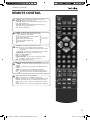
1
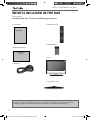
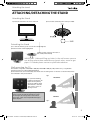
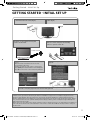
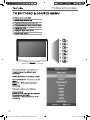
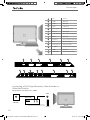
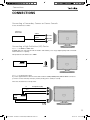
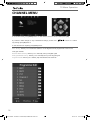
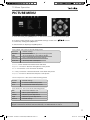
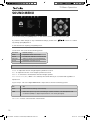
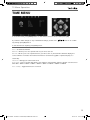
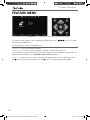
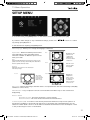
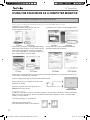
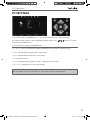
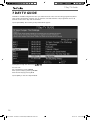
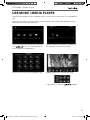
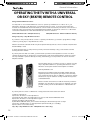
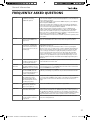
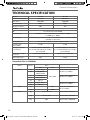
Full HD LED TV with Freeview & USB Media Player User Guide Model No LED40-248 IMPORTANT SAFETY INSTRUCTIONS Please read these instructions. All the safety and operating instructions should be read before the appliance is operated. Warnings • To reduce the risk of fire, electric shock or damage to the television, do not expose it to dust, rain or moisture, or place any objects filled with liquids on or near the television. • Do not place the television in a confined space, ensure that nothing can obstruct the ventilation openings at the rear of the television. To prevent spread of fire, keep candles or other open flames away from this product at all times • Dispose of this television and any components including batteries in an environmentally friendly manner. If in doubt, please contact your local authority for details of recycling. Safety • For your safety, this appliance is fitted with a fused moulded 3 pin mains plug. Should the fuse need to be replaced, ensure that any replacement is of the same amperage and approved with the BSI mark. • The television should be connected to a main socket outlet with a protective earthing connection. • Never try and replace the mains plug unless you have adequate qualifications and are legally authorised to do so. In the event that a replacement Mains cable is required, contact the manufacturer for a suitable replacement. • Never use the television if it is damaged in any way. • Always place the television on a flat level surface avoiding anywhere which may be subject to strong vibration. • Ensure the television is not placed on top of the power cable as the weight of the television may damage the cable and cause a safety hazard. • Never place mobile phones, speakers or any other device which may cause magnetic or radio interference with the television. If interference is apparent, move the device causing the interference away from the television. • To disconnect the apparatus from the mains, please use the all pole mains switch located on the side, underside or rear of the TV. The switch shall remain readily operable. • Batteries (battery pack or batteries installed) shall not be exposed to excessive heat such as sunshine, fire or the like. • Install the product at least 5cm from the wall for ventilation. Maintenance • To clean this unit, wipe with a soft, dry cloth. If the surfaces are extremely dirty, use a soft cloth dipped in a soap and water solution or a weak detergent solution. • Use eyeglass cleaner to remove stubborn dirt from the LCD/LED Screen. • Never use alcohol, paint thinner or benzene to clean this unit. • Before using a chemically treated cloth, read the instructions that came with the cloth carefully. CAUTION: If water or other liquid enters the television through the display panel surface, a malfunction may occur. Packaging 4 • The safest way to transport your item is in the original box/packaging - please save your packaging for this. • You will need original box/packaging in the event of warranty/service repair or support. We are unable to carry out warranty/service if you are unable to package it correctly. User Guide - Technika - LCD 32-248, 40-248.indd Sec1:4 12-Oct-11 1:01:46 PM IMPORTANT SAFETY INSTRUCTIONS Please read these instructions. All the safety and operating instructions should be read before the appliance is operated. Important Information Regarding Use of Video Games, Computers, Captions or Other Fixed Image Displays The extended use of fixed image program material can cause a permanent “shadow image” on the LCD panel. This background image is viewable on normal programs in the form of a stationary fixed image. This type of irreversible LCD/LED panel deterioration can be limited by observing the following steps: 1. Reduce the brightness/contrast setting to a minimum viewing level. 2. Do not display the fixed image for extended periods of time. 3. Turn the power off when not in actual use. Examples of images that you need to watch out for are as follows (this is not an exhaustive list): • TV Channel Logos: e.g. Shopping channel logos and pricing displays-especially if they are bright and stationary. Moving or low-contrast graphics are less likely to cause ageing of the screen. • Time Displays • Teletext: Do not view a stationary page for long period of time • TV/DVD Menus: e.g. Listings of DVD disk content • Pause Mode: Do not leave the TV in pause mode for long periods of time, e.g. When watching DVDs or videos. Important - Once ‘shadow image/screen burn’ occurs, it will never disappear and is not repairable under warranty. How do I dispose of this product? UK: Waste electrical products should not be disposed of with household waste. Separate disposal facilities exist. For your nearest facilities, please see www.recycle-more.co.uk or in store for details. ROI: Waste electrical products should not be disposed of with household waste. Separate disposal facilities exist. Check with your Local Authority or retailer for recycling advice. Batteries • Observe the correct polarity when inserting batteries. • Do not use different types of batteries together or mix old and new batteries. • Dispose of batteries in an environmentally friendly way. • Certain regions may regulate the disposal of batteries. Please consult your local authority. Cd 5 User Guide - Technika - LCD 32-248, 40-248.indd Sec1:5 12-Oct-11 1:01:46 PM CONTENTS Manufacturers Guarantee Information . . . . . . . . . . . . . . . . . . . . . . . . . . . . . . . . . . . . . . 3 Important Safety Instructions . . . . . . . . . . . . . . . . . . . . . . . . . . . . . . . . . . . . . . . . . . . . . . 4-5 What is included in the box . . . . . . . . . . . . . . . . . . . . . . . . . . . . . . . . . . . . . . . . . . . . . . . 8 Attaching/Detaching the stand and wall mounting . . . . . . . . . . . . . . . . . . . . . . . . . . . . 9 Getting Started - Initial Set Up . . . . . . . . . . . . . . . . . . . . . . . . . . . . . . . . . . . . . . . . . . . . . 11 TV Buttons and Input Source Menu . . . . . . . . . . . . . . . . . . . . . . . . . . . . . . . . . . . . . . . . . 12 Remote Control . . . . . . . . . . . . . . . . . . . . . . . . . . . . . . . . . . . . . . . . . . . . . . . . . . . . . . . . . 13 Connections . . . . . . . . . . . . . . . . . . . . . . . . . . . . . . . . . . . . . . . . . . . . . . . . . . . . . . . . . . . . 14-15 TV Menu Operation . . . . . . . . . . . . . . . . . . . . . . . . . . . . . . . . . . . . . . . . . . . . . . . . . . . . . 16-21 Channel Menu . . . . . . . . . . . . . . . . . . . . . . . . . . . . . . . . . . . . . . . . . . . . . . . . 16 Picture Menu . . . . . . . . . . . . . . . . . . . . . . . . . . . . . . . . . . . . . . . . . . . . . . . . . 17 Sound Menu . . . . . . . . . . . . . . . . . . . . . . . . . . . . . . . . . . . . . . . . . . . . . . . . . . 18 Time Menu . . . . . . . . . . . . . . . . . . . . . . . . . . . . . . . . . . . . . . . . . . . . . . . . . . . 19 Feature Menu . . . . . . . . . . . . . . . . . . . . . . . . . . . . . . . . . . . . . . . . . . . . . . . . . 20 Setup Menu . . . . . . . . . . . . . . . . . . . . . . . . . . . . . . . . . . . . . . . . . . . . . . . . . . 21 PC Operation . . . . . . . . . . . . . . . . . . . . . . . . . . . . . . . . . . . . . . . . . . . . . . . . . . . . . . . . . . . 22-23 7 Day TV Guide . . . . . . . . . . . . . . . . . . . . . . . . . . . . . . . . . . . . . . . . . . . . . . . . . . . . . . . . . 24 USB Mode / Media Player . . . . . . . . . . . . . . . . . . . . . . . . . . . . . . . . . . . . . . . . . . . . . . . . . 25 General Information . . . . . . . . . . . . . . . . . . . . . . . . . . . . . . . . . . . . . . . . . . . . . . . . . . . . . 26-30 Operating the TV with a universal or Sky (BSKYB) remote control . . . . . . 26 Frequently Asked Questions . . . . . . . . . . . . . . . . . . . . . . . . . . . . . . . . . . . . . 27 Technical Specifications . . . . . . . . . . . . . . . . . . . . . . . . . . . . . . . . . . . . . . . . . 28 Index . . . . . . . . . . . . . . . . . . . . . . . . . . . . . . . . . . . . . . . . . . . . . . . . . . . . . . . . 29 7 User Guide - Technika - LCD 32-248, 40-248.indd Sec1:7 12-Oct-11 1:01:46 PM What is included in the box WHAT IS INCLUDED IN THE BOX Accessories Included with this TV are the following accessories: 1 x User Guide 1 x Remote Control User Guide 2 x AAA Batteries 1 x Quick Start Guide Quick Start Guide 1 x TV 1 x RF Cable 1 x Stand plus screws Please save your packaging as you will need this in the event of warranty/service repair or support. We are unable to carry out warranty/service if you are unable to package it correctly. The safest way to package your item in the event of warranty/service repair is in it’s original box/packaging. 8 User Guide - Technika - LCD 32-248, 40-248.indd Sec1:8 12-Oct-11 1:01:46 PM Attaching the stand ATTACHING/DETACHING THE STAND Attaching the Stand 1) Insert the stand into the neck of the TV. 2) Secure the stand using the screws provided. Detaching the Stand 1) To remove the base, press close and rotate 45 degrees. 2) Remove the 4 screws highlighted 3) Remove the screw/s in the neck of the stand (where fitted) IMPORTANT - Before drilling any holes in the wall ensure you are not drilling where there could be any electric wires, water or gas pipes. If in doubt please contact a qualified tradesman. Wall mounting the TV This television requires a VESA 200 x 100 (26’’) VESA 400 x 200 (32’’, 40’’) wall mount, or equivalent. 1) Remove the four screws highlighted below. 2) The wall mount can now be easily attached to the mounting holes on the rear of the TV. These holes are indicated in the picture below. TV fig 1 INCORRECT For optimum viewing, if wall mounting the TV higher than eye level, the TV should be tilted downwards so that the TV’s screen is ‘face on’. See fig 1 and 2 Viewing angle TV Important – If wall mounting this TV, only use the screws already provided in the wall mounting holes. Using other screws which are longer could cause irreparable damage to internal parts. CORRECT fig 2 9 User Guide - Technika - LCD 32-248, 40-248.indd Sec1:9 12-Oct-11 1:01:51 PM 10 User Guide - Technika - LCD 32-248, 40-248.indd Sec1:10 12-Oct-11 1:01:52 PM Getting Started - Initial Set Up GETTING STARTED INITIAL SET UP 1) Using the RF cable supplied, connect the TV to the TV Aerial wall socket (Fig A) 2) Connect the power cable to the Electrical outlet (Fig B) Fig B Fig A 3) Switch on the television using the power on/off switch. 4) Insert the batteries supplied into the Remote control and press the Standby button to power on the TV Power on/off 5) You will now be welcomed with the initial set-up screen. Ecohome mode: Select this mode for the most energy efficient TV set up* If it does not appear, on the remote control, please press [MENU] then 8-8-8-8 and the menu will appear. Press OK on the remote control and tuning will start. 6) After tuning the following screen will appear. If you are missing channels, the reason for this is likely to be signal strength, you should consider connecting signal booster and re-tuning the TV. As part of our ongoing development to reduce power consumption, we have added an extra function to this Television called ‘Ecohome’ (you will see this during the first time installation set up). Power consumption using the Ecohome function is approximately 15% lower than some other modes. The picture brightness is reduced using the Ecohome function. If this function is not suitable for your viewing environment, you can select other modes as necessary. (Please note, ‘Professional’ mode is for optimum default picture settings, however, power consumption is approximately 15% higher than ‘Ecohome’ mode) Please refer to the user guide section ‘Picture settings’ in order to change the mode to one that maybe more suitable for your environment. There is also a shortcut button on the remote control called ‘P-Mode’ should you wish to change to another mode. 11 User Guide - Technika - LCD 32-248, 40-248.indd Sec1:11 12-Oct-11 1:01:52 PM User Guide - Technika - LCD 32-248, 40-248.indd Sec1:12 12-Oct-11 1:01:53 PM Remote Control REMOTE CONTROL 1 1 2 3 4 5 STANDBY - Switch on TV when in standby or vice versa MUTE - Mute the sound or vice versa TV/RADIO - Switch to Freeview and switch between TV and radio in Freeview mode TV GUIDE - Opens the 7 Day TV Guide (Freeview mode) ATV - Switch to analogue TV source USB - Switch to USB Source S.MODE - Scrolls through sound mode options P.MODE - Scrolls through picture mode options - To restart the current chapter - To advance forward to the next chapter - To stop the playback - To play in fast rewind mode - To play in fast forward mode - To play/pause 2 3 Only operate when a USB key is inserted SOURCE/AV - To display the input/source menu INFO - Press once for now/next channel information Press twice for programme information about current programme - Allows you to navigate the on-screen menus and adjust the system settings to your preference MENU - To display OSD menu EXIT - To exit all menus NUMBER BUTTONS - 0 – 9 to select a TV channel directly. - To return to the previous channel viewed FAV - To display favourites menu VOL - To increase / decrease the sound level SUBTITLE - To switch the dialogue at the bottom of the screen (on/off) ASPECT - To switch the screen between the different picture formats AUDIO - To change the audio language (if available) SLEEP - Press repeatedly to cycle through the sleep options CH To increase or decrease the channel being watched TEXT - Teletext mode - To enter Teletext INDEX - Teletext mode - To display the index page REVEAL - Teletext mode - To reveal or hide the hidden words. DISPLAY - To switch off the screen when listening to radio SIZE - Teletext mode - To change the display size in Teletext mode HOLD - Teletext mode - Hold current page which is displayed 4 5 13 User Guide - Technika - LCD 32-248, 40-248.indd Sec1:13 12-Oct-11 1:01:54 PM Connections A USB G H YPbPr VIDEO A USB USB port B HDMI 1 HDMI input C HDMI 2 HDMI input D SCART SCART input E VGA(PC) Audio In 3.5mm PC audio input F VGA(PC) VGA-PC input G COMPONENT (HD) Mini Component input (YPbPr) H VIDEO Video input I R/L (AUDIO) Video / Component audio input J RF IN RF / TV Aerial Input K COAX Audio Out Digital Coax output L CI CARD IN Common Interface Card Input M HDMI 3 HDMI input N HEADPHONES 3.5mm Headphone output B C D E F HDMI 1 HDMI 2 SCART IN PC AUDIO IN VGA (PC) IN J I R L RF IN K L COAXIAL OUT CI CARD IN M N HDMI 3 EARPHONE Connecting a DVD Player/Recorder, Video Recorder or Cable/Satellite Box TVs Input/Source should be set to SCART RF IN DVD or VCR TV Aerial Wall Socket SCART OUT RF IN RF OUT SCART 14 User Guide - Technika - LCD 32-248, 40-248.indd Sec1:14 12-Oct-11 1:01:54 PM Connections CONNECTIONS Connecting a Camcorder, Camera or Games Console Source should be set to Video Camera or Camcorder Yellow Video White Audio In L/R Red Connecting a High Definition (HD) Device Option 1 - via HDMI to HDMI cable A HDMI cable can output both video and audio and enables you to enjoy digital-quality video and audio with minimal loss of quality. TVs Input/Source should be set to HDMI. HDMI OUT HDMI Option 2 - via Component cable If you are supplied with a cable from the device which has RED, GREEN, BLUE, RED & WHITE connectors you must connect via Component (for picture) and by phono cable (for sound). TV Source should be set to Component. Component (HD) Red Green Blue Audio L/R Component Red White Audio In L/R 15 User Guide - Technika - LCD 32-248, 40-248.indd Sec1:15 12-Oct-11 1:01:55 PM TV Menu Operation CHANNEL MENU AV To access this menu, press [MENU] button on the remote control. To enter a menu press [OK] If you wish to make changes to any of the default settings, use the scroll any settings press [OK] button. buttons. To confirm To exit this menu at anytime, press [EXIT] button. Auto Tuning - Allows you to retune the television for all digital channels, digital radio stations and analogue channels. Freeview Manual Tuning- Allows you to manually tune your digital signal Analogue Manual Tuning - Allows you to manually tune your analogue signal Programme Edit - Allows you to delete, skip and add favourite channels. 16 User Guide - Technika - LCD 32-248, 40-248.indd Sec1:16 12-Oct-11 1:01:55 PM TV Menu Operation PICTURE MENU AV To access this menu, press [MENU] button on the remote control. To enter a menu press [OK] If you wish to make changes to any of the default settings, use the scroll To confirm any settings press [OK] button. buttons. To exit this menu at anytime, press [EXIT] button. Picture Mode - Choose from the following presets Standard Default settings Dynamic Recommended settings for fast moving pictures Mild Set to be lighter in colour and less bright Personal Lets you manually alter all the settings Ecohome 15% less power consumption Contrast - Switch the balance between black and white Brightness - Increase or decrease the brightness of the picture Colour - Increases the colour from black and white Tint - Lets you increase or decrease the level of tint within the picture Sharpness - Increase or decrease the sharpness of the picture Colour Temperature - Choose from the following presets Normal Default settings Warm Increases red within the picture Cool Increases blue within the picture Noise Reduction - Choose from the following presets Off Turns noise reduction off Low Minor system adjustment Middle Medium system adjustments High Maximum system adjustments Default Default settings Tip: If you do not press any buttons for 10 seconds, the menu will automatically exit. You can change the length of time before the menu exits automatically - see ‘Menu Duration’ section. 17 User Guide - Technika - LCD 32-248, 40-248.indd Sec1:17 12-Oct-11 1:01:55 PM TV Menu Operation SOUND MENU AV To access this menu, press [MENU] button on the remote control. To enter a menu press [OK] If you wish to make changes to any of the default settings, use the scroll any settings press [OK] button. buttons. To confirm To exit this menu at anytime, press [EXIT] button. Sound Mode - Choose from the following presets Standard Default settings Music Emphasises music over voices Movie Provides live and full sound for movies Personal Selects your personal sound settings Sports Emphasises sound for sports Tip: Treble and bass levels can only be adjusted when the sound mode ‘Personal’ is selected. Treble - To adjust the amount of high frequency within the sound Bass - To adjust the amount of low frequency within the sound Balance - To switch the sound between the left and right speakers Auto Volume Level (AVL) - When ‘on’ is selected, the volume will stay at a constant level regardless of input/source Digital Output - This is the digital COAX Audio output. Choose from the following options: Off Off Auto Selects the best settings automatically PCM Select this option if you are connecting to a Stereo Hi-fi via coax cable (Pulse-code modulation (PCM) is a digital representation of an analogue signal) AD Volume - Increase or decrease the overall volume 18 User Guide - Technika - LCD 32-248, 40-248.indd Sec1:18 12-Oct-11 1:01:56 PM TV Menu Operation TIME MENU AV To access this menu, press [MENU] button on the remote control. To enter a menu press [OK] If you wish to make changes to any of the default settings, use the scroll any settings press [OK] button. buttons. To confirm To exit this menu at anytime, press [EXIT] button. Clock - Set the date and time Off Time - Allows you to set a specific time for your TV to turn off On Time - Allows you to set a specific time for your TV to turn on, the channel it will then display, the source it will be on and also the volume. This function can then be toggled to repeat every day or a certain day. Time Zone - Change your current time zone Sleep Timer - Lets you set the sleep timer so the television automatically switches off after a set amount of time. Off -> 10min -> 20min -> 30min -> 60min -> 90min -> 120min -> 180min -> 240min Auto standby - Toggle the Function on and off 19 User Guide - Technika - LCD 32-248, 40-248.indd Sec1:19 12-Oct-11 1:01:57 PM TV Menu Operation FEATURE MENU AV To access this menu, press [MENU] button on the remote control. To enter a menu press [OK] If you wish to make changes to any of the default settings, use the scroll any settings press [OK] button. buttons. To confirm To exit this menu at anytime, press [EXIT] button. Schedule List - Lists your programme reminders CI Information - Pay per view services require a “smartcard” to be inserted into the TV. If you subscribe to a pay per view service the provider will issue you with a ‘CAM’ and a “smartcard”. The CAM can then be inserted into the COMMON INTERFACE PORT (CI Card In). System Lock - Allows you to lock or unlock the menu. You will be asked to enter a 4 digit password use the button to quit the password input. Use the button to clear. Default password is 0000 20 User Guide - Technika - LCD 32-248, 40-248.indd Sec1:20 12-Oct-11 1:01:57 PM TV Menu Operation SETUP MENU AV To access this menu, press [MENU] button on the remote control. To enter a menu press [OK] If you wish to make changes to any of the default settings, use the scroll any settings press [OK] button. buttons. To confirm To exit this menu at anytime, press [EXIT] button. Menu language - Allows you to change the language of the menu Aspect Ratio - Within the UK the picture format varies depending on the channel/broadcast. There are a number of different options to best meet your needs 4:3 Displays the 4:3 picture in its original size. Side bars are shown to fill the 16:9 screen Auo Automatically displays the best picture format. So the picture is in the correct position. May have black lines At the top/bottom and/or sides. 16:9 Fills the screen with a regular 16:9 signal. Original Will display the picture from the broadcaster without any change Zoom 14:9 The picture is the correct proportion but zoomed in to fill the screen Displays the 14:9 picture in the correct proportion. As a result side bars are shown on the screen Blue Screen - Changes the background when there is no input between clear and a blue background (Only available on some sources) Menu Duration - Lets you adjust the amount of time the On Screen Menu stays on the screen before disappearing Reset to default Reset Menu System - This resets the menus to factory settings. Reset TV Channels - This clears all the TV channels from the television. Software Update (USB) - From time to time we may release new firmware to improve the operation of the television (available to download). This menu lets you install the new software/firmware onto the television. Further details of how to do this will be issued with the firmware. Contact the helpline or refer to the ‘product support’ section of the website. 21 User Guide - Technika - LCD 32-248, 40-248.indd Sec1:21 12-Oct-11 1:01:58 PM PC Operation USING THE TELEVISION AS A COMPUTER MONITOR IMPORTANT – Before connecting the computer to the television you must ensure the computer settings are correct for the television. You MUST do this using your old monitor. How to set up for Windows XP & Windows Vista (connecting via VGA cable to the TV) 1) Switch on your computer 2) When finished booting up right click your 3) Left click your mouse on Properties/Personalise mouse anywhere on the screen 4) Left click your mouse on Setting/Display Settings. Ensure the screen resolution is set to what is shown in the technical specifications section toward the rear of this user guide. To correct the resolution to that of the television move the slider. 5) Left click your mouse on Advance/Advanced Settings and left click on Monitor 6) Left click on the drop down for Screen refresh rate and select 60 Hertz, if you experience picture noise or ‘flickering’, select 50 hertz or 70 hertz. 7) Click on Apply, then click Yes and the settings will be saved. 8) Now switch off your computer and connect the television (as shown) 9) Switch on the TV, select the input/source to VGA/PC and re-start your PC. Connecting a Laptop In addition to the above if you are connecting a laptop to the television you will also need to activate the VGA connection on the laptop. This can vary based on the brand of laptop you have, on many brands/ models, it is as per below. 1) Connect the laptop to the television 2) On the Laptop push buttons The screen will now switch to the television. 22 User Guide - Technika - LCD 32-248, 40-248.indd Sec1:22 12-Oct-11 1:01:59 PM PC Operation PC SETTINGS AV To access this menu, press [MENU] button on the remote control. To enter a menu press [OK] If you wish to make changes to any of the default settings, use the scroll any settings press [OK] button. buttons. To confirm To exit this menu at anytime, press [EXIT] button. Auto Adjust - Lets you automatically configure the television to be used as a computer monitor H Offset - Changes the horizontal position of the picture V Offset - Changes the vertical position of the picture Size - increase picture size Phase - To adjust delay time of phase in order to reduce the noise of picture Position Reset - Changes back to the original settings Tip: If the computer is left in-active for a period of time, the television will switch into a ‘sleep’ state (the screen will power off to save power). To switch back on press the standby button. 23 User Guide - Technika - LCD 32-248, 40-248.indd Sec1:23 12-Oct-11 1:01:59 PM 7 Day TV Guide 7 DAY TV GUIDE TV Guide is available in Digital TV mode. It provides information about forthcoming programmes (where supported by the freeview channel). You can view the start and end time of all programmes and on all channels for the next 7 days and set reminders. 1) Press [TV GUIDE]. The following 7 Day TV Guide will appear. 2) Navigate through the menu using You can now: Set a reminder by pressing GREEN View a previous day by pressing YELLOW View the next day by pressing BLUE 3) Press [EXIT] to exit the 7 day TV Guide. 24 User Guide - Technika - LCD 32-248, 40-248.indd Sec1:24 12-Oct-11 1:02:00 PM USB Mode / Media Player USB MODE / MEDIA PLAYER USB mode offers playback of various different types of content that you have saved on your USB Memory Stick. On switching to USB source the above menu screen will appear. The content will be divided into Photo, Music, Movie and Text based on file type. 1) You can navigate through the menus using the buttons. To confirm the item you scroll wish to play/view press [OK] button. 2) Select the drive you require. (If your drive only has 1 partition you will only see 1 item). 3) You can now access the item. Press OK to view. 4) While viewing you control the item using or by pressing ( i ) and using and (OK) 25 User Guide - Technika - LCD 32-248, 40-248.indd Sec1:25 12-Oct-11 1:02:00 PM General Information OPERATING THE TV WITH A UNIVERSAL OR SKY (BSKYB) REMOTE CONTROL Using a Universal Remote Control. You may wish to use a Universal Remote control to operate your Television. In order to do so, you will need to enter the ‘code’ below into your universal remote control, to do this, please follow the instructions included with the Universal remote control. Please note that if your remote control does not accept the code, this is because the software/firmware installed on the remote control is too old. Please contact the manufacturer of the Universal Remote control for assistance. Universal Remote Code - 2106 (TV functions) 2302 (DVD Functions - where included on the TV) Using a Sky / Sky+ / Sky HD Remote Control If you wish to use your Sky remote control to operate your Television, you need to programme a 4 digit code into your Sky, Sky+ or Sky HD remote control. Please note that the code below will only be accepted if the Sky remote control is a Revision 9 (launched Autumn 2010) or later. To find out which version of Sky remote you have, remove the battery cover, you should see a sticker showing the ‘Rev’ number. If your Sky remote is Rev 8 or earlier, you will need to purchase a new Sky Remote control in order to operate the TV’s functions. At the point of manufacture of this TV, the latest Revision 9 remote controls are only available to purchase directly from Sky, alternatively, you can purchase our versions from the helpline / website. The very latest versions of remote controls to operate your Sky / Sky+ / Sky HD in addition to operating the functions of the Television can be purchased from the helpline or website. www.skymediauk.co.uk Our versions (from One for All) are slightly smaller than the regular Sky remotes and operate your Sky box the same way your current Sky remote does, in addition, our versions operate the functions of your television as they include the very latest software/firmware. Please note that as we have to install the necessary software / firmware onto the remote control prior to shipping, you must provide us with your TV model number in order that we can do this. Sky Sky+/Sky HD If your Sky remote control is a Revision 9 or later, please follow the instructions below. 1) Switch on the TV set 2) Press the ‘TV’ button on the Sky Remote 3) Hold down the ‘select’ and ‘red’ buttons for 2-3 seconds until the LED blinks twice 4) Press the ‘TV’ button on the Sky Remote again 5) Enter the 4 digit code (see below) 6) The LED should blink twice, if not recheck the 4 digit code used and go back to step 1 7) Press the ‘standby’ button on the Sky Remote (The TV should go to standby) 8) Press ‘select’ to store this setting Sky / Sky+ / Sky HD Remote code - 2134 (Revision 9 or later only) 26 User Guide - Technika - LCD 32-248, 40-248.indd Sec1:26 12-Oct-11 1:02:02 PM General Information FREQUENTLY ASKED QUESTIONS General I would like to have louder sound by connecting additional speakers Subject to the TV model and connections, it is possible to connect the TV to an external amplifier or surround sound (subject to connections/inputs on the device) as follows:1) Connect a COAX cable* from the TV’s COAX output to your amplifier/ surround systems COAX input 2) Connect a 3.5mm jack to L/R phono cable* from the TV’s headphone socket (where fitted) to your amplifier/surround sound L/R input. Please note sound to the TV’s speakers will be disabled. 3) On selected models, it maybe possible to connect a SCART input/ output* switch with an additional L/R Phono cable* to the TV’s SCART socket and to the L/R Phono Input of your amplifier/surround sound. Please note due to copyright laws it is not possible to output video/sound from the TV on certain sources, i.e. HDMi, DVD etc. *cables and switches mentioned are available to purchase separately from your retailer. General Why are some options in the menu unavailable and greyed out Some options are only available in certain sources, i.e. HDMI, PC/VGA. They are unavailable in the other sources where they have no affect. TV I have tuned in Digital TV but I am not receiving any or all of the channels and/ or the channels I receive are breaking up 1) Check you are in an area that can receive Freeview. Visit www.freeview.co.uk. 2) Check you are using an aerial that is able to receive a good digital signal. In most cases, you will need an outdoor digital hi-gain/wideband aerial. In areas that have excellent Freeview coverage, you may be able to use a loft type aerial but it is highly likely that you will also need to connect a booster between the back of the TV and the TV aerial wall socket. Unfortunately, to receive a good enough digital signal, it is not possible to use a portable/indoor type aerial. This may change once the analogue signal is switched off in 2012 and the Digital signal strength is increased. TV I have re-tuned my television but when I switch it off it is not storing the channels Complete a first time installation, please refer to the set-up menu section of the manual for how to do this VCR/DVD Recorder I have connected the TV to my VCR or DVD Recorder via SCART but it is not recording In addition to connecting via SCART, you should connect the aerial cable from the wall socket to your VCR/DVD Recorder and another aerial cable from the VCR/DVD Recorder to the TV Game Consoles I have connected my PS3 to the TV via HDMI, but I am not receiving any pictures or sound on my Television 1) Ensure the TVs source is on HDMI 2) Check your settings on your PS3 are as per the PS3 instruction manual Game Consoles I have connected my Xbox 360 to the TV via Component Cables (Red, Green & Blue) but I am not receiving any sound Component cables only provide HD Pictures. For the sound you will need to connect the Red & White audio cables on the Xbox to the Red & White phono inputs on the rear of the TV. Please refer to the ‘Connections’ pages. USB Mode I have inserted a USB Memory Key, but the TV does not recognise it Ensure the USB Memory Key is formatted to type FAT32. USB Mode Can I use a USB portable hard drive with my TV? If you wish to use a portable hard drive larger than 32GB, please note that it must be formatted to the FAT32 file system in order to operate on this TV. Windows XP/Vista computers are only capable of formatting up to 32GB, therefore, you will need a software programme/utility to format larger hard drives. Please refer to the web site for more information. System Lock I have changed the password on the television and now forgotten it There is a master password of 4711, to gain access to the TV menu and reset the normal password 27 User Guide - Technika - LCD 32-248, 40-248.indd Sec1:27 12-Oct-11 1:02:02 PM General Information TECHNICAL SPECIFICATION Model 32 - 248 40 - 248 Screen size (diagonal) 32"/ 81cm 40”/ 102cm Resolution 1920x1080 1920x1080 5000:1 4000:1 Contrast Ratio Brightness cd/m2 400 430 PC RGB Yes RF 75 ohm Antenna / PAL-SECAM Video Inputs 1 x SCART, 1 x Video, 1 x Mini Component (YPbPr - 1080p), 3 x HDMI (up to 1080p) Sound Inputs 1 x 3.5mm jack for PC audio input, 1 x pair RCA Audio input shared for Video and YPbPr (component) Sound Outputs 1 x Coax Audio output , 1 x 3.5mm headphone jack Sound power, watts (RMS) 2 x 9W 2 x 9W Voltage and power consumption 110-240V 50/60Hz 44/90/120W (ecomode/standard/max) in standby less than 0.5W 110-240V 50/60Hz 68/130/180W (ecomode/standard/max) in standby less than 0.5W Dimensions including stand (mm) 771W x 536H x 228D mm 963W x 655H x 340D mm 9.0kg 12.2kg Net weight (Kgs) Compatible files in USB Mode Media File Ext. Codec Video Movie Music Picture Audio .mpg Mpeg-1, Mpeg-2 .avi Xvid, MJPEG, MPEG-4 SP/ASP .ts Mpeg-2 .mov Mpeg-4 SP/ASP .dat Mpeg-1 .mp4 Mpeg-1, Mpeg-2 .vob Mpeg-2 .mp3 - .wma - Max Resolution: 1920x1080 Max Data rate: 40Mbps MP3, WMA Max Resolution: 1920x1080 Max Data rate: 40Mbps Max Resolution: 1024x768 Max Data rate: 40Mbps MP3 WMA Sample Rate 16K-48KHz Bit rate: 320Kbps .jpg Progressive JPEG Max Resolution: 1024x768 .jpeg Baseline JPEG Max Resolution: 8192x8192 .bmp BMP Max Resolution: 6500x6500 28 User Guide - Technika - LCD 32-248, 40-248.indd Sec1:28 12-Oct-11 1:02:02 PM General Information INDEX Attaching the stand ....................................................... 9 Aspect Ratio.................................................................... 21 Auto Configuration of screen (PC) ................................ 23 Auto Tuning.................................................................... 16 Auto Volume Level ........................................................ 18 Balance ........................................................................... 18 Bass ................................................................................. 18 Blue Screen .................................................................... 21 Brightness ...................................................................... 17 Clock................................................................................ 19 Colour ............................................................................ 17 Colour Temperature ...................................................... 17 Common Interface ........................................................ 20 Connections .................................................................... 14-15 Contrast .......................................................................... 17 Detaching the base/stand .............................................. 10 Digital Output ............................................................... 18 First Time Installation .................................................... 11 Frequently Asked Questions .......................................... 27 Getting Started............................................................... 11 Horizontal Position (PC) ................................................. 23 Language ....................................................................... 21 Manual Search ................................................................ 16 Noise Reduction ............................................................ 17 Operating the TV with a universal or Sky (BSKYB) remote control .......................................... 26 Phase (PC) ....................................................................... 23 Picture Mode ................................................................. 17 Remote control .............................................................. 13 Reset to default .............................................................. 21 Sharpness ....................................................................... 17 Sleep Timer .................................................................... 19 Sound Mode .................................................................. 18 Source Menu................................................................... 12 System Lock ................................................................... 20 Technical Specifications ................................................. 28 Treble ............................................................................. 18 TV buttons ..................................................................... 12 TV Guide ........................................................................ 24 USB Mode / Media Player .............................................. 25 Using the television as a computer monitor ................ 22 Vertical Position (PC) .................................................. 23 Wall mounting ............................................................... 9 What is included in the box .......................................... 8 29 User Guide - Technika - LCD 32-248, 40-248.indd Sec1:29 12-Oct-11 1:02:02 PM 30 User Guide - Technika - LCD 32-248, 40-248.indd Sec1:30 12-Oct-11 1:02:02 PM 31 User Guide - Technika - LCD 32-248, 40-248.indd Sec1:31 12-Oct-11 1:02:02 PM WMU/MAN/0022 User Guide - Technika - LCD 32-248, 40-248.indd Sec1:32 12-Oct-11 1:02:02 PM