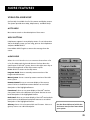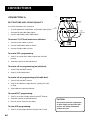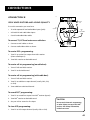
1
DRD302RA
OWNER’S
MANUAL
SATELLITE RECEIVER
Safety Information
WARNING
To reduce risk of fire or
shock hazard, do not
expose this receiver to
rain or moisture.
WARNING
RISK OF ELECTRIC SHOCK
DO NOT OPEN
Cautions
TO REDUCE THE RISK OF ELECTRIC SHOCK, DO NOT REMOVE
COVER (OR BACK). NO USER SERVICEABLE PARTS INSIDE.
REFER SERVICING TO QUALIFIED SERVICE PERSONNEL.
This symbol indicates
“dangerous voltage” inside the
product that presents a risk of
electric shock or personal injury.
This symbol indicates
important instructions
accompanying the product.
Do not stack electronic components or other objects on top of
the DSS Receiver. The slots on top of the receiver must be left
uncovered to allow proper airflow to the unit. Blocking the airflow to
the unit could impair performance or damage your receiver and other
components.
Do not stack the DSS receiver on top of a “hot component” such as an
audio power amplifier.
Refer to the accompanying "Important Safeguards" pamphlet for
additional information concerning the safe use of this product.
FCC Regulations state that unauthorized changes or modifications to
this equipment may void the user’s authority to operate it.
Note to Cable TV Installer:
This reminder is provided to call your attention to Article 820-40 of the
National Electrical Code (Section 54 of the Canadian Electrical Code,
Part 1) which provides guidelines for proper grounding and, in
particular, specifies that the cable ground shall be connected to the
grounding system of the building as close to the point of cable entry as
practical.
Note to Satellite Dish Installer:
This reminder is provided to call your attention to Article 810 and in
particular article 810-15 of the National Electrical Code which covers
proper installation and grounding of television receiving equipment as
well as to article 820-40 of the National Electrical Code which specifies
that the satellite dish cable ground shall be connected to the
grounding system of the building as close to the point of cable entry as
practical.
IMPORTANT NOTICE:
This device incorporates an anticopy process technology that is
protected by U.S. patents and other intellectual property rights. The
anticopy process is licensed for non-commerical, home use only. Reverse
engineering or disassembly is prohibited.
DSS® is a registered trademark of DIRECTV, Inc., a unit of GM Hughes Electronics
StarSight-Licensed: The manufacture and sale of the television schedule feature of this product was licensed under one or
more of the following patents of StarSight Telecast, Inc.; U.S. Patent Nos. 4,706,121; 4977,455; 5,151,789; and 5,353,121.
Table of Contents
First Things First ............................................................3
What is the DSS® System? .............................................................. 4
Ordering DSS® Programming .........................................................4
What’s in the Box ............................................................................. 5
Using This Manual ........................................................................... 6
The Only Rule: Point and select ................................... 7
Program Guides .............................................................9
Using the GUIDE Button ................................................................ 10
Getting Around in the Program Guide ...................................... 10
Changing Channels with the Number Keys (0-9) ........................ 10
Scrolling Channel By Channel .......................................................10
Scrolling Page By Page .................................................................. 11
Tuning to a Program ..................................................................... 11
Selecting A Program Guide from the Main Menu ...................... 11
Types of Program Guides............................................................... 12
Sorting the Grid and Info Guides ................................................. 14
Using the Themes Button .............................................................. 15
Exiting A Program Guide .............................................................. 15
The Menu System ........................................................17
Using the Menu System ................................................................. 18
Exiting a Screen ............................................................................. 18
Using Help ...................................................................................... 18
Menu Descriptions ......................................................................... 19
Lists & Limits ................................................................21
Setting the Ratings Limit ............................................................... 22
Setting Up Spending Limits ........................................................... 23
Creating Favorite Channel Lists ................................................... 23
Parent Approved Channel List ......................................................25
Selecting a Channel List to Use .................................................... 25
Locking the System ........................................................................ 25
Unlocking the System .................................................................... 26
More Features ..............................................................27
Pay-Per-View Programs ................................................................. 28
Using the Program Guide for PPV Programs ............................... 29
Using the Attractions Guide ......................................................... 29
Using the Purchases Menu ............................................................ 30
Reviewing and Canceling an Upcoming Purchase ...................... 30
Timer Feature ................................................................................. 31
Editing or Canceling a Timer ......................................................... 31
1
Table of Contents
The Mailbox ................................................................................... 32
Alternate Audio Programs ............................................................ 33
ALT AUD Remote Button .............................................................. 33
Picture Size ..................................................................................... 34
System Test ..................................................................................... 34
New Access Card Setup ................................................................. 34
Using On-Line Help ........................................................................ 35
Auto Help ....................................................................................... 35
Help Buttons .................................................................................. 35
Menu Help ..................................................................................... 35
Connections .................................................................37
Connecting Your DSS® Receiver to Your TV ................................. 38
Choosing a Connection ................................................................. 39
Interactive Setup ............................................................................ 44
Disabling Interactive Setup ........................................................... 44
Reference .....................................................................45
Parts of the DSS® System .............................................................. 46
World View .................................................................................... 46
Home View ..................................................................................... 47
Front Panel Controls ...................................................................... 48
Back Panel ...................................................................................... 48
Remote Control Buttons ............................................................... 49
Programming the Remote to Control Your TV ........................... 50
Using the Remote Buttons to Control Your TV ........................... 50
Remote Codes ................................................................................ 51
Glossary .......................................................................................... 52
Troubleshooting ............................................................................ 54
Running the System Test ............................................................... 54
Appendix A: Warranty Information .......................... 55
To receive a replacement receiver before your return yours: .... 56
Appendix B: FCC Regulations .................................... 58
Appendix C: Accessories ............................................ 59
Index ............................................................................ 61
2
First Things First
Hi, my name is jay...
➣
and I wrote this User Manual. You can believe me
when I tell you that you should read this page first
because it gives you a game plan for attacking this
rather large manual.
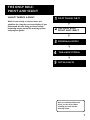
1 First Things First
Only Rule:
2 The
Point and select
➣
Read the First Four sections
3
Program Guides
4
The Menu System
5
Lists & Limits
➣
The first four sections of the manual introduce you
to your DSS® system, and show you how to use the
on-screen guides and menus. Reading these sections
gives you the basic information you need to navigate
the DSS® system.
The fifth section of the book introduces you to the
Lists & Limits feature, which lets you control the
way you watch DSS® programming by creating
favorite channel lists, and by setting ratings limits
and spending limits.
➣
Putting You in Control
What’s Left?
The rest of the book highlights the remaining
features, and includes reference information such as
a connections guide, a glossary, and an index.
Take some time right now to read
at least the first five sections.
Then, as you have time, you can
check out the rest of the book.
3
First Things First
What is the DSS® System?
You’ve purchased the DSS® Digital Satellite System, so you
already know a lot of the great things it offers. You know that
the DSS® system uses the latest satellite technology to deliver
television programming to your home. And you know that the
transmissions are digital, so the quality of the picture and audio
rivals that of laser discs and CDs. You know the dish is small—18
inches wide—and that it often can be installed in a matter of
hours. (See the DSS® System Installer Guide for specific
information.)
Those are the some of the things you probably know about the
DSS® system. But what about the things you don’t know? For
instance...
•
The DSS® system works like your TV. Pick up the DSS® remote
and push the DSS® button. Press the Channel Up/Down
buttons to scan through the channels. Press the number keys
to go directly to a channel.
•
There is an on-screen Program Guide. The Program Guide is
like a TV listing in the newspaper. It is designed to help you
select regular programs and pay-per-view events. You can
also sort the Guide to list only specific types of programs. You
can select Sports, for example, and your guide will show
current and upcoming sports programs only. Or Movies. Or
News.
•
There is the on-screen Menu System that allows you to
customize your system. You can set up your system, build
channel lists, preview coming attractions, set spending limits,
and receive mail from your program providers.
•
There are three types of On-line Help to assist you in learning
how to use the DSS® system: Auto Help, Help buttons, and
the About DSS menu.
Ordering DSS® Programming
After you have installed your system, you should contact the
service providers, DIRECTV and USSB to receive DSS®
programming.
4
Programming with DIRECTV:
Call 1-800-347-3288
Programming with USSB:
Call 1-800-204-USSB
When you order programming, you
need to know your Access Card
number. To get the number, select
Options from the Main menu, and
then select System Test. Wait for the
system to run all of it’s tests. The
Access Card number is displayed at
the end of the system test.
Write the Access Card number in the
space below for easy reference:
_________________________________
First Things First
What’s in the Box
The following items come with your RCA DSS® receiver:
•
Receiver (with access card inserted)
•
Remote Control
•
OFF ON
ON/OFF
TV
DSS
•
MENU SELECT
GUIDE
DISPLAY
DISPLAY
MENU
SELECT
ANTENNA
PREV CH
CLEAR
1
2
3
4
5
6
7
8
9
Receiver
VOL
0
ANT
CHAN
•
FAV INPUT ALT AUD
MUTE
Remote Control
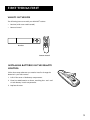
Installing Batteries In the Remote
Control
Follow these steps whenever you need to install or change the
batteries in your DSS® remote.
1. Pull off the cover of the battery compartment.
2. Place four AAA batteries as shown, matching the + and - end
of each battery in each compartment.
3. Replace the cover.
5
First Things First
Using This Manual
There are a couple of conventions used in this manual that might
help you read it.
•
Words that appear in ALL CAPS indicate the name of a
button.
•
The names of on-screen menu option are shown in italics.
Important Note about This User’s
Manual
This manual assumes that your DSS® system has been installed,
meaning:
1. The DSS® satellite dish has been installed, correctly pointed at
the satellite, and connected to your DSS® receiver.
2. The DSS® receiver is connected to your television and to a
telephone line.
3. The access card is installed in your DSS® receiver.
Your access card has been matched to your receiver, and
should already be installed when you take the receiver out of
the packing box. The access card should only be taken out of
the DSS® receiver when you are issued a new card by your
programming providers.
4. The DSS® remote control has batteries and can be
programmed to control both your DSS® receiver and your TV
(if your TV is remote-controllable).
If your system has not been installed, refer to the satellite dish
Installer's Guide for information regarding proper installation.
Then, refer to the section, “Connections,” in this manual. See
your dealer for specific information regarding professional
installation or the purchase of a Self-Installer’s Kit.
6
The Only Rule:
Point and Select
What? There’s a Rule?
➣
Well, it’s not exactly a rule, but more of a
guideline for using the on-screen displays. If you
understand this one thing, you have enough
knowledge to get around the menuing system
and program guides.
1 First Things First
Only Rule:
2 The
Point and select
➣
3 Program Guides
➣
The Menu System
5
Lists & Limits
➣
4
Once you understand Point and
Select, you can do just about
anything you want with the
menuing system.
7
The Only Rule:
Point and Select
What is Point and Select?
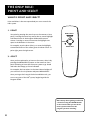
Point and Select is the two-step method you use to control the
DSS® system.
1. Point
You point by pressing the arrow keys on the remote or front
panel. Pressing the arrow keys moves the on-screen highlight
to different items in the Program Guide and the menu
screens. Pressing an arrow once moves the highlight one
space in the direction of the arrow.
For example, to point down (that is, to move the highlight
toward the bottom of the screen), press the down arrow. To
point right, press the right arrow.
MENU•SELECT
CLEAR
ARROW KEYS
2. Select
Once you have pointed to an item on the screen, select it by
pressing the MENU•SELECT button on the remote or front
panel. Selecting an item tells the menu system to go ahead
and make the change you have indicated.
For example, the instructions in the User’s Manual might tell
you to Point to the Help button and press MENU•SELECT.
Once you’ve got the hang of the Point and Select rule, you
can use any part of the DSS® system, beginning with the
Program Guide.
Don’t worry about getting stuck inside
a menu. Pressing the CLEAR button
on the remote takes you out of the
menu system and back to the
program you were watching.
8
Program Guides
What is a Program Guide?
Only Rule:
2 The
Point and select
➣
Using the Program Guide is easy as long as you
remember the Point and Select rule. Point to
items on the screen by pressing the arrow keys on
the remote or front panel. Then, press
MENU•SELECT to tune to that program.
1 First Things First
➣
A program guide is an on-screen programming
schedule. There are several types of guides, each
presenting the schedule in a different format.
3 Program Guides
➣
The Menu System
5
Lists & limits
➣
4
Take some time to explore the
different types of Program Guides
and use the one that best suits
your viewing habits.
9
Program Guides
Bringing Up the Program Guides
You can access the program guides by using the GUIDE button on
the remote, or by selecting Program Guide from the Main menu.
Using the GUIDE Button
Each press of the GUIDE button takes you to an alternate type of
program guide:
•
Press GUIDE once to see the seven-channel Grid Guide.
•
Press GUIDE again to see the five-channel Info Guide which
contains program information.
You can switch the order in which the Grid Guide and the Info
Guide appear by selecting Preferences from the Assistance menu,
and then using the arrow keys to set the Guide Format option.
Getting Around in the
Program Guide
This section describes how to change channels and move around
the Program Guide.
•
OFF ON
TV
DSS
•
MENU SELECT
GUIDE
DISPLAY
CLEAR
PREV CH
Changing Channels with the number
keys (0-9)
You can point quickly to any channel in the Program Guide by
entering the channel number with the number keys (0-9). For
example, to point to the first listing for Channel 128, press the
numbers 1-2-8 on the remote. To point to Channel 102, press 1-0-2.
1
2
3
4
5
6
7
8
9
VOL
0
Scrolling Channel By Channel
The programs that you see on the TV screen make up one
section—or page—of the total Program Guide. You can scroll to
other sections using the arrows: point to other times with the left
and right arrows; point to other channels with the up and down
arrows.
10
ANT
CHAN
•
FAV INPUT ALT AUD
MUTE
Program Guides
Scrolling Page By Page
If you want to scroll up or down through the Program Guide
faster, press the Channel Up/Down buttons on the remote
control. The highlight scrolls a page at a time. This is called
“paging.”
Tuning to a Program
•
To tune directly to a program listed in the guide, point to the
program and press MENU•SELECT.
•
To see information about a program in the guide, press
DISPLAY. Then, you can select View Channel to tune to that
channel.
If you select a future program, you are given program details. If
you choose a pay-per-view event, a second screen allows you to
buy the program, find out more information, or return to the
Guide.
Selecting A Program Guide from
the Main Menu
When you access the program guides through the Main menu,
you have more available options:
1. Press MENU•SELECT to bring up the Main menu.
2. Point to Program Guide and press MENU•SELECT.
The Program Guide menu screen appears.
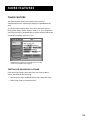
This is the Program Guide menu. Use the arrow to
scroll down to see the Attractions Guide option.
If you select a future program, you
are given program details. If you
choose a pay-per-view event, a
second screen allows you to purchase
the program, find out more
information, or return to the Guide.
11
Program Guides
Types of Program Guides
There are five types of program guides: the Grid Guide, the Info
Guide, the Topic Guide, the Channel Guide, and the Attractions
Guide.
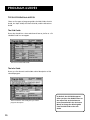
The Grid Guide
Shows the schedule in a time-and-channel format, similar to a TV
schedule listed in a newspaper.
The seven-channel Grid Guide.
The Info Guide
Shows you five channels and includes a brief description of the
selected program.
The five-channel Info Guide gives you a brief
program description.
12
By default, the Grid Guide appears
when you press the GUIDE button on
the remote. Go to the Preferences
menu (located within the Assistance
Menu) to change the default guide
from the Grid Guide to the Info
Guide.
Program Guides
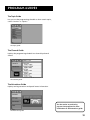
The Topic Guide
Lets you sort the programming schedule to show certain topics,
such as “movies” or “sports.”
The Topic guide.
The Channel Guide
Displays the programming schedule in a channel-by-channel
format.
The Channel guide.
The Attractions Guide
Displays coming attractions and special events information.
See the section on purchasing
pay-per-view programs for more
information on the Attractions guide.
The Attractions guide.
13
Program Guides
Sorting the Grid and Info Guides
There are six on-screen choices—called “buttons”— at the
bottom of the Grid Guide and the Info Guide: down arrow,
Movies, Sports, Other, All, and Sort.
The Sorting buttons are at the bottom of the screen.
The arrow button allows you to scroll down through other
channels in the guide. Point to the down arrow, and then press
MENU•SELECT to scroll down through the program guide.
Using the Sorting Buttons
The remaining buttons at the bottom of the guide are called
“sorting buttons.” These buttons allow you to simplify the guide
to show specific types of information such as movies, or sports.
The Movies button lists movies only. After selecting Movies, point
to the Theme button that appears and press MENU•SELECT to
sort the guide to list specific types of movies, such as comedies or
thrillers.
The Sports button lists sporting events only. After selecting
Sports, point to the Theme button that appears and press
MENU•SELECT to sort the guide to highlight specific types of
sports, such as basketball or soccer.
14
Program Guides
Allows you choose from a list of sorting topics. Once you have
selected a sorting topic from the list, your guide will be
simplified to show only that type of program.
After selecting a topic, a Themes button may appear in the place
of the Other button.
Resets the guide to show all available channels and listings.
The Sort button takes you to the Guide Filter menu screen
Using the Themes Button
After you select one of the sorting buttons, the name of that
button changes into the Themes button. Use the Themes button
to further sort the Grid or Info Guide to show subtopics
(“themes”). For example, you could simplify the guide to show
“baseball” under the Sports sorting button, or “comedies” under
Movies.
Exiting A Program Guide
There are two ways to exit a Program Guide:
•
Point to a channel and press MENU•SELECT.
•
Press CLEAR on the remote.
The Program Guide disappears and you are returned to regular
program viewing. If you have selected a pay-per-view program,
a display screen allows you to purchase the selected program.
15
The Menu System
What’s a Menu?
➣
The DSS® menu is a list of choices, just like a menu
in a restaurant. And, just as a restaurant menu is
divided into sections such as appetizers, entrees,
and desserts, the on-screen menus are also
separated into sections to help you find the
information you need.
1 First Things First
Only Rule:
2 The
Point and select
➣
Don’t Forget Point and Select
Program Guides
4
The Menu System
➣
As with all of the on-screen displays, you use Point
and Select to navigate.
3
➣
5
Lists & Limits
Use the MENU•SELECT button to
bring up the Main Menu, and then
use Point and Select to choose a
menu option.
17
The Menu System
Using the Menu System
To bring up the Main Menu, press MENU•SELECT on the remote.
The Main Menu.
To use the menu system, you need to know the Point and Select
rule. Use the arrows on the remote to point to an item on the
screen, and then press MENU•SELECT to select it.
Exit and Help
There are Exit and Help buttons at the top of most screens. Point
to Exit and press MENU•SELECT to leave that screen. Point to
Help and press MENU•SELECT to see more information about
that screen.
Exiting a Screen
There are two ways to exit a menu:
•
Point to Exit and press MENU•SELECT.
•
Press the CLEAR button on the remote control. The on-screen
displays clear from the screen and you return to TV viewing.
If the Main Menu doesn’t appear
when you press MENU•SELECT, the
remote might not be in DSS® mode.
Try pressing the DSS button on the
remote, and then MENU•SELECT.
Using Help
All menus have a Help button. For example, selecting the Help
button from the Main Menu shows you information about using
the Main Menu screen.
The rest of the Help buttons in the menu system bring up helpful
information explaining one aspect of that menu.
18
Context-Sensitive Help
Most of the screens contain
information to help you decide what
to do next. If you get stuck, look for
the help text.
The Menu System
Menu Descriptions
This section briefly describes each of the available Main Menu
options. Detailed information about each menu is included in the
sections of the manual which describe each menu.
Program Guide
Shows the on-screen programming schedules.
Mailbox
Use to read your mail messages.
Purchases
Use to review or cancel upcoming purchases, and to review
past purchases.
Timers
Allows you to schedule the DSS® system to tune to a specific
channel at a specific time, and to record that channel.
Lists and Limits
Allows you to set ratings and spending limits, and to create
favorite channel lists.
Options
Allows you to run the system test and install a new access card.
Dish Pointing
Use to find your dish pointing coordinates, and to access the
on-screen signal strength meter.
Assistance
Shows you information about using the system and setting the
system to your personal preferences.
Explore, Explore, Explore!
Once you’ve learned the basics, feel free to poke around the
menu system because exploring is the best way to learn. The
context-sensitive help at the bottom of the screen provides
instructions for getting through any particular menu or control
panel. Remember, press CLEAR at any time to leave the menu
system and return to regular DSS® viewing.
Don’t Forget about the
CLEAR button
Press the CLEAR button on the
remote to remove the on-screen
menus and return to normal viewing.
19
The Menu System
20
Lists & Limits
Different Drummers
3
Program Guides
4
The Menu System
➣
In addition to activating the ratings, spending, and
channel limits, the system lock feature keeps
anyone from changing any of the limits without
first entering a four-digit password.
The Only Rule:
Point and select
➣
You can set up a parent approved channel list so
that selected channels cannot be viewed when the
system is locked unless the system password is
entered.
2
➣
Especially for Parents
First Things First
➣
Not everybody likes to watch the same thing, and
within your own family, you might not want
everybody to be able to watch everything. The
Lists & Limits feature puts you in control of your
DSS® viewing by letting you create channel lists
and set ratings and spending limits which can be
password protected.
1
5
Lists & Limits
21
Lists & Limits
An Overview
When you select Lists & Limits from the Main Menu, the first
screen you see is the Ratings Limit screen. By moving down
through the other options, you can set per-event spending limits,
create favorite channels lists, and also lock the system by
assigning a password.
Setting the Ratings Limit
The Ratings Limit menu enables you to set a maximum viewing
limit for rated movies (based on the MPAA ratings system), as
long as the program provider has transmitted the proper code.
•
Note that the ratings limit cannot be enforced if a program
has not been rated, if rating information for that program is
not transmitted by the program provider, or if the system has
not been locked.
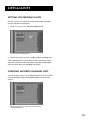
1. Point to Rating Limit and press MENU•SELECT.
Use the arrow keys to move the selector up and down.
2. Use the up and down arrows to move the rating selector to
the highest rating you want to be able to view. In the
preceding illustration, movies that are rated up to and
including an “R” rating can be viewed.
After the ratings limit is set and the system is locked, you must
enter the system password to watch programs with a rating
higher than your limit.
22
You need to lock the system in order
for rating limits and channel lists to
go into effect. See “Locking the
System” for details
Lists & Limits
Setting Up Spending Limits
Use the Spending Limit option to indicate a per-event spending
limit for pay-per-view programs.
1. Point to Spending Limit, and press MENU•SELECT.
Set a per-event spending limit.
2. Use the arrow keys to enter a single-program spending limit.
After a spending limit is set and the system is locked, you must
enter the system password to purchase a pay-per-view program
that costs more than your spending limit allows.
Creating Favorite Channel Lists
You can create as many as four different channel lists that can be
easily accessed by using the FAV•INPUT button on the remote
control.
Select the Channel Lists option to create or edit a
favorite channels list.
23
Lists & Limits
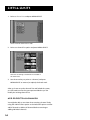
1. Point to Channel Lists and press MENU•SELECT.
Select a Favorite channel list to edit.
2. Point to a channel list option and press MENU•SELECT.
Channels containing a checkmark are included in
the channel list .
3. Use the arrow keys to point to a channel, and press
MENU•SELECT to remove (or replace) the check mark.
After you have set up the channel lists and locked the system,
you will need to enter the system password before you can
modify the existing channel lists.
Add or Delete All Channels
You might be able to save time when creating a channel list by
using the Add All Chans option or the Delete All option to either
add all channels or delete all channels before removing or
adding individual channels.
24
Lists & Limits
Parent Approved Channel List
The Parent Apprv channel list enables you to limit access to
channels by creating a list of acceptable channels, and then
locking the system.
When the system is locked, the Parent Apprv list overrides all
other channel lists, and requires that you enter the four-digit
system password to view an unapproved channel.
Note that when you enter the system password to view an
unapproved channel, all spending, ratings, and channel limits
remain unlocked until you turn off the receiver (see “Locking the
System” for more information).
•
OFF ON
TV
DSS
•
MENU SELECT
Selecting a Channel List to Use
GUIDE
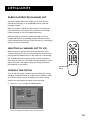
When you turn on the DSS receiver, the unit defaults to the
“Normal” channel list. You can easily change the channel list by
pressing the FAV•INPUT button on the remote to scroll through
the available channel lists (Normal, FAV A, FAV B, and FAV C).
The current channel list is reflected in the channel banner at the
top of the screen. that appears when you change channels or
press DISPLAY on the remote.
DISPLAY
PREV CH
CLEAR
1
2
3
4
5
6
7
8
9
VOL
0
ANT
CHAN
•
FAV INPUT ALT AUD
MUTE
FAV•INPUT
button
Locking the System
You can lock the system in order to put into effect the ratings,
spending, and channel limits you have set up. In addition, when
you lock the system, no one can modify any of these setting
without first entering the four-digit system password.
1. Point to Lock System and press MENU•SELECT.
Enter a four-digit system password to lock the system.
25
Lists & Limits
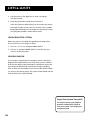
2. Use the arrows or the digit keys to enter a four-digit
system password.
3. Enter the password a second time to confirm it.
After the system has been locked, you must enter the correct
password in order to access the Lists & Limits menu, so Don’t
Forget Your Password! If you do forget your password, contact
your program provider’s authorization center.
Unlocking the System
When the system is unlocked, the spending and ratings limits,
that you have set are no longer in effect.
1. Point to Unlock Limits and press MENU•SELECT.
2. Point to Yes and press MENU•SELECT to confirm that you
want to unlock the system.
Session Unlock
If your system is locked and you attempt to access a channel or
program that is blocked by one or more limits, you are asked to
enter the four-digit system password to override the system lock.
If you enter the password to override the rating or spending
limit, all limits are unlocked until you turn off the receiver. When
you turn on the receiver again, the system will be locked, and the
normal channel list will be selected.
Forget Your System Password?
You need to contact your program
provider’s authorization center to
reset your system if you forget your
system password.
26
More Features
What? There’s More?
If you’ve read this far, then you’ve seen how to
use the on-screen program guides, how to get
around in the menu system, and how to use the
Lists & Limits feature. This section highlights
the rest of the features offered by your DSS®
system.
Don’t be afraid to use Point and
Select to explore all of the
features on your own.
27
More Features
Pay-Per-View Programs
Pay-per-view programs (PPV) are programs that you purchase—
like a movie ticket—on an event-by-event basis. For instance,
there might be a specific channel that runs nothing but previews
for movies. After previewing the movie, you can purchase it or
find out more details about it. PPV programs can also be found
in the Program Guide.
Purchasing and Viewing
There are several ways to purchase PPV movies and events:
•
Tune to a PPV program while using the channel buttons on
the remote to scan through the channel lists.
•
Select a PPV program from the Program Guide.
•
Select a coming attraction from the Attractions menu.
Tuning to a PPV Program
When you use the channel buttons or digits on the remote to
tune to a Pay-Per-View channel, you need to press the DISPLAY
button to bring up the Program Details screen in order to
purchase a program.
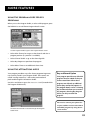
Program Details screen.
Follow the on-screen instructions to purchase the selected
program.
28
You may need to enter your four-digit
system password to order a PPV
program if it costs more than the
spending limit you set up in the Lists
& Limits menu.
More Features
Using the Program Guide for PPV
Programs
When you use the Program Guide, to select a PPV program, press
the DISPLAY to see a different Program Details screen.
Use the Program Guide to get to the Program Details screen.
•
Select View Channel to see go to that channel and view a
program preview (if a preview is available).
•
Select Channel Guide to go to the channel guide.
•
Select Buy Program to purchase the program.
•
Select Other Times to see additional show times.
Using the Attractions Guide
Your program providers may offer future programming events
not currently listed in your Program Guide. These events are
called “coming attractions,” and can be previewed and
purchased through the Attractions Guide.
Use Point and Select to go to the Attractions Guide (located within
the Program Guide menu).
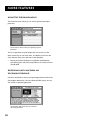
The Attractions Guide is accessed through the Program
Guide menu.
Buy and Record Option
Your program provider may offer PPV
programs that are coded so that you
cannot record them. When these
programs are offered, an additional
option (Buy and Record) appears in
the program details screen. Selecting
Buy and Record allows you to record
the program; selecting Buy Program
allows you only to watch the
program.
You need to connect your phone line
to your satellite receiver to be able to
order PPV programs by using the onscreen menus.
29
More Features
Using the Purchases Menu
The Purchases menu allows you to review upcoming and past
purchases.
The Purchases menu shows you upcoming or past
purchases.
The list of purchases may be longer than one screen; use the
down arrow keys to see more items. The display also shows the
title, channel, date, time, and cost of each program.
•
Note that the Past Purchases list might be modified after
each billing cycle and still show purchases for which you have
already paid.
Reviewing and Canceling an
Upcoming Purchase
Use Point and Select to choose an upcoming purchase and review
the program description. From the Purchase Edit screen, you can
also cancel an upcoming purchase.
The Purchase Edit screen lets you cancel an
upcoming purchase.
30
More Features
Timer Feature
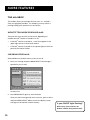
The Timer feature allows you to preset your system to
automatically tune to a particular channel at a predetermined
time.
To use the Timer feature, select Timers from the main menu to
bring up the Timers screen. Select a Timer (1, 2, 3, or 4) and then
use the arrow keys to complete the on-screen sentence. When the
sentence is complete, select Run Timer.
Complete the sentence to set up the timer for each
of the four available Timer options.
Editing or Canceling a Timer
From the Timers screen, select the Timer you want to edit or
cancel, and then do the following:
•
Use the arrows keys to edit the Timer, then select Run Timer.
•
Select Clear Timer to cancel the timer.
31
More Features
The Mailbox
The mailbox shows you messages that are sent—or “mailed”—
from your program providers. For example, you may receive a
message calling your attention to a new service.
How to tell when you have mail
There are two ways to tell if you have mail, depending on
whether the DSS® receiver is turned on or off.
•
If the DSS® receiver is turned on, a mail icon appears in the
upper right corner of the channel marker.
•
If the DSS® receiver is turned off, the power light on the front
panel of the receiver flashes.
Checking your mail
Select Mailbox on the Main menu to view your mail.
1. Point to a message and press MENU•SELECT. The message is
opened for you to read.
The Mail menu.
2. Press MENU•SELECT again to close the letter.
After you read a message and want to erase it, point to Erase
and press MENU•SELECT. When you exit the display screen,
messages not erased are saved in memory.
Is your ON/OFF Light Flashing?
Don’t worry, your receiver’s not
broken. It means that you have mail.
32
More Features
Mailbox Size
The mailbox has enough memory to store as many as ten (10)
200-character messages. You should periodically review and
erase your mail messages to prevent any mail messages from
being erased by the system when memory runs low.
Alternate Audio Programs
Alternate Audio allows you to select different audio programs
(when available) to be played with the video. For example,
audio broadcast in a second language may be available for
certain programs.
There are two ways to change the audio:
•
Press ALT AUD on the remote.
•
Point to Alternate Audio from the Preferences menu and
press MENU•SELECT.
ALT AUD Remote Button
Temporary audio selections are made by pressing ALT AUD on
the remote. All the available audio types are selected one after
another as you continue pressing the ALT AUD button. Once
selected, the chosen audio remains selected until it is changed
or until the DSS® receiver is turned off.
Alternate Audio Display Screen
When you select Alternate Audio from the Preferences menu,
the Alternate Audio display screen comes up.
Point to the audio program type you want and press
MENU•SELECT. A check mark next to the program means you
have selected that program. The DSS® system will then
automatically set the audio program to the selected audio
program type when that type is available.
33
More Features
Picture Size
The Picture size display screen allows you to choose between a
standard TV screen and a Cinema option. A standard TV screen
has an aspect ratio of 4:3; the Cinema option has an aspect ratio
of 16:9.
You should only use the Cinema option if you have a
CinemaScreen® TV; using the Cinema option on a standard TV
screen could crop the picture.
System Test
The System Test display screen is accessed through the Options
menu, and allows you to initiate diagnostic procedures on the
DSS® system. You should use this feature to get your Access Card
number, or when your receiver doesn’t seem to be working
correctly. There are four separate tests: signal, tuning, phone
connection, and access card.
A message screen appears, telling you whether the system passed
each test. If your system fails a test, run the system test several
times before concluding that there is a problem. Occasional
fluctuations in the phone line or satellite signal can give
temporary false readings.
New Access Card Setup
Periodically, your program provider may issue you a replacement
access card. The New Access Card Setup display screen allows you
to transfer the information from the old card onto the new one.
Follow the display screen prompts to initialize your new card.
Once you have transferred the information to the new card, your
old card becomes invalid.
Because your specific account information and custom settings
are stored in the access card, power failures should have no
effect on your DSS® system.
34
More Features
Using On-Line Help
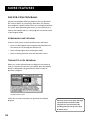
On-line Help is available for all of the menus and display screens.
The System provides Auto Help, Help buttons, and Menu Help.
Auto Help
Most menus contain a short description of that menu.
Help Buttons
Help buttons appear in many display screens. To see information
about the display screen you are using, point to the Help button
and press MENU•SELECT.
Press MENU• SELECT again to remove the message from the
screen.
Menu Help
Select About DSS from the Assistance menu to choose from a list
of on-line Help topics. Point and select to find out about the
specific parts of the DSS® system, then use the right arrow key to
continue through each of the Help screens or press
MENU•SELECT to return to the Help menu.
Program Guide shows a screen-by-screen overview of the
Program Guide features.
Menu System shows a screen-by-screen overview of the DSS®
menu system.
Remote Control shows an on-screen display of the remote
control. Point to the different remote buttons to see a brief
description of the highlighted button.
Front Panel shows an on-screen display of the DSS® receiver
front panel. Point to the different front panel features to see a
brief description of the highlighted feature.
Back Panel shows an on-screen display of the DSS® receiver back
panel. Point to the different back panel features to see a brief
description of the highlighted feature.
Glossary shows a list of common DSS® and TV terms. Point to a
glossary item to see a brief description.
Use the About DSS menu (within the
Assistance menu) to learn more about
your system.
35
More Features
36
Connections
Things to Know Before
Connecting Components
Protect Your Components from Power Surges
•
Connect all components before plugging any power cords
into the wall outlet.
•
Always turn off the DSS® receiver, TV and other
components before you connect or disconnect any cables.
Position Cables Correctly to Avoid Audio Hum or
Interference
•
Insert all cable plugs firmly into their jacks.
•
Place the audio/video cables to the sides of the TV’s back
panel instead of straight down the middle after you
connect your components.
•
Try not to coil any twin-lead cables and keep them away
from the audio/video cables as much as possible.
•
Make sure all antennas and cables are properly grounded.
Refer to the Safety Tips sheet packed with your unit.
Protect Your Components from Overheating
•
Do not block ventilation holes in any of the components.
Arrange the components so that air can circulate freely.
•
Do not stack components.
•
Allow adequate ventilation when placing your
components in a stand.
•
Place an amplifier or DSS® receiver on the top shelf of the
stand so heated air rising from it will not flow around
other components.
37
Connections
Connecting Your DSS® Receiver to
Your TV
If your DSS® system has not been professionally installed, or if
you move your system or add a component, refer to these pages
to help you connect your system.
Jacks and Cables
S-Video Jack and Cable (S-VHS)
The S-Video jack provides the best picture quality for your DSS®
system.
This jack is available on many TVs and is used in conjunction with
audio cables to connect the DSS® receiver to your TV. Remember
also to connect the left and right audio cables because the SVideo jack carries only the picture signal, not the sound.
S-Video Jack
Audio/Video Jacks and Cables (RCA-type)
The audio/video jacks provide very good picture and stereo
sound quality, and should be used if your TV has no S-Video jack.
Theses jacks are used for most audio/video connections between
components. The DSS® receiver audio/video jacks are color coded
(yellow for video, red for right audio, and white for left audio). If
your TV has only one input for audio (mono), connect it to the
right (red) audio jack on the DSS® receiver.
Audio/Video Jack
RF Jacks and Coaxial Cables (F-type)
The RF jacks provide good picture and mono sound quality, and
are to be used if audio/video connections are not available for
your TV.
These jacks are required for antenna or cable-TV connections.
The RF jacks on the DSS® receiver are labeled IN FROM ANT and
OUT TO TV. The coaxial cable supplied with your DSS® system is
used to connect the RF jacks between the DSS® receiver and your
TV’s antenna input.
38
RF Jack
Connections
Choosing a Connection
The following pages show four examples of hookups commonly
used to connect the DSS® receiver with a TV and other
components. Refer to your TV and VCR Owner’s Manuals for
more information on hooking up your specific components.
Connection A
Provides the best possible picture and stereo audio quality.
To use Connection A, you must have:
•
TV with S-Video input, plus separate RF and audio/video
inputs (jacks).
•
VCR with RF and audio/video inputs and outputs
•
S-Video, coaxial, and audio/video cables
Connection B
Provides very good picture and stereo audio quality.
To use Connection B, you must have:
•
TV with separate RF and audio/video inputs (jacks)
•
VCR with RF and audio/video inputs and outputs
•
Coaxial and audio/video cables
Connection C
Provides good picture and mono audio quality.
To use Connection C, you must have:
•
TV with RF input (jack)
•
VCR with RF and audio/video inputs
•
Coaxial and audio/video cables
Connection D
Provides good picture and mono audio quality.
To use Connection D, you must have:
•
TV with RF input (jack)
•
Coaxial cables
39
Connections
Connection A
TV
IN
S-VIDEO
VIDEO
R AUDIO L
Best Picture and Sound Quality
SATELLITE
DISH
To use this connection you must have:
•
TV with separate RF, audio/video, and S-Video inputs (jacks)
•
VCR with RF and audio/video inputs
•
Coaxial, audio/video, and S-Video cables
To connect TV, VCR and antenna or cable box.
1. Connect coaxial cables as shown.
DSS
RECEIVER
OUT TO TV
IN FROM ANT
VCR
VIDEO
R
VIDEO
R
AUDIO
L
S-VIDEO
CH4
CH3
IN FROM ANT
CH3
CH4
VIDEO IN
AUDIO
L
SATELLITE IN
CABLE
OR
OFF-AIR ANTENNA
AUDIO IN
R
L
OUT TO TV
VIDEO OUT AUDIO OUT
2. Connect audio/video cables as shown.
3. Connect S-Video cable as shown.
To receive DSS® programming:
1. Tune TV to receive the S-Video output from the DSS®
receiver.
2. Tune DSS® receiver to desired channel.
To receive off-air programming (no cable box):
1. Turn off VCR and DSS® receiver.
2. Tune TV to desired channel.
To receive off-air programming (with cable box):
1. Turn off VCR and DSS® receiver.
2. Tune TV to cable box output channel (usually CH2, CH3,
or CH4).
3. Tune cable box to desired channel.
To record DSS® programming:
1. Tune TV to receive S-Video output from DSS® receiver.
2. Tune DSS® receiver to desired channel.
CAUTION
3. Set your VCR to record on line input.
Do not stack electronic components
or other objects on top of the DSS®
receiver. See Safety Information,
inside front cover.
To view VCR programming:
1. Tune TV to VCR output channel (usually CH3 or CH4).
40
Connections
Connection B
TV
IN
VIDEO
R AUDIO L
SATELLITE
DISH
Very Good Picture and Sound Quality
To use this connection you must have:
•
TV with separate RF and audio/video inputs (jacks)
•
VCR with RF and audio/video inputs
•
Coaxial and audio/video cables
To connect TV, VCR and antenna or cable box.
DSS
RECEIVER
OUT TO TV
IN FROM ANT
VCR
CH3
CH4
1. Connect coaxial cables as shown.
IN FROM ANT
CH4
CH3
VIDEO IN
VIDEO
R
VIDEO
R
AUDIO
AUDIO
L
L
SATELLITE IN
CABLE
OR
OFF-AIR ANTENNA
AUDIO IN
R
L
OUT TO TV
VIDEO OUT AUDIO OUT
2. Connect audio/video cables as shown.
To receive DSS® programming:
1. Tune TV to receive line output from DSS® receiver
(often called Input 1).
2. Tune DSS® receiver to desired channel.
To receive off-air programming (no cable box):
1. Turn off VCR and DSS® receiver.
2. Tune TV to desired channel.
To receive off-air programming (with cable box):
1. Turn off VCR and DSS® receiver.
2. Tune TV to cable box output channel (usually CH2, CH3,
or CH4).
3. Tune cable box to desired channel.
To record DSS® programming:
1. Tune TV to record line output from DSS® receiver (Input1).
2. Tune DSS® receiver to desired channel.
3. Set your VCR to record on line input.
To view VCR programming:
1. Tune TV to VCR output channel (usually CH3 or CH4).
CAUTION
Do not stack electronic components
or other objects on top of the DSS®
receiver. See Safety Information,
inside front cover.
41
Connections
TV
Connection C
IN
SATELLITE
DISH
Good Picture and Sound Quality
To use this connection you must have:
•
TV with RF input (jack)
•
VCR with RF and audio/video inputs
•
Coaxial and audio/video cables
To connect TV, VCR, and antenna or cable box.
DSS
RECEIVER
OUT TO TV
VIDEO
R
VIDEO
R
CH4
CH3
VCR
IN FROM ANT
CH3
CH4
VIDEO IN
L
AUDIO
L
SATELLITE IN
CABLE
OR
OFF-AIR ANTENNA
AUDIO IN
R
1. Connect coaxial cables and audio/video cables as shown.
AUDIO
IN FROM ANT
L
OUT TO TV
VIDEO OUT AUDIO OUT
To receive DSS® programming:
•
Tune TV to channel 3 or 4 (depending on how you set
the CH3/CH4 switch on the back of the receiver).
To receive off-air programming (no cable box):
1. Turn off VCR and DSS® receiver.
2. Tune TV to desired channel.
To receive cable programming (with cable box):
1. Turn off VCR and DSS® receiver.
2. Tune TV to cable box output channel (usually CH2, CH3,
or CH4).
3. Tune cable box to desired channel.
To record DSS® programming:
1. Tune TV to the channel on which you receive the DSS®
signal.
2. Tune DSS® receiver to desired channel.
3. Set VCR to record on line input.
CAUTION
To view VCR programming:
1. Tune TV to VCR output channel (usually CH3 or CH4).
2. Turn DSS® receiver off.
42
Do not stack electronic components
or other objects on top of the DSS®
receiver. See Safety Information,
inside front cover.
Connections
Connection D
TV
IN
Good Picture and Sound Quality)
SATELLITE
DISH
To use this connection you must have:
•
TV with RF input
DSS
RECEIVER
CABLE
OR
OFF-AIR ANTENNA
OUT TO TV
CH4
CH3
•
VIDEO
R
VIDEO
R
AUDIO
L
IN FROM ANT
Coaxial cables
AUDIO
L
SATELLITE IN
To connect TV and antenna or cable box:
1. Connect coaxial cables as shown.
To receive DSS® programming:
•
Tune TV to channel 3 or 4 (depending on how you set
the CH3/CH4 switch on the back of the receiver.
To receive off-air programming (no cable box):
1. Turn off DSS® receiver.
2. Tune TV to desired channel.
To receive cable programming (with cable box):
1. Turn off DSS® receiver.
2. Tune TV to cable box output channel (usually CH2,
CH3, or CH4).
3. Tune cable box to desired channel.
CAUTION
Do not stack electronic components
or other objects on top of the DSS®
receiver. See Safety Information,
inside front cover.
43
Connections
Interactive Setup
If you self-installed your satellite dish, you may have already used
the interactive setup to find the dish pointing coordinates,
acquire and fine-tune the signal, and run a system test.
If you need to run the interactive setup again, go to the
Assistance menu and select Setup.
If you just want to check your dish pointing coordinates, or run
the signal strength meter, select Dish Pointing from the Main
menu.
Disabling Interactive Setup
The Interactive Setup menus automatically appear on-screen the
first time you plug in your receiver, and when power is restored
after a power loss.
The final step of the Interactive Setup allows you to disable the
automatic appearance of the Interactive Setup.
To enable it again, select Setup from the Assistance menu and
then follow the Interactive Setup routine until the end, where
you can choose to enable the automatic feature.
44
Reference
How It All Works
Although the DSS® system is simple to use,
there are a number of parts in the system.
Don’t be overwhelmed. This section explains
how these different parts work together to bring
a picture to your screen.
What’s It For?
This section also describes the controlls located
on the front and back of the receiver.
What Else Can it Do?
Your remote capable of controlling other
devices as well. This section tells you how to
program the remote to control TVs, VCRs,
Laserdisc players, and other equipment.
The information in this section tells
you more about your system, and less
about how the system works.
45
Reference
Parts of the DSS® System
One way to understand the DSS® system is to look at the
different parts of the system—from the studio down to the DSS®
receiver and remote control in your living room.
Uplink Center
Satellite Dish Antenna
Satellite
➣
Authorization Center
World View
These parts make up the DSS® system “big picture.”
Uplink Center Transmits programming up to the satellite.
Satellite Relays the programming signals back to your satellite dish.
The satellite is parked above the equator, in geostationary orbit
22,300 miles above the earth.
DSS® Satellite Dish Antenna Receives the satellite signals. Because
the satellite is so powerful, the dish can be as small as 18 inches.
Program Provider Authorization Center Processes billing statements.
Your DSS® system is linked to the Service Center through the phone
jack on the back of your DSS® receiver.
46
Reference
Home View
These parts are inside of or attached to your house.
Satellite Dish
DSS Receiver Telephone Jack
Access Card
and Security Clip
Remote Control
DSS® Satellite Dish Picks up the satellite’s coded program
information and relays it to your DSS® receiver. (Your satellite dish
may be installed in different locations on or around your house. The
satellite dish must, however, be pointed in a southern direction
toward the satellite.)
DSS® Receiver Receives the TV program information and sends it to
your TV or VCR.
Telephone Jack Connects to the phone jack on the back of the DSS®
receiver. The DSS® receiver uses a toll-free number once a month to
update your access card. This update only takes a few seconds and
ensures that you will have continuous service. The system
automatically hangs up if you pick up the phone when the DSS®
receiver is calling out.
Television If your television is remote controllable, you can program
the DSS® Universal TV Remote to change channels and volume.
Remote Control (included with your DSS® system) Controls the DSS®
system as well as most remote controllable TVs (when programmed
by you).
Access Card (installed in DSS® receiver) Must be inserted for you to
use the DSS® system! Provides system security and authorization of
DSS® services. Do not remove the card except when issued a new card
as a replacement for the original.
47
Reference
Front Panel Controls
ON/OFF
DISPLAY
MENU
SELECT
ANTENNA
The Access Card door slides open so that you can replace the card when necessary.
ON/OFF Turns the DSS® receiver’s power on or off.
DISPLAY Brings up the on-screen channel marker.
ANTENNA Switches the source of the video signal from DSS® satellite signals to an off-air antenna or cable
signal.
ARROWS Press the navigation arrows to move the on-screen highlight up, down, left, or right. Using the
arrows to highlight a menu item is also called “pointing.”
MENU•SELECT Brings up the Main menu. If you are already in the menu system, press MENU•SELECT to
select a highlighted choice.
ACCESS CARD Identifies you to your program providers. The DSS® system requires a valid access card.
Back Panel
IN
FROM
ANT
PHONE JACK
S-VIDEO
VIDEO
R
AUDIO
L
WIDE BAND DATA
SATELLITE IN
CH 4
OUT
TO
TV
CH 3
REMOTE IN
IN FROM ANT Use to connect an off-air antenna or cable TV signal to the DSS® system.
OUT TO TV Use to connect the DSS® receiver to your TV. However, if your TV has audio/video jacks, you
should use those jacks to get better picture and sound quality.
CH3/CH4 SWITCH If a coaxial cable is used to connect the DSS® receiver to your TV, you must set the CH3/CH4
SWITCH. For example, to see the DSS® signal on TV channel 3, set the switch to 3.
S-VIDEO Provides the best picture quality. If your TV has S-VIDEO capability, use this jack along with the
audio/video jacks to connect the DSS® receiver to your TV.
VIDEO Provides better picture quality than the OUT TO TV jack. If your TV has audio/video capability, use this
jack to connect the DSS® receiver to your TV. You must also connect the AUDIO jacks.
AUDIO (R and L) Provide better sound quality than the OUT TO TV jack. If your TV has audio/video capability,
use these jacks to connect the DSS® receiver to your TV. You must also connect the VIDEO jack.
WIDE BAND DATA PORTS This port allows you to connect the DSS® system to future services and accessories as
they become available. A shielded cable and additional hardware may be required.
SATELLITE IN Use to connect the DSS® receiver to the satellite dish.
PHONE JACK Use to connect a phone line to the DSS® receiver. The DSS® system requires a phone line
connection to periodically call out to program providers.
REMOTE IN Use in conjunction with a remote control signal extender to control the DSS® receiver from
another room.
48
Reference
Remote Control Buttons
•
OFF ON
OFF•ON
TV
DSS
Turns the device you are controlling on or off.
TV Tells the remote to control the TV.
•
MENU SELECT
VCR Tells the remote to control the VCR.
GUIDE
DISPLAY
CLEAR
PREV CH
ALT Tells the remote to control an alternative device connected
to your TV.
DSS® Turns on the DSS® receiver and tells the remote to control
DSS® system functions.
1
2
3
4
5
6
7
8
9
DISPLAY Brings up the on-screen channel marker.
MENU•SELECT Brings up the Main menu. If you are already in
the menu system, press MENU•SELECT to select a highlighted
choice.
VOL
0
ARROWS Use the navigation arrows to move the on-screen
highlight up, down, left, or right. Using the arrows to highlight a
menu item is also called “pointing.”
ANT
CHAN
•
FAV INPUT ALT AUD
MUTE
GUIDE Brings up the on-screen program guide. Press the GUIDE
button several times to toggle through the different types of
guides.
PREV CH Moves you back and forth between your last two
selected channels.
CLEAR Removes the on screen displays and return to normal
viewing.
DIGIT KEYS (0 - 9) Use the digit keys to tune directly to a channel.
If you are in the menu system, use the digit keys to enter numbers
for the time, date, channel and passwords.
CHAN UP/DOWN Use to scan up and down through the channels
in the current channel list. If you are in the program guide or
menu system, use the CHAN UP/DOWN buttons to page up and
down a screen at a time.
VOL UP/DOWN Adjusts the audio volume.
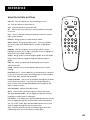
MUTE Turns off the sound. Press again to restore the sound.
ALT AUD (Alternate Audio) Use to toggle through the available
languages or audio types for a program.
FAV•INPUT In TV mode, press the FAV•INPUT button one or more
times to toggle through the available video inputs connected to
the TV. In DSS® mode, press the FAV•INPUT button one or more
times to toggle through the favorite channel lists.
ANT Lets you switch the source of the video signal from DSS®
satellite signals to an off-air antenna or cable signal.
49
Reference
Programming the Remote Control
The remote can be programmed to control most brands of remote
controllable TV. Most RCA, GE and ProScan TVs and VCRs are
already programmed. Other manufacturer’s brands need to be
programmed.
Programming the Remote to Control
Your TV
To determine whether your remote needs to be programmed,
turn the TV on, point the remote at the TV, and press the TV
button. Then press CHAN UP or DOWN to see whether the TV
responds to the remote commands.
Follow these steps to program your remote to control your TV.
1. Turn on the TV.
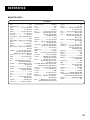
2. Look up your brand and code number(s) on the TV Code list
on page 51.
3. Press and hold the TV button.
4. Enter the three-digit code from the code list.
5. Release the TV button and press OFF•ON or CHAN UP/DOWN
to see if the TV responds to the remote commands. If it
doesn’t, try the next code listed for your brand.
6. Repeat these steps until the TV responds to the remote
commands.
Using the Remote Buttons to Control
Your TV
Once the remote has been programmed with the correct codes,
you are ready to use it to control your devices.
This remote may not operate all
models of the brands that are shown.
Use the codes shown in this manual,
or on the sheet packed with your
remote.
To operate the device:
1. Press the TV button to set the remote to control the TV.
2. Use the remote buttons to control the TV.
50
After you program the remote to
control your TV, record your TV code
here for easy reference.
Reference
Remote Codes
TV Codes
Akai .................................................. 002
Anam National ................................ 038
AOC .......................... 011, 019, 027, 088
Candle .............................. 011, 027, 033
Citizen ...................... 011, 027, 033, 064
Colortyme ........................ 011, 027, 084
Concerto ................................... 011, 027
Contec/Cony ..... 036, 037, 040, 042, 064
Craig ................................................. 064
Curtis Mathes ... 000, 011, 015, 027, 037
CXC ................................................... 064
Daewoo ............................ 011, 019, 027
Daytron .................................... 011, 027
Electrohome ..... 006, 011, 014,027, 038,
061, 068
Emerson ........... 011, 026, 027, 028, 029,
030, 031, 032, 037, 042, 053,
064,065, 067, 075, 076, 078, 079
Envision .................................... 011, 027
Fisher ........................ 017, 021, 039, 041
Funai ................................................. 064
GE .......... 000, 008, 009, 011, 012, 027,
038, 068, 086, 089, 091
Goldstar ........... 003, 004, 006, 011, 019,
027,037, 050
Hallmark ................................... 011, 027
Hitachi ............. 009, 011, 027, 036, 037,
040, 047, 063, 080
Infinity .............................................. 013
JBL ..................................................... 013
Jensen ....................................... 011, 027
JVC ................... 012, 024, 036, 037, 040,
048, 051, 074
Kawasho ........................... 002, 011, 027
Kenwood .................. 006, 011, 014, 027
Kloss Novabeam ....................... 035, 043
KTV ................................................... 078
Loewe ............................................... 013
Luxman ..................................... 011, 027
LXI ..................... 013, 018, 021, 023, 054
Magnavox ........ 006, 007, 010, 011, 013,
016, 027, 033, 035,043,
049, 066, 087, 089
Marants ............................................ 013
Marantz .................... 011, 013, 027, 069
MGA ......... 006, 011, 014, 019, 022,027,
041, 056, 061, 068
Mitsubishi ......... 006, 011, 014, 019, 022,
027, 041, 055, 056, 061, 068
MTC .................................. 011, 019, 027
Multivision ........................................ 081
NAD .......................................... 018, 023
NEC ........... 011, 014, 019, 027, 038, 084
Panasonic .................. 012, 013, 038, 086
Penney ............. 000, 008, 011, 019, 027,
040, 068, 077, 086, 088
Philco ............... 006, 007, 010, 011, 013,
016, 019, 027, 033, 035, 037,
038, 043, 087, 089
Philips 002, 006, 007, 010, 011, 013, 016,
033, 035, 037, 038, 043, 066, 073
Pioneer ............. 011, 027, 045, 062, 093
Portland .................... 011, 019, 027, 037
ProScan ............................................. 000
Proton ....................... 011, 027, 037, 072
Quasar .............................. 012, 038, 092
Radio Shack ...... 000, 021, 025, 036, 037,
059, 064, 078
RCA .......... 000, 006, 011, 012, 019, 027,
034, 038, 044, 046, 072, 088, 100
Realistic ............................................. 021
Sampo ........................................ 011, 027
Samsung ........... 006, 011, 014, 015, 019,
027, 036, 037, 077
Sanyo ......... 017, 021, 039, 056, 057, 058
Scott ................................... 028, 037, 064
Sears ......... 000, 006, 011, 014, 017, 018,
021, 023, 027, 039, 040, 041,
051, 071, 083
Sharp ........ 011, 020, 025, 027, 037, 052,
053, 059, 060
Sony ................................................... 002
Soundesign ....................... 011, 027, 033
Sylvania ............ 006, 007, 010, 011, 013,
016, 027, 033, 035, 043,
049, 066, 087, 089
Symphonic ................................. 064, 076
Tatung ............................................... 038
Technics ............................................. 012
Techwood .................................. 011, 027
Teknika ............. 011, 019, 027, 033, 036,
037, 040, 066
Telecaption ........................................ 090
TMK ........................................... 011, 027
Toshiba ..................... 018, 021, 023, 040,
071, 077, 085
Universal .................................... 008, 009
Victor ................................................. 051
Vidtech ...................................... 019, 027
Wards ................ 000, 005, 006, 007, 008
009, 010, 011, 013, 019, 025, 027, 028,
035, 043, 059, 066 076, 082, 089
Yamaha ..................... 006, 014, 019, 027
Zenith ................................................ 001
51
Reference
Glossary
The following is a list of terms used in this manual. There is also a glossary contained within the Assistance
menu of your DSS® system.
Access Card
Identifies you to the DSS® service providers and is required for your DSS® system to work. Do not remove the
access card except when a new card has been issued to replace the original.
Alternate Audio
Refers to the different audio channels that may be broadcast in conjunction with a video program. A foreign
language translation is an example.
Ant Button
Remote control buttons that toggles the input signal to your TV from the antenna or cable signals to the
satellite signal. Similar in function to that of TV/VCR buttons on some VCRs and remote controls.
Attractions
Previews of special programs broadcast by your program provider.
Azimuth
Refers to the left-to-right positioning of your DSS® dish. When you enter your zip code (or latitude and
longitude), the display screen provides the number corresponding to an azimuth setting for your location.
DSS® Receiver
Receives, processes, and converts the digitally compressed satellite signals into audio and video.
Elevation
Refers to the up and down positioning of your DSS® dish. When you enter your zip code (or latitude and
longitude), the display screen provides the number corresponding to the elevation setting for your location.
Limits
There are three kinds of limits. The Ratings Limit allows you to control program viewing of rated programs by
ratings level. The Spending Limit controls spending on a cost-per-program basis. The Parent Approved channel
list allows you to select which channels can be viewed when the system is locked.
Locks
The means of restricting access to certain features of the DSS® system. The lock is controlled by a 4-digit
password. The closed or open lock icon in the channel marker indicates whether your system is locked or
unlocked.
Mailbox
Stores incoming electronic messages sent to you by your program providers. The Mailbox is accessed through
the on-screen menu system, and can store up to ten messages of forty characters each.
52
Reference
Main Menu
The first list of choices in the DSS® on-screen menu system. Press the MENU button on the remote or front
panel to bring up the Main menu.
Past Purchases
Detailed list of the programs that you have already purchased and viewed.
Point and Select
The method of using the remote control (or front panel) buttons to navigate to and make choices among the
different parts of the on-screen displays.
Program Guide
Lists and updates the programs and services available from your program providers.
Ratings Limit
Provides a means of restricting viewing of rated programs, based on program rating information. The
operation of this feature depends upon the availability and accuracy of data supplied from and broadcast by
the program provider.
Signal Meter
An on-screen display that indicates the relative strength of the satellite signal and sounds a test tone to help
you lock in on the satellite signal. The signal meter is used when you adjust your DSS® dish.
Spending Limit
Provides a means of restricting viewing; based on cost-per-program limit.
System Test
Provides a diagnostics check that can be used to determine that the main components of the DSS® system—
signal, tuning, phone, and access card—are connected and working properly.
Themes
Provides a way to simplify the Program Guide and make it easier to find programs of special interest to you.
Upcoming Purchases
Detailed list of the programs you have purchased but have not yet been broadcast.
53
Reference
Troubleshooting
The DSS® System Test allows you to run a basic diagnostics check
on your DSS® system. If you are experiencing any trouble with
your system, run the system test.
Make sure that
•
All connections—jacks, cables, etc. are correctly in place. See
Connecting Your DSS® Receiver, page 46, for more
information.
•
There are batteries in the remote, and that they are working
correctly.
•
The access card is installed in the receiver.
Running the System Test
Follow these steps to run the diagnostics system test on your
system.
1. Turn on your TV and the DSS® receiver.
2. Press DSS® to put remote in DSS® mode, then press
MENU•SELECT to bring up the Main menu.
3. Point to and select Options.
4. Point to and select System Test. Follow the on-screen
directions after the test is completed.
5. If your system does not pass the system test, check any of
these potential trouble areas: cabling, pointing the satellite
dish, phone connection, and access card.
6. If you continue to have problems, call 1-800-679-4776.
54
Appendix A: Warranty Information
Toll-Free Telephone Product Help
You can reach Thomson Consumer Electronics at the following number:
1-800-679-4776 (Toll free inside U.S.A.)
Our toll-free DSS® System number operates from
8:00 a.m. to 10:00 p.m. EST on weekdays and
10:00 a.m. to 10:00 p.m. EST Saturday and Sunday.
Thomson provides a toll-free telephone number to help you with any problems you may encounter with your
DSS® System, as many problems can be diagnosed over the phone. If necessary, a replacement unit can be
shipped to you. Please have your DSS® System model/serial number and date of purchase ready when
you call. If your unit is out of warranty, we will quote the cost of an exchange unit to you.
Returning Equipment to Thomson for Repair or Exchange
If we are unable to resolve your problem over the phone we will gladly service your unit or exchange it for a
new or refurbished unit. Refer to the limited warranty included in the booklet to learn about your specific
rights and responsibilities. Always consult Thomson and get a Return Authorization number before returning anything.
Obtain a Return Authorization (RA) number from the telephone representative before returning your
equipment to avoid delays, accounting errors, or even loss of your unit.
Important Information to Customers Who Ship Defective Equipment to Thomson Consumer
Electronics
The Thomson representative who authorizes the return of your equipment will give you an RA number over
the phone. The representative will also provide you with instructions on where and how to return your unit.
Write the number in large, clear characters on the outside of the box. To avoid confusion and misunderstandings,
shipments without an RA number clearly visible on the outside of the box will be returned to you at your expense.
Include a brief note describing the problem and any conversations you have had with Thomson personnel
about the problem. Include your name, address and model/serial number of your unit. These numbers are
located on the back of your receiver. If your DSS® System is within the warranty period, please provide a copy
of the bill of sale to verify purchase date. Use the original box and packing material to protect the equipment
from damage in shipment. For your protection, insure all shipments for full replacement value and use a reliable
shipper. Thomson assumes no responsibility for warranty shipments from the customer to the factory if not
shipped in the manner prescribed by Thomson.
Digital Satellite System (DSS®) Limited Warranty
What your warranty covers:
•
•
Any defect in materials or workmanship.
Basic installation, provided installation is performed by a Thomson Consumer Electronics Authorized
Installer.
For how long after your purchase:
•
•
•
90 days - Installation which includes parts and labor.
90 days - Unit exchange, which includes parts and labor.
91 days to 1 year – Unit exchange, which includes parts only; you pay the labor.
(The warranty period for rental units begins with the first rental or 45 days from date of shipment to the
customer, whichever comes first.)
55
Appendix A: Warranty Information
What we will do:
•
•
During the initial 90 days:
Exchange the defective portion of your DSS® with a new or, at our option, refurbished unit and correct any
basic installation defects at no cost to you.
After the 90 days and within one year:
Exchange the defective portion of your DSS® with a new or, at our option, refurbished unit. We will bill you
a flat exchange charge to replace a defective receiver. This charge covers the labor cost for its repair. Labor
costs for the removal and re-installation of any equipment are your responsibility.
How you get service:
•
•
•
•
•
Call 1-800-679-4776 and have your unit’s date of purchase and model/serial number ready. The model/serial
number information is on the back of your receiver.
A representative will troubleshoot your problem over the phone.
If the representative determines that you should receive a replacement receiver you will be provided with a
Return Authorization (RA) number and the location of a nearby exchange point if one exists. No returns
will be accepted without the RA number.
If the representative determines that your antenna/dish is defective they will arrange for its repair or
replacement.
If the representative determines that installation is defective they will arrange for its repair.
To receive a replacement receiver before your return yours:
If you are located near an exchange point:
1. We will send a replacement unit to our exchange point next business day delivery in the continental USA.
2. The exchange location will notify you of its arrival.
3. Take your unit and your evidence of purchase date, such as a bill of sale, to the exchange location and you
will be provided the new or refurbished unit. Please retain all accessories such as the remote control hand
unit.
4. If the repairs are covered by your warranty, you will not be billed.
If you are not located near an exchange point:
1. Provide your Discover, Mastercard, or Visa account number and expiration date to your phone
representative. This is for security purposes only and your account will not be charged at this time.
2. We will send you a replacement unit next business day delivery in the continental USA.
3. If you return the unit to us within 14 days from the date you were provided an RA, only items not covered
by warranty will be charged to your account. If your unit is not received within 14 days, the suggested retail
value of the receiver will be charged to your credit card. This amount will be credited if the unit is
subsequently received.
4. Ship your defective unit back to us using the replacement unit’s carton. Shipping instructions will be
included on the carton along with your RA number which will allow you to easily ship the unit back to us.
Make sure you insure your shipment in case of damage or loss. Include with the shipment:
• Evidence of purchase date such as a bill of sale.
• A brief note describing the receiver’s problem.
• Your name, address, and phone number.
Thomson assumes no responsibility of warranty shipments from the customer to the factory if not
shipped in the manner prescribed by Thomson.
56
Appendix A: Warranty Information
To receive a replacement receiver after we have received your unit:
•
•
•
•
•
Write the RA number on the outside of the carton used to return the unit. Make sure you insure your
shipment in case of damage or loss.
Carefully pack the unit using the original box and packing material if possible. Please retain all accessories
that were included with your unit such as the remote control hand unit.
Include with the shipment:
– Evidence of purchase date such as a bill of sale.
– A brief note describing the receiver’s problem.
– Your name, address, and phone number.
Include a cashier’s check or money order for payment if there are any out of warranty labor or parts
charges which were indicated by the representative, and you elect not to use your credit card.
After we receive your product, a new or refurbished unit will be shipped to you next business day delivery
in the continental USA.
What your warranty does not cover:
•
•
•
•
•
•
•
•
•
•
•
•
Acts of God, such as but not limited to lightning damage.
Adjustment of customer controls.
Damage from misuse or neglect.
A unit that has been modified or incorporated into other products or is used for institutional or other
commercial purposes.
Batteries.
Units purchased, serviced, or operated outside the USA.
For units intended for use in Alaska, this warranty does not cover the installation or the dish antenna. It
only covers the DSS® receiver.
Loss of programming.
Shipping damage if the unit was not packed and shipped in the manner prescribed by Thomson.
Storage fees may be charged by the exchange point if you fail to pick up the replacement unit in a timely
manner.
Any installation other than a basic installation. A basic installation consists of:
– Antenna mounted to a single family dwelling using 100 ft. or less of cable.
– Antenna grounded to meet National Electrical Code (NEC).
– Routing of the cabling through a normal frame structure or only one layer of masonry.
– One TV connected to the antenna.
– A telephone cable and connection installed at the connected TV.
Installations performed by anyone other than Thomson Consumer Electronics Authorized Installers.
Product Registration:
•
Please complete and mail the Product Registration Card packed with your DSS® product. It will make it
easier to contact you should it ever be necessary. The return of the card is not required for warranty
coverage.
How state law relates to this warranty:
•
This warranty gives you specific legal rights and you may have other rights that vary from state to state.
If you purchased your product outside the USA:
•
This warranty does not apply. Contact your dealer for warranty information.
57
Appendix B: FCC Regulations
FCC Registration Information
Your DSS® equipment is registered with the Federal Communications Commission and is in compliance with parts
15B and 68, FCC Rules and Regulations.
1. Notification to the Local Telephone Company.
On the bottom of this equipment is a label indicating among other information, the FCC Registration number
and Ringer Equivalence Number (REN) for the equipment. You must, upon request, provide this information to
your telephone company.
The REN is useful to determine the number of devices you may connect to your telephone line and still have all
these devices ring when your telephone number is called. In most (but not all) areas, the sum of the RENs of all
devices connected to one line should not exceed 5. To be certain of the number of devices you may connect to
your line as determined by the REN, you should contact your local telephone company.
Notes: This equipment may not be used on coin service provided by the telephone company.
Party lines are subject to state tariffs, and therefore, you may not be able to use your own telephone equipment
if you are on a party line. Check with your local telephone company.
Notice must be given to the telephone company upon permanent disconnection of your DSS® equipment from
your line.
2. Rights of the Telephone Company.
Should your equipment cause trouble on your line which may harm the telephone network, the telephone
company shall, where practicable, notify you that temporary discontinuance of service may be required. Where
prior notice is not practicable and the circumstances warrant such action, the telephone company may
temporarily discontinue service immediately. In case of such temporary discontinuance, the telephone company
must: (1) promptly notify you of such temporary discontinuance (2) afford you the opportunity to correct the
situation and (3) inform you of your right to bring a complaint to the Commission pursuant to procedures set
forth in Subpart E of Part 68, FCC Rules and Regulations.
The telephone company may make changes in its communications facilities, equipment, operations of procedures
where such action is required in the operation of its business and not inconsistent with FCC Rules and
Regulations. If these changes are expected to affect the use or performance of your telephone equipment, the
telephone company must give you adequate notice, in writing, to allow you to maintain uninterrupted service.
Radio Interference
This equipment has been type tested and found to comply with the limits for a Class B Digital Device in
accordance with the specifications in Part 15 of FCC Rules. These rules are designed to provide reasonable
protection against radio and television interference in a residential installation. This equipment generates, uses
and can radiate radio frequency energy and, if not installed and used in accordance with the instructions, may
cause harmful interference to radio communications. However, there is no guarantee that interference will not
occur in a particular installation.
If this equipment does cause interference to radio or television reception (which you can determine by turning
the equipment off and on), try to correct the interference by one or more of the following measures.
• Reorient or relocate the receiving antenna (that is, the antenna for radio or television that is “receiving” the
interference).
• Change the position of the DSS® satellite receiver with respect to the radio or television equipment that is
receiving interference.
• Move the DSS® satellite receiver away from the equipment that is receiving interference.
• Plug the DSS® satellite receiver into a different wall outlet so that the DSS® satellite receiver and the
equipment receiving interference are on different branch circuits.
If these measures do not eliminate the interference, please consult your dealer or an experienced radio/television
technician for additional suggestions. Also, the Federal Communications Commission has prepared a helpful
booklet, “How To Identify and Resolve Radio/TV Interference Problems”. This booklet is available from the U.S.
Government Printing Office, Washington, D.C. 20402. Please specify stock number 004-000-00345-4 when
ordering copies.
58
Appendix C: Accessories
Accessory Order Form for RCA DSS® Models
Audio/Video Cables
Description
RG-6 Coaxial Burial
Cable with
weatherproof “F”
connectors
Part No.
Price
Qty Total
RG-6 Coaxial Cable
12 feet
D912
$12.95
25 feet
D925
$15.95
50 feet
D950
$21.95
75 feet
D975
$29.95
100 feet
D901
$29.95
6 feet
D906
$12.95
12 feet
D914
$14.95
S-Video Cable
D913
$12.95
“F” Connector
D905
$ 5.30
Grounding Block
D902
$ 2.95
TVRO Bullet Amplifier
D903
$24.95
Self-Installer’s Kit
DKIT96
$69.95
Stereo Audio/Video
Cable with gold RCAtype connectors
Stereo Audio/Video Cable
S-VHS Video Cable
(2) Weatherproof “F”
Connectors for RG-6
coaxial cable
Grounding Block for
RG-6 coaxial cable
Prices are subject to change without notice.
Miscellaneous Supplies
Total Merchandise ($10 Minimum Order) ............................
$
Sales Tax .............................................................................
$
We are required by law to collect the appropriate sales tax
for each individual state, country, and locality to which
the merchandise is being sent.
Shipping, Handling, and Insurance ......................................
$
Total Amount Enclosed ........................................................
$
5.00
Self-Installer’s Kit
Use VISA or MasterCard preferably.
Money order or check must be in U.S. currency only.
Detach Here
✂
No COD or CASH.
All accessories are subject to availability.
Where applicable, we will ship a superseding model.
Please complete other side also
59
Appendix C: Accessories
To order accessories, contact your local RCA Dealer.
If a dealer is not nearby, you can also follow the
instructions below to order by telephone.
United States and Canadian Orders
To place your order by phone, have your Visa or
MasterCard ready and call the toll-free number
listed below between 8 AM and 8 PM Eastern
Standard Time. Use this number only to place
an order for accessory items listed on this
order form.
1 – 800 – 338 – 0376
Most times your order will be shipped UPS within
72 hours of receipt. If ever it is not possible to ship
within 30 days, we will notify you with an update
on your order and an option to cancel.
To place your order by mail, detach and mail the
completed order form with credit card information,
money order, or check in U.S. currency (made
payable to Thomson Consumer Electronics, Inc.) to
the following address:
RCA Video Accessories
P.O. Box 8419
Ronks, PA 17573
For more information on these accessories (or
current prices), write to the following
address:
Video Accessories Customer Service
Thomson Consumer Electronics, Inc.
Distributor & Special Products
2000 Clements Bridge Rd
Deptford, NJ 08096-2088
International Orders
This offer is valid only in the 50 United States and
Canada. For international orders, please send your
request for quotation (not an order) to:
International Customer Service
Thomson Consumer Electronics, Inc.
Distributor & Special Products
2000 Clements Bridge Rd
Deptford, NJ 08096-2088
Charge your order on your VISA
or MasterCard by
filling in below
USE YOUR CREDIT CARD
®
IMPORTANT: Copy complete account number
from your VISA card
My card expires:
IMPORTANT: Copy complete account number
from your MasterCard
Copy Number
above your
name on
MasterCard
s r
r
TM
My card
expires:
AUTHORIZED SIGNATURE
Prices are subject to change without notice.
PLEASE
Print or type your name and
address clearly. This will be your
mailing label.
A complete and correct order will
save you days of waiting.
Name:
Street:
Apt:
City:
Zip:
✂
State:
60
Index
A
F
N
Access Card 47
Flashing ON/OFF light 32
New Access Card Setup 34
new card setup 34
Front Panel controls 48
Programming the Remote to
conrol a TV 50
Purchases menu 30
ANTENNA 48
O
Purchasing a PPV program 28
ALT AUD button 33
ARROWS 48
On-Line Help 35
DISPLAY 48
R
Alternate audio programs 33
ON/OFF Indicator Light
Arrow keys 8
MENU•SELECT 48
Attractions Guide 13, 29
ON/OFF 48
number 4
Audio/video jacks 38
Auto Help 35
Back Panel controls 48
AUDIO 48
G
SATELLITE IN 48
installing batteries 5
setup 50
P
S
auto-help 35
Password, forgetting 26
S-Video jack 38
menu help 35
Past purchases 30
Satellite 46
on-line 35
Pay-Per-View Programs 28
Satellite Dish 47
Help Buttons 35
Picture size 34
Session unlock 26
Help-line (toll-free) 55
PPV (pay-per-view) 28
Sort button 15
Product help-line 55
Sorting the Program
Guide 14
H
Help 18, 35
OUT TO TV 48
S-VIDEO 48
buttons 49
RF jacks 38
LOW SPEED DATA port 48
REMOTE IN 48
Remote control
Ordering DSS® Programming
4
IN FROM ANT 48
PHONE JACK 48
ON/OFF Light, flashing 32
Receiver 47
Ordering DSS programming
4
Grid Guide 12
B
flashing 32
I
Program Guide 9
VIDEO 48
Info Guide 12
All Button 15
Spending limits 23
WIDE BAND DATA port 48
Interactive setup 44
Arrow button 14
System controls 25
Attractions Guide 13
System Test 34
Batteries
installing in the remote 5
Buy and Record Option 29
C
Channel Guide 13
Cinema screen 34
CLEAR button 8, 18
Coming attractions 29
L
bringing up 10
Limited Warranty 55–57
Channel guide 13
Exit Button 15
M
exiting 15
Mailbox 32
Grid Guide 12
DIRECTV: 4
E
Exiting a menu 18
Exiting A Program Guide 15
T
Timer feature 31
editing or cancelling 31
checking your mail 32
Other 15
deleting mail messages 32
scrolling channel by
channel 10
Topic Guide 13
scrolling page by page 11
Troubleshooting 54
selecting from the
Main Menu 11
Tuning to a PPV program 28
Assistance 19
sorting 14
U
Dish Pointing 19
Sports button 14
exiting 18
Unlocking the system 26
Theme button 15
Mailbox 19
Topic Guide 13
Options 19
tuning to a channel 11
Program Guide 19
types 11
Main menu 18
MENU•SELECT button 8, 49
D
use to get access card
number 34
Menus
Purchases 19
Timers 19
Movies button 14
setting up 31
temporarily 26
Upcoming purchases 30
USSB 4
W
warranty information 55
61
Thomson Consumer Electronics is one of the first corporations to
take part in a special program to improve our environment.
Thomson has committed itself to a voluntary initiative program
through the U.S. Environmental Protection Agency. The
program’s purpose is to reduce toxic air emissions and to
promote pollution prevention.
Thomson’s involvement includes a concentrated effort to phase
in new water-based paints to replace solvent-based paints
normally used in our manufacturing operations. The key benefit
of these new paints is to significantly reduce air pollution.
Thomson Consumer Electronics remains committed to improving
our manufacturing process through changes like these to help
our environment. At Thomson, on-going efforts to maintain our
valuable natural resources will continue to be a priority.
If your DSS® system needs service, please contact your dealer
or the nearest Servicenter from the yellow pages. Please do
not send any products to the Indianapolis address listed in
this manual or on the carton. This will only add delays in
service for your product.
10330 North Meridian Street
Indianapolis, IN 46290
©1996 Thomson Consumer Electronics, Inc.
Trademark(s)® Registered
Marca(s) Registrada(s)
Printed in USA
TOCOM 15176350
100%
RECYCLED PAPER
MINIMUM 50% POST CONSUMER