1
15
16
17
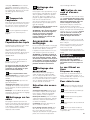
Handle Positions
Transporting cleaner
A
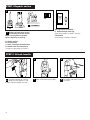
15 Plug cord into electrical outlet.
To turn cleaner ON, push
switch (A) toward front of cleaner.
To turn cleaner OFF, push (A) toward
back of cleaner.
18
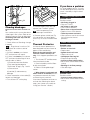
The handle of your cleaner has
16 three positions; upright for
storage and when using cleaning
tools; operating position for general operation on carpet and floors;
low for reaching under low furniture.
Step on handle release lever to
lower handle.
17 To move your cleaner from
room to room, put handle in
upright position, tilt cleaner back on
rear wheels and push forward.
20
19
C
D
B
18 The cleaner can also be moved
by using carrying handle.
A
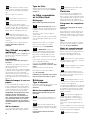
Carpet height adjustment
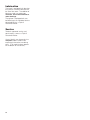
The cleaning of carpet and rugs
19 takes place at the nozzle (A).
When it is necessary to raise and
lower the nozzle for various carpet
pile heights, slide the nozzle control
knob (B) to the desired setting.
20 For ease in sliding knob, the
handle should be in the upright
position (C).
The nozzle will not move into the
adjusted position until the cleaner
handle is lowered to the operating
position (D).
22
21
HIGH
BARE
FLOOR
For maximum cleaning perfor-
21 mance, the following carpet
height settings are recommended.
• Lowest setting: for all types of carpet
• Higher settings: for very deep pile
carpet where easier pushing effort is
desired, while maintaining good
cleaning performance.
Note: If the cleaner is difficult to push,
slide knob to the next higher setting.
Edge cleaning
edge groomers are pro22 Special
vided on both sides of the nozzle
to remove dirt in carpet near baseboards and furniture. Guide either side
of nozzle parallel to edge of carpet or
furniture.
5