1
4-241-667-14(2)
FM Stereo
FM-AM Receiver
Operating Instructions
STR-VA333ES
© 2002 Sony Corporation
WARNING
To prevent fire or shock hazard, do not
expose the unit to rain or moisture.
To prevent fire, do not cover the ventilation of the
apparatus with news papers, table-cloths, curtains,
etc. And don’t place lighted candles on the apparatus.
To prevent fire or shock hazard, do not place objects
filled with liquids, such as vases, on the apparatus.
Don’t throw away the battery with
general house waste, dispose of it
correctly as chemical waste.
Do not install the appliance in a confined space, such
as a bookcase or built-in cabinet.
About This Manual
• The instructions in this manual are for model
STR-VA333ES. Check your model number by
looking at the lower right corner of the front panel.
• The instructions in this manual describe the controls
on the receiver. You can also use the controls on the
supplied remote if they have the same or similar
names as those on the receiver. For details on the
use of your remote:
See the separate operating instructions supplied
with the remote.
About area codes
The area code of the receiver you purchased is
shown on the upper portion of the rear panel (see
the illustration below).
AC OUTLET
L
–
+
–
+
CENTER
–
BACK
L
–
+
–
+
+
IMPEDANCE SELECTOR
4Ω
ROUND
Except for European model
4-XXX-XXX-XX AA
SPEAKERS
ONT
8Ω
Area code
L
ENERGY STAR® is a U.S.
registered mark.
As an ENERGY STAR® partner,
Sony Corporation has determined
that this product meets the ENERGY
STAR® guidelines for energy
efficiency.
Any differences in operation, according to the
area code, are clearly indicated in the text, for
example, “Models of area code AA only”.
This receiver incorporates Dolby* Digital and Pro
Logic Surround and the DTS** Digital Surround
System.
* Manufactured under license from Dolby
Laboratories.
“Dolby”, “Pro Logic” and the double-D symbol are
trademarks of Dolby Laboratories.
** “DTS”, “DTS-ES Extended Surround” and
“Neo:6” are trademarks of Digital Theater
Systems, Inc.
2GB
Table of Contents
List of Button Locations and
Reference Pages
Main unit ............................................... 4
Getting Started
1: Check how to hookup your
components ..................................... 6
1a: Connecting components with
digital audio output jacks ............ 8
1b: Connecting components with multi
channel output jacks .................. 11
1c: Connecting components with only
analog audio jacks ..................... 13
2: Connecting the antennas .................. 15
3: Connecting speakers ........................ 16
4: Connecting the AC power cord ....... 18
5: Setting up the speakers .................... 19
6: Adjusting the speaker levels and
balance (TEST TONE) .................. 24
Amplifier/Tuner Operation
Selecting the component ..................... 25
Listening to multi channel sound
(MULTI CH DIRECT) ................. 26
Listening to FM/AM radio .................. 26
Storing FM stations automatically
(AUTOBETICAL)* ...................... 27
Presetting radio stations ....................... 28
Using the Radio Data System (RDS)* 29
Changing the display ........................... 31
About the indications in the display .... 32
Enjoying Surround Sound
Automatically decoding the input audio
signal (AUTO DECODING) ......... 34
Using only the front speakers
(2CH STEREO) ............................ 34
Selecting a sound field ........................ 35
Enjoying Dolby Pro Logic II and DTS
Neo:6 (2CH MODE) ..................... 38
Selecting the surround back decoding
mode (SB DECODING) ............... 39
Advanced Adjustments and
Settings
Assigning the audio input
(AUDIO SPLIT) ............................ 41
Switching the audio input mode for
digital components
(INPUT MODE) ............................ 42
Customizing sound fields .................... 43
Adjusting the equalizer ........................ 45
Advanced settings ................................ 47
Other Operations
Naming preset stations and functions .. 57
Using the Sleep Timer ......................... 58
Selecting the speaker system ............... 58
Recording ............................................ 59
CONTROL A1 control system ......... 60
Additional Information
Precautions .......................................... 64
Troubleshooting ................................... 64
Specifications ...................................... 67
Index .................................................... 69
* Models of area code CEL only.
3GB
List of Button Locations and Reference Pages
Illustration number
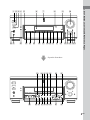
How to use this page
r
Use this page to find the location of buttons and other
parts of the system that are mentioned in the text.
PLAY MODE qg (9, 13, 14)
R
R
Name of button/part
Reference page
Main unit
ALPHABETICAL ORDER
A–L
ANALOG DIRECT ql (34)
AUDIO SPLIT qf (41)
AUTO DEC ws (34)
CINEMA STUDIO EX wg (35)
Cursor buttons ( / ) ej (19,
43–47, 57)
CUSTOMIZE el (47, 57)
Digital Cinema Sound indicator
8
DIMMER wh (31)
DISPLAY 4 (29, 31)
Display 6
DOOR OPEN qg
ENTER eh (46, 57)
EQ ek (45, 46)
EQ BANK r; (45, 46)
FM/AM wf (26)
FM MODE rd (26)
FUNCTION qd (25, 26, 28, 41,
42, 57)
INPUT MODE qs (42)
IR emitter 3
IR receptor 2
Jog dial ef (19, 43–47, 57)
LEVEL ed (44)
4GB
NUMBERS AND SYMBOLS
M–V
MASTER VOLUME q; (24, 25)
MEMORY rs (27, 28)
MODE +/– wa (36, 37, 45)
MULTI CH DIRECT qk (26)
MULTI CHANNEL DECODING
indicator 7
MUTING qa (25)
NIGHT MODE ra (38)
NIGHT MODE indicator 5
NORMAL SURR
(;PLII/NEO:6) qj (38)
ON SCREEN ea (9, 12, 14)
PHONES jack wj
PRESET TUNING +/– wd (28)
PTY SELECT +/– wl (29)
(Models of area code CEL only)
RDS PTY e; (29)
(Models of area code CEL only)
SB DEC indicator 9
SET UP eg (19)
SLEEP e; (58)
(Models of area code TW, KR
only)
SPEAKERS switch wk (58)
SURR BACK DECODING qh
(39)
SURROUND es (43)
TUNING +/– wl (26)
VIDEO 3 INPUT jacks rf (14)
2CH STEREO w; (34)
?/1 (power) 1
6
7
8
9
0
+
–
wk wj
wh
wg wf
wd
ws
wa
v
wl
w; ql qk
qj qh
qg qf qd qsqa
List of Button Locations and Reference Pages
1 23 4 5
Open the front door
e; ea es ed
ef
eg
+
–
–
rf
rd rs ra r; el ek
+
ej
eh
5GB
Getting Started
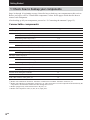
1: Check how to hookup your components
Steps 1a through 1c beginning on page 8 describe how to hook up your components to this receiver.
Before you begin, refer to “Connectable components” below for the pages which describe how to
connect each component.
After hooking up all your components, proceed to “2: Connecting the antennas” (page 15).
Connectable components
Component to be connected
Page
DVD/LD player
With digital audio output*1
8–9
With multi-channel audio output*2
11–12
With analog audio output only*3
8–9
TV monitor
With component video input*4
9 or 12
With S-Video or composite video input only
14
Satellite tuner
With digital audio output*1
8–9
With analog audio output only*3
8–9
CD/Super Audio CD player
With digital audio output*1
10
With multi-channel audio output*2
11
With analog audio output only*3
13
MD/DAT deck
With digital audio output*1
10
With analog audio output only*3
13
Cassette deck, analog disc turntable
13
Multi-channel decoder
11
VCR, video camera, video game, etc.
14
*1 Model with a DIGITAL OPTICAL OUTPUT or DIGITAL COAXIAL OUTPUT connector, etc.
*2 Model with a MULTI CH OUTPUT connectors, etc. This connection is used to output the audio decoded by the
component’s internal multi-channel decoder through this receiver.
*3 Model equipped only with AUDIO OUT L/R jacks, etc.
*4 Model with component video (Y, B-Y, R-Y) input jacks.
6GB
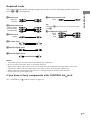
Required cords
The hookup diagrams on the subsequent pages assume the use of the following optional connection
cords (A to H) (not supplied).
G Monaural audio cord
White (L)
Red (R)
Black
Tip
B Audio/video cord
Audio cord A can be torn into two monaural audio
cords G.
Yellow (video)
White (L/audio)
Red (R/audio)
Getting Started
A Audio cord
H Component video cord
Green
Blue
Red
C Video cord
Yellow
D S-video cord
E Optical digital cord
F Coaxial digital cord
Notes
• Turn off the power to all components before making any connections.
• Be sure to make connections firmly to avoid hum and noise.
• When connecting an audio/video cord, be sure to match the color-coded pins to the appropriate jacks on the
components: yellow (video) to yellow; white (left, audio) to white; and red (right, audio) to red.
• When connecting optical digital cords, insert the cord plugs straight in until they click into place.
• Do not bend or tie optical digital cords.
If you have a Sony components with CONTROL A1
See “CONTROL A1
jack
control system” on page 60.
7GB
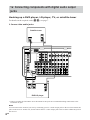
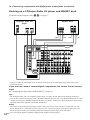
1a: Connecting components with digital audio output
jacks
Hooking up a DVD player, LD player, TV, or satellite tuner
For details on the required cords (A–H), see page 7.
1 Connect the audio jacks.
Satellite tuner
OUTPUT
AUDIO
OUT
OUTPUT
L
DIGITAL
OPTICAL
R
E
A
75Ω COAXIAL
ANTENNA
FM
DIGITAL
COMPONENT VIDEO
U
AM
MONITOR TV/SAT DVD/LD
VIDEO 2
VIDEO 1
S2 VIDEO S2 VIDEO S2 VIDEO
OUT
IN
IN
S2 VIDEO
OUT
IN
S2 VIDEO
OUT
IN
TV/SAT IN DVD/LD IN MONITOR OUT
CD/SACD
OPTICAL
IN
Y
MD/DAT
OPTICAL
OUT
PB/CB/B-Y
MD/DAT
OPTICAL
IN
PR/CR/R-Y
VIDEO
OUT
PHONO CD/SACD
TV/SAT
OPTICAL
IN
IN
IN
MD/DAT
OUT
TAPE
IN
OUT
IN
VIDEO
IN
VIDEO
IN
OUT
VIDEO
AUDIO
IN
AUDIO
IN
OUT
CTRL
A1
VIDEO
IN
OUT
IN
OUT
AUDIO
IN
AUDIO
IN
L
DVD/LD
OPTICAL
IN
R
CD/SACD
COAXIAL
IN
SIGNAL GND FRONT
L
SURROUND CENTER
FRONT
L
SURROUND SURR BACK CENTER
FRONT
L
SURROUND SURR BACK CENTER
U
DVD/LD
COAXIAL
IN
R
R
R
ASSIGNABLE
SUB WOOFER
RS232C
E*
SUB WOOFER
MULTI CHANNEL IN 2
F*
MULTI CHANNEL IN 1
SUB WOOFER
PRE OUT
A
OUTPUT
OUTPUT
OUTPUT
DIGITAL
OPTICAL
DIGITAL
COAXIAL
AUDIO
OUT
L
R
DVD/LD player
* Connect to either the COAXIAL IN or the OPTICAL IN jack. We recommend making connections to the
COAXIAL IN jack.
Note
You can listen to the sound of your TV by connecting your TV’s audio output jacks to the TV/SAT AUDIO IN
jacks on the receiver. In this case, do not connect the TV’s video output jack to the TV/SAT VIDEO IN jack on
the receiver.
8GB
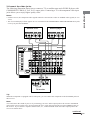
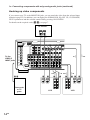
2 Connect the video jacks.
The following illustration shows how to connect a TV or satellite tuner and a DVD/LD player with
COMPONENT VIDEO (Y, B-Y, R-Y) output jacks. Connecting a TV with component video input
jacks allows you to enjoy higher quality video.
• On this receiver, the component video signals cannot be converted to S-video or standard video signals (or vice
versa).
• The on-screen display will not appear on a TV connected to the COMPONENT VIDEO MONITOR OUT jacks
even if you press ON SCREEN.
DVD/LD player
Satellite tuner
OUTPUT
R-Y
COMPONENT
B-Y
Y
OUTPUT
VIDEO
S VIDEO
OUTPUT
R-Y
H
ANTENNA
OUTPUT
C
COMPONENT
B-Y
D
Y
OUTPUT
OUTPUT
S VIDEO
VIDEO
H
D
Getting Started
Notes
C
75Ω COAXIAL
FM
DIGITAL
COMPONENT VIDEO
U
AM
CD/SACD
OPTICAL
IN
MONITOR TV/SAT DVD/LD
VIDEO 2
VIDEO 1
S2 VIDEO S2 VIDEO S2 VIDEO
OUT
IN
IN
S2 VIDEO
OUT
IN
S2 VIDEO
OUT
IN
TV/SAT IN DVD/LD IN MONITOR OUT
CTRL
A1
Y
MD/DAT
OPTICAL
OUT
PB/CB/B-Y
MD/DAT
OPTICAL
IN
PR/CR/R-Y
VIDEO
OUT
PHONO CD/SACD
TV/SAT
OPTICAL
IN
IN
IN
MD/DAT
OUT
TAPE
IN
OUT
IN
VIDEO
IN
VIDEO
IN
OUT
VIDEO
AUDIO
IN
AUDIO
IN
OUT
VIDEO
IN
OUT
IN
OUT
AUDIO
IN
AUDIO
IN
L
DVD/LD
OPTICAL
IN
R
CD/SACD
COAXIAL
IN
DVD/LD
COAXIAL
IN
SIGNAL GND FRONT
L
SURROUND CENTER
FRONT
L
SURROUND SURR BACK CENTER
FRONT
L
SURROUND SURR BACK CENTER
U
R
R
R
ASSIGNABLE
SUB WOOFER
RS232C
MULTI CHANNEL IN 2
H
INPUT
R-Y
COMPONENT
B-Y
Y
SUB WOOFER
MULTI CHANNEL IN 1
D
SUB WOOFER
PRE OUT
C
INPUT
INPUT
S VIDEO
VIDEO
TV monitor
Tip
When the component is equipped with S-video jacks, you can connect the component to the S2 VIDEO jacks on
this receiver.
Note
You can listen to the sound of your TV by connecting your TV’s audio output jacks to the TV/SAT AUDIO IN
jacks on the receiver. In this case, do not connect the TV’s video output jack to the TV/SAT VIDEO IN jack on
the receiver. If you connect a separate satellite tuner, etc., connect both the audio and video output jacks to the
receiver as shown above.
continued
9GB
1a: Connecting components with digital audio output jacks (continued)
Hooking up a CD/Super Audio CD player and MD/DAT deck
For details on the required cords (A–H), see page 7.
CD/Super Audio CD
player
MD/DAT deck
OUTPUT
INPUT OUTPUT
AUDIO
OUT
LINE
L
OUTPUT
OUTPUT
DIGITAL
COAXIAL
DIGITAL
OPTICAL
DIGITAL
L
R
E
ANTENNA
IN
OUT
A
A
ç
E
OUT
ç
E*
ç
F*
ç
R
A
LINE
OPTICAL
OUT
IN
IN
75Ω COAXIAL
FM
DIGITAL
COMPONENT VIDEO
U
AM
CD/SACD
OPTICAL
IN
MONITOR TV/SAT DVD/LD
VIDEO 2
VIDEO 1
S2 VIDEO S2 VIDEO S2 VIDEO
OUT
IN
IN
S2 VIDEO
OUT
IN
S2 VIDEO
OUT
IN
TV/SAT IN DVD/LD IN MONITOR OUT
CTRL
A1
Y
MD/DAT
OPTICAL
OUT
PB/CB/B-Y
MD/DAT
OPTICAL
IN
PR/CR/R-Y
VIDEO
OUT
PHONO CD/SACD
TV/SAT
OPTICAL
IN
IN
IN
MD/DAT
OUT
TAPE
IN
OUT
IN
VIDEO
IN
VIDEO
IN
OUT
VIDEO
AUDIO
IN
AUDIO
IN
OUT
VIDEO
IN
OUT
IN
OUT
AUDIO
IN
AUDIO
IN
L
DVD/LD
OPTICAL
IN
R
CD/SACD
COAXIAL
IN
DVD/LD
COAXIAL
IN
SIGNAL GND FRONT
L
SURROUND CENTER
FRONT
L
SURROUND SURR BACK CENTER
FRONT
L
SURROUND SURR BACK CENTER
U
R
R
R
ASSIGNABLE
SUB WOOFER
RS232C
MULTI CHANNEL IN 2
SUB WOOFER
MULTI CHANNEL IN 1
SUB WOOFER
PRE OUT
* Connect to either the COAXIAL IN or the OPTICAL IN jack. We recommend making connections to the
COAXIAL IN jack.
If you want to connect several digital components, but cannot find an unused
input
See “Assigning the audio input (AUDIO SPLIT)” (page 41).
Tips
• All the digital audio jacks are compatible with 32 kHz, 44.1 kHz, 48 kHz and 96 kHz sampling frequencies.
• You can also connect an LD player with a DOLBY DIGITAL RF OUT jack via an RF demodulator (You cannot
connect an LD player’s DOLBY DIGITAL RF OUT jack directly to this unit’s digital input jacks). Refer to the
operating instructions supplied with the RF demodulator.
Notes
10
• No sound is output when playing a Super Audio CD disc on a Super Audio CD player connected to the CD/
SACD OPTICAL or COAXIAL IN jacks on this receiver. Connect the player to the analog input jacks (CD/
SACD IN jacks). Refer to the operating instructions supplied with the Super Audio CD player.
• You cannot make digital recordings of digital multi channel surround signals.
GB
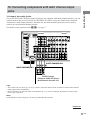
1b: Connecting components with multi channel output
jacks
If your DVD/LD and CD/Super Audio CD players are equipped with multi channel decoder, you can
connect them to this receiver’s MULTI CHANNEL IN jacks to enjoy the sound of the connected
component’s multi channel decoder. Alternatively, the multi channel input jacks can be used to
connect an external multi channel decoder.
For details on the required cords (A–H), see page 7.
ANTENNA
Getting Started
1 Connect the audio jacks.
75Ω COAXIAL
FM
DIGITAL
COMPONENT VIDEO
U
AM
MONITOR TV/SAT DVD/LD
VIDEO 2
VIDEO 1
S2 VIDEO S2 VIDEO S2 VIDEO
OUT
IN
IN
S2 VIDEO
OUT
IN
S2 VIDEO
OUT
IN
TV/SAT IN DVD/LD IN MONITOR OUT
CD/SACD
OPTICAL
IN
Y
MD/DAT
OPTICAL
OUT
PB/CB/B-Y
MD/DAT
OPTICAL
IN
PR/CR/R-Y
VIDEO
OUT
PHONO CD/SACD
TV/SAT
OPTICAL
IN
IN
IN
MD/DAT
OUT
TAPE
IN
OUT
IN
VIDEO
IN
VIDEO
IN
OUT
VIDEO
AUDIO
IN
AUDIO
IN
OUT
CTRL
A1
VIDEO
IN
OUT
IN
OUT
AUDIO
IN
AUDIO
IN
L
DVD/LD
OPTICAL
IN
R
CD/SACD
COAXIAL
IN
DVD/LD
COAXIAL
IN
SIGNAL GND FRONT
L
SURROUND CENTER
FRONT
L
SURROUND SURR BACK CENTER
FRONT
L
SURROUND SURR BACK CENTER
U
R
R
R
ASSIGNABLE
SUB WOOFER
RS232C
MULTI CHANNEL IN 2
SUB WOOFER
MULTI CHANNEL IN 1
SUB WOOFER
PRE OUT
MULTI CHANNEL IN 1
A A G G
MULTI CHANNEL IN 2
FRONT
SURROUND CENTER
L
R
MULTI CH OUT
SUB
WOOFER
DVD/LD player,
CD/Super Audio CD player,
Multichannel decoder, etc.
Tips
• This connection also allows you to enjoy software with multi-channel audio recorded in formats other than the
Dolby Digital, DTS and MPEG-2.
• Make connections to either the MULTI CHANNEL IN 1 or 2 jacks according to the number of audio output
jacks of the component.
Note
DVD and Super Audio CD players do not have SURR BACK terminals.
continued
11GB
1b: Connecting components with multi channel output jacks (continued)
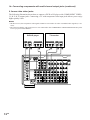
2 Connect the video jacks.
The following illustration shows how to connect a DVD or LD player with COMPONENT VIDEO
(Y, B-Y, R-Y) output jacks. Connecting a TV with component video input jacks allows you to enjoy
higher quality video.
Notes
• On this receiver, the component video signals cannot be converted to S-video or standard video signals (or vice
versa).
• The on-screen display will not appear on a TV connected to the COMPONENT VIDEO MONITOR OUT jacks
even if you press ON SCREEN.
TV monitor
DVD/LD player
OUTPUT
OUTPUT
S VIDEO
VIDEO
D
ANTENNA
OUTPUT
R-Y
INPUT
COMPONENT
B-Y
C
Y
R-Y
COMPONENT
B-Y
H
Y
INPUT
INPUT
S VIDEO
VIDEO
H
D
C
75Ω COAXIAL
FM
DIGITAL
COMPONENT VIDEO
U
AM
CD/SACD
OPTICAL
IN
MONITOR TV/SAT DVD/LD
VIDEO 2
VIDEO 1
S2 VIDEO S2 VIDEO S2 VIDEO
OUT
IN
IN
S2 VIDEO
OUT
IN
S2 VIDEO
OUT
IN
TV/SAT IN DVD/LD IN MONITOR OUT
Y
MD/DAT
OPTICAL
OUT
PB/CB/B-Y
MD/DAT
OPTICAL
IN
PR/CR/R-Y
VIDEO
OUT
PHONO CD/SACD
TV/SAT
OPTICAL
IN
IN
IN
MD/DAT
OUT
TAPE
IN
OUT
IN
VIDEO
IN
VIDEO
IN
OUT
VIDEO
AUDIO
IN
AUDIO
IN
OUT
VIDEO
IN
OUT
IN
OUT
AUDIO
IN
AUDIO
IN
L
DVD/LD
OPTICAL
IN
R
CD/SACD
COAXIAL
IN
DVD/LD
COAXIAL
IN
SIGNAL GND FRONT
L
SURROUND CENTER
FRONT
L
SURROUND SURR BACK CENTER
FRONT
L
SURROUND SURR BACK CENTER
U
R
R
R
ASSIGNABLE
SUB WOOFER
RS232C
12GB
MULTI CHANNEL IN 2
SUB WOOFER
MULTI CHANNEL IN 1
SUB WOOFER
PRE OUT
CTRL
A1
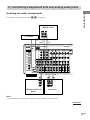
1c: Connecting components with only analog audio jacks
Getting Started
Hooking up audio components
For details on the required cords (A–H), see page 7.
MD/DAT deck
INPUT OUTPUT
LINE
LINE
L
Turntable
A
A
ç
A
ç
R
OUT
ANTENNA
IN
75Ω COAXIAL
FM
DIGITAL
COMPONENT VIDEO
U
AM
CD/SACD
OPTICAL
IN
MONITOR TV/SAT DVD/LD
VIDEO 2
VIDEO 1
S2 VIDEO S2 VIDEO S2 VIDEO
OUT
IN
IN
S2 VIDEO
OUT
IN
S2 VIDEO
OUT
IN
TV/SAT IN DVD/LD IN MONITOR OUT
CTRL
A1
Y
MD/DAT
OPTICAL
OUT
PB/CB/B-Y
MD/DAT
OPTICAL
IN
PR/CR/R-Y
VIDEO
OUT
PHONO CD/SACD
TV/SAT
OPTICAL
IN
MD/DAT
IN
IN
OUT
TAPE
IN
OUT
IN
VIDEO
IN
VIDEO
IN
OUT
VIDEO
AUDIO
IN
AUDIO
IN
OUT
VIDEO
IN
OUT
IN
OUT
AUDIO
IN
AUDIO
IN
L
DVD/LD
OPTICAL
IN
R
CD/SACD
COAXIAL
IN
DVD/LD
COAXIAL
IN
SIGNAL GND FRONT
L
SURROUND CENTER
FRONT
L
SURROUND SURR BACK CENTER
FRONT
L
SURROUND SURR BACK CENTER
U
R
R
R
ASSIGNABLE
SUB WOOFER
SUB WOOFER
MULTI CHANNEL IN 2
MULTI CHANNEL IN 1
ç
RS232C
ç
A
A
OUT
A
OUTPUT
SUB WOOFER
PRE OUT
IN
INPUT OUTPUT
LINE
LINE
LINE
L
L
R
R
CD/Super Audio CD
player
Tape deck
Note
If your turntable has a ground wire, connect it to the U SIGNAL GND terminal.
continued
13GB
1c: Connecting components with only analog audio jacks (continued)
Hooking up video components
If you connect your TV to the MONITOR jacks, you can watch the video from the selected input
(function) (page 25). In addition, you can display the SURROUND, EQ, SET UP, CUSTOMIZE,
LEVEL parameters and the selected sound field by pressing ON SCREEN.
For details on the required cords (A–H), see page 7.
TV monitor
INPUT
INPUT
VIDEO
S VIDEO
C
ANTENNA
D
75Ω COAXIAL
FM
COMPONENT VIDEO
U
AM
VIDEO 2
VIDEO 1
S2 VIDEO S2 VIDEO S2 VIDEO
OUT
IN
IN
S2 VIDEO
OUT
IN
S2 VIDEO
OUT
IN
CTRL
A1
MD/DAT
OPTICAL
OUT
PB/CB/B-Y
MD/DAT
OPTICAL
IN
PR/CR/R-Y
VIDEO
OUT
PHONO CD/SACD
TV/SAT
OPTICAL
IN
IN
IN
MD/DAT
OUT
TAPE
IN
OUT
IN
VIDEO
IN
VIDEO
IN
OUT
VIDEO
AUDIO
IN
AUDIO
IN
OUT
VIDEO
IN
OUT
IN
OUT
AUDIO
IN
AUDIO
IN
IN
L
DVD/LD
OPTICAL
IN
Ç
To the
VIDEO 3
INPUT jacks
MONITOR TV/SAT DVD/LD
TV/SAT IN DVD/LD IN MONITOR OUT
Y
Ç
DIGITAL
CD/SACD
OPTICAL
IN
R
CD/SACD
COAXIAL
IN
DVD/LD
COAXIAL
IN
SIGNAL GND FRONT
L
SURROUND CENTER
FRONT
L
SURROUND SURR BACK CENTER
FRONT
L
SURROUND SURR BACK CENTER
U
R
R
R
ASSIGNABLE
MULTI CHANNEL IN 2
SUB WOOFER
PRE OUT
MULTI CHANNEL IN 1
Ç
B
B
OUT
B, D
Camcorder
or TV
game
14GB
IN
Ç
Ç
RS232C
SUB WOOFER
Ç
SUB WOOFER
B
B
OUT
IN
D
D
INPUT
OUTPUT
INPUT OUTPUT
INPUT OUTPUT
OUTPUT
INPUT
S VIDEO
S VIDEO
VIDEO
IN
VIDEO
OUT
VIDEO
IN
VIDEO
OUT
S VIDEO
S VIDEO
AUDIO
IN
AUDIO
OUT
AUDIO
IN
AUDIO
OUT
VCR
L
L
R
R
D
VCR
D
OUT
2: Connecting the antennas
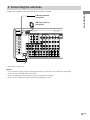
Connect the supplied AM loop antenna and FM wire antenna.
Getting Started
FM wire antenna
(supplied)
AM loop antenna
(supplied)
ANTENNA
75Ω COAXIAL
FM
COMPONENT VIDEO
U
DIGITAL
AM
CD/SACD
OPTICAL
IN
MONITOR TV/SAT DVD/LD
VIDEO 2
VIDEO 1
S2 VIDEO S2 VIDEO S2 VIDEO
OUT
IN
IN
S2 VIDEO
OUT
IN
S2 VIDEO
OUT
IN
TV/SAT IN DVD/LD IN MONITOR OUT
CTRL
A1
Y
MD/DAT
OPTICAL
OUT
PB/CB/B-Y
MD/DAT
OPTICAL
IN
PR/CR/R-Y
VIDEO
OUT
PHONO CD/SACD
TV/SAT
OPTICAL
IN
IN
IN
MD/DAT
OUT
TAPE
IN
OUT
IN
VIDEO
IN
VIDEO
IN
OUT
VIDEO
AUDIO
IN
AUDIO
IN
OUT
VIDEO
IN
OUT
IN
OUT
AUDIO
IN
AUDIO
IN
L
DVD/LD
OPTICAL
IN
R
CD/SACD
COAXIAL
IN
SIGNAL GND FRONT
L
SURROUND CENTER
FRONT
L
SURROUND SURR BACK CENTER
FRONT
L
SURROUND SURR BACK CENTER
U
DVD/LD
COAXIAL
IN
R
R
R
ASSIGNABLE
SUB WOOFER
RS232C
MULTI CHANNEL IN 2
SUB WOOFER
MULTI CHANNEL IN 1
SUB WOOFER
PRE OUT
*
* This jack is for future use.
Notes
•
•
•
•
To prevent noise pickup, keep the AM loop antenna away from the receiver and other components.
Be sure to fully extend the FM wire antenna.
After connecting the FM wire antenna, keep it as horizontal as possible.
Do not use the U SIGNAL GND terminal for grounding the receiver.
15GB
3: Connecting speakers
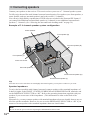
Connect your speakers to the receiver. This receiver alows you to use a 7.1 channel speaker system.
To fully enjoy theater-like multi channel surround sound requires five speakers (two front speakers, a
center speaker, and two surround speakers) and a sub woofer (5.1 channel).
You can enjoy high fidelity reproduction of DVD software recorded in the Surround EX format if
you connect one additional surround back speaker (6.1 channel) or two additional surround back
speakers (7.1 channel). (See “Selecting the surround back decoding mode” on page 39.)
Example of 7.1 channel speaker system configuration
Center speaker
Front speaker (R)
Surround speaker (R)
Front speaker (L)
Active sub woofer
Surround speaker (L)
Surround back speaker (R)
Surround back speaker (L)
Tip
Since the active sub woofer does not emit highly directional signals, you can place it wherever you want.
Speaker impedance
To enjoy the best possible multi channel surround, connect speakers with a nominal impedance of
8 ohms or higher to the FRONT, CENTER, SURROUND and SURROUND BACK terminals, and
set the IMPEDANCE SELECTOR to “8Ω”. Refer to the operating instructions supplied with your
speakers if you are not sure of their impedance. (This information is often on the back of the
speaker.)
Alternatively, you may connect speakers with nominal impedances between 4 and 8 ohms to any or
all of the speaker terminals. However, be sure to set the IMPEDANCE SELECTOR to “4Ω” if you
connect even one speaker with a nominal impedance between 4 and 8 ohms.
Note
Be sure to turn the power off before adjusting the IMPEDANCE SELECTOR.
16GB
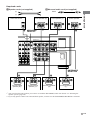
Required cords
B Monaural audio cord (not supplied)
A Speaker cords (not supplied)
(+)
Black
Front speaker (R)
Active sub woofer
Front speaker (L)
Center speaker
INPUT
AUDIO
IN
E
B
e
E
e
A
SPEAKERS
FRONT B*1
e
E
A
Getting Started
(–)
A
AC OUTLET
IMPEDANCE USE 4-16Ω
VIDEO 2
VIDEO 1
S2 VIDEO
OUT
IN
S2 VIDEO
OUT
IN
SPEAKERS
CTRL
A1
R
–
+
FRONT
L
–
+
–
+
CENTER
–
+
A
VIDEO
OUT
VIDEO
IN
OUT
–
+
IN
AUDIO
OUT
FRONT
8Ω
AUDIO
IN
OUT
IN
SURROUND SURR BACK CENTER
SURROUND
R
+
L
IMPEDANCE SELECTOR
4Ω
B
+
R
L
–
–
+
–
–
+
SURR BACK
R
L
SUB WOOFER
PRE OUT
IMPEDANCE
SELECTOR
A
A
E
e E
Surround back
speaker (R)*2
A
e E
Surround back
speaker (L)*2
A
e
Surround speaker
(R)
E
e
Surround speaker
(L)
*1 You can select the font speakers you want to use with the SPEAKERS switch. For details. see “Selecting the
speaker system” (page 58).
*2 If you only plan to connect one surround back speaker, connect it to the SPEAKERS SURR BACK L terminal.
17GB
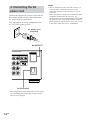
4: Connecting the AC
power cord
Connect the supplied AC power cord to the AC
IN terminal on the receiver, then connect the
AC power cord to a wall outlet.
You can connect up to one component to the
AC OUTLET on the receiver.
AC power cord
(supplied)
AC OUTLET*
AC OUTLET
SPEAKERS
ONT
L
–
+
–
+
CENTER
–
IMPEDANCE SELECTOR
4Ω
ROUND
BACK
L
–
+
–
+
+
8Ω
L
AC IN terminal
* The configuration, shape, and number of AC outlets
vary according to the model and country to which
the receiver is shipped.
18GB
Notes
• The AC OUTLET on the rear of the receiver is a
switched outlet, which supplies power to the
connected component only while the receiver is
turned on.
• Make sure that the total power consumption of the
component connected to the receiver’s AC
OUTLET does not exceed the wattage stated on the
rear panel. Do not connect high-wattage electrical
home appliances such as electric irons, fans, or TVs
to this outlet. This may cause a malfunction.
Performing initial setup
operations
1 Press ?/1 to turn off the receiver.
2 Hold down ?/1 for 5 seconds.
“ENTER to Clear All” appears in the
display for about 10 seconds.
3 While “ENTER to Clear All” appears in
the display, press DOOR OPEN to open
the door of the front panel, then press
ENTER.
After “MEMORY CLEARING...” appears
in the display for a while, “MEMORY
CLEARED!” appears.
The following are reset to their factory
settings.
• All settings in the SET UP,
CUSTOMIZE, SURROUND, LEVEL,
and EQ menus.
• The sound field memorized for each
function and preset station.
• All preset stations.
• All index names for functions and
preset stations.
Use the SET UP menu to set the types and sizes
of the speakers connected to the receiver.
1 Press ?/1 to turn on the receiver.
2 Press SET UP.
The SET UP button lights up and “<<<SET
UP>>>” appears in the display.
3 Press the cursor buttons (
or
) to
Getting Started
Before using the receiver for the first time,
initialize the receiver by performing the
following procedure.
This procedure can also be used to return
settings you have made to their factory
defaults.
5: Setting up the speakers
select the speaker.
For details, see “Speaker setup parameters”
below.
Notes
• Certain setup parameters may be dimmed in the
display. This means that the selected parameter
is either unavailale or fixed and unchangeable
due to sound field (pages 35–37) or other
settings.
• Some speaker settings may appear dimmed in
the display. This means that they have been
changed automatically due to other speaker
settings. The dimmed settings may or may not
be adjustable.
4 Turn the jog dial to select the
parameter.
5 Repeat steps 3 and 4 until you have set
all of the items that follow.
Speaker setup parameters
The initial setting is underlined.
x FRONT SP (Front speaker size)
• LARGE
If you connect large speakers that will
effectively reproduce bass frequencies, select
“LARGE”. Normally, select “LARGE”.
• SMALL
If the sound is distorted, or you feel a lack of
surround effects when using multi channel
surround sound, select “SMALL” to activate
the bass redirection circuitry and output the
front channel bass frequencies from the sub
woofer. When the front speakers are set to
“SMALL”, the center, surround, and surround
back speakers are also automatically set to
“SMALL” (unless previously set to “NO”).
continued
19GB
5: Setting up the speakers
(continued)
x CENTER SP (Center speaker size)
• LARGE
If you connect a large speaker that will
effectively reproduce bass frequencies, select
“LARGE”. Normally, select “LARGE”.
However, if the front speakers are set to
“SMALL”, you cannot set the center speaker to
“LARGE”.
• SMALL
If the sound is distorted, or you feel a lack of
surround effects when using multi channel
surround sound, select “SMALL” to activate
the bass redirection circuitry and output the
center channel bass frequencies from the front
speakers (if set to “LARGE”) or sub woofer.
• NO (for all sources except MULTI CH 1/
MULTI CH 2)
If you did not connect a center speaker, select
“NO”. The sound of the center channel will be
output from the front speakers (DIGITAL
DOWNMIX).
• MIX (for all sources except MULTI CH 1/
MULTI CH 2)
If you did not connect a center speaker but want
to downmix the center channel audio, select
“MIX” (page 26).
This is only active when the front and surround
speakers are set to “LARGE”, and the surround
back speakers are set to “LARGE” or “NO”.
The sound of the center channel will be output
from the front speakers (ANALOG
DOWNMIX).
In other cases, the sound of the center channel
will be output from the front speakers
(DIGITAL DOWNMIX).
* When using MULTI CH 1/MULTI CH 2
sources, the sound of the center channel is
output from the front speakers if you select
either “NO” or “MIX” (ANALOG
DOWNMIX).
20GB
x SURROUND SP (Surround speaker
size)
• LARGE
If you connect large speakers that will
effectively reproduce bass frequencies, select
“LARGE”. Normally, select “LARGE”.
However, if the front speakers are set to
“SMALL”, you cannot set the surround
speakers to “LARGE”.
• SMALL
If the sound is distorted, or you feel a lack of
surround effects when using multi channel
surround sound, select “SMALL” to activate
the bass redirection circuitry and output the
surround channel bass frequencies from the sub
woofer or other “LARGE” speakers.
• NO
If you did not connect surround speakers, select
“NO”. When the surround speakers are set to
“NO”, the surround back speakers are also
automatically set to “NO”.
x SURR BACK SP (Surround back
speaker size)
• LARGE
If you connect a large speaker that will
effectively reproduce bass frequencies, select
“LARGE”. Normally, select “LARGE”.
However, if the front speakers are set to
“SMALL”, you cannot set the surround back
speaker to “LARGE”.
• SMALL
If the sound is distorted, or you feel a lack of
surround effects when using multi channel
surround sound, select “SMALL” to activate
the bass redirection circuitry and output the
surround back channel bass frequencies from
the front speakers (if set to “LARGE”) or sub
woofer.
• NO
If you did not connect a surround back speaker,
select “NO”.
Tip
The LARGE and SMALL settings for each speaker
determine whether or not the internal sound processor
will cut the bass signal from that channel. When the
bass is cut from a channel, the bass redirection
circuitry sends the corresponding bass frequencies to
the sub woofer or other “LARGE” speakers.
However, since bass has a certain amount of
directionality, it best not to cut them, if possible.
Therefore, even when using small speakers, you can
set them to “LARGE” if you want to output the bass
frequencies from that speaker. On the other hand, if
you are using a large speaker, but prefer not to have
bass frequencies output from that speaker, set it to
“SMALL”.
If the overall sound level is lower than you prefer, set
all speakers to “LARGE”. If there is not enough bass,
you can use the equalizer to boost the bass levels. To
adjust the equalizer, see page 45.
• NO
If you connect only one surround back speaker,
select “NO”. The sound will be output to a
maximum of 6.1 channels.
x SUB WOOFER (Sub woofer selection)
• YES
If you connect a sub woofer, select “YES”.
Getting Started
When the surround speakers are set to “NO”,
the surround back speakers are also
automatically set to “NO” and the setting
cannot be changed.
x SURR BACK L/R (7.1 channel/
6.1 channel switching)
• YES
If you connect two surround back speakers,
select “YES”. The sound will be output to a
maximum of 7.1 channels.
• NO
If you did not connect a sub woofer, select
“NO”. The sound of the sub woofer will be
output from the front speakers.
In the following cases, analog downmix
function is used for the sub woofer channel
audio.
– When using MULTI CH 1/MULTI CH 2
sources
– When the front and surround speakers are set
to “LARGE”, the surround back speakers are
set to “LARGE” or “NO”, and the center
speaker is set to the settings other than
“SMALL” for the digital sources.
In other cases, digital downmix function is used
for the sub woofer channel audio.
This activates the bass redirection circuitry and
outputs the LFE signals from other speakers.
Tip
In order to take full advantage of the Dolby Digital
bass redirection circuitry, we recommend setting the
continued
21GB
5: Setting up the speakers
(continued)
sub woofer’s cut off frequency as high as possible.
Initial setting: 5.0 meter
x FRONT XX.X meter
(Front speaker distance)
Initial setting: 5.0 meter
Lets you set the distance from your listening
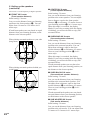
position to the front speakers (A). You can
adjust from 1.0 meter to 12.0 meters in 0.1
meter steps.
If both front speakers are not placed an equal
distance from your listening position, set the
distance to the closest speaker.
When placing surround speakers to your side
(long room)
B
A
A
45°
C
C
90°
D
When placing surround speakers behind you
(wide room)
B
When this range is exceeded, the display
blinks. If you select a setting while the display
is blinking, you will not be able to enjoy full
surround effects.
x SURROUND XX.X meter
(Surround speaker distance)
Initial setting: 5.0 meter
Lets you set the distance from your listening
position to the surround speakers. You can
adjust from a distance equal to the front
speaker distance (A) to a distance 4.5 meters
closer to your listening position (C) in 0.1
meter steps.
If both surround speakers are not placed an
equal distance from your listening position, set
the distance to the closest speaker.
x SURR BACK XX.X meter
(Surround back speaker distance)
A
45°
Initial setting: 5.0 meter
C
C
90°
D
Lets you set the distance from your listening
position to the center speaker. You can adjust
from a distance equal to the front speaker
distance (A) to a distance 1.5 meters closer to
your listening position (B) in 0.1 meter steps.
When this range is exceeded, the display
blinks. If you select a setting while the display
is blinking, you will not be able to enjoy full
surround effects.
20°
A
x CENTER XX.X meter
(Center speaker distance)
20°
Lets you set the distance from your listening
position to the surround back speakers. You
can adjust from a distance equal to the front
speaker distance (A) to a distance 4.5 meters
closer to your listening position (D) in 0.1
meter steps.
If both surround back speakers are not placed
an equal distance from your listening position,
set the distance to the closest speaker.
x SUB WOOFER XX.X meter
(Sub woofer distance)
Initial setting: 5.0 meter
Lets you set the distance from your listening
position to the sub woofer. You can adjust from
1.0 meter to 12.0 meters in 0.1 meter steps.
22GB
Give it a try!
For advanced speaker setups
The receiver lets you to input the speaker position in
terms of distance. However, it is not possible to set
the center speaker further than the front speakers.
Also, the center speaker cannot be set more that
1.5 meters closer than the front speakers.
Likewise, the surround speakers can not be set farther
away from the listening position than the front
speakers. And they can be no more than 4.5 meters
closer.
This is because incorrect speaker placement is not
conducive to the enjoyment of surround sound.
Please note that, setting the speaker distance closer
than the actual location of the speakers will cause a
delay in the output of the sound from that speaker. In
other words, the speaker will sound like it is farther
away.
For example, setting the center speaker distance
1–2 meters closer than the actual speaker position will
create a fairly realistic sensation of being “inside” the
screen. If you cannot obtain a satisfactory surround
effect because the surround speakers are too close,
setting the surround speaker distance closer (shorter)
than the actual distance will create a larger sound
stage.
Adjusting these parameter while listening to the
sound often results in much better surround sound.
Use the CUSTOMIZE menu and set “MENU
EXPAND” to “ON”. This enables advanced
setups including those of the position and
height of the surround and surround back
speakers.
For details on “MENU EXPAND”, see page
47. For details on how to set the items, see page
49.
Getting Started
Tip
23GB
6: Adjusting the speaker
levels and balance
(TEST TONE)
Adjust the speaker levels and balance while
listening the test tone from your listening
position. Use the remote for the operation.
Tips
• The receiver employs a test tone with a frequency
centered at 800 Hz.
• Although these adjustments can also be made via
the LEVEL button on the front panel, we
recommend you follow the procedure described
below and make adjustments from your listening
position using the remote.
1 Press ?/1 on the remote to turn on the
receiver.
2 Press
on the remote repeatedly until
RECEIVER menu appears.
3 Move the easy scroll key to select
“TEST TONE”, then press the key to
enter the selection.
“TEST TONE” in the LEVEL menu
appears in the display and the test tone is
output from each speaker in sequence.
4 Adjust the speaker level and balance
using the LEVEL menu so that the level
of the test tone sounds the same from
each speaker.
For details on the LEVEL menu settings,
see page 44.
Tips
• To adjust the level of all speakers at the same
time, press MASTER VOL +/– on the remote or
turn MASTER VOLUME on the receiver.
• You can also use the jog dial on the receiver for
the adjustment.
5 After the adjustment, press
on the
remote repeatedly again until
RECEIVER menu appears.
6 Move the easy scroll key to select
“TEST TONE”, then press the key
repeatedly to select “TEST TONE
[OFF]”.
The test tone turns off.
24GB
To output the test tone only from a
specific speaker
Set “TEST TONE” in the LEVEL menu to
“FIX” (page 44). The test tone is output only
from the selected speaker.
For more precise adjustment
You can output the test tone or sound source
from two adjacent speakers to adjust their
balance and level.
Set “T.TONE” in the CUSTOMIZE menu to
“PHASE NOISE” or “PHASE AUDIO” (page
48). Then select the two speakers you want to
adjust using “PHASE NOISE” or “PHASE
AUDIO” in the LEVEL menu (page 44).
Note
When you select analog audio using the MULTI CH
DIRECT or ANALOG DIRECT buttons, the power to
the digital circuits is turned off.* When you output
the test tone in this setting, it takes a few seconds to
output the test tone. This, however, is not a
malfunction.
* When “D.POWER” in the CUSTOMIZE menu is
set to “AUTO OFF” (page 47).
Amplifier/Tuner Operation
Notes on using headphones
Selecting the component
1 Rotate FUNCTION to select the
function.
The selected function appears in the display.
Display
VCR
VIDEO 1 or VIDEO 2
Camcorder or
TV game
VIDEO 3
DVD or LD player
DVD/LD
Satellite tuner
TV/SAT
Tape deck
TAPE
MD or DAT deck
MD/DAT
CD or Super Audio
CD player
CD/SACD
Built in tuner
TUNER
Turntable
PHONO
Amplifier/Tuner Operation
To select the
• When headphones are connected, you can select
only the following sound fields (page 37).
– HEADPHONE (2CH)
– HEADPHONE (DIRECT)
– HEADPHONE (MULTI1)
– HEADPHONE (MULTI2)
– HEADPHONE THEATER
• When headphones are connected and you use the
MULTI CH DIRECT function (page 26), the sound
of all channels may not output depending on the
speaker settings.
2 Turn on the component and start
playback.
When you select a component which is also
connected to the TV (such as VCR or DVD
player), turn on the TV and set the TV’s
video input to match the component you
selected.
If your TV is connected to the receiver’s
MONITOR jack, the video from the
selected function will be displayed on the
TV.
3 Rotate MASTER VOLUME to adjust the
volume.
To mute the sound
Press MUTING.
25GB
Listening to multi channel
sound
(MULTI CH DIRECT)
You can select the audio directly from the
components connected to the MULTI
CHANNEL IN jacks. This function enables
you to enjoy high quality analog sources like
DVD or Super Audio CD.
Also see “D.POWER” on page 47.
Surround effects are not activated when using
this function.
Press MULTI CH DIRECT repeatedly to
select the multi channel audio source
(“MULTI CH 1 DIRECT” or “MULTI CH 2
DIRECT”).
The selected audio source is output.
Note
This function is canceled when you switch the
function (page 25) or sound field (pages 35–37).
When the center speaker or sub
woofer is not connected
(Analog downmix function)
If you set the center speaker size (CENTER
SP) or sub woofer selection (SUB WOOFER)
in the SET UP menu to “NO” or “MIX”
(CENTER SP only) (page 20) and activate the
MULTI CH DIRECT function, the analog
center or sub woofer audio will be downmixed
to the FRONT L/R channel audio.
To assign the multi channel audio to
a specific function
Set “MULTI CH 1” or “MULTI CH 2” in the
CUSTOMIZE menu (page 47). The multi
channel audio inputs can be assigned to any
functions except TUNER and PHONO.
26GB
Listening to FM/AM radio
You can listen to FM and AM broadcasts
through the built-in tuner. Before operation,
make sure you have connected the FM and AM
antennas to the receiver (see page 15).
Tip
The tuning scale is:
FM: 50 kHz
AM: 9 kHz
Automatic tuning
1 Rotate FUNCTION to switch the
function to TUNER.
2 Press FM/AM to select the FM or AM
band.
3 Press DOOR OPEN to open the door of
the front panel, then press TUNING + or –.
Press + to scan from low to high; press – to
scan from high to low.
The receiver stops scanning whenever a
station is received.
In case of poor FM stereo reception
Press FM MODE to switch to monaural audio.
If the FM stereo reception is poor and
“STEREO” flashes in the display, select the
monaural audio so that the sound will be less
distorted.
Direct tuning
Enter a frequency of the station directly by
using the NUM menu on the remote.
For details on the supplied remote, refer to the
operating instructions supplied with the remote.
1 Select “TUNER” from the FUNCTION
You can also use the FUNCTION control
on the receiver.
2 Press
on the remote repeatedly until
SUB menu appears, then select “FM/
AM” from the SUB menu to select the
FM or AM band.
You can also use the FM/AM button on the
receiver.
3 Select “DIRECT TUNING” from the SUB
menu.
4 Press
on the remote repeatedly until
NUM menu appears, then select the
numbers for the frequency.
Example 1: FM 102.50 MHz
Press 1 b 0 b 2 b 5 b 0
Example 2: AM 1,350 kHz
Press 1 b 3 b 5 b 0
If you’ve tuned in an AM station, adjust the
direction of the AM loop antenna for
optimum reception.
If you cannot tune in a station and
the entered numbers flash
Make sure you’ve entered the right frequency.
If not, repeat steps 3 and 4. If the entered
numbers still flash, the frequency is not used in
your area.
(Models of area code CEL only)
This function lets you store up to 30 FM and
FM RDS stations in alphabetical order without
redundancy. Additionally, it only stores the
stations with the clearest signals.
If you want to store FM or AM stations one by
one, see “Presetting radio stations” on page 28.
1 Press ?/1 to turn off the receiver.
2 Hold down MEMORY and press ?/1 to
turn the receiver back on.
“Autobetical select” appears in the display
and the receiver scans and stores all the FM
and FM RDS stations in the broadcast area.
For RDS stations, the tuner first checks for
stations broadcasting the same program,
then stores only the one with the clearest
signal. The selected RDS stations are sorted
alphabetically by their Program Service
name, then assigned a 2-character preset
code. For more details on RDS, see page 29.
Regular FM stations are assigned
2-character preset codes and stored after the
RDS station.
When done, “Autobetical finish” appears in
the display momentarily and the receiver
returns to the normal operation.
Amplifier/Tuner Operation
list to switch the function to TUNER.
Storing FM stations
automatically
(AUTOBETICAL)
Notes
• Do not press any button on the receiver or supplied
remote during autobetical operation, except ?/1.
• If you move to another area, repeat this procedure
to store stations in your new area.
• For details on tuning the stored stations, see page
28.
• If you move the antenna after storing stations with
this procedure, the stored settings may no longer be
valid. If this happens, repeat this procedure to store
the stations again.
27GB
Presetting radio stations
You can preset up to 30 FM or AM stations.
Then you can easily tune in the stations you
often listen to.
Presetting radio stations
1 Rotate FUNCTION to switch the
Tuning to preset stations
1 Rotate FUNCTION to switch the function to
TUNER.
2 Press PRESET TUNING + or – repeatedly
to select the preset station you want.
Each time you press the button, you can
select the preset station as follows:
nA1˜A2˜...˜A0˜B1˜B2˜...˜B0N
function to TUNER.
2 Tune in the station that you want to
preset using Automatic Tuning (page
26) or Direct Tuning (page 27).
3 Press MEMORY.
“MEMORY” appears in the display for a
few seconds. Do steps 4 to 5 before the
display goes out.
4 Press PRESET TUNING + or – to select
a preset number.
If “MEMORY” goes out before you select
the preset number, start again from step 3.
5 Press MEMORY again.
The station is stored to the selected preset
number.
If “MEMORY” goes out before you press
MEMORY, start again from step 3.
6 Repeat steps 2 to 5 to preset another
station.
28GB
nC0˜...C2˜C1N
Using the remote
1 Select “TUNER” from the FUNCTION list to
switch the function to TUNER.
2 Move the easy scroll key to select the
preset number you want, then press the
key to enter the selection.
Using the Radio Data
System (RDS)
(Models of area code CEL only)
– Displaying RDS information
– Scanning preset stations by program type
Note that RDS is operable only for FM
stations.*
* Not all FM stations provide RDS service, nor do
they provide the same types of services. If you are
not familiar with the RDS services in your area,
check with your local radio stations for details.
Receiving RDS broadcasts
Simply select a station on the FM band
using direct tuning (page 27), automatic
tuning (page 26), or preset tuning (page
28).
When you tune in a station that provides RDS
services, the RDS indicator lights up and the
program service name appears in the display.
Note
RDS may not work properly if the station you tuned
to is not transmitting the RDS signal properly or if the
signal strength is weak.
Displaying RDS information
While receiving an RDS station, press
DISPLAY.
Each time you press the button, RDS
information on the display changes cyclically
as follows:
The display is split into two levels as described
below:
Top level
Frequencya) t PTY (Program TYpe)
indicationb) t RT (Radio Text) indicationc) t
CT (Time) indication (in 24-hour system level)
t Sound field currectly applied t Volume
level t Decoding information
a) This information also appears for non-RDS FM
stations.
b) Type of program being broadcast (see page 30).
c) Text messages sent by the RDS station.
Notes
• If there is an emergency announcement by
government authorities, “Alarm-Alarm!” flashes in
the display.
• If a station does not provide a particular RDS
service, “No XX” (such as “No Clock Time”)
appears in the display.
• When a station broadcasts radio text data, it is
displayed at the same rate at which it is sent from
the station. Any change in this rate is reflected in
the display rate of the data.
Amplifier/Tuner Operation
This receiver also allows you to use RDS
(Radio Data System), which enables radio
stations to send additional information along
with the regular program signal. You can use
the following convenient RDS features:
Lower level
Scanning preset stations by
program type
You can tune in preset stations according to a
program type that you specify. The receiver
scans for stations in its preset memory
currently broadcasting the specified program
type.
1 Press RDS PTY.
2 Press PTY SELECT + or PTY SELECT –
to select the program type.
See the table on the next page for the
information on each program type.
3 Press RDS PTY.
While the receiver is scanning stations,
“PTY SEARCH” appears in the display
window.
When the receiver finds a station, the
receiver stops scanning. When the receiver
could not find any preset stations currently
broadcasting the specified program type,
“PTY not found” appears in the display.
One of the followings is displayed:
• PS (Program Service name)a)
continued
• Index name
• “TUNER” indication
29GB
Using the Radio Data System (RDS)
(continued)
Program type
indication
Description of program types
Leisure & Hobby Programs on recreational activities
such as gardening, fishing,
cooking, etc.
Program type
indication
Jazz Music
Jazz programs
Country Music
Country music programs
National Music
Programs featuring the popular
music of the country or region
Oldies Music
Programs featuring oldies music
Description
News
News programs
Current Affairs
Topical programs that expand
on current news
Information
Programs offering information on
a wide spectrum of subjects,
including consumer affairs and
medical advice
Sport
Sports programs
Education
Educational programs, such as
“how-to” and advice programs
Drama
Radio plays and serials
Cultures
Programs about national or
regional culture, such as language
and social concerns
Science
Programs about the natural
sciences and technology
Varied Speech
Other types of programs such as
celebrity interviews, panel games,
and comedy
Pop Music
Popular music programs
Rock Music
Rock music programs
M.o.R. Music
Easy Listening
Light Classics M Instrumental, vocal, and choral
music
Serious Classics
Performances of major orchestras,
chamber music, opera, etc.
Other Music
Music that does not fit into any
categories above, such as Rhythm
& Blues and Reggae
Weather & Metr Weather information
Finance
Stock market reports and trading,
etc.
Children’s Progs Programs for children
Social Affairs
Programs about people and the
things that affect them
Religion
Programs of religious content
Phone In
Programs where members of the
public express their views by
phone or in a public forum
Travel & Touring Programs about travel. Not for
announcements that are located by
TP/TA.
30GB
Description
Folk Music
Folk music programs
Documentary
Investigative features
None
Any programs not defined above
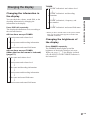
Changing the display
Changing the information in
the display
Press DISPLAY repeatedly.
The displayed information varies according to
the selected function.
All functions except TUNER
t Function name and volume level
t “TUNER” indication* and volume level
r
“TUNER” indication* and decoding
information
r
“TUNER” indication*, frequency, and
preset number
r
“TUNER” indication* and sound field name
* When you have entered names to the preset stations
(page 57), the index name appears instead of the
“TUNER” indication.
r
Function name and decoding information
Changing the brightness of
the display
r
Function name and sound field name
Press DIMMER repeatedly.
All functions except TUNER
(When the function name is indexed)
(page 57)
t Index name and volume level
Amplifier/Tuner Operation
You can check the volume, sound field, or the
decoding information by changing the
information in the display.
TUNER
The DIMMER button lights up and the
brightness of the display changes in 6 steps.
When you set to “[ ]” (the display is turned
off), the MULTI CH DECODING indicator is
also turned off.
r
Function name and volume level
r
Index name and decoding information
r
Function name and decoding information
r
Index name and sound field name
r
Function name and sound field name
31GB
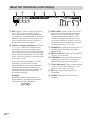
About the indications in the display
1
2
3
SW
L
C
R
L.F.E.
SL
S
SR
PRO LOGIC
4
6
COAX SLEEP MONO
OPT
STEREO
DTS MPEG
EQ
qf
qd qs qa q;
1 SW: Lights up when sub woofer selection is
set to “YES” (page 21) and the receiver
detects that the disc being played back does
not contain the LFE channel signal. While this
indicator lights up, the receiver creates a sub
woofer signal based on the low frequency
components of the front channels.
2 Playback channel indicators: The letters
(L, C, R, etc.) indicate the channels being
played back. The boxes around the letters
vary to show how the receiver downmixes the
source sound (based on the speakers settings).
When using sound fields like “D.CONCERT
HALL”, the receiver adds reverberation based
on the source sound.
L (Front Left), R (Front Right), C (Center
(monaural)), SL (Surround Left), SR
(Surround Right), S (Surround (monaural or
the surround components obtained by Pro
Logic processing)), SB (Surround Back (the
surround back components obtained by
6.1 channel decoding))
Example:
Recording format (Front/Surround): 3/2
Output channel: Surround speakers absent
Sound Field: AUTO DECODING.
L
SL
C
7
a DIGITAL MULTI CH IN 1 2 D.RANGE RDS MEMORY
SB
32GB
5
R
SR
9
8
3 PRO LOGIC: Lights up when the receiver
applies Pro Logic processing to 2 channel
signals in order to output the center and
surround channel signals. However, this
indicator also lights when the Pro Logic II
movie/music decoder is in active. However,
this indicator does not light if the center and
surround speakers are set to “NO”.
4 ; DIGITAL: Lights up when the receiver is
decoding signals recorded in the Dolby
Digital format.
5 MULTI CH IN 1/2: Lights up when MULTI
CH IN 1 or 2 is selected.
6 D.RANGE: Lights up when dynamic range
compression is activated. See page 55 to
adjust the dynamic range compression.
7 Tuner indicators: Light up when using the
receiver to tune in radio stations, etc. See
pages 26–30 for tuner operations.
8 EQ: Lights up when the equalizer is
functioning.
9 SLEEP: Lights up when sleep timer is
activated.
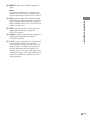
0 MPEG: Lights up when MPEG signals are
input.
Note
Only the front 2 channels are compatible with
MPEG format. Multi channel surround sound is
downmixed and output from the front 2 channels.
qs OPT: Lights up when the source signal is a
digital signal being input through the
OPTICAL terminal.
qd COAX: Lights up when the source signal is a
digital signal being input through the
COAXIAL terminal.
qf L.F.E.: Lights up when the disc being played
back contains the LFE (Low Frequency
Effect) channel. When the sound of the LFE
channel signal is actually being reproduced,
the bars underneath the letters lights up to
indicate the level. Since the LFE signal is not
recorded in all parts of the input signal the bar
indication will fluctuate (and may turn off)
during playback.
Amplifier/Tuner Operation
qa DTS: Lights up when DTS signals are input.
When playing a DTS format disc, be sure that
you have made digital connections and that
INPUT MODE is NOT set to ANALOG 2CH
FIXED (see page 42).
33GB
Enjoying Surround Sound
Automatically decoding
the input audio signal
Using only the front
speakers
(2CH STEREO)
(AUTO DECODING)
In this mode, the receiver automatically detects
the type of audio signal being input (Dolby
Digital, DTS, standard 2 channel stereo, etc)
and performs the proper decoding if necessary.
This mode presents the sound as it was
recorded/encoded, without adding any surround
effects.
If you connect an active sub woofer
When the audio signal is 2 channel stereo or if
the source signal does not include a LFE signal,
the receiver generates a low frequency signal
for output to the sub woofer.
Press AUTO DEC.
“AUTO DECODING” appears in the display
and the receiver switches to the AUTO
DECODING mode.
Tip
In most cases AUTO DECODING provides the most
appropriate decoding. However, when playing
software encoded in the Dolby Digital EX format,
you may want to use SURR BACK DECODING
(page 39) to match the input stream to the mode you
prefer.
In this mode, the receiver outputs the sound
from the front L/R speakers only. There is no
sound from the sub woofer.
Listening to 2 channel stereo
sources (2CH STEREO)
Standard 2 channel stereo sources completely
bypass the sound field processing and multi
channel surround formats are downmixed to 2
channel.
Press 2CH STEREO.
“2CH STEREO” appears in the display and the
receiver switches to the 2CH STEREO mode.
Note
No sound is output from the sub woofer in the
2CH STEREO mode. To listen to the 2 channel stereo
sources using the front L/R speakers and a sub
woofer, set to the AUTO DECODING mode.
Listening to analog audio
(ANALOG DIRECT)
You can switch the audio of the selected
function to the two channel analog input. This
function enables you to enjoy high quality
analog sources. Also see “D.POWER” on page
47.
When using this function, only the volume and
front speaker balance can be adjusted.
1 Rotate FUNCTION to select the function
you want to listen to in analog audio.
2 Press ANALOG DIRECT.
“ANALOG DIRECT” appears in the
display and the analog audio is output.
Note
This function is canceled when you switch the sound
field (pages 35–37).
34GB
Selecting a sound field
You can take advantage of surround sound
simply by selecting one of the receiver’s
pre-programmed sound fields. They bring the
exciting and powerful sound of movie theaters
and concert halls into your home.
Sound field list
CINEMA STUDIO EX A DCS
CINEMA STUDIO EX B DCS
CINEMA STUDIO EX C DCS
MONO MOVIE
STEREO MOVIE
D.CONCERT HALL A
D.CONCERT HALL B
CHURCH
OPERA HOUSE
CINEMA STUDIO EX modes are suitable for
watching motion picture DVDs (etc.), with
multi channel surround effects. You can
reproduce the sound characteristics of Sony
Pictures Entertainment’s dubbing studio in
your home.
Press CINEMA STUDIO EX repeatedly to
select the CINEMA STUDIO EX mode you
want.
The selected CINEMA STUDIO EX mode
appears in the display.
x CINEMA STUDIO EX A DCS
Reproduces the sound characteristics of the
Sony Pictures Entertainment “Cary Grant
Theater” cinema production studio. This is a
standard mode, great for watching most any
type of movies.
JAZZ CLUB
x CINEMA STUDIO EX B DCS
DISCO/CLUB
Reproduces the sound characteristics of the
Sony Pictures Entertainment “Kim Novak
Theater” cinema production studio. This mode
is ideal for watching science-fiction or action
movies with lots of sound effects.
LIVE CONCERT
ARENA
STADIUM
GAME
Enjoying Surround Sound
NORMAL SURROUND
Enjoying movies using the
CINEMA STUDIO EX modes
x CINEMA STUDIO EX C DCS
About DCS (Digital Cinema Sound)
Sound fields with DCS marks use DCS
technology.
DCS is the concept name of the surround
technology for home theater developed by
Sony. DCS uses the DSP (Digital Signal
Processor) technology to reproduce the sound
characteristics of an actual cinema cutting
studio in Hollywood.
Reproduces the sound characteristics of the
Sony Pictures Entertainment scoring stage.
This mode is ideal for watching musicals or
films where orchestra music is featured in the
soundtrack.
continued
When played at home, DCS will create a
powerful theater effect that mimics the artistic
combination of sound and action as envisioned
by the movie director.
35GB
Selecting a sound field (continued)
Selecting the DIGITAL
CONCERT HALL modes
About CINEMA STUDIO EX modes
These modes reproduce the acoustics of a
concert hall by applying multi-speaker system
dynamics to 2 channel audio signals, like those
from CDs, etc.
The CINEMA STUDIO EX modes consist of
the following three elements.
• Virtual Multi Dimension
Creates 5 sets of virtual speakers from a single
pair of actual surround speakers.
Press MODE +/– repeatedly to select
“D.CONCERT HALL A (or B)”.
• Screen Depth Matching
Creates the sensation that the sound is coming
from inside the screen like in theaters.
The selected mode appears in the display.
• Cinema Studio Reverberation
Reproduces the type of reverberation found in
theaters.
Uses 3D sound imaging to reproduce the sound
characteristics of the CONCERTGEBOUW in
Amsterdam, which is famous for a large sound
stage produced by reflectivity.
The CINEMA STUDIO EX modes integrate
these three elements simultaneously.
Tips
• You can also select the CINEMA STUDIO EX
mode by pressing MODE +/– repeatedly.
• You can identify the encoding format of DVD
software, etc. by looking at the logo on the
package.
: Dolby Digital discs
–
–
: Dolby Surround encoded
programs
–
: DTS Digital Surround encoded programs
Notes
• The effects provided by the virtual speakers may
cause increased noise in the playback signal.
• When listening with sound fields that employ the
virtual speakers, you will not be able to hear any
sound coming directly from the surround speakers.
36GB
x D.CONCERT HALL A
x D.CONCERT HALL B
Uses 3D sound imaging to reproduce the sound
characteristics of the MUSIKVEREIN in
Vienna, which is famous for its hall resonance
and unique reverberative sound.
Selecting other sound fields
Press MODE +/– repeatedly to select the
sound field you want.
The selected sound field appears in the display.
x NORMAL SURROUND
x MONO MOVIE
Creates a theater like environment from movies
with monaural soundtracks.
x STEREO MOVIE
Creates a theater like environment from movies
recorded with stereo soundtracks.
x CHURCH
Reproduces the acoustics of a stone church.
x OPERA HOUSE
Reproduces the acoustics of an opera house.
Reproduces the acoustics of a 1,000-seat
concert hall.
x STADIUM
Reproduces the feeling of a large open-air
stadium.
x GAME
Obtains maximum audio impact from TV game
software.
When the headphones are connected
You can select only from the following sound
fields.
x HEADPHONE (2CH)
Press AUTO DEC or 2CH STEREO.
Outputs the sound in 2 channel (stereo). Multi
channel surround formats from digital inputs
are downmixed to 2 channels.
x HEADPHONE (DIRECT)
Press ANALOG DIRECT.
Outputs the analog signals without digital
processing by the equalizer, sound field, etc.
x HEADPHONE (MULTI 1/MULTI 2)
Reproduces the acoustics of a jazz club.
Press MULTI CH DIRECT.
Outputs the analog signals input to the MULTI
CHANNEL IN jacks.
x DISCO/CLUB
x HEADPHONE THEATER DCS
Reproduces the acoustics of a discotheque/
dance club.
Allows you to experience a theater like
environment while listening through a pair of
headphones.
x JAZZ CLUB
x LIVE CONCERT
Reproduces the acoustics of a 300-seat live
house.
Enjoying Surround Sound
Software with multi channel surround audio
signals is played back according to the way it
was recorded. This sound field reproduces the
acoustics of a small rectangular concert hall.
For software with 2 channel audio signals, you
can select from a variety of decoding modes
according to the 2CH MODE setting (page 38).
x ARENA
To turn off the surround effect
Press AUTO DEC or 2CH STEREO.
continued
37GB
Selecting a sound field (continued)
Enjoying the surround effect
at low volume level
(NIGHT MODE)
This function allows you to retain a theater like
environment at low volume levels. This
function can be used with other sound fields.
Enjoying Dolby Pro Logic II
and DTS Neo:6
(2CH MODE)
This function lets you specify the type of
decoding for 2 channel audio sources.
Press NIGHT MODE.
This receiver can reproduce 2 channel sound in
5 channels through Dolby Pro Logic II;
6 channels through DTS Neo:6; or 4 channels
through Dolby Pro Logic. However, MPEG
2CH sources are not decoded by DTS Neo:6;
they are output in 2 channels.
The “NIGHT MODE” indicator in the display
lights up and the NIGHT MODE function is
activated.
Press NORMAL SURR (;PLII/NEO:6)
repeatedly to select the 2 channel
decoding mode.
When watching a movie late at night, you will
be able to hear the dialog clearly even at a low
volume level.
Tip
While this function is on, the BASS, TREBLE, and
EFFECT level increase, and “D.RANGE COMP.” is
automatically set to “MAX”.
Note
This function cannot be activated when the ANALOG
DIRECT or MULTI CH DIRECT function is used.
The selected mode appears in the display. The
sound field automatically switches to
“NORMAL SURROUND” (page 37).
2 channel decoding modes
• PRO LOGIC
Performs Pro Logic decoding. The source
recorded in 2 channel is decoded into 4.1
channels.
• PLII MOVIE
Performs Pro Logic II Movie mode decoding.
This setting is ideal for movies encoded in
Dolby Surround. In Addition, this mode can
reproduce sound in 5.1 channel when watching
videos of overdubbed or old movies.
• PLII MUSIC
Performs the Pro Logic II Music mode
decoding. This setting is ideal for normal stereo
sources such as CDs.
• Neo: Cinema
Performs the DTS Neo:6 Cinema mode
decoding. This setting is ideal for movies
encoded in DTS Surround.
• Neo: Music
Performs the DTS Neo:6 Music mode
decoding. This setting is ideal for normal stereo
sources such as CDs.
38GB
Tips
• When “PLII MUSIC” is selected, you can make
further adjustments using “CENTER WIDTH”,
“DIMENSION”, “PANORAMA” in the
SURROUND menu (page 53).
• You can select the 2 channel decoding mode using
“2CH MODE” in the CUSTOMIZE menu (page
47).
Selecting the surround
back decoding mode
(SB DECODING)
This function lets you select the decoding mode
for the surround back signals of the multi
channel input stream.
* Dolby Digital EX, DTS-ES Matrix 6.1, DTS-ES
Discrete 6.1, etc.
Press SURR BACK DECODING repeatedly
to select the surround back decoding
mode.
“SB DECODING XXXX” appears in the
display.
Enjoying Surround Sound
By decoding the surround back signal of DVD
software (etc.) recorded in the Surround EX
format*, you can enjoy the surround sound
intended by the filmmakers.
When the receiver is decoding the surround
back signal the “SB DEC” indicator lights up.
Surround back decoding modes
• AUTO
• MATRIX
• OFF
For details, see “How to select the surround
back decoding mode” on the next page.
Tip
You can select the surround back decoding mode
using “SB DECODING” in the CUSTOMIZE menu
(page 47).
Note
You cannot select the surround back decoding mode
when using the 2CH STEREO (page 34), ANALOG
DIRECT (page 34) or MULTI CH DIRECT mode
(page 26) or when headphones are connected.
continued
39GB
Selecting the surround back decoding mode (continued)
How to select the surround back decoding mode
You can select the surround back mode you want according to the input stream.
When you select “AUTO”
When the input stream contains the 6.1 channel decode flag*1, the appropriate decoder is applied to
decode the surround back signal.
For the DTS-ES Matrix 6.1 source, DTS Matrix decoder is applied.
For the DTS-ES Discrete 6.1 source, DTS Discrete decoder is applied to reproduce the Discrete 6.1
channel signal.
Input stream
Output channel
Applied surround back decoder
Dolby Digital 5.1
5.1*5
—
5.1*5
—
6.1*5
Matrix decoder conforms to Dolby Digital EX
DTS-ES Matrix 6.1*3
6.1*5
DTS Matrix decoder
DTS-ES Discrete 6.1*4
6.1*5
DTS Discrete decoder
DTS 5.1
Dolby Digital EX*
2
When you select “MATRIX”
Dolby Digital EX is applied to decode the surround back signal regardless of the 6.1 channel decode
flag*1 in the input stream. This decoder conforms to Dolby Digital EX and functions the same as the
decoders used in movie theaters. This decoder can be used for all the Surround EX formats (Dolby
Digital EX, DTS-ES Matrix 6.1, DTS-ES Discrete 6.1).
Input stream
Output channel
Applied surround back decoder
Dolby Digital 5.1
6.1*5
Matrix decoder conforms to Dolby Digital EX
Dolby Digital EX
6.1*5
Matrix decoder conforms to Dolby Digital EX
DTS 5.1
6.1*5
Matrix decoder conforms to Dolby Digital EX
DTS-ES Matrix 6.1*3
6.1*5
Matrix decoder conforms to Dolby Digital EX
DTS-ES Discrete 6.1*4
6.1*5
Matrix decoder conforms to Dolby Digital EX
When you select “OFF”
Surround back decoding is not performed.
*1 6.1 channel decode flag is the information recorded in software like DVDs.
*2 Dolby Digital DVD that includes a Surround EX flag. The Dolby Corporation web page can help you
distinguish Surround EX films.
*3 Software encoded with a flag to denote it has both Surround EX and 5.1 channel signals.
*4 Software encoded with both 5.1 channel signals and an extension stream designed for returning those signals to
6.1 discrete channels. Discrete 6.1 channel signals are DVD specific signals not used in movie theaters.
*5 When two surround back speakers are connected, the output channel will be 7.1 channels.
40GB
Advanced Adjustments and Settings
Assigning the audio input
Selectable audio inputs for each
function
DVD/LD, CD/SACD function
(AUDIO SPLIT)
NO ASSIGN t DIGITAL: ONLY COAX t
DIGITAL: ONLY OPT t ONLY ANALOG INPUT
You can assign the audio input for each
function. This function is convenient in the
following cases.
TV/SAT, MD/DAT function
(Example) When you have two DVD
players and no digital audio input jack is
available for the second DVD player.
PHONO function
NO ASSIGN t VIDEO 1 t VIDEO 2 t
VIDEO 3 t DVD/LD (ANALOG) t
TV/SAT (ANALOG) t TAPE t MD/DAT
(ANALOG) t CD/SACD (ANALOG)
All other analog functions
Also, connect the analog audio/video output
jacks on the second DVD player to the VIDEO
2 INPUT jacks on the receiver.
NO ASSIGN t DVD/LD (COAXIAL) t
DVD/LD (OPTICAL) t TV/SAT (OPTICAL) t
MD/DAT (OPTICAL) t CD/SACD (COAXIAL)
t CD/SACD (OPTICAL)
Assign “DIGITAL ONLY COAXIAL” to
DVD/LD function and assign “DVD/LD
(OPTICAL)” to VIDEO 2 function.
Tips
1 Rotate FUNCTION to select the function
whose audio input mode you want to
assign.
2 Press AUDIO SPLIT.
3 Rotate FUNCTION to select the audio
input.
The audio input you can assign varies for
each function. For details, see “Selectable
audio inputs for each function” below.
Select “NO ASSIGN” if you do not want to
assign any audio input to the selected
function.
• When you select a function for which an audio
input is assigned, the AUDIO SPLIT button lights
up.
• You can also select the audio input assigned with
this function using INPUT MODE (page 42).
Notes
• You cannot use the AUDIO SPLIT function when
the ANALOG DIRECT or MULTI CH DIRECT
function is activated.
• You cannot assign an audio input for TUNER
function.
Advanced Adjustments and Settings
Connect the first DVD player to the DVD/LD
COAXIAL IN jack and connect the second
DVD player to the DVD/LD OPTICAL IN
jack.
NO ASSIGN t DVD/LD (COAXIAL) t
CD/SACD (COAXIAL) t ONLY ANALOG
INPUT
4 Press AUDIO SPLIT.
The audio input is assigned to the function
selected in step 1. If you do not press
AUDIO SPLIT within 8 seconds, the
receiver automatically assigns the audio
input displayed in the display.
41GB
Switching the audio input
mode for digital components
When the multi channel audio input
is assigned to a specific function
(page 47)
(INPUT MODE)
The following is displayed instead of “AUTO
2CH” and “ANALOG 2CH FIXED”.
You can switch the audio input mode for
functions which have digital audio input jacks.
You can also select the COAXIAL or
OPTICAL audio inputs of other functions using
the AUDIO SPLIT (page 41).
• AUTO MULTI CH 1
AUTO MULTI CH 2
Gives priority to the analog audio signals input
to the MULTI CHANNEL IN 1 or MULTI
CHANNEL IN 2 jacks when there is no digital
audio signals.
1 Rotate FUNCTION to select the function
whose audio input mode you want to
switch.
2 Press INPUT MODE repeatedly to select
the audio input mode.
The selected audio input mode appears in
the display.
Audio input modes
• AUTO 2CH
Gives priority to the analog audio signals input
to the AUDIO IN (L/R) jacks when there is no
digital audio signals.
• COAXIAL FIXED
Specifies the digital audio signals input to the
DIGITAL COAXIAL input jacks.
• OPTICAL FIXED
Specifies the digital audio signals input to the
DIGITAL OPTICAL input jacks.
• ANALOG 2CH FIXED
Specifies the analog audio signals input to the
AUDIO IN (L/R) jacks.
42GB
• MULTI CH 1 FIXED
MULTI CH 2 FIXED
Specifies the analog audio signals input to the
MULTI CHANNEL IN 1 or MULTI
CHANNEL IN 2 jacks.
Customizing sound fields
By adjusting the SURROUND menu and
LEVEL menu, you can customize the sound
fields to suit your particular listening situation.
Note on the displayed items
The setup items you can adjust in each menu
vary depending on the sound field. Certain
setup parameters may be dimmed in the
display. This means that the selected parameter
is either unavailable or fixed and unchangeable.
You can customize the surround effects of the
selected sound field. The settings are stored
individually for each sound field.
1 Start playing a source encoded with
multi channel surround effects (DVD,
etc.).
2 Press SURROUND.
The SURROUND button lights up and
“<<<SURROUND>>>” appears in the
display.
3 Press the cursor buttons (
or
x EFFECT LEVEL XXX %
(Effect level)
Initial setting: 100 %
Higher settings apply more surround effect. You can
adjust from 0 % to 150 % in 5 % steps.
x BASS GAIN XXX.X dB
(Bass gain level of the equalizer)
Initial setting: 0 dB
Unlike the equalizer in the EQ menu (which lets you
adjust the overall sound of each speaker), this
parameter lets you adjust the bass gain level of each
sound field.
You can adjust from –10 dB to +10 dB in 0.5 dB
steps.
x TREBLE GAIN XXX.X dB
(Treble gain level of the equalizer)
Initial setting: 0 dB
Unlike the equalizer in the EQ menu (which lets you
adjust the overall sound of each speaker), this
parameter lets you adjust the treble gain level of each
sound field.
You can adjust from –10 dB to +10 dB in 0.5 dB
steps.
For advanced SURROUND menu
adjustments
Use the CUSTOMIZE menu and set “MENU
EXPAND” to “ON” to enable advanced
adjustments.
) to
For details on “MENU EXPAND”, see page
47.
For details on how to set the items, see page 52.
4 While monitoring the sound, turn the
continued
select the parameter.
For details, see “SURROUND menu
parameters” below.
Advanced Adjustments and Settings
Adjusting the SURROUND
menu
SURROUND menu parameters
jog dial to adjust the selected
parameter.
5 Repeat steps 3 and 4 to adjust the other
parameters.
43GB
Customizing sound fields (continued)
x CENTER XXX.X dB
(Center speaker level)
Adjusting the LEVEL menu
x SURROUND L XXX.X dB
(Surround speaker (L) level)
You can adjust the balance and level of each
speaker. These settings are applied to all sound
fields.
1 Start playing a source encoded with
multi channel surround effects (DVD,
etc.).
x SURR BACK XXX.X dB
(Surround back speaker level)*1
x SURR BACK L XXX.X dB
(Surround back speaker (L) level)*2
x SURR BACK R XXX.X dB
(Surround back speaker (R) level)*2
2 Press LEVEL.
The LEVEL button lights up and
“<<<LEVEL>>>” appears in the display.
3 Press the cursor buttons (
x SURROUND R XXX.X dB
(Surround speaker (R) level)
or
) to
select the parameter.
For details, see “LEVEL menu parameters”
below.
4 While monitoring the sound, turn the
jog dial to adjust the selected
parameter.
5 Repeat steps 3 and 4 to adjust the other
parameters.
LEVEL menu parameters
Depending on the setting of “T.TONE” in the
CUSTOMIZE menu, only one of “TEST
TONE”, “PHASE NOISE”, or “PHASE
AUDIO” appears (page 48).
Initial setting: 0 dB
You can adjust from –20 dB to +10 dB in 0.5 dB
steps.
x S.WOOFER XXX.X dB
(Sub woofer level)
Initial setting: 0 dB
You can adjust from –20 dB to +10 dB in 0.5 dB
steps.
x MULTI CH 1 SW XXX dB
(Multi channel 1 sub woofer level)
x MULTI CH 2 SW XXX dB
(Multi channel 2 sub woofer level)
Initial setting: 0 dB
Lets you increase the level of the MULTI CHANNEL
IN 1/MULTI CHANNEL IN 2 sub woofer channel by
+10 dB. This adjustment may be necessary when
connecting a DVD player to the MULTI CHANNEL
IN 1/MULTI CHANNEL IN 2 jacks. The sub woofer
level from DVD players is 10 dB lower than Super
Audio CD players.
x TEST TONE (Test tone)
Initial setting: OFF
Lets you output the test tone sequentially from each
speaker. When set to “AUTO”, the test tone is output
from each speaker automatically. When set to “FIX”,
you can select which speaker will output the test tone.
*1 Only when “SURR BACK L/R” is set to “NO”
(page 21).
*2 Only when “SURR BACK L/R” is set to “YES”
(page 21).
x PHASE NOISE (Phase noise)
When one of the following sound fields are selected,
no sound is output from the sub woofer if all speakers
are set to “LARGE” in the SET UP menu. However,
the sound will be output from the sub woofer if the
digital input signal contains LFE (Low Frequency
Effect) signals or any of the front, center, surround, or
surround back speakers are set to “SMALL”.
– D.CONCERT HALL A/B
– CHURCH
– OPERA HOUSE
– JAZZ CLUB
– LIVE CONCERT
– ARENA
– STADIUM
Initial setting: OFF
Lets you output the test tone sequentially from two
adjacent speakers.
x PHASE AUDIO (Phase audio)
Initial setting: OFF
Lets you output the source sound (instead of the test
tone) sequentially from two adjacent speakers.
x FRONT (Front speaker balance)
Initial setting: midpoint (0)
Lets you adjust the balance between front left and
right speakers. You can adjust from –8 dB to +8 dB in
0.5 dB steps.
44GB
Note
For advanced LEVEL menu
adjustments
Adjusting the equalizer
Use the CUSTOMIZE menu and set “MENU
EXPAND” to “ON” to enable advanced
adjustments.
For details on “MENU EXPAND”, see page
47.
For details on how to set the items, see page 54.
Resetting sound fields to the
initial settings
?/1.
“S.F Initialize” appears in the display and
all sound fields are reset to the initial
settings.
Bass
Midrange
Treble
Level
(dB)
Frequency
(Hz)
Frequency
(Hz)
Frequency
(Hz)
You can store up to 5 different equalizer
settings in the equalizer bank (EQ [1]–[5]) and
apply them by pressing EQ BANK.
1 Start playing a source encoded with
multi channel surround effects (DVD,
etc.).
2 Press EQ BANK repeatedly to select
the equalizer you want to adjust (EQ
[1]–[5]).
3 Press EQ.
The EQ button lights up and
“<<<EQUALIZER>>>” appears in the
display.
4 Press the cursor buttons (
or
Advanced Adjustments and Settings
1 Press ?/1 to turn off the power.
2 While holding down MODE +, press
You can adjust the tonal quality (bass,
midrange, treble level) of each speaker using
the EQ menu.
) to
select the parameter.
For details, see “EQ menu parameters”
below.
5 While monitoring the sound, turn the
jog dial to adjust the selected
parameter.
6 Repeat steps 4 and 5 to adjust the other
items.
continued
45GB
Adjusting the equalizer (continued)
EQ menu parameters
To apply the stored equalizer
Press EQ BANK repeatedly to select EQ
[1]–[5].
Select “EQ [OFF]” to turn off equalization.
x FRONT BASS XXX.X dB
(Front speaker bass level)
Clearing Stored Equalizer Settings
x FRONT MID XXX.X dB
(Front speaker midrange level)
1 Press EQ BANK repeatedly to select the
equalizer (EQ [1]–[5]) you want to clear.
x FRONT TREBLE XXX.X dB
(Front speaker treble level)
2 Press EQ.
x CENTER BASS XXX.X dB
(Center speaker bass level)
x CENTER MID XXX.X dB
(Center speaker midrange level)
3 Press the cursor buttons (
“PRESET CLEAR”.
or
) to select
4 Turn the jog dial to select “YES”, then
press ENTER.
“Are you sure?” appears in the display.
x CENTER TREBLE XXX.X dB
(Center speaker treble level)
5 Turn the jog dial to select “YES”, then
press ENTER.
x SURROUND BASS XXX.X dB
(Surround speaker bass level)
The adjusted contents of the selected
equalizer bank are cleared.
x SURROUND TRE. XXX.X dB
(Surround speaker treble level)
For advanced EQ menu adjustments
x SUR.BACK BASS XXX.X dB
(Surround back speaker bass level)
Use the CUSTOMIZE menu and set “MENU
EXPAND” to “ON” to enable advanced
adjustments.
x SUR.BACK TRE. XXX.X dB
(Surround back speaker treble level)
Initial setting: 0 dB
You can adjust from –10 dB to +10 dB in 0.5 dB
steps.
46GB
For details on “MENU EXPAND”, see page
47.
For details on how to set the items, see page 55.
x 2CH MODE
(2 channel decoding mode)
Advanced settings
Using the CUSTOMIZE menu
to adjust the receiver
You can adjust various receiver settings using
the CUSTOMIZE menu.
1 Press CUSTOMIZE.
The CUSTOMIZE button lights up and
“<<<CUSTOMIZE>>>” appears in the
display.
or
) to
select the parameter.
For details, see “CUSTOMIZE menu
parameters” below.
3 Turn the jog dial to adjust the selected
parameter.
4 Repeat steps 2 and 3 to adjust the other
items.
CUSTOMIZE menu parameters
x SB DECODING
(Surround back decoding mode)
You can use the CUSTOMIZE menu to set the
surround back decoding mode (page 39).
For details on each decoding mode, see page 39.
• AUTO
• MATRIX
• OFF
x MULTI CH 1
(Multi channel 1 assignment)
The initial setting is underlined.
x MULTI CH 2
(Multi channel 2 assignment)
x MENU EXPAND (Menu expanding)
Initial setting: NONE (no assignment)
Lets you assign the audio signal input to MULTI
CHANNEL IN 1 (or 2) jacks to any function except
TUNER and PHONO.
You cannot assign both “MULTI CH 1” and “MULTI
CH 2” to the same function.
• ON
The advanced parameters for the SET UP,
SURROUND, LEVEL, and EQ menus are
displayed and can be adjusted.
For details on each setup items, see pages 19, 43–45
and the following pages.
• OFF
The advanced parameters are not displayed.
x dts 96/24DEC.
(DTS 96/24 decoding mode)
• AUTO
When a DTS 96/24 signal is input, it is played back
at 96 kHz sampling frequencies.
• OFF
Even when a DTS 96/24 signal is input, it is played
back at 48 kHz sampling frequencies.
Note
This parameter is valid only in the AUTO
DECODING mode (page 34). In other sound fields,
this parameter is always set to “OFF”.
Advanced Adjustments and Settings
2 Press the cursor buttons (
You can use the NORMAL SURR (;PLII/NEO:6)
button to set the 2 channel decoding mode (page 38).
You can set this parameter only when NORMAL
SURROUND or AUTO DECODING* is selected. In
the Cinema Studio EX mode, this parameter is always
set to “PRO LOGIC” and cannot be changed.
For details on each decoding mode, see page 38.
* The selected decoding mode is applied only when
the Dolby Digital [Lt/Rt] signal is input.
• PRO LOGIC
• PLII MOVIE
• PLII MUSIC
• Neo: Cinema
• Neo: Music
x D.POWER (Digital power management)
• AUTO OFF
Lets you turn off the power of the unnecessary
digital circuits automatically when outputting the
analog audio signals using the ANALOG DIRECT
or MULTI CH DIRECT function. You can enjoy
high quality analog audio without the influence of
digital circuits.
• ALWAYS ON
Lets you keep the power of digital circuits on.
Select if you do not like the time lag that occurs
with the “AUTO OFF” setting when digital circuits
are turned on, etc.
continued
47GB
Advanced settings (continued)
x V.POWER (Video power management)
• AUTO OFF
Lets you turn off the power of the unnecessary
video circuits automatically. You can enjoy high
quality audio without the influence of video
circuits.
• ALWAYS ON
Lets you keep the power of video circuits on.
Depending on the monitor, noise may be produced
or the picture may be distorted when the power of
the video circuits is turned on. In this case, select
“ALWAYS ON”.
x S.FIELD LINK (Sound field link)
• ON
Lets you apply the last selected sound field to a
function whenever it is selected. For example, if
you select STADIUM for CD/SACD function,
change to a different function and return to CD/
SACD function, STADIUM is automatically
applied again.
• OFF
Sound field link is not activated.
x DECODE FORMAT
(Digital audio input decoding mode)
Lets you specify the input mode for the digital signal
input to the DIGITAL IN jacks.
• AUTO
Automatically switches the input mode between
DTS, Dolby Digital, PCM, or MPEG2.
• PCM
Decodes all the input signals as PCM signals. If a
Dolby Digital, DTS, or MPEG (etc.) signal is input,
no sound is output. When set to “AUTO”, and the
sound from the digital audio jacks (for CD, etc.) is
interrupted when playback starts, set to “PCM”.
48GB
x AUTO FUNCTION
(Control A1: Function link)
• ON
Lets you switch the function of this receiver to the
Sony components connected via CONTROL A1
cords (page 60) automatically when the playback on
the component is started.
• OFF
Function link is not activated.
x 2 WAY REMOTE
(2 way remote control system)
• ON
Lets you turn on the 2 way remote control system.
Normally, select “ON”.
• OFF
Lets you turn off the 2 way remote control system.
When you use another receiver, etc. that is also
compatible with the 2 way remote control system,
together with this receiver, select the component for
which you use the 2 way remote control system.
Then set the 2 way remote control system for the
component to “ON”. For other components, set the
2 way remote control system to “OFF”.
x T.TONE (Test tone mode)
Lets you select the test tone output mode
(page 24).
• NORMAL
Lets you output the test tone from each speaker in
sequence.
• PHASE NOISE
Lets you output the test tone from two adjacent
speakers at a time in sequence.
• PHASE AUDIO
Lets you output the source sound instead of the test
tone from two adjacent speakers at a time in
sequence.
x COLOR SYSTEM
(OSD color system)
(Models of area code CEL only)
Lets you select the color system.
• NTSC
• PAL
x OSD COLOR
(Color of the on-screen display)
Lets you select the color of the on-screen display.
• COLOR
The on-screen display is displayed in color.
• MONOCHROME
The on-screen display is displayed in monochrome.
Initial setting: 4
Lets you adjust the position of the on-screen display
horizontally. You can adjust from 0 to 64.
x OSD V.POSITION
(OSD vertical position)
When “MENU EXPAND” is set to “ON”, all
of the following parameters are displayed and
adjustable.
See page 19 for the SET UP menu adjustments.
Initial settings are underlined.
All SET UP menu parameters
FRONT SP
CENTER SP
SURROUND SP
SURR BACK SP
SURR BACK L/R
SUB WOOFER
FRONT XX.X meter
Initial setting: 4
Lets you adjust the position of the on-screen display
vertically. You can adjust from 0 to 32.
CENTER XX.X meter
x COMMAND MODE (Command mode)
SUB WOOFER XX.X meter
Lets you select the command mode of the remote. If
the command mode of the receiver and the remote is
different, operation from the remote is not possible.
• AV1
• AV2
Advanced Adjustments and Settings
x OSD H.POSITION
(OSD horizontal position)
Advanced SET UP menu
parameters
SURROUND XX.X meter
SURR BACK XX.X meter
S.W PHASE*
DISTANCE UNIT*
SURR POSI.*
SURR HEIGHT*
x NAME IN?
(Naming preset stations and functions)
SURR BACK HGT.*
For details, see “Naming preset stations and
functions” on page 57.
FRONT SP > XXX Hz*
CENTER SP > XXX Hz*
SURROUND SP > XXX Hz*
SURR BACK SP > XXX Hz*
LFE HIGH CUT > XXX Hz*
* Adjustable only when “MENU EXPAND” is set to
“ON”.
continued
49GB
Advanced settings (continued)
x S.W PHASE
(Sub woofer phase polarity)
Lets you set the sub woofer phase polarity.
• NORMAL
Normally, select “NORMAL”.
• REVERSE
Depending on the type of front speakers, the
position of the sub woofer, and the cut-off
frequency of the sub woofer, setting the phase
polarity to “REVERSE” (reverse) may produce
better bass. Besides bass reproduction, the richness
and tightness of the overall sound may also be
affected. While listening from the main listening
position, select the setting that best suits your
environment.
x DISTANCE UNIT (Distance unit)
Lets you select the unit of measure for setting
distances.
• meter
The distance is displayed in meters.
• feet
The distance is displayed in feet.
50GB
x SURR POSI.
(Surround speaker position)*1
Lets you specify the location of your surround
speakers for proper implementation of the surround
effects in the Cinema Studio EX modes (page 35).
90°
A
A
60°
30°
B
C
B
C
20°
• SIDE
Select if the location of your surround speakers
corresponds to section A.
• MIDDLE
Select if the location of your surround speakers
corresponds to section B.
• BEHIND
Select if the location of your surround speakers
corresponds to section C.
Tip
x SURR HEIGHT
(Surround speaker height)*1
x SURR BACK HGT.
(Surround back speaker height)*2
Lets you specify the height of your surround speakers
and the surround back speakers for proper
implementation of the surround effects of the Cinema
Studio EX modes (page 35).
B
B
60
A
A
30
• LOW
Select if the height of your surround speakers or the
surround back speakers corresponds to section A.
• HIGH
Select if the height of your surround speakers or the
surround back speakers corresponds to section B.
*1 This setup item is not available when
“SURROUND SP” (surround speaker size) is set
to “NO” (page 20).
*2 This setup item is not available when “SURR
BACK SP” (surround back speaker size) is set to
“NO” (page 21).
Advanced Adjustments and Settings
“SURR POSI.” (Surround speaker position) is
designed specifically for implementation of the sound
fields of the Cinema Studio EX modes.
For other sound fields, speaker position is not so
critical. Those sound fields were designed under the
premise that the surround speakers would be located
behind the listening position, but presentation remains
fairly consistent even with the surround speakers
positioned at a rather wide angle. However, if the
speakers are pointing toward the listener from the
immediate left and right of the listening position, the
surround effects becomes unclear unless set to
“SIDE”.
Nevertheless, each listening environment has many
variables, like wall reflections, and you may obtain
better results using “BEHIND” or “MIDDLE” if your
speakers are located high above the listening position,
even if they are to the immediate left and right.
Therefore, although it may result in a setting contrary
to the above explanation, we recommend that you
playback multi channel surround encoded software
and select the setting that provides a good sense of
spaciousness and that best succeeds in forming a
cohesive space between the surround sound from the
surround speakers and the sound of the front
speakers. If you are not sure which sounds best, select
“BEHIND” and then use the speaker distance
parameter and speaker level adjustments to obtain
proper balance.
x FRONT SP > XXX Hz
(Front speaker crossover frequency)
Initial setting: STD (120 Hz)
Lets you adjust the front speaker bass crossover
frequency when “FRONT SP” (front speaker size) is
set to “SMALL”. You can adjust from 40 Hz to
200 Hz in 10 Hz steps.
x CENTER SP > XXX Hz
(Center speaker crossover frequency)
Initial setting: STD (120 Hz)
Lets you adjust the center speaker bass crossover
frequency when “CENTER SP” (center speaker size)
is set to “SMALL”. You can adjust from 40 Hz to
200 Hz in 10 Hz steps.
continued
51GB
Advanced settings (continued)
Advanced SURROUND menu
parameters
x SURROUND SP > XXX Hz
(Surround speaker crossover frequency)
When “MENU EXPAND” is set to “ON”, all
of the following parameters are displayed and
adjustable.
Initial setting: STD (120 Hz)
Lets you adjust the surround speaker bass crossover
frequency when “SURROUND SP” (surround
speaker size) is set to “SMALL”. You can adjust from
40 Hz to 200 Hz in 10 Hz steps.
x SURR BACK SP > XXX Hz
(Surround back speaker crossover
frequency)
Initial setting: STD (120 Hz)
Lets you adjust the surround back speaker bass
crossover frequency when “SURR BACK SP”
(surround back speaker size) is set to “SMALL”. You
can adjust from 40 Hz to 200 Hz in 10 Hz steps.
x LFE HIGH CUT > XXX Hz
(LFE high cut filter)
Initial setting: STD (120 Hz)
Lets you select the cut off frequency of the LFE
channel high cut filter. Normally, select “STD
(120 Hz)”.
When using a passive sub woofer powered by a
separate power amplifier, it may be better to change
the cut off frequency. In this case, you can adjust
from 40 Hz to 200 Hz in 10 Hz steps.
See page 43 for the SURROUND menu
adjustments.
Initial settings are underlined.
All SURROUND menu parameters
C.WIDTH*
DIMENSION*
PANORAMA MODE*
EFFECT LEVEL XXX %
WALL*
REVERB*
FRONT REVERB*
SCREEN DEPTH*
VIR.SPEAKERS*
SURR ENHANCER*
BASS GAIN XXX.X dB
BASS FREQ. XXX.X Hz*
TREBLE GAIN XXX.X dB
TREBLE FREQ. XXX.X Hz*
* Adjustable only when “MENU EXPAND” is set to
“ON”.
52GB
x C.WIDTH
(Center width control)
Initial setting: (3)
Lets you perform further adjustments for Dolby Pro
Logic II Music mode decoding (PLII MUSIC). You
can set this parameter only when “2CH MODE” is set
to “PLII MUSIC” (page 38) and NORMAL
SURROUND is selected.
You can adjust the distribution of the center channel
signal, generated through the Dolby Pro Logic II
decoding, to the L/R speakers.
x DIMENSION
(Dimension control)
x PANORAMA MODE
(Panorama mode)
Lets you perform further adjustments for Dolby Pro
Logic II Music mode decoding (PLII MUSIC). You
can set this parameter only when “PLII MUSIC” is
selected using the NORMAL SURR (;PLII/NEO:6)
button (page 38), or “2CH MODE” is set to “PLII
MUSIC” (page 47) and NORMAL SURROUND is
selected.
• ON
Lets you enjoy the surround sound by spreading the
sound field of front speakers to the left and right of
the listening position (panorama mode).
• OFF
Panorama mode is not activated.
Initial setting: midpoint (0)
When sound is reflected off soft material, such as a
curtain, the high frequency elements are reduced. A
hard wall is highly reflective and does not
significantly effect the frequency response of the
reflected sound.
“WALL” lets you control the level of the high
frequencies to alter the sonic character of your
listening environment by simulating a softer (S) or
harder (H) wall. You can adjust from S to H in 17
steps. The center (0) setting designates a neutral wall
made of wood.
x REVERB (Reverberation)
Initial setting: midpoint (0)
Before sound reaches our ears, it is reflected
(reverberated) many times between he left and right
walls, ceiling, and floor. In a large room, sound takes
more time to bounce from one surface to another than
in a smaller room.
“REVERB” lets you control the spacing of the early
reflections to simulate a sonically longer (L) or
shorter (S) room. You can adjust from S to L in 17
steps. The midpoint (0) designates a standard room
with no adjustment.
x FRONT REVERB (Front reverberation)
This parameter is especially for “D.CONCERT
HALL A/B” (page 36).
This parameter lets you adjust the amount of
reverberations to add to the front signals according to
the original reverberations in the source.
• DRY
Select to decrease front reverberations.
• STD
Normally, select “STD”.
• WET
Select to increase front reverberations.
Advanced Adjustments and Settings
Initial setting: midpoint (0)
Lets you perform further adjustments for Dolby Pro
Logic II Music mode decoding (PLII MUSIC). You
can set this parameter only when “2CH MODE” is set
to “PLII MUSIC” (page 38) and NORMAL
SURROUND is selected.
You can adjust the difference between the front
channels and the surround channels.
x WALL (Wall type)
x SCREEN DEPTH (Screen depth)
Lets you create the sensation that the sound of the
front speakers comes from inside the screen in your
listering room, like theaters.
• OFF
This function is not activated.
• MID
Normally, select “MID”.
• DEEP
Lets you create the sensation that the sound comes
from a very large screen with a greate amount of
screen depth.
continued
53GB
Advanced settings (continued)
Advanced LEVEL menu
parameters
x VIR.SPEAKERS (Virtual speakers)
When “MENU EXPAND” is set to “ON”, all
of the following parameters are displayed and
adjustable.
This parameter is especially for the Cinema Studio
EX modes (page 35).
• ON
The virtual speakers are created.
• OFF
The virtual speakers are not created.
x SURR ENHANCER
(Surround reflection enhancer)
This parameter is especially for the Cinema Studio
EX modes (page 35).
This parameter lets you add the effect of a broader
sound when the surround channel sound is monaural.
• ON
The effect is automatically applied to sources
recorded in Dolby Pro Logic, Dolby Digital [2/1],
[3/1] or dts [2/1], [3/1], etc. and the surround
channel is monaural.
• OFF
This function is not activated.
x BASS FREQ. XXX.X Hz
(Bass frequency of the equalizer)
Initial setting: 250 Hz
Unlike the equalizer in the EQ menu (which lets you
adjust the overall sound quality of each set of
speakers), this parameter lets you adjust the bass
frequency of each sound field. You can adjust from
99 Hz to 1.0 kHz in 21 steps.
x TREBLE FREQ. XXX.X Hz
(Treble frequency of the equalizer)
Initial setting: 2.5 kHz
Unlike the equalizer in the EQ menu (which lets you
adjust the overall sound quality of each set of
speakers), this parameter lets you adjust the treble
frequency of each sound field. You can adjust from
1.0 kHz to 10.0 kHz in 23 steps.
54GB
See page 44 for the LEVEL menu adjustments.
Initial settings are underlined.
All LEVEL menu parameters
TEST TONE
FRONT L__I__R
CENTER XXX.X dB
SURROUND L XXX.X dB
SURROUND R XXX.X dB
SURR BACK XXX.X dB
SURR BACK L XXX.X dB
SURR BACK R XXX.X dB
S.WOOFER XXX.X dB
MULTI CH 1 SW XXX dB
MULTI CH 2 SW XXX dB
LFE MIX LEVEL XXX.X dB*
D.RANGE COMP.*
* Adjustable only when “MENU EXPAND” is set to
“ON”.
x LFE MIX LEVEL XXX.X dB
(LFE (Low Frequency Effect) mix level)
Initial setting: 0 dB
Lets you attenuate the level of the LFE (Low
Frequency Effect) channel output from the sub
woofer without effecting the level of the bass
frequencies sent to the sub woofer from the front,
center or surround channels via the Dolby Digital or
DTS bass redirection circuitry. You can adjust from
–20 dB to 0 dB (line level) in 0.5 dB steps. “0 dB”
outputs the full LFE signal at the mix level
determined by the recording engineer. When set to
“OFF”, the sound of the LFE channel from the sub
woofer is muted. In this case, the low frequency
sounds of the front, center, or surround speakers are
output from the sub woofer according to the settings
made for each speaker (pages 19–21).
x D.RANGE COMP.
(Dynamic range compressor)
Lets you compress the dynamic range of the sound
track. This may be useful when you want to watch
movies at low volumes late at night.
• OFF
The dynamic range is not compressed.
• 0.1–0.9
The dynamic range is compressed in small steps to
achieve the sound you desire.
• STD
The dynamic range is compressed as intended by
the recording engineer.
• MAX
The dynamic range is compressed dramatically.
“D.RANGE COMP.” lets you to compress the
dynamic range of the soundtrack based on the
dynamic range information included in the Dolby
Digital signal. “STD” is standard compression, but
because many sources have only light compression,
you may not notice much difference when using 0.1–
0.9.
Therefore, we recommend using the “MAX” setting.
This greatly compresses the dynamic range and lets
you view movies late at night at low volumes. Unlike
analog limiters, the levels are predetermined and
provide a very natural compression.
When “MENU EXPAND” is set to “ON”, all
of the following parameters are displayed and
adjustable.
See page 45 for the EQ menu adjustments.
Initial settings are underlined.
All EQ menu parameters
FRONT BASS XXX.X dB
FRONT BASS XXX Hz*
FRONT MID XXX.X dB
Advanced Adjustments and Settings
Tip
Advanced EQ menu
parameters
FRONT MID XXX Hz*
FRONT MID*
FRONT TREBLE XXX.X dB
FRONT TREBLE XXX Hz*
CENTER BASS XXX.X dB
CENTER BASS XXX Hz*
CENTER MID XXX.X dB
CENTER MID XXX Hz*
CENTER MID*
Notes
CENTER TREBLE XXX.X dB
• Dynamic range compression is possible with Dolby
Digital sources only.
• While NIGHT MODE is activated, D.RANGE
COMP. is automatically set to MAX and the setting
cannot be changed.
CENTER TREBLE XXX Hz*
SURROUND BASS XXX.X dB
SURROUND BASS XXX Hz*
SURROUND TRE. XXX.X dB
SURROUND TRE. XXX Hz*
SUR.BACK BASS XXX.X dB
SUR.BACK BASS XXX Hz*
SUR.BACK TRE. XXX.X dB
SUR.BACK TRE. XXX Hz*
PRESET CLEAR
* Adjustable only when “MENU EXPAND” is set to
“ON”.
continued
55GB
Advanced settings (continued)
x FRONT BASS XXX Hz
(Front speaker bass frequency)
Initial setting: 250 Hz
You can adjust from 99 Hz to 1.0 kHz in 21 steps.
x FRONT MID XXX Hz
(Front speaker midrange frequency)
Initial setting: 1.0 kHz
You can adjust from 198 Hz to 10 kHz in 37 steps.
x FRONT MID
(Front speaker midrange bandwidth)
• WIDE
Provides a wide band centered on the selected
frequency, for general adjustments.
• MID
Provides a normal band.
• NARR
Provides a narrow band centered on the selected
frequency, for specific adjustments.
x FRONT TREBLE XXX Hz
(Front speaker treble frequency)
Initial setting: 2.5 kHz
You can adjust from 1.0 kHz to 10 kHz in 23 steps.
x CENTER BASS XXX Hz
(Center speaker bass frequency)
Initial setting: 250 Hz
You can adjust from 99 Hz to 1.0 kHz in 21 steps.
x CENTER MID XXX Hz
(Center speaker midrange frequency)
Initial setting: 1.0 kHz
You can adjust from 198 Hz to 10 kHz in 37 steps.
x CENTER MID
(Center speaker midrange bandwidth)
• WIDE
Provides a wide band centered on the selected
frequency, for general adjustments.
• MID
Provides a normal band.
• NARR
Provides a narrow band centered on the selected
frequency, for specific adjustments.
x CENTER TREBLE XXX Hz
(Center speaker treble frequency)
Initial setting: 2.5 kHz
You can adjust from 1.0 kHz to 10 kHz in 23 steps.
56GB
x SURROUND BASS XXX Hz
(Surround speaker bass frequency)
Initial setting: 250 Hz
You can adjust from 99 Hz to 1.0 kHz in 21 steps.
x SURROUND TRE. XXX Hz
(Surround speaker treble frequency)
Initial setting: 2.5 kHz
You can adjust from 1.0 kHz to 10 kHz in 23 steps.
x SUR.BACK BASS XXX Hz
(Surround back speaker bass frequency)
Initial setting: 250 Hz
You can adjust from 99 Hz to 1.0 kHz in 21 steps.
x SUR.BACK TRE. XXX Hz
(Surround back speaker treble frequency)
Initial setting: 2.5 kHz
You can adjust from 1.0 kHz to 10 kHz in 23 steps.
Other Operations
6 Press ENTER.
Naming preset stations
and functions
You can enter a name of up to 8 characters for
preset stations and functions and display it in
the receiver’s display.
1 To index a preset station
Rotate FUNCTION to select TUNER,
then tune in the preset station you want
to create an index name for (page 28).
2 Press CUSTOMIZE.
The CUSTOMIZE button lights up and
“<<<CUSTOMIZE>>>” appears in the
display.
3 Press the cursor button (
) to select
“NAME IN?”.
7 To create index names for other preset
stations and functions, repeat steps 1
to 6.
Note
(Models of area code CEL only)
When you name an RDS station and tune in the
station, the Program Service (PS) name appears
instead of the name you entered. (The name you
entered will be overwritten by the Program Service
(PS) name.)
Other Operations
To index a function
Rotate FUNCTION to select a function
you want to create an index name for.
The entered name is registered.
The preset station name or the function
name flashes.
4 Press ENTER.
The cursor flashes and you can select a
character.
5 Create an index name by using the jog
dial and cursor buttons (
or
).
Turn the jog dial to select a character, then
press the cursor button ( ) to move the
cursor to the next position.
Tips
• You can select the character type as follows by
turning the jog dial.
Alphabet (upper case) t Alphabet (lower case)
t Numbers t Symbols
• To enter a blank space, turn the jog dial until a
blank space appears in the display.
• If you made a mistake, press the cursor button
( or ) until the character you want to change
flashes, then turn the jog dial to select the
correct character.
57GB
Using the Sleep Timer
You can set the receiver to turn off
automatically at a specified time by using the
remote.
For details, refer to the operating instructions
supplied with the remote.
Select SLEEP from the RECEIVER menu
repeatedly while the power is on.
Each time you select SLEEP, the display
changes cyclically as follows:
Selecting the speaker
system
Set the SPEAKERS switch according to the
front speakers you want to drive.
Set to
To select
A
The speakers connected to the FRONT
SPEAKERS A terminals.
B
The speakers connected to the FRONT
SPEAKERS B terminals.
A+B*
The speakers connected to both the
FRONT SPEAKERS A and B
terminals (parallel connection).
The sound field is automatically set to
2CH STEREO.
OFF
No speaker output.
2:00:00 t 1:30:00 t 1:00:00 t 0:30:00 t
OFF
While using Sleep Timer, “SLEEP” lights up in
the display.
Models of area code TW, KR only
You can also use the SLEEP button on the
receiver.
Tip
To check the remaining time before the receiver turns
off, select or press SLEEP. The remaining time
appears in the display.
58GB
* Be sure to connect front speakers with a nominal
impedance of 8 ohms or higher if you want to select
both sets of front speakers (A+B). In this case, set
the IMPEDANCE SELECTOR to “4Ω”.
Recording
Before you begin, make sure you’ve connected
all components properly.
Recording on an audio tape
or MiniDisc
You can record on a MiniDisc or cassette tape
using the receiver. See the operating
instructions of your cassette deck or MD deck
if you need help.
Recording on a video tape
You can record from a VCR, a TV, or an LD
player using the receiver. You can also add
audio from a variety of audio sources when
editing a video tape. See the operating
instructions of your VCR or LD player if you
need help.
1 Select the program source to be
recorded.
2 Prepare the component for playing.
For example, insert the laser disc you want
to record into the LD player.
3 Insert a blank video tape into the VCR
For example, insert a CD into the CD
player.
4 Start recording on the recording VCR,
3 Insert a blank tape or MD into the
recording deck and adjust the
recording level, if necessary.
4 Start recording on the recording deck,
then start playback on the playback
component.
Notes
• You cannot record a digital audio signal using a
component connected to the analog TAPE OUT or
MD/DAT OUT jacks. To record a digital audio
signal, connect a digital component to the
DIGITAL MD/DAT OUT jacks.
• Sound adjustments do not affect the signal output
from the TAPE OUT or MD/DAT OUT jacks.
• The analog audio signals of the current function is
output from the REC OUT jacks.
• The signals input to the MULTI CHANNEL IN
jacks are not output from the REC OUT jacks even
when MULTI CH DIRECT is selected. The analog
audio signals of the current function are output.
• No signals are output from DIGITAL OUT jacks
(MD/DAT OPTICAL OUT) when ANALOG
DIRECT is selected. The digital circuitry power is
cut off to ensure superior sound quality when
“D.POWER” is set to “AUTO OFF”.
(VIDEO 1 or VIDEO 2) for recording.
then start playing the video tape or
laser disc you want to record.
Tip
You can record the sound from any audio source onto
a video tape while copying from a video tape or laser
disc. Locate the point where you want to start
recording from another audio source, select the
program source, then start playback. The audio from
that source will be recorded onto the audio track of
the video tape instead of the audio from the original
medium. To resume audio recording from the original
medium, select the video source again.
Other Operations
1 Select the component to be recorded.
2 Prepare the component for playing.
Notes
• You cannot record a digital audio signal using a
component connected to the analog VIDEO 1 OUT
or VIDEO 2 OUT jacks.
• Make sure to make both digital and analog
connections to the TV/SAT and DVD/LD inputs.
Analog recording is not possible if you make only
digital connections.
• Some sources contain copy guards to prevent
recording. In this case, you may not be able to
record from the sources.
• The analog audio signals of the current function is
output from the REC OUT jacks.
• The signals input to the MULTI CHANNEL IN
jacks are not output from the REC OUT jacks even
when MULTI CH DIRECT is selected. The analog
audio signals of the current function are output.
59GB
CONTROL A1
control system
CONTROL A1
ANTENNA
75Ω COAXIAL
FM
DIGITAL
COMPONENT VIDEO
U
AM
CD/SACD
OPTICAL
IN
MONITOR TV/SAT DVD/LD
VIDEO 2
VIDEO 1
S2 VIDEO S2 VIDEO S2 VIDEO
OUT
IN
IN
S2 VIDEO
OUT
IN
S2 VIDEO
OUT
IN
TV/SAT IN DVD/LD IN MONITOR OUT
CTRL
A1
Y
MD/DAT
OPTICAL
OUT
PB/CB/B-Y
MD/DAT
OPTICAL
IN
PR/CR/R-Y
VIDEO
OUT
PHONO CD/SACD
TV/SAT
OPTICAL
IN
IN
IN
MD/DAT
OUT
TAPE
IN
OUT
IN
VIDEO
IN
VIDEO
IN
OUT
VIDEO
AUDIO
IN
AUDIO
IN
OUT
VIDEO
IN
OUT
IN
OUT
AUDIO
IN
AUDIO
IN
L
DVD/LD
OPTICAL
IN
R
CD/SACD
COAXIAL
IN
DVD/LD
COAXIAL
IN
SIGNAL GND FRONT
L
SURROUND CENTER
FRONT
L
SURROUND SURR BACK CENTER
FRONT
L
SURROUND SURR BACK CENTER
U
R
R
R
ASSIGNABLE
SUB WOOFER
RS232C
MULTI CHANNEL IN 2
SUB WOOFER
MULTI CHANNEL IN 1
Using the CONTROL A1
system
Getting Started
This section explains the basic functions
of the CONTROL A1 Control System.
Certain components have special
functions, like “CD Synchro Dubbing” on
cassette decks, that require CONTROL
A1 connections. For detailed information
regarding specific operations, be sure to
also refer to the Operating Instructions
supplied with your component(s).
The CONTROL A1 Control System was
designed to simplify the operation of audio
systems composed of separate Sony
components. CONTROL A1 connections
provide a path for the transmission of control
signals which enable automatic operation and
control features usually associated with
integrated systems.
60GB
SUB WOOFER
PRE OUT
Currently, CONTROL A1 connections
between a Sony CD player, amplifier
(receiver), MD deck and cassette deck provide
automatic function selection and synchronized
recording.
In the future, the CONTROL A1 connection
will work as a multifunction bus allowing you
to control various functions for each
component.
Notes
• The CONTROL A1 Control System is designed to
maintain upward compatibility as the Control
System is upgraded to handle new functions. In this
case, however, older components will not be
compatible with the new functions.
• Do not operate a 2 way remote control unit when
the CONTROL A1 jacks are connected via a PC
interface kit to a personal computer running “MD
Editor” or similar application. Also, do not operate
the connected component in a manner contrary to
the functions of the application, as this may cause
the application to operate incorrectly.
CONTROL A1
compatibility
and CONTROL A1
CONTROL A1
hookup
• If you have a CONTROL A1 compatible
Sony CD player, Super Audio CD player,
tape deck, or MD deck
Use a CONTROL A1 cord (mini jack) (not
supplied) to connect the CONTROL A1
jack on the CD player, Super Audio CD
player, tape deck, or MD deck to the
CONTROL A1 jack on the receiver. See
page 60 and the operating instructions
supplied with your CD player, Super Audio
CD player, tape deck, or MD deck for
details.
Note
If you make CONTROL A1 connections from
the receiver to an MD deck that is also connected
to a computer, do not operate the receiver while
using the “Sony MD Editor” software. This may
cause a malfunction.
If your CD changer’s COMMAND MODE
selector can be set to CD 1, CD 2, or CD 3,
be sure to set the command mode to “CD 1”
and connect the changer to the CD jacks on
the receiver.
If, however, you have a Sony CD changer
with VIDEO OUT jacks, set the command
mode to “CD 2” and connect the changer to
the VIDEO 2 jacks on the receiver.
Connections
Connect monaural (2P) mini-plug cords in
series to the CONTROL A1 jacks on the
back of each component. You can connect up
to 10 CONTROL A1 compatible components
in any order. However, you can connect only
one of each type of component (i.e., 1 CD
player, 1 MD deck, 1 tape deck and 1 receiver).
(You may be able to connect more than one CD
player or MD deck, depending on the model.
Refer to the operating instructions supplied
with the respective component for details.)
Other Operations
The CONTROL A1 control system has been
updated to the CONTROL A1 which is the
standard system in the Sony 300 disc CD changer
and other recent Sony components. Components
with CONTROL A1 jacks are compatible with
components with CONTROL A1 , and can be
connected to each other. Basically, the majority of
the functions available with the CONTROL A1
control system will be available with the
CONTROL A1 control system.
However, when making connections between
components with CONTROL A1 jacks and
components with CONTROL A1 jacks, the
number of functions that can be controlled may be
limited depending on the component. For detailed
information, refer to the operating instructions
supplied with the component(s).
• If you have a Sony CD changer with a
COMMAND MODE selector
Example
Amplifier
CD
(Receiver) player
MD
deck
Tape
deck
Other
component
In the CONTROL A1 control system, the
control signals flow both ways, so there is no
distinction of IN and OUT jacks. If a
component has more than one CONTROL
A1 jack, you can use either one, or connect
different components to each jack.
continued
61GB
CONTROL A1
(continued)
control system
Jacks and connection examples
CONTROL A1
Basic Functions
The CONTROL A1 functions will operate as
long as the component you want to operate is
turned on, even if all of the other connected
components are not turned on.
x Automatic function selection
CONTROL A1
CD player
MD deck
When you connect a CONTROL A1
compatible Sony amplifier (or receiver) to
other Sony components using monaural miniplug cords, the function selector on the
amplifier (or receiver) automatically switches
to the correct input when you press the play
button on one of the connected components.
Notes
On CONTROL A1 jacks and connections
It is possible to make connections between
CONTROL A1 and CONTROL A1 jacks. For
details regarding particular connections or set up
options, refer to the operating instructions supplied
with the component(s).
About the connecting cord
Some CONTROL A1 compatible components are
supplied with a connecting cord as an accessory. In
this case, use the connecting cord for your
connection.
When using a commercially available cord, use a
monaural (2P) mini-plug cord less than
2 meters long, with no resistance.
62GB
• You must connect a CONTROL A1 compatible
amplifier (receiver) using a monaural mini-plug
cord in order to take advantage of the automatic
function selection feature.
• This function only works when the components are
connected to the amplifier (or receiver) inputs
according to the names on the function buttons.
Certain receivers allow you to switch the names of
the function buttons. In this case, refer to the
operating instructions supplied with the receiver.
• When recording, do not play any components other
than the recording source. It will cause the
automatic function selection to operate.
x Synchronized recording
This function lets you conduct synchronized
recording between the selected source and
recorder components.
1 Set the function selector on the amplifier
(or receiver) to the source component.
2 Set the source component to pause mode
(make sure both the N and X indicators
light together).
3 Set the recorder component to the RECPAUSE mode.
4 Press PAUSE on the recorder component.
Notes
• Do not set more than one component to the pause
mode.
• Certain recorder components may be equipped with
a special synchronized recording function that uses
the CONTROL A1 Control System, like “CD
Synchro Dubbing”. In this case, refer to the
operating instructions supplied with the recorder
component.
Other Operations
The source component is released from the
pause mode, and recording begins shortly
thereafter.
When playback ends from the source
component, recording stops.
63GB
Additional Information
Precautions
On safety
Should any solid object or liquid fall into the cabinet,
unplug the receiver and have it checked by qualified
personnel before operating it any further.
Troubleshooting
If you experience any of the following
difficulties while using the receiver, use this
troubleshooting guide to help you remedy the
problem. Should any problem persist, consult
your nearest Sony dealer.
On power sources
• Before operating the unit, check that the operating
voltage is identical with your local power supply.
The operating voltage is indicated on the nameplate
at the rear of the receiver.
• The unit is not disconnected from the AC power
source (mains) as long as it is connected to the wall
outlet, even if the receiver itself has been turned off.
• If you are not going to use the receiver for a long
time, be sure to disconnect the receiver from the
wall outlet. To disconnect the AC power cord,
grasp the plug itself; never pull the cord.
• AC power cord must be changed only at the
qualified service shop.
On heat buildup
Although the unit heats up during operation, this is
not a malfunction. If you continuously use this unit at
a large volume, the cabinet temperature of the top,
side and bottom rises considerably. To avoid burning
yourself, do not touch the cabinet.
On placement
• Place the receiver in a location with adequate
ventilation to prevent heat buildup and prolong the
life of the receiver.
• Do not place the receiver near heat sources, or in a
place subject to direct sunlight, excessive dust or
mechanical shock.
• Do not place anything on top of the cabinet that
might block the ventilation holes and cause
malfunctions.
On operation
Before connecting other components, be sure to turn
off and unplug the receiver.
On cleaning
Clean the cabinet, panel and controls with a soft cloth
slightly moistened with a mild detergent solution. Do
not use any type of abrasive pad, scouring powder or
solvent such as alcohol or benzine.
If you have any question or problem concerning your
receiver, please consult your nearest Sony dealer.
64GB
There is no sound no matter which component
is selected.
• Check that both the receiver and all components
are turned on.
• Check that the MASTER VOLUME control is
not set at –∞ dB.
• Check that the SPEAKERS switch is not set to
OFF (page 58).
• Check that all speaker cords are connected
correctly.
• Press MUTING to cancel the muting function.
“Not PCM” appears in the display and no sound
is heard.
• Set “DECODE FORMAT” to “AUTO” in the
CUSTOMIZE menu (page 48).
There is no sound from a specific component.
• Check that the component is connected correctly
to the audio input jacks for that component.
• Check that the cord(s) used for the connection is
(are) fully inserted into the jacks on both the
receiver and the component.
There is no sound from one of the front
speakers.
• Connect a pair of headphones to the PHONES
jack to verify that sound is output from the
headphones.
If only one channel is output from the
headphones, the component may not be
connected to the receiver correctly. Check that
all the cords are fully inserted into the jacks on
both the receiver and the component.
If both channels are output from the headphones,
the front speaker may not be connected to the
receiver correctly. Check the connection of the
front speaker which is not outputting any sound.
There is no sound or only a very low-level sound
is heard.
• Check that the speakers and components are
connected securely.
• Check that you have selected the correct
component on the receiver.
• Check that the SPEAKERS selector is not set to
OFF (page 58).
• Check that the headphones are not connected.
• Press MUTING to cancel the muting function.
• The protective device on the receiver has been
activated because of a short circuit. Turn off the
receiver, eliminate the short-circuit problem and
turn on the power again.
• When only a very low-level sound is heard,
check to see if NIGHT MODE is activated (page
38).
There is no sound from analog 2 channel
sources.
There is no sound from digital sources (from
COAXIAL or OPTICAL input jack).
• Check that the AUDIO SPLIT function is not
used to assign the audio input of other function
to the selected function (page 41).
• Check that the INPUT MODE is not set to
“ANALOG 2CH FIXED” (page 42). Check that
the INPUT MODE is not set to“COAXIAL
FIXED” for the sources from OPTICAL input
jack, nor set to “OPTICAL FIXED” for the
sources from COAXIAL input jack.
• Check that “MULTI CH 1 DIRECT” or “MULTI
CH 2 DIRECT” is not selected using the MULTI
CH DIRECT button.
The left and right sounds are unbalanced or
reversed.
• Check that the speakers and components are
connected correctly and securely.
• Adjust balance parameters in the LEVEL menu.
• Check that the speakers and components are
connected securely.
• Check that the connecting cords are away from a
transformer or motor, and at least 3 meters away
from a TV set or fluorescent light.
• Move your TV away from the audio components.
• Make sure you have grounded U SIGNAL GND
terminal (only when a turntable is connected).
• The plugs and jacks are dirty. Wipe them with a
cloth slightly moistened with alcohol.
There is no sound or only a very low-level sound
is heard from the center speaker.
• Make sure the sound field function is on (press
MODE +/–).
• Select the CINEMA STUDIO EX mode (page
35).
• Adjust the speaker level (page 44).
• Make sure the center speaker size parameter is
set to either “SMALL” or “LARGE” (page 20).
There is no sound or only a very low-level sound
is heard from the surround/surround back
speakers.
• Make sure the sound field function is on (press
MODE +/–).
• Select the CINEMA STUDIO EX mode (page
35).
• Adjust the speaker level (page 44).
• Make sure the surround/surround back speaker
size parameter is set to either “SMALL” or
“LARGE” (pages 20–21).
Additional Information
• Check that the AUDIO SPLIT function is not
used to assign the audio input of other function
to the selected function (page 41).
• Check that the INPUT MODE is not set to
“COAXIAL FIXED” nor “OPTICAL FIXED”
(page 42).
• Check that “MULTI CH 1 DIRECT” or “MULTI
CH 2 DIRECT” is not selected using the MULTI
CH DIRECT button.
• Check that the multi channel assignment
(“MULTI CH 1” or “MULTI CH 2” in the
CUSTOMIZE menu) is not used for the selected
function (page 47).
There is severe hum or noise.
The surround effect cannot be obtained.
• Make sure the sound field function is on (press
MODE +/–).
• Sound fields do not function for the signals with
a sampling frequency of more than 48 kHz.
• When the INPUT MODE is set to “AUTO
MULTI CH 1 (or 2)” and no digital signal is
input, or INPUT MODE is set to “MULTI CH 1
(or 2) FIXED”, you cannot change the sound
field (page 42).
Dolby Digital or DTS multi channel sound is not
reproduced.
• Check that the playing DVD, etc. is recorded in
Dolby Digital or DTS format.
• When connecting the DVD player, etc. to the
digital input jacks of this receiver, check the
audio setting (settings for the audio output) of the
connected component.
continued
65GB
Troubleshooting (continued)
Recording cannot be done.
• Check that the components are connected
correctly.
• Select the source component with FUNCTION
control.
• When recording from a digital component, make
sure the INPUT MODE is set to ANALOG 2CH
FIXED (page 42) before recording with a
component connected to the analog MD/DAT or
TAPE terminals.
• When recording from a digital component, make
sure the INPUT MODE is set to COAXIAL
FIXED or OPTICAL FIXED (page 42) before
recording with the component connected to the
DIGITAL MD/DAT OUT terminals.
• Set “D.POWER” to “ALWAYS ON” when
ANALOG DIRECT is selected, for the digital
audio signal is not output in “AUTO OFF”
setting.
To connect an LD player via an RF demodulator.
• Connect the LD player to the RF demodulator,
then connect the RF demodulator’s optical or
coaxial digital output to the receiver’s DVD/LD
OPTICAL IN or COAXIAL jack. When making
this connection, be sure to set INPUT MODE
manually (page 42). The receiver may not
operate correctly if INPUT MODE is set to
AUTO 2CH.
For details on DOLBY DIGITAL RF hookups,
see the operating instructions supplied with your
RF demodulator.
The FM reception is poor.
• Use a 75-ohm coaxial cable (not supplied) to
connect the receiver to an outdoor FM antenna as
shown below. If you connect the receiver to an
outdoor antenna, ground it against lightning. To
prevent a gas explosion, do not connect the
ground wire to a gas pipe.
Outdoor FM antenna
Receiver
ANTENNA
75Ω COAXIAL
FM
U
AM
Radio stations cannot be tuned in.
• Check that the antennas are connected securely.
Adjust the antennas and connect an external
antenna if necessary.
• The signal strength of the stations is too weak
(when tuning in with automatic tuning). Use
direct tuning.
• Make sure you set the tuning interval correctly
(when tuning in AM stations with direct tuning).
• No stations have been preset or the preset stations
have been cleared (when tuning by scanning preset
stations). Preset the stations (page 28).
• Press DISPLAY so that the frequency appears in
the display.
RDS does not work.*
• Make sure that you’re tuned to an FM RDS station.
• Select a stronger FM station.
The RDS information that you want does not
appear.*
• Contact the radio station and find out whether or
not they actually provide the service in question. If
so, the service may be temporarily out of order.
There is no picture or an unclear picture appears
on the TV screen or monitor.
• Select the appropriate function on the receiver.
• Set your TV to the appropriate input mode.
• Move your TV away from the audio components.
Remote control
The remote does not function.
• Point the remote at the remote sensor on the
receiver.
• Remove any obstacles in the path between the
remote and the receiver.
• Replace all the batteries in the remote with new
ones, if they are weak.
• If the receiver’s COMMAND MODE and the
remote’s COMMAND MODE do not match,
transmission is not possible between the remote
and the receiver (page 49).
• Make sure you select the correct function on the
remote.
• When you operate a programmed non-Sony
component, the remote may not function
properly depending on the model and the make
of the component.
Ground wire
(not supplied)
Reference sections for clearing the memory
To ground
66
To clear
See
All memorized settings
page 19
Customized sound fields
page 45
GB
* Models of area code CEL only.
Specifications
Amplifier section
Models of area code TW
POWER OUTPUT
(8 ohms 20 Hz – 20 kHz, THD 0.05 %)
100 W + 100 W
(4 ohms 20 Hz – 20 kHz, THD 0.09 %)
90 W + 90 W
1) Depending on the sound field settings and the
source, there may be no sound output.
Models of area code CEL, KR
POWER OUTPUT
(8 ohms 1 kHz, THD 0.7 %)
100 W + 100 W2)
90 W + 90 W3)
(4 ohms 1 kHz, THD 0.7 %)
90 W + 90 W2)
80 W + 80 W3)
Reference Power Output
(8 ohms 1 kHz, THD 0.7 %)
FRONT4): 100 W + 100 W
CENTER4): 100 W
SURR4): 100 W / 100 W
SURR BACK4): 100 W /
100 W
(4 ohms 1 kHz, THD 0.7 %)
FRONT4): 90 W + 90 W
CENTER4): 90 W
SURR4): 90 W / 90 W
SURR BACK4): 90 W /
90 W
(8 ohms 20 Hz – 20 kHz, THD 0.05 %)
FRONT4): 90 W + 90 W
CENTER4): 90 W
SURR4): 90 W / 90 W
SURR BACK4): 90 W /
90 W
(4 ohms 20 Hz – 20 kHz, THD 0.09 %)
FRONT4): 80 W + 80 W
CENTER4): 80 W
SURR4): 80 W / 80 W
SURR BACK4): 80 W /
80 W
Frequency response
PHONO
CD/SACD, TAPE,
MD/DAT, TV/SAT,
DVD/LD, VIDEO 1, 2,
3
Inputs (Analog)
PHONO
MULTI CHANNEL
IN 1, 2, CD/SACD,
TAPE, MD/DAT,
DVD/LD, TV/SAT,
VIDEO 1, 2, 3
RIAA equalization curve
±0.5 dB
10 Hz – 100 kHz
+0.5/–2 dB (with sound
field, equalizer, and bass
boost bypassed)
Sensitivity: 2.5 mV
Impedance: 50 kilohms
S/N5): 86 dB (A, 2.5 mV6))
Sensitivity: 150 mV
Impedance: 50 kilohms
S/N5): 100 dB
(A, 150 mV6))
5) INPUT SHORT.
6) Weighted network, input level.
Inputs (Digital)
CD/SACD, DVD/LD
(Coaxial)
CD/SACD, DVD/LD,
TV/SAT, MD/DAT
(Optical)
Outputs
TAPE, MD/DAT
(REC OUT), VIDEO
1, 2 (AUDIO OUT)
FRONT L/R,
CENTER,
SURROUND L/R,
SURROUND BACK
L/R, SUB WOOFER
Sensitivity: –
Impedance: 75 ohms
S/N: 100 dB
(A, 20 kHz LPF)
Additional Information
Reference Power Output
(8 ohms 20 Hz – 20 kHz, THD 0.05 %)
FRONT1): 100 W + 100 W
CENTER1): 100 W
SURR1): 100 W / 100 W
SURR BACK1): 100 W /
100 W
(4 ohms 20 Hz – 20 kHz, THD 0.09 %)
FRONT1): 90 W + 90 W
CENTER1): 90 W
SURR1): 90 W / 90 W
SURR BACK1): 90 W /
90 W
2) Measured under the following conditions:
Models of area code CEL: 230 V AC, 50 Hz
3) Measured under the following conditions:
Models of area code KR: 220 V AC, 60 Hz
4) Depending on the sound field settings and the
source, there may be no sound output.
Sensitivity: –
Impedance: –
S/N: 100 dB
(A, 20 kHz LPF)
Voltage: 150 mV
Impedance: 10 kilohms
Voltage: 2 V
Impedance: 1 kilohms
continued
67GB
Specifications (continued)
EQ
BASS:
99 Hz~1.0 kHz
MID (FRONT L/R, CENTER only):
198 Hz~10 kHz
TREBLE:
1.0 kHz~10 kHz
Gain levels:
±10 dB, 0.5 dB step
Video section
Inputs/Outputs
Video:
S-video:
COMPONENT VIDEO:
1 Vp-p, 75 ohms
Y: 1 Vp-p, 75 ohms
C: 0.286 Vp-p, 75 ohms
Y: 1 Vp-p, 75 ohms
B-Y: 0.7 Vp-p, 75 ohms
R-Y: 0.7 Vp-p, 75 ohms
General
FM tuner section
Power requirements
Tuning range
87.5 - 108.0 MHz
Area code
Antenna terminals
75 ohms, unbalanced
CEL
230 V AC, 50/60 Hz
TW
110 V AC, 60 Hz
KR
220 V AC, 60 Hz
Sensitivity
Mono:
Stereo:
18.3 dBf, 2.2 µV/75 ohms
38.3 dBf, 22.5 µV/75 ohms
Usable sensitivity
11.2 dBf, 1 µV/75 ohms
S/N
Mono:
Stereo:
76 dB
70 dB
Power requirements
Power consumption
Area code
Power consumption
CEL, KR
390 W
TW
400 W (max. 1,000 W)
Harmonic distortion at 1 kHz
Mono:
0.3%
Stereo:
0.5%
Power consumption (during standby mode)
1W
Separation
45 dB at 1 kHz
AC outlets
Frequency response
30 Hz – 15 kHz,
+0.5/–2 dB
Area code
Selectivity
AC outlets
CEL
1 switched, 100 W
TW
2 switched, 100 W
60 dB at 400 kHz
AM tuner section
Tuning range
531 – 1,602 kHz
Antenna
Loop antenna
Usable sensitivity
50 dB/m (at 999 kHz)
S/N
54 dB (at 50 mV/m)
Harmonic distortion
0.5 % (50 mV/m,
400 Hz)
Selectivity
35 dB
Dimensions
430 × 174 × 465 mm
including projecting parts
and controls
Mass (Approx.)
21 kg
Supplied accessories
FM wire antenna (1)
AM loop antenna (1)
Remote commander RM-LP211 (1)
R6 (size-AA) batteries (3)
For details on the area code of the component you
are using, see page 2.
Design and specifications are subject to change
without notice.
68GB
Index
N
Naming 57
A, B
Adjusting
brightness of the display
31
CUSTOMIZE parameters
47, 57
EQ parameters 45, 55
LEVEL parameters 44, 54
speaker volumes 24
SET UP parameters 19, 49
SURROUND parameters
43, 52
Automatic tuning 26
Changing
display 31
effect level 43
Clearing receiver’s memory 19
Crossover frequency 51–52
CUSTOMIZE menu 47, 57
D
Digital Cinema Sound 35
Direct tuning 27
Dubbing. See Recording
E, F, G, H
Editing. See Recording
Effect level 43
EQ menu 45, 55
I, J, K
Indexing. See Naming
L, M
Labeling. See Naming
LEVEL menu 44, 54
Test tone 24
Tuning
automatically 26
directly 27
preset stations 28
P, Q
Preset stations
how to preset 28
how to tune 28
R
RDS 29
Recording
on an audio tape or MD 59
on a video tape 59
S
Scanning
preset stations. See Preset
tuning
radio stations. See
Automatic tuning
Selecting
component 25
front speaker system 58
sound field 35–37
SET UP menu 19, 49
Sleep timer 58
Sound field
customizing 43
pre-programmed 35–37
resetting 45
selecting 35–37
Speakers
adjusting speaker volume
24
connection 17
impedance 16
placement 16
Supplied accessories 68
SURROUND menu 43, 52
Additional Information
C
O
OSD 49
T, U, V, W, X, Y, Z
69GB
70GB
Additional Information
71GB
Sony Corporation
72GB
Printed in Malaysia