1
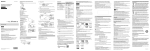
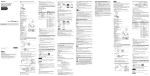
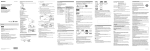
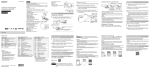
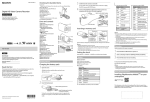
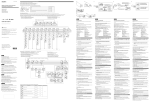
4-479-707-11(1) Checking the bundled items Camera (1) 3 Confirm that the camera is turned off. Camera is set in the Waterproof Case. Open the cover of the case as illustrated below. 4 To turn off the camera, press the NEXT button several times to display [PwOFF], then press the ENTER button. Connect the Multi/Micro USB Terminal of the camera to a computer with the micro USB cable (supplied). Digital HD Video Camera Recorder Press the NEXT or PREV button to power on. Select a shooting mode from [MOVIE], [PHOTO] and [INTVL]. Press the REC button to start recording. CHG (Charge) lamp Included in the internal memory of this camera. Micro USB cable To stop movie recording/interval photo recording Printed side Parts and controls REC/access lamp REC (Movie/Photo) button/ HDR-AS30 / AS30V English Owner’s Record The model and serial numbers are located inside the connector cover. Record the serial number in the space provided below. Refer to these numbers whenever you call your Sony dealer regarding this product. Model No. HDR-AS Serial No. Read this first This manual covers basic operations. For more detailed operations, refer to the Handbook (PDF) built into this camera, by doing the following. Insert a charged battery pack into the camera. Connect the camera to a computer with the micro USB cable (supplied). Press the NEXT or PREV button to power on. Display [Computer] [PMHOME] [HANDBOOK] on your computer, then install the Handbook (PDF). microSD card/ microSDHC card/ microSDXC card Terminal side “Memory Stick Micro” (Mark2) media Insert the memory card properly, confirming each side is facing the correct direction. Notes Playback of images recorded with other cameras, is not assured on this camera. During periods of extended shooting, camera temperature may rise to a point where shooting stops automatically. On what to do if this happens, see “Notes on long-time recording.” Using the Wi-Fi function Installing “PlayMemories Mobile” on your smartphone On the format of the memory card For details, refer to the Handbook (PDF). Notes Operation with all memory cards is not assured. Confirm the direction of the memory card. If you forcibly insert the memory card in the wrong direction, the memory card, memory card slot, or image data may be damaged. Format the memory card before use. To eject the memory card, lightly push the memory card once. Android 2.3 or later (Android 4.0 or later is required to use One-touch functions (NFC)) Search for “PlayMemories Mobile” on Google Play, then install it. Setting iOS 4.3 or later (One-touch functions (NFC) are not available) Button operations Search for “PlayMemories Mobile” on App Store, then install it. NEXT: Goes to the next menu PREV: Goes to the previous menu ENTER: Executes the menu Menu items List of modes Getting Started Charging the battery pack 1 Open the cover. 2 Insert the battery pack. Slide the battery ejection lever. © 2013 Sony Corporation Printed in China http://www.sony.net/ Press the REC button again. Inserting a memory card Set of printed documentation ENTER (Menu execute) button REC HOLD switch (N mark) NFC: Near Field Communication Display panel Speaker PREV button NEXT button Microphones Lens GPS sensor (HDR-AS30V only) Connector cover (Mic) jack Expansion connector CHG (Charge) lamp HDMI OUT jack Multi/Micro USB Terminal Supports Micro USB compatible devices. Battery pack/memory card cover Memory card insertion slot Battery ejection lever Battery insertion slot Recording Attach accessories to the camera, as required. 1 2 3 Operating Guide Micro USB cable (1) Rechargeable battery pack (NP-BX1) (1) Waterproof Case (1) Attachment Buckle (1) Flat Adhesive Mount (1) Curved Adhesive Mount (1) Handbook The following operations are available when the power of the camera is turned off. - Press the PREV or NEXT button to turn on the camera. - Press the ENTER button to start recording in the shooting mode you set before turning off the power of the camera. The display language cannot be changed. To close the cover, perform the operations in step 1 in opposite order. Items you can set in SETUP (Setup Mode) Display Modes Display Items MOVIE Movie Mode VIDEO Recording mode PHOTO Photo Mode STEDY SteadyShot INTVL Interval Photo Recording Mode ANGLE Field Angle SETUP Setup Mode SCENE Scene PLAY Play Mode LAPSE Interval Photo Recording PwOFF Power off Wi-Fi Smart Remote Control GPS GPS Log PLANE Airplane Mode A.OFF Auto Power Off BEEP Beep DATE Date & Time Setting USBPw USB Power Supply V.SYS Switching NTSC/PAL RESET Resetting the Settings FORMT Format Notes Pressing the NEXT or PREV button repeatedly cycles through the respective mode/setup items. To return to the [SETUP] menu from each setup item, select [BACK], then press the ENTER button. Notes Update “PlayMemories Mobile” to the latest version if you have already installed it on your smartphone. Operation of this application with all smartphones and tablets is not assured. Compliant OS version is information as at September 1, 2013. The operation methods and display screens for the application are subject to change without notice by future upgrades. For more information about “PlayMemories Mobile,” refer to the following website. (http://www.sony.net/pmm/) The information on the sticker (in the perforated box, below) is required when connecting the camera to a smartphone. If there is no sticker, refer to the supplied English version of the instruction manual. If the sticker is lost, you can recall your user ID and password by the following procedure. Insert a charged battery pack into the camera. Connect the camera to a computer with the micro USB cable (supplied). Press the NEXT or PREV button to power on. Display [Computer] [PMHOME] [INFO] [WIFI_INF.TXT] on your computer, then confirm your ID and password. Connecting Specifications Android Signal format: NTSC color, EIA standards HDTV 1080/60i, 1080/60p specification PAL color, CCIR standards HDTV 1080/50i, 1080/50p specification Power requirements: Rechargeable battery pack, 3.6 V (NP-BX1) USB, 5.0 V USB charging (Multi/Micro USB Terminal): DC 5.0 V, 500 mA/800 mA Rechargeable battery pack NP-BX1: Maximum charge voltage: DC 4.2 V Maximum charge current: 1.89 A Insert a memory card in the camera, turn on the camera, then select the shooting mode: [MOVIE], [PHOTO], [INTVL] Start “PlayMemories Mobile” on the smartphone. Select the SSID, as printed on the sticker attached to this manual. Input the password on the same sticker. (First time only.) On your smartphone, select the mode of the camera: Smart Remote Control mode or Copy mode. For more specifications, refer to “Specifications” in Handbook (PDF). Design and specifications are subject to change without notice. On trademarks Android (Supporting NFC) Touch the (N mark) of the smartphone against the (N mark) of the camera. When “PlayMemories Mobile” starts, settings are automatically applied to establish Wi-Fi connection. iPhone Insert a memory card in the camera, turn on the camera, then select the shooting mode: [MOVIE], [PHOTO], [INTVL] Open [Settings] on the smartphone. Select [Wi-Fi] on the smartphone. Select the SSID, as printed on the sticker attached to this manual. Input the password on the same sticker. (First time only.) Confirm that the SSID of the camera is displayed on the smartphone. Return to the Home screen, then start “PlayMemories Mobile.” On your smartphone, select the mode of the camera: Smart Remote Control mode or Copy mode. “Memory Stick,” “ ,” “Memory Stick Duo,” “ ,” “Memory Stick PRO ,” “Memory Stick PRO-HG Duo,” Duo,” “ ,” “Memory Stick Micro,” “MagicGate,” “ ,” “MagicGate Memory Stick” and “MagicGate Memory Stick Duo” are “ trademarks or registered trademarks of Sony Corporation. The terms HDMI and HDMI High-Definition Multimedia Interface, and the HDMI Logo are trademarks or registered trademarks of HDMI Licensing LLC in the United States and other countries. Mac, App Store are registered trademarks of Apple Inc. iOS is a registered trademark or trademark of Cisco Systems, Inc. and/or its affiliates in the United States and certain other countries. Android, Google Play are trademarks of Google Inc. iPhone is a trademark or a registered trademark of Apple Inc. Wi-Fi, the Wi-Fi logo, Wi-Fi PROTECTED SET-UP are registered trademarks of the Wi-Fi Alliance. The N Mark is a trademark or registered trademark of NFC Forum, Inc. in the United States and in other countries. “ ” and “PlayStation” are registered trademarks of Sony Computer Entertainment Inc. Add further enjoyment with your PlayStation 3 by downloading the application for PlayStation 3 from PlayStation Store (where available.) The application for PlayStation 3 requires PlayStation Network account and application download. Accessible in areas where the PlayStation Store is available. Adobe, the Adobe logo, and Adobe Acrobat are either registered trademarks or trademarks of Adobe Systems Incorporated in the United States and/or other countries. microSDXC logo is a trademark of SD-3C, LLC. In addition, system and product names used in this manual are, in general, trademarks or registered trademarks of their respective developers or manufacturers. However, the or marks are not used in all cases in this manual. WARNING Others Notes on long-time recording If the power is turned off, leave the camera for 10 minutes or longer to allow the temperature inside the camera to decrease to a safe level. Under high ambient temperatures, the temperature of the camera rises quickly. When the temperature of the camera rises, the image quality may deteriorate. It is recommended that you wait until the temperature of the camera drops before continuing to shoot. The surface of the camera may get hot. This is not a malfunction. Note on using When warning is displayed, entire screen flashes with the message displayed. For details, refer to the Handbook (PDF). To reduce the risk of fire or electric shock, 1) do not expose the unit to rain or moisture. 2) do not place objects filled with liquids, such as vases, on the apparatus. Do not expose the batteries to excessive heat such as sunshine, fire or the like. CAUTION Battery pack If the battery pack is mishandled, the battery pack can burst, cause a fire or even chemical burns. Observe the following cautions. About the software You can download the image management software “PlayMemories Home” from the following URL. http://www.sony.net/pm/ Note on wireless network function We assume no responsibility whatsoever for any damage caused by unauthorized access to, or unauthorized use of, destinations loaded on the camera, resulting from loss or theft. AC Adaptor Use the nearby wall outlet (wall socket) when using the AC Adaptor. Disconnect the AC Adaptor from the wall outlet (wall socket) immediately if any malfunction occurs while using the apparatus. For customers in the U.S.A. and CANADA RECYCLING LITHIUM-ION BATTERIES Lithium-Ion batteries are recyclable. You can help preserve our environment by returning your used rechargeable batteries to the collection and recycling location nearest you. For more information regarding recycling of rechargeable batteries, call toll free 1-800-822- 8837, or visit http://www.call2recycle.org/ Caution: Do not handle damaged or leaking Lithium-Ion batteries. Battery pack This device complies with Part 15 of the FCC Rules. Operation is subject to the following two conditions: (1) This device may not cause harmful interference, and (2) this device must accept any interference received, including interference that may cause undesired operation. CAN ICES-3 B/NMB-3 B This equipment complies with FCC/IC radiation exposure limits set forth for an uncontrolled environment and meets the FCC radio frequency (RF) Exposure Guidelines in Supplement C to OET65 and RSS-102 of the IC radio frequency (RF) Exposure rules. This equipment has very low levels of RF energy that are deemed to comply without testing of specific absorption ratio (SAR). For Customers in the USA Replace the battery with the specified type only. Otherwise, fire or injury may result. Do not disassemble. Do not crush and do not expose the battery pack to any shock or force such as hammering, dropping or stepping on it. Do not short circuit and do not allow metal objects to come into contact with the battery terminals. Do not expose to high temperature above 60°C (140°F) such as in direct sunlight or in a car parked in the sun. Do not incinerate or dispose of in fire. Do not handle damaged or leaking lithium ion batteries. Be sure to charge the battery pack using a genuine Sony battery charger or a device that can charge the battery pack. Keep the battery pack out of the reach of small children. Keep the battery pack dry. Replace only with the same or equivalent type recommended by Sony. Dispose of used battery packs promptly as described in the instructions. If you have any questions about this product, you may call: Sony Customer Information Center 1-800-222-SONY (7669) The number below is for the FCC related matters only. Regulatory Information Declaration of Conformity Trade Name: SONY Model No.: HDR-AS30V Responsible Party: Sony Electronics Inc. Address: 16530 Via Esprillo, San Diego, CA 92127 U.S.A. Telephone No.: 858-942-2230 This device complies with Part 15 of the FCC Rules. Operation is subject to the following two conditions: (1) This device may not cause harmful interference, and (2) this device must accept any interference received, including interference that may cause undesired operation. This equipment must not be co-located or operated in conjunction with any other antenna or transmitter. CAUTION You are cautioned that any changes or modifications not expressly approved in this manual could void your authority to operate this equipment. Note This equipment has been tested and found to comply with the limits for a Class B digital device, pursuant to Part 15 of the FCC Rules. These limits are designed to provide reasonable protection against harmful interference in a residential installation. This equipment generates, uses, and can radiate radio frequency energy and, if not installed and used in accordance with the instructions, may cause harmful interference to radio communications. However, there is no guarantee that interference will not occur in a particular installation. If this equipment does cause harmful interference to radio or television reception, which can be determined by turning the equipment off and on, the user is encouraged to try to correct the interference by one or more of the following measures: Reorient or relocate the receiving antenna. Increase the separation between the equipment and receiver. Connect the equipment into an outlet on a circuit different from that to which the receiver is connected. Consult the dealer or an experienced radio/TV technician for help. The supplied interface cable must be used with the equipment in order to comply with the limits for a digital device pursuant to Subpart B of Part 15 of FCC Rules. For Customers in Canada This device complies with Industry Canada licence-exempt RSS standard(s). Operation is subject to the following two conditions: (1) this device may not cause interference, and (2) this device must accept any interference, including interference that may cause undesired operation of the device. For Customers in Europe Notice for the customers in the countries applying EU Directives Manufacturer: Sony Corporation, 1-7-1 Konan Minato-ku Tokyo, 108-0075 Japan For EU product compliance: Sony Deutschland GmbH, Hedelfinger Strasse 61, 70327 Stuttgart, Germany Hereby, Sony Corporation, declares that this HDR-AS30V Digital HD Video Camera Recorder is in compliance with the essential requirements and other relevant provisions of Directive 1999/5/EC. For details, please access the following URL: http://www.compliance.sony.de/ Notice If static electricity or electromagnetism causes data transfer to discontinue midway (fail), restart the application or disconnect and connect the communication cable (USB, etc.) again. This product has been tested and found compliant with the limits set out in the EMC regulation for using connection cables shorter than 3 meters (9.8 feet). The electromagnetic fields at the specific frequencies may influence the picture and sound of this unit. Disposal of Old Electrical & Electronic Equipment (Applicable in the European Union and other European countries with separate collection systems) This symbol on the product or on its packaging indicates that this product shall not be treated as household waste. Instead it shall be handed over to the applicable collection point for the recycling of electrical and electronic equipment. By ensuring this product is disposed of correctly, you will help prevent potential negative consequences for the environment and human health, which could otherwise be caused by inappropriate waste handling of this product. The recycling of materials will help to conserve natural resources. For more detailed information about recycling of this product, please contact your local Civic Office, your household waste disposal service or the shop where you purchased the product. Disposal of waste batteries (applicable in the European Union and other European countries with separate collection systems) This symbol on the battery or on the packaging indicates that the battery provided with this product shall not be treated as household waste. On certain batteries this symbol might be used in combination with a chemical symbol. The chemical symbols for mercury (Hg) or lead (Pb) are added if the battery contains more than 0.0005% mercury or 0.004% lead. By ensuring these batteries are disposed of correctly, you will help prevent potentially negative consequences for the environment and human health which could otherwise be caused by inappropriate waste handling of the battery. The recycling of the materials will help to conserve natural resources. In case of products that for safety, performance or data integrity reasons require a permanent connection with an incorporated battery, this battery should be replaced by qualified service staff only. To ensure that the battery will be treated properly, hand over the product at end-of-life to the applicable collection point for the recycling of electrical and electronic equipment. For all other batteries, please view the section on how to remove the battery from the product safely. Hand the battery over to the applicable collection point for the recycling of waste batteries. For more detailed information about recycling of this product or battery, please contact your local Civic Office, your household waste disposal service or the shop where you purchased the product. For Customers in Singapore