1
3-261-647-62 (1)
D
Label side up
貼標籤面朝上
贴标签面朝上
注意
E
•
•
•
•
開著時,將有看不見的雷射線
別凝視射線或直接觀看裡面的光學元件
開著時,將有看不見的 CLASS 1M 雷射線
別直接觀看裡面的光學元件
*1 AMS= 自動音樂感應器
*2 如果斷開電源,所有設定返回到默認值。
*3 當使用 SOUND 功能時,如果聲音失真,請降低音量。
*4 AVLS= 自動音量控制系統
要取出 CD
連接電源
Operating Instructions
使用說明書
使用说明书
使用 AC 電源轉接器(C)
Playing a CD
To insert a CD
1 Slide OPEN to open the lid (A).
2 Fit the CD to the pivot, then close the lid (D).
English
WARNING
To prevent fire or shock hazard, do not expose the unit to
rain or moisture.
D-EJ100
©2003 Sony Corporation
Do not install the appliance in a confined space, such as
a bookcase or built-in cabinet.
Printed in China
“WALKMAN” is a registered trademark of Sony Corporation to represent Headphone Stereo
products.
is a trademark of Sony Corporation.
To prevent fire, do not cover the ventilation of the
apparatus with newspapers, tablecloths, curtains, etc. And
don’t place lighted candles on the apparatus.
To prevent fire or shock hazard, do not place objects filled
with liquids, such as vases, on the apparatus.
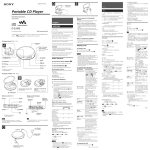
CD player (front)/CD 唱機(正面)/CD 播放机(正面)
1 ./>
4 DISPLAY/MENU
Certain countries may regulate disposal of the battery used
to power this product. Please consult with your local
authority.
5 P MODE/
CAUTION
2 u*
6 SOUND
i (headphones) jack
i(頭戴耳機)插孔
i(头戴耳机)插孔
Strap hole/吊帶孔/吊带孔
7x
A
• INVISIBLE LASER RADIATION WHEN OPEN
• DO NOT STARE INTO BEAM OR VIEW DIRECTLY
WITH OPTICAL INSTRUMENTS
• CLASS 1M INVISIBLE LASER RADIATION WHEN
OPEN
• DO NOT VIEW DIRECTLY WITH OPTICAL
INSTRUMENTS
• This CD player can play CD-Rs/CD-RWs recorded in the
Compact Disc Digital Audio (Audio CD) format, but
playback capability may vary depending on the quality of the
disc and the condition of the recording device.
• This product is designed to play back discs that conform to
the Compact Disc (CD) standard.
Recently, various music discs encoded with copyright
protection technologies are marketed by some record
companies. Please be aware that among those discs, there are
some that do not conform to the CD standard and may not be
playable by this product.
To operate the CD player
Button/Switch
Function/Operation
1./>
(AMS*1/search)
Press . or > once to find
the beginning of the current/next
track. Press . or >
repeatedly to find the beginning of
the previous/succeeding tracks.
Press and hold . or > to go
backward/forward quickly.
2u
(play/pause)
• Press to start play. Press again to
pause play.
To play from the first track, press
for 2 seconds or more while the
CD player is stopped.
• Also press to enter the selection.
Display/顯示器/显示器
DC IN 4.5 V (external power
input) jack
DC IN 4.5 V(外部電源輸
入)插孔
DC IN 4.5 V(外部电源输
入)插孔
OPEN
The validity of the CE marking is restricted to only those
countries where it is legally enforced, mainly in the
countries EEA (European Economic Area).
3 HOLD
Use to lock the controls to prevent
accidental button presses.
Power Sources
4 DISPLAY/
MENU
• Press once to display “track
number and remaining time of the
current track.”
Press twice to display “the
number of tracks left and the time
remaining on the CD.”
Press three times to display “track
number and elapsed playing time
(normal display).”
• Also press to enter the menu and
to enter the selection.
To use the AC power adaptor (C)
3 HOLD (rear/背面/背面)
8 VOL +*/–
1 Connect the AC power adaptor to an AC outlet.
To use the batteries (B)
*The button has a tactile dot.
* 按鈕帶有觸感圓點。
* 按键带有触感圆点。
Use only the following batteries for your CD player:
Dry batteries
• LR6 (size AA) alkaline batteries
5 P MODE/
(play mode/repeat)
To insert the batteries
CD player (inside)/CD 唱機(裡面)/CD 播放机(里面)
1 Open the battery compartment lid inside your CD
player.
B
2 Insert two batteries by matching the 3 to the diagram
in the battery compartment and close the lid until it
clicks into place.
Battery life* (approx. hours)
(When the CD player is used on a flat and stable place.)
Playing time varies depending on how the CD player is
used.
Open the battery compartment lid.
打開電池室蓋。
打开电池室盖。
Insert the # end first (for both
batteries).
首先插入 # 端(兩電池都
是)。
首先插入#端(两电池都是)。
6 SOUND*2
G-PROTECTION
ON
OFF
Two Sony alkaline
batteries LR6 (SG)
(produced in Japan)
50
45
* Measured value by the standard of JEITA (Japan
Electronics and Information Technology Industries
Association).
Display/顯示器/显示器
Track number
曲號
曲号
Playing time
播放時間
播放时间
7 x(stop)
Press to stop play.
8 VOL+/–
Press to adjust the volume.
t
t
t
t
t Lo batt*
*Beep sounds.
Notes
• The indicator sections of
roughly shows the
remaining battery power. One section does not always
indicate one-fourth of the battery power.
• Depending on operating conditions, the indicator
sections of
may increase or decrease.
Notes on using the dry batteries
C
to an AC outlet
至 AC 電源插座
至 AC 电源插座
DC IN 4.5V
i
AC power adaptor
AC 電源轉接器
AC 电源转接器
• Use to emphasize the bassboosted sound. Press repeatedly
to select BASS
or BASS
. BASS
enhances
more than BASS .*3
• Also use to keep down the
maximum volume to protect your
hearing. Press and hold until
“AVLS*4” appears in the display.
The AVLS function is turned on.
To turn off the AVLS function,
press and hold again until
“AVLS” disappears.
You can check it in the display.
Replace the batteries when “
G-PROTECTION
Play mode
播放模式
播放模式
Remaining battery
AVLS
power
Bookmark
Sound mode
剩餘電池電力
書簽
聲音模式
剩余电池电力
书签
声音模式
During play, press repeatedly until
the play mode you want appears on
the display.
No indication: Normal play
“1”: Single track play
“SHUF”: Shuffle play
“ ”: Bookmark track play
“PGM”: PGM (program) play
To repeat the play mode you
selected, press and hold until “ ”
appears.
To check the remaining power of the
batteries
” flashes.
• Be sure to remove the AC power adaptor.
• When the batteries are depleted, replace both batteries
with new ones.
本 CD 唱機限使用下列電池:
为防火灾或触电危险,切勿让机器暴露于雨中或
潮湿处。
• LR6(AA , 3 號)鹼性電池
*1 AMS = Automatic Music Sensor
*2 If you disconnect the power sources, all settings return to the
defaults.
*3 If the sound is distorted when using the SOUND function,
turn down the volume.
*4 AVLS = Automatic Volume Limiter System
插入電池
1 打開 CD 唱機裡面的電池室蓋。
2 裝入 2 個電池使 3 對準電池室中的圖示,然後關
上蓋子至卡搭定位。
(在平穩表面使用 CD 唱機時)
播放時間因 CD 唱機的使用狀況而異。
G-PROTECTION 設定
ON
OFF
兩 Sony 鹼性電池
LR6(SG)
(日本製)
可以在顯示器上檢查。
”閃爍時請更換電池。
當“
t
t
為防火災或觸電危險,切勿讓機器暴露於雨中或
潮濕處。
別把機器安裝在諸如書櫥或壁櫥等密閉處。
t
t
•
•
•
•
开着时,将有看不见的激光辐射
别凝视激光束或直接用光学仪器观看
开着时,将有看不见的 CLASS 1M 激光辐射
别直接用光学仪器观看
5 P MODE/
(播放模式/重现)
6 SOUND*2
CE 标志的有效性,仅限于那些有法律限制的国
家,主要在 EEA(欧洲经济区)国家。
使用 AC 电源转接器 (C)
1 将 AC 电源转接器连接到 AC 电源插座。
* 嗶聲。
用于锁定控制钮以防止意外按
动。
4 DISPLAY/MENU • 按一次显示“曲号和当前曲
子剩余时间”。
按两次显示“剩余曲子数和
CD 上的剩余时间”。
按三次显示“曲号和已播放
时间(正常播放)”。
• 按下时也用于输入菜单和选
择。
注意
使用电池 (B)
t Lo batt*
播放期间,反复按直到所要的
播放模式出现在显示器上。
无显示:正常播放
“1”:单首曲子播放
“SHUF”:随机播放
“ ”:书签轨迹播放
“PGM”:PGM(程序)播放
要重现选定的播放模式,按住
此钮直到“ ”出现。
• 用来加强低音。反复按此钮
或
以选择 BASS
BASS
。BASS
的作用强于 BASS 。*3
• 也用来限制最大音量以保护
听力。按住此钮直到
“AVLS*4”出现在显示器
上。AVLS 功能开启。要关
闭 AVLS 功能,再次按住此
钮直到“AVLS”消失。
7 x (停止)
按此钮停止播放。
8 VOL+/–
按此钮调节音量。
*1 AMS= 自动音乐传感器
*2 如果断开电源,所有设置返回到默认值。
*3 当使用 SOUND 功能时,如果声音失真,请降低音量。
*4 AVLS= 自动音量控制系统
干电池
• LR6(AA,5 号)碱性电池
註
的指示段節粗示剩餘電池電力。其一個段節不
一定正確代表電池電力的四分之一。
• 根據操作條件,
的指示段節的使用時間可能增
加或減少。
•
• 務必卸下 AC 電源轉接器。
• 當電池用完時,同時更換兩節新電池。
要取出 CD
插入电池
按住中心轴(E),取下 CD。
1 打开 CD 播放机里面的电池室盖。
2 装入 2 个电池使 3 对准电池室中的图示,然后关
使用乾電池的注意事項
上盖子至卡搭定位。
电池使用时间 *(大约时数)
(在平稳表面使用 CD 播放机时)
播放时间因 CD 播放机的使用状况而异。
播放 CD
G-PROTECTION 设定
ON
OFF
插入 CD
1 滑動 OPEN 打開頂蓋(A)。
2 把 CD 按入中心軸,然後蓋上頂蓋(D)。
註
• 本CD唱機可以播放以雷射光碟數位音訊(音訊CD)格
式錄製的 CD-R/CD-RW 。但播放能力取決於光碟質量
和錄音設備的狀況。
• 本產品設計用於播放符合 Compact Disc(CD)標準的
光碟。近來,許多錄製公司都出售各種用版權保護技
術編碼的音樂光碟。請注意,這些光碟中可能會有不
符合 CD 標準的光碟,且可能無法用本產品播放。
開關
两 Sony 碱性电池
LR6 (SG)
(日本制)
功能
操作
1 ./>
(AMS*1 搜索)
按 . 或 > 一次查找當前
下一曲子的開頭。反復按 .
或 > 查找前面 後面的曲子
的開頭。按住 . 或 > 快退
快進。
2u
(播放 暫停)
• 按此鈕開始播放。再按一次暫
停播放。
要從第一個曲子開始播放,當
CD 唱機停止時,按住此鈕 2 秒
以上。
• 按下時也用於輸入選擇。
3 HOLD
用於鎖定控制鈕以防意外。
4 DISPLAY/MENU
• 按一次顯示“曲號和當前曲子
剩餘時間”。
按兩次顯示“剩餘曲子數和 CD
上的剩餘時間”。
按三次顯示“曲號和已播放時
間(正常播放)”。
• 按下時也用於輸入功能表和選
擇。
5 P MODE/
播放期間,反復按直到所要的播
(播放模式 重現) 放模式出現在顯示器上。
無顯示︰正常播放
“1”︰單首曲子播放
“SHUF”︰隨機播放
“ ”︰書籤軌跡播放
“PGM”︰ PGM(程式)播放
要重現選定的播放模式,按住此
鈕直到“ ”出現。
6 SOUND*2
• 用來加強低音。反復按此鈕以
選擇 BASS
或 BASS
。
的作用強於
BASS
BASS 。 *3
• 也用來限制最大音量以保護聽
力。按住此鈕直到“AVLS*4”
出現在顯示器上。 AVLS 功能開
啟。要關閉 AVLS 功能,再次按
住此鈕直到“AVLS”消失。
7 x(停止)
按此鈕停止播放。
8 VOL+/–
按此鈕調節音量。
50
45
* JEITA (Japan Electronics and Information
Technology Industries Association)(日本电
子和信息技术产业协会)的标准测值。
检查电池剩余电力
可以在显示器上检查。
”闪烁时请更换电池。
当“
t
t
操作 CD 唱機
為防火災,請勿讓裝置的通風孔蓋住報紙,桌
布,窗簾等。也不可在裝置上點放蠟燭。
一部分國家對於本產品的電源用電池可能規定有
處置的標準。請洽詢當地有關當局。
• 按此钮开始播放。再按一次
暂停播放。
要从第一个曲子开始播放,
当 CD 播放机停止时,按住
此钮 2 秒以上。
• 按下时也用于输入选择。
一部分国家对于本产品的电源用电池可能规定有
处置的标准。请洽询当地有关当局。
本 CD 播放机限使用下列电池:
按鈕
2u
(播放/暂停)
连接电源
檢查電池剩餘電力
Remove the CD while pressing the pivot (E).
警告
45
* JEITA(Japan Electronics and Information
Technology Industries Association)
(日本電子
和資訊技術產業協會)的標準測值。
To remove the CD
中文
50
为防火灾,请勿让装置的通风孔盖住报纸,桌布,
窗帘等。也不可在装置上点放蜡烛。
为防火灾或触电危险,不可在装置上摆饰花瓶等
装满液体的物体。
電池使用時間 *(大約時數)
為防火災或觸電危險,不可在裝置上擺飾花瓶等
裝滿液體的物體。
Headphones or earphones
頭戴耳機或耳機
头戴耳机或耳机
警告
别把机器安装在诸如书橱或壁橱等密闭处。
Notes
朝 . 或 > 按此钮一次查
找当前/下一曲子的开头。反
复按 . 或 > 查找前面/
后面的曲子的开头。按住 .
或 > 快退/快进。
3 HOLD
使用電池(B)
功能/操作
1 ./>
(AMS*1 /搜索)
中文
1 將 AC 電源轉接器連接到 AC 電源插座。
乾電池
按钮/开关
按住中心軸(E),取下 CD 。
C E 標誌的有效性,僅限於那些有法律限制的國
家,主要在 EEA(歐洲經濟區)國家。
Portable CD Player
操作 CD 播放机
t
t
t Lo batt*
* 哔声。
注
的指示段节粗示剩余电池电力。其一个段节不
一定正确代表电池电力的四分之一。
的指示段节的使用时间可能增
• 根据操作条件,
加或减少。
•
使用干电池的注意事项
• 务必卸下 AC 电源转接器。
• 当电池用完时,同时更换两节新电池。
播放 CD
插入 CD
1 滑动 OPEN 打开顶盖(A)。
2 把 CD 按入中心轴,然后盖上顶盖(D)。
注
• 本 CD 播放机可以播放以激光光盘数码音频(音频
CD)格式录制的 CD-R/CD-RW。但播放能力取决于
光盘质量和录音设备的状况。
• 本产品设计用于播放符合Compact Disc(CD)标准的
光盘。近来,许多录制公司都出售各种用版权保护技
术编码的音乐光盘。请注意,这些光盘中可能会有不
符合 CD 标准的光盘,且可能无法用本产品播放。
To cancel the setting operation, press and hold x.
The volume does not increase even if
you press VOL + repeatedly.
List of menus
c Press and hold SOUND until “AVLS” disappears from
the display.
To return to the previous screen, press x.
English
Setting
Menu 1
Timer*
t-SEt
,
Playing your favorite tracks
by adding Bookmarks
(Bookmark track play)
You can add Bookmarks to up to 99 tracks for each CD.
You can use this function for up to 5 CDs.
To add Bookmarks
1 During playback of the track where you want to add a
Bookmark, press and hold u until “
(Bookmark)” flashes on the display.
Menu 2
––
05
:
:
95
G-PROTECTION
SEt
on
off
Turning off the
beep sound
bEEP
b on
b off
If you disconnect the power sources, all settings return to
the defaults.
2 Repeat step 1 to add Bookmarks to the tracks you
Precautions
want.
To listen to the tracks with
Bookmarks
1 Press P MODE/
2 Press u.
repeatedly until “
On safety
” flashes.
“ ” lights up in the display and the playback of the
tracks with Bookmarks starts.
To remove the Bookmarks
During playback of the track with a Bookmark, press and
hold u until “ ” disappears from the display.
To check the tracks with Bookmarks
During playback of the tracks with Bookmarks, “
keeps flashing slowly in the display.
”
Notes
• During playback of the tracks with Bookmarks, tracks
are played in order of track number, and not in the order
you added the Bookmarks.
• If you try to add Bookmarks to the tracks on the 6th CD,
the Bookmarks of the CD you played back first will be
erased.
• If you remove all power sources, all Bookmarks stored
in memory will be erased.
Playing tracks in your
favorite order (PGM play)
You can program the CD player to play up to 64 tracks in
your favorite order.
1 During playback, press P MODE/
repeatedly until
“PGM” appears.
2 Press . or > to select a track.
3 To enter the selected track, press and hold u until
the playing order increases by one.
“00” appears and the playing order increases
by one.
4 Repeat steps 2 and 3 to select the tracks in your
favorite order.
5 Press u to start PGM play.
To check the program
During programming:
Press and hold u repeatedly before step 5.
During the PGM play:
Press P MODE/
repeatedly until “PGM” flashes, then
press and hold u repeatedly.
Each time you press u, the track number appears.
Notes
• When you finish entering the 64th track in step 3, the first
selected track appears in the display.
• If you select more than 64 tracks, the first selected
tracks are erased.
• Should any solid objects or liquid fall into the CD
player, unplug it and have it checked by qualified
personnel before operating it any further.
• Do not put any foreign objects in the DC IN 4.5 V
(external power input) jack.
On power sources
• When you are not using the CD player for a long time,
disconnect all power sources from the CD player.
On AC power adaptor
• Use only the AC power adaptor supplied. If your CD
player is not supplied with the one, use the AC-E45HG
AC power adaptor. Do not use any other AC power
adaptor. It may cause a malfunction.
Polarity of the plug
You can make the following settings using the menu.
• Do not touch the AC power adaptor with wet hands.
• Connect the AC power adaptor to an easily accessible
AC outlet. Should you notice an abnormality in the AC
power adaptor, disconnect it from the AC outlet
immediately.
On dry batteries
• Do not throw the batteries into fire.
• Do not carry the batteries with coins or other metallic
objects. It can generate heat if the positive and negative
terminals of the battery are accidentally contacted by a
metallic object.
• Do not mix new batteries with old ones.
• Do not use different types of batteries together.
• When the batteries are not to be used for a long time,
remove them.
• If battery leakage occurs, wipe off any deposit in the
battery compartment, and install new batteries. In case
the deposit adheres to you, wash it off thoroughly.
On the CD player
• Keep the lens on the CD player clean and do not touch
it. If you do so, the lens may be damaged and the CD
player will not operate properly.
• Do not put any heavy object on top of the CD player.
The CD player and the CD may be damaged.
• Do not leave the CD player in a location near heat
sources, or in a place subject to direct sunlight, excessive
dust or sand, moisture, rain, mechanical shock, unleveled
surface, or in a car with its windows closed.
• If the CD player causes interference to the radio or
television reception, turn off the CD player or move it
away from the radio or television.
• Discs with non-standard shapes (e.g., heart, square, star)
cannot be played on this CD player. Attempting to do so
may damage the CD player. Do not use such discs.
Road safety
You can set the CD player to stop playback automatically
within a range of 5 to 95 minutes at 5 minute intervals.
When the CD player is playing and the timer function is
activated, the track number flashes on the display.
The G-PROTECTION function
Preventing hearing damage
This function has been developed to provide excellent
protection against sound skipping during many active uses.*
Turning off the beep sound
You can turn off the beep sound that is heard from your
headphones/earphones when you operate your CD player.
* Sound may skip:
– if the CD player receives stronger continuous shock than
expected,
– if a dirty or scratched CD is played or
– when using poor-quality CD-Rs/CD-RWs or if there is a
problem with the recording device or application software.
可以使用功能表進行下列設定。
可以設定 CD 唱機使其在 5 到 95 分鐘的範圍內,以
5 分鐘為間隔,自動停止播放。
當 CD 唱機正在播放,並且激活定時器功能時,曲
號在顯示器上閃爍。
G-PROTECTION 功能
此功能已發展到能在許多活動使用過程中提供優
秀的保護,防止跳音。 *
Specifications
可以關掉當操作 CD 唱機時從頭戴耳機 / 耳機聽到
的嘩聲。
Compact disc digital audio system
Laser diode properties
Material: GaAlAs
Wavelength: λ = 780 nm
Emission duration: Continuous
Laser output: Less than 44.6 µW (This output is the value
measured at a distance of 200 mm from the objective lens
surface on the optical pick-up block with 7 mm aperture.)
• Two LR6 (size AA) batteries: 1.5 V DC × 2
• AC power adaptor (DC IN 4.5 V jack):
220 V, 50 Hz (Model for China)
120 V, 60 Hz (Model for Mexico)
• Rated current: 500 mA
Approx. 135.8 × 22.8 × 135.8 mm
Avoid using headphones/earphones at high volume.
Hearing experts advise against continuous, loud and
extended play. If you experience a ringing in your ears,
reduce volume or discontinue use.
Consideration for others
Keep the volume at a moderate level. This will allow you
to hear outside sounds and to be considerate to the people
around you.
Design and specifications are subject to change without
notice.
Supplied Accessories
When the item has been entered securely, the item
stops flashing.
可按照所喜爱的顺序给CD播放机编程来播放最多
64 首曲子。
請用適當的音量聽。如此則仍可聽到周圍的聲音
並且不至於騷擾到旁邊的人。
保養
清潔機殼
用清水或溫和的洗滌劑溶液蘸濕軟布擦拭清潔,
不可使用酒精、汽油或稀釋劑。
如果端子髒了,可能聽不到聲音或聽到噪音。定
期用乾的軟布清潔它們。
故障檢修
即使反復按 VOL + ,音量也不提高。
c 按住 SOUND 直到“AVLS”從顯示器上消失。
電池室蓋由於意外掉落、過大的力等而脫
落。
當成功地加記完書籤時,“
”閃爍即變慢。
2 反復步驟 1 給所有喜歡的曲子加記書籤。
To clean the plugs
If the plugs become dirty, there is no audio or noise is
heard. Clean them with a dry soft cloth periodically.
Troubleshooting
Should any problem persist after you have made these
checks, consult your nearest Sony dealer.
“Hold” appears in the display when you
press a button, and the CD does not play.
c The buttons are locked. Slide HOLD back.
設定
功能表 1
定時器 *
t-SEt
,
SEt
bEEP
功能表 2
––
05
:
:
95
on
off
b on
b off
1 請反復按 P MODE/
2 按u。
顯示器中即點亮“
(書籤)的曲子。
註
至閃爍著“
使用前須注意
• 萬一有任何異物或液體掉進 CD 唱機內時,即請立刻
卸下電源並找有資格的人檢查過以後才可再操作使
用。
• 別試圖用任何物體塞入 DC IN 4.5 V(外部電源輸
入)插孔。
• 當長期不使用 CD 唱機時,請卸下所有的電源。
”。
”而開始播放帶有 Bookmark
要去除 Bookmark 時
請在播放帶有 Bookmark(書籤)的曲子當中,按
住 u 至顯示器中的“ ”消失了顯示。
可以关掉当操作 CD 播放机时从头戴耳机 / 耳机听
到的哗声。
規格
* 下列情况可能会发生跳音:
– 如果 CD 播放机受到连续的、意外强大的震动。
– 如果 CD 光盘污秽或有刮痕,或
– 当使用劣质的CD-R/CD-RW或录音设备或应用软件有
问题时。
系統
CD 數位聲頻系統
雷射二極管性質
材料:GaAlAs
波長:λ =780 nm
發射持久性:連續
雷射輸出:小於 44.6 μ W(本輸出值是在距離 7 mm 光
圈的光學拾音元件的物鏡鏡面 200 mm 處測得。)
AC 電源轉接器須知
• 限使用附帶的 AC 電源轉接器。如果CD 唱機沒有附帶
AC 電源轉接器,使用 AC-E45HG AC 電源轉接器。請
別使用任何其他的 AC 電源轉接器。因為可能造成故
障。
• 用兩 LR6(AA , 3 號)電池:1.5 V DC × 2
• AC 電源轉接器(DC IN 4.5 V 插孔):
220 V, 50 Hz(中國型號)
120 V, 60 Hz(墨西哥型號)
尺寸(寬
制器)
高
縱深)(不含突起部分和控
註
• 在播放帶有 Bookmark(書籤)的曲子時,是以曲號
順序播放曲子的,而不是以您加記書籤的順序播放
的。
• 您如果試圖給第 6 張 CD 加記書籤,則第 1 張播放的
CD 其所加記的書籤,即被擦去。
• 您如果拆開了所有的電源,則儲存在存儲器中的所有
Bookmark 都將被擦去。
按您喜愛的順序播放曲子(PGM 播
放)
1。
“00”出現,播放順序加 1 。
4 重複步驟 2 和 3 以按喜愛的順序選擇曲子。
5 按 u 開始 PGM 播放。
要檢查程式時
編程中︰
在步驟 5 之前反復按住 u 。
PGM 播放中︰
反復按 P MODE/
直到“PGM”閃爍,然後反復
按住 u 。
每次按 u ,出現曲號。
乾電池須知
• 別把電池投入火中。
• 電池不要和硬幣等別的金屬小件混在一起攜帶。因為
電池的+、-極若與金屬件接觸,將會生熱造成危
險。
• 別混用新、舊電池。
• 別混用不同類型的電池。
• 長時間不用電池時,請把它卸下保存。
• 電池發生漏液時,須即擦拭乾淨電池室裡沾染的電解
液,然後裝用新電池。萬一皮膚上沾染了漏液時,必
須趕快洗淨。
CD 唱機須知
• 須保持 CD 唱機上的透鏡乾淨清潔,不要用手觸摸。
否則,透鏡可能受損而 CD 唱機將不能操作正常。
• 別在CD唱機上堆置重物以免壓壞CD唱機或CD光碟。
• 別把 CD 唱機放置靠近熱源或可直接照射到陽光,或
多沙塵、潮濕、淋到雨、有機械衝擊、不平坦的地
方,或緊閉著窗門的汽車裡面。
• 如果 CD 唱機給附近的收音機或電視接收造成干擾,
即請關掉 CD 唱機或把它移離開收音機或電視機遠些
使用。
• 本 C D 唱機不能用於播放不規則形(例如心形,方
形,星形)的光碟。若試圖那樣做,將可能損壞您的
CD 唱機。切勿使用該類光碟。
CD 播放机须知
• 须保持 CD 播放机上的透镜干净清洁,不要用手触
摸。否则,透镜可能受损而 CD 播放机将不能操作正
常。
• 别在CD播放机上堆置重物以免压坏CD播放机或CD
光盘。
• 别把 CD 播放机放置靠近热源或可直接照射到阳光,
或多沙尘、潮湿、淋到雨、有机械冲击、不平坦的地
方,或紧闭着窗门的汽车里面。
• 如果 CD 播放机给附近的收音机或电视接收造成干
扰,即请关掉 CD 播放机或把它移离开收音机或电视
机远些使用。
• 本 CD 播放机不能用于播放不规则形(例如心形,方
形,星形)的光盘。若试图那样做,将可能损坏您的
CD 播放机。切勿使用该类光盘。
路上安全
开车、骑车、或在操作任何机动车辆时,请勿使用
头戴耳机/耳机。因为可能有造成交通事故的危险。有
些地区是禁止使用的。步行中如果用太大声听耳机也
会有潜在危险的,尤其是在横越马路时。在有潜在危险
的地方,必须特别注意或暂停使用。
避免用大音量听头戴耳机/耳机。最好也不要长
时间连续使用。如有耳鸣经历,更应降低音量和避免连
续用耳机听。
顾虑他人
请用适当的音量听。如此则仍可听到周围的声音
并且不至于骚扰到旁边的人。
保养
清洁机壳
用清水或温和的洗涤剂溶液蘸湿软布擦拭清洁,
不可使用酒精、汽油或稀释剂。
清洁端子
如果端子脏了,可能听不到声音或听到噪音。定期
用干的软布清洁它们。
故障检修
1 当播放停止时,按DISPLAY/MENU直到“t-SEt”
虽经检查过这些征候而问题仍未获解决时,即请
洽询附近的 Sony 销售店。
出现。
从这步开始,请在完成上一个操作后 15 秒内开始
下一操作。如果显示器上的显示消失,需再次从步
骤 1 开始。
2 按 . 或 > 选择菜单 1 项,然后按 DISPLAY/
当按按钮时,
“Hold”出现在显示器上,不能
播放 CD。
c 按钮被锁定。把 HOLD 滑回原位。
MENU 或 u。
即使反复按 VOL +,音量也不提高。
菜单 2 项开始闪烁。
c 按住 SOUND 直到“AVLS”从显示器上消失。
3 按 . 或 > 选择菜单 2 项,然后按 DISPLAY/
电池室盖由于意外掉落、过大的力等而脱落。
c 如下图所示把它装上。
MENU 或 u 输入该选项。
当项目已成功输入时,该项目停止闪烁。
質量(不含附件)
大約 180 g
要返回前一个屏幕时,按 x。
操作溫度
要取消设置操作时,按住 x。
5℃∼ 35℃
設計和規格有所變更時,恕不另行奉告。
附帶的附件
菜单列表
设置
菜单 1
定时器 *
t-SEt
,
AC 電源轉接器(1)
頭戴耳機 耳機(1)
插頭極性
• 潮濕著手不要去碰 AC 電源轉接器。
• 將 AC 電源轉接器接插到方便的 AC 電源插座。萬一發
現 AC 電源轉接器有異常時,請立即從AC 電源插座上
拔下 AC 電源轉接器。
• 别把电池投入火中。
• 电池不要和硬币等别的金属小件混在一起携带。因为
电池的+、-极若与金属件接触,将会生热造成危险。
• 别混用新、旧电池。
• 别混用不同类型的电池。
• 长时间不用电池时,请把它卸下保存。
• 电池发生漏液时,须即擦拭干净电池室里沾染的电解
液,然后装用新电池。万一皮肤上沾染了漏液时,必
须赶快洗净。
如何设置
大約 135.8 × 22.8 × 135.8 mm
要檢查帶有 Bookmark 的曲子時
在播放帶有 Bookmark(書籤)的曲子當中,顯示
器中的“ ”將閃爍得較慢。
干电池须知
防止损伤听觉
关掉哗声
電源
如果斷開電源,所有設定返回到默認值。
電源須知
要利用 Bookmark 聽曲子時
可以使用菜单进行下列设置。
定时器功能
此功能已发展到能在许多活动使用过程中提供优
秀的保护,防止跳音。*
功能表列表
安全須知
器中閃爍著“ (Bookmark)”。
其它功能
G-PROTECTION 功能
* 在播放和停止期間均可設定此項。
時間設定是估計的。
1 播放曲子當中,在所要加記書籤處按住u至顯示
• 在步骤 3,当您输入完第 64 首曲子时,显示器上即
出现所选的第 1 首曲子。
• 选择大于 64 首曲子时,第 1 首选择的曲子将被擦去。
要取消設定操作時,按住 x 。
c 如下圖所示把它裝上。
• 将 AC 电源转接器接插到方便的 AC 电源插座。万一
发现 AC 电源转接器有异常时,请立即从 AC 电源插
座上拔下 AC 电源转接器。
头戴耳机/耳机须知
注
要返回前一個螢幕時,按 x 。
關掉嘩聲
要加記 Bookmark 時
编程中:
在步骤 5 之前反复按住 u。
PGM 播放中:
反复按 P MODE/
直到“PGM”闪烁,然后
反复按住 u。
每次按 u,出现曲号。
可以设置 CD 播放机使其在 5 到 95 分钟的范围内,
以 5 分钟为间隔,自动停止播放。
当 CD 播放机正在播放,并且激活定时器功能时,
曲号在显示器上闪烁。
中文
每張 CD 最多能給 99 首曲子加記書籤。最多能為 5
張 CD 使用此功能。
4 重复步骤 2 和 3 以按喜爱的顺序选择曲子。
5 按 u 开始 PGM 播放。
c 按鈕被鎖定。把 HOLD 滑回原位。
功能表 2 項開始閃爍。
G-PROTECTION
給喜歡的曲子加記 Bookmark 以便選
播(播放加記書籤曲子)
1 播放中,反复按 P MODE/ 直到“PGM”出现。
2 按 . 或 > 选择曲子。
3 要输入选择的曲子时,按住u直到播放顺序加1。
要检查程序时
清潔端子
MENU 或 u 。
AC power adaptor AC-ES455K (1)
Headphones/earphones (1)
1 While play is stopped, press DISPLAY/MENU until
press DISPLAY/MENU or u to enter the selection.
2 按 . 或 > 選擇功能表 1 項,然後按 DISPLAY/
當項目已成功輸入時,該項目停止閃爍。
Use a soft cloth slightly moistened in water or a mild
detergent solution. Do not use alcohol, benzine or thinner.
Menu 2 item starts flashing.
顧慮他人
當按按鈕時,“Hold”出現在顯示器上,不
能播放 CD 。
Approx. 180 g
1 播放中,反復按 P MODE/
直到“PGM”出現。
2 按 . 或 > 選擇曲子。
3 要輸入選擇的曲子時,按住 u 直到播放順序加
3 Press . or > to select the Menu 2 item, then
按您喜爱的顺序播放曲子(PGM 播
放)
從這步開始,請在完成上一個操作後 15 秒內開始
下一操作。如果顯示器上的顯示消失,需再次從步
驟 1 開始。
Mass (excluding accessories)
To clean the casing
press DISPLAY/MENU or u.
避免用大音量聽頭戴耳機 耳機。最好也不要長
時間連續使用。如有耳鳴經歷,更應降低音量和避免
連續用耳機聽。
雖經檢查過這些徵候而問題仍未獲解決時,即請
洽詢附近的 Sony 銷售店。
MENU 或 u 輸入該選項。
How to set
2 Press . or > to select the Menu 1 item, then
開車、騎車、或在操作任何機動車輛時,請勿使
用頭戴耳機 耳機。因為可能有造成交通事故的危
險。有些地區是禁止使用的。步行中如果用太大聲聽
耳機也會有潛在危險的,尤其是在橫越馬路時。在有
潛在危險的地方,必須特別注意或暫停使用。
現。
3 按 . 或 > 選擇功能表 2 項,然後按 DISPLAY/
Maintenance
From this step on, start the next operation within 15
seconds after you finish the previous operation. If the
indications on the display disappear, start from step 1
again.
如何設定
Dimensions (w/h/d) (without projecting
parts and controls)
可按照所喜愛的順序給CD唱機編程來播放最多64
首曲子。
“t-SEt” appears.
* 下列情況可能會發生跳音︰
– 如果 CD 唱機受到連續的、意外強大的震動。
– 如果 CD 光碟污穢或有刮痕,或
– 當使用劣質的 CD-R/CD-RW 或錄音設備或應用軟體有問
題時。
1 當播放停止時,按 DISPLAY/MENU 直到“t-SEt”出
Power requirements
路上安全
“00”出现,播放顺序加 1。
關掉嘩聲
System
注
• 在播放带有 Bookmark(书签)的曲子时,是以曲号
顺序播放曲子的,而不是以您加记书签的顺序播放
的。
• 您如果试图给第 6 张 CD 加记书签,则第 1 张播放的
CD 其所加记的书签,即被擦去。
• 您如果拆开了所有的电源,则储存在存储器中的所有
Bookmark 都将被擦去。
防止損傷聽覺
定時器功能
5°C - 35°C (41°F - 95°F)
Do not use headphones/earphones while driving, cycling,
or operating any motorized vehicle. It may create a traffic
hazard and is illegal in some areas. It can also be
potentially dangerous to play your headsets at high
volume while walking, especially at pedestrian crossings.
You should exercise extreme caution or discontinue use in
potentially hazardous situations.
The timer function
其他功能
耳機須知
Operating temperature
On headphones/earphones
Other functions
c Attach it as illustrated below.
* You can set this item during both play and stop.
The time set is estimated.
Notes
When the Bookmark has been added successfully,
flashing of “ ” becomes slow.
The battery compartment lid is
dettached by an accidental drop,
excessive force, etc.
頭戴耳機
註
• 在步驟 3 ,當您輸入完第 64 首曲子時,顯示器上即
出現所選的第 1 首曲子。
• 選擇大於 6 4 首曲子時,第 1 首選擇的曲子將被擦
去。
菜单 2
––
05
:
:
95
规格
激光二极管性质
G-PROTECTION
SEt
on
off
关掉哗声
bEEP
b on
b off
中文
* 在播放和停止期间均可设置此项。
时间设置是估计的。
给喜欢的曲子加记 Bookmark 以便
选播(播放加记书签曲子)
如果断开电源,所有设置返回到默认值。
使用前须注意
要加记 Bookmark 时
安全须知
器中闪烁着“
(Bookmark)”。
当成功地加记完书签时,“
”闪烁即变慢。
2 反复步骤 1 给所有喜欢的曲子加记书签。
1 请反复按 P MODE/
2 按 u。
显示器中即点亮“
(书签)的曲子。
至闪烁着“
• 万一有任何异物或液体掉进 CD 播放机内时,即请立
刻卸下电源并找有资格的人检查过以后才可再操作使
用。
• 别试图用任何物体塞入 DC IN 4.5 V(外部电源输
入)插孔。
电源须知
要利用 Bookmark 听曲子时
• 当长期不使用 CD 播放机时,请卸下所有的电源。
”。
”而开始播放带有 Bookmark
要去除 Bookmark 时
请在播放带有 Bookmark(书签)的曲子当中,按
住 u 至显示器中的“ ”消失了显示。
AC 电源转接器须知
• 限使用附带的 AC 电源转接器。如果 CD 播放机没有
附带 AC 电源转接器,使用 AC-E45HG AC 电源转
接器。请别使用任何其他的 AC 电源转接器。因为可
能造成故障。
插头极性
要检查带有 Bookmark 的曲子时
在播放带有 Bookmark(书签)的曲子当中,显示
器中的“ ”将闪烁得较慢。
CD 数码声频系统
材料:GaAlAs
波长:λ=780 nm
发射持久性:连续
激光输出:小于 44.6 µW(本输出值是在距离 7 mm
光圈的光学拾音元件的物镜镜面 200 mm 处测得。)
电源
注
每张 CD 最多能给 99 首曲子加记书签。最多能为
5 张 CD 使用此功能。
1 播放曲子当中,在所要加记书签处按住 u 至显示
系统
• 潮湿着手不要去碰 AC 电源转接器。
• 用两 LR6(AA,5 号)电池:1.5 V DC × 2
• AC 电源转接器(DC IN 4.5 V 插孔):
220 V, 50 Hz(中国型号)
120 V, 60 Hz(墨西哥型号)
• 额定电流:500 mA
尺寸(宽/高/纵深)(不含突起部分和控
制器)
大约 135.8 × 22.8 × 135.8 mm
重量(不含附件)
大约 180 g
操作温度
5℃~35℃
设计和规格有所变更时,恕不另行奉告。
附带的附件
AC 电源转接器 AC-ES455K (1)
头戴耳机/耳机 (1)