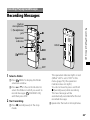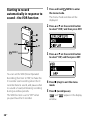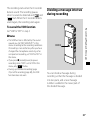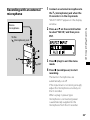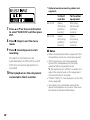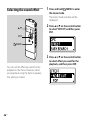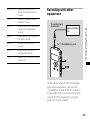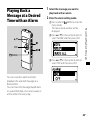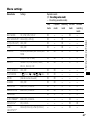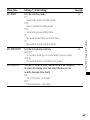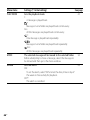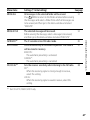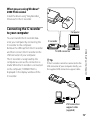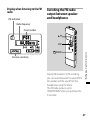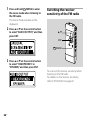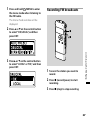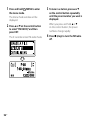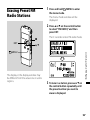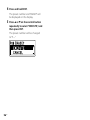
1
For customers in Europe Disposal of Old Electrical & Electronic Equipment (Applicable in the European Union and other European countries with separate collection systems) This symbol on the product or on its packaging indicates that this product shall not be treated as household waste. Instead it shall be handed over to the applicable collection point for the recycling of electrical and electronic equipment. By ensuring this product is disposed of correctly, you will help prevent potential negative consequences for the environment and human health, which could otherwise be caused by inappropriate waste handling of this product. The recycling of materials will help to conserve natural resources. For more detailed information about recycling of this product, please contact your local Civic Office, your household waste disposal service or the shop where you purchased the product. Applicable accessories: Headphones, USB connection support cable Disposal of waste batteries (applicable in the European Union and other European countries with separate collection systems) This symbol on the battery or on the packaging indicates that the battery provided with this product shall not be treated as household waste. By ensuring these batteries are GB disposed of correctly, you will help prevent potentially negative consequences for the environment and human health which could otherwise be caused by inappropriate waste handling of the battery. The recycling of the materials will help to conserve natural resources. In case of products that for safety, performance or data integrity reasons require a permanent connection with an incorporated battery, this battery should be replaced by qualified service staff only. To ensure that the battery will be treated properly, hand over the product at end-of-life to the applicable collection point for the recycling of electrical and electronic equipment. For all other batteries, please view the section on how to remove the battery from the product safely. Hand the battery over to the applicable collection point for the recycling of waste batteries. For more detailed information about recycling of this product or battery, please contact your local Civic Office, your household waste disposal service or the shop where you purchased the product. Notice for the customers: the following information is only applicable to equipment sold in the countries applying EU directives The manufacturer of this product is Sony Corporation, 1-7-1 Konan, Minato-ku, Tokyo, Japan. The Authorized Representative for EMC and product safety is Sony Deutschland GmbH, Hedelfinger Strasse 61, 70327 Stuttgart, Germany. For any service or guarantee matters please refer to the addresses given in separate service or guarantee documents. The recorded music is limited to private use only. Use of the music beyond this limit requires permission of the copyright holders. Sony is not responsible for incomplete recording/downloading or damaged data due to problems of the IC recorder or computer. Depending on the types of the text and characters, the text shown on the IC recorder may not be displayed properly on device. This is due to: The capacity of the connected IC recorder. The IC recorder is not functioning normally. Content information is written in the language or the character that is not supported by the IC recorder. GB Table of Contents Checking the Contents of the Package........................................................... 7 Index to Parts and Controls......................... 8 Getting Started Step 1: Preparing a Power Source.........13 Inserting the battery.................................13 Disconnecting the IC recorder from your computer..............................................14 When charging/replacing the battery...............................................................15 Step 2: Setting the Clock.............................18 Continued directly from “Step 1: Preparing a Power Source”....................18 Setting the clock using the menu....19 Step 3: Setting the Language to Be Used in the Display Window....................20 Turning the IC Recorder On or Off........22 Turning the power off..............................22 Turning the power on ............................22 GB Recording/Playing Back Messages Recording Messages.....................................23 Selecting the recording mode...........26 Setting the microphone sensitivity.........................................................28 Cutting out low frequency – the LCF function ....................................29 Starting to record automatically in response to sound – the VOR function.....................................30 Dividing a message into two during recording..........................................................31 Recording with an external microphone....................................................33 Recording sound from a telephone or a cell phone..............................................34 Recording from other equipment....35 To record using the synchronized recording function....................................35 To record without using the synchronized recording function.....37 Playing Back Messages.................................39 Selecting the playback mode.............43 Adjusting the playback speed – the DPC function....................................45 Selecting the sound effect....................46 Recording with other equipment....47 Playing Back a Message at a Desired Time with an Alarm........................................49 Editing Messages Erasing Messages............................................52 Erasing messages one by one............52 Erasing all messages in a folder.........53 Moving a Message to a Different Folder......................................................................54 Dividing a Message into Two...................56 Preventing Accidental Operation – the HOLD function.....................................58 Utilizing the Menu Function Making Settings for the Menu.................59 Utilizing Your Computer Using the IC Recorder with Your Computer.............................................................72 System requirements...............................72 Connecting the IC recorder to your computer.........................................................73 Disconnecting the IC recorder from your computer..............................................74 Transferring Files from Your Computer to the IC Recorder...........................................75 Copying a music file from your computer to the IC recorder (drag and drop)............................................75 Construction of folders and files.......76 Transferring Files from the IC Recorder to Your Computer............................................78 Using the IC Recorder as a USB Mass Storage Device..................................................79 Using Voice Recognition Software.......80 Introducing the voice recognition software............................................................80 Creating a user file adapted to your recorded speech (Training)..................81 Playing Back Music Files..............................82 Enjoying the music files more ...........84 Listening to the FM Radio Tuning in an FM radio Station.................85 Switching the FM radio output between speaker and headphones...................................................87 Switching the receiver sensitivity of the FM radio...................................................88 Recording FM broadcasts......................89 GB Presetting FM Radio Stations Automatically.....................................................90 Switching the scanning sensitivity.........................................................91 Presetting FM Radio Stations Manually................................................................92 Listening to a Preset Radio Station.......93 Erasing Preset FM Radio Stations...........95 Troubleshooting Troubleshooting...............................................97 Error messages..........................................103 System limitations...................................105 Additional Information Using a USB AC Adaptor (not supplied).................................................106 Disconnecting the IC recorder from the AC outlet...............................................107 Precautions.......................................................108 Specifications..................................................110 Index.....................................................................112 GB Checking the Contents of the Package IC Recorder (1) Remove the film on the display window before you use the IC recorder. Carrying case (1) Battery case (1) CD-ROM (1) (The operating instructions are stored as PDF files.) Operating Instructions You are cautioned that any changes or modifications not expressly approved in this manual could void your authority to operate this equipment. NH-AAA (size AAA) rechargeable battery (1) Stereo headphones (1) USB connection support cable (1) GB Index to Parts and Controls Operation indicator (17, 23, 24, 32, 39, 70, 74, 107) Refer to the pages indicated in parentheses for details. Display window (10) Front Built-in microphones (stereo) (23) Control button*1 (, /VOL (volume) +, – ) /ENT (enter) button DIVIDE button (31, 32, 56) (folder)/MENU button (23, 39, 59, 60, 82) (headphone) jack*2 (23, 25, 39, 40, 47, 48) (microphone) jack (33, 35) (record/pause) button (23, 25, 30, 33, 36, 38, 64, 89) (stop) button (18, 20, 23, 24, 39, 44, 47, 48, 50, 55, 59, 60, 82, 89, 107) (cue/fast forward) button (39, 40, 41, 42, 56, 57, 82) (play/stop) button (25, 39, 42, 44, 47, 48, 50, 82) (review/fast backward) button (25, 39, 40, 41, 42, 56, 57, 82) (repeat) A-B button (39, 44) GB *1 How to use the control button Press VOL – or + on the button to adjust the volume. In the menu setting window or folder selection window, press or on the button to change the menu settings or to select the folder you want, and then press the center button (ENT) to confirm the setting. In the FM reception window, press or to tune in a station, or to select a preset number. Rear HOLD switch (22, 23, 24, 39, 40, 58) DPC (SPEED CTRL) switch (45, 64) *2 Connect the supplied or commercially available stereo headphones to the (headphone) jack. If unwanted noise is heard, wipe the headphones plug clean. Opening for a handstrap (A handstrap is not supplied.) USB cap Speaker Battery compartment (13) To the (headphone) jack GB Display window 10 GB Operation mode indicator Displays the following, depending on the current operation mode : stop : playback : recording : recording standby/recording pause : recording with the VOR function : recording pause with the VOR function (flashing) If you press (record/pause) to pause recording when “VOR” is set to “ON” in the menu, only “ ” flashes. : Synchronized recording : Flashes while synchronized recording is set to pause. : review/fast backward, cue/fast forward : going backward/forward continuously Folder name/ Message title name/ Artist name/ File name indication Press or of the control button to display a folder name, message title, artist name, and file name in sequence. Elasped time/Remaining time/ Recording date and time indication Repeat playback : Appears when one message is played back repeatedly. : Appears when messages in one folder are played back repeatedly. : Appears when all the messages are played back repeatedly. Selected message number/Total number of messages in the folder LCF (Low Cut Filter) indicator Appears when a folder for messages recorded using the IC recorder is selected and the LCF function is set to “ON” in the menu. Microphone sensitivity indicator Displays the microphone sensitivity. (high) : To record at a meeting or in a quiet/spacious place. (low) : To record for dictation or in a noisy place. Alarm indicator Appears when the alarm is set for a message. Recording mode indicator Displays the recording mode set using the menu when the IC recorder is in the stop mode, and displays the current recording mode when the IC recorder is in the playback or recording mode. : Standard play stereo recording mode with high quality sound : Standard play stereo recording mode : Long play stereo recording mode : Standard play monaural recording mode : Long play monaural recording mode Displays as follows when a file is transferred from the computer. : MP3 files transferred : WMA files transferred 11 GB Remaining battery/Charging indicator When a dry battery is used, the indicator shows the remaining battery power. While charging the rechargeable battery an animation appears. Remaining recording time indication Displays the remaining recording time in hours, minutes, and seconds. If there is more than 10 hours time remaining, the time is displayed in hours. If there is more than 10 minutes and less than 10 hours time remaining, the time is displayed in hours and minutes. If there is less than 10 minutes time remaining, the time is displayed in minutes and seconds. 12 GB Display when listening to the FM radio (for ICD-UX71F/UX81F/UX91F only) FM indicator Radio frequency Preset number Receiver sensitivity Getting Started Step 1: Preparing a Power Source 3 Charge the battery by connecting the USB connector of the IC recorder to your computer. Remove the film on the display window before you use the IC recorder. Computer 1 Slide and lift the battery compartment lid. Getting Started Inserting the battery IC recorder To USB connector 2 Insert one NH-AAA rechargeable battery with correct polarity, and close the lid. While the battery is charging, “CONNECTING” and the remaining battery/charging indicator are displayed in an animation. When the remaining battery/charging indicator indicates “ ,” charging is completed. (Charging time: approx. 4 hours*) 13 GB When you use the IC recorder for the first time, or after you have not used the IC recorder for a certain time, it is recommended that you charge the battery repeatedly until “ ” is displayed. 2 Disconnect the IC recorder from the USB connector of the computer. On the Windows screen, left-click “Safely Remove Hardware” on the taskbar, and click “Safely remove USB Mass Storage Device.” On the Macintosh screen, drag the “IC RECORDER” on the desktop to “Trash” and drop it there. For details on disconnecting the IC recorder, refer to the operating instructions supplied with your computer. If the remaining battery/charging indicator is not displayed, charging has not been done properly. Proceed from step 1 again. * This is an approximation for the time it takes to charge from no remaining battery power to full battery power at room temperature. It varies depending on the remaining power and the condition of the battery. It also takes more time if the temperature of the battery is low, or if the battery is charged while you are transferring data to the IC recorder. If the IC recorder cannot be connected to your computer directly, use the supplied USB connection support cable. Disconnecting the IC recorder from your computer Follow the procedures below; otherwise, data may be damaged. 1 Make sure that the operation indicator is not flashing. 14 GB Tips You can charge the rechargeable battery by connecting the IC recorder to an AC outlet using a USB AC adaptor (not supplied) (pages 71, 106). When replacing the battery, messages recorded or alarm settings are not erased even when you remove the battery. When replacing the battery, the clock continues moving for about 3 minutes after you remove the battery. Notes While “ ” or “ ” is flashing instead of the remaining battery/charging indicator, you cannot charge the battery. Charge the battery in an environment with a temperature of 5 °C - 35 °C. Clock setting display appears and the year section flashes when you insert battery for the first time, or when you insert battery after the IC recorder has been without battery for a certain period of time. Please refer to “Continued directly from Step 1: Preparing a Power Source” on page 18 to set the date and time. When using a fully charged battery or an LR03 (size AAA) alkaline battery Follow the steps 1 and 2. When charging/replacing the battery The remaining battery/charging indicator on the display shows the battery condition. Battery remain indication : Charge the rechargeable battery or replace the old battery with a new one. Getting Started If “USB CHARGE” in the “DETAIL MENU” menu is set to “OFF,” you cannot charge the battery using your computer. Set “USB CHARGE” to “ON” (page 71). Do not use manganese battery for this IC recorder. During playback using the built-in speaker, you cannot charge the battery. When you use the IC recorder with a rechargeable battery, the remaining battery/ charging indicator may not light fully. During FM reception you cannot charge the battery. : “LOW BATTERY“ appears and the IC recorder will stop operation. Battery life*1 When using Sony NH-AAA rechargeable battery Recording mode Recording ST*3 STSP*4 Approx. 14 hr. Approx. 14 hr. 30 min. 30 min. Approx. 18 hr. Approx. 18 hr. Playback*2 through speaker Playback Approx. 44 hr. Approx. 44 hr. using the 30 min. 30 min. headphones FM Approx. 5 hr. Approx. 5 hr. recording 15 GB Recording mode Recording STLP*5 SP*6 Approx. 16 hr. Approx. 15 hr. 30 min. Approx. 18 hr. Approx. 18 hr. 30 min. 30 min. Playback*2 through speaker Playback Approx. 47 hr. Approx. 46 hr. using the headphones FM Approx. 5 hr. Approx. 5 hr. recording 30 min. 30 min. Recording mode LP*7 Recording Approx. 17 hr. – 30 min. Approx. 19 hr. Approx. 18 hr. 30 min. 30 min. Playback*2 through speaker Playback using the headphones FM recording Approx. 48 hr. Approx. 44 hr. 30 min. 30 min. Approx. 5 hr. 30 min. FM reception : Approx. 6 hr. 16 GB Music file (128 kbps/ 44.1 kHz) – (hr. : hours/min. : minutes) When using Sony LR03 (SG) (size AAA) alkaline battery Recording mode Recording Playback*2 through speaker Playback using the headphones FM recording ST*3 STSP*4 Approx. 4 hr. 30 min. Approx. 4 hr. 30 min. Recording mode Recording STLP*5 SP*6 Approx. 13 hr. Approx. 13 hr. Approx. 16 hr. Approx. 16 hr. Approx. 40 hr. Approx. 40 hr. Approx. 15 hr. Approx. 13 hr. 30 min. Approx. 16 hr. Approx. 16 hr. 30 min. 30 min. Playback*2 through speaker Playback Approx. 42 hr. Approx. 41 hr. using the 30 min. 30 min. headphones FM Approx. 5 hr. Approx. 5 hr. recording LP*7 Recording Playback*2 through speaker Playback using the headphones FM recording Approx. 16 hr. – Approx. 17 hr. Approx. 16 hr. Music file (128 kbps/ 44.1 kHz) Approx. 43 hr. Approx. 40 hr. 30 min. Approx. 5 hr. FM reception : Approx. 5 hr. 30 min. – (hr. : hours/min. : minutes) The battery life may shorten depending on how you operate the IC recorder. *2 When playing back music through the internal speaker with the volume level set to 24 *3 ST : Stereo high quality recording mode *4 STSP : Stereo standard recording mode *5 STLP : Stereo long play recording mode *6 SP : Monaural standard play recording mode *7 LP : Monaural long play recording mode *1 Note while accessing The IC recorder is accessing data when an updating animation appears in the display window or the operation indicator flashes in orange or is lit in red. While the IC recorder is accessing data, do not remove the battery or connect or disconnect the USB AC adaptor (not supplied). Doing so may damage the data. Getting Started Recording mode Note If the IC recorder is required to process a large amount of data, an updating animation may be displayed for an extended period of time. This is not a malfunction of the IC recorder. Wait until the animation disappears before starting operation. 17 GB Step 2: Setting the Clock Continued directly from “Step 1: Preparing a Power Source” 1 Press or on the control button , /MENU to set the year, month, day, hour, and minute in sequence, and then press ENT. ENT 2 Press (stop) to return to the display of the stop mode. You need to set the clock to use the alarm function or record the date and time. Clock setting display appears when you insert battery for the first time, or when you insert a battery after the IC recorder has been without battery for more than 3 minutes, “SET DATE & TIME” appears, and then the year section flashes in the display window. 18 GB Setting the clock using the menu While the IC recorder is in the stop mode, you can set the clock using the menu. 2 Press the or on the control button to select “08y1m1d,” and then press ENT. 1 Select “DATE & TIME” in the menu. Press and hold 3 Press or on the control button Getting Started /MENU to enter the menu mode. The menu mode will be displayed in the display window. to set the year, month, day, hour, and minute in sequence, and then press ENT. Press or on the control button to select “DETAIL MENU,” and then press ENT. Press or on the control button to select “DATE & TIME,” and then press ENT. 4 Press (stop) to return to the display of the stop mode. 19 GB Tips Press /MENU to return to the previous operation. You can set the time display for the clock to “12-HOUR” or “24-HOUR” in the menu. When “12-HOUR” is set, “AM” or “PM” appears in the display window. When setting the clock, you can use VOL + or – on the control button to move the cursor toward the left or right. You cannot use VOL + or – to adjust the volume at this time. Note If you do not press ENT within one minute of entering the clock setting data, the clock setting mode is cancelled and the window will return to the display of the stop mode. Step 3: Setting the Language to Be Used in the Display Window , ENT /MENU To display the current date and time Press (stop) to display the current date and time. 20 GB You can select the language to be used for messages, menus, folder names, file names, etc. from 2 languages (European model)/7 languages (other models). 1 Press and hold the menu mode. /MENU to enter The menu mode window will be displayed. 4 Press or on the control button to select the language that you want to use, and then press ENT. 2 Press or on the control button to select “DETAIL MENU,” and then press ENT. to select “LANGUAGE,” and then press ENT. Getting Started 3 Press or on the control button You can select the following languages. European model : ENGLISH, Pyccкий (Russian) Other models : ENGLISH, Pyccкий (Russian), (Japanese), (Korean), (Chinese), (Chinese), (Thai) 21 GB Turning the IC Recorder On or Off Turning the power off Slide the HOLD switch in the direction of the arrow in the stop mode. “HOLD” lights up and the key mark flashes and then “POWER OFF” is displayed. The IC recorder turns off within a few seconds. Turning the power on Slide the HOLD switch in the opposite direction from that of the arrow. The IC recorder is turned on, and an accessing animation is displayed. When you are not using the IC recorder, you can prevent the battery from getting weak quickly by turning the power off. 22 GB Tips When you are not going to use the IC recorder for a long time, we recommend to turn off the IC recorder. When 10 minutes have passed after you have turned on the IC recorder and leave it without doing anything, the display goes off automatically. (Press any button to show the display.) Recording/Playing Back Messages Recording Messages Operation indicator , Recording/Playback Messages Built-in microphones (headphone) jack HOLD /MENU ENT 1 Select a folder. Press /MENU to display the folder selection window. Press or on the control button to select the folder in which you want to record messages ( FOLDER01-05), and then press ENT. 2 Start recording. Press (record/pause) in the stop The operation indicator lights in red. (When “LED” is set to “OFF” in the menu (page 70), the operation indicator does not light.) You do not need to press and hold (record/pause) while recording. The new message will be automatically recorded after the last recorded message. Speak into the built-in microphones. mode. 23 GB 3 Press (stop) to stop recording. The IC recorder stops at the beginning of the current recording. Tips Messages recorded using this IC recorder will be recorded as MP3 files. Before you start recording, we recommend you make a trial recording first. When you purchase the IC recorder, there are 5 folders already available, and you can record up to 99 messages in each folder. While recording you can lock all the functions of all the buttons so that you can prevent inadvertent operations by sliding the HOLD switch in the direction of the arrow. Notes 24 GB You cannot record a message in a folder transferred from a computer. If you press (record/pause) when you have selected a folder, the folder will be automatically changed to a folder in which a message can be recorded, and the message will be recorded as the last one in the folder. While the operation indicator is flashing or is lit in red or orange, do not remove the battery or connect or disconnect the USB AC adaptor. Doing so may damage the data. Noise may be recorded if an object, such as your finger, etc., accidentally rubs or scratches the IC recorder during recording. Before making a recording, be sure to check the remaining battery/charging indicator (page 15). To avoid replacing battery during a long recording session, use a USB AC adaptor (not supplied) (page 106). The maximum recording time varies if you record messages in mixed recording mode. To pause recording* Do this Press (record/pause). During recording pause, the operation indicator flashes in red and “ “ flashes in the display window. review the current recording instantly Connect the supplied stereo headphones to the (headphone) jack and monitor the recording. You can adjust the monitoring volume by pressing VOL + or – on the control button, but the recording level is fixed. Recording/Playback Messages release pause Press (record/pause) and resume again. recording Recording resumes from that point. (To stop recording after pausing recording, press (stop).) Monitoring the recording Press . Recording stops and playback starts from the beginning of the message just recorded. review during Press and hold during recording recording or recording pause. Recording stops and you can search backwards while listening to fast playback sound. After you release , playback starts from that point. * One hour after you pause recording, recording pause is automatically released and the IC recorder enters the stop mode. 25 GB Selecting the recording mode 1 Press and hold the menu mode. /MENU to enter The menu mode window will be displayed. 2 Press or on the control button , to select “REC MODE” and then press ENT. ENT /MENU 3 Press or on the control button to select “ST,” “STSP,” “STLP,” “SP,” or “LP,” and then press ENT. You can select the recording mode in the menu when the IC recorder is stopped. The recording mode is set to “ST” when you purchase the IC recorder. 26 GB High-quality stereo recording mode (44.1 kHz/192 kbps) You can record with stereo highquality sound. STSP : Standard play stereo recording mode (44.1 kHz/128 kbps) You can record with stereo sound. STLP : Long play stereo recording mode (22.05 kHz/48 kbps) You can record for a longer time with stereo sound. SP : Standard play monaural recording mode (44.1 kHz/32 kbps) You can record with standard quality sound. LP : Long play monaural recording mode (11.025 kHz/8 kbps) You can record for a longer time with monaural sound. Maximum recording time To record with better sound quality, select the ST or STSP mode. ICD-UX91F ST : You cannot set the recording mode while recording. ICD-UX71/UX71F ST mode STSP mode STLP mode 11 hr. 55 min. 17 hr. 55 min. 47 hr. 50 min. Recording/Playback Messages Note The maximum recording time of all the folders is as follows. SP mode LP mode 71 hr. 45 min. 287 hr. 15 min. ICD-UX81/UX81F ST mode STSP mode STLP mode 23 hr. 55 min. 35 hr. 55 min. 95 hr. 55 min. SP mode LP mode 143 hr. 50 min. 575 hr. 35 min. ST mode STSP mode 47 hr. 55 min. 72 hr. SP mode 288 hr. STLP mode 192 hr. LP mode 1152 hr. 5 min. (hr. : hours/min. : minutes) 27 GB Setting the microphone sensitivity 1 Press and hold the menu mode. /MENU to enter The menu mode window will be displayed. 2 Press or on the control button , to select “MIC SENSITIVITY,” and then press ENT. ENT /MENU 3 Press or on the control button to select “HIGH (H),” “LOW (L),” and then press ENT. You can set the microphone sensitivity in the menu when the IC recorder is stopped or is recording. The microphone sensitivity is set to “HIGH (H)” when you purchase the IC recorder. 28 GB HIGH (H): To record at meetings or in a quiet and/or spacious place. LOW (L): To record dictation, or record in a noisy place. Cutting out low frequency – the LCF function 1 Press and hold the menu mode. /MENU to enter The menu mode window will be displayed. 2 Press or on the control button to select “LCF (LOW CUT),” and then press ENT. Recording/Playback Messages , ENT /MENU 3 Press or on the control button to select “ON,” and then press ENT. When you set the LCF (Low Cut Filter) function to “ON” in the stop or recording mode, you cut out a low frequency to reduce the roaring noise from wind, etc.; therefore you can record a message more clearly. The LCF function is set to “OFF” when you purchase the IC recorder. To cancel the LCF function Set “LCF (LOW CUT)” to “OFF” in step 3. 29 GB Starting to record automatically in response to sound – the VOR function 1 Press and hold the menu mode. /MENU to enter The menu mode window will be displayed. 2 Press or on the control button to select “VOR,” and then press ENT. ENT , /MENU 3 Press or on the control button to select “ON,” and then press ENT. You can set the VOR (Voice Operated Recording) function to “ON,” to make the IC recorder start recording when the IC recorder detects sound, and pause when no sound is heard, eliminating recording during soundless periods. The VOR function is set to “OFF” when you purchase the IC recorder. 30 GB 4 Press (stop) to exit the menu mode. 5 Press (record/pause). “ ” and “ window. ” appear in the display The recording starts when the IC recorder detects sound. The recording pauses when no sound is detected and “ ” and “ ” flash. When the IC recorder detects sound again, the recording starts again. Dividing a message into two during recording Recording/Playback Messages To cancel the VOR function Set “VOR” to “OFF” in step 3. Notes The VOR function is affected by the sound around you. Set “MIC SENSITIVITY” in the menu according to the recording conditions. If recording is not satisfactory after you have changed the microphone sensitivity, or for an important recording, set “VOR” to “OFF” in the menu. If you press (record/pause) to pause recording when “VOR” is set to “ON” in the menu, only “ ” flashes. During synchronized recording (page 35) and FM recording (page 89), the VOR function does not work. DIVIDE You can divide a message during recording so that the message is divided into two parts, and a new message number is added to the newer part of the divided message. 31 GB Press DIVIDE during recording. “DIVIDING …” appears on the display and the new message number is added at the point you pressed the button. The message will be recorded as two messages, however recording continues without stopping. Message 1 Message 2 Message 3 Message is divided. Notes Message 2 and Message 3 are recorded without stopping. Tip You can divide the currently recorded message during recording pause. 32 GB You need a certain amount of free space in the memory to divide a message. For more information, see “System Limitations” on page 105. If 99 messages have been recorded in a folder, you cannot divide a message in that folder. Once a message is divided, you cannot recombine the divided messages. You cannot divide a message at the very beginning (0.5 seconds from the beginning) or at the very end (0.5 seconds prior to the end) of the message. When you divide a message into two, at the point of division, the end of the first message and the beginning of the second message may be interrupted. During synchronized recording (page 35) and FM recording (page 89), you cannot divide a message. If you divide messages too frequently while the unit is recording them, the following phenomenon may occur: The operation indicator keeps flashing, and you cannot operate the unit for a certain period. This is not a malfunction. Wait until the operation indicator goes off. Recording with an external microphone 1 Connect an external microphone to the (microphone) jack when the IC recorder is in the stop mode. “SELECT INPUT” appears in the display window. Stereo microphone Recording/Playback Messages 2 Press or on the control button to select “MIC IN,” and then press ENT. To the (microphone) jack , ENT 3 Press (stop) to exit the menu mode. 4 Press (record/pause) to start recording. The built-in microphones are automatically cut off. If the input level is not strong enough, adjust the microphone sensitivity on the IC recorder. When a plug in power type microphone is connected, power is automatically supplied to the microphone from the IC recorder. 33 GB Note Recording sound from a telephone or a cell phone Recommended microphones You can use the Sony ECM-CS10, ECM-CZ10, ECM-DS70P, ECM-DS30P electret condenser microphone (not supplied). You can use the ECM-TL1 headphonetype electret condenser microphone (not supplied) to record sound from a telephone or a cell phone. For details on how to make the connection, see the operating instructions supplied with the ECM-TL1 microphone. If “SELECT INPUT” is not displayed, set it in the menu (page 68). Notes 34 GB After you have made the connection, check the sound quality of the conversation and the recording level before you start recording. If the beep of the telephone or a dial tone is recorded, the conversation may be recorded with lower level of sound. In this case, start recording after the conversation has started. The VOR function may not work, depending on the kind of telephone or the line condition. We assume no responsibility whatsoever for any inconvenience, even if you cannot record a conversation using the IC recorder. 2 seconds and the IC recorder starts recording again as a new message when sound is detected. Recording from other equipment Tip Before you start recording, we recommend you make a trial recording first. To record using the synchronized recording function To the (microphone) jack 1 Press and hold the menu mode. , Recording/Playback Messages Tape recorder, etc. ENT /MENU /MENU to enter The menu mode window will be displayed. 2 Press or on the control button to select “DETAIL MENU,” and then press ENT. You can make music files without using the computer by recording the sound from other equipment connected to the IC recorder. When you use the synchronized recording function, the IC recorder enters the recording pause mode when no sound is detected for more than 35 GB 3 Press or on the control button to select “SYNC REC,” and then press ENT. 4 Press or on the control button to select “ON,” and then press ENT. “SELECT INPUT” appears in the display window. 7 Press or on the control button to select “AUDIO IN,” and then press ENT. 8 Press (record/pause) to start recording. “ ” flashes and the IC recorder enters the recording pause mode. 5 Press (stop) to exit the menu mode. 6 Connect other equipment to the IC recorder when the IC recorder is in the stop mode. Connect the audio output connector (stereo mini-plug) of other equipment to the (microphone) jack of the IC recorder using an audio connecting cable*. 36 GB 9 Start playback on the component connected to the IC recorder. “ ” appears on the display and synchronized recording starts. The synchronized recording pauses when no sound is detected for more than 2 seconds, and “ ” flashes. The IC recorder starts recording again as a new message when sound is detected. Notes 4 Press or on the control button Recording/Playback Messages During synchronized recording, you cannot divide a message (page 31) and you cannot pause recording (page 25). Depending on the equipment connected to the IC recorder, the synchronized recording function may not operate properly due to a difference in the audio input level. to select “OFF,” and then press ENT. To record without using the synchronized recording function 1 Press and hold the menu mode. /MENU to enter The menu mode window will be displayed. 2 Press or on the control button to select “DETAIL MENU,” and then press ENT. 3 Press or on the control button to select “SYNC REC,” and then press ENT. 5 Press (stop) to exit the menu mode. 6 Connect other equipment to the IC recorder when the IC recorder is in the stop mode. Connect the audio output connector (stereo mini-plug) of other equipment to the (microphone) jack of the IC recorder using an audio connecting cable*. “SELECT INPUT” appears in the display window. 37 GB * Optional audio connecting cables (not supplied) RK-G139 7 Press or on the control button to select “AUDIO IN,” and then press ENT. RK-G136 8 Press (stop) to exit the menu mode. 9 Press (record/pause) to start recording. The built-in microphones are automatically cut off and the sound from the connected equipment is recorded. 38 GB To the other equipment Mini-plug (monaural) (without resistor) Stereo mini-plug (without resistor) Notes 10 Start playback on the component connected to the IC recorder. To the IC recorder Stereo mini-plug (without resistor) Stereo mini-plug (without resistor) When recording from other equipment, the microphone sensitivity cannot be adjusted. If the input level is not strong enough, connect the headphone jack (minijack, stereo) of other equipment to the (microphone) jack of the IC recorder and adjust the volume level on the equipment connected to the IC recorder. If “SELECT INPUT” is not displayed, set it in the menu (page 68). Your dealer may not handle some of the above listed optional accessories. Please ask the dealer for detailed information. Playing Back Messages jack VOL +, – Operation indicator , /MENU Recording/Playback Messages (headphone) HOLD A-B� 1 Select a folder. Press /MENU. Press or on the control button to select the folder, and then press ENT. 2 Press or to select the message you want to play. 3 Press to start playback. The operation indicator lights in green. (When “LED” is set to “OFF” in the menu (page 70), the operation indicator does not light.) 4 Press VOL + or – on the control button to adjust the volume. 5 Press (stop) to stop playback. 39 GB Tip During playback you can lock all the functions of all the buttons so that you can prevent inadvertent operations by sliding the HOLD switch in the direction of the arrow. Listening with better sound quality Display when playing back the messages Press or on the control button to check the file information during playback. A message recorded using the IC recorder is displayed as follows. : Folder name: FOLDER01-FOLDER05 : Title: Date_file number (e.g. 080101_001) : Artist name: Unknown : File name: Date_file number.mp3 (e.g. 080101_001.mp3) You can change the folder name, title, artist name, and/or file name using your computer. 40 GB To listen with the headphones : Connect the supplied headphones to the (headphone) jack. The built-in speaker will be automatically disconnected. To listen from an external speaker: Connect an active or passive speaker (not supplied) to the (headphone) jack. Quickly locating the point you wish to start playback (Easy Search) When “EASY SEARCH” is set to “ON” (page 65) in the menu, you can quickly locate the point at which you wish to start playback by pressing or repeatedly during playback. You can go back approx. 3 seconds by pressing once, or advance approx. 10 seconds by pressing once. This function is useful for locating a desired point in a long recording. Searching forward/backward during playback (Cue/Review) The IC recorder searches at slow speed with playback sound. This is useful to check one word forward or back. Then, if you press and hold the button, the IC recorder starts to search at higher speed. to the end of the last message When you play back or fast play back to the end of the last message, “MESSAGE END” lights up for 5 seconds and the operation indicator lights up in green. (You cannot hear the playback sound.) When “MESSAGE END” and the operation indicator go off, the IC recorder will stop at the beginning of the last message. If you press and hold while “MESSAGE END” is lit, the messages are played back rapidly, and normal playback will start at the point you release the button. If the last message is long and you wish to start playback at a later part of the message, press and hold to go to the end of the message and then press while “MESSAGE END” is lit to go back to the desired point. For messages other than the last one, go to the beginning of the next message and play backward to the desired point. Recording/Playback Messages To search forward (Cue): Press and hold during playback and release it at the point you wish to resume playback. To search backward (Review): Press and hold during playback and release it at the point you wish to resume playback. When messages are played back 41 GB To Do this stop at the current position (Playback Pause function) Press (stop) or . To resume playback from that point, press again. go back to the beginning of the current message Press once.* go back to previous messages Press repeatedly. (During stop mode, keep the button pressed to go back the messages continuously.) skip to the next Press once.* message skip to the succeeding messages Press repeatedly. (During stop mode, keep the button pressed to skip the messages continuously.) * These operations are for when “EASY SEARCH” is set to “OFF” (page 65). 42 GB Playing back a message repeatedly During playback, press and hold until “ 1” appears. The selected message will be played back repeatedly. To resume normal playback, press again. Selecting the playback mode 1 Press and hold the menu mode. /MENU to enter The menu mode window will be displayed. 2 Press or on the control button to select “PLAY MODE,” and then press ENT. Recording/Playback Messages , ENT /MENU 3 Press or on the control button to select “1,” “ ,” “ALL,” “ 1,” “ or “ ALL,” and then press ENT. ,” You can select the playback mode in the menu. 43 GB 1 ALL 1 ALL A message is played back. Messages in one folder are played back continuously. All the messages are played back continuously. One message is played back repeatedly. Messages in one folder are played back repeatedly. All the messages are played back repeatedly. Playing back a specified section repeatedly – A-B Repeat 1 During playback, press (repeat) A-B to specify the starting point A. “A-B B?” is displayed. 2 Press (repeat) A-B again to specify the finishing point B. “ A-B” is displayed and the specified section is played back repeatedly. 44 GB To resume normal playback Press . To stop A-B Repeat playback Press (stop). To change the segment specified for A-B Repeat playback During A-B Repeat playback, press A-B again to specify a new starting point A. Then specify a new finishing point B, as in step 2. Note You cannot specify the finishing point B before the starting point A that has been set. Adjusting the playback speed – the DPC function 1 Slide the DPC (SPEED CTRL) switch to “ON.” 2 Press and hold the menu mode. /MENU to enter Recording/Playback Messages The menu mode window will be displayed. 3 Press or on the control button , to select “DPC,” and then press ENT. ENT /MENU DPC (SPEED CTRL) 4 Press or on the control button to adjust the speed of the playback. When you slide the DPC (Digital Pitch Control) (SPEED CTRL) switch to “ON,” you can adjust the playback speed between +100% and –50%* of normal speed in the menu. The message is played back in natural tones thanks to the digital processing function. * You can only adjust the playback speed between 0 and –50% when messages are recorded as WMA files. You can set the speed by 10% for + setting and by 5% for – setting. To resume normal playback Slide the DPC (SPEED CTRL) switch to “OFF.” 45 GB Selecting the sound effect 1 Press and hold the menu mode. /MENU to enter The menu mode window will be displayed. , 2 Press or on the control button to select “EFFECT,” and then press ENT. ENT /MENU 3 Press or on the control button You can set the effect you want for the playback in the menu. However, when you play back using the built-in speaker, this setting is invalid. 46 GB to select effect you want for the playback, and then press ENT. Recording with other equipment To audio input connector Tape recorder, etc. Recording/Playback Messages NOISE CUT Reduces distortion to make the human voice clearer. POP Stresses middle ranges, ideal for vocals. ROCK Emphasizes high and low ranges for a powerful sound. JAZZ Emphasizes high ranges for lively sound. BASS 1 Emphasizes the bass sound. BASS 2 Emphasizes the bass sound even more. OFF The EFFECT function does not work. To (headphone) jack To record the sound of the IC recorder with other equipment, connect the (headphone) jack of the IC recorder to the audio input connector (minijack, stereo) of other equipment using an audio connecting cable*. 47 GB 1 Connect the (headphone) jack Note 2 Press to start playback and at Tip Before you start recording, we recommend you to make trial recording first. of the IC recorder to the audio input connector (stereo minijack) of other equipment using an audio connecting cable*. the same time set the connected equipment to the recording mode. A message from the IC recorder will be recorded on the equipment connected. 3 Press (stop) on the IC recorder and the connected equipment at the same time to stop recording. * Optional audio connecting cables (not supplied) 48 To the IC recorder To the other equipment RK-G139 Stereo mini-plug (without resistor) Mini-plug (monaural) (without resistor) RK-G136 Stereo mini-plug (without resistor) Stereo mini-plug (without resistor) GB Your dealer may not handle some of the above listed optional accessories. Please ask the dealer for detailed information. Playing Back a Message at a Desired Time with an Alarm play back with an alarm. 2 Enter the alarm setting mode. Press and hold /MENU to enter the menu mode. The menu mode window will be displayed. Press or on the control button to select “ALARM,” and then press ENT. Recording/Playback Messages , 1 Select the message you want to ENT /MENU Press or on the control button to select “ON,” and then press ENT. You can sound an alarm and start playback of a selected message at a desired time. You can have the message played back on a specified date, once every week, or at the same time every day. 49 GB 3 Set the alarm date and time. Press or on the control button to select “DATE,” a day of the week, or “DAILY,” and then press ENT. When you select “DATE”: Set the year, month, day, hour, and minute in sequence, as described in “Step 2: Setting the Clock” on page 18, then press ENT. When you select a day of the week or “DAILY”: Press or on the control button to set the hour and then press ENT, press or on the control button to set the minute and then press ENT. The setting process is finished and “” (alarm indicator) appears in the display window. When the set date and time comes At the set time, the alarm will sound for about 10 seconds while “ALARM” is displayed in the display window and the selected message will be played back. When the playback ends, the IC recorder will stop automatically at the beginning of that message. 50 GB To listen to the same message again Press , and the same message will be played back from the beginning. To stop the alarm before the playback starts Press (stop) while the alarm sound is heard. You can stop the alarm playback even when the HOLD function is activated. To change the alarm setting Start from step 2 on page 49. To cancel the alarm setting Follow steps 1 and 2- on page 49. In step 2-, press or on the control button to select “OFF,” and press ENT. The alarm will be cancelled and the alarm indicator will disappear from the display window. Notes Recording/Playback Messages You can set only one alarm. When the clock has not been set or no messages are recorded, you cannot set the alarm. The alarm sounds even if you set “BEEP” to “OFF” in the menu (page 69). If the alarm time comes during recording, the alarm will sound after the recording is finished. “” will flash when the alarm time comes. The alarm set for “DATE” will be cancelled when the alarm playback finishes. If you delete a message on which you have set an alarm, that alarm will be also cancelled. 51 GB You can erase the recorded messages one by one or all messages in a folder at a time. You can erase unwanted messages, retaining all other messages when the IC recorder is in the stop or playback mode. When a message is erased, the remaining messages will advance and be renumbered so that there will be no space between messages. Note 1 Select the message you want to Editing Messages Erasing Messages Once a recording has been erased, you cannot retrieve it. Erasing messages one by one erase. 2 Press and hold the menu mode. /MENU to enter The menu mode window will be displayed. 3 Press or on the control button , ENT /MENU 52 GB to select “ERASE A FILE,” and then press ENT. The message to be erased will be played back. 4 Press or on the control button to select “EXECUTE,” and then press ENT. Erasing all messages in a folder “ERASING …” appears in the display window and the selected message will be erased. , ENT Editing Messages /MENU To cancel erasing Select “CANCEL” in step 4, and then press ENT. To erase another message Proceed with the same steps again from the beginning. To erase a part of one message Divide the message into two messages first, and then proceed with the same steps from the beginning. 1 Select the folder containing the messages you want to erase when the IC recorder is in the stop mode. 2 Press and hold the menu mode. /MENU to enter The menu mode window will be displayed. 53 GB 3 Press or on the control button to select “ERASE ALL,” and then press ENT. Moving a Message to a Different Folder , 4 Press or on the control button ENT to select “EXECUTE,” and then press ENT. /MENU “ERASING …” appears in the display window and all messages in the selected folder will be erased. Notes To cancel erasing Select “CANCEL” in step 4, and then press ENT. 54 GB When “ ” is displayed for the folder indicator, you cannot move a message (page 76). You cannot move a message to a folder. 1 Select the message you want to move. 2 Press and hold the menu mode. /MENU to enter The menu mode window will be displayed. 3 Press or on the control button to select “MOVE,” and then press ENT. 4 Press or on the control button to select the folder that you want to move the message into, and then press ENT. “EXECUTING…” is displayed and the message is moved to the last position in the destination folder. When you move a message to another folder, the original message in the previous folder will be deleted. Editing Messages The message to be moved will be played back. To cancel moving the message Press (stop) before step 4. 55 GB Dividing a Message into Two 1 Press DIVIDE while you are playing back the message you want to divide. “DIVIDE? PRESS [DIVIDE]” appears with the message title. 2 Press DIVIDE. , DIVIDE “DIVIDING…” appears, a new number is added to the newer part of the divided message, and the message numbers of the following messages will be incremeted by one. Message 1 Message 2 Message 3 A Message is divided. Message 1 Message 2 Message 3 Message 4 The message numbers are incremeted. You can divide a message during playback, so that the message is divided into two parts and a new message number is added to the newer part of the divided message. By dividing a message, you can easily find the point from which you want to play back when you make a long recording such as at a meeting. You can divide a message until the total number of messages in the folder reaches 99. 56 GB Notes To play the divided message Press or to display the message number, as the divided messages now each have message numbers. Editing Messages You need a certain amount of free space in the memory to divide a message. For more information, see “System Limitations” on page 105. When you divide a message with a title and artist name, the newer part has the same title, artist name, and file name. You cannot divide a message other than the one recorded using the IC recorder (MP3/ WMA file transferred from a computer). Once a message is divided, you cannot combine divided messages using the IC recorder. If you divide a message frequently, the unit may become unable to divide the message further. If you divide a message with an alarm setting, the same alarm setting remains only with the former message divided. You cannot divide a message at the very beginning (0.5 seconds from the beginning) or at the very end (0.5 seconds prior to the end) of the message. 57 GB Preventing Accidental Operation – the HOLD function To prevent accidental operation, slide the HOLD switch in the direction of arrow in the recording or playback mode. “HOLD” will appear indicating that all the functions of the buttons are locked. To cancel the HOLD function Slide the HOLD switch in the opposite direction from that of the arrow. Note When the HOLD function is activated during recording, cancel the HOLD function first to stop recording. Tip Even if the HOLD function is activated, you can stop the alarm playback. To stop the alarm or playback, press (stop). 58 GB 1 Press and hold Utilizing the Menu Function Making Settings for the Menu the menu mode. /MENU to enter The menu mode window will be displayed. ENT /MENU Utilizing the Menu Function , 2 Press or on the control button to select the menu item for which you want to make setting, and then press ENT. 59 GB 3 Press or on the control button to select the setting that you want to set, and then press ENT. 4 Press (stop) to exit the menu mode. Note If you do not press any button for one minute, the menu mode is automatically cancelled and the window will return to the normal display. To return to the previous window Press /MENU during menu mode. To exit the menu mode Press (stop). 60 GB Menu settings Menu items Settings Operation mode ( �������������������������� : the setting can be made/ : the setting cannot be made) Stop mode Playback mode Recording FM radio mode mode FM radio recording mode LCF (LOW CUT) ON, OFF VOR ON, OFF DISPLAY ELAPSE, REMAIN, REC DATE, REC TIME DPC n% (n=–50 - +100) EFFECT NOISE CUT, POP, ROCK, JAZZ, BASS1, BASS2, OFF EASY SEARCH ON, OFF PLAY MODE 1, MOVE (Folder to be moved) ALARM ON, OFF ERASE ALL EXECUTE, CANCEL ERASE A FILE EXECUTE, CANCEL ST, STSP, STLP, SP, LP , ALL, 1, , ALL FM RADIO* AUTO PRESET* EXECUTE, CANCEL DX/LOCAL* DX, LOCAL SCAN SENSITIVITY* HIGH (SCAN H), LOW (SCAN L) Utilizing the Menu Function MIC SENSITIVITY HIGH (H), LOW (L) REC MODE 61 GB Menu items Settings Stop mode Playback mode Recording FM radio mode mode FM radio recording mode SELECT INPUT MIC IN, AUDIO IN DATE&TIME TIME DISPLAY 12-HOUR, 24-HOUR FORMAT EXECUTE, CANCEL BEEP ON, OFF LED ON, OFF BACKLIGHT ON, OFF LANGUAGE European model : ENGLISH, Pyccкий (Russian) Other model : ENGLISH, Pyccкий (Russian), (Japanese), (Korean), (Chinese), (Chinese), (Thai) AUDIO OUTPUT* HEADPHONES, SPEAKER DETAIL MENU SYNC REC ON, OFF __y__m__d__:__ USB CHARGE ON, OFF * for ICD-UX71F/UX81F/UX91F only 62 GB Operation mode ( �������������������������� : the setting can be made/ : the setting cannot be made) Settings (*: Initial setting) REC MODE Sets the recording mode. ST*: Stereo high-quality recording mode. STSP: Stereo standard recording mode. STLP: Stereo long play recording mode. SP: Monaural standard play recording mode. LP: Monaural long play recording mode. See page 26 MIC SENSITIVITY Sets the microphone sensitivity. HIGH (H)*: To record at meeting or in a quiet and/or spacious place. LOW (L): To record dictation, or record in a noisy place. 28 LCF (LOW CUT) Sets the LCF (Low Cut Filter) function to cut a low frequency to reduce the roaring noise from wind; therfore you can record a message more clearly. ON: The LCF function is activated. OFF*: The LCF function is cancelled. 29 Utilizing the Menu Function Menu items 63 GB Menu items Settings (*: Initial setting) VOR Sets the VOR (Voice Operated Recording) function. ON: Recording starts when the IC recorder detects sound and pauses when no sound is heard, eliminating recording during soundless periods. The VOR function is activated when (record/pause) is pressed. OFF*: The VOR function does not work. 30 DISPLAY Changes the display mode. ELAPSE*: Elapsed playback time of one message REMAIN: During stop or playback, the remaining time of the message During recording, the available recording time REC DATE: Date recorded REC TIME: Time recorded – DPC Sets the DPC (Digital Pitch Control) function. When you set the DPC (SPEED CTRL) switch to “ON,” you can adjust the speed of the playback in a range from +100% to –50%. Set the speed by 10% for + setting and by 5% for – setting. –30%* 45 Note You can only adjust the playback speed between 0 and -50% when messages are recorded as WMA files. 64 GB See page Settings (*: Initial setting) EFFECT Sets the effect you want for the playback in the menu. NOISE CUT Reduces distortion to make the human voice clearer. POP: Stresses middle ranges, ideal for vocals. ROCK: Emphasizes high and low ranges for a powerful sound. JAZZ: Emphasizes high ranges for a lively sound. BASS1: The bass sound is emphasized. BASS2: The bass sound is emphasized even more. OFF*: The EFFECT function does not work. See page 46 Utilizing the Menu Function Menu items Note When playing back messages using a built-in speaker, the EFFECT function does not work. EASY SEARCH Sets the easy search function. ON: You can go forward for about 10 seconds by pressing and go back for about 3 seconds by pressing . This function is useful when attempting to locate desired point in a long recording. OFF*: The easy search function does not work. When you press or , a message will be moved forward or backward. 40 65 GB 66 Menu items Settings (*: Initial setting) PLAY MODE Sets the playback mode. 1: A message is played back. *: Messages in one folder are played back continuously. ALL: All the messages are played back continuously. 1: One message is played back repeatedly. : Messages in one folder are played back repeatedly. ALL: All the messages are played back repeatedly. 43 MOVE The selected message will be moved to the selected folder. Before attempting to move a message, select the message to be moved and then go to the menu window. 54 ALARM Sets the alarm. ON: To set the alarm, select “ON” and set the date, time or day of the week or choose daily for playback. OFF*: The alarm is cancelled. 49 GB See page Settings (*: Initial setting) ERASE ALL All messages in the selected folder will be erased. Press /MENU to return to the folder window before erasing the messages and select a folder from which all messages are to be erased, and then go to the menu window and select “EXECUTE.” See page 53 ERASE A FILE The selected message will be erased. Before erasing the message, select a message to be erased, and then go to the menu window and select “EXECUTE.” 52 FM RADIO** The IC recorder enters FM radio mode. 85 AUTO PRESET** Scans automatically for available frequencies. The stations will be stored in memory. EXECUTE : The automatic presetting is activated. CANCEL* : The automatic presetting is cancelled. 90 DX/LOCAL** Sets the receiver sensitivity when listening to the FM radio. DX* : When the receiving signal is strong enough to receive, select this setting. LOCAL : When the receiving signal is weak to receive, select this setting. 88 Utilizing the Menu Function Menu items ** for ICD-UX71F/UX81F/UX91F only 67 GB Menu items Settings (*: Initial setting) See page SCAN SENSITIVITY** Sets the scanning sensitivity when presetting FM radio stations. HIGH (SCAN H)*: The scanning sensitivity is set to high. LOW (SCAN L) : The scanning sensitivity is set to low. 91 AUDIO OUTPUT** During FM reception or FM recording, you can switch between the sound from the speaker and the sound from the headphones. HEADPHONES* : The sound comes out from the headphones. SPEAKER : The sound comes out from the speaker (s). 87 When set to “ON,” the IC recorder enters the recording pause mode when no sound is detected for more than 2 seconds, and the IC recorder starts recording again as a new message when any sound is detected. ON: The synchronized recording function is activated. OFF*: The synchronized recording function is cancelled. 35 DETAIL MENU SYNC REC SELECT INPUT Selects the external input to be recorded that is connected to the (microphone) jack. MIC IN*: Select when you record messages using an external microphone. AUDIO IN: Select when you record using other equipment. 68 GB 33, 36 Menu items Settings (*: Initial setting) See page 19 TIME DISPLAY Sets the clock display. 12-HOUR: 12:00AM = midnight, 12:00PM = noon 24-HOUR*: 0:00 = midnight, 12:00 = noon – FORMAT – Sets the formatting of the drive. EXECUTE: “FORMATTING …” appears and the drive will be formatted. CANCEL*: The drive will not be formatted. Utilizing the Menu Function DATE & TIME Sets the clock by setting year, month, day, hour, and minute in sequence. Notes BEEP Use the IC recorder formatting function to format the memory. When the memory is formatted, all the data stored in the IC recorder will be erased. Once the memory has been erased, you cannot retrieve the data that was erased. Sets whether a beep will be heard or not. ON*: A beep will sound to indicate that an operation has been accepted. OFF: No beep sound will be heard. – Note The alarm sounds even if you set “BEEP” to “OFF” in the menu. 69 GB Menu items LED Settings (*: Initial setting) Turns the operation indicator on or off during operation. ON*: During recording or playback, the operation indicator lights or flashes. OFF: The operation indicator does not light or flash, even during operation. See page – Note When the IC recorder is connected to a computer, the operation indicator lights or flashes even if “LED” is set to “OFF.” 70 GB BACKLIGHT Turns the backlight in the display window on or off. ON*: The backlight in the display window lights up for 10 seconds. OFF: The backlight in the display window does not light, even during operation. – LANGUAGE Sets the language to be used for messages, menus, folder names, file names, etc. European model: ENGLISH*, Pyccкий (Russian) Other models: ENGLISH*, Pyccкий (Russian), (Japanese), (Korean), (Chinese), (Chinese), (Thai) 20 Menu items Settings (*: Initial setting) USB CHARGE Sets whether battery will be charged using a USB connection or not. ON*: The battery will be charged. OFF: The battery will not be charged. See page – Note Utilizing the Menu Function If you use a USB AC adaptor (not supplied) to connect the IC recorder to the AC outlet, you can charge battery regardless this setting. 71 GB Utilizing Your Computer Using the IC Recorder with Your Computer System requirements Operating systems: Windows Vista® Ultimate Windows Vista® Business Windows Vista® Home Premium Windows Vista® Home Basic Windows® XP Media Center Edition 2005 Service Pack 2 or higher Windows® XP Media Center Edition 2004 Service Pack 2 or higher Windows® XP Media Center Edition Service Pack 2 or higher Windows® XP Professional Service Pack 2 or higher Windows® XP Home Edition Service Pack 2 or higher Windows® 2000 Professional Service Pack 4 or higher Mac OS X (v10.2.8-v10.5) Pre-Installed 72 GB Notes Operation is not guaranteed if any operating system other than those described above (Windows® 98 or Linux, etc.) is used. Any 64 bit operating system is not supported. For the latest version information and compatibility with your operating system, please access the support home page for the IC recorder: European model: http://support.sony-europe.com/DNA Other models: http://www.sony-asia.com/support Hardware environment: – Port: USB port – Sound board: Sound cards compatible with any of the supported Microsoft® Windows® operating systems Note The following systems are not supported: Operating systems other than the ones indicated on the left Personally constructed computers or operating systems Upgraded operating systems Multi-boot environment Multi-monitor environment When you are using Windows® 2000 Professional Install the driver using “SonyRecorder_ Driver.exe” in the IC recorder. Connecting the IC recorder to your computer IC recorder Utilizing Your Computer You can transfer the IC recorder data onto your computer by connecting the IC recorder to the computer. Remove the USB cap from the IC recorder and then connect the IC recorder to the USB connector of your computer. The IC recorder is recognized by the computer as soon as the connection is made. While the IC recorder is connected to the computer, “CONNECTING” is displayed in the display window of the IC recorder. Computer To USB connector Tip If the IC recorder cannot be connected to the USB connector of your computer directly, use the supplied USB connection support cable. USB connection support cable (supplied) 73 GB Notes 74 GB If you connect more than two USB devices to your computer, normal operation will not be guaranteed. Use of this IC recorder with a USB hub or a USB connection support cable other than the supplied cable is not guaranteed. A malfunction may occur depending on the USB devices connected at the same time. Before connecting the IC recorder to the computer, make sure that the battery is inserted in the IC recorder. It is recommended that you disconnect the IC recorder from the computer when you are not using the IC recorder connected to the computer. Disconnecting the IC recorder from your computer Follow the procedures below; otherwise, data may be damaged. 1 Make sure that the operation indicator is not flashing. 2 Disconnect the IC recorder from the USB connector of the computer. On the Windows screen, left-click “Safely Remove Hardware” on the taskbar, and click “Safely remove USB Mass Storage Device.” On the Macintosh screen, drag the “IC RECORDER” on the desktop to “Trash” and drop it there. For details on disconnecting the IC recorder, refer to the operating instructions supplied with your computer. Transferring Files from Your Computer to the IC Recorder You can play back music or language files (MP3/WMA*) from your computer using the IC recorder. * For the file formats that can be played back using the IC recorder, refer to “Specifications” (page 110). 1 Connect the IC recorder to your computer (page 73). On the Windows screen; open “My Computer” and make sure that “IC RECORDER” has been recognized. On the Macintosh screen; make sure that an “IC RECORDER” drive is displayed on the desk top. Utilizing Your Computer You can make an MP3/WMA file using either a player software application installed on your computer or a commercially available software application. Copying a music file from your computer to the IC recorder (drag and drop) 2 Copy the folder in which the music files are stored to the IC recorder. On the Windows screen using Explorer, and on the Macintosh screen using Finder, drag and drop the folder onto the IC recorder. The IC recorder can recognize up to 500 folders. You can copy up to 999 files to one folder and up to 5,000 files in total. 75 GB Note When you transfer a music file from your computer, you can play it back, however, you cannot divide it, or move it. To copy a folder (Drag and drop) Click and hold, drag, and then drop. Construction of folders and files The folders and files are displayed on the computer screen as shown. The folder indicators in the display window of the IC recorder are as follows: :Folder for messages recorded using the IC recorder (They have been already made when you purchase the IC recorder.) :Folder transferred from a computer (They are displayed when music files have been transferred from a computer.) Note You can record messages in up to 5 folders using the IC recorder. 76 GB The name of a folder in which music files are stored will be displayed on the IC recorder as it is, so it is convenient if you put an easy-toremember name on the folder in advance. Folders shown in the illustration are examples of folder names. *2 The IC recorder can recognize up to three levels of folders copied to the IC recorder, that is, up to “OLDIES” shown in the figure. *3 If you copy music files separately, they are classified as being in “NO FOLDER.” *1 “IC RECORDER” Folder for messages recorded using the IC recorder VOICE FOLDER01 FOLDER05 Conversation MUSIC Tips You can enter title, or artist name, etc., into music files as ID3 tag information. The ID3 tag information can be displayed on the IC recorder. It is useful if you input the ID3 tag information using the software you use to make the music files on your computer. You can display the ID3 tag information in sequence by pressing or on the control button (page 83). Utilizing Your Computer Folder transferred from your computer POP OLDIES *1 *2 *3 77 GB Notes You cannot copy 511 or more folders (except VOICE folders) or files to the root directory that is located immediately below “IC RECORDER” on the computer. This is due to Windows system limitations (ICD-UX71/ UX81/UX71F/UX81F only). If no title, or artist name has been entered into the ID3 tag information, “Unknown” will be displayed. Transferring Files from the IC Recorder to Your Computer You can save files or folders by transferring them from the IC recorder to your computer. 1 Connect the IC recorder to your computer (page 73). On the Windows screen; open “My Computer” and make sure that “IC RECORDER” has been recognized. On the Macintosh screen; make sure that an “IC RECORDER” drive is displayed on the desk top. 2 Copy files or folders you want to transfer to your computer. Drag and drop the folders contains files you want from “IC RECORDER” to the local disc on your computer. 78 GB Using the IC Recorder as a USB Mass Storage Device Operating Systems: Windows Vista® Ultimate Windows Vista® Business Windows Vista® Home Premium Windows Vista® Home Basic Windows® XP Media Center Edition 2005 Service Pack 2 or higher Windows® XP Media Center Edition 2004 Service Pack 2 or higher Windows® XP Media Center Edition Service Pack 2 or higher Windows® XP Professional Service Pack 2 or higher Port: USB port Note The following systems are not supported: Any 64 bit operating systems Any operating systems other than the ones indicated on the left Personally constructed PCs or operating systems Upgraded operating systems Multi-boot environment Multi-monitor environment Utilizing Your Computer When the IC recorder is connected to your computer directly or using a USB connection support cable, image data or text data on the computer, as well as messages or files recorded using the IC recorder can be temporarily stored in the IC recorder. Your computer must meet the operating system requirements and port environment described below to use the IC recorder as a USB mass storage device. Windows® XP Home Edition Service Pack 2 or higher Windows® 2000 Professional Service Pack 4 or higher Mac OS X (v10.2.8-v10.5) Pre-Installed 79 GB Using Voice Recognition Software When voice recognition software (not supplied) is installed on your computer, you can transcribe a message into a text file. Notes Introducing the voice recognition software Dragon NaturallySpeaking is a speechrecognition software application that allows you to recognize and transcribe your recorded voice in a message and convert it into a text file. For details on Dragon NaturallySpeaking, refer to the operating instructions supplied with Dragon NaturallySpeaking. For information on using Dragon NaturallySpeaking, refer to the documentation supplied with the software. For the latest version and information on the availability of Dragon NaturallySpeaking in each region, please refer to the following home page: http://www.nuance.com 80 GB You can use the transcribing feature only when you have installed Dragon NaturallySpeaking Select or Professional Edition (not supplied) on your computer. To install Dragon NaturallySpeaking, your computer should meet the specified system requirements. You can transcribe the following messages saved in your IC recorder or on your computer; ST, STSP, STLP or SP recording mode messages (MP3 files) 44.1/16/11 kHz 16-bit WAV files saved on your computer You cannot transcribe a message recording the voices of more than one person. Creating a user file adapted to your recorded speech (Training) What is “Training”? When transcribing messages recorded using the IC recorder, the following tips will help you obtain maximum recognition accuracy. Set “REC MODE” to “ST,” “STSP,” “STLP” or “SP” in the menu. When creating a user speech file (training), set “REC MODE” to the mode you normally use for voice recognition software. Set “MIC SENSITIVITY” to “LOW (L)” in the menu. Hold the IC recorder firmly and start recording. Hold the IC recorder so that the microphone is about an inch (2 - 3 cm) from the corner of your mouth, not directly in front of it. This minimizes the sound of your breath in the recordings, enabling maximum recognition accuracy. Utilizing Your Computer Before you can transcribe recorded messages using Dragon NaturallySpeaking, you must create a user file specifically adapted to the sound of your recorded speech. This procedure is called “training.” When training is complete, Dragon NaturallySpeaking creates a user speech file containing information about your recorded speech. Refer to the operating instructions or the help supplied with Dragon NaturallySpeaking, as some parts of training are the same as those required for dictating directly to the computer using a headset microphone. Even if you have already created a user speech file with a headset microphone, you should create a separate speech file for the IC recorder to get better recognition accuracy. Tips on using the IC recorder Note Avoid recording in a noisy place, such as on a subway platform, in order to obtain maximum recognition accuracy. 81 GB Playing Back Music Files , ENT /MENU 1 Remove the IC recorder from your computer, press /MENU, press or on the control button to select the folder ( ) in which music files are stored, and then press ENT. 82 GB 2 Press or to select the music file you want to play. 3 Press to start playback. 4 Press (stop) to stop playback. The maximum playback time (tracks*), when playing music files using the IC recorder, is as follows. 48 kbps ICD-UX71/ 47 hr. 50 min. UX71F (717 tracks) ICD-UX81/ 95 hr. 55 min. UX81F (1438 tracks) ICD-UX91F 192 hr. (2880 tracks) 128 kbps 17 hr. 55 min. (268 tracks) 35 hr. 55 min. (538 tracks) 72 hr. (1080 tracks) Press or on the control button to check the music file information during playback. : : : : Folder name Title* Artist name* File name Utilizing Your Computer * In the case where tracks of 4 minutes each are transferred to the IC recorder. Display when playing back a music file * The ID3 tag information is displayed. 83 GB Enjoying the music files more Selecting the playback mode You can select the playback mode, such as playback of one music file, continuous playback of music files in one folder, continuous playback of all music files, repeat playback of one music file, repeat playback of music files in one folder and repeat playback of all music files, in the menu. For details, see page 43. Selecting a sound effect You can set a effect such as “NOISE CUT,” “POP,” “ROCK,” “JAZZ,” “BASS 1,” or “BASS 2,” for the playback item in the menu. For details, see page 46. Adjusting the playback speed – the DPC (Digital Pitch Control) function You can adjust a playback speed between +100% and –50% of normal speed in the menu. You can only adjust the playback speed between 0 and -50% when messages are recorded as WMA files. For details, see page 45. 84 GB Playing back a message at a desired time with an alarm You can sound an alarm and start playback of a selected message at a desired time. For details, see page 49. Listening to the FM Radio (for ICD-UX71F/UX81F/UX91F only) The headphone cord is an FM antenna, therefore, connect the headphone when listening to the radio. , ENT /MENU Listening to the FM Radio During FM reception or FM recording, you can switch between the sound from the speaker and the sound from the headphones using the menu. For details, see page 87. Tuning in an FM radio Station Note During FM reception you cannot charge the battery. The display in the display window may be different from the actual one in some regions. 85 GB 1 Press and hold the menu mode. /MENU to enter The menu mode window will be displayed. 2 Press or on the control button to select “FM RADIO,” and then press ENT. The IC recorder enters FM radio mode. You can switch the display between preset number and frequency by pressing ENT. 86 GB 3 Tune in a station. 4 Press or on the control button repeatedly to tune in a station or press and hold or on the control button until the frequency digits begin to change on the display. The IC recorder automatically scans the radio frequencies and stops when it finds a clear station. If you cannot tune in a station, press or on the control button repeatedly to change the frequency step by step. When a station you tune in is a preset station, the preset number is displayed, otherwise, “P - -” appears instead. Display when listening to the FM radio FM indication Switching the FM radio output between speaker and headphones Radio frequency Preset number , ENT Listening to the FM Radio /MENU Receiver sensitivity During FM reception or FM recording, you can switch between the sound from the speaker and the sound from the headphones using the menu. The FM radio output is set to “HEADPHONES” when you purchase the IC recorder. 87 GB 1 Press and hold /MENU to enter the menu mode when listening to the FM radio. Switching the receiver sensitivity of the FM radio The menu mode window will be displayed. 2 Press or on the control button to select “AUDIO OUTPUT,” and then press ENT. , ENT /MENU 3 Press or on the control button to select “HEADPHONES” or “SPEAKER,” and then press ENT. 88 GB You can set the receiver sensitivity when listening to the FM radio. For details on the receiver sensitivity, refer to “DX/LOCAL” on page 67. 1 Press and hold /MENU to enter the menu mode when listening to the FM radio. Recording FM broadcasts The menu mode window will be displayed. 2 Press or on the control button to select “DX/LOCAL,” and then press ENT. Listening to the FM Radio 3 Press or on the control button to select “LOCAL” or “DX,” and then press ENT. 1 Tune in the station you want to record. 2 Press (record/pause) to start recording. 3 Press (stop) to stop recording. 89 GB 1 Press and hold /MENU to enter the menu mode when listening to the FM radio. Presetting FM Radio Stations Automatically The menu mode window will be displayed. 2 Press or on the control button to select “AUTO PRESET,” and then press ENT. , ENT /MENU 3 Press or on the control button to select “EXECUTE,” and then press ENT. The display in the display window may be different from the actual one in some regions. You can preset up to 30 FM radio stations automatically using the preset menu. 90 GB The IC recorder automatically scans for available radio frequencies and the stations will be stored in memory from the lower frequencies to the higher ones. While presetting FM radio stations automatically, the preset number ready to be assigned flashes. To stop the automatic presetting Press (stop). The preset numbers stored until you press the (stop) button remain in memory. Switching the scanning sensitivity , ENT /MENU Listening to the FM Radio You can set the scanning sensitivity when presetting FM radio stations. The scanning sensitivity is set to “HIGH (SCAN H)” when you purchase the IC recorder. 91 GB 1 Press and hold /MENU to enter the menu mode when listening to the FM radio. Presetting FM Radio Stations Manually The menu mode window will be displayed. 2 Press or on the control button to select “SCAN SENSITIVITY” and then press ENT. ENT 3 Press or on the control button to select “HIGH (SCAN H)” or “LOW (SCAN L),” and then press ENT. The display in the display window may be different from the actual one in some regions. You can preset up to 30 FM radio stations in the IC recorder’s memory. 92 GB 1 Tune in the station you want to preset and store on the preset number. Listening to a Preset Radio Station When a station you tune in is not a preset station, “P - -“ is displayed. 2 Press and hold ENT until a preset number flashes on the display. The station will be stored in memory. ENT , Listening to the FM Radio /MENU The display in the display window may be different from the actual one in some regions. 93 GB 1 Press and hold the menu mode. /MENU to enter The menu mode window will be displayed. 2 Press or on the control button to select “FM RADIO,” and then press ENT. The IC recorder enters FM radio mode. 94 GB 3 To tune in a station, press or on the control button repeatedly until the preset number you want is displayed. When you press and hold or on the control button, the preset numbers change rapidly. 4 Press (stop) to turn the FM radio off. Erasing Preset FM Radio Stations 1 Press and hold the menu mode. /MENU to enter The menu mode window will be displayed. 2 Press or on the control button to select “FM RADIO,” and then press ENT. ENT The IC recorder enters FM radio mode. , The display in the display window may be different from the actual one in some regions. Listening to the FM Radio /MENU 3 To tune in a station, press or on the control button repeatedly until the preset number you want to erase is displayed. 95 GB 4 Press and hold ENT. The preset number and “ERASE?” will be displayed on the display. 5 Press or on the control button repeatedly to select “EXECUTE,” and then press ENT. The preset number will be changed to “P- -.” 96 GB Troubleshooting Troubleshooting Before taking the IC recorder for repair, check the following sections. Should any problem persist after you have made these checks, consult your nearest Sony dealer. Remedy The IC recorder cannot be turned off. Slide the HOLD switch in the direction of the arrow when the IC recorder is stopped (page 22). The IC recorder cannot be turned on. The HOLD switch is set. Slide the HOLD switch in the direction opposite that of the arrow (page 22). Display does not disappear. Display appears blurred. Remove the protective film on the display window before you use the IC recorder. The IC recorder does not operate. The battery has been inserted with incorrect polarity (page 13). The battery is weak (page 15). The buttons are locked with the HOLD switch (page 58). No sound comes from the speaker. Sound comes from the speaker even when the headphones are plugged in. Troubleshooting Symptom The volume is turned down completely (page 39). Headphones are plugged in (page 40). When you are listening to the FM radio, “AUDIO OUTPUT” is set to “HEADPHONES.” Set it to “SPEAKER” (page 68). If you plug in the headphones not securely during playback, the sound may come from the speaker. Unplug the headphones and then insert them securely. When you are listening to the FM radio, “AUDIO OUTPUT” is set to “SPEAKER.” Set it to “HEADPHONES” (page 68). 97 GB Symptom Remedy The operation indicator does not light. “LED” is set to “OFF” (page 70). Display the menu and set “LED” to “ON.” “MEMORY FULL” is displayed and you cannot start recording. The memory is full. Erase some of the messages (page 52) or erase all the messages after you store them on your computer. “FILE FULL” is displayed and you cannot operate the IC recorder. 99 messages have been recorded in the selected folder or 495 messages (when there are 5 folders) in total have been recorded. Therefore you cannot record another message, or move a message. Erase some of the messages (page 52) or erase all the messages after you store them on your computer. Recording is interrupted. The VOR function (page 30) is activated. Set “VOR” to “OFF” in the menu (page 64). Noise is heard. An object, such as your finger, etc., accidentally rubbed or scratched the IC recorder during recording so that noise was recorded. The IC recorder was placed near an AC power source, a fluorescent lamp or a mobile phone during recording or playback. Plug of the connected microphone was dirty when recording. Clean the plug. The (headphones) plug is dirty. Clean the plug. Recording level is low. 98 GB “MIC SENSITIVITY” (microphone sensitivity) is set to “LOW (L).” Display the menu and set “MIC SENSITIVITY” to “HIGH (H)” (page 28). Remedy When recording from other equipment, the input level is too strong or not strong enough. Connect the headphone jack of other equipment to the (microphone) jack of the IC recorder and adjust the volume level on the equipment connected to the IC recorder. Playback speed is too fast or too slow. The playback speed is adjusted in DPC. Slide the DPC (SPEED CTRL) switch to “OFF” or display the menu and adjust the speed in DPC again (pages 45, 64). “--:--” is displayed. You have not set the clock (page 18). “--y--m--d” or ” --:--” is displayed on the REC DATE display. The date of recording will not be displayed if you recorded the message when the clock was not set. There are fewer menu items displayed in the menu mode. The menu items displayed are different depending on the operation modes (stop mode, playback mode, and recording mode) (pages 61, 62). The battery life is short. The battery life on pages 15 - 17 is based on playback with the volume level set to 24. The battery life may shorten depending on the operation of the IC recorder. There is no battery power remaining after you have left the battery inserted for long time without using the IC recorder. Even if you do not use the IC recorder, the battery is consumed slightly. The battery life in this case varies depending on humidity or other environmental conditions. Usually, the battery lasts about four months. If you do not intend to use the IC recorder for an extended period of time, it is recommended that you turn the power off (page 22) or remove the battery. Troubleshooting Symptom 99 GB Symptom Remedy The charging indicator is not displayed. The charging indicator disappears in the middle of charging. “ ” or “ ” is flashing instead of the remaining battery/ charging indicator. The environmental temperature is out of the range for charging. Charge the battery in an environment with a temperature of 5 °C - 35 °C. The battery life of the rechargeable battery is short. You are using the rechargeable battery in an environment with a temperature of under 5 °C. Charge the battery in an environment with a temperature of 5 °C - 35 °C. The IC recorder has not been used for a certain time. Charge and discharge the rechargeable battery using the IC recorder several times. Replace the old one with new rechargeable battery. The remaining ����������������������������������������������������������� battery/charging��������������������������������� indicator is displayed only for a short time, however, the rechargeable battery is not charged completely. It takes about 4 hours to fully charge exhausted battery. 100 You are not using rechargeable battery. Rechargeable battery has been inserted with incorrect polarity. “USB CHARGE” of “DETAIL MENU” is set to “OFF” in the menu. To charge the battery using your computer, set it to “ON.” While playing back messages using the built-in speaker, you cannot charge the battery. GB Rechargeable battery other than NH-AAA has been inserted. The rechargeable battery has deteriorated. While playing back messages using the built-in speaker, you cannot charge the battery. Symptom Remedy The changed menu setting does not function. If the battery is removed just after the menu setting is changed, the menu setting may not function. You cannot charge the battery by connecting the IC recorder to your computer. Disconnect the IC recorder from your computer and reconnect it. Operation is not guaranteed if you use any system requirements other than those described on page 72. When you are listening to the FM radio, you cannot charge the battery. The picture of your TV becomes unstable. If you are listening to an FM program near the TV with an indoor antenna, move the IC recorder away from the TV. You cannot receive FM radio stations, or a lot of static is heard. The headphones are not connected (the headphone cord is the FM antenna). Connect the headphones to the (headphone) jack and extend the headphone cord. “DX/LOCAL” has been set to “LOCAL.” Set it to “DX” (page 67). You cannot preset an FM radio station. The battery is weak. Replace the battery with new one (page 13). Move the unit away from the TV. You have already preset 30 FM radio stations. Erase unwanted preset stations (page 95). “SCAN SENSITIVITY” has been set to “LOW (SCAN L).” Set it to “HIGH (SCAN H)” (page 68). Troubleshooting The audio is weak or has poor quality when listening to the radio. 101 GB Symptom Remedy It takes a long time for the IC recorder to start. If the IC recorder is required to process a large amount of data, it may take longer for the IC recorder to start. This is not a malfunction of the IC recorder. Wait until the start-up display disappears. The IC recorder does not operate correctly. Take out the battery and insert it again (page 13). The IC recorder does not operate. You may have formatted the memory of the IC recorder using the computer. Use the IC recorder formatting function to format the memory (page 69). The IC recorder is not recognized by your computer. A folder/file cannot be transferred from your computer. Disconnect the IC recorder from your computer and reconnect it. Do not use a USB hub or USB extension cable other than the supplied USB connection support cable. Connect the IC recorder directly to your computer or use the supplied USB connection support cable. Operation is not guaranteed if you use any system requirements other than those described on page 72. Depending on the USB connector position, the IC recorder may not be recognized. If this happens, try another connector. The file transferred from your computer cannot be played back. The file format may differ from those that can be played back using the IC recorder (.mp3/.wma) (page 40). Check the file name. Please note that recorded messages may be erased during service or repair work. 102 GB Error messages Cause/Remedy BATTERY LOWER-LEVEL You cannot format the memory or erase all the files in a folder because of insufficient battery power. Prepare a new battery to replace the current one. LOW BATTERY Battery is exhausted. Replace the old battery with a new one. Or charge the rechargeable battery or replace the old rechargeable battery with a new one. MEMORY FULL The remaining memory capacity of the IC recorder is insufficient. Erase some messages before recording. FILE FULL When there are already 99 messages in the selected folder or the total number of the file stored in the IC recorder becomes maximum, you cannot record a new message. Erase some messages before recording a message. FILE DAMAGED You cannot play or edit messages, because the data of the selected file is damaged. FORMAT ERROR The IC recorder cannot be turned on using the computer because there is no copy of the control file required for operation. Format the IC recorder using the formatting function in the menu. PROCESS ERROR The IC recorder failed in memory access. Remove and then re‑insert the battery. Save a backup copy of your data and format the IC recorder using the menu. Troubleshooting Error message 103 GB Error message Cause/Remedy SET DATE&TIME Set the clock; otherwise, you cannot set the alarm. NO FILE The selected folder does not have any messages. You cannot move a message or set the alarm, etc., because of this. PAST DATE/TIME You set the alarm when the time has already passed. Check it and set the appropriate date and time. FILE PROTECTED The selected message is protected and is now a “Reading only” file. You cannot erase it. Cancel “Reading only” on your computer to edit the message using the IC recorder. UNKNOWN DATA The data does not have a file format which the IC recorder supports. CANNOT OPERATE You cannot move a message or divide a message, because there is more than one folder that has files with same name. Change the file names. A message in the folder cannot be moved or divided. You cannot divide messages not recorded using the IC recorder. 104 NEW MESSAGE The maximum recording message/music file size is 1 GB. When the recording message/music file size exceeds the maximum size limit, exceeded recording is recorded as a new message. CHANGE FOLDER If there are no MP3 files in the folder, no folders are displayed in the display window, therefore, the folder setting will be changed. FULL SETTING When 30 FM stations have already been stored in the IC recorder’s memory, you cannot preset a new FM station. SYSTEM ERROR A system error other than the above has occurred. Remove the battery and re-insert it. GB System limitations There are some system limitations of the IC recorder. Troubles as mentioned below are not malfunctions of the IC recorder. Symptom Cause/Remedy You cannot record messages up to the maximum recording time. If you record messages in a mixture of ST, STSP, STLP, SP and LP modes, the recordable time varies from the maximum ST mode recording time to the maximum LP mode recording time. The sum of the number on the counter (elapsed recording time) and the remaining recording time may be less than the IC recorder’s maximum recording time. If you have transferred music files using your computer, those files may not be copied in order of transfer because of the System limitation. A message/music file is automatically divided. The message/music file has reached the maximum size limit (1 GB), therefore it is automatically divided. You cannot enter lowercase characters. Depending on the combination of the characters used for the folder name that was made on your computer, those characters may change to all capitals. “” is displayed in place of a folder name, title, artist name, or file name. A character which cannot be displayed on the IC recorder has been used. Using your computer, replace it with one which can be displayed on the IC recorder. You cannot specify the finishing point B. You cannot specify the finishing point B before the starting point A that has been set. When you set A-B Repeat playback, the set positions move a little. Depending on the files transferred to the IC recorder from your computer, the set positions may move. Troubleshooting You cannot display music files in order. 105 GB Additional Information 1 Remove the USB cap from the Using a USB AC Adaptor (not supplied) 2 Connect the USB AC adaptor to an USB connector of the IC recorder USB AC adaptor (not supplied) You can charge the rechargeable battery by connecting the IC recorder to an AC outlet using a USB AC adaptor AC-U50A/ AC-U50AD (not supplied). You can charge the battery while you are using the IC recorder, so that it is useful when you want to record for a long time. Note Your dealer may not handle some of the optional accessories. Please ask the dealer for detailed information. 106 GB IC recorder and connect the IC recorder to a USB AC adaptor (not supplied) . AC outlet. Now you can use the IC recorder while changing the battery. While the battery is charging, the remaining battery/charging indicator are displayed in an animation. When the remaining battery/charging indicator indicates “ ,” charging is completed. (Charging time: approx. 4 hours*) When you use the IC recorder for the first time, or after you have not used the IC recorder for a certain time, it is recommended that you charge the battery repeatedly until “ ” is displayed. If the remaining battery/charging indicator is not displayed, charging has not been done properly. Proceed from step 1 again. * This is an approximation for the time it takes to charge from no remaining battery power to full battery power at room temperature. It varies depending on the remaining power and the condition of the battery. It also takes more time if the temperature of the battery is low, or if the battery is charged while you are transferring data to the IC recorder. Disconnecting the IC recorder from the AC outlet Follow the procedures below; otherwise, data may be damaged. 1 If you are recording or playing back a message, press (stop) to put the IC recorder into the stop mode. 2 Make sure that the operation indicator is not flashing. 3 Disconnect the USB AC adaptor from the AC outlet, and then disconnect the IC recorder from the USB AC adaptor. While “ ” or “ ” is being displayed instead of the remaining battery/charging indicator, you cannot charge the battery. Charge the battery in an environment with a temperature of 5 °C - 35 °C. While playing back messages using the builtin speaker, you cannot charge the battery. Additional Information Notes 107 GB During recording (the operation indicator lights or flashes in red) or accessing data (the operation indicator flashes in orange), the IC recorder should not be connected to or disconnected from the USB AC adaptor connected to the AC outlet. the USB AC adaptor connected to the IC recorder should not be connected to or disconnected from the AC outlet. Doing so may damage the data. If the IC recorder is required to process a large amount of data, the start-up window may be displayed for an extended period of time. This is not a malfunction of the IC recorder. Wait until the start-up display disappears from the display window. While a USB AC adaptor (not supplied) is being used, the remaining battery/charging indicator does not appear in the display window. Precautions On power On safety GB Do not operate the unit while driving, cycling or operating any motorized vehicle. On handling 108 Operate the unit only on 1.5 V or 1.2 V DC. Use one NH-AAA rechargeable battery or one LR03 (size AAA) alkaline battery. Do not leave the unit in a location near heat sources, or in a place subject to direct sunlight, excessive dust or mechanical shock. Should any solid object or liquid fall into the unit, remove the battery and have the unit checked by qualified personnel before operating it any further. On noise Noise may be heard when the unit is placed near an AC power source, a fluorescent lamp or a mobile phone during recording or playback. Noise may be recorded when an object, such as your finger, etc., rubs or scratches the unit during recording. Backup recommendations To avoid potential risk of data loss caused by accidental operation or malfunction of the IC recorder, we recommend that you save a backup copy of your recorded messages on a tape recorder or to a computer, etc. On maintenance To clean the exterior, use a soft cloth slightly moistened in water. Do not use alcohol, benzine or thinner. Additional Information If you have any questions or problems concerning your unit, please consult your nearest Sony dealer. 109 GB Specifications IC recorder section Capacity (User available capacity) Bit rate: 32 - 320 kbps, VBR Sampling frequencies: 16/22.05/24/32/44.1/ 48 kHz ICD-UX71/UX71F: 1 GB (approx. 986 MB =1,034,354,688 Byte) ICD-UX81/UX81F: 2 GB (approx. 1.92 GB =2,072,313,856 Byte) ICD-UX91F: 4 GB (approx. 3.86 GB =4,147,806,208 Byte) A part of the memory capacity is used as a management area. *2The playback of MP3 files recorded using the IC recorder is also supported. Not all encoders are supported. Recording time*1 *3WMA Ver. 8 Class2A is compatible, however, MBR (Multi Bit Rate), Lossless, Professional, and Voice are not supported. *4The NoiseSubstitution function is not supported, therefore, playback becomes simple playback with 32 kbps bit rate. See page 27. *1When you are going to record continuously for a long time, you may have to replace the battery with a new one in the midst of recording. For details on the battery life, refer to pages 15 - 17 . Frequency range 110 Bit rates and sampling frequencies for MP3 files*2 GB ST : 40 Hz - 20,000 Hz STSP : 40 Hz - 15,000 Hz STLP : 60 Hz - 7,500 Hz SP : 60 Hz - 10,000 Hz LP : 60 Hz - 3,400 Hz Bit rate and sampling frequencies*3 for WMA files Bit rate: 32 - 192 kbps*4, VBR Sampling frequencies: 44.1 kHz FM radio section Frequency range 87.5 - 108 MHz IF 150 kHz Antenna Headphone cord antenna General Speaker Approx. 10 mm dia. Power output 90 mW Input/Output Microphone jack (minijack, stereo) input for plug in power, minimum input level 0.9 mV, 3 kilohms or lower impedance microphone Headphone jack (minijack, stereo) output for 8 - 300 ohms headphones USB connector High-Speed USB compatible Playback speed control (DPC) Power requirements One NH-AAA rechargeable battery (supplied): 1.2 V DC One LR03 (size AAA) alkaline battery (not supplied): 1.5 V DC Operating temperature 5˚C - 35˚C 34.4 × 99.0 × 13.4 mm Mass (JEITA)*5 Approx. 48 g including NH-AAA rechargeable battery *5Measured value by the standard of JEITA (Japan Electronics and Information Technology Industries Association) Supplied accessories See page 7. Optional accessories Active speaker SRS-T80 Electret condenser microphone ECM-CS10, ECM-CZ10, ECM-DS70P, ECM-DS30P, ECM-TL1 Audio connecting cable RK-G136, RK-G139 (excluding Europe) Rechargeable battery NH-AAA-B2F USB AC adaptor AC-U50A, AC-U50AD Battery charger BCG- 34HE4 Your dealer may not handle some of the above listed optional accessories. Please ask the dealer for detailed information. Additional Information +100% to –50% (MP3) 0% to –50% (WMA) Dimensions (w/h/d) (not incl. projecting parts and controls) (JEITA)*5 Design and specifications are subject to change without notice. 111 GB Index A A-B Repeat......................................................................44 Adjusting the volume......................................25, 39 Alarm..................................................................49, 61, 66 B Battery...............................................................................13 Battery life.......................................................................15 Built-in microphones................................................23 112 E Easy Search.....................................................40, 61, 65 Editing Messages........................................................52 Erasing Messages.......................................................52 Error Messages..........................................................103 External Microphone................................................33 F Folder..................................23, 39, 40, 53, 54, 76, 83 H HOLD.................................................. 22, 23, 24, 39, 40 C I Connecting the IC Recorder to your Computer........................................................................73 Cue/Review....................................................................41 Cutting out low frequency...................29, 61, 63 Index to Parts and Controls Display window.....................................................10 Front................................................................................8 Rear..................................................................................9 D L Dividing a message...........................................31, 56 DPC (the Digital Pitch Control function)...........................................................45, 61, 64 LCF function...................................................29, 61, 63 Listening to the FM Radio.....................................85 LP.......................................................... 16, 17, 27, 61, 63 GB M MIC SENSITIVITY............................................61, 63 MOVE...................................................................61, 66 PLAY MODE......................................................61, 66 REC MODE.........................................................61, 63 SCAN SENSITIVITY........................................61, 68 SELECT INPUT.................................................62, 68 SYNC REC...........................................................62, 68 TIME DISPLAY..................................................62, 69 USB CHARGE...................................................62, 71 VOR........................................................................61, 64 Message number................................ 31, 32, 56, 57 Microphone sensitivity............................28, 61, 63 Monitoring the recording.....................................25 Moving a Message.....................................54, 61, 66 N Noise................................................................................109 P Pause recording...........................................................25 Playback modes..........................................43, 61, 66 Playing Back Messages............................................39 Playing Back Music Files.........................................82 Precautions..................................................................108 Preparing a Power Source.....................................13 Index Maintenance..............................................................109 Menu ALARM.................................................................61, 66 AUDIO OUTPUT.............................................62, 68 AUTO PRESET..................................................61, 67 BACKLIGHT.......................................................62, 70 BEEP......................................................................62, 69 DATE & TIME.....................................................62, 69 DETAIL MENU..................................................62, 68 DISPLAY..............................................................61, 64 DPC........................................................................61, 64 DX/LOCAL.........................................................61, 67 EASY SEARCH..................................................61, 65 EFFECT.................................................................61, 65 ERASE A FILE....................................................61, 67 ERASE ALL.........................................................61, 67 FORMAT..............................................................62, 69 LANGUAGE.......................................................62, 70 LCF (LOW CUT)...............................................61, 63 LED........................................................................62, 70 Making Settings....................................................59 Menu settings.........................................................61 113 GB R T Rechargeable battery......................................13, 15 Recording from a telephone...............................34 Recording from other equipment...................35 Recording Messages................................................23 Recording mode.........................................26, 61, 63 Recording time............................................................27 Recording with an external microphone....33 Recording with other equipment....................47 Remaining battery/Charging indicator........15 Transferring Files.................................................75, 78 Troubleshooting..........................................................97 S Selecting the sound effect...................46, 61, 65 Setting the clock.........................................................18 Setting the language...............................20, 62, 70 SP.................................................................. 16, 27, 61, 63 Specifications.............................................................110 ST.......................................................... 15, 16, 27, 61, 63 STLP............................................................. 16, 27, 61, 63 STSP..................................................... 15, 16, 27, 61, 63 Synchronized recording.........................35, 62, 68 System Limitations.................................................105 114 GB U USB AC Adaptor........................................................106 USB Mass Storage Device......................................79 V VOR function.................................................30, 61, 64 Trademarks Microsoft, Windows, Windows Vista and Windows Media are registered trademarks or trademarks of the Microsoft Corporation in the United States and/or other countries. Apple, Macintosh and Mac OS are trademarks of Apple Inc., registered in the USA and other countries. Nuance, the Nuance logo, Dragon NaturallySpeaking, and RealSpeak are trademarks and/or registered trademarks of Nuance Communications, Inc., and/or its affiliates in the United States and/or other countries. © 2007 Nuance Communications, Inc. All rights reserved. MPEG Layer-3 audio coding technology and patents licensed from Fraunhofer IIS and Thomson. This product is protected by certain intellectual property rights of Microsoft Corporation. Use or distribution of such technology outside of this product is prohibited without a license from Microsoft or an authorized Microsoft subsidiary. All other trademarks and registered trademarks are trademarks or registered trademarks of their respective holders. Furthermore, “ ™ ” and “ ® ” are not mentioned in each case in this manual. Index 115 GB