1
For easy set-up of Bloggie Sport,
visit the
Web
www.sony.net/start/bloggie
Instruction Manual
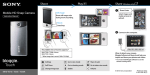
Shoot, Connect and Share
View images on multiple devices and share with friends.
MHS-TS22
Shoot
Share
Charge
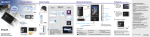
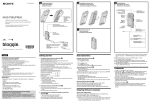
1 After shooting, immediately reserve
an image for uploading.
Still image
You can also shoot
still images during
movie recording.
Movie
Turn the camera’s power off before
charging.
Start/Stop
For the details:
Refer to the PDF Handbook which is
saved in internal memory of Bloggie.
(“Handbook” folder in “START” drive)
Menu
Zoom out/in
Light
Viewing mode
2 Connect Bloggie to PC and upload
reserved image to online service.
Shooting mode
Delete
Share it Later
Back
Volume
© 2012 Sony Corporation Printed in China
4-416-997-11(1)
For uploading, Install the software
from website beforehand.
(www.sony.net/start/bloggie)
For the water-proof and dust-proof :
This camera is water-proof/dust-proof
equivalent to IEC60529 IP58. The camera
is operable up to a water depth of 5 m for
60 minutes.
Conforming to MIL-STD 810F Method 516.5Shock standards, this product has passed
testing when dropped from a height of 1.5 m
above a 5 cm thick plywood board.
If the camera becomes unresponsive:
Press and hold the ON/OFF (Power) button
for at least 7 seconds, and reboot the
camera.