1
Section 4 - REPAIR & ADJUSTMENTS
4.1.6.
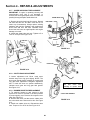
SINGLE HANDLE CONTROL ADJUSTMENT
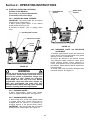
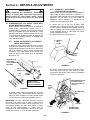
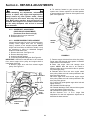
3. To adjust, loosen the nuts on the cable guide
support bracket and move the bracket in or out until
the cam lock aligns with the adjusting line.
Retighten nuts.
4. Hold the wheel drive control lever down to the
handle bar, at the same time press the
auger/impeller control lever down to the handle bar
and hold in position.
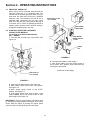
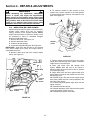
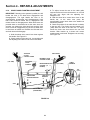
5. Check the position of the cable ferrule in relation
to the cam lock. The ferrule must be located 1/16”
(.060) above the hook of the cam lock. To adjust,
loosen the three nuts that secure the cam lock
bracket. Slide bracket up or down until correct
measurement is achieved. Retighten nuts securely.
See Figure 4.9.
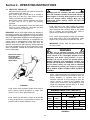
IMPORTANT: Standing in the operator’s position, the left
handle bar lever is for wheel drive engagement and
disengagement. The right handle bar lever is for
auger/impeller engagement and disengagement. Hold
both levers down to handle bar for engagement and
release levers for disengagement. When both levers are
pressed down to the handle bar at the same time, the
operator can release the right hand lever and the right
lever will remain engaged as long as the left hand lever
is held down to handle bar. Release the left hand lever
and both levers will disengage.
1. Hold the wheel drive control lever down against
the handle. See Figure 4.9.
2. Check position of the cam lock. It must align with
the adjusting line located on the cam lock bracket.
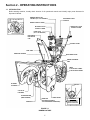
HOLD DOWN
TRACTION
CLUTCH
CONTROL LEVER
BLOWER CLUTCH
CONTROL LEVER
(L.H. SIDE)
DISCHARGE
CHUTE
CONTROL
REMOTE DEFLECTOR
CONTROL (“T”
HANDLE)
(R.H. SIDE)
CABLE
FERRULE
.060
(1/16”)
CABLE
CABLE GUIDE
SUPPORT BRACKET
CAM LOCK
BRACKET
CAM LOCK
UP
“OUT”
“IN”
DOWN
ADJUSTING LINE
(ON BRACKET)
FIGURE 4.9
19
CAM LOCK
HOOK
CABLE