1
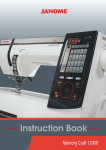
LCD Screen
1
3
2
4
5
6
10
7
8
9
11
1
Mode button:
Press this button to select the desired mode.
2
Letter style button:
Press this button to change the letter style of monogram.
3
Memory/Recall button:
Press this button to register or recall programmed stitch pattern combinations.
The previous stitch pattern combination will be replaced by the new combination when
pressing this button after programming. The memorized stitch pattern combination will be
recalled when pressing this button on the initial screen of the selected mode.
4
Twin needle button:
Press this button when sewing with a twin needle. The machine will limit width to protect
a 2.0 width double needle from breakage.
5
Elongation button:
Press this button to elongate satin stitch patterns in Mode 3.
Note: Not all stitch patterns can be elongated.
6
Bobbin winding button:
Press this button to wind the bobbin.
7
Stitch width adjusting button:
Press this button to alter the stitch width.
8
Stitch length adjusting button:
Press this button to alter the stitch length.
9
Editing button:
Press this button to edit the programmed stitch patterns.
In the editing mode this button is used to shift the cursor to the left.
10
11
Help button:
Press this button to view alternative applications of certain stitches and correct choice of
sewing foot. In the editing mode this button is used to shift the cursor to the right.
LCD contrast adjusting dial:
Turn this dial to adjust contrast of the LCD Screen.
9