1
ENGLISH
LC-15B5M/LC-20B5M
LC-15B5M
LC-20B5M
LC-15B5M
LC-20B5M
OPERATION MANUAL
LCD COLOUR TELEVISION
OPERATION MANUAL
Printed in Japan
TINS-B130WJZZA
Printed on 100% post-consumer recycled paper.
TINS-B130WJZZA
04P02-JMM
04P02-JMM
LC-15_20B5M_Hyo1_4.p65
1
04.2.23, 4:48 PM
ENGLISH
ENGLISH
LC-15B5M
LC-20B5M
LCD COLOUR TELEVISION
ENGLISH
OPERATION MANUAL
Contents
Dear SHARP customer .................................................... 2
Important Safety Precautions ......................................... 2
Supplied Accessories ...................................................... 4
Preparation ....................................................................... 5
Installing Batteries in the Remote Control ................... 5
Using Remote Control ................................................. 5
Power Connection ....................................................... 6
Antenna Connection ................................................... 6
Listening with Headphones ......................................... 6
Part Names of Main Unit .................................................. 7
How to fix the cables ................................................... 8
Part Names of Remote Control ....................................... 9
Basic Operation .............................................................. 10
Turning On and Off the Main Power .......................... 10
Standby ..................................................................... 10
Switching TV/VIDEO AV1/AV2/COMPONENT/
CARD/TV Mode .................................................. 10
Sound Volume ........................................................... 11
Changing Channels .................................................. 11
Preset .............................................................................. 12
On-Screen Display Language Selection ................... 12
Presetting the Channels (AUTO) ............................... 12
Presetting the Channels (MANUAL) .......................... 13
Channel Setting ......................................................... 14
Clock Setup ............................................................... 14
Selecting Menu Items .................................................... 15
Selecting Menu Items ................................................ 15
Basic Adjustment Settings ............................................ 16
Picture Adjustments .................................................. 16
Colour System (Only AV1 or AV2 mode) ................... 16
I/P Setup .................................................................... 16
DNR (Digital Noise Reduction) .................................. 17
Film Mode .................................................................. 17
Cool Climate .............................................................. 17
Sound Adjustments ................................................... 18
On-screen Display Language Setting ....................... 18
AV2 In/Out ................................................................. 19
Display Mode ............................................................ 19
Features .................................................................... 20
Timer Function ........................................................... 21
NICAM Broadcast Selection .......................................... 22
A2 Stereo Broadcast Selection ..................................... 23
Teletext ............................................................................ 24
Before Using Memory Cards ......................................... 26
Copyright ................................................................... 26
About Memory Cards ..................................................... 27
Commercially Available Memory Cards .................... 27
Preparing a Memory Card ......................................... 27
Notes on Using Memory Cards and
PC Card Adapters .............................................. 27
Loading a PC Card Adapter .......................................... 28
Loading a PC Card Adapter ..................................... 28
Changing from Card Mode to the TV mode .............. 28
Inserting/Removing a PC Card ................................. 28
Playing Back Mode ........................................................ 29
Select Mode .............................................................. 29
Recording/Playing Back a Memory Card ..................... 30
Recording on the Memory Card ................................ 30
Playing Back the Memory Card ................................ 30
Precautions when Playing Back PC Image Data
on the LCD TV Set .............................................. 30
Recording on a Memory Card (Video Setup) ............... 31
Rec Mode .................................................................. 31
Pre-Recording ........................................................... 31
Recording a TV Programme in Real-time ..................... 32
Recording as a Motion Picture .................................. 32
Easy Recording ......................................................... 32
Setting Timer Recording ................................................ 33
Adjusting the Clock ................................................... 33
Timer Rec .................................................................. 33
Checking the Programme List ................................... 34
Checking the Recording Mode ................................. 35
At the Set Time .......................................................... 35
If There is not Sufficient Space on a Memory Card .. 35
If Power Outage Happens/AC Cord or
DC Plug at the LCD TV Set is Unplugged
During Recording ............................................... 35
Playing Back Motion Pictures (Normal Mode) ............. 36
Normal Playback ....................................................... 36
Repeat ....................................................................... 36
Playing Back Motion Pictures (Special Mode) ............ 37
Slowmotion ................................................................ 37
Zoom ......................................................................... 38
Protecting/Deleting Motion Pictures ............................ 39
Protecting Motion Picture Files .................................. 39
Unprotecting Motion Picture Files ............................. 39
Deleting One Motion Picture File ............................... 40
Deleting All Motion Picture Files ................................ 40
Playing Back Still Pictures ............................................ 41
Listing Still Pictures (Index) ....................................... 42
Displaying One Picture at a Time .............................. 42
Slideshow Setup ........................................................ 43
My Programme .......................................................... 44
Displaying Pictures in Slideshow in the Order
Specified in “My programme” ............................ 44
Rotate ........................................................................ 45
Switching Files .......................................................... 45
Audio Select .............................................................. 46
Recording on a Memory Card ....................................... 47
Shutter Click .............................................................. 47
Capturing a TV Programme in Real-time ...................... 48
Capturing as Still Pictures ......................................... 48
Protecting/Deleting Still Pictures ................................. 49
Protecting Still Picture Files ....................................... 49
Unprotecting Still Picture Files .................................. 49
Deleting One Still Picture File .................................... 50
Deleting All Still Picture Files ..................................... 50
Formatting the Card ....................................................... 51
Connecting with External Devices ............................... 52
Troubleshooting ............................................................. 55
Specifications ................................................................. 57
Time Zone Table ............................................................. 58
Dimensional Drawings ................................................... 59
1
LC-15_20B5M_E_P01-09.p65
1
04.1.30, 11:21 AM
Dear SHARP customer
Thank you for your purchase of the SHARP LCD colour TV product. To ensure safety and many years of trouble-free
operation of your product, please read the Important Safety Precautions carefully before using this product.
Important Safety Precautions
Electricity is used to perform many useful functions, but it can also cause personal injuries and property damage
if improperly handled. This product has been engineered and manufactured with the highest priority on safety.
However, improper use can result in electric shock and/or fire. In order to prevent potential danger, please
observe the following instructions when installing, operating and cleaning the product. To ensure your safety
and prolong the service life of your LCD colour TV product, please read the following precautions carefully
before using the product.
1.
Read instructions—All operating instructions must be read and understood before the product is operated.
2.
Keep this manual in a safe place—These safety and operating instructions must be kept in a safe place for future
reference.
3.
Observe warnings—All warnings on the product and in the instructions must be observed closely.
4.
Follow instructions—All operating instructions must be followed.
5.
Attachments—Do not use attachments not recommended by the manufacturer. Use of inadequate attachments can
result in accidents.
6.
Power source—This product must operate on a power source specified on the specification label. If you are not sure
of the type of power supply used in your home, consult your dealer or local power company.
7.
AC cord protection—The AC cords must be routed properly to prevent people from stepping on them or objects
from resting on them. Check the cords at the plugs and product.
8.
Overloading—Do not overload AC outlets or extension cords. Overloading can cause fire or electric shock.
9.
Entering of objects and liquids—Never insert an object into the product through vents or openings. High voltage
flows in the product, and inserting an object can cause electric shock and/or short internal parts. For the same
reason, do not spill water or liquid on the product.
10. Servicing—Do not attempt to service the product yourself. Removing covers can expose you to high voltage and
other dangerous conditions. Request a qualified service person to perform servicing.
11. Repair—If any of the following conditions occurs, unplug the AC cord from the AC outlet, and request a qualified
service person to perform repairs.
a.
b.
c.
d.
When the AC cord or plug is damaged.
When a liquid was spilled on the product or when objects have fallen into the product.
When the product has been exposed to rain or water.
When the product does not operate properly as described in the operating instructions.
Do not touch the controls other than those described in the operating instructions. Improper adjustment of
controls not described in the instructions can cause damage, which often requires extensive adjustment work
by a qualified technician.
e. When the product has been dropped or damaged.
f. When the product displays an abnormal condition. Any noticeable abnormality in the product indicates that
the product needs servicing.
12. Replacement parts—In case the product needs replacement parts, make sure that the service person uses
replacement parts specified by the manufacturer, or those with the same characteristics and performance as the
original parts. Use of unauthorized parts can result in fire, electric shock and/or other danger.
13. Safety checks—Upon completion of service or repair work, request the service technician to perform safety checks
to ensure that the product is in proper operating condition.
14. Wall or ceiling mounting—When mounting the product on a wall or ceiling, be sure to install the product according
to the method recommended by the manufacturer.
2
LC-15_20B5M_E_P01-09.p65
2
04.1.30, 11:21 AM
Important Safety Precautions (Continued)
• Cleaning—Unplug the AC cord
from the AC outlet before cleaning
the product. Use a damp cloth to
clean the product. Do not use
liquid cleaners or aerosol
cleaners.
• Water and moisture—Do not use
the product near water, such as
bathtub, washbasin, kitchen sink,
laundry tub, swimming pool and in
a wet basement.
• Stand—Do not place the product
on an unstable cart, stand, tripod
or table. Doing so can cause the
product to fall, resulting in serious
personal injuries as well as
damage to the product. Use only
a cart, stand, tripod, bracket or
table recommended by the
manufacturer or sold with the
product. When mounting the
product on a wall, be sure to
follow the manufacturer’s
instructions. Use only the
mounting hardware recommended
by the manufacturer.
• When relocating the product
placed on a cart, it must be
moved with utmost care. Sudden
stops, excessive force and
uneven floor surface can cause
the product to fall from the cart.
• Ventilation—The vents and other
openings in the cabinet are
designed for ventilation. Do not
cover or block these vents and
openings since insufficient
ventilation can cause overheating
and/or shorten the life of the
product. Do not place the product
on a bed, sofa, rug or other similar
surface, since they can block
ventilation openings. This product
is not designed for built-in
installation; do not place the
product in an enclosed place
such as a bookcase or rack,
unless proper ventilation is
provided or the manufacturer’s
instructions are followed.
• The LCD panel used in this
product is made of glass.
Therefore, it can break when the
product is dropped or applied
with impact. Be careful not to be
injured by broken glass pieces in
case the LCD panel breaks.
• Heat sources—Keep the product
away from heat sources such as
radiators, heaters, stoves and
other heat-generating products
(including amplifiers).
• Do not place vases or any other
water-filled containers on this
product. The water may spill onto
the product causing fire or electric
shock.
• To prevent fire, never place any
type of candle or naked flames on
the top or near the TV set.
• To prevent fire or shock hazard,
do not place the AC power cord
under the TV set or other heavy
items.
The LCD panel is a very high technology product with
921,600 thin film transistors, giving you fine picture
details.
Due to the very large number of pixels, a few
non-active pixels may occasionally appear
on the screen as a fixed point of blue, green or red.
This is within product specifications and does not
constitute a fault.
3
LC-15_20B5M_E_P01-09.p65
3
04.1.30, 11:21 AM
Supplied Accessories
Make sure the following accessories are provided with the LCD TV set.
Remote control
“AAA” size batteries (×2)
pages 5 and 9
page 5
Antenna cable
AC cord
*Product shape varies in some countries.
page 6
AC adapter
page 6
Operation manual
Cable holder
LC-15B5M
LC-20B5M
page 8
page 6
4
LC-15_20B5M_E_P01-09.p65
4
04.1.30, 11:21 AM
Preparation
Installing Batteries in the Remote Control
Before using the LCD TV set for the first time, install the two “AAA” size batteries supplied in the remote control. When the
batteries become depleted and the remote control fails to operate, replace the batteries with new “AAA” size batteries.
1
Open the battery cover.
2
Insert two “AAA” size batteries.
3
Close the battery cover.
–
+
+
–
■ Slide the cover while
pressing the ( ) part.
■ Engaging the lower
claw with the remote
control, close the
cover.
■ Place batteries with their
terminals corresponding to
the (+) and (–) indications in
the battery compartment.
Caution!
Precautions regarding batteries
■ Improper use of batteries can result in a leakage of chemicals and/or explosion. Be sure to follow the instructions below.
• Place batteries with their terminals corresponding to the (+) and (–) indications.
• Different types of batteries have different characteristics. Do not mix batteries of different types.
• Do not mix old and new batteries. Mixing old and new batteries can shorten the life of new batteries and/or cause old
batteries to leak chemicals.
• Remove batteries as soon as they are depleted. Chemicals that leak from batteries can cause a rash. If chemical
leakage is found, wipe it off with a cloth.
• The batteries supplied with the LCD TV set may have a shorter operating time due to storage conditions.
• If the remote control is not to be used for an extended period of time, remove the batteries from the remote control.
Using Remote Control
■ Use the remote control by pointing it towards the remote sensor
window of the main unit. Objects between the remote control and
sensor window may prevent proper operation.
HEADPHONE jack
OPC indicator
POWER indicator
Remote sensor
Cautions regarding use of remote control
■ Do not apply shock to the remote control. In addition, do not
expose the remote control to liquids, and do not place it in an area
with high humidity.
OPC sensor
■ Do not install or place the remote control under direct sunlight. The
heat may cause deformation of the unit.
■ The remote control may not work properly if the remote sensor
window is under direct sunlight or strong lighting. In such a case,
change the angle of the lighting or main unit, or operate the remote
control closer to the remote sensor window.
5
LC-15_20B5M_E_P01-09.p65
5
04.1.30, 11:21 AM
Preparation (Continued)
Power Connection
Connect to the DC input terminal of the LCD TV set.
POWER INPUT
DC12V
MAIN POWER
Pull down the hook to
open the cover.
Pull down the hook
to open the cover.
Household
power outlet
To POWER INPUT
terminal
Plug into an AC outlet.
AC adapter
■
•
•
•
AC cord*
* Product shape varies in some
countries.
Using the AC adapter
Although the AC adapter may become warm during use, this is not a malfunction.
Do not wrap or cover the AC adapter with a blanket or similar covering. This can cause a malfunction or accident.
Do not attempt to disassemble or modify the AC adapter. The insides of the AC adapter contain high-voltage components that can
result in the risk of electrical shock.
NOTE
• Use a commercially available AC plug adapter, if necessary, depending on the design of the wall outlet.
• Always turn the MAIN POWER switch of the LCD TV set to OFF when connecting the AC adapter.
• Unplug the AC adapter from the LCD TV set and power outlet when the LCD TV set is not to be used for a long period of time.
Antenna Connection
• Using the supplied antenna cable, connect the room antenna terminal to the antenna terminal on the LCD TV set.
(Refer to the figure below.)
ANT.
(Antenna terminal)
Room antenna terminal
(75-ohm type)
Antenna cable (supplied)
To antenna terminal
Listening with Headphones
■ Plug the headphone mini-plug into the HEADPHONE jack located on the front of the LCD TV set.
▼ On-screen display
Headphones
Adjust the sound volume using VOL (+)/(–).
NOTE
• Headphones are not included in the supplied accessories.
• No sound is heard from the main unit speakers when a headphone mini-plug is connected into the HEADPHONE jack.
6
LC-15_20B5M_E_P01-09.p65
6
04.1.30, 11:21 AM
Part Names of Main Unit
How to adjust the angle
Controls
Upper control panel
LC-20B5M
VOL ( )/( )
CH ( )/( )
MENU
MAIN POWER
TV/VIDEO
LC-15B5M
Tilt the display by grabbing onto
the carrying handle while securely
holding down the stand with your
other hand.
To change the vertical angle of the LCD TV
set, tilt the screen up to 5 degrees forward or
10 degrees backward. The LCD TV set can
also be rotated up to 25 degrees to right and
left. Please adjust the angle so that the LCD
TV set can be watched most comfortably.
Card Lamp
When timer recording is set: Orange
When recording: Red
Standby: Green
PC Card Slot
Speaker
Speaker
OPC sensor
Remote sensor
HEADPHONE jack
Plug the headphone mini-plug into the Headphone jack
located on the front of the LCD TV set. (See page 6.)
OPC indicator (Optical Picture Control)
The Optical Picture Control indicator lights up green when the
“Backlight” is set to “Auto (OPC)”. (See page 20.)
POWER indicator
POWER indicator lights up green when the power is on, and
red when in the standby mode (the indicator will not light
when the main power is off). The indicator lights up orange
when the wake-up timer is set.
* The examples used throughout this manual are based on
the LC-20B5M model.
NOTE
• TV/VIDEO, CH ( )/( ), VOL (–)/(+) and MENU on the main unit have the same functions as the same buttons on the remote control.
Fundamentally, this operation manual provides a description based on operation using the remote control.
7
LC-15_20B5M_E_P01-09.p65
7
04.1.30, 11:21 AM
Part Names of Main Unit (Continued)
Terminals
Rear View
Carrying handle
S-VIDEO
AV-IN1
AV-IN2/OUT
VIDEO
AUDIO (L)
AUDIO (R)
VIDEO
AUDIO (L)
AUDIO (R)
COMPONENT
Y
PB
PR
AUDIO (L)
AUDIO (R)
ANT. (Antenna terminal)
POWER INPUT (DC12V)
How to fix the cables
• Pull the cables connected to each terminal through the holes and close the left and right terminal covers.
Push the cables into the grooves of the support covers. Insert the cable holder (supplied) from above the
support cover and fix the cables.
Terminal cover
Cable holder
Terminal cover
Support cover
8
LC-15_20B5M_E_P01-09.p65
8
04.1.30, 11:21 AM
Part Names of Remote Control
SUBPAGE
Displays the Teletext
Subpage directly.
(P.25)
REC
Records the motion
picture.
(P.32)
CAPTURE
Records the still picture.
(P.48)
HOLD
Temporarily holds the
current Teletext page.
(P.25)
REVEAL
Displays hidden information
such as solutions to riddles
and puzzles. (P.25)
POWER
(P.10)
CARD
Switches the motion and
still picture. (P.29)
SUBTITLE
Displays the Teletext
Subtitle directly.
(P.25)
TEXT
Displays the Teletext mode
screen. (P.24)
END
Returns to normal screen
in Teletext mode.
(P.25)
RETURN
Return to the previous screen.
MENU
Displays the TV menu or return
to normal screen.
(P.14)
Red, Picture Menu
(P.16)
Cyan, Status Display
(P.32)
Green, Sound Menu
(P.18)
VOL (+)/(-)
(P.11)
Yellow,
Timer function Menu
(P.21)
Channel Select
(P.11)
(Mute)
Switches the sound on and off.
(P.11)
(Flashback)
Returns to the previous
channel. (P.11)
CH ( )/(
(P.11)
)
MPX
Switches the audio
mode. (P.22)
BACKLIGHT
Selects the brightness and
OPC of the display.
(P.20)
How to use the cursor during the
motion picture playback
TV/VIDEO
Switches the input source
between AV1, AV2, COMPONENT,
CARD and TV mode. (P.10)
Move the cursor to the upwards (Select the menu items)/
Still (Pause the motion picture playback or card recording)
Move the cursor to the left (Select the menu items)/
Fast Reverse (Fast reverses the picture)
Move the cursor to the right (Select the menu items)/
Fast Forward (Fast forwards the picture)
OK (Set the menu or items by selecting the cursor)/
Play (Playback the card)
Move the cursor to the downwards (Select the menu items)/
Stop (stop the motion picture playback or card recording)
9
LC-15_20B5M_E_P01-09.p65
9
04.1.30, 11:21 AM
Basic Operation
Turning On and Off the Main Power
Switching TV/VIDEO AV1/AV2/COMPONENT/CARD/TV Mode
MAIN POWER
1
Turn on the power of the connected video equipment.
2
Press TV/VIDEO to select the applicable input source.
The screen changes in order of AV1, AV2,
COMPONENT, CARD and TV mode each time TV/VIDEO
is pressed.
AV1 mode
AV1
PAL
AV2 mode
AV2
POWER indicator
PAL
● Press MAIN POWER. The POWER indicator instantantly
changes from blinking red to green and the LCD TV set is
turned on.
On-screen display
COMPONENT mode
COMPONENT
1
PAL
B/G
CARD mode
VIDEO INDEX
NOTE
• The On-screen display disappears after a few seconds.
● To turn off the main power, press MAIN POWER.
TV mode
12
PAL
B/G
Standby
NOTE
• AV input mode indication remains for 5 seconds.
• AV1:
Video equipment connected to the AV1 input
terminals. The S-video input terminal is additionally
provided for the AV1 input. If both S-video terminal
and normal video terminals are connected with
cables, the S-video input terminal takes priority.
• AV2:
AV2 mode is used to adjust the preset settings and
IN or OUT can be selected. AV2 indication is not
displayed when OUT is selected. (For details on
setting AV-OUT, see page 19.)
To turn off the LCD TV
Press POWER. The POWER indicator will turn red.
To turn the LCD TV back on
Press POWER again. The POWER indicator will turn green.
• COMPONENT: Video equipment connected to the COMPONENT
input terminals.
• CARD:
Select this when running a memory card. (STILL
INDEX will be displayed when still picture mode and
VIDEO INDEX will be displayed when motion picture
mode.)
10
LC-15_20B5M_E_P10-11.p65
10
04.1.30, 11:24 AM
Basic Operation (Continued)
Changing Channels
Sound Volume
■ To adjust the volume
You can select channels using Channel Select or CH (
)/(
).
• To handle the increasing number of channels available, this
LCD TV set allows you to select up to 100 positions (Channels
0 to 99). One-digit and two-digit methods of selection can be
used. Follow the procedure shown below to select channels.
● Press VOL (+) to increase the sound volume.
The numerical value increases.
■ Using Channel Select
To select a one-digit channel (e.g., Channel 5):
Volume
50
● Press VOL (–) to decrease the sound volume.
The numerical value decreases.
1
Press 5 of Channel Select.
2
If “5-” is indicated and the picture does not change,
press -/-- to switch over to the 1-digit select mode
and press 5 of Channel Select.
Volume
10
1
PAL
B/G
■ To mute the sound
● Press e (Mute) to temporarily turn off the sound. The
MUTE mark is displayed on the screen.
To select a two-digit channel (e.g., Channel 15):
1
--
2
● Press e (Mute) or VOL (+)/(–) to turn the sound back to
the previous level. MUTE is automatically cleared when
one of the following buttons are pressed: POWER, VOL
(+)/(–) or e (Mute).
Volume
10
Press -/-- to set the 2-digit select mode.
Press 1 of Channel Select.
1-
3
Press 5 of Channel Select.
15
PAL
B/G
NOTE
• Complete this procedure within 4 seconds, otherwise the selection
will not be made.
Changing channels with CH (
control.
)/(
) on the remote
Press CH ( ) and the channels change in the order shown below:
1 → 2 → 3 → . . . → 98 → 99 → 0 → 1 → 2 → 3 → . . .
Press CH ( ) and the channels change in the order shown below:
3 → 2 → 1 → 0 → 99 → 98 → . . . → 3 → 2 → 1 → . . .
■ Using A (FLASHBACK)
● Press A to switch the currently tuned channel to the
previously tuned channel.
● Press A again to switch back to the currently tuned
channel.
11
LC-15_20B5M_E_P10-11.p65
11
04.1.30, 11:24 AM
Preset
On-Screen Display Language Selection
MENU on the LCD TV set can also be used to select the
language.
Upper control panel
3
1
Presetting the Channels (AUTO)
Automatically tunes in and presets receivable TV stations.
Make sure the antenna cable is properly connected.
Upper control panel
2
1, 2 4
1
Press MENU (PRESET-1) on the upper part of the
LCD TV set for more than 2 seconds to display the
PRESET mode screen.
Auto ( B/G )
VHF
1
48.25MHz
2
Press MENU (PRESET-1) twice to display the
LANGUAGE select mode screen. Press MENU
(PRESET-1) again to change the PRESET mode as
shown below.
AUTO
MANUAL
LANGUAGE
1
Press MENU (PRESET-1) on the upper part of the
LCD TV set for more than 2 seconds. The AUTO
mode screen appears.
Sound System
NORMAL SCREEN
Auto( B/G )
VHF
1
48.25MHz
NOTE
• Instead of pressing MENU for more than 2 seconds, you can
display the LANGUAGE select mode by selecting Setup →
Language on the Menu screen (see page 18).
2
Press VOL (–)/(+) (PRESET-2) on the upper part of
the LCD TV set. All the TV stations in your area that
can be received by the LCD TV set are automatically
preset.
3
The screen shows whatever is on channel 1 when full
auto channel preset is finished.
English
3
4
: SELECT O K : ENTER
M : BACK E : EXIT
Press
CH ( )/( ) to
select the language you wish
to display.
1
PAL
B/G
Press TV/VIDEO to return to the normal screen.
NOTE
• When starting PRESET after setting the SOUND SYSTEM with
MENU of the Remote Control, the SOUND SYSTEM for all channels
are stored into memory.
• Unused channels are automatically skipped.
• The Preset mode is only available in the TV mode and cannot be
operated in the AV mode.
12
LC-15_20B5M_E_P12-15.p65
12
04.1.30, 11:22 AM
Preset (Continued)
Presetting the Channels (MANUAL)
■ Setting a channel to a desired TV station:
■ In a weak reception area, or under bad reception
conditions.
Upper control panel
4
3
1, 2, 6
Upper control panel
4
1, 2, 3, 5
1
Press MENU (PRESET-1) on the upper part of the
LCD TV set for more than 2 seconds. The AUTO
mode screen appears.
2
Press MENU (PRESET-1) to display the MANUAL
mode screen.
3
While the MANUAL mode screen is displayed, press
MENU (PRESET-1) for more than 2 seconds.
The channel position number remains in green.
1
Press MENU (PRESET-1) on the upper part of the
LCD TV set for more than 2 seconds. The AUTO
mode screen appears.
Sound system
Auto ( B/G )
VHF
1
48.25MHz
4
Adjust for good reception using VOL (+)/(–).
5
After finishing the adjustment, press MENU
(PRESET-1) to continue channel presetting.
NOTE
• While the MANUAL mode screen is displayed, press MENU
(PRESET-1).
(The LANGUAGE mode screen will appear.)
Manual(B/G)
VHF
1
48.25MHz
2
Press MENU (PRESET-1) to display the MANUAL
mode screen. Press MENU (PRESET-1) again to
change the MANUAL mode as shown below.
AUTO
3
MANUAL
LANGUAGE
Fine
UHF
5
623.25MHz
NORMAL SCREEN
Select the channel position using Channel Select or
CH ( )/( ).
Manual ( B/G )
VHF
1
48.25MHz
English
: SELECT
4
Press VOL (+)/(–) to locate the channel you want to
preset to the position. Search is initiated and when a
TV signal is received during the search, the search
stops.
5
Repeat steps 3 and 4 above, to preset the channel
positions for other broadcasts, etc.
O K : ENTER
M : BACK
E : EXIT
Manual ( B/G )
UHF
5
623.25MHz
6
Press MENU (PRESET-1) to return to the normal
screen.
NOTE
• SYSTEM may not have been set correctly, if noise can be heard or
if there is no sound. In such case, reset to “Sound system” using
MENU (See page 14).
13
LC-15_20B5M_E_P12-15.p65
13
04.1.30, 11:23 AM
Preset (Continued)
Channel Setting
Clock Setup
The Timer functions that turn power on at the specified time
do not work unless the clock has been adjusted. Be sure to
adjust the clock first.
1
Press MENU to display the MENU screen.
2
Press \/| to select “Setup”.
3
Press '/" to select “CH setup”, and press OK.
Me
Set
CH
Clo
Dis
AV2
Lan
Dem
4
u[Setup
CH
p
etup
k
setup
lay
mode
In/Out
guage
o
n
u
s
c
p
setup]
1
Press MENU to display the Menu screen.
2
Press \/| to select “Setup”.
3
Press '/" to select “Clock setup”, and press OK.
Me
Set
CH
Clo
Dis
AV2
Lan
Dem
Press '/" to select the desired adjustment item.
Menu[Setup
P
C
S
S
F
N
A
o
o
o
k
i
i
2
s
l
u
i
n
c
i
o
n
p
e
a
CH
setup]
Adjust
setting
tion
ur
system
d
system
m
C
S
B
O
8
O
O
H
E
/
f
7
f
f
1
CAM
G
f
1.15MHz
f
f
4
u[Setup
Clock
p
etup
k
setup
lay
mode
In/Out
guage
o
n
u
s
c
p
Press \/| to select day/month/day of week, year or
time. Press '/" to make the adjustment.
Menu[Setup
5
6
: SELECT
O K : ENTER
M : BACK
Clock
setup]
E : EXIT
Each time you press \/|, the setting for individual
items is as mentioned under Selected item.
Adjust
Date
15/12
Wed
Ye a r
2 0 0 4
setting
Time
12: 0 0 : 0 0
Time
zone
0 : 0 0
Press MENU to exit.
5
Selected item
Description
Position
The channel position changes to the upper or lower number.
Colour system The mode changes in the following order:
Auto
PAL60
Sound system
PAL
SECAM
N443
Press MENU to exit.
: SELECT
O K : ENTER
M : BACK
B/G I D/K M
The mode changes in the following order:
On ←→ Off
Channel numbers with a “● (RED)” mark on the left are set
to Skip.
To turn off Skip, press Channel Select to select the desired
channel,
and then set the Skip mode on the CH setup menu to “Off”.
Fine
The frequency changes to allow fine tuning.
Nicam
The broadcast sound system changes in the following order:
NOTE
• Set the time difference with global standard time of your area for
“Time zone”. (See “Time Zone Table” on page 58).
■ Backup
The clock function is maintained for about 10 minutes even when the
adapter has been shut off due to a power outage or when moving
the LCD TV set. (Since about 30 minutes are required to charge the
backup power supply, the clock function may not be able to be
maintained if the charging time is excessively short.)
On (NICAM sound) ←→ Off (Monaural TV sound)
Stereo system changes in the following order:
On (A2 sound) ←→ Off (Monaural TV sound)
NOTE
• Switching Colour system;
Set the system to Auto for normal TV reception. The Auto mode
automatically detects the receiving signal system and changes the
reception system of the LCD TV set. When the picture or sound is
not stable, switching to an appropriate system may improve the
picture or sound quality.
• When using Fine tuning, the channel number changes from green
to yellow.
• To return the channel to its original frequency setting, follow the
manual channel preset procedure. (Please see page 13 “Presetting the Channels (MANUAL)” for details.)
14
LC-15_20B5M_E_P12-15.p65
E : EXIT
N358
The mode changes in the following order:
Skip
A2
setup]
14
04.2.18, 4:05 PM
Selecting Menu Items
Selecting Menu Items
■ Menu Setting Screens
0
For details on using each setting screen, refer to the page number indicated.
Picture
P
C
B
C
T
S
C
A
R
M
i
o
r
o
i
h
o
d
e
e
c
n
i
l
n
a
l
v
s
n
t
t
g
o
t
r
o
a
e
u
u
r
h
u
[
r
a
t
r
Picture(TV)]
e
Sound
Setup
Features
st
[
3 0 ]
0
0 ]
ness
[
-3 0
0 ]
[
-3 0
[
-3 0
0 ]
pness
[
-1 0
0 ]
ur
system
nced
t
: Select
O K : Enter
R E T U R N : Back
Car
+
+
+
+
+
d
6
3
3
3
1
Page
Contrast .......................................................... 16
Brightness ....................................................... 16
Colour ............................................................. 16
Tint .................................................................. 16
Sharpness ....................................................... 16
Colour system ................................................. 16
Advanced .................................................. 16, 17
Reset ............................................................... 16
0
0
0
0
0
MENU: Exit
MENU
: Select
O K : Enter
R E T U R N : Back
M E N U : Exit
The bar above is an operational guide for
the remote control. The bar will change in
accordance with each menu screen.
Sound
Menu[Sou
Picture
S
T
B
B
S
C
R
: SELECT
Setup
]
n
b
s
a
n
a
e
d
Setup
Features
0 ]
le
[
-1 0
[
-1 0
0 ]
nce
[
-1 0
0 ]
d
wide
r
tone
t
O K : ENTER
O K : ENTER
M : BACK
S
C
C
D
A
L
D
e
H
l
i
V
a
e
tu
s
oc
sp
2
ng
mo
O K : ENTER
Menu[Card]
Picture
Sound
Card
+1 0
+1 0
+1 0
Page
Treble .............................................................. 18
Bass ................................................................ 18
Balance ........................................................... 18
Sound wide ..................................................... 18
Clear tone ....................................................... 18
Reset ............................................................... 18
E : EXIT
p
e
k
l
I
u
M : BACK
Menu[Features]
Picture
Sound
Setup
: SELECT
Card
d
u
e
s
l
u
e
s
Menu[Setup]
Picture
Sound
: SELECT
Features
n
o
r
a
a
o
l
e
M : BACK
Setup
t
a
n
a
F
u
s
y
/
g
eatures
p
etup
mode
Out
e
Page
CH setup ............................................. 14, 22, 23
Clock setup ..................................................... 14
Display mode .................................................. 19
AV2 In/Out ...................................................... 19
Language ........................................................ 18
Demo* ............................................................. 15
Card
E : EXIT
F
B
T
A
B
R
e
a
i
u
l
e
a
c
m
t
u
s
t
k
e
o
e
e
ures
ligh
r
fu
pow
bac
t
Page
Backlight ......................................................... 20
Timer function ................................................. 21
Auto power off ................................................ 20
Blue Back ........................................................ 20
Reset ............................................................... 20
Card
t
nction
er
off
k
E : EXIT
Features
S
V
T
S
F
e
i
i
t
o
C
l
d
m
i
r
a
e
e
e
l
m
rd
ct
mo
o
set
r
Rec
l
set
at
de
up
.
up
Page
Select mode .................................................... 29
Video setup ....................................... 31, 36 – 40
Timer Rec. ...................................................... 33
Still setup ................................... 43 – 47, 49, 50
Format ............................................................. 51
*About “Demo” in “Setup”
: SELECT
O K : ENTER
M : BACK
E : EXIT
• “Demo” is a function for demonstration display at a
shop.
• To turn off the demonstration, do the following:
1. Press \/| to select “Setup” in the Menu screen.
2. Press '/" to select “Demo”, and press OK.
3. Press '/" to select “Demo”.
4. Press \/| to select “Off”, and press OK.
5. Press MENU to exit.
NOTE
• The illustrations and on-screen displays in this manual are for explanation purposes and may vary slightly from the actual appearance.
15
LC-15_20B5M_E_P12-15.p65
15
04.1.30, 11:23 AM
Basic Adjustment Settings
3
Picture Adjustments
Press '/"/\/| to select “Auto”, “PAL”, “SECAM”,
“N358”, “N443” or “PAL60” and press OK.
Adjust the picture to your preference with the following
picture settings.
Menu[Picture(AV1)Colour
Selected
desired
Auto
4
system]
item
PAL
SECAM
N358
N443
PAL6 0
: SELECT
O Kto
: ENTER
Press
MENU
exit.
M : BACK
E : EXIT
NOTE
• Colour system is displayed only in the AV mode.
1
Press MENU to display the Menu screen.
2
Press \/| to select “Picture”.
3
Press '/" to select a specific adjustment item.
P
C
B
C
T
S
C
A
R
4
5
I/P Setup
• The Picture Menu screen can be displayed directly by
pressing the Red.
M
i
o
r
o
i
h
o
d
e
e
c
n
i
l
n
a
l
v
s
n
t
t
g
o
t
r
o
a
e
Adjusting the image and input signal can give you a more
beautiful picture.
[Picture(TV)]
re
ast
[
3 0 ]
0
0 ]
tness
[
-3 0
0 ]
r
[
-3 0
0 ]
[
-3 0
0 ]
pness
[
-1 0
ur
system
nced
t
u
u
r
h
u
+
+
+
+
+
6
3
3
3
1
0
0
0
0
0
1
Press \/| to adjust the item to your desired position.
Press MENU to display the Menu screen.
• The Picture Menu screen can be displayed directly by
pressing the Red.
Press MENU to exit.
Selected item
c button
2
Press \/| to select “Picture”.
3
Press '/" to select “Advanced”, and press OK.
d button
Contrast
For less contrast
For more contrast
Brightness
For less brightness
For more brightness
Colour
For less colour
intensity
For more colour
intensity
Tint
Skin tones become
purplish
Skin tones become
greenish
Sharpness
For less sharpness
For more sharpness
P
C
B
C
T
S
C
A
R
NOTE
• Select “Colour system” and press OK to select “Auto”, “PAL”,
“SECAM”, “N358”, “N443” or “PAL60”. See below.
• Select “Advanced” and press OK to set “I/P Setup”, “DNR”, “Film
mode” or “Cool climate”. See pages 16 and 17.
• When setting all adjustments (Except “Colour system” and
“Advanced” items) to factory preset values,
1 Press '/" to select “Reset”, and press OK.
2 Press \/| to select “Yes”, and press OK.
4
M
i
o
r
o
i
h
o
d
e
e
c
n
i
l
n
a
l
v
s
n
t
t
g
o
t
r
o
a
e
[Picture(TV)Advanced]
re
ast
[
3 0 ]
0
0 ]
tness
[
-3 0
0 ]
r
[
-3 0
0 ]
[
-3 0
0 ]
pness
[
-1 0
ur
system
nced
t
u
u
r
h
u
/
N
i
o
P
Setup
R
lm
mode
ol
climate
Selected
Press '/" to select “Colour system”, and press OK.
P
C
B
C
T
S
C
A
R
M
i
o
r
o
i
h
o
d
e
e
c
n
i
l
n
a
l
v
s
n
t
t
g
o
t
r
o
a
e
[Picture(AV1)Colour
re
ast
[
3 0 ]
0
0 ]
tness
[
-3 0
0 ]
r
[
-3 0
0 ]
[
-3 0
0 ]
pness
[
-1 0
ur
system
nced
t
u
u
r
h
u
system]
+
+
+
+
+
6
3
3
3
1
5
16
item
6
: SELECT O K : ENTER
: BACK E : EXIT
Press
'/" to select M“Interlace”
or “Progressive”, and
press OK.
Press MENU to exit.
Description
Interlace
Use this setting when you cannot get a clear
picture with Progressive. (Especially suitable for
media with special effects like game software.)
Progressive
Normally, you should select this setting.
0
0
0
0
0
16
LC-15_20B5M_E_P16-17.p65
desired
Interlace
Progressive
Selected item
2
0
0
0
0
0
Menu[Picture(TV)Advanced]
Set the system to “Auto” for normal reception. The “Auto”
mode automatically detects the receiving signal system and
changes the reception system of the set. When the picture or
sound is not stable, switching to an appropriate system may
improve the picture or sound quality.
Perform steps 1 and 2 in Picture Adjustments.
6
3
3
3
1
Press '/" to select “I/P Setup”, and press OK.
I
D
F
C
Colour System (Only AV1 or AV2 Mode)
1
+
+
+
+
+
2/19/04, 5:54 PM
Basic Adjustment Settings (Continued)
DNR (Digital Noise Reduction)
Produces a clearer video image.
5
Press '/" to select “On”, and press OK.
6
Press MENU to exit.
NOTE
• Set the “Film mode” to “On” manually to detect a film-based source
(originally encoded at 24 frames/second) when the input source
has vertical frequency of 50 Hz (e.g. PAL, SECAM etc.) .
Cool Climate
1
(This function is only available with LC-20B5M model.)
Improves LCD response when viewing fast-moving images.
The effect is greater at low room temperatures (at or below
15˚C/59˚F).
Press MENU to display the Menu screen.
• The Picture Menu screen can be displayed directly by
pressing the Red.
2
Press \/| to select “Picture”.
3
Press '/" to select “Advanced”, and press OK.
P
C
B
C
T
S
C
A
R
4
M
i
o
r
o
i
h
o
d
e
e
c
n
i
l
n
a
l
v
s
n
t
t
g
o
t
r
o
a
e
[Picture(TV)Advanced]
re
ast
[
3 0 ]
0
0 ]
tness
[
-3 0
0 ]
r
[
-3 0
0 ]
[
-3 0
0 ]
pness
[
-1 0
ur
system
nced
t
u
u
r
h
u
+
+
+
+
+
6
3
3
3
1
0
0
0
0
0
1
• The Picture Menu screen can be displayed directly by
pressing the Red.
Press '/" to select “DNR”, and press OK.
Menu[Picture(TV)Advanced]
I
D
F
C
/
N
i
o
P
Setup
R
lm
mode
ol
climate
Selected
desired
O
Press MENU to display the Menu screen.
2
Press \/| to select “Picture”.
3
Press '/" to select “Advanced”, and press OK.
item
n
Off
5
Press
'/"O Kto: select
“On”,
press OK.
: SELECT
ENTER
M
: BACK and
E : EXIT
6
Press MENU to exit.
P
C
B
C
T
S
C
A
R
4
Film Mode
e
c
n
i
l
n
a
l
v
s
n
t
t
g
o
t
r
o
a
e
[Picture(TV)Advanced]
re
ast
[
3 0 ]
0
0 ]
tness
[
-3 0
0 ]
r
[
-3 0
0 ]
[
-3 0
0 ]
pness
[
-1 0
ur
system
nced
t
u
u
r
h
u
6
3
3
3
1
0
0
0
0
0
Press '/" to select “Cool climate”, and press OK.
I
D
F
C
/
N
i
o
P
Setup
R
lm
mode
ol
climate
Selected
desired
O
item
n
Off
Press MENU to display the Menu screen.
• The Picture Menu screen can be displayed directly by
pressing the Red.
5
Press
'/"O Kto:select
“On”,
OK.
: SELECT
ENTER
M
: BACK and
E : press
EXIT
2
Press \/| to select “Picture”.
6
Press MENU to exit.
3
Press '/" to select “Advanced”, and press OK.
P
C
B
C
T
S
C
A
R
4
+
+
+
+
+
Menu[Picture(TV)Advanced]
Automatically detects a film-based source (originally encoded
at 24 frames/second), analyses it, and then recreates each
still film frame for high-definition picture quality.
1
M
i
o
r
o
i
h
o
d
e
M
i
o
r
o
i
h
o
d
e
e
c
n
i
l
n
a
l
v
s
n
t
t
g
o
t
r
o
a
e
[Picture(TV)Advanced]
re
ast
[
3 0 ]
0
0 ]
tness
[
-3 0
0 ]
r
[
-3 0
0 ]
[
-3 0
0 ]
pness
[
-1 0
ur
system
nced
t
u
u
r
h
u
NOTE
• Cool climate may cause image noise. If this occurs, set the
function to “Off”.
+
+
+
+
+
6
3
3
3
1
0
0
0
0
0
Press '/" to select “Film mode”, and press OK.
Menu[Picture(TV)Advanced]
I
D
F
C
/
N
i
o
P
Setup
R
lm
mode
ol
climate
Selected
desired
O
item
n
Off
: SELECT
LC-15_20B5M_E_P16-17.p65
O K : ENTER
17
M : BACK
17
E : EXIT
04.1.30, 3:19 PM
Basic Adjustment Settings (Continued)
Sound Adjustments
On-screen Display Language Setting
You can adjust the sound quality to your preference with the
following settings.
1
Press MENU to display the Menu screen.
• The Sound Menu screen can be displayed directly by
pressing the Green.
2
Press \/| to select “Sound”.
3
Press '/" to select a specific adjustment item.
S
T
B
B
S
C
R
4
M
o
r
a
a
o
l
e
e
u
e
s
l
u
e
s
n
n
b
s
a
n
a
e
u[Sound(TV)]
d
0 ]
le
[
0 ]
[
0 ]
nce
[
d
wide
r
tone
t
-1 0
-1 0
-1 0
You can select English, Chinese or Arabic as the on-screen
display language.
1
Press MENU to display the Menu screen.
2
Press \/| to select “Setup”.
3
Press '/" to select “Language”, and press OK.
Me
Set
CH
Clo
Dis
AV2
Lan
Dem
+1 0
+1 0
+1 0
Press \/| to adjust the item to your desired position.
4
• Select “Sound wide” or “Clear tone” and press OK to select
“On” or “Off” of each item.
u[Setup
Language]
p
etup
k
setup
lay
mode
In/Out
guage
o
n
u
s
c
p
Press '/" to select the desired language, and press
OK.
Menu[Setup
Language]
Selected
desired
Example: Sound wide setting screen
Menu[Sound(TV)Sound
Selected
O
5
desired
n
English
wide]
item
Off
5
: SELECT
O K to
: ENTER
Press
MENU
exit.
M : BACK
Press MENU to exit.
Selected item
\ button
| button
Treble
For weaker treble
For stronger treble
Bass
For weaker bass
For stronger bass
Sound wide*
Increase the volume of Increase the volume of
the left speaker
the right speaker
On: Increase the spread of the sound.
Clear tone*
On: Accentuates high-pitched sounds.
Balance
* “Sound wide” and “Clear tone” are not set when the headphone miniplug plug into HEADPHONE jack.
NOTE
• When all adjustments (Except “Sound wide” and “Clear tone”
items) set to factory preset values,
1 Press '/" to select “Reset”, and press OK.
2 Press \/| to select “Yes”, and press OK.
• When you select “Out ” in “AV2 In/Out”, you cannot adjust sound
settings.
18
LC-15_20B5M_E_P18-23.p65
18
04.1.30, 11:36 AM
E : EXIT
item
Basic Adjustment Settings (Continued)
AV2 In/Out
Display Mode
You can set the orientation of the picture.
1
Press MENU to display the Menu screen.
2
Press \/| to select “Setup”.
3
Press '/" to select “AV2 In/Out”, and press OK.
Me
Set
CH
Clo
Dis
AV2
Lan
Dem
4
u[Setup
AV2
p
etup
k
setup
lay
mode
In/Out
guage
o
2
Press \/| to select “Setup”.
3
Press '/" to select “Display mode”, and press OK.
Me
Set
CH
Clo
Dis
AV2
Lan
Dem
Press '/" to select the desired mode, and press OK.
AV2
Press MENU and the Menu screen is displayed.
In/Out]
n
u
s
c
p
Menu[Setup
1
In/Out]
4
u[Setup
Display
p
etup
k
setup
lay
mode
In/Out
guage
o
n
u
s
c
p
Press '/" to select the desired mode, and press OK.
Menu[Setup
Selected
desired
item
Display
Selected
In
Rotate
Upside
5
: SELECT
[In] AV-IN2 terminals
selected as input
terminals
down
E : EXIT
5
AV2 In/Out
item
Mirror
Out
M : BACK
mode]
desired
Normal
Out
: SELECT O K : ENTER
Press
MENU to exit.
mode]
[Out
[Out
] Line Output is
selected, Output
volume is fixed,
Speaker output is
available.
] Line output is
selected, Output
volume is variable,
speaker output is
Mute.
O K : ENTER
M : BACK
E : EXIT
Press MENU to exit.
NOTE
• The Rotate is set to “Normal” at the factory setting.
[Normal]: Normal
image orientation.
[Mirror]: To display
mirror images for
special uses.
ABC
CBA
[Rotate]: To display
rotated images for
special uses.
[Upside down]: To
display upside down
images for special uses.
ABC
ABC
19
LC-15_20B5M_E_P18-23.p65
19
04.1.30, 11:36 AM
Basic Adjustment Settings (Continued)
■ Directly setting the Backlight
Features
You can change the setting of Backlight directly.
The Feature items can be set by the user.
1
Press BACKLIGHT to display the Backlight screen.
2
Each time you press BACKLIGHT, the mode changes
as follows. You can select the desired mode.
1
Press MENU and the Menu screen is displayed.
2
Press \/| to select “Features”.
Backlight [Bright
3
Press '/" to select the desired adjustment item, and
press OK.
Backlight [Auto(OPC)]
F
B
T
A
B
R
4
M
e
a
i
u
l
e
e
a
c
m
t
u
s
n
t
k
e
o
e
e
u[Features]
ures
light
r
function
power
off
back
t
]
Example: Backlight setting screen
Backlight]
Selected
desired
Auto(OPC)
: SELECT
O K : ENTER
item
Bright
Normal
5
Dark
M : BACK
E : EXIT
Press MENU to exit.
Selected item Factory setting
Adjustable item/range
Backlight*
[Bright]
Maximum
brightness
Auto power
off (only TV
mode)
[Off] This feature [On] The power of the LCD TV set is
is inactive.
turned off when there is no
signal for 5 minutes.
Blue back
[On] The screen [Off] This feature is inactive.
is turned blue
when there is
no signal.
[Normal] Brightness 60% → Suitable
for viewing in well-lit areas.
Saves energy.
[Dark] Brightness 20% → Sufficiently
bright when viewing in dim areas.
[Auto (OPC)] Screen brightness is
adjusted according to
the ambient light of
the room.
* Backlight setting can be switched in one touch using the remote control
(see right).
NOTE
• Select “Timer function” and press OK to set “Sleep timer” and
“Wake-up timer” (See page 21).
• When all adjustments set to factory preset values,
1 Press '/" to select “Reset”, and press OK.
2 Press \/| to select “Yes”, and press OK.
20
LC-15_20B5M_E_P18-23.p65
20
]
Backlight [Dark
]
NOTE
• The Backlight screen automatically disappears after 4 seconds.
• See the table left for details of the each backlight setting.
• When set to “Auto (OPC)”, make sure that no object obstructs the
OPC sensor, which could affect its ability to sense surrounding light.
Press '/"/\/| to set each item in each setting screen.
(Except “Timer function” item.)
Menu[Features
Backlight [Normal
04.1.30, 11:36 AM
Basic Adjustment Settings (Continued)
Timer Function
1
Press MENU to display the Menu screen.
• The Timer function Menu screen can be displayed directly by
pressing the Yellow.
2
Press \/| to select “Features”.
3
Press '/" to select “Timer function”, and press OK.
F
B
T
A
B
R
4
M
e
a
i
u
l
e
e
a
c
m
t
u
s
n
t
k
e
o
e
e
u[Features
ures
light
r
function
power
off
back
t
Timer
function]
Press '/" to select “Sleep timer”, and press OK.
Menu[Features
Sleep
timer
Wake-up
timer
Timer
function] –––
Selected
desired
item
9 0 min
Off
3 0 min
12 0 min
6 0 min
15 0 min
5
: SELECT O K : ENTER
M : BACK E : EXIT
Press
'/"/\/| to select
“Off”, “30min”, “60min”,
“90min”, “120min” or “150min”, and press OK.
6
Press '/" to select “Wake-up timer”, and press OK.
Menu[Features
Timer
Sleep
timer
Wake-up
timer
function]
Adjust
S
W
C
V
e
a
h
o
t
ke-up
annel
lume
setting
time
O
0
C
2
ff
0 : 0 0
H1
0
7
: SELECT
K :select
ENTER
M : BACK
E : EXIT
Press
'/"O to
the
desired
adjustment item, and
press \/| to adjust them. Press OK to set.
8
Press MENU to exit.
NOTE
• When you set “Wake-up timer”, POWER indicator lights up orange.
• Be sure to adjust the clock with “Clock setup” in “Setup” before
setting “Sleep timer” and “Wake-up timer”.
• Timer programming settings are cancelled when the duration of the
power outage exceeds the backup time. (See page 14.)
21
LC-15_20B5M_E_P18-23.p65
21
04.2.18, 4:05 PM
NICAM Broadcast Selection
To let you enjoy NICAM broadcasting, this LCD TV receives
NICAM stereo system, bilingual, and monaural broadcasts.
Stereo
The LCD TV set is receiving a stereo broadcast.
• Each time you press MPX, the mode changes between
“NICAM STEREO” and “MONO”.
• When “MONO” is selected, the TV sound is output monaurally.
If the sound quality is poor due to a weak signal or other
problems during NICAM broadcast reception, set the “Off”
position of the NICAM to change the TV sound to monaural.
1
Press MENU to display the MENU screen.
2
Press \/| to select “Setup”.
3
Press '/" to select “CH setup”, and press OK.
(When stereo sound is received)
49
49
NICAM
STEREO
MONO
Bilingual
The LCD TV set is receiving a bilingual broadcast.
• Pressing MPX changes the audio mode in the order shown on
the right.
• M1=main sound, M2=sub sound, or MONO=monaural sound,
can be selected.
(When main sound is selected)
S
C
C
D
A
L
D
49
49
NICAM
M2
enu
tup
se
ock
spl
2
I
ngu
mo
[Setup
tu
s
ay
n/
ag
CH
setup]
p
etup
mode
Out
e
4
Press '/" to select “Nicam”, and press \/| to select
“Off”.
When the NICAM sound is set to the “Off” position, the
TV sound is output in monaural.
5
Press MENU to exit.
(When sub sound is selected)
NICAM
M1
M
e
H
l
i
V
a
e
(When off position is selected)
(When monaural sound is selected)
49
15
NICAM
MONO
Monaural
The LCD TV set is receiving a monaural broadcast.
• Each time you press MPX, the mode changes between
“NICAM MONO” and “MONO”.
(When monaural sound is received)
49
49
NICAM
MONO
NOTE
• When the NICAM sound is set to the “Off” position, MPX cannot
be used to change the audio mode (stereo and bilingual settings).
MONO
NOTE
• If approximately 3 seconds pass without a button being pressed,
the mode setting is automatically terminated and the LCD TV set
returns to the normal mode.
• The setting can be individually selected for each channel number.
22
LC-15_20B5M_E_P18-23.p65
22
04.2.4, 4:44 PM
A2 Stereo Broadcast Selection
To let you enjoy A2 stereo broadcasting, this TV receives A2
stereo system and bilingual broadcasts.
Stereo
The LCD TV set is receiving a stereo broadcast.
• Each time you press MPX, the mode changes between
“STEREO” and “MONO”.
• When “MONO” is selected, the TV sound is output monaurally.
(When stereo sound is received)
49
49
STEREO
If the sound quality is poor due to a weak signal or other
problems during A2 stereo broadcast reception, set the “Off”
position of the A2 to change the TV sound to monaural.
1
Press MENU to display the MENU screen.
2
Press \/| to select “Setup”.
3
Press '/" to select “CH setup”, and press OK.
MONO
Bilingual
The LCD TV set is receiving a bilingual broadcast.
• Pressing MPX changes the audio mode in the order shown on
the right.
• MAIN=main sound or SUB=sub sound, can be selected.
(When main sound is received)
(When sub sound is received)
49
S
C
C
D
A
L
D
4
49
MAIN
SUB
M
e
H
l
i
V
a
e
enu
tup
se
ock
spl
2
I
ngu
mo
[Setup
tu
s
ay
n/
ag
CH
setup]
p
etup
mode
Out
e
Press '/" to select “A2”, and press \/| to select
“Off”.
When the A2 sound is set to the “Off” position, the TV
sound is output in monaural.
(When off position is selected)
NOTE
• If approximately 3 seconds pass without a button being pressed,
the mode setting is automatically terminated and the LCD TV set
returns to normal mode setting.
• The setting can be selected individually for each channel number.
15
b is displayed if A2 is
received when A2 is set to
“Off”.
5
Press MENU to exit.
NOTE
• When the A2 sound is set to the “Off” position, MPX cannot be
used to change the audio mode (stereo and bilingual settings).
23
LC-15_20B5M_E_P18-23.p65
23
04.2.4, 4:44 PM
Teletext
■ What is Teletext?
Teletext is an information service organised like a
magazine, which is provided by some TV stations in
addition to regular television broadcasting. Your LCD TV
set receives special Teletext signals broadcast by a TV
station, processes the information and displays it
graphically on the screen. News, weather and sports
information, stock exchange prices, programme reviews
and closed captioning for people hard of hearing are
among the many services available through Teletext.
■ Teletext mode
Teletext is activated with TEXT on the remote control and
is also closed with it. The LCD TV set can be controlled in
Teletext mode directly by inputting commands with the
remote control and indirectly through the on-screen
display (menu system).
[1] Turning on and off Teletext mode
1
Select a TV channel that is broadcasting the Teletext
programme.
2
Press TEXT and the Teletext screen is displayed.
100
100
TELETEXT
TELETEXT
Red
Green
Yellow
Cyan
Red
■ Operating instructions in Teletext mode
• The FLOF system for teletext is transmitted in Singapore
currently.
• The TOP system for teletext is transmitted in Australia
currently.
• If TOP Teletext is broadcast, a control line and TOP line
can be displayed on the screen. The TOP line involves
the operating instructions associated with all of the
Coloured buttons if TOP text is transmitted, or the
operating instructions for only Red and Green if TOP
text is not being transmitted.
• If there are subpages, a control line holding the operating instructions for subpages can be displayed on line
24.
1
2
3
4
5
6
7
8
9
10
11
12
13
14
15
16
17
18
19
20
21
22
23
369
Green
Yellow
Cyan
● To turn off the Teletext mode, press TEXT again.
[2] Using the TOP line
When TOP Teletext is being broadcast, you can display
the TOP line, which contains the operating instructions on
the screen.
02 : 5 2 : 21
SHARP - T EXT
1
100
200
Press the Coloured buttons to operate the Teletext
screen.
• Press Red to display the previous page and Green
to display the next page. Yellow and Cyan are as
indicated on the TOP line.
NOTE
• By pressing Red the previously selected page will appear
down to the first page which showed up directly after
switching on the teletext. Therefore Red has no function
directly after switching on the teletext.
24
LC-15_20B5M_E_P24-28.p65
24
04.1.30, 11:38 AM
Teletext (Continued)
[3] Changing subpages
If a page has been selected from among several
subpages, you can display a control line which contains
the subpage numbers.
[5] Using Teletext menu
To select the character set
1
1
Press SUBPAGE. The control line with the subpage
numbers is displayed on line 24, and the number of the
currently selected subpage is displayed in blue.
1
2
3
4
5
6
7
8
9
10
11
12
13
14
15
16
17
18
19
20
21
22
23
369
SHARP - T EXT
Character
A
W
E
T
02 : 5 2 : 21
2
r
e
a
u
a
s
s
r
bic/H
t
Eur
t
Eur
kish/
e
o
o
G
set
b
p
p
r
rew
e
e
eek
Press '/" to select the desired character set.
• The colour of the letters will turn to yellow. When selecting
SELECT O K : ENTER
M : BACK E : EXIT
the:character
set, pressing
OK will change the letters to grey
for an instant and then return them back to yellow.
100
2
During Teletext broadcast, press MENU to display the
“Character set” screen.
200
Press \/| to select the desired subpage number.
The selected subpage is displayed.
3
Press MENU to exit.
[6] Useful Features for Teletext
• You can also use Channel Select to select the desired
subpage.
3
Press SUBPAGE to turn off the control line.
[4] Using the TOP table
When TOP Teletext is being broadcast, you can display
the TOP table with the current programme data if one
exists.
● HOLD on the remote control can be used to hold the
current teletext page.
Press the button again to cancel the hold mode.
● '/" can be used to zoom the current teletext page as
below.
ABC
DEF
1
Press OK to display the TOP table. The Teletext page
is temporarily turned off.
2
Press '/" to select the desired item. Press \/| to
select topics (column 1) or subtopics (column 2) if they
exist.
ABC
DEF
* The screen is displayed in each mode each time '/" is
pressed.
● SUBTITLE can be used to quickly activate subtitles.
* Press TEXT to deactivate subtitles.
3
Press OK. A page associated with the selected item is
displayed.
4
Press END to exit.
● REVEAL can be used to display hidden information such
as solutions to riddles and puzzles. Press the button again
to hide the information.
25
LC-15_20B5M_E_P24-28.p65
25
04.1.30, 11:39 AM
Before Using Memory Cards
■ Important Notes on Using Memory Cards
• SHARP cannot be held responsible for misuse of the LCD TV set, any troubles during use, or other problems, or any
damages arising out of the use of the LCD TV set, except for those cases for which Sharp is liable by law.
• If you or other people misuse the LCD TV set, or the LCD TV set is affected by static electricity or electrical noise, the
recorded data may be in danger of being changed or lost.
• If you are making an important recording, run a test in advance to ensure that the recording would be performed correctly
in terms of picture or sound quality.
• SHARP cannot be held responsibility nor make any compensations even if pictures or sound cannot be recorded correctly
because of any troubles when using the LCD TV set.
Copyright
Note:
For Australia
• Copyright may exist in material you wish to record.
Copying such material without permission of the relevant licensee(s) or owner(s) of the copyright is prohibited
by law. SHARP is not in a position to authorize the recording of copyright works and nothing in this manual
should be read or implied as giving that authority.
For Asia
• Audio-visual material may consist of copyrighted works which must not be recorded without the authority of the
owner of the copyright.
Please refer to relevant law in your country.
Duplicating images and music by copying and/or editing from videocassettes and/or TV programmes that are
subject to copyrights is only permitted when the edited or copied versions are used for personal pleasure. With
the exception of cases when the user personally is the owner of the copyrights of the object in question or when
specific and written permission has been obtained from the owner(s) of the object in question, the user is not
permitted to make copies and/or duplications and/or edited versions as this constitutes a violation of the copyright
laws, possible exposing the user to demands for compensation for damages. Therefore, be sure to strictly observe
the existing copyright laws.
In addition when using image data that includes third parties, since the use of such images without prior
permission may constitute an intrusion on the privacy of third parties, be sure to refrain from such usage.
■ Card mode specifications
Still Picture
Motion Picture
Recording/Playback File Format
JPEG (DCF compliant)
Size of a Captured Still Picture
640×480 dots
Recording File Format
SP/LP ... ASF (Motion Picture: MPEG-4 compliant, Sound: WMA-compliant)
EP ........ ASF (Motion Picture: MPEG-4 compliant, Sound: G.726-compliant)
Size of a Recorded Motion
Picture/Number of Frames
SP ... Size: 320×240 dots, Frame: approx. 25 frames/sec
LP ... Size: 320×240 dots, Frame: approx. 25 frames/sec
EP ... Size: 320×240 dots, Frame: approx. 12.5 frames/sec
Playback File Format
ASF (Motion Picture: MPEG-4 compliant, Sound: WMA-compliant)
ASF (Motion Picture: MPEG-4 compliant, Sound: G.726-compliant)
* Motion picture files and still image files recorded, stored or edited with other devices may not play back correctly.
■ Concerning the standard number of recorded images and recording time
Still Pictures
Picture Size
Recordable Pictures
640 × 480
Memory Card
32MB
128MB
Approx. 300 pictures
Approx. 1,000 pictures
* Recordable numbers may vary depending on the reception conditions of the LCD TV set and/or the contents of images.
Motion Pictures
Recordable Time
Memory Card Capacity
Picture Size
Recording Mode
320 × 240
SP
256MB
Approx. 10min.
5GB
Approx. 4h
320 × 240
LP
Approx. 30min.
Approx. 10h
320 × 240
EP
Approx. 1h
Approx. 25h
* Recordable time may vary depending on reception conditions of the LCD TV set or the contents of images.
* The maximum amount of data you can record on a memory card is 1,024 pictures in total including still and motion pictures.
* Files in excess of 4GB and files exceeding 12 hours of recording time cannot be recorded and/or played back.
26
LC-15_20B5M_E_P24-28.p65
26
04.2.6, 10:44 AM
About Memory Cards
■ You can use memory cards (commercially available) for
recording and playing back pictures.
• Please use an appropriate PC card adapter (commercially available) for each memory card.
• The following memory cards are available. (Note that names
for memory cards vary depending on the manufacturer.)
Memory card name
SD Memory Card
Storage capacity
• Some motion pictures recorded with other devices may
not be played back correctly.
* Depending on the card or adapter used, normal operation may not be possible.
Commercially Available Memory Cards
512 MB or less
miniSDTM Card
32 MB or less
CompactFlash
2 GB or less
MultiMediaCard
128 MB or less
SmartMedia
128 MB or less
Memory Stick
128 MB or less
Memory Stick Pro
SD Memory Card
1 GB or less
xD-Picture Card
128 MB or less
Micro Drive
2 GB or less
PC Card HDD
5 GB or less
miniSDTM Card
Adapter
PC Card HDD
miniSDTM Card
* At present, January, 2004
The capacity of the memory stick only serves as a
guide and may differ depending on brand.
Trademarks
SD Memory Card is a trademark.
CompactFlash is a trademark of SanDisk
Corporation of the USA.
MultiMediaCard is a trademark of Infineon
Technologies AG of Germany.
SmartMedia is a trademark of Toshiba
Corporation.
Memory Stick is a trademark of Sony Corporation.
• To read picture files recorded with digital cameras, use
the PC card adapter recommended by the corresponding manufacturer. (The names of PC card adapters vary
depending on the manufacturer.)
• For directions concerning the use of digital cameras or
PC card adapters, please refer to the operation manual
provided with each product.
• Depending on the card or adapter used, normal operation may not be possible.
■ In the card mode, you can playback DCF compliant JPEG
pictures captured with other devices.
* DCF (Design rule for Camera File system) is a standard
of the Japan Electronics and Information Technology
Industries Association (JEITA). This standard specifies
the image file format used for images shot with a digital
camera.
CompactFlash
PC Card Adapter
MultiMediaCard
SmartMedia
Memory Stick
xD-Picture Card
• Be sure to use an appropriate PC card adapter (commercially available) for each memory card.
Preparing a Memory Card
Insert a memory card (commercially available) into a PC card
adapter (commercially available).
Example:
Inserting the SD memory card into a PC card adapter.
Notes on Using Memory Cards and PC Card Adapters
Please note the following when using memory cards and PC card adapters to avoid corruption of data or malfunction of the
LCD TV set.
● If you use a memory card other than the ones specified above, its ability to record or playback pictures is not guaranteed.
● Some PC card adapters have restrictions in regards to memory card capacity. Refer to the relevant operation manual for
such restrictions.
● Some pictures which have been created, modified, or copied on your PC may not be played back correctly.
● Do not bend, drop or apply a shock to memory cards or PC card adapters.
● Keep memory cards or PC card adapters away from heat, water or direct sunlight.
● Do not take apart or modify memory cards or PC card adapters.
● Refer to the appropriate operation manuals for details on using or keeping memory cards or PC card adapters.
● Do not turn the LCD TV set off while a memory card is in operation (e.g. playing back, recording or displaying a
slideshow).
● The recorded data may be erased or changed due to incorrect operation, the influence of static electricity and electrical
noise, therefore be sure to back-up the data regularly.
● Be sure to back-up important files using other media such as a PC.
27
LC-15_20B5M_E_P24-28.p65
27
04.1.30, 11:39 AM
Loading a PC Card Adapter
Loading a PC Card Adapter
Inserting/Removing a PC Card
You need to set a memory card in a PC card adapter before
loading it. (See page 27.)
1
Check the Card Eject button is pressed.
2
Insert a PC card adapter into the PC card slot on the
LCD TV set slowly.
Important:
• Do not allow foreign objects to enter the PC card slot. This could lead
to defects.
1
Confirm the Card Eject button is in the depressed
position.
The Card Eject button
Press the Card Eject button.
* Insert a card straight
into the slot.
3
2
Insert the PC card adapter.
PC card adapter
The Card Lamp turns green.
The Card Eject button
Changing from Card Mode to the TV mode
Press either Channel Select, TV/VIDEO or CH(
)/(
).
The Card Lamp lights up green.
3
Press the Card Eject button, and remove the PC card
adapter.
Confirm the Card Lamp has turned green.
When pressed, the card eject button pops up.
The Card Eject button
The PC card adapter is ejected when the button is
pressed again.
NOTE
• If the Card Eject button is not in the depressed position, the card
cannot operate. Please use with the Card Eject button in the
depressed position.
• When ejecting the PC card adapter, confirm the Card Lamp is
green before ejecting the adapter.
• Never eject the PC card adapter when the Card Lamp is red.
• When there are many files, reading can take about 5 minutes.
28
LC-15_20B5M_E_P24-28.p65
28
04.2.4, 11:58 AM
Playing Back Mode
You can also set the mode from the Menu screen.
Select Mode
Switches the mode between motion picture and still picture.
1
Press MENU to display the Menu screen.
2
Press \/| to select “Card”.
3
Press '/" to select “Select mode”, and press OK.
S
V
T
S
F
4
Me
C
l
d
m
i
r
e
i
i
t
o
n
a
e
e
e
l
m
u
r
c
o
r
l
a
[Card
d
t
m
se
re
se
Select
mode]
ode
tup
c
tup
t
Press \/| to select the desired mode, and press OK.
Menu[Card
Select
Selected
mode]
desired
item
Press CARD.
• The playback mode used when recording is displayed. Each time
you press this button, the mode is switched as follows.
Video
Still
• Selected
mode is displayed.
: SELECT O K : ENTER
M : BACK E : EXIT
[Motion Picture]
Video
1
1
1
1
1
3
4
4
5
6
/
/
/
/
/
0
0
0
0
0
5
5
6
6
6
0 0 1/ 0 0 1
/
/
/
/
/
4
4
4
4
4
0
0
0
0
0
T
F
M
T
W
h
r
o
u
e
u
i
n
e
d
1
1
1
1
1
1
1
0
0
0
:
:
:
:
:
0
0
3
3
3
0
0
0
0
0
C
A
C
A
C
H
V
H
V
H
0 13
1
0 15
2
0 15
E
S
L
L
E
P
P
P
P
P
5
Press MENU to exit.
NOTE
• Protected files are displayed with the “ ” mark.
• Files that could not be read are displayed with an “X” mark.
* When no motion picture is present, “No video file” is displayed.
"
"
[Still Picture]
Still
13/ 0 5/ 0 4
0 0 1/ 0 0 2
11:35
* When no still picture is present, “No still image file” is displayed.
29
LC-15_20B5M_E_P29-32.p65
29
04.1.30, 11:41 AM
Recording/Playing Back a Memory Card
Recording on the Memory Card
The following settings are available to help you make correct recordings.
When Recording Motion Pictures:
● Set the picture quality for recording motion pictures. →
Rec mode (See page 31.)
● Set the date, channel, and picture quality for the programme you want to record. →
● Make the settings not to miss the moment you want to record. →
Timer Rec (See page 33.)
Pre-recording (See page 31.)
When Recording Still Pictures:
● Make the settings for the shutter click to be heard when a picture is captured. →
Playing Back the Memory Card
Shutter click (See page 47.)
How to playback motion/still pictures.
Select the picture (motion picture or still picture) to be played back. →
Select mode (See page 29.)
When Playing Back Motion Pictures:
● Playback the selected picture repeatedly. →
Repeat (See page 36.)
● Playback the selected picture more slowly than normal. →
● Zooms the selected picture. →
Slowmotion (See page 37.)
Zoom (See page 38.)
When Playing Back Still Pictures:
● Start playing back pictures with the setup as specified. →
Still setup (See page 43.)
● Displays still pictures you have selected one after another at a certain interval.→
● Displays still pictures in order you have specified. →
● Rotates a still picture. →
Slideshow setup (See page 43.)
My programme (See page 44.)
Rotate (See page 45.)
● Plays a background music while playing back still pictures. →
Audio select (See page 46.)
● Deletes unnecessary files or protects the files you want to keep. →
Edit (See page 49, 50.)
Precautions when Playing Back PC Image Data on the LCD TV Set
Recording formats of image data:
When recording image data on the LCD TV set, the recording formats are as follows.
● When recording motion pictures: The SD_VIDEO folder is created and the data is stored in. When playing the card, the
SD_VIDEO recording format is recognized.
● When recording still pictures: The DCIM folder is created and the data is stored in. When playing the card, the DCIM
recording format is recognized.
When playing the card, record PC data in a recording format the LCD TV set can recognize.
1. When copying motion pictures from a PC to a card recorded with the LCD TV set, only play these pictures after placing
them in the SD_VIDEO folder.
2. When copying still pictures from a PC to a card recorded with the LCD TV set, only play these pictures after placing
them in the DCIM folder.
3. When using a new card for copying motion pictures, first format the card and create a SD_VIDEO folder before placing
the data in the folder for playback.
4. When using a new card for copying still pictures, first format the card and create a DCIM folder before placing the data in
the folder for playback.
When creating, revising, or copying images using your PC, the edited images may not playback correctly.
30
LC-15_20B5M_E_P29-32.p65
30
04.1.30, 11:41 AM
Recording on a Memory Card (Video Setup)
Rec Mode
Pre-Recording
Use this setting for recording images you are currently
watching. Select the recording mode (picture quality) for a
motion picture.
1
Press MENU to display the Menu screen.
2
Press \/| to select “Card”.
3
Press '/" to select “Video setup”, and press OK.
S
V
T
S
F
4
Me
C
el
id
im
ti
or
n
a
e
e
e
l
m
u
r
c
o
r
l
a
[C
d
t
s
R
s
t
ard
m
e
e
e
o
t
c
t
R
P
R
S
Z
E
e
r
e
l
o
d
c
e
p
o
o
i
1
Press MENU to display the Menu screen.
2
Press \/| to select “Card”.
3
Press '/" to select “Video setup”, and press OK.
setup]
Video
S
V
T
S
F
de
up
.
up
Press '/" to select “Rec mode”, and press OK.
Menu[Card
When setting pre-recording to “On”, recording will be initiated
starting from 5 seconds earlier.
Video
mode
-recording
eat
wmotion
m
t
4
desired
n
a
e
e
e
l
m
u
r
c
o
r
l
a
[Card
d
t
SP
setup]
t
Press '/" to select “Pre-recording”, and press OK.
R
P
R
S
Z
E
item
Video
mode
setup
Rec.
setup
Menu[Card
setup]
Selected
Me
C
el
id
im
ti
or
e
r
e
l
o
d
c
e
p
o
o
i
m
-r
ea
wm
m
t
Video
ode
ecording
t
otion
setup]
Selected
O
n
desired
item
Off
LP
EP
: SELECT
O K : ENTER
M : BACK
E : EXIT
5
Press '/" to select “SP”, “LP” or “EP”, and press OK.
6
Press MENU to exit.
Selected item
Description
SP
Use this mode for normal use.
LP
Use this mode for making long recordings.
EP
When recording with the LP/EP mode, there is a
bigger difference in the image and sound quality
than recording in the SP mode.
NOTE
• When using the SP mode, differences in picture quality can occur
depending on the card used. In this case, it is recommended to
record in the LP mode.
• When switching to the Card mode after finishing the recording, the
motion picture mode is indicated.
• When switching to the Card mode after finishing recording a still
picture, the still image mode is indicated.
5
Press
\/| OtoK :select
“On”,
OK.
: SELECT
ENTER
M : BACKand
E :press
EXIT
6
Press MENU to exit.
NOTE
• Pre-recording is enabled only in the motion picture mode. It is not
possible to capture an image a few seconds before as a still
picture.
When recording with the “Pre-recording” mode set to “On”
• The LAP time at playback will be a few seconds longer than the
LAP time at the end of recording.
• Depending on the timing the recording was started, the time the
pre-recording can return may vary slightly, for example, immediately after selecting a channel or immediately after turning on the
power.
• When timer recording has been set in “Timer Rec.”, the start time
will not return even if “Pre-recording” is set to “On”.
31
LC-15_20B5M_E_P29-32.p65
31
04.1.30, 11:41 AM
Recording a TV Programme in Real-time
Recording as a Motion Picture
Press Cyan to check that the desired recording mode has
been selected and that the memory card has enough space
for recording.
■ To Pause Recording
Press .
• When resuming the recording, press ●REC once more.
PAUSE
Lap 0 0 :0 0 :3 0
SP/Remain video 0 :32
2:18
■ To Stop Recording
Press ■.
• By pressing Cyan, you can confirm the conditions during
recording.
• Press Cyan again to switch off the screen display.
MAIN POWER
Card Lamp
When recording: Red
NOTE
• When the memory card runs out of space, “Card is full” will be
displayed while in the Teletext mode, and the recording will stop.
• When you press TEXT during the recording, “Cannot operate” is
displayed. The recording itself continues.
• During teletext broadcast, CAPTURE is functional. However,
●REC is not functional during teletext broadcast, and “Cannot
operate” is displayed.
• When MAIN POWER on the LCD TV set is pressed during
recording, the recording cannot be stopped normally creating the
danger the file is corrupted.
• Pressing POWER on the remote control during recording stops the
recording.
• When the card has no remaining capacity left, the information
display shows “Card is full” and the recording is stopped.
• During recording, you cannot switch to a different channel and you
cannot switch to another input.
• When the timer reaches the stop time, the recording will be stopped.
• When you select the COMPONENT mode, you cannot record a
motion picture.
• If the stop time is reached during timer recording the pause mode is
switched on, but timer recording will continue.
Easy Recording
When pressing ●REC again during normal recording, you
can easily switch to timer recording.
Each time you press ●REC, the recording time changes as follows.
1
Press Channel Select, CH ( )/( ) or TV/VIDEO to
select the channel you want to record.
2
Press ●REC to start recording.
Lap
0:30
1:00
1:30
• The recording is started from the moment the button is
pressed.
REC
Lap 0 0 :0 0 :30
SP/Remain video 0 :35
2:15
* When the remaining time is indicated as [08:00], this means
you can record for eight more hours.
32
LC-15_20B5M_E_P29-32.p65
32
04.2.6, 3:34 PM
2:00
Setting Timer Recording
Adjusting the Clock
The LCD TV set has a built-in clock. Be sure to adjust the
clock with “Clock setup” in “Setup” before setting the timer.
(See page 14.)
Timer Rec
Set the date, start time, end time, channel, and record mode
for the TV programme you want to record.
You can set up to 8 programmes for timer recording up to
one month in advance.
1
Press MENU to display the Menu screen.
2
Press \/| to select “Card”.
Make sure that you have finished setting channels. (See
pages 12 and 13.)
3
Press '/" to select “Timer Rec.”, and press OK.
S
V
T
S
F
• Date
The date can be set within the next one month. You can
also set for daily or weekly recording.
The time is displayed
in forward direction
a
15/05 Sat
4
Me
C
el
id
im
ti
or
n
a
e
e
e
l
m
u
r
c
o
r
l
a
[Card
d
t
Timer
Rec.]
mode
setup
Rec.
setup
t
Press \/| to select “Setup”, and press OK.
Menu[Card
Timer
Rec.
Setup]
14/05 Fri
Current Date
13/05 Thu
Setup
Programme
list
Mon ~ Fri
b
The time is displayed
in backward direction
Mon ~ Sat
Daily
5
Every Sun
:
Press
'/"
set “Date”.
: SELECT
O K to
: ENTER
M : BACK E : EXIT
• You can set the date within the next one month, or you can
select daily or weekly recording.
Menu[Card
Every Sat
Next month 12/06 Sat
Adjust
Date
13/0 5
• Start/Stop
You can set the start and stop times.
: SELECT
Displays times in forward direction
a
Current Time
b
Displays times in backward direction
0:00
23:59
:
21:50
21:40
:
19:47
19:46
19:45
19:44
:
12:00
:
0:01
Thu
O K : ENTER
6
rec.
Start
Stop
--:--~--:--
M : BACK
Setup]
setting
CH
CH 0 0 1
Mode
SP
Set
O
n
E : EXIT
Press \/| to select “Start”.
• Press ' to display the time in forward direction.
• Press " to display the time in backward direction.
Menu[Card
Adjust
Date
13/0 5
: SELECT
7
Thu
O K : ENTER
Timer
timer
Rec.
rec.
Start
Stop
19:45~--:--
M : BACK
Setup]
setting
CH
CH 0 0 1
Mode
SP
Set
O
n
E : EXIT
Press \/| to select “Stop”.
• Press ' to display the time in forward direction.
• Press " to display the time in backward direction.
Adjust
• Mode
SP, LP, EP, or FIT can be selected. (Please refer to page
34 for information of FIT.)
timer
Rec.
A
• When the time set by the timer is reached during timer recording,
the power is set to standby but the recording will be continued.
Menu[Card
• CH
In the case of channels for which “Skip” is not set, AV1 and
AV2 can be selected.
Timer
Date
13/0 5
: SELECT
Thu
O K : ENTER
Timer
timer
Rec.
rec.
Start
Stop
19:45~21:45
M : BACK
Setup]
setting
CH
CH 0 01
Mode
SP
Set
O
n
E : EXIT
33
LC-15_20B5M_E_P33-35.p65
33
2/19/04, 6:05 PM
Setting Timer Recording (Continued)
8
Press \/| to select “CH”.
• When you press ', channels are displayed in forward
direction.
• When you press ", channels are displayed in backward
direction.
Menu[Card
Adjust
Date
13/0 5
: SELECT
Thu
O K : ENTER
Timer
timer
Rec.
rec.
Start
Stop
19:45~21:45
M : BACK
Checking the Programme List
You can check the current recording states in the list.
Setup]
setting
CH
CH 0 0 1
Mode
SP
Set
O
n
E : EXIT
NOTE
• Programmes set to “On” in “Skip” are not displayed.
1
9
Press \/| to select “Mode”, and press '/" to select
either “SP”, “LP”, “EP” or “FIT”.
Menu[Card
Timer
Rec.
Setup]
2
Perform steps 1 to 3 in Timer Rec to display the “Timer
Rec.” screen.
Press \/| to select “Programme list”, and press OK.
Menu[Card
Adjust
Date
13/0 5
: SELECT
Thu
O K : ENTER
timer
rec.
Start
Stop
19:45~21:45
M : BACK
CH
CH 0 0 1
Mode
SP
Set
O
n
E : EXIT
NOTE
• The recording is performed within the times set. When there is no
remaining time on the card, the message “Remain 0:00” is
displayed and the recording will be interrupted. In this case, use
another card or delete recorded files to make more space. (See
page 40.)
• FIT refers to automatic recording while adjusting image quality
between SP and LP so that the recording is completed within the
specified time. It may not be possible to record using FIT
depending on the remaining capacity of the card.
• Two recordings cannot be programmed simultaneously for FIT.
10
Press \/| to select “Set”, and press '/" to select
either “On”, “Off” or “Clr”.
Menu[Card
Adjust
Date
13/0 5
: SELECT
Thu
O K : ENTER
Timer
timer
Rec.
rec.
Start
Stop
19:45~21:45
M : BACK
Timer
Setup]
setting
CH
CH 0 0 1
Mode
SP
Setup
3
11
12
Press MENU to exit.
Menu[Card
13/ 0 5
14/ 0 5
15/ 0 5
4
Thu
Fri
Sat
Timer
: SELECT MENU
O K : ENTER
M : BACK
Press
to exit.
list
Rec.
Programme
CH 0 0 1
CH 0 15
CH 0 15
SP
EP
SP
list]
O
O
O
n
n
n
E : EXIT
To change the programme
In the step 3 above, press '/" to select the programme to be
changed or clear, and press OK.
Press \/| to select the desired item, and adjust with '/".
Set
O
n
34
34
Programme
19:45~21:45
21: 0 0 ~22: 0 0
19: 0 0 ~21: 0 0
NOTE
• Timer programming settings are cancelled when the duration of the
power outage exceeds the backup time. (See page 14.)
LC-15_20B5M_E_P33-35.p65
Setup]
: SELECT
O K to
: ENTER
M :the
BACK file
E : EXIT
Press
'/"
select
you want to check, and
press OK.
E : EXIT
Press OK to set the timer.
Rec.
setting
2/19/04, 5:28 PM
Setting Timer Recording (Continued)
Checking the Recording Mode
At the Set Time
• Starts recording with the channel and the mode you
have set, and stops at the end time.
• Do not remove the card during recording. Otherwise,
problems may occur, causing the data including those
previously recorded not to be recorded or kept properly.
If There is not Sufficient Space on a
Memory Card
• Recording stops when the card runs out of free space.
• Make sure that there is enough space on a card,
because timer recording can be set, like with VCRs,
without taking free space in account.
Press Cyan.
If Power Outage Happens/AC Cord or DC
Plug at the LCD TV Set is Unplugged
During Recording
• Because the recording is not completed under normal
conditions, the file cannot be stored while unnecessary
data remains in the memory card. To delete unnecessary data, select “Delete file” in “Edit” and proceed to
delete the file. (See page 40.)
Remain
SP/Remain
still
video
10 0 7
0:35
2:15
• Start formatting the card after saving necessary files to
a PC or other external media. All data and files are
deleted upon format.
• If you turn the power off using POWER on the remote
control while timer recording is set, both picture and
sound go off at the preset recording start time and
then the recording will start. (The recording also starts
at the set time as well, when the power is on.)
MAIN POWER
When timer recording is set: Orange
When recording: Red
During standby: Green
NOTE
• If you turn the power off using MAIN POWER on the LCD TV set,
timer recording will not work.
• When the recording mode is switched to “SP”, “LP”, “EP” or “FIT”
the remaining recording time will change accordingly.
• You cannot pause the timer recording.
• You cannot switch channels during timer recording.
• The clock cannot be adjusted while timer recording is set.
• When the Card Eject button is pressed and the card is removed
during timer recording standby, the recording will take place as set
when a card is reinserted.
35
LC-15_20B5M_E_P33-35.p65
35
04.1.30, 11:50 AM
Playing Back Motion Pictures (Normal Mode)
Operations while playing back
Normal Playback
Modes for Playing Back Motion Pictures
Normal/Repeat/Slowmotion/Zoom
The Playback Quality of the Memory Card
As the memory card of this device records conforming to the
MPEG-4 system (image compression technology), the replay
image will not have the same picture quality as the image
while it was being recorded.
Pause
Press
Playback
Press | while pausing, fast forwarding, or fast
reversing.
while playing back.
Fast Forward
Press
while playing back. Pressing 2, 3 or 4
times respectively fast-forwards at 8 and 32 normal
speed and back to regular speed.
Fast Reverse
Press
while playing back. Pressing 2, 3 or 4
times respectively fast reverses at 8 and 32 normal
speed and back to regular speed.
Stop
Press ■ while playing back.
You will return to the recorded motion picture list.
NOTE
• If you press ■ while playing back, fast forwarding, fast reversing,
or pausing, the respective operation is terminated and you will
return to the recorded motion picture list.
• During fast forwarding and fast rereversing, no sound is output.
• When the motion picture file is recorded using a device other than
this LCD TV set, the “Resume” or “Top” selection screen may not
display.
Repeat
1
Press CARD to switch to the motion picture mode.
You can specify one file or all files to replay repeatedly.
• The recorded motion picture list is displayed.
2
Press '/" to select the title, and press OK.
Video
1
1
1
1
1
3
4
4
5
6
/
/
/
/
/
0
0
0
0
0
5
5
6
6
6
0 0 1/ 0 0 1
/
/
/
/
/
0
0
0
0
0
4
4
4
4
4
T
F
M
T
W
h
r
o
u
e
u
i
n
e
d
1
1
1
1
1
1
1
0
0
0
:
:
:
:
:
0
0
3
3
3
0
0
0
0
0
C
A
C
A
C
H
V
H
V
H
0 13
1
0 15
2
0 15
E
S
L
L
E
P
P
P
P
P
1
Press CARD to switch to the motion picture mode.
• The recorded motion picture list is displayed.
• When selecting a motion picture you paused while playing
back the last time, the selection screen; “Resume” or “Top”
will be displayed.
Video
1
1
1
1
1
3
4
4
5
6
/
/
/
/
/
0
0
0
0
0
5
5
6
6
6
0 0 1/ 0 0 1
/
/
/
/
/
0
0
0
0
0
4
4
4
4
4
T
F
M
T
W
h
r
o
u
e
u
i
n
e
d
1
1
1
1
1
1
1
0
0
0
:
:
:
:
:
0
0
3
3
3
0
0
0
0
0
C
A
C
A
C
H
V
H
V
H
0 13
1
0 15
2
0 15
E
S
L
L
E
P
P
P
P
P
Resume
Top
• Depending on the type of file, you may not resume a picture
by selecting “Resume”.
2
Press MENU to display the Menu screen. Press \/| to
select “Card”.
3
Press '/" to select “Video setup”, and press OK.
S
V
T
S
F
4
Me
C
el
id
im
ti
or
n
a
e
e
e
l
m
u
r
c
o
r
l
a
[Card
d
t
setup]
mode
setup
Rec.
setup
t
Press '/" to select “Repeat”, and press OK.
Menu[Card
|Play
00:00:30
Repeat[Off ]
11:00
Video
R
P
R
S
Z
E
e
r
e
l
o
d
c
e
p
o
o
i
m
-r
ea
wm
m
t
Video
ode
ecording
t
otion
setup]
Selected
Off
3
Press MENU to exit.
: SELECT
O K : ENTER
M : BACK
36
LC-15_20B5M_E_P36-42.p65
36
04.2.6, 10:48 AM
E : EXIT
desired
item
File
All
Playing Back Motion Pictures (Special Mode)
5
Press \/| to select “Off”, “File” or “All”, and press OK.
Video
1
1
1
1
1
3
4
4
5
6
/
/
/
/
/
0
0
0
0
0
5
5
6
6
6
Slowmotion
0 0 1/ 0 0 1
/
/
/
/
/
0
0
0
0
0
4
4
4
4
4
T
F
M
T
W
h
r
o
u
e
u
i
n
e
d
1
1
1
1
1
1
1
0
0
0
:
:
:
:
:
0
0
3
3
3
0
0
0
0
0
C
A
C
A
C
H
V
H
V
H
0 13
1
0 15
2
0 15
E
S
L
L
E
P
P
P
P
P
• The recorded motion picture list is displayed.
File
A file is played back repeatedly.
All
Plays back a file completely and then another in order.
Off
Does not perform repeat playback.
6
Press '/" to select the file to repeat, and press OK.
1
Press CARD to switch to the motion picture mode.
• The recorded motion picture list is displayed.
• When selecting a motion picture you paused while playing
back the last time, the selection screen; “Resume” or “Top”
will be displayed.
Video
1
1
1
1
1
3
4
4
5
6
/
/
/
/
/
0
0
0
0
0
5
5
6
6
6
0 0 1/ 0 0 1
/
/
/
/
/
0
0
0
0
0
4
4
4
4
4
T
F
M
T
W
h
r
o
u
e
u
i
n
e
d
1
1
1
1
1
1
1
0
0
0
:
:
:
:
:
0
0
3
3
3
0
0
0
0
0
C
A
C
A
C
H
V
H
V
H
0 13
1
0 15
2
0 15
E
S
L
L
E
P
P
P
P
P
Resume
Top
7
Press MENU to exit.
■ When One File is Specified for Repeat Playback
2
Press MENU to display the Menu screen. Press \/| to
select “Card”.
3
Press '/" to select “Video setup”, and press OK.
S
V
T
S
F
4
Me
C
el
id
im
ti
or
n
a
e
e
e
l
m
u
r
c
o
r
l
a
[Card
d
t
mode
setup
Rec.
setup
t
Press '/" to select “Slowmotion”, and press OK.
Menu[Card
R
P
R
S
Z
E
|Play
00:00:30
Repeat[File]
1 1 :0 0
setup]
Video
e
r
e
l
o
d
c
e
p
o
o
i
m
-r
ea
wm
m
t
Video
ode
ecording
t
otion
setup]
Selected
O
NOTE
• If you press ■ while playing back, fast forwarding, fast reversing,
or pausing, the respective operation is terminated and you will
return to the recorded motion picture list.
• During playback of motion pictures, setting for repeat playback and
slowmotion cannot be performed.
: SELECT
5
O K : ENTER
M : BACK
desired
n
item
Off
E : EXIT
Press \/| to select “On”, and press OK.
Video
1
1
1
1
1
3
4
4
5
6
/
/
/
/
/
0
0
0
0
0
5
5
6
6
6
0 0 1/ 0 0 1
/
/
/
/
/
0
0
0
0
0
4
4
4
4
4
T
F
M
T
W
h
r
o
u
e
u
i
n
e
d
1
1
1
1
1
1
1
0
0
0
:
:
:
:
:
0
0
3
3
3
0
0
0
0
0
C
A
C
A
C
H
V
H
V
H
0 13
1
0 15
2
0 15
E
S
L
L
E
P
P
P
P
P
• The recorded motion picture list is displayed.
6
Press '/" to select the title to playback in slowmotion,
and press OK.
7
Press MENU to exit.
37
LC-15_20B5M_E_P36-42.p65
37
04.2.6, 10:48 AM
Playing Back Motion Pictures (Special Mode) (Continued)
■ The Screen When Slowmotion is Specified
5
Press '/" to select the title to zoom, and press OK.
Video
1
1
1
1
1
3
4
4
5
6
/
/
/
/
/
0
0
0
0
0
5
5
6
6
6
0 0 1/ 0 0 1
/
/
/
/
/
0
0
0
0
0
4
4
4
4
4
T
F
M
T
W
h
r
o
u
e
u
i
n
e
d
1
1
1
1
1
1
1
0
0
0
:
:
:
:
:
0
0
3
3
3
0
0
0
0
0
C
A
C
A
C
H
V
H
V
H
0 13
1
0 15
2
0 15
E
S
L
L
E
P
P
P
P
P
• The recorded motion picture list is displayed.
• Only when the “EP” recording mode is used, zoom playback
can be performed.
|Slow
00:00:30
Repeat[Off ]
11:00
6
NOTE
• During slowmotion playback, no sound is output.
• To cancel slowmotion playback, set “Slowmotion” to “Off”.
Press MENU to exit.
■ The Screen When Zoom is Specified
Zoom
|Play
00:00:30
Repeat[Off ]
11:00
1
Press CARD to switch to the motion picture mode.
Video
1
1
1
1
1
3
4
4
5
6
/
/
/
/
/
0
0
0
0
0
5
5
6
6
6
0 0 1/ 0 0 1
/
/
/
/
/
0
0
0
0
0
4
4
4
4
4
T
F
M
T
W
h
r
o
u
e
u
i
n
e
d
1
1
1
1
1
1
1
0
0
0
:
:
:
:
:
0
0
3
3
3
0
0
0
0
0
C
A
C
A
C
H
V
H
V
H
0 13
1
0 15
2
0 15
E
S
L
L
E
P
P
P
P
P
2
Press MENU to display the Menu screen. Press \/| to
select “Card”.
3
Press '/" to select “Video setup”, and press OK.
S
V
T
S
F
4
When you set “Zoom” to “On”.
• The recorded motion picture list is displayed.
Me
C
el
id
im
ti
or
n
a
e
e
e
l
m
u
r
c
o
r
l
a
[C
d
t
s
R
s
t
ard
m
e
e
e
o
t
c
t
Video
setup]
|Play
00:00:30
Repeat[Off ]
11:00
Zoom
de
up
.
up
NOTE
• Only when the “EP” recording mode is used, zoom playback can
be performed.
Press '/" to select “Zoom”, and press OK. Press \/|
to select “On”, and press OK.
Menu[Card
R
P
R
S
Z
E
e
r
e
l
o
d
c
e
p
o
o
i
m
-r
ea
wm
m
t
Video
ode
ecording
t
otion
setup]
Selected
O
n
desired
item
Off
Enlarge playback is not
available in SP/LP file
: SELECT
O K : ENTER
M : BACK
E : EXIT
38
LC-15_20B5M_E_P36-42.p65
38
04.2.6, 10:48 AM
Protecting/Deleting Motion Pictures
7
Protecting Motion Picture Files
Press MENU to exit.
NOTE
You can protect files you do not want to be deleted.
• Protecting the file:
By setting to protect files, you can avoid deleting files by accident.
It is recommended to protect important files.
Unprotecting Motion Picture Files
• Align the cursor with the
1
Press CARD to display the list of recorded motion
pictures.
2
Press MENU to display the Menu screen. Press \/| to
select “Card”.
3
Press '/" to select “Video setup”, and press OK.
S
V
T
S
F
4
Me
C
el
id
im
ti
or
n
a
e
e
e
l
m
u
r
c
o
r
l
a
[Card
d
t
mode
setup
Rec.
setup
t
Menu[Card
e
r
e
l
o
d
c
e
p
o
o
i
m
-r
ea
wm
m
t
Video
ode
ecording
t
otion
: SELECT
setup]
Selected
desired
item
Protect
O K : ENTER
M : BACK
Delete
file
Delete
all
E : EXIT
Press '/" to select “Protect”, and press OK.
Protect
1
1
1
1
1
6
setup]
Video
Press '/" to select “Edit”, and press OK.
R
P
R
S
Z
E
5
mark and press OK.
3
4
4
5
6
/
/
/
/
/
0
0
0
0
0
5
5
6
6
6
/
/
/
/
/
0
0
0
0
0
selected
4
4
4
4
4
T
F
M
T
W
h
r
o
u
e
u
i
n
e
d
1
1
1
1
1
1
1
0
0
0
:
:
:
:
:
file.
0
0
3
3
3
0
0
0
0
0
C
A
C
A
C
H
V
H
V
H
0 13
1
0 15
2
0 15
0 0 1/ 0 0 1
E
S
L
L
E
P
P
P
P
P
Press '/" to select the file you want to protect, and
press OK.
Protect
1
1
1
1
1
3
4
4
5
6
/
/
/
/
/
0
0
0
0
0
5
5
6
6
6
/
/
/
/
/
0
0
0
0
0
selected
4
4
4
4
4
T
F
M
T
W
h
r
o
u
e
u
i
n
e
d
1
1
1
1
1
1
1
0
0
0
:
:
:
:
:
file.
0
0
3
3
3
0
0
0
0
0
C
A
C
A
C
H
V
H
V
H
0 13
1
0 15
2
0 15
0 0 1/ 0 0 1
E
S
L
L
E
P
P
P
P
P
will be displayed.
39
LC-15_20B5M_E_P36-42.p65
39
04.1.30, 11:51 AM
Protecting/Deleting Motion Pictures (Continued)
Deleting All Motion Picture Files
Deleting One Motion Picture File
This operation deletes one file that have not been set for
protecting.
This operation deletes all files that have not been set for
protecting.
1
Perform steps 1 to 4 in Protecting Motion Picture
Files to display the “Edit” screen.
1
Perform steps 1 to 4 in Protecting Motion Picture
Files to display the “Edit” screen.
2
Press '/" to select “Delete file”, and press OK.
2
Press '/" to select “Delete all”, and press OK.
Menu[Card
R
P
R
S
Z
E
e
r
e
l
o
d
c
e
p
o
o
i
m
-r
ea
wm
m
t
ode
ecording
t
otion
: SELECT
3
Menu[Card
setup]
Selected
desired
M : BACK
Delete
file
Delete
all
3
4
4
5
6
/
/
/
/
/
0
0
0
0
0
5
5
6
6
6
/
/
/
/
/
selected
0
0
0
0
0
4
4
4
4
4
T
F
M
T
W
h
r
o
u
e
u
i
n
e
d
1
1
1
1
1
1
1
0
0
0
0
0
3
3
3
0
0
0
0
0
C
A
C
A
C
H
V
H
V
H
c
e
p
o
o
i
m
-r
ea
wm
m
t
3
Video
ode
ecording
t
otion
O K : ENTER
setup]
Selected
desired
Protect
M : BACK
Delete
file
Delete
all
E : EXIT
Press OK again.
• All files will be deleted.
0 0 1/ 0 0 1
file.
:
:
:
:
:
e
r
e
l
o
d
: SELECT
E : EXIT
Press '/" to select the file you want to delete, and
press OK.
1
1
1
1
1
R
P
R
S
Z
E
item
Protect
O K : ENTER
Delete
4
Video
0 13
1
0 15
2
0 15
E
S
L
L
E
1
0 15
2
0 15
S
L
L
E
P
P
P
P
P
"OK"
Press
to
delete
all
video
files
Press OK again.
• The selected file will be deleted.
Delete
1
1
1
1
5
4
4
5
6
/
/
/
/
0
0
0
0
5
6
6
6
/
/
/
/
selected
0
0
0
0
4
4
4
4
F
M
T
W
r
o
u
e
i
n
e
d
1
1
1
1
1
0
0
0
0 0 1/ 0 0 1
file.
:
:
:
:
0
3
3
3
0
0
0
0
A
C
A
C
V
H
V
H
Deleting
P
P
P
P
Press MENU to exit.
NOTE
• Do not turn off the power and do not eject the card during deletion
of one file or all files. The card may not operate normally after that.
• Even if only one file is being deleted, it may take some time if it
large. Please wait until the file is deleted.
40
LC-15_20B5M_E_P36-42.p65
40
04.2.6, 1:29 PM
video
files
item
Playing Back Still Pictures
Modes for Playing Back Still Pictures
You can specify various modes with “Card” in the Menu
screen.
■ Rotate (page 45)
Recorded pictures can be displayed rotated 90 degrees
clockwise or anticlockwise.
■ Listing Still Pictures; Index (page 42)
(1) Lists nine still pictures at a time.
(2) Displays one still picture you select in full screen.
Still
0 0 1/ 0 0 1
(2) One Picture at a Time
13/ 0 5/ 0 4
11:35
(1) Nine Pictures at a Time
■ Audio Select (page 46)
You can select the sound played through the speaker.
The Audio Select Screen
■ Slideshow Setup (page 43)
You can set the interval to 1-10 seconds, 1 minute, 15
minutes or 60 minutes, and select the order from among
“Normal”, “Random” or “My programme”. “Repeat” can also
be selected.
Menu[Card
Slide show
s
Slide show
s
My
prog
Rotate
Audio
s
Shutter
Edit
Still
tart
etup
ramme
setup]
Selected
Off
elect
click
AV1
desired
T
item
V
COMPONENT
AV2
The Slideshow Setup Screen
Menu[Card
Slid e sho w
Slid e sho w
My
pro
Rotate
Audio
Shutte
Edit
Still
setup]
start
setup
gramme
select
r
click
Adjust
I
O
R
I
n
r
e
n
t
d
p
i
e
e
e
t
rval
r
at
ial
: SELECT
O K : ENTER
M : BACK
E : EXIT
setting
5Sec
Normal
On
Index
: SELECT
O K : ENTER (page
M : BACK
■ My
Programme
44)E : EXIT
From a large number of pictures, you can select and set up
to 32 pictures. (Up to 32 set pictures can be displayed in
slideshow.)
Full-screen display using
the selected order
41
LC-15_20B5M_E_P36-42.p65
41
04.1.30, 11:52 AM
Playing Back Still Pictures (Continued)
Listing Still Pictures (Index)
Displaying One Picture at a Time
Fast paging in forward/backward direction
When multiple still pictures are recorded, you can speed up
paging in forward/backward direction by keeping \/|
depressed during paging forward/backward direction.
1
Insert the memory card. Press CARD to display the
index of still picture.
Still
You can select a picture from the memory card and display
individually.
1
Press CARD to display the index of still picture.
Still
0 0 1/ 0 0 2
0 0 1/ 0 0 2
13/ 0 5/ 0 4
13/ 0 5/ 0 4
2
Press '/"/\/| to position the cursor at the last file in
the page (at the lower right), and press |.
Still
13/ 0 5/ 0 4
11:35
11:35
2
Press '/"/\/| to select the picture to display, and
press OK.
0 0 1/ 0 0 2
11:35
• When you press ■, you will return to the index of still picture.
The next index page is displayed. (The cursor moves to
the top file of the page.)
Page
Still
NOTE
• Depending on the recording mode of digital still cameras, pictures
may not be displayed in full screen.
0 0 2/ 0 0 2
NOTE
• After registering My Programme, if the number of files during still
picture or motion picture recording has exceeded 1,024, they are
not displayed in the index but they are played back from My
Programme.
Files that
are registered in My Programme but not
15/ 0 5/ 0 4
12:45
displayed in the index cannot be deleted from My Programme. In
that case, you can only delete those particular files by first deleting
files that are displayed in the index in order to make the files to be
deleted appear in the Index.
42
LC-15_20B5M_E_P36-42.p65
42
04.1.30, 11:52 AM
Playing Back Still Pictures (Continued)
Slideshow Setup
You can set the interval to 1-10 seconds, 1 minute, 15 minutes,
or 60 minutes, and select the playback order from among
“Normal”, “Random” or “My programme”.
6
Press '/" to select “Still setup”, and press OK. Press
'/" to select “Slideshow setup”, and press OK.
7
Press '/" to select “Interval”. Press \/| to select
“1-10 Sec”, “1 Min”, “15 Min” or “60 Min”.
Menu[Card
Slid e s
sho w
Slid e s
sho w
My
pro
Rotate
Audio
Shutte
Edit
8
select
r
click
Slid e s
sho w
Slid e s
sho w
My
pro
Rotate
Audio
Shutte
Edit
Press CARD to display the index of still picture.
Still
0 0 1/ 0 0 2
9
10
Press MENU to display the Menu screen.
3
Press \/| to select “Card”. Press '/" to select “Still
setup”, and press OK.
S
V
T
S
F
4
u
r
c
o
r
l
a
[C
d
t
s
R
s
t
ard
m
e
e
e
o
t
c
t
Menu[Card
5
Still
t
d
p
i
e
e
e
t
rval
r
at
ial
5Sec
Normal
On
Index
Still
setup]
select
r
click
Adjust
I
O
R
I
n
r
e
n
t
d
p
i
e
e
e
t
rval
r
at
ial
setting
5Sec
Normal
On
Index
Still
setup]
start
setup
gramme
select
r
click
Adjust
I
O
R
I
n
r
e
n
t
d
p
i
e
e
e
t
rval
r
at
ial
setting
5Sec
Normal
On
Index
Menu[Card
Slid e s
sho w
Slid e s
sho w
My
pro
Rotate
Audio
Shutte
Edit
de
up
.
up
Still
start
setup
gramme
setup]
Selected
desired
item
select
r
click
Yes
N
o
Press
\/| OtoK :select
press OK.
: SELECT
ENTER “Yes”,
M : BACK and
E : EXIT
• The slideshow starts according to the initial mode.
Press MENU if you want to change the settings halfway
through.
Press
'/"O Kto: select
“Initial”.
: SELECT
ENTER
M
: BACK EPress
: EXIT \/| to select
“Slideshow” or “Index”, and press OK.
• The initial screen is the mode first displayed when switching
to the still picture mode.
setup]
Press '/" to select “Slideshow start”, and press OK.
Slid e sho w
Slid e sho w
My
pro
Rotate
Audio
Shutte
Edit
n
r
e
n
setting
11:35
2
n
a
e
e
e
l
m
I
O
R
I
start
setup
gramme
Menu[Card
Me
C
el
id
im
ti
or
Adjust
Press
'/"O Kto: select
“Repeat”.
Press \/| to select
: SELECT
ENTER
M
: BACK E : EXIT
“On” or “Off”.
Slid e s
sho w
Slid e s
sho w
My
pro
Rotate
Audio
Shutte
Edit
13/ 0 5/ 0 4
setup]
Press
'/"O Kto: select
“Order”.
\/| to select
: SELECT
ENTER
M
: BACK E Press
: EXIT
“Normal”, “Random” or “My programme”.
Menu[Card
1
Still
start
setup
gramme
11
Still
setup]
start
setup
gramme
select
r
click
Adjust
I
O
R
I
n
r
e
n
t
d
p
i
e
e
e
t
rval
r
at
ial
setting
5Sec
Normal
On
Index
Press
'/"O Kto: select
“Slideshow
start”, and press OK.
: SELECT
ENTER
M
: BACK E : EXIT
Press \/| to select “Yes”, and press OK.
• The slide show resumes in accordance with the new
settings.
If you press ■, the slideshow will be stopped.
NOTE
• When using the slideshow for the first time after purchase, it
opertes in accordance with the factory presets as follows:
Interval: 5 seconds
Order: Normal
Repeat: Off
• Slideshow is paused while the Menu screen is displayed.
• The display interval does not include the time it takes for the LCD
TV set to process the image and display it. Therefore, the image
may not be displayed for the display interval set. (In general, the
processing time slows it down by 1-3 seconds.)
43
LC-15_20B5M_E_P43-46.p65
43
04.2.4, 4:35 PM
Playing Back Still Pictures (Continued)
7
My Programme
You can select up to 32 pictures and specify the order for
displaying in slideshow.
• To delete the settings registered in “My programme”, select
“Erase” at step 4, and press OK.
8
1
Press CARD and the index of still picture is displayed.
Still
0 0 1/ 0 0 2
Perform the step above to select as many pictures as
you like (up to 32).
Press MENU to exit.
NOTE
• When My Programme is set using another device, it cannot be
edited.
• When My Programme is created using this device, you can add to
it but you cannot edit it. Please delete all files if you want to
change the order.
• After registering My Programme, if the number of files during still
picture or motion picture recording has exceeded 1,024, they are
not displayed in the index but they are played back from My
Programme. Files that are registered in My Programme but not
displayed in the index cannot be deleted from My Programme. In
that case, you can only delete those particular files by first deleting
files that are displayed in the index in order to make the files to be
deleted appear in the Index.
Displaying Pictures in Slideshow in the
Order Specified in “My programme”
Register the slideshow playback order in advance using the
settings in My Programme.
13/ 0 5/ 0 4
11:35
2
Press MENU to display the Menu screen.
3
Press \/| to select “Card”. Press '/" to select “Still
setup”, and press OK.
S
V
T
S
F
4
Me
C
el
id
im
ti
or
n
a
e
e
e
l
m
u
r
c
o
r
l
a
[Card
d
t
Still
setup]
mode
setup
Rec.
setup
t
Press '/" to select “My programme”, and press OK.
Menu[Card
Slid e sho w
Slid e sho w
My
pro
Rotate
Audio
Shutte
Edit
Still
start
setup
gramme
1
Press MENU to display the Menu screen.
2
Press \/| to select “Card”.
3
Press '/" to select “Still setup”, and press OK.
setup]
Selected
desired
item
select
r
click
Setup
5
Press
\/| OtoK :select
press OK.
: SELECT
ENTER “Setup”,
M : BACK Eand
: EXIT
6
Press '/"/\/| to select a picture, and press OK.
Still
4
S
V
T
S
F
Erase
0 0 1/ 0 0 2
4
Me
C
el
id
im
ti
or
n
a
e
e
e
l
m
u
r
c
o
r
l
a
[Card
d
t
mode
setup
Rec.
setup
Press '/" to select “Slideshow start”, and press OK.
Menu[Card
Slid e s
sho w
Slid e s
sho w
My
pro
Rotate
Audio
Shutte
Edit
Still
start
setup
gramme
setup]
Selected
Yes
O K : ENTER
M : BACK
3
21:35
• The selected picture will be numbered. Pictures will be
displayed in numerical order.
44
44
desired
select
r
click
1
2
LC-15_20B5M_E_P43-46.p65
setup]
t
: SELECT
13/ 0 5/ 0 4
Still
04.1.30, 11:53 AM
E : EXIT
N
o
item
Playing Back Still Pictures (Continued)
5
Press \/| to select “Yes”, and press OK.
6
Press '/" to select “Rotate
• The slideshow will be started.
Menu[Card
Slid e s
sho w
Slid e s
sho w
My
pro
Rotate
Audio
Shutte
Edit
Still
” or “
Rotate”.
setup]
start
setup
gramme
Adjust
setting
Rotate
select
r
click
Rotate
Next
file
• The picture will be rotated to left or to right each time OK is
: SELECT O K : ENTER
M : BACK E : EXIT
pressed.
6
Press MENU to exit.
Rotate
You can rotate a displayed picture file.
Rotate
Rotates the file being displayed.
Select “
Rotate” to rotate the picture 90 degrees anti
clockwise.
Select “Rotate ” to rotate the picture 90 degrees
clockwise.
NOTE
• Pictures cannot be rotated during the index screen.
• The rotation information is deleted when the power is turned off.
1
Switching Files
Playback the memory card. Display the picture you
want to rotate in either the card playback mode or the
slideshow mode.
Switches files while in the Rotate menu.
1
Perform steps 1 to 5 in Rotate to display the “Rotate”
screen.
2
Press '/" to select “Next file”, and press OK.
Menu[Card
Slid e s
sho w
Slid e s
sho w
My
pro
Rotate
Audio
Shutte
Edit
Still
setup]
start
setup
gramme
Adjust
select
r
click
Rotate
Next
: SELECT
2
Press MENU to display the Menu screen.
3
Press \/| to select “Card”.
4
Press '/" to select “Still setup”, and press OK.
S
V
T
S
F
5
Me
C
el
id
im
ti
or
n
a
e
e
e
l
m
u
r
c
o
r
l
a
[Card
d
t
Still
setting
Rotate
O K : ENTER
M : BACK
file
E : EXIT
setup]
mode
setup
Rec.
setup
t
Press '/" to select “Rotate”, and press OK.
Menu[Card
Slid e sho w
Slid e sho w
My
pro
Rotate
Audio
Shutte
Edit
Still
setup]
start
setup
gramme
Adjust
select
r
click
Rotate
Next
: SELECT
setting
Rotate
O K : ENTER
M : BACK
file
E : EXIT
45
LC-15_20B5M_E_P43-46.p65
45
04.1.30, 11:53 AM
Playing Back Still Pictures (Continued)
6
Audio Select
Press '/"/\/| to select the sound to be output, and
press OK.
One of the following sound setting can be selected
when playing back a card.
Playing background music when playing back a card.
You can output the sound of other devices (e.g. TV or VCR)
when playing back a card.
TV
The sound of the TV channel tuned just
before you switched to the card playback
mode will be output. The sound of bilingual or
stereo programmes becomes the sound set
using the TV screen.
AV1
The sound from the device connected to AV1
will be output.
AV2
The sound from the device connected to AV2
will be output.
COMPONENT The sound from the device connected to
COMPONENT will be output.
7
1
Playback the memory card. Display the picture in either
the card playback mode or the slideshow mode.
Press MENU to exit.
NOTE
• Each time MPX is pressed during playback of still pictures, the
mode changes as follows.
Off
2
Press MENU to display the Menu screen.
3
Press \/| to select “Card”.
4
Press '/" to select “Still setup”, and press OK.
S
V
T
S
F
5
Me
C
el
id
im
ti
or
n
a
e
e
e
l
m
u
r
c
o
r
l
a
[Card
d
t
Still
TV
AV1
COMPONENT
AV2
setup]
mode
setup
Rec.
setup
t
Press '/" to select “Audio select”, and press OK.
Menu[Card
Slide show
s
Slide show
s
My
prog
Rotate
Audio
s
Shutter
Edit
Still
tart
etup
ramme
setup]
Selected
Off
elect
click
AV1
desired
T
item
V
COMPONENT
AV2
: SELECT
O K : ENTER
M : BACK
E : EXIT
46
LC-15_20B5M_E_P43-46.p65
46
04.1.30, 11:53 AM
Recording on a Memory Card
Shutter Click
Enables you to make sure that whenever a still picture is
captured the shutter sounds.
1
Press MENU to display the Menu screen.
2
Press \/| to select “Card”.
3
Press '/" to select “Still setup”, and press OK.
S
V
T
S
F
4
Me
C
el
id
im
ti
or
n
a
e
e
e
l
m
u
r
c
o
r
l
a
[Card
d
t
Still
setup]
mode
setup
Rec.
setup
t
Press '/" to select “Shutter click”, and press OK.
Menu[Card
Slid e sho w
Slid e sho w
My
pro
Rotate
Audio
Shutte
Edit
Still
start
setup
gramme
setup]
Selected
select
r
click
O
n
desired
item
Off
5
Press
\/| OtoK :select
OK.
: SELECT
ENTER “On”,
M : BACKand
E :press
EXIT
6
Press MENU to exit.
NOTE
• The volume of the shutter sound can be adjusted using VOL(+)/(–).
47
LC-15_20B5M_E_P47-51.p65
47
04.1.30, 11:55 AM
Capturing a TV Programme in Real-time
Capturing as Still Pictures
3
Whenever you want to record an image, press CAPTURE.
• For protecting the pictures, see “Protecting Still Picture Files”
on page 49.
NOTE
• When you try to capture an image from a fast moving picture,
there may be a small temporal delay in the captured picture.
• The number of remaining pictures only serves as a guide and may
differ on the reception conditions and the contents of the image.
• When you select the COMPONENT mode, you cannot capture still
pictures.
1
Press Channel Select, CH ( )/( ) or TV/VIDEO to
select the channel you want to record.
2
Press CAPTURE.
• The screen freezes for a moment, and the image is recorded
as a still picture.
• When “Shutter click” is set to “On”, the shutter sound can be
heard at the same time.
During this time, no sound from the TV or input signal can be
heard.
48
LC-15_20B5M_E_P47-51.p65
48
04.2.6, 10:49 AM
Protecting/Deleting Still Pictures
6
Protecting Still Picture Files
Press '/"/\/| to select the file you want to protect,
and press OK.
Protect
You can protect files you do not want to be deleted.
selected
15/ 0 5/ 0 4
1
Press CARD to display the index of still picture.
2
Press MENU to display the Menu screen. Press \/| to
select “Card”.
3
Press '/" to select “Still setup”, and press OK.
Me
C
el
id
im
ti
or
n
a
e
e
e
l
m
u
r
c
o
r
l
a
[Card
d
t
0 9:15
will be displayed.
Press MENU to exit.
Still
setup]
• Protecting the file:
By setting to protect the file, the accidental deleting the file by
mistake can be avoided. It is recommended to protect at the
important files.
Unprotecting Still Picture Files
mode
setup
Rec.
setup
• Align the cursor with the
mark and press OK.
t
Press '/" to select “Edit”, and press OK.
Menu[Card
Slid e s
sho w
Slid e s
sho w
My
pro
Rotate
Audio
Shutte
Edit
5
0 0 1/ 0 0 2
NOTE
S
V
T
S
F
4
7
file.
Still
start
setup
gramme
setup]
Selected
desired
item
Protect
select
r
click
Delete
file
Delete
all
: SELECT O K : ENTER
: BACK E : EXIT
Press
'/" to select M“Protect”,
and press OK.
Protect
selected
13/ 0 5/ 0 4
file.
0 0 1/ 0 0 2
11:35
49
LC-15_20B5M_E_P47-51.p65
49
04.1.30, 11:55 AM
Protecting/Deleting Still Pictures (Continued)
Deleting One Still Picture File
Deleting All Still Picture Files
This operation deletes one file that have not been set for
protecting.
This operation deletes all files that have not been set for
protecting.
1
Perform steps 1 to 4 in Protecting Still Picture Files to
display the “Edit” screen.
1
Perform steps 1 to 4 in Protecting Still Picture Files to
display the “Edit” screen.
2
Press '/" to select “Delete file”, and press OK.
2
Press '/" to select “Delete all”, and press OK.
Menu[Card
Slid e s
sho
ho w
Slid e s
sho
ho w
My
pro
Rotate
Audio
Shutte
Edit
3
Still
start
setup
gramme
setup]
Selected
Menu[Card
desired
Slid e s
sho
ho w
Slid e s
sho
ho w
My
pro
Rotate
Audio
Shutte
Edit
item
Protect
select
r
click
: SELECT
O K : ENTER
M : BACK
Delete
file
Delete
all
E : EXIT
Press '/"/\/| to select the file you want to delete,
and press OK.
Delete
selected
file.
3
: SELECT
Still
start
setup
gramme
setup]
Selected
desired
item
Protect
select
r
click
O K : ENTER
M : BACK
Delete
file
Delete
all
E : EXIT
Press OK again.
• All files will be deleted.
0 0 1/ 0 0 2
"OK"
Press
to
delete
all
still
image
files
13/ 0 5/ 0 4
11:35
Deleting
4
still
files
Press OK again.
• Selected file will be deleted.
Delete
selected
file.
0 0 1/0 0 2
■ File display (motion picture/still picture)
When the card contains 1,024 or more motion pictures and/or still
pictures, motion pictures have priority while those after number
1,024 are not displayed on the screen. When free space is created
by deleting files, eject and reinsert the card or switch the power off
and on again to reread the contents of the card in order to display its
contents. Up to 1,024 files can be displayed with all motion pictures
first followed by still pictures.
13/ 0 5/ 0 4
5
12:45
Press MENU to exit.
NOTE
• Even if only one file is being deleted, it may take some time if it is
large. Please wait until the file is deleted.
50
LC-15_20B5M_E_P47-51.p65
50
04.2.6, 1:31 PM
Formatting the Card
All motion picture and still picture files are deleted including
any files that have been set for protecting.
1
Run the memory card. Press MENU to display the
Menu screen.
. 2 Press \/| to select “Card”.
3
Press '/" to select “Format”, and press OK.
S
V
T
S
F
4
Me
C
el
id
im
ti
or
n
a
e
e
e
l
m
u
r
c
o
r
l
a
[Card
d
t
Format]
mode
setup
Rec.
setup
t
Press \/| to select “Yes”, and press OK.
Menu[Card
Format]
Format
card
Ye s
: SELECT
5
No
Press
OK again
M : BACK
E : EXIT to start formatting.
O K : ENTER
Format
card
All
files
(video,
including
protected
ones)
will
be
deleted.
: SELECT
O K : ENTER
M : BACK
still,
E : EXIT
NOTE
• When you use the memory card for the first time, make sure to
read the Operation manual for the card.
• The card locked with card lock function cannot be formatted.
51
LC-15_20B5M_E_P47-51.p65
51
04.2.6, 10:54 AM
Connecting with External Devices
You can enjoy picture and sound by connecting a VCR or a home video game system to the terminals located on the rear of
the LCD TV set.
When connecting an external device, turn off the power of the LCD TV set first to prevent any possible damage.
Example of external devices that can be connected
External devices that can be connected
to AV-IN1 terminal
<Example>
• Camcorder
• Home video game system
* If your external device has an S-Video terminal,
S-VIDEO connection is recommended.
External devices that can be connected
to COMPONENT terminal
<Example>
• DVD, etc.
* If your external device has a component terminal,
COMPONENT connection is recommended (you
can view high-quality pictures).
External devices that can be connected
to AV-IN2 terminal
<Example>
• VCR
NOTE
• PC connection is not possible.
• For the cable, use a commercially available audio/video cord.
• Only connect audio/video signals to AV-IN1 and AV-IN2/OUT terminals. Connecting other signals may result in a malfunction.
• AV-IN1 has 2 video input terminals: VIDEO and S-VIDEO. When you connect external devices to both terminals (and if you select AVIN1), you can only view pictures from the S-VIDEO terminal. To view the picture from the VIDEO terminal, do not connect any external
devices to the S-VIDEO terminal.
• For more information about external device connections, see the manuals of your external devices.
• If HDTV (720P/1080I) signals are input to the COMPONENT terminals, playback cannot be viewed.
52
LC-15_20B5M_E_P52-60.p65
52
04.1.30, 11:56 AM
Connecting with External Devices (Continued)
Connecting a VCR, DVD player or a Camcorder (AV-IN1/2/COMPONENT)
To S-VIDEO input
terminal
S-video
To S-video output
terminal
To AV-IN1 or AV-IN2
terminal
Camcorder
Video
Audio(L)
Audio(R)
VCR
To audio/video output
terminal
To COMPONENT output
(Video) terminal
To COMPONENT input
(Video) terminal
Y
PB
PR
To COMPONENT output
(Audio) terminal
Audio(L)
Audio(R)
To COMPONENT input
(Audio) terminal
DVD Player
NOTE
• If your VCR (or other external devices) has an S-Video terminal, S-VIDEO connection is recommended. (Use an S-video cord.)
• When you connect external devices to both S-VIDEO and VIDEO terminals (and if you select AV-IN1), you can only view pictures from
the S-VIDEO terminal.
• You cannot view multiple or synthesized pictures by connecting two or more external devices. When connecting an external device, use
care to connect the video and audio cables to the corresponding terminals.
• When a monaural audio source is connected to only one of the AUDIO input terminals, sound will be heard not from both speakers but
from only one speaker.
53
LC-15_20B5M_E_P52-60.p65
53
04.1.30, 11:56 AM
Connecting with External Devices (Continued)
Outputting video and audio (video output)
You can output video and audio data from the LCD TV set through the AV output terminals (AV-OUT).
• When using as an OUTPUT terminal, select “Setup” in the Menu and set “AV2 In/Out” to “Out”. (See page 19.)
• The factory setting for “AV2 In/Out” is “In”.
Connect to a VCR,
audio amplifier, etc.
NOTE
• AV2 has 2 Out modes (see page 19).
• When using the S-VIDEO input for AV-IN1, no video output will be made to the AV output terminal, but audio output will be made for
connection to external audio systems.
• When using the S-VIDEO input for AV-IN1 or Y, PB and PR input for COMPONENT, no video output will be made to the AV output
terminal, but audio output will be made for connection to external audio systems.
54
LC-15_20B5M_E_P52-60.p65
54
04.1.30, 11:56 AM
Troubleshooting
Before calling for repair services, check the following items for possible remedies to the encountered sympotoms.
LCD TV set
Problem
Sound
Picture
There is no
picture or sound.
There is no
picture.
There is no
picture from
AV-IN 1/2.
Picture
Check item
• Make sure the AC adapter is properly inserted in the power
outlet.
• Reception other than those of broadcasting stations can be
considered.
• Make sure the input mode is set to the LCD TV set.
• Make sure the MAIN POWER switch of the LCD TV set is on.
• Make sure Picture adjustment is properly adjusted.
• The fluorescent lamp may have reached the end of its service
life.
• Make sure the S-VIDEO terminal has nothing connected.
Reference
page
6
–
10
10
16
–
8,53
• Make sure the volume is not set to minimum.
• Make sure the sound is not set to mute.
11
• Make sure the antenna cable is properly connected.
• Bad reception can be considered.
6
–
• Make sure the antenna cable is properly connected.
• Bad reception could be the problem.
6
–
• Check colour adjustment.
(NTSC mode)
16
• Check if “Backlight” is set to “Dark”.
• Check “Contrast”.
• The fluorescent lamp may have reached the end of its service
life.
20
16
–
• Check if batteries in the remote control have sufficient power.
• Make sure the remote sensor window is not under strong
lighting.
5
5
11
There is no
sound.
There is no
picture or sound,
just noise.
Picture is not
clear.
Picture is too
light or improperly tinted.
The picture is
too dark.
Remote control does not work.
Unit cannot be operated.
• External influences such as lightning, static electricity, etc., may
cause improper operation. In this case, operate the unit after
first turning the power of the Display, or umplugging the AC cord
and re-plugging it in after 1 or 2 minutes.
–
■ Cautions regarding use in high and low temperature environments
• When the unit is used in a low temperature space (e.g. room, office), the picture may leave trails or appear slightly delayed.
This is not a malfunction, and the unit will recover when the temperature returns to normal.
• Do not leave the unit in a hot or cold location. Also, do not leave the unit in a location exposed to direct sunlight or near a
heater, as this may cause the cabinet to deform and the LCD panel to malfunction.
(Storage temperature: –20°C to +60°C)
55
LC-15_20B5M_E_P52-60.p65
55
04.2.1, 3:32 PM
Troubleshooting (Continued)
Antenna
Problem
Check item
The picture is
not sharp.
•
•
•
•
The reception may be weak.
The state of the broadcast may also be bad.
Make sure the antenna is facing the correct direction.
Make sure the outside antenna has not been disconnected.
The picture
moves.
The picture is
doubled or tripled.
The picture is
spotted.
There are
stripes on the
screen or
colours fade.
• Make sure the antenna is facing the correct direction.
• Broadcast waves may be reflected from adjacent mountains or buildings.
• There may be interference from automobiles, trains, high-voltage lines, neon lights, etc.
• There may be interference between the antenna cable and power cable. Try positioning
them further apart.
• Is the unit receiving interference from other devices?
Transmission antennas of radio broadcasting stations and transmission antennas of
amateur radios and cellular phones may also cause interference.
• Use the unit as far apart as possible from devices that may cause possible interference.
56
LC-15_20B5M_E_P52-60.p65
56
04.1.30, 11:57 AM
Specifications
LCD COLOUR TV COMPARISON
MODEL
ITEMS
LCD panel
Number of pixels
Video colour systems
TV Standard (CCIR)
TV Tuning System
TV function
STEREO/BILINGUAL
AUTO PRESET
CATV
4-LINE DIGITAL COMB FILTER
Brightness
Lamp life
Viewing angles
Audio output
Speakers
AV1
AV2 IN/OUT
Terminals
COMPONENT
Headphone jack
PC Card Slot
Image File Format
OSD LANGUAGE
Power requirement
Power Consumption
Weight
Accessories
LC-15B5M
LC-20B5M
15” (38 cm) Advanced Super View & BLACK TFT LCD 19.7” (50 cm) Advanced Super View & BLACK TFT LCD
921,600 dots
World multi system
I/DK/M/BG
Auto preset tuning
NICAM-BG, I, DK/A2 stereo-BG
Yes
S1~S41 ch. Hyper Band
Yes
430 cd/m2
450 cd/m2
60,000 hours*
H: 170° V: 170°
2.1 W ⳯ 2
4 ⳯ 7 cm, 2 pcs.
5.7 cm ø, 2 pcs.
Composite Video, S-Video, Audio
Composite Video, Audio IN/Composite Video, Audio OUT
Y, PB, PR/Audio
3.5 mm ø jack (Front)
PC Card Type II (PC Card Adapter)
JPEG files complying with DCF format
English/Chinese/Arabic
DC 12 V, AC 110–240 V, 50/60 Hz
43 W (0.7 W Standby):
For Asia
AC 230 V (With AC adapter)
63 W (1.2 W Standby):
AC 230 V (With AC adapter)
For Australia
65 W (1.2 W Standby):
AC 230 V (With AC adapter)
34 W : DC 12 V
55W : DC 12 V
5.7 kg w/o accessories
9.2 kg w/o accessories
Remote control, Batteries (⳯2), Antenna cable, AC adapter,
AC cord, Cable holder, Operation manual
* The typical period of time after which the lamp’s power output will have decreased by about half, given that the AQUOS is used continuously
in a 25°C room under standard lighting and brightness conditions.
■ As a part of policy of continuous improvement, SHARP reserves the right to make design and specification changes for the LCD TV set
improvement without prior notice. The performance specification figures indicated are nominal values of production units. There may be
some deviations from these values in individual units.
57
LC-15_20B5M_E_P52-60.p65
57
04.2.6, 10:55 AM
Time Zone Table
Only major regions are shown below. Check the actual time difference of your area.
Region
Time difference with global standard time
* New Zealand
* Fiji
New Caledonia
Australia (AEST)
*
• ACT (Canberra)
*
• NSW (Sydney)
• QLD (Brisbane)
*
• VIC (Melbourne)
*
• TAS (Hobart)
Papua New Guinea
Australia (ACST)
• Broken Hill
• NT (Darwin)
*
• SA (Adelaide)
Japan (JST)
South Korea
Indonesia (Eastern area)
Indonesia (Central area)
Australia (AWST)
• WA (Perth)
Singapore
China
Hong Kong
Taiwan
Philippines
Malaysia
Indonesia (Western area)
Cambodia
Thailand
Vietnam
Laos
Myanmar
Sri Lanka
Bangladesh
Nepal
India
Pakistan
Afghanistan
U.A.E.
Oman
* Iran
Republic of Yemen
* Iraq
Ethiopia
Qatar
Kuwait
Saudi Arabia
Sudan
Bahrain
* Egypt
* Greece
* Syria
Libya
+ 12
+ 11
+ 10
+ 9:30
+9
+8
+7
+ 6:30
+6
+ 5:45
+ 5:30
+5
+ 4:30
+4
+ 3:30
+3
+2
* Daylight saving adoption area
58
LC-15_20B5M_E_P52-60.p65
58
04.2.5, 12:47 PM
Dimensional Drawings
Unit: mm
LC-15B5M
178
310
63
526
58
354 (including rubber foot)
231
307
213
56
363 (including rubber foot)
307
151
207
62
100
100
59
LC-15_20B5M_E_P52-60.p65
59
04.1.30, 11:57 AM
Dimensional Drawings (Continued)
Unit: mm
LC-20B5M
212
384
80
673
68
450 (including rubber foot)
300.8
393
261
59
452 (including rubber foot)
403.3
178
244
100
47
100
60
LC-15_20B5M_E_P52-60.p65
60
04.1.30, 11:57 AM



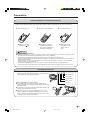
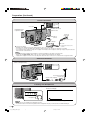

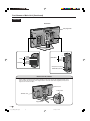
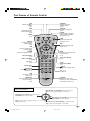
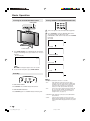
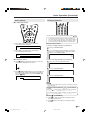
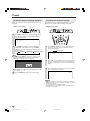

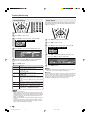

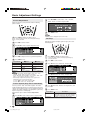
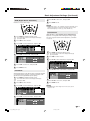
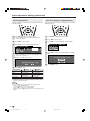
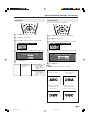
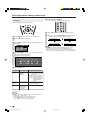
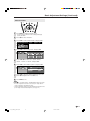

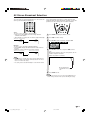
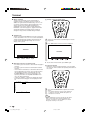
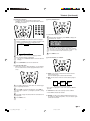
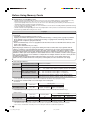
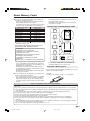
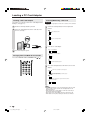
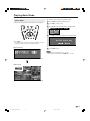
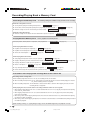
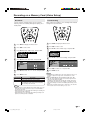

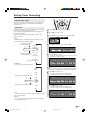
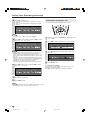

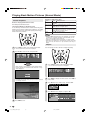
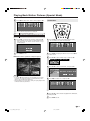


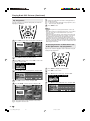
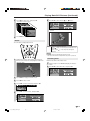
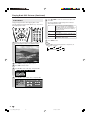
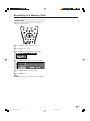
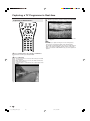
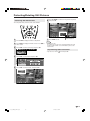


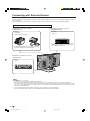
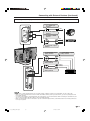
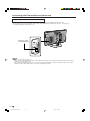
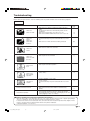

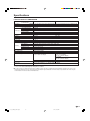


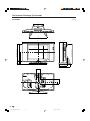



![Subject: [MB] 1987 W126 intermittent climate control](http://vs1.manualzilla.com/store/data/006030956_1-f014f75cb14526db0f9eb72ec9889b7e-150x150.png)