1
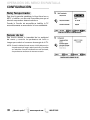
CAUTION
THIS SYMBOL INDICATES THAT DANGEROUS VOLTAGE CONSTITUTING A
RISK OF ELECTRIC SHOCK IS PRESENT WITHIN THIS UNIT.
RISK OF ELECTRIC SHOCK DO NOT OPEN!
CAUTION: TO REDUCE THE RISK OF ELECTRIC SHOCK, DO NOT REMOVE COVER (OR
BACK). NO USER-SERVICEABLE PARTS INSIDE. REFER SERVICING TO QUALIFIED SERVICE PERSONNEL.
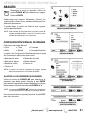
THIS SYMBOL INDICATES THAT THERE ARE IMPORTANT OPERATING AND
MAINTENANCE INSTRUCTIONS IN THE LITERATURE ACCOMPANYING THIS
UNIT.
WARNING: TO REDUCE THE RISK OF FIRE OR ELECTRIC SHOCK, DO NOT EXPOSE THIS APPLIANCE TO
RAIN OR MOISTURE.
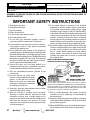
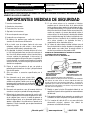
IMPORTANT SAFETY INSTRUCTIONS
1.
2.
3.
4.
5.
6.
7.
8.
9.
10.
11.
12.
13.
14.
2
Read these instructions.
Keep these instructions.
Heed all warnings.
Follow all instructions.
Do not use this apparatus near water.
Clean only with dry cloth.
Do not block any ventilation openings. Install in
accordance with the manufacturer’s instructions.
Do not install near any heat sources such as radiators,
heat registers, stoves, or other apparatus (including
amplifiers) that produce heat.
Do not defeat the safety purpose of the polarized or
grounding-type plug. A polarized plug has two blades with
one wider than the other. A grounding-type plug has two
blades and a third grounding prong. The wide blade or the
third prong are provided for your safety. If the provided
plug does not fit fully into your outlet, consult an electrician for replacement of the obsolete outlet.
Protect the power cord from being walked on or
pinched particularly at plugs, convenience receptacles,
and the point where they exit from the apparatus.
Only use attachments/accessories specified by the
manufacturer.
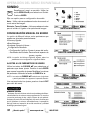
Use only with the cart, stand, tripod,
bracket, or table specified by the manufacturer, or sold with the apparatus.
When a cart is used, use caution when
moving the cart/apparatus combination
to avoid injury from tip-over.
Unplug this apparatus during lightning storms or when
unused for long periods of time.
Refer all servicing to qualified service personnel.
Servicing is required when the apparatus has been
damaged in any way, such as power-supply cord or
plug is damaged, liquid has been spilled or objects have
fallen into the apparatus, the apparatus has been
exposed to rain or moisture, does not operate normally,
or has been dropped.
Need help?
www.sanyoctv.com
15. If an outside antenna is connected to the television
equipment, be sure the antenna system is grounded so
as to provide some protection against voltage surges
and built up static charges. In the U.S. Selection 810-21
of the National Electrical Code provides information with
respect to proper grounding of the mast and supporting
structure, grounding of the lead-in wire to an antenna
discharge unit, size of grounding conductors, location of
antenna discharge unit, connection to grounding electrodes, and requirements for the grounding electrodes.
16. An outside antenna system should not be located in the
vicinity of overhead power lines or other electrical light
or power circuits, or where it can fall into such power
lines or circuits. When installing an outside antenna
system, extreme care should be taken to keep from
touching such power lines or circuits as contact with
them might be fatal.
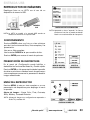
EXAMPLE OF ANTENNA GROUNDING ACCORDING
TO NATIONAL ELECTRICAL CODE, ANSI/NFPA 70
“Note to CATV system installer:
This reminder is provided to call the CATV system installer’s
attention to Article 820-40 of the NEC that provides guidelines for
proper grounding and, in particular, specifies that the cable
ground shall be connected to the grounding system of the building, as close to the point of cable entry as practical.”
17. Wall or Ceiling Mounting—The product should be
mounted to a wall or ceiling only as recommended by
the manufacturer.
18. Apparatus shall not be exposed to dripping or splashing
and no objects filled with liquids, such as vases, shall be
placed on the apparatus.
19. When the MAINS plug is used as the disconnect device,
the disconnect device shall remain readily operable.
1-800-877-5032
FCC INFORMATION
This equipment has been tested and found to comply with the limits for a Class B digital device, pursuant to Part 15
of the FCC Rules. These limits are designed to provide reasonable protection against harmful interference in a
residential installation. This equipment generates, uses and can radiate radio frequency energy and, if not installed
and used in accordance with the instructions, may cause harmful interference to radio communications. However,
there is no guarantee that interference will not occur in a particular installation. If this equipment does cause
harmful interference to radio or television reception, which can be determined by turning the equipment off and on,
the user is encouraged to try to correct the interference by one or more of the following measures:
– Reorient or relocate the receiving antenna.
– Increase the separation between the equipment and receiver.
– Connect the equipment into an outlet on a circuit different from that to which the receiver is connected.
– Consult the dealer or an experienced radio/TV technician for help.
CAUTION: FCC Regulations state that improper modifications or unauthorized changes to this unit may void
the user’s authority to operate the unit.
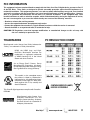
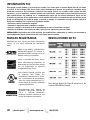
PC RESOLUTION CHART
TRADEMARKS
Manufactured under license from Dolby Laboratories.
“Dolby” is a trademark of Dolby Laboratories.
HDMI, the HDMI Logo and HighDefinition Multimedia Interface are
trademarks or registered trademarks
of HDMI Licensing LLC in the United
States and other countries.
As an Energy Star ® Partner, Sanyo
Manufacturing Corporation has determined that this product meets the Energy
Star® guidelines for energy efficiency.
This symbol on the nameplate means
the product is Listed by Underwriter’s
Laboratories Inc. It is designed and manufactured to meet rigid U.L. safety standards against risk of fire, casualty and
electrical hazards.
CONTAINS MERCURY LAMPS,
DISPOSE OF PROPERLY
This Class B digital apparatus complies with Canadian
ICES-003.
Manufactured under license from
Audyssey Laboratories. U.S. and
foreign patents pending. Audyssey
Dynamic VolumeTM is a trademark of
Audyssey Laboratories.
Need help?
www.sanyoctv.com
1-800-877-5032
3
CONTENTS
SPECIFICATIONS
IMPORTANT SAFETY INSTRUCTIONS . . . . . . . . . . . . . . . 2
FCC INFORMATION . . . . . . . . . . . . . . . . . . . . . . . . . . . . . . . .3
TRADEMARKS . . . . . . . . . . . . . . . . . . . . . . . . . . . . . . . . . . . .3
PC RESOLUTIONS . . . . . . . . . . . . . . . . . . . . . . . . . . . . . . . . . .3
DISPOSAL PRECAUTIONS . . . . . . . . . . . . . . . . . . . . . . . . . . .3
CONTENTS . . . . . . . . . . . . . . . . . . . . . . . . . . . . . . . . . . . . . . .4
SPECIFICATIONS . . . . . . . . . . . . . . . . . . . . . . . . . . . . . . . . . .4
PROTECTING THE LCD SCREEN . . . . . . . . . . . . . . . . . . . . .4
HANDLING PRECAUTIONS . . . . . . . . . . . . . . . . . . . . . . . . .4
STAND REMOVAL / WALL MOUNTING . . . . . . . . . . . . . . .5
GETTING STARTED—
Remote Control Battery Installation . . . . . . . . . . . . . . . .5
Antenna Connections for off-air or cable . . . . . . . . . . .5
BACK PANEL JACKS . . . . . . . . . . . . . . . . . . . . . . . . . . . . . . .6
A/V CONNECTIONS . . . . . . . . . . . . . . . . . . . . . . . . . . . . . . . .7
POWER CONNECTION / INITIAL CHANNEL SEARCH . . .8
REMOTE CONTROL OPERATION . . . . . . . . . . . . . . . . . . . . .9
ON-SCREEN MENU OPERATION—
Channel Setting . . . . . . . . . . . . . . . . . . . . . . . . . . . . . . . .10
Channel Search . . . . . . . . . . . . . . . . . . . . . . . . . . . . .10
Channel Scan Memory . . . . . . . . . . . . . . . . . . . . . . .10
Input Setting . . . . . . . . . . . . . . . . . . . . . . . . . . . . . . . .10
Video2 Setting . . . . . . . . . . . . . . . . . . . . . . . . . . . . . . .11
Setup . . . . . . . . . . . . . . . . . . . . . . . . . . . . . . . . . . . . . . . . .11
Menu Language . . . . . . . . . . . . . . . . . . . . . . . . . . . . .11
Digital Caption . . . . . . . . . . . . . . . . . . . . . . . . . . . . . .11
Energy Saver . . . . . . . . . . . . . . . . . . . . . . . . . . . . . . . .11
Clock Timer . . . . . . . . . . . . . . . . . . . . . . . . . . . . . . . . .12
Light Sensor . . . . . . . . . . . . . . . . . . . . . . . . . . . . . . . .12
V-Chip . . . . . . . . . . . . . . . . . . . . . . . . . . . . . . . . . . . . . .13
Picture . . . . . . . . . . . . . . . . . . . . . . . . . . . . . . . . . . . . . . . .14
Manual Picture Settings . . . . . . . . . . . . . . . . . . . . . .14
Sound . . . . . . . . . . . . . . . . . . . . . . . . . . . . . . . . . . . . . . . . .15
aaManual Sound Settings . . . . . . . . . . . . . . . . . . . . . . .15
PC CONNECTIONS . . . . . . . . . . . . . . . . . . . . . . . . . . . . . . . .16
PC MENU OPERATION . . . . . . . . . . . . . . . . . . . . . . . . . . . .16
PHOTO VIEWER . . . . . . . . . . . . . . . . . . . . . . . . . . . . . . . . . .17
WARRANTY . . . . . . . . . . . . . . . . . . . . . . . . . . . . . . . . . . . . . .18
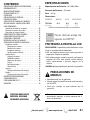
Power Requirement: Source: AC 120V, 60Hz
AC Power Consumption: 95 watts
Weight: 19 lbs.
Dimensions:
MODEL
WIDTH
HEIGHT
DEPTH
DP26640
26.1
19.1
17.4
9.5
4.5
w/o stand
NOTE: Dimensions are in inches
Please read before
operating your HDTV!
PROTECTING THE LCD SCREEN
CAUTION: The screen can be damaged if it is not
maintained properly.
•
Do not use hard objects such as hard cloth or
paper to clean the screen.
•
Do not use excessive pressure when cleaning
the screen; excessive pressure can cause
permanent discoloration or dark spots.
•
NEVER spray liquids on the screen.
HANDLING PRECAUTIONS
•
•
•
Handle by the cabinet only.
Never touch the screen when handling.
Handling damage is not covered under warranty.
“The Amercian Academy of Pediatrics discourages
television viewing for children younger than two
years of age”
4
Need help?
www.sanyoctv.com
1-800-877-5032
POSITIONING THE LCD
HDTV
GETTING STARTED
BATTERY INSTALLATION
• Always
use a firm and flat surface when
positioning your HDTV.
• Do not position the unit in a confined area.
• Allow adequate space for proper ventilation.
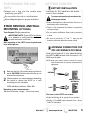
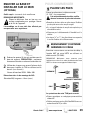
STAND REMOVAL AND WALL
MOUNTING (OPTIONAL)
Tools Needed: Phillips screwdriver
IMPORTANT NOTE: Place HDTV face down
on a padded or cushioned flat surface to
protect the screen and finish.
Wall mounting of the HDTV must be performed
by a skilled person.
Install two (2) “AA” batteries in the remote
control. (Not included)
To ensure safe operation, please observe the
following precautions:
• Replace both batteries at the same time. Do not use a
new battery with a used battery.
• There’s a risk of explosion if a battery is replaced by
an incorrect type.
• Do not expose the Remote Control unit to moisture
or heat.
• Be sure to match the “+” and “–” signs on the
batteries with marks inside the remote control.
ANTENNA CONNECTION FOR
OFF-AIR SIGNALS OR CABLE
Hook up your antenna or your cable service to
the HDTV’s ANT terminal with the use of a 75
OHM coaxial cable.
NOTE: Keep your indoor antenna at least 3 ft. away
from the television set and any other electronic
equipment.
1
Remove the four (4) screws securing the foot
stand. CAUTION: Hold the stand firmly as you
remove the last screw.
2
Use the screws you removed when detaching
the stand to secure the HDTV to a wall
mounting kit (not included.)
VESA standard interface: 200 x 200
ANTENNA
ANALOG / DIGITAL
ANTENNA IN
CABLE
Mounting screws measurements:
M6 (6mm) Diameter, Length—12mm (maximum)
The tuner in this HDTV can receive:
• Digital and Analog off air signals from an antenna
• Analog or ClearQAM cable channels from a direct
Cable TV connection.
Need help?
www.sanyoctv.com
1-800-877-5032
5
GETTING STARTED
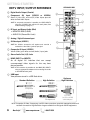
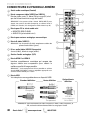
HDTV INPUT/OUTPUT REFERENCE
1 Digital Audio Output (Coaxial)
2
Component
AV
Input
(VIDEO2
HDTV BACK PANEL
1
or
5
VIDEO3)
Green (Y), blue (Pb), and red (Pr) Video inputs plus the
white and red Audio inputs.
NOTE: A composite connection is possible via VIDEO INPUT2
using the Y (VIDEO) jack and the L/R audio jacks. (See
Video 2 Setting on page 11.)
6
2
3 PC Input and Stereo Audio (Mini)
7
• MONITOR RGB (D-SUB)
• AUDIO R/L (Stereo Mini Jack)
4 Analog / Digital Antenna Input
5 S-Video Input (VIDEO1)
3
NOTE: An S-Video connection will replace and override a
connection to the Video1 (yellow) input jack.
6 Composite AV Input (VIDEO1)
4
Yellow (Video), plus white and red (Audio) input jacks.
7 Stereo Audio Out (L/R) Jacks
8
8 HDMI (INPUT1 or INPUT2)
An all digital AV interface that can accept
uncompressed video signals for the very best
picture possible.
9
NOTE: A DVI conection is possible via the HDMI (DVI) INPUT1
using an appropriate adapter and connecting the audio
to the VIDEO3 Audio jacks.
9 USB Input
View pictures stored in a USB flash drive.
Standard Definition
High Definition
Optimum
High Definition
Component
(or DVI to HDMI
cable/adapter)
Composite
HDMI
S-Video
NOTE: Composite, S-Video, Component, and DVI video connections need their appropriate white and
red audio connections. High Definition image available from HD signals and HD equipment.
6
Need help?
www.sanyoctv.com
1-800-877-5032
GETTING STARTED
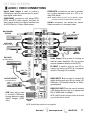
AUDIO / VIDEO CONNECTIONS
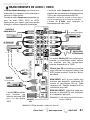
Digital Audio Output is used to hookup a
multichannel receiver with the use of a phonotype digital audio cable.
COMPOSITE connections are used to hookup
your analog equipment such as a VCR or an
older DVD player.
COMPONENT connections will accept SDTV,
EDTV and HDTV video signals. Use them for
great image quality from digital devices such
as a DVD player or Video Game system.
NOTE: Always match the color of your device’s output
jack, the connector and the HDTV’s input jack.
S-Video connection can replace the yellow
Video connection for enhanced video.
MULTICHANNEL
RECEIVER
VCR
(or analog device)
DVD PLAYER
(or similar device)
STEREO
AMPLIFIER
DVD PLAYER
(or similar device)
Audio Output L/R are used to hookup an
external stereo Amplifier. (Do not connect
external speakers directly to the HDTV.)
PC INPUT is used to hook up your PC or
Laptop and use your HDTV as a computer
monitor. See page 16 for details.
DVI
HDMI INPUT1 & 2 are used to hookup HD
digital devices such as a Blu-ray player, HD
Cable Box, HD Satellite Receiver or Videogame System.
SATELLITE RECEIVER
(or similar device)
USB input jack is used
to connect a USB mass
storage device to watch
digital images (JPEG
only.)
HDMI (DVI) INPUT1 can be used to hookup
a DVI device with the use of an appropriate
DVI to HDMI cable or adapter.
NOTE: VIDEO3 Audio L/R jacks need to be hooked
up to the DVI device as well.
USB FLASH
DRIVE
NOTE: Audio/Video cables are not supplied
Need help?
www.sanyoctv.com
1-800-877-5032
7
GETTING STARTED
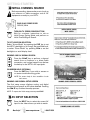
INITIAL CHANNEL SEARCH
Before proceeding, please make sure to hook up
your antenna or cable connection and all AV
equipment correctly to your HDTV.
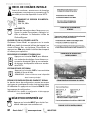
PLUG IN AC POWER CORD
120V AC, 60Hz
TURN ON TV (PRESS POWER BUTTON)
Wait for on-screen instructions to set an
Initial Energy Saving Mode, and perform an
Initial Channel/Signal Search.
INITIAL ENERGY SAVING
MODE SCREEN
TV SET LOCATION SELECTION:
Select “Home Mode” by pressing the CH key to set
the HDTV’s backlight to an Energy Star qualified level,
or select “Store Mode” by pressing CH to set the
backlight to a retail display level.
CHANNEL AND AV SIGNAL SEARCH:
Press the CH key to perform a channel
search from an Antenna or a direct Cable
connection, and a signal search from devices
hooked up to the HDTV’s AV input jacks.
INITIAL CHANNEL/SIGNAL SEARCH
SETUP SCREEN
ON SCREEN HELP (OPTIONAL)
Press the CH key if you wish to access an
on screen trouble shooting guide.
NOTE: On screen help is also accesible via the
main menu.
CHANNEL AND SIGNAL SETUP SCREEN
The final setup screen displays analog and digital
channels found as well as AV inputs detected. Pressing
the CH key finalizes the setup process.
CHANNEL SEARCH PROGRESS SCREEN
NOTE: To repeat the initial setup process press VOL
AV INPUT SELECTION
Press the INPUT key to select the correct AV
input for the video source you wish to watch.
CHANNEL/SIGNAL LIST SCREEN
8
Need help?
www.sanyoctv.com
1-800-877-5032
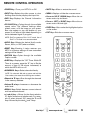
REMOTE CONTROL OPERATION
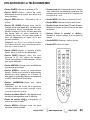
• POWER Key—Turns your HDTV On or Off.
• MUTE Key—Mute or restore the sound.
• INPUT Key—Selects the video source to view.
Holding down the key displays the Input List.
• MENU—Displays or hides the on-screen menu.
• INFO Key—Displays the Channel Information
banner.
• PIX SHAPE Key—Cycles through the available
aspect ratios. The different settings either
stretch, zoom, or fit the image on your screen.
Bars may appear on top and bottom of your
screen (or on left and right sides) depending on
the broadcasted signal or program.
• Cursor (UP) (DOWN) keys—Move the onscreen cursor up and down.
• Cursor < (LEFT) > (RIGHT) keys—Move the onscreen cursor left and right.
• ENTER Key—Set or select the highlighted option
on the screen.
• EXIT Key—Exits the on-screen menu.
NOTE: Pix6-7 are setup as Pix1-2 in PC mode. Use of
Pix6-7 in TV mode is not recommended.
• AUDIO Key—Selects the desired Audio mode.
Stereo, Mono, or SAP (when available.)
• RESET Key—Pressing it twice restores your
HDTV to its factory settings. All user customized
settings will be cleared.
• CAPTION Key—Cycles through the available
Caption modes.
• SLEEP Key—Displays the “Off” Timer. While Off
Timer is on-screen, press the “0” key to Set the
amount of time (in 30 minute increments) at
which the HDTV will turn off.
• NUMERICAL Keys—Select channels directly.
NOTE: For channels 100 and up, press and hold the
first number, then enter the remaining two numbers.
• Channel keys—Scan through the channels
in the memory database.
• Volume + – keys—Increases or decreases the
audio level.
• RECALL Key—Switch between current channel
and last selected channel.
•
– (sub ch) key —Allows for the direct selection
of digital chanels and subchannels. For example: to select channel 39.1 press the 3 and 9
keys followed by the dash –, and 1 keys.
Need help?
www.sanyoctv.com
1-800-877-5032
9
ON-SCREEN MENU OPERATION
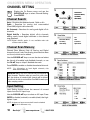
CHANNEL SETTING ___________
Display the On Screen menu and use the
CURSOR keys to select Channel Setting.
Press ENTER.
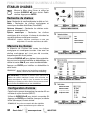
Channel Search
Auto – Searches the detected mode, Cable or Air.
Cable – Searches for analog and unscrambled
(ClearQAM) digital cable channels.
Air (Antenna) – Searches for analog and digital off-air
channels.
Digital Add-On – Searches digital off-air channels
adding newly found digital channels to the channel
map database.
MAIN MENU SCREEN
NOTE: Digital Add-On option is not available when the
current mode is Cable.
Channel Scan Memory
Channel Scan Memory lists all Analog and Digital
channels found. It also lists Analog channels that were
not found, which can be added.
CHANNEL SETTING SCREEN
Use the CURSOR keys to move the channel select
bar throuh all enabled and disabled channels, or use
the CH keys to skip all disabled channels.
Press ENTER to enable or disable the selected channel.
NOTE:
For information on local digital channels, visit
www.antennaweb.org
IMPORTANT FACT: This HDTV maintains only one database of
digital channels. Therefore, when you search for cable channels, the database of antenna digital channels will be deleted.
You will only be able to receive those ClearQAM channels your
cable company provides.
CHANNEL SCAN MEMORY SCREEN
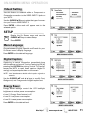
Input Setting
Input Setting feature allows the removal of unused
inputs from the AV input loop.
Use the CURSOR keys to select an AV input. Press
ENTER to disable (uncheck) or enable (check) the highlighted input.
NOTE: At least one input must and will remain checked.
:Skip is for reference only.
10
Need help?
www.sanyoctv.com
1-800-877-5032
INPUT SETTING SCREEN
ON-SCREEN MENU OPERATION
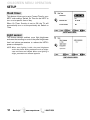
Video2 Setting
Use this feature to establish either a Component or
Composite connection to the VIDEO INPUT 2 jacks on
your HDTV.
Use the CURSOR keys to select the type of connection you’ll use in VIDEO INPUT 2.
Press ENTER, a blue mark will appear next to the
selected option.
VIDEO2 SETTING SCREEN
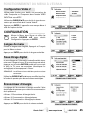
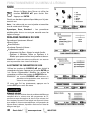
SETUP ________________________
Display the On Screen menu and use the
CURSOR keys to select Setup.
Press ENTER.
Menu Language
Choose between English, Spanish and French for your
On Screen menu’s display language.
Press ENTER on the desired language.
MENU LANGUAGE SCREEN
Digital Caption
Captioning is textual information transmitted along
with the picture and sound. Turning Captioning ON (by
pressing the CAPTION key during normal TV viewing)
causes the HDTV to open these captions (digital or
analog) and superimpose them on the screen.
NOTE: Local broadcasters decide which caption signals to
transmit.
Use the CURSOR and < > keys to modify Font,
Background, and Foreground of digital caption text.
DIGITAL CAPTION SCREEN
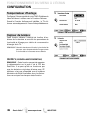
Energy Saver
Energy Saver settings control the LCD backlight
brightness to reduce power consumption.
• Level 1: Energy Saver feature is off.
• Level 2: Low power consumption.
• Level 3: Lowest power consumption.
Press ENTER on the desired level.
ENERGY SAVER SCREEN
Need help?
www.sanyoctv.com
1-800-877-5032
11
ON-SCREEN MENU OPERATION
SETUP__________________________
Clock timer
This feature allows you to set a Current Time for your
HDTV and enable a Switch On Time for the HDTV to
turn on at a specific time of day.
When On Timer Function is set to ON, the TV will
automatically turn on at the previously set Switch on
Time.
CLOCK TIMER SCREEN
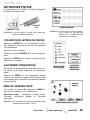
Light sensor
This feature detects ambient room light brightness
and uses that reading to control the panel brightness
level and picture parameters to reduce the HDTV’s
power consumption.
NOTE: When room lighting is dark, the panel brightness
and/or the picture setting parameters such as brightness and cotrast are lowered. When room lighting is
bright, parameters are affected opposite.
LIGHT SENSOR SCREEN
12
Need help?
www.sanyoctv.com
1-800-877-5032
ON-SCREEN MENU OPERATION
SETUP______________________
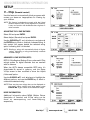
V – Chip
(Parental control)
Use this feature to automatically block programs with
content you deem as inappropriate for viewing by
your children.
NOTE: This feature is designed to comply with the United
States of America’s FCC V-Chip regulations. Therefore,
it may not function with broadcasts that originate in
other countries.
V-CHIP SETUP SCREEN
ADJUSTING THE V-CHIP RATINGS
Select ON and press ENTER.
Select Adjust (Standard) and press ENTER.
Use the CURSOR and < > keys to navigate and
the ENTER key to Block or Unblock a selected rating. A
lock symbol will appear beside the selected rating
option indicating that it is blocked.
NOTE: Blocking a rating will automatically block all higher
ratings. Unblocking a rating automatically unblocks
all lower ratings.
ADJUST (STANDARD) SCREEN
ADVANCED V-CHIP SYSTEM (RRT5)
RRT5 (V-Chip Regional Ratings 5) is an advanced V-Chip
ratings system for digital channels that are received
with an antenna.
When the HDTV detects compatible RRT5 data, it’s
downloaded & stored in memory, and the Setup
V-Chip screen is then modified to show the Adjust
(Advanced) option.
Use the CURSOR and < > keys to highlight the
different options, and use the ENTER key to block or
unblock the selected rating.
V-CHIP SETUP SCREEN WITH ADJUST
(ADVANCED) OPTION
NOTE:There may be more ratings than can be displayed on
one screen. When vertical scroll bars appear, press
CURSOR to gain access to the additional ratings.
MORE INFORMATION
Additional information about MPAA (Motion Picture
Association of America) and V-Chip rating can be
found at: www.mpaa.org and www.v-chip.org,
respectively.
ADJUST (ADVANCED) SCREEN
Need help?
www.sanyoctv.com
1-800-877-5032
13
ON-SCREEN MENU OPERATION
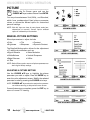
PICTURE ____________________
Display the On Screen menu and use the
CURSOR keys to select Picture. Press ENTER.
You may choose between Vivid, Mild, , and Standard,
which have predetermined fixed picture parameter
values, or choose the Manual option for customized
personal settings.
NOTE: Each AV input can have its own picture mode (predetermined or manual.) Current input’s selected
option is indicated by a blue marker.
MAIN MENU SCREEN
MANUAL PICTURE SETTINGS
Manual parameters to adjust include:
• Color
• Tint
• Contrast
• Brightness
• Sharpness
• Dynamic Contrast
The Detailed Setting option allows for the adjustment
of 7 additional parameters such as:
• Signal Balancer
• Noise Reduction
• White Balance
• Edge Enhancer
• V-Size
PICTURE SCREEN (MANUAL)
• Vertical Sharpness
• H-Size
NOTE: Default Picture option returns all picture parameters to
their original factory settings.
ADJUSTING A PICTURE SETTING
Use the CURSOR keys to highlight the picture
parameter you wish to adjust. Press the ENTER key to
enter the value adjustment screen. Modify the selected
parameter’s value by pressing the CURSOR < > keys.
PARAMETER SELECTION SCREEN
NOTE: CURSOR keys select the next/previous parameter without returning to the previous menu screen.
Once adjustments are complete, press the EXIT key to
return to normal TV viewing.
VALUE ADJUSTMENT SCREEN EXAMPLES
14
Need help?
www.sanyoctv.com
1-800-877-5032
ON-SCREEN MENU OPERATION
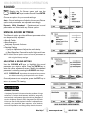
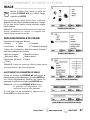
SOUND _____________________
Display the On Screen menu and use the
CURSOR keys to select Sound. Press ENTER.
Choose an option for your sound settings:
Auto – Sound settings are linked to the current Picture
option and parameters are adjusted accordingly.
Dynamic, Mild, Standard – Predetermined sound
parameters not linked with any Picture option.
MAIN MENU SCREEN
MANUAL SOUND SETTINGS
The Manual option provides different parameters that
can be personally adjusted:
• Bass & Treble
• Bass Extension
• Audyssey Dynamic Volume 1
• Detailed Setting
– Lip-Sync Adjustment: Adjust the audio delay.
– 4-Band Equalizer: Personalize audio highs and lows.
MANUAL PARAMETER SCREEN
NOTE: Default Sound option returns all sound parameters to
their original factory settings.
ADJUSTING A SOUND SETTING
Use the CURSOR keys to highlight the sound
parameter you wish to adjust. Press the ENTER key to
enter the value adjustment screen. Modify the selected
parameter’s value by pressing the CURSOR < > keys.
NOTE: CURSOR keys select the next/previous parameter without returning to the previous menu screen.
Once adjustments are complete, press the EXIT key to
return to normal TV viewing.
DETAILED SETTING SCREEN
1 Audyssey Dynamic Volume solves the problem of large
variations in volume level between television programs,
commercials, and between the soft and loud passages of
movies. Audyssey Dynamic EQ is integrated into Dynamic
Volume so that as the playback volume is adjusted automatically, the perceived bass response, tonal balance,
surround impression and dialog clarity remain the same.
Need help?
VALUE ADJUSTMENT SCREEN EXAMPLES
www.sanyoctv.com
1-800-877-5032
15
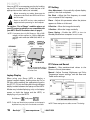
PC INPUT
Use your HDTV as a computer monitor by hooking
up your PC or Laptop to the TV with the use of an
appropriate monitor cable (not included.)
Before connecting any cables, disconnect the
AC power cords of both the HDTV and PC from
the AC outlets.
Power on the HDTV and any other peripheral
equipment before powering on the computer.
To avoid an “Out of Range” condition please set
your PC’s output resolution to one compatible with
your HDTV. See PC Resolution chart on page 3.
RGB OUTPUT
JACK
Auto Adjustment – Automatically adjusts display
position, dot clock and phase.
Dot Clock – Adjust the Dot frequency to match
your computer’s Dot frequency.
Phase – Adjust this parameter when the picture
appears to flicker or is blurred.
H-Position – Move the image horizontally
V-Position – Move the image vertically
Power Saving – Enable the HDTV to turn to
Standby Mode when computer is not in use.
NOTE: If computer has only DVI Output, a DVI to RGB
adapter will be required, or, a DVI to HDMI cable
and RCA audio cables (see HDMI (DVI) INPUT1 on
page 7.)
HDTV BACK
PC Setting
DVI OUTPUT
JACK
Stereo mini
audio cable
PC SETTING SCREEN
PC OR LAPTOP
RGB Monitor
cable
PC Picture and Sound
Sanyo recommends using a
monitor cable that includes
a Ferrite Core.
Laptop Display
Standard – Sets predetermined values to the
Picture or Sound parameters.
Manual – Adjust Contrast, Brightness, and Color
Temperature screen settings, and the Bass and
Treble audio settings.
When using your Sanyo HDTV to display a
Laptop’s screen display, holding down the Fn (or
FN) key while pressing the appropriate function
key (F5, F7, F8, etc) should cycle through different
display modes between the laptop and the HDTV.
Modes may include displaying only on the laptop
screen, on both the laptop and the HDTV, or
displaying only on the HDTV.
Hold down
and press
PC PICTURE AND SOUND SCREENS
NOTE: Fn key and function key symbols on the laptop’s
keyboard may vary from one brand to another.
16
Need help?
www.sanyoctv.com
NOTE: These settings do not affect normal TV viewing.
1-800-877-5032
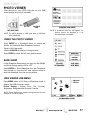
USB INPUT
PHOTO VIEWER
View pictures on your HDTV with the use of a USB
mass storage device (not included.)
USB FLASH
DRIVE
HDTV BACK PANEL
NOTE: The HDTV switches to USB Input when a USB flash
drive is detected.
THUMBNAIL VIEW SCREEN
NOTE: A thumbnail hide icon will appear if a
picture cannot be decoded or if no
thumbnail data is available.
USING THE PHOTO VIEWER
Press ENTER on a thumbnail photo to enable the
Rotate, Full View and Start Slideshow functions.
Once in Full View mode:
Use the CURSOR < > keys to change picture.
Press ENTER to show the full view options menu.
SLIDE SHOW
In the Slideshow Setup menu you may turn the Shuffle
and Quick Change options ON or OFF.
FULL VIEW
OPTIONS MENU
SLIDE SHOW
SETUP MENU
Press ENTER on Start Slideshow from the Thumbnail
View Screen or from the full view options menu to
start the slideshow from the current picture.
JPEG VIEWER USB MENU
Press MENU when in Full View or Slideshow mode to
display the USB On screen menu.
Picture Setting – Adjust Color, Tint, Contrast,
Brightness, Sharpness and Dynamic Contrast.
NOTE: Picture Settings are separate configurations from the
settings in TV and AV inputs.
USB MAIN MENU SCREEN
Need help?
www.sanyoctv.com
1-800-877-5032
17
ONE-YEAR LIMITED PARTS AND LABOR WARRANTY
THIS LIMITED PARTS AND LABOR WARRANTY IS VALID ONLY ON SANYO TELEVISIONS PURCHASED AND USED IN
THE UNITED STATES OF AMERICA, CANADA, AND PUERTO RICO, EXCLUDING ALL OTHER U.S. TERRITORIES AND
PROTECTORATES. THIS LIMITED WARRANTY APPLIES ONLY TO THE ORIGINAL RETAIL PURCHASER, AND DOES NOT
APPLY TO PRODUCTS USED FOR INDUSTRIAL OR COMMERCIAL PURPOSES.
WARRANTY APPLICATION
FOR ONE YEAR from the date of original retail purchase Sanyo Manufacturing Corporation (SMC) warrants this TV to
be free from manufacturing defects in materials and workmanship under normal use and conditions for parts and labor.
For the FIRST 90 DAYS from the date of original retail purchase, Sanyo Manufacturing Corporation will replace any
defective TV via exchange at the retailer. To ensure proper warranty application, keep the original-dated-sales receipt
for evidence of purchase. Return the defective TV to the retailer along with the receipt and the included accessories,
such as the remote control. The defective TV will be exchanged for the same model, or a replacement model of equal
value, if necessary. Replacement model will be contingent on availability and at the sole discretion of Sanyo
Manufacturing Corporation.
THE FOREGOING WARRANTY IS EXCLUSIVE AND IN LIEU OF ALL OTHER WARRANTIES OF MERCHANTABILITY OR
FITNESS FOR A PARTICULAR PURPOSE.
OBLIGATIONS
For one year from the date of purchase, Sanyo Manufacturing Corporation warrants this product to be free from
defects in material and workmanship under normal use and conditions. During the first 90 days under this warranty
for any manufacturing defect or malfunction Sanyo Manufacturing Corporation will provide a new TV via exchange at
the retailer.
HOW TO MAKE A CLAIM UNDER THIS WARRANTY
Please call 1-800-877-5032. Please be prepared to give us the television’s model number and serial number when you
call. The model number and serial number are printed on a label attached to the back of the unit.
For customer assistance, call toll free 1-800-877-5032.
This warranty expresses specific contractual rights; retail purchasers may have additional statutory rights which vary
from state to state.
(EFFECTIVE: March 1, 2007)
Your Sanyo HDTV is registered at the time of purchase, please keep sales receipt for future reference.
For your protection in the event of theft or loss of this product, please fill in the information requested
below and KEEP IN A SAFE PLACE FOR YOUR OWN PERSONAL RECORDS.
Model No.______________________________
Date of Purchase _________________________
Serial No.______________________________
Purchase Price ___________________________
(Located on back of unit)
Where Purchased_________________________
Sanyo Manufacturing Corp.
3333 Sanyo Road, Forrest City, AR 72335
18
Need help?
www.sanyoctv.com
1-800-877-5032
PRECAUCIÓN
RIESGO DE CHOQUE ELÉCTRICO ¡NO ABRIR!
ESTE SÍMBOLO INDICA QUÉ VOLTAJES PELIGROSOS QUE CONSTITUYEN UN RIESGO DE CHOQUE ELÉCTRICO ESTÁN PRESENTES DENTRO DE ESTA UNIDAD.
PRECAUCIÓN: PARA REDUCIR EL RIESGO DE CHOQUE ELÉCTRICO, NO QUITE LA CUBIERTA
(O LA TAPA TRASERA). NO HAY PARTES ADENTRO QUE LAS PUEDA REPARAR EL USUARIO.
REFIÉRASE A PERSONAL CALIFICADO PARA REPARAR EL APARATO.
ESTE SÍMBOLO INDICA QUE HAY INSTRUCCIONES IMPORTANTES DE
OPERACIÓN Y MANTENIMIENTO EN LA LITERATURA QUE SE ANEXA A
ESTA UNIDAD.
ADVERTENCIA: PARA REDUCIR EL RIESGO DE FUEGO O CHOQUE ELÉCTRICO, NO EXPONGA ESTE
APARATO A LLUVIA O HUMEDAD.
IMPORTANTES MEDIDAS DE SEGURIDAD
1. Lea estas instrucciones.
2. Guarde estas instrucciones.
3. Preste atención a los avisos.
4. Siga todas las instrucciones.
5. No use este aparato cerca del agua.
6. Limpie sólo con un trapo seco.
7. No obstruya las aperturas para ventilación. Instale de
acuerdo a las instrucciones del fabricante.
8. No se instale cerca de ninguna fuente de calor como
radiadores, registros de calor, estufas, u otros aparatos
(incluyendo amplificadores) que produzcan calor.
9. Por seguridad, no elimine la conexión de tierra de la clavija. Una clavija polarizada tiene una hoja más ancha que la
otra. Una clavija de tipo conexión a tierra, tiene dos hojas y
un tercer conector mas prolongado. La hoja ancha o el
conector prolongado están provistas para su seguridad. Si
la clavija proveída no asienta correctamente en el contacto
eléctrico, consulte a un electricista para que esa toma de ac
obsoleta sea remplazada.
15. Si una antena externa se ha conectado al televisor,
asegúrese que el sistema de tierra de la antena esté de
forma que provea alguna protección contra fugas de voltaje o cargas electrostáticas. En la sección 810-21 del código
eléctrico nacional de los Estados Unidos se menciona información con respecto a la manera adecuada de instalar el
sistema de tierra al mástil principal, aterrizaje del cableado
para la unidad de descarga de la antena, tamaño de los conductores de tierra, localización de la unidad de descarga
de la antena, conexión a los electrodos de tierra, y
requerimientos de los electrodos de tierra.
16. Un sistema de antena externo no debe instalarse cerca de
líneas de electricidad o circuitos de potencia o alumbrado, o
donde puedan caer sobre líneas de energía eléctrica o
circuitos cuyo contacto con ellos puede ser fatal.
EJEMPLO DE ATERRIZAMIENTO DE ANTENA DE ACUERDO
AL CÓDIGO ELÉCTRICO NACIONAL
(National Electrical Code, ANSI/NFPA 70)
10. Proteja el cordón de potencia de que sea pisado o
perforado, particularmente en las hojas y del punto donde
éste sale del aparato.
11. Sólo use anexos o accesorios especificados por el
fabricante.
12. Use únicamente con el carro, estante, tripie,
soporte o mesa especificada por el fabricante, o
vendida con el aparato. Cuando se use un carro,
tenga precaución cuando mueva la combinación
de carro/aparato para evitar lesiones en caso de
que se caiga.
13. Desconecte este aparato en caso de tormenta eléctrica o
cuando no se use por un periodo de tiempo prolongado.
14. Refiera todas las reparaciones a personal de servicio calificado. Se requiere de servicio cuando el aparato se ha dañado de cualquier forma, como si el cordón de potencia se
dañara de alguna forma, se ha derramado líquido sobre el
aparato o algún objeto le ha caído encima, el aparato se ha
expuesto a la lluvia o humedad, que no opere normalmente
o que se haya caído.
¿Necesita ayuda?
“Nota al instalador del sistema de cable CATV :
Este recordatorio es dado para llamar la atención del instalador
del sistema de cable CATV al Artículo 820-40 del NEC que
provee guías para el aterrizamiento adecuado y, en particular,
especifica que el cable de tierra deberá de estar conectado al
sistema de tierra del edificio, tan cercano al punto de entrada
del cable como sea práctico.”
17. Montaje en pared o techo—Este producto deberá de ser
montado en la pared o techo siguiendo las recomendaciones
del fabricante.
18. Este aparato no deberá de ser expuesto a ser mojado, y no
se deberán de colocar recipientes con líquido encima de él.
19. Si el conector del cable de AC se usa como artículo de
desconexión principal, entonces éste deberá de
permanecer accesible todo el tiempo.
www.sanyoctv.com
1-800-877-5032
19
INFORMACIÓN FCC
Este equipo ha sido probado y se encontró en acuerdo a los límites para un aparato digital Clase B, en acorde
a la Parte 15 de las Reglas FCC. Estos límites están diseñados para proveer una protección razonable contra
interferencia nociva en una instalación residencial. Este equipo genera, usa y puede irradiar energía de radio
frecuencia y si no es instalado o usado de acuerdo a las instrucciones, puede llegar a causar interferencia nociva a
radio comunicaciones. Sin embargo, no es completamente seguro que no ocurrirá interferencia alguna en una
instalación en particular. Si este equipo llega a causar interferencia nociva a la recepción de radio o televisión, la cual
puede ser determinada por medio de apagar y encender el equipo, se recomienda al usuario intentar corregir la
interferencia mediante una o varias de las siguientes medidas:
- Reorientar o mover la antena de recepción.
- Aumentar la separación entre el equipo y el receptor.
- Conectar el equipo a un enchufe en un circuito diferente al cual esté conectado el receptor.
- Consultar al vendedor o a un técnico de radio y televisión con experiencia para más ayuda.
PRECAUCIÓN: Regulaciones de la FCC advierten que modificaciones inadecuadas o cambios no autorizados a
esta unidad pueden anular la autorización del usuario para operar la unidad.
MARCAS REGISTRADAS
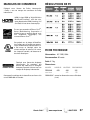
RESOLUCIONES DE PC
Manufacturado bajo licencia de Dolby Laboratories.
“Dolby ” es una marca registrada de Laboratorios
Dolby.
HDMI, el logo HDMI y “High-Definition
Multimedia Interface” son marcas registradas de HDMI Licensing LLC en los
Estados Unidos y otros países.
Como un Asociado de ENERGY STAR®,
Sanyo Manufacturing Corporation, ha
determinado que este producto cumple
con los lineamientos en eficiencia
energética de ENERGY STAR®.
Este símbolo impreso, significa que
el producto está listado por
Underwriters Laboratories Inc. El diseño y manufactura de este producto,
reúne los rígidos estándares de U.L.,
contra riesgos de incendio, accidentes
o descargas eléctricas.
Este aparato digital de Clase B cumple con las
normas ICES-003 de Canadá.
Manufacturado bajo licencia de
Audyssey Laboratories. Patentes de
E.U.A. y foráneas pendientes.
Audyssey Dynamic VolumeTM es una
marca de Audyssey Laboratories.
20
¿Necesita ayuda?
www.sanyoctv.com
1-800-877-5032
CONTENIDO
ESPECIFICACIONES
IMPORTANTES MEDIDAS DE SEGURIDAD . . . . . . . . .19
INFORMACIÓN FCC . . . . . . . . . . . . . . . . . . . . . . . . . . . . . . .20
MARCAS REGISTRADAS . . . . . . . . . . . . . . . . . . . . . . . . . .20
RESOLUCIONES DE PC . . . . . . . . . . . . . . . . . . . . . . . . . . . .20
CONTENIDO . . . . . . . . . . . . . . . . . . . . . . . . . . . . . . . . . . . . .21
PRECAUCIONES DE DESECHO . . . . . . . . . . . . . . . . . . . . .21
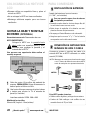
ESPECIFICACIONES . . . . . . . . . . . . . . . . . . . . . . . . . . . . . . .21
PROTECCIÓN DE PANTALLA Y MANEJO . . . . . . . . . . . .21
QUITAR LA BASE / MONTAJE EN PARED . . . . . . . . . . . .22
PARA COMENZAR—
Instalación de baterías al control . . . . . . . . . . . . . . . . .22
Conexión de antena aire/cable . . . . . . . . . . . . . . . . . . .22
Operación del control remoto . . . . . . . . . . . . . . . . . . . .23
CONECTORES DEL PANEL TRASERO . . . . . . . . . . . . . . . .24
CONEXIONES DE AUDIO/VIDEO . . . . . . . . . . . . . . . . . . . .25
CONEXIÓN A CORRIENTE . . . . . . . . . . . . . . . . . . . . . . . . . .26
BÚSQUEDA INICIAL DE CANALES . . . . . . . . . . . . . . . . . .26
OPERACIÓN DEL MENÚ EN PANTALLA—
Establecer canales . . . . . . . . . . . . . . . . . . . . . . . . . . . . .27
Búsqueda de canales . . . . . . . . . . . . . . . . . . . . . . . .27
Memoria de canales . . . . . . . . . . . . . . . . . . . . . . . . .27
Establecer entradas . . . . . . . . . . . . . . . . . . . . . . . . .27
Configuración de Video2 . . . . . . . . . . . . . . . . . . . . .28
Configuración . . . . . . . . . . . . . . . . . . . . . . . . . . . . . . . . . .28
Lenguaje del menú . . . . . . . . . . . . . . . . . . . . . . . . . .28
Subtítulos digitales . . . . . . . . . . . . . . . . . . . . . . . . . .28
Ahorrador de energía . . . . . . . . . . . . . . . . . . . . . . . .28
V-Chip . . . . . . . . . . . . . . . . . . . . . . . . . . . . . . . . . . . . . .29
Reloj temporizador . . . . . . . . . . . . . . . . . . . . . . . . . . .30
Sensor de luz . . . . . . . . . . . . . . . . . . . . . . . . . . . . . . .30
Imagen . . . . . . . . . . . . . . . . . . . . . . . . . . . . . . . . . . . . . . . .31
Configuración manual de imagen . . . . . . . . . . . . . .31
Sonido . . . . . . . . . . . . . . . . . . . . . . . . . . . . . . . . . . . . . . . .32
aaConfiguración manual de sonido . . . . . . . . . . . . . .32
REPRODUCTOR DE IMÁGENES . . . . . . . . . . . . . . . . . . . . .33
CONEXIONES DE PC . . . . . . . . . . . . . . . . . . . . . . . . . . . . . .34
CONFIGURACIÓN DE PC . . . . . . . . . . . . . . . . . . . . . . . . . . .34
GARANTÍA . . . . . . . . . . . . . . . . . . . . . . . . . . . . . . . . . . . . . . .35
Requerimiento de Potencia: AC 120V, 60Hz
Consumo de Potencia: 95 watts
Peso: 8,7 kg.
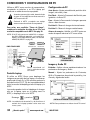
Dimensiones:
MODELO
ANCHO
ALTO
PROFUNDO
DP26640
66,3
48,4
44,1
24,1
11,5
sin base
NOTA: Las dimensiones están en centímetros.
Favor de leer antes de
operar su HDTV!
PROTEGER LA PANTALLA LCD
PRECAUCIÓN: La pantalla podría dañarse si no se
le da un mantenimiento adecuado.
• NO use objetos duros como trapos gruesos o
papel para limpiar la pantalla.
• NO utilice presión excesiva cuando se limpie la
pantalla de LCD; esto podría causar decoloración permanente o puntos negros en la
misma.
• NUNCA aplique líquidos en aerosol a la pantalla.
PRECAUCIONES DE
MANEJO
• Manéjese sólo por el gabinete.
• Nunca toque la pantalla cuando esté manejando la HDTV.
• Daño por manejo no está cubierto por la
garantía.
CONTIENE LÁMPARAS DE
MERCURIO, DESECHAR
DE MANERA APROPIADA
“La Academia Americana de Pediatras no
recomienda permitir a niños menores de 2
años ver televisión”
¿Necesita ayuda?
www.sanyoctv.com
1-800-877-5032
21
COLOCANDO LA HDTV DE
LCD
• Siempre utilice una superficie firme y plana al
colocar su HDTV.
• No se coloque la HDTV en áreas confinadas.
• Mantenga suficiente espacio para una buena
ventilación.
QUITAR LA BASE Y MONTAJE
EN PARED (OPCIONAL)
Herramienta necesaria: Desarmador de cruz.
NOTA IMPORTANTE:
Coloque la HDTV con la pantalla hacia
abajo sobre una superficie plana y acolchonada para proteger la pantalla y el
acabado de la HDTV.
Una persona con experiencia debe realizar el
montaje en pared.
PARA COMENZAR
INSTALACIÓN DE BATERÍAS
Instale las baterías al control remoto.
( 2 “AA”, no incluídas)
Para una operación segura, favor de observar
las siguientes precauciones:
• Reemplace ambas baterías al mismo tiempo. No utilice una batería nueva con una usada.
• Existe riesgo de explosión si las baterías son remplazadas con unas de tipo incorrecto.
• No exponga el Control Remoto a calor o humedad.
• Asegúrese que las marcas “+” y “–” de las baterías
correspondan con las del control remoto.
CONEXIÓN DE ANTENA PARA
SEÑALES DE AIRE O CABLE
Conecte su antena o servicio de cable a la
entrada ANT de su HDTV utilizando un cable
coaxial (75 OHM).
NOTA: Mantenga su antena para interiores al menos
a un (1) metro de distancia tanto de su HDTV
como de cualquier otro aparato electrónico.
ANTENA
ENTRADA DE ANTENA
ANÁLOGA / DIGITAL
1
Quite los cuatro (4) tornillos del pedestal de
soporte. PRECAUCIÓN: Sujete firmemente la
base al quitar el último tornillo.
2
Use los tornillos que remueva al quitar la base
y úselos para montar la TV al estuche de
pared (no incluído)
Esta HDTV puede sintonizar:
Interfase estándar VESA: 200 x 200
• Señales aéreas digitales y análogas de una antena.
Medida de los tornillos:
Diámetro M6, Longitud – 12mm (máximo)
22
¿Necesita ayuda?
www.sanyoctv.com
CABLE
• Canales de Cable análogos o sin codificar de una
conexión directa de TV por Cable.
1-800-877-5032
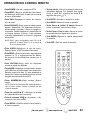
OPERACIÓN DEL CONTROL REMOTO
• Tecla POWER—Prende o apaga su HDTV.
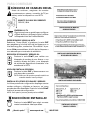
• Tecla INPUT—Elegir la entrada de video deseada Mantenga presionada la tecla para mostrar
el menú de entradas.
• Tecla – (sub ch)—Permite la selección directa de
subcanales digitales. Por ejemplo: para seleccionar el canal 39.1, presione las teclas 3, 9,
seguidas del guión –, y 1.
• Tecla INFO—Desplegar el banner de información de canal.
• Tecla MUTE—Cancelar o restaurar el audio.
• Tecla PIX SHAPE—Elegir entre las relaciones de
aspecto disponibles. Las diferentes configuraciones estiran, agrandan o llenan la imagen en
la pantalla. Pueden aparecer en pantalla barras
en la parte superior e inferior, o lado izquierdo
y derecho, dependiendo en la señal o programa
transmitido.
• Teclas Cursor (arriba) (abajo)—Mover el
cursor en pantalla hacia arriba y abajo.
NOTE: Pix6-7 están configurados como Pix1-2 de
modo PC. El utilizar Pix6-7 in TV en modo de
TV no es recomendado.
• Tecla MENU—Mostrar el menú en pantalla.
• Teclas Cursor < (izq.) > (der.)—Mover el cursor
en pantalla hacia la izquierda y derecha.
• Tecla ENTER—Ejecutar la opción seleccionada
en pantalla.
• Tecla EXIT—Salir del menú en pantalla.
• Tecla AUDIO—Selecciona el tipo de audio,
Estéreo, Mono, o SAP (de estar disponible).
• Tecla RESET—Presione dos veces seguidas para
restaurar la TV a configuraciones de fábrica.
Se borrarán las modificaciones hechas por el
usuario.
• Tecla CAPTION—Elegir entre los diferentes
modos de subtítulos digitales.
• Tecla SLEEP—Despelgar el temporizador de apagado. Mientras el temporizador se encuentre en
pantalla, presione la tecla “0” para establecer el
tiempo (en incrementos de 30 minutos) al cual se
apagará automáticamente la HDTV.
• Teclas NUMÉRICAS—Elegir canales directamente.
NOTA: Para canales mayores al 99, mantenga presionado el primer número, suéltelo y presione los dos
números restantes.
• Teclas de canal CH —Navegar los canales
en la base de datos de la memoria.
• Tecla de volumen VOL+ – —Aumentar o disminuir el nivel del volumen.
• Tecla RECALL—Cambiar entre el canal actual y
el último accesado.
¿Necesita ayuda?
www.sanyoctv.com
1-800-877-5032
23
PARA COMENZAR
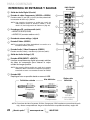
REFERENCIA DE ENTRADAS Y SALIDAS
PANEL TRASERO
DE LA HDTV
1 Salida de Audio Digital (Coaxial)
2 Entrada de video Componente (VIDEO2 o VIDEO3)
1
5
Entradas verde (Y), azul (Pb) y roja (Pr) de video; además de
las entradas de audio roja y blanca.
NOTA: Una conexión Compuesta es posible por medio de
VIDEO INPUT2 usando la entrada Y (VIDEO) y las de
Audio L/R. (Ver Configuración de Video2 en la pág. 28).
6
2
3 Entrada para PC y estéreo audio (mini)
7
• MONITOR RGB (D-SUB)
• AUDIO R/L (conector estéreo mini)
4 Entrada de antena análoga / digital
5 Entrada S-Video (VIDEO1)
NOTE: La conexión de S-Video deshabilitará la conexión en la
entrada de VIDEO1 (amarillo)
3
4
6 Entrada Audio / Video Compuesto (VIDEO1)
Entrada amarilla (video) y entradas roja y blanca (audio).
7 Salida de Audio Análogo (L/R)
8
8 Entradas HDMI (INPUT1 o INPUT2)
Interfase completamente digital que acepta señales
de video sin compresión para obtener la mejor
calidad de imagen posible.
9
NOTE: Una conexión DVI es posible por medio de la entrada
HDMI (DVI) INPUT1 utilizando un adaptador apropiado y
conectando el audio a las entradas de audio de VIDEO3.
9 Entrada USB
Despliegue fotos en pantalla desde su memoria USB.
Definición estándar
Alta definición
Óptima alta
definición
Compuesto
HDMI
S-Video
Componente
(o cable/adaptador
DVI a HDMI)
NOTA: Conexiones de video Compuesto, S-Video, Componente Y DVI necesitan sus conexiones de audio
roja y blanca correspondientes. Imagen en Alta Definición es posible de señales y equipo HD.
24
¿Necesita ayuda?
www.sanyoctv.com
1-800-877-5032
PARA COMENZAR
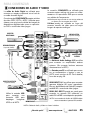
CONEXIONES DE AUDIO Y VIDEO
La salida de Audio Digital es utilizada para
conectar un receptor multicanal con el uso de
un cable de audio digital.
Conexiones de COMPONENTE aceptan señales
de video SDTV, EDTV y HDTV. Utilícelas para
obtener una muy buena calidad de imagen de
dispositivos digitales tales como un reproductor DVD o consola de video juegos.
La conexión COMPUESTA es utilizada para
conectar equipo análogo tal como una videocasetera o un reproductor DVD que no cuente
con salidas de Componente.
NOTA:Siempre haga coincidir el color de las salidas de
su aparato con las entradas de su HDTV.
S-Video puede ser utilizada en lugar del
conector amarillo de video para una mejor
imagen de aparatos análogos.
RECEPTOR
MULTICANAL
VIDEOCASETERA
(o aparato análogo)
REPRODUCTOR DVD
(o aparato similar)
AMPLIFICADOR
ESTÉREO
DVI
La Salida de Audio Análogo (L/R) se utiliza
para conectar un amplificador estéreo
externo. (No conecte bocinas externas
directamente a la HDTV)
La Entrada para PC es utilizada para conectar su computadora o laptop y usar su
HDTV como monitor de PC. Para detalles,
favor de ver pág. 30.
RECEPTOR SATELITAL
(o aparato similar)
HDMI INPUT1 & 2 se utilizan para conectar
aparatos digitales HD como: reproductor
Blu-ray, decodificador de Cable HD, receptor
satelital HD o consola de video juegos.
Utilice la entrada USB
para
conectar
una
memoria USB para
desplegar
imágenes
MEMORIA USB
JPEG en la HDTV.
HDMI (DVI) INPUT1 puede ser usado para
conectar un aparato DVI utilizando un
cable DVI a HDMI o un adaptador apropiado.
NOTA: Las entradas de Audio de VIDEO3 deben
estar conectadas al aparato DVI también.
NOTA: Cables de Audio y Video no vienen incluídos.
¿Necesita ayuda?
www.sanyoctv.com
1-800-877-5032
25
PARA COMENZAR
BÚSQUEDA DE CANALES INICIAL
Antes de continuar, asegúrese de conectar
correctamente su antena o conexión de TV por
cable y todos los dispositivos a su HDTV.
CONECTE EL CABLE DE CORRIENTE
120V AC, 60Hz
PANTALLA INICIAL DE MODO DE
AHORRO DE ENERGÍA
ENCIENDA LA TV
Siga instrucciones en pantalla para configurar
el Modo de Ahorro de Energía inicial y realizar
la Búsqueda Inicial de Canales/Señales.
ELEGIR DÓNDE SE USARA LA HDTV
Seleccione “Home Mode” al presionar la tecla CH
para establecer el nivel de brillo de las lámparas a un
nivel de Energy Star, o seleccione “Store Mode” al presionar CH para establecer el brillo de las lámparas a
uno adecuado para mostrador de exhibición.
BÚSQUEDA DE CANALES Y SEÑALES AV:
Presione la tecla CH para realizar una
búsqueda de canales de una Antena o una
conexión directa de Cable, y una búsqueda
de señales de dispositivos conectados a las
entradas de la HDTV.
PANTALLA DE CONFIGURACIÓN INICIAL
DE BÚSQUEDA DE CANALES
AYUDA EN PANTALLA (OPCIONAL)
Presione la tecla CH si desea accesar una
guía de ayuda en pantalla.
NOTA: Este menú de ayuda en pantalla también es
accesible desde el menú principal.
PANTALLA DE AVANCE DE BÚSQUEDA
PANTALLA DE LISTADO DE CANALES Y SEÑALES
La última pantalla de configuración despliega cuantos
canales análogos y digitales se hayaron, así como
entradas de video detectadas. Presionar la tecla CH
finaliza el proceso de configuración.
NOTA: Para repetir el proceso puede presionar VOL
SELECCIÓN DE ENTRADA AV
Presione la tecla INPUT para elegir correctamente la entrada de video que desea.
26
¿Necesita ayuda?
www.sanyoctv.com
PANTALLA DE LISTADO DE
CANALES Y SEÑALES
1-800-877-5032
OPERACIÓN DEL MENÚ EN PANTALLA
ESTABLECER CANALES ________
Despliegue el menú en pantalla. Utilice las
teclas CURSOR para seleccionar
Establecer canales. Presione ENTER.
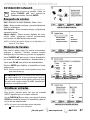
Búsqueda de canales
Auto – Busca en el modo detectado, Cable o Aire.
Cable – Busca canales análogos y canales digitales de
Cable no codificados.
Aire (Antena) – Busca canales análogos y digitales de
transmisión aérea.
Adición digital – Busca canales digitales de transmisión aérea, agregando canales recientemente
encontrados a la base de datos de canales.
PANTALLA DE MENÚ PRINCIPAL
NOTA: La función de Adición Digital no es disponible si el
modo de TV es Cable.
Memoria de Canales
Esta función enlista todos los canales encontrados,
análogos y digitales. También muestra canales
Análogos que no se hallaron y pueden ser agregados.
PANTALLA DE ESTABLECER CANALES
Use el CURSOR para mover la barra de selección
por todos los canales habilitados y deshabilitados, o
use la tecla CH para saltarse los deshabilitados.
Presione ENTER para habilitar o deshabilitar el canal
seleccionado.
NOTA: Para información sobre canales digitales locales, visite
www.antennaweb.org
INFO. IMPORTANTE: Esta HDTV mantiene una sola base de datos
para canales digitales. Por lo tanto cuando busque canales de
Cable, la base de datos de canales digitales será borrada. Usted
sólo podrá recibir aquellos canales ClearQAM (decodificados)
provistos por su compañía de cable.
PANTALLA DE MEMORIA DE CANALES
Establecer entradas
Esta función permite quitar del ciclo de entradas
(INPUT) aquellas que no se estén utilizando.
Use el CURSOR para elegir una entrada. Presione
ENTER para habilitar (marcar) or deshabilitar (desmarcar) la entrada seleccionada.
NOTA: Al menos una entrada debe quedar habilitada.
:Saltar es sólo como referencia.
¿Necesita ayuda?
PANTALLA DE ESTABLECER ENTRADAS
www.sanyoctv.com
1-800-877-5032
27
OPERACIÓN DEL MENÚ EN PANTALLA
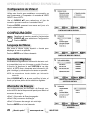
Configuración de Video 2
Utilice esta función para establecer una conexión ya
sea Componente o Compuesta a la entrada de VIDEO
INPUT 2 en su HDTV.
Use el CURSOR para seleccionar el tipo de
conexión que será usada en la entrada Video2.
Presione ENTER, aparecerá una marca azul junto a la
opción seleccionada.
PANTALLA DE CONFIG. DE VIDEO 2
CONFIGURACIÓN _____________
Despliegue el menú en pantalla. Use las teclas
CURSOR para seleccionar Configuración.
Presione ENTER.
Lenguaje del Menú
Elija entre el idioma inglés, español o francés para
desplegar el menú en pantalla.
Presione ENTER en el idioma deseado.
PANTALLA DE MENÚ DEL LENGUAJE
Subtítulos Digitales
Los Subtítulos Digitales son información de texto oculta, transmitida junto con la imagen y sonido. El activar
la función (al presionar la tecla CAPTION al ver televisión), la HDTV abre e interpreta esta información (digital o análoga) y sobreimpone los textos en pantalla.
NOTA: Las transmisoras locales deciden que información
transmitir.
Use el CURSOR y < > para modificar la letra, el
fondo y el primer plano de los subtítulos digitales.
PANTALLA DE CONFIGURACIÓN DE
SUBTÍTULOS DIGITALES
Ahorrador de Energía
Las configuraciones de Ahorrador de Energía controlan el brillo de las lámparas del panel para reducir el
consumo de energía.
• Nivel 1: Ahorrador de Energía apagado.
• Nivel 2: Bajo consumo de energía.
• Nivel 3: Consumo de energía aún más bajo.
Presione ENTER en el nivel deseado.
28
¿Necesita ayuda?
www.sanyoctv.com
PANTALLA DE AHORRADOR
DE ENERGÍA
1-800-877-5032
OPERACIÓN DEL MENÚ EN PANTALLA
CONFIGURACIÓN
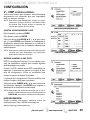
V – CHIP
(CONTROL PATERNAL)
Utilice esta función para bloquear automáticamente
programación con contenido que crea inapropiado
para ser visto por sus hijos.
NOTA: Esta función está diseñada para cumplir con regulaciones de la FCC para V-Chip en los Estados Unidos
de América. Esta función pudiera no activarse con
señales que originen de otros países.
PANTALLA DE CONFIGURACIÓN/V-CHIP
AJUSTES A CONFIGURACIÓN V–CHIP
Elija Encendido y presione ENTER.
Elija Ajustar y presione ENTER.
Utilice las teclas de CURSOR y < > para navegar y la tecla ENTER para Bloquear o Desbloquear la
clasificación seleccionada. Aparecerá a un lado de la
clasificación el símbolo de un candado indicando que
está bloqueada.
NOTA: Bloquear una clasificación bloqueará todas las clasificaciones más altas. Desbloquear una clasificación,
desbloqueará todas las más bajas.
PANTALLA DE AJUSTAR (ESTÁNDAR)
SISTEMA AVANZADO V-CHIP (RRT5)
RRT5 (V-chip Regional Ratings 5) es un sistema avanzado de clasificación regional para canales digitales
recibidos desde una antena.
Cuando la HDTV detecta datos RRT5 compatibles, se
descargan y almacenan en memoria, entonces la pantalla de configuración V-Chip es modificada para
mostrar la opción de Ajustar (Avanzado).
La pantalla de Configuración/V-Chip se modifica para
mostrar la opción de Ajustar (avanzado).
Utilice las teclas CURSOR y < > para seleccionar
las diferentes opciones. Use ENTER para bloquear o
desbloquear la clasificación seleccionada.
NOTA:Puede haber más clasificaciones de las que se ven en
pantalla. Cuando aparezcan barras verticales, presione
CURSOR para accesar clasificaciones adicionales.
MÁS INFORMACIÓN
Puede consultar información adicional sobre las
clasificaciones V-Chip y MPAA en las páginas:
www.v-chip.org y www.mpaa.org
¿Necesita ayuda?
PANTALLAS DE AJUSTAR (AVANZADO)
www.sanyoctv.com
1-800-877-5032
29
OPERACIÓN DEL MENÚ EN PANTALLA
CONFIGURACIÓN _____________
Reloj Temporizador
Esta función permite establecer la Hora Actual en su
HDTV y habilitar una Hora de Encendido para que el
televisor se prenda a determinada hora.
Cuando la Función de encendido se habilita, la TV
automáticamente se encenderá a la hora establecida.
PANTALLA DE RELOJ TEMPORIZADOR
Sensor de luz
Esta función detecta la intensidad de luz ambiental
del cuarto y controla los parámetros de brillo e
imagen para reducir el consumo de energía de la TV.
NOTA: Cuando la habitación esté oscura, el brillo del panel y/o
los parámetros de imagen tales como brillo y contraste
son reducidos. Cuando la habitación es más iluminada,
los parámetros se afectan de manera contraria.
PANTALLA DE SENSOR DE LUZ
30
¿Necesita ayuda?
www.sanyoctv.com
1-800-877-5032
OPERACIÓN DEL MENÚ EN PANTALLA
IMAGEN ____________________
Despliegue el menú en pantalla. Utilice las
teclas CURSOR para seleccionar Imagen.
Presione ENTER.
Puede elegir entre Intenso, Moderado y Normal, los
cuales tienen valores fijos y predeterminados para los
diferentes parámetros.
O puede elegir la opción de Manual para ingresar
valores personalizados.
PANTALLA DE MENÚ PRINCIPAL
NOTA: Cada entrada de AV puede tener su propio modo de
imagen (predeterminado o manual). La opción seleccionada es indicada por una marca azul.
CONFIGURACIÓN MANUAL DE IMAGEN
Parámetros de ajuste Manual:
• Color
• Tinte
• Brillo
• Nitidez
• Contraste
• Contraste Dinámico
La opción de Configuración Detallada permite el ajuste
de 7 parámetros adicionales tales como:
• Balanceo de señal
• Reducción de ruido
• Balance de blanco
• Realce de orillas
• Tamaño-V
PANTALLA DE IMAGEN
• Nitidez Vertical
• Tamaño-H
NOTA: La opción de Valores originales de imagen regresa
todos los parámetros a sus niveles de fábrica.
AJUSTES A LOS PARÁMETROS DE IMAGEN
Utilice las teclas de CURSOR para seleccionar el
parámetro que desea ajustar. Presione la tecla ENTER
para accesar la pantalla de ajustes. Modifique los valores
del parámetro utilizando las teclas de CURSOR < >.
PANTALLA DE SELECCIÓN
DE PARÁMETROS
NOTA: Las teclas de CURSOR seleccionan al siguiente
o previo parámetro sin regresar a la pantalla anterior.
Una vez terminados los ajustes, presione la tecla EXIT
para salir del menú.
EJEMPLOS DE PANTALLA DE
AJUSTE DE PARÁMETROS
¿Necesita ayuda?
www.sanyoctv.com
1-800-877-5032
31
OPERACIÓN DEL MENÚ EN PANTALLA
SONIDO _____________________
Despliegue el menú en pantalla. Utilice las
teclas CURSOR para seleccionar Sonido.
Presione ENTER.
Elija una opción para su configuración de sonido:
Auto – Utiliza valores predeterminados de acuerdo al
modo actual de Imagen.
Dinámico, Tenue, Estándar – Valores predeterminados
para el sonido no ligados a las opciones de imagen.
PANTALLA DE MENÚ PRINCIPAL
CONFIGURACIÓN MANUAL DE SONIDO
La opción de Manual incluye varios parámetros que
pueden ser ajustados personalmente:
• Graves y Agudos
• Bass Extension
• Audyssey Dynamic Volume 1
• Configuración Detallada
– Configuración Lip-Sync.: Ajusta el retraso del audio.
– Ecualizador de 4 bandas: Personalice el espectro de
graves y agudos.
PANTALLA DE PARÁMETROS MANUALES
NOTA: La opción de Valores originales regresa todos los
parámetros a su configuración original de fábrica.
AJUSTES A LOS PARÁMETROS DE SONIDO
Utilice las teclas de CURSOR para seleccionar el
parámetro que desea ajustar. Presione la tecla ENTER
para accesar la pantalla de ajustes. Modifique los valores
del parámetro utilizando las teclas de CURSOR < >.
NOTA: Las teclas de CURSOR seleccionan al siguiente
o previo parámetro sin regresar a la pantalla anterior.
PANTALLA DE PARÁMETROS
MANUAL (AVANZADO)
Una vez terminados los ajustes, presione la tecla EXIT
para salir del menú.
1 Audyssey Dynamic Volume soluciona el problema de diferen-
cias marcadas en el volumen entre programas de TV, anuncios
y entre las secciones de alto y bajo volumen de una película.
Audyssey Dynamic EQ está integrado a Dynamic Volume para
que al ajustarse el volumen automáticamente, la percepción
del bajo, balance, impresión de sonido envolvente y claridad
de diálogo permanezca igual.
32
¿Necesita ayuda?
www.sanyoctv.com
EJEMPLOS DE PANTALLA DE
AJUSTE DE PARÁMETROS
1-800-877-5032
ENTRADA USB
REPRODUCTOR DE IMÁGENES
Despliegue fotos en su HDTV con el uso de un
dispositivo de memoria USB.
MEMORIA
USB
PANEL TRASERO HDTV
NOTA: La HDTV se cambia a la entrada USB cuando se
detecta una memoria en el puerto USB.
PANTALLA DE VISTAS EN MINIATURA
NOTA: Aparecerá un ícono “tapando” la vista en
miniatura si una foto no puede ser decodificada o no contiene datos de vista previa.
FUNCIONAMIENTO
Presione ENTER sobre una foto en vista miniatura
para abrir las funciones de Rotar, Vista completa y Ver
presentación.
Una vez en Vista completa:
Use las teclas CURSOR < > para cambiar de foto.
Presione ENTER para mostrar el menú de opciones.
PRESENTACIÓN DE DIAPOSITIVAS
En el menú de Configuración puede habilitar o
deshabilitar las funciones de Aleatorio y Cambio rápido.
MENÚ DE OPCIONES
EN VISTA COMPLETA
AJUSTES A
PRESENTACIÓN
Presione ENTER en Ver presentación desde la pantalla
de vistas en miniatura o desde el menú de opciones en
vista completa para comenzar la presentación desde la
imagen seleccionada.
MENÚ DEL REPRODUCTOR
Presione MENU al estar en vista completa o en una
presentación de diapositivas para desplegar el menú
en pantalla.
Ajustes de imagen – Ajuste Color, Tinte, Contraste,
Brillo, Nitidez y Contraste Dinámico.
NOTA: Ajustes de imagen son configuraciones separadas a
las de TV y entradas AV.
PANTALLA DE MENÚ USB
¿Necesita ayuda?
www.sanyoctv.com
1-800-877-5032
33
CONEXIONES Y CONFIGURACION DE PC
Utilice su HDTV como monitor de computadora,
conectando su televisor a su PC o Laptop por
medio de un cable de monitor apropiado.
Antes de conectar algún cable, desenchufe de
la toma AC los cables de corriente tanto de la
HDTV como de la PC.
Encienda la HDTV y cualquier otro equipo
externo antes de encender la computadora.
Para evitar una condición “Fuera de Rango”,
establezca la resolución de video de su PC a una
resolución compatible con la HDTV. Ver pág. 20.
NOTA: Si la PC sólo cuenta con salida DVI, un adaptador DVI a RGB será requerido, o un cable DVI a
HDMI y unos cables RCA de audio (ver entrada
HDMI (DVI) INPUT1 en pág 25).
SALIDA
ANÁLOGA RGB
PANEL TRASERO HDTV
Configuración de PC
Auto Ajuste – Ajuste automático de posición de la
imagen, dot clock y fase.
Dot Clock – Ajusta la Frecuencia de Barrido para
igualarla a la de su PC.
Fase – Ajuste la Fase cuando la imagen aparenta
vibrar o estar borrosa.
Posición-H – Mueva la imagen horizontalmente.
Posición-V – Mueva la imagen verticalmente.
Ahorro de energía – Habilita a la HDTV entrar en
modo de espera mientras la PC no se utilice.
SALIDA
DIGITAL DVI
Cable estéreo
audio mini
PANTALLA DE
CONFIGURACIÓN PC
PC o LAPTOP
Cable de
monitor RGB
Imagen y Audio PC
Sanyo recomienda utilizar un cable de monitor
con ferrita.
Pantalla Laptop
Si utiliza su HDTV Sanyo para desplegar las
imágenes en pantalla de una laptop, el mantener
presionada la tecla Fn (o FN) mientras pesiona la
tecla de función (F5, F7, F8, etc.) apropiada deberá
ciclar los modos de despliegue entre la laptop y la
HDTV.
Estándar – Aplica valores predeterminados a los
parámetros de Imagen y Audio.
Manual – Ajuste los parámetros de Contraste,
Brillo y Temperatura de color de la pantalla, y los
Graves y Agudos del audio.
Los modos pueden incluir el desplegar la imagen
sólo en la laptop, tanto en la laptop como la
HDTV, o desplegar sólo en la HDTV.
Sostenga
y presione
PANTALLAS DE IMAGEN Y AUDIO (MANUAL)
NOTA: Los símbolos de las teclas Fn y de función en el
teclado de la laptop pueden variar entre una
marca y otra.
34
¿Necesita ayuda?
www.sanyoctv.com
NOTA: Estos parámetros no afectan los de TV normal.
1-800-877-5032
GARANTÍA LIMITADA DE UN AÑO EN PARTES Y MANO DE OBRA
ESTA GARANTÍA LIMITADA DE PARTES Y MANO DE OBRA ES VÁLIDA SÓLO EN TELEVISORES SANYO COMPRADOS
Y USADOS EN LOS ESTADOS UNIDOS DE AMÉRICA, CANADÁ Y PUERTO RICO, EXCLUYENDO CUALQUIER OTRO
TERRITORIO Y PROTECTORADO DE E.E.U.U. ESTA GARANTÍA LIMITADA APLICA SÓLO A COMPRADORES
MINORISTAS Y NO APLICA A PRODUCTOS UTILIZADOS CON FINES COMERCIALES O INDUSTRIALES.
APLICACIÓN DE LA GARANTÍA
POR UN AÑO, desde la fecha de la compra original, Sanyo Manufacturing Corporation (SMC) garantiza esta televisión
de estar libre de defectos de manufactura en materiales y mano de obra bajo uso y condiciones normales para partes
y trabajo.
Por los PRIMEROS 90 DÍAS, desde la fecha de la compra original, Sanyo Manufacturing Corporation remplazará
cualquier televisión defectuosa vía el vendedor original. Para asegurar la apropiada aplicación de la garantía,
conserve el recibo original de compra fechado como evidencia de compra. Regrese la TV defectuosa al vendedor
junto con su recibo de compra además de todos los accesorios incluídos, como el control remoto. La TV defectuosa
será cambiada por una del mismo modelo, o un modelo equivalente o de igual valor, si es necesario. El reemplazo
de la TV será en contingencia y disponibilidad y a la exclusiva discreción de Sanyo Manufacturing Corporation.
ESTA GARANTÍA ES EXCLUYENTE DE Y EN LUGAR DE TODAS LAS OTRAS GARANTÍAS DE COMERCIALIZACIÓN O USO
PARA UN PROPÓSITO ESPECÍFICO.
OBLIGACIONES
Por un año, desde la fecha de la compra original, Sanyo Manufacturing Corporation (SMC) garantiza esta televisión
de estar libre de defectos de manufactura en materiales y mano de obra bajo condiciones normales de uso. Durante
los primeros 90 días bajo esta garantía para cualquier defecto de manufactura o mal funcionamiento Sanyo
Manufacturing Corporation proveerá una nueva TV vía intercambio con el vendedor.
CÓMO HACER UN RECLAMO BAJO ESTA GARANTÍA.
Por favor llame al 1-800-877-5032. Por favor esté preparado para darnos el número de modelo de la televisión cuando llame. El número de modelo y el número de serie están impresos en la etiqueta agregada en la parte trasera
de la unidad.
Para asistencia al consumidor, llame sin costo al 1-800-877-5032
Esta garantía expresa derechos contractuales específicos; minoristas podrán tener derechos estatutarios
adicionales que pueden variar de estado a estado.
(EFECTIVO: Marzo 1, 2007)
Su HDTV Sanyo es registrada al momento de la compra, por favor guarde su recibo de compra.
Para su protección en caso de robo o pérdida de este producto, por favor llene la siguiente
información requerida y GUÁRDELA en un lugar seguro para su registro personal:
No. de Modelo__________________________
Fecha de compra ___________________________
No. de Serie ____________________________
Precio de compra ___________________________
(Localizado en la parte posterior de la TV)
Lugar de compra ___________________________
Sanyo Manufacturing Corp.
3333 Sanyo Road, Forrest City, AR 72335
¿Necesita ayuda?
www.sanyoctv.com
1-800-877-5032
35
MESURES DE SÉCURITÉ
Afin d’éviter les risques d’incendie ou de choc
électrique, n’exposez pas l’appareil à la pluie ni
à l’humidité.
Afin d’éviter les risques de choc électrique,
n’enlevez pas le panneau arrière. L’appareil est
entièrement transistorisé et ne contient aucune
pièce remplaçable ou réparable par l’utilisateur.
En cas de problème, confiez l’appareil à un
réparateur qualifié.
Le téléviseur est muni d’un cordon d’alimentation CA à fiche polarisée dont une lame est plus
large que l’autre. MISE EN GARDE : pour éviter
le risque de choc électrique, faites correspondre
la lame large de la fiche à la fente large de la
prise, puis enfichez à fond. Ceci est une mesure
de sécurité conçue pour ne brancher la fiche que
d’une seule façon sur une prise électrique.
Lorsque vous utilisez le téléviseur avec des jeux
vidéo, ne saturez pas la luminosité ni le contraste.
Avec le temps, ceci pourrait causer l’impression
permanente de l’image du champ de jeu sur
l’écran. Ne placez pas cet appareil sur un chariot, un support ou une table instable. Il risquerait
de tomber, de s’endommager et d’entraîner de
graves blessures.
Utilisez uniquement un chariot,
une table ou un support recommandé par le fabricant ou vendu
avec l’appareil. Lors de son
installation, suivez les instructions du fabricant et utilisez les accessoires d’installation recommandés. Prenez garde lorsque
vous déplacez le téléviseur s’il se trouve sur un
chariot. Des arrêts brutaux, une force excessive
et des surfaces inégales peuvent renverser le
chariot et l’appareil.
Lisez attentivement le présent manuel et
conservez-le.
INFORMATION FCC
Cet équipement a été testé et déclaré conforme aux limites fixées pour un appareil de Classe B, selon la Partie 15 du
règlement FCC. Ces limites sont destinées à assurer une protection raisonnable contre des interférences nocives
dans une installation résidentielle. Cet équipement génère, utilise et peut irradier une énergie de fréquence radio et
s’il n’est pas installé ou utilisé conformément aux instructions, il peut provoquer des interférences nuisibles aux communications radio. Cependant, il est impossible de garantir qu’aucune interférence ne soit créée suivant le type d’installation. Si cet équipement vient à générer une interférence nuisible à la réception de la radio ou de la télévision,
qui peut être mise en évidence en allumant et en éteignant l’appareil, on recommandera à l’utilisateur d’essayer de
corriger cette interférence au moyen d’une ou plusieurs méthodes :
- en réorientant ou en déplaçant l’antenne réceptrice.
- en augmentant la distance entre l’équipement et le récepteur.
- en connectant l’équipement à une prise d’un circuit électrique différent de celui sur lequel est connecté le récepteur.
- en demandant l’aide d’un vendeur ou d’un technicien de radio et télévision expérimenté.
PRÉCAUTION : Le règlement FCC avertit que des modifications inadéquates ou non autorisées sur cette unité
peuvent annuler l’autorisation de l’utilisateur pour opérer l’unité.
36
Besoin d’aide?
www.sanyoctv.com
1-800-877-5032
MARQUES DE COMMERCE
RÉSOLUTIONS DE PC
Fabriqué sous licence de Dolby Laboratories.
« Dolby » est une marque de commerce de Dolby
Laboratories.
HDMI, le logo HDMI et “High-Definition
Multimedia Interface” sont des marques déposées de HDMI Licensing, LLC
aux États-Unis et dans d’autres pays.
MD
En tant que partenaire d’ENERGY STAR ,
Sanyo Manufacturing Corporation a
déterminé que ce produit répond, pour
son rendement énergétique, aux
MD
normes d’ENERGY STAR .
Ce symbole sur la plaque d’identification indique que le produit est approuvé par Underwriters Laboratories Inc. Il
a été conçu et fabriqué selon les
normes strictes de sécurité UL contre
les risques d’incendie, de blessures et
de chocs électriques.
FICHE TECHNIQUE
Alimentation: AC 120V, 60Hz
Consommation: 95 watts
Fabriqué sous licence de Audyssey
Laboratories. En attendant des
brevets des Etats-Unis et étrangers.
Audyssey Dynamic VolumeTM est une
marque de Audyssey Laboratories.
Poids: 8.7 kg
Dimensiones:
MODÉLE
LARGEUR
HAUTEUR
DP26640
663
484
441
sans base
Cet appareil numérique de la classe B est conforme à la
norme NMB-003 du Canada.
Besoin d’aide?
PROFONDEUR
241
115
REMARQUE : toutes les dimensions sont millimètres
(mm).
www.sanyoctv.com
1-800-877-5032
37
TABLE DES MATIÈRES
MESURES DE SÉCURITÉ . . . . . . . . . . . . . . . . . . . . . . . . . . .36
INFORMATION FCC . . . . . . . . . . . . . . . . . . . . . . . . . . . . . . .36
MARQUES DE COMMERCE . . . . . . . . . . . . . . . . . . . . . . . .37
FICHE TECHNIQUE . . . . . . . . . . . . . . . . . . . . . . . . . . . . . . . .37
RÉSOLUTIONS DE PC . . . . . . . . . . . . . . . . . . . . . . . . . . . . .37
TABLE DES MATIÈRES . . . . . . . . . . . . . . . . . . . . . . . . . . . .38
PRÉCAUTIONS DE MANIEMENT . . . . . . . . . . . . . . . . . . .38
PLACER LA TVHD ACL . . . . . . . . . . . . . . . . . . . . . . . . . . . . .38
ENLEVER LA BASE ET INSTALLER SUR LE MUR . . . . . .39
POUR COMMENCER—
Placez les piles dans la télécommande . . . . . . . . . . .39
Branchement d’antenne aérienne ou câble . . . . . . . .39
CONNECTEURS DU PANNEAU ARRIÈRE . . . . . . . . . . . . .40
BRANCHEMENTS DE AUDIO / VIDEO . . . . . . . . . . . . . . .41
BRANCHEMENT ÉLECTRIQUE . . . . . . . . . . . . . . . . . . . . . .42
RECH. DE CHAÎNES INITIALE . . . . . . . . . . . . . . . . . . . . . .42
UTILISATION DE LA TÉLÉCOMMANDE . . . . . . . . . . . . . .43
FONCTIONNEMENT DU MENU À L'ÉCRAN—
Établir chaînes . . . . . . . . . . . . . . . . . . . . . . . . . . . . . . . . .44
Recherche de chaînes . . . . . . . . . . . . . . . . . . . . . . .44
Memoir de chaînes . . . . . . . . . . . . . . . . . . . . . . . . . .44
Configuration d’entrée . . . . . . . . . . . . . . . . . . . . . . .44
Configuration Vidéo2 . . . . . . . . . . . . . . . . . . . . . . . . .45
Configuration . . . . . . . . . . . . . . . . . . . . . . . . . . . . . . . . . .45
Langue du menu . . . . . . . . . . . . . . . . . . . . . . . . . . . . .45
Sous-titrage digital . . . . . . . . . . . . . . . . . . . . . . . . . .45
Économiseur d’énergie . . . . . . . . . . . . . . . . . . . . . . .45
Temporisateur d’horloge . . . . . . . . . . . . . . . . . . . . .46
Capteur de lumiére . . . . . . . . . . . . . . . . . . . . . . . . . .46
Image . . . . . . . . . . . . . . . . . . . . . . . . . . . . . . . . . . . . . . . . .47
Réglages manuels de l’image . . . . . . . . . . . . . . . . .47
Son . . . . . . . . . . . . . . . . . . . . . . . . . . . . . . . . . . . . . . . . . . .48
aaRéglages manuels du son . . . . . . . . . . . . . . . . . . . .48
LECTEUR DES PHOTOS . . . . . . . . . . . . . . . . . . . . . . . . . . . .49
BRANCHEMENTS ET CONFIGURATION DU PC . . . . . . .50
GARANTIE . . . . . . . . . . . . . . . . . . . . . . . . . . . . . . . . . . . . . . .51
CONTIENT DES LAMPES AU
MERCURE, À JETER DE
FAÇON APPROPRIÉE
38
Besoin d’aide?
www.sanyoctv.com
Veuillez lire avant d’utiliser votre HDTV!
PROTECTION DE L’ÉCRAN
D’AFFICHAGE ACL
PRECAUTION: L'écran est susceptible d'être
endommagé
s'il
n'est
pas
entretenu convenablement.
• NE PAS utiliser d'objets durs tels qu'un chiffon
rugueux ou du papier rigide.
• NE PAS appuyer trop fort en nettoyant l'écran
ACL; une pression excessive peut causer une
décoloration permanente ou des taches d'ombre.
• Ne jamais pulvériser de liquides sur l'écran.
PRÉCAUTIONS DE
MANIEMENT
•
Manipulez par le coffret seulement. Ne touchez
jamais l'écran pendant le maniement.
•
La pression excessive sur l'écran peut causer la
décoloration permanente ou des taches foncées.
•
Les dommages par maniement ne sont pas couverts par la garantie.
PLACER LA TVHD ACL
•
Utilisez toujours une surface plane et ferme
pour installer votre TVN.
•
Ne placez pas le téléviseur dans un endroit trop
exigu.
•
Laissez assez d’espace pour assurer une ventilation appropriée.
“L'Académie Américaine de Pédiatres ne recommande pas à des enfants plus petits de 2 années
de voir télévision.”
1-800-877-5032
ENLEVER LA BASE ET
INSTALLER SUR LE MUR
(OPTIONAL)
Outils requis : tournevis à vis cruciforme
REMARQUE IMPORTANTE:
Placez le téléviseur face en bas sur une
surface matelassée pour protéger l’écran
et le fini de l’appareil.
L’assemblage sur le mur doir être effectué par
une personne avec expérience.
POUR COMMENCER
PLACEZ LES PILES
Placez les piles dans la télécommande
( 2 “AA”, non comprises)
Pour un fonctionnement sécuritaire, veuillez
observer les mesures de précaution suivantes :
• Remplacez les deux piles en même temps. N'utilisez
pas une pile neuve avec une pile usagée.
• Il y a risque d’explosion si une pile est remplacée par
un modèle incorrect.
• N'exposez pas la télécommande à l'humidité ou à la
chaleur.
• Les signes “+” et “–” des piles doivent correspondre
á ceux de l’intériur de la télécommande.
BRANCHEMENT D’ANTENNE
AÉRIENNE OU CÂBLE
Branchez votre antenne ou service de câble, à
l'entrée ANT de votre HDTV en utilisant un
câble coaxial (75 OHM).
1
Enlevez les quatre (4) vis qui maintiennent la
base de support. PRECAUTION : maintenez
fermement le socle en enlevant la dernière vis.
2
Utilisez les vis que vous venez d’enlever de la
base pour installer le TVN en utilisant un kit
de mur (non fournis.)
Norme d'interface VESA: 200 x 200
REMARQUE: Maintenez votre antenne pour
intérieurs au moins à un mètre de distance de votre
HDTV ou de tout autre appareil électronique.
ANTENNE RF
Dimensions des vis de montage du ACL:
Diamètre M6, longueur—12mm (max.)
ENTRÉE D'ANTENNE
ANALOGIQUE ET NUMÉRIQUE
CÂBLE
Le syntoniseur de cette TVN peut recevoir:
• Signaux numériques ou analogiques provenant d’une
antenne RF.
• Chaînes analogues que de câblé ClearQAM d'une connexion directe de TV par câble.
Besoin d’aide?
www.sanyoctv.com
1-800-877-5032
39
POUR COMMENCER
CONNECTEURS DU PANNEAU ARRIÈRE
1 Sortie audio numérique (Coaxial)
1
2 Entrée composant vidéo (VIDEO2 ou VIDEO3)
5
Entrées vidéo verte (Y), bleue (Pb) et rouge (Pr) ainsi
que les fiches blanche et rouge de l’audio.
REMARQUE: Vous pouvez utiliser l’entrée VIDEO INPUT2 pour
obtenir une conexion de vidéo Composite, en utilisant l’entré Y
(VIDEO) et L/R Audio. (Voir Configuration Vidéo 2 dans la p. 45).
6
2
3 Entrée pour PC et stéréo audio mini
7
• MONITOR RGB (D-SUB)
• AUDIO R/L (prise stéréo mini)
4 Entrée pour antenne analogique ou numérique
5 Entrée S-vidéo (VIDEO1)
REMARQUE: Les connexions S-vidéo remplaceront celles des
3
prises d’entrée Video1 (jaune).
4
6 Prises audio/vidéo (VIDEO1 Composite)
Jaune (vidéo), blanc et rouge (audio).
7 Sorties d'audio analogique (G/D)
8
8 Entrée HDMI 1 et HDMI 2
Interface complètement numérique qui accepte des
signaux vidéos sans compression pour obtenir la
meilleure qualité d’image possible.
9
REMARQUE : Un branchement de DVI est possible en utilisant
l’entrée HDMI (DVI) INPUT1 avec un adaptateur approprié et en
utilisant l’entrée VIDEO3 pour l’audio
9 Entrée USB
Voir des photos sauvegardées dans un dispositif USB.
Standard définition
Haute définition
Optimal haute
définition
Composite
HDMI
S-Video
Composant
(ou un adaptateur
DVI à HDMI)
REMARQUE: Les branchements de vidéo Composite, S-Vidéo, vidéo Composant, et
DVI, ont besoin de branchements blanc et rouge pour l’audio.
40
Besoin d’aide?
www.sanyoctv.com
1-800-877-5032
POUR COMMENCER
BRANCHEMENTS DE AUDIO / VIDEO
La Sortie d’Audio Numérique est utilisée pour
se brancher à un récepteur audionumérique en
utilisant un câble d’audio.
L’entrée de vidéo Composite est utilisée pour
brancher des équipements analogiques comme
VCR ou des vieux reproducteurs de DVD.
L’entrée de vidéo Composant accepte des signaux de vidéo SDTV, EDTV et HDTV.
Employez-les pour obtenir une bonne qualité
d'image en utilisant dispositifs numériques.
REMARQUE: Veuillez faire coïncider la couleur des sorties de votre appareil avec les entrées de votre HDTV.
L’entrée de S-Vidéo peut
branchement de vidéo jaune.
RÉCEPTEUR À
CANAUX MULTIPLES
remplacer
le
VCR
(ou appareil analogique)
LECTEUR DE DVD
(ou autre dispositif)
AMPLIFICATEUR
STÉRÉOPHONIQUE
DVI
Les sorties d'Audio G/D sont utilisés pour
brancher un amplificateur stéréo externe
(ne branchez pas des haut-parleurs
externes directement à la TVHD).
L'Entrée pour PC est utilisée pour brancher
votre ordinateur ou laptop et utiliser votre
HDTV comme moniteur. Voyez la p. 30 pour
des détails.
RÉCEPTEUR
SATELLITE
HDMI INPUT1 et 2, ils sont utilisés pour
brancher des dispositifs numériques HD
comme un reproducteur Blu-ray, Câble
récepteurs HD, Satellite récepteurs HD ou
consoles de jeux vidéo.
(ou autre dispositif)
L’entrée USB est utilisée
pour
brancher
une
mémoire de masse USB
pour voir des photos
JPEG.
HDMI (DVI) INPUT1, il peut être utilisé pour
brancher un dispositif DVI avec l'utilisation
d'un adaptateur approprié.
DISPOSITIF
USB
REMARQUE: Il faut utiliser l’entrée G/D d’audio à
travers le VIDEO3.
REMARQUE: Câbles de audio / video non fournis.
Besoin d’aide?
www.sanyoctv.com
1-800-877-5032
41
POUR COMMENCER
RECH. DE CHAÎNES INITIALE
Avant de continuer, assurez-vous de brancher
correctement votre antenne ou connexion de TV
par câble, et tous les dispositifs à votre HDTV.
BRANCHEZ LE CORDON D’ALIMENTATION CA
120V CA, 60Hz
ALLUMER TV
Suivez les instructions dans l'écran pour configurer le mode Économiseur d'énergie initiale et effectuer la Recherche Initiale de
Chaînes/Signaux.
ÉCRAN INITIAL D'ÉCONOMISEUR
D'ÉNERGIE
CHOISIR OÙ ON VA UTILISER LA HDTV:
Choisissez "Home Mode" en appuyant sur la touche
CH pour établir le niveau de brillant des lampes à un
niveau d'Energy Star, ou choisissez "Store Mode" en
appuyant sur CH pour établir le brillant des lampes à
un niveau pour exposition.
RECHERCHE DE CHAÎNES ET SIGNAUX AV:
Appuyer sur la touche CH pour effectuer
une recherche de chaînes d'une Antenne ou
connexion directe de Câble, et une recherche
de signaux de dispositifs reliés aux entrées
de la HDTV.
ÉCRAN INITIAL DE RECHERCHE DE
CHAÎNES/SIGNAUX
L’ÉCRAN DE’AIDE (OPTIONAL)
Appuyer sur la touche CH si vous souhaitez
accéder à l'écran d'aide.
REMAREQUE: L'écran d'aide est aussi disponible
dans le menu principal.
ÉCRAN DE CONFIGURATION DE CHAÎNE ET SIGNAL
Le dernier écran de configuration montre les canaux
analogues et numériques trouvés, ainsi que les entrées
AV détectées. En appuyant sur la touche CH il finit
le processus de configuration.
ÉCRAN PROGRÈS DE RECHERCHE DE CHAÎNES
REMARQUE: Pour répéter la configuration initiale appuyez
sur la touche VOL
SÉLECTION D'ENTRÉE AV
Appuyer sur la touche INPUT pour choisir l'entrée de vidéo que vous souhaitez voir.
42
Besoin d’aide?
www.sanyoctv.com
1-800-877-5032
ÉCRAN DE LISTE DE CHAÎNES/SIGNAUX
UTILISATION DE LA TÉLÉCOMMANDE
• Touche POWER—Allumer ou éteindre la TV.
• Touche INPUT—Choisir l’entrée de vidéo.
Maintenez enfoncée la touche, pour montrer le
menu d'entrées.
• Touche – (sub ch)—Il permet de choisir directement une chaîne ou subchaîne numérique. Par
exemple: pour choisir le canal 39.1, appuyer sur
la touche 3, 9, –, et 1.
• Touche INFO—Montrer l’information de la
chaîne.
• Touche MUTE—Sourdine ou retourner le son.
• Touche PIX SHAPE—Changer entre les différentes manières d’aspect ratio. Les différentes
configurations étirent, agrandissent out remplissent l'image sur l'écran. On peut apparaitre
des barres dans la partie supérieure et
inférieure de l'écran, out aus cotés gauche et
droit, en dédpendant du signal ou le programme transmis.
• Touches Cursor (en haut) (vers le bas)—
Déplacer le curseur en haut et vers le bas dans
les menus.
REMARQUE: Les Pix 6-7 sont configurè comment
Pix1-2 dans le mode PC. On ne recommande pas díutiliser Pix 6-7 dans le mode TV.
• Touche MENU—Montrer le menu dans l’écran.
• Touches Cursor < (gauche) > (droite)—
Déplacer le curseur gauche et droite dans les
menus.
• Touche ENTER—Exécuter l'option choisie.
• Touche EXIT—Sortir du menu.
• Touche AUDIO—Choisir la manière d’audio,
Stéréo, Mono ou SAP (s'il est disponible).
• Touche RESET—Appuyer deux fois pour
retourner la TV aux valeurs de fabrique.
Toutes les modifications effectuées par l'utilisateur, seront éliminées.
• Touche CAPTION—Changer entre les différentes
manières de sous-titrage.
• Touche SLEEP—Il montre le temporisateur
d'éteint. Tandis qu'on montre le temporisateur
d'éteint sur l'écran, appuyer sur la touche "0"
pour établir le temps de d'éteint automatique de
la HDTV (intervalles de 30 minutes).
• Touches NUMÉRICAS—Entrer
directement.
une
chaîne
REMARQUE: Pour des chaînes 100 et supérieures,
maintenir appuyée sur la touche numérique, et puis,
entrer les autres deux nombres.
• Touches de chaîne CH —Se déplacer entre
les chaînes sauvegardées dans la mémoire.
• Touche de volume VOL+
réduire le niveau d’audio.
–
—Augmenter ou
• Touche RECALL—Changer entre les deux
dernières chaînes choisies.
Besoin d’aide?
www.sanyoctv.com
1-800-877-5032
43
FONCTIONNEMENT DU MENU À L'ÉCRAN
ÉTABLIR CHAÎNES ___________
Montre le Menu dans l’écran et utilise les
touches CURSEUR pour choisir Établir
chaînes. Appuyez sur ENTER.
Recherche de chaînes
Auto – Recherche la manière détectée, le câble ou l'air.
Câble – Recherche les chaînes analogiques et
numériques de câble déchiffrées (ClearQAM).
Aérienne (Antenne) – Recherche les chaînes analogiques et numériques d'air.
Ajouter numérique – Recherche les chaînes
numériques d'air et ajoute à la base de données les
nouvelles chaînes numériques trouvées.
ÉCRAN DE MENU PRINCIPAL
REMARQUE : L'option d'Ajouter numérique ne sera pas
disponible si la manière actuelle est de câble.
Mémoire de chaînes
La Mémoire de Chaînes liste toutes les chaînes
analogiques et numériques trouvées. Liste aussi les
chaînes analogiques qui n'ont pas été trouvées,
lesquelles peuvent être ajoutées.
ÉCRAN DE AJUSTEMENT DE CHAÎNES
Utilisez le CURSEUR pour déplacer la barre de sélection par tous les chaînes habilitées et déshabilitées, ou
utilisez la touche CH pour sauter les déshabilitées.
Appuyer sur ENTER pour habiliter ou déshabiliter le
canal choisi.
REMARQUE : pour s’informer sur les chaînes numériques
locales, visitez le site www.antennaweb.org
INFO. IMPORTANTE: ce téléviseur ne conserve qu’une seule base de
données des chaînes numériques. Lorsque vous recherchez des
chaînes numériques de câble, la base de données de chaînes
numériques par antenne sera donc effacée. Vous ne pourrez recevoir
que les chaînes ClearQAM fournis par votre câblodiffuseur.
ÉCRAN DE MÉMOIRE DES CHAÎNES
Configuration d’entrée
Cette fonction permet de supprimer les entrées AV non
utilisées du cycle d'entrées (INPUT).
Utilisez le CURSEUR pour choisir une entrée AV.
Appuyer sur ENTER pour habiliter (marquer) ou déshabiliter (démarquer) l'entrée choisie.
REMARQUE: Au moins une entrée doit être habilitée.
:Sauter est seulement pour référence.
44
Besoin d’aide?
www.sanyoctv.com
ÉCRAN DE CONFIGURATION D’ENTRÉE
1-800-877-5032
FONCTIONNEMENT DU MENU À L'ÉCRAN
Configuration Vidéo 2
Utilisez cette fonction pour établir une connexion de
vidéo Composite ou Composant dans l’entrée VIDEO
INPUT2 de votre HDTV.
Utilisez les CURSEUR pour choisir le type de connexion qui sera utilisé dans l'entrée Video2.
Appuyer sur ENTER, il apparaîtra une marque bleue à
côté de l'option choisie.
ÉCRAN DE CONFIGURATION VIDÉO2
CONFIGURATIÓN _____________
Montre le Menu dans l’écran et utilise les
touches CURSEUR pour choisir
Configuration. Appuyez sur ENTER.
Langue du menu
Choisit la langue entre Anglais, Espagnol et Français
pour le Menu en écran.
Appuyer sur ENTER pour choisir la langue souhaitée.
ÉCRAN DE LANGUE DU MENU
Sous-titrage digital
Le sous-titrage est l'information textuelle cachée transmise avec l'image et le son. Si le sous-titrage est activé,
(appuyer sur la touche CAPTION tandis que vous voyez
la télé), la TV ouvre ces sous-titres (numériques ou
analogiques) et les superpose à l'écran.
REMARQUE: Les diffuseurs locaux décident quels sous-titres
transmettre.
Utilisez les CURSEUR et < > pour modifier la police,
le fond et le premier plan des sous-titres numériques.
ÉCRAN DE SOUS-TITRAGE DIGITAL
Économiseur d’énergie
Le réglage de l’économiseur d'énergie contrôle l’éclat
des lampes du panneau pour réduire la consommation
de la puissance.
• Niveau 1: Économiseur d'énergie éteint.
• Niveau 2: Consommation d'énergie basse.
• Niveau 3: Consommation d'énergie plus basse.
Appuyer sur ENTER pour choisir le niveau souhaité.
Besoin d’aide?
ÉCRAN DE ÉCONOMISEUR D’ÉNERGIE
www.sanyoctv.com
1-800-877-5032
45
FONCTIONNEMENT DU MENU À L'ÉCRAN
CONFIGURATION _____________
Temporisateur d'horloge
Configurez l'Heure actuelle de votre TVHD. Établissez le
Heure d’allumer à utiliser avec la Fonction d’allumer.
Quand la Fonction d'allumer soit habilitée, la TV s’allumera automatiquement à l'heure fixée préalablement.
ÉCRAN DE TEMPORISATEUR D’HORLOGE
Capteur de lumiére
Cette fonction détecte l'intensité de lumière d’ambiance de la chambre et contrôle les paramètres de
luminosité et d’image pour réduire la consommation
d'énergie de la TV.
REMARQUE: Quand la chambre soit foncée, la luminosité du
panneau et/ou les paramètres d’image comme
la luminosité et le contraste seront réduits.
ÉCRAN DE CAPTEUR DE LUMIÉRE
GUIDE V (SURVEILLANCE PARENTALE)
REMARQUE : Cette fonction permet de respecter
la réglementation sur la puce V de la FCC des
États-Unis. Il se peut qu’elle ne fonctionne pas
avec les émissions originaires d’autres pays. CE
téléviseur n’est pas compatible avec le système
d’emission de Guide V canadien, donc, les instructions ne sont pas fournies pour cette fonction.
46
Besoin d’aide?
www.sanyoctv.com
1-800-877-5032
FONCTIONNEMENT DU MENU À L'ÉCRAN
IMAGE ______________________
Montre le Menu dans l’écran et utilise les
touches CURSEUR pour choisir Image.
Appuyer sur ENTER.
Vous pouvez choisir entre Vivant, Doux, et Normal,
lesquels ont des valeurs prédéterminées pour l'image.
Ou, on peut choisir l’option manuel avec des valeurs
personnalisées.
ÉCRAN DE MENU PRINCIPAL
REMARQUE : Chaque entrée AV peut avoir son propre mode
d'image (prédéterminé ou manuel). Un marqueur bleu
indique l'option actuellement choisie.
RÉGLAGES MANUELS DE L’IMAGE
Paramètres d'ajustement Manuel:
• Couleur
• Teinte
• Contraste
• Luminosité
• Netteté
• Contraste Dynamique
L'option de Configuration Détaillée permet d'ajuster 7
paramètres additionnels comme:
• Balance du signal
• Reduction du bruit
• Balance du blanc
• Renforceur des bords
• Taille-V
ÉCRAN DE IMAGE (MANUEL)
• Netteté vertical
• Taille-H
REMARQUE: L'option de valeurs par défaut d'image retourne
tous les paramètres à ses niveaux de fabrique.
AJUSTEMENT DE PARAMÈTRES D’IMAGE
Utilisez les touches de CURSEUR pour choisir le
paramèmtre à ajuster. Appuyez sur la touche ENTER pur
voir l’écran d’ajustements. Modifiez les valeurs du
paramètre en utilizant les touches de CURSEUR < >.
ÉCRAN SÉLECTION DE PARAMÈTRES
REMARQUE : Les touches CURSEUR choisissent
le paramètre suivant/précédent sans
retourner à l’écran du menu précédent.
Si vous avez fini les ajustements, appuyez sur la
touche EXIT pour sortir du menu.
ÉCRAN EXEMPLES D'AJUSTEMENTS DE VALEUR
Besoin d’aide?
www.sanyoctv.com
1-800-877-5032
47
FONCTIONNEMENT DU MENU À L'ÉCRAN
SON ________________________
Montre le Menu dans l’écran et utilise les
touches CURSEUR pour choisir Son.
Appuyer sur ENTER.
Choisit une des deux options disponibles pour l'ajustement du son.
Auto – Les valeurs de son sont ajustées et associées
avec le mode actuel d'Image.
ÉCRAN DE MENU PRINCIPAL
Dynamique, Doux, Standard – Les paramètres
prédéterminés de son ne sont pas associés avec les
options d'image.
RÉGLAGES MANUELS DU SON
Paramètres d'ajustement Manuel:
Bas et Aigus
Bass Extension
Audyssey Dynamic Volume 1
Ajustement en détail
– Ajustement Lip-Sync.: Ajuster le retard d'audio.
– Égaliseur á 4-Bandes: Utilise un Égaliseur á 4Bandes pour personnaliser les ajustements de son.
•
•
•
•
ÉCRAN PARAMÈTRES MANUELS
REMARQUE: L'option de valeurs par défaut d'u son retourne
tous les paramètres à ses niveaux de fabrique.
AJUSTEMENT DE PARAMÈTRES DE SON
Utilisez les touches de CURSEUR pour choisir le
paramèmtre à ajuster. Appuyez sur la touche ENTER pur
voir l’écran d’ajustements. Modifiez les valeurs du
paramètre en utilizant les touches de CURSEUR < >.
REMARQUE : Les touches CURSEUR choisissent le
ÉCRAN PARAMÈTRES MANUELS AVANCÉS
paramètre suivant/précédent sans retourner à
l’écran du menu précédent.
Si vous avez fini les ajustements, appuyez sur la
touche EXIT pour sortir du menu.
1 Audyssey Dynamic Volume résout le problème de différences
marquées dans le volume entre des programmes de TV,
annonces et entre les sections de haut et sous volume d'un
film. Audyssey Dynamic EQ est intégré avec Dynamic Volume
pour adapter le volume automatiquement, et la perception de
réponse basse, la balance, impression Surround et la clarté de
dialogue reste égal.
48
Besoin d’aide?
www.sanyoctv.com
ÉCRAN EXEMPLES D'AJUSTEMENTS DE VALEUR
1-800-877-5032
ENTRÉE USB
LECTEUR DES PHOTOS
Voir des photos sur la TVHD en utilisant un dispositif
de mémoire de masse USB.
DISPOSITIF
USB
ÉCRAN VU MINIATURE
BARRIÉRE DE LA TVN
REMARQUE: La télé changera à l'entrée USB, quand elle
détecte un dispositif USB relié.
REMARQUE: Une icône de vu miniature apparaîtra si la photo ne peut pas être
décodée ou si n'existent pas des
données de vue miniature.
UTILISATION DU LECTEUR DE PHOTOS
Appuyez sur ENTER sur le vu miniature de la photo
pour habiliter les fonctions de Tourner, Vu complète et
Voir présentation.
En étant sur le Vu complète :
Utilisez les touches CURSEUR
photo.
< >
pour changer de
Appuyez sur ENTER pour montrer le menu avec les
options de vu complète.
AJUSTEMENT PRÉSENTATION
Dans le menu d'ajustements de Présentation vous pouvez activer les fonctions d'Aléatoire et Changement
rapide.
MENU D'OPTIONS
DE VU COMPLÈTE
AJUSTEMENTS
COMMENCER LA
PRÉSENTATION
Appuyez sur ENTER sur Voir présentation depuis
l'écran de vu miniature ou depuis le menu d'options de
vue complète, pour commencer la présentation depuis
la photo choisie.
MENU DU REPRODUCTEUR
Pour montrer le menu USB, appuyez sur MENU en
étant sur Vu complète ou Voir présentation.
Ajustement Image – Ajustement Couleur, Teinte,
Contraste,
Luminosité,
Netteté
et
Contraste
dynamique.
REMARQUE: Les ajustements d'image sont indépendants des
ajustements des entrées TV et AV.
Besoin d’aide?
ÉCRAN DE MENU PRINCIPAL DE USB
www.sanyoctv.com
1-800-877-5032
49
BRANCHEMENTS ET CONFIGURATION DU PC
On peut utiliser votre TV HD comme un moniteur
d’ordinateur. Branchez l’ordinateur et le téléviseur
en utilisant un câble de moniteur approprié.
Avant de brancher le moindre câble,
débranchez les prises de courant du Téléviseur
TVN et de l’ordinateur.
Allumez le TVN et tout autre appareil externe
avant d’allumer l’ordinateur.
Pour éviter un état “Hors limite”, s'il vous plait,
changez la résolution de votre PC à une compatible
avec votre TVHD.
REMARQUE : Si l’ordinateur a seulement une sortie
DVI, un adaptateur DVI à RGB sera nécessaire. (adapta-
Configuration du PC
Auto-ajustement – Ajuste automatiquement la
position d'image, le dot clock et la phase.
Dot Clock – Ajustez la fréquence de balayage
pour la synchroniser à celle du PC.
Phase – Réglez la phase lorsque l’image devient
floue ou tremblante.
Position H – Déplace l’image horizontalement
Position V – Déplace l’image verticalement
Economie d’energie – Permet à la TVHD de se
tourner au mode d’attente quand l'ordinateur est
non utilisable.
teur non fournis)
BARRIÉRE DE LA TVN
SORTIE RGB
SORTIE DVI
Câble audio
stéreo mini
ÉCRAN DE CONFIGURATION DU PC
PC OU LAPTOP
Câble RGB
Sanyo recommande d’utiliser un câble RGB avec
de ferrite.
Écran PC portable
Si vous utilisez votre TV HD Sanyo pour voir l’image d’un PC portable, il faut d’appuyer sur la
touche Fn (ou FN) plus la touche de la fonction
appropriée (F5, F7, F8, etc.) dans le portable. Ceci
va faire changer entre les différentes manières de
montrer l’image du portable.
PC Image et Son
Standard – Charge les valeurs prédéterminées
d’Image et Son.
Manuel – Ajuste le Contraste, Luminosité et
Température de couleur de l'écran, ou Bas et
Aigus de la TVHD.
Les manières de montrer l’image dans le portable
peuvent être : image sur le PC portable, image sur
le PC portable plus la TV HD ou, image sur la TV HD.
Maintenez
et appuyez sur
REMARQUE: Les symboles des touches Fn et de la fonction dans le clavier du PC portable, peuvent varier entre une marque et une autre.
50
Besoin d’aide?
www.sanyoctv.com
ÉCRANS DE PC IMAGE ET SON (MANUEL)
REMARQUE : Ces arrangements n'affectent pas la vision
normale de la TV
1-800-877-5032
GARANTIE LIMITÉE D'UN AN POUR PIÈCE ET MAIN-D' ŒUVRE
CETTE GARANTIE LIMITÉE POUR PIÈCE ET MAIN-D'UVRE N'EST VALABLE QUE SUR LES TÉLÉVISEURS SANYO ACHETÉS ET
UTILISÉS AUX ÉTATS-UNIS D'AMÉRIQUE, AU CANADA, ET À PORTO RICO, À L'EXCLUSION DE TOUT AUTRE TERRITOIRE ET
PROTECTORAT DES ÉTATS-UNIS D'AMÉRIQUE.
CETTE GARANTIE LIMITÉE NE S'APPLIQUE QU'AU PREMIER ACHETEUR; ELLE NE S'APPLIQUE PAS AUX PRODUITS
UTILISÉS À DES FINS INDUSTRIELLES OU COMMERCIALES.
APPLICATION DE LA GARANTIE
PENDANT UN AN à compter de la date d'achat chez le revendeur d'origine, Sanyo Manufacturing Corporation (SMC)
garantit que ce téléviseur est exempt de tout défaut de pièce et main-d'œuvre dans des conditions d'utilisation normale, tant
pour les pièces que pour la main-d'œuvre.
Pendant les 90 PREMIERS JOURS à compter de la date d'achat chez le revendeur d'origine, Sanyo Manufacturing
Corporation remplacera tout téléviseur présentant des défauts par un échange chez le détaillant. Pour assurer une application correcte de la garantie, veuillez conserver l'original du reçu de vente faisant apparaître la date, comme preuve
d'achat. Retournez le téléviseur défectueux au détaillant accompagné du reçu et de tous les accessoires inclus, tels que
la télécommande. Le téléviseur défectueux sera échangé contre un appareil du même modèle ou d'un modèle de remplacement d'une valeur égale, s'il y a lieu. Le modèle de remplacement dépendra de la disponibilité, à la seule discrétion de
Sanyo Manufacturing Corporation.
LA GARANTIE EXPOSÉE AUX PRÉSENTES EST EXCLUSIVE EST REMPLACE TOUTE AUTRE GARANTIE DE QUALITÉ
MARCHANDE OU ADAPTÉE À UN BUT PARTICULIER.
OBLIGATIONS
Pendant un an à compter de la date d'achat, Sanyo Manufacturing Corporation (SMC) garantit que ce téléviseur est exempt
de tout défaut de pièce et main-d'œuvre dans des conditions d'utilisation normale. Au titre de cette garantie et au cours des
90 premiers jours, Sanyo Manufacturing Corporation fournira un nouveau téléviseur par un échange chez le détaillant pour
tout défaut ou dysfonctionnement.
COMMENT BÉNÉFICIER DE CETTE GARANTIE
Veuillez appeler le 1-800-877-5032. Munissez-vous du numéro de modèle du téléviseur et de son numéro de série lorsque
vous nous appelez. Les numéros de modèle et de série sont imprimés sur une étiquette figurant au dos de l'appareil.
Pour attention au client, appelez gratuitement à 1-800-877-5032
Cette garantie expose des droits contractuels spécifiques; les acheteurs au détail peuvent bénéficier de droits statutaires
qui varient d'un État ou d'une province à l'autre.
(Date d'entrée en vigueur : le 1er mars 2007)
Votre TVHD Sanyo est enregistré au moment de l’achat, svp gardez votre reçu d’achat.
À titre de protection en cas de vol ou de perte de ce produit, veuillez indiquer ci-dessous les renseignements demandés et GARDER CETTE FEUILLE EN LIEU SÛR, AVEC VOS PAPIERS PERSONNELS.
No de modèle ________________________________
Date d’achat ___________________________
No de série _________________________________
Prix d’achat ___________________________
(Indiqué à l’arrière de l’appareil)
Lieu d’achat ___________________________
Sanyo Manufacturing Corp.
3333 Sanyo Road, Forrest City, AR 72335
Besoin d’aide?
www.sanyoctv.com
1-800-877-5032
51