1
•
Press FWD EXTERNAL to turn the feature on and press it again to turn
the feature off.
NOTES:
1. External Call Forward will cancel all other call forwarding instructions.
2. If the Hot Keypad feature has been turned off, you must first lift the handset or press the SPEAKER key before you begin dialing.
CALL FORWARD OPTIONS
DIALING FEATURES
SPEED DIALING
You can dial a preprogrammed telephone number stored in the system-wide
speed dial list of numbers 500–799 or from your personal list of numbers
00–49:
A display keyset may review or change call forward options and destinations. Call forward access can be done via the keypad or by accessing the
keyset display features. To review or change call forward options:
•
•
•
•
•
NOTE: If the Hot Keypad feature has been turned off, you must first lift the
handset or press the SPEAKER key before you begin dialing.
•
•
•
Press TRANSFER 102.
Dial 0-5 to select the forward type (e.g., 1) OR
Press UP or DOWN to select the forward type
Press the right soft key to move the cursor
Dial the destination number (e.g., 202) OR
Press UP or DOWN to select the destination
Press the right soft key to move the cursor
Dial 1 to set OR
Press UP or DOWN to select YES or NO
Press Transfer to store and exit
STATION CALL PICKUP
To pick up (answer) a call ringing at another station, lift the handset and dial
65 plus the extension number of the ringing phone.
NOTE: If the Hot Keypad feature has been turned off, you must first lift the
handset or press the SPEAKER key before you begin dialing.
GROUP CALL PICKUP
To pick up (answer) a call ringing in any pickup group, lift the handset and
dial 66 plus the desired group number 01–08 or press the flashing GROUP
PICKUP key if available.
NOTES:
1. A group pickup key can have an extender for a specific pickup group.
2. If the Hot Keypad feature has been turned off, you must first lift the handset or press the SPEAKER key before dialing the access code.
16
With the handset on-hook, press the SPD key or dial 16.
Dial the desired speed dial number.
The telephone number is automatically dialed for you.
PROGRAMMING PERSONAL SPEED
DIAL NUMBERS
You can program frequently dialed telephone numbers in a personal speed
dial list. A station may be assigned up to fifty numbers, 00–49. See your system administrator to determine the amount assigned to your station.
•
•
•
•
•
While on-hook, press TRANSFER and then dial 105.
Dial a speed dial number (00–49).
Dial a line or line group access code.
Dial the telephone number to be stored (24 digits maximum). It can include #, ✱, FLASH and PAUSE.
Press TRANSFER to store the number.
NOTE: If the Hot Keypad feature has been
turned off, you must first lift the handset or
press the SPEAKER key before you begin
dialing.
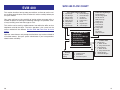
For the purposes of programming speed dial
numbers, the programmable keys are
known as A, B, C, D, E and F and are
defined below.
•
•
•
•
The A key is not used.
The B key inserts a flash.
The C key inserts a pause.
The D key is used for pulse to tone conversion. If your system uses rotary (or
A
B
C
DS 24D DEFAULT
PROGRAMMING
KEYS LAYOUT
D
E
F
17