1
FAX 1195L
Software User’s Guide
Read this manual carefully before you use this machine and keep it handy for future reference. For safe and correct1
use, be sure to read “Safety Information” pamphlet and “Product Safety Guide”.
Definitions of notes
We use the following icons throughout this User’s Guide:
Note
Notes tell you how you should respond to a situation that may arise or give
tips about how the operation works with other features.
Compilation and publication notice
Under our supervision, this manual has been compiled and published, covering the latest product’s
descriptions and specifications.
The contents of this manual and the specifications of this product are subject to change without notice.
We reserve the right to make changes without notice in the specifications and materials contained herein and
shall not be responsible for any damages (including consequential) caused by reliance on the materials
presented, including but not limited to typographical and other errors relating to the publication.
©2013 Ricoh Company, Ltd.
IMPORTANT NOTE
This product is approved for use in the country of purchase only. Do not use this product outside the
country of purchase as it may violate the power regulations of that country.
Before using this manual, please be sure to install available drivers and software from the CD-ROM
attached to your machine.
Windows® XP in this document represents Windows® XP Professional, Windows® XP Professional x64
Edition and Windows® XP Home Edition.
Windows Vista® in this document represents all editions of Windows Vista®.
Windows® 7 in this document represents all editions of Windows® 7.
i
Table of Contents
Section I
1
Machine operation keys
Using the control panel
2
Using the printer keys ................................................................................................................................2
Job Cancel...........................................................................................................................................2
Section II Windows®
2
Printing
4
Using the printer driver ..............................................................................................................................4
Printing a document...................................................................................................................................5
Manual duplex (two-sided) printing............................................................................................................6
Guidelines for printing on both sides of the paper ...............................................................................6
Manual duplex printing ........................................................................................................................6
Simultaneous scanning, printing and faxing ..............................................................................................7
Printer driver settings.................................................................................................................................8
Accessing the printer driver settings..........................................................................................................9
Basic tab ..................................................................................................................................................10
Paper Size .........................................................................................................................................10
Orientation .........................................................................................................................................11
Copies ...............................................................................................................................................11
Media Type........................................................................................................................................12
Resolution..........................................................................................................................................12
Print Settings .....................................................................................................................................13
Multiple Page.....................................................................................................................................13
Manual duplex (two-sided)/ Booklet ..................................................................................................14
Paper Source ....................................................................................................................................15
Advanced tab...........................................................................................................................................16
Scaling...............................................................................................................................................16
Reverse Print.....................................................................................................................................16
Use Watermark..................................................................................................................................17
Watermark Settings ...........................................................................................................................17
Header-Footer Print...........................................................................................................................19
Toner Save Mode ..............................................................................................................................19
Administrator .....................................................................................................................................19
Other Print Options............................................................................................................................20
Density Adjustment............................................................................................................................20
Improve Print Output .........................................................................................................................20
Skip Blank Page ................................................................................................................................21
Print Profiles tab ......................................................................................................................................22
Edit a Profile ......................................................................................................................................23
Support ....................................................................................................................................................24
Tray Settings tab......................................................................................................................................25
Status Monitor..........................................................................................................................................27
Monitoring the machine’s status ........................................................................................................28
ii
3
Scanning
29
Scanning a document using the WIA driver.............................................................................................29
WIA compliant ...................................................................................................................................29
Scanning a document into the PC .....................................................................................................29
Scanning a document using the WIA driver
(Windows Photo Gallery and Windows Fax and Scan) ........................................................................34
Scanning a document into the PC .....................................................................................................34
Scanning a document using the TWAIN driver........................................................................................36
Scanning a document into the PC .....................................................................................................36
Pre-Scanning to crop a portion you want to scan..............................................................................37
Settings in the Scanner Setup dialog box..........................................................................................38
4
Remote Setup
42
Remote Setup..........................................................................................................................................42
5
PC-FAX Send Software
44
PC-FAX sending ......................................................................................................................................44
Sending a file as a PC-FAX...............................................................................................................44
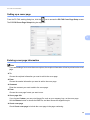
Setting up user information................................................................................................................45
Sending setup....................................................................................................................................46
Setting up a cover page.....................................................................................................................47
Entering cover page information........................................................................................................47
Address Book ..........................................................................................................................................48
Address Book ....................................................................................................................................49
Setting up a member in the Address Book ........................................................................................49
Setting up a group for broadcasting ..................................................................................................50
Editing member information...............................................................................................................50
Deleting a member or group..............................................................................................................51
Exporting the Address Book ..............................................................................................................51
Importing to the Address Book ..........................................................................................................53
A
Index
55
iii
Section I
Machine operation keys
Using the control panel
2
I
1
Using the control panel
1
1
Using the printer keys
1
You can access the following features from your machine’s control panel.
Job Cancel
To cancel the current print job, press
pressing
.
1
. You can clear the data that is left in the machine’s memory by
2
Section II
®
Windows
Printing
Scanning
Remote Setup
PC-FAX Send Software
II
4
29
42
44
2
Printing
2
Note
2
The screens in this section are from Windows® 7. Screens on your PC may vary depending on your
operating system.
Using the printer driver
2
A printer driver is software that translates data from the format used by a PC into the format needed by a
particular printer, using a printer command language or page description language.
The printer drivers are available from the CD-ROM attached to your machine.
4
Printing
Printing a document
2
When the machine receives data from your computer, it begins printing by picking up paper from the paper
tray. The paper tray can feed many types of paper and envelopes. (For information about the Paper Tray and
Recommended paper, see Basic User’s Guide.)
a
From your application, choose the Print command.
If any other printer drivers are installed on your computer, choose TYPE 1195L Printer as your printer
driver from the Print or Print Settings menu in your software application, and then click OK to begin
printing.
Note
You can choose the paper size and orientation in your application software.
If your application software does not support your custom paper size, choose the next largest paper size.
Then adjust the print area by changing the right and left margins in your application software.
5
2
Printing
Manual duplex (two-sided) printing
2
The supplied printer driver supports manual duplex printing.
2
Guidelines for printing on both sides of the paper
2
If the paper is thin, it may wrinkle.
If paper is curled, turn over the stack, straighten it and then put it back in the paper tray or manual feed slot.
If the paper is not feeding properly, it may be curled. Remove the paper, straighten it and turn over the
stack.
When you use the manual duplex function, it is possible that there may be paper jams or poor print quality.
If there is a paper jam, see Basic User’s Guide: Error and maintenance messages. If you have a print
quality problem, see Basic User’s Guide: Improving the print quality.
Manual duplex printing
2
The machine prints all the even-numbered pages on one side of the paper first. Then, the printer driver
instructs you (with a pop-up message) to reinsert the paper. Before reinserting the paper, straighten it well,
or you may get a paper jam. Very thin or thick paper is not recommended.
6
Printing
Simultaneous scanning, printing and faxing
2
Your machine can print from your computer while sending or receiving a fax in memory, or while scanning a
document into the computer. Fax sending will not be stopped during the computer printing. However, when
the machine is copying or receiving a fax on paper, it pauses the computer printing operation, and then
continues printing when copying or fax receiving has finished.
Note
Even if Toner Low or Toner Ended is displayed on the LCD, fax sending and scanning are available.
7
2
Printing
Printer driver settings
2
You can change the following printer settings when you print from your computer:
Paper Size
2
Orientation
Copies
Media Type
Resolution
Print Settings
Multiple Page
Duplex / Booklet
Paper Source
Scaling
Reverse Print
Use Watermark
Header-Footer Print
Toner Save Mode
Administrator
Density Adjustment
Improve Print Output
Skip Blank Page
Print Profiles
The following pages provide an overview of the printer driver settings. For more information, see the Help text
in the printer driver.
8
Printing
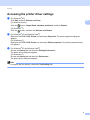
Accessing the printer driver settings
a
2
(For Windows ® XP)
Click Start, and then Printers and Faxes.
(For Windows Vista®)
Click the
2
button, Control Panel, Hardware and Sound, and then Printers.
(For Windows ® 7)
Click the
button, and then click Devices and Printers.
b
(For Windows ® XP and Windows Vista®)
Right-click the TYPE 1195L Printer icon and select Properties. The printer properties dialog box
appears.
(For Windows ® 7)
Right-click the TYPE 1195L Printer icon and select Printer properties. The printer properties dialog
box appears.
c
(For Windows ® XP and Windows Vista®)
Choose the General tab and then click Printing Preferences....
The printer driver dialog box appears.
(For Windows ® 7)
Choose the General tab and then click Preferences....
The printer driver dialog box appears.
Note
To configure the tray settings, choose the Tray Settings tab.
9
Printing
Basic tab
2
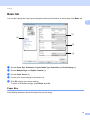
You can also change the Page Layout settings by clicking the illustration on the left side of the Basic tab.
2
(1)
(4)
(2)
(3)
a
b
c
d
e
Choose Paper Size, Orientation, Copies, Media Type, Resolution and Print Settings (1).
Choose Multiple Page and Duplex / Booklet (2).
Choose Paper Source (3).
Confirm your current settings in the window (4).
Click OK to apply your chosen settings.
To return to the default settings, click Default, then OK.
Paper Size
2
From the drop-down box choose the Paper Size you are using.
10
Printing
Orientation
2
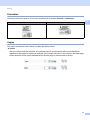
Orientation selects the position of how your document will be printed (Portrait or Landscape).
Portrait (Vertical)
2
Landscape (Horizontal)
Copies
2
The copies selection sets the number of copies that will be printed.
Collate
With the Collate check box selected, one complete copy of your document will be printed and then
repeated for the number of copies you selected. If the Collate check box is not selected, then each page
will be printed for all the copies selected before the next page of the document is printed.
11
Printing
Media Type
2
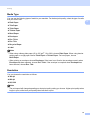
You can use the following types of media in your machine. For the best print quality, select the type of media
that you wish to use.
2
Plain Paper
Thin Paper
Thick Paper
Thicker Paper
Bond Paper
Envelopes
Env. Thick
Env. Thin
Recycled Paper
Label
Note
• When using ordinary plain paper (60 to 105 g/m2, 16 to 28 lb) choose Plain Paper. When using heavier
weight paper or rough paper choose Thick Paper or Thicker Paper. For bond paper, choose
Bond Paper.
• When printing on envelopes choose Envelopes. If the toner is not fixed to the envelope correctly when
Envelopes has been selected, choose Env. Thick. If the envelope is crumpled when Envelopes has
been selected, choose Env. Thin.
Resolution
2
You can choose the resolution as follows.
300 dpi
600 dpi
HQ 1200
Note
The print speed will change depending on what print quality setting you choose. Higher print quality takes
longer to print, while lower print quality takes less time to print.
12
Printing
Print Settings
2
You can change the print settings as follows:
Graphics
2
This is the best mode for printing documents that contain graphics.
Text
This is the best mode for printing text documents.
Manual
You can change the settings manually by choosing Manual and clicking the Manual Settings... button.
You can set brightness, contrast and other settings.
Multiple Page
2
The Multiple Page selection can reduce the image size of a page allowing multiple pages to be printed on
one sheet of paper or enlarge the image size for printing one page on multiple sheets of paper.
Page Order
When N in 1 option is selected, the page order can be selected from the drop-down list.
Border Line
When printing multiple pages onto one sheet, with the Multiple Page feature, you can choose to have a
solid border, dashed border or no border around each page on the sheet.
Print cut-out line
When 1 in NxN pages option is selected, the Print cut-out line option can be selected. This option allows
you to print a faint cut-out line around the printable area.
13
Printing
Manual duplex (two-sided)/ Booklet
2
When you want to print a booklet or do manual duplex printing, use this function.
None
2
Disable duplex printing.
Duplex (Manual)
When you want to do duplex printing, use this option.
• Duplex (Manual)
The machine prints all the even-numbered pages first. Then the printer driver will stop and show the
instructions required to re-insert the paper. When you click OK the odd-numbered pages will be printed.
When you choose Duplex (Manual), the Duplex Settings... button becomes available to select. You can
set the following settings in the Duplex Settings dialog box.
• Duplex Type
There are four types of duplex binding directions available for each orientation.
• Binding Offset
When you check Binding Offset, you can also specify the offset for binding in inches or millimetres.
Booklet (Manual)
Use this option to print a document in booklet format using duplex printing; it will arrange the document
according to the correct page numbers and allows you to fold at the centre of the print output without
having to change the order of the pages.
• Booklet (Manual)
The machine prints all the even-numbered sides first. Then the printer driver will stop and show the
instructions required to re-insert the paper. When you click OK the odd-numbered sides will be printed.
When you choose Booklet (Manual), the Duplex Settings... button becomes available to select. You can
set the following settings in the Duplex Settings dialog box.
• Duplex Type
There are two types of duplex binding directions available for each orientation.
• Booklet Printing Method
When Divide into Sets is selected:
This option allows you to print the whole booklet into smaller individual booklet sets, it still allows you
to fold at the center of the smaller individual booklet sets without having to change the order of the
pages. You can specify the number of sheets in each smaller booklet set, from 1 to 15. This option can
help when folding the printed booklet that has a large number of pages.
• Binding Offset
When you check Binding Offset, you can also specify the offset for binding in inches or millimetres.
14
Printing
Paper Source
2
You can choose Auto Select, Tray1 or Manual and specify separate trays for printing the first page and for
printing from the second page onwards.
15
2
Printing
Advanced tab
2
2
(1)
(2)
(3)
(4)
(5)
(6)
(7)
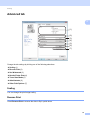
Change the tab settings by clicking one of the following selections:
Scaling (1)
Reverse Print (2)
Use Watermark (3)
Header-Footer Print (4)
Toner Save Mode (5)
Administrator (6)
Other Print Options (7)
Scaling
2
You can change the print image scaling.
Reverse Print
2
Check Reverse Print to reverse the data to flip it upside down.
16
Printing
Use Watermark
2
You can put a logo or text into your document as a watermark. You can choose one of the preset Watermarks,
or you can use a bitmap file that you have created. Check Use Watermark and then click the Settings...
button.
Watermark Settings
2
2
17
Printing
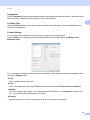
Transparent
2
Check Transparent to print the watermarked image in the background of your document. If this feature is not
checked then the watermark will be printed on top of your document.
2
In Outline Text
2
Check In Outline Text if you only want to print an outline of the watermark. It is only available when you
choose a text watermark.
Custom Settings
2
You can choose which watermark to print on the first page or on the other pages.
Click the Add button to add the watermark settings and then choose Use Text or Use Bitmap File in
Watermark Style.
You can change the additional watermark’s size and position on the page by selecting the watermark, and
clicking the Settings button.
Title
Enter a suitable title into the field.
Text
Enter your Watermark Text into the Text box, and then choose the Font, Style, Size and Darkness.
Bitmap
Enter the file name and location of your bitmap image in the File box, or click Browse to search for the
file. You can also set the scaling size of the image.
Position
Use this setting if you want to control the position of the watermark on the page.
18
Printing
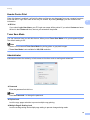
Header-Footer Print
2
When this feature is enabled, it will print the date and time on your document from your computer’s system
clock and the PC login user name or the text you entered. By clicking Settings, you can customize the
information.
2
ID Print
If you select Login User Name, your PC login user name will be printed. If you select Custom and enter
the text in the Custom edit box, the text you entered will be printed.
Toner Save Mode
2
You can conserve toner use with this feature. When you set Toner Save Mode to On, prints appears lighter.
The default setting is Off.
Note
• We do not recommend Toner Save Mode for printing photo or greyscale images.
• Toner Save Mode is not available for HQ 1200 resolution.
Administrator
2
Administrators have the authority to limit access to functions such as scaling and watermark.
Password
Enter the password into this box.
Note
Click Set Password... to change the password.
Copies Lock
Lock the copy pages selection to prevent multiple copy printing.
Multiple Page & Scaling Lock
Lock the scaling setting and multiple page setting to prevent changes being made.
19
Printing
Watermark Lock
Lock the current settings of the Watermark option to prevent changes being made.
Header-Footer Print Lock
2
Lock the current settings of the Header-Footer Print option to prevent changes being made.
Other Print Options
2
You can set the following in Printer Function:
Density Adjustment
Improve Print Output
Skip Blank Page
Density Adjustment
2
Increase or decrease the print density.
Improve Print Output
2
This feature allows you to improve a print quality problem.
Reduce Paper Curl
If you choose this setting, the paper curl may be reduced.
If you are printing only a few pages, you do not need to choose this setting. We recommend that you
change the printer driver setting in Media Type to the thin setting.
Note
This operation will decrease the temperature of the machine’s fusing process.
Improve Toner Fixing
If you choose this setting, the toner fixing on paper may be improved. If this selection does not provide
enough improvement, change the printer driver setting in Media Type to a thick setting.
Note
This operation will increase the temperature of the machine’s fusing process.
Reduce Ghosting
If you are using the machine in a high humidity environment this setting may reduce ghosting on the paper.
Do not use this setting if the ambient humidity is below 30% or ghosting may increase.
Note
This feature may not reduce ghosting for all types of paper. Before you buy a lot of paper, test a small
quantity to make sure that the paper is suitable.
20
Printing
Skip Blank Page
2
If Skip Blank Page is checked, the printer driver automatically detects blank pages and excludes them from
printing.
Note
This option does not work when you choose the following options:
• Use Watermark
• Header-Footer Print
• N in 1 or 1 in NxN Pages in Multiple Page
• Duplex (Manual) or Booklet (Manual)
21
2
Printing
Print Profiles tab
2
Print Profiles are editable presets designed to give you quick access to frequently used printing
configurations.
2
5
1
2
3
4
Print profile list box (1)
Edit a profile(2)
You can edit and save a new print profile.
Restore default profiles(3)
Click to restore all the default print profiles.
Always show Print Profiles tab first.(4)
Current print profile view(5)
a
b
c
Choose your profile from the print profile list box.
If you want to display the Print Profiles tab at the front of the window from the next time you print, check
Always show Print Profiles tab first.
Click OK to apply your chosen profile.
22
Printing
Edit a Profile
2
The Save your profile changes dialog box appears by clicking Edit a profile.
a
b
c
Choose an icon you want to use from the Icon list.
2
Enter the desired title in Name.
Choose the print profile you want to overwrite, then click OK.
Note
You can overwrite the preset print profiles.
23
Printing
Support
2
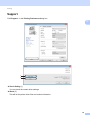
Click Support... in the Printing Preferences dialog box.
2
1
2
Check Setting (1)
You can check the current driver settings.
About (2)
This will list the printer driver files and version information.
24
Printing
Tray Settings tab
2
Note
To access the Tray Settings tab, see Accessing the printer driver settings uu page 9.
2
You can define the paper size for each paper tray and auto detect the serial number in the Tray Settings tab
as follows.
(5)
(6)
(2)
(1)
(4)
(3)
Paper Source Setting (1)
This feature lists the paper size assigned to each tray. The settings applied in Paper Size (2) and Update
(4) are displayed.
Paper Size (2)
This setting allows you to define which paper size is used for the tray and manual feed slot. Highlight the
paper source you want to define and then choose the paper size from the drop-down list. Click Update (4)
to apply the setting to the tray.
Default Source (3)
This setting allows you to choose the default paper source that your document will be printed from. Choose
the Default Source from the drop-down list and click Update (4) to save your setting. The Auto Select
setting will automatically pull paper from any paper source (tray or manual feed slot) that has a defined
paper size that matches your document.
25
Printing
Update (4)
The Update function reflects the Paper Size (2) setting in Paper Source Setting (1).
Serial No. (5)
By clicking Auto Detect (6), the printer driver will query the machine and display its serial number. If it fails
to receive the information, the screen will display “---------------”.
Auto Detect (6)
The Auto Detect function obtains the machine’s serial number by initiating communication between the
PC and the machine.
Note
The Auto Detect function is not available under the following machine conditions:
• The machine’s power switch is Off.
• The cable is not connected to the machine correctly.
26
2
Printing
Status Monitor
2
The Status Monitor utility is a configurable software tool for monitoring the status of one or more devices,
allowing you to get immediate notification of error messages such as paper empty or paper jam.
2
You can check the device status at anytime by double-clicking the icon in the tasktray or by choosing
Status Monitor located in Start/All Programs/RFG/TYPE 1195L on your PC.
(Windows® 7)
If you have set the Enable Status Monitor on startup during installation, you will find the
Status Monitor icon on the taskbar.
To show the Status Monitor icon on your taskbar, click the
in the small window. Then drag the
icon to the taskbar.
button or the
button. The Status Monitor icon will appear
Note
For more information about using the Status Monitor software, right-click the Status Monitor icon and
choose Help.
27
Printing
Monitoring the machine’s status
2
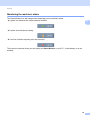
The Status Monitor icon will change colour depending on the machine’s status.
A green icon indicates the normal stand-by condition.
2
A yellow icon indicates a warning.
A red icon indicates a printing error has occurred.
There are two locations where you can display the Status Monitor on your PC - in the tasktray or on the
desktop.
28
3
Scanning
3
The scanning operations and drivers will be different depending on your operating system. The machine uses
a TWAIN compliant driver for scanning documents from your applications.
Two scanner drivers are installed. A TWAIN compliant scanner driver (See Scanning a document using the
TWAIN driver uu page 36) and a Windows® Imaging Acquisition (WIA) driver (See Scanning a document
using the WIA driver uu page 29).
Scanning a document using the WIA driver
3
3
WIA compliant
3
You can choose Windows® Image Acquisition (WIA) for scanning images from the machine. You can scan
images directly into any application that supports WIA or TWAIN scanning.
Scanning a document into the PC
3
You can use the ADF (automatic document feeder) to scan a whole page.
a
b
Load your document.
Start Microsoft ® Paint to scan a document.
Note
The instructions for scanning in this Guide are for when you use Microsoft® Paint. The scanning steps may
vary when using other software applications.
c
Click From Scanner or Camera on the File menu.
The Scanner Setup dialog box appears.
29
Scanning
d
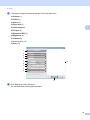
If necessary, adjust the following settings in the Scanner Setup dialog box:
Paper source (1)
Picture type (2)
Adjust the quality of the scanned picture (3)
Page size (4)
3
Scan (5)
1
2
3
4
5
e
f
g
Choose Document Feeder from the Paper source drop-down list (1).
Choose the picture type (2).
Choose the Page size from the drop-down list (4).
30
Scanning
h
If you need advanced settings, click Adjust the quality of the scanned picture (3). You can choose
Brightness, Contrast, Resolution (DPI) and Picture type from Advanced Properties. Click OK after
you have changed the settings.
3
Note
• The scanner resolution can be set as high as 1200 dpi.
• For resolutions greater than 1200 dpi, use the Scanner Utility. (See Scanner Utility uu page 32.)
i
Click the Scan button in the Scan dialog box (5).
The machine starts scanning the document.
31
Scanning
Scanner Utility
3
The Scanner Utility is used for configuring the WIA scanner driver for resolutions greater than 1200 dpi. You
must restart your PC for the new settings to take effect.
Note
If you scan the document at a resolution greater than 1200 dpi, the file size may be very large. Make sure
that you have enough memory and hard disk space for the size of the file you are trying to scan. If you do
not have enough memory or hard disk space then your PC may freeze and you could lose your file.
Running the utility
You can run the utility by choosing the Scanner Utility located in Start/All Programs/RFG/TYPE 1195L/
Scanner Settings/Scanner Utility.
Screens on your computer may vary depending on your operating system or the model of your machine.
32
3
Scanning
Note
(Windows Vista® and Windows ® 7)
When the User Account Control screen appears, do the following.
• For users who have administrator rights: Click Yes.
3
• For users who do not have administrator rights: Enter the administrator password and click Yes.
33
Scanning
Scanning a document using the WIA driver
(Windows Photo Gallery and Windows Fax and Scan)
Scanning a document into the PC
3
3
3
You can use the ADF (automatic document feeder) to scan a whole page.
a
b
c
Load your document.
Open your software application to scan the document.
Do one of the following:
(Windows Photo Gallery)
Click File, then Import from Camera or Scanner.
(Windows Fax and Scan)
Click File, New, then Scan.
d
e
Choose the scanner you want to use.
Click Import or OK.
The Scan dialog box appears.
34
Scanning
f
If necessary, adjust the following settings in the Scan dialog box:
Scanner (1)
Profile (2)
Source (3)
Paper size (4)
3
Color format (5)
File type (6)
Resolution (DPI) (7)
Brightness (8)
Contrast (9)
Scanning area (10)
Scan (11)
1
2
3
4
5
6
7
10
8
9
11
g
Click Scan in the Scan dialog box.
The machine starts scanning the document.
35
Scanning
Scanning a document using the TWAIN driver
3
A TWAIN compliant scanner driver is available from the CD-ROM attached to your machine. TWAIN drivers
meet the standard universal protocol for communicating between scanners and applications. This means that
you can scan images directly into hundreds of software applications that support TWAIN scanning. These
applications include popular programs like Adobe® Photoshop®, CorelDRAW® and many more.
3
Scanning a document into the PC
3
You can use the ADF (automatic document feeder) to scan a whole page.
a
b
Load your document.
c
If necessary, adjust the following settings in the Scanner Setup dialog box:
Start your graphics application, and select scan operation.
The Scanner Setup dialog box appears.
Scan (Image Type) (1)
Resolution (2)
Scan Type (3)
Brightness (4)
Contrast (5)
Document Size (6)
d
Click Start.
When scanning is finished, click Cancel to return to the graphics application window.
36
Scanning
Note
After you select a document size, you can adjust the scanning area further by clicking the left mouse
button and dragging it. This is required when you want to crop an image when scanning. (See
Pre-Scanning to crop a portion you want to scan uu page 37.)
Pre-Scanning to crop a portion you want to scan
3
You can preview your image and crop unwanted portions before scanning by using the PreScan button.
When you are satisfied with the preview, click the Start button in the Scanner Setup dialog box to scan the
image.
a
b
Follow the steps from a to b of Scanning a document into the PC uu page 36.
c
Click PreScan.
The whole image is scanned into the PC and appears in the Scanning Area (1) of the Scanner Setup
dialog box.
Choose the settings for Scan (Image Type), Resolution, Scan Type, Brightness, Contrast and
Document Size, as needed.
1
37
3
Scanning
d
Press and hold down the left mouse button and drag it over the portion you want to scan.
3
1
1 Scanning area
Note
You can enlarge the image using the
icon, and then use the
icon to restore the image to its
original size.
e
f
g
Load your document again.
Click Start.
When scanning is finished, click Cancel to return to the graphics application window.
This time only the chosen area of the document appears in your application window.
In your application window, use the options available to refine the image.
Settings in the Scanner Setup dialog box
3
Scan (Image Type)
3
Choose the output image type from Photo, Web or Text. Resolution and Scan Type will be altered for each
default setting.
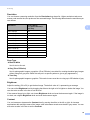
The default settings are listed in the table below:
Scan (Image Type)
Resolution
Scan Type
Photo
Use for scanning photo images.
300 x 300 dpi
True Grey
Web
Use for attaching the scanned image to web pages. 100 x 100 dpi
True Grey
Text
Use for scanning text documents.
Black & White
200 x 200 dpi
38
Scanning
Resolution
3
You can choose a scanning resolution from the Resolution drop-down list. Higher resolutions take more
memory and transfer time, but produce a finer scanned image. The following table shows the resolutions you
can choose.
Resolution
Black & White/
Grey (Error Diffusion)/
True Grey
100 x 100 dpi
Yes
150 x 150 dpi
Yes
200 x 200 dpi
Yes
300 x 300 dpi
Yes
400 x 400 dpi
Yes
600 x 600 dpi
Yes
1200 x 1200 dpi
Yes
2400 x 2400 dpi
Yes
4800 x 4800 dpi
Yes
9600 x 9600 dpi
Yes
19200 x 19200 dpi
Yes
3
Scan Type
3
Black & White
Use for text or line art.
Grey (Error Diffusion)
Use for photographic images or graphics. (Error Diffusion is a method for creating simulated grey images
without using true grey dots. Black dots are put in a specific pattern to give a grey appearance.)
True Grey
Use for photographic images or graphics. This mode is more exact due to using up to 256 shades of grey.
Brightness
3
Adjust the setting (-50 to 50) to get the best image. The default value is 0, representing an average.
You can set the Brightness level by dragging the slider to the right or left to lighten or darken the image. You
can also enter a value in the box to set the level.
If the scanned image is too light, set a lower Brightness level and scan the document again. If the image is
too dark, set a higher Brightness level and scan the document again.
Contrast
3
You can increase or decrease the Contrast level by moving the slider to the left or right. An increase
emphasizes dark and light areas of the image, while a decrease reveals more detail in grey areas. You can
also enter a value in the box to set the Contrast.
39
Scanning
Note
The Contrast setting is only available when Grey (Error Diffusion) or True Grey is chosen.
When scanning photographs or other images for use in a word processor or other graphics application, try
different settings for the contrast and resolution to see which setting best suits your needs.
Document Size
3
Choose one of the following sizes:
A4 210 x 297 mm (8.3 x 11.7 in)
JIS B5 182 x 257 mm (7.2 x 10.1 in)
JIS B6 128 x 182 mm (5 x 7.2 in)
Letter 215.9 x 279.4 mm (8 1/2 x 11 in)
Legal 215.9 x 355.6 mm (8 1/2 x 14 in)
A5 148 x 210 mm (5.8 x 8.3 in)
A6 105 x 148 mm (4.1 x 5.8 in)
Executive 184.1 x 266.7 mm (7 1/4 x 10 1/2 in)
10 x 15 cm (4 x 6 in)
13 x 20cm (5 x 8 in)
9 x 13 cm (3.5 x 5 in)
13 x 18 cm (5 x 7 in)
Postcard 1 100 x 148 mm (3.9 x 5.8 in)
Postcard 2 (Double) 148 x 200 mm (5.8 x 7.9 in)
Custom
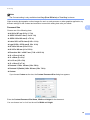
If you choose Custom as the size, the Custom Document Size dialog box appears.
Enter the Custom Document Size Name, Width and Height for the document.
You can choose ‘mm’ or ‘inch’ as the unit for Width and Height.
40
3
Scanning
Note
• You can see the actual paper size you chose on the screen.
3
• Width: shows the width of scanning area.
• Height: shows the height of scanning area.
• Data Size: shows the rough data size in Bitmap format. The size will be different for other file formats
such as JPEG.
• User adjustable from 8.9 x 8.9 mm to 215.9 x 355.6 mm.
41
4
Remote Setup
4
Remote Setup
4
The Remote Setup program lets you configure many machine settings from a Windows® application. When
you start this application, the settings on your machine will be downloaded automatically to your PC and
displayed on your PC screen. If you change the settings, you can upload them directly to the machine.
Click the Start button, All Programs, RFG, TYPE 1195L and Remote Setup.
4
OK
Lets you start uploading data to the machine and exit the Remote Setup application. If an error message
is displayed, enter the correct data again and then click OK.
Cancel
Lets you exit the Remote Setup application without uploading data to the machine.
Apply
Lets you upload data to the machine without exiting the Remote Setup application.
42
Remote Setup
Print
Lets you print the chosen items on the machine. You cannot print the data until it is uploaded to the
machine. Click Apply to upload the new data to the machine and then click Print.
Export
Lets you save the current configuration settings to a file.
Import
Lets you read the settings from a file.
4
Note
You can use the Export button to save Quick Dial or all your settings for your machine.
43
5
PC-FAX Send Software
5
PC-FAX sending
5
The PC-FAX feature lets you use your PC to send a document from an application as a standard fax. All you
have to do is set up the receiving parties as members or groups in your PC-FAX Address Book or simply enter
the destination address or fax number into the user interface. You can use the Address Book Search feature
to quickly find members to send to.
Note
The PC-FAX software can only send Black & White fax documents in A4 size.
Sending a file as a PC-FAX
a
b
c
5
5
Create a file in any application on your PC.
Click File, then Print.
The Print dialog box appears:
Choose PC-FAX TYPE 1195L as your printer, and then click Print.
The PC-FAX sending dialog box appears:
44
PC-FAX Send Software
d
Enter a fax number using any of the following methods:
Use the dial pad to enter the number.
Click the Address Book button, and then choose a member or group from the Address Book.
If you make a mistake, click All Clear to delete all the entries.
e
To include a cover page, check Add Cover Page.
Note
You can click the
f
icon to edit a cover page.
5
Click Start to send the fax.
Note
• If you want to cancel the fax, click Cancel.
• If you want to redial a number, click Redial to scroll through the last five fax numbers, choose a number,
and then click Start.
Setting up user information
5
Note
You can access User Information from the PC-FAX sending dialog box by clicking the
icon.
(See Sending a file as a PC-FAX uu page 44.)
a
Click the Start button, All Programs, RFG, TYPE 1195L, PC-FAX Sending, then PC-FAX Setup.
The PC-FAX Setup dialog box appears:
b
Enter this information to create the fax header and cover page.
45
PC-FAX Send Software
c
Click OK to save the User Information.
Note
You can set up the User Information separately for each Windows® account.
Sending setup
5
From the PC-FAX Setup dialog box, click the Sending tab to display the screen below.
5
Outside line access
Enter a number to access an outside line here. This is sometimes required by local PBX telephone
systems (for example, dialling 9 to get an outside line in your office). For PC-Fax send, this number will be
applied and the Dial Prefix set in the function menu will be ignored.
Include header
To add the header information you entered in the User Information tab to the top of your sent faxes, check
the Include header box. (See Setting up user information uu page 45.)
46
PC-FAX Send Software
Setting up a cover page
From the PC-FAX sending dialog box, click the
5
icon to access the PC-FAX Cover Page Setup screen.
The PC-FAX Cover Page Setup dialog box appears:
5
Entering cover page information
5
Note
If you are sending a fax to more than one recipient, the recipient information will not be printed on the cover
page.
To
Choose the recipient information you want to add to the cover page.
From
Choose the sender information you want to add to the cover page.
Comment
Enter the comment you want to add to the cover page.
Form
Choose the cover page format you want to use.
Cover page title
If you choose Custom, you can put a bitmap file, such as your company logo, on the cover page.
Use the Browse button to choose the BMP file, and then choose the alignment style.
Count cover page
Check Count cover page to include the cover page in the page numbering.
47
PC-FAX Send Software
Address Book
5
If Outlook or Outlook Express is installed on your PC, you can choose in the Select Address Book dropdown list which address book to use for PC-FAX sending. There are five types: PC-FAX Address Book,
Outlook, Outlook Express (Windows® XP only), Windows Mail Address Book (Windows Vista® only) or
Windows Contacts (Windows® 7 only).
Click the Browse button to choose the database file.
5
You can use the address book you have chosen in the Select Address Book drop-down list by clicking the
Address Book button in the PC-FAX Sending dialog box.
Outlook Express Address Book
5
Note
• To use your Outlook Address Book, you must select Microsoft® Outlook 2000, 2002, 2003, 2007 or 2010
as your default E-mail application.
• For Microsoft® Outlook 2010, the 64-bit version is not supported.
48
PC-FAX Send Software
Address Book
a
5
Click the Start button, All Programs, RFG, TYPE 1195L, PC-FAX Sending, then
PC-FAX Address Book.
The Address Book dialog box appears:
5
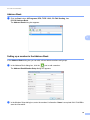
Setting up a member in the Address Book
5
In the Address Book dialog box you can add, edit and delete members and groups.
a
In the Address Book dialog box, click the
icon to add a member.
The Address Book Member Setup dialog box appears:
b
In the Member Setup dialog box, enter the member’s information. Name is a required field. Click OK to
save the information.
49
PC-FAX Send Software
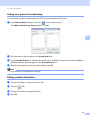
Setting up a group for broadcasting
5
You can create a group to send the same PC-FAX to several recipients at one time.
a
In the Address Book dialog box, click the
icon to create a Group.
The Address Book Group Setup dialog box appears:
5
b
c
Enter the name of the new group in the Group Name field.
d
After all the members you want have been added, click OK.
In the Available Names box, choose each member to be included in the group, and then click Add >>.
Members added to the group appear in the Group Members box.
Note
You can have up to 50 members in a group.
Editing member information
a
Choose the member or group you want to edit.
b
Click the
c
d
Change the member or group information.
5
icon.
Click OK.
50
PC-FAX Send Software
Deleting a member or group
a
Choose the member or group you want to delete.
b
Click the
c
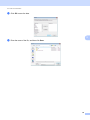
When the confirmation dialog box appears, click OK.
5
icon.
Exporting the Address Book
5
You can export the whole Address Book to an ASCII text file (*.csv). You can also create a vCard for an
address book member that can be attached to an outgoing E-mail (a vCard is an electronic business card
that contains the sender’s contact information). You can also export the Address Book as Remote Setup Dial
Data that can be used by the Remote Setup application of your machine. (See Remote Setup uu page 42.)
If you are creating a vCard, you must first click on the address book member you want to create the vCard for.
Exporting Address Book entries
5
Note
• If you are creating a vCard, you must first choose the member.
• If you choose vCard in step a, Save as type: will be vCard {*.vcf}.
a
Do one of the following:
From the Address Book, click File, Export, then Text.
From the Address Book, click File, Export, then vCard and go to step e.
From the Address Book, click File, Export, then Remote Setup Dial Data and go to step e.
b
From the Available Items column, choose the data fields you want to export and then click Add >>.
Note
Choose the items in the order you want them listed.
c
If you are exporting to an ASCII file, choose Tab or Comma from Divide Character. This chooses Tab
or Comma to separate the data fields.
51
5
PC-FAX Send Software
d
Click OK to save the data.
5
e
Enter the name of the file, and then click Save.
52
PC-FAX Send Software
Importing to the Address Book
5
You can import ASCII text files (*.csv), vCards (electronic business cards) or Remote Setup Dial Data into
your Address Book.
Importing an ASCII text file
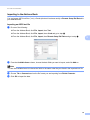
a
5
Do one of the following:
From the Address Book, click File, Import, then Text.
From the Address Book, click File, Import, then vCard and go to step e.
From the Address Book, click File, Import, then Remote Setup Dial Data and go to step e.
b
5
From the Available Items column, choose the data fields you want to import, and click Add >>.
Note
From the Available Items list choose the fields in the same order they are listed in the imported text file.
c
d
Choose Tab or Comma based on the file format you are importing from Divide Character.
Click OK to import the data.
53
PC-FAX Send Software
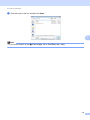
e
Enter the name of the file, and then click Open.
5
Note
If you chose Text file in step a, Files of type: will be Text files {*.txt; *.csv}.
54
A
Index
A
S
Administrator .......................................................16, 19
Scan
Resolution .............................................................. 39
TWAIN Compliant .................................................. 36
WIA Compliant ....................................................... 29
Scan Type
Black & White ......................................................... 39
Grey (Error Diffusion) ............................................. 39
True Grey ............................................................... 39
Status Monitor ........................................................... 27
Support ..................................................................... 24
B
Brightness ................................................................. 39
C
Contrast .................................................................... 39
D
Drivers
printer ....................................................................... 4
TWAIN ................................................................... 36
WIA ........................................................................ 29
E
T
A
Tray Settings ............................................................. 25
W
Watermark ..........................................................16, 17
Edit a Profile .............................................................. 23
F
FAX (PC-FAX)
address book ......................................................... 49
cover page ............................................................. 47
group ...................................................................... 50
sending .................................................................. 44
setup ...................................................................... 46
H
Header-Footer Print ............................................16, 19
P
Password .................................................................. 19
Print
Booklet printing ...................................................... 14
Manual duplex printing ........................................... 14
Print Profiles .............................................................. 22
R
Remote Setup ........................................................... 42
55
This machine is approved for use in the country of purchase only.
H560-6021