1
Manual
file:///D|/My%20Documents/dfu/320WN6/english/320wn6/MANUAL.HTM2005-11-07 12:38:41 PM
Safety & Troubleshooting
Safety and Troubleshooting Information
Safety Precautions and Maintenance • Installation Locations • FAQs • Troubleshooting •
Regulatory Information• Other Related Information
Safety precautions and maintenance
WARNING: Use of controls, adjustments or procedures other than those
specified in this documentation may result in exposure to shock, electrical
hazards and/or mechanical hazards.
Read and follow these instructions when connecting and using your computer monitor:
●
●
●
●
●
●
●
●
●
●
●
●
Unplug the monitor if you are not going to use it for an extensive period of time.
Unplug the monitor if you need to clean it with a slightly damp cloth. The screen many be
wiped with a dry cloth when the power is off. However, never use alcohol, solvents or
ammonia-based liquids.
Consult a service technician if the monitor does not operate normally when you have
followed the instructions in this manual.
The casing cover should be opened only by qualified service personnel.
Keep the monitor out of direct sunlight and away from stoves or any other heat source.
Remove any object that could fall into the vents or prevent proper cooling of the monitor’s
electronics.
Do not block the ventilation holes on the cabinet.
Keep the monitor dry. To avoid electric shock, do not expose it to rain or excessive moisture.
If turning off the monitor by detaching power cable or DC power cord, wait for 6 seconds
before attach the power cable or DC power cord for normal operation.
To avoid the risk of shock or permanent damage to the set do not expose the monitor to rain
or excessive moisture.
When positioning the monitor, make sure the power plug and outlet are easily accessible.
IMPORTANT: Always activate a screen saver program during your application. If a still
image in high contrast remains on the screen for an extended period of time, it may leave an
'after-image' or 'ghost image' on the front of the screen. This is a well-known phenomenon
that is caused by the shortcomings inherent in the LCD technology. In most cases the afterimage will disappear gradually over a period of time after the power has been switched off.
Be aware that the after-image symptom cannot be repaired and is not covered under
warranty.
file:///D|/My%20Documents/dfu/320WN6/english/320wn6/SAFETY/SAFETY.HTM (1 of 2)2005-11-07 12:38:50 PM
Safety & Troubleshooting
Consult a service technician if the monitor does not operate normally when the operating
instructions given in this manual have been followed.
RETURN TO TOP OF THE PAGE
Installation Locations
●
●
●
●
●
●
Avoid exposure to heat and extreme cold
Do not store or use the product in locations exposed to heat, direct sunlight or extreme cold.
Avoid moving the product between locations with large temperature differences. Choose a
site that falls within the following temperature and humidity ranges.
❍ Temperature: 0-35°C 32-95°F
❍ Humidity: 20-80% RH
Do not subject the product to severe vibration or high impact conditions. Do not place the
product inside a car boot.
Take care not to mishandle this product by either knocking or dropping during operation or
transportation.
Do not store or use the product in locations where there is a high level of humidity or in dusty
environments. Do not allow water or other liquids to spill on or into the product.
RETURN TO TOP OF THE PAGE
file:///D|/My%20Documents/dfu/320WN6/english/320wn6/SAFETY/SAFETY.HTM (2 of 2)2005-11-07 12:38:50 PM
About This Manual
About This Manual
About This Guide • Notational Descriptions
About This Guide
This electronic user's guide is intended for anyone who uses the Philips LCD Monitor TV. It
describes the features, setup, operation and other important information.
It includes the following sections:
●
●
●
●
●
●
●
●
Safety and Troubleshooting Information provides tips and solutions for common problems as
well as other related information you may need.
About This Electronic User's Manual gives an overview of information included, along with
notation icon descriptions and other documentation for your reference.
Product Information gives an overview of the monitor's features as well as the technical
specifications for this monitor.
Installing Your Monitor describes the initial setup process and gives an overview of how to
use the monitor.
On-Screen Display provides information on adjusting the settings on your monitor.
Remote Control provides information on adjusting the settings for your TV function.
Customer Care and Warranty contains a list of worldwide Philips Consumer Information
Centres along with help desk phone numbers and information on the warranty applicable to
your product.
Download and Print Option transfers this entire manual to your hard drive for easy reference.
RETURN TO TOP OF THE PAGE
Notational Descriptions
The following subsections describe notational conventions used in this document.
file:///D|/My%20Documents/dfu/320WN6/english/320wn6/ABOUT/ABOUT.HTM (1 of 2)2005-11-07 12:38:52 PM
About This Manual
Notes, Cautions and Warnings
Throughout this guide blocks of text may be accompanied by an icon and printed in bold or italic
type. These blocks contain notes, cautions or warnings. They are used as follows:
NOTE: This icon indicates important information and tips that help you make
better use of your computer system.
CAUTION: This icon indicates information that tells you how to avoid either
potential damage to hardware or loss of data.
WARNING: This icon indicates the potential for bodily harm and tells you how
to avoid the problem.
Some warnings may appear in alternate formats and may not be accompanied by an icon. In such
cases, the specific presentation of the warning is mandated by the relevant regulatory authority.
RETURN TO TOP OF THE PAGE
©2005 Koninklijke Philips Electronics N.V.
All rights reserved. Reproduction, copying, use, modification, hiring, renting, public performance, transmission and/or
broadcasting in whole or in part is prohibited without written consent of Philips Electronics N.V.
file:///D|/My%20Documents/dfu/320WN6/english/320wn6/ABOUT/ABOUT.HTM (2 of 2)2005-11-07 12:38:52 PM
Product Information
Product Information
Product Features • Lead-free Product • Technical Specifications • Resolution & Preset
Modes • Philips Pixel Defect Policy • Automatic Power Saving • Physical Specification •
Pin Assignment • Product Views
Product Features
320WN6
●
●
●
Less management effort for maximum productivity
❍ Multiple displays form a daisy chain to show uniform
❍ Monitor is network controllable for remote management
❍ Input connectors: CVBS, S-video, SCART, YPbPr, and RF (TV input)
Better front of screen experience
❍ Motion adaptive deinterlacing for razor sharp images
❍ 3D comb filter separates color for a razor-sharp image
❍ WXGA, wide format 1366 x 768 resolution for sharper display
❍ Adaptive brightness intensifier technology
❍ Ready to display SDTV, EDTV, and HDTV formats
Great convenience
❍ Zoom function to enable tiled matrix application
❍ Support hight-bandwidth digital content protection decryption
❍ Split screen for dual video/PC display
❍ Picture in picture for public display
* RF(TV input) is only available for 320WN6QS
RETURN TO TOP OF THE PAGE
Lead-free Product
file:///D|/My%20Documents/dfu/320WN6/english/320wn6/PRODUCT/PRODUCT.HTM (1 of 10)2005-11-07 12:39:02 PM
Product Information
Philips eliminated toxic substances like lead from its displays. Lead-free display
helps protect your health and promotes environmentally sound recovery and
disposal of waste from electrical and electronic equipment.Philips complies with the
European Community stringent RoHS Directive mandating restrictions on
hazardous substances in electrical and electronic equipment. With Philips, you can
be confident that your display device does not harm the environment.
Technical Specifications*
LCD PANEL
• Type
TFT LCD
• Screen size
31.51inch
• Pixel Pitch
0.17 x 0.511 mm
• LCD Panel type
1366 x 768 pixels
R.G.B. vertical stripe
Hard coating surface, anti-glare polarizer
• Effective viewing area
697.7 x 392.2 mm
• Display Colors
8 bits interface (16.7M colors)
PC SCANNING
• Vertical refresh rate
56Hz-75Hz
• Horizontal frequency
30kHz-63kHz
PC VIDEO
• Video dot rate
< 85 MHz
• Input impedance
- Video
75 ohm
- Sync
2.2K ohm
• Input signal levels
0.7 Vpp
• Sync input signal
Separate sync
file:///D|/My%20Documents/dfu/320WN6/english/320wn6/PRODUCT/PRODUCT.HTM (2 of 10)2005-11-07 12:39:02 PM
Product Information
• Sync polarities
Positive and negative
• Input Frequency
WXGA
Hsync 48 kHz, Vsync 60 Hz (N.I.)
SVGA
Hsync 38 kHz, Vsync 60 Hz (N.I.)
VGA/DVI-D Hsync 31 kHz, Vsync 60 Hz (N.I.)
• Video interface
D-sub, S-Video, TV-RF, SCART composite, components
video, and DVI
AUDIO
• Input level for PC/SVHS/SCART 500 mV nominal
• Loudspeaker
10W Stereo Audio (10W/channel RMS x2, 200Hz~10kHz, 8
ohm, 10% THD)
OPTICAL CHARACTERISTICS
• Contrast ratio
1200:1(with DCR on)
• Brightness
500 cd/m2 (typ.)
• Peak contrast angle
6 o'clock
• White Chromaticity
x: 0.283 y: 0.297 (at 9300°K)
x: 0.313 y: 0.329 (at 6500°K)
x: 0.328 y: 0.344 (at 5700°K)
• Viewing Angle (C/R >5)
Upper >89° (typ.)
Lower >89° (typ.)
Left >89° (typ.)
Right >89° (typ.)
• Response time
(G to G) 8ms(typ.) 12ms(max.)
sRGB
sRGB is a standard for ensuring correct exchange of colors between different devices (e.g.
digital cameras, monitors, printers, scanners, etc.)
Using a standard unified color space, sRGB will help represent pictures taken by an sRGB
compatible device correctly on your sRGB enabled Philips monitors. In that way, the colors are
calibrated and you can rely on the correctness of the colors shown on your screen.
Important with the use of sRGB is that the brightness and contrast of your monitor is fixed to a
predefined setting as well as the color gamut. Therefore it is important to select the sRGB
setting in the monitor's OSD.
To do so, at PC mode, open the OSD by pressing the MENU button of your monitor. Use the
file:///D|/My%20Documents/dfu/320WN6/english/320wn6/PRODUCT/PRODUCT.HTM (3 of 10)2005-11-07 12:39:02 PM
Product Information
down button to go to COLOR SETTINGS and press MENU again. Then move the down button
to go to NORMAL COLOR and press MENU again.
* This data is subject to change without notice.
RETURN TO TOP OF THE PAGE
Resolution & Preset Modes
• Recommended
1360 x 768 at 60Hz
10 factory preset modes:
Resolution
Mode
H. freq (kHz)
V. freq (Hz)
640x350
VGA-1
31.469
70.086
640x480
VGA VESA 60
31.469
59.940
640x480
VGA VESA 75
37.500
75.000
720x400
IBM VGA 3H
31.468
70.087
800x600
SVGA VESA 56
35.156
56.250
800x600
SVGA VESA 60
37.879
60.317
800x600
SVGA VESA 75
46.875
75.000
1024x768
XGA VESA 60
48.363
60.004
1024x768
XGA VESA 75
60.023
75.029
1280x768
CVT
47.700
60.000
1280x720
CVT
44.772
59.855
1360x768
VESA
47.700
60.000
480i
15.734
59.940
PC
Video
720x480
file:///D|/My%20Documents/dfu/320WN6/english/320wn6/PRODUCT/PRODUCT.HTM (4 of 10)2005-11-07 12:39:02 PM
Product Information
720x576
576i
15.625
50.000
720x480
480p
31.470
60.000
720x576
576p
31.250
50.000
1280x720
720p
37.500
50.000
1280x720
720p
45.000
60.000
1920x1080
1080i
28.125
50.000
1920x1080
1080i
33.750
60.000
RETURN TO TOP OF THE PAGE
Automatic Power Saving
If you have VESA DPMS compliance display card or software installed in your PC, the monitor
can automatically reduce its power consumption when not in use. If an input from a keyboard,
mouse or other input device is detected, the monitor will then 'wake up' automatically. The
following table shows the power consumption and signaling of this automatic power saving
feature:
Power Management Definition
VESA Mode
Video
H-sync
V-sync
Power Used
LED color
Active
On
Yes
Yes
100 W (typ.)
Blue
Sleep
Off
No
No
<5W
Amber
Switch Off
Off
-
-
<3W
Off
RETURN TO TOP OF THE PAGE
Physical Specifications
file:///D|/My%20Documents/dfu/320WN6/english/320wn6/PRODUCT/PRODUCT.HTM (5 of 10)2005-11-07 12:39:02 PM
Product Information
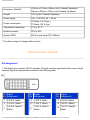
• Dimension (WxHxD) *
1014mm x 517mm x 244mm (incl. Pedestal, Speakers)
794mm x 490mm x 130mm (w/o Pedestal, Speakers)
• Weight
19.2 kg (incl. Pedestal, Speakers)
• Power supply
100 — 240 VAC, 60 — 50 Hz
• Power consumption
PC Mode: 100 W (typ.)
TV Mode: 130 W (typ.)
• Temperature (operating)
5° C to 35° C
• Relative humidity
20% to 80%
• System MTBF
50K hrs (excluding CCFL 50Khrs)
* This data is subject to change without notice.
RETURN TO TOP OF THE PAGE
Pin Assignment
1. The digital only connector (DVI-D) contains 24 signal contacts organized in three rows of eight
contacts. Signal pin assignments are listed in the following table:
Pin Signal
No. Assignment
Pin Signal
No. Assignment
Pin Signal
No. Assignment
1
T.M.D.S. Data2-
9
T.M.D.S. Data1-
17 T.M.D.S. Data0-
2
T.M.D.S. Data2+
10 T.M.D.S. Data1+
18 T.M.D.S. Data0+
3
T.M.D.S. Data2/4
Shield
11
T.M.D.S. Data1/3
Shield
19
T.M.D.S. Data0/5
Shield
file:///D|/My%20Documents/dfu/320WN6/english/320wn6/PRODUCT/PRODUCT.HTM (6 of 10)2005-11-07 12:39:02 PM
Product Information
4
No connect
12 No connect
20 No connect
5
No connect
13 No connect
21 No connect
6
DDC Clock
14 +5V Power
22
7
DDC Data
15 Hot Plug Detect
23 T.M.D.S. Clock+
8
No connect
16 Ground (for +5V)
24 T.M.D.S. Clock-
T.M.D.S. Clock
Shield
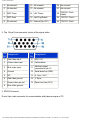
2. The 15-pin D-sub connector (male) of the signal cable:
Pin
Assignment
No.
Pin
Assignment
No.
1
Red video input
9
DDC +5V
2
Green video input
10 Cable detect
3
Blue video input
11
4
Ground
12 Serial data line (SDA)
5
NC
13 H. Sync / H+V
6
Red video ground
14 V. Sync
7
Green video ground
15 Data clock line (SCL)
8
Blue video ground
Identical output,
connected to pin 10
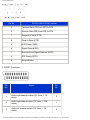
3. RS232 Connector
D-sub 9-pin male connector for communication with plasma engine or PC.
file:///D|/My%20Documents/dfu/320WN6/english/320wn6/PRODUCT/PRODUCT.HTM (7 of 10)2005-11-07 12:39:02 PM
Product Information
Pin No.
RS-232 (EIA-232-A) Function
3
Transmit Data (TD) from DTE to DCE
2
Receive Data (RD) from DCE to DTE
7
Request to Send (RTS)
8
Clear to Send (CTS)
6
DCE Ready (DSR)
5
Signal Ground (SG)
1
Received Line Signal Detector (DCD)
4
DTE Ready (DTR)
9
Ring Indicator
4. SCART Connector
Pin
No.
Signal
Pin
No.
1
Audio right channel output (0.5 Vrms, < 1K
ohms)
2
2
Audio right channel input (0.5 Vrms, > 10K
ohms)
1
3
Audio left channel output (0.5 Vrms, < 1K
ohms)
6
file:///D|/My%20Documents/dfu/320WN6/english/320wn6/PRODUCT/PRODUCT.HTM (8 of 10)2005-11-07 12:39:02 PM
Product Information
4
Audio ground
4
5
Blue signal ground
5
6
Audio left channel input (0.5 Vrms, > 10K
ohms)
3
7
Blue signal I/O (0.7 Vp-p, 75 ohms)
7
8
Function switching I/O (L: < 2V, H: > 10V, 10K
ohms)
8
9
Green signal ground
9
10
Intercommunication data line No. 1
10
11
Green signal I/O (0.7 Vp-p, 75 ohms)
11
12
Intercommunication data line No. 2
12
13
Red signal ground
13
14
Blanking signal ground
14
15
Red signal I/O (0.7 Vp-p, 75 ohms)
15
16
Blanking signal I/O (L: < 0.4V, H: >1.0V, 75
ohms)
16
17
Composite video signal ground
18
18
Blanking signal ground
17
19
Composite video signal output (1 Vp-p, 75
ohms, sync: negative)
20
20
Composite video signal input (1 Vp-p, 75
ohms, sync: negative)
19
21
Plug shield (common ground)
21
RETURN TO TOP OF THE PAGE
Product Views
file:///D|/My%20Documents/dfu/320WN6/english/320wn6/PRODUCT/PRODUCT.HTM (9 of 10)2005-11-07 12:39:02 PM
Product Information
Follow the links to see various views of the monitor and its components.
Product Description
RETURN TO TOP OF THE PAGE
file:///D|/My%20Documents/dfu/320WN6/english/320wn6/PRODUCT/PRODUCT.HTM (10 of 10)2005-11-07 12:39:02 PM
Installing your LCD Monitor/TV
Installing your LCD Monitor/TV
Product Description • Connecting to Your PC, TV antenna, DVD/VCR etc. • Getting Started • Optimizing
Performance
Product Description
Installing your LCD Monitor/TV
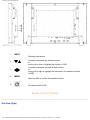
Side View (Left)
file:///D|/My%20Documents/dfu/320WN6/english/320wn6/INSTALL/INSTALL.HTM (1 of 5)2005-11-07 12:39:06 PM
Installing your LCD Monitor/TV
1
INPUT
Increase or decrease the channel number
or
moving up or down to highlight the function in OSD
2
Increase or decrease the level of audio volume
or
moving left or right to highlight the sub-menu in the selected function
of OSD
3
4
Selecting input source
MENU
5
Open the OSD or confirm the selected function
DC power switch On/Off
RETURN TO TOP OF THE PAGE
Side View (Right)
file:///D|/My%20Documents/dfu/320WN6/english/320wn6/INSTALL/INSTALL.HTM (2 of 5)2005-11-07 12:39:06 PM
Installing your LCD Monitor/TV
1
Audio input for composite input
2
3
4
5
Composite input
S-Video input
Earphone output
TV tuner
Audio (left and right) in put for compo site
signal in put.
Composite (CVBS) signal input
S-Video signal input
Earphone output
TV tuner input (available in TV version only)
RETURN TO TOP OF THE PAGE
Rear View
file:///D|/My%20Documents/dfu/320WN6/english/320wn6/INSTALL/INSTALL.HTM (3 of 5)2005-11-07 12:39:06 PM
Installing your LCD Monitor/TV
1
AC in
2
Speakers output
3
D-Sub output
4
DVI-D input
5
D-Sub input
6
RS232 input
7
RS232 output
8
PC audio
AC power in
External speakers output
PC analog D-Sub output
PC digital input
PC analog D-Sub input
RS232 network connection Input
RS232 network connection output for the use of
loop through function
PC stereo audio input
file:///D|/My%20Documents/dfu/320WN6/english/320wn6/INSTALL/INSTALL.HTM (4 of 5)2005-11-07 12:39:06 PM
Installing your LCD Monitor/TV
9
Audio input for component signal
10
Component input
Audio (left and right) input for component signal
input
Component (YPbPr ) signal input
Composite (CVBS) output for the use of loop
through function
11
Composite output
12
Audio (left and right) out put for compo site signal
Audio output for composite output out put.
13
External / EURO-AV
14
Kensington lock
SCART connection (for the use of European
model only)
Kensington lock
Optimising Performance
●
For best performance, ensure that your display settings are set at 1360x768, 60Hz.
Note: You can check the current display settings by pressing the 'MENU' button
once.
●
You can also install the Flat Panel Adjust (FP Adjust) program, a program for getting the best performance
out of your monitor. This is included on this CD. Step-by-step instructions are provided to guide you
through the installation process. Click on the link to find out more about this program.
More about
FP_setup04.exe
RETURN TO TOP OF THE PAGE
file:///D|/My%20Documents/dfu/320WN6/english/320wn6/INSTALL/INSTALL.HTM (5 of 5)2005-11-07 12:39:06 PM
On Screen Display
On Screen Display
On Screen Display Control • Using Your Remote Control
On Screen Display Controls
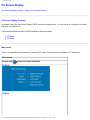
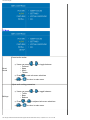
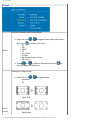
An overall view of the On-Screen Display (OSD) structure is shown below. You can use it as a reference for further
adjusting your Monitor/TV.
There are two different modes of OSD available for different models:
●
●
PC Mode
TV Mode
Main menu
There is a slight difference between PC mode and TV mode: Setup selection is available in TV mode only.
Sub-menus
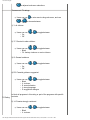
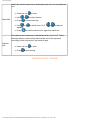
Picture: press
to enter sub-menu selections.
PC Mode
TV Mode
file:///D|/My%20Documents/dfu/320WN6/english/320wn6/OSD/osddesc.htm (1 of 22)2005-11-07 12:39:11 PM
On Screen Display
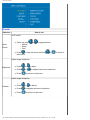
PC mode
Selection
How to use
In PC mode
●
Smart
Picture
●
Users can press
❍ Normal
❍ Warm
❍ Cool
or
to toggle between
Press
to next sub-menu selection
main menu.
or
Adjust image brightness.
●
Press
or
●
Press
or
●
Press
to return to main menu.
Brightness
to adjust,
to adjacent sub menu selections,
Adjust image sharpness.
Contrast
●
Press
or
to adjust,
●
Press
to adjacent sub-menu selections,
●
Press
to return to main menu.
file:///D|/My%20Documents/dfu/320WN6/english/320wn6/OSD/osddesc.htm (2 of 22)2005-11-07 12:39:11 PM
to return to
On Screen Display
Automatic fine tuning display geometry and time frequency parameter.
●
Press
to start,
A selection of Store? Yes/No will appear.
●
Press
●
Press
●
Auto
Adjust
or
to toggle between Yes and No.
to confirm and return to sub-menu.
Adjust display geometry and time frequency parameters.
●
●
Manual
Adjust
●
●
Phase: Press
sub-menu.
or
to adjust,
Clock: Phase: Press
return to sub-menu.
or
to adjust,
Horizontal: Phase: Press
and return to sub-menu.
Vertical: Phase: Press
return to sub-menu.
to confirm and return to
or
or
to confirm and
to adjust,
to adjust,
to confirm
to confirm and
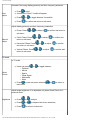
TV mode
In TV mode
●
Smart
Picture
●
Users can press
❍ Personal
❍ Movies
❍ Sports
❍ Weak Signal
❍ Multimedia
❍ Night
or
to toggle between
Press
to next sub-menu selection,
main menu.
or
to return to
Adjust image brightness. It is adjustable only when Smart Picture is in
personal mode.
Brightness
●
Press
or
to adjust,
●
Press
or
●
Press
to return to main menu.
to adjacent sub-menu selections,
file:///D|/My%20Documents/dfu/320WN6/english/320wn6/OSD/osddesc.htm (3 of 22)2005-11-07 12:39:11 PM
On Screen Display
Adjust image sharpness. It is adjustable only when Smart Picture is in
personal mode.
Contrast
●
Press
or
to adjust,
●
Press
or
●
Press
to return to main menu.
to adjacent sub-menu selections,
Adjust image color saturation. It is adjustable only when Smart Picture is
in personal mode.
Color
●
Press
or
to adjust,
●
Press
or
●
Press
to return to main menu.
to adjacent sub-menu selections,
Adjust image sharpness. It is adjustable only when Smart Picture is in
personal mode.
Sharpness
●
Press
or
to adjust,
●
Press
or
●
Press
to return to main menu.
to adjacent sub-menu selections,
Adjust image hue level.
●
Press
or
●
Press
or
●
Press
to return to main menu.
Tint
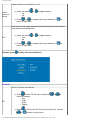
Audio: press
PC Mode
to adjust,
to adjacent sub-menu selections,
to enter sub-menu selections
file:///D|/My%20Documents/dfu/320WN6/english/320wn6/OSD/osddesc.htm (4 of 22)2005-11-07 12:39:11 PM
On Screen Display
TV Mode
Preset audio modes.
●
Smart
Sound
●
●
Users can press
❍ Personal
❍ News
❍ Music
❍ Theater
Press
or
to toggle between
to next sub-menu selections
or
to return to main menu.
Adjust audio setting parameters.
●
Settings
●
●
Users can press
❍ Treble
❍ Bass
❍ Balance
Press
or
or
or
to toggle between
to adjacent sub-menu selections
to return to main menu.
file:///D|/My%20Documents/dfu/320WN6/english/320wn6/OSD/osddesc.htm (5 of 22)2005-11-07 12:39:11 PM
On Screen Display
Switch virtual surround effect on or off.
●
Virtual
Surround
Sound
●
Users can press
❍ On
❍ Off
or
to toggle between
Press
or
to adjacent sub-menu selections,
return to main menu.
to
Auto Volume Limit, adjust volume level automatically to prevent sudden
peak load exceeds design limit.
●
AVL
●
Users can press
❍ Yes
❍ No
or
to toggle between
Press
or
to adjacent sub-menu selections,
return to main menu.
to
to enter sub-menu selections.
Features: press
PC mode
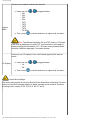
Picture in Picture size choices.
●
PIP
●
Press
to enter PIP sub-menu, and press
selection between
❍ Size
❍ Video
❍ Audio
❍ Display
Press
or
or
to
to return from PIP sub-menu to sub-menu, or press
to return to main menu.
file:///D|/My%20Documents/dfu/320WN6/english/320wn6/OSD/osddesc.htm (6 of 22)2005-11-07 12:39:11 PM
On Screen Display
PIP Sub-menu
PIP window size adjustment.
●
Size
●
Users can use
❍ Small
❍ Medium
❍ Large
❍ PBP
❍ Off
or
Press
selection.
to return to upper level sub-menu,
or
to toggle between
to next
Video source of the PIP window.
●
Video
●
Users can use
or
❍ TV
❍ AV (CVBS)
❍ S-video
❍ EXT (Scart)
to toggle between
Press
or
to adjacent sub-menu selections,
return to upper level sub-menu.
to
Audio source of the PIP window.
●
Audio
●
Users can use
❍ PC
❍ PIP
or
to toggle between
Press
or
to adjacent sub-menu selections,
return to upper level sub-menu.
to
PIP window location selection.
●
Display
●
Users can use
or
to toggle between
❍ Icon1 (upper right corner of the screen)
❍ Icon2 (lower right corner of the screen)
❍ Icon3 (lower left corner of the screen)
❍ Icon4 (upper left corner of the screen)
Press
or
to adjacent sub-menu selections,
return to upper level sub-menu.
file:///D|/My%20Documents/dfu/320WN6/english/320wn6/OSD/osddesc.htm (7 of 22)2005-11-07 12:39:11 PM
to
On Screen Display
Choices of video source for main screen.
●
Source
●
Users can use
or
to toggle between
❍ PC
❍ DVI
❍ HDCP
❍ TV
❍ AV (CVBS)
❍ S-video
❍ EXT (Euro connector, Scart)
❍ HD (YPbPr)
Press
or
to adjacent sub-menu selections,
return to upper level sub-menu.
to
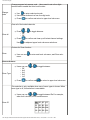
Choices for Zoom function.
Zoom
●
Users can use
menu.
to enter next level sub-menu and Zoom sub-
Zoom sub-menu
●
Zoom Type
●
Users can use
❍ Off
❍ 4x4
❍ 3x3
❍ 2x2
❍ 1x5
Press
or
to confirm and
to toggle between
to return to upper level sub-menu.
This selections is only available when one of zoom types is chosen.
When zoom type is off, this selections is unavailable.
●
Users can use
or
to toggle between IDs. For example,
when 4x4 is chosen, the ID selection are
A1 A2 A3 A3
Zoom ID
B1 B2 B3 B4
C1 C2 C3 C4
D1 D2 D3 D4
●
Press
to confirm and
upper level sub-menu.
to return to Zoom Type and exit to
file:///D|/My%20Documents/dfu/320WN6/english/320wn6/OSD/osddesc.htm (8 of 22)2005-11-07 12:39:11 PM
On Screen Display
TV mode
Choices of video source for main screen.
●
Users can use
or
to toggle between each signal source,
to confirm your select.
then press
❍ PC
❍ DVI
❍ HDCP
❍ TV
❍ AV (CVBS)
❍ S-Video
❍ Ext (Euro connector, Scart)
❍ HD (YPbPr)
Source
●
Press
or
to adjacent sub-menu selections
return to upper level sub-menu.
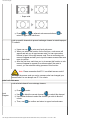
Selections of image format.
●
Users can use
❍ Automatic
❍ 4:3
❍
Zoom 16:9
❍
Wide screen
Picture
Format
or
to toggle between
file:///D|/My%20Documents/dfu/320WN6/english/320wn6/OSD/osddesc.htm (9 of 22)2005-11-07 12:39:11 PM
to
On Screen Display
❍
●
Super wide
Press
or
to adjacent sub-menu selections
return to upper level sub-menu.
to
Lock up specific channels to prevent underage viewers to watch improper
TV content.
●
●
Auto Lock
●
Users can use
to enter next level sub-menu.
When you select this function for the first time, a sub-menu will
appear and ask you to input access code.You can use number
buttons to input a four-digit access code.Then a confirming submenu will appear and ask you to input the same access code once
more to confirm.
After the first time, each time you try to access this function, a submenu will appear to request for a access code.If the code is
correct, you can start the setting process of this function.
Note: Please remember that 0711 is a default access code.If
you forget the access code you set or someone else has changed your
access code.You can always use 0711 to unlock.
Auto Lock sub-menu
Lock selected channel from underage viewers.
●
Lock
Program
Press
to enter.
●
Use
to block the current channel,
to unlock this channel.
Use number buttons to select the channel you wish to block of
unlock.
●
Then, use
●
to confirm and return to upper level sub-menu.
file:///D|/My%20Documents/dfu/320WN6/english/320wn6/OSD/osddesc.htm (10 of 22)2005-11-07 12:39:11 PM
On Screen Display
Change program lock access code. Users need to set a four digits
access code to enable the Auto Lock function.
Change
code
●
Use
to enter code input mode
Use number buttons to a new four-digit code
●
Press
●
to confirm and return to upper level sub menu.
Clear all of the locked channels.
●
Press
❍
Clear all
❍
●
Press
Use
or
to toggle between
On
Off
to confirm and clear up all locked channel settings.
to adjacent upper level sub-menu selections.
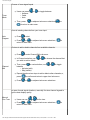
Choices for Zoom function.
Zoom
●
User can use
menu.
to enter next level sub-menu, and Zoom sub-
Zoom sub-menu
●
Zoom Type
●
Users can use
❍ Off
❍ 4x4
❍ 3x3
❍ 2x2
❍ 1x5
Press
or
to toggle between
to confirm and
to return to upper level sub-menu.
This selection is only available when one of zoom types is chosen.When
zoom type is off, this selection is unavailable.
●
Zoom ID
Users can use
or
to toggle between IDs.For example,
when 4x4 is chosen, the ID selections are
A1 A2 A3 A3
B1 B2 B3 B4
C1 C2 C3 C4
D1 D2 D3 D4
file:///D|/My%20Documents/dfu/320WN6/english/320wn6/OSD/osddesc.htm (11 of 22)2005-11-07 12:39:11 PM
On Screen Display
●
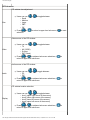
Install: press
Press
to confirm and
upper level sub-menu.
to return to Zoom Type and exit to
to enter sub-menu selections.
Choices of languages in user interfaces.
●
Language
Users can use
or
❍ ENGLISH
❍ ESPAÑOL
to toggle between
❍
❍
❍
DEUTSCH
ITALIANO
❍
●
Press
to adjacent sub-menu selections
to main menu.
or
to return
Assigning a three digits monitor ID to the unit, so it can be identified when
using RS232 to control from remote.
Monitor ID
●
Use
to enter, and
confirm.
or
to select 1~9 numbers,
Dynamic Contrast Ratio, technology to boost display contrast ratio.
●
DCR
●
Users can use
❍ On
❍ Off
or
Press
to adjacent sub-menu selections.
or
to toggle between
file:///D|/My%20Documents/dfu/320WN6/english/320wn6/OSD/osddesc.htm (12 of 22)2005-11-07 12:39:11 PM
to
On Screen Display
Turns on or off the light sensor for automatic brightness control.
Light
Sensor
●
●
Users can use
❍ On
❍ Off
or
Press
to adjacent sub-menu selections.
or
to toggle between
Users need to turn off remote control function when they want to use
RS232 protocol to control this unit from afar, so it will remote control
commands not to conflict with RS232 commands.
Remote
Control
●
●
Users can use
❍ On
❍ Off
or
Press
to adjacent sub-menu selections.
or
to toggle between
To reset monitor TV's settings back to factory default.
Factory
Reset
●
●
Users can use
❍ No
❍ Yes
Press
or
to toggle between
to confirm.
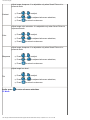
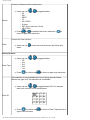
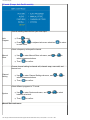
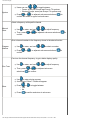
Setup:Setup sub-menu is available in TV modes only. Press
to enter the sub-
menu selections.
TV mode (North America model)
file:///D|/My%20Documents/dfu/320WN6/english/320wn6/OSD/osddesc.htm (13 of 22)2005-11-07 12:39:11 PM
On Screen Display
Choose of tuner signal inputs.
●
Tuner
Mode
●
Users can press
❍ Antenna
❍ Cable
❍ Auto
Then, press
or
to toggle between
to adjacent sub-menu selections
or
to return to main menu.
Scan all existing channels from your tuner input.
Auto
Program
●
●
Press
to start.
Press
or
to adjacent sub-menu selections,
return to main menu.
to
Choices to add or delete channels from available channels.
●
●
●
Channel
Edit
●
●
Press
to enter Channel Edit sub-menu.
In Channel selection, use
you wish to add or delete.
or
to choose the channel that
Then, press
to next selection, use
or
to toggle
between
❍ Activate (add)
❍ Skip (delete)
Repeat the above two steps to add or delete other channels,or,
press
to confirm and return to upper level sub-menu.
Press
or
to adjacent sub-menu selections.
In case of weak signal situations, manually fine-tune channel signals to
get the best display quality.
Manual
Fine Tune
●
●
Users can use
or
to fine tune
Press
or
to adjacent sub-menu selections,
return to main menu.
file:///D|/My%20Documents/dfu/320WN6/english/320wn6/OSD/osddesc.htm (14 of 22)2005-11-07 12:39:11 PM
to
On Screen Display
Movie or TV broadcasters add rating signal in the TV or movie
broadcasted.Users can use this function to set up an automatic program
rating and blocking mechanism to prevent underage viewers to watch
improper movie or TV contents.
Rating
●
Press
●
Press
to enter Rating sub-menu.
or
to adjacent sub-menu selections.
Rating sub-menu
To enable or disable the TV or Movie block function.
●
Block
Option
●
Users can use
❍ On
❍ Off
or
to toggle between
Press
or
to return to upper level sub- menu ,
adjacent sub-menu selections.
to
There are seven movie ratings.
●
Users can use
to enter movie rating sub-menu, and use
or
to choose between
G: all ages admitted
❍ PG: Parental guidance suggested
❍ PG13: Parents strongly cautioned
❍ R: Restricted
❍ NC: No children under the age of 17 will be admitted
❍ X: Adults only
❍
(More information will be seen at the end of this section)
Moving
Rating
●
In each rating selection, users can use
between
❍ On
❍ Off
or
to toggle
Note: If a lower level rating is blocked, then all the upper level
rating will be also blocked automatically.For example, if PG is blocked,
then all the rest ratings except G will be blocked.
●
Then, press
to return to upper level sub- menu,
file:///D|/My%20Documents/dfu/320WN6/english/320wn6/OSD/osddesc.htm (15 of 22)2005-11-07 12:39:11 PM
or
On Screen Display
to adjacent sub-menu selections.
There are six TV ratings.
●
Users can use
or
to enter movie rating sub-menu, and use
to choose between
1) Y: all children
●
Users can use
❍ On
❍ Off
or
to toggle between
2) Y7: Directed to older children
●
Users can use
or
to toggle between
❍ Block
❍ FV: fantasy violence or comic violence
3) G: General audience
●
Users can use
❍ On
❍ Off
or
to toggle between
4) PG: Parental guidance suggested
●
TV Rating
Users can use
or
to toggle between
❍ Block
❍ V: violence
❍ S: sexual situation
❍ L: strong language
❍ D: suggestive dialogue
to block all programs in this rating or part of the programs with specific
contents.
5) 14: Parents strongly cautioned.
●
Users can use
or
❍ Block
❍ V: violence
to toggle between
file:///D|/My%20Documents/dfu/320WN6/english/320wn6/OSD/osddesc.htm (16 of 22)2005-11-07 12:39:11 PM
On Screen Display
S: sexual situation
L: strong language
D: suggestive dialogue
❍
❍
❍
to block all programs in this rating or part of the programs with specific
contents.
6) MA: Matured audience only.
●
Users can use
or
to toggle between
❍ Block
❍ V: violence
❍ S: sexual situation
❍ L: strong language
❍ D: suggestive dialogue
to block all programs in this rating or part of the programs with specific
contents.
(More information will be seen at the end of this section)
Note: If a lower level rating is blocked, then all the upper level
rating will be also blocked automatically. For example, if Y7 is blocked,
then all the rest ratings except Y will be blocked.
●
Then, press
to return to upper level sub- menu,
or
to adjacent sub-menu selections.
Closed caption are captions that are hidden in the video signal, invisible
without a special decoder. It allows hearing impaired TV viewers to read
ongoing program dialogues or audio effects.
Closed
Caption
●
Users can use
to enter Closed Caption sub-menu. Then use
or
to choose between
❍ Caption Mode
❍ CC Display
●
Press
to return to main menu.
Closed Caption sub-menu
file:///D|/My%20Documents/dfu/320WN6/english/320wn6/OSD/osddesc.htm (17 of 22)2005-11-07 12:39:11 PM
On Screen Display
There are nine caption modes to be selected.
●
Caption
Mode
●
Users can use
❍ CC1
❍ CC2
❍ CC3
❍ CC4
❍ TXT1
❍ TXT2
❍ TXT3
❍ TXT4
❍ CC Mute
Then, press
or
to toggle between
to confirm and return to upper level sub-menu.
Note: The difference between CC and TXT mode is, CC shows
a few lines of dialogues only while TXT (text) use half or entire page to
display scrolling text information. CC1 ~CC4 are usually showing same
contents in different languages. Text mode likewise.
Users can use CC display to turn on/off closed caption which was set
earlier.
CC Display
●
●
Users can use
❍ On
❍ Off
Then, press
or
to toggle between
to confirm and return to upper level sub-menu.
About Movie Ratings
The movie rating system is set up by Motion Picture Association of America.The main
reason is to prevent underage viewers to watch improper movie contents.There are
six rating levels, namely G, PG, PG-13, R, NC-17, and X.
file:///D|/My%20Documents/dfu/320WN6/english/320wn6/OSD/osddesc.htm (18 of 22)2005-11-07 12:39:11 PM
On Screen Display
TV mode (Europe, Asia Pacific models)
Scan all existing channels from your tuner input.
Auto
Program
●
●
Press
to start.
Press
or
to main menu.
to adjacent sub-menu selections,
to return
Select a frequency with specific channel.
Manual
Store
●
●
Use
to enter Manual Store sub-menu, and
select between selections.
Then,
or
to
to confirm.
Choose channel setting to channel edit, channel swap, neme edit, and
channel sort.
Channel
Setting
●
●
Use
to enter Channel Setting sub-menu, and
select between selections.
Then,
or
to confirm.
Select different programs in TV mode.
System
●
●
Use
to enter System sub-menu, and
between selections.
Then,
or
to confirm.
Manual Store sub-menu
file:///D|/My%20Documents/dfu/320WN6/english/320wn6/OSD/osddesc.htm (19 of 22)2005-11-07 12:39:11 PM
to select
to
On Screen Display
●
System
●
Users can use
or
to toggle between
❍ France: scans pan Europe and French TV systems
❍ Western Europe: scans pan Europe TV systems only.
Press
or
to adjacent sub-menu selections,
confirm and return to upper level sub-menu.
to
Select a frequency with specific channel.
Manual
Store
●
●
Use
to enter, and use
Then, press
confirm.
or
or
to adjust frequency.
to adjacent sub-menu selections,
to
Give a channel number to the frequency chose in the above function.
Program
Number
●
●
Use
to enter, and use
Press
confirm.
or
or
to select a number.
to adjacent sub-menu selections,
Fine tune the channel frequency to get a better display quality.
●
Use
●
Then, press
Fine Tune
to enter, and use
to adjust frequency.
to adjacent sub-menu
to confirm.
selections,
●
Use
to enter storing process.
A selection of Store? Yes/No will appear.
●
Press
●
Store
or
or
❍
❍
●
Press
or
to toggle between
Yes
No
to confirm and return to sub-menu.
file:///D|/My%20Documents/dfu/320WN6/english/320wn6/OSD/osddesc.htm (20 of 22)2005-11-07 12:39:11 PM
to
On Screen Display
Choices to add or delete channels from available channels.
●
●
Channel
Edit
Press
enter Channel Edit sub-menu
In Channel selection, use
you wish to add or delete.
or
to choose the channel that
●
Then, press
to next selection, use
or
to toggle
between
❍ Activate (add)
❍ Skip (delete)
Repeat the above two steps to add or delete other channels, or,
●
Press
to confirm and return to upper level sub-menu
●
Press
or
●
to adjacent sub-menu selections.
To swap channel numbers between two channels.So users can put
preferred channels at front.
Channel
Swap
●
Users can use
or
●
●
to enter Manual Store sub-menu,
to select between selections.
Then,
to confirm.
Channel Swap sub-menu
Choose a channel number to be swapped from.
From
●
Use
or
to select channel.
to confirm and return to upper level sub-menu.
●
Choose a target channel number to be swapped to.
To
●
●
Use
or
to select channel.
to confirm and return to upper level sub-menu.
Execute channel swap.
Exchange
●
Users can use
to execute the swapping move.
file:///D|/My%20Documents/dfu/320WN6/english/320wn6/OSD/osddesc.htm (21 of 22)2005-11-07 12:39:11 PM
On Screen Display
Modify the channel name from a broadcaster give one to a user preferred
one.
Name Edit
●
Users can use
●
Use
●
Press
●
●
or
to select channel.
to name input line.
Use
or
alphabet.
Press
to enter
to select from A to Z,
or
to adjacent
to confirm and return to upper level sub-menu.
Sort channel name sequence in alphabetical order, from A to Z. Those
channels without a name will be placed at the end of the sequence
according to their frequencies, from small to large.
Channel
Sort
●
Users can use
●
Press
to enter.
to start sorting.
RETURN TO TOP OF THE PAGE
file:///D|/My%20Documents/dfu/320WN6/english/320wn6/OSD/osddesc.htm (22 of 22)2005-11-07 12:39:11 PM
Remote Control
Remote Control
On Screen Display • Using Your Remote Control
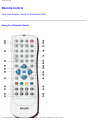
Using Your Remote Control
file:///D|/My%20Documents/dfu/320WN6/english/320wn6/OSD/tv_control.htm (1 of 5)2005-11-07 12:39:14 PM
Remote Control
1
2
3
AV source:
● To select TV/video source in TV and also PIP window.
● If TV is in Standby mode, press this button to switch to ON.
Mode:
Screen aspect ratio, switching between 4:3, 16: 9, wide screen, and super
wide.
Numerical keys:
● For direct access to programs.
● If TV is in Standby mode, press any number will switch the TV to ON
mode.
4
Previous program:
Jump to previous TV channel you are viewing.
5
Menu:
To turn on or off the On-screen-display (OSD) menu
●
6
●
●
7
●
Move the cursor up in OS
Channel up
Move the cursor left in OSD
Adjust volume down
8
Switching between PC and TV mode.
9
Closed Caption:
Functions in North America and Asia Pacific models only.
●
10
●
Move the cursor down in OSD
Channel down
file:///D|/My%20Documents/dfu/320WN6/english/320wn6/OSD/tv_control.htm (2 of 5)2005-11-07 12:39:14 PM
Remote Control
●
11
●
Move the cursor right in OSD
Adjust volume up
12
Confirm the chosen OSD function
13
Freeze:
Freeze the screen in video mode or PIP.
14
Status:
Display channel number, video/PC mode, and sound mode information.
15
Sound select:
● To switch between mono and stereo, or to choose between Dual I
and Dual II for bilingual transmissions.
● For TV sets fitted with NICAM, depends on transmission, you can
switch between NICAM stereo and Mono, or between NICAM Dual I,
NICAM Dual II, and Mono.
16
PIP Size:
Adjusts Picture-in-Picture (PIP) window size between small, medium, large,
picture-by-picture (PBP or split screen), and off.
17
PIP position:
Changing PIP window's location on the screen between upper right, lower
right, lower left, and upper left.
18
Mute:
Disables audio: To enable audio, press the button again.
19
Sleep Timer:
Selects a period of time and the unit will switch off automatically.
20
Standby:
Sets the TV to standby mode temporary.
27
Smart Sound:
Chooses audio effects between Music, Theater, News, and Personal.
28
Smart Picture:
Choose picture settings between Sports, Movie, Weak signal, Night,
Multimedia, and Personal.
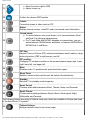
The following buttons are using in Teletext mode only, which are available in Europe and some
of the Asia Pacific TV systems.
21
Teletext Enlarge:
Enlarge teletext context to two times larger.
file:///D|/My%20Documents/dfu/320WN6/english/320wn6/OSD/tv_control.htm (3 of 5)2005-11-07 12:39:14 PM
Remote Control
Teletext Mix:
Teletext background become transparent, content mixes with images.
22
Teletext On/Off:
Teletext ON or OFF.
23
24
Teletext Hold:
Freezes the teletext page.
25
Main Index:
Press the button to return to the main index.
26
Teletext Reveal/Conceal:
To view the concealed text information (e.g. question/answer, quiz, etc.)
send by the teletext provider. Press the button can toggle between conceal
and reveal mode.
These four color buttons allow you to access the item or the page indicated
by corresponding color in teletext.
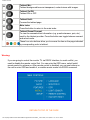
Warning:
If you are going to control the monitor TV via RS232 interface, to avoid conflict, you
need to disable the remote control first. You can enter the OSD menu, select Install,
remote control to achieve so. After remote control is disabled, you can use buttons on
the unit to enter OSD and enable it, or enable remote control via RS232 command.
RETURN TO TOP OF THE PAGE
file:///D|/My%20Documents/dfu/320WN6/english/320wn6/OSD/tv_control.htm (4 of 5)2005-11-07 12:39:14 PM
Customer Care and Warranty
Customer Care & Warranty
PLEASE SELECT YOUR COUNTRY/AREA TO REVIEW DETAILS OF YOUR
WARRANTY COVERAGE
WESTERN EUROPE: Austria • Belgium • Cyprus • Denmark • France • Germany • Greece •
Finland • Ireland • Italy • Luxembourg • the Netherlands • Norway • Portugal • Sweden •
Switzerland • Spain • United Kingdom
EASTERN EUROPE: Czech Republic • Hungary • Poland • Russia • Slovakia • Slovenia •
Turkey
LATIN AMERICA: Antilles • Argentina • Brasil • Chile • Colombia • Mexico • Paraguay •
Peru • Uruguay • Venezuela
NORTH AMERICA: Canada • USA
PACIFIC: Australia • New Zealand
ASIA: Bangladesh • China • Hong Kong • India • Indonesia • Japan • Korea • Malaysia •
Pakistan • Philippines • Singapore • Taiwan • Thailand
AFRICA: Morocco • South Africa
MIDDLE EAST: Dubai • Egypt
file:///D|/My%20Documents/dfu/320WN6/english/warranty/warranty.htm2005-11-07 12:39:17 PM
Download and Print
Download and Print
Installing your LCD monitor driver • Download and Printing Instructions • Installing FPadjust
Program
Installing Your LCD monitor driver
System requirements:
●
●
PC running Windows® 95, Windows® 98, Windows® 2000 , Windows® Me, Windows® XP
or later
Find your driver ".inf/.icm/.cat" at : /PC/drivers/
Read the "Readme.txt" file before installing.
This page provides an option to read the manual in .pdf format. PDF files can be downloaded into
your hard disk, then viewed and printed with Acrobat Reader or through your browser.
If you do not have Adobe¨ Acrobat Reader installed, click on the link to install the application.
Adobe® Acrobat Reader for PC / Adobe® Acrobat Reader for Mac.
Download instructions:
To download the file:
1. Click-and-hold your mouse over the icon below. (Win95/98/2000/Me/XP users right-click)
Download
320WN6.pdf
2. From the menu that appears, choose 'Save Link As...', 'Save Target As...' or 'Download Link to
Disk'.
file:///D|/My%20Documents/dfu/320WN6/english/download/download.htm (1 of 3)2005-11-07 12:39:20 PM
Download and Print
3. Choose where you would like to save the file; click 'Save' (if prompted to save as either 'text' or
'source', choose 'source').
Printing instructions:
To print the manual:
1. With the manual file open, follow your printer's instructions and print the pages you need.
RETURN TO TOP OF THE PAGE
Installing FPadjust Program
The FP Adjust program generates alignment patterns which will help you adjust monitor settings
such as CONTRAST, BRIGHTNESS, HORIZONTAL & VERTICAL POSITION, PHASE and CLOCK.
System requirements:
●
PC running Windows® 95, Windows® 98, Windows® 2000, Windows® Me, Windows® XP
or later
To install FPadjust Program:
●
Click on the link or icon to install FPadjustment Program.
or
●
Click-and-hold your mouse over the icon. (Win95/98/2000/Me/XP users right-click)
file:///D|/My%20Documents/dfu/320WN6/english/download/download.htm (2 of 3)2005-11-07 12:39:20 PM
Download and Print
Download
FP_setup04.exe
●
●
●
From the menu that appears, choose 'Save Link As...', 'Save Target As...' or 'Download Link
to Disk'.
Choose where you would like to save the file; click 'Save' (if prompted to save as either 'text'
or 'source', choose 'source').
Exit your browser and install the FPadjust Program.
Read the "FP_Readme04.txt" file before installing.
RETURN TO TOP OF THE PAGE
file:///D|/My%20Documents/dfu/320WN6/english/download/download.htm (3 of 3)2005-11-07 12:39:20 PM
FAQs (Frequently Asked Questions)
FAQs (Frequently Asked Questions)
Safety and Troubleshooting • General FAQs • Screen Adjustments • Compatibility with
Other Peripherals • LCD Panel Technology • Ergonomics, Ecology and Safety Standards •
Troubleshooting • Regulatory Information • Other Related Information
General FAQs
Q: When I install my monitor what should I do if the screen shows 'Cannot display this video
mode'?
A: Recommended video mode for Philips 32": 1360x768 @60Hz.
1. Unplug all cables, then connect your PC to the monitor that you used
2.
3.
4.
5.
6.
previously.
In the Windows Start Menu, select Settings/Control Panel. In the Control Panel
Window, select the Display icon. Inside the Display Control Panel, select the
'Settings' tab. Under the setting tab, in box labeled 'desktop area', move the
slidebar to 1360x768 pixels (32").
Open 'Advanced Properties' and set the Refresh Rate to 60Hz, then click OK.
Restart your computer and repeat step 2 and 3 to verify that your PC is set at
1360x768@60Hz (32").
Shut down your computer, disconnect your old monitor and reconnect your
Philips LCD monitor.
Turn on your monitor and then turn on your PC.
Q: What should I do when screen shows: THIS IS 85HZ OVERSCAN, CHANGE COMPUTER
DISPLAY INPUT TO 1360 x 768 @60HZ?
A: It means the signal input from your PC is 85Hz -- outside the range that the
monitor can display. New Generation LCD intelligent monitor capabilities temporarily
override the overscan, providing you with 10 minutes to reset timing to recommended
settings.
Here's how:
file:///D|/My%20Documents/dfu/320WN6/english/320wn6/SAFETY/SAF_FAQ.HTM (1 of 9)2005-11-07 12:39:28 PM
FAQs (Frequently Asked Questions)
Go to your Windows Start menu. Select Settings, then Control Panel. Select Display.
Move to Settings and click on the Advanced button. Under Adaptor, change the
refresh rate to 56~75.
You have 10 minutes to complete the operation; if you do not complete within 10
minutes, power off and re-power on monitor to enter changes.
Q: What does 'refresh rate' mean in connection with an LCD monitor?
A: The refresh rate is of much less relevance for LCD monitors. LCD monitors display
a stable, flicker-free image at 60Hz. There is no visible difference between 85Hz and
60Hz.
Q: What are the .inf and .icm files on the CD-ROM? How do I install the drivers (.inf and .
icm)?
A: These are the driver files for your monitor. Follow the instructions in your user
manual to install the drivers. Your computer may ask you for monitor drivers (.inf and .
icm files) or a driver disk when you first install your monitor. Follow the instructions to
insert the ( companion CD-ROM) included in this package. Monitor drivers (.inf and .
icm files) will be installed automatically.
Q: How do I adjust the resolution?
A: Your video card/graphic driver and monitor together determine the available
resolutions. You can select the desired resolution under Windows® Control Panel
with the "Display properties".
Q: What if I get lost when I am making monitor adjustments?
A: Simply press the OK button, then select 'Reset' to recall all of the original factory
settings.
file:///D|/My%20Documents/dfu/320WN6/english/320wn6/SAFETY/SAF_FAQ.HTM (2 of 9)2005-11-07 12:39:28 PM
FAQs (Frequently Asked Questions)
Q: What is the Auto function?
A: The AUTO adjustment key restores the optimal screen position, phase and clock
settings at the press of a single button – without the need to navigate through OSD
menus and control keys.
Note: Auto function is available in selected models only.
Q: My Monitor has no power (Power LED does not light up). What should I do?
A: Make sure the AC power cord is connected to the Monitor.
Q: Will the LCD monitor accept an interlaced signal under PC models?
A: No. If an Interlace signal is used, the screen displays both odd and even horizontal
scanning lines at the same time, thus distorting the picture.
Q: What does the Refresh Rate mean for LCD?
A: Unlike CRT display technology, in which the speed of the electron beam is swept
from the top to the bottom of the screen determines flicker, an active matrix display
uses an active element (TFT) to control each individual pixel and the refresh rate is
therefore not really applicable to LCD technology.
Q: Will the LCD screen be resistant to scratches?
A: A protective coating is applied to the surface of the LCD, which is durable to a
certain extent (approximately up to the hardness of a 2H pencil). In general, it is
recommended that the panel surface is not subject to any excessive shocks or
scratches. An optional protective cover with greater scratch resistance is also
available.
file:///D|/My%20Documents/dfu/320WN6/english/320wn6/SAFETY/SAF_FAQ.HTM (3 of 9)2005-11-07 12:39:28 PM
FAQs (Frequently Asked Questions)
Q: How should I clean the LCD surface?
A: For normal cleaning, use a clean, soft cloth. For extensive cleaning, please use
isopropyl alcohol. Do not use other solvents such as ethyl alcohol, ethanol, acetone,
hexane, etc.
Q: Can the Philips LCD Monitor be mounted on the wall or used as a touch panel?
A: Yes. Philips LCD monitors have this optional feature. The standard VESA mount
holes on the back cover allows the user to mount the Philips monitor on any VESA
standard ARM or accessories. Touch panels are being developed for future
applications. Check with your Philips sales representative for more information.
RETURN TO TOP OF THE PAGE
Screen Adjustments
Q: What is the FPadjust program on the CD-ROM?
A: The FPadjust program generates alignment patterns that help you adjust monitor
settings such as Contrast, Brightness, Horizontal Position, Vertical Position, Phase
and Clock for optimal performance.
Q: When I install my monitor, how do I get the best performance from the monitor?
A:
1. For best performance, make sure your display settings are set at
1360x768@60Hz for 32". Note: You can check the current display settings by
pressing the OSD OK button once. The current display mode is shown in
product information in OSD main controls.
2. To install the Flat Panel Adjust (FPadjust) program located on the monitor
setup CD-ROM, open the CD-ROM and double-click the FP_setup04.exe icon.
This will install FP Adjust automatically and place a shortcut on your desktop.
3. Run FPadjust by double clicking the shortcut. Follow the instructions step by
step to optimize image performance with your system's video controller.
file:///D|/My%20Documents/dfu/320WN6/english/320wn6/SAFETY/SAF_FAQ.HTM (4 of 9)2005-11-07 12:39:28 PM
FAQs (Frequently Asked Questions)
Q: How do LCDs compare to CRTs in terms of radiation?
A: Because LCDs do not use an electron gun, they do not generate the same amount
of radiation at the screen surface.
RETURN TO TOP OF THE PAGE
Compatibility with other Peripherals
Q: Can I connect my LCD monitor to any PC, workstation or Mac?
A: Yes. All Philips LCD monitors are fully compatible with standard PCs, Macs and
workstations. You may need a cable adapter to connect the monitor to your Mac
system. Please contact your dealer/retailer for more information.
Q: Are Philips LCD monitors Plug-and-Play?
A: Yes, the monitors are Plug-and-Play compatible with Windows® 95, 98, 2000 and
XP.
Q: What is USB (Universal Serial Bus)?
A: Think of USB as a smart plug for PC peripherals. USB automatically determines
resources (like driver software and bus bandwidth) required by peripherals. USB
makes necessary resources available without user intervention. There are three main
benefits of USB. USB eliminates "case anxiety," the fear of removing the computer
case to install circuit board cards -- that often requires adjustment of complicated IRQ
settings -- for add-on peripherals. USB does away with "port gridlock." Without USB,
PCs are normally limited to one printer, two Com port devices (usually a mouse and
modem), one Enhanced Parallel Port add-on (scanner or video camera, for example),
and a joystick. More and more peripherals for multimedia computers come on the
market every day. With USB, up to 127 devices can run simultaneously on one
computer. USB permits "hot plug-in." No need to shut down, plug in, reboot and run
file:///D|/My%20Documents/dfu/320WN6/english/320wn6/SAFETY/SAF_FAQ.HTM (5 of 9)2005-11-07 12:39:28 PM
FAQs (Frequently Asked Questions)
set up to install peripherals. No need to go through the reverse process to unplug a
device. Bottom line: USB transforms today's "Plug-and-Pray" into true Plug-and-Play!
Please refer to glossary for more information about USB.
Q: What is a USB hub ?
A: A USB hub provides additional connections to the Universal Serial Bus. A hub's
upstream port connects a hub to the host, usually a PC. Multiple downstream ports in
a hub allows connection to another hub or device, such as a USB keyboard, camera
or printer.
RETURN TO TOP OF THE PAGE
LCD Panel Technology
Q: What is a Liquid Crystal Display?
A: A Liquid Crystal Display (LCD) is an optical device that is commonly used to
display ASCII characters and images on digital items such as watches, calculators,
portable game consoles, etc. LCD is the technology used for displays in notebooks
and other small computers. Like light-emitting diode and gas-plasma technologies,
LCD allows displays to be much thinner than cathode ray tube (CRT) technology.
LCD consumes much less power than LED and gas-displays because it works on the
principle of blocking light rather than emitting it.
Q: How are LCDs made?
A: LCDs are created from two glass plates separated from each other at a distance
of a few microns. The plates are filled with liquid crystal and then sealed together.
The top plate is colored with an RGB pattern to make the color filter. Polarizers are
then glued to both plates. This combination is sometimes called 'glass' or 'cell.' The
LCD cell is assembled into a 'module' by adding the backlight, driver electronics and
frame.
Q: What is polarization ?
file:///D|/My%20Documents/dfu/320WN6/english/320wn6/SAFETY/SAF_FAQ.HTM (6 of 9)2005-11-07 12:39:28 PM
FAQs (Frequently Asked Questions)
A: Polarization is basically directing light to shine in one direction. Light is
electromagnetic waves. Electric and magnetic fields oscillate in a direction
perpendicular to the propagation of the light beam. The direction of these fields is
called the 'polarization direction'. Normal or non-polarized light has fields in several
directions; polarized light has a field in only one direction.
Q: What differentiates passive matrix LCDs from active matrix LCDs?
A: An LCD is made with either a passive matrix or an active matrix display grid. An
active matrix has a transistor located at each pixel intersection, requiring less current
to control the luminance of a pixel. For this reason, the current in an active matrix
display can be switched on and off more frequently, improving the screen refresh time
(your mouse pointer will appear to move more smoothly across the screen, for
example). The passive matrix LCD has a grid of conductors with pixels located at
each intersection in the grid.
Q: How does a TFT LCD Panel work?
A: On each column and row of the TFT LCD panel, a data source drive and a gate
drive are attached, respectively. The TFT drain of each cell is connected to the
electrode. The molecular arrangement of liquid crystal elements differ according to
whether it is impressed with voltage or not. It varies the direction of polarized light and
the amount of light by letting it through different arrays of liquid crystal elements.
When two polarized filters are arranged vertically on a polarized light pole, the light
that passes through the upper polarized panel is turned 90 degrees along with the
spiral structure of the liquid crystal molecules and goes through the polarized filter at
the bottom. When impressed with voltage, liquid crystal molecules are arranged
vertically from the original spiral structure and the direction of the light is not turned
through 90 degrees. In this case, light that comes through the top polarized panel
may not go through the polarized panel at the bottom.
Q: What are the advantages of TFT LCD compared with CRT?
A: In a CRT monitor, a gun shoots electrons and general light by colliding polarized
electrons on fluorescent glass. Therefore, CRT monitors basically operate with an
analog RGB signal. A TFT LCD monitor is a device that displays an input image by
operating a liquid crystal panel. The TFT has a fundamentally different structure than
a CRT: Each cell has an active matrix structure and independent active elements. A
TFT LCD has two glass panels and the space between them is filled with liquid
file:///D|/My%20Documents/dfu/320WN6/english/320wn6/SAFETY/SAF_FAQ.HTM (7 of 9)2005-11-07 12:39:28 PM
FAQs (Frequently Asked Questions)
crystal. When each cell is connected with electrodes and impressed with voltage, the
molecular structure of the liquid crystal is altered and controls the amount of inlet
lighting to display images. A TFT LCD has several advantages over a CRT, since it
can be very thin and no flickering occurs because it does not use the scanning
method.
Q: Why is vertical frequency of 60Hz optimal for an LCD monitor?
A: Unlike a CDT monitor, the TFT LCD panel has a fixed resolution. For example, an
XGA monitor has 1024x3 (R, G, B) x 768 pixels and a higher resolution may not be
available without additional software processing. The panel is designed to optimize
the display for a 65MHz dot clock, one of the standards for XGA displays. Since the
vertical/horizontal frequency for this dot clock is 60Hz/48kHz, the optimum frequency
for this monitor is 60Hz.
Q: What kind of wide-angle technology is available? How does it work?
A: The TFT LCD panel is an element that controls/displays the inlet of a backlight
using the dual-refraction of a liquid crystal. Using the property that the projection of
inlet light refracts toward the major axis of the liquid element, it controls the direction
of inlet light and displays it. Since the refraction ratio of inlet light on liquid crystal
varies with the inlet angle of the light, the viewing angle of a TFT is much narrower
than that of a CDT. Usually, the viewing angle refers to the point where the contrast
ration is 10. Many ways to widen the viewing angle are currently being developed and
the most common approach is to use a wide viewing angle film, which widens the
viewing angle by varying the refraction ratio. IPS (In Plane Switching) or MVA (Multi
Vertical Aligned) is also used to give a wider viewing angle.
Q: Why is there no flicker on an LCD Monitor?
A: Technically speaking, LCDs do flicker, but the cause of the phenomenon is
different from that of a CRT monitor -- and it has no impact of the ease of viewing.
Flickering in an LCD monitor relates to usually undetectable luminance caused by the
difference between positive and negative voltage. On the other hand, CRT flickering
that can irritate the human eye occurs when the on/off action of the fluorescent object
becomes visible. Since the reaction speed of liquid crystal in an LCD panel is much
slower, this troublesome form of flickering is not present in an LCD display.
Q: Why is an LCD monitor virtually free of Electro Magnetic Interference?
file:///D|/My%20Documents/dfu/320WN6/english/320wn6/SAFETY/SAF_FAQ.HTM (8 of 9)2005-11-07 12:39:28 PM
FAQs (Frequently Asked Questions)
A: Unlike a CRT, an LCD monitor does not have key parts that generate Electro
Magnetic Interference, especially magnetic fields. Also, since an LCD display utilizes
relatively low power, its power supply is extremely quiet.
RETURN TO TOP OF THE PAGE
Ergonomics, Ecology and Safety Standards
Q: What is the CE mark?
A: The CE (Conformité Européenne) mark is required to be displayed on all regulated
products offered for sale on the European market. This 'CE' mark means that a
product complies with the relevant European Directive. A European Directive is a
European 'Law' that relates to health, safety, environment and consumer protection,
much the same as the U.S. National Electrical Code and UL Standards.
Q: Does the LCD monitor conform to general safety standards?
A: Yes. Philips LCD monitors conform to the guidelines of MPR-II and TCO 99/03
standards for the control of radiation, electromagnetic waves, energy reduction,
electrical safety in the work environment and recyclability. The specification page
provides detailed data on safety standards.
More information is provided in the Regulatory Information section.
RETURN TO TOP OF THE PAGE
file:///D|/My%20Documents/dfu/320WN6/english/320wn6/SAFETY/SAF_FAQ.HTM (9 of 9)2005-11-07 12:39:28 PM
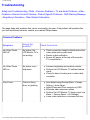
Troubleshooting
Troubleshooting
Safety and Troubleshooting • FAQs • Common Problems • TV and Audio Problems • Video
Problems • Remote Control Problems • Product Specific Problems • OSD Warning Message
• Regulatory Information • Other Related Information
This page deals with problems that can be corrected by the user. If the problem still persists after
you have tried these solutions, contact your nearest Philips dealer.
Common Problems
Symptoms
No Video/ Power
LED off
Having this
problem?
No picture, the
LCD Monitor TV is
not working
Check these items
●
●
●
No Video/ Power
LED on
No picture or no
brightness
●
●
●
Poor Focus
Picture is fuzzy,
blurry or ghosting
●
●
●
●
●
Check connection integrity at both ends of the
video cable and/or power cord.
Electric outlet verification
Ensure AC power at the rear of the monitor
TV is switched on.
Increase brightness and contrast controls.
Perform the LCD Monitor TV self-test feature
check.
Check for bent or broken pins in video cable
connector.
Auto adjust image through Menu -> Image
Setting -> Auto Adjust.
Adjust Phase and Clock controls via OSD.
Eliminate video extension cables.
Perform the LCD Monitor TV factory reset (via
Menu -> Factory Reset -> All Settings).
Lower video resolution or increase font size.
file:///D|/My%20Documents/dfu/320WN6/english/320wn6/SAFETY/saf_troub.htm (1 of 7)2005-11-07 12:39:28 PM
Troubleshooting
Shaky/Jittery Video
Wavy picture or
fine movement
●
●
●
●
●
Missing Pixels
Stuck-on Pixels
Brightness Problems
LCD screen has
spots
LCD screen has
bright spots
Picture too dim or
too bright
●
●
●
●
●
●
●
Auto adjust image through Menu -> Image
Setting -> Auto Adjust
Adjust Phase and Clock controls via OSD
Perform the LCD Monitor TV factory reset (via
Menu -> Factory Reset -> All Settings)
Check environmental factors
Relocate and test in other room
Cycle power on-off
These are pixels that are permanently off and
is a natural defect that occurs in LCD
technology
Cycle power on-off
These are pixels that are permanently on and
is a natural defect that occurs in LCD
technology
Perform the LCD Monitor TV factory reset (via
Menu -> Factory Reset -> All Settings)
Auto adjust image through Menu -> Image
Setting -> Auto Adjust
Adjust brightness & contrast controls
Note: When operating in DVI mode, the
contrast adjustment is not available.
Geometric Distortion
Screen not
centered correctly
●
●
●
●
Perform the LCD Monitor TV reset on
"Position Settings Only"
Auto adjust image through Menu -> Image
Setting -> Auto Adjust
Adjust the centering controls
Ensure the LCD Monitor TV is in proper video
mode
Note: When operating in DVI mode, the
positioning adjustments are not
available.
file:///D|/My%20Documents/dfu/320WN6/english/320wn6/SAFETY/saf_troub.htm (2 of 7)2005-11-07 12:39:28 PM
Troubleshooting
Horizontal/Vertical
Lines
Screen has one or
more lines
●
●
●
●
Perform the LCD Monitor TV reset
Auto adjust image through Menu -> Image
Setting -> Auto Adjust
Adjust Phase and Clock controls via OSD
Check for bent or broken pins in the video
cable connector
Note: When operating in DVI mode, the
Pixel Clock and Phase adjustments are
not available.
Sync Problems
Screen is
scrambled or
appears torn
●
●
●
●
●
LCD Scratched
Screen has
scratches or
smudges
Safety Related
Issues
Visible signs of
smoke or sparks
Intermittent Problems The LCD Monitor
TV malfunctions
on & off
●
●
●
●
●
●
●
Perform the LCD Monitor TV reset
Push Auto Adjust button
Adjust Phase and Clock controls via OSD
Check for bent or broken pins
Boot up in the "safe mode"
Turn the LCD Monitor TV off and clean the
screen
Do not perform any troubleshooting steps
The LCD Monitor TV needs to be replaced
Ensure the LCD Monitor TV is in proper video
mode
Ensure video cable connection between
computer and the LCD monitor TV is secured
Perform the LCD Monitor TV factory reset (via
Menu -> Factory Reset -> All Settings)
Perform the LCD Monitor TV self-test feature
check to determine if the intermittent problem
occurs in self-test mode
TV and Audio Problems
file:///D|/My%20Documents/dfu/320WN6/english/320wn6/SAFETY/saf_troub.htm (3 of 7)2005-11-07 12:39:28 PM
Troubleshooting
●
Poor TV signal
reception
Abnormal picture
seen from the
screen
●
No TV picture
No picture when
TV input was
selected
●
No sound
No sound output
when a program
with sound was
playing
●
The proximity of mountains or high buildings
may be responsible for ghost pictures,
echoing or shadows. In this case, try manually
adjusting your pictures: see 'fine tuning' or
adjust the direction of the outside aerial.
Have you connected the aerial socket
properly? Have you chosen the right system?
Poorly connected SCART cables or aerial
sockets are often the cause of picture or
sound problems (sometimes the connectors
can become half disconnected if the LCD
Monitor TV set is moved or turned). Check all
connections.
Ensure that the audio cables are firmly
connected to both the audio input connectors
on your the LCD Monitor TV and audio output
connectors on your PC or Video player.
If on certain TV channels you receive a
picture but no sound, this means that you do
not have the correct TV system. Modify the
SYSTEM setting.
Video Problems
●
No Video
No signal indicator
is displayed.
●
Low Quality DVD
playback
Picture not crisp
and some color
distortion
●
Check Video Input Selection
❍ Composite: Yellow colored RCA jack
❍ S-Video: Typically a round 4 pin jack
❍ Component: Typically 3 RCA jacks of
Green, Red and Blue.
Make sure you did not plug the video cable to
video output port behind the LCD monitor TV.
Check DVD connection
❍ Composite gives good picture
❍ S-Video gives better picture
❍ Component gives best picture
file:///D|/My%20Documents/dfu/320WN6/english/320wn6/SAFETY/saf_troub.htm (4 of 7)2005-11-07 12:39:28 PM
Troubleshooting
●
No sound
See video but no
audio
●
●
●
Check if the LCD Monitor TV volume is turn
off of muted.
Connect the audio cable securely.
Audio cable is connected incorrectly.
Verify that the audio source is selected
correctly in the OSD.
Remote Control Problems
Remote control does
not work properly
No response from
the LCD Monitor
TV when remote
is pressed
●
●
●
Point the remote control directly at the remote
sensor on the LCD Monitor TV.
Replace both batteries with new ones.
Make sure the remote control is not disabled
(for disable/enable the remote control, please
refer to the section of Remote Control).
Product Specific Problems
Screen image is too
small
Image is centered
on screen, but
does not fill entire
viewing area
Cannot adjust the
LCD Monitor TV with
the buttons at the
side of the unit
OSD does not
appear on the
screen
●
●
Perform the LCD Monitor TV factory reset (via
Menu -> Factory Reset -> All Settings).
Turn the LCD Monitor TV off and unplug the
power cord and then plug back and power on.
For further assistance, refer to the Consumer Information Centers list and contact your local
Philips distributor.
RETURN TO TOP OF THE PAGE
OSD Warning Messages
A warning message may appear on the screen indicating the LCD Monitor TV current status.
file:///D|/My%20Documents/dfu/320WN6/english/320wn6/SAFETY/saf_troub.htm (5 of 7)2005-11-07 12:39:28 PM
Troubleshooting
When user sees this warning message, it means
that the LCD Monitor TV is in adjustment process.
A warning message may appear on the screen
indicating that the LCD Monitor TV is out of sync
range.
See Specifications for the Horizontal and Vertical
frequency ranges addressable by this the LCD
Monitor TV. Recommended mode is 1360 x 768
@ 60Hz.
This message means that there is no video input
signal.
The LCD Monitor TV is in a power saving mode
(in PC mode).
The main OSD menu is unlocked.
The main OSD menu is locked.
file:///D|/My%20Documents/dfu/320WN6/english/320wn6/SAFETY/saf_troub.htm (6 of 7)2005-11-07 12:39:28 PM
Troubleshooting
RETURN TO TOP OF THE PAGE
file:///D|/My%20Documents/dfu/320WN6/english/320wn6/SAFETY/saf_troub.htm (7 of 7)2005-11-07 12:39:28 PM
Regulatory Information
Regulatory Information
CE Declaration of Conformity • Display Power Management Signaling • Federal Communications
Commission (FCC) Notice (U.S. Only) • Commission Federale de la Communication (FCC
Declaration) • EN 55022 Compliance (Czech Republic Only) • VCCI Class 2 Notice (Japan Only) •
MIC Notice (South Korea Only) • Polish Center for Testing and Certification Notice • North Europe
(Nordic Countries) Information • BSMI Notice (Taiwan Only) • Ergonomie Hinweis (nur
Deutschland) • Philips End-of-Life Disposal • Information for UK only • Waste Electrical and
Electronic Equipment-WEEE
Safety and Troubleshooting • Troubleshooting • Other Related Information • Frequently Asked
Questions (FAQs)
CE Declaration of Conformity
Philips Consumer Electronics declare under our responsibility that the product is in conformity with the
following standards
- EN60950-1:2001 (Safety requirement of Information Technology Equipment)
- EN55022:1998 (Radio Disturbance requirement of Information Technology Equipment)
- EN55024:1998 (Immunity requirement of Information Technology Equipment)
- EN61000-3-2:2000 (Limits for Harmonic Current Emission)
- EN61000-3-3:1995 (Limitation of Voltage Fluctuation and Flicker)
- EN55013:1990+A12+A13+A14 (Radio Disturbance requirement of Sound and Television Receivers and
associated)
- EN55020:1994+A12 (Immunity requirement of Sound and Television Receivers and associated)
- IEC Guide 112:2000 ( Guide on the Safety of Multimedia Equipment) following provisions of directives
applicable
- 73/23/EEC (Low Voltage Directive)
- 89/336/EEC (EMC Directive)
- 93/68/EEC (Amendment of EMC and Low Voltage Directive)
and is produced by a manufacturing organization on ISO9000 level.
The product also comply with the following standards
- ISO9241-3, ISO9241-7, ISO9241-8 (Ergonomic requirement for Visual Display)
- ISO13406-2 (Ergonomic requirement for Flat panels)
- GS EK1-2000 (GS specification)
- prEN50279:1998 (Low Frequency Electric and Magnetic fields for Visual Display)
- MPR-II (MPR:1990:8/1990:10 Low Frequency Electric and Magnetic fields)
file:///D|/My%20Documents/dfu/320WN6/english/320wn6/SAFETY/REGS/REGULAT.HTM (1 of 12)2005-11-07 12:39:30 PM
Regulatory Information
- TCO99, TCO03 (Requirement for Environment Labelling of Ergonomics, Energy, Ecology and Emission,
TCO: Swedish Confederation of Professional Employees) for TCO versions
RETURN TO TOP OF THE PAGE
Display Power Management Signaling
320WN6
This monitor is equipped with a function for saving energy which supports the VESA Display
Power Management Signaling (DPMS) standard. This means that the monitor must be
connected to a computer which supports VESA DPMS to fulfill the requirements in the NUTEK
specification 803299/94. Time settings are adjusted from the system unit by software.
NUTEK
VESA State
LED Indicator
Power Consumption
Normal operation
ON
Blue
100 W (typical)
Power Saving
Alternative 2
One step
OFF(Sleep)
Amber
<5W
Switch OFF
OFF
<3W
We recommend you switch off the monitor when it is not in use for quite a long time.
RETURN TO TOP OF THE PAGE
Federal Communications Commission (FCC) Notice (U.S. Only)
file:///D|/My%20Documents/dfu/320WN6/english/320wn6/SAFETY/REGS/REGULAT.HTM (2 of 12)2005-11-07 12:39:30 PM
Regulatory Information
This equipment has been tested and found to comply with the limits for a Class B
digital device, pursuant to Part 15 of the FCC Rules. These limits are designed to
provide reasonable protection against harmful interference in a residential
installation. This equipment generates, uses and can radiate radio frequency energy
and, if not installed and used in accordance with the instructions, may cause harmful
interference to radio communications. However, there is no guarantee that
interference will not occur in a particular installation. If this equipment does cause
harmful interference to radio or television reception, which can be determined by
turning the equipment off and on, the user is encouraged to try to correct the
interference by one or more of the following measures:
●
●
●
●
Reorient or relocate the receiving antenna.
Increase the separation between the equipment and receiver.
Connect the equipment into an outlet on a circuit different from that to which the receiver is
connected.
Consult the dealer or an experienced radio/TV technician for help.
Changes or modifications not expressly approved by the party responsible for
compliance could void the user's authority to operate the equipment.
Use only RF shielded cable that was supplied with the monitor when connecting this monitor to a computer
device.
To prevent damage which may result in fire or shock hazard, do not expose this appliance to rain or
excessive moisture.
THIS CLASS B DIGITAL APPARATUS MEETS ALL REQUIREMENTS OF THE CANADIAN
INTERFERENCE-CAUSING EQUIPMENT REGULATIONS.
RETURN TO TOP OF THE PAGE
Commission Federale de la Communication (FCC Declaration)
file:///D|/My%20Documents/dfu/320WN6/english/320wn6/SAFETY/REGS/REGULAT.HTM (3 of 12)2005-11-07 12:39:30 PM
Regulatory Information
Cet équipement a été testé et déclaré conforme auxlimites des appareils numériques
de class B,aux termes de l'article 15 Des règles de la FCC. Ces limites sont conçues
de façon à fourir une protection raisonnable contre les interférences nuisibles dans le
cadre d'une installation résidentielle. CET appareil produit, utilise et peut émettre des
hyperfréquences qui, si l'appareil n'est pas installé et utilisé selon les consignes
données, peuvent causer des interférences nuisibles aux communications radio.
Cependant, rien ne peut garantir l'absence d'interférences dans le cadre d'une
installation particulière. Si cet appareil est la cause d'interférences nuisibles pour la
réception des signaux de radio ou de télévision, ce qui peut être décelé en fermant
l'équipement, puis en le remettant en fonction, l'utilisateur pourrait essayer de
corriger la situation en prenant les mesures suivantes:
●
●
●
●
Réorienter ou déplacer l'antenne de réception.
Augmenter la distance entre l'équipement et le récepteur.
Brancher l'équipement sur un autre circuit que celui utilisé par le récepteur.
Demander l'aide du marchand ou d'un technicien chevronné en radio/télévision.
Toutes modifications n'ayant pas reçu l'approbation des services compétents en
matière de conformité est susceptible d'interdire à l'utilisateur l'usage du présent
équipement.
N'utiliser que des câbles RF armés pour les connections avec des ordinateurs ou périphériques.
CET APPAREIL NUMERIQUE DE LA CLASSE B RESPECTE TOUTES LES EXIGENCES DU
REGLEMENT SUR LE MATERIEL BROUILLEUR DU CANADA.
RETURN TO TOP OF THE PAGE
EN 55022 Compliance (Czech Republic Only)
file:///D|/My%20Documents/dfu/320WN6/english/320wn6/SAFETY/REGS/REGULAT.HTM (4 of 12)2005-11-07 12:39:30 PM
Regulatory Information
RETURN TO TOP OF THE PAGE
VCCI Notice (Japan Only)
This is a Class B product based on the standard of the Voluntary Control Council for Interference (VCCI)
for Information technology equipment. If this equipment is used near a radio or television receiver in a
domestic environment, it may cause radio Interference. Install and use the equipment according to the
instruction manual.
Class B ITE
RETURN TO TOP OF THE PAGE
MIC Notice (South Korea Only)
Class B Device
file:///D|/My%20Documents/dfu/320WN6/english/320wn6/SAFETY/REGS/REGULAT.HTM (5 of 12)2005-11-07 12:39:30 PM
Regulatory Information
Please note that this device has been approved for non-business purposes and may be used in any
environment, including residential areas.
RETURN TO TOP OF THE PAGE
Polish Center for Testing and Certification Notice
The equipment should draw power from a socket with an attached protection circuit (a three-prong socket).
All equipment that works together (computer, monitor, printer, and so on) should have the same power
supply source.
The phasing conductor of the room's electrical installation should have a reserve short-circuit protection
device in the form of a fuse with a nominal value no larger than 16 amperes (A).
To completely switch off the equipment, the power supply cable must be removed from the power supply
socket, which should be located near the equipment and easily accessible.
A protection mark "B" confirms that the equipment is in compliance with the protection usage requirements
of standards PN-93/T-42107 and PN-89/E-06251.
file:///D|/My%20Documents/dfu/320WN6/english/320wn6/SAFETY/REGS/REGULAT.HTM (6 of 12)2005-11-07 12:39:30 PM
Regulatory Information
RETURN TO TOP OF THE PAGE
North Europe (Nordic Countries) Information
Placering/Ventilation
VARNING:
FÖRSÄKRA DIG OM ATT HUVUDBRYTARE OCH UTTAG ÄR LÄTÅTKOMLIGA, NÄR
DU STÄLLER DIN UTRUSTNING PÅPLATS.
file:///D|/My%20Documents/dfu/320WN6/english/320wn6/SAFETY/REGS/REGULAT.HTM (7 of 12)2005-11-07 12:39:30 PM
Regulatory Information
Placering/Ventilation
ADVARSEL:
SØRG VED PLACERINGEN FOR, AT NETLEDNINGENS STIK OG STIKKONTAKT
ER NEMT TILGÆNGELIGE.
Paikka/Ilmankierto
VAROITUS:
SIJOITA LAITE SITEN, ETTÄ VERKKOJOHTO VOIDAAN TARVITTAESSA HELPOSTI
IRROTTAA PISTORASIASTA.
Plassering/Ventilasjon
ADVARSEL:
NÅR DETTE UTSTYRET PLASSERES, MÅ DU PASSE PÅ AT KONTAKTENE FOR
STØMTILFØRSEL ER LETTE Å NÅ.
RETURN TO TOP OF THE PAGE
BSMI Notice (Taiwan Only)
RETURN TO TOP OF THE PAGE
file:///D|/My%20Documents/dfu/320WN6/english/320wn6/SAFETY/REGS/REGULAT.HTM (8 of 12)2005-11-07 12:39:30 PM
Regulatory Information
Ergonomie Hinweis (nur Deutschland)
Damit Ihr Monitor immer den in der Zulassung geforderten Werten entspricht, ist darauf zu achten, daß
1. Reparaturen nur durch Fachpersonal durchgeführt werden.
2. nur original-Ersatzteile verwendet werden.
3. bei Ersatz der Bildröhre nur eine bauartgleiche eingebaut wird.
Aus ergonomischen Gründen wird empfohlen, die Grundfarben Blau und Rot nicht auf dunklem
Untergrund zu verwenden (schlechte Lesbarkeit und erhöhte Augenbelastung bei zu geringem
Zeichenkontrast wären die Folge).
Der arbeitsplatzbezogene Schalldruckpegel nach DIN 45 635 beträgt 70dB (A) oder weniger.
ACHTUNG: BEIM AUFSTELLEN DIESES GERÄTES DARAUF ACHTEN, DAß
NETZSTECKER UND NETZKABELANSCHLUß LEICHT ZUGÄNGLICH SIND.
RETURN TO TOP OF THE PAGE
End-of-Life Disposal
Your new monitor contains materials that can be recycled and reused. Specialized companies can recycle
your product to increase the amount of reusable materials and to minimize the amount to be disposed of.
Please find out about the local regulations on how to dispose of your old monitor from your local Philips
dealer.
(For customers in Canada and U.S.A.)
This product may contain lead and/or mercury. Dispose of in accordance to local-state and federal
regulations.
For additional information on recycling contact www.eia.org (Consumer Education Initiative)
RETURN TO TOP OF THE PAGE
Information for UK only
file:///D|/My%20Documents/dfu/320WN6/english/320wn6/SAFETY/REGS/REGULAT.HTM (9 of 12)2005-11-07 12:39:30 PM
Regulatory Information
WARNING - THIS APPLIANCE MUST BE
EARTHED.
Important:
This apparatus is supplied with an approved
moulded 13A plug. To change a fuse in this type
of plug proceed as follows:
1. Remove fuse cover and fuse.
2. Fit new fuse which should be a BS 1362 5A,A.
S.T.A. or BSI approved type.
3. Refit the fuse cover.
If the fitted plug is not suitable for your socket
outlets, it should be cut off and an appropriate 3pin plug fitted in its place.
If the mains plug contains a fuse, this should
have a value of 5A. If a plug without a fuse is
used, the fuse at the distribution board should
not be greater than 5A.
Note: The severed plug must be destroyed to
avoid a possible shock hazard should it be
inserted into a 13A socket elsewhere.
How to connect a plug
The wires in the mains lead are coloured in
accordance with the following code:
BLUE - "NEUTRAL" ("N")
BROWN - "LIVE" ("L")
GREEN & YELLOW - "EARTH" ("E")
file:///D|/My%20Documents/dfu/320WN6/english/320wn6/SAFETY/REGS/REGULAT.HTM (10 of 12)2005-11-07 12:39:30 PM
Regulatory Information
1. The GREEN AND YELLOW wire must be
connected to the terminal in the plug which is
marked with the letter "E" or by the Earth symbol
or coloured GREEN or GREEN AND
YELLOW.
2. The BLUE wire must be connected to the
terminal which is marked with the letter "N" or
coloured BLACK.
3. The BROWN wire must be connected to the
terminal which marked with the letter "L" or
coloured RED.
Before replacing the plug cover, make certain
that the cord grip is clamped over the sheath of
the lead - not simply over the three wires.
RETURN TO TOP OF THE PAGE
Waste Electrical and Electronic Equipment-WEEE
Attention users in European Union private households
This marking on the product or on its packaging illustrates that, under European Directive
2002/96/EG governing used electrical and electronic appliances, this product may not be disposed of with
normal household waste. You are responsible for disposal of this equipment through a designated waste
electrical and electronic equipment collection. To determine the locations for dropping off such waste
electrical and electronic, contact your local government office, the waste disposal organization that serves
your household or the store at which you purchased the product.
RETURN TO TOP OF THE PAGE
file:///D|/My%20Documents/dfu/320WN6/english/320wn6/SAFETY/REGS/REGULAT.HTM (11 of 12)2005-11-07 12:39:30 PM
Other Related Information
Other Related Information
Safety and Troubleshooting • FAQs • Troubleshooting • Regulatory Information • Information
for Users in the U. S. • Information for Users Outside the U.S
Information for Users in the U. S.
For units set at 115 V :
Use a UL Listed Cord Set consisting of a minimum 18 AWG, Type SVT or SJT three conductor cord
a maximum of 15-feet long and a parallel blade, grounding type attachment plug rated 15 A, 125 V.
For units set at 230 V:
Use a UL Listed Cord Set consisting of a minimum 18 AWG, Type SVT or SJT three conductor cord
a maximum of 15-feet long and a tandem blade, grounding type attachment plug rated 15 A, 250 V.
Information for Users outside the U.S.
For units set at 230 V:
Use a Cord Set consisting of a minimum 18 AWG cord and grounding type attachment plug rated
15 A, 250 V. The Cord Set should have the appropriate safety approvals for the country in which
the equipment will be installed and / or be marked HAR.
RETURN TO TOP OF THE PAGE
file:///D|/My%20Documents/dfu/320WN6/english/320wn6/SAFETY/saf_other.htm2005-11-07 12:39:30 PM
Philips Pixel Defect Policy
Philips Pixel Defect Policy
Product Features • Technical Specifications • Resolution and Preset Modes • Automatic
Power Saving • Physical Specification • Pin Assignment • Product Views
Philips' LCD Panel Pixel Defect Policy
Philips strives to deliver the highest quality products. We use some of the industry's most advanced
manufacturing processes and practise stringent quality control. However, pixel or sub pixel defects
on the TFT LCD panels used in flat panel monitors are sometimes unavoidable. No manufacturer
can guarantee that all panels will be free from pixel defects, but Philips guarantees that any monitor
with an unacceptable number of defects will be repaired or replaced under warranty. This notice
explains the different types of pixel defects and defines acceptable defect levels for each type. In
order to qualify for repair or replacement under warranty, the number of pixel defects on a TFT LCD
panel must exceed these acceptable levels. For example, no more than 0.0004% of the sub pixels
on a 32" XGA monitor may be defective. Furthermore, Philips sets even higher quality standards for
certain types or combinations of pixel defects that are more noticeable than others. This policy is
valid worldwide.
Pixels and Sub pixels
A pixel, or picture element, is composed of three sub pixels in the primary colors of red, green and
blue. Many pixels together form an image. When all sub pixels of a pixel are lit, the three colored
subpixels together appear as a single white pixel. When all are dark, the three colored sub pixels
together appear as a single black pixel. Other combinations of lit and dark sub pixels appear as
single pixels of other colors.
file:///D|/My%20Documents/dfu/320WN6/english/320wn6/PRODUCT/PIXEL.HTM (1 of 4)2005-11-07 12:39:35 PM
Philips Pixel Defect Policy
Types of Pixel Defects
Pixel and sub pixel defects appear on the screen in different ways. There are two categories of pixel
defects and several types of sub pixel defects within each category.
Bright Dot Defects Bright dot defects appear as pixels or sub pixels that are always lit or 'on'. That
is, a bright dot is a sub-pixel that stands out on the screen when the monitor displays a dark pattern.
There are the types of bright dot defects:
One lit red, green or blue
sub pixel
Two adjacent lit sub pixels:
- Red + Blue = Purple
Three adjacent lit sub pixels
- Red + Green = Yellow
- Green + Blue = Cyan (Light Blue) (one white pixel)
A red or blue bright dot must be more than 50 percent brighter than neighboring dots
while a green bright dot is 30 percent brighter than neighboring dots.
Black Dot Defects Black dot defects appear as pixels or sub pixels that are always dark or 'off'. That
is, a dark dot is a sub-pixel that stands out on the screen when the monitor displays a light pattern.
These are the types of black dot defects:
file:///D|/My%20Documents/dfu/320WN6/english/320wn6/PRODUCT/PIXEL.HTM (2 of 4)2005-11-07 12:39:35 PM
Philips Pixel Defect Policy
One dark sub pixel
Two or three adjacent dark sub pixels
Proximity of Pixel Defects
Because pixel and sub pixels defects of the same type that are near to one another may be more
noticeable, Philips also specifies tolerances for the proximity of pixel defects.
Pixel Defect Tolerances
In order to qualify for repair or replacement due to pixel defects during the warranty period, a TFT
LCD panel in a Philips flat panel monitor must have pixel or sub pixel defects exceeding the
tolerances listed in the following tables.
BRIGHT DOT DEFECTS
MODEL
ACCEPTABLE LEVEL
320WN6
1 lit sub pixel
0
2 adjacent lit sub pixels
0
3 adjacent lit sub pixels (one white pixel)
0
75% ~ 50% of Dot
0
50% ~ Less Dot (Weak Dot)
Distance between two bright dot defects*
Total bright dot defects of all types
Max 7
N/A
0
file:///D|/My%20Documents/dfu/320WN6/english/320wn6/PRODUCT/PIXEL.HTM (3 of 4)2005-11-07 12:39:35 PM
Philips Pixel Defect Policy
Tiny bright dots less then 50% R/B, 30% G
Max 4
* Bright Dot is defined as dots (sub-pixels) which appeared brightly in the screen when the LCM
displayed with whole pattern & Bright Dot's brightess is defined over 50% of the brightness against
around. (but, Green bright dot is over 30% of brightness against around)
* Here in Tiny Bright Dot is defined as "for Red and Blue" the bright area should be no longer than
1/2 sub-pixel and for green the bright area should be no larger than 1/3 sub-pixel.
BLACK DOT DEFECTS
ACCEPTABLE LEVEL
MODEL
320WN6
1 dark sub pixel
5 or fewer
2 adjacent dark sub pixels
1 or fewer
3 adjacent dark sub pixels
0
Distance between two black dot defects*
15 mm or more
Total black dot defects of all types
TOTAL DOT DEFECTS
5 or fewer
ACCEPTABLE LEVEL
MODEL
320WN6
Total bright or black dot defects of all types
5 or fewer
Note:
* 1 or 2 adjacent sub pixel defects = 1 dot defect
All Philips monitors are ISO13406-2 Compliant
RETURN TO TOP OF THE PAGE
file:///D|/My%20Documents/dfu/320WN6/english/320wn6/PRODUCT/PIXEL.HTM (4 of 4)2005-11-07 12:39:35 PM
Connecting to Your PC, TV Antenna, DVD/VCR etc.
Connecting to Your PC, TV Antenna, DVD/VCR etc.
Product Description • Accessory Pack • Connecting to Your PC, TV Antenna, DVD/VCR etc. • Getting Started •
Optimizing Performance
Accessory Pack
Unpack all the parts
Power cable
Remote control & batteries
DVI-D cable
VGA signal cable
E-DFU pack
file:///D|/My%20Documents/dfu/320WN6/english/320wn6/INSTALL/CONNECT.HTM (1 of 8)2005-11-07 12:39:40 PM
Connecting to Your PC, TV Antenna, DVD/VCR etc.
Base
Screw pack
2x10 W Detachable Speakers
RETURN TO TOP OF THE PAGE
Setting up and connecting your monitor/TV
CAUTION: Ensure that the power to the monitor/TV is switched off before the
installation.
- Connecting the monitor/TV
●
Connect the cables to the rear of your monitor/TV according to the numbers:
TV model
file:///D|/My%20Documents/dfu/320WN6/english/320wn6/INSTALL/CONNECT.HTM (2 of 8)2005-11-07 12:39:40 PM
Connecting to Your PC, TV Antenna, DVD/VCR etc.
RETURN TO TOP OF THE PAGE
- Connect to PC
●
●
●
●
Connect the cables to the back of your computer by following step 1~5.
If your monitor displays the computer image the installation has been completed successfully.
If installation was not successful, see the Troubleshooting section.
For installation of the monitor driver for Microsoft Windows®, see the Monitor Driver Installation section
(Getting Started).
file:///D|/My%20Documents/dfu/320WN6/english/320wn6/INSTALL/CONNECT.HTM (3 of 8)2005-11-07 12:39:40 PM
Connecting to Your PC, TV Antenna, DVD/VCR etc.
RETURN TO TOP OF THE PAGE
- Connect to DVD/VCD/VCR
Connect to DVD/VCR/VCD through S-VIDEO
●
Connect to DVD/VCR/VCD through S-VIDEO
●
Connect to DVD/VCR /VCD through SCART (for Europe only)
file:///D|/My%20Documents/dfu/320WN6/english/320wn6/INSTALL/CONNECT.HTM (4 of 8)2005-11-07 12:39:40 PM
Connecting to Your PC, TV Antenna, DVD/VCR etc.
●
Connect to DVD/VCR /VCD through composite video (CVBS)
●
Connect to DVD/VCR /VCD through component video (YPbPr)
file:///D|/My%20Documents/dfu/320WN6/english/320wn6/INSTALL/CONNECT.HTM (5 of 8)2005-11-07 12:39:40 PM
Connecting to Your PC, TV Antenna, DVD/VCR etc.
RETURN TO TOP OF THE PAGE
Connecting to Cable TV
Antenna
file:///D|/My%20Documents/dfu/320WN6/english/320wn6/INSTALL/CONNECT.HTM (6 of 8)2005-11-07 12:39:40 PM
Connecting to Your PC, TV Antenna, DVD/VCR etc.
Progressive video and HDTV connections for digital high-definition picture
file:///D|/My%20Documents/dfu/320WN6/english/320wn6/INSTALL/CONNECT.HTM (7 of 8)2005-11-07 12:39:40 PM
Connecting to Your PC, TV Antenna, DVD/VCR etc.
RETURN TO TOP OF THE PAGE
file:///D|/My%20Documents/dfu/320WN6/english/320wn6/INSTALL/CONNECT.HTM (8 of 8)2005-11-07 12:39:40 PM
Getting Started
Getting Started
Product Description • Connecting to Your PC, TV Antenna, DVD/VCR etc.• Driver
Installation • Optimizing Performance
Driver Installation
Use the information file ( .inf) for Windows® 95/98/2000/Me/XP or later
The built-in VESA DDC2B feature in Philips Monitors supports Plug & Play requirements for
Windows® 95/98/2000/Me/XP. This information file ( .inf) should be installed in order that your
Philips monitor can be enabled from the 'Monitor' dialog box in Windows® 95/98/2000/Me/XP
and the Plug & Play application can be activated. The installation procedure based on
Windows® '95 OEM Release 2 , 98 , Me, XP and 2000 is specified as follows.
For Windows® 95
1.
2.
3.
4.
5.
6.
Start Windows® '95
Click on the 'Start' button, point to 'Settings', and then click on 'Control Panel'.
Double click on the 'Display' Icon.
Select the 'Settings' tab then click on 'Advanced...'.
Select the 'Monitor' button, point to 'Change...' then click on 'Have Disk...'.
Click on the 'Browse...' button, select the appropriate drive F: ( CD-ROM Drive) then click
on the 'OK' button.
7. Click on the 'OK' button then select your monitor model and click on the 'OK'.
8. Click on the 'Close' button.
For Windows® 98
1.
2.
3.
4.
5.
6.
Start Windows® 98
Click on the 'Start' button, point to 'Settings', and then click on 'Control Panel'.
Double click on the 'Display' Icon.
Select the 'Settings' tab then click on 'Advanced...'.
Select the 'Monitor' button, point to 'Change...' then click on 'Next'
Select 'Display a list of all the drivers in a specific location, so you can choose the driver
you want.' then click on 'Next' and then click on 'Have Disk...'.
7. Click on the 'Browse...' button, select the appropriate drive F: ( CD-ROM Drive) then click
on the 'OK' button.
8. Click on the 'OK' button then select your monitor model and click on the 'Next' button.
9. Click on the 'Finish' button then the 'Close' button.
file:///D|/My%20Documents/dfu/320WN6/english/320wn6/INSTALL/gt_start.htm (1 of 3)2005-11-07 12:39:41 PM
Getting Started
For Windows® Me
1.
2.
3.
4.
5.
6.
7.
Start Windows® Me
Click on the 'Start' button, point to 'Settings', and then click on 'Control Panel'.
Double click on the 'Display' Icon.
Select the 'Settings' tab then click on 'Advanced...'.
Select 'Monitor' button, then click on 'Change...' button.
Select 'Specify the location of the driver(Advanced)' and click on the 'Next' button.
Select 'Display a list of all the drivers in a specific location, so you can choose the driver
you want', then click on 'Next' and then click on 'Have Disk...'.
8. Click on 'Browse...' button, select the appropriate drive F: ( CD-ROM Drive) then click on
the 'OK' button.
9. Click on the 'OK' button, select your monitor model and click on the 'Next' button.
10. Click on 'Finish' button then the 'Close' button.
For Windows® 2000
1.
2.
3.
4.
5.
6.
7.
8.
9.
10.
11.
Start Windows® 2000
Click on the 'Start' button, point to 'Settings', and then click on 'Control Panel'.
Double click on the 'Display' Icon.
Select the 'Settings' tab then click on 'Advanced...'.
Select 'Monitor'
- If the 'Properties' button is inactive, it means your monitor is properly configured. Please
stop installation.
- If the 'Properties' button is active. Click on 'Properties' button. Please follow the steps
given below.
Click on 'Driver' and then click on 'Update Driver...' then click on the 'Next' button.
Select 'Display a list of the known drivers for this device so that I can choose a specific
driver', then click on 'Next' and then click on 'Have disk...'.
Click on 'Browse...' button then select the appropriate drive F: ( CD-ROM Drive).
Click on the 'Open' button, then click on the 'OK' button.
Select your monitor model and click on the 'Next' button.
Click on the 'Finish' button then the 'Close' button.
If you can see the 'Digital Signature Not Found' window, click on the 'Yes' button.
For Windows® XP
1.
2.
3.
4.
5.
6.
Start Windows® XP
Click on the 'Start' button and then click on 'Control Panel'.
Select and click on the category 'Printers and Other Hardware'
Click on the 'Display' Icon.
Select the 'Settings' tab then click on the 'Advanced' button.
Select 'Monitor' tab
- If the 'Properties' button is inactive, it means your monitor is properly configured. Please
stop installation.
file:///D|/My%20Documents/dfu/320WN6/english/320wn6/INSTALL/gt_start.htm (2 of 3)2005-11-07 12:39:41 PM
Getting Started
7.
8.
9.
10.
11.
12.
13.
14.
- If the 'Properties' button is active, click on 'Properties' button.
Please follow the steps below.
Click on the 'Driver' tab and then click on 'Update Driver...' button.
Select the 'Install from a list or specific location [advanced]' radio button and then click on
the 'Next' button.
Select the 'Don't Search. I will choose the driver to install' radio button. Then click on the
'Next' button.
Click on the 'Have disk...' button, then click on the 'Browse...' button and then select the
appropriate drive F: (CD-ROM Drive).
Click on the 'Open' button, then click the 'OK' button.
Select your monitor model and click on the 'Next' button.
- If you can see the 'has not passed Windows® Logo testing to verify its compatibility with
Windows® XP' message please click on the 'Continue Anyway' button.
Click on the 'Finish' button then the 'Close' button.
Click on the 'OK' button and then the 'OK' button again to close the Display_Properties
dialog box.
If your Windows® 95/98/2000/Me/XP version is different or you need more detailed installation
information, please refer to Windows® 95/98/2000/Me/XP user's manual.
RETURN TO TOP OF THE PAGE
file:///D|/My%20Documents/dfu/320WN6/english/320wn6/INSTALL/gt_start.htm (3 of 3)2005-11-07 12:39:41 PM
Your Philips F1rst Choice Warranty
Your Philips F1rst Choice Warranty
Thank you for purchasing this Philips monitor.
All Philips monitors are designed and manufactured to high standards and deliver
high-quality performance, ease of use and ease of installation. Should you
encounter any difficulties while installing or using this product, please contact the
Philips helpdesk directly to benefit from your Philips F1rst Choice Warranty. This
three-year service warranty entitles you to a swap model on-site if your monitor
turns out to be faulty or defective. Philips aims at a swap within 48 hours of your
call being received.
What is covered?
The Philips F1rst Choice Warranty applies within Andorra, Austria, Belgium, Cyprus, Denmark,
France, Germany, Greece, Finland, Ireland, Italy, Liechtenstein, Luxembourg, Monaco, the
Netherlands, Norway, Portugal, Sweden, Switzerland, Spain and the United Kingdom and only for
monitors originally designed, manufactured, approved and/or authorized for usage within these
countries.
Warranty coverage begins as from the day you buy your monitor. For three years thereafter, your
monitor will be swapped by at least an equivalent monitor in case of defects provided for under the
warranty coverage.
The swap monitor remains yours and Philips keeps the defective/original monitor. For the swap
monitor the warranty period remains equal to that of your original monitor, being 36 months as from
the purchase date of your original monitor.
What is excluded?
The Philips F1rst Choice Warranty applies provided the product is handled properly for its intended
use, in accordance with its operating instructions and upon presentation of the original invoice or
cash receipt, indicating the date of purchase, dealer's name and model and production number of
the product.
The Philips F1rst Choice Warranty may not apply if:
●
●
●
The documents have been altered in any way or made illegible;
The model or production number on the product has been altered, deleted, removed or
made illegible;
Repairs or product modifications and alterations have been executed by unauthorized
service organizations or persons;
file:///D|/My%20Documents/dfu/320WN6/english/warranty/war_1st.htm (1 of 3)2005-11-07 12:39:47 PM
Your Philips F1rst Choice Warranty
●
●
●
●
●
Damage is caused by accidents including but not limited to lightning, water or fire, misuse or
neglect;
Reception problems caused by signal conditions or cable or antenna systems outside the
unit;
Defects caused by abuse or misuse of the monitor;
Product requires modification or adaptation to enable it to comply with local or national
technical standards, which apply in countries for which the product was not originally
designed, manufactured, approved and/or authorized. Therefore always check whether a
product can be used in a specific country.
Note that products that are not originally designed, manufactured, approved and/or
authorized for usage within the Philips F1rst Choice countries, do not apply to the Philips
F1rst Choice Warranty. In these cases the Philips global warranty terms are valid.
Just a click away
In case of any problems, we advise you to read the operating instructions carefully or go to the www.
philips.com/support website for additional support.
Just a phone call away
In order to avoid unnecessary inconvenience, we advise you to read the operating instructions
carefully or go to the www.philips.com/support website for additional support before contacting the
Philips helpdesk.
To solve your problem quickly, please prepare the following details before contacting the Philips
helpdesk:
●
●
●
●
●
Philips type number
Philips serial number
Purchase date (copy of purchase may be required)
PC environment Processor:
❍ 286/386/486/Pentium Pro/Internal memory
❍ Operating system (Windows, DOS, OS/2, MAC)
❍ Fax/Modem/Internet program?
Other cards installed
Having the following information available will also help speed up the process:
●
●
Your proof of purchase indicating: date of purchase, dealer name, model and product serial
number.
The full address to which the faulty monitor has to be collected and the swap model should
be delivered.
Philips' customer help desks are located worldwide. Click here to access the F1rst Choice Contact
file:///D|/My%20Documents/dfu/320WN6/english/warranty/war_1st.htm (2 of 3)2005-11-07 12:39:47 PM
Your Philips F1rst Choice Warranty
Information.
Or you can reach us via:
Website: http://www.philips.com/support
file:///D|/My%20Documents/dfu/320WN6/english/warranty/war_1st.htm (3 of 3)2005-11-07 12:39:47 PM
International Guarantee
Your International Guarantee
Dear Customer,
Thank you for purchasing this Philips product which has been designed and manufactured to the
highest quality standards.
If, unfortunately, something should go wrong with this product Philips guarantees free of charge
labor and replacement parts irrespective of the country where it is repaired during a period of 12
months from date of purchase. This international Philips guarantee complements the existing
national guarantee obligations to you of dealers and Philips in the country of purchase and does not
affect your statutory rights as a customer.
The Philips guarantee applies provided the product is handled properly for its intended use, in
accordance with its operating instructions and upon presentation of the original invoice or cash
receipt, indicating the date of purchase, dealer's name and model and production number of the
product.
The Philips guarantee may not apply if:
●
●
●
●
the documents have been altered in any way or made illegible;
the model or production number on the product has been altered, deleted, removed or made
illegible;
repairs or product modifications and alterations have been executed by unauthorized service
organizations or persons;
damage is caused by accidents including but not limited to lightning, water or fire, misuse or
neglect.
Please note that the product is not defective under this guarantee in the case where modifications
become necessary in order for the product to comply with local or national technical standards
which apply in countries for which the product was not originally designed and/or manufactured.
Therefore always check whether a product can be used in a specific country.
In case your Philips product is not working correctly or is defective, please contact your Philips
dealer. In the event you require service whilst in another country a dealer address can be given to
you by the Philips Consumer Help Desk in that country, the telephone and fax number of which can
be found in the relevant part of this booklet.
In order to avoid unnecessary inconvenience, we advise you to read the operating instructions
carefully before contacting your dealer. If you have questions which your dealer cannot answer or
any related question please contact the Philips Consumer Information Centers or via:
Website: http://www.philips.com
file:///D|/My%20Documents/dfu/320WN6/english/warranty/war_intl.htm (1 of 2)2005-11-07 12:39:47 PM
United States Guarantee
PHILIPS LIMITED WARRANTY
One (1) Year Labor and Parts Repair
PHILIPS CONSUMER ELECTRONICS warrants this
product against defect in material or workmanship, subject to
any conditions set forth as follows:
PROOF OF PURCHASE:
You must have proof of the date of purchase to receive warranted repair on the product. A sales receipt or other document showing the product and the date that your purchased the
products as well as the authorized retailer included, is considered such proof.
COVERAGE:
(If this product is determined to be defective)
LABOR: For a period of one (1) year from the date of purchase,
Philips will repair or replace the product, at its option, at no
charge, or pay the labor charges to any Philips authorized repair
facility. After the period of one (1) year, Philips will no longer be
responsible for charges incurred.
PARTS: For a period of one (1) year from the date of purchase,
Philips will supply, at no charge, new or rebuilt replacement parts
in exchange for defective parts, through a Philips authorized
service center.
Note: If Philips is unable to provide service in your area, receipt of
the paid service can be submitted for consideration of adjustment
or full reimbursement at Philips discretion.
EXCLUDED FROM WARRANTY COVERAGE
Your warranty does not cover:
• Labor charges for installation or setup of the product, adjustment
of customer controls on the product, and installation or repair of
antenna systems outside of the product.
• Product repair and/or part replacement because of improper
installation, connections to improper voltage supply, abuse,
neglect, misuse, accident, unauthorized repair or other cause not
within the control of Philips.
• A product that requires modification or adaptation to enable it to
operate in any country other than the country for which it was
designed, manufactured, approved and/or authorized, or repair of
products damaged by these modifications.
• Damage occurring to product during shipping when improperly
packaged or cost associated with packaging.
• Product lost in shipment and no signature verification of receipt
can be provided.
• Products sold AS IS or RENEWED.
CARRY-IN / SHIP-IN WARRANTY
For Carry-In warranty repair, take the product to a Philips authorized
service center for repair. When the product has been repaired, you
must pick up the unit at the center. For Ship-In warranty repair, ship
the product to a Philips authorized service center for repair in its
original carton and packing material. If you do not have the original
carton or packing material, have your product professionally packed
for shipping. Ship product via a traceable carrier. When it is
necessary for you to ship the product to Philips for repair, you will pay
the shipping cost for shipment to Philips. Philips will pay the shipping
costs when returning the product to you.
TO OBTAIN WARRANTY SERVICE IN THE U.S.A., PUERTO RICO,
OR U.S. VIRGIN ISLANDS…
Contact Philips Customer Care Center at:
1-888-PHILIPS (1-888-744-5477)
TO OBTAIN WARRANTY SERVICE IN CANADA…
1-800-661-6162 (French Speaking)
1-888-PHILIPS (1-888-744-5477) - (English or Spanish
Speaking)
REPAIR OR REPLACEMENT AS PROVIDED UNDER THIS
WARRANTY IS THE EXCLUSIVE REMEDY FOR THE CONSUMER.
PHILIPS SHALL NOT BE LIABLE FOR ANY INCIDENTAL OR
CONSEQUENTIAL DAMAGES FOR BREACH OF ANY EXPRESS
OR IMPLIED WARRANTY ON THIS PRODUCT. EXCEPT TO THE
EXTENT PROHIBITED BY APPLICABLE LAW, ANY IMPLIED
WARRANTY OF MERCHANTABILITY OR FITNESS FOR A
PARTICULAR PURPOSE ON THIS PRODUCT IS LIMITED IN
DURATION TO THE DURATION OF THIS WARRANTY.
Some states do not allow the exclusions or limitation of incidental or
consequential damages, or allow limitations on how long an implied
warranty lasts, so the above limitations or exclusions may not apply to
you. In addition, if you enter into a service contract agreement with
the PHILIPS partnership within ninety (90) days of the date of sale,
the limitation on how long an implied warranty lasts does not apply.
This warranty gives you specific legal rights. You may have other rights which vary from state/province to state/province.
Philips, P.O. Box 671539, Marietta, GA. 30006-0026
(Warranty: 4835 710 27175)
file:///D|/My%20Documents/dfu/320WN6/english/warranty/war_usa.htm (1 of 2)2005-11-07 12:39:47 PM
F1rst Choice Contact Information
F1rst Choice Contact Information
Country
Telephone number
Tariff
Austria
0820 901115
0.20
Belgium
070 253 010
0.17
Cyprus
800 92256
Free of Charge
Denmark
3525 8761
Local call tariff
Finland
09 2290 1908
Local call tariff
France
08 9165 0006
0.23
Germany
0180 5 007 532
0.12
Greece
00800 3122 1223
Local call tariff
Ireland
01 601 1161
Local call tariff
Italy
199 404 042
0.25
Luxembourg
26 84 30 00
Local call tariff
The Netherlands
0900 0400 063
0.20
Norway
2270 8250
Local call tariff
Portugal
2 1359 1440
Local call tariff
Spain
902 888 785
0.15
Sweden
08 632 0016
Local call tariff
Switzerland
02 2310 2116
Local call tariff
United Kingdom
0207 949 0069
Local call tariff
file:///D|/My%20Documents/dfu/320WN6/english/warranty/warfirst.htm2005-11-07 12:39:54 PM
Consumer Information Centers
Consumer Information Centers
Antilles • Argentina • Australia • Bangladesh • Brasil • Canada • Chile • China • Colombia •
Belarus • Bulgaria • Croatia • Czech Republic • Estonia • Dubai • Hong Kong • Hungary •
India • Indonesia • Korea • Latvia • Lithuania • Malaysia • Mexico • Morocco • New Zealand
• Pakistan • Paraguay • Peru • Philippines • Poland • Romania • Russia • Serbia &
Montenegro • Singapore • Slovakia • Slovenia • South Africa • Taiwan • Thailand • Turkey •
Ukraine • Uruguay • Venezuela
Eastern Europe
BELARUS
Technical Center of JV IBA
M. Bogdanovich str. 155
BY - 220040 Minsk
Tel: +375 17 217 33 86
BULGARIA
LAN Service
140, Mimi Balkanska Str.
Office center Translog
1540 Sofia, Bulgaria
Tel: +359 2 960 2360
www.lan-service.bg
CZECH REPUBLIC
Xpectrum
Lužná 591/4
CZ - 160 00 Praha 6 Tel: 800 100 697
Email:[email protected]
www.xpectrum.cz
file:///D|/My%20Documents/dfu/320WN6/english/warranty/warcic.htm (1 of 11)2005-11-07 12:40:00 PM
Consumer Information Centers
CROATIA
Renoprom d.o.o.
Mlinska 5, Strmec
HR - 41430 Samobor
Tel: +385 1 333 0974
ESTONIA
FUJITSU SERVICES OU
Akadeemia tee 21G
EE-12618 Tallinn
Tel: +372 6519900
www.ee.invia.fujitsu.com
HUNGARY
Serware Szerviz
Vizimolnár u. 2-4
HU - 1031 Budapest
Tel: +36 1 2426331
Email: [email protected]
www.serware.hu
LATVIA
ServiceNet LV
Jelgavas iela 36
LV - 1055 Riga,
Tel: +371 7460399
Email: [email protected]
LITHUANIA
ServiceNet LT
Gaiziunu G. 3
LT - 3009 KAUNAS
Tel: +370 7400088
Email: [email protected]
www.servicenet.lt
file:///D|/My%20Documents/dfu/320WN6/english/warranty/warcic.htm (2 of 11)2005-11-07 12:40:00 PM
Consumer Information Centers
ROMANIA
Blue Ridge Int'l Computers SRL
115, Mihai Eminescu St., Sector 2
RO - 020074 Bucharest
Tel: +40 21 2101969
SERBIA & MONTENEGRO
Tehnicom Service d.o.o.
Bulevar Vojvode Misica 37B
YU - 11000 Belgrade
Tel: +381 11 3060 886
SLOVAKIA
Datalan Servisne Stredisko
Puchovska 8
SK - 831 06 Bratislava
Tel: +421 2 49207155
Email: [email protected]
SLOVENIA
PC HAND
Brezovce 10
SI - 1236 Trzin
Tel: +386 1 530 08 24
Email: [email protected]
POLAND
Zolter
ul.Zytnia 1
PL - 05-500 Piaseczno
Tel: +48 22 7501766
Email: [email protected]
www.zolter.com.pl
RUSSIA
Tel: +7 095 961-1111
Tel: 8-800-200-0880
Website: www.philips.ru
file:///D|/My%20Documents/dfu/320WN6/english/warranty/warcic.htm (3 of 11)2005-11-07 12:40:00 PM
Consumer Information Centers
TURKEY
Türk Philips Ticaret A.S.
Yukari Dudullu Org.San.Bolgesi
2.Cadde No:22
34776-Umraniye/Istanbul
Tel: (0800)-261 33 02
UKRAINE
Comel
Shevchenko street 32
UA - 49030 Dnepropetrovsk
Tel: +380 562320045
www.csp-comel.com
Latin America
ANTILLES
Philips Antillana N.V.
Kaminda A.J.E. Kusters 4
Zeelandia, P.O. box 3523-3051
Willemstad, Curacao
Phone: (09)-4612799
Fax : (09)-4612772
ARGENTINA
Philips Antillana N.V.
Vedia 3892 Capital Federal
CP: 1430 Buenos Aires
Phone/Fax: (011)-4544 2047
BRASIL
Philips da Amazônia Ind. Elet. Ltda.
Rua Verbo Divino, 1400-São Paulo-SP
CEP-04719-002
Phones: 11 21210203 -São Paulo & 0800-701-0203-Other Regions without São Paulo City
file:///D|/My%20Documents/dfu/320WN6/english/warranty/warcic.htm (4 of 11)2005-11-07 12:40:00 PM
Consumer Information Centers
CHILE
Philips Chilena S.A.
Avenida Santa Maria 0760
P.O. box 2687Santiago de Chile
Phone: (02)-730 2000
Fax : (02)-777 6730
COLOMBIA
Industrias Philips de Colombia
S.A.-Division de Servicio
CARRERA 15 Nr. 104-33
Bogota, Colombia
Phone:(01)-8000 111001 (toll free)
Fax : (01)-619-4300/619-4104
MEXICO
Consumer Information Centre
Norte 45 No.669
Col. Industrial Vallejo
C.P.02300, -Mexico, D.F.
Phone: (05)-3687788 / 9180050462
Fax : (05)-7284272
PARAGUAY
Av. Rca. Argentina 1780 c/Alfredo Seiferheld
P.O. Box 605
Phone: (595 21) 664 333
Fax: (595 21) 664 336
Customer Desk:
Phone: 009 800 54 1 0004
file:///D|/My%20Documents/dfu/320WN6/english/warranty/warcic.htm (5 of 11)2005-11-07 12:40:00 PM
Consumer Information Centers
PERU
Philips Peruana S.A.
Customer Desk
Comandante Espinar 719
Casilla 1841
Limab18
Phone: (01)-2136200
Fax : (01)-2136276
URUGUAY
Rambla O'Higgins 5303 Montevideo
Uruguay
Phone: (598) 619 66 66
Fax: (598) 619 77 77
Customer Desk:
Phone: 0004054176
VENEZUELA
Industrias Venezolanas Philips S.A.
Apartado Postal 1167
Caracas 1010-A
Phone: (02) 2377575
Fax : (02) 2376420
Canada
CANADA
Philips Electronics Ltd.
281 Hillmount Road
Markham, Ontario L6C 2S3
Phone: (800) 479-6696
Pacific
file:///D|/My%20Documents/dfu/320WN6/english/warranty/warcic.htm (6 of 11)2005-11-07 12:40:00 PM
Consumer Information Centers
AUSTRALIA
Philips Consumer Electronics
Consumer Care Center
Level 1, 65 Epping Rd
North Ryde NSW 2113
Phone: 1300 363 391
Fax : +61 2 9947 0063
NEW ZEALAND
Philips New Zealand Ltd.
Consumer Help Desk
2 Wagener Place, Mt.Albert
P.O. box 1041
Auckland
Phone: 0800 477 999 (toll free)
Fax : 0800 288 588
Asia
BANGLADESH
Philips Service Centre
100 Kazi Nazrul Islam
Avenue Kawran Bazar C/A
Dhaka-1215
Phone: (02)-812909
Fax : (02)-813062
CHINA
SHANGHAI
Rm 1007, Hongyun Building, No. 501 Wuning road,
200063 Shanghai P.R. China
Phone: 4008 800 008
Fax: 21-52710058
file:///D|/My%20Documents/dfu/320WN6/english/warranty/warcic.htm (7 of 11)2005-11-07 12:40:00 PM
Consumer Information Centers
HONG KONG
Philips Electronics Hong Kong Limited
Consumer Service
Unit A, 10/F. Park Sun Building
103-107 Wo Yi Hop Road
Kwai Chung, N.T.
Hong Kong
Phone: (852)26199663
Fax: (852)24815847
INDIA
Phone: 91-20-712 2048 ext: 2765
Fax: 91-20-712 1558
BOMBAY
Philips India
Customer Relation Centre
Bandbox House
254-D Dr. A Besant Road, Worli
Bombay 400 025
CALCUTTA
Customer Relation Centre
7 justice Chandra Madhab Road
Calcutta 700 020
MADRAS
Customer Relation Centre
3, Haddows Road
Madras 600 006
NEW DELHI
Customer Relation Centre
68, Shivaji Marg
New Dehli 110 015
file:///D|/My%20Documents/dfu/320WN6/english/warranty/warcic.htm (8 of 11)2005-11-07 12:40:00 PM
Consumer Information Centers
INDONESIA
Philips Group of Companies in Indonesia
Consumer Information Centre
Jl.Buncit Raya Kav. 99-100
12510 Jakarta
Phone: (021)-7940040 ext: 2100
Fax : (021)-794 7511 / 794 7539
KOREA
Philips Korea Ltd.
Philips House
C.P.O. box 3680
260-199, Itaewon-Dong.
Yongsan-Ku, Seoul 140-202
Phone: 080 600 6600 (toll free)
Fax : (02) 709 1210
MALAYSIA
After Market Solutions Sdn Bhd,
Philips Authorised Service Center,
Lot 6, Jalan 225, Section 51A,
46100 Petaling Jaya,
Selangor Darul Ehsan,
Malaysia.
Phone: (603)-7954 9691/7956 3695
Fax: (603)-7954 8504
Customer Careline: 1800-880-180
PAKISTAN
Philips Consumer Service
Mubarak manzil,
39, Garden Road, Saddar,
Karachi-74400
Tel: (9221) 2737411-16
Fax: (9221) 2721167
E-mail: [email protected]
Website: www.philips.com.pk
file:///D|/My%20Documents/dfu/320WN6/english/warranty/warcic.htm (9 of 11)2005-11-07 12:40:00 PM
Consumer Information Centers
PHILIPPINES
PHILIPS ELECTRONICS & LIGHTING, INC.
Consumer Electronics
48F PBCOM tower
6795 Ayala Avenue cor VA Rufino St.
Salcedo Village
1227 Makati City, PHILS
Phone: (02)-888 0572, Domestic Toll Free: 1-800-10-PHILIPS or 1-800-10-744 5477
Fax: (02)-888 0571
SINGAPORE
Accord Customer Care Solutions Ltd
Authorized Philips Service Center
Consumer Service
620A Lorong 1 Toa Rayoh
Singapore 319762
Tel: +65 6882 3999
Fax: +65 6250 8037
TAIWAN
Philips Taiwan Ltd.
Consumer Information Centre
13F, No. 3-1 Yuan Qu St., Nan Gang Dist.,
Taipei 115, Taiwan
Phone: 0800-231-099
Fax : (02)-3789-2641
THAILAND
Philips Electronics (Thailand) Ltd.
26-28th floor, Thai Summit Tower
1768 New Petchburi Road
Khwaeng Bangkapi, Khet Huaykhwang
Bangkok10320 Thailand
Tel: (66)2-6528652
E-mail: cic [email protected]
Africa
file:///D|/My%20Documents/dfu/320WN6/english/warranty/warcic.htm (10 of 11)2005-11-07 12:40:00 PM
Consumer Information Centers
MOROCCO
Philips Electronique Maroc
304,BD Mohamed V
Casablanca
Phone: (02)-302992
Fax : (02)-303446
SOUTH AFRICA
PHILIPS SA (PTY) LTD
Customer Care Center
195 Main Road
Martindale, Johannesburg
P.O. box 58088
Newville 2114
Telephone: +27 (0) 11 471 5194
Fax: +27 (0) 11 471 5123
E-mail: [email protected]
Middle East
DUBAI
Philips Middle East B.V.
Consumer Information Centre
P.O.Box 7785
DUBAI
Phone: (04)-335 3666
Fax : (04)-335 3999
file:///D|/My%20Documents/dfu/320WN6/english/warranty/warcic.htm (11 of 11)2005-11-07 12:40:00 PM