1
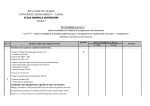
PC Resolution:
Standard
Resolution
VGA
Active Resolution
H Pixels
V Lines
480
640
480
480
WVGA
720
SVGA
800
XGA
1024
WXGA
WXGA
SXGA
SXGA
WXGA
WXGA
UXGA
HD1080
1280
1280
1280
1280
1360
1366
1600
1920
Refresh Rate
Dot Clock
Aspect Ratio
Stand for Mode
60 Hz
72 Hz
75 Hz
25.175 MHz
31.5 MHz
31.5 MHz
4:3
Video Graphic
Array
400
70 Hz
33.75 MHz
16:9
Wide Video
Graphic Array
600
600
768
768
768
800
960
1024
768
768
1200
1080
60 Hz
75 Hz
60 Hz
75 Hz
60 Hz
60 Hz
60 Hz
60 Hz
60 Hz
60 Hz
60 Hz
60 Hz
40 MHz
49.5 MHz
65 MHz
78.75 MHz
79.5 MHz
79.5 MHz
108 MHz
108 MHz
85.5 MHz
85.5 MHz
162 MHz
148.5 MHz
4:3
Super VGA
5:3
16:10
4:3
5:4
16:9
16:9
4:3
16:9
Extended
Graphic Array
Wide XGA
Wide XGA
Super XGA
Super XGA
Wide XGA
Wide XGA
Ultra XGA
HD1080
Refresh Rate
Dot Clock
Aspect Ratio
Stand for Mode
29.97 Hz
59.94 Hz
25 Hz
50 Hz
13.5 MHz
27 MHz
13.5 MHz
27 MHz
Refresh Rate
Dot Clock
Aspect Ratio
74.25 MHz
16:9
74.25 MHz
16:9
148.5 MHz
16:9
4:3
SDTV Resolution:
Standard
Resolution
480i
480p
576i
576p
Active Resolution
H Pixels
V Lines
720
480
720
480
4:3
4:3
Standard
Standard
HDTV Resolution:
Standard
Resolution
Active Resolution
H Pixels
V Lines
720p
1280
720
1080i
1920
1080
1080p
1920
1080
50 Hz
60 Hz
25 Hz
30 Hz
50 Hz
60 Hz
Stand for Mode
Normally DVB
Mode
Normally ATSC
Mode
Normally ATSC
Mode
The PC text quality is optimum in HD 1080 mode (1920 x 1080, 60 Hz).
Your PC display screen might appear different depending on the manufacture (and your particular version of Windows).
Check your PC instruction book for information about connecting your PC to a monitor.
If a vertical and horizontal frequency-select mode exists, select 60 Hz (vertical) and 31.5 KHz (horizontal). In some
cases, abnormal signals (such as stripes) might appear on the screen when the PC power is turned off (or if the PC is
disconnected). If so, press the [INPUT] button to enter the video mode. Also, make sure that the PC is connected.
When horizontal synchronous signals seem irregular in RGB mode, check PC power saving mode or cable connections.
The display settings table complies to the IBM/VESA standards, and based on the analog input.
The DVI support mode is regarded as same to the PC support mode.
The best timing for the vertical frequency to each mode is 60 Hz.