1
ED150mm f2.0
Instructions
For customers in Europe
The “CE” mark indicates that this product complies with the European requirements for safety, health,
environment and customer protection. CE-mark products are for sale in Europe.
For customers in USA
FCC Notice
This device complies with part 15 of the FCC rules. Operation is subject to the following two conditions: (1) This device
may not cause harmful interference, and (2) this device must accept any interference received, including interference
that may cause undesired operation.
Any unauthorized changes or modifications to this equipment would void the user’s authority to operate.
For customers in CANADA
This Class B digital apparatus complies with Canadian ICES-003.
Features
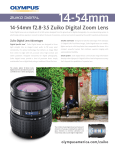
• The ED150mm f2.0 is a lens with high imaging capability, designed exclusively for use with Olympus
FOUR THIRDS single-lens-reflex digital cameras.
• Dustproof and drip-proof construction.
• Super-telephoto lens corresponding to a 300 mm lens for a 35 mm camera.
• F2.0 high-quality lens with 11 elements in 9 groups including one Super ED and one ED glass
elements (ED: Extra-low Dispersion).
• Can be used in combination with the optional EC-14 teleconverter. Set the aperture at composite
f-stop of f4 or more.
• Can be used in combination with the optional EX-25 extension tube under the following conditions:
Focus adjustment
Working distance
MF
79 cm – 126 cm
(2.6 ft – 4.1 ft)
Magnification
( ): When converted to 35 mm film camera
0.17X – 0.31X
(0.34X – 0.62X)
This lens cannot be used in combination with the Olympus Macro Flash System.
Contents
• Features ....................................................................................................................................... 10
• Nomenclature .............................................................................................................................. 11
• Lens Case (Provided) .................................................................................................................. 11
• Attaching the Hood ...................................................................................................................... 12
• Storing the Hood .......................................................................................................................... 12
• Attaching and Detaching the Tripod Mount .................................................................................. 12
• Focus Limit Switch ....................................................................................................................... 13
• Focus Stop Buttons ..................................................................................................................... 13
• Shooting Cautions ....................................................................................................................... 13
• Precautions: Be Sure to Read the Following ............................................................................... 14
• Main Specifications ...................................................................................................................... 15
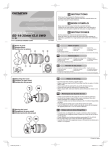
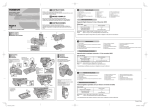
Nomenclature
Front cap
Focus stop buttons (x4)
Mounting index
Rear cap
Focus limit switch
Focus ring
Filter mount thread
Electrical contacts
Tripod mount
Lens hood
Lens Case (Provided)
• Attaching the lens case strap.
Pull the end of the
strap at least 5 cm
away from the
buckle.
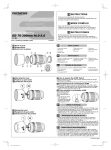
Attaching the Hood
Storing the Hood
Attaching and Detaching the Tripod Mount
Focus Limit Switch
∞-1.4m
∞
-4m
4-1.4m
This switch limits the autofocus range to speed up focusing in each
range.
Select the optimum mode according to the shooting distance.
Close-up shooting : Autofocus is performed between 4 meters
(13.1ft) and 1.4 meters (4.6 ft).
Normal shooting : Autofocus is performed from ∞ (infinity) to
1.4 meters (4.6 ft).
Distant shooting : Autofocus is performed from ∞ (infinity) to
4 meters (13.1 ft).
Focus Stop Buttons
• By holding down one of the focus stop buttons, you can deactivate
autofocus operation and fix focus at the point where the button
was pressed.
• Four buttons are provided. All have the same effect.
Shooting Cautions
• Be sure to attach the hood when shooting against the light.
• When two or more filters are used or a thick filter is used, part of the picture may be cut off or
obscured.
Precautions: Be Sure to Read the Following
Warnings: Safety Precautions
Do not view the sun
through the lens.
Do not leave the lens without the cap.
If solar light is converged through the
lens, a fire may result.
Do not point the camera lens at the sun. Sunlight
will converge in the lens and focus inside the camera, possibly causing a malfunction or fire.
Handling Precautions
Working temperature
range
Abrupt temperature
changes
Do not put the lens with
its contacts facing down.
Too much pressure
Do not touch the lens.
Submergence
Do not touch the
contacts.
Do not drop
Organic solvents
Excessive moisture
Magnetism
Do not hold the camera by the section of
the lens extruded by
the focusing operation.
Moth repellents
If you experience any
problems, contact your
nearest Olympus service
center.
Storage Precautions
Lens cleaning tissue or
soft cloth
Cap the lens when it is
not used.
Lens cleaning
Main Specifications
Mount
Focal distance
Max. aperture
Image angle
Lens configuration
: Four Thirds mount
: 150 mm
: f2.0
: 8.2°
: 11 elements in 9 groups
Multi-layer coating (partial single-layer coating)
Iris control
: f2.0 to f22
Shooting range
: 1.4 m (4.6 ft) to ∞ (infinity)
Focus adjustment
: AF/MF switching
Weight
: 1610 g (56.8 oz) (excluding hood and cap)
Dimensions
: Max. dia. ø100 mm (3.9 in) x Overall length 150 mm (5.9 in)
Lens hood mount
: Bayonet
Filter mount thread diameter : 82 mm (3.2 in)
• Design and specifications are subject to change without any notice or obligation on the part of
the manufacturer.
Lens configuration diagram
Technical Support (USA)
24/7 online automated help: http://www.olympusamerica.com/E1
Phone customer : Tel.1-800-260-1625 (Toll-free)
Our phone customer support is available from 8 am to
10 pm (Monday to Friday) ET
E-Mail : [email protected]
European technical Customer Support
Please visit our homepage http://www.olympus-europa.com
or call NUMBER : Tel.00800-67 10 83 00 (Toll-free)
+49 1805-67 10 83 or +49 40-23 77 38 99 (Charged)