1
NETGEAR Wireless-N Router User Manual
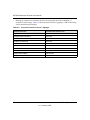
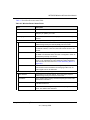
Table 6-1. Wireless Router Status Fields (continued)
Field
Description
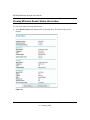
Wireless Port. The following settings apply to the wireless port of the router.
Name (SSID)
The wireless network name (SSID) being used by the wireless port of
the router. The default is NETGEAR.
Region
The geographic region where the router is being used. It might be
illegal to use the wireless features of the router in some parts of the
world.
Channel
Identifies the channel of the wireless port being used. Click the link to
the online document “Wireless Networking Basics” in Appendix B for
the frequencies used on each channel.
Mode
Indicates the wireless communication mode:
• Up to 54 Mbps.
• Up to 145 Mbps.
• Up to 300 Mbps (in this mode, there are two channels: a primary
channel [P] and a secondary channel [S]).
Wireless AP
Indicates whether the radio feature of the router is enabled. If not
enabled, the Wireless LED on the front panel is off.
Broadcast Name
Indicates whether the router is broadcasting its SSID.
Wi-Fi Protected Setup
Indicates whether the router’s PIN is enabled and whether the router
is configured for Push ‘N’ Connect (Wi-Fi Protected Setup). For more
information, see “Using Push 'N' Connect (Wi-Fi Protected Setup)” on
page 2-13.
6-4
Using Network Monitoring Tools
v1.2, January 2009