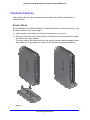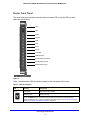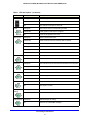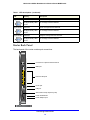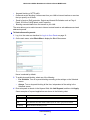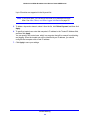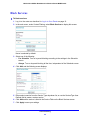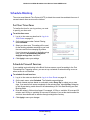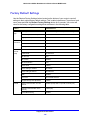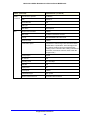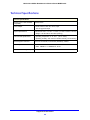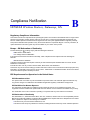
1
Mobile Voice HSPA+ Broadband 11n Wireless Router MVBR1210C User M anua l 350 East Plumeria Drive San Jose, CA 95134 USA January 2013 202-10972-02 v1.0 Mobile Voice HSPA+ Broadband 11n Wireless Router MVBR1210C Support Thank you for selecting NETGEAR products. After installing your device, locate the serial number on the label of your product and use it to register your product at https://my.netgear.com. You must register your product before you can use NETGEAR telephone support. NETGEAR recommends registering your product through the NETGEAR website. For product updates and web support, visit http://support.netgear.com. Phone (US & Canada only): 1-888-NETGEAR. Phone (Other Countries): Check the list of phone numbers at http://support.netgear.com/general/contact/default.aspx. Trademarks NETGEAR, the NETGEAR logo, and Connect with Innovation are trademarks and/or registered trademarks of NETGEAR, Inc. and/or its subsidiaries in the United States and/or other countries. Information is subject to change without notice. © NETGEAR, Inc. All rights reserved. 2 Table of Contents Chapter 1 Connecting to the Internet Hardware Features. . . . . . . . . . . . . . . . . . . . . . . . . . . . . . . . . . . . . . . . . . . . 7 Router Stand . . . . . . . . . . . . . . . . . . . . . . . . . . . . . . . . . . . . . . . . . . . . . . 7 Router Front Panel . . . . . . . . . . . . . . . . . . . . . . . . . . . . . . . . . . . . . . . . . . 8 Router Back Panel . . . . . . . . . . . . . . . . . . . . . . . . . . . . . . . . . . . . . . . . . 10 Router Label . . . . . . . . . . . . . . . . . . . . . . . . . . . . . . . . . . . . . . . . . . . . . . 11 Log In to Your Router . . . . . . . . . . . . . . . . . . . . . . . . . . . . . . . . . . . . . . . . . 12 Access the Setup Wizard after Installation . . . . . . . . . . . . . . . . . . . . . . . . . 14 Manually Configure Your Internet Settings. . . . . . . . . . . . . . . . . . . . . . . . . 15 Broadband Settings . . . . . . . . . . . . . . . . . . . . . . . . . . . . . . . . . . . . . . . . 15 Mobile Broadband Settings . . . . . . . . . . . . . . . . . . . . . . . . . . . . . . . . . . 17 Ethernet Broadband Settings . . . . . . . . . . . . . . . . . . . . . . . . . . . . . . . . . 19 Chapter 2 Wireless Network Configuration Plan Your Wireless Network. . . . . . . . . . . . . . . . . . . . . . . . . . . . . . . . . . . . 25 Wireless Placement and Range Guidelines . . . . . . . . . . . . . . . . . . . . . . 25 Wireless Security Options . . . . . . . . . . . . . . . . . . . . . . . . . . . . . . . . . . . 26 Manually Configure Your Wireless Settings . . . . . . . . . . . . . . . . . . . . . . . . 27 Configure WEP. . . . . . . . . . . . . . . . . . . . . . . . . . . . . . . . . . . . . . . . . . . . 28 Configure WPA, WPA2, or WPA + WPA2 . . . . . . . . . . . . . . . . . . . . . . . 30 Use Push 'N' Connect (WPS) to Configure Your Wireless Network. . . . . . 31 WPS Button . . . . . . . . . . . . . . . . . . . . . . . . . . . . . . . . . . . . . . . . . . . . . . 31 WPS PIN Entry . . . . . . . . . . . . . . . . . . . . . . . . . . . . . . . . . . . . . . . . . . . . 32 Add Wireless Computers That Do Not Support WPS. . . . . . . . . . . . . . . 33 SIM Card PIN Code . . . . . . . . . . . . . . . . . . . . . . . . . . . . . . . . . . . . . . . . . . 34 SIM Card Modem Unlock Code . . . . . . . . . . . . . . . . . . . . . . . . . . . . . . . . . 35 Chapter 3 Voice and Messaging Services Voice Services . . . . . . . . . . . . . . . . . . . . . . . . . . . . . . . . . . . . . . . . . . . . . . 36 Messaging Services . . . . . . . . . . . . . . . . . . . . . . . . . . . . . . . . . . . . . . . . . . 37 View SMS Messages . . . . . . . . . . . . . . . . . . . . . . . . . . . . . . . . . . . . . . . 37 Send SMS Messages . . . . . . . . . . . . . . . . . . . . . . . . . . . . . . . . . . . . . . . 39 Chapter 4 USB Storage USB Drive Requirements . . . . . . . . . . . . . . . . . . . . . . . . . . . . . . . . . . . . . . 41 File-Sharing Scenarios . . . . . . . . . . . . . . . . . . . . . . . . . . . . . . . . . . . . . . . . 41 Share Photos with Friends and Family. . . . . . . . . . . . . . . . . . . . . . . . . . 42 Store Files in a Central Location for Printing . . . . . . . . . . . . . . . . . . . . . 42 3 Mobile Voice HSPA+ Broadband 11n Wireless Router MVBR1210C Share Large Files with Colleagues. . . . . . . . . . . . . . . . . . . . . . . . . . . . . 42 USB Storage Basic Settings. . . . . . . . . . . . . . . . . . . . . . . . . . . . . . . . . . . . 44 Edit a Network Folder. . . . . . . . . . . . . . . . . . . . . . . . . . . . . . . . . . . . . . . . . 45 Configure USB Storage Advanced Settings. . . . . . . . . . . . . . . . . . . . . . . . 46 Create a Network Folder . . . . . . . . . . . . . . . . . . . . . . . . . . . . . . . . . . . . 47 Unmount a USB Drive . . . . . . . . . . . . . . . . . . . . . . . . . . . . . . . . . . . . . . . . 48 Specify Approved USB Devices . . . . . . . . . . . . . . . . . . . . . . . . . . . . . . . . . 48 Connect to the USB Drive from a Remote Computer. . . . . . . . . . . . . . . . . 49 Locate the Internet Port IP Address . . . . . . . . . . . . . . . . . . . . . . . . . . . . 49 Access the Router’s USB Drive Remotely Using FTP . . . . . . . . . . . . . . 49 Connect to the USB Drive with Microsoft Network Settings . . . . . . . . . . . . 49 Enable File and Printer Sharing . . . . . . . . . . . . . . . . . . . . . . . . . . . . . . . 50 Chapter 5 USB Printer USB Printer Control . . . . . . . . . . . . . . . . . . . . . . . . . . . . . . . . . . . . . . . . . . 52 Control Center Configuration . . . . . . . . . . . . . . . . . . . . . . . . . . . . . . . . . 53 USB Printer. . . . . . . . . . . . . . . . . . . . . . . . . . . . . . . . . . . . . . . . . . . . . . . 53 Scan with a Multifunction Printer . . . . . . . . . . . . . . . . . . . . . . . . . . . . . . 54 Chapter 6 Content Filtering View, Select, and Save Logged Information . . . . . . . . . . . . . . . . . . . . . . . 56 Log Message Examples . . . . . . . . . . . . . . . . . . . . . . . . . . . . . . . . . . . . . 57 Block Sites and Keywords . . . . . . . . . . . . . . . . . . . . . . . . . . . . . . . . . . . . . 57 Block Services . . . . . . . . . . . . . . . . . . . . . . . . . . . . . . . . . . . . . . . . . . . . . . 60 Schedule Blocking . . . . . . . . . . . . . . . . . . . . . . . . . . . . . . . . . . . . . . . . . . . 61 Set Your Time Zone . . . . . . . . . . . . . . . . . . . . . . . . . . . . . . . . . . . . . . . . 61 Schedule Firewall Services . . . . . . . . . . . . . . . . . . . . . . . . . . . . . . . . . . 61 Enable Security Event Email Notification . . . . . . . . . . . . . . . . . . . . . . . . . . 62 Chapter 7 Managing Your Network Router Status . . . . . . . . . . . . . . . . . . . . . . . . . . . . . . . . . . . . . . . . . . . . . . . 64 Showing Statistics . . . . . . . . . . . . . . . . . . . . . . . . . . . . . . . . . . . . . . . . . 66 Connection Status . . . . . . . . . . . . . . . . . . . . . . . . . . . . . . . . . . . . . . . . . 67 View Attached Devices. . . . . . . . . . . . . . . . . . . . . . . . . . . . . . . . . . . . . . . . 68 Back Up, Restore, or Erase Your Settings . . . . . . . . . . . . . . . . . . . . . . . . . 69 Back Up the Configuration to a File . . . . . . . . . . . . . . . . . . . . . . . . . . . . 69 Restore the Configuration from a File. . . . . . . . . . . . . . . . . . . . . . . . . . . 69 Erase the Configuration . . . . . . . . . . . . . . . . . . . . . . . . . . . . . . . . . . . . . 70 Protect Access to Your Router . . . . . . . . . . . . . . . . . . . . . . . . . . . . . . . . . . 70 Change the Built-In Password . . . . . . . . . . . . . . . . . . . . . . . . . . . . . . . . 70 Change the Administrator Login Time-Out . . . . . . . . . . . . . . . . . . . . . . . 71 Run Diagnostic Utilities and Reboot the Router . . . . . . . . . . . . . . . . . . . . . 71 Upgrade the Router Firmware . . . . . . . . . . . . . . . . . . . . . . . . . . . . . . . . . . 72 Upgrade the Module Firmware. . . . . . . . . . . . . . . . . . . . . . . . . . . . . . . . . . 73 Chapter 8 Advanced 4 Mobile Voice HSPA+ Broadband 11n Wireless Router MVBR1210C SIM Settings . . . . . . . . . . . . . . . . . . . . . . . . . . . . . . . . . . . . . . . . . . . . . . . . 76 Advanced Wireless Settings. . . . . . . . . . . . . . . . . . . . . . . . . . . . . . . . . . . . 77 Wireless Station Access Control. . . . . . . . . . . . . . . . . . . . . . . . . . . . . . . 77 Restrict Access by MAC Address . . . . . . . . . . . . . . . . . . . . . . . . . . . . . . 78 Wireless Repeating Function . . . . . . . . . . . . . . . . . . . . . . . . . . . . . . . . . . . 80 Port Forwarding and Port Triggering . . . . . . . . . . . . . . . . . . . . . . . . . . . . . 81 Port Forwarding . . . . . . . . . . . . . . . . . . . . . . . . . . . . . . . . . . . . . . . . . . . 81 Port Triggering . . . . . . . . . . . . . . . . . . . . . . . . . . . . . . . . . . . . . . . . . . . . 82 WAN Setup. . . . . . . . . . . . . . . . . . . . . . . . . . . . . . . . . . . . . . . . . . . . . . . . . 83 Set Up a Default DMZ Server . . . . . . . . . . . . . . . . . . . . . . . . . . . . . . . . . 84 LAN Setup . . . . . . . . . . . . . . . . . . . . . . . . . . . . . . . . . . . . . . . . . . . . . . . . . 85 DHCP Settings . . . . . . . . . . . . . . . . . . . . . . . . . . . . . . . . . . . . . . . . . . . . 86 Reserved IP Addresses . . . . . . . . . . . . . . . . . . . . . . . . . . . . . . . . . . . . . 87 QoS Setup . . . . . . . . . . . . . . . . . . . . . . . . . . . . . . . . . . . . . . . . . . . . . . . . . 88 QoS Priority Rule List . . . . . . . . . . . . . . . . . . . . . . . . . . . . . . . . . . . . . . . 89 QoS Priority Rules . . . . . . . . . . . . . . . . . . . . . . . . . . . . . . . . . . . . . . . . . 90 Dynamic DNS . . . . . . . . . . . . . . . . . . . . . . . . . . . . . . . . . . . . . . . . . . . . . . . 92 Use Static Routes. . . . . . . . . . . . . . . . . . . . . . . . . . . . . . . . . . . . . . . . . . . . 93 Static Route Example . . . . . . . . . . . . . . . . . . . . . . . . . . . . . . . . . . . . . . . 93 Enable Remote Management. . . . . . . . . . . . . . . . . . . . . . . . . . . . . . . . . . . 95 Universal Plug and Play . . . . . . . . . . . . . . . . . . . . . . . . . . . . . . . . . . . . . . . 96 Traffic Meter . . . . . . . . . . . . . . . . . . . . . . . . . . . . . . . . . . . . . . . . . . . . . . . . 97 Chapter 9 Troubleshooting Basic Functioning . . . . . . . . . . . . . . . . . . . . . . . . . . . . . . . . . . . . . . . . . . . . 99 Troubleshoot Access to the Router Main Menu . . . . . . . . . . . . . . . . . . . . 101 Troubleshoot the ISP Connection. . . . . . . . . . . . . . . . . . . . . . . . . . . . . . . 102 Connect to the Internet . . . . . . . . . . . . . . . . . . . . . . . . . . . . . . . . . . . . . 102 Troubleshoot Internet Browsing . . . . . . . . . . . . . . . . . . . . . . . . . . . . . . 103 Troubleshoot a TCP/IP Network Using the Ping Utility. . . . . . . . . . . . . . . 104 Test the LAN Path to Your Router . . . . . . . . . . . . . . . . . . . . . . . . . . . . 104 Test the Path from Your Computer to a Remote Device . . . . . . . . . . . 105 Problems with Date and Time . . . . . . . . . . . . . . . . . . . . . . . . . . . . . . . . . 105 Restore the Default Configuration and Password . . . . . . . . . . . . . . . . . . 106 Appendix A Supplemental Information Factory Default Settings . . . . . . . . . . . . . . . . . . . . . . . . . . . . . . . . . . . . . . 108 Technical Specifications . . . . . . . . . . . . . . . . . . . . . . . . . . . . . . . . . . . . . . 110 Appendix B Compliance Notification Index 5 1. Connecting to the Internet 1 This chapter describes how to configure your Mobile Voice HSPA+ Broadband 11n Wireless Router MVBR1210C Internet connection. • Hardware Features • Log In to Your Router • Access the Setup Wizard after Installation • Manually Configure Your Internet Settings Note: For more information about the topics covered in this manual, visit the support website at http://support.netgear.com. 6 Mobile Voice HSPA+ Broadband 11n Wireless Router MVBR1210C Hardware Features This section outlines the physical aspects of your Mobile Voice HSPA+ Broadband 11n Wireless Router. Router Stand Since the Mobile Voice HSPA+ Broadband 11n Wireless Router is a vertical-only device, use the stand to position your router upright. 1. Insert the tabs on the stand into the slot on the bottom of your router. 2. Place your router near an AC power outlet in a location where you can connect the cables you need for your home network. The router needs to be located where you can receive a strong mobile broadband signal while indoors if you are planning to connect to the Internet using mobile broadband. Figure 1. Connecting to the Internet 7 Mobile Voice HSPA+ Broadband 11n Wireless Router MVBR1210C Router Front Panel The router front panel contains control buttons and status LEDs. Use the LEDs to verify status and connections. WPS WiFi Power Internet USB LAN WAN Phone Voice Mail SMS Message Signal Quality (Excellent) Signal Quality (Good) Signal Quality (Poor) Figure 2. Table 1 describes each LED and button located on the front panel of the router. Table 1. LED descriptions LED Activity Description WPS Solid green WiFi has security enabled. Blinking green WPS is running. Press the WPS button to open a 2-minute window for the router to connect with other WPS-enabled devices. For more information about this function, see Use Push 'N' Connect (WPS) to Configure Your Wireless Network on page 31. Connecting to the Internet 8 Mobile Voice HSPA+ Broadband 11n Wireless Router MVBR1210C Table 1. LED descriptions (continued) LED Activity Description WiFi Blinking blue Data is being transmitted or received over the WiFi link. Solid blue The WiFi local port is initialized. Off The wireless access point is turned off. Solid green The router is turned on and operating normally. Solid amber POST (power-on self-test) is in progress. Off Power is not supplied to the router. Solid green There is an Internet session. Solid amber Traffic meter limit has been reached; traffic is blocked. Blinking green Data is being transmitted over the Internet connection. Blinking amber Traffic meter limit has been reached, but traffic is not blocked. Power Internet Port Blinking green and amber Failover occurred from WAN to mobile broadband. USB LAN Ports WAN Port Phone Port Message Waiting SMS Message Off No Internet connection is detected. Solid green A USB port has detected a USB device. Off No link is detected on this port. Solid green The local Ethernet ports have detected wired links with computers. Blinking Data is being transmitted or received. Off No link is detected on these ports. Solid green The Ethernet WAN port has detected an active link. Blinking Data is being transmitted or received. Off No link is detected on these ports. Solid green The phone is off hook. Off The phone is on hook. Blinking green Voice mail is waiting. Off There is no unread voice mail. Solid green SMS messages are waiting. Off There are no unread SMS messages. Connecting to the Internet 9 Mobile Voice HSPA+ Broadband 11n Wireless Router MVBR1210C Table 1. LED descriptions (continued) LED Activity Description Signal Quality Solid blue Excellent coverage has been detected. All Signal Quality LEDs are off No coverage has been detected. Solid blue Good coverage has been detected. All Signal Quality LEDs are off No coverage has been detected. Solid blue Marginal coverage has been detected. All Signal Quality LEDs are off No coverage has been detected. Signal Quality Signal Quality Router Back Panel The back panel of the router contains port connections. Connector for optional external antenna WAN port Ethernet LAN ports Phone port USB port Slot for SIM card (if required by ISP) Power On/Off button Power adapter input Connecting to the Internet 10 Mobile Voice HSPA+ Broadband 11n Wireless Router MVBR1210C Router Label The label on the left side of the router shows the router’s MAC address, serial number, security PIN, IMEI or ESN number, and factory default login information. It also contains the SSID and passphrase that is unique to each router. Direction of SIM card insertion Restore Factory Settings: Press for 6 seconds. Router label with unique SSID and passphrase Router information - Default access address - Default user name and password - WPS PIN - IMEI or ESN number - Serial number - MAC address Note: Restore Factory Settings. Locate the small hole outlined in red on the back of the router. Insert a paper clip into the hole and push for 6 seconds. Pressing the Restore Factory Settings button causes the LED to blink briefly. After the button is held down for more than 6 seconds, the LED flashes AMBER, and then turns green as the router resets to the factory defaults. Connecting to the Internet 11 Mobile Voice HSPA+ Broadband 11n Wireless Router MVBR1210C Log In to Your Router When you first connect to your router during installation, a Setup Wizard displays. After the initial configuration, you can use your web browser to log in to the router to view or change its settings. Links to Knowledge Base and documentation are also available on the router main menu. Note: Your computer needs to be configured for DHCP. For help configuring DHCP, refer to the documentation that came with your computer. When you have logged in, if you do not click Logout, after 5 minutes of no activity the router automatically logs you out. To log in to the router: 1. Type http://www.routerlogin.net in the address field of your browser, and then press Enter or Return to display the login window. 2. Enter admin for the user name and your password (or the default, password). For information about how to change the password, see Change the Built-In Password on page 70. Note: If you do not remember your password, you can restore the router to its factory default settings, which will reset the password. See Factory Default Settings on page 108. 3. If the router has not been configured, the Smart Wizard screen displays. After the router has been configured, one of the following screens displays: Connecting to the Internet 12 Mobile Voice HSPA+ Broadband 11n Wireless Router MVBR1210C • Firmware Upgrade Assistant screen. After initial setup, the Firmware Upgrade Assistant screen displays unless the Check for Updated Firmware Upon Log-in check box is cleared. Note: You can disable this automatic checking and updating feature during future log-ins by clearing the Check for Updated Firmware Upon Log-in check box, but NETGEAR recommends that you keep this feature enabled to ensure that your router is using the latest updated firmware. • Router Status screen. The Router Status screen displays the current router connection status. See Router Status on page 64. 4. You can use different methods to configure your router. • Select Setup Wizard from the router menu to set up your Internet connection and wireless network configuration. See Access the Setup Wizard after Installation on page 14. • You can manually configure the router settings. See Manually Configure Your Internet Settings on page 15. Connecting to the Internet 13 Mobile Voice HSPA+ Broadband 11n Wireless Router MVBR1210C Access the Setup Wizard after Installation To access the Setup Wizard: 1. Log in to the router as described in Log In to Your Router on page 12. The Setup Wizard opens. 2. Click Next. The Setup Wizard prompts you to set up your Internet connection and wireless network. a. Select your Internet connection mode: • Use Ethernet first and if fail use mobile broadband connection • Always use mobile broadband connection • Always use Ethernet connection b. Click Next. c. Select your country and then your Internet service provider. d. Click Done. Connecting to the Internet 14 Mobile Voice HSPA+ Broadband 11n Wireless Router MVBR1210C Manually Configure Your Internet Settings For you to connect to the network, an active broadband service account is required. Contact your ISP for your user name, password, and the network name. You also need to configure some or all of the settings described in the following sections, depending on how you have chosen to connect to the Internet: • Broadband Settings on page 15 • Mobile Broadband Settings on page 17 (not required if using Ethernet connection only) • Ethernet Broadband Settings on page 19 (not required if using mobile broadband connection only) Broadband Settings To manually configure your broadband Internet settings: 1. Log in to the router as described in Log In to Your Router on page 12. 2. From the main menu, select Broadband Settings. 3. Adjust the settings as needed based on your Internet connection. The fields in this screen are described in Table 2. 4. The following buttons are available: • Apply. Apply the changes that you made. • Cancel. Discard changes. Connecting to the Internet 15 Mobile Voice HSPA+ Broadband 11n Wireless Router MVBR1210C Table 2. Internet connection settings Fields and check boxes Description Internet Connection Mode The choices are: • Always use an Ethernet connection (default) • Use Ethernet first and if fail use mobile broadband connection • Always use mobile broadband connection Failover Detection Method1 Select the failover method, and enter the related information: • DNS lookup using WAN DNS Server • Perform a DNS lookup by a hostname • Ping this IP address Retry Interval is1 Enter the retry interval. Failover after1 Enter how many retry attempts to make before failing over. Resume after1 Enter how long to wait for the primary link to be stabilized before resuming use of the primary link. Enable Hardware link detection When selected, the hardware detects when the Ethernet link is dropped. Enter when to failover when the Ethernet link is dropped. This is independent of the DNS and Ping detection methods. 1. This field is available only when the Internet connection mode is Use Ethernet first and if fail use broadband connection. Connecting to the Internet 16 Mobile Voice HSPA+ Broadband 11n Wireless Router MVBR1210C Mobile Broadband Settings To manually configure your mobile broadband Internet settings: 1. Log in to the router as described in Log In to Your Router on page 12. 2. From the main menu, select Mobile Broadband Settings. 3. Adjust the settings as needed based on your Internet connection. The fields in this screen are described in Table 3. 4. Available buttons are: • Connect. Manually connect to the network. • Disconnect. Disconnect from the current network. • Apply. Apply the changes that you made. • Cancel. Discard changes. • Refresh. Update the connection status. Table 3. Settings Fields and check boxes Description User Name Internet account login user name. Password Internet account password for authentication. Country Select your country from the drop-down list. Connecting to the Internet 17 Mobile Voice HSPA+ Broadband 11n Wireless Router MVBR1210C Table 3. Settings Fields and check boxes Description Internet Service Provider Select your Internet service provider from the drop-down list. Access Number The remote site’s phone number. PIN code Pin code of the SIM card, where applicable. APN Access point name. PDP type Select the type of packet data protocol: • IP • PDP-IP • PPP • PPP-IP Connect automatically at startup When this check box is selected, the modem automatically connects to the network when powered up. This should be selected after login information is provided. Roaming automatically When this check box is selected, the unit might roam to any available operator in range and might incur roaming charges. Use internal antenna If this check box is selected, the router will use the internal antenna rather than the external antenna. Wireless Button Configuration Select the option to determine what happens when the WPS button on the front panel is pressed. • Control Wi-Fi Only. Pressing the button toggles the WiFi function. If WiFi is turned on, pressing the button turns off the WiFi. Pressing it again turns on the WiFi. This function is available only if the WiFi function is enabled. The wireless broadband function is unaffected. • Control Both Wi-Fi and Wireless Broadband. Pressing the push button toggles both the WiFi function and wireless broadband at the same time. If WiFi is turned on, pressing the button turns off the WiFi. At the same time, the wireless broadband connection is disconnected. If you press the button again, WiFi is turned on and the router attempts to reestablish the wireless broadband connection. Depending on the coverage, wireless broadband coverage might or might not be connected successfully. Connection status Current WAN port status. Connecting to the Internet 18 Mobile Voice HSPA+ Broadband 11n Wireless Router MVBR1210C Ethernet Broadband Settings To manually configure your Ethernet broadband Internet settings: 1. Log in to the router as described in Log In to Your Router on page 12. 2. From the main menu, select Ethernet Broadband Settings. The following question displays at the top of the screen: Select the option based on the type of account you have with your ISP. • If you need to enter login information every time you connect to the Internet, or you have a PPPoE account with your ISP, select Yes. • Otherwise, select No. Then fill out the appropriate screen. For details, see one of the following: • step a, Login required: • step b, Login not required:. Note: If you have installed PPP software such as WinPoET (from Earthlink) or Enternet (from PacBell), then you have PPPoE. Select Yes. After selecting Yes and configuring your router, you do not need to run the PPP software on your computer to connect to the Internet. a. Login required: Adjust the settings as needed based on your Internet connection. The fields in this screen are described in Table 4. Connecting to the Internet 19 Mobile Voice HSPA+ Broadband 11n Wireless Router MVBR1210C Table 4. Ethernet broadband settings when login required Fields and check boxes Description Internet Service Provider Select the service provided by your ISP. • Other (PPPoE) is the most common. • PPTP is used in Austria and other European countries. • Telstra BigPond is for Australia only. Login This is usually the name that you use in your email address. For example, if your main mail account is [email protected], then type JerAB in this field. Some ISPs (such as Mindspring, Earthlink, and T-DSL) require that you use your full email address when you log in. If your ISP requires your full email address, then type it in the Login field. Password Type the password that you use to log in to your ISP. Service Name (If Required) If your ISP provided a service name, enter it here. Otherwise, this can be left blank. Connecting to the Internet 20 Mobile Voice HSPA+ Broadband 11n Wireless Router MVBR1210C Table 4. Ethernet broadband settings when login required (continued) Fields and check boxes Description Connection Mode Set the connection mode to Dial on Demand, Always On, or Manually Connect. • With the default setting, Dial on Demand, a PPPoE connection automatically starts when there is outbound traffic to the Internet, and it automatically terminates if the connection is idle based on the value in the Idle Timeout field. • When the connection mode is set to Always On, the PPPoE connection automatically starts when the computer boots up, but the connection does not time out. The router keeps trying to bring up the connection if it is disconnected for some reason. • If you select Manually Connect, you need to go to the Router Status screen and click the Connect button to connect to the Internet. The manual connection does not time out, and you have to click the Disconnect button on the Router Status screen to disconnect it. Idle Timeout (In Minutes) An idle Internet connection is terminated after this time period. If this value is zero (0), then the router keeps the connection alive by reconnecting immediately whenever the connection is lost. Internet IP Address If you log in to your service or your ISP did not provide you with a fixed IP address, the router finds an IP address for you automatically when you connect. Select Get Dynamically from ISP. If you have a fixed (static, permanent) IP address, your ISP has provided you with an IP address. Select Use Static IP Address, and type the IP address. Domain Name Server (DNS) Address The DNS server is used to look up site addresses based on their names. • If your ISP gave you one or two DNS addresses, select Use These DNS Servers, and type the primary and secondary addresses. • Otherwise, select Get Automatically From ISP. Note: If you get “Address not found” errors when you go to a website, it is likely that your DNS servers are not set up correctly. You should contact your ISP to get DNS server addresses. b. Login not required: Adjust the settings as needed based on your Internet connection. The fields in this screen are described in Table 5. Connecting to the Internet 21 Mobile Voice HSPA+ Broadband 11n Wireless Router MVBR1210C Table 5. Ethernet broadband settings fields when login not required Fields and check boxes Description Account Name (If Required) This is also known as the host name or system name. For most users, type your account name or user name in this field. For example, if your main mail account is [email protected], then type JerAB in this field. If your ISP has given you a specific host name, then type it (for example, CCA7324-A). Domain Name (If Required) For most users, you can leave this field blank, unless required by your ISP. You can type the domain name of your ISP. For example, if your ISP’s mail server is mail.xxx.yyy.zzz, you would type xxx.yyy.zzz as the domain name. If you have a domain name given to you by your ISP, type it in this field. (For example, Earthlink Cable might require a host name of home, and Comcast sometimes supplies a domain name.) If you have a cable modem, this is usually the workgroup name. Connecting to the Internet 22 Mobile Voice HSPA+ Broadband 11n Wireless Router MVBR1210C Table 5. Ethernet broadband settings fields when login not required (continued) Fields and check boxes Description Internet IP Address If you log in to your service or your ISP did not provide you with a fixed IP address, the router finds an IP address for you automatically when you connect. Select Get Dynamically From ISP. If you have a fixed (or static IP) address, your ISP has provided you with the required information. Select Use Static IP Address, and type the IP address, subnet mask, and gateway IP address in the correct fields. For example: • IP Address. 24.218.156.183 • Subnet Mask. 255.255.255.0 • Gateway IP Address. 24.218.156.1 Domain Name Server (DNS) Address The DNS server is used to look up site addresses based on their names. • If your ISP gave you one or two DNS addresses, select Use These DNS Servers, and type the primary and secondary addresses. • Otherwise, select Get Automatically From ISP. Note: If you get “Address not found” errors when you go to a website, it is likely that your DNS servers are not set up correctly. You should contact your ISP to get DNS server addresses. Router MAC Address Your computer’s local address is its unique address on your network. This is also referred to as the computer’s MAC (Media Access Control) address. • Usually, select Use Default MAC Address. • If your ISP requires MAC authentication, then select either Use Computer MAC Address to disguise the router’s MAC address with the computer’s own MAC address, or select Use This MAC Address and manually type the MAC address for a different computer. The format for the MAC address is XX:XX:XX:XX:XX:XX. This value might be changed if Use Computer MAC Address is selected once a value has already been set in the Use This MAC Address selection. 3. The following buttons are available: • Apply. Apply the changes that you made. • Cancel. Discard changes. • Test. Connect to the NETGEAR website. If you connect successfully, your settings work, and you can click Logout to exit these screens. Connecting to the Internet 23 2. Wireless Network Configuration 2 For a wireless connection, the SSID (also known as the wireless network name) and the wireless security settings need to be the same for the router and wireless computers or wireless adapters. NETGEAR strongly recommends that you use wireless security. The router is preconfigured with WPA-PSK/WPA2-PSK mixed mode and uses a unique SSID and passphrase. This information is printed on the label on the bottom of the router. Use this information to setup your WiFi computer and devices. This chapter incudes the following sections: • Plan Your Wireless Network • Manually Configure Your Wireless Settings • Use Push 'N' Connect (WPS) to Configure Your Wireless Network • SIM Card PIN Code • SIM Card Modem Unlock Code Note: Computers can connect wirelessly at a range of several hundred feet. If you do not use wireless security, this can allow others outside your immediate area to access your network. 24 Mobile Voice HSPA+ Broadband 11n Wireless Router MVBR1210C Plan Your Wireless Network For compliance and compatibility between similar products in your area, the operating channel and region need to be set correctly. To configure the wireless network, you can either specify the wireless settings, or you can use Wi-Fi Protected Setup (WPS) to automatically set the SSID and implement WPA/WPA2 security. • To manually configure the wireless settings, you need to know the following: - SSID. The default SSID for the router is NETGEAR-3G. - The wireless mode (802.11n, 802.11g, or 802.11b) that each wireless adapter supports. - Wireless security option. To successfully implement wireless security, check each wireless adapter to determine which wireless security option it supports. See Manually Configure Your Wireless Settings on page 27. • Push 'N' Connect (WPS) implements WPA/WPA2 wireless security on the router and your wireless computer or device at the same time. The wireless computer or device needs to be compatible with WPS. See Use Push 'N' Connect (WPS) to Configure Your Wireless Network on page 31. Wireless Placement and Range Guidelines The range of your wireless connection can vary significantly based on the physical placement of the router. The latency, data throughput performance, and notebook power consumption of wireless adapters also vary depending on your configuration choices. For best results, place your router according to the following guidelines: • Near the center of the area in which your computers will operate. • In an elevated location, such as a high shelf, where the wirelessly connected computers have line-of-sight access (even if through walls). • Away from sources of interference, such as microwave ovens and 2.4 GHz cordless phones. • Away from large metal surfaces. • Put the antenna in a vertical position to provide the best side-to-side coverage. Put the antenna in a horizontal position to provide the best up-and-down coverage. • If using multiple access points, it is better if adjacent access points use different radio frequency channels to reduce interference. The recommended channel spacing between adjacent access points is 5 channels (for example, use Channels 1 and 6, or 6 and 11). The time it takes to establish a wireless connection can vary depending on both your security settings and placement. WEP connections can take slightly longer to establish. Also, WEP encryption can consume more battery power on a notebook computer. Wireless Network Configuration 25 Mobile Voice HSPA+ Broadband 11n Wireless Router MVBR1210C Wireless Security Options Indoors, computers can connect over 802.11n wireless networks at a maximum range of up to 300 feet. Such distances can allow others outside your immediate area to access your network. Unlike wired network data, your wireless data transmissions can extend beyond your walls and can be received by anyone with a compatible adapter. For this reason, use the security features of your wireless equipment. The Mobile Voice HSPA+ Broadband 11n Wireless Router provides highly effective security features, which are covered in detail in this chapter. Deploy the security features appropriate to your needs. Each router is preconfigured for WPA-PSK/WPA2-PSK mixed mode and comes with a unique SSID and passphrase. There are several ways you can enhance the security of your wireless network: Wireless Data Security Options Range: up to 300 feet radius 1) Open system: easy but no security 2) MAC access list: no data security MVBR1210C 3) WEP: security but some performance impact 4) WPA-PSK: strong security 5) WPA2-PSK: very strong security Figure 3. Wireless security • Restrict access based on MAC address. You can allow only trusted computers to connect so that unknown computers cannot wirelessly connect to the router. Restricting access by MAC address adds an obstacle against unwanted access to your network, but the data broadcast over the wireless link is fully exposed. • Turn off the broadcast of the wireless network name (SSID). If you disable broadcast of the SSID, only devices that have the correct SSID can connect. This nullifies wireless network “discovery” feature of some products, such as Windows XP, but the data is still exposed. • WEP. Wired Equivalent Privacy (WEP) data encryption provides data security. WEP Shared Key authentication and WEP data encryption block all but the most determined eavesdropper. This data encryption mode has been superseded by WPA-PSK and WPA2-PSK. • WPA-PSK (TKIP), WPA2-PSK (AES). Wi-Fi Protected Access (WPA) uses a pre-shared key to perform authentication and generate the initial data encryption keys. The very strong authentication along with dynamic per frame rekeying of WPA makes it virtually impossible to compromise. Wireless Network Configuration 26 Mobile Voice HSPA+ Broadband 11n Wireless Router MVBR1210C Manually Configure Your Wireless Settings Note: If you use a wireless computer to change the wireless network name (SSID) or wireless security, you will be disconnected when you click Apply. To avoid this occurrence, connect your computer directly to the router with an Ethernet cable while you are making changes. To view or manually configure the wireless settings: 1. Log in to the router as described in Log In to Your Router on page 12. 2. Select Wireless Settings from the main menu. The settings for this screen are explained in Table 6. 3. Select the region in which the router will operate. 4. For initial configuration and test, leave the other settings unchanged. 5. To save your changes, click Apply. 6. Configure and test your computers for wireless connectivity. Set up your wireless computers with the same SSID and wireless security settings as your router. Check that they have a wireless link and are able to obtain an IP address by DHCP from the router. If there is interference, adjust the channel. Table 6. Wireless settings Settings Wireless Network Description Name (SSID) The SSID is also known as the wireless network name. Enter a 32-character (maximum) name in this field. This field is case-sensitive. When there is more than one wireless network, SSIDs provide a means for separating the traffic. To join a network, a wireless computer or device needs to use the SSID. Region The location where the router is used. Channel The wireless channel used by the gateway. The default is Auto. Do not change the channel unless you experience interference (shown by lost connections or slow data transfers). If this happens, you might need to try different channels to see which works best. Mode The default is Up to 145 Mbps. Wireless Network Configuration 27 Mobile Voice HSPA+ Broadband 11n Wireless Router MVBR1210C Table 6. Wireless settings (continued) Settings Security Options Description None Use this setting to establish wireless connectivity before implementing wireless security. NETGEAR strongly recommends that you implement wireless security. WEP Use encryption keys and data encryption for data security. You can select 64-bit or 128-bit encryption. See Configure WEP on page 28. WPA-PSK (TKIP) Allow only computers configured with WPA to connect to the router. See Configure WPA, WPA2, or WPA + WPA2 on page 30. WPA2-PSK (AES) Allow only computers configured with WPA2 to connect to the router. See Configure WPA, WPA2, or WPA + WPA2 on page 30. WPA-PSK (TKIP) + WPA2-PSK (AES) Allow computers configured with either WPA-PSK or WPA2-PSK security to connect to the router. See Configure WPA, WPA2, or WPA + WPA2 on page 30. Configure WEP Note: If you use a wireless computer to configure wireless security settings, you will be disconnected when you click Apply. Reconfigure your wireless computer to match the new settings, or access the router from a wired computer to make further changes. To configure WEP data encryption: 1. Log in to the router as described in Log In to Your Router on page 12. 2. From the main menu, select Wireless Settings to display the Wireless Settings screen. Wireless Network Configuration 28 Mobile Voice HSPA+ Broadband 11n Wireless Router MVBR1210C 3. In the Security Options section, select the WEP (Wired Equivalent Privacy) radio button: 4. Select the Authentication Type setting: Automatic, Open System, or Shared Key. The default is Open System. Note: The authentication is separate from the data encryption. You can select authentication that requires a shared key, but still leaves data transmissions unencrypted. Security is stronger if you use both the Shared Key and WEP encryption settings. 5. Select the Encryption Strength setting: • 64-bit. Enter 10 hexadecimal digits (any combination of 0–9, a–f, or A–F). • 128-bit. Enter 26 hexadecimal digits (any combination of 0–9, a–f, or A–F). 6. Enter the encryption keys. You can manually or automatically program the four data encryption keys. These values need to be identical on all computers and access points in your network: • Passphrase. To use a passphrase to generate the keys, enter a passphrase, and click Generate. This automatically creates the keys. Wireless stations need to use the passphrase or keys to access the router. Note: Not all wireless adapters support passphrase key generation. • Key 1–Key4. These values are not case-sensitive. You can manually enter the four data encryption keys. These values need to be identical on all computers and access points in your network. Enter 10 hexadecimal digits (any combination of 0–9, a–f, or A–F). 7. Select which of the four keys will be the default. Data transmissions are always encrypted using the default key. The other keys can be used only to decrypt received data. The four entries are disabled if WPA-PSK or WPA authentication is selected. 8. Click Apply to save your settings. Wireless Network Configuration 29 Mobile Voice HSPA+ Broadband 11n Wireless Router MVBR1210C Configure WPA, WPA2, or WPA + WPA2 Both WPA and WPA2 provide strong data security. WPA with TKIP is a software implementation that can be used on Windows systems with Service Pack 2 or later, WPA2 with AES is a hardware implementation; see your device documentation before implementing it. Consult the product documentation for your wireless adapter for instructions for configuring WPA settings. Note: If you use a wireless computer to configure wireless security settings, you will be disconnected when you click Apply. If this happens, reconfigure your wireless computer to match the new settings, or access the router from a wired computer to make further changes. To configure WPA or WPA2 in the router: 1. Log in to the router as described in Log In to Your Router on page 12. 2. Select Wireless Settings from the main menu. 3. On the Wireless Setting screen, select the radio button for the WPA or WPA2 option of your choice. 4. For WPA-PSK or WPA2-PSK, enter the passphrase. 5. To save your settings, click Apply. Wireless Network Configuration 30 Mobile Voice HSPA+ Broadband 11n Wireless Router MVBR1210C Use Push 'N' Connect (WPS) to Configure Your Wireless Network For you to use Push 'N' Connect, your wireless computers or devices need to support Wi-Fi WPS symbol on it. WPS Protected Setup (WPS). Compatible equipment usually has the can configure the network name (SSID) and set up WPA/WPA2 wireless security for the router and the wireless computer or device at the same time. Here are some considerations to consider when planning on using WPS to configure your wireless network: • NETGEAR’s Push 'N' Connect feature is based on the WPS standard. All other WiFi-certified and WPS-capable products should be compatible with NETGEAR products that implement Push 'N' Connect. • If your wireless network will include a combination of WPS-capable devices and non-WPS-capable devices, NETGEAR suggests that you set up your wireless network and security settings manually first, and use WPS only for adding WPS-capable devices. WPS Button Any wireless computer or wireless adapter that will connect to the router wirelessly is a client. The client needs to support a WPS button and needs to have a WPS configuration utility, such as the NETGEAR Smart Wizard or Atheros Jumpstart. To use the router WPS button to add a WPS client: 1. Log in to the router as described in Log In to Your Router on page 12. 2. On the router main menu, select Add WPS Client, and then click Next. By default, the Push Button (recommended) radio button is selected. WPS button 3. Either click the onscreen button or press the WPS button on the front of the router. The router tries to communicate with the client (the computer that wants to join the network) for 2 minutes. 4. Go to the client wireless computer, and run a WPS configuration utility. Follow the utility’s instructions to click a WPS button. 5. Go back to the router screen to check for a message. Wireless Network Configuration 31 Mobile Voice HSPA+ Broadband 11n Wireless Router MVBR1210C A message displays confirming that the client was added to the wireless network. The router generates an SSID and implements WPA/WPA2 wireless security. The router will keep these wireless settings unless you change them or you clear the Keep Existing Wireless Settings check box in the Advanced Wireless Settings screen. 6. Note the new SSID and WPA/WPA2 password for the wireless network. You can view these settings in the Wireless Settings screen. See Manually Configure Your Wireless Settings on page 27. To access the Internet from any computer connected to your router, launch a browser such as Microsoft Internet Explorer or Mozilla Firefox. You should see the router’s Internet Port LED blink, indicating communication to the ISP. Note: If no WPS-capable client devices are located during the 2-minute time frame, the SSID does not change, and no security is set up. WPS PIN Entry Any wireless computer or device that will connect to the router wirelessly is a client. The client needs to support a WPS PIN and needs to have a WPS configuration utility, such as the NETGEAR Smart Wizard or Atheros Jumpstart. The first time you add a WPS client, make sure that the Keep Existing Wireless Settings check box on the Advanced Wireless Settings screen is cleared. This is the default setting for the router, and allows it to generate the SSID and WPA/WPA2 security settings when it implements WPS. After WPS is implemented, the router automatically selects this check box so that your SSID and wireless security settings stay the same if other WPS devices are added later. To use a PIN to add a WPS client: 1. Log in to the router as described in Log In to Your Router on page 12. 2. On the router main menu, select Add WPS Client (computers that will connect wirelessly to the router are clients), and then click Next. The Add WPS Client screen displays. 3. Select the PIN Number radio button. Wireless Network Configuration 32 Mobile Voice HSPA+ Broadband 11n Wireless Router MVBR1210C 4. Go to the client wireless computer. Run a WPS configuration utility. Follow the utility’s instructions to generate a PIN. Take note of the client PIN. 5. In the router Add WPS Client screen, enter the client PIN number, and then click Next. • The router tries to communicate with the client for 4 minutes. If no WPS clients connect during this time, the router wireless settings do not change. • The router WPS screen confirms that the client was added to the wireless network. The router generates an SSID and implements WPA/WPA2 wireless security. 6. Note the new SSID and WPA/WPA2 password for the wireless network. You can view these settings in the Wireless Settings screen. See Manually Configure Your Wireless Settings on page 27. To access the Internet from any computer connected to your router, launch an Internet browser such as Mozilla Firefox. You should see the router’s Internet LED blink. Add Wireless Computers That Do Not Support WPS If you set up your network with WPS, and now you want to add a computer that does not support WPS, you need to manually configure that computer. For information about how to view the wireless settings for the router, see Manually Configure Your Wireless Settings on page 27. Because WPA randomly creates the SSID and WPA/WPA2 keys, they might be difficult to type or remember (that is one reason why the network is so secure). You can change the wireless settings so that they are easier for you to remember. If you do that, then you will need to set up the WPS-compatible computers again. Note: Making these changes will cause all wireless computers to be disconnected from network. You will then have to set them up with the new wireless settings. To change wireless settings for the network: 1. Use an Ethernet cable to connect a computer to the router. That way you will not get disconnected when you change the wireless settings. 2. Log in to the router, and select Wireless Settings (see Manually Configure Your Wireless Settings on page 27). 3. Make the following changes: • Change the wireless network name (SSID) to a meaningful name. • On the WPA/PSK + WPA2/PSK screen, select a passphrase. • Make sure that the Keep Wireless Settings check box is selected in the Advanced Wireless Settings screen so that your new settings will not be erased if you use WPS. 4. Click Apply so that your changes take effect. Write down your settings. All existing wireless clients are disassociated and disconnected from the router. Wireless Network Configuration 33 Mobile Voice HSPA+ Broadband 11n Wireless Router MVBR1210C 5. For the non-WPS devices that you want to connect, open the networking utility, and follow the utility’s instructions to enter the security settings that you selected in Step 3 (the SSID, WPA/PSK + WPA2/PSK security method, and passphrase). 6. For the WPS devices that you want to connect, follow the procedure in WPS Button on page 31 or WPS PIN Entry on page 32. The settings that you configured in Step 3 are broadcast to the WPS devices so that they can connect to the router. SIM Card PIN Code Some SIM cards might have a PIN code associated with them. Without the PIN code, you will not be able to access the Internet. This status appears when a PIN is required, but has not yet been entered. To enter the PIN code: 1. Log in to the router and on the main menu under Advanced, select Mobile Broadband Settings. 2. Enter the PIN code. Check with your service provider if you do not know the modem unlock code. PIN Code 3. Click Apply. Wireless Network Configuration 34 Mobile Voice HSPA+ Broadband 11n Wireless Router MVBR1210C SIM Card Modem Unlock Code If you have a SIM card that is not provided by the company where you got the router, you might get an error indicating that the modem is locked. To proceed, you need to enter an unlock code. To enter the modem unlock code: 1. Log in to the router and on the main menu under Advanced, select Mobile Broadband Settings. 2. Enter the modem unlock code. The modem unlock code can be obtained from your service provider. Modem unlock code 3. Click Apply. Wireless Network Configuration 35 3. Voice and Messaging Services 3 The Mobile Voice HSPA+ Broadband 11n Wireless Router MVBR1210C provides voice and messaging services. This chapter covers the following topics: • Voice Services • Messaging Services Note: The voice and messaging services are available only when the SIM card is inserted and the router is connected to the mobile broadband service. Voice Services Voice services use the following LEDs on the front panel: LED is solid green when the phone is off hook. • The Phone Port • New voice mail is available when the Message Waiting LED is blinking green. Table 7 lists the available phone functions. Table 7. Phone functions Call features Using your feature Activation code Deactivation code Status code1 Message Centre/ Voicemail Dial *98 to access messages — — — Call Waiting Flash/Link or hang up during call *43# #43# *#43# Call Display Blocking (per call) Per each outgoing call #31# <10-digit phone number> — — Call Forwarding - All Calls — *21* <10-digit phone number> # #21# *#21# Call Forwarding - No Answer Transfer — *61* <10-digit phone number> # #61# *#61# 36 Mobile Voice HSPA+ Broadband 11n Wireless Router MVBR1210C Table 7. Phone functions (continued) Call features Using your feature Activation code Deactivation code Status code1 Call Forwarding - Busy Transfer — *67* <10-digit phone number> # #67# *#67# Call Forwarding Unreachable — *62* <10-digit phone number> # #62# *#62# Directory Assistance Dial 411 — — — Emergency Call Dial 911 — — — Client Care Dial 611 — — — Collect Calls Collect calls cannot be received on your Turbo Hub. However, you can make an outgoing collect call. 1. The responses to the status codes are: - One beep - feature not active. - Two beeps - feature active. Messaging Services Short Message Service (SMS) is a text messaging service for communication systems. The SMS screens enable you to perform the tasks that are explained in the following sections: • View SMS Messages • Send SMS Messages View SMS Messages New SMS messages are available when the SMS LED on the front panel is solid green. To view new SMS messages: 1. On the main menu, under Advanced, select SMS Messages, and then select Inbox from the drop-down list to display the SMS Message screen: 2. Click a particular message to view it. Voice and Messaging Services 37 Mobile Voice HSPA+ Broadband 11n Wireless Router MVBR1210C • Click Forward or Reply to forward or reply to the specified message. • Click Delete to delete the specified SMS message. 3. Otherwise, do one of the following: • Click Refresh to redisplay all SMS messages from the SIM card. • Click Delete All to delete all SMS messages from the SIM card • Click New to open a new message. See Send SMS Messages on page 39 for more information. To view sent SMS messages: 1. On the main menu, under Advanced, select SMS Settings, and then select Sent from the drop-down list to display the SMS Message screen: 2. Click a particular message to display it. • Click Forward to forward the specified SMS message. • Click Resend to resend the specified SMS message. • Click Delete to delete the specified SMS message. 3. Click New to open a new message. See Send SMS Messages on page 39 for more information. To view draft SMS messages: 1. On the main menu, under Advanced, select SMS Settings, and then select Draft from the drop-down list to display the SMS Message screen: Voice and Messaging Services 38 Mobile Voice HSPA+ Broadband 11n Wireless Router MVBR1210C 2. Click a particular message to display it. • Click Edit to edit the specified SMS message. • Click Send to send the specified SMS message. • Click Delete to delete the specified SMS message. 3. Click New to open a new message. See Send SMS Messages on page 39 for more information. Send SMS Messages You can create a new SMS message or send an SMS message over email. To send SMS messages: 1. From either the SMS Message Inbox or Sent screen, click New to display the SMS Message Compose screen: 2. In the To field, enter the phone number that you want to send your SMS message to, or the email address to send a SMS message over email. For multitarget messages, you can send a message to multiple phone numbers. Each phone number has to be separated by a comma (,). 3. In the Content field, enter the content of the SMS message. The length of the message is shown at the bottom of the content box. 4. Click Send to send the SMS message. Alternatively, you can also take one of the following actions: • Click Clear to remove the information in the To and Content fields. • Click Save to save message to Draft. • Click Cancel to return to the Inbox without sending the message. Voice and Messaging Services 39 4. USB Storage 4 This chapter describes how to access and configure a USB storage drive attached to your router. This chapter includes the following sections: • USB Drive Requirements • File-Sharing Scenarios • USB Storage Basic Settings • Configure USB Storage Advanced Settings 40 Mobile Voice HSPA+ Broadband 11n Wireless Router MVBR1210C • Unmount a USB Drive • Specify Approved USB Devices • Connect to the USB Drive from a Remote Computer • Connect to the USB Drive with Microsoft Network Settings USB Drive Requirements The router works with 1.0 and 1.1 (USB full speed) and 2.0 (USB high speed) standards. The approximate USB bus speeds are shown in the following table. Bus Data rate USB 1.1 12 Mbits USB 2.0 480 Mbits Actual bus speeds can vary, depending on the CPU speed, memory, speed of the network, and other variables. The router should work with USB 2.0-compliant or 1.1-compliant external flash and hard drives. For the most up-to-date list of USB drives supported by the router, go to http://kb.netgear.com/app/answers/detail/a_id/12345. When selecting a USB device, bear in mind the following: • The USB port on the router can be used with one USB hard drive at a time. Do not attempt to use a USB hub attached to the USB port. • According to the USB 2.0 specification, the maximum available power is 5V at 0.5A. Some USB devices might exceed this requirement, in which case the device might not function or might function erratically. Check the documentation for your USB device to be sure. • The router supports FAT, FAT32, NTFS (read and write), and Linux file systems. File-Sharing Scenarios You can share files on the USB drive for a wide variety of business and recreational purposes. The files can be any Windows, Mac, or Linux file type including text, Word, PowerPoint, Excel, MP3, picture, and multimedia files. USB drive applications include: • Sharing multimedia with friends and family. You can share MP3 files, pictures, and other multimedia with local and remote users. • Sharing resources on your network. Store files in a central location so that you do not have to power up a computer to perform local sharing. In addition, you can share files between Macintosh, Linux, and Windows computers by using the USB drive as a go-between. • Sharing files with offsite coworkers. Share files such as Word documents, PowerPoint presentations, and text files with remote users. USB Storage 41 Mobile Voice HSPA+ Broadband 11n Wireless Router MVBR1210C A few common uses are described in the following sections. Share Photos with Friends and Family You can create your own central storage location for photos and multimedia. This eliminates the need to log in to (and pay for) an external photo-sharing site. To share files with your friends and family: 1. Insert your USB drive into the USB port on the router either directly or with a USB cable. Computers on your local area network (LAN) can access this USB drive using a web browser or Microsoft Networking. 2. If you want to specify read-only access, or to allow access from the Internet, see Configure USB Storage Advanced Settings on page 46. Store Files in a Central Location for Printing This scenario is for a family that has one high-quality color printer directly attached to a computer, but not shared on the local area network (LAN). This family does not have a print server: • The family’s color printer is directly attached to the mother’s computer. • The daughter has some photos on her Macintosh computer that she wants to print. • Their computers are not visible to each other on the network. To print her photos on the color printer: 1. The daughter types \\readyshare in the address field of her web browser. This gives her access to the USB drive in the router. 2. She copies the photos from the Mac to the router USB drive. 3. The mother uses a web browser or Microsoft Networking to transfer the files from the USB drive to her computer. Then she prints the files. Share Large Files with Colleagues Sending files larger than 5 MB can pose a problem for many email systems. The router allows you to share very large files such as PowerPoint presentations or .zip files with colleagues at another site. Rather than tying up their mail systems will large files, your colleagues can use FTP to easily download shared files from the router. To share files with a remote colleague: 1. To protect your network, set up security. Create a user name and password for the colleague with appropriate access. 2. If you want to limit USB drive access to read-only access, from the router USB Storage (Basic Settings) screen, click Edit a Network folder. In the Write Access field, select admin, and then click Apply. USB Storage 42 Mobile Voice HSPA+ Broadband 11n Wireless Router MVBR1210C Note: The password for admin is the same one that you use to access the router. By default it is password. 3. Enable FTP via Internet in the USB Storage (Advanced Settings) screen. See Configure USB Storage Advanced Settings on page 46. USB Storage 43 Mobile Voice HSPA+ Broadband 11n Wireless Router MVBR1210C USB Storage Basic Settings You can view or edit basic settings for the USB storage device attached to your router. On the router main menu under USB, select Basic Settings. The following screen displays: By default, the USB storage device is available to all computers on your local area network (LAN). To access your USB device from this screen, you can click the network or device name or the share name. Network or device name: \\readyshare Share name: \\readyshare\USB_Storage You can also type \\readyshare in the address field of your web browser. If you logged in to the router before you connected your USB device, you might not see your USB device in the router screens until you log out and then log in again. Table 8. USB Storage (Basic Settings) Fields and buttons Description Network Device Name The default is \\readyshare. This is the name used to access the USB device connected to the router. USB Storage 44 Mobile Voice HSPA+ Broadband 11n Wireless Router MVBR1210C Table 8. USB Storage (Basic Settings) (continued) Fields and buttons Description Available Folder Name Network Folders Volume name Full path of the network folder. Volume name from the storage device (either USB drive or HDD). Total/Free Space Shows the current utilization of the storage device. Share Name • You can click the name shown, or you can type it in the address field of your web browser. • If Not Shared is shown, then the default share has been deleted, and no other share for the root folder exists. Click the link to change this setting. Read and Write Access Shows the network folder permissions and access controls. • All-no password allows all users to access the network folder. • admin uses the same password that you use to log in to the router main menu. Edit button You can click the Edit button to edit the Available Network Folders settings. See Edit a Network Folder on page 45. Safely Remove USB Device button Click to safely remove the USB device attached to your router. See Unmount a USB Drive on page 48. Edit a Network Folder This process is the same from either the USB Storage (Basic Settings) screen or the USB Storage (Advanced Settings) screen. Click the Edit button to open the USB Storage (Advanced Settings) screen: You can use this screen to select a folder, to change the share name, or to change read access or write access from All-no password to admin. The password for admin is the same one that is used to log in to the router main menu. By default it is password. USB Storage 45 Mobile Voice HSPA+ Broadband 11n Wireless Router MVBR1210C Note: You need to click Apply for your changes to take effect. Configure USB Storage Advanced Settings To configure advanced USB settings, from the router menu, under USB, select Advanced Settings. The USB Storage (Advanced Settings) screen displays: You can use this screen to specify access to the USB storage device. The following table explains the fields and buttons in the USB Storage (Advanced Settings) screen. Table 9. USB Storage (Advanced Settings) Fields Description Network Device Name The default is readyshare. This is the name used to access the USB device connected to the router from your computer. Workgroup If you are using a Windows workgroup rather than a domain, the workgroup name is displayed here. Access Method Network Connection Enabled by default, this allows all users on the LAN to have access to the USB drive. HTTP Disabled by default. If you enable this setting, you can type http://kbserver.netgear.com/products/MVBR1210C-1BMCNS.asp to access the USB drive. HTTP (via Internet) Disabled by default. If you enable this setting, remote users can type http://kbserver.netgear.com/products/MVBR1210C-1BMCNS.asp to access the USB drive over the Internet. FTP Disabled by default. FTP (via Internet) Disabled by default. If you enable this setting, remote users can access the USB drive through FTP over the Internet. USB Storage 46 Mobile Voice HSPA+ Broadband 11n Wireless Router MVBR1210C Table 9. USB Storage (Advanced Settings) (continued) Fields Description Available Share Name Network Folders • You can click the name shown, or you can type it into the address field of your web browser. • If Not Shared is shown, then the default share has been deleted, and no other share for the root folder exists. Click the link to change this setting. Read and Write Access Shows the permissions and access controls on the network folder. • All-no password allows all users to access the network folder. • admin prompts you to enter the same password that you use to log in to the router main menu. Folder Name Full path of the used by the network folder. Volume name Volume name from the storage device (either USB drive or HDD). Total/Free Space The current utilization of the storage device. Create a Network Folder To create a network folder: 1. From the USB Storage (Advanced Settings) screen, click the Create Network Folder button to open the Create Network Folder screen: 2. Create a folder. • You can specify the folder’s share name and change read access and write access from All-no password to admin. • The password for admin is the same one that is used to log in to the router main menu. By default it is password. 3. Click Apply so that your changes take effect. USB Storage 47 Mobile Voice HSPA+ Broadband 11n Wireless Router MVBR1210C Unmount a USB Drive WARNING: Unmount the USB drive first before physically unplugging it from the router. If the USB disk is removed or a cable is pulled while data is being written to the disk, it could result in file or disk corruption. To unmount a USB disk drive so that no users can access it, from the USB Settings screen, click the Safely Remove USB button. This takes the drive offline. Specify Approved USB Devices You can specify which USB devices are approved for use when connected to the router. To specify approved USB devices: 1. On the router main menu, under Advanced, select USB Settings. 2. Click Approved Devices. 3. On the USB Drive Approved Devices screen, select the USB device from the Available USB Devices list. 4. Click Add. 5. Select the Allow only approved devices check box. 6. Click Apply so that your change takes effect. USB Storage 48 Mobile Voice HSPA+ Broadband 11n Wireless Router MVBR1210C If you want to approve another USB device, you need to first click the Safely Remove USB Device button to unmount the currently connected USB device. Connect the other USB device, and then repeat this process. Connect to the USB Drive from a Remote Computer To connect to the USB drive from remote computers using a web browser, you need to use the router’s Internet port IP address. Locate the Internet Port IP Address To view the Internet port IP address: 1. Log in to the router. 2. In the main menu, under Maintenance, select Router Status. 3. Record the IP address that is listed for the Internet port. This is the IP address you can use to connect to the router remotely. Access the Router’s USB Drive Remotely Using FTP To connect to the router’s USB drive using a web browser: 1. Connect to the router by typing ftp:// and the Internet port IP address in the address field of Internet Explorer or Netscape Navigator, for example, ftp://10.1.65.4. If you are using Dynamic DNS, you can type the DNS name rather than the IP address. 2. Type the account name and password that provide access rights to the USB drive. 3. The directories of the USB drive that your account has access to display, for example, share/partition1/directory1. You can now read and copy files from the USB directory. Connect to the USB Drive with Microsoft Network Settings You can access the USB drive from local computers on your home or office network using Microsoft network settings. You need to be running Microsoft Windows 2000, XP, or older versions of Windows with Microsoft Networking enabled. You can use normal Explorer operations such as dragging and dropping, opening files, or cutting and pasting files from: • Microsoft Windows Start menu, Run option • Windows Explorer • Network Neighborhood or My Network Place USB Storage 49 Mobile Voice HSPA+ Broadband 11n Wireless Router MVBR1210C Enable File and Printer Sharing Each computer’s network properties need to be set to enable network communication with the USB drive. File and Printer Sharing for Microsoft Networking needs to be enabled, as described in the following sections. Note: In Windows 2000 and Windows XP, File and Printer Sharing is enabled by default. Configure Windows 98SE and Windows ME The easiest way to get to your network properties is to go to your desktop, right-click Network Neighborhood, and then select Properties. File and Printer Sharing for Microsoft Windows should be listed. If it is not, click Add, and follow the installation prompts. Note: If you have any questions about File and Printer Sharing, contact Microsoft for assistance. Configure Windows 2000 and Windows XP Right-click the network connection for your local area network. File and Printer Sharing for Microsoft Windows should be listed. If it is not, click Install, and follow the installation prompts. USB Storage 50 5. USB Printer 5 This chapter describes how to access and configure a USB printer attached to your router. This chapter includes the following sections: • USB Printer Control 51 Mobile Voice HSPA+ Broadband 11n Wireless Router MVBR1210C USB Printer Control The USB Control Center utility allows you to control a shared USB device from your computer that is connected to the USB port on your router. The utility allows you to control a printer. The utility has to be installed on each computer on your network from which you want to control the device. You can download this utility at www.netgear.com/landing/en-us/readyshare.aspx. When you launch the USB Control Center utility, a screen similar to the following displays: This is the main screen, which shows a device icon, the description for this USB device, and its status. Available. The device is available from the computer that you are using. Waiting to Connect. You need to connect to this device from the computer that you are using. If this is the first time you are connecting, you might be prompted to install the device driver. The following menu selections are available: • System. Exit the utility. • Tools. Access the Control Center Configuration to set up your shared USB device. See the following section, Control Center Configuration. • About. View details about the USB Control Center software. USB Printer 52 Mobile Voice HSPA+ Broadband 11n Wireless Router MVBR1210C Control Center Configuration Select Tools > Configuration to display the following screen: Automatically execute when logging on Windows. Select this checkbox to have the utility start automatically when you are logged in to Windows. Timeout. Specify the time-out value for holding the USB resource when it is not in use. Language. Select the display language for this utility. USB Printer The first time you use a printer, you need to click Connect. You might be asked to install the driver for this printer. After the driver is installed, the printer status changes to Available. Note: Some USB printers (for example: HP and Lexmark printer) request that you do not connect the USB cable until you are prompted by the installation software. If the USB printer is detected and connected automatically, you need to disconnect the printer, and then wait for the prompt asking you to click Connect. USB Printer 53 Mobile Voice HSPA+ Broadband 11n Wireless Router MVBR1210C Once the printer shows Available status, the grayed out Paused state no longer displays in the Windows Printers and Faxes window. This USB printer is ready. The utility does not need to always hold the connection of this USB printer. Once there is any print job for this printer, the USB utility connects to this USB printer automatically, then prints. After the print job is done, the printer status returns to the Paused state. Scan with a Multifunction Printer You can use the scan feature of a multifunction printer. 1. Make sure that the printer’s status shows as Available. 2. Click the Network Scanner button. This activates the scanner window that is used to perform the scans. USB Printer 54 6. Content Filtering 6 This chapter describes how to use the basic firewall features of the router to protect your network. • View, Select, and Save Logged Information • Block Sites and Keywords • Block Services • Schedule Blocking • Enable Security Event Email Notification Note: For information about the advanced content filtering features port forwarding and port triggering, see Port Forwarding and Port Triggering on page 81. 55 Mobile Voice HSPA+ Broadband 11n Wireless Router MVBR1210C View, Select, and Save Logged Information The router logs security-related events such as denied incoming service requests, hacker probes, and administrator logins. If you enabled content filtering in the Block Sites screen, the Logs screen can show you when someone on your network tries to access a blocked site. On the main menu, under Content Filtering, select Logs to display this screen: Figure 4. Note: You can enable email notification to receive these logs in an email message. See Enable Security Event Email Notification on page 62. Log entries and action buttons are described in the following table. Field or button Description Current time The date and time the log entry was recorded. Description or action The type of event and what action was taken, if any. Source IP The IP address of the initiating device for this log entry. Source port and interface The service port number of the initiating device, and whether it originated from the LAN or WAN. Destination The name or IP address of the destination device or website. Destination port and interface The service port number of the destination device, and whether it is on the LAN or WAN. Refresh button Refresh the log screen. Clear Log button Clear the log entries. Content Filtering 56 Mobile Voice HSPA+ Broadband 11n Wireless Router MVBR1210C Field or button Description Send Log button Email the log immediately. Apply button Apply the current settings. Cancel button Clear the current settings. Log Message Examples Following are examples of log messages. In all cases, the log entry shows the time stamp as Day, Year-Month-Date Hour:Minute:Second. Activation and Administration This entry indicates a power-up or reboot with initial time entry: Tue, 2002-05-21 18:48:39 - NETGEAR activated This entry shows an administrator logging in to and out from IP address 192.168.0.2: Tue, 2002-05-21 18:55:00 - Administrator login successful - IP:192.168.0.2 Thu, 2002-05-21 18:56:58 - Administrator logout - IP:192.168.0.2 This entry shows a time-out of the administrator login: Tue, 2002-05-21 19:00:06 - Login screen timed out - IP:192.168.0.2 This entry shows when the log was emailed: Wed, 2002-05-22 22:00:19 - Log emailed Dropped Packets These entries show an inbound FTP (port 21) packet, User Datagram Protocol (UDP) packet (port 6970), and Internet Control Message Protocol (ICMP) packet (port 0) being dropped as a result of the default inbound rule, which states that all inbound packets are denied: Wed, 2002-05-22 07:15:15 - TCP packet dropped - Source:64.12.47.28,4787,WAN - Destination:134.177.0.11,21,LAN - [Inbound Default rule match] Sun, 2002-05-22 12:50:33 - UDP packet dropped - Source:64.12.47.28,10714,WAN - Destination:134.177.0.11,6970,LAN - [Inbound Default rule match] Sun, 2002-05-22 21:02:53 - ICMP packet dropped - Source:64.12.47.28,0,WAN Destination:134.177.0.11,0,LAN - [Inbound Default rule match] Block Sites and Keywords The router provides a variety of options for blocking Internet-based content and communications services. With its content filtering feature, the router prevents objectionable content from reaching your computers. You can control access to Internet content by screening for keywords within web addresses. Content filtering options include: Content Filtering 57 Mobile Voice HSPA+ Broadband 11n Wireless Router MVBR1210C • Keyword blocking of HTTP traffic. • Outbound service blocking. Limits access from your LAN to Internet locations or services that you specify as off-limits. • Denial of service (DoS) protection. Detects and thwarts DoS attacks such as Ping of Death, SYN flood, LAND attack, and IP spoofing. • Blocking unwanted traffic from the Internet to your LAN. The router allows you to restrict access to Internet content based on web addresses and web address keywords. To block sites and keywords: 1. Log in to the router as described in Log In to Your Router on page 12. 2. On the main menu, select Block Sites to display the Block Sites screen: Never is selected by default. 3. To enable keyword blocking, select one of the following: • Per Schedule. Turn on keyword blocking according to the settings on the Schedule screen. • Always. Turn on keyword blocking all the time, independent of the setting in the Schedule screen. 4. Enter a keyword or domain in the Keyword field, click Add Keyword, and then click Apply. Some examples of keyword applications are shown in the following chart. Keyword Result XXX Block the URL http://www.badstuf.com/xxx.html. .com Only websites with other domain suffixes (such as .edu or .gov) can be viewed. . ( a period) Block all Internet browsing access. Content Filtering 58 Mobile Voice HSPA+ Broadband 11n Wireless Router MVBR1210C Up to 32 entries are supported in the Keyword list. Note: If you block sites, you can set up the router to log attempts to access them. See View, Select, and Save Logged Information on page 56. 5. To delete a keyword or domain, select it from the list, click Delete Keyword, and then click Apply. 6. To specify a trusted user, enter that computer’s IP address in the Trusted IP Address field, and then click Apply. You can specify one trusted user, which is a computer that will be exempt from blocking and logging. Since the trusted user will be identified by an IP address, you should configure that computer with a fixed IP address. 7. Click Apply to save your settings. Content Filtering 59 Mobile Voice HSPA+ Broadband 11n Wireless Router MVBR1210C Block Services To block services: 1. Log in to the router as described in Log In to Your Router on page 12. 2. In the main menu, under Content Filtering, select Block Services to display this screen: Never is selected by default. 3. Select one of the following: • Per Schedule. Turn on keyword blocking according to the settings in the Schedule screen. • Always. Turn on keyword blocking all the time, independent of the Schedule screen. 4. Click Add, and the following screen displays: 5. Either select a service from the Service Type drop-down list, or use the Service/Type User Defined field to create a custom service. 6. Click Add and the service is listed in the Service Table on the Block Services screen. 7. Click Apply to save your settings. Content Filtering 60 Mobile Voice HSPA+ Broadband 11n Wireless Router MVBR1210C Schedule Blocking The router uses Network Time Protocol (NTP) to obtain the current time and date from one of several network time servers on the Internet. Set Your Time Zone To localize the time for your log entries, you need to specify your time zone. To set the time zone: 1. Log in to the router as described in Log In to Your Router on page 12. 2. On the main menu under Content Filtering, select Schedule: 3. Select your time zone. This setting will be used for the blocking schedule according to your local time zone and for time-stamping log entries. If your time zone is currently in daylight savings time, select the Automatically adjust for daylight savings time check box. 4. Click Apply to save your settings. Schedule Firewall Services If you enabled service blocking in the Block Services screen or port forwarding in the Port Forwarding/Port Triggering screen, you can set up a schedule for when blocking occurs or when access is not restricted. To schedule firewall services: 1. Log in to the router as described in Log In to Your Router on page 12. 2. On the main menu, select Schedule. The Schedule screen displays. 3. To block Internet services based on a schedule, select Every Day, or select one or more days. If you want to limit access completely for the selected days, select All Day. Otherwise, to limit access during certain times for the selected days, fill in the Start Blocking and End Blocking fields. 4. Enter the values in 24-hour time format. For example, 10:30 a.m. would be 10 hours and 30 minutes, and 10:30 p.m. would be 22 hours and 30 minutes. If you set the start time after the end time, the schedule will be effective through midnight the next day. 5. Click Apply to save your changes. Content Filtering 61 Mobile Voice HSPA+ Broadband 11n Wireless Router MVBR1210C Enable Security Event Email Notification To set up the router so that you can receive logs and alerts by email, select Email from the router menu to display the following screen: To receive alerts and logs by email: 1. Select the Turn E-mail Notification On check box. 2. Fill in the fields to send alerts and logs through email. • Your Outgoing Mail Server. Enter the name or IP address of the outgoing SMTP mail server of your ISP (such as mail.myISP.com). • Send to This Email Address. Enter the email address where you want to send the alerts and logs. Use a full email address, such as [email protected]. • My mail server requires authentication. Select this check box if you need to log in to your SMTP server to send email. If you select this feature, you need to enter the user name and password for the mail server. Tip: If you cannot remember this information, check the settings in your email program. 3. Specify when you want the alerts and logs to be sent: • Send alert immediately. Select this check box if you would like immediate notification of a significant security event, such as a known attack, port scan, or attempted access to a blocked site. • Send logs according to this schedule. Specifies how often to send the logs: Hourly, Daily, Weekly, or When Full. • Day for sending log. Specifies which day of the week to send the log. Relevant when the log is sent weekly. • Time for sending log. Specifies the time of day to send the log. Relevant when the log is sent daily or weekly. If the Weekly, Daily, or Hourly option is selected and the log fills up before the specified period, the log is automatically emailed to the specified email address. After the log is sent, it is cleared from the router’s memory. If the router cannot email the log file, the log buffer might fill up. In this case, the router overwrites the log and discards its contents. 4. Click Apply so that your changes take effect. Content Filtering 62 7. Managing Your Network 7 This chapter describes how to perform network management tasks with your Mobile Voice HSPA+ Broadband 11n Wireless Router. • Router Status • View Attached Devices • Back Up, Restore, or Erase Your Settings • Protect Access to Your Router • Run Diagnostic Utilities and Reboot the Router • Upgrade the Router Firmware • Upgrade the Module Firmware 63 Mobile Voice HSPA+ Broadband 11n Wireless Router MVBR1210C Router Status You can use the Router Status screen to view the status of the router, to show statistics, or to view the connection status. To view the router status: 1. From the main menu, under Maintenance, select Router Status to view this screen. You can use the Router Status screen to check the current settings and statistics for your router. This screen shows you the current settings. If something needs to be changed, you will have to change it on the relevant screen. • Active Connection. This is the current WAN interface the router is using. • Router Information • - Account Name. This is the current hardware the router is using. - Firmware Version. This is the current software the router is using. This will change if you upgrade your router. Ethernet Port. These are the current settings that you set in the Setup Wizard or Broadband Account Settings screens. Managing Your Network 64 Mobile Voice HSPA+ Broadband 11n Wireless Router MVBR1210C • • • • - MAC Address. The physical address of the Router, as seen from the Ethernet WAN. - IP Address. Current Internet IP address. If assigned dynamically, and no Internet connection exists, this will be blank or 0.0.0.0 - Network Type. Type of network client. - IP Subnet Mask. The subnet mask associated with the Internet IP address - Gateway IP Address. Gateway IP address of the Router. - Domain Name Server. Displays the address of the current DNS. Wireless Broadband Modem. These are the current settings of mobile broadband device. - Modem Identity. Identity of this USB modem device. - Modem SW version. Software/Firmware version of this USB modem device. - Modem driver version. Kernel driver version. - IMSI. International Mobile Subscriber Identity. - IMEI. International Mobile station Equipment Identity. - Operator. The internet service provider name which has connected. - Network mode. Current access technology - Network band. Current access technology Wireless Broadband Port. These are the current settings of mobile broadband WAN. - Connection Status. The current state of the Mobile broadband connection to your cellular ISP. - IP Address. Mobile broadband IP address of the Router. - Protocol. Protocol of the mobile broadband port. - IP Subnet Mask. Subnet mask associated with the mobile broadband IP address. - Domain Name Server. Displays the address of the current DNS. LAN Port. These are the current settings, as set in the LAN IP Setup page. - MAC Address. The physical address of the Router, as seen from the local LAN. - IP Address. LAN IP address of the Router. - DHCP. Indicates if the Router is acting as a DHCP Server for devices on your LAN. - IP Subnet Mask. Subnet mask associated with the LAN IP address. Wireless Port. These are the current settings, as set in the Wireless Settings page. - Name (SSID). SSID of the Router. - Region. The location (country). - Channel. The current channel in use. - Wireless AP. Indicates if the Access Point feature of the Router is enabled or not. If not enabled, the Wireless LED on the front panel will be off. - Broadcast Name. Indicates if the Router is broadcasting its SSID. Managing Your Network 65 Mobile Voice HSPA+ Broadband 11n Wireless Router MVBR1210C 2. Click Show Statistics to see router performance statistics such as the number of packets sent and number of packets received for each port. See Showing Statistics on page 66 for information about statistics. 3. Click Connection Status to see information about your current connection. For information about the Internet connection, see Connection Status on page 67. Showing Statistics Click the Show Statistics button on the Router Status screen to display router usage statistics: The following table explains the statistic fields. Field Description Status The link status. Note that LAN2, LAN3, and LAN4 are guest networks. TxPkts The number of packets transmitted on this port since reset or manual clear. RxPkts The number of packets received on this port since reset or manual clear. Collisions The number of collisions on this port since reset or manual clear. Tx B/s The average egress line utilization for this port. Rx B/s The average ingress line utilization for this port. Up Time The time elapsed since the last power cycle or reset. Managing Your Network 66 Mobile Voice HSPA+ Broadband 11n Wireless Router MVBR1210C Connection Status Click the Connection Status button on the Router Status screen: This screen shows the following statistics: Field Mobile Broadband Status Description Connection Status The status of the Internet connection. • Scanning. The modem is scanning for broadband wireless networks in your area. • Connected. The router is connected to the Internet. • No USB Device Attached. The router does not detect a USB modem connected to its USB port. Either the modem is disconnected, or it is not correctly seated. To correct the problem, remove the modem and reinsert it into the port. Received Signal Quality Modem radio reception. A small, negative number indicates good signal quality. (in dBm) Bytes Transmitted The number of bytes transmitted in the most recent connection session. Bytes Received The number of bytes received in the most recent connection session. Tx B/s The transmission rate. Rx B/s The receiving rate. System Uptime Time elapsed since the last reboot. Managing Your Network 67 Mobile Voice HSPA+ Broadband 11n Wireless Router MVBR1210C Field Connection Status Description Connection Time The time elapsed since the last connection to the Internet through the broadband port. Connecting to Server The connection status. Negotiation Success or Failed. Authentication Success or Failed. Getting IP Address The IP address assigned to the WAN port by the ADSL Internet service provider. Getting Network Mask The network mask assigned to the WAN port by the ADSL Internet service provider. View Attached Devices The Attached Devices screen shows all IP devices that the router discovered on the local network. From the main menu, under Maintenance, select Attached Devices: For each device, the table shows the IP address, device name if available, and the Ethernet MAC address. If the router is rebooted, this data is lost until the router rediscovers the devices. To force the router to look for attached devices, click the Refresh button. Managing Your Network 68 Mobile Voice HSPA+ Broadband 11n Wireless Router MVBR1210C Back Up, Restore, or Erase Your Settings The configuration settings of the router are stored in a configuration file in the router. This file can be backed up to your computer, restored, or reverted to factory default settings. The procedures in the following sections explain how to do these tasks. Back Up the Configuration to a File To back up the configuration: 1. Log in to the router. Type http://www.routerlogin.net in the address field of your Internet browser. Enter admin for the user name and your password (or the default, password). 2. Under Maintenance on the main menu, select Backup Settings to display the Backup Settings screen. 3. Click Save to save a copy of the current settings. 4. Store the .cfg file on a computer on your network. Restore the Configuration from a File To restore the configuration: 1. Log in to the router. Type http://www.routerlogin.net in the address field of your Internet browser. Enter admin for the user name and your password (or the default, password). 2. Under Maintenance on the main menu, select Backup Settings. 3. Enter the full path to the file on your network, or click Browse to locate the file. 4. When you have located the .cfg file, click Restore to upload the file to the router. The router reboots. Managing Your Network 69 Mobile Voice HSPA+ Broadband 11n Wireless Router MVBR1210C Erase the Configuration You can use the Erase feature to erase the configuration settings and restore the router to the factory default settings. To erase the configuration: 1. Under Maintenance on the main menu, select Backup Settings. 2. Click Erase. The router reboots. After an erase, the router password is password, the LAN IP address is 192.168.0.1, and the router DHCP client is enabled. Note: To restore the factory default settings when you do not know the login password or IP address, press the Restore Factory Settings button on the bottom of the router for 6 seconds. Protect Access to Your Router For security reasons, the router has its own user name and password. Also, after a period of inactivity, the router automatically logs itself out. The user name and password are not the same as a user name or password you might use to log in to your Internet connection. NETGEAR recommends that you change this password to a more secure password. The ideal password should contain no dictionary words from any language, and should be a mixture of both uppercase and lowercase letters, numbers, and symbols. Your password can be up to 30 characters. Change the Built-In Password To change the password: 1. To log in to the router, type http://www.routerlogin.net in the address field of your Internet browser. Enter admin for the user name and your password (or the default, password). Note: If you changed the password and do not remember what it is, you can reset the router to its factory default settings. See Restore the Default Configuration and Password on page 106. Managing Your Network 70 Mobile Voice HSPA+ Broadband 11n Wireless Router MVBR1210C 2. From the main menu, under Maintenance, select Set Password. 3. To change the password, first enter the old password, and then enter the new password twice. 4. Click Apply to save your changes. Note: After changing the password, you need to log in again to continue the configuration. If you have backed up the router settings previously, you should do a new backup so that the saved settings file includes the new password. Change the Administrator Login Time-Out For security, the administrator login to the router configuration times out after a period of inactivity. To change the time-out: 1. In the Set Password screen, type a number in the Administrator login times out field. The suggested default value is 5 minutes. 2. Click Apply to save your changes, or click Cancel to keep the current period. Run Diagnostic Utilities and Reboot the Router The router has a diagnostics feature. You can use the Diagnostics screen to perform the following functions from the router: • Ping an IP address to test connectivity to see if you can reach a remote host. If Ping VPN is enabled, the ping packet always goes through the VPN if the VPN tunnel is enabled and working. • Perform a DNS lookup to test if an Internet name resolves to an IP address to verify that the DNS server configuration is working. • Display the routing table to identify what other routers the router is communicating with. • Reboot the router to enable new network configurations to take effect or to clear problems with the router’s network connection. Managing Your Network 71 Mobile Voice HSPA+ Broadband 11n Wireless Router MVBR1210C From the main menu, under Maintenance, select Diagnostics. Click the following buttons to perform the diagnostic tests. • Ping. Type an IP address. • Lookup. A Domain Name Server (DNS) converts the Internet name such as www.netgear.com to an IP address. If you need the IP address of a server on the Internet, you can do a DNS lookup to find the IP address. • Display. View the internal routing table. Typically, this information is used only by technical support. • Reboot. Shut down and restart the router. If you reboot the router, you will lose your connection. To access the router you will need to log in again after it has finished rebooting. • Save. Save the diagnostic information. • Open. View the module data. Upgrade the Router Firmware Note: This section deals with upgrading the router firmware. For information about upgrading the mobile broadband modem firmware, see Upgrade the Module Firmware on page 73. The router firmware is stored in flash memory and can be upgraded as new firmware is released by NETGEAR. Upgrade files can be downloaded from the NETGEAR website. If the upgrade file is compressed (a .zip file), you need to first extract the binary (.bin or .img) file before uploading it to the router. NETGEAR recommends that you back up your configuration before doing a router firmware upgrade. After the upgrade is complete, you might need to restore your configuration settings. To upgrade the router firmware: 1. Download and unzip the new router firmware file from NETGEAR. The web browser used to upload new router firmware into the router needs to support HTTP uploads. NETGEAR recommends using Microsoft Internet Explorer 5.0 or later, or Mozilla Firefox 2.0 or later. Managing Your Network 72 Mobile Voice HSPA+ Broadband 11n Wireless Router MVBR1210C 2. Log in to the router. Type http://www.routerlogin.net in the address field of your Internet browser. Enter admin for the user name and your password (or the default, password). 3. From the main menu, under Maintenance, select Router Upgrade to display this screen. 4. Click Browse to locate the binary (.bin or .img) upgrade file. 5. Click Upload. WARNING: When uploading firmware to the router, do not interrupt the web browser by closing the window, clicking a link, or loading a new page. If the browser is interrupted, it might corrupt the firmware, causing router to be unworkable and inaccessible. When the upload is complete, your router will automatically restart. The upgrade process typically takes about 1 minute. In some cases, you might need to clear the configuration and reconfigure the router after upgrading. Upgrade the Module Firmware Note: This section deals with upgrading the mobile broadband modem firmware. For information about upgrading the router firmware, see Upgrade the Router Firmware on page 72. The module firmware is stored in flash memory and can be upgraded as new module firmware is released by NETGEAR or the module vendor. Upgrade files can be downloaded from the NETGEAR or module vendor website. If the upgrade file is compressed (a .zip or .exe file), you need to first extract the binary (.cwe) file before uploading it to the router. NETGEAR recommends that you back up your configuration before doing a module firmware upgrade. After the upgrade is complete, you might need to restore your configuration settings. To upgrade the module firmware: 1. Download and unzip the new module firmware file from NETGEAR or the module vendor. Managing Your Network 73 Mobile Voice HSPA+ Broadband 11n Wireless Router MVBR1210C The web browser used to upload new module firmware into the router needs to support HTTP uploads. NETGEAR recommends using Microsoft Internet Explorer 5.0 or later, or Mozilla Firefox 2.0 or later. 2. Log in to the router. Type http://www.routerlogin.net in the address field of your Internet browser. Enter admin for the user name and your password (or the default, password). 3. From the main menu, under Maintenance, select Module Upgrade to display this screen. 4. Click Browse to locate the binary (.cwe) upgrade file. 5. Click Upload. WARNING: When uploading module firmware to the router, do not interrupt the web browser by closing the window, clicking a link, or loading a new page. If the browser is interrupted, it might corrupt the firmware, causing router to be unworkable and inaccessible. When the upload is complete, your router will automatically restart. The upgrade process typically takes about 1 minute. In some cases, you might need to clear the configuration and reconfigure the router after upgrading. Managing Your Network 74 8. Advanced 8 This chapter describes how to configure the advanced features of your Mobile Voice HSPA+ Broadband 11n Wireless Router. • SIM Settings • Advanced Wireless Settings • Wireless Repeating Function • Port Forwarding and Port Triggering • WAN Setup • LAN Setup • QoS Setup • Dynamic DNS • Use Static Routes • Enable Remote Management • Universal Plug and Play • Traffic Meter 75 Mobile Voice HSPA+ Broadband 11n Wireless Router MVBR1210C SIM Settings From the main menu, select SIM Settings to display the following screen: Field Description Enabling or Disabling the PIN Code Controls whether the PIN code on the SIM card will be used to connect to the network. Changing the PIN Code Changes the PIN code on the SIM card. SIM status Current SIM card access status. Advanced 76 Mobile Voice HSPA+ Broadband 11n Wireless Router MVBR1210C Advanced Wireless Settings From the main menu, select Advanced Wireless Settings to display the following screen: Field Description Enable Wireless Router Radio Selected by default, this setting enables the wireless radio, which allows the router to work as a wireless access point. Turning off the wireless radio can be helpful for configuration, network tuning, or troubleshooting. Enable SSID Broadcast The router broadcasts its wireless network name (SSID). Fragmentation Length, CTS/RTS Threshold, and Preamble Mode These should be left at their default settings. Router’s PIN The PIN number used for Push 'N' Connect. Disable Router’s PIN By default, this check box is cleared. This allows the WPS clients to discover the router’s PIN. Keep Existing Wireless Settings By default, this check box is cleared. This allows the router to automatically generate the SSID and WPA/WPA2 security settings when it implements WPS. After WPS is implemented, the router automatically selects the Keep Existing Wireless Settings check box so that your SSID and wireless security settings remain the same if other WPS-enabled devices are added later. Set Up Access List Access control is disabled by default so that any computer configured with the correct SSID can connect. See Restrict Access by MAC Address on page 78. Wireless Station Access Control By default, any wireless computer configured with the correct SSID and wireless security settings is allowed access to your wireless network. You can use wireless access point settings in the Wireless Settings screen to further restrict wireless access to your network: Advanced 77 Mobile Voice HSPA+ Broadband 11n Wireless Router MVBR1210C • Turn off wireless connectivity completely. You can completely turn off the wireless portion of the router. For example, if you use your notebook computer to wirelessly connect to your router, and you take a business trip, you can turn off the wireless portion of the router while you are traveling. Other members of your household who use computers connected to the router through Ethernet cables can still use the router. To do this, clear the Enable Wireless Router Radio check box on the Advanced Wireless Settings screen, and then click Apply. • Hide your wireless network name (SSID). By default, the router is set to broadcast its wireless network name (SSID). You can restrict wireless access to your network by not broadcasting the wireless network name (SSID). To do this, clear the Enable SSID Broadcast check box on the Advanced Wireless Settings screen, and then click Apply. Wireless devices will not “see” your router. You need to configure your wireless devices to match the wireless network name (SSID) of the router. Note: The SSID of any wireless access adapters needs to match the SSID you configure in the router. If they do not match, you will not get a wireless connection to the router. Restrict Access by MAC Address For increased security, you can restrict access to the wireless network to allow only specific computers based on their MAC addresses. You can restrict access to only trusted computers so that unknown computers cannot wirelessly connect to the Mobile Voice HSPA+ Broadband 11n Wireless Router. MAC address filtering adds an obstacle against unwanted access to your network, but the data broadcast over the wireless link is fully exposed. Note: If you configure the router from a wireless computer, add your computer’s MAC address to the access list. Otherwise you will lose your wireless connection when you click Apply. You need to then access the router from a wired computer, or from a wireless computer that is on the access control list, to make any further changes. Advanced 78 Mobile Voice HSPA+ Broadband 11n Wireless Router MVBR1210C To restrict access based on MAC addresses: 1. From the main menu, under Advanced, select Wireless Settings. Click Set Up Access List to display the Wireless Card Access List screen. 2. Adjust the list as needed for your network. You can add devices to the Trusted Wireless Stations list. Click Add to display the following screen: 3. You can add devices to the list using either of the following methods: • If the computer is in the Available Wireless Cards table, select its radio button to capture its MAC address. • Use the Wireless Card Entry fields to enter the MAC address of the device to be added. The MAC address can usually be found on the bottom of the wireless device. • If no device name displays when you enter the MAC address, you can type a descriptive name for the computer that you are adding. 4. Click Apply to save these settings. Now, only devices on this list will be allowed to wirelessly connect to the router. Advanced 79 Mobile Voice HSPA+ Broadband 11n Wireless Router MVBR1210C Wireless Repeating Function From the main menu, select Wireless Repeating Function to display the following screen: Field Description Enable Wireless Repeating Function Enable this if you wish to use either bridge mode or repeater mode, and then select the mode you want for your environment. • Wireless Repeater. In this mode, the MVBR1210C will communicate only with another Base Station–mode wireless station. You need to enter the MAC address (physical address) of the other base station–mode wireless station in the field provided. WEP / WPA-PSK [TKIP] can (and should) be used to protect this communication. • Wireless Base Station. Select this only if this MVBR1210C is the "master" for a group of repeater-mode wireless stations. The other repeater-mode wireless stations need to be set to wireless repeater-mode, using this MVBR1210C's MAC address. They then send all traffic to this master, rather than communicating directly with each other. WEP / WPA-PSK [TKIP] can (and should) be used to protect this traffic. If this option is selected, you need to enter the MAC addresses of the other access points in the fields provided. Advanced 80 Mobile Voice HSPA+ Broadband 11n Wireless Router MVBR1210C Port Forwarding and Port Triggering Port forwarding and port triggering are advanced features that affect the behavior of the firewall in your router. In the Port Forwarding / Port Triggering screen, you can make local computers or servers available to the Internet for different services (for example, FTP or HTTP), to play Internet games (like Quake III), or to use Internet applications (like CU-SeeMe). • Port forwarding is designed for FTP, web server, or other server-based services. Once port forwarding is set up, requests from the Internet are forwarded to the correct server. • Port triggering monitors outbound traffic. When the router detects traffic on the specified outbound port, it remembers the IP address of the computer that sent the data and triggers the incoming port. Incoming traffic on the triggered port is then forwarded to the triggering computer. Port triggering allows requests from the Internet only after a designated port is triggered. Port triggering applies to chat and Internet games. Port Forwarding To set up port forwarding: 1. From the main menu, under Advanced, select Port Forwarding/Port Triggering. The following screen displays: By default, the Port Forwarding radio button is selected. 2. You can select a service or add a custom service. • Select a service from the Service Name drop-down list , and specify the computer’s IP address. • If you want to add a service that is not in the list, click the Add Custom Service button. Fill in the fields in the Add Custom Service screen. The service displays in the list. Advanced 81 Mobile Voice HSPA+ Broadband 11n Wireless Router MVBR1210C Port Triggering To set up port triggering: 1. From the main menu, under Advanced, select Port Forwarding/Port Triggering. 2. Select the Port Triggering radio button to display the following screen: 3. Click Add Service, and fill in the fields in the Add Service screen. The service displays in the list. For more detailed information, see the Port Forwarding/Port Triggering help. Advanced 82 Mobile Voice HSPA+ Broadband 11n Wireless Router MVBR1210C WAN Setup To change broadband Internet connection settings, use the Broadband Settings screen, as described in Manually Configure Your Internet Settings on page 15. To view or change the WAN setup: 1. From the main menu, select WAN Setup to display the WAN Setup screen. 2. Make the changes that you want, and then click Apply to save the settings. The WAN Setup fields are described in the following table. Setting Description Disable Port Scan and DoS Protection This check box is usually cleared so that the firewall protects your LAN against port scans and denial of service attacks. This check box should be selected only in special circumstances. Default DMZ Server This feature is sometimes helpful when you are using some online games and videoconferencing. Be careful when using this feature because it makes the firewall security less effective. See Set Up a Default DMZ Server on page 84. Respond to Ping on Internet Port If you want the router to respond to a ping from the Internet, select this check box. This should be used only as a diagnostic tool, since it allows your router to be discovered. Do not select this check box unless you have a specific reason to do so. MTU Size Maximum Transmit Unit (MTU) value. For most Ethernet networks this is 1500 bytes, or 1492 bytes for PPPoE connections, or 1436 bytes for PPTP connections. NAT Filtering This is set to Secured to provide a secure firewall to protect computers on the LAN from attacks from the Internet. The Open setting is less secure. Disable SIP ALG Some VoIP applications do not work well with SIP ALG. Selecting this check box might help your VoIP devices create or accept a call through the router. Advanced 83 Mobile Voice HSPA+ Broadband 11n Wireless Router MVBR1210C Set Up a Default DMZ Server WARNING: For security reasons, you should avoid using the default DMZ server feature. When a computer is designated as the default DMZ server, it loses much of the protection of the firewall and is exposed to many exploits from the Internet. If compromised, the computer can be used to attack your network. The default DMZ server feature is helpful when you are using some online games and videoconferencing applications that are incompatible with NAT. The router is programmed to recognize some of these applications and to work correctly with them, but there are other applications that might not function well. In some cases, one local computer can run the application correctly if that computer’s IP address is entered as the default DMZ server. Incoming traffic from the Internet is normally discarded by the router unless the traffic is a response to one of your local computers or a service that you have configured in the Port Forwarding/Port Triggering screen. Instead of discarding this traffic, you can have it forwarded to one computer on your network. This computer is called the default DMZ server. To assign a computer or server to be a default DMZ server: 1. Go to the WAN Setup screen as described in the previous section. 2. Select the Default DMZ Server check box. 3. Type the IP address for that server. 4. Click Apply to save your changes. Advanced 84 Mobile Voice HSPA+ Broadband 11n Wireless Router MVBR1210C LAN Setup The LAN Setup screen allows configuration of LAN IP services such as DHCP and RIP. These features can be found under Advanced in the router main menu. The router is shipped preconfigured to use private IP addresses on the LAN side, and to act as a DHCP server. The router default LAN IP configuration is: • LAN IP address. 192.168.0.1 • Subnet mask. 255.255.255.0 These addresses are part of the Internet Engineering Task Force (IETF)–designated private address range for use in private networks, and should be suitable in most applications. If your network has a requirement to use a different IP addressing scheme, you can make those changes in this screen. Tip: If you change the LAN IP address of the router while connected through the browser, you will be disconnected, and so will others connected to the router. To connect to the router, you need to open a new connection to the new IP address and log in again. Others using the router need to restart their computers to connect to the router again. To view or change the LAN setup: 1. Select LAN IP to display the LAN Setup screen. 2. Change the settings. For more information, see DHCP Settings on page 86 or Reserved IP Addresses on page 87. 3. Click Apply to save the changes. Advanced 85 Mobile Voice HSPA+ Broadband 11n Wireless Router MVBR1210C The LAN TCP/IP Setup parameters are explained in the following table. Settings Description Device Name LAN TCP/IP Setup IP Address The LAN IP address of the router. IP Subnet Mask The LAN subnet mask of the router. Combined with the IP address, the IP subnet mask allows a device to know which other addresses are local to it, and which needs to be reached through a gateway or router. DHCP Server Use Router as a DHCP Server For more information, see DHCP Settings Starting IP Address on page 86. Ending IP Address Address Reservation For more information, see DHCP Settings on page 86. This check box is usually selected so that the router functions as a Dynamic Host Configuration Protocol (DHCP) server. See DHCP Settings on page 86. Specify the start of the range for the pool of IP addresses in the same subnet as the router. Specify the end of the range for the pool of IP addresses in the same subnet as the router. When you specify a reserved IP address for a computer on the LAN, that computer receives the same IP address each time it accesses the router’s DHCP server. Assign reserved IP addresses to servers that require permanent IP settings. DHCP Settings By default, the router functions as a Dynamic Host Configuration Protocol (DHCP) server, allowing it to assign IP, DNS server, and default gateway addresses to all computers connected to the router’s LAN. The assigned default gateway address is the LAN address of the router. IP addresses is assigned to the attached computers from a pool of addresses specified in this screen. Each pool address is tested before it is assigned to avoid duplicate addresses on the LAN. For most applications, the default DHCP and TCP/IP settings of the router are satisfactory. Use Router as DHCP Server If another device on your network will be the DHCP server, or if you will manually configure the network settings of all of your computers, clear the Use Router as DHCP Server check box on the LAN Setup screen. Otherwise, leave it selected. Specify the pool of IP addresses to be assigned by filling in the Starting IP Address and Ending IP Address fields. These addresses should be part of the same IP address subnet as the router’s LAN IP address. Using the default addressing scheme, you should define a range between 192.168.0.2 and 192.168.0.254, although you might want to save part of the range for devices with fixed addresses. The router delivers the following parameters to any LAN device that requests DHCP: • An IP address from the range you have defined. Advanced 86 Mobile Voice HSPA+ Broadband 11n Wireless Router MVBR1210C • Subnet mask. • Gateway IP address is the router’s LAN IP address. • Primary DNS server, if you entered a primary DNS address in the Basic Settings screen; otherwise, the router’s LAN IP address. • Secondary DNS server, if you entered a secondary DNS address in the Basic Settings screen. • WINS server (Windows Internet Naming Service server) determines the IP address associated with a particular Windows computer. A WINS server records and reports a list of names and IP address of Windows PCs on its local network. If you connect to a remote network that contains a WINS server, enter the server’s IP address here. This allows your PCs to browse the network using the Network Neighborhood feature of Windows. Reserved IP Addresses When you specify a reserved IP address for a computer on the LAN, that computer always receives the same IP address each time it access the router’s DHCP server. Reserved IP addresses should be assigned to servers that require permanent IP settings. To reserve an IP address: 1. Click the Add button. 2. In the IP Address field, type the IP address to assign to the computer or server. Choose an IP address from the router’s LAN subnet, such as 192.168.0.x. 3. Type the MAC address of the computer or server. Tip: If the computer is on your network, it is listed on the same screen for your convenience. Selecting the radio button for each entry in the attached device list fills in the fields automatically with the computer’s MAC address and name. 4. Click Apply to enter the reserved address into the table. Note: The reserved address will not be assigned until the next time the computer contacts the router’s DHCP server. Reboot the computer or access its IP configuration and force a DHCP release and renew. To edit or delete a reserved address entry: 1. Select the button next to the reserved address you want to edit or delete. 2. Click Edit or Delete. Advanced 87 Mobile Voice HSPA+ Broadband 11n Wireless Router MVBR1210C QoS Setup QoS is an advanced feature that can be used to prioritize some Internet applications and online gaming, and to minimize the impact when the bandwidth is busy. From the main menu, select QoS Setup to display the following screen: Field Description Enable WMM (Wi-Fi Multi-media) Settings WMM (Wireless Multimedia) is a subset of the 802.11e standard. WMM allows wireless traffic to have a range of priorities depending on the kind of data. Time-dependent information, such as video or audio, has a higher priority than normal traffic. For WMM to function correctly, wireless clients also need to support WMM. Turn Internet Access QoS On If you enable QoS, the QoS function works to prioritize Internet access traffic. Turn Bandwidth Control On To set up the total maximum uplink bandwidth, click the Check button to detect current uplink bandwidth that will help you to determinate the maximum bandwidth setting. QoS Priority Rule List For the applications that already exist in the drop-down list (for example, On-line Gaming, Ethernet LAN Port, or a specified MAC address, see QoS Priority Rule List on page 89), you can modify the priority level by clicking the Edit button, or clicking the Delete button to erase the priority rule. Otherwise, you can also define the priority policy for online gaming, an application, a LAN port, or the computer's MAC address by clicking the Setup QoS Rule button. Advanced 88 Mobile Voice HSPA+ Broadband 11n Wireless Router MVBR1210C QoS Priority Rule List From the QoS Setup screen, click Setup QoS Rule to display the following screen: Advanced 89 Mobile Voice HSPA+ Broadband 11n Wireless Router MVBR1210C QoS Priority Rules From the QoS Priority Rule List, click Add Priority Rule to display the following screen: For Applications or Online Gaming To set up the priority for an application or online gaming: 1. From the Priority Category list, select Applications or On-line Gaming. 2. Select the Internet application or game for which you want to set the priority from the relevant list. 3. Select the priority level: Highest, High, Normal, or Low. 4. You can also type the name in the QoS Policy field for this rule if you prefer. 5. Click Apply. For Ethernet LAN Ports To set up the priority for a LAN port: 1. From the Priority Category list, select Ethernet LAN Port. Advanced 90 Mobile Voice HSPA+ Broadband 11n Wireless Router MVBR1210C 2. Select the number of LAN ports for which you want to specify the priority level for those computers connecting on this LAN port. 3. Select the priority level: Highest, High, Normal, or Low. 4. You can also type the name in the QoS Policy field for this rule if you prefer. 5. Click Apply. For MAC Addresses To set up the priority for a specified computer using its MAC address: 1. From the Priority Category list, select MAC Address. 2. Click the Refresh button to update the list of computers already connected to the router. 3. Select the entry’s radio button. 4. Modify the information in the MAC Address and Device Name fields. 5. Select the priority level: Highest, High, Normal, or Low. 6. You can also type the name in the QoS Policy field for this rule if you prefer. 7. Click the Edit button. 8. Click Apply. To add the priority for a specified computer using its MAC address: 1. From the Priority Category list, select MAC Address. 2. Enter the MAC address for the computer for which you are specifying the priority. 3. You can also type a name that is easy to remember in the Device Name field. 4. Select the priority level: Highest, High, Normal, or Low. 5. You can also type a name in the QoS Policy field for this rule if you prefer. 6. Click the Add button. 7. Click Apply. To delete a priority rule entry: 1. Select the entry’s radio button. 2. Click the Delete button. Advanced 91 Mobile Voice HSPA+ Broadband 11n Wireless Router MVBR1210C 3. Click Apply. Dynamic DNS If your network has a permanently assigned IP address, you can register a domain name and have that name linked with your IP address by public Domain Name Servers (DNS). However, if your Internet account uses a dynamically assigned IP address, you will not know in advance what your IP address will be, and the address can change frequently. In this case, you can use a commercial Dynamic DNS service to register your domain to their IP address, and forward traffic directed at your domain to your frequently changing IP address. The router contains a client that can connect to a Dynamic DNS service provider. To use this feature, you need to select a service provider and obtain an account with them. After you have configured your account information in the router, whenever your ISP-assigned IP address changes, your router will automatically contact your Dynamic DNS service provider, log in to your account, and register your new IP address. WARNING: If your ISP assigns a private WAN IP address such as 192.168.x.x or 10.x.x.x, the Dynamic DNS service will not work because private addresses are not routed on the Internet. To configure Dynamic DNS: 1. From the main menu, select Dynamic DNS to display the Dynamic DNS screen. 2. Access the website of one of the Dynamic DNS service providers whose names appear in the Service Provider drop-down list, and register for an account. For example, for dyndns.org, go to www.dyndns.org. 3. Select the Use a Dynamic DNS Service check box. 4. Select the name of your Dynamic DNS service provider. 5. Fill in the Host Name, User Name, and Password fields. The Dynamic DNS service provider might call the host name a domain name. If your URL is myName.dyndns.org, then your host name is myName. The password can be a key for your Dynamic DNS account. If your Dynamic DNS provider allows the use of wildcards in resolving your URL, you can select the Use wildcards check box to activate this feature. For example, the wildcard feature will cause *.yourhost.dyndns.org to be aliased to the same IP address as yourhost.dyndns.org. Advanced 92 Mobile Voice HSPA+ Broadband 11n Wireless Router MVBR1210C 6. Click Apply to save your configuration. Use Static Routes Static routes provide additional routing information to your router. Under normal circumstances, the router has adequate routing information after it has been configured for Internet access, and you do not need to configure additional static routes. You need to configure static routes only for unusual cases such as multiple routers or multiple IP subnets located on your network. Static Route Example As an example of when a static route is needed, consider the following case: • Your primary Internet access is through a cable modem to an ISP. • You have an ISDN router on your home network for connecting to the company where you are employed. This router’s address on your LAN is 192.168.0.100. • Your company’s network is 134.177.0.0. When you first configured your router, two implicit static routes were created. A default route was created with your ISP as the router, and a second static route was created to your local network for all 192.168.0.x addresses. With this configuration, if you attempt to access a device on the 134.177.0.0 network, your router forwards your request to the ISP. The ISP forwards your request to the company where you are employed, and the request is likely to be denied by the company’s firewall. In this case you need to define a static route, telling your router that 134.177.0.0 should be accessed through the ISDN router at 192.168.0.100. In this example: • The Destination IP Address and IP Subnet Mask fields specify that this static route applies to all 134.177.x.x addresses. • The Gateway IP Address fields specify that all traffic for these addresses should be forwarded to the ISDN router at 192.168.0.100. • In the Metric field, a value of 1 will work since the ISDN router is on the LAN. This represents the number of routers between your network and the destination. This is a direct connection, so it is set to 1. • Private is selected only as a precautionary security measure in case RIP is activated. Advanced 93 Mobile Voice HSPA+ Broadband 11n Wireless Router MVBR1210C To configure static routes: 1. From the main menu, under Advanced, select Static Routes to view the Static Routes screen. 2. Select the radio button of the static route you want to configure. 3. Click Add or Edit to display the following screen: 4. Fill in or change the fields: • Route Name. The route name is for identification purposes only. • Private. Select this check box if you want to limit access to the LAN only. The static route will not be reported in RIP. • Active. Select this check box to make this route effective. • Destination IP Address and IP Subnet Mask. Type the destination IP address of the final destination. If the destination is a single host, type a subnet value of 255.255.255.255. • Gateway IP Address. This needs to be a router on the same LAN segment as the router. • Metric. Type a number between 2 and 15. This represents the number of routers between your network and the destination. Usually, a setting of 2 or 3 works, but if this is a direct connection, set it to 2. 5. Click Apply to save your changes. If you added a static route, it is added to the Static Routes screen. Advanced 94 Mobile Voice HSPA+ Broadband 11n Wireless Router MVBR1210C Enable Remote Management Using the Remote Management screen, you can allow a user or users on the Internet to configure, upgrade, and check the status of your router. Tip: Be sure to change the router default password to a very secure password. The ideal password should contain no dictionary words from any language, and should be a mixture of letters (both uppercase and lowercase), numbers, and symbols. Your password can be up to 30 characters. To configure remote management: 1. Log in to the router. Type http://www.routerlogin.net in the address field of your Internet browser. Enter admin for the user name and your password (or the default, password). 2. Under Advanced, select Remote Management. 3. Select the Turn Remote Management On check box. 4. Specify which external addresses will be allowed to access the router’s remote management. For security, restrict access to as few external IP addresses as practical: • To allow access from any IP address on the Internet, select Everyone. • To allow access from a range of IP addresses on the Internet, select IP Address Range. Enter a beginning and ending IP address to define the allowed range. • To allow access from a single IP address on the Internet, select Only This Computer. Enter the IP address that will be allowed access. 5. Specify the number of the port that will be used for accessing the router menu. Access normally uses the standard HTTP service port 80. For greater security, you can enter a different port number. Choose a number between 1024 and 65535, but do not use the number of any common service port. The default is 8080, which is a common alternate for HTTP. 6. Click Apply to have your changes take effect. When accessing your router from the Internet, type your router WAN IP address in your Internet browser address or location field, followed by a colon (:) and the custom port number. For example, if your external address is 134.177.0.123 and you use port number 8080, enter http://134.177.0.123:8080. Be sure to include http:// in the address. Advanced 95 Mobile Voice HSPA+ Broadband 11n Wireless Router MVBR1210C Universal Plug and Play Universal Plug and Play (UPnP) helps devices such as Internet appliances and computers access the network and connect to other devices as needed. UPnP devices can automatically discover the services from other registered UPnP devices on the network. To configure UPnP: 1. On the main menu, select UPnP to display the UPnP screen: 2. Fill in the settings on the UPnP screen: • Turn UPnP On. UPnP can be enabled or disabled. The default setting for UPnP is enabled. If this feature is disabled, the router will not allow any device to automatically control the resources, such as port forwarding (mapping), of the router. • Advertisement Period. The advertisement period is how often the router advertises (broadcasts) its UPnP information. This value can range from 1 to 1440 minutes. The default period is 30 minutes. Shorter durations ensure that control points have current device status at the expense of additional network traffic. Longer durations might compromise the freshness of the device status but can significantly reduce network traffic. • Advertisement Time To Live. The time to live for the advertisement is measured in hops for each UPnP packet sent. Hops are the number of steps allowed to propagate for each UPnP advertisement before it disappears. The number of hops can range from 1 to 255. The default value for the advertisement time to live is 4 hops, which should be fine for most home networks. If you notice that some devices are not being updated or reached correctly, then it might be necessary to increase this value a little. • UPnP Portmap Table. The UPnP Portmap Table displays the IP address of each UPnP device that is currently accessing the router and which ports (internal and external) that device has opened. 3. To save or cancel your changes or refresh the table: • Click Apply to save the new settings to the router. • Click Cancel to disregard any unsaved changes. • Click Refresh to update the portmap table and to show the active ports that are currently opened by UPnP devices. Advanced 96 Mobile Voice HSPA+ Broadband 11n Wireless Router MVBR1210C Traffic Meter Traffic metering allows you to monitor the volume of Internet traffic passing through your router’s Internet port. With the traffic meter utility, you can set limits for traffic volume, set a monthly limit, and get a live update of traffic usage. You enable separate traffic meters for the mobile broadband connection and the Ethernet connection. To monitor traffic on your router: 1. Under Advanced on the router menu, select Traffic Meter. 2. Select the appropriate Show Traffic Meter Application for radio button for the type of Internet connection (mobile broadband or Ethernet) you are setting up. 3. To enable the traffic meter, select the Enable Traffic Meter check box. 4. If you would like to record and restrict the volume of Internet traffic, select the Traffic volume control by radio button. You can select one of the following options for controlling the traffic volume: • No Limit. No restriction is applied when the traffic limit is reached. • Download only. The restriction is applied to incoming traffic only. • Both Directions. The restriction is applied to both incoming and outgoing traffic. 5. You can limit the amount of data traffic allowed per month by specifying: • How many Mbytes per month are allowed. • How many hours of traffic are allowed. 6. Set the traffic counter to begin at a specific time and date. 7. Set up traffic control to issue a warning message before the monthly limit of Mbytes or hours is reached. You can select one of the following to occur when the limit is attained: • The Internet Port LED flashes green or amber. • The Internet connection is disconnected and disabled. • Send an email. See Enable Security Event Email Notification on page 62. 8. Set up Internet traffic statistics to monitor the data traffic. 9. Click the Traffic Status button for a live update on Internet traffic status on your router. 10. Click Apply to save your settings. Advanced 97 9. Troubleshooting 9 This chapter gives information about troubleshooting your Mobile Voice HSPA+ Broadband 11n Wireless Router. After each problem description, instructions are provided to help you diagnose and solve the problem. For the common problems listed, go to the section indicated. • Is the router on? Go to Basic Functioning on page 99. • Have I connected the router correctly? Go to Basic Functioning on page 99. • I can’t access the router’s configuration with my browser. Go to Troubleshoot Access to the Router Main Menu on page 101. • I’ve configured the router but I can’t access the Internet. Go to Troubleshoot the ISP Connection on page 102. • I’ve configured the router but I can’t access my local network. Go to Troubleshoot a TCP/IP Network Using the Ping Utility on page 104. • How do I set daylight savings time? Go to Problems with Date and Time on page 105. • I want to clear the configuration and start over again. Go to Restore the Default Configuration and Password on page 106. 98 Mobile Voice HSPA+ Broadband 11n Wireless Router MVBR1210C Basic Functioning After you turn on power to the router, the following sequence of events should occur: 1. When power is first applied, verify that the Power LED is on. 2. After approximately a minute, verify that: a. The Power LED is still solid green. An amber light indicates the unit has failed its power-on self-test (POST). b. The Internet Port LED is lit. c. The WiFi LED is lit. The WiFi radio is on by default. d. The LAN Ports LED is lit when any local ports are connected. If a LAN Port LED on the back of the unit is lit, a link has been established to the connected device. If a LAN port is connected to a 100 Mbps device, verify that the port’s LED is green. If the port is 10 Mbps, the LED is amber. e. The WAN Port LED is lit when the router is connected to a wired modem. f. One of the Signal Quality LEDs is lit when the router has detected a mobile broadband signal. LED indicates excellent coverage. • The blue • The blue LED indicates good coverage. • The blue LED indicates marginal coverage. If any of these conditions does not occur, refer to the following table. LED Power Action Power LED is off. • Make sure the power cord is correctly connected to your router, and that the power supply adapter is correctly connected to a functioning power outlet. • Check that you are using the power adapter supplied by NETGEAR for this product. • If the error persists, you might have a hardware problem and should contact technical support. Power LED is amber. There is a fault within the router. Try to clear the fault as follows: • Cycle the power to see if the router recovers. • Clear the router’s configuration to factory defaults. This sets the router’s IP address to 192.168.0.1. This procedure is explained in Restore the Default Configuration and Password on page 106. If the error persists, you might have a hardware problem and should contact technical support. Troubleshooting 99 Mobile Voice HSPA+ Broadband 11n Wireless Router MVBR1210C LED Action Internet Port Internet Port LED is off. Be sure the SIM card you received is in the router. SIM cards from other devices will not function in the router, and this SIM card will not function in other devices. Internet Port LED is amber. The router cannot connect to the Internet. Check the Internet connection option being used. • For the mobile broadband connection option, check the Signal Quality LEDs. • For the Ethernet connection option, check the WAN Port LED. Internet Port LED is blinking amber and green. The traffic meter feature is enabled, and the limit set has been reached. WiFi LED is off. The WiFi radio has been turned off. If you want a WiFi connection with the router, press the WiFi button to turn the WiFi radio back on. WiFi LED is not blinking. If this LED does not blink when you are attempting to send data over the WiFi link, log in to the router menu using the Ethernet LAN connection, and check your router’s wireless (WiFi) configuration. LAN Ports LAN Ports LED is off. If this LED does not light when an Ethernet connection is made, check the following: • Make sure that the Ethernet cable connections are secure at the router and at the hub or workstation. • Make sure that power is turned on to the connected hub or workstation. WAN Port WAN Port LED is off. If this LED does not light when an Ethernet connection is made using the Ethernet connection option, check the following: • Make sure that the Ethernet cable connections are secure at the router and at the modem. • Make sure that power is turned on to the modem. Signal Quality Signal Quality LEDs If these LEDs do not light when the mobile broadband connection option is are off. used, check the following: • Check with your ISP to ensure that there is good coverage in the area. • Ensure that your mobile broadband account is active. • Ensure that the SIM card is inserted correctly into the router. • Locate the router near the window or other area of the building. Make sure that one of the Signal Quality LEDs is lit, indicating that there is mobile broadband coverage with the router. • Log in to the router menu and check the Internet configuration. Check that the user name, password, and APN with ISP are set correctly. If you use a PIN to connect to the Internet, make sure it is entered correctly. WiFi Troubleshooting 100 Mobile Voice HSPA+ Broadband 11n Wireless Router MVBR1210C Troubleshoot Access to the Router Main Menu If you are unable to access the router main menu from a computer on your local network, check the following: • If you are using an Ethernet-connected computer, check the Ethernet connection between the computer and the router as described in the previous section. • Make sure your computer’s IP address is on the same subnet as the router. If you are using the recommended addressing scheme, your computer’s address should be in the range of 192.168.0.2 to 192.168.0.254. Note: If your computer’s IP address is shown as 169.254.x.x: Recent versions of Windows and MacOS generate and assign an IP address if the computer cannot reach a DHCP server. These autogenerated addresses are in the range of 169.254.x.x. If your IP address is in this range, check the connection from the computer to the router, and reboot your computer. • If your router’s IP address was changed and you do not know the current IP address, clear the router’s configuration to factory defaults. This will set the router’s IP address to 192.168.0.1. This procedure is explained in Restore the Default Configuration and Password on page 106. • Make sure that your browser has Java, JavaScript, or ActiveX enabled. If you are using Internet Explorer, click Refresh to be sure that the Java applet is loaded. • Try quitting the browser and launching it again. • Make sure that you are using the correct login information. The factory default login name is admin, and the password is password. Make sure that Caps Lock is off when entering this information. If the router does not save changes you have made in the web management interface, check the following: • When entering configuration settings, be sure to click the Apply button before moving to another screen or tab, or your changes are lost. • Click the Refresh or Reload button in the web browser. The changes might have occurred, but the web browser might be caching the old configuration. Troubleshooting 101 Mobile Voice HSPA+ Broadband 11n Wireless Router MVBR1210C Troubleshoot the ISP Connection Check these possible sources of trouble if you are having difficulty connecting to or browsing the Internet. Connect to the Internet If unable to connect to Internet, check the following: 1. The Internet account is active. If your ISP has provided you with a SIM card and you have not inserted it into the SIM card slot on the back of the router yet, do so now. 2. Wireless broadband coverage is available where the unit is located. 3. Access the router main menu to verify that the broadband settings are correct. Check with your ISP if you are unsure. 4. Check the location of the router. a. Move the router closer to a window for better access to the Internet signal. • The blue Signal Quality LED indicates excellent coverage. • The blue Signal Quality LED indicates good coverage. • The blue Signal Quality LED indicates marginal coverage. • No lighted Signal Quality LED indicates no coverage. b. Maintain recommended minimum distances between NETGEAR equipment and household appliances to reduce interference. Troubleshooting 102 Mobile Voice HSPA+ Broadband 11n Wireless Router MVBR1210C 5. Use an external antenna for improved signal strength: Connector on back panel for optional external antenna a. Install an external antenna. (The external antenna is an optional accessory that you can purchase.) b. Clear the Use internal antenna check box on the Mobile Broadband Settings screen, and then click Apply. c. Click Connect to connect to the Internet. Troubleshoot Internet Browsing If your router can obtain an IP address but your computer is unable to load any web pages from the Internet: • The traffic meter is enabled, and the limit might have been reached. By configuring the traffic meter not to block, you can resume Internet access. If you have a usage limit, your ISP might charge you for the overage. • Your computer might not recognize any DNS server addresses. A DNS server is a host on the Internet that translates Internet names (such as www addresses) to numeric IP addresses. Typically your ISP provides the addresses of one or Troubleshooting 103 Mobile Voice HSPA+ Broadband 11n Wireless Router MVBR1210C two DNS servers for your use. If you entered a DNS address during the router’s configuration, reboot your computer and verify the DNS address. Alternatively, you can configure your computer manually with DNS addresses, as explained in your operating system documentation. • Your computer might not have the router configured as its TCP/IP router. If your computer obtains its information from the router by DHCP, reboot the computer, and verify the router address. Troubleshoot a TCP/IP Network Using the Ping Utility Most TCP/IP terminal devices and routers contain a ping utility that sends an echo request packet to the designated device. The device then responds with an echo reply. You can easily troubleshoot a TCP/IP network by using the ping utility in your computer. Test the LAN Path to Your Router You can ping the router from your computer to verify that the LAN path to your router is set up correctly. To ping the router from a PC running Windows 95 or later: 1. From the Windows toolbar, click the Start button, and select Run. 2. In the field provided, type ping followed by the IP address of the router, as in this example: ping 192.168.0.1 3. Click OK. You should see a message like this one: Pinging <IP address> with 32 bytes of data If the path is working, you see this message: Reply from < IP address >: bytes=32 time=NN ms TTL=xxx If the path is not working, you see this message: Request timed out If the path is not working correctly, you could have one of the following problems: • • Wrong physical connections - Make sure that the LAN Ports LED is on. If the LED is off, follow the instructions in Connect to the Internet on page 102. - Check that the corresponding link LEDs are on for your network interface card and for the hub ports (if any) that are connected to your workstation and router. Wrong network configuration - Verify that the Ethernet card driver software and TCP/IP software are both installed and configured on your computer or workstation. Troubleshooting 104 Mobile Voice HSPA+ Broadband 11n Wireless Router MVBR1210C - Verify that the IP address for your router and your workstation are correct and that the addresses are on the same subnet. Test the Path from Your Computer to a Remote Device After verifying that the LAN path works correctly, test the path from your computer to a remote device. To test the path: 1. From the Windows toolbar, click the Start button, and select Run. 2. In the Windows Run window, type: ping -n 10 IP address where IP address is the IP address of a remote device such as your ISP’s DNS server. If the path is functioning correctly, replies as in the previous section are displayed. If you do not receive replies: • Check that your computer has the IP address of your router listed as the default router. If the IP configuration of your computer is assigned by DHCP, this information is not visible in your computer’s Network Control Panel. Verify that the IP address of the router is listed as the default router. • Make sure that the network address of your computer (the portion of the IP address specified by the netmask) is different from the network address of the remote device. • Check that your cable or DSL modem is connected and functioning. • If your ISP assigned a host name to your computer, enter that host name as the account name in the Basic Settings screen. • Your ISP could be rejecting the Ethernet MAC addresses of all but one of your computers. Many broadband ISPs restrict access by allowing only traffic from the MAC address of your broadband modem, but some ISPs additionally restrict access to the MAC address of a single computer connected to that modem. If this is the case, you need to configure your router to clone or spoof the MAC address from the authorized computer. Problems with Date and Time The Email screen displays the current date and time of day. The Mobile Voice HSPA+ Broadband 11n Wireless Router uses the Network Time Protocol (NTP) to obtain the current time from one of several network time servers on the Internet. Each entry in the log is stamped with the date and time of day. Problems with the date and time function can include the following: • Date shown is January 1, 2000. Cause: The router has not yet successfully reached a network time server. Check that your Internet access settings are configured correctly. If you have just completed configuring the router, wait at least 5 minutes, and check the date and time again. Troubleshooting 105 Mobile Voice HSPA+ Broadband 11n Wireless Router MVBR1210C • Time is off by one hour. Cause: The router does not automatically sense daylight savings time. On the E-mail screen, select or clear the Automatically adjust for Daylight Savings Time check box. Restore the Default Configuration and Password This section explains how to restore the factory default configuration settings, changing the router’s admin password to password and the IP address to 192.168.0.1. You can erase the current configuration and restore factory defaults in two ways: • Use the Erase feature (see Erase the Configuration on page 70). • Press the Restore Factory Settings button on the bottom of the router for 6 seconds. Use this method for cases when the administration password or IP address is not known. The factory default settings are shown in Factory Default Settings on page 108. Troubleshooting 106 A. Supplemental Information This appendix provides the following information: • Factory Default Settings • Technical Specifications 107 A Mobile Voice HSPA+ Broadband 11n Wireless Router MVBR1210C Factory Default Settings Use the Restore Factory Settings button located on the bottom of your router to reset all settings to their original factory default settings. This is called a hard reset. To perform a hard reset, press and hold the Restore Factory Settings button for 6 seconds. Your router will return to the factory configuration settings that are shown in the following table. Feature Router login Internet connection Local network (LAN) Firewall Default behavior User login URL http://www.routerlogin.net or http://www.routerlogin.com User name (case-sensitive) admin Login password (case-sensitive) password WAN MAC address Use default address WAN MTU size 1500 Port speed AutoSense LAN IP 192.168.0.1 Subnet mask 255.255.255.0 RIP direction None RIP version Disabled RIP authentication None DHCP server Enabled DHCP starting IP address 192.168.0.2 DHCP ending IP address 192.168.0.254 DMZ Disabled Time zone PST for North America Daylight savings time adjustment Enabled Inbound communication from the Internet Disabled (except traffic on port 80, the HTTP port) Outbound communication to the Internet) Enabled (all) Source MAC filtering Disabled Supplemental Information 108 Mobile Voice HSPA+ Broadband 11n Wireless Router MVBR1210C Feature (continued) Default behavior (continued) Mobile broadband Internet service provider Bell Mobility APN inet.bell.ca Access Number *99# PDP Type IP User Name None required Wireless communication Enabled SSID name See label on the bottom of router Security WPA-PSK/WPA2-PSK mixed mode Broadcast SSID Enabled Transmission speed Auto (Maximum wireless signal rate derived from IEEE Standard 802.11 specifications. Actual throughput will vary. Network conditions and environmental factors, including volume of network traffic, building materials and construction, and network overhead, lower actual data throughput rate.) Country/region Canada RF channel Auto Operating mode Up to 145 Mbps Data rate Best Output power Full Access point Enabled Authentication type Open system Wireless Card Access List All wireless stations allowed WiFi Supplemental Information 109 Mobile Voice HSPA+ Broadband 11n Wireless Router MVBR1210C Technical Specifications Technical specifications Network protocol and standards compatibility TCP/IP, DHCP Power adapter • North America: 120V AC, 60 Hz, input • 12V DC @ 2.5A output Physical specifications • Dimensions: 6.8 in. x 5.03 in. x 1.28 in. (173 mm x 128 mm x 33 mm) • Weight: 0.65 lbs without the stand (0.29 kg) Environmental specifications • Operating temperature: 0° to 40°C (32º to 104ºF) • Operating humidity: 90% maximum relative humidity, noncondensing Electromagnetic emissions FCC Part 15 Class B; IC; EN 55 022 (CISPR 22), Class B Interface specifications • LAN: 10BASE-T or 100BASE-Tx, RJ-45 • WAN: 10BASE-T or 100BASE-TX, RJ-45 Antenna connection (optional) • SMA connector Supplemental Information 110 B. Compliance Notification NETG EAR Wireless Routers, G ateways, APs B Regulatory Compliance Information This section includes user requirements for operating this product in accordance with National laws for usage of radio spectrum and operation of radio devices. Failure of the end-user to comply with the applicable requirements may result in unlawful operation and adverse action against the end-user by the applicable National regulatory authority. This product's firmware limits operation to only the channels allowed in a particular Region or Country. Therefore, all options described in this user's guide may not be available in your version of the product. Europe – EU Declaration of Conformity Products bearing the marking comply with the following EU directives: • EMC Directive 2004/108/EC • Low Voltage Directive 2006/95/EC If this product has telecommunications functionality, it also complies with the requirements of the following EU Directive: • R&TTE Directive 1999/5/EC Compliance with these directives implies conformity to harmonized European standards that are noted in the EU Declaration of Conformity. Intended for indoor use only in all EU member states, EFTA states, and Switzerland. This device may not be used for setting up outdoor radio links in France and in some areas the RF output power may be limited to 10 mW EIRP in the frequency range of 2454 - 2483.5 MHz. For detailed information the end-user should contact the national spectrum authority in France. FCC Requirements for Operation in the United States FCC Information to User This product does not contain any user serviceable components and is to be used with approved antennas only. Any product changes or modifications will invalidate all applicable regulatory certifications and approvals. FCC Guidelines for Human Exposure This equipment complies with FCC radiation exposure limits set forth for an uncontrolled environment. This equipment should be installed and operated with minimum distance of 20 cm between the radiator and your body. This transmitter must not be co-located or operating in conjunction with any other antenna or transmitter. FCC Declaration of Conformity We, NETGEAR, Inc., 350 East Plumeria Drive, San Jose, CA 95134, declare under our sole responsibility that the Mobile Voice HSPA+ Broadband 11n Wireless Router MVBR1210C complies with Part 15 Subpart B of FCC CFR47 Rules. Operation is subject to the following two conditions: • This device may not cause harmful interference, and • This device must accept any interference received, including interference that may cause undesired operation. 111 Mobile Voice HSPA+ Broadband 11n Wireless Router MVBR1210C FCC Radio Frequency Interference Warnings & Instructions This equipment has been tested and found to comply with the limits for a Class B digital device, pursuant to Part 15 of the FCC Rules. These limits are designed to provide reasonable protection against harmful interference in a residential installation. This equipment uses and can radiate radio frequency energy and, if not installed and used in accordance with the instructions, may cause harmful interference to radio communications. However, there is no guarantee that interference will not occur in a particular installation. If this equipment does cause harmful interference to radio or television reception, which can be determined by turning the equipment off and on, the user is encouraged to try to correct the interference by one or more of the following methods: • Reorient or relocate the receiving antenna. • Increase the separation between the equipment and the receiver. • Connect the equipment into an electrical outlet on a circuit different from that which the radio receiver is connected. • Consult the dealer or an experienced radio/TV technician for help. FCC Caution • Any changes or modifications not expressly approved by the party responsible for compliance could void the user’s authority to operate this equipment. • This device complies with Part 15 of the FCC Rules. Operation is subject to the following two conditions: (1) This • • device may not cause harmful interference, and (2) this device must accept any interference received, including interference that may cause undesired operation. For product available in the USA market, only channel 1~11 can be operated. Selection of other channels is not possible. This device and its antenna(s) must not be co-located or operation in conjunction with any other antenna or transmitter. Canadian Department of Communications Radio Interference Regulations This digital apparatus (Mobile Voice HSPA+ Broadband 11n Wireless Router MVBR1210C) does not exceed the Class B limits for radio-noise emissions from digital apparatus as set out in the Radio Interference Regulations of the Canadian Department of Communications. This Class [B] digital apparatus complies with Canadian ICES-003. Cet appareil numérique de la classe [B] est conforme à la norme NMB-003 du Canada Industry Canada This device complies with RSS-210 of the Industry Canada Rules. Operation is subject to the following two conditions: (1) This device may not cause harmful interference, and (2) this device must accept any interference received, including interference that may cause undesired operation. IMPORTANT NOTE: Radiation Exposure Statement: This equipment complies with IC radiation exposure limits set forth for an uncontrolled environment. This equipment should be installed and operated with minimum distance 20cm between the radiator & your body. Caution: Ce dispositif est conforme à la norme CNR-210 d'Industrie Canada applicable aux appareils radio exempts de licence. Son fonctionnement est sujet aux deux conditions suivantes: (1) le dispositif ne doit pas produire de brouillage préjudiciable, et (2) ce dispositif doit accepter tout brouillage reçu, y compris un brouillage susceptible de provoquer un fonctionnement indésirable. NOTE IMPORTANTE: Déclaration d'exposition aux radiations: Cet équipement est conforme aux limites d'exposition aux rayonnements IC établies pour un environnement non contrôlé. Cet équipement doit être installé et utilisé avec un minimum de 20 cm de distance entre la source de rayonnement et votre corps. Compliance Notification 112 Mobile Voice HSPA+ Broadband 11n Wireless Router MVBR1210C Interference Reduction Table The table below shows the recommended minimum distance between NETGEAR equipment and household appliances to reduce interference (in feet and meters). Household Appliance Recommended Minimum Distance (in feet and meters) Microwave ovens 30 feet / 9 meters Baby Monitor - Analog 20 feet / 6 meters Baby Monitor - Digital 40 feet / 12 meters Cordless phone - Analog 20 feet / 6 meters Cordless phone - Digital 30 feet / 9 meters Bluetooth devices 20 feet / 6 meters ZigBee 20 feet / 6 meters Compliance Notification 113 Index A F access 70 protecting 70 restricting by MAC address 26, 78 access control 77 administrator login 71 approved USB devices 48 attached devices 68 auto-detect connection 14 factory defaults 11, 70 file and printer sharing 50 file sharing 41 Firmware Upgrade Assistant 13 flash memory 72, 73 front panel 8, 99 FTP, sharing files using 42 I B back panel 10 blocking keywords and sites 57 services 60 broadband settings 15, 17, 19 interference 25 internet port LED 9 Internet traffic statistics 97 IP addresses auto-generated 101 connecting to USB drive 49 C K compliance, adapters 111 configuration backup 69 connecting USB drive 49 connection mode 14 connection status 67 control buttons 8 keywords, blocking 57 L label, product 11 LAN setup 85 large files, sharing 42 LED descriptions 8 log messages 57 logging in and out 12 login not required 21 login required 19 logs 56 logs, sending 62 D date and time 105 daylight savings time 61, 106 denial of service (DoS) 58 DHCP 12, 86 diagnostics 71 disconnecting USB drive 48 DMZ server 84 Dynamic DNS, configure 92 M MAC address 105 location of 79 restricting access 26 manual configuration 15 Message Waiting LED 9 E email notification 56, 62 Ethernet broadband settings 19 114 Mobile Voice HSPA+ Broadband 11n Wireless Router MVBR1210C SMTP 62 static routes 93 status LEDs 8, 99 storage drive. See USB storage metric (static route) 94 mobile broadband settings 17 modem unlock code 35 N T network folder creating 47 editing 45 network management 63 Network Time Protocol (NTP) 61, 105 TCP/IP network, troubleshooting 104 technical support 2 time of day 105 time zone 61 time-out 71 time-stamping 61 trademarks 2 traffic counter 97 traffic meter 97 traffic status 97 troubleshooting 98 trusted host 59 P password changing 70 restoring 106 Phone Port LED 9 placement guidelines 25 port forwarding 81 port triggering 81 ports 9 Power LED 9 Push ’N’ Connect 31 U Universal Plug and Play (UPnP) 96 unmounting USB drive 48 updating firmware 13 USB devices, approved 48 USB drive requirements 41 USB drive, unmounting 48 USB storage advanced settings 46 basic settings 44 connecting 49 creating network folder 47 editing network folder 45 file sharing scenarios 41 Q Quality of Service (QoS) 88 R range guidelines 25 remote management 49, 95 removing USB drive 48 reserved IP addresses 87 restoring factory defaults 11, 70 restricted access 78 router assembly 7 router status 64 router, accessing 70 W WAN Port LED 9 WAN setup 83 websites, blocking 57 WEP 26, 28 WiFi LED 9 WINS 87 wireless access control 77 wireless networks, configuring 24, 27 wireless repeat function 80 wireless security 26 WPA 26, 30 WPA + WPA2 30 WPA2 26, 30 S sharing files 41 showing statistics 66 signal quality 10 SIM modem unlock 35 PIN code 34 settings 76 SMS (Short Message Service), configuring 39 SMS LED 9 115 Mobile Voice HSPA+ Broadband 11n Wireless Router MVBR1210C WPS 8, 31 PIN entry 32 unsupported 33 116