1
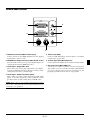
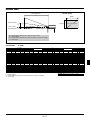
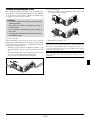
Ceiling Installation
Screen Top
VIDEO
OUT IN
α
OUTPUT
IN OUT
RGB
INPUT
Lens Center
Projector feet
2.3” (58.4mm)
PC-CONTROL S-VIDEO
D
AUDIO
B
Screen Center
Throw Distance
C
B = Vertical distance between lens center and screen center
C = Throw distance
D = Vertical distance between lens center and top of screen
α = Throw angle
Lens Offset
Diagonal
inch
mm
25
635
30
762
40
1016
60
1524
67
1702
72
1829
80
2032
84
2134
90
2286
100
2540
120
3048
150
3810
180
4572
200
5080
210
5334
240
6096
250
6350
270
6858
300
7620
5.5mm
Screen Size
Width
inch
mm
20
508
24
610
32
813
48
1219
54
1361
58
1463
64
1626
67
1707
72
1829
80
2032
96
2438
120
3048
144
3658
160
4064
168
4267
192
4877
200
5080
216
5486
240
6096
Height
inch
mm
15
381
18
457
24
610
36
914
40
1021
43
1097
48
1219
50
1280
54
1372
60
1524
72
1829
90
2286
108
2743
120
3048
126
3200
144
3658
150
3810
162
4115
180
4572
C
B
inch
6
7
10
14
16
17
19
20
22
24
29
36
43
48
51
58
60
65
72
wide
mm
153
183
244
367
409
440
489
513
550
611
733
917
1100
1222
1283
1467
1528
1650
1833
inch
mm
42
57
87
97
104
116
122
131
145
175
219
263
292
307
351
366
395
439
1077
1450
2197
2459
2645
2944
3094
3318
3691
4438
5559
6679
7426
7800
8920
9294
10041
11161
-
tele
inch
mm
42
1077
51
1301
69
1749
104
2645
117
2959
125
3183
139
3542
146
3721
157
3990
175
4438
210
5335
263
6679
316
8024
351
8920
369
9368
422
10713
439
11161
-
α
D
inch
1
2
2
4
4
4
5
5
5
6
7
9
11
12
12
14
15
16
18
mm
38
45
60
91
101
109
121
127
136
151
181
226
272
302
317
362
377
407
453
wide
degree
9.7
9.6
9.5
9.5
9.4
9.4
9.4
9.4
9.4
9.4
9.4
9.4
9.3
9.3
9.3
9.3
9.3
9.3
-
tele
degree
8.1
8.0
8.0
7.9
7.9
7.9
7.9
7.9
7.8
7.8
7.8
7.8
7.8
7.8
7.8
7.8
7.8
-
B = Vertical distance between lens center and screen center
C = Throw distance
D = Vertical distance between lens center and top of screen
α = Throw angle
WARNING
• Installing your projector on the ceiling must be done by a
qualified technician. Contact your NEC dealer for more
information.
* Do not attempt to install the projector yourself.
• Only use your projector on a solid, level surface. If the
projector falls to the ground, you can be injured and the
projector severely damaged.
• Do not use the projector where temperatures vary greatly.
The projector must be used at temperatures between 32˚F
(0˚C) and 95˚F (35˚C).
• Do not expose the projector to moisture, dust, or smoke.
This will harm the screen image.
• Ensure that you have adequate ventilation around your
projector so heat can dissipate. Do not cover the vents on
the side or the front of the projector.
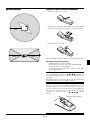
If your projector is mounted on the ceiling and your image is
upside down, use the “Menu” and “Select” buttons on your projector cabinet or your remote control to correct the orientation.
(See page E-35.)
Reflecting the Image
Using a mirror to reflect your projector’s image enables you to
enjoy a much larger image. Contact your NEC dealer if you need
a mirror. If you’re using a mirror and your image is inverted, use
the “Menu” and “Select” buttons on your projector cabinet or
your remote control to correct the orientation. (See page E-35.)
E–18