1
MultiSync LCD1980SXi
®
TM
Index
Warning .................................................................................................................... 1
Contents ................................................................................................................. 2
Quick Start ............................................................................................................. 3
Controls ...................................................................................................................7
Long Cable Compensation Adjustment ........................................................... 11
Recommended Use ............................................................................................... 12
Specifications ...................................................................................................... 14
Features ................................................................................................................. 15
Troubleshooting ................................................................................................... 17
References .............................................................................................................18
Limited Warranty ................................................................................................. 19
TCO’99 .................................................................................................................... 20
TCO’03 .................................................................................................................... 22
Manufacturer’s Recycling and Energy Information .................................... 23
Avertissement ..................................................................................................... 25
Contenu ................................................................................................................. 26
Mise en marche rapide ...................................................................................... 27
Commandes ........................................................................................................... 31
Réglage de la compensation de câble long ................................................... 35
Usage recommandé ............................................................................................ 36
Fiche technique ................................................................................................... 38
Fonctions .............................................................................................................. 39
Dépannage ............................................................................................................ 41
Références ........................................................................................................... 42
Garantie limitée .................................................................................................. 43
TCO’99 .................................................................................................................... 44
TCO’03 .................................................................................................................... 46
Informations du fabricant relatives au recylage et aux économies d’énergie ... 47
Appendix ............................................................................................................... 49
Annexe .................................................................................................................. 55
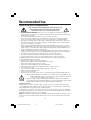
WARNING
TO PREVENT FIRE OR SHOCK HAZARDS, DO NOT EXPOSE THIS UNIT TO RAIN OR MOISTURE. ALSO, DO NOT USE
THIS UNIT'S POLARIZED PLUG WITH AN EXTENSION CORD RECEPTACLE OR OTHER OUTLETS UNLESS THE PRONGS
CAN BE FULLY INSERTED.
REFRAIN FROM OPENING THE CABINET AS THERE ARE HIGH VOLTAGE COMPONENTS INSIDE. REFER SERVICING
TO QUALIFIED SERVICE PERSONNEL.
CAUTION
CAUTION: TO REDUCE THE RISK OF ELECTRIC SHOCK, MAKE SURE POWER CORD IS UNPLUGGED FROM
WALL SOCKET. TO FULLY DISENGAGE THE POWER TO THE UNIT, PLEASE DISCONNECT THE POWER
CORD FROM THE AC OUTLET. DO NOT REMOVE COVER (OR BACK). NO USER SERVICEABLE PARTS
INSIDE. REFER SERVICING TO QUALIFIED SERVICE PERSONNEL.
This symbol warns user that uninsulated voltage within the unit may have sufficient magnitude to cause
electric shock. Therefore, it is dangerous to make any kind of contact with any part inside this unit.
This symbol alerts the user that important literature concerning the operation and maintenance of this
unit has been included. Therefore, it should be read carefully in order to avoid any problems.
Canadian Department of Communications Compliance Statement
DOC: This Class B digital apparatus meets all requirements of the Canadian
Interference-Causing Equipment Regulations.
C-UL: Bears the C-UL Mark and is in compliance with Canadian Safety Regulations
according to CAN/CSA C22.2 No. 60950-1.
FCC Information
1. Use the attached specified cables with the MultiSync LCD1980SXiTM (L193FH) color monitor so
as not to interfere with radio and television reception.
(1) Please use the supplied power cord or equivalent to ensure FCC compliance.
(2) Please use the supplied shielded video signal cable, 15-pin mini D-SUB to DVI-A
cable or DVI-D to DVI-D cable.
Use of other cables and adapters may cause interference with radio and
television reception.
2. This equipment has been tested and found to comply with the limits for a Class B digital
device, pursuant to part 15 of the FCC Rules. These limits are designed to provide reasonable
protection against harmful interference in a residential installation. This equipment generates, uses, and can radiate radio frequency energy, and, if not installed and used in
accordance with the instructions, may cause harmful interference to radio communications.
However, there is no guarantee that interference will not occur in a particular installation.
If this equipment does cause harmful interference to radio or television reception, which can
be determined by turning the equipment off and on, the user is encouraged to try to correct
the interference by one or more of the following measures:
• Reorient or relocate the receiving antenna.
• Increase the separation between the equipment and receiver.
• Connect the equipment into an outlet on a circuit different from that to which the receiver
is connected.
• Consult your dealer or an experienced radio/TV technician for help.
If necessary, the user should contact the dealer or an experienced radio/television technician
for additional suggestions. The user may find the following booklet, prepared by the Federal
Communications Commission, helpful: ”How to Identify and Resolve Radio-TV Interference
Problems.“ This booklet is available from the U.S. Government Printing Office, Washington,
D.C., 20402, Stock No. 004-000-00345-4.
1
LCD1980SXimanual060704.p65
1
6/10/04, 9:28 AM
Contents
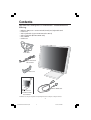
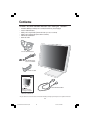
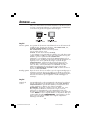
Your new NEC MultiSync® LCD monitor box* should contain the
following:
•
•
•
•
•
•
MultiSync LCD1980SXi™ monitor with tilt/swivel/pivot/adjustable stand
Power Cord
Video Signal Cable (15-pin mini D-SUB male to DVI-A)
Video Signal Cable (DVI-D to DVI-D cable)
User’s Manual
Cable Cover
Power Cord
15-pin mini D-SUB
male to DVI-A
Cable Cover
DVI-D to DVI-D cable
MultiSync LCD1980SXi
®
TM
User’s Manual
* Remember to save your original box and packing material to transport or ship the monitor.
2
LCD1980SXimanual060704.p65
2
6/10/04, 9:28 AM
Quick Start
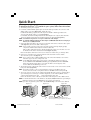
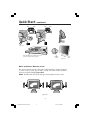
To attach the MultiSync® LCD monitor to your system, follow these instructions:
1. Turn off the power to your computer.
2. For the PC or MAC with DVI digital output: Connect the DVI signal cable to the connector of the
display card in your system (Figure A.1). Tighten all screws.
For the PC with Analog output: Connect the 15-pin mini D-SUB to DVI-A signal cable to the
connector of the display card in your system (Figure A.2).
For the MAC: Connect the MultiSync Macintosh cable adapter to the computer, then attach the
15-pin mini D-SUB signal cable to the MultiSync Macintosh cable adapter (Figure B.1).
NOTE: Some Macintosh systems do not require a Macintosh cable adapter.
NOTE: To obtain the MultiSync Macintosh cable adapter call NEC-Mitsubishi Electronics Display of
America, Inc. at (800) 632-4662.
3. Connect the DVI signal cable to the connector on the back of the monitor. Place the video signal
cable (Figure C.1). Connect the VGA or DVI to Input 2.
NOTE: Incorrect cable connections may result in irregular operation, damage display quality/
components of LCD module and/or shorten the module’s life.
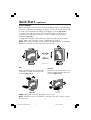
Collect cables and keep them in the stand by attaching the cable cover. The cable cover can
be attached on the front or back side of tilt stand (Figure C.1, C.2).
Please check Tilt, Rise and Lower monitor screen and screen rotation when you manage cables.
4. Connect one end of the power cord to the AC inlet on the back of the monitor and the
other end to the power outlet (Figure C.1).
NOTE: If you use this monitor at AC125-240V, please refer to Recommended Use section of this
manual for proper selection of AC power cord.
NOTE: For the MAC with digital output: before turning on the MAC, the DVI Input mode must
be set to DIGITAL in DVI SELECTION of OSM by pressing SELECT button then CONTROL
button when the DVI signal cable is connected to the DVI-I connector (Input1) of the
monitor. Otherwise the MAC may not turn on.
5. The Vacation Switch on the left side of the monitor must be turned on. Turn on the monitor with the
front power button (Figure D.1).
NOTE: The Vacation Switch is a true on/off switch. If this switch is on the OFF position, the
monitor cannot be turned on using the front button. DO NOT switch on/off repeatedly.
6. Turn on the computer. No-touch auto adjust automatically adjusts the monitor to optimal settings
upon initial setup for most timings. For further adjustments, use the following OSM® controls:
• Auto Contrast (Analog input only)
• Auto Adjust (Analog input only)
Refer to the Controls section of this User’s Manual for a full description of these OSM controls.
NOTE: For download information on the Windows® 95/98/Me/2000/XP INF file for your MultiSync
LCD1980SXi monitor, refer to the References section of this User’s Manual.
NOTE: If you have any problems, please refer to the Troubleshooting section of this User’s Manual.
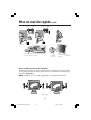
Figure A.1
Figure B.1
Figure A.2
Macintosh
Adapter
3
LCD1980SXimanual060704.p65
3
Macintosh Cable Adapter (not included) Note: Some
Macintosh systems do not require a Macintosh Cable Adapter
6/10/04, 9:28 AM
Quick Start –continued
INPUT1
INPUT2
INPUT1
INPUT2
Figure C.2
Figure C.1
NEC optional product attachment. Do not
use this connector unless specified.
Vacation
Switch
Figure D.1
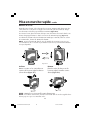
Raise and Lower Monitor Screen
The monitor may be raised or lowered in either Portrait or Landscape mode.
To raise or lower screen, place hands on each side of the monitor and lift or
lower to the desired height (Figure RL.1).
NOTE: Handle with care when raising or lowering the monitor screen.
Figure RL.1
4
LCD1980SXimanual060704.p65
4
6/10/04, 9:28 AM
Power
Button
Quick Start –continued
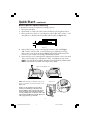
Screen Rotation
Before rotating, the screen must be raised to the highest level to avoid knocking
the screen on the desk or pinching your fingers. To raise the screen, place hands
on each side of the monitor and lift up to the highest position (Figure RL.1).
To rotate screen, place hands on each side of the monitor screen and turn
clockwise from Landscape to Portrait or counter-clockwise from Portrait to
Landscape (Figure R.1).
To toggle the orientation of the OSM menu between Landscape and Portrait
modes, refer to the “Controls” section, “OSM Rotation” function.
NOTE: If the screen is rotated counterclockwise, the tilt function is not available.
Rotate the screen 90˚ clockwise until you hear one click.
Figure R.1
Tilt
Swivel
Grasp top and bottom sides of the monitor
screen with your hands and adjust the tilt
as desired (Figure TS.1).
Grasp both sides of the monitor screen
with your hands and adjust the swivel
as desired (Figure TS.2).
NOTE: Handle with care when tilting the monitor screen.
NOTE: If the tilt function is not available, rotate the screen 90˚ clockwise until you
hear one click.
5
LCD1980SXimanual060704.p65
5
6/10/04, 9:28 AM
Quick Start –continued
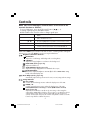
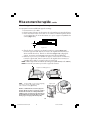
Remove Monitor Stand for Mounting
To prepare the monitor for alternate mounting purposes:
1. Disconnect all cables.
2. Place hands on each side of the monitor and lift up to the highest position.
3. Place monitor face down on a nonabrasive surface. (Place the screen on a 33
mm platform so that the stand is parallel with the surface.) (Figure S.1)
33mm
Figure S.1
4. Remove the two top screws connecting the monitor to the stand (Figure
S.2). Turn the stand to 180˚ counterclockwise (you will hear two clicks).
Remove the screws from the bottom (Figure S.3) and lift off the stand. The
monitor is now ready for mounting in an alternate manner.
5. Reverse this process to reattach stand: tighten the two bottom screws, turn stand
180˚ counterclockwise (you will hear two clicks), and tighten two top screws.
NOTE: Use only VESA-compatible alternative mounting method. (100mm pitch)
NOTE: Handle with care when removing monitor stand.
Figure S.2 and Figure S.3
4
2
3
1
NOTE: When the LCD is in Landscape mode, be sure
the two round indents are at the bottom of the screen
(Figure S.4).
Figure S.4
Caution: Use the original screws (4 pcs) when
mounting to avoid damage to the monitor and
stand. To fulfill the safety requirements the monitor
must be mounted to an arm which guaranties the
necessary stability under consideration of the weight
of the monitor. The LCD monitor should only be used
with an approved arm (e.g. GS mark).
6
LCD1980SXimanual060704.p65
6
6/10/04, 9:28 AM
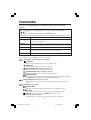
Controls
OSM® (On-Screen Manager) control buttons on the front of the
monitor function as follows:
To access OSM menu, press any of the control buttons ( , , –, +).
To change signal input, press the SELECT button.
NOTE: OSM must be closed in order to change signal input.
Menu
EXIT
Exits the OSM controls.
Exits to the OSM main menu.
CONTROL
/
Moves the highlighted area left/right to select control menus.
Moves the highlighted area up/down to select one of the controls.
ADJUST –/+
SELECT
Moves the bar left/right to increase or decrease the adjustment.
RESET
Resets the highlighted control menu to the factory setting.
Activates the selected function and enters the OSM and OSM
sub menu controls. Input selection can be made with OSM off.
NOTE: When RESET is pressed in the main and sub-menu, a warning window will appear
allowing you to cancel the RESET function by pressing the EXIT button.
Brightness/Contrast Controls
BRIGHTNESS
Adjusts the overall image and background screen brightness.
CONTRAST
Adjusts the image brightness in relation to the background.
BLACK LEVEL (Analog input only)
Adjusts the black level.
AUTO CONTRAST (Analog input only)
Adjusts the image displayed for non-standard video inputs.
AUTO BRIGHTNESS
This function adjusts the brightness automatically for the best BRIGHTNESS setting
based on the white display area.
Auto Adjust (Analog input only)
Automatically adjusts the Image Position and H. Size (or V.Size) settings and Fine settings.
Image Controls
LEFT / RIGHT
Controls Horizontal Image Position within the display area of the LCD.
DOWN / UP
Controls Vertical Image Position within the display area of the LCD.
H.SIZE (OSM Rotation: Landscape) or V.Size (OSM Rotation: Portrait)
(Analog input only)
Adjusts the horizontal (or vertical) size by increasing or decreasing this
setting. If the “AUTO Adjust function” does not give you a satisfactory picture
setting, further tuning can be performed manually using the “H.Size (or
V.Size)” function (dot clock). For this a Moiré test pattern could be used. This
function may alter the width of the picture.
7
LCD1980SXimanual060704.p65
7
6/10/04, 9:28 AM
Controls –continued
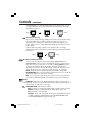
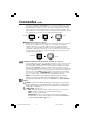
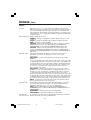
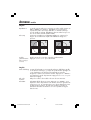
Use left/Right Menu to center the image on the screen. If the H.Size or V.Size
is wrongly calibrated, the result would look like the left drawing. The image
should be homogeneous.
Wrong
Correct
FINE (Analog input only)
Improves focus, clarity and image stability by increasing or decreasing this setting.
If the “Auto Adjust function” and the “H.Size” function do not give you a
satisfactory picture setting, a fine tuning can be performed using the “Fine”
function. It improves focus, clarity and image stability by increasing or decreasing this setting.
For this a Moiré test pattern could be used. If the Fine value is wrongly
calibrated, the result would look like on the left drawing. The image should be
homogeneous.
Wrong
Correct
AccuColor® Control Systems
Seven color presets select the desired color setting (sRGB, NATIVE and
PROGRAMMABLE color presets are standard and cannot be changed). Color
temperature increases or decreases, in each preset. R,Y,G,C,B,M,S: Increases
or decreases Red, Yellow, Green, Cyan, Blue, Magenta and Saturation
depending upon which is selected. The change in color will appear on screen
and the direction (increase or decrease) will be shown by the color bars.
NATIVE: Original color presented by the LCD panel that is unadjustable.
PROGRAMMABLE: The colour temperature and tone that were set up with the
downloaded application software are reflected.
NOTE: To reset a poor image setting, turn on the monitor by using the front
power button while holding “EXIT” and “SELECT” buttons at the sametime.
Tools 1
SHARPNESS: This function uses digital technology to keep a crisp image at
any timing. Sharpness is independent from other setting and can be adjusted
continuously to get a distinct or soft image.
EXPANSION MODE: Sets the zoom method.
FULL: The image is expanded to 1280 x 1024, regardless of the resolution.
ASPECT: The image is expanded without changing the aspect ratio.
OFF: The image is not expanded.
CUSTOM1: Zoom with center fixed. The image is expanded from the rate
of 1.00 to 3.00 times individually for horizontal (H.EXPANSION) and
vertical (V.EXPANSION) direction by 0.01 step.
8
LCD1980SXimanual060704.p65
8
6/10/04, 9:28 AM
Controls –continued
CUSTOM2: Zoom with top left corner fixed. The image is expanded from
the rate of 1.00 to 3.00 times individually for horizontal (H.EXPANSION)
and vertical (V.EXPANSION) direction by 0.01 step.
VIDEO DETECT: Selects the method of video detection when more than one
computer is connected.
FIRST DETECT: The video input has to be switched to “FIRST DETECT”
mode. When the current video input signal is not present, then the monitor
searches for a video signal from the other video input port. If the video
signal is present in the other port, then the monitor switches the video
source input port to the new found video source automatically. The
monitor will not look for other video signals while the current video source
is present.
LAST DETECT: The video input has to be switched to the “LAST DETECT”
mode. When the monitor is displaying a signal from the current source
and a new secondary source is supplied to the monitor, the monitor will
automatically switch to the new video source. When current video input
signal is not present, the monitor searches for a video signal from the
other video input port. If the video signal is present in the other port, then
the monitor switches the video source input port to the new found video
source automatically.
NONE: The Monitor will not search the other video input port unless the
monitor is turned on.
DVI SELECTION: This function selects the DVI input mode (Input 1). When the DVI
selection has been changed, you must restart your computer.
AUTO: By using the DVI-D to DVI-D cable, the DVI SELECTION is DIGITAL.
By using the D-SUB to DVI-A cable, the DVI SELECTION is ANALOG.
DIGITAL: DVI digital input is available.
ANALOG: DVI analog input is available.
NOTE:
For the MAC with digital output: before turning on the MAC, the DVI
Input mode must be set to DIGITAL in DVI SELECTION of OSM by
pressing SELECT button then CONTROL button when the DVI signal cable
is connected to the DVI-I connector (Input1) of the monitor. Otherwise the
MAC may not turn on.
NOTE: Depending on the PC/Video card or video signal cable used, this
function may not operate.
OFF TIMER: Monitor will automatically power-down when the end user has
selected a predetermined amount of time.
Tools 2
LANGUAGE: OSM control menus are available in seven languages.
OSM LEFT/RIGHT: You can choose where you would like the OSM control
image to appear on your screen. Selecting OSM Location allows you to
manually adjust the position of the OSM control menu left or right.
OSM DOWN/UP: You can choose where you would like the OSM control
image to appear on your screen. Selecting OSM Location allows you to
manually adjust the position of the OSM control menu down or up.
9
LCD1980SXimanual060704.p65
9
6/10/04, 9:28 AM
Controls –continued
OSM TURN OFF: The OSM control menu will stay on as long as it is use. In the
OSM Turn Off submenu, you can select how long the monitor waits after the
last touch of a button to shut off the OSM control menu. The preset choices are 10120 seconds by 5 second increments.
OSM LOCK OUT: This control completely locks out access to all OSM control
functions. When attempting to activate OSM controls while in the Lock Out
mode, a screen will appear indicating the OSM controls are locked out.
There are three types of OSM LOCK OUT:
OSM LOCK OUT with BRIGHTNESS and CONTRAST control: To activate the
OSM Lock Out function, press SELECT, then “+” key and hold down simultaneously. To deactivate the OSM Lock Out, press SELECT, then “+” key and
hold down simultaneously while in the OSM menu. BRIGHTNESS and
CONTRAST can be adjusted while in the lock out mode.
OSM LOCK OUT with no control: To activate the OSM Lock Out function,
press SELECT, then “>” key and hold down simultaneously. To deactivate the
OSM Lock Out, press SELECT, then “>” key and hold down simultaneously while
in the OSM menu. No controls can be adjusted while in the lock out mode.
OSM LOCK OUT with BRIGHTNESS (only) control: To activate the OSM Lock
Out function, press SELECT, then “–” and “<“ keys and hold down simultaneously. To deactivate the OSM Lock Out, press SELECT, then “+” key and
hold down simultaneously while in the OSM menu. BRIGHTNESS can be
adjusted while in the lock out mode.
OSM ROTATION: To rotate OSM between Landscape and Portrait modes.
RESOLUTION NOTIFIER: This optimal resolution is 1280 x 1024. If ON is
selected, a message will appear on the screen after 30 seconds, notifying you
that the resolution is not at 1280 x 1024.
HOT KEY: You can adjust the brightness and contrast directly. When this
function is set to ON, you can adjust the brightness with or , contrast with
+ or - key, while the OSM menu is off.
FACTORY PRESET: Selecting Factory Preset allows you to reset most OSM
control settings back to the factory settings. Individual settings can be reset by
highlighting the control to be reset and pressing the RESET button.
Information
DISPLAY MODE: Provides information about the current resolution display and technical
data including the preset timing being used and the horizontal and vertical frequencies.
Increases or decreases the current resolution.
MONITOR INFO.: Indicates the model and serial numbers of your monitor.
OSM Warning: OSM Warning menus disappear with Exit button.
NO SIGNAL: This function gives a warning when there is no Horizontal or Vertical
Sync. After power is turned on or when there is a change of input signal, the No Signal
window will appear.
RESOLUTION NOTIFIER: This function gives a warning of use with optimized resolution. After
power is turned on or when there is a change of input signal or the video signal doesn’t have
proper resolution, the Resolution Notifier window will open. This function can be disabled in
the TOOL menu.
OUT OF RANGE: When the input signal is a non-supported timing or the video signal
doesn’t have proper timing, the Out Of Range menu will appear.
NOTE: If “
CHANGE DVI SELECTION” is displayed, switch to DVI SELECTION.
For advanced user menu see “Appendix”.
10
LCD1980SXimanual060704.p65
10
6/10/04, 9:28 AM
Long Cable Compensation Adjustment
Long Cable Compensation should only be performed when using extended length cables
or to compensate for a low-quality video signal. To perform the long cable compensation
adjustment, follow these six steps:
1. For optimal adjustment, download the “LCD Long Cable Comp Test Pattern” and “Read
Me” file at www.necmitsubishi.com and display the test pattern during this adjustment.
2. In order to perform the adjustment, enter the Advanced OSM:
• Turn off your monitor.
• Turn on your monitor by pressing the “POWER” and “SELECT” buttons simultaneously
to open the Advanced OSM menu.
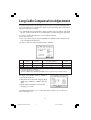
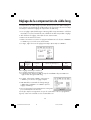
3. In Tag 3, set the Auto Adjust Level (Auto SW) to “DETAIL”.
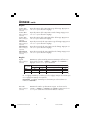
SIMPLE
FULL
DETAIL
"Size" "Fine"
"Position"
"Contrast"
O
O
O
X
O
O
Black Level,
Long cable capability *1
X
X
O
Time
1.5 seconds
2 seconds
10 to 20 seconds
O: Automatic adjustment is performed.
X: Automatic adjustment is not performed.
*1: Black level, RGB sharpness, RGB delay and RGB position are adjusted using Long Cable Software.
4. In Tag 4, select “AUTO” and press “SELECT” to
perform full adjustment.
5. NEC-Mitsubishi recommends changing (Tag 3)
“AUTO SW”/ “DETAIL” to “SIMPLE” after auto
adjust.
6. Exit the Advanced OSM by turning off and
restarting your monitor.
For additional information on user controls and software utilities, visit our website at
www.necmitsubishi.com
11
LCD1980SXimanual060704.p65
11
6/10/04, 9:28 AM
Recommended Use
Safety Precautions and Maintenance
FOR OPTIMUM PERFORMANCE, PLEASE NOTE THE
FOLLOWING WHEN SETTING UP AND USING
THE MULTISYNC® LCD COLOR MONITOR:
• DO NOT OPEN THE MONITOR. There are no user serviceable parts inside and opening or
removing covers may expose you to dangerous shock hazards or other risks. Refer all servicing to
qualified service personnel.
• Do not spill any liquids into the cabinet or use your monitor near water.
• Do not insert objects of any kind into the cabinet slots, as they may touch dangerous voltage
points, which can be harmful or fatal or may cause electric shock, fire or equipment failure.
• Do not place any heavy objects on the power cord. Damage to the cord may cause shock or fire.
• Do not place this product on a sloping or unstable cart, stand or table, as the monitor may fall,
causing serious damage to the monitor.
• When operating the MultiSync LCD monitor with its AC 125-240V power supply, use a power
supply cord that matches the power supply voltage of the AC power outlet being used. The power
supply cord you use must have been approved by and comply with the safety standards of your
country. (Type H05VV-F should be used in Europe)
• In UK, use a BS-approved power cord with molded plug having a black (5A) fuse installed for use
with this monitor. If a power cord is not supplied with this monitor, please contact your supplier.
• Do not place any objects onto the monitor and do not use the monitor outdoors.
• The inside of the fluorescent tube located within the LCD monitor contains mercury.
Please follow the bylaws or rules of your municipality to dispose of the tube properly.
Immediately unplug your monitor from the wall outlet and refer servicing to qualified service
personnel under the following conditions:
• When the power supply cord or plug is damaged.
• If liquid has been spilled, or objects have fallen into the monitor.
• If the monitor has been exposed to rain or water.
• If the monitor has been dropped or the cabinet damaged.
• If the monitor does not operate normally by following operating instructions.
• Do not bend power cord.
• Do not use monitor in high temperatured, humid, dusty, or oily areas.
• If glass is broken, handle with care.
• Do not cover vent on monitor.
• If monitor or glass is broken, do not come in contact with the liquid crystal and handle with care.
CAUTION
• Allow adequate ventilation around the monitor so that heat can properly dissipate. Do
not block ventilated openings or place the monitor near a radiator or other heat
sources. Do not put anything on top of monitor.
• The power cable connector is the primary means of detaching the system from the
power supply. The monitor should be installed close to a power outlet which is easily accessible.
• Handle with care when transporting. Save packaging for transporting.
Image Persistence
Image persistence is when a residual or “ghost” image of a previous image remains visible on the
screen. Unlike CRT monitors, LCD monitors’ image persistence is not permanent, but constant images
being displayed for a long period of time should be avoided.
To alleviate image persistence, turn off the monitor for as long as the previous image was displayed.
For example, if an image was on the monitor for one hour and a residual image remains, the monitor
should be turned off for one hour to erase the image.
NOTE: As with all personal display devices, NEC-Mitsubishi Electronics Display recommends using a
moving screen saver at regular intervals whenever the screen is idle or turning off the monitor when
not in use.
12
LCD1980SXimanual060704.p65
12
6/10/04, 9:28 AM
Recommended Use –continued
•
•
•
•
•
•
•
•
•
•
•
•
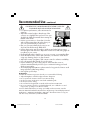
CORRECT PLACEMENT AND ADJUSTMENT OF THE MONITOR
CAN REDUCE EYE, SHOULDER AND NECK FATIGUE. CHECK THE
FOLLOWING WHEN YOU POSITION THE MONITOR:
For optimum performance, allow 20 minutes for
warm-up.
Adjust the monitor height so that the top of the
screen is at or slightly below eye level. Your eyes
should look slightly downward when viewing the
middle of the screen.
Position your monitor no closer than 16 inches
and no further away than 28 inches from your
eyes. The optimal distance is 20 inches.
Rest your eyes periodically by focusing on an
object at least 20 feet away. Blink often.
Position the monitor at a 90° angle to windows and other light sources to
minimize glare and reflections. Adjust the monitor tilt so that ceiling lights do
not reflect on your screen.
If reflected light makes it hard for you to see your screen, use an antiglare filter.
Clean the LCD monitor surface with a lint-free, non-abrasive cloth. Avoid
using any cleaning solution or glass cleaner!
Adjust the monitor’s brightness and contrast controls to enhance readability.
Use a document holder placed close to the screen.
Position whatever you are looking at most of the time (the screen or
reference material) directly in front of you to minimize turning your head
while you are typing.
Avoid displaying fixed patterns on the monitor for long periods of time to avoid
image persistence (after-image effects).
Get regular eye checkups.
Ergonomics
To realize the maximum ergonomics benefits, we recommend the following:
• Adjust the Brightness until the background raster disappears
• Do not position the Contrast control to its maximum setting
• Use the preset Size and Position controls with standard signals
• Use the preset Color Setting
• Use non-interlaced signals with a vertical refresh rate between 60-75Hz
• Do not use primary color blue on a dark background, as it is difficult to see and
may produce eye fatigue to insufficient contrast
For more detailed information on setting up a healthy work environment, write the
American National Standard for Human Factors Engineering of Visual Display Terminal
Workstations – ANSI-HFS Standard No. 100-1988 – The Human Factors Society, Inc.
P.O. Box 1369, Santa Monica, California 90406.
13
LCD1980SXimanual060704.p65
13
6/10/04, 9:28 AM
Specifications
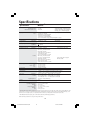
Monitor
Specifications
MultiSync® LCD1980SXi™
Monitor
LCD Module
Diagonal:
Viewable Image Size:
Native Resolution (Pixel Count):
Input Signal
Video:
Sync:
19.0 inch
19.0 inch
1280x1024
Notes
Active matrix; thin film transistor (TFT) liquid
crystal display (LCD); 0.294 mm dot pitch;
270cd/m2 white luminance (typical); XtraView+™
technology; 500:1 contrast ratio (typical)
ANALOG 0.7 Vp-p/75 Ohms
Digital Input: DVI
Separate sync. TTL Level
Horizontal sync. Positive/Negative
Vertical sync. Positive/Negative
Composite sync. Positive/Negative
Sync on Green (Video 0.7Vp-p and Sync Negative 0.3V p-p)
16,777,216
Depends on display card used.
Synchronization
Range
Horizontal:
Vertical:
31.5 kHz to 81.1 kHz
50.0 Hz to 85.0 Hz
Automatically
Automatically
Viewing Angle
Left/Right:
Up/Down:
+88˚ (CR>10)
+88˚ (CR>10)
Landscape:
720 x 400*1 :VGA text
640 x 480*1 at 60 Hz to 85 Hz
800 x 600*1 at 56 Hz to 85 Hz
832 x 624*1 at 75 Hz
1024 x 768*1 at 60 Hz to 85 Hz
1152 x 864*1 at 75Hz
1280 x 1024 at 60 Hz*2 to 75 Hz
Portrait:
480 x 640*1 at 60 Hz to 85 Hz
600 x 800*1 at 56 Hz to 85 Hz
624 x 832*1 at 75 Hz
768 x 1024*1 at 60 Hz to 85 Hz
864 x 1152*1 at 75 Hz
1024 x 1280 at 60 Hz*2 to 75 Hz
Display Colors
25ms (Typ.)
Response Time
Resolutions Supported
Active Display Area
Landscape : Horiz. :
Vert. :
Portrait : Horiz. :
Vert. :
Some systems may not support
all modes listed.
Some systems may not support
all modes listed.
376 mm/14.8inches
301 mm/11.9 inches
301 mm/11.9 inches
376 mm/14.8 inches
Power Supply
100-240V ~ 50/60 Hz
Power Consumption
48W typ. (without optional Sound Bar)
Current Rating
0.48A@100-120V/0.23A@220-240V (without optional Sound Bar)
0.55A@100-120V/0.25A@220-240V (with optional Sound Bar)
Landscape:
Dimensions
412.2 mm (W) x 364.8 - 494.8 mm (H) x 200.0 mm (D)
16.2 inches (W) x 14.4 - 19.5 inches (H) x 7.9 inches (D)
337.0 mm (W) x 428.5 - 532.4 mm (H) x 200.0 mm (D)
13.3 inches (W) x 16.9 - 21.0 inches (H) x 7.9 inches (D)
130 mm/5.1 inches (Landscape)
Portrait:
Height Adjustment:
9.7 kg
21.4 lbs
Weight
Environmental Considerations
Operating Temperature:
Humidity:
Feet:
Storage Temperature:
Humidity:
Feet:
5°C to 35°C/41°F to 95°F
30% to 80%
0 to 10,000 Feet
-10°C to 60°C/14°F to 140°F
10% to 85%
0 to 40,000 Feet
*1 Interpolated Resolutions: When resolutions are shown that are lower than the pixel count of the LCD module, text may appear different. This is
normal and necessary for all current flat panel technologies when displaying non-native resolutions full screen. In flat panel technologies, each
dot on the screen is actually one pixel, so to expand resolutions to full screen, an interpolation of the resolution must be done.
*2 NEC-Mitsubishi Electronics Display cites recommended reolution for optimal display performance.
NOTE: Technical specifications are subject to change without notice.
14
LCD1980SXimanual060704.p65
14
6/10/04, 9:28 AM
Features
ambix+™ Technology: Dual input technology allowing both analog and digital inputs off
of one connector (DVI-I) as well as additional legacy analog support off of a traditional
15-pin VGA connector. Provides traditional MultiSync® technology compatibility for
analog as well as DVI-based digital compatibility for digital inputs. DVI-based digital
interfaces include DVI-D,DFP and P&D.
DVI-I: The integrated interface ratified by the Digital Display Working Group (DDWG)
that allows both digital and analog connectors off of one port. The “I” stands for integration for both digital and analog, The digital portion is DVI-based.
DVI-D: The digital-only subset of DVI ratified by the Digital Display Working Group
(DDWG) for digital connections between computers and displays. As a digital-only
connector, analog support is not provided off a DVI-D connector. As a DVI-based digital
only connection, only a simple adapter is necessary for compatibility between DVI-D and
other DVI-based digital connectors such as DFP and P&D.
DFP (Digital Flat Panel): An all-digital interface for flat panel monitors which is signal
compatible with DVI. As a DVI-based digital only connection, only a simple adapter is
necessary for compatibility between DFP and other DVI-based digital connectors such as
DVI and P&D.
P&D (Plug and Display): The VESA standard for digital flat panel monitor interfaces. It is
more robust than DFP since it allows for other options off a signal connector (options like
USB, analog video and IEEE-1394-995). The VESA committee has recognized that DFP is
a subset of P&D. As a DVI-based connector (for the digital input pins), only a simple
adapter is necessary for compatibility between P&D and other DVI-based digital connector such as DVI and DFP.
Pivoting Stand: Allows users to adjust the monitor to the orientation that best fits their
application, either Landscape orientation for wide documents, or portrait orientation for
the ability to preview a full page on one screen at one time. The Portrait orientation is also
perfect for full screen video conferencing.
Reduced Footprint: Provides the ideal solution for environments requiring superior image
quality but with size and weight limitations. The monitor’s small footprint and low weight
allow it to be moved or transported easily from one location to another.
AccuColor® Control Systems: Allows you to adjust the colors on your screen and customize
the color accuracy of your monitor to a variety of standards.
OmniColor™ control system with sRGB color-matching uses 6-axis color data to ensure
true-to-life color reproduction for still images and real-time videos.
OSM® (On-Screen Manager) Controls: advanced OSM controls allow you to quickly and
easily adjust all elements of your screen image via simple to use on-screen menus.
ErgoDesign® Features: Enhance human ergonomics to improve the working environment,
protect the health of the user and save money. Examples include OSM controls for quick
and easy image adjustments, tilt base for preferred angle of vision, small footprint and
compliance with MPRII and TCO guidelines for lower emissions.
Plug and Play: The Microsoft® solution with the Windows®95/98/2000/Me/XP operating system facilitates setup and installation by allowing the monitor to send its capabilities
(such as screen size and resolutions supported) directly to your computer, automatically
optimizing display performance.
15
LCD1980SXimanual060704.p65
15
6/10/04, 9:28 AM
Features –continued
IPM® (Intelligent Power Manager) System: Provides innovative power-saving methods that
allow the monitor to shift to a lower power consumption level when on but not in use,
saving two-thirds of your monitor energy costs, reducing emissions and lowering the air
conditioning costs of the workplace.
Multiple Frequency Technology: Automatically adjusts monitor to the display card’s
scanning frequency, thus displaying the resolution required.
FullScan® Capability: Allows you to use the entire screen area in most resolutions,
significantly expanding image size.
XtraView+™ Wide Viewing Angle Technology: Allows the user to be able to see the
monitor from any angle (176 degrees) from any orientation — Portrait or Landscape.
Provides full 176° viewing angles either up, down, left or right.
VESA® Standard Mounting Interface: Allows users to connect their MultiSync monitor to
any VESA standard third party mounting arm or bracket. Allows for the monitor to be
mounted on a wall or an arm using any third party compliant device.
Ultra-thin-frame design allows you to view more of your ideas and less of the monitor
bezel, while freeing up more horizontal and vertical desktop space for multiple-monitor
applications.
NaViSet™ software offers an expanded and intuitive graphical interface, allowing you to
more easily adjust OSM display settings via mouse and keyboard.
CableComp™ automatic long cable compensation prevents image quality degradation
caused by long cable lengths.
Advanced No Touch Auto Adjust™ provides optimal image settings upon initial power-on
and closed signal changes.
Rapid Response™ delivers virtually uninterrupted, undistorted viewing of full-motion video
applications.
sRGB Color Control: A new optimized color management standard which allows for
color matching on computer displays and other peripherals. The sRGB, which is based on
the calibrated color space, allows for optimal color representation and backward compatibility with other common color standards.
Pivot capability and adjustable stand add flexibility to your viewing preferences.
GammaComp™: Internal circuitry automatically converts 8-bit data from the PC to 10bit and back to 8-bit, producing smooth, accurate color tones. Gamma can be set by
using preset values or creating a custom setting from 0.7 to 4.4 in increments of 0.1.
16
LCD1980SXimanual060704.p65
16
6/10/04, 9:28 AM
Troubleshooting
No picture
•
•
•
•
•
•
•
•
•
The signal cable should be completely connected to the display card/computer.
The display card should be completely seated in its slot.
Check the Vacation Switch should be in the ON position.
Front Power Switch and computer power switch should be in the ON position.
Check to make sure that a supported mode has been selected on the display card or system being used.
(Please consult display card or system manual to change graphics mode.)
Check the monitor and your display card with respect to compatibility and recommended settings.
Check the signal cable connector for bent or pushed-in pins.
Check the signal input, “INPUT 1” or “INPUT 2”.
Ensure the DVI input mode is set to DIGITAL when the MAC digital output is connected to the DVI-I
(Input1) connector.
Power Button does not respond
• Unplug the power cord of the monitor from the AC outlet to turn off and reset the monitor.
• Check the Vacation Switch on the left side of the monitor.
Image Persistence
• Image persistence is when a residual or “ghost” image of a previous image remains visible on the screen.
Unlike CRT monitors, LCD monitors’ image persistence is not permanent, but constant images being displayed
for a long period of time should be avoided. To alleviate image persistence, turn off the monitor for as long
as the previous image was displayed. For example, if an image was on the monitor for one hour and a
residual image remains, the monitor should be turned off for one hour to erase the image.
NOTE: As with all personal display devices, NEC-Mitsubishi Electronics Display recommends using a
moving screen saver at regular intervals whenever the screen is idle or turning off the monitor when not
in use.
Message “OUT OF RANGE” is displayed (screen is either blank or shows rough images only)
• Image is displayed only roughly (pixels are missing) and OSM warning “OUT OF RANGE” is displayed: Either
signal clock or resolution is too high. Choose one of the supported modes.
• OSM warning “OUT OF RANGE” is displayed on a blank screen: Signal frequency is out of range. Choose one
of the supported modes.
Image is unstable, unfocused or swimming is apparent
• Signal cable should be completely attached to the computer.
• Use the OSM Image Adjust controls to focus and adjust display by
increasing or decreasing the fine total. When the display mode is changed, the OSM Image Adjust
settings may need to be readjusted.
• Check the monitor and your display card with respect to compatibility
and recommended signal timings.
• If your text is garbled, change the video mode to non-interlace and use 60Hz refresh rate.
LED on monitor is not lit (no green or amber color can be seen)
• Power Switch should be in the ON position and power cord should be connected.
Display image is not sized properly
• Use the OSM Image Adjust controls to increase or decrease the Coarse total.
• Check to make sure that a supported mode has been selected on the display card or system being used.
(Please consult display card or system manual to change graphics mode.)
No Video
• If no video is present on the screen, turn the Power button off and on again.
• Make certain the computer is not in a power-saving mode (touch the keyboard or mouse).
No tilt
• Rotate the screen to 90˚ clockwise until you hear one click.
• Refer to the Quick Start section, “Remove monitor stand for mounting” to insure correct installation of
stand.
17
LCD1980SXimanual060704.p65
17
6/10/04, 9:28 AM
References
NEC-Mitsubishi Monitor Customer Service & Support
Customer Service and Technical Support: (800) 632-4662
Fax: (800) 695-3044
Parts and Accessories/Macintosh
Cable Adapter:
(888) NEC-MITS
[888-632-6487]
Customer Service Policies & Processes: http://www.necmitsubishi.com/css/
ServicePolicies/ServicePolicies.htm
Online Technical Support
Knowledge Base:
http://www.necmitsubishi.com/
css/knowledgebase.cfm
Customer Service & Technical
Support Email:
http://www.necmitsubishi.com/
css/techform.htm
Sales and Product Information
Sales Information Line:
(888) NEC-MITS [888-632-6487]
Canadian Customers:
(866) 771-0266, Ext#: 4037
Government Sales:
(800) 284-6320
Government Sales email:
[email protected]
Electronic Channels
World Wide Web:
Product Registration:
http://www.necmitsubishi.com
http://www.necmitsubishi.com/
productregistration
European Operations:
http://www.nec-mitsubishi.com
Windows® 95/98/Me/2000/XP INF File: http://www.necmitsubishi.com and select
“Downloads and Drivers”
Long Cable Software:
http://www.necmitsubishi.com
GammaComp Software:
http://www.necmitsubishi.com
18
LCD1980SXimanual060704.p65
18
6/10/04, 9:28 AM
Limited Warranty
NEC-Mitsubishi Electronics Display of America, Inc. (hereinafter “NMD-A”) warrants this
Product to be free from defects in material and workmanship and, subject to the conditions set
forth below, agrees to repair or replace (at NMD-A’s sole option) any part of the enclosed unit
which proves defective for a period of three (3) years from the date of first consumer purchase.
Spare parts are warranted for ninety (90) days. Replacement parts or unit may be new or
refurbished and will meet specifications of the original parts or unit.
This warranty gives you specific legal rights and you may also have other rights, which vary
from state to state. This warranty is limited to the original purchaser of the Product and is not
transferable. This warranty covers only NMD-A-supplied components. Service required as a
result of third party components is not covered under this warranty. In order to be covered
under this warranty, the Product must have been purchased in the U.S.A. or Canada by the
original purchaser. This warranty only covers Product distribution in the U.S.A. or Canada by
NMD-A No warranty service is provided outside of the U.S.A. or Canada. Proof of Purchase
will be required by NMD-A to substantiate date of purchase. Such proof of purchase must be
an original bill of sale or receipt containing name and address of seller, purchaser, and the
serial number of the product.
It shall be your obligation and expense to have the Product shipped, freight prepaid, or
delivered to the authorized reseller from whom it was purchased or other facility authorized
by NMD-A to render the services provided hereunder in either the original package or a
similar package affording an equal degree of protection. All Products returned to NMD-A for
service MUST have prior approval, which may be obtained by calling 1-800-632-4662. The
Product shall not have been previously altered, repaired, or serviced by anyone other than a
service facility authorized by NMD-A to render such service, the serial number of the product
shall not have been altered or removed. In order to be covered by this warranty the Product
shall not have been subjected to displaying of fixed images for long periods of time resulting
in image persistence (afterimage effects), accident, misuse or abuse or operated contrary to
the instructions contained in the User’s Manual. Any such conditions will void this warranty.
NMD-A SHALL NOT BE LIABLE FOR DIRECT, INDIRECT, INCIDENTAL, CONSEQUENTIAL,
OR OTHER TYPES OF DAMAGES RESULTING FROM THE USE OF ANY NMD-A PRODUCT
OTHER THAN THE LIABILITY STATED ABOVE. THESE WARRANTIES ARE IN LIEU OF ALL
OTHER WARRANTIES EXPRESS OR IMPLIED, INCLUDING, BUT NOT LIMITED TO, THE
IMPLIED WARRANTIES OF MERCHANTABILITY OR FITNESS FOR A PARTICULAR PURPOSE.
SOME STATES DO NOT ALLOW THE EXCLUSION OF IMPLIED WARRANTIES OR THE
LIMITATION OR EXCLUSION OF LIABILITY FOR INCIDENTAL OR CONSEQUENTIAL DAMAGES SO THE ABOVE EXCLUSIONS OR LIMITATIONS MAY NOT APPLY TO YOU.
This Product is warranted in accordance with the terms of this limited warranty. Consumers
are cautioned that Product performance is affected by system configuration, software, the
application, customer data, and operator control of the system, among other factors. While
NMD-A Products are considered to be compatible with many systems, specific functional
implementation by the customers of the Product may vary. Therefore, suitability of a Product
for a specific purpose or application must be determined by consumer and is not warranted
by NMD-A.
For the name of your nearest authorized NEC-Mitsubishi Electronics Display service facility,
contact NEC-Mitsubishi Electronics Display of America at 1-800-632-4662.
19
LCD1980SXimanual060704.p65
19
6/10/04, 9:28 AM
TCO’99 –Black Model
Congratulations! You have just purchased a TCO’99 approved and
labelled product! Your choice has provided you with a product developed
for professional use. Your purchase has also contributed to reducing the
burden on the environment and also to the further development of
environmentally adapted electronics products.
Why do we have environmentally labelled computers?
In many countries, environmental labelling has become an established method for encouraging the adaptation of goods and services to the environment. The main problem, as far as
computers and other electronics equipment are concerned, is that environmentally harmful
substances are used both in the products and during the manufacturing. Since it has not been
possible for the majority of electronics equipment to be recycled in a satisfactory way, most
of these potentially damaging substances sooner or later enter Nature.
There are also other characteristics of a computer, such as energy consumption levels, that are
important from the viewpoints of both the work (Internal) and natural (external) environments.
Since all methods of conventional electricity generation have a negative effect on the
environment (acidic and climate-influencing emissions, radioactive waste, etc.), it is vital to
conserve energy. Electronics equipment in offices consume an enormous amount of energy
since they are often left running continuously.
What does labelling involve?
This product meets the requirements for the TCO’99 scheme which provides for international and
environmental labelling of personal computers. The labelling scheme was developed as a joint
effort by the TCO (The Swedish Confederation of Professional Employees), Svenska
Naturskyddsforeningen (The Swedish Society for Nature Conservation) and Statens Energimyndighet
(The Swedish National Energy Administration).
The requirements cover a wide range of issues: environment, ergonomics, usability, emission of
electrical and magnetic fields, energy consumption and electrical and fire safety.
The environmental demands concern restrictions on the presence and use of heavy metals,
brominated and chlorinated flame retardants, CFCs (freons) and chlorinated solvents, among other
things. The product must be prepared for recycling and the manufacturer is obliged to have an
environmental plan which must be adhered to in each country where the company implements its
operational policy. The energy requirements include a demand that the computer and/or display,
after a certain period of inactivity, shall reduce its power consumption to a lower level in one or
more stages. The length of time to reactivate the computer shall be reasonable for the user.
Labelled products must meet strict environmental demands, for example, in respect of the reduction
of electric and magnetic fields, physical and visual ergonomics and good usability.
Environmental Requirements
Flame retardants
Flame retardants are present in printed circuit boards, cables, wires, casings and housings. In turn,
they delay the spread of fire. Up to thirty percent of the plastic in a computer casing can consist of
flame retardant substances. Most flame retardants contain bromine or chloride and these are
related to another group of environmental toxins, PCBs, which are suspected to give rise to severe
20
LCD1980SXimanual060704.p65
20
6/10/04, 9:28 AM
TCO’99 –continued
health effects, including reproductive damage in fisheating birds and mammals, due to the bioaccumulative* processes. Flame retardants have been found in human blood and researchers fear
that disturbances in foetus development may occur.
TCO’99 demand requires that plastic components weighing more than 25 grams must not contain
flame retardants with organically bound chlorine and bromine. Flame retardants are allowed in
the printed circuit boards since no substitutes are available.
Lead**
Lead can be found in picture tubes, display screens, solders and capacitors. Lead damages the
nervous system and in higher doses, causes lead poisoning.
TCO’99 requirement permits the inclusion of lead since no replacement has yet been developed.
Cadmium**
Cadmium is present in rechargeable batteries and in the colourgenerating layers of certain
computer displays. Cadmium damages the nervous system and is toxic in high doses.
TCO’99 requirement states that batteries, the colourgenerating layers of display screens and the
electrical or electronics components must not contain any cadmium.
Mercury**
Mercury is sometimes found in batteries, relays and switches, Mercury damages the nervous system
and is toxic in high doses.
TCO’99 requirement states that batteries may not contain any Mercury. It also demands that no
mercury is present in any of the electrical or electronics components associated with the display unit.
CFCs (freons)
CFCs (freons) are sometimes used for washing printed circuit boards. CFCs break down ozone and
thereby damage the ozone layer in the stratosphere, causing increased reception on Earth of
ultraviolet light with consequent increased risks of skin cancer (malignant melanoma).
The relevant TCO’99 requirement; Neither CFCs nor HCFCs may be used during the manufacturing
and assembly of the product or its packaging.
*Bio-accumulative is defined as substances which accumulate within living organisms.
**Lead, Cadmium and Mercury are heavy metals which are Bio-accumulative.
To obtain complete information on the environmental criteria document, order from:
TCO Development Unit
SE-114 94 Stockholm
SWEDEN
FAX Number: +46 8 782 92 07
E-mail (Internet): [email protected]
You may also obtain current information on TCO’99 approved and labelled products by
visiting their website at: http://www.tcodevelopment.com/
21
LCD1980SXimanual060704.p65
21
6/10/04, 9:28 AM
TCO’03 –White Model
Congratulations!
The display you have just purchased carries the TCO’03
Displays label. This means that your display is designed,
manufactured and tested according to some of the strictest
quality and environmental requirements in the world. This makes
for a high performance product, designed with the user in focus
that also minimizes the impact on our natural environment.
Some of the features of the TCO’03 Display requirements:
Ergonomics
• Good visual ergonomics and image quality in order to improve the working
environment for the user and to reduce sight and strain problems. Important
parameters are luminance, contrast, resolution, reflectance, colour rendition
and image stability.
Energy
• Energy-saving mode after a certain time – beneficial both for the user and the
environment
• Electrical safety
Emissions
• Electromagnetic fields
• Noise emissions
Ecology
• The product must be prepared for recycling and the manufacturer must have a
certified environmental management system such as EMAS or ISO 14 001
• Restrictions on:
- chlorinated and brominated flame retardants and polymers
- heavy metals such as cadmium, mercury and lead.
The requirements included in this label have been developed by TCO Development in cooperation with scientists, experts, users as well as manufacturers all over the world.
Since the end of the 1980s TCO has been involved in influencing the development of IT
equipment in a more user-friendly direction. Our labelling system started with displays in
1992 and is now requested by users and IT-manufacturers all over the world.
For more information, please visit
www.tcodevelopment.com
22
LCD1980SXimanual060704.p65
22
6/10/04, 9:28 AM
Manufacturer’s Recycling and Energy
Information
NEC-Mitsubishi Electric Visual Systems Corp. is strongly committed to environmental
protection and sees recycling as one of the company’s top priorities in trying to minimize
the burden placed on the environment. We are engaged in developing environmentallyfriendly products, and always strive to help define and comply with the latest
independent standards from agencies such as ISO (International Organisation for
Standardization) and TCO (Swedish Trades Union).
For more information, and for help in recycling your old NEC or Mitsubishi monitors,
please visit our website at:
http://www.nec-mitsubishi.com (in Europe) or
http://www.nmv.co.jp/environment (in Japan) or
http://www.necmitsubishi.com/markets-solutions/totaltrade (in USA).
Country-specific recycling programmes can also be found at:
Sweden -
http://www.el-retur.se
Germany -
http://www.recyclingpartner.de/
Holland -
http://www.mirec.nl/
Japan -
http://www.diarcs.com/
Energy saving
This monitor features an advanced energy saving capability. When a VESA Display
Power Management Signaling (DPMS) Standard signal is sent to the monitor, the Energy
Saving mode is activated. The monitor enters a single Energy Saving mode.
Mode
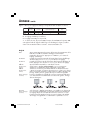
Power consumption
LED color
Normal Operation
Energy Saving Mode
Approx. 48W
Less than 2W
Green
Amber
Off Mode
Less than 0.1W
Unlit
23
LCD1980SXimanual060704.p65
23
6/10/04, 9:28 AM
Declaration of the Manufacturer
We hereby certify that the color monitor
MultiSync® LCD1980SXi (L193FH)
is in compliance with
Council Directive 73/23/EEC:
– EN 60950-1
Council Directive 89/336/EEC:
– EN 55022
– EN 61000-3-2
– EN 61000-3-3
– EN 55024
and marked with
NEC-Mitsubishi Electric Visual
Systems Corporation
4-13-23, Shibaura,
Minato-Ku
Tokyo 108-0023, Japan
24
LCD1980SXimanual060704.p65
24
6/10/04, 9:28 AM
AVERTISSEMENT
AFIN D’ÉVITER TOUT RISQUE D’INCENDIE OU D’ÉLECTROCUTION, NE PAS EXPOSER CET APPAREIL À LA PLUIE OU À
L’HUMIDITÉ. NE PAS UTILISER LA FICHE D’ALIMENTATION POLARISÉE AVEC UNE PRISE DE CORDON DE RALLONGE
OU AUTRE PRISE SAUF SI LES BROCHES PEUVENT ÊTRE ENTIÈREMENT INTRODUITES.
NE PAS OUVRIR LE BOÎTIER, LEQUEL CONTIENT DES COMPOSANTS À HAUTE TENSION. CONFIER TOUS TRAVAUX
À DU PERSONNEL TECHNIQUE QUALIFIÉ.
ATTENTION
RISQUE DE DÉCHARGE ÉLECTRIQUE • NE PAS OUVRIR
ATTENTION : POUR ÉVITER TOUT RISQUE D'ÉLECTROCUTION, NE PAS OUVRIR LE COUVERCLE (L'ARRIÈRE). À L'INTÉRIEUR, AUCUNE
PIÈCE NE NÉCESSITE L'INTERVENTION DE L'UTILISATEUR. EN CAS DE PROBLÈME, S'ADRESSER À DU PERSONNEL TECHNIQUE QUALIFIÉ.
Ce symbole est une mise en garde contre les risques d'électrocution que présentent certaines parties dépourvues
d'isolation à l'intérieur de l'appareil. Il est donc dangereux d'établir le moindre contact avec ces parties.
Ce symbole prévient l'utilisateur que des directives d'utilisation et de maintenance de cet appareil sont fournies avec
ce guide d’utilisateur. Par conséquent, celles-ci doivent être lues attentivement pour éviter tout incident.
Déclaration de conformité – Département des Communications du Canada
DOC : Cet appareil numérique de classe B respecte toutes les exigences du Règlement
sur le matériel à l'origine d'interférences du Canada.
C-UL : Ce produit porte la marque «C-UL» et est conforme aux règlements de sécurité
canadiens selon CAN/CSA C22.2 No. 60950-1.
Informations FCC
1. Utiliser les câbles spécifiés fournis avec les moniteur couleur MultiSync LCD1980SXiTM (L193FH) afin de ne
pas provoquer d'interférences avec la réception radio et télévision.
(1) Prière d'utiliser le câble d'alimentation fourni ou équivalent pour assurer la conformité FCC.
(2) Veuillez utiliser le câble de signal vidéo blindé fourni, un mini D-SUB à 15 broches vers le câble
un DVI-A câble ou DVI-D à DVI-D câble.
L'utilisation d'autres câbles et adaptateurs peut provoquer des interférences avec la réception
radio et télévision.
2. Cet appareil a été testé et s’avère conforme avec les spécifications d'équipements de Classe B, section 15
de la réglementation FCC. Ces spécifications ont été établies pour garantir une protection raisonnable contre
les interférences nuisibles dans une installation résidentielle. Cet appareil génère, utilise et peut émettre des
fréquences radio et, s'il n'est pas installé et utilisé selon les directives de ce guide, il peut perturber les
communications radio. Cependant, il n'est pas garanti qu'aucune interférence ne se produira dans une
installation donnée.
Si cet appareil provoque des interférences nuisibles à la réception radio ou télévision, ce que vous pouvez
déterminer en allumant et en éteignant l'appareil, essayez de remédier au problème en prenant une ou
plusieurs des mesures suivantes :
• Réorienter ou repositionner l'antenne de réception.
• Augmenter la distance entre l'appareil et le récepteur.
• Connecter l'appareil à une prise de courant sur un circuit différent de celui sur lequel le récepteur
est connecté.
• Consulter son revendeur ou un technicien radio/TV pour obtenir de l'aide.
Si nécessaire, l'utilisateur doit contacter le revendeur ou un technicien radio/TV afin d'obtenir des informations
supplémentaires. L'utilisateur peut se procurer le livret utile suivant, préparé par la Federal Communications
Commission : «How to Identify and Resolve Radio-TV Interference Problems» (Comment cerner et résoudre les
problèmes d’interférences radio/TV). Ce livret est disponible auprès du U.S. Government Printing Office,
Washington, D.C., 20402, Stock No. 004-000-00345-4.
25
LCD1980SXimanual060704.p65
25
6/10/04, 9:28 AM
Contenu
La boîte* de votre nouveau moniteur NEC MultiSync® contient :
•
•
•
•
•
•
Moniteur MultiSync LCD1980SXi™ sur tilt/tourillon se place/réglage
Cordon d'alimentation
Câble pour le signal vidéo (Mini D-SUB mâle 15 broches vers DVI-A)
Câble pour le signal vidéo (Câble DVI-D vers DVI-D)
Manuel de l’utilisateur
Gaine de câble
Cordon d'alimentation
Mini D-SUB mâle 15
broches vers DVI-A
Gaine de câble
Câble DVI-D vers DVI-D
®
TM
MultiSync LCD1980SXi
Manuel de l’utilisateur
* Ne pas oublier de conserver la boîte et le matériel d'emballage d'origine pour transporter ou expédier le moniteur.
26
LCD1980SXimanual060704.p65
26
6/10/04, 9:28 AM
Mise en marche rapide
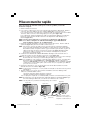
Pour raccorder le moniteur MultiSync® LCD au système, suivez les
directives ciaprès:
1. Mettez l’ordinateur hors tension.
2. Pour un PC ou un Mac équipé d’une sortie numérique DVI : Branchez le câble DVI-D - DVI-D au
connecteur de la carte graphique de votre ordinateur (Figure A.1). Serrez toutes les vis.
Pour un PC équipé d’une sortie analogique : Branchez le câble de signal mini-connecteur D-SUB à
15 broches - DVI au connecteur de la carte graphique de votre systéme (Figure A.2).
Pour un Macintosh : Brachez l’adaptateur de câble pour Macintosh de MultiSync à l’ordinateur.
Branchez le câble signal mini D-SUB à 15 broches à l’adaptateur de câble MultiSync pour
Macintosh (Figure B.1).
NOTA : Certains systèmes Macintosh ne nécessitent pas un adaptateur de câble Macintosh.
NOTA : Pour obtenir un adaptateur de câble Macintosh Multisync appeler NEC-Mitsubishi
Electronics Display of America, Inc. au (800) 632-4662.
3. Branchez le câble de signal DVI au connecteur situé à l’arrière du moniteur. Placez le câble de
signal vidéo (Figure C.1). Connectez le VGA ou DVI à l’entrée 2.
NOTA : Une mauvaise connexion des câble peut nuire au fonctionnement, endommager l’affichage
et nuire à la qualité de l’affichage du model LCD et/ou réduire la durée de vie utile du module.
Rassemblez les câbles et rangez-les dans le support en fixant la gaine de câble. La gaine de
câble peut être fixée à l’avant ou à l’arrière du support incliné (Figure C.1, C.2). Veuillez
vérifier que les câbles ne génent pas les mouvements du stand (inclinaison, élévation,
abaissement et rotation de l’écran.
4. Connecter une extrémité du câble d’alimentation électrique sur l’arrivée CA située à
l’arrière du moniteur et l’autre extrémité sur la prise de courant (Figure C.1).
NOTA : Si vous utilisez ce moniteur à AC125-240V, s'il vous plaît faites référence à section de l'Usage
Recommandée de ce manuel pour sélection adéquate d'AC pouvoir cordon.
NOTA : Pour le MAC avec sortie numérique : Avant de mettre le MAC sous tension, le mode d’entrée
DVI doit être réglé sur NUMÉRIQUE dans « SÉLECTION DVI » d’OSM en appuyant sur
le bouton « SÉLECTIONNER » puis sur le bouton « CONTRÔLE » lorsque le câble de signal DVI
est branché au connecteur DVI-I (entrée 1) du moniteur. Sinon, il est possible que le MAC ne
puisse être mis sous tension.
5. L’Interrupteur de Vacances sur le côté gauche de l’écran doit être allumai. Allume l’écran de
Silhouette de bouton et l’ordinateur (Figure D.1).
NOTA : que there a deux interrupteurs : un sur le côté droit et le façade sur côté de l’écran. Pas permute
rapidement ou.
6. Mettez l’ordinateur sous tension. Pour conclure l’installation du moniteur MultiSync LCD.
Utilisez les commandes OSM suivantes :
• Contraste automatique (Entrée analogigue seulement)
• Réglage automatique (Entrée analogigue seulement)
Pour une description complète de ces commandes OSM, consultez la section Commandes de ce guide.
NOTA : des informations sur le télé chargement du fichier INF Windows® 95/98/Me/2000/XP pour
le moniteur MultiSync LCD1980SXi, consultez la section Références de ce manuel.
NOTA : case de probl è me,consultez la section Dépannage de ce manuel.
Figure B.1
Figure A.1
Figure A.2
27
LCD1980SXimanual060704.p65
27
Adaptateur de câble Remarque: Certains systémes
Macintosh ne nécessitent pas un
(non fourni)
adaptateur de câble Macintosh.
6/10/04, 9:28 AM
Mise en marche rapide –suite
INPUT1
INPUT2
INPUT1
INPUT2
Figure C.2
Figure C.1
Fixation de produit NEC en option. N’utilisez pas ce
connecteur sauf indication contraire.
l’interrupteur
de vacances
Bouton
d’alimentation
Figure D.1
Levez et baissez l’écran du moniteur
Le moniteur peut être levé ou baissé en mode Portrait ou Paysage. Pour lever ou baisser
l’écran, placez les mains de chaque côté du moniteur et positionnez-le à la hauteur de
votre choix. (Figure RL.1).
NOTA: Manipule sur soin quand augmentant ou l’écran diminuant écran.
Figure RL.1
28
LCD1980SXimanual060704.p65
28
6/10/04, 9:28 AM
Mise en marche rapide –suite
Rotation de l’écran
Avant de tourner l’écran, celui-ci doit être levé au niveau maximum afin d’éviter tout choc
contre le bureau ou de pincer vos doigts. Pour lever l’écran, placez les mains de chaque
côté du moniteur et levez-le jusqu’à la hauteur maximum (Figure RL.1).
Pour tourner l’écran, placez les mains de chaque côté du moniteur et tournez-le dans le sens
horaire de Paysage à Portrait ou dans le sens inverse de Portrait à Paysage (Figure R.1).
Pour alterner l’orientation de menu d’OSM entre Landscape et Portrait, référer au section
de “Commandes”, function de “Rotation de l’OSM”.
NOTA: Tournez l’écran à 90° dans le sens des aiguilles d’une montre jusqu’à ce que
vous entendiez un clic. Si l’écran est pivoté dans le sens inverse, la fonction d’inclinaison
n’est pas disponible.
Figure R.1
Incliner
Pivoter
Mettez vos mains sur les côtés inférieur et
supérieur de l'écran et réglez l'inclinaison
comme désirée (Figure TS.1).
Placez les mains de chaque côté de
l'écran et réglez l'orientation comme
désirée (Figure TS.2).
NOTA: Manipule sur soin quand l’écran inclinant écran.
NOTA: Pour utiliser cette fonction, tournez l’écran à 90° dans le sens des aiguilles d’une
montre jusqu’à ce que vous entendiez un clic.
29
LCD1980SXimanual060704.p65
29
6/10/04, 9:28 AM
Mise en marche rapide –suite
Enlever le support du moniteur pour le montage
Pour préparer le moniteur à différents types de montage :
1. Déconnectez tous les câbles.
2. Placez les mains de chaque côté du moniteur en le soulevant dans sa position la plus haute.
3. Placez le moniteur la face vers le bas sur une surface non abrasive (placez l’écran
sur une plate-forme de 33 mm de manière à ce que le support soit parallèle à la
surface) (Figure S.1).
33mm
Figure S.1
4. Ôtez les deux vis supérieures qui fixent le moniteur au support (Figure S.2).
Pivotez le support à 180° dans le sens inverse des aiguilles d’une montre (vous
devez entendre deux clics). Ôtez les vis de la base (Figure S.3) et dégagez le
support. Le moniteur est maintenant prêt à être monté de façon différente.
5. Renversez ce processus pour rattacher le support: serrez les deux vis inférieures,
tournez le support 180˚, dans le sens inverses des aiguilles d’une montre (vous
entendrez deux “clicks”), et serrez les deux vis supérieures.
NOTA : Utilisez uniquement une méthode de montage compatible VESA (Pas de 100mm).
NOTA : Prenez des précautions pour ôter le support du moniteur.
Figure S.2 and Figure S.3
4
2
3
1
NOTA : Lorsque l’ACL est en position Paysage,
assurez-vous que les deux dents rondes
sont en bas de l’ cran (figure S.4).
Figure S.4
Attention : Veuillez utiliser les vis fournies (4) pour le
montage. Afin de respecter les consignes de sécurité, le
moniteur doit être monté sur un bras garantissant la
stabilité nécessaire en fonction du poids du moniteur. Le
moniteur LCD doit être uniquement utilisé avec un bras
homologué (par exemple, portant la marque GS).
30
LCD1980SXimanual060704.p65
30
6/10/04, 9:28 AM
Commandes
Les boutons de réglage OSM situés sur l’avant du moniteur fournissent les fonctions
suivantes :
Pour accéder au menu OSM, appuyez sur une des touches de commande
( , , –, +).
À transformer signale de l’entrée, presser le SELECT bouton.
NOTA: Menu de OSM doit être fermé pourvoir modifier le signal déntrée et pour.
Menu principal
Quitte les commandes OSM.
EXIT
Revient au menu principal OSM.
CONTROL
/
Déplace la zone en surbrillance vers la gauche ou la droite pour choisir un menu de commande.
Déplace la zone en surbrillance vers le haut ou vers le bas pour choisir l’une des commandes.
ADJUST –/+
Déplacez la barre de gauche à droite pour augmenter ou diminuer le réglage.
SELECT
Active la fonction choisi et saisit les commandes OSM et celles du sous-menu OSM. La
sélection des entrées peut être effectuée avec la fonction OSM arrêtée.
Réinitialise le menu de commandes en surbrillance aux réglages d’usine.
RESET
NOTA : En appuyant sur le bouton RESET dans un menu ou dans un sous-menu, une fenêtre s’affiche vous
permettant d’annuler la fonction RESET en appuyant sur le bouton EXIT.
Commandes de luminosité et de contraste
LUMINOSITÉ
Règle la luminosité globale de l’image et du fond de l’écran.
CONTRASTE
Règle la luminosité de l’image en fonction du fond.
NIVEAU DE NOIR. (Entrée analogique seulement)
Ajuste la luminosité de l’image par rapport au fond.
CONTRASTE AUTO. (Entrée analogique seulement)
Règle l’image affichée pour des entrées vidéo non standard.
LUMINOSITÉ AUTO.
Cette fonction ajuste automatiquement la luminosité pour le réglage optimal de
la LUMINOSITÉ en fonction de la zone d’affichage blanche.
Réglage Auto (Entrée analogique seulement)
Règle automatiquement la position de l’image, la dimension horizontale (ou hauteur) et la
finesse.
Commandes de l’image
GAUCHE/DROITE
Contrôle la position horizontale de l’image dans la zone d’affichage du LCD.
BAS/HAUT
Contrôle la position verticale de l’image dans la zone d’affichage du LCD.
HAUTEUR (OSM Rotation: Paysage) ou LARGEUR (OSM Rotation: Portrait)
(Entrée analogique seulement)
Règle la largeur (ou verticale) en augmentant ou diminuant ce paramètre.
31
LCD1980SXimanual060704.p65
31
6/10/04, 9:28 AM
Commandes –suite
Si la fonction « Réglage AUTOMATIQUE » ne vous permet pas d’effectuer un réglage
de l’image satisfaisant, il est possible d’effectuer une mise au point manuellement en
utilisant la fonction « H.Size (ou V.Size) ». Pour cela, un motif de test moiré peut être
utilisé. Cette fonction peut modifier la largeur ou Hauteur de l’image. Utilisez le menu
gauche/droite pour centrer l’image sur l’écran. Si la largeur est mal calibrée, le résultat
sera semblable à celui du dessin ci-contre. L'image doit être homogène.
Correct
Incorrecte
FINESSE (Entrée analogique seulement)
Améliore le point, la clarté et la stabilité de l’image en augmentant ou diminuant ce paramètre.
Si les fonctions « Réglage auto » et « Largeur » ne vous donnent pas un réglage
satisfaisant de l’image, vous pouvez la régler avec précision à l'aide de la fonction
« Finesse ». Vous pouvez améliorer la netteté, la clarté et la stabilité de l’image en
augmentant ou diminuant ce paramétre. Pour cela, un motif de test moiré peut être utilisé.
Si la valeur fine est mal calibrée, le résultat sera semblable à celui du dessin ci-contre.
L’image devrait être homogéne.
Incorrecte
Correct
AccuColor® Control Systems (Système de contrôle des couleurs)
Sept préréglages des couleurs vous permettent de régler les couleurs à votre guise (les
préréglages sRGB, NATIVE et PROGRAMMABLE sont des standards et ne peuvent
pas être modifiés). La température des couleurs augmente ou diminue dans chaque
préréglage. R,J,V,C,B,M,S : Augmente ou diminue le Rouge, le Jaune, le Vert, le
Cyan, le Bleu, le Magenta et la Saturation selon ce qui est sélectionné. Le changement
de couleur apparaît à l’écran et le sens (augmentation ou diminution) est indiqué par
les barres de couleur. NATIVE : Réglage d’origine présenté par le panneau LCD et
que l’on ne peut modifier. PROGRAMMABLE : La température et le ton des couleurs
qui ont été réglés à l’aide de l’application logicielle téléchargée appliqués.
NOTA : Pour réinitialiser un paramétrage d’image médiocre, mettez le
moniteur sous tension à l’aide du bouton d’alimentation avant tout en
appuyant simultanément sur les boutons « QUITTER » et « SÉLECTIONNER ».
Outils 1
NETTETÉ : Cette fonction utilise la technologie numérique pour conserver une
image contrastée avec toute synchronisation. La précision est indépendante
de tout autre réglage et peut être ajustée en permanence pour obtenir une
image nette ou estompée.
MODE ÉTENDU : Règle le zoom.
PLEIN : La taille de l’image est agrandie à 1280 x 1024, quelle que soit la résolution.
ASPECT : L’image est agrandie sans modifier le rapport du format.
ARRÊT : L’image n’est pas agrandie.
PERSONNALISÉ1 : Faites un zoom en fixant le centre. L’image est agrandie
individuellement au taux de 1,00 à 3,00 fois horizontalement (H.EXPANSION) et
verticalement (V.EXPANSION) de 0,01 cran.
32
LCD1980SXimanual060704.p65
32
6/10/04, 9:28 AM
Commandes –suite
PERSONNALISÉ2 : Faites un zoom en fixant le coin supérieur gauche. L’image est
agrandie individuellement au taux de 1,00 à 3,00 fois horizontalement
(H.EXPANSION) et verticalement (V.EXPANSION) de 0,01 cran.
DÉTECTION VIDÉO : Sélectionne la méthode de détection de la vidéo lorsque plusieurs
ordinateurs sont connectés.
1ER DÉTECTÉ : L’entrée vidéo doit être commutée en mode « 1ER DÉTECTÉ ».
S’il n’existe pas de signal d’entrée vidéo, le moniteur recherche un signal vidéo sur
l’autre port d’entrée vidéo. Si le signal vidéo est localisé sur l'autre port, le moniteur
bascule automatiquement le port d’entrée vidéo vers la nouvelle source vidéo
détectée. Le moniteur ne recherchera pas d’autre signal vidéo tant que la source
vidéo actuelle sera présente.
DERNIER DÉTECTÉ : L’entrée vidéo doit être commutée en mode « DERNIER
DÉTECTÉ ». Si le moniteur affiche un signal de la source actuelle et qu’une nouvelle
source vidéo lui est fournie, le moniteur bascule automatiquement vers cette nouvelle
source vidéo. Si aucun signal d'entrée vidéo n'est détecté, le moniteur en recherche un
sur l'autre port d'entrée vidéo. Si le signal vidéo est localisé sur l'autre port, le moniteur
bascule automatiquement le port d’entrée vidéo vers la nouvelle source vidéo détectée.
PAS DE PRIORITÉ : Tant qu’il n’est pas allumé, le moniteur ne vérifie pas l’autre port
d’entrée vidéo.
SELECTION DVI : Cette fonction sélectionne le mode d’entrée DVI (Entrée 1). En cas de
nouvelle sélection du mode DVI, l’ordinateur devra être redémarré.
AUTO : Avec le câble DVI-D au DVI-D, la SÉLECTION DVI est NUMÉRIQUE. Avec
le câble D-SUB à DVI-A, la SÉLECTION DVI est ANALOGIQUE.
NUMÉRIQUE : L’entrée DVI numérique est disponible.
ANALOGIQUE : L’entrée DVI analogique est disponible.
NOTA: Pour le MAC avec sortie numérique : Avant de mettre le MAC sous tension,
le mode d’entrée DVI doit être réglé sur NUMÉRIQUE dans « SÉLECTION DVI »
d’OSM en appuyant sur le bouton « SÉLECTIONNER » puis sur le bouton «
CONTRÔLE » lorsque le câble de signal DVI est branché au connecteur DVI-I
(entrée 1) du moniteur. Sinon, il est possible que le MAC ne puisse être mis sous
tension.
NOTA: Selon le carte de PC/Video ou le câble utilisé, cette fonction peut pas fonctionner.
ARRÊT PROGRAMMATEUR : Le moniteur sera mis automatiquement hors tension lorsque
l'utilisateur final sélectionne un laps de temps préréglé.
Outils 2
LANGAGE : Les menus des commandes OSM sont disponibles en sept langues.
OSM GAUCHE/DROITE : Vous pouvez choisir l’emplacement sur l’écran de la fenêtre
de commandes OSM. En choisissant Position de l’OSM, vous pouvez régler
manuellement la position du menu de commandes OSM : gauche ou droite.
OSM BAS/HAUT : Vous pouvez choisir l’emplacement sur l’écran de la fenêtre de
commandes OSM. En choisissant Position de l’OSM, vous pouvez régler
manuellement la position du menu de commandes OSM : en bas ou en haut.
EXTINCTION DE L’OSM : Le menu des commandes OSM reste à l’écran aussi
longtemps qu’il est utilisé. Dans le sous-menu Extinction OSM, vous pouvez choisir la
durée d’attente du moniteur entre la dernière pression de touche et l’extinction du menu
des commandes OSM. Les choix prédéfinis sont situés entre 10 et 120 secondes, par
pas de 5 secondes.
VERROUILLAGE OSM : Cette commande bloque totalement l’accès à toutes les
fonctions de commande OSM. Toute tentative d’activation des commandes OSM,
33
LCD1980SXimanual060704.p65
33
6/10/04, 9:28 AM
Commandes –suite
lorsque ce dernier est en mode verrouillé, provoque l’apparition d’un écran informant
que les commandes OSM sont verrouillées. Il existe trios types de VERROUILLAGE OSM :
VERROUILLAGE OSM avec les commandes LUMINOSITÉ et CONTRASTE : Pour
activer la fonction de verrouillage OSM, appuyez sur le bouton SÉLECTION, puis sur
la touche « + » et maintenez-les simultanément enfoncés. Pour désactiver le
verrouillage OSM, appuyez sur le bouton SÉLECTION, puis sur la touche « + » et
maintenez-les simultanément enfoncés. Il est possible de régler CONTRASTE et
LUMINOSITÉ en mode verrouillé.
VERROUILLAGE OSM sans commande : Pour activer la fonction de verrouillage
OSM, appuyez sur le bouton SÉLECTION, puis sur la touche « > » et maintenez-les
simultanément enfoncés. Pour désactiver le verrouillage OSM, appuyez sur le bouton
SÉLECTION, puis sur la touche « > » et maintenez-les simultanément enfoncés.
Aucune commande ne peut être réglée en mode verrouillé.
VERROUILLAGE OSM avec contrôle de LUMINOSITÉ (uniquement) : Pour activer la
fonction Verrouillage OSM, appuyez sur SELECT, puis sur les touches “–” et “>” en
les maintenant enfoncées simultanément. Pour désactiver la fonction Verrouillage
OSM, appuyez sur SELECT, puis sur la touche “+” en les maintenant enfoncées
simultanément, tout en restant dans le menu OSM. La LUMINOSITÉ peut être ajustée
tout en restant dans le mode Verrouillage.
ROTATION DE L’OSM : Pour basculer OSM entre les modes Paysage et Portrait.
NOTIFICAT. RÉSOLUTION : La résolution optimale est de 1280 x 1024. Si MARCHE est
choisi, un message apparaît à l’écran après 30 secondes, vous avertissant que la résolution n’est
pas à 1280 x 1024.
TOUCHE DE RACCOURCI : Vous pouvez régler directement la luminosité et le
contraste. Lorsque le menu est activé, vous pouvez régler la luminosité avec
ou
.
Lorsque le menu est désactivé, utilisez les touches + ou - pour régler le contraste.
PRÉRÉGLAGE USINE : En choisissant “Factory Preset” vous permet de remettre la plupart
des commandes d’OSM. Les réglages individuels peuvent être réinitialisés en mettant la
commande concernée en surbrillance et en appuyant sur le bouton RESET.
Informations
MODE D’AFFICHAGE : Fournit des informations sur la résolution d’affichage actuelle, des
données techniques comprenant le préréglage de temps utilisé et les fréquences
horizontale et verticale. Augmente ou diminue la résolution actuelle.
INFOS MONITEUR : Indique le nom du modèle et les numéros de série de votre moniteur.
Avertissements OSM: Les menus Avertissements OSM disparaissent avec le
bouton Exit.
PAS DE SIGNAL : Cette fonction génère un avertissement lorsqu'il n'y a aucun signal
horizontal ou vertical de synchronisation présent. Une fois l'alimentation positionnée
sur MARCHE ou lorsqu'il y a un changement du signal d'entrée, la fenêtre PAS de
Signal apparaît.
ERREUR RESOLUTION : Cette fonction vous avertit de l’utilisation en résolution optimisée.
Après la mise sous tension, ou bien si le signal d’entrée change ou encore si le signal vidéo
ne présente pas de résolution appropriée, la fenêtre Erreur résolution apparaît. Cette
fonction peut être désactivée dans le menu OUTILS.
HORS LIMITE : Lorsque la synchronisation du signal d’entrée n’est pas acceptée ou si
le signal vidéo n’est pas correctement synchronisé, le menu Hors limite s’affiche.
REMARQUE : Si «
CHANGER D’ENTRÉE DVI » s’affiche, commuter sur SELECTION DVI.
Veuillez consulter l’« Annexe » pour en savoir plus sur le menu utilisateur avancé.
34
LCD1980SXimanual060704.p65
34
6/10/04, 9:28 AM
Réglage de la compensation de câble long
La compensation des câbles longs ne peut être effectuée qu’avec des câbles rallongés ou
pour compenser un signal vidéo de qualité médiocre. Il est nécessaire de suivre les étapes
suivantes pour effectuer le réglage de compensation de câble long :
1. Pour un réglage optimal, téléchargez « LCD Long Cable Comp Test Pattern » et le fichier
« Read Me » sur www.necmitsubishi.com et affichez le motif de test pendant ce réglage.
2. Afin d’effectuer le réglage, entrez dans le menu avancé OSM :
• Mettez votre moniteur hors tension.
• Mettez votre moniteur sous tension en appuyant simultanément sur les boutons « MARCHE »
et « SELECT » pour ouvrir le menu avancé OSM.
3. Sur Tag 3, réglez le niveau de réglage automatique (Auto SW) sur « DETAIL ».
SIMPLE
FULL
DÉTAIL
"Dimension"
"précision"
"position"
"Contraste"
O
O
O
X
O
O
Le niveau du noir,
Capacité du câble long (*1)
X
X
O
Durée
1,5 seconde
2 secondes
10 à 20 secondes
O: Le réglage automatique est effectué.
X: Le réglage automatique n’est pas fait.
*1: Le niveau du noir, la précision RVB, le temps de retard RVB et la position RVB sont
réglés à l’aide du logiciel Câble long.
4. Sur Tag 4, sélectionnez « AUTO » et appuyez sur
« SELECT » pour effectuer le réglage complet.
5. NEC-Mitsubishi recommande de changer (Tag 3)
« AUTO SW »/« DETAIL » en « SIMPLE » après le
réglage automatique.
6. Vous pouvez quitter le menu OSM avancé en éteignant
puis en redémarrant votre moniteur.
Pour de plus amples renseignements au sujet des commandes et des sous-programmes
logiciels, visitez notre site Web sur www.necmitsubishi.com
35
LCD1980SXimanual060704.p65
35
6/10/04, 9:28 AM
Usage recommandé
Consignes de sécurité et d’entretien
POUR UN FONCTIONNEMENT OPTIMAL, PRIÈRE DE NOTER CE QUI
SUIT POUR LE RÉGLAGE ET L'UTILISATION DU MONITEUR COULEUR
MULTISYNC® LCD :
• NE PAS OUVRIR LE MONITEUR. Aucune pièce intérieure ne nécessite l'intervention de l'utilisateur,
et l'ouverture ou la dépose des couvercles peut entraîner des risques de décharges électriques
dangereuses ou d'autres risques. Confier tous travaux à du personnel technique qualifié.
• Ne pas renverser de liquides dans le boîtier, ni utiliser le moniteur près de l'eau.
• Ne pas introduire d'objets de quelque nature que ce soit dans les fentes du boîtier car ceux-ci
pourraient toucher des endroits sous tension dangereuse, ce qui peut provoquer des blessures, voire
être fatal, ou peut occasionner une décharge électrique, un incendie ou une panne de l'appareil.
• Ne pas placer d'objets lourds sur le cordon d'alimentation. Un cordon endommagé peut
occasionner une décharge électrique ou un incendie.
• Ne pas placer cet appareil sur un chariot, un support ou une table inclinée ou instable, afin
d'éviter que le moniteur ne tombe, occasionnant de sérieux dommages au moniteur.
• Pour l'utilisation du moniteur MultiSync LCD avec l'alimentation AC mondiale de 125-240 V,
utiliser un cordon d'alimentation qui correspond à la tension de l'alimentation fournie à la prise
de courant AC. Le cordon d'alimentation utilisé doit être agréé et en conformité avec les normes
de sécurité de son pays. (Type H05VV-F à utiliser sauf au Europe.)
• Au R, –U., utilisez avec ce moniteur un cordon d’alimrntation approuvé BS avec fiche moulée d’un
fusible noir (5A). Si un cordon d’alimentation n’a pas été fourni avec ce moniteur, veuillez
contacter votre fournisseur.
• Ne placer aucun objet sur le moniteur et ne pas l’utiliser en extérieur.
• L’intérieur du tube fluorescent situé dans le moniteur contient du mercure. Pour l’élimination
appropriée, observez les règlements en vigueur dans votre région.
Débrancher immédiatement le moniteur de la prise murale et confier la réparation à du personnel
technique qualifié dans les cas suivants :
• Lorsque le cordon d'alimentation ou la fiche est endommagé(e).
• Si du liquide a été renversé ou des objets sont tombés à l'intérieur du moniteur.
• Si le moniteur a été exposé à la pluie ou à de l'eau.
• Si le moniteur est tombé ou le boîtier est endommagé.
• Si le moniteur ne fonctionne pas normalement en suivant les directives d'utilisation.
• Ne courbe pas le pouvoir du cordon.
• N’utilise pas votre écran dans de hautes températures humides poussiéreuses près d’huile ou.
• Ne couvre pas l’armoire fente ou usage rayonnai mauvaise chaleur.
• Regal toujours glass sur soin.
• Si écran ou verre est rodé, ne supporter pas ne venir pas touche le liquide crystal et manche sur soin.
• Prévoir une aération suffisante autour du moniteur pour que la chaleur puisse se
dissiper correctement. Ne pas obstruer les ouvertures de ventilation ni placer le
moniteur près d'un radiateur ou autre source de chaleur. Ne rien poser sur le moniteur.
• La fiche du cordon d'alimentation est le moyen principal de débrancher le système
de l'alimentation. Le moniteur doit être installé à proximité d'une prise de courant
AVERTISSEMENT
facilement accessible.
• Manipuler avec soin lors du transport. Conserver l'emballage pour le transport.
Persistance de l’image
la persistance de l’image se présente lorsqu’une image résiduelle ou “ fantôme ” d’une image précédente reste
visible sur l’écran. Contrairement aux moniteurs à tube cathodique, la persistance de le l’image des moniteurs LCD
n’est pas permanente, mais l’affichage d’images constantes pendant une longue période de temps doit être évitée.
Pour remédier à la persistance de l’image, mettez le moniteur hors tension pendant une durée égale à celle de
l’affichage de l’image précédente. Par exemple, si une image est restée affichée sur l’écran pendant une heure et
qu’il reste une image résiduelle, le moniteur doit être mis hors tension pendant une heure pour effacer l’image.
NOTA: Comme pour tous les équipements d’affichage personnels, NEC-Mitsubishi Electronics Display recommande
l’utilisation d’un économiseur d’écran mobile à des intervalles réguliers, à chaque fois que l’écran est en veille, ou
d’éteindre le moniteur lorsqu’il n’est pas utilisé.
36
LCD1980SXimanual060704.p65
36
6/10/04, 9:28 AM
Usage recommandé –suite
LA MODIFICATION DE LA POSITION ET DU RÉGLAGE DU MONITEUR
PEUT RÉDUIRE LA FATIGUE DES YEUX, DES ÉPAULES ET DE LA NUQUE.
OBSERVER LES DIRECTIVES CI-APRÈS LORS DU POSITIONNEMENT
DU MONITEUR :
• Pour une performance optimale, laissez le moniteur
se réchauffer pendant 20 minutes.
• Régler la hauteur du moniteur de sorte que le dessus
de l'écran soit au niveau ou légèrement en-dessous
du niveau des yeux. Les yeux doivent regarder
légèrement vers le bas lorsque l'on regarde le milieu
de l'écran.
• Positionner le moniteur à une distance minimale de
40 cm (16 po) et maximale de 70 cm (28 po) des yeux.
La distance optimale est de 50 cm (20 po).
• Reposer ses yeux régulièrement en regardant vers un
objet situé à au moins 6 m (20 pieds). Cligner régulièrement.
• Positionner le moniteur à un angle de 90° par rapport aux fenêtres et autres sources de
lumière, afin de réduire au maximum les reflets et l'éblouissement. Régler l'inclinaison
du moniteur de sorte que l'éclairage du plafond ne soit pas reflété sur l'écran.
• Si une lumière réfléchie rend la vision de l'écran difficile, utiliser un filtre anti-reflet.
• Nettoyer régulièrement le moniteur. Utiliser un chiffon sans peluches et non abrasif et
une solution de nettoyage sans alcool, neutre, non abrasive ou un produit nettoyant
pour vitres pour éliminer au maximum la poussière.
• Régler les commandes de luminosité et de contraste du moniteur pour améliorer la
lisibilité.
• Utiliser un support de document placé près de l'écran.
• Positionner ce que l'on regarde le plus souvent (l'écran ou les documents de référence)
directement devant soi pour réduire au maximum les mouvements de la tête lorsque
l'on dactylographie.
• Pour éviter la persistance d’images (images rémanentes), n’affichez pas des motifs fixes
sur le moniteur pendant de longues périodes.
• Consulter régulièrement un ophtalmologiste.
Ergonomie
Pour optimiser les avantages ergonomiques, observez les directives suivantes :
• Régler la luminosité jusqu’à ce que la trame de fond disparaisse.
• Ne pas placer la commande de contrate à son réglage maximum.
• Utiliser les commandes de format et position préprogrammées avec signaux standard.
• Utiliser le réglage couleur et les commandes gauche/droite préprogrammés.
• Utiliser des signaux non entrelacés avec fréquence de rafraîchissement vertical de 60 à 75Hz.
• Ne pas utiliser la couleur bleu primaire sur fond foncé car cela rend la lecture difficile
et peut occasionner de la fatigue oculaire en raison de contraste insuffisant.
Pour des informations plus détaillées sur l'établissement d'un environnement de travail sain, écrire à
American National Standard for Human Factors Engineering of Visual Display Terminal Workstations ANSI-HFS Standard No. 100-1988 - The Human Factors Society, Inc. P.O. Box 1369, Santa Monica,
California 90406.
37
LCD1980SXimanual060704.p65
37
6/10/04, 9:28 AM
Fiche technique
Caractér. techn.
du moniteur
Module LCD
Moniteur
MultiSync® LCD1980SXi™
Diagonale :
Surface utile :
Résolution (nombre de pixels) :
19,0 po
19,0 po
Paysage : 1280 x 1024
Vidéo :
Sync :
Signal d'entrée
16.777.216
Horizontale :
Verticale :
Automatique
Automatique
+88˚ (CR>10)
+88˚ (CR>10)
25ms (May.)
Temps de réponse
720 x 400*1 :VGA text
640 x 480*1 @ 60 Hz à 85 Hz
800 x 600*1 @ 56 Hz à 85 Hz
832 x 624*1 @ 75 Hz
1024 x 768*1 @ 60 Hz à 85 Hz
1152 x 864*1 @ 75Hz
1280 x 1024 @ 60 Hz*2 à 75 Hz
480 x 640*1 @ 60 Hz à 85 Hz
600 x 800*1 @ 56 Hz à 85 Hz
624 x 832*1 @ 75 Hz
768 x 1024*1 @ 60 Hz à 85 Hz
864 x 1152*1 @ 75 Hz
1024 x 1280 @ 60 Hz*2 à 75 Hz
Paysage :
Résolutions acceptées
Portrait:
Zone d'affichage active
Dépend de la carte vidéo et synchronisation utilisée.
31,5kHz à 81,1 kHz
50 Hz à 85 Hz
Gauche/Driote:
Haut/Bas:
Angles de visionnement
Matrice active; transistor à film fin (TFT);
affichage à cristaux liquides (LCD);
pas 0,294 mm; technologie XtraView+ ™;
270cd/m2 Luminance blanche (normale); taux de
contraste caractéristique 500:1.
ANALO.GIQUE 0,7 Vp-p/75 Ohms
Entrée bumérique : DVI
Synchro séparée niveau TTL.
Positif/négatif sync. horizontale
Positif/négatif sync. verticale
Sync. composite (positif/négatif) (niveau TTL)
Synchro sur le vert (positive) 0,7 Vp-p et synchro négative 0,3 Vp-p
Couleurs d'affichage
Gamme de
synchronisation
Remarques
Paysage : Horiz. :
Vert. :
Portrait : Horiz. :
Vert. :
Certains systémes peuvent ne pas prendre
en charge tous modes listés.
Certains systémes peuvent ne pas prendre
en charge tous modes listés.
376 mm/14,8 inches
301 mm/11,9 inches
301 mm/11,9 inches
376 mm/14,8 inches
100-240V ~ 50/60 Hz
Alimentation
Power Consumption
48W typ. (sans l’option de la barre acoustique)
Tension d'alimentation
0.48A@100-120V/0.23A@220-240V (sans l’option de la barre acoustique)
0.55A@100-120V/0.25A@220-240V (avec l’option de la barre acoustique)
412,2 mm (W) x364,8 - 494,8 mm (H) x 200,0 mm (D)
16,2 inches (W) x 14,4 - 19,5 inches (H) x 7,9 inches (D)
337,0 mm (W) x 428,5 - 532,4 mm (H) x 200,0 mm (D)
13,3 inches (W) x 16,9 - 21,0 inches (H) x 7,9 inches (D)
130 mm / 5,1 inches (Paysage)
Paysage :
Dimensions
Portrait:
Height Adjustment:
9,7 kg
21,4 livres
Poids
Considérations environnementales
Température de fonctionnement :
Humidité :
Altitude :
Température de stockage :
Humidité :
Altitude :
5 °C à 35 °C/41 °F à 95 °F
30 % à 80 %
0 à 10 000 pieds
-10 °C à +60 °C/14 °F à 140 °F
10 % à 85 %
0 à 40 000 pieds
*1 Résolutions interpolées : Quand les résolutions affichées sont inférieures au nombre de pixels du module LCD, le texte peut apparaître craquelé et les lignes plus épaisses.
Ceci est normal et nécessaire pour toutes les technologies d’affichage sur panneaux plats pour lesquels chaque point de l’écran occupe réellement un pixel. Pour agrandir
la résolution à celle du plein écran, une interpolation mathématique de celle-ci est nécessaire. Quand cette résolution interpolée ne correspond pas exactement à un
multiple entier de la résolution d’origine, la nécessaire interpolation mathématique peut faire que certaines lignes apparaissent plus épaisses que d’autres.
*2 NEC-Mitsubishi Electronics Display recommande une résolution pour des
performances d'affichage optimales et couleurs.
NOTA : Les spécifications techniques sont susceptibles d’être modifiées sans préavi.
38
LCD1980SXimanual060704.p65
38
6/10/04, 9:28 AM
Fonctions
Technologie ambix+™ : À double entrée permettant des entrées analogique et numérique à partir du
même connecteur (DVI-I) ainsi que le support de matériel analogique existant à partir d’un connecteur
VGA à 15 broches conventionnel. Assure la compatibilité avec la technologie MultiSync ® traditionnelle
pour les entrées analogiques ainsi que la compatibilité numérique basée sur DVI pour les entrées
numériques. Les interfaces numériques basées DVI incluent DVI-D, DFP et P&D.
DVI-I : L’interface intégrée ratifiée par le Digital Display Working Group (DDWG) qui autorise des
connecteurs numérique et analogique sur le même port. Le “I” désigne l’intégration du numérique et
de l’analogique. La portion numérique est basée DVI.
DVI-D : Le sous-composant numérique seulement du DVI ratifié par le Digital Display Working Group
(DDWG) pour les connexions numériques entre ordinateurs et moniteurs. En tant que connecteur
exclusivement numérique, le support analogique n’est pas prévu à partir d’un connecteur DVI-D. En
tant que connexion exclusivement numérique basée DVI, un simple adaptateur suffit pour assurer la
compatibilité entre DVI-D et autres connecteurs numériques basés DVI comme DFP et P&D.
DFP (Digital Flat Panel) : Une interface exclusivement numérique pour moniteur à panneau plat
laquelle est compatible DVI. En tant que connexion exclusivement numérique basée DVI, un simple
adaptateur suffit pour assurer la compatibilité entre DFP et autres connecteurs numériques basés DVI
comme DVI et P&D.
P&D (Plug and Display) : La norme VESA régissant les interfaces pour moniteurs à panneau plat. Elle
est plus rigoureuse que la norme DFP puisqu’elle autorise d’autres options sur le même connecteur
d’interface (options comme USB, vidéo analogique et IEEE-1394-995). Le comité VESA a reconnu
que DFP est un sous-composant de P&D. En tant que connecteur basé DVI (pour broches d’entrées
numériques), un simple adaptateur suffit pour assurer la compatibilité entre P&D et autres connecteurs
numériques basés DVI comme DVI et P&D.
Support pivotant : Permet à l’utilisateur de régler l’orientation du moniteur selon l’application utilisée,
soit Landscape pour les documents larges ou Portrait afin d’avoir la possibilité d’observer une page
entière sur l’écran à un moment précis. L’orientation Portrait est également parfait pour les
conférences vidéo à grand écran.
Encombrement réduit : Constitue la solution idéale pour les environnements qui nécessitent une image
de haute qualité et un encombrement et un poids limités. L’encombrement réduit et le faible poids du
moniteur permettent de le déplacer ou de le transporter rapidement d’un point à un autre.
Système de commande AccuColor ® : Permet de régler les couleurs à l’écran et de personnaliser la
précision des couleurs selon diverses normes.
Le système de contrôle OmniColor™ avec le nuançage de couleurs sRGB utilise des données de
couleurs à 6 axes permettant d’assurer une reproduction des couleurs réalistes pour les images fixes
et les vidéos en temps réel.
Commandes OSM® (Gestionnaire à l'écran) : avancé commandes OSM permet de régler facilement et
rapidement tous les éléments de l'image de l'écran via les menus à l'écran simples à utiliser.
Fonctions ErgoDesign® : Améliore l'ergonomie humaine pour améliorer l'environnement de travail,
protéger la santé de l'utilisateur et épargner de l'argent. On peut citer comme exemple les commandes
OSM pour un réglage rapide et facile de l'image, un socle inclinable pour un meilleur confort de
visualisation et la conformité aux directives MPRII et TCO concernant les réductions d'émissions.
Plug and Play : La solution Microsoft® avec le système d’exploitation Windows ®95/98/2000/Me/XP
39
LCD1980SXimanual060704.p65
39
6/10/04, 9:28 AM
Fonctions –suite
facilite la configuration et l'installation en permettant au moniteur d'envoyer ses capacités (telles que le
format et les résolutions d'écran acceptés) directement à l'ordinateur, optimisant ainsi
automatiquement les performances d'affichage.
Système IPM® (Intelligent Power Manager/Gestionnaire d'énergie intelligent) : Procure des méthodes
d'économie d'énergie novatrices qui permettent au moniteur de passer à un niveau de consommation
d'énergie plus faible lorsqu'il est allumé mais non utilisé, épargnant deux tiers des coûts énergétiques,
réduisant les émissions et diminuant les coûts de conditionnement d'air du lieu de travail.
Technologie à fréquence multiple : Règle automatiquement le moniteur à la fréquence de la carte
vidéo, affichant ainsi la résolution requise.
Capacité FullScan™ (balayage complet) : Permet d'utiliser la totalité de la surface d'écran dans la
plupart des résolutions, augmentant ainsi de façon significative la taille de l'image.
Technologie à vision grand angle XtraView+™ : Permet à l’utilisateur d’observer le moniteur à partir
de n’importe quel angle (176 degrés), dans n’importe quel sens –Portrait ou Paysage. Offre des
angles de vision complets de 176 degrés haut, bas, gauche ou droit.
Standard VESA® de montage d’interface : Permet a l’utilisateur de raccorder son moniteur MultiSync
a n’importe quel autre bras au baie de montage conforme VESA. Permet de monter le moniteur sur un
mur ou un bras à l’aide de n’importe quel autre dispositif compatible.
Le design à encadrement ultra-mince vous permet de visionner davantage de vos idées et une partie
moins importante du cadre, tout en libérant de l’espace sur votre bureau à l’horizontale comme à la
verticale pour des applications à multiples moniteurs.
Le logiciel NaViset™ offre une interface d’utilisateur graphique et intuitive, facile à utiliser qui
fonctionne avec le protocole Chaîne de données d’affichage/Interface de commande (DDC/CI)
permettant d’ajuster les réglages d’affichage avec la souris et le clavier.
La compensation automatique des câbles longs CableComp™ évite la dégradation de la qualité de
l’image causée par la longueur des câbles.
La fonction avancée Réglage automatique sans touche offre des réglages d’image optimaux dès la
mise sous tension et hors tension initiale des changements de signaux.
Rapid Response™ offre un visionnement continu, sans distorsion des applications vidéo plein écran.
sRGB Colore l’un nouveau Contrôler : optimisé couleur la gérance standard qui tient montant de couleur
assortissant sur affichages informatiques et autre peripherals. Le sRGB, qui est basa sur étalonné color
de l’espace, tient montant d’optimal color de la représentation et rétrograde la compatibilité sur autrement
common color des standards.
La capacité de pivotement ainsi que le support réglage ajoute de la souplesse à vos modes de
visionnement préférés.
GammaComp™: Circuit interne qui convertit les données à 8 bits du PC en données à 10 bits et
de nouveau en données à 8 bits, ce qui produit des couleurs dont les tons sont lisses et nets. Vous
pouvez régler Gamma en utilisant les valeurs pré initialisées ou en créant un paramètre
personnalisé de 0,7 à 4,4 par incréments de 0,1.
40
LCD1980SXimanual060704.p65
40
6/10/04, 9:28 AM
Dépannage
Pas d'image
• Le câble vidéo doit être bien connecté à la carte d'affichage et à l’ordinateur.
• La carte d'affichage doit être insérée à fond dans son logement.
• Vérifiez que l’interrupteur de vacances soit sur la position MARCHE.
• Les interrupteurs d’alimentation du moniteur à l’avantet de l’ordinateur doivent être sur la
position MARCHE.
• Vérifiez qu’un mode d’affichage autorisé a été sélectionné pour la carte d’affichage ou le
système utilisé (veuillez consulter le manuel de votre carte d'affichage ou de votre système pour
modifier le mode graphique).
• Vérifier la compatibilité et les paramètres recommandés de votre moniteur et de votre carte d'affichage.
• Vérifiez que le connecteur du câble vidéo ne comporte aucune broche tordue ou rentrée.
• L’entrée, de signal de chèque “INPUT 1” ou “INPUT 2”.
• Assurez-vous que le mode d’entrée DVI est réglé sur NUMÉRIQUE lorsque la sortie numérique
MAC est branchée au connecteur DVI-I (entrée 1).
L’interrupteur d’alimentation ne fonctionne pas
• Déconnectez le cordon d’alimentation de la prise secteur pour mettre le moniteur sous puis hors tension.
• Le pouvoir de chèque boutonne sur le côté gauche de l’écran.
Persistance de l’image
• Obstination d’image est quand un “fantôme” d’une image reste sur l’écran égalise après l’écran
a été ou une image différente est affiché. Dedans most instances, l’obstination d’image peut être
réduite by éteignant l’écran pour pourvu une image fut affichée by afficher la même image
dans les couleurs complémentaires ou.
NOTA : Tout comme dans le cas des écrans personnels, NEC-Mitsubishi Electronics Display recommande
l’utilisation d’un économiseur d’énergie à intervalles réguliers lorsque l’écran n’est pas utilisé.
Le message « HORS LIMITE » est affiché (l’écran est vide ou n’affiche que des images indistinctes)
• l’image est indistincte (des pixels manquent) et le message d’avertissement OSM « HORS LIMITE » est
affiché : La fréquence du signal ou la résolution sont trop élevées. Choisissez un mode pris en charge.
• L’avertissement OSM « HORS LIMITE » est affiché sur un écran vide : La fréquence du signal est
hors limites. Choisissez un mode pris en charge.
L'image défile ou est instable
• Le câble vidéo doit être bien connecté à la carte d'affichage et à l’ordinateur.
• Utilisez les boutons de Réglage image OSM pour mettre au point et régler l’affichage en
augmentant ou en diminuant la valeur Fin. Lorsque l’affichage est réglé, le Réglage image OSM
peut nécessiter un réajustement.
• Vérifier la compatibilité et les réglages recommandés de votre moniteur et de votre carte
d'affichage.
• Si votre texte n’est pas net, con Figurez le mode vidéo en non entrelacé à 60Hz.
La LED sur le moniteur n'est pas allumée (aucune couleur, verte, orange ou jaune, n'est visible)
• L’interrupteur d'alimentation doit être en position MARCHE et le cordon d'alimentation doit être connecté.
L'image n’a pas la bonne taille
• Utilisez les boutons de Réglage image OSM pour augmenter ou diminuer le format horizontal.
• Vérifiez qu’un mode d’affichage supporté a été sélectionné pour la carte d’affichage ou le
système utilisé (veuillez consulter le manuel de votre carte d'affichage ou de votre système pour
modifier le mode graphique).
Pas de vidéo
• Si pas be vidéo n’est présent sur l’écran, appuyez le couton d’alimentation marche et arrêt encore.
• Assurez-vous que l’ordinateur n’est pas réglé dans le mode d’économie d’énergie (touchez le
clavier ou la souris).
Sans inclinaison
• Tournez l’écran à 90° dans le sens des aiguilles d’une montre jusqu’à ce que vous entendiez un clic.
• Consultez la section Démarrage rapide, enlevez le support du moniteur pour le montage afin de
l’installer correctement.
41
LCD1980SXimanual060704.p65
41
6/10/04, 9:28 AM
Références
Service à la clientèle et assistance technique du moniteur NEC-Mitsubishi
Service à la clientèle et assistance technique: (800)632-4662
Télécopieur: (800) 695-3044
Pièces et accessoires/adaptateur
de câble Macintosh:
(888) NEC-MITS
[888-632-6487]
Politiques et processus du service
à la clientèle:
http://www.necmitsubishi.com/css/
ServicePolicies/ServicePolicies.htm
Base de connaissance de l’assistance
technique en lign:
http://www.necmitsubishi.com/css/
knowledgebase.cfm
Adresse électronique du service à la
clientèle et de l’assistance technique:
http://www.necmitsubishi.com/css/
techform.htm
Ventes et information produit
Ligne d’information sur les ventes:
(888) NEC-MITS [888-632-6487]
Clientèle canadienne:
(866) 771-0266, Ext#: 4037
Ventes au gouvernement:
(800) 284-6320
Adresse électronique du service
des ventes au gouvernement:
Courrier électronique
World Wide Web:
Produit enregistré:
[email protected]
http://www.necmitsubishi.com
http://www.necmitsubishi.com/
productregistration
Opérations Européennes:
http://www.nec-mitsubishi.com
Fichier INF Windows® 95/98/Me/2000/XP: http://www.necmitsubishi.com et select
“Downloads and Drivers”
Logiciel Long Cable:
http://www.necmitsubishi.com
Logiciel GammaComp:
http://www.necmitsubishi.com
42
LCD1980SXimanual060704.p65
42
6/10/04, 9:28 AM
Garantie limitée
NEC-Mitsubishi Electronics Display of America, Inc. (ci-après «NMD-A») garantit que ce
produit est exempt de vice de fabrication et de main-d’oeuvre et, selon les conditions énoncées
ci-dessous, accepte de réparer ou remplacer, à sa discrétion, toute pièce de l’appareil concerné
qui s’avérerait défectueuse et ce, pendant une période de trois (3) ans à partir de la date
d’achat initial. Les pièces de rechange sont garanties pendant quatre-vingt dix (90) jours. Les
pièces de rechange ou unités peuvent être neuves ou reconditionnées et seront conformes aux
spécifications des pièces et des unités d’origine. Cette garantie vous accorde des droits légaux
spécifiques auxquels peuvent s’ajouter d’autres droits pouvant varier d’une juridiction à l’autre.
Cette garantie est limitée à l’acheteur d’origine du produit et n’est pas transférable. Cette
garantie couvre uniquement les composants fournis par NMD-A. Une réparation requise à la
suite de l’utilisation des pièces provenant d’un tiers n’est pas couverte par cette garantie. Pour
être couvert par cette garantie, le produit doit avoir été acheté aux États-Unis ou au Canada
par l’acheteur d’origine. Cette garantie couvre uniquement la distribution du produit aux
États-Unis ou au Canada par NMD-A. Aucune garantie n’est offerte à l’extérieur des ÉtatsUnis et du Canada. La preuve d’achat sera exigée par NMD-A pour prouver la date d’achat.
Une telle preuve d’achat doit être une facture de vente d’origine ou un reçu reprenant le nom
et l’adresse du vendeur, de l’acheteur et le numéro de série du produit.
Pour obtenir un service au titre de la garantie, vous devez expédier le produit en port
prépayé ou le déposer chez le revendeur agréé qui vous l’a vendu ou dans un autre centre
autorisé par NMD-A, soit dans l’emballage d’origine, soit dans un emballage similaire
procurant un niveau équivalent de protection. Avant de retourner tout produit à NMD-A,
vous devez d’abord obtenir une autorisation de retour de marchandise en composant le 1800-632-4662. Le produit ne pourra avoir été enlevé ou modifié, réparé ou entretenu au
préalable par personne d’autre que du personnel technique autorisé par NMD-A, et le
numéro de série du produit ne pourra pas avoir été enlevé. Pour être couvert par cette
garantie, le produit ne pourra pas avoir été soumis à l’affichage d’une image fixe pendant
de longues périodes de temps résultant en une persistance de l’image, un accident, une
utilisation incorrecte ou abusive ou une utilisation contraire aux directives contenues dans le
guide de l’utilisateur. Une seule de ces conditions annulera la garantie.
NMD-A NE POURRA ÊTRE TENUE RESPONSABLE DE DOMMAGES DIRECTS, INDIRECTS,
ACCIDENTELS, SECONDAIRES OU D’AUTRES TYPES DE DOMMAGES RÉSULTANT DE
L’UTILISATION D’UN PRODUIT QUI N’ENTRENT PAS SOUS LA RESPONSABILITÉ DÉCRITE
CI-DESSUS. CES GARANTIES REMPLACENT TOUTE AUTRE GARANTIE EXPLICITE OU
IMPLICITE, Y COMPRIS, MAIS SANS S’Y LIMITER, TOUTE GARANTIE DE QUALITÉ
MARCHANDE OU D’APTITUDE À UNE FIN PARTICULIÈRE. CERTAINES JURIDICTIONS NE
PERMETTANT PAS L’EXCLUSION DE GARANTIES IMPLICITES OU LA LIMITATION OU
L’EXCLUSION DE RESPONSABILITÉ POUR DOMMAGES ACCIDENTELS OU SECONDAIRES,
LES EXCLUSIONS OU LIMITATIONS CI-DESSUS POURRAIENT NE PAS S’APPLIQUER DANS
VOTRE CAS.
Ce produit est garanti selon les termes de cette garantie limitée. Les consommateurs doivent
savoir que les performances du produit peuvent varier selon la configuration du système, le
logiciel, l’application, les données du client et la manière dont le produit est utilisé par
l’opérateur, ainsi que d’autres facteurs. Bien que les produits NMD-A soient considérés compatibles avec de nombreux systèmes, la mise en oeuvre fonctionnelle du produit peut varier
d’un client à l ’autre. Par conséquent, l’adéquation d’un produit à un besoin ou une application spécifique doit être déterminée par le consommateur et n’est pas garantie par NMD-A.
Pour connaître le nom du centre de service technique agréé NEC-Mitsubishi Electronics
Display le plus proche, appeler NEC-Mitsubishi Electronics Display of America au
1-800-632-4662.
43
LCD1980SXimanual060704.p65
43
6/10/04, 9:28 AM
TCO’99 – le modèle noir
(C’est une traduction de portion Anglaise de TCO’03.)
Félicitations! Vous avez acheté un produit qui répond à la directive TCO’99.
En choisissant ce produit conçu pour une utilisation professionnelle, vous
contribuez aussi à la réduction des effets nuisibles sur l’environnement et
aussi au développement continu de produits électroniques respectueux de
l’environnement.
Pourquoi des ordinateurs «éco-étiquetés»?
Dans de nombreux pays, l’éco-étiquetage est devenu une méthode reconnue pour favoriser la
mise au point de biens et de services respectueux de l’environnement. Pour ce qui est des ordinateurs
et autre équipement électronique, le problème est double : des substances nuisibles à
l’environnement sont utilisées à la fois dans le produit et au cours du processus de fabrication.
Comme il n’a pas été possible de recycler de manière appropriée la majeure partie de l’équipement
électronique, ces substances sont tôt ou tard introduites dans la nature.
L’ordinateur comporte d’autres caracté ristiques comme les niveaux de consommation énergétique,
qui influent à la fois sur l’environnement de travail (interne) et sur l’environnement naturel (externe).
Étant donné que toutes les méthodes de génération d’électricité traditionnelle ont un impact négatif
sur l’environnement (retombées acides et émissions provoquant des changements climatiques,
déchets radioactifs, etc.), la conservation de l’énergie est cruciale. Les appareils électroniques
utilisés dans des bireaux consomment une quantité énorme d’énergie puisqu’ils sont souvent
laissés continuellement en marche.
Qu’est-ce qu’implique l’éco-étiquetage?
Ce produit répond aux exigences de la directive TCO’99 qui prévoit l’éco-étiquetage et étiquetage
international d’ordinateurs personnels. La directive d’étiquetage a été élaborée par le TCO
(Confédération suédoise des employés professionnels), Svenska Naturakyddsforeningen (Société
suédoise de conservation de la nature) et Statens Energimyndighet (Administration nationale de
l’énergie de la Suéde).
La directive couvre plusieurs volets : environnement, ergonomie, facilité d’utilisation, émissions de
champs électriques et magnétiques, consommation énergétique, sécurité-électrique et sécurité-incendie.
Les exigences environnementales concernent la restriction de la présence et de l’utilisation, entre
autres, de métaux lourds, de retardateurs de flamme contenant du brome et du chlore,
d’hydrocarbure chlorofluoré (fréon) et de solvants chlorés. Le produit doit être préparé en vue
d’être éventuellement recyclé et le fabricant est tenu d’élaborer un plan environnemental qui doit
être respecté dans chaque pays où la société met en oeuvre sa politique opérationnelle. Dans le
cadre des exigences relatives à la consommation, l’ordinateur et/ou l’écran doit, après une certaine
période d’inactivité, réduire sa consommation énergétique en une ou plusieurs phases. Le temps
nécessaire à la réactivation de l’ordinateur devra être raisonnable. Le produits étiquetés doivent
répondre à des exigences environnementales rigoureuses, par exemple, eu égard à la réduction
des champs électriques et magnétiques, à l’ergonomie physique et visuelle et à la facilité d’utilisation.
Exigences environnementales
Retardateurs de flamme
Les retardateurs de flamme sont présents dans les cartes à circuits imprimés, les câbles, les fils, les
châssis et les boîtiers. Leur présence permet de retarder la propagation du feu. Le plastique d’un
boîtier d’ordinateur peut contenir jusqu’à trente pour cent de substances ignifuges. La plupart des
retardateurs de flamme contiennent du brome ou du chlrore et ces derniers s’apparentent à un
autre groupe de toxines environnementales, les PCB, qui sont suspectésde provoquer des effets
néfastes pour la santé, dont la modification de la reproduction chez les oiseaux piscivores et les
mammifères, attribuable aux processus biocumulatifs*. La présence de retardateurs de flamme a
été détectée dans le sang humain et les chercheurs craignent que le développement du foetus
pourrait être perturbé. La directive TCO’99 exige que les composants en plastique pesant plus de
44
LCD1980SXimanual060704.p65
44
6/10/04, 9:28 AM
TCO’99 –suite
25 grammes ne contiennent pas de retardateurs de flame contenant du chlore ou du brome
organiquement liés. Les retardateurs de flame sont autorisés dans les cartes à circuits imprimés
étant donné qu’aucun substitut n’est encore disponible.
Plomb**
Le plomb peut être présent dans les tubes cathodiques, les écrans, les soudures et les condensateurs.
Le plomb s’attaque au système nerveux et, à doses élevées, entraîne l’intoxication par le plomb.
La directive TCO’99 permet l’inclusion du plomb était donné qu’aucun remplacement n’ait encore
été mis au point.
Cadmium**
Le cadmium est présent dans les batteries rechargeables et dans les couches de génération des
couleurs de certains écrans d’ordinateur. Le cadmium s’attaque au système nerveux et est toxique
à doses élevées.
La directive TCO’99 stipule que les batteries, les couches de génération de couleurs d’écrans
d’ordinateur et les composants électriques ou électroniques ne doivent pas contenir de cadmium.
Mercure**
Le mercure est parfois présent dans les batteries, les relais, les interrupteurs et les systèmes
rétroéclairés. Le cadmium s’attaque au système nerveux et est toxique à doses élevées.
La directive TCO’99 stipule que les batteries ne peuvent de mercure. Elle exige aussi que le
mercure soit absent de tous les composants électriques ou électroniques associés à l’écran.
Hydrocarbures chlorofluorés (fréon)
Les hydrocarbures chlorofluorés (fréon) sont parfois utilisés dans le lavage des cartes à circuits
imprimés. Les hydrocarbures chlorofluorés décomposent la couche d’ozone et endommagent la
couche l’ozone dans la stratosphère, ce qui provoque l’augmentation de rayonnement ultraviolet
sur la terre et entraîne le risque accru de cancer de la peau (mélanome malin).
La directive TCO’99 : les hydrocarbures chlorofluorés et les hydrocarbures partiellement halogénés
ne peuvent pas être utilisés dans la fabrication ou l’assemblage du produit ou de son emballage.
*Biocumulatif signifie les substances qui s’accumulent au sein d’organismes vivants.
**Le plomb, le cadmium et le mercure sont des métaux lourds qui sont biocumulatifs.
Pour obtenir des informations détaillées sur le document des critères environnementaux,
adressez-vous á:
TCO Development Unit
SE 114 94 Stockholm
SUÈDE
Numéro de télécopieur : +46 8 782 92 07
Courriel (Internet) : [email protected]
Vous pouvez aussi obtenir des informations à jour sur les produits approvés et étiquetés
TCO’99 en visitant le site Web http://www.tcodevelopment..com
45
LCD1980SXimanual060704.p65
45
6/10/04, 9:28 AM
TCO’03 – le modèle blanc
(C’est une traduction de portion Anglaise de TCO’03.)
Félicitations !
L’écran que vous venez d'acheter porte l’étiquette « Displays
TCO’03 ». Ceci signifie que votre écran a été conçu, fabriqué,
et vérifié selon certaines des directives relatives à la qualité et
aux exigences environnementales les plus strictes au monde.
Cela permet à un produit de haute performance, conçu avec
l’utilisateur comme priorité, de réduire son impact sur notre
environnement naturel.
Voici certaines caractéristiques de ces directives « TCO’03 Display » :
Ergonomie
• Bonne ergonomie visuelle et qualité de l’image afin d’améliorer l’environnement
de travail des utilisateurs, et afin de réduire les problèmes de vue et de tension
nerveuse. Les paramètres importants sont la luminance, le contraste, la
résolution, la rémission, le rendu des couleurs et la stabilité de l’image.
Consommation
• Mode économie d’énergie après un certain temps, un avantage à la fois pour
l’utilisateur et l’environnement
• Sécurité électrique
Émissions
•
Champs électromagnétiques
•
Émissions de parasites
Écologie
• Le produit doit être conçu afin d’être recyclable et le fabriquant doit disposer
d’une certification relative à l’environnement telle qu’EMAS ou ISO 14 001
• Restrictions sur l’usage des :
- polymères et retardants au feu chlorés ou bromés
- métaux lourds tels que cadmium, mercure et plomb.
Les directives comprises sous cette étiquette ont été mises au point par « TCO
Development » en coopération avec des scientifiques, des experts, des utilisateurs, ainsi
que des fabricants du monde entier. Depuis la fin des années 1980, TCO s’est efforcée
d’influencer le développement du matériel informatique grâce à une orientation plus
conviviale. Notre système d’étiquetage a débuté avec des écrans en 1992 et se retrouve
maintenant demandé par des utilisateurs et des fabricants informatiques du monde
entier.
Pour obtenir des renseignements supplémentaires, veuillez visiter
www.tcodevelopment.com
46
LCD1980SXimanual060704.p65
46
6/10/04, 9:28 AM
Informations du fabricant relatives au
recylage et aux économies d’énergie
NEC-Mitsubishi Electric Visual Systems Corp. S’est fortement engagée dans la protection
de l’environnement et voit le recyclage comme une des priorités de la société en essayant
de réduire la pression exercée sur l’environnement. Nous nous sommes engagés à mettre
au point des produits respectant l’environnement, et à nous attacher à aider constamment
à définir et à respecter les dernières normes indépendantes émanant d’organismes tel
qu’ISO (International Organisation for Standardization, organisation internationale de
normalisation) et TCO (Swedish Trades Union, union commerciale suédoise).
Pour obtenir plus de renseignements, et pour vous aider à recycler vos anciens moniteurs
NEC ou Mitsubishi, veuillez visiter notre site web sur
http://www.nec-mitsubishi.com (en Europe) ou
http://www.nmv.co.jp/environment (au Japon) ou
http://www.necmitsubishi.com/markets-solutions/totaltrade (aux États-Unis).
Des programmes de recyclage, spécifiques à certains pays, peuvent également être consultés sur :
Suède -
http://www.el-retur.se
Allemagne -
http://www.recyclingpartner.de/
Pays-Bas -
http://www.mirec.nl/
Japon -
http://www.diarcs.com/
Économie d’énergie
Les caractéristiques de ce moniteur offrent des capacités d’économie d’énergie
avancées. Lorsqu’un signal standard VESA (DPMS) (émission de signaux de gestion
d’énergie d’écran) est envoyé au moniteur, le mode d’économie d’énergie est activé. Le
moniteur entre dans un mode simple d’économie d’énergie.
Mode
Consommation électrique
Couleur du voyan
Fonctionnement normal
Économie d’énergie
Environ 48W
Moins de 2W
Vert
Orange
Arrêt
Moins de 0.1W
Éteint
47
LCD1980SXimanual060704.p65
47
6/10/04, 9:28 AM
Déclaration du fabricant
Nous certifions par la présente que les
moniteurs
MultiSync® LCD1980SXi (L193FH) sont
conformes à
la directive 73/23/EEC du Counseil:
– EN 60950-1
la directive 89/336/EEC du Counseil:
– EN 55022
– EN 61000-3-2
– EN 61000-3-3
– EN 55024
et porte le sigle
NEC-Mitsubishi Electric Visual
Systems Corporation
4-13-23, Shibaura,
Minato-Ku
Tokyo 108-0023, Japan
48
LCD1980SXimanual060704.p65
48
6/10/04, 9:28 AM
Appendix
If you need detailed information about the controls, please use the advanced menu.
How to use the advanced menu
• Turn off your monitor.
• Turn on your monitor by pushing the "POWER" and "SELECT" button at the same time for
at least one second simultaneously.
• You will see the Advanced menu.
This menu is larger than the normal OSM.
How to exit the advanced menu
• Turn off and restart your monitor in the normal way.
To make an adjustment, ensure that the tag is highlighted, then press "SELECT."
To move to another tag, press "EXIT," then press "<" or ">" to highlight another tag.
Tag1
Brightness
Contrast
Auto Black Level
(Analog input only)
Auto Contrast
(Analog input only)
Black Level
Adjusts the overall image and screen background brightness. Press
“+” or “-” to adjust.
Adjusts the image brightness and contrast in relation to the background. Press “+” or “-” to adjust.
Automatically adjusts the black level. Press “SELECT” to adjust. Any
adjustment requires the image to have black portions. (Ensure that
the image has 64 or more adjacent black dots before making an
adjustment). Press “SELECT” to activate Auto Adjust.
Adjusts the image displayed for non-standard video inputs. Press
“SELECT” to adjust. Any adjustment requires the image to have white
portions.
Manually adjusts the black level. Press “+” or “-” to adjust.
(Analog input only)
Auto Brightness
This function adjusts the brightness automatically for the best
BRIGHTNESS setting based on the white display area.
Tag2
R-H. position
(Analog input only)
G-H. position
(Analog input only)
B-H. position
(Analog input only)
R-SHARPNESS
(Analog input only)
G- SHARPNESS
(Analog input only)
B- SHARPNESS
(Analog input only)
Adjusts the position of the red component of the image. Press “+” or
“-” to adjust.
Adjusts the position of the green component of the image. Press “+”
or “-” to adjust.
Adjusts the position of the blue component of the image. Press “+” or
“-” to adjust.
Adjusts the sharpness of the red component of the image. Press “+” or
“-” to adjust.
Adjusts the sharpness of the green component of the image. Press “+”
or “-” to adjust.
Adjusts the sharpness of the blue component of the image. Press “+”
or “-” to adjust.
49
LCD1980SXimanual060704.p65
49
6/10/04, 9:28 AM
Appendix –continued
Tag 3
Signal
Determines when the auto adjust is performed. The choices are
“OFF”, “SIMPLE” and “FULL”. Press “+” or “-” to select.
(Analog input only)
Signal
Setting
Input Signal
New signal
OFF
SIMPLE
FULL
Adjustment Items
Re-input
"H-size" "Fine" "H/V-Position"
Contrast
X
O
O
*
*
X
*
*
O
O
O
X
O : Automatic adjustment is performed on adjustments marked with *.
X : Automatic adjustment is not performed.
NOTE: Automatic adjustment does not work at a resolution lower than
800x600.
Auto SW
(Analog input only)
Determines which items are adjusted. The choices are “SIMPLE”,
“FULL”, and “DETAIL”. Press “+” or “-” to select. See table below.
Sets the “Auto Adjust Level” as shown in the table below.
"Size" "Fine"
"Position"
"Contrast"
O
O
O
X
O
O
SIMPLE
FULL
DETAIL
Black level,
Long cable capability *1
X
X
O
Time
1.5 seconds
2 seconds
10 to 20 seconds
O : Automatic adjustment is performed.
X : Automatic adjustment is not performed.
*1: Black level, RGB sharpness, RGB delay and RGB position are adjusted using
the Long Cable Software. To download the software, please visit our website at
www.necmitsubishi.com.
Tag4
Auto
(Analog input only)
H. Position
V. Position
H. Size
(OSM Rotation: Landscape)
V. Size
(OSM Rotation: Portrait)
(Analog input only)
Automatically adjusts the Image Position and H. Size (or V. Size)
settings and Fine settings. Press “SELECT” to activate Auto Adjustment.
Controls Horizontal Image Position within the display area of the LCD.
Press “+” or “-” to adjust.
Controls Vertical Image Position within the display area of the LCD.
Press “+” or “-” to adjust.
Adjusts the horizontal (or vertical) size of the screen. If the
“AUTO Adjust function” does not provide a satisfactory picture
setting, a further tuning can be manually performed using the “H.Size
(or V.Size)” a further tuning can be manually performed using the
“H.Size (or V.Size)” function (dot clock). For this a Moiré test pattern
could be used. This function may alter the width of the picture. Use
left/Right Menu to center the image on the screen. If the H.Size (or
V.Size) is wrongly calibrated, the result would look like on the left
drawing. The image should be homogeneous.
50
LCD1980SXimanual060704.p65
50
6/10/04, 9:28 AM
Appendix –continued
Fine
(Analog input only)
If the “Auto Adjust function” and the “H.Size” function do not give
you a satisfactory picture setting, fine tuning can be performed using
the “Fine” function. Increasing or decreasing this setting can improve
focus, clarity and image stability. For this a Moiré test pattern could
be used. If the Fine value is wrongly calibrated, the result would look
like the drawing on the left. The image should be homogeneous.
Tag5
Gamma Selection Allows you to manually select the brightness level of grayscale. There
are five selections: NO CORRECTION, 2.2, OPTION, PROGRAMMABLE and CUSTOM. NO CORRECTION: No Correction possible.
2.2: The value is fixed at 2.2.
OPTION: There are two OPTION selections. 1: This setting is recommended when displaying full motion video such as a DVD or HDTV.
The grey area looks much brighter than NO CORRECTION setting. 2:
This setting is near DICOM gamma and is preset at the factory. The
luminosity difference between gradations is set for optimal viewing of
grayscale luminosity difference between gradations is set for optimal
viewing of grayscale images. PROGRAMMABLE: The brightness of
grayscale can be changed to your preference by downloading the
application software from www.necmitsubishi.com. CUSTOM: The
gamma value is selectable from a range of 0.5 to 4.0 in 0.1 steps.
When the COLOR PRESET is sRGB, the value is fixed at 2.2 and NOT
ADJUSTABLE.
Gamma Offset Adjusts the black level and is performed for both analog and digital
signals. Black Level in Tag1 is effective only when the signal is analog.
GAMMA OFFSET digitally adjusts the black level after the signal is
converted from analog to digital.
Tag6
Color Control
Seven color presets select the desired color setting (sRGB, NATIVE and
PROGRAMMABLE color presets are standard and cannot be
changed). Color temperature increases or decreases, in each preset.
R,Y,G,C,B,M,S: Increases or decreases Red, Yellow, Green, Cyan,
Blue, Magenta and Saturation depending upon which is selected. The
change in color will appear on screen and the direction (increase or
decrease) will be shown by the color bars. NATIVE: Original color
presented by the LCD panel that is unadjustable. PROGRAMMABLE:
51
LCD1980SXimanual060704.p65
51
6/10/04, 9:28 AM
Appendix –continued
The color temperature and tone that were set up with the downloaded
application software are reflected.
Tag7
Sharpness
Press “+” or “-” to adjust. This is a digital capability for keeping a
crisp image at all signal timings. It continuously adjusts to maintain a
distinct or soft image as preferred, and is set independently according
to different timings.
Expansion Mode Sets the zoom method.
FULL: The image is expanded to 1280 x 1024, regardless of the
resolution.
ASPECT: The image is expanded without changing the aspect ratio.
OFF: The image is not expanded.
CUSTOM1: Zoom with center fixed. The image is expanded from the
rate of 1.00 to 3.00 times individually for horizontal (H.EXPANSION)
and vertical (V.EXPANSION) direction by 0.01 step.
CUSTOM2: Zoom with top left corner fixed. The image is expanded
from the rate of 1.00 to 3.00 times individually for horizontal
(H.EXPANSION) and vertical (V.EXPANSION) direction by 0.01 step.
Video Detect
Selects the method of video detection when more than one computer
is connected. Press “+” or “-” to select.
FIRST DETECT: The video input has to be switched to “FIRST DETECT”
mode. When current video input signal is not present, then the
monitor searches for a video signal from the other video input port. If
the video signal is present in the other port, then the monitor switches
the video source input port to the newfound video source automatically. The monitor will not look for other video signals while the
current video source is present.
LAST DETECT: The video input has to be switched to the “LAST
DETECT” mode. When the monitor is displaying a signal from the
current source and a new secondary source is supplied to the monitor,
then the monitor will automatically switch to the new video source.
When current video input signal is not present, then the monitor
searches for a video signal from the other video input port. If the
video signal is present in the other port, then the monitor switches the
video source input port to the new found video source automatically.
NONE: The Monitor will not search the other video input port unless
the monitor is turned on.
DVI Selection
This function selects the DVI input mode (Input 1). When the DVI
selection has been changed, you must restart your computer. Press
“+” or “-” to select.
AUTO: By using the DVI-D to DVI-D cable, the DVI SELECTION is
DIGITAL. By using the D-SUB to DVI-A cable, the DVI SELECTION is
ANALOG.
DIGITAL: DVI digital input is available.
ANALOG: DVI analog input is available.
Off Timer
Monitor will automatically power-down when the end user has
selected a pre-determined amount of time.
Language
OSM control menus are available in seven languages. Press “+” or
“-” to select.
52
LCD1980SXimanual060704.p65
52
6/10/04, 9:28 AM
Appendix –continued
OSM Position
You can choose where you would like the OSM control image to
appear on your screen. Selecting OSM Location allows you to
manually adjust the position of the OSM control menu left, right,
down or up. Press “SELECT” to move the adjustment menu, and press
“+” or “-” to adjust.
OSM Turn off
The OSM control menu will stay on as long as it is in use. In the OSM
Turn Off submenu, you can select how long the monitor waits after the
last touch of a button to close the OSM control menu. The preset
choices are 10-120 seconds in 5-second increments. Press “+” or “-”
to select.
OSM Lock Out
This control completely locks out access to all OSM control functions.
When attempting to activate OSM controls while in the Lock Out
mode, a screen will appear indicating the OSM controls are locked
out. There are three types of OSM LOCK OUT:
OSM LOCK OUT with BRIGHTNESS and CONTRAST control: To
activate the OSM Lock Out function, press SELECT, then “+” key and
hold down simultaneously. To deactivate the OSM Lock Out, press
SELECT, then “+” key and hold down simultaneously while in the OSM
menu. BRIGHTNESS and CONTRAST can be adjusted while in the
lock out mode.
OSM LOCK OUT with no control: To activate the OSM Lock Out
function, press SELECT, then “>” key and hold down simultaneously.
To deactivate the OSM Lock Out, press SELECT, then “>” key and hold
down simultaneously while in the OSM menu. No controls can be
adjusted while in the lock out mode.
OSM LOCK OUT with BRIGHTNESS (only) control: To activate the
OSM Lock Out function, press SELECT, then “–” and “<“ keys and
hold down simultaneously. To deactivate the OSM Lock Out, press
SELECT, then “+” key and hold down simultaneously while in the OSM
menu. BRIGHTNESS can be adjusted while in the lock out mode.
OSM Rotation
To switch OSM between Landscape and Portrait modes. Press “+” or
“–” to select.
Resolution Notifier The optimal resolution is 1280 x 1024. If ON is selected, a message
will appear on the screen after 30 seconds, notifying you that the
resolution is not set to 1280 x 1024. Press “+” or “–” to select.
LED Brightness
Controls the brightness of the LED on the monitor, “OFF”, “MID” and
“MAX”.
Factory Preset
Selecting Factory Preset allows you to reset most OSM control settings
back to the factory settings. Highlighting the control to be reset and
pressing the set to 1280 x 1024. Press “+” or “–” to select.
Tag8
RapidMotion
This mode can be used when viewing moving video (such as DVD or
MPEG) on the monitor. RapidMotion will bypass video reproduction
without ghosting or digital artifacts. For best results, RapidMotion
should be used while in native resolution (1280 x 1024).
53
LCD1980SXimanual060704.p65
53
6/10/04, 9:28 AM
Appendix –continued
Tile Comp
Works in tandem with Tile Matrix (Tag9) to compensate for the width
of the tile bezels in order to accurately display the image.
Tile Comp ON
Sync Threshold
(Analog input only)
Tile Comp OFF
Adjusts the slice level of a synchronization signal. Press “+” or “–” to
select.
Tag9
Display Mode
Monitor Info
Tile Matrix
Provides information about the current display resolution and technical data, including the preset timing currently being used and the
horizontal and vertical frequencies. Increases or decreases the current
resolution. Press “SELECT” to move the adjustment mode, and press
“+” or “–” to adjust.
Indicates the model and serial numbers of your monitor.
Tile Matrix demonstrates multiple screens. Press “SELECT” to move
adjustment menu. This feature provides a single large screen using 4,
9, 16 and 25 monitors. This requires you to feed the PC output into
each of the monitors through a splitter. Specify the number of monitors and determine the monitor numbers by referring to the figures in
menu.
54
LCD1980SXimanual060704.p65
54
6/10/04, 9:28 AM
Annexe
Si vous avez besoin de plus amples informations au sujet des commandes, veuillez utiliser
le menu avancé.
Comment utiliser le menu avancé
• Mettez votre moniteur hors tension.
• Mettez votre moniteur en marche en appuyant simultanément sur les boutons
« MARCHE » et « SELECT » pendant au moins une seconde.
• Le menu avancé s’affiche.
Ce menu est plus grand que le menu OSM habituel.
Comment quitter le menu avancé
• Mettez votre moniteur hors tension, puis remettez-le en marche, comme vous le faites
habituellement.
Pour effectuer un ajustement, assurez-vous que l’onglet est surligné, puis appuyez sur
« SELECT ».
Pour passer à un autre onglet, appuyez sur « QUITTER », puis appuyez sur “<“ ou “>”
pour surligner un autre onglet.
Onglet1
Luminosité
Contraste
Niveau du noir
automatique
(Entrée analogique
seulement)
Auto-Contrast
(Entrée analogique
seulement)
Niveau du noir
(Entrée analogique
seulement)
Luminosité
automatique
Ajuste la luminosité globale de l’image et du fond de l’écran.
Appuyez sur “+” ou “-” pour effectuer le réglage.
Ajuste la luminosité et le contraste de l’image par rapport au fond.
Appuyez sur “+” ou “-” pour effectuer le réglage.
Ajuste automatiquement le niveau du noir. Appuyez sur « SELECT »
pour effectuer le réglage. Tout ajustement nécessite que l’image
possède quelques parties noires. (Veillez à ce que l’image montre
64 points noirs adjacents ou plus avant d’effectuer un réglage.
Appuyez sur le bouton « SELECT » pour activer le réglage
automatique.
Ajuste l’image affichée pour les entrées vidéo non standard. Appuyez
sur le bouton « SELECT » pour effectuer le réglage. Tout réglage
nécessite que l’image montre quelques parties blanches.
Ajuste manuellement le niveau du noir. Appuyez sur «+» ou «-» pour
effectuer le réglage.
Cette fonction permet de régler la luminosité automatiquement pour le
meilleur paramètre de LUMINOSITÉ en fonction de la zone blanche
affichée.
55
LCD1980SXimanual060704.p65
55
6/10/04, 9:28 AM
Annexe –suite
Onglet2
Position R-H
(Entrée analogique
seulement)
Position G-H
(Entrée analogique
seulement)
Position B-H
(Entrée analogique
seulement)
PRÉCISION R
(Entrée analogique
seulement)
PRÉCISION G
(Entrée analogique
seulement)
PRÉCISION B
(Entrée analogique
seulement)
Ajuste la position de la composante rouge de l’image. Appuyez sur
«+» ou «-» pour effectuer le réglage.
Ajuste la position de la composante verte de l’image. Appuyez sur
«+» ou «-» pour effectuer le réglage.
Ajuste la position de la composante bleue de l’image. Appuyez sur
«+» ou «-» pour effectuer le réglage.
Ajuste la précision de la composante rouge de l’image. Appuyez sur
«+» ou «-» pour effectuer le réglage.
Ajuste la précision de la composante verte de l’image. Appuyez sur
«+» ou «-» pour effectuer le réglage.
Ajuste la précision de la composante bleue de l’image. Appuyez sur
«+» ou «-» pour effectuer le réglage.
Onglet3
Signal
(Entrée analogique
seulement)
Détermine à quel moment l’ajustement automatique s’effectue. Les
choix sont les suivants : « ARRÊT », « SIMPLE » et « COMPLET ».
Appuyez sur «+» ou «-» pour sélectionner.
Signal d'entrée
Articles d'adjustement
Paramétrage
du signal Nouveau signal Nouvelle signal "Taille H" "Précision" "Position H/V" Contraste
OFF
SIMPLE
COMPLET
O
O
O
X
O
O
*
*
X
X
*
*
O : Le réglage automatique est effectué pour les réglages marqués d’un astérisque*.
X : Le réglage automatique n’est pas fait.
REMARQUE : Le réglage automatique ne fonctionne pas si la résolution est
inférieure à 800x600.
Auto SW
(Entrée analogique
seulement)
Détermine les articles qui doivent être ajustés. Les choix sont les
suivants : « SIMPLE», « COMPLET » et « DÉTAIL ». Appuyez sur «+»
ou «-» pour sélectionner. Consultez le tableau ci-dessous.
56
LCD1980SXimanual060704.p65
56
6/10/04, 9:28 AM
Annexe –suite
Règle le « Niveau de réglage automatique » tel qu’illustré dans le tableau ci-dessous.
SIMPLE
COMPLET
DÉTAIL
"Dimension"
"précision"
"Position"
O
O
O
"Contraste"
Niveau du noir,
Capacité du câble long *1
Durée
X
O
O
X
X
O
1,5 secondes
2 secondes
10 à 20 secondes
O : Le réglage automatique est effectué.
X : Le réglage automatique n’est pas fait.
*1 : Le niveau du noir, la précision RVB, le temps de retard RVB et la position RVB
sont réglés à l’aide du logiciel Câble long. Pour télécharger le logiciel, veuillez
visiter notre site Web à l’adresse suivante : www.necmitsubishi.com.
Onglet4
Auto
Position H
Position V
Taille-H
(Rotation OSM :
Paysage)
Taille-V
(Rotation OSM :
Portrait)
(Entrée analogique
seulement)
Précision
(Entrée analogique
seulement)
Ajuste automatiquement la position de l’image et les paramètres de la
taille H (ou la taille V) et (Entrée analogique seulement) les
paramètres de précision. Appuyez sur « SELECT » pour activer le
réglage automatique.
Contrôle la position horizontale de l’image dans la zone d’affichage
de l’ACL. Appuyez sur «+» ou «-» pour effectuer le réglage.
Contrôle la position verticale de l’image dans la zone d’affichage de
l’ACL. Appuyez sur le bouton «+» ou «-» pour effectuer le réglage.
Ajuste la taille horizontale (ou verticale) de l’écran.
Si la fonction « Réglage AUTOMATIQUE » ne vous permet pas
d’effectuer un réglage de l’image satisfaisant, il est possible
d’effectuer une mise au point manuellement en utilisant la fonction
« H.Size (ou V.Size) » (compteur de points). Pour ce faire, vous devrez
utiliser un motif de test Moiré. Cette fonction peut altérer la largeur de
l’image. Utilisez le menu gauche/droit pour centrer l’image dans
l’écran. Si la taille H (ou la taille V) n’est pas correctement étalonnée,
vous allez obtenir le résultat illustré sur le dessin de gauche. L’image
doit être homogène.
Si les fonctions « Réglage automatique » et « Taille H » ne fournissent
pas une image satisfaisante, il est possible d’effectuer manuellement
un réglage de précision à l’aide de la fonction « Précision ». Cette
fonction permet d’améliorer la mise au point, la clarté et la stabilité
de l’image en augmentant ou en diminuant ce paramètre. Pour ce
57
LCD1980SXimanual060704.p65
57
6/10/04, 9:28 AM
Annexe –suite
faire, vous devrez utiliser un motif de test Moiré. Si la valeur Précision
n’est pas correctement étalonnée, vous allez obtenir le résultat illustré
sur le dessin de gauche. L’image doit être homogène.
Onglet5
Sélection gamma Vous permet de sélectionner manuellement le niveau de luminosité de
l’échelle de gris. Il existe cinq sélections : NO CORRECTION, 2.2,
OPTION, PROGRAMMABLE et CUSTOM.
NO CORRECTION : Aucune correction possible.
2.2: La valeur est fixée à 2.2.
OPTION : Il existe deux sélections OPTION.
1: Ce paramètre est recommandé pour afficher une vidéo plein écran
comme un DVD ou TVHD. Les zones grises paraissent beaucoup plus
brillantes qu’avec le paramètre NO CORRECTION.
paramètre 2 : Ce paramètre est proche de DICOM gamma et il est
préréglé en usine. La différence de luminosité entre les gradations est
réglée pour une vision optimale des images en échelle de gris.
PROGRAMMABLE : La luminosité des niveaux de gris peut être
modifiée selon vos préférences en téléchargeant l’application sur
notre site Web : www.necmitsubishi.com. CUSTOM : La valeur
gamma est sélectionnée du taux de 0,5 à 4,0 en crans de 0,1.
Lorsque le PRÉRÉGLAGE DE COULEUR est RVB, la valeur est fixée à
2,2 et n’est PAS AJUSTABLE.
Décalage gamma Ajuste le niveau du noir est s’effectue pour les signaux analogiques et
numériques.Le niveau du noir à l’onglet1 n’est effectif que lorsque le
signal est analogique. DÉCALAGE GAMMA ajuste numériquement le
niveau du noir une fois que le signal est converti d’analogique à
numérique.
Onglet6
Contrôle de
couleur
Sept préréglages de couleur permettent de sélectionner la configuration de couleur désirée (les préréglages de couleur RVB, NATIVE et
PROGRAMMABLE ne peuvent être modifiés). La température de la
couleur augmente ou diminue avec chaque préréglage.
R,J,V,C,B,M,S : Augmente ou diminue le rouge, jaune, vert, cyan,
bleu, magenta et saturation en fonction de ce que vous avez
sélectionné. Le changement de couleur apparaît à l’écran et la
direction pour augmenter ou diminuer sera indiquée sur les barres de
couleur. NATIVE : couleur originale affichée sur le panneau ACL qu’il
est impossible de régler. PROGRAMMABLE : La température et le ton
de la couleur qui ont été installés avec le logiciel d’application
téléchargé sont refléchis.
58
LCD1980SXimanual060704.p65
58
6/10/04, 9:28 AM
Annexe –suite
Onglet7
Précision
Appuyez sur «+» ou «-» pour effectuer le réglage. Cette fonction
utilise la technologie numérique pour conserver une image contrastée
avec toute synchronisation des signaux. Il effectue continuellement
l’ajustement afin de maintenir une image distincte ou estompée, selon
vos préférences, et il se règle indépendamment d’après les différentes
synchronisations.
Mode Expansion Règle la méthode de zoom.
COMPLET : L’image est agrandie à 1280 x 1024, quelle que soit la
résolution.
ASPECT : L’image est agrandie sans changer le rapport de forme.
ARRÊT : L’image n’est pas agrandie.
CUSTOM1 : Faites un zoom en fixant le centre. L’image est agrandie
individuellement au taux de 1,00 à 3,00 fois horizontalement
(H.EXPANSION) et verticalement (V.EXPANSION) de 0,01 cran.
CUSTOM2 : Faites un zoom en fixant le coin supérieur gauche.
L’image est agrandie individuellement au taux de 1,00 à 3,00 fois
horizontalement (H.EXPANSION) et verticalement (V.EXPANSION) de
0,01 cran.
Détection vidéo Sélectionne la méthode de détection de vidéo lorsque plusieurs
ordinateurs sont connectés. Appuyez sur «+» ou «-» pour
sélectionner.
FIRST DETECT : L’entrée vidéo doit être basculée en mode « FIRST
DETECT ».
Lorsque le signal d’entrée vidéo actuel est absent, le moniteur cherche
un signal vidéo émis par l’autre port d’entrée vidéo. Si le signal vidéo
est présent dans l’autre port, le moniteur bascule automatiquement le
port d’entrée de la source vidéo sur la nouvelle source vidéo trouvée.
Le moniteur ne recherche pas d’autres signaux vidéo si la source
vidéo actuelle est présente.
LAST DETECT : L’entrée vidéo doit être basculée en mode « LAST
DETECT ». Lorsque le moniteur affiche un signal émis par une source
actuelle et qu’une nouvelle source auxiliaire est fournie au moniteur,
ce dernier bascule automatiquement à la nouvelle source vidéo.
Lorsque le signal d’entrée vidéo actuel est absent, le moniteur cherche
un signal vidéo émis par l’autre port d’entrée vidéo. Si le signal vidéo
est présent dans l’autre port, le moniteur bascule automatiquement le
port d’entrée de la source vidéo sur la nouvelle source vidéo trouvée.
NONE : Le moniteur ne recherche pas l’autre port d’entrée vidéo à
moins que le moniteur ne soit sous tension.
Sélection DVI
Cette fonction sélectionne le mode d’entrée DVI (entrée 1). Une fois
que la sélection DVI a été changée, vous devez redémarrer votre
ordinateur. Appuyez sur «+» ou «-» pour sélectionner.
AUTO : Avec le câble DVI-D au DVI-D, la SÉLECTION DVI est
NUMÉRIQUE. Avec le câble D-SUB à DVI-A, la SÉLECTION DVI est
ANALOGIQUE.
NUMÉRIQUE : L’entrée DVI numérique est disponible.
ANALOGIQUE : L’entrée DVI analogique est disponible.
Minuterie de
Le moniteur se met hors tension automatiquement lorsque l’utilisateur
mise hors tension final a sélectionné une durée prédéterminée.
59
LCD1980SXimanual060704.p65
59
6/10/04, 9:28 AM
Annexe –suite
Langue
Les menus de contrôle OSM sont disponibles en sept langues.
Appuyez sur «+» ou «-» pour sélectionner.
Position OSM
Vous pouvez choisir l’endroit où vous souhaitez que l’image de
contrôle OSM apparaisse à l’écran. Le fait de sélectionner
l’emplacement OSM vous permet d’ajuster manuellement la position
du menu de contrôle OSM à gauche, à droite, en bas ou en haut.
Appuyez sur « SELECT » pour déplacer le menu d’ajustement et
appuyez sur «+» ou «-» pour effectuer le réglage.
Mise hors
Le menu de contrôle OSM reste affiché tant qu’il est utilisé. Dans le
tension OSM
sous-menu Mise hors tension OSM, vous pouvez sélectionner la durée
pendant laquelle le moniteur attend après la dernière pression d’un
bouton pour fermer le menu de contrôle OSM. Les choix préréglés
sont 10 à 120 secondes en intervalles de 5 secondes. Appuyez sur
«+» ou «-» pour sélectionner.
Verrouillage OSM Cette commande permet de verrouiller l’accès à toutes les fonctions de
contrôle OSM. Si vous essayez d’activer les commandes OSM tout en
étant en mode Verrouillage, un écran apparaît indiquant que les
commandes OSM sont verrouillées. Il existe trois types de
VERROUILLAGE OSM :
avec les contrôles LUMINOSITÉ ET CONTRASTE : pour activer
la fonction Verrouillage OSM, appuyez sur SELECT, puis sur la touche
“+” en les maintenant enfoncées simultanément. Pour désactiver la
fonction Verrouillage OSM, appuyez sur SELECT, puis sur la touche
“+” en les maintenant enfoncées simultanément, tout en restant dans
le menu OSM. La LUMINOSITÉ et le CONTRASTE peuvent être ajustés
tout en restant en mode verrouillage. VERROUILLAGE OSM sans
contrôle : Pour activer la fonction Verrouillage OSM, appuyez sur
SELECT, puis sur la touche “>” en les maintenant enfoncées
simultanément. Pour désactiver la fonction Verrouillage OSM,
appuyez sur SELECT, puis sur la touche “>” en les maintenant
enfoncées simultanément, tout en restant dans le menu OSM. Aucun
contrôle ne peut être ajusté tout en restant dans le mode Verrouillage.
VERROUILLAGE OSM avec contrôle de LUMINOSITÉ (uniquement) :
Pour activer la fonction Verrouillage OSM, appuyez sur SELECT, puis
sur les touches “–” et “>” en les maintenant enfoncées simultanément.
Pour désactiver la fonction Verrouillage OSM, appuyez sur SELECT,
puis sur la touche “+” en les maintenant enfoncées simultanément,
tout en restant dans le menu OSM. La LUMINOSITÉ peut être ajustée
tout en restant en mode Verrouillage.
Rotation OSM
Pour passer OSM du mode Paysage au mode Portrait. Appuyez sur
«+» ou «-» pour sélectionner.
Notice de
La résolution optimale est de 1280 x 1024. Si MARCHE est
résolution
sélectionné, un message apparaît à l’écran après 30 secondes,
indiquant que la résolution n’est pas à son niveau optimal (1280 x
1024). Appuyez sur «+» ou «-» pour sélectionner.
Luminosité DEL
Contrôle la luminosité de la DEL sur le moniteur, « ARRÊT », « MOY » et « MAX ».
Préréglage
Le fait de sélectionner Préréglage d’usine vous permet de réinitialiser
d’usine
les paramètres de contrôle aux paramètres d’usine. Le fait de mettre
le contrôle à réinitialiser en surbrillance et d’appuyer sur le bouton
RESET peut réinitialiser les paramètres individuels. Appuyez sur
« SELECT » pour réinitialiser.
60
LCD1980SXimanual060704.p65
60
6/10/04, 9:28 AM
Annexe –suite
Onglet8
RapidMotion
Tile Comp
Ce mode peut être utilisé pour visionner une vidéo mobile (comme un
DVD ou MPEG) sur le moniteur. RapidMotion va contourner la
reproduction vidéo sans image dédoublée ou artefact numérique.
Pour de meilleurs résultats, RapidMotion doit être utilisé lorsque vous
êtes en résolution naturelle (1280 x 1024).
Fonctionne en tandem avec TileMatrix (Tag9) pour compenser la
largeur des encadrements empilés afin d’afficher l’image avec
précison.
Tile Comp SUR
Seuil de
synchronisation
Tile Comp OUTRE DE
Règle le niveau de coupe d’un signal de synchronisation.
Appuyez sur «+» ou «-» pour sélectionner.
(Entrée analogique
seulement)
Onglet9
Mode d’affichage Fournit de l’information concernant la résolution d’affichage actuelle
et des données techniques, y compris la synchronisation préréglée en
cours d’utilisation et les fréquences horizontales et verticales.
Augmente ou diminue la résolution actuelle. Appuyez sur « SELECT »
pour déplacer le mode d’ajustement et appuyez sur «+» ou «-» pour
effectuer le réglage.
Info sur le
Indique les numéros de modèle et de série de votre moniteur.
moniteur
Tile Matrix
Tile Matrix affiche plusieurs écrans. Appuyez sur « SELECT » pour
déplacer le menu d’ajustement. Cette fonction fournit un grand écran
unique avec 4, 9, 16 et 25 moniteurs. Vous devez alimenter la sortie
PC dans chaque moniteur, à l’aide d’un répartiteur. Spécifiez et
déterminez le nombre de moniteurs en vous reportant aux figures
dans le menu.
61
LCD1980SXimanual060704.p65
61
6/10/04, 9:28 AM
Notes
62
LCD1980SXimanual060704.p65
62
6/10/04, 9:29 AM
Notes
63
LCD1980SXimanual060704.p65
63
6/10/04, 9:29 AM
Notes
64
LCD1980SXimanual060704.p65
64
6/10/04, 9:29 AM
Série LCD NEC
AVIS DE PROPRIÉTÉ EXCLUSIVE ET DE DÉGAGEMENT DE RESPONSABILITÉ
Les informations contenues dans ce document, y compris tous les designs et matériel s'y rapportant, sont la propriété de
NEC-Mitsubishi Electronics Display of America et/ou ses concédants. NEC-Mitsubishi Electronics Display of America se
réserve les droits de fabrication brevetée, les droits d’auteurs et autres propriétés exclusives à ce document, y compris
tous les droits de design, de fabrication, de reproduction, d'utilisation et de vente y afférent, à condition que ces droits
n'ont pas été directement délivrés à d'autres.
Les produits de NEC-Mitsubishi Electronics Display of America dont il est question dans ce document sont garantis
conformément aux termes de la déclaration de garantie limitée accompagnant chaque produit. Cependant, les
performances réelles de chaque produit dépendent de facteurs tels que la configuration du système, les données du client
et la manière dont le produit est utilisé. Étant donné que la mise en oeuvre fonctionnelle du produit peut varier d’un client
à l’autre, l'adéquation et l'application de configurations spécifiques du produit peuvent être déterminées par le client
et ne sont pas garanties par NEC-Mitsubishi Electronics Display of America .
Afin de permettre l'amélioration du design et des caractéristiques techniques, les informations contenues dans ce
document sont sujettes à modifications sans préavis. La reproduction totale ou partielle de ce document sans l'accord
préalable de NEC-Mitsubishi Electronics Display of America est interdite.
DÉCLARATION DE CONFORMITÉ
Cet appareil est conforme à l'article 15 du règlement de la FCC. L'utilisation est soumise à deux conditions. 1) Cet appareil
ne peut pas occasionner d'interférences nuisibles, et 2) cet appareil doit accepter toutes interférences reçues, y compris
les interférences qui peuvent occasionner un mauvais fonctionnement.
Partie responsable américaine :
Address:
No tél. :
NEC-Mitsubishi Electronics Display of America, Inc.
500 Park Blvd, Suite 1100
Itasca, Illinois 60143
(630) 467-3000
Type de produit :
Moniteur d'affichage
Classification de l'appareil :
Périphérique classe B
Modèle :
LCD1980SXi (L193FH)
Nous déclarons par la présente que les appareils mentionnés ci-dessus sont
conformes aux normes techniques spécifiées dans le règlement de la FCC.
Windows est une marque déposée de Microsoft Corporation. NEC est une marque déposée de NEC Corporation. ENERGY STAR est une
marque déposée aux États-Unis. Tous les autres noms de marques et de produits sont des marques de commerce ou des marques déposées
de leurs propriétaires respectifs.
En tant que partenaire ENERGY STAR®, NEC-Mitsubishi Electronics Display of America a veillé à ce que ce produit respecte les normes
ENERGY STAR en matière de rendement énergétique. Le logo ENERGY STAR ne représente aucun aval par l’EPA de quelque produit ou
service que ce soit.
No de pièce 15503152
Imprimé au Chine
LCD1980SXimanual060704.p65
65
6/10/04, 9:29 AM
NEC LCD Series
PROPRIETARY NOTICE AND LIABILITY DISCLAIMER
The information disclosed in this document, including all designs and related materials, is the valuable property of NECMitsubishi Electronics Display of America and/or its licensors, as appropriate, reserve all patent, copyright and other
proprietary rights to this document, including all design, manufacturing, reproduction, use and sales rights thereto, except
to the extent said rights are expressly granted to others.
The NEC-Mitsubishi Electronics Display of America product(s) discussed in this document are warranted in accordance
with the terms of the Limited Warranty Statement accompanying each product. However, actual performance of each
such product is dependent upon factors such as system configuration, customer data and operator control. Since
implementation by customers of each product may vary, the suitability of specific product configurations and applications
must be determined by the customer and is not warranted by NEC-Mitsubishi Electronics Display of America.
To allow for design and specification improvements, the information in this document is subject to change at any time
without notice. Reproduction of this document or portions thereof without prior approval of NEC-Mitsubishi Electronics
Display of America is prohibited.
DECLARATION OF CONFORMITY
This device complies with Part 15 of FCC Rules. Operation is subject to the following two conditions. (1) This device may
not cause harmful interference, and (2) this device must accept any interference received, including interference that may
cause undesired operation.
U.S. Responsible Party:
Address:
NEC-Mitsubishi Electronics Display of America, Inc.
500 Park Blvd, Suite 1100
Itasca, Illinois 60143
(630) 467-3000
Tel. No.:
Type of Product:
Display Monitor
Equipment Classification:
Class B Peripheral
Model:
MultiSync LCD1980SXi (L193FH)
We hereby declare that the equipment specified above
conforms to the technical standards as specified in the FCC Rules.
Windows is a registered trademark of Microsoft Corporation. NEC is a registered trademark of NEC Corporation. ENERGY STAR is a
U.S. registered trademark. All other brands and product names are trademarks or registered trademarks of their respective owners.
As an ENERGY STAR® Partner, NEC-Mitsubishi Electronics Display of America has determined that this product meets the ENERGY STAR
guidelines for energy efficiency. The ENERGY STAR emblem does not represent EPA endorsement of any product or service.
© NEC-Mitsubishi Electronics Display of America, Inc. 2004
Part No. 15503152
Printed in China
LCD1980SXimanual060704.p65
66
6/10/04, 9:29 AM