1
Gas - Precision Touch
Control 700
®
Use & Care Guide
Table of Contents
Important Safety
Instructions ............................... 1-4
Care & Cleaning ................... 18-21
Self-Clean Oven
Cleaning Procedures
Surface Cooking ...................... 5-7
Surface Controls
Sealed Gas Burners
Maintenance ......................... 22-23
Oven Window & Light
Removal of Gas Appliance
Oven Cooking ......................... 8-17
Baking
Cook & Hold
Delay Cook & Hold
Keep Warm
Broiling
Sabbath Mode
Favorite
Oven Racks
Form No. A/01/06
Part No. 8113P576-60
Troubleshooting ................... 24-25
Warranty & Service .................... 27
Guide d’utilisation
et d’entretien............................... 28
Guía de Uso y Cuidado ............. 56
©2006 Maytag Appliances Sales Co.
Litho U.S.A .
Serial Number __________________________________
technician. Do not attempt to adjust, repair, service, or
replace any part of your appliance unless it is specifically
recommended in this guide. All other servicing should be
referred to a qualified servicer. Have the installer show
you the location of the gas shut off valve and how to
shut it off in an emergency.
Date of Purchase ________________________________
Always disconnect power to appliance before servicing.
Installer: Please leave this guide with this appliance.
Consumer: Please read and keep this guide for future reference.
Keep sales receipt and/or canceled check as proof of purchase.
Model Number __________________________________
If you have questions, call:
Customer Assistance
1-800-688-9900 USA
1-800-688-2002 Canada
1-800-688-2080 ( U.S. TTY for hearing or speech impaired)
(Mon.-Fri., 8 am-8 pm Eastern Time)
Internet: http://www.maytag.com
WARNING
If the information in this guide is not followed
exactly, a fire or explosion may result causing
property damage, personal injury or death.
– Do not store or use gasoline or other flammable vapors and liquids in the vicinity of this
or any appliance.
In our continuing effort to improve the quality and performance
of our cooking products, it may be necessary to make changes
to the appliance without revising this guide.
– IF YOU SMELL GAS:
For service information, see page 27.
•
•
•
•
Do not try to light any appliance.
Do not touch any electrical switch.
Do not use any phone in your building.
Immediately call your gas supplier from a
neighbor’s phone. Follow the gas supplier’s
instructions.
• If you cannot reach your gas supplier, call
the fire department.
Important Safety
Instructions
– Installation and service must be performed by
a qualified installer, service agency or the gas
supplier.
Warning and Important Safety Instructions appearing in
this guide are not meant to cover all possible conditions
and situations that may occur. Common sense, caution,
and care must be exercised when installing, maintaining,
or operating the appliance.
WARNING
Gas leaks may occur in your system and result in a
dangerous situation. Gas leaks may not be detected
by smell alone. Gas suppliers recommend you purchase and install an UL approved gas detector. Install
and use in accordance with the manufacturer’s
instructions.
Always contact the manufacturer about problems or
conditions you do not understand.
Recognize Safety Symbols, Words, Labels
WARNING
WARNING – Hazards or unsafe practices which
COULD result in severe personal injury or death.
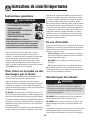
General Instructions
WARNING
CAUTION
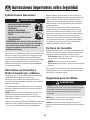
• ALL RANGES CAN TIP AND
CAUSE INJURIES TO PERSONS
CAUTION – Hazards or unsafe practices which
COULD result in minor personal injury.
• INSTALL ANTI-TIP DEVICE
PACKED WITH RANGE
Read and follow all instructions before using this
appliance to prevent the potential risk of fire, electric
shock, personal injury or damage to the appliance as a
result of improper usage of the appliance. Use appliance
only for its intended purpose as described in this guide.
• FOLLOW ALL INSTALLATION
INSTRUCTIONS
WARNING: To reduce risk of
tipping of the appliance from
abnormal usage or by excessive loading of the
oven door, the appliance must be secured by a
properly installed anti-tip device.
To ensure proper and safe operation: Appliance
must be properly installed and grounded by a qualified
1
Important Safety Instructions
To check if device is properly installed, look underneath
range with a flashlight to make sure one of the rear
leveling legs is properly engaged in the bracket slot. The
anti-tip device secures the rear leveling leg to the floor
when properly engaged. You should check this anytime
the range has been moved.
Do not use water on grease fires. Use baking soda, a
dry chemical or foam-type extinguisher to smother fire
or flame.
Child Safety
CAUTION
To Prevent Fire or Smoke
Damage
NEVER store items of interest to children in cabinets
above an appliance or on backguard of a range.
Children climbing on the appliance door to reach
items could be seriously injured.
Be sure all packing materials are removed from the
appliance before operating it.
Keep area around appliance clear and free from combustible materials, gasoline, and other flammable vapors
and materials.
NEVER leave children alone or unsupervised near the
appliance when it is in use or is still hot.
NEVER allow children to sit or stand on any part of the
appliance as they could be injured or burned.
If appliance is installed near a window, proper precautions should be taken to prevent curtains from blowing
over burners.
NEVER leave any items on the cooktop. The hot air from
the vent may ignite flammable items and may increase
pressure in closed containers which may cause them to
burst.
Children must be taught that the appliance and utensils
in it can be hot. Let hot utensils cool in a safe place, out
of reach of small children. Children should be taught
that an appliance is not a toy. Children should not be
allowed to play with controls or other parts of the
appliance.
Many aerosol-type spray cans are EXPLOSIVE when
exposed to heat and may be highly flammable. Avoid
their use or storage near an appliance.
About Your Appliance
Many plastics are vulnerable to heat. Keep plastics away
from parts of the appliance that may become warm or
hot. Do not leave plastic items on the cooktop as they
may melt or soften if left too close to the vent or a
lighted surface burner.
WARNING
NEVER use appliance door as a step stool or seat as this
may result in possible tipping of the appliance and serious
injuries.
To eliminate the hazard of reaching over hot surface
burners, cabinet storage should not be provided directly
above a unit. If storage is provided, it should be limited
to items which are used infrequently and which are
safely stored in an area subjected to heat from an
appliance. Temperatures may be unsafe for some items,
such as volatile liquids, cleaners or aerosol sprays.
NEVER use this appliance as a space heater to heat or
warm a room. Doing so may result in carbon monoxide poisoning and overheating of the oven.
NEVER cover any slots, holes or passages in the oven
bottom or cover the entire rack with materials such as
aluminum foil. Doing so blocks air flow through the
oven and may cause carbon monoxide poisoning.
Aluminum foil may also trap heat causing a fire
hazard.
In Case of Fire
NEVER obstruct the flow of combustion and ventilation
air by blocking the oven vent or air intakes. Doing so
restricts air to the burners and may result in carbon
monoxide poisoning.
Turn off appliance and ventilating hood to avoid spreading the flame. Extinguish flame then turn on hood to
remove smoke and odor.
• Cooktop: Smother fire or flame in a pan with a lid or
cookie sheet.
The oven vent is located at the base of the backguard.
NEVER pick up or move a flaming pan.
Avoid touching oven vent area while oven is on and for
several minutes after oven is turned off. Some parts of
• Oven: Smother fire or flame by closing the oven door.
2
Important Safety Instructions
the vent and surrounding area become hot enough to
cause burns. After oven is turned off, do not touch the
oven vent or surrounding areas until they have had
sufficient time to cool.
Do not let cooking grease or other flammable materials
accumulate in or near the appliance, hood or vent fan.
Clean hood frequently to prevent grease from
accumulating on hood or filter. When flaming foods
under the hood turn the fan on.
Other potentially hot surfaces include cooktop, areas
facing the cooktop, oven vent, surface near the vent
opening, oven door, area around the oven door and
oven window.
NEVER wear garments made of flammable material or
loose fitting or long-sleeved apparel while cooking.
Clothing may ignite or catch utensil handles.
Do not touch a hot oven light bulb with a damp cloth as
the bulb could break. Should the bulb break, disconnect
power to the appliance before removing bulb to avoid
electrical shock.
Always place oven racks in the desired positions while
oven is cool. Slide oven rack out to add or remove food,
using dry, sturdy potholders. Always avoid reaching into
the oven to add or remove food. If a rack must be moved
while hot, use a dry potholder. Always turn the oven off at
the end of cooking.
Do not use the cooktop or oven as a storage area for food
or cooking utensils.
Use care when opening the oven door. Let hot air or steam
escape before moving or replacing food.
Cooking Safety
PREPARED FOOD WARNING: Follow food
manufacturer’s instructions. If a plastic frozen food
container and/or its cover distorts, warps, or is otherwise
damaged during cooking, immediately discard the food
and its container. The food could be contaminated.
Always place a pan on a surface burner before turning it
on. Be sure you know which knob controls which
surface burner. Make sure the correct burner is turned
on and that the burner has ignited. When cooking is
completed, turn burner off before removing pan to
prevent exposure to burner flame.
NEVER use aluminum foil to cover oven racks or oven
bottom. This could result in risk of electric shock, fire, or
damage to the appliance. Use foil only as directed in this
guide.
Always adjust surface burner flame so that it does not
extend beyond the bottom edge of the pan. Anexcessive
flame is hazardous, wastes energy and may damage the
appliance, pan or cabinets above the appliance.
Utensil Safety
NEVER leave a surface cooking operation unattended
especially when using a high heat setting or when deep
fat frying. Boilovers cause smoking and greasy spillovers
may ignite. Clean up greasy spills as soon as possible.
Do not use high heat for extended cooking operations.
Use pans with flat bottoms and handles that are easily
grasped and stay cool. Avoid using unstable, warped, easily
tipped or loose-handled pans. Also avoid using pans,
especially small pans, with heavy handles as they could be
unstable and easily tip. Pans that are heavy to move when
filled with food may also be hazardous.
NEVER heat an unopened container on the surface
burner or in the oven. Pressure build-up may cause
container to burst resulting in serious personal injury or
damage to the appliance.
Be sure utensil is large enough to properly contain food
and avoid boilovers. Pan size is particularly important in
deep fat frying. Be sure pan will accommodate the volume
of food that is to be added as well as the bubble action
of fat.
Use dry, sturdy potholders. Damp potholders may cause
burns from steam. Dish towels or other substitutes
should never be used as potholders because they can
trail across hot surface burners and ignite or get caught
on appliance parts.
To minimize burns, ignition of flammable materials and
spillage due to unintentional contact with the utensil, do
not extend handles over adjacent surface burners. Always
turn pan handles toward the side or back of the appliance,
not out into the room where they are easily hit or reached
by small children.
Always let quantities of hot fat used for deep fat frying
cool before attempting to move or handle.
3
Important Safety Instructions
Never let a pan boil dry as this could damage the utensil
and the appliance.
It is normal for the cooktop of the range to become hot
during a self-clean cycle. Therefore, touching the
cooktop during a clean cycle should be avoided.
Follow the manufacturer’s directions when using oven
cooking bags.
Important Safety Notice
and Warning
Only certain types of glass, glass/ceramic, ceramic or
glazed utensils are suitable for cooktop or oven usage
without breaking due to the sudden change in temperature. Follow manufacturer’s instructions when using
glass.
The California Safe Drinking Water and Toxic
Enforcement Act of 1986 (Proposition 65) requires the
Governor of California to publish a list of substances
known to the State of California to cause cancer or
reproductive harm, and requires businesses to warn
customers of potential exposures to such substances.
This appliance has been tested for safe performance
using conventional cookware. Do not use any devices or
accessories that are not specifically recommended in
this guide. Do not use element covers for the surface
units, stovetop grills, or add-on oven convection
systems. The use of devices or accessories that are not
expressly recommended in this manual can create
serious safety hazards, result in performance problems,
and reduce the life of the components of the appliance.
Users of this appliance are hereby warned that the
burning of gas can result in low-level exposure to some
of the listed substances, including benzene,
formaldehyde and soot, due primarily to the incomplete
combustion of natural gas or liquid petroleum (LP) fuels.
Properly adjusted burners will minimize incomplete
combustion. Exposure to these substances can also be
minimized by properly venting the burners to the
outdoors.
Cleaning Safety
Turn off all controls and wait for appliance parts to cool
before touching or cleaning them. Do not touch the
burner grates or surrounding areas until they have had
sufficient time to cool.
Users of this appliance are hereby warned that when
the oven is engaged in the self-clean cycle, there may
be some low-level exposure to some of the listed
substances, including carbon monoxide. Exposure to
these substances can be minimized by properly venting
the oven to the outdoors by opening the windows and/
or door in the room where the appliance is located
during the self-clean cycle.
Clean appliance with caution. Use care to avoid steam
burns if a wet sponge or cloth is used to wipe spills on a
hot surface. Some cleaners can produce noxious fumes
if applied to a hot surface.
IMPORTANT NOTICE REGARDING PET BIRDS:
Never keep pet birds in the kitchen or in rooms where
the fumes from the kitchen could reach. Birds have a
very sensitive respiratory system. Fumes released during
an oven self-cleaning cycle may be harmful or fatal to
birds. Fumes released due to overheated cooking oil, fat,
margarine and overheated non-stick cookware may be
equally harmful.
Self-Clean Oven
CAUTION
Before self-cleaning the oven, remove the oven racks,
broiler pan, food and any other utensils. Wipe
spillovers to prevent excessive smoke and flare-ups.
Clean only parts listed in this guide. Do not clean door
gasket. The door gasket is essential for a good seal.
Care should be taken not to rub, damage, or move the
gasket. Do not use oven cleaners of any kind in or
around any part of the self-clean oven.
Save These Instructions for Future Reference
4
Surface Cooking
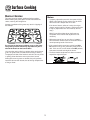
HI: Use to bring liquid to a boil, or reach
pressure in a pressure cooker. Always
reduce setting to a lower heat when liquids
begin to boil or foods begin to cook.
LO: Use to simmer foods, keep foods
warm and melt chocolate or butter. Some
cooking may take place on the LO setting
if the pan is covered. It is possible to
reduce the heat by rotating the knob
toward OFF. Be sure flame is stable.
An intermediate flame size is used to
continue cooking. Food will not cook any
faster when a higher flame setting is used
than needed to maintain a gentle boil.
Water boils at the same temperature
whether boiling gently or vigorously.
Surface Controls
Surface Control Knobs
Use to turn on the surface burners. An infinite choice of heat
settings is available from LO to HI. At the HI setting a detent
or notch may be felt. The knobs can be set on or between any
of the settings.
CAUTION
• If flame should go out during a cooking operation, turn
the burner off. If a strong gas odor is detected, open a
window and wait five minutes before relighting the
burner.
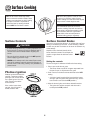
Graphics next to the knob identify which
burner the knob controls. For example, the
graphic at right shows the left front burner
location.
• Be sure all surface controls are set in the OFF position
before supplying gas to the range.
• NEVER touch cooktop until it has cooled. Expect some
parts of the cooktop, especially around the burners, to
become warm or hot during cooking. Use potholders to
protect hands.
Setting the controls:
The size and type of cookware will affect the heat setting.
1. Place a pan on the burner grate.
• The burner flame may lift off or appear separated from
the port if a pan is not placed on the grate.
Pilotless Ignition
2. Push in and turn the knob counterclockwise to the LITE
setting.
Pilotless ignition eliminates the
need for a constant standing
pilot light. Each surface burner
has a spark ignitor. Use care
when cleaning around the
surface burner.
• A clicking (spark) sound will be heard and the burner
will light. (All five ignitors will spark when any surface
burner knob is turned to the LITE position.)
3. After the burner lights, turn knob to desired flame size.
• The ignitor will continue to spark until the knob is
If the surface burner does
not light, check if ignitor is
broken, soiled or wet.
turned past the LITE position.
5
Surface Cooking
Sealed Gas Burners
Operating During a
Power Failure
The sealed burners of your range are secured to the cooktop
and are not designed to be removed. Since the burners are
sealed into the cooktop, boilovers or spills will not seep
underneath the cooktop.
CAUTION
However, the burner should be cleaned after each use. The
head portion of the burner is easily removed for cleaning.
(See page 20 for cleaning directions.)
When lighting the surface burners, be sure all of the
controls are in the OFF position. Strike the match first and
hold it in position before turning the knob to LITE.
The burner heads must be correctly placed on the burner
base for proper operation of the burner.
1. Hold a lighted match to the desired surface burner.
2. Push in and turn the control knob slowly to LITE.
Power Boost Burner*
3. Adjust the flame to the desired level.
There is one high speed burner on your
range, located in the right front
position. This burner offers higher
speed cooking that can be used to
quickly bring water to a boil and for
large-quantity cooking.
Cooktop
To prevent the cooktop from discoloring or
staining:
• Clean cooktop after each use.
• Wipe acidic or sugary spills as soon as the cooktop has
Simmer Burner
cooled as these spills may discolor the
porcelain.
This burner is located in the center
position. The simmer burner offers a
lower BTU* flame for delicate sauces or
melting chocolate.
Unlike a range with standard gas burners,
this cooktop does not lift-up nor is it
removable. Do not attempt to lift the
cooktop for any reason.
* BTU ratings will vary when using LP gas.
6
Surface Cooking
Burner Grates
Notes:
The grates must be properly positioned before cooking.
When installing the grates, place the tab ends toward the
center, matching the straight bars.
• A properly adjusted burner with clean ports will light
within a few seconds. If using natural gas, the flame
will be blue with a deeper blue inner cone.
Improper installation of the grates may result in chipping of
the cooktop.
If the burner flame is yellow or is noisy, the air/gas
mixture may be incorrect. Contact a service technician
to adjust. (Adjustments are not covered by the warranty.)
With LP gas, slight yellow tips on the flames are
acceptable. This is normal and adjustment is not
necessary.
• With some types of gas, you may hear a “popping”
sound when the surface burner is turned off. This is a
normal operating sound of the burner.
• If the control knob is turned very quickly from HI to
Do not operate the burners without a pan on the grate.
The grate’s porcelain finish may chip without a pan to
absorb the heat from the burner flame.
LO, the flame may go out, particularly if the burner is
cold. If this occurs, turn the knob to the OFF position,
wait several seconds and relight the burner.
Use care when stirring food in a pot/pan sitting on the burner
grate. The grates have a smooth finish for ease of cleaning.
The pot/pan will slide if the handle is not held. This may result
in spilling of hot food items and may be a burn hazard.
• The flame should be adjusted so it does not extend
beyond the edge of the pan.
Although the burner grates are durable, they will gradually
lose their shine and/or discolor, due to the high temperatures
of the gas flame.
7
Oven Cooking
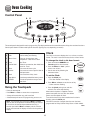
Control Panel
A
B
E
F
G
H
C
D
I
J
The control panel is designed for ease in programming. The display window on the control shows time of day, timer and oven functions.
Control panel shown includes model specific features. (Styling may vary depending on model.)
Clock
A
B
Broil
Bake
Use for broiling and top browning.
Use for baking and roasting.
C
More+/Less-
Enters or changes time, oven
temperature. Sets HI or LO broil.
D
Timer
Sets Timer.
E
Cook & Hold
F
Clean
Bakes for a preset time, then holds food
warm for 1 hour.
Use to set self-clean cycle.
G
Favorite
Use to set and save a specific Cook &
Hold procedure.
3. Set the time of day following the
directions below.
H
Clock
Use to set time-of-day clock.
To set the Clock:
I
Keep Warm
Use to keep cooked food warm in oven.
1. Press the Clock pad.
J
CANCEL
Cancels all operations except Timer
and Clock.
The clock can be set to display time in a 12-hour or 24-hour
format. The clock is set at the factory for the 12-hour format.
To change the clock to 24-hour format:
1. Press and hold the CANCEL and
Favorite pads for three seconds.
2. Press the More+ or Less - pad to
select 12 or 24 hour.
• The colon flashes in the display.
2. Press More+ or Less- to set the time of day.
• Colon continues flashing.
Using the Touchpads
3. Press the Clock pad again or wait four
seconds. The colon stops flashing.
• Press the desired pad.
When electrical power is supplied or after a
power interruption, the last clock time before
power was interrupted will flash.
• Press More+ or Less- to enter time or temperature.
• A beep will sound when any pad is touched.
To recall the time of day when another time function is
showing, press the Clock pad.
• A double beep will sound if a programming error occurs.
Note: Four seconds after pressing the More+ or Lesspad, the time or temperature will automatically be entered.
If more than 30 seconds elapse between touching a
function pad and the More+ or Less- pad, the function
will be canceled and the display will return to the previous
display.
Clock time cannot be changed when the oven has been
programmed for Delay Cook or Delay Clean or Cook & Hold.
cont.
8
Oven Cooking
Locking the Control
and Oven Door
To cancel the Clock display:
If you do not want the time of day to display:
Press and hold the CANCEL and Clock
pads for three seconds. The time of day
will disappear from the display
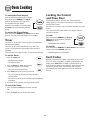
The touchpad controls and oven door can be locked for
safety, cleaning, or to prevent unwanted use. They will not
function when locked.
When the clock display is canceled, press
the Clock pad to briefly display the time
of day.
If the oven is currently in use, the controls and door cannot be
locked.
To restore the Clock display:
The current time of day will remain in the display when the
controls are locked.
Press and hold the CANCEL and Clock pads for three
seconds. The time of day will reappear in the display.
To lock:
Press and hold the CANCEL and Cook &
Hold pads for three seconds. (Press the
CANCEL pad first.)
Timer
The timer can be set from one minute (0:01) up to 99 hours
and 59 minutes (99:59).
•
LOCK flashes in the display.
To unlock:
The timer can be used independently of any other oven
activity. It can also be set while another oven function is
operating.
Press and hold the CANCEL and Cook & Hold pads for three
seconds. (Press the CANCEL pad first.)
•
The timer does not control the oven. It only controls a beeper.
To set the Timer:
LOCK disappears from the display.
Fault Codes
1. Press the Timer pad.
BAKE or LOCK may flash rapidly in the display to alert you if
there is an error or a problem. If BAKE or LOCK flash in the
display, press Cancel pad. If BAKE or LOCK continue to
flash, disconnect power to the appliance. Wait a few minutes,
and then reconnect power. If the flashing still continues,
disconnect power to the appliance and call an authorized
servicer.
• 0:00 lights in the display.
• The colon will flash.
2. Press the More+ or Less- pad until the
correct time appears in the display.
• The colon will continue to flash.
3. Press Timer pad again or wait four seconds.
• The colon continues flashing and the time begins
counting down.
• The last minute of the timer countdown will be displayed
as seconds.
4. At the end of the set time, one long beep will sound.
To cancel the Timer:
1. Press and hold the Timer pad for three seconds.
OR
2. Press the Timer pad and set the time to 0:00.
9
Oven Cooking
Baking
Baking Differences Between Your Old
and New Oven
To set bake:
It is normal to notice some baking time differences between a
new oven and an old one. See “Adjusting the Oven Temperature”
on page 15.
1. Press the Bake pad.
• BAKE will flash.
• 000 will light in the display.
2. Select the oven temperature. The oven
temperature can be set from 170° to 550°. Press
or press and hold the More+ or Less- pad.
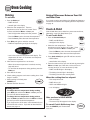
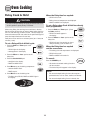
Cook & Hold
• 350° will light when either pad is first pressed.
Cook & Hold allows you to bake for a preset amount of time,
followed by a one-hour Keep Warm cycle.
• Press the More+ pad to increase the temperature.
To set Cook & Hold:
1. Press the Cook & Hold pad.
• Press the Less- pad to decrease the temperature.
• BAKE and HOLD flash.
3. Press Bake pad again or wait four seconds.
• 000 lights in the display.
• BAKE will stop flashing and light in the display.
2. Select the oven temperature. The oven
temperature can be set from 170° to 550°. Press
or press and hold the More+ or Less- pad.
• Press the More+ pad to increase the temperature.
• Press the Less- pad to decrease the temperature.
• 100° or the actual oven temperature will display. The
temperature will rise in 5° increments until the preset
temperature is reached.
3. Press Cook & Hold pad again OR wait four seconds.
• HOLD flashes.
• 00:00 flashes in the display
4. Allow the oven to preheat for 8-15 minutes.
4. Enter the amount of time you want to bake by pressing the
More+ or Less- pad. Bake time can be set from 10
minutes (00:10) to 11 hours, 59 minutes (11:59).
• When the set oven temperature is reached, one long
beep will sound.
• To recall the set temperature during preheat, press the
Bake pad.
• BAKE and HOLD light in the display.
5. Place food in the oven.
• The baking time will light in the display.
6. Check cooking progress at minumum cooking time. Cook
longer if needed.
• The baking time will start counting down.
When the cooking time has elapsed:
7. When cooking is finished, press
CANCEL pad.
• Four beeps will sound.
8. Remove food from the oven.
• HOLD and WARM will light.
• BAKE will turn off.
• 170° will display.
Baking Notes:
• To change the oven temperature during cooking,
press Bake pad and then the More+ or Less- pad until
you reach the desired temperature.
• To change the oven temperature during preheat,
press the Bake pad twice and then the More+ or Lesspad until you reach the desired temperature.
After one hour in HOLD WARM:
• END will display.
• The time of day will reappear in the display.
• If you forget to turn off the oven, it will automatically turn
off at the end of 12 hours. If you wish to deactivate this
feature, see page 14.
To cancel Cook & Hold at any time:
Press the CANCEL pad. Remove food
from oven.
10
Oven Cooking
When the Delay time has expired:
Delay Cook & Hold
• DELAY will turn off.
CAUTION
• Baking time and temperature are displayed.
• BAKE and HOLD are displayed.
Do not use delayed baking for highly perishable foods such
as dairy products, pork, poultry, or seafood.
To set a Delay when Cook & Hold has already
been programmed:
When using Delay, the oven begins to cook later in the day.
Set the amount of time that you want to delay before the oven
turns on and how long you want to cook. The oven begins to
heat at the selected time and cooks for the specified length of
time, then keeps food warm for one hour.
1. Press the Bake and Timer pads. (Press
the Bake pad first).
Delay time can be set from 10 minutes (00:10) to 11 hours, 59
minutes (11:59).
2. Press the More+ or Less- pad to set the
delay time.
• DELAY and 00:00 appear in
the display.
• DELAY will stay lit to remind you that a
delayed cooking cycle has been set.
To set a Delayed Cook & Hold cycle:
1. Press the Bake and Timer pads at the
same time.
When the Delay time has expired
and the oven starts:
• DELAY lights in the display.
• The baking time and temperature are displayed.
• 00:00 appears in the display.
• DELAY will turn off.
2. Press the More+ or Less- pad to set the
delay time.
• BAKE and HOLD will remain lit.
To cancel:
3. Press the Cook & Hold pad.
Press the CANCEL pad.
• 000 lights in the display.
• All timed and untimed cooking functions
will be canceled.
• BAKE and HOLD flash.
4. Press More+ to set the baking temperature.
• The time of day will reappear in the display.
• 00:00 and HOLD flash.
• BAKE stays lit.
Notes:
5. Press More+ to set the baking time.
• The Delay time, DELAY, BAKE and HOLD light in
the display.
11
•
Do not use delayed baking for items that require a
preheated oven, such as cakes, cookies, and breads.
•
Do not use delayed baking if oven is already hot.
Oven Cooking
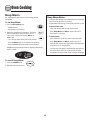
Keep Warm
Keep Warm Notes:
For safely keeping foods warm or for warming breads
and plates.
• For optimal food quality, oven cooked foods should be kept
warm for no longer than 1 to 2 hours.
To set Keep Warm:
• To keep foods from drying, cover loosely with foil or a lid.
1. Press the Keep Warm pad.
• To warm dinner rolls:
• WARM flashes.
- cover rolls loosely with foil and place in oven.
• 000 appears in the display.
- press Keep Warm and More+ pads to set 170° F.
2. Select the Keep Warm temperature. The Keep
Warm temperature can be set from 145° to
190°. Press or press and hold the More+ or
Less- pad.
- warm for 12-15 minutes.
• To warm plates:
- place 2 stacks of up to four plates each in the oven.
• 170° will light when either pad is first pressed.
- press Keep Warm and More+ pads to set 170° F.
• Press the More+ pad to increase the temperature.
• Press the Less- pad to decrease the temperature.
- warm for five minutes, turn off the oven and leave plates
in the oven for 15 minutes more.
WARM and the temperature will be displayed while Keep
Warm is active.
- use only oven-safe plates, check with the manufacturer.
- do not set warm dishes on a cold surface as rapid
temperature changes could cause crazing or breakage.
To cancel Keep Warm:
1. Press the CANCEL pad.
2. Remove food from the oven.
12
Oven Cooking
Broiling
4. For optimum browning, preheat for 2-3 minutes before
adding food.
CAUTION
5. Place food in the oven. Close oven door.
6. Turn meat once about halfway through
cooking.
Use CAUTION when cooking with the Broil feature. The
grease from fatty foods may ignite. If a fire should occur, close
the oven door and turn the oven OFF. If the fire does not
extinquish, DO NOT put water on the fire. Use baking soda,
dry chemical or fire extinguisher to smother the fire.
7. When food is cooked, press the CANCEL
pad. Remove food and broiler pan from the
oven.
• The time of day will reappear in the display.
To set Broil:
1. To begin, press the Broil pad.
• BROIL flashes.
Broil Notes:
• SEt is displayed.
• For best results when broiling, use a pan designed for
broiling.
2. Press the More+ pad to set HI broil or press the Lesspad to set LO broil.
• HI is used for most broiling. Use LO broil when broiling
longer cooking foods. The lower temperature allows
food to cook to the well done stage without excessive
browning.
• HI or LO will be displayed.
• Select HI broil (550° F) for normal broiling. Select
LO broil (450° F) for low-temperature broiling of longer
cooking foods such as poultry.
• To change oven temperature during broiling, press
the Broil pad and then the More+ or Less- pad to
switch between LO and HI broil.
3. After four seconds, the oven will start.
• Broil times may be longer when the lower broiling
temperature is selected.
• BROIL will remain lit.
• Most foods should be turned halfway through broiling
time.
Broiling Chart
Preheat oven for 2-3 minutes.
FOOD
Beef
Steaks, 1” thick
Hamburger Patties, 3/4” thick
RACK
POSITION
DONENESS
TOTAL
COOK TIME
5
5
5 or 6
Medium
Well Done
Well Done
15-20 min.
18-24 min.
13-18 min.
Pork
Bacon
Ham, precooked 1/2” slice
Chops, 1” thick
5
5
5
Well Done
Warm
Well Done
6-10 min.
8-12 min.
22-26 min.
Poultry
Chicken Breasts, bone-in
4
Well Done
30-45 min. (Lo Broil)
Seafood Fish filets
Fish steaks, 1” thick
Lobster tails, 3-4 oz. each
5
5
5
Flaky
Flaky
Done
8-12 min.
10-15 min.
7-10 min.
For a browned/seared exterior and rare interior, it may be necessary to decrease cook time on side one and decrease the distance
between the meat and heat source.
Note: This chart is a suggested guide. The times may vary with the food being cooked.
13
Oven Cooking
Automatic Shut-Off/
Sabbath Mode
Sabbath Mode Notes:
• Sabbath Mode can be turned on at any time with or
without the oven on.
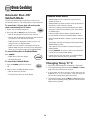
The oven will automatically turn off after 12 hours if you
accidentally leave it on. This safety feature can be turned off.
• Sabbath Mode cannot be turned on if the touchpads are
locked out or when the door is locked.
To cancel the 12-hour shut-off and run the
oven continuously for 72 hours:
• If the oven is baking when Sabbath Mode is set, BAKE
will go out at the end of the baking cycle. There will be
no audible beeps.
1. Set the oven to bake (see page 10).
2. Press and hold the Clock pad for five seconds.
• If the oven light is desired while in Sabbath Mode, it
must be turned on before the Sabbath Mode is started.
• SAb will be displayed and flash for five seconds.
• SAb will then be displayed continuously until turned off
or until the 72-hour time limit is reached.
• When the Sabbath Mode is started, no preheat beep will
sound.
• BAKE will also be displayed if a bake cycle is in use
while the oven is in Sabbath Mode.
• All prompts, messages and beeps are deactivated when
Sabbath Mode is active.
• BAKE is the only function that operates during the
Sabbath Mode. All other functions (Timer, Keep Warm,
Clean, etc.) are locked out during the Sabbath Mode.
• The automatic door lock does not operate during the
Sabbath Mode.
• Pressing CANCEL will cancel a bake cycle, however the
control will stay in the Sabbath Mode.
To cancel Bake when in Sabbath Mode:
Press CANCEL.
• If power fails, the oven will power up in Sabbath Mode
with 72 hours remaining and no cycle active.
• BAKE will turn off in the display.
• No beeps will sound.
To cancel the Sabbath Mode:
Changing Temp °F/°C
1. Press the CLOCK pad for five seconds.
1. The factory default setting for temperature is Fahrenheit.
OR
2. To change the setting, press and hold the CANCEL and Bake
pads at the same time for three seconds.
2. After 72 hours, the Sabbath Mode will end.
• SAb will flash for 5 seconds.
3. A single beep will sound and the current setting will be
displayed (°F or °C). (If no change is made, the range will
return to the existing setting after 30 seconds.)
• The time of day will return to the display.
4. To change the setting, press the More+ or Less- pad. Press
again to return to existing setting. Wait five seconds and the
setting will be complete.
14
Oven Cooking
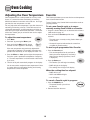
Adjusting the Oven Temperature
Favorite
Oven temperatures are carefully tested for accuracy at the
factory. It is normal to notice some baking or browning
differences between a new oven and an old one. As ranges
get older, the oven temperature can shift.
The Favorite pad allows you to save the time and temperature
from a Cook & Hold function.
You may adjust the oven temperature if you think the oven is
not baking or browning correctly. To decide how much to
change the temperature, set the temperature 25° higher or
lower than your recipe recommends, then bake. The results
of the “test” should give you an idea of how much to adjust
the temperature.
To set a new Favorite cycle or to save a
currently running Cook & Hold as a Favorite:
To set a Favorite cycle, Cook & Hold must be either active or
just programmed.
1. Program a Cook & Hold cycle as described in the Cook &
Hold section on page 10.
2. Press and hold the Favorite pad for three
seconds.
To adjust the oven temperature:
1. Press Bake.
• The newly set or currently running Cook & Hold cycle
will be saved.
2. Enter 550° by pressing the More+ pad.
• A beep will sound to indicate that the control has
accepted the Favorite setting.
3. Press and hold the Bake pad for several
seconds or until 0° appears in the display.
To start a cycle programmed into Favorite:
If the oven temperature was previously adjusted, the
change will be displayed. For example, if the oven temperature was reduced by 15° the display will show “-15°”.
1. Press the Favorite pad.
• Time and temperature for the set Cook &
Hold cycle will be displayed. (If no Cook &
Hold cycle has been programmed, “nonE”
is displayed.)
4. Press the More+ or Less- pad to adjust the temperature.
Each time a pad is pressed, the temperature changes by
5°. The oven temperature can be increased or decreased
by 5° to 35°.
2. Press the Bake pad.
• The Favorite cycle will begin immediately.
5. The time of day will automatically reappear in the display.
• BAKE will light in the display
You do not need to readjust the oven temperature if there
is a power failure or interruption. Broiling and cleaning
temperatures cannot be adjusted.
• The cooking time will light in the display
When the cooking time has elapsed:
• BAKE will turn off.
• HOLD and WARM will light.
• 170° will display.
To cancel a Favorite cycle in progress:
1. Press the CANCEL pad.
• The stored Favorite cycle will not
be affected.
2. Remove food from the oven.
15
Oven Cooking
Pilotless Ignition
Oven Racks
Your range is equipped with pilotless ignition. With this type of
ignition system, the gas automatically shuts off and the oven
will not operate during a power failure.
CAUTION
A lighted match will not light the oven burner. No attempt
should be made to operate the oven during a power
failure.
• Do not attempt to change the rack position when the oven
is hot.
• Do not use the oven for storing food or cookware.
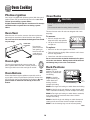
Oven Vent
The oven has two racks. All racks are designed with a lockstop edge.
When the oven is in use the area near the vent may become
hot enough to cause burns. Never block the vent opening.
To remove:
The oven vent is located below the backguard vent shield
on your range.
OVEN VENT
LOCATION
Do not place
plastics near the
vent opening as
heat from the vent
could distort or
melt the plastic.
1. Pull rack straight out until it
stops at the lock-stop position.
2. Lift up on the front of the rack
and pull out.
To replace:
1. Place rack on the rack supports in the oven.
2. Tilt the front end up slightly. Slide rack back until it clears
the lock-stop position.
3. Lower front and slide back into the oven.
Oven Light
Do not cover an entire rack with aluminum foil or place
foil on the oven bottom. Baking results will be affected
and damage may occur to the oven bottom.
The oven light automatically comes on when the
door is opened. When the door is closed, press the
Oven Light switch to turn the oven light on and off.
Rack Positions
RACK 7 (highest
position): For single rack
baking on cookie sheets
and broiling.
Oven Bottom
Protect oven bottom against spillovers, especially acidic or
sugary spills, as they may discolor the porcelain enamel. Use
the correct pan size to avoid spillovers and boilovers. Do not
place utensils or aluminum foil directly on the oven
bottom.
RACK 6: Used for
single rack baking on
cookie sheets and
broiling. Used for
multiple rack baking.
Two Rack Baking
7
6
5
4
3
2
1
Oven
Bottom
RACK 5: For single rack baking on cookie sheets and broiling.
RACK 4: Used for single rack baking on cookie sheets, sheet
cakes, casseroles and broiling. Used for multiple rack baking.
RACK 3: For single rack baking on cookie sheets, casseroles,
layer cakes, loaves of bread and sheet cakes. Used for
multiple rack baking.
RACK 2: Used for single rack baking on cookie sheets and
roasting small cuts of meat. Used for multiple rack baking.
RACK 1: Use for roasting large cuts of meat and poultry.
cont.
16
Oven Cooking
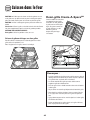
Create-A-SpaceTM Half Rack
Oven Bottom: Place oven rack on
raised sides of oven bottom. Use
for additional space when cooking
large oven meals.
Select range models are
equipped with a convertible
half rack. The left side of
the rack can be removed
to accommodate a large
roaster on the lower
rack. The right side of
the rack is still
available to hold a
casserole dish.
MULTIPLE RACK COOKING:
Two rack: Use rack positions 3
and 6, or 2 and 4.
Baking Layer Cakes on Two Racks
For best results when baking cakes on two racks, use racks
2 and 4.
Place the cakes on the rack as shown.
Notes:
• The removable section of the rack can be used as a
roasting rack in a broiling pan. Do not use the top insert
when using the rack in a broiling pan.
• The removable section of the rack can be used as a
cooling rack or trivet.
• Make sure oven is cool before removing or reinstalling
the half rack.
• Do not use cookware that extends beyond edge of rack.
• For best results, allow two inches between the pan
placed on the rack and the oven side wall.
• Use caution when removing items from the half rack to
avoid burns.
• Carefully remove items from the lower rack to avoid
disturbing the half rack.
17
Care & Cleaning
Self-Clean Oven
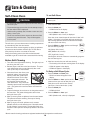
To set Self-Clean:
Note: Oven temperature must be below 400° F to program
a clean cycle.
CAUTION
• It is normal for parts of the range to become hot during a
self-clean cycle.
1. Close the oven door.
• To prevent damage to oven door, do not attempt to open
the door when LOCK is displayed.
2. Press the Clean pad.
• Avoid touching cooktop, door, window or oven vent area
during a clean cycle.
3. Press the More+ or Less- pad.
• CLEAN flashes in the display.
• MEd (Medium soil, 3 hours) is displayed.
• Do not use commercial oven cleaners on the oven finish
or around any part of the oven. They will damage the
finish or parts.
If the door is not closed, beeps will sound and “door” will
display. If the door is not closed within 45 seconds, the
self-cleaning operation will be canceled and the display
will return to the time of day.
The self-clean cycle uses above-normal cooking temperatures
to automatically clean the oven interior.
4. Press the More+ or Less- pad to scroll through
the self-cleaning settings.
The oven should be cleaned regularly by wiping up spillovers
to prevent excessive smoke and flare-ups. Do not allow a
heavy build-up of soil to accumulate in the oven.
HVy (Heavy Soil, 4 hours)
MEd (Medium soil, 3 hours)
During the cleaning process, the kitchen should be well
ventilated to get rid of normal odors associated with cleaning.
LITE ( Light Soil, 2 hours)
Choosing the soil level of the oven automatically programs
the self-cleaning time.
Before Self-Cleaning
5. After four seconds, the oven will start cleaning.
1. Turn off the oven light before cleaning. The light may burn
out during the clean cycle.
• The cleaning time will start counting down in the display.
• LOCK will appear in the display.
2. Remove all pans and oven racks from the oven. The oven
racks will discolor and may not slide easily after a selfclean cycle if they are not removed.
• CLEAN will appear in the display.
To Delay a Self-Clean Cycle:
3. Clean oven frame, door frame, area
outside of gasket, and around the
opening in the door gasket with a
nonabrasive cleaner such as Bon
Ami* or detergent and water. The
self-cleaning process does not
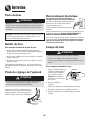
clean these areas. They should be
cleaned to prevent soil from baking on during the clean
cycle. (The gasket is the seal around the oven door and
window.)
1. Press the Clean and Timer pads.
• DELAY and 00:00 will appear in the
display.
2. Press the More+ or Less- pad to set the
amount of time you want to delay the cycle.
Delay time can be set from ten minutes
(00:10) to 11 hours, 59 minutes (11:59).
3. Press the Clean pad.
• CLEAN will flash.
4. To prevent damage, do not clean or rub the gasket around
the oven door. The gasket is designed to seal in heat
during the clean cycle.
4. Press the More+ or Less- pad.
• MEd (Medium soil, 3 hours) is displayed.
5. Wipe up excess grease or spillovers from the oven bottom.
This prevents excessive smoking, flare-ups or flaming
during the clean cycle.
6. Wipe up sugary and acidic spillovers such as sweet
potatoes, tomato, or milk-based sauces. Porcelain enamel
is acid-resistant, not acid-proof. The porcelain finish may
discolor if acidic spills are not wiped up before a self-clean
cycle.
* Brand names for cleaning products are registered trademarks of the respective manufacturers.
18
cont.
Care & Cleaning
During the Self-Clean Cycle
5. Press the More+ or Less- pad to scroll through the selfcleaning settings.
When LOCK shows in the display, the door cannot be opened.
To prevent damage to the door, do not force the door open
when LOCK is displayed.
HVy (Heavy Soil, 4 hours)
MEd (Medium soil, 3 hours)
Smoke and Smells
LITE ( Light Soil, 2 hours)
You may see some smoke and smell an odor the first few
times the oven is cleaned. This is normal and will lessen in
time.
Choosing the soil level of the oven automatically programs
the self-cleaning time.
Smoke may also occur if the oven is heavily soiled or if a pan
was left in the oven.
6. After four seconds, CLEAN, DELAY and LOCK will appear
in the display to show that the oven is set for a delayed
clean operation. The delay time is displayed.
Sounds
As the oven heats, you may hear sounds of metal parts
expanding and contracting. This is normal and will not
damage the oven.
After Self-Cleaning
If the oven has already been set for a clean
cycle and you wish to set a delay:
About one hour after the end of the self-clean cycle, LOCK
will turn off. The door can then be opened.
1. Press the Clean and Timer pads. (Press
the Clean pad first)
Some soil may leave a light gray, powdery ash. Remove
it with a damp cloth. If soil remains after wiping, that means
the clean cycle was not long enough. The soil will be removed during the next clean cycle.
• DELAY flashes.
• 00:00 will appear in the display.
If oven racks were left in the oven and do not slide
smoothly after a clean cycle, wipe racks and rack supports
with a small amount of vegetable oil to make them easier to
move.
2. Press the More+ or Less- pad to set the amount of time
you want to delay the cycle.
After four seconds, CLEAN, DELAY and LOCK will appear
in the display to show that the oven is set for a delayed
clean operation. The delay time is displayed.
Fine lines may appear in the porcelain because it went
through heating and cooling. This is normal and will not
affect performance.
When the Self-Clean cycle starts:
• DELAY will turn off.
A white discoloration may appear after cleaning if acidic
or sugary foods were not wiped up before the self-clean
cycle. This discoloration is normal and will not affect performance.
• The clean time will appear in the display.
To cancel the Self-Clean cycle:
Press the CANCEL pad.
• All words disappear from the display.
Notes:
• All functions are canceled.
• If the oven door is left open, “door” will flash in the
display and a signal will beep until the door is closed
and the Clean pad is pressed again.
• The time of day appears in the display.
• If more than five seconds elapse between pressing the
Clean pad and the More+ or Less- pads, the program
will automatically return to the previous display.
• The oven door will be damaged if the oven door is
forced to open when LOCK is still displayed.
19
Care & Cleaning
Cleaning Procedures
CAUTION
• Be sure appliance is off and all parts are cool before handling
or cleaning. This is to avoid damage and possible burns.
• To prevent staining or discoloration, clean appliance after each use.
• If a part is removed, be sure it is correctly replaced.
* Brand names are registered trademarks of the
respective manufacturers.
** To order call 1-877-232-6771 USA and
1-800-688-8408 Canada.
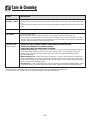
PART
PROCEDURE
Burner Caps and
Sealed Gas
Burners
Removable Burner Caps
• Allow burner to cool. Remove burner cap and wash in soapy water with a plastic scouring pad. For
stubborn soils, clean with a soap-filled, nonabrasive pad or Cooktop Cleaning Creme*
(Part #20000001)** and a sponge.
• Do not clean in the dishwasher or self-cleaning oven.
Sealed Gas Burners
• Clean frequently. Allow burner to cool. Clean with soap and plastic scouring pad. For stubborn soils,
clean with a soap-filled, nonabrasive pad. Do not enlarge or distort holes.
• Be careful not to get water into burner ports.
• Use care when cleaning the ignitor. If the ignitor is wet or damaged the surface burner will not light.
Burner Grates Porcelain on
Cast Iron
• Wash with warm, soapy water and a nonabrasive, plastic, scrubbing pad. For stubborn soils,
clean with a soap-filled, nonabrasive, plastic pad or Cooktop Cleaning Creme* (Part #20000001)**
and a sponge. If soil remains, reapply Cooktop Cleaning Creme, cover with a damp paper towel and soak
for 30 minutes. Scrub again, rinse and dry.
• Do not clean in the dishwasher or self-cleaning oven.
Clock and
Control Pad
Area
• To activate control lock for cleaning, see “Locking the controls” page 9.
• Wipe with a damp cloth and dry. Do not use abrasive cleaning agents as they may scratch the finish.
• Glass cleaners may be used if sprayed on a cloth first. DO NOT spray directly on control pad and
display area.
Control Knobs
• Remove knobs in the OFF position by pulling forward.
• Wash, rinse and dry. Do not use abrasive cleaning agents as they may scratch the finish.
• Turn on each burner to be sure the knobs have been correctly replaced.
Cooktop and
Porcelain enamel is glass fused on metal and may crack or chip with misuse. It is acid resistant, not acid proof.
Control Panel All spillovers, especially acidic or sugary spillovers, should be wiped up immediately with a dry cloth.
Porcelain Enamel • When cool, wash with soapy water, rinse and dry.
• Never wipe off a warm or hot surface with a damp cloth. This may cause cracking or chipping.
• Never use oven cleaners, abrasive or caustic cleaning agents on exterior finish of range.
Side Panels,
Storage Drawer
and Door
Handles Painted Enamel
• When cool, wash with warm soapy water, rinse and dry. Never wipe a warm or hot surface with a damp
cloth as this may damage the surface and may cause a steam burn.
• For stubborn soil, use mildly abrasive cleaning agents such as baking soda paste or Bon Ami*. Do not use
abrasive cleaners such as steel wool pads or oven cleaners. These products will scratch or permanently
damage the surface.
Note: Use a dry towel or cloth to wipe up spills, especially acidic or sugary spills. Surface may
discolor or dull if soil is not immediately removed. This is especially important for white surfaces.
20
cont.
Care & Cleaning
PART
PROCEDURE
Oven Window
and Door - Glass
• Avoid using excessive amounts of water which may seep under or behind glass causing staining.
• Wash with soap and water. Rinse with clear water and dry. Glass cleaner can be used if sprayed on a cloth
first.
• Do not use abrasive materials such as scouring pads, steel wool or powdered cleaners as they will scratch
glass.
Oven Interior
• Follow instructions on pages 18-19 to set a self-clean cycle.
Oven Racks
• Clean with soapy water.
• Remove stubborn soil with cleansing powder or soap-filled scouring pad. Rinse and dry.
• Racks will permanently discolor and may not slide out smoothly if left in the oven during a self-clean
operation. If this occurs, wipe the rack and embossed rack supports with a small amount of vegetable oil
to restore ease of movement, then wipe off excess oil.
Stainless Steel
(select models)
•
•
•
•
DO NOT USE ANY CLEANING PRODUCT CONTAINING CHLORINE BLEACH.
DO NOT USE ABRASIVE OR ORANGE CLEANERS.
ALWAYS WIPE WITH THE GRAIN WHEN CLEANING.
Daily Cleaning/Light Soil –– Wipe with one of the following - soapy water, white vinegar/water solution,
Formula 409 Glass and Surface Cleaner* or a similar glass cleaner - using a sponge or soft cloth.
Rinse and dry. To polish and help prevent fingerprints, follow with Stainless Steel Magic Spray*
(Part No. 20000008)**.
• Moderate/Heavy Soil –– Wipe with one of the following - Bon Ami, Smart Cleanser, or Soft Scrub* using a damp sponge or soft cloth. Rinse and dry. Stubborn soils may be removed with a damp multipurpose Scotch-Brite* pad; rub evenly with the grain. Rinse and dry. To restore luster and remove streaks,
follow with Stainless Steel Magic Spray*.
• Discoloration –– Using a damp sponge or soft cloth, wipe with Cameo Stainless Steel Cleaner*. Rinse
immediately and dry. To remove streaks and restore luster, follow with Stainless Steel Magic Spray*.
* Brand names for cleaning products are registered trademarks of the respective manufacturers.
** To order direct, call To order call 1-877-232-6771 USA and 1-800-688-8408 Canada.
21
Maintenance
Oven Door
Electrical Connection
Appliances which require electrical power
are equipped with a three-prong
grounding plug which must be plugged
directly into a properly grounded threehole 120 volt electrical outlet.
CAUTION
Do not place excessive weight on or stand on an open
oven door. This could cause the range to tip over, break
the door, or injure the user.
Always disconnect power to appliance before servicing.
The three-prong grounding plug offers protection against
shock hazards. DO NOT CUT OR REMOVE THE THIRD
GROUNDING PRONG FROM THE POWER CORD PLUG.
Note: The oven door on a new range may feel “spongy”
when it is closed. This is normal and will decrease with use.
If an ungrounded, two-hole or other type electrical outlet is
encountered, it is the personal responsibility of the
appliance owner to have the outlet replaced with a
properly grounded three-hole electrical outlet.
Oven Window
To protect the oven door window:
Oven Light
1. Do not use abrasive cleaning agents such as steel wool
scouring pads or powdered cleansers as they may scratch
the glass.
CAUTION
2. Do not hit the glass with pots, pans, furniture, toys, or other
objects.
• Disconnect power to range before replacing light bulb.
3. Do not close the oven door until the oven racks are in
place.
• Allow oven to cool before replacing light bulb.
• Make sure bulb cover and bulb are cool before touching.
Scratching, hitting, jarring or stressing the glass may weaken
its structure causing an increased risk of breakage at a later
date.
To replace oven light bulb:
1. When oven is cool, hold bulb cover
in place, then slide wire retainer
off cover. Note: Bulb cover
will fall if not held in place
while removing wire retainer.
Leveling Legs
CAUTION
BULB COVER
2. Remove bulb cover and light
bulb.
Be sure the anti-tip bracket secures one of the rear
leveling legs to the floor. This bracket prevents the range
from accidentally tipping.
3. Replace with a 40-watt appliance bulb.
4. Replace bulb cover and secure with wire retainer.
5. Reconnect power to range. Reset clock.
Be sure the range is leveled when installed. If
the range is not level, turn the leveling legs,
located at each corner of the range, until
range is level.
ANTI-TIP
BRACKET
ANTI-TIP
BRACKET
LEVELING
LEVELING
LEG
WIRE
RETAINER
LEG
22
Maintenance
Removal of Gas Appliance
Storage Drawer
Gas appliance connectors used to connect this appliance to
the gas supply are not designed for continuous movement.
Once installed, DO NOT repeatedly move this gas appliance
for cleaning or to relocate. If this appliance has to be moved
and/or removed for servicing, follow the procedure described
in the installation instructions. For information, contact
Maytag Customer Assistance at 1-800-688-9900 USA or
1-800-688-2002 Canada.
CAUTION
Do not store plastic, paper products, food or flammable
materials in this drawer. The drawer may become too warm
for these items when the oven is in use.
The storage drawer can be removed to allow you to clean
under the range.
To prevent range from accidentally tipping, range must be
secured to the floor by sliding rear leveling leg into the antitip bracket.
To remove:
1. Empty drawer and pull out to the first stop position.
2. Lift up the front of the drawer.
3. Pull out to the second stop position.
4. Grasp sides and lift drawer up and out.
To replace:
1. Fit the ends of the drawer glides into the rails in the range.
2. Lift up the front of the drawer and gently push in to the
first stop position.
3. Lift drawer up again and push until drawer is closed.
23
Troubleshooting
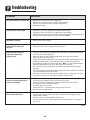
PROBLEM
SOLUTION
For most concerns, try these first.
•
•
•
•
Check if oven controls have been properly set.
Check to be sure plug is securely inserted into receptacle.
Check or re-set circuit breaker. Check or replace fuse.
Check power supply.
Surface burner fails to light.
• Check to be sure unit is properly connected to power supply.
• Check for a blown circuit fuse or a tripped main circuit breaker.
• Check to be sure ignitor is dry and clicking. Burner will not light if ignitor is damaged,
soiled or wet. If ignitor doesn’t click, turn control knob OFF.
The flame is uneven.
• Burner ports may be clogged.
Surface burner flame lifts
off ports.
• Check to be sure a pan is sitting on the grate above.
Baking results are not as
expected or differ from
previous oven.
• Check the oven temperature selected. Make sure oven is preheated when recipe
or directions recommend preheat.
• Make sure the oven vent has not been blocked. See page 16 for location.
• Check to make sure range is level.
• Temperatures often vary between a new oven and an old one. As ovens age, the oven
temperature often “drifts” and may become hotter or cooler. See page 15 for
instructions on adjusting the oven temperature. Note: It is not recommended to
adjust the temperature if only one or two recipes are in question.
• Use correct pan. Dark pans produce dark browning. Shiny pans produce light
browning.
• Check rack positions and pan placement. Stagger pans when using two racks. Allow
1-2 inches between pans and oven wall.
• Check the use of foil in the oven. Never use foil to cover an entire oven rack. Place
a small piece of foil on the rack below the pan to catch spillovers.
Food is not broiling properly or
smokes excessively.
•
•
•
•
•
•
Check oven rack positions. Food may be too close to flame.
Aluminum foil was incorrectly used. Never line the broiler insert with foil.
Trim excess fat from meat before broiling.
A soiled broiler pan was used.
Preheat oven for 2-3 minutes before placing food in the oven.
Broil with the oven door closed.
Oven will not self-clean.
•
•
•
•
Check to make sure the cycle is not set for a delayed start. See pages 18-19.
Check if door is closed.
Check if control is in Sabbath Mode. See page 14.
Oven may be over 400° F. Oven temperature must be below 400° F to program a
clean cycle.
cont.
24
Troubleshooting
PROBLEM
SOLUTION
Oven did not clean properly.
• Longer cleaning time may be needed.
• Excessive spillovers, especially sugary and/or acidic foods, were not removed prior
to the self-clean cycle.
Oven door will not unlock after
self-clean cycle.
• Oven interior is still hot. Allow about one hour for the oven to cool after the
completion of a self-clean cycle. The door can be opened when the LOCK indicator
word is not displayed.
• The control and door may be locked. See page 9.
Moisture collects on oven
window or steam comes from
oven vent.
• This is normal when cooking foods high in moisture.
• Excessive moisture was used when cleaning the window.
There is a strong odor or light
smoke when oven is turned on.
• This is normal for a new range and will disappear after a few uses. Initiating a clean
cycle will “burn off” the odors more quickly.
• Turning on a ventilation fan will help remove the smoke and/or odor.
• Excessive food soils on the oven bottom. Use a self-clean cycle.
Fault Codes
• BAKE or LOCK may flash rapidly in the display to alert you if there is an error
or a problem. If BAKE or LOCK appear in the display, press the CANCEL pad.
If BAKE or LOCK continue to flash, disconnect power to the appliance.
Wait a few minutes, and then reconnect power. If the flashing still continues,
disconnect power to the appliance and call an authorized servicer.
• If the oven is heavily soiled, excessive flareups may result in a fault code during
cleaning. Press the CANCEL pad and allow the oven to cool completely, wipe out
excess soil, then reset the clean cycle. If the fault code reappears, contact an
authorized servicer.
Noises may be heard.
• The oven makes several low level noises. You may hear the oven relays as they go on
and off. This is normal.
• As the oven heats and cools, you may hear sounds of metal parts expanding and
contracting. This is normal and will not damage your appliance.
There are no beeps and
no display.
• Oven may be in Sabbath Mode. See page 14.
SAb flashing and then
displayed continuously.
• Oven is in Sabbath Mode. To cancel, press and hold the Clock pad for five
seconds.
25
Notes
26
Warranty & Service
Warranty
Limited One Year Warranty Parts and Labor
For one (1) year from the original retail
purchase date, any part which fails in
normal home use will be repaired or
replaced free of charge.
Canadian Residents
The above warranties only cover an
appliance installed in Canada that has
been certified or listed by appropriate
test agencies for compliance to a
National Standard of Canada unless the
appliance was brought into Canada due
to transfer of residence from the United
States to Canada.
The specific warranties expressed above
are the ONLY warranties provided by the
manufacturer. These warranties give you
specific legal rights, and you may also
have other rights which vary from state to
state.
CUSTOMER'S SOLE AND EXCLUSIVE
REMEDY UNDER THIS LIMITED
WARRANTY SHALL BE PRODUCT REPAIR
AS PROVIDED HEREIN. IMPLIED
WARRANTIES, INCLUDING WARRANTIES
OF MERCHANTABILITY OR FITNESS FOR A
PARTICULAR PURPOSE, ARE LIMITED TO
ONE YEAR OR THE SHORTEST PERIOD
ALLOWED BY LAW. MAYTAG
CORPORATION SHALL NOT BE LIABLE
FOR INCIDENTAL OR CONSEQUENTIAL
DAMAGES. SOME STATES AND
PROVINCES DO NOT ALLOW THE
EXCLUSION OR LIMITATION OF
INCIDENTAL OR CONSEQUENTIAL
DAMAGES, OR LIMITATIONS ON THE
DURATION OF IMPLIED WARRANTIES OF
MERCHANTABILITY OR FITNESS, SO
THESE EXCLUSIONS OR LIMITATIONS
MAY NOT APPLY TO YOU. THIS
WARRANTY GIVES YOU SPECIFIC LEGAL
RIGHTS AND YOU MAY ALSO HAVE
OTHER RIGHTS, WHICH VARY STATE TO
STATE OR PROVINCE TO PROVINCE.
What is Not Covered By These Warranties
1. Conditions and damages resulting from any of the following:
a. Improper installation, delivery, or maintenance.
b. Any repair, modification, alteration, or adjustment not authorized by the
manufacturer or an authorized servicer.
c. Misuse, abuse, accidents, or unreasonable use, or acts of God.
d. Incorrect electric current, voltage, electrical and/ or gas supply.
e. Improper setting of any control.
2 Warranties are void if the original serial numbers have been removed, altered,
or cannot be readily determined.
3. Light bulbs, water filters and air filters.
4. Products purchased for commercial or industrial use.
5. The cost of service or service call to:
a. Correct installation errors. For products requiring ventilation, rigid metal
ducting must be used.
b. Instruct the user on the proper use of the product.
c. Transport the appliance to and from the servicer.
6. Any food loss due to refrigerator or freezer product failures.
7. Expenses for travel and transportation for product service in remote locations.
8. Outside of the United States and Canada this warranty does not apply.
Contact your dealer to determine if another warranty applies.
9. Consequential or incidental damages sustained by any person as a result of
any breach of these warranties. Some states do not allow the exclusion or
limitation of consequential or incidental damages, so the above exclusion may
not apply.
If You Need Service
First see the Troubleshooting section in your Use and Care Guide or call the
dealer from whom your appliance was purchased or call Maytag Services, LLC,
Customer Assistance at 1-800-688-9900 USA and 1-800-688-2002 Canada to
locate an authorized servicer.
• Be sure to retain proof of purchase to verify warranty status. Refer to
WARRANTY for further information on owner’s responsibilities for warranty
service.
• If the dealer or service company cannot resolve the problem, write to Maytag
Services, LLC, Attn: CAIR® Center, P.O. Box 2370, Cleveland, TN 37320-2370, or
call 1-800-688-9900 USA and 1-800-688-2002 Canada. U.S. customers
using TTY for deaf, hearing impaired or speech impaired, call 1-800-688-2080.
• User’s guides, service manuals and parts information are available from Maytag
Services, LLC, Customer Assistance.
Notes: When writing or calling about a service problem, please include:
a. Your name, address and telephone number;
b. Model number and serial number;
c. Name and address of your dealer or servicer;
d. A clear description of the problem you are having;
e. Proof of purchase (sales receipt).
27
Cuisinière à gaz à touches
de précision 700
®
Guide d’utilisation et d’entretien
Table des matières
Instructions de sécurité
importantes ................................ 29-33
Nettoyage ................................... 46-49
Four autonettoyant
Méthodes de nettoyage
Cuisson sur la surface ............. 34-35
Commandes de la surface de cuisson
Brûleurs à gaz scellés
Entretien...................................... 50-51
Hublot et lampe du four
Déplacement d’un appareil à gaz
Cuisson dans le four ................ 36-45
Cuisson courante
Cuisson et maintien
Cuisson et maintien différée
Maintien au chaud
Cuisson au gril
Arrête automatique/Mode sabbat
Favori
Grilles du four
Recherche des pannes ............. 52-53
Garantie et service après-vente .... 55
Guía de Uso y Cuidado .................... 56
Lire toutes les instructions avant d’utiliser cet appareil;
observer toutes les instructions pour éliminer les risques
d’incendie, choc électrique, dommages matériels et corporels
que pourrait susciter une utilisation incorrecte de l’appareil.
Utiliser l’appareil uniquement pour les fonctions prévues,
décrites dans ce guide.
Installateur : Laissez ce guide avec l’appareil.
Consommateur: Veuillez lire le guide et le conserver pour
consultation ultérieure. Conservez la facture d’achat ou le chèque
encaissé comme preuve de l’achat.
Numéro de modèle ___________________________________
Numéro de série _____________________________________
Pour une utilisation adéquate et en sécurité, il faut que
l’appareil soit convenablement installé par un technicien
qualifié, et relié à la terre. Ne pas régler, réparer ni remplacer
un composant, à moins que cela ne soit spécifiquement
recommandé dans ce guide. Toute autre réparation doit être
effectuée par un technicien qualifié. Demander à l’installateur
de montrer où se trouve le robinet d’arrêt de gaz et comment
le fermer en cas d’urgence.
Date d’achat _________________________________________
Si vous avez des questions, veuillez nous appeler :
Service à la clientèle
1-800-688-9900 É.-U.
1-800-688-2002 Canada
(lundi au vendredi, 8 h à 20 h, heure de l’Est)
Internet: http://www.maytag.com
Dans le cadre de nos pratiques d’amélioration constante de la
qualité et de la performance de nos produits de cuisson, des
modifications de l’appareil qui ne sont pas mentionnées dans ce
guide pourront être introduites.
Toujours débrancher l’appareil avant d’y faire de l’entretien.
AVERTISSEMENT
Reportez-vous à la page 55 pour plus d’informations
concernant le service après-vente.
Si les directives données dans le présent guide ne
sont pas respectées à la lettre, il y a risque d’incendie
ou d’explosion pouvant causer des dommages, des
blessures et même la mort.
Instructions de
sécurité importantes
- Ne pas ranger ni utiliser d’essence ou autre vapeur
ou liquide inflammable à proximité de cet appareil
ou de tout autre appareil.
- QUE FAIRE SI L’ON SENT UNE ODEUR DE GAZ :
• Ne mettre aucun appareil en marche.
• Ne pas toucher à un interrupteur électrique.
• N’utiliser aucun téléphone de l’immeuble.
• Se rendre chez un voisin et téléphoner
immédiatement à la compagnie de gaz. Suivre les
directives données par le préposé de la
compagnie de gaz.
• S’il est impossible de joindre la compagnie de
gaz, téléphoner au service des incendies.
Les instructions de sécurité importantes et les paragraphes
« avertissement » de ce guide ne sont pas destinés à couvrir
toutes les conditions et situations qui pourraient se présenter.
Il faut faire preuve de bon sens, de prudence et de soin lors de
l’installation, de l’entretien ou du fonctionnement de l’appareil.
Toujours prendre contact avec le fabricant dans le cas de
problèmes ou de conditions qui ne seraient pas comprises.
- L’installation et les réparations doivent être
confiées à un installateur compétent, à une
entreprise de service ou à la compagnie de gaz.
Reconnaître les étiquettes, paragraphes et
symboles sur la sécurité
AVERTISSEMENT
AVERTISSEMENT
AVERTISSEMENT - Dangers ou pratiques dangereuses qui
POURRAIENT résulter en de graves blessures ou même la
mort.
Une fuite de gaz pourrait survenir dans le système et
susciter une situation dangereuse. L’odorat peut ne pas
suffire pour détecter une fuite de gaz. Les fournisseurs de
gaz recommandent l’installation d’un détecteur de gaz
(homologation UL). Installer et utiliser le détecteur
conformément aux instructions du fabricant.
ATTENTION
ATTENTION - Dangers ou pratiques dangereuses qui
POURRAIENT résulter en des blessures mineures.
29
Instructions de sécurité importantes
Instructions générales
composants de l’appareil susceptibles de devenir tièdes ou
chauds. Ne pas laisser des articles en plastique sur la table
de cuisson; un article en plastique trop proche de l’évent du
four ou d’un brûleur allumé pourrait s’amollir ou fondre.
AVERTISSEMENT
• TOUTE CUISINIÈRE PEUT BASCULER
ET PROVOQUER DES BLESSURES.
Pour éliminer le besoin d’atteindre quelque chose par-dessus
les brûleurs de surface, il est préférable qu’il n’y ait aucune
armoire de cuisine directement au-dessus de l’appareil. S’il y
a une armoire, on ne devrait y remiser que des articles peu
fréquemment utilisés et capables de résister à la chaleur
émise par l’appareil. La température pourrait être excessive
pour certains articles, comme liquides volatils, produits de
nettoyage ou flacons d’aérosol.
• INSTALLER LA BRIDE
ANTIBASCULEMENT FOURNIE AVEC
CETTE CUISINIÈRE.
• RESPECTER TOUTES LES INSTRUCTIONS D’INSTALLATION.
AVERTISSEMENT: Pour réduire le
risque de basculement de l’appareil à l’occasion
d’une utilisation anormale ou d’un chargement
excessif de la porte du four, il faut que la bride
antibasculement soit convenablement installée.
En cas d’incendie
Interrompre le fonctionnement de l’appareil et de la hotte de
ventilation pour minimiser le risque d’extension des flammes.
Éteindre les flammes, puis mettre la hotte en marche pour
évacuer la fumée et l’air vicié.
Utiliser une lampe torche pour déterminer si la bride
antibasculement est convenablement installée sous la
cuisinière. L’un des pieds arrière de réglage de l’aplomb doit
être convenablement engagé dans la fente de la bride.
Lorsque la cuisinière est convenablement calée, la bride
antibasculement immobilise le pied arrière contre le sol.
Vérifier la parfaite immobilisation de la cuisinière par la bride
après chaque déplacement de la cuisinière.
• Table de cuisson : Utiliser un couvercle ou une plaque à
biscuits pour étouffer les flammes d’un feu qui se déclare
dans un ustensile de cuisine.
NE JAMAIS saisir ou déplacer un ustensile de cuisine
enflammé.
• Four : Fermer la porte du four pour étouffer les flammes.
Ne pas projeter de l’eau sur un feu de graisse. Utiliser du
bicarbonate de sodium ou un extincteur à mousse ou produit
chimique sec pour éteindre les flammes.
Pour éviter un incendie ou des
dommages par la fumée
Sécurité pour les enfants
S’assurer que tous les matériaux de conditionnement sont
retirés de l’appareil avant de le mettre en marche.
Garder les matériaux combustibles, l’essence et autres
matières et vapeurs inflammables bien éloignés de l’appareil.
ATTENTION
NE JAMAIS remiser sur le dosseret d’une cuisinière ou
dans une armoire au-dessus, des articles auxquels les
enfants peuvent s’intéresser. Un enfant tentant de grimper
sur la porte de l’appareil pour atteindre un objet pourrait
subir de graves blessures.
Si l’appareil est installé près d’une fenêtre, des précautions
appropriées doivent être prises pour éviter que le vent entraîne
les rideaux au-dessus des brûleurs.
NE JAMAIS laisser des articles sur la table de cuisson. L’air
chaud de l’évent peut les enflammer et mettre également sous
pression des contenants fermés qui pourraient alors exploser.
NE JAMAIS laisser des enfants seuls ou sans supervision
lorsque l’appareil est en service ou encore chaud.
De nombreux flacons d’aérosol peuvent EXPLOSER lorsqu’on
les expose à la chaleur, et ils peuvent contenir un produit très
inflammable. Éviter d’utiliser ou remiser un flacon d’aérosol à
proximité de l’appareil.
NE JAMAIS laisser un enfant s’asseoir ou se tenir sur une
partie quelconque de l’appareil. Il pourrait se blesser ou se
brûler.
De nombreux articles en plastique peuvent être détériorés par
la chaleur. Conserver les articles en plastique à distance des
Il est important d’enseigner aux enfants que la cuisinière et les
ustensiles placés dessus ou dedans peuvent être chauds.
Laisser refroidir les ustensiles en un lieu sûr, hors d’atteinte
30
Instructions de sécurité importantes
Cuisson et sécurité
des enfants. Il est important d’enseigner aux enfants qu’un
appareil ménager n’est pas un jouet, et qu’ils ne doivent
toucher aucune commande ou autre composant de l’appareil.
Placer toujours un ustensile sur un brûleur de surface avant de
l’allumer. Veiller à bien connaître la correspondance entre les
boutons de commande et les brûleurs. Veiller à allumer le
brûleur correct et vérifier que le brûleur s’allume
effectivement. À la fin de la période de cuisson, éteindre le
brûleur avant de retirer l’ustensile, pour éviter une exposition
aux flammes du brûleur.
Familiarisation avec l’appareil
AVERTISSEMENT
NE JAMAIS utiliser la porte de four comme tabouret/siège/
escabeau; ceci pourrait faire basculer l’appareil et entraîner
dommages corporels sérieux.
Veiller à toujours ajuster correctement la taille des flammes
pour qu’elles ne dépassent pas sur la périphérie de l’ustensile.
Des flammes de trop grande taille sur un brûleur sont
dangereuses, elles entraînent un gaspillage d’énergie et elles
peuvent faire subir des dommages à l’ustensile, à l’appareil ou
à l’armoire située au-dessus.
NE JAMAIS utiliser la cuisinière comme source de chaleur
pour le chauffage de la pièce. Sinon, un empoisonnement au
monoxyde de carbone pourrait s’ensuivre ainsi qu’une
surchauffe du four.
NE JAMAIS laisser un brûleur de surface allumé sans
surveillance, particulièrement avec une puissance de
chauffage élevée ou lors d’une opération de friture. Un
débordement pourrait provoquer la formation de fumée et des
produits gras pourraient s’enflammer. Éliminer dès que
possible les produits gras renversés. Ne pas utiliser une
puissance de chauffage élevée pendant une période
prolongée.
NE JAMAIS recouvrer les fentes, ouvertures ou passages
de la sole de four ni la grille toute entière avec un matériau
comme du papier d’aluminium. Sinon, la circulation de l’air
dans le four sera entravée et donc entraîner un
empoisonnement au monoxyde de carbone. Le papier
d’aluminium peut aussi emprisonner de la chaleur et
entraîner un risque d’incendie.
NE JAMAIS obstruer la circulation de l’air de combustion et
de ventilation au niveau de l’évent de four ou des entrées
d’air. Sinon, l’air ne parvient pas correctement aux brûleurs
et donc cela peut poser un risque d’empoisonnement au
monoxyde de carbone.
NE JAMAIS faire chauffer un récipient non ouvert dans le
four ou sur un brûleur de surface; l’accumulation de pression
dans le récipient pourrait provoquer son éclatement et de
graves dommages matériels ou corporels.
Utiliser des maniques robustes et sèches. Des maniques
humides peuvent provoquer la formation de vapeur brûlante.
Ne jamais utiliser un torchon à vaisselle ou autre article textile
à la place de maniques; un tel article pourrait traîner sur un
brûleur et s’enflammer, ou accrocher un ustensile ou un
composant de l’appareil.
L’évent de four est situé à la base du dosseret.
Évitez de toucher le voisinage de l’évent de four lorsque le four
est utilisé et pendant plusieurs minutes après l’arrêt du four.
Certains composants de l’évent et la zone voisine peuvent
devenir suffisamment chauds pour provoquer des brûlures.
Après l’arrêt du four, ne touchez pas l’évent de four ou la zone
voisine avant que ces composants aient pu se refroidir
suffisamment.
Laisser toujours refroidir un récipient d’huile de friture chaude
avant de tenter de le déplacer et le manipuler.
Autres surfaces potentiellement chaudes : table de cuisson,
zones faisant face à la table de cuisson, évent de four, zone
voisine de l’évent, porte de four et zone voisine de porte et de
hublot.
Ne pas laisser la graisse de cuisson ou autre matériau inflammable s’accumuler dans ou près de l’appareil, de la hotte ou
du ventilateur de l’évent. Nettoyer fréquemment la hotte pour
empêcher toute accumulation sur la hotte elle-même ou sur le
filtre. Lors du flambage d’aliments sous la hotte, mettre le
ventilateur en marche.
Ne touchez pas l’ampoule chaude du four avec un linge
humide; le choc thermique pourrait la briser. Si tel est le cas,
débranchez l’appareil avant de retirer l’ampoule pour éviter
une décharge électrique.
NE JAMAIS porter, lors de l’utilisation de l’appareil, des
vêtements faits d’un matériau inflammable, ou amples, ou à
longues manches. De tels vêtements peuvent s’enflammer ou
accrocher la poignée d’un ustensile.
Ne remisez pas des aliments ou ustensiles de cuisine sur la
table de cuisson ou dans le four.
31
Instructions de sécurité importantes
Veiller à ne jamais laisser le contenu liquide d’un ustensile
s’évaporer complètement; l’ustensile et l’appareil pourraient
subir des dommages.
Placer toujours les grilles à la position appropriée dans le four
lorsque le four est froid. Faire coulisser la grille vers l’extérieur
avant d’ajouter ou enlever un plat; utiliser pour cela une
manique robuste et sèche. Éviter d’introduire la main dans le
four pour y placer ou retirer un plat. S’il est nécessaire de
déplacer une grille lorsqu’elle est chaude, utiliser une manique
sèche. Veiller à toujours arrêter le four à la fin d’une période
de cuisson.
Appliquer les instructions du fabricant lors de l’emploi d’un
sachet pour cuisson au four.
Seuls certains matériaux en verre, vitrocéramique, céramique,
ou certains ustensiles vitrifiés/émaillés peuvent être utilisés sur
la table de cuisson ou dans le four sans risque de bris sous
l’effet du choc thermique. Observer les instructions du
fabricant lors de l’utilisation d’un ustensile en verre.
Ouvrir toujours la porte du four très prudemment. Laisser l’air
chaud ou la vapeur s’échapper avant de retirer/introduire un
plat.
La sécurité de fonctionnement de cet appareil a été testée à
l’aide d’ustensiles de cuisine conventionnels. Ne pas utiliser un
ustensile ou accessoire qui n’est pas spécifiquement
recommandé dans ce guide. Ne pas utiliser de couvre-brûleur,
gril placé sur la table de cuisson ou système de convection
additionnel. L’utilisation d’un dispositif ou accessoire qui n’est
pas expressément recommandé dans ce guide peut dégrader
la sécurité de l’appareil ou sa performance, ou réduire la
longévité des composants.
AVERTISSEMENT : Mets préparés : Respecter les instructions du fabricant. Si le contenant ou le couvercle en plastique
d’un mets surgelé se déforme ou est endommagé durant la
cuisson, jeter immédiatement le récipient et son contenu. Les
aliments pourraient être contaminés.
NE JAMAIS garnir la sole ou une grille du four avec de la
feuille d’aluminium. Ceci pourrait susciter un risque de choc
électrique ou d’incendie, ou une autre détérioration de
l’appareil. Utiliser de la feuille d’aluminium uniquement selon
les instructions de ce guide.
Nettoyage et sécurité
Arrêter toutes les commandes et attendre le refroidissement
de tous les composants avant de les toucher ou d’entreprendre le nettoyage. Ne pas toucher la grille d’un brûleur ou
la zone voisine avant que ces composants aient pu suffisamment refroidir.
Ustensiles et sécurité
Utiliser des ustensiles à fond plat comportant une poignée
qu’on peut facilement saisir et qui reste froide. Éviter d’utiliser
un ustensile instable ou déformé, qui pourrait facilement
basculer, ou dont la poignée est mal fixée. Éviter également
d’utiliser des ustensiles de petite taille comportant une
poignée lourde; ces ustensiles sont généralement instables et
peuvent facilement basculer. Un ustensile lourd lorsqu’il est
rempli peut également être dangereux lors des manipulations.
Exercer une grande prudence lors du nettoyage de l’appareil.
Travailler prudemment pour éviter des brûlures par la vapeur
en cas d’utilisation d’un chiffon ou d’une éponge humide lors
de l’élimination d’un produit renversé sur une surface chaude.
Certains produits de nettoyage peuvent générer des vapeurs
nocives lorsqu’on les applique sur une surface chaude.
Veiller à utiliser un ustensile de taille suffisante pour que le
contenu ne risque pas de déborder. Ceci est particulièrement
important pour un ustensile rempli d’huile de friture. Vérifier
que la taille de l’ustensile est suffisante pour qu’il puisse
recevoir les produits alimentaires à cuire, et absorber
l’augmentation de volume suscitée par l’ébullition de la
graisse.
Four autonettoyant
ATTENTION
Avant d’effectuer un cycle d’autonettoyage, enlevez les
grilles de four, la lèchefrite, la nourriture et tout autre
ustensile présent dans le four. Essuyez les renversements
pour prévenir la formation de fumée et de flammes
excessives.
Pour minimiser les risques de brûlure, d’inflammation de
matières et de renversement par contact non intentionnel avec
un ustensile, ne pas orienter la poignée d’un ustensile vers un
brûleur adjacent; orienter toujours la poignée d’un ustensile
vers le côté ou l’arrière de l’appareil; ne pas laisser non plus la
poignée d’un ustensile déborder à l’avant de l’appareil, où un
jeune enfant pourrait facilement la saisir.
Nettoyer uniquement les pièces mentionnées dans ce guide.
Ne pas nettoyer le joint de porte; le joint joue un rôle essentiel
quant à l’étanchéité. Ne pas frotter, endommager ou déplacer
le joint. Ne pas utiliser de produit de nettoyage du four dans
le four autonettoyant ou sur les zones voisines.
32
Instructions de sécurité importantes
Il est normal que la surface de cuisson devienne chaude
durant une opération d’autonettoyage; par conséquent, éviter
de toucher la surface de cuisson durant l’autonettoyage.
incomplète, veiller à ce que les brûleurs soient parfaitement
réglés. Pour minimiser l’exposition à ces substances, veiller à
bien évacuer les gaz de combustion à l’extérieur.
Nous informons les utilisateurs de cet appareil que lors d’une
opération d’autonettoyage, ils peuvent être exposés à une
faible concentration de certaines substances figurant dans la
liste mentionnée ci-dessus, dont le monoxyde de carbone.
Pour minimiser l’exposition, veiller à ce que la pièce où se
trouve le four soit convenablement aérée durant une opération
d’autonettoyage par l’ouverture d’une fenêtre ou d’une porte.
Avertissement et avis
important pour la sécurité
La loi californienne « Safe Drinking Water and Toxic Enforcement Act » de 1986 (proposition 65) stipule la publication par
le gouverneur de la Californie d’une liste de substances que
l’état de Californie considère comme cancérigènes ou
dangereuses pour le système reproducteur, et impose aux
entreprises commerciales l’obligation de signaler à leurs
clients les risques d’exposition à de telles substances.
AVIS IMPORTANT - OISEAUX FAMILIERS : Les oiseaux ont
un système respiratoire très sensible. Ne pas garder un oiseau
familier dans la cuisine ou dans une pièce où il pourrait être
exposé aux fumées. Les fumées émises durant une opération
d’autonettoyage peuvent être dangereuses ou mortelles pour
un oiseau, de même que les fumées émises lors du chauffage
excessif de graisse, huile, margarine, et du chauffage excessif
dans un ustensile à revêtement antiadhésif.
Les utilisateurs de cet appareil peuvent être exposés à une
faible concentration de certaines substances figurant dans la
liste mentionnée ci-dessus, dont benzène, formaldéhyde et
suie, du fait de la combustion incomplète du gaz naturel ou du
gaz de pétrole liquéfié. Pour minimiser la combustion
Conserver ces instructions pour consultation ultérieure
33
Cuisson sur la surface
HI (Élevée) : S’utilise pour porter un liquide à
ébullition ou atteindre la bonne pression dans un
autocuiseur. Réduire ensuite la puissance de
chauffage après le début de l’ébullition ou de la
cuisson des aliments.
LO (Basse) : S’utilise pour le mijotage ou le
maintien de la température d’un mets, ou pour
la fusion de chocolat ou beurre. Lorsque le plat
ou l'ustensile est couvert, un début de cuisson
peut se produire avec la puissance de
chauffage LO. Pour réduire la puissance de
chauffage, tourner le bouton à la position OFF
(Arrêt). Vérifier la stabilité des flammes sur le
brûleur.
Une puissance de chauffage intermédiaire est
utilisée pour la poursuite de la cuisson. Les
aliments ne cuisent pas plus rapidement si on
utilise une puissance de chauffage plus élevée que
nécessaire pour le maintien d’une douce ébullition.
L’eau bout toujours à la même température, que
l’ébullition soit tranquille ou vigoureuse.
Commandes de la
surface de cuisson
Un graphique près de chaque bouton identifie le brûleur de
surface commandé par ce bouton. Par exemple, le
graphique à droit identifie le brûleur avant/gauche.
ATTENTION
• Si un brûleur s’éteint durant une opération de cuisson, fermer
l’arrivée de gaz au brûleur. Si une forte odeur de gaz est
perceptible, ouvrir une fenêtre et attendre cinq minutes avant
d’allumer de nouveau le brûleur.
Réglage des commandes :
La puissance de chauffage à employer dépend du type et de la taille
de l’ustensile utilisé.
• Avant d’ouvrir l’arrivée de gaz à la cuisinière, vérifier que
chaque bouton de commande est à la position OFF.
1. Placer un ustensile sur la grille du brûleur.
• Si aucun ustensile n’est placé sur la grille du brûleur, les
flammes peuvent avoir tendance à se séparer du brûleur.
2. Appuyer et tourner le bouton dans le sens anti-horaire, jusqu’à la
position LITE (Allumage).
• NE JAMAIS toucher la surface de cuisson avant qu’elle se soit
complètement refroidie. Certaines zones de la surface,
particulièrement au voisinage des brûleurs, peuvent devenir
très chaudes durant une cuisson. Utiliser des maniques.
• On peut percevoir le cliquetis correspondant à la production
des étincelles, et le brûleur s’allume. (Les cinq allumeurs
produisent des étincelles lorsqu’on place le bouton de l’un des
brûleurs à la position LITE.)
3. Après l’allumage du brûleur, régler la taille des flammes selon le
désir en tournant le bouton de commande.
Allumage sans flamme
de veille
CHAPEAU DE BRÛLEUR
Le dispositif d’allumage ne fait
intervenir aucune flamme de veille.
Chaque brûleur de la table de cuisson
comporte un allumeur par étincelle.
Travailler prudemment lors du
nettoyage autour des brûleurs de
la table de cuisson.
• L’allumeur continue à produire des étincelles aussi longtemps
que le bouton est à la position LITE.
Orifices
Si un brûleur de la table de cuisson ne
s’allume pas, déterminer si l’allumeur
est brisé, sali ou mouillé.
Allumeur
Utilisation durant une panne
d’électricité
ATTENTION
BASE DU BRÛLEUR
Avant d’allumer un brûleur de surface, vérifier que tous les boutons
de commande sont à la position OFF. Approcher l’allumette
enflammée du brûleur avant de faire tourner le bouton jusqu’à la
position LITE.
Boutons de commande de la
surface de cuisson
1. Approcher une allumette enflammée du brûleur à utiliser.
On utilise ces boutons pour commander l’allumage des brûleurs de
surface. On peut régler chaque bouton à toute position entre les
positions extrêmes LO et HI. On peut percevoir une détente de
calage à la position HI. On peut choisir toute position de réglage
entre les deux positions extrêmes.
2. Enfoncer et faire tourner lentement le bouton de commande
jusqu’à la position LITE.
3. Ajuster les flammes à la taille désirée.
34
Cuisson sur la surface
Surface de cuisson
Une grille de brûleur incorrectement installée peut écailler
l’émail de la surface de cuisson.
Pour éviter la formation de taches ou un
changement de couleur de la surface de
cuisson :
• Nettoyer la surface de cuisson après chaque utilisation.
• Enlever les résidus renversés de produits acides ou sucrés
dès que la surface de cuisson a refroidi; ces produits
renversés peuvent faire changer la couleur de
l’émail.
À la différence d’une cuisinière dotée de
brûleurs à gaz standard, la surface de
cuisson de cette cuisinière n’est pas
amovible ou relevable. Ne pas tenter de
relever la surface de cuisson, quelle
qu’en soit la raison.
Ne pas faire fonctionner un brûleur sans qu’un ustensile
soit placé sur la grille. L’émail de la grille peut s’écailler
s’il n’y a aucun ustensile capable d’absorber la chaleur
émise par le brûleur.
Travailler prudemment lorsqu’il faut remuer des aliments dans
un ustensile placé sur la grille de brûleur. Les grilles
comportent un fini lisse qui facilite le nettoyage. L’ustensile
peut glisser sur la grille si on ne tient pas fermement la
poignée; ceci pourrait provoquer un renversement d’aliments
chauds, et susciter un risque de brûlure.
Même si les grilles de brûleur sont très durables, elles perdront
progressivement leur lustre et changeront de couleur, du fait
des températures élevées auxquelles les brûleurs les exposent.
Brûleurs à gaz scellés
Les brûleurs scellés de la cuisinière sont fixés sur la surface
de cuisson; ils ne sont pas conçus pour être enlevés. Comme
les brûleurs sont scellés, un produit qui déborde d’un
ustensile ne s’infiltrera pas sous la surface de cuisson.
On devrait cependant nettoyer les brûleurs après chaque
utilisation. La tête du brûleur s’enlève facilement pour être
nettoyée. (Voir les instructions de nettoyage à la page 48.)
Remarques :
Pour le bon fonctionnement du brûleur, le chapeau de brûleur
doit être correctement placé sur la base du brûleur.
• Un brûleur convenablement réglé et dont les orifices
sont propres s’allume en quelques secondes. Lors de
l’alimentation au gaz naturel les flammes sont bleues,
avec un cône interne bleu intense.
Brûleur de haute performance
Power Boost*
Si les flammes d’un brûleur sont jaunes ou si la combustion est bruyante, le ratio air/gaz peut être incorrect.
Demander à un technicien d’effectuer le réglage. (La
garantie ne couvre pas ce réglage.)
Lors de l’alimentation au gaz de pétrole liquéfié, il est
acceptable que l’extrémité des flammes soit jaune. Ceci
est normal; aucun réglage n’est nécessaire.
Cette cuisinière est dotée d’un brûleur de
haute vitesse, placé à l’avant droit. Ce
brûleur permet une cuisson rapide qui peut
servir à faire bouillir rapidement de l’eau ou
à cuire une grande quantité d’aliments.
• Avec certains types de gaz, on peut percevoir un petit
bruit d’explosion lors de l’extinction d’un brûleur de
surface. Ceci est normal.
• Si on fait passer rapidement le bouton de commande de
la position HI (Élevée) à la position LO (Basse), les
flammes peuvent s’éteindre, particulièrement si le
brûleur est froid. Si ceci se produit, placer le bouton de
commande à la position OFF (Arrêt) et attendre
quelques secondes avant d’allumer de nouveau le
brûleur.
Brûleur de
mijotage*
Ce brûleur est situé à la position
centrale. Il offre une plus faible
puissance pour la cuisson de sauces délicates ou la fusion du
chocolat.
* La puissance thermique (BTU) des brûleurs est différente lors
de l’alimentation au gaz de pétrole liquéfié.
• Ajuster la puissance de chauffage de telle manière que
les flammes ne débordent pas à la périphérie de
l’ustensile.
Grilles de brûleur
Avant une opération de cuisson, vérifier que la grille est
correctement placée. Lors de l’installation des grilles, placer
l’extrémité avec pattes vers le centre, au niveau des barres
droites.
35
Cuisson dans le four
Tableau de commande
A
B
E
F
G
C
D
I
J
H
Le tableau de commande est conçu pour faciliter la programmation. La fenêtre d’affichage indique l’heure, les fonctions avec minuterie et
fonctions du four. Le tableau de commande représenté comprend caractéristiques spécifiques au modèle. (Le style peut varier selon le
modèle.)
A
Gril
S’utilise pour la cuisson au gril et le rissolage
sur partie supérieure.
B
Cuisson courante
S’utilise pour la cuisson courante et le
rôtissage.
C
Plus+/moins-
S’utilise pour entrer ou changer la durée, la
température du four. Établit le gril à
température ÉLEVÉE ou BASSE.
D
Minuterie
Programme la minuterie.
E
Cuisson et
maintien
Pour cuire pendant une durée préétablie, avec
maintien au chaud pendant une heure.
F
Nettoyage
S’utilise pour programmer le cycle
d’autonettoyage.
G
Favori
S’utilise pour programmer et sauvegarder une
méthode particulière de cuisson et maintien.
H
I
Horloge
Maintien au
chaud
S’utilise pour programmer l’heure du jour.
S’utilise pour maintenir au chaud dans le four
les aliments cuits.
J
ANNULER
Annule toutes les opérations sauf minuterie et
horloge.
Remarque : Quatre secondes après avoir appuyé sur les
touches More+ ou Less-, la durée ou la température sera
automatiquement entrée. Si plus de 30 secondes s’écoulent entre
la pression sur une touche de fonction sur les touches More+ ou
Less-, la fonction sera annulée et l’afficheur reviendra à
l’affichage précédent.
Horloge
L’horloge peut être programmée pour afficher la durée dans un
format de 12 ou 24 heures. L’horloge est programmée en usine pour
un format de 12 heures.
Changement de l’horloge à un format de 24 heures :
1. Appuyer sur les touches CANCEL (Annuler)
et Favorite (Favori) et maintenir la
pression pendant trois secondes.
2. Appuyer sur More+ ou Less- pour programmer un format de 12 ou 24 heures.
3. Programmer l’heure en suivant les
instructions ci-dessous.
Réglage de l’horloge
Utilisation des touches
1. Appuyer sur la touche Clock (Horloge).
• Appuyer sur la touche désirée.
• La deux points clignotent à l’afficheur.
• Appuyer sur More+ (Plus+) ou Less- (Moins-) pour entrer la durée
ou la température.
2. Appuyer sur More+ ou Less- pour programmer
l’heure du jour.
• Un bip retentit lorsque l’on appuie sur une touche.
• Deux points continuent à clignoter.
• Un double bip retentit en cas d’erreur de programmation.
3. Appuyer à nouveau sur la touche Clock ou
attendre quatre secondes. Le deux points
cessent le clignotent.
suite . . .
36
Cuisson dans le four
Lorsque le courant électrique arrive ou après une interruption de
courant, la dernière heure avant l’interruption de courant va
clignoter.
4. À la fin de la durée programmée, un bip long retentit.
Annulation de la minuterie :
1. Appuyer sur la touche Timer et la maintenir ainsi pendant trois
secondes.
Pour rappeler l’heure du jour lorsqu’une autre fonction de durée
s’affiche, appuyer sur la touche Clock (Horloge).
OU
L’heure de l’horloge ne peut être changée lorsque le four a été
programmé pour une cuisson ou un nettoyage différé ou pour la
fonction de cuisson et maintien.
2. Appuyer sur la touche Timer et régler l’heure à 0:00.
Annulation de l’affichage de l’heure :
Verrouillage des commandes
et de la porte du four
Si l’on ne désire pas l’affichage de l’heure du jour :
Appuyer sur les touches CANCEL (Annuler) et
Clock et les maintenir ainsi pendant trois
secondes. L’heure du jour disparaît de
l’afficheur.
La porte du four et les touches peuvent être verrouillées pour des
raisons de sécurité, nettoyage ou pour empêcher toute utilisation
non souhaitée. Elles ne pourront être utilisées si elles sont
verrouillées.
Lorsque l’affichage de l’heure est annulé,
appuyer sur la touche Clock pour afficher
brièvement l’heure du jour.
Si le four est en cours d’utilisation, les commandes et la porte ne
peuvent être verrouillées.
Réaffichage de l’heure :
L’heure actuelle du jour restera à l’afficheur lorsque les commandes
seront verrouillées.
Appuyer sur les touches CANCEL et Clock et les maintenir ainsi
pendant trois secondes. L’heure du jour réapparaît à l’afficheur.
Verrouillage :
Minuterie
1. Appuyer sur les touches CANCEL et Cook
& Hold (Cuisson et maintien) et les
maintenir ainsi pendant trois secondes.
(Appuyer d’abord sur la touche CANCEL.)
La minuterie peut être programmée de une minute (0:01) jusqu’à
99 heures et 59 minutes (99:59).
• Le mot LOCK (Verrouillage) clignote à l’afficheur.
La minuterie peut être utilisée indépendamment de toute autre
activité du four. Elle peut être aussi programmée alors qu’une autre
fonction du four est en cours d’utilisation.
Déverrouillage :
Appuyer sur les touches CANCEL et Cook & Hold et les maintenir
ainsi pendant trois secondes. (Appuyer d’abord sur la touche
CANCEL.)
La minuterie ne commande pas le four. Elle ne sert qu’à émettre des
bips.
• Le mot LOCK disparaît de l’afficheur.
Programmation de la minuterie :
1. Appuyer sur la touche Timer (Minuterie).
Codes d’anomalie
• 0:00 clignote à l’afficheur.
Les mots BAKE (Cuisson courante) ou LOCK peuvent clignoter
rapidement à l’afficheur pour prévenir en cas d’erreur ou de
problème. Si tel est le cas, appuyer sur la touche CANCEL. Si les
mots BAKE ou LOCK continuent à clignoter, débrancher l’appareil.
Attendre quelques minutes, puis rebrancher l’appareil. Si l’un des
mots continue à clignoter, débrancher l’appareil et prendre contact
avec un réparateur autorisé.
• Les deux points clignotent.
2. Appuyer sur la touche More+ (Plus+) ou Less(Moins-) jusqu’à ce que l’heure juste paraisse à
l’afficheur.
• Les deux points continuent à clignoter.
3. Appuyer à nouveau sur la touche Timer ou attendre quatre
secondes.
• Les deux points continuent à clignoter et le décompte de la
durée commence.
• La dernière minute du décompte sera affichée sous forme de
secondes.
37
Cuisson dans le four
Cuisson courante
Remarques sur la cuisson courante
au four :
Programmation de la cuisson courante :
1. Appuyer sur la touche Bake (Cuisson courante).
• Pour changer la température du four pendant la cuisson,
appuyer sur la touche Bake et pius More+ ou Less- jusqu’à ce
que l’on obtienne la température désirée.
• Le mot BAKE clignote.
• 000 clignote à l’afficheur.
• Pour changer la température du four lors du préchauffage,
appuyer deux fois sur la touche Bake, puis sur la touche
More+ ou Less- jusqu’à ce que la température désirée soit
affichée.
2. Sélectionner la température du four. La température
peut être programmée de 75 à 290 °C (170 à 550 °F).
Appuyer une fois sur la touche More+ (Plus+) ou
Less- (Moins-) ou appuyer sur la touche More+ ou
Less- et la maintenir ainsi.
• Si l’on oublie d’arrêter le four, il s’arrêtera automatiquement
après 12 heures. Si l’on désire désactiver cette fonction, voir
page 42.
• 175° (350°) s’allume lorsque l’on appuie la
première fois sur l’une des touches.
• Appuyer sur la touche More+ pour augmenter la température.
• Appuyer sur la touche Less- pour diminuer la température.
Cuisson et maintien
3. Appuyer à nouveau sur la touche Bake ou attendre quatre
secondes.
La fonction cuisson et maintien permet de cuire pendant une durée
prédéterminée, suivie par un cycle de maintien au chaud d’une
heure.
• Le mot BAKE s’arrête de clignoter et s’allume à l’afficheur.
Programmation de la fonction cuisson et maintien :
1. Appuyer sur la touche Cook & Hold (Cuisson et
maintien).
• Les mots BAKE (Cuisson) et HOLD (Maintien) clignotent.
• 38° (100°) ou la température réelle du four sera affichée. La
température augmentera par intervalle de 3 °C (5 °F) jusqu’à ce
que la température préprogrammée soit atteinte.
• 000 s’allume à l’afficheur.
2. Sélectionner la température du four. La température
peut être programmée de 75 à 290 °C (170 à 550 °F).
Appuyer une fois sur la touche More+ ou Less- ou
appuyer sur la touche More+ ou Less- et la
maintenir ainsi.
4. Laisser le four préchauffer pendant 8 à 15 minutes.
• Lorsque la température programmée pour le four est atteinte,
un bip long retentit.
• Pour rappeler la température programmée pendant le
préchauffage, appuyer sur la touche Bake.
• Appuyer sur la touche More+ pour augmenter la température.
• Appuyer sur la touche Less- pour diminuer la température.
5. Placer la nourriture dans le four.
3. Appuyer à nouveau sur la touche Cook & Hold OU attendre
quatre secondes.
6. Vérifier l’avancement de la cuisson à la durée minimale de
cuisson. Cuire plus longtemps au besoin.
• Le mot HOLD clignote.
7. Lorsque la cuisson est terminée, appuyer sur
la touche CANCEL (Annuler).
• 00:00 clignote à l’afficheur.
4. Entrer la durée pendant laquelle l’on désire que la cuisson ait
lieu en appuyant sur les touches More+ ou Less-. La durée
de cuisson peut être programmée de dix minutes (00:10) à
11 heures, 59 minutes (11:59).
8. Retirer la nourriture du four.
Différences de cuisson entre l’ancien
four et le nouveau
• Les mots BAKE et HOLD s’allument à l’afficheur.
Il est normal de remarquer quelques différences dans la durée de
cuisson entre un four neuf et un four ancien. Voir Ajustement de la
température du four à la page 43.
• La durée de cuisson s’allume à l’afficheur.
• La durée de cuisson commence le compte à rebours.
38
Cuisson dans le four
Lorsque la durée de cuisson s’est écoulée :
4. Appuyer sur More+ pour programmer la température de
cuisson.
• Trois bips retentissent.
• 00:00 et le mot HOLD clignotent.
• Le mot BAKE (Cuisson courante) s’éteint.
• Le mot BAKE reste allumé.
• Les mots HOLD (Maintien) et WARM (Chaud) s’allument.
5. Appuyer sur More+ pour programmer la durée de cuisson.
• 75° (170°) paraît à l’afficheur.
• La durée d’attente, les mots DELAY, BAKE et HOLD s’allument
à l’afficheur.
Après une heure de MAINTIEN AU CHAUD :
• Le mot End (Fin) s’affiche.
Lorsque la durée d’attente s’est écoulée :
• L’heure du jour réapparaît à l’afficheur.
• Le mot DELAY s’éteint.
Annulation de la fonction cuisson et maintien à tout
moment :
• La durée de cuisson est affichée.
• Les mots BAKE et HOLD sont affichés.
Appuyer sur la touche CANCEL (Annuler). Retirer la
nourriture du four.
Pour programmer un temps d’attente lorsque la
fonction cuisson et maintien a déjà été programmée :
1. Appuyer sur les touches Bake et Timer.
(Appuyer d’abord sur la touche Bake.)
Cuisson et maintien différée
• Le mot DELAY et 00:00 paraît
à l’afficheur.
ATTENTION
2. Appuyer sur la touche More+ ou Lesspour programmer la durée d’attente.
Ne pas utiliser la cuisson différée pour des denrées très
périssables comme les produits laitiers, le porc, la volaille ou les
fruits de mer.
• Le mot DELAY reste allumé pour rappeler
qu’un cycle de cuisson différée a été programmé.
Lorsque la durée d’attente s’est écoulée
et que le four se met en marche :
Avec la fonction différée, le four se met à cuire plus tard dans la
journée. Programmer la durée d’attente désirée avant que le four ne
se mette en marche et la durée de cuisson désirée. Le four commence à chauffer à l’heure sélectionnée et cuit pour la durée
spécifiée.
• La durée de cuisson et la température sera affichée.
• Le mot DELAY s’éteint.
• Les mots BAKE et HOLD reste allumés.
La durée d’attente peut être programmée de 10 minutes (00:10) à
11 heures, 59 minutes (11:59).
Annulation :
Programmation d’un cycle de cuisson et maintien
différée :
Appuyer sur la touche CANCEL.
• Toutes les fonctions de cuisson minutée et non minutée seront
annulées.
1. Appuyer sur les touches Bake et Timer
(Minuterie) en même temps.
• L’heure du jour réapparaît à l’afficheur.
• Le mot DELAY (Différée) s’allume à
l’afficheur.
Remarques :
• 00:00 paraît à l’afficheur.
•
Ne pas utiliser la cuisson différée pour des articles qui
nécessitent que le four soit préchauffé, comme les gâteaux,
les petits biscuits et les pains.
•
Ne pas utiliser le cycle de cuisson et maintien différés si le
four est déjà chaud.
2. Appuyer sur la touche More+ (Plus+) ou Less(Moins-) pour programmer la durée d’attente.
3. Appuyer sur la touche Cook & Hold (Cuisson et
maintien).
• 000 s’allume à l’afficheur.
• Les mots BAKE et HOLD (Maintien)
clignotent.
39
Cuisson dans le four
Maintien au chaud
Remarques sur la fonction maintien
au chaud :
Pour maintenir au chaud dans le four des aliments cuits et chauds
ou pour réchauffer pains et assiettes.
• Pour obtenir des qualités alimentaires et nutritives optimales,
les aliments cuits au four ne doivent pas être gardés au chaud
plus de 1 à 2 heures.
Programmation du maintien au chaud :
1. Appuyer sur la touche Keep Warm (Maintien
au chaud).
• Le mot WARM (Chaud) clignote.
• Pour empêcher les aliments de dessécher, les recouvrir de
papier aluminium, sans serrer, ou d’un couvercle.
• 000 paraît à l’afficheur.
• Pour réchauffer des petits pains :
2. Sélectionner la température de maintien au chaud.
Celle-ci peut être réglée de 63 à 90 °C (145 à
190 °F). Appuyer une fois sur la touche More+
(Plus+) ou Less- (Moins-) ou appuyer sur la
touche More+ ou Less- et la maintenir ainsi.
- recouvrir les petits pains de papier aluminium sans serrer et
les placer au four.
- appuyer sur les touches Keep Warm et More+ pour
programmer 75 °C (170 °F).
- réchauffer pendant 12 à 15 minutes.
• 75° (170°) s’allume lorsque l’on appuie la
première fois sur l’une des touches.
• Pour réchauffer des assiettes :
• Appuyer sur la touche More+ pour augmenter la température.
- placer deux piles de quatre assiettes maximum dans le four.
• Appuyer sur la touche Less- pour diminuer la température.
- appuyer sur les touches Keep Warm et More+ pour
programmer 75 °C (170 °F).
Le mot WARM et la température seront affichés pendant que la
fonction maintien au chaud est active.
- réchauffer pendant 5 minutes, arrêter le four et laisser les
assiettes au four pendant encore 15 minutes.
- n’utiliser que des assiettes pouvant aller au four, à vérifier
avec le fabricant.
- ne pas poser des assiettes tièdes sur une surface froide, les
changements rapides de température pouvant casser
l’assiette ou la fendiller.
Annulation du maintien au chaud :
1. Appuyer sur la touche CANCEL (Annuler).
2. Retirer la nourriture du four.
40
Cuisson dans le four
Cuisson au gril
4. Pour un rissolage maximum, préchauffer le four pendant 2 ou 3
minutes avant d’ajouter la nourriture.
5. Placer la nourriture dans le four. Fermer la porte du four.
ATTENTION
6. Retourner la viande une fois à la moitié de la durée de cuisson.
Utiliser la fonction gril avec PRUDENCE. La graisse de certains
aliments pourrait s’enflammer. Si un feu se déclenche, fermer la
porte du four et ARRÊTER le four. Si le feu ne s’éteint pas, NE
PAS mettre de l’eau sur le feu. Utiliser du bicarbonate de sodium,
un produit chimique sec ou un extincteur pour étouffer le feu.
7. Lorsque l’aliment est cuit, appuyer sur la touche
CANCEL (Annuler). Retirer la nourriture et la
lèchefrite du four.
• L’heure du jour réapparaît à l’afficheur.
Programmation de la cuisson au gril :
Remarques sur la cuisson au gril
1. Pour commencer, appuyer sur la touche Broil (Gril).
• Pour de meilleurs résultats lors du gril, se servir d’un ustensile
prévu pour ce type de cuisson.
• Le mot BROIL (Gril) clignote.
• Le mot SEt (Valider) est affiché.
• Le gril au réglage HI est utilisé pour la majorité des opérations
de cuisson au gril. Utiliser le gril au réglage LO pour la cuisson
de mets devant cuire plus longtemps, afin de leur permettre
d’être bien cuits sans rissolage excessif.
2. Appuyer sur la touche More+ (Plus+) pour programmer un gril à
température élevée ou sur la touche Less- (Moins-) pour
programmer un gril à température basse.
• Les mots HI (Élevée) ou LO (Basse) seront affichés.
• Pour changer la température du four pendant la cuisson
au gril, appuyer sur la touche Broil, puis sur la touche More+
ou Less- pour changer entre la cuisson au gril à température
élevée (HI) et la cuisson au gril à température basse (LO).
• Sélectionner HI broil (Gril à température élevée) (290 °C
[550 °F]) pour un gril normal. Sélectionner LO broil (Gril à
température basse) (230 °C [450 °F]) pour un gril à
température inférieure d’aliments à cuisson plus longue
comme la volaille.
• Les durées de cuisson au gril peuvent être plus longues avec
une température de gril inférieure.
• Retourner la plupart des aliments lorsque la moitié de la durée
prévue pour la cuisson au gril s’est écoulée.
3. Après quatre secondes, le four se met en marche.
• Le mot BROIL reste allumé.
Tableau de cuisson au gril
Préchauffer le four pendant 2-3 minutes.
POSITION DES
GRILLES
DEGRÉ DE
CUISSON
TEMPS DE
CUISSON TOTAL
5
5
5 ou 6
À point
Bien cuit
Bien cuit
15 - 20 min.
18 - 24 min.
13 - 18 min.
Bacon
Tranche de jambon précuit,
1,3 cm (1/2 po) d’épaisseur
Côtelette, 2,5 cm (1 po) d’épaisseur
5
5
Bien cuit
Chaud
6 - 10 min.
8 - 12 min.
5
Bien cuit
22 - 26 min.
Volaille
Blancs, avec os
4
Bien cuit
(Gril à température basse)
30 - 45 min.
Fruits de mer
Filet de poisson
Darne de poisson, 2,5 cm (1 po) d’épaisseur
Queue de homard, 85 à 115 g (3 à 4 onces)
5
5
5
Émiettement
Émiettement
Bien cuit
8 - 12 min.
10 - 15 min.
7 - 10 min.
ALIMENTS
Boeuf
Bifteck, 2,5 cm (1 po) d’épaisseur
Hamburger, 2 cm (3/4 po) d’épaisseur
Porc
Four obtenir une surface extérieure saisie/brunie et un intérieur saignant, il peut être nécessaire de réduire le temps de cuisson sur la première face,
et de réduire la distance entre la viande et la source de chaleur.
Remarque : Ce tableau n’est qu’un guide de suggestions. Les durées peuvent varier selon l’aliment à cuire.
41
Cuisson dans le four
Arrêt automatique/
Mode sabbat
Remarques sur le mode sabbat :
• Le mode sabbat peut être mis en marche à tout moment, que
le four soit en marche ou non.
Le four s’arrête automatiquement après 12 heures s’il a été
accidentellement laissé en marche. Cette caractéristique de sécurité
peut être arrêtée.
• Le mode sabbat ne peut pas être mis en marche si les
commandes sont verrouillées ou la porte verrouillée.
Pour annuler l’arrêt 12 heures et faire fonctionner le
four en continu pendant 72 heures :
1. Programmer le four pour une cuisson courante (voir page 38).
• Si le four est en mode cuisson lorsque le mode sabbat est
programmé, le mot BAKE s’éteint à la fin du cycle de cuisson. Il
n’y aura aucun signal sonore audible.
2. Appuyer sur la touche Clock (Horloge) et la
maintenir ainsi pendant cinq secondes.
• Si l’éclairage du four est souhaité pendant le mode sabbat, la
lampe devra être allumée avant que le mode sabbat ne débute.
• SAb sera affiché et clignotera pendant 5 secondes.
• Lorsque le mode sabbat a démarré, aucun bip de préchauffage
ne retentit.
• SAb sera ensuite affiché en continu jusqu’à ce qu’on l’arrête ou
jusqu’à ce que la durée limite de 72 heures soit atteinte.
• Tous les messages et les bips sont désactivés lorsque le mode
sabbat est actif.
• Le mot BAKE (Cuisson courante) sera aussi affiché si un
cycle de cuisson courante est en cours alors que le four est en
mode sabbat.
• Le verrouillage automatique de la porte ne fonctionne pas
pendant le mode sabbat.
• La CUISSON AU FOUR est la seule fonction qui est
opérationnelle en mode sabbat. Toutes les autres fonctions
(Minuterie, Maintien au chaud, Nettoyage, etc.) sont verrouillées
pendant le mode sabbat.
• Si l’on appuie sur la touche CANCEL, un cycle de cuisson
courante au four sera annulé. Cependant, le programmateur
restera en mode sabbat.
• Après une panne de courant, le four revient en mode sabbat
avec 72 heures restantes et aucun cycle actif.
Annulation de la cuisson courante alors que le four
est en mode sabbat :
Appuyer sur CANCEL (Annuler).
• Le mot BAKE s’éteint à l’afficheur.
• Aucun bip sonore ne retentit.
Annulation du mode sabbat :
1. Appuyer sur la touche Clock pendant cinq
secondes.
OU
2. Après 72 heures, le mode sabbat se termine.
• SAb clignote pendant cinq secondes.
• L’heure du jour revient à l’afficheur.
Changement de la
température °F/°C
1. Le réglage par défaut de l’usine pour la température est en
Fahrenheit.
2. Pour modifier ce réglage, appuyer sur les touches CANCEL et
Bake simultanément et maintener-les enfoncées pendant trois
secondes.
3. Un bip retentit et le réglage courant (°F ou °C) paraît à l’afficheur.
(Si vous ne faites pas de changement, la cuisinière retourne au
réglage existant après 30 secondes.)
4. Pour modifier le réglage, appuyer sur la touché More+ (Plus+)
ou Less- (Moins-). Appuyer à nouveau sur la touche pour
retourner au réglage existant. Attender cinq secondes et le
réglage sera éffectué.
42
Cuisson dans le four
Ajustement de la température
du four
Favori
La touche Favorite (favori) permet de sauvegarder la durée et la
température d’une fonction de cuisson et maintien.
La précision des températures du four a été soigneusement vérifiée
à l’usine. Il est normal de remarquer quelques différences dans la
cuisson entre un four neuf et un four ancien. Au fur et à mesure que
les cuisinières sont moins neuves, la température du four peut varier.
Pour programmer un cycle Favori, une fonction de cuisson et
maintien doit être active ou tout juste programmée.
Programmation d’un nouveau cycle favori ou
sauvegarde d’un cycle en cours de cuisson et
maintien comme favori :
Il est possible d’ajuster la température du four si l’on pense que le
four ne cuit pas ou ne rissole pas correctement. Pour décider de
l’ajustement à apporter, régler le four à une température de 15 °C
(25 °F) plus élevée ou plus basse que la température indiquée dans
la recette, puis faire cuire la préparation. Les résultats du « test » de
cuisson doivent donner une idée du nombre de degrés duquel la
température doit être ajustée.
1. Programmer un cycle de cuisson et maintien comme il est décrit
à la section Cuisson et maintien à la page 38.
2. Appuyer sur la touche Favorite et la maintenir
ainsi pendant trois secondes.
• Le cycle cuisson et maintien nouvellement programmé ou en
cours de fonctionnement sera sauvegardé.
Ajustement de la température du four :
1. Appuyer sur la touche Bake (Cuisson courante).
• Un bip sonore retentit pour indiquer que les commandes ont
accepté le réglage favori.
2. Entrer 285 °C (550 °F) en appuyant sur la touche
More+ (Plus+).
Démarrage d’un cycle programmé dans favori :
3. Appuyer sur la touche Bake et la maintenir ainsi
pendant plusieurs secondes ou jusqu’à ce que 0°
paraisse à l’afficheur.
1. Appuyer sur la touche Favorite.
• La durée et la température du cycle programmé
de cuisson et maintien seront affichées (si aucun
cycle de cuisson et maintien n’a été programmé,
« nonE » sera affiché).
Si la température du four a été précédemment ajustée, le
changement sera affiché. Par exemple, si la température du four
a été réduite de 8 °C (15 °F), l’afficheur indiquera -8° (-15°).
2. Appuyer sur la touche Bake.
4. Appuyer sur la touche More+ ou Less- (Moins-) pour ajuster la
température.
• Le cycle favori commence immédiatement.
• Le mot BAKE s’allume à l’afficheur.
À chaque fois que l’on appuie sur une touche, la température
change de 3 °C (5 °F). La température du four peut être
augmentée ou diminuée de 3 à 20 °C (5 à 35 °F).
• La durée de cuisson s’allume à l’afficheur.
Lorsque la durée de cuisson s’est écoulée :
• Le mot BAKE s’éteint.
5. L’heure du jour réapparaît automatiquement à l’afficheur.
• Les mots HOLD (Maintien) et WARM (Chaud) s’allument.
Il n’est pas nécessaire de réajuster la température du four en cas
de panne ou d’interruption de courant. Les températures de
cuisson au gril et de nettoyage ne peuvent être ajustées.
• 75° (170°) paraît à l’afficheur.
Annulation d’un cycle favori en cours :
1. Appuyer sur la touche CANCEL (Annuler).
• Le cycle favori sauvegardé ne sera pas
affecté.
2. Retirer la nourriture du four.
43
Cuisson dans le four
Allumage sans flamme
de veille
Grilles du four
La cuisinière est dotée d’un système d’allumage sans flamme de veille.
Ce système ferme automatiquement l’arrivée de gaz et empêche tout
fonctionnement du four lors d’une interruption de l’alimentation
électrique.
Il ne sera pas possible d’allumer le brûleur du four avec une
allumette. Ne pas tenter de faire fonctionner le four lors d’une
interruption de l’alimentation électrique.
ATTENTION
• Ne pas tenter de changer la position des grilles lorsque le four
est chaud.
• Ne pas ranger de nourriture ou d’ustensile dans le four.
Le four comporte deux grilles avec, pour chacune, un dispositif de
calage.
Extraction :
Évent du four
Lorsque le four fonctionne, les surfaces voisines de l’évent peuvent
devenir assez chaudes pour entraîner des brûlures. Ne jamais bloquer
l’évent.
L’évent est situé sous le protecteur d’évent du dosseret, sur la
cuisinière.
ÉVENT
DU FOUR
Ne pas mettre de
plastiques près de
l’évent, la chaleur
pouvant les déformer
ou les faire fondre.
Éclairage du four
La lampe du four s’allume automatiquement à l’ouverture
de la porte. Lorsque la porte est fermée, appuyer sur le
commutateur d’éclairage du four pour allumer ou éteindre
la lampe.
Sole du four
Protéger la sole des produits renversés, en particulier acides ou
sucrés, ceux-ci pouvant décolorer l’émail vitrifié. Utiliser des
ustensiles de la bonne dimension pour éviter que les produits ne se
renversent ou passent par-dessus l’ustensile en bouillant. Ne pas
placer d’ustensiles ou de feuille d’aluminium directement sur la
sole du four.
1. Tirer la grille en ligne droite jusqu’à
ce qu’elle s’arrête à la position de
calage.
2. Soulever la grille à l’avant pour
pouvoir l’extraire.
Réinstallation :
1. Placer la grille sur les supports dans le four.
2. Soulever légèrement l’avant. Faire glisser la grille vers l’arrière
au-delà de la position de calage.
3. Abaisser la grille et la faire glisser dans le four.
Ne pas couvrir la totalité d’une grille de papier d’aluminium ni
mettre d’aluminium sur la sole du four. Cela ne donnerait pas
de bons résultats dans la cuisson de gâteaux et la sole
pourrait se trouver abîmée.
Positions des grilles
POSITION 7 (position la
plus haute) : Pour la
cuisson au gril et la cuisson
au four sur une seule grille
avec une tôle à biscuits.
POSITION 6 : S’utilise pour
la cuisson au gril et la
cuisson au four sur une
Cuisson sur deux grilles
seule grille avec une tôle à
biscuits. S’utilise pour une cuisson sur plusieurs grilles.
7
6
5
4
3
2
1
Sole du
four
POSITION 5 : Pour la cuisson au gril et la cuisson au four sur une
seule grille avec une tôle à biscuits.
POSITION 4 : S’utilise pour la cuisson au four de gâteaux et de mets
en sauce, sur une seule grille avec une tôle à biscuits, et la cuisson
au gril. S’utilise pour une cuisson sur plusieurs grilles.
POSITION 3 : Pour la cuisson au four de mets en sauce, de gâteaux
à étages, de miches de pain, sur une seule grille avec une tôle à
biscuits. S’utilise pour une cuisson sur plusieurs grilles.
suite . . .
44
Cuisson dans le four
Demi-grille Create-A-SpaceMC
POSITION 2 : S’utilise pour la cuisson au four de gâteaux sur une
seule grille avec une tôle à biscuits, et pour le rôtissage de petites
pièces de viande. S’utilise pour une cuisson sur plusieurs grilles.
Certains modèles de cuisinières
sont dotés d’une demi-grille
convertible. Le côté gauche de
la grille peut être enlevé pour
loger une grosse marmite sur
la grille inférieure. Le côté
droit de la grille est
toujours libre pour loger
une cocotte.
POSITION 1 : Pour le rôtissage de grosses pièces de viande et la
volaille.
Sole du four : Placer la grille sur les côtés relevés de la sole. Donne
une place supplémentaire pour la cuisson de grandes quantités.
CUISSON SUR PLUSIEURS GRILLES :
Deux grilles : Utiliser les positions 3 et 6, ou 2 et 4.
Cuisson de gâteaux à étages sur deux grilles
Pour de meilleurs résultats pour la cuisson de gâteaux sur deux
grilles, utiliser les positions 2 et 4.
Placer les gâteaux sur la grille, comme il est indiqué.
Remarques :
• La partie amovible de la grille peut être utilisée comme grille de
rôtissage dans un lèchefrite. Ne pas utiliser la partie supérieure
si la grille du four est placée dans un lèchefrite.
• La section amovible de la grille peut être utilisée comme
support ou grille de refroidissement.
• S’assurer que le four a refroidi avant de retirer ou de réinstaller
la demi-grille.
• Ne pas utiliser un ustensile qui dépasserait du bord de la grille.
• Pour obtenir les meilleurs résultats, laisser un espace libre de
5 cm (2 po) entre l’ustensile placé sur la grille et la paroi du
four.
• Agir prudemment pour retirer un article placé sur la demi-grille,
afin d’éviter des brûlures.
• Enlever prudemment les articles placés sur la grille inférieure,
pour ne pas perturber la demi-grille.
45
Nettoyage
Four autonettoyant
6. Essuyer les résidus sucrés et acides, comme les patates douces,
la tomate ou les sauces à base de lait. La porcelaine vitrifiée
possède une certaine résistance aux composés acides, mais qui
n’est pas limitée. Elle peut se décolorer si les résidus acides ou
sucrés ne sont pas enlevés avant de commencer l’autonettoyage.
ATTENTION
• Il est normal que certaines pièces de la cuisinière deviennent
très chaudes lors d’un cycle de nettoyage.
Programmation de l’autonettoyage :
• Pour éviter que la porte du four ne subisse des dommages, ne
pas tenter de l’ouvrir lorsque le mot LOCK (Verrouillage) est
visible sur l’afficheur.
Remarque : La température du four doit être située en dessous
de 205 °C (400 °F) pour programmer un cycle d’autonettoyage.
• Éviter de toucher la porte, le hublot et la zone de l’évent du four
lors d’un cycle d’autonettoyage.
1. Fermer la porte du four.
• Ne pas utiliser de nettoyant pour four du commerce sur le fini
du four ou sur tout autre composant du four. Cela abîmerait le
fini ou les composants du four.
2. Appuyer sur la touche Clean (Nettoyage).
• Le mot CLEAN clignote à l’afficheur.
3. Appuyer sur la touche More+ (Plus+) ou Less(Moins-).
Le cycle d’autonettoyage utilise des températures supérieures à la
normale pour assurer le nettoyage automatique de la totalité du four.
Le four doit être nettoyé régulièrement. Les éclaboussures doivent
être essuyées pour éviter une production excessive de fumée ou
l’apparition de flammes. Ne laissez pas de résidus s’accumuler dans
le four.
• MEd (Saleté moyenne, 3 heures) est affiché.
Si la porte n’est pas fermée, des bips retentissent et
le mot « door » (porte) paraît à l’afficheur. Si la porte
n’est pas fermée dans les 45 secondes, l’opération
d’autonettoyage est annulée et l’afficheur revient à l’heure du
jour.
Durant le processus d’autonettoyage, il convient de bien aérer la
cuisine pour éliminer les odeurs normalement émises durant le
nettoyage.
4. Appuyer sur la touche More+ ou Less- pour voir défiler les
différents réglages de l’autonettoyage.
Avant l’autonettoyage
HVy (Très sale) (Saleté épaisse, 4 heures)
1. Éteindre la lampe du four avant le nettoyage. Elle risquerait sinon,
de griller.
2. Enlever tous les plats et les grilles du four. Les grilles risquent de
se décolorer et de ne plus glisser aussi bien après un cycle
d’autonettoyage si on ne les enlève pas.
MEd (Moyen) (Saleté moyenne, 3 heures)
LITE (Léger) (Saleté légère, 2 heures)
Le choix du niveau de saleté du four programme
automatiquement la durée du cycle d’autonettoyage.
3. Nettoyer le cadre du four, le cadre de la
porte, la zone à l’extérieur du joint et
autour de l’ouverture dans le joint de la
porte, à l’aide d’un produit de
nettoyage non abrasif comme Bon
Ami* ou d’eau additionnée de
détergent. Le processus
d’autonettoyage ne nettoie pas ces zones. Elles doivent être
nettoyées pour empêcher la saleté de s’incruster pendant le cycle
de nettoyage. (Le joint assure l’étanchéité autour de la porte et du
hublot du four.)
4. Pour empêcher tout dommage, ne pas nettoyer ni frotter le joint
qui se trouve autour de la porte du four. Ce joint est conçu pour
éviter les pertes de chaleur pendant le cycle d’autonettoyage.
5. Après quatre secondes, le four commence le nettoyage.
• La durée de nettoyage commence le décompte à l’afficheur.
• Le mot LOCK paraît à l’afficheur.
• Le mot CLEAN paraît à l’afficheur.
Démarrage différé d’un cycle d’autonettoyage :
1. Appuyer sur les touches Clean et Timer
(Minuterie).
• Le mot DELAY (Diférée) clignote.
• 00:00 paraît à l’afficheur.
2. Appuyer sur la touche More+ ou Lesspour programmer la durée d’attente avant
que ne commence le cycle. La durée d’attente peut être
programmée de 10 minutes (00:10) à 11 heures et 59 minutes
(11:59).
suite . . .
5. Éliminer les résidus de graisse ou de produits renversés sur la
sole avant le nettoyage. Ceci empêche la formation de flammes
ou de fumée durant le nettoyage.
*Les noms de marque des produits de nettoyage sont des marques déposées des différents fabricants.
46
Nettoyage
Pendant le cycle d’autonettoyage
3. Appuyer sur la touche Clean (Nettoyage).
Lorsque le mot LOCK paraît à l’afficheur, la porte ne peut être
ouverte. Pour éviter d’endommager la porte, ne pas la forcer pour
l’ouvrir lorsque le mot LOCK est affiché.
• Le mot CLEAN va clignoter.
4. Appuyer sur la touche More+ (Plus+) ou Less- (Moins-).
• MEd (Saleté moyenne, 3 heures) est affiché.
Fumée et odeurs
5. Appuyer sur la touche More+ ou Less- pour voir défiler les
différents réglages de l’autonettoyage.
La première fois où le four est nettoyé, il peut y avoir production
d’odeur et de fumée. Ceci est normal et disparaîtra à l’usage.
HVy (Très sale) (Saleté épaisse, 4 heures)
MEd (Moyen) (Saleté moyenne, 3 heures)
Si le four est très sale ou si une ustensile a été laissée dans le four, il
peut y avoir production de fumée.
LITE (Léger) (Saleté légère, 2 heures)
Bruits
Le choix du niveau de saleté du four programme
automatiquement la durée du cycle d’autonettoyage.
Pendant que le four chauffe, il peut se produire des bruits de métal
en dilatation ou en contraction. Ceci est normal et n’indique pas que
le four s’abîme.
6. Après quatre secondes, les mots CLEAN, DELAY (Différée) et
LOCK (Verrouillage) paraissent à l’afficheur pour indiquer que le
four est programmé pour une opération de nettoyage différé. Le
temps d’attente paraît à l’afficheur.
Après le cycle d’autonettoyage
Environ une heure après la fin du cycle, le mot LOCK s’éteint. À ce
moment, la porte peut être ouverte.
La saleté peut avoir laissé un résidu gris poudreux. L’enlever
avec un linge humide. S’il reste de la saleté, cela indique que le cycle
de nettoyage n’a pas été assez long. Cette saleté restante sera
enlevée au prochain cycle d’autonettoyage.
Si le four a déjà été programmé pour un cycle de
nettoyage et que l’on désire établir un délai :
Si les grilles ont été laissées à l’intérieur du four pendant le
cycle d’autonettoyage et qu’elles glissent mal sur leurs supports, les enduire, ainsi que les supports, d’une fine couche d’huile
végétale.
1. Appuyer sur les touches Clean et Timer
(Minuterie). (Appuyer d’abord sur la touche
Clean.)
De fines lignes peuvent apparaître dans la porcelaine parce
qu’elle a subi chaleur et refroidissement. Ceci est normal et
n’affectera pas la performance.
• Le mot DELAY clignote.
• 00:00 paraît à l’afficheur.
Une décoloration blanche peut apparaître après le nettoyage
si des aliments acides ou sucrés n’ont pas été enlevés avant
que ne commence l’autonettoyage. La décoloration est normale
et n’affectera pas la performance du four.
2. Appuyer sur la touche More+ ou Less- pour programmer la
durée désirée de l’attente avant que ne débute le cycle.
Après quatre secondes, les mots CLEAN, DELAY et LOCK
paraissent à l’afficheur pour indiquer que le four est programmé
pour une opération de nettoyage différé. Le temps d’attente
paraît à l’afficheur.
Remarques :
• Si la porte du four n’est pas fermée, le mot « door » (porte)
clignote à l’afficheur et le four émet des bips jusqu’à ce que la
porte soit fermée et que l’on appuie à nouveau sur Clean.
Lorsque le cycle d’autonettoyage débute :
• Le mot DELAY s’éteint.
• La durée de nettoyage paraît à l’afficheur.
• S’il s’écoule plus de cinq secondes entre le moment où l’on
appuie sur Clean et celui où l’on appuie sur la touche
More+ ou Less-, l’afficheur retourne automatiquement à
l’affichage précédent.
Annulation du cycle d’autonettoyage :
Appuyer sur la touche CANCEL (Annuler).
• Tous les mots disparaissent de l’afficheur.
• La porte du four se trouvera endommagée si l’on force son
ouverture alors que le mot LOCK est encore affiché.
• Toutes les fonctions sont annulées.
• L’heure du jour paraît à l’afficheur.
47
Nettoyage
Méthodes de nettoyage
ATTENTION
• Avant toute manipulation ou opération de nettoyage, vérifier que l’appareil est arrêté
et que tous les composants sont froids, afin d’éviter des dommages ou des brûlures.
• Pour éviter la formation de taches ou un changement de couleur, nettoyer l’appareil après
chaque utilisation.
• Après tout démontage de composants, veiller à effectuer un remontage correct.
*Les noms de marque sont des marques
déposées des différents fabricants.
** Pour commander directement,
composer le 1-877-232-6771 É.-U. ou
1-800-688-8408 Canada.
PIÈCE
NETTOYAGE
Chapeaux de
brûleur et
brûleurs à gaz
Chapeaux de brûleur amovibles
• Laisser le brûleur refroidir. Enlever le chapeau de brûleur pour le laver dans de l’eau savonneuse avec un tampon à
récurer en plastique. Pour les souillures tenaces, nettoyer avec un tampon non abrasif, savonneux, ou avec une
éponge et la crème de nettoyage pour table de cuisson Cooktop Cleaning Creme* (produit n° 20000001)**.
• Ne pas effectuer le nettoyage au lave-vaisselle ou dans le four autonettoyant.
Brûleurs à gaz scellés
• Nettoyer fréquemment. Laisser le brûleur refroidir. Nettoyer avec du savon et un tampon à récurer en plastique. Pour
les souillures tenaces, nettoyer avec un tampon savonneux et non abrasif. Ne pas agrandir ou déformer les trous.
• Veiller à ne pas introduire d’eau dans les orifices du brûleur.
• Travailler prudemment lors du nettoyage de l’allumeur. Si l’allumeur est endommagé ou mouillé, les brûleurs de la
table de cuisson ne pourront pas s’allumer.
Grilles des
brûleurs porcelaine
sur fonte
• Laver les grilles avec de l’eau savonneuse tiède et un tampon à récurer en plastique non abrasif. Pour les souillures
tenaces, nettoyer avec un tampon en plastique non abrasif, savonneux, ou avec une éponge et la crème de nettoyage
pour table de cuisson Cooktop Cleaning Creme* (produit n° 20000001)**. S’il reste des souillures, appliquer de
nouveau la crème pour table de cuisson, recouvrir avec un essuie-tout humide, et laisser tremper pendant 30 minutes.
Frotter de nouveau, rincer et faire sécher.
• Ne pas effectuer le nettoyage au lave-vaisselle ou dans le four autonettoyant.
Zone de la
console de
commande et
horloge
• Pour utiliser la fonction Verrouillage des commandes pour le nettoyage, voir page 37.
• Essuyer avec un linge humide et sécher. Ne pas utiliser un agent de nettoyage abrasif susceptible de rayer la finition.
• On peut utiliser un produit de nettoyage du verre, pulvérisé d’abord sur un chiffon. NE PAS projeter le produit
directement sur les touches de commande ou sur l’afficheur.
Boutons de
commande
• Placer chaque bouton à la position d’ARRÊT, et retirer chaque bouton en le tirant.
• Laver, rincer et faire sécher. Ne pas utiliser un agent de nettoyage abrasif susceptible de rayer la finition.
• Faire fonctionner brièvement chaque brûleur pour vérifier que le bouton a été correctement réinstallé.
Table de cuisson
et tableau de
commande émail vitrifié
L’émail vitrifié est du verre lié au métal par fusion. Il peut se fissurer ou s’écailler en cas de mauvaise utilisation. Il est
résistant aux acides, mais pas totalement inattaquable par les acides. Tous les produits renversés, en particulier acides
ou sucrés, doivent être essuyés immédiatement avec un linge sec.
• Une fois refroidi, laver avec de l’eau savonneuse, rincer et sécher.
• Ne jamais essuyer une surface tiède ou chaude avec un linge humide. Ceci pourrait la fissurer ou l’écailler.
• Ne jamais utiliser de nettoyants pour four, d’agents de nettoyage caustiques ou abrasifs sur le fini extérieur de la
cuisinière.
suite . . .
48
Nettoyage
PIÈCE
NETTOYAGE
Panneaux
latéraux, tiroir
de remisage
et poignées
de porte émail peint
• Une fois les pièces refroidies, les laver à l’eau savonneuse tiède, rincer et sécher. Ne jamais essuyer une surface
tiède ou chaude avec un linge humide, ceci pouvant endommager la surface et entraîner une brûlure par la vapeur.
• Pour les taches rebelles, utiliser des agents de nettoyage légèrement abrasifs comme la pâte au bicarbonate de
soude ou Bon Ami*. Ne pas utiliser de nettoyants abrasifs, caustiques ou énergiques comme les nettoyants pour
four ou les tampons en laine d’acier. Ces produits raieraient ou endommageraient de façon permanente la surface.
Remarque : Utiliser un linge ou un torchon sec pour essuyer les produits renversés, surtout s’ils sont acides
ou sucrés. La surface pourrait se décolorer ou se ternir si la saleté n’était pas immédiatement enlevée. Ceci
est particulièrement important dans le cas de surfaces blanches.
Hublot et porte
du four en verre
• Éviter d’utiliser trop d’eau, qui risquerait de s’infiltrer sous ou derrière le verre et de tacher.
• Laver à l’eau et au savon. Rincer avec de l’eau propre et sécher. Un produit de nettoyage du verre peut être utilisé en
le vaporisant d’abord sur un linge.
• Ne pas utiliser de produits abrasifs comme tampons à récurer, laine d’acier ou produit de nettoyage en poudre qui
risqueraient de rayer le verre.
Intérieur du four
• Exécuter les instructions présentées aux pages 46-47 pour l’autonettoyage du four.
Grilles du four
• Nettoyer avec de l’eau savonneuse.
• Éliminer les souillures tenaces avec une poudre de nettoyage ou un tampon à récurer savonneux. Rincer et faire
sécher.
• Si les grilles sont laissées dans le four pendant le cycle d’autonettoyage, elles se décolorent et peuvent ne plus très
bien glisser. Si ceci se produit, appliquer par essuyage un peu d’huile végétale sur la grille et ses supports en relief
pour faciliter le mouvement, et enlever l’excès d’huile.
Acier inoxydable • NE PAS UTILISER DE PRODUITS DE NETTOYAGE CONTENANT DU JAVELLISANT.
(certains modèles) • NE PAS UTILISER DE NETTOYANTS « ORANGE » OU ABRASIFS.
• TOUJOURS ESSUYER DANS LE SENS DE LA TEXTURE DE L’ACIER LORS DU NETTOYAGE.
• Nettoyage journalier/saleté légère - Essuyer avec l’un des produits suivants: eau savonneuse, vinaigre blanc/eau,
produit de nettoyage pour verre et surface Formula 409* ou un produit semblable pour verre - avec un linge souple
et une éponge. Rincer et sécher. Pour polir et enlever les marques de doigts, faire suivre par une vaporisation de
Magic Spray* pour acier inoxydable (produit n° 20000008)**.
• Saleté modérée/épaisse - Essuyer avec l’un des produits suivants: Bon Ami*, Smart Cleanser* ou Soft Scrub* - à
l’aide d’un linge souple ou d’une éponge humide. Rincer et sécher. Les taches rebelles peuvent être enlevées avec
un tampon multi-usages Scotch-Brite* humidifié. Frotter uniformément dans le sens du métal. Rincer et sécher.
Pour redonner du lustre et retirer les rayures, faire suivre par une vaporisation de Magic Spray* pour acier
inoxydable.
• Décoloration - À l’aide d’une éponge humidifiée ou d’un linge souple, essuyer à l’aide du nettoyant Cameo* pour
acier inoxydable. Rincer immédiatement et sécher. Pour enlever les marques et redonner du lustre, faire suivre par
une vaporisation de Magic Spray* pour acier inoxydable.
* Les noms de marque sont des marques déposées des différents fabricants.
** Pour commander directement, composer le 1-877-232-6771 É.-U. ou 1-800-688-8408 Canada.
49
Entretien
Porte du four
Raccordement électrique
Les appareils nécessitant une alimentation
électrique comportent une fiche à trois broches
mise à la terre qui doit être branchée directement
dans une prise de 120 volts à trois cavités et
correctement mise à la terre.
ATTENTION
Ne pas grimper sur la porte du four ouverte, ou lui imposer une
charge excessive. Ceci pourrait provoquer un basculement de la
cuisinière, le bris de la porte ou des blessures pour la personne
concernée.
Toujours débrancher l’appareil avant d’y faire de
l’entretien.
La fiche à trois broches mise à la terre fournit une protection contre
les décharges électriques. NE PAS COUPER NI ENLEVER LA
BROCHE DE TERRE DU CORDON D’ALIMENTATION.
Remarque : On peut percevoir une certaine « élasticité » lors de la
fermeture de la porte du four d’une cuisinière neuve; ceci est
normal; cet effet disparaît progressivement.
Si la prise ne comporte que deux cavités, n’est pas mise à la terre ou
n’est pas appropriée, le propriétaire de l’appareil a la responsabilité de faire remplacer la prise par une prise à trois cavités
correctement mise à la terre.
Hublot du four
Lampe du four
Pour protéger le hublot de la porte du four :
1. Ne pas utiliser de produits nettoyants abrasifs comme des
tampons à récurer en laine d’acier ou des produits de nettoyage
en poudre qui risqueraient de rayer le verre.
2. Ne pas heurter le hublot en verre avec un ustensile, un article de
mobilier, un jouet, etc.
ATTENTION
• Débrancher la cuisinière avant de remplacer l’ampoule.
• Laisser le four refroidir avant de remplacer l’ampoule.
3. Ne pas fermer la porte du four avant que les grilles ne soient en
place dans le four.
• S’assurer que le cabochon et l'’ampoule sont froids avant de les
toucher.
Toute dégradation du hublot de verre - rayure, choc, tension, etc. peut affaiblir sa structure et augmenter le risque de bris à une date
ultérieure.
Pour remplacer l’ampoule du four :
1. Après le refroidissement du four,
maintenir le cabochon tout en
enlevant la pièce métallique
qui la maintient en place.
Remarque : Le cabochon
tombera si on ne le maintient
pas en place.
Pieds de réglage de l’aplomb
ATTENTION
Vérifier que la bride antibasculement agrippe convenablement
l’un des pieds arrière de réglage de l’aplomb, pour que la
cuisinière ne puisse basculer accidentellement.
BULB COVER
CABOCHON
RESSORT
WIREDE RETENUE
RETAINER
(fil
métallique)
2. Enlever le cabochon et
l’ampoule.
3. Installer une ampoule de 40 watts pour appareil ménager.
4. Réinstaller le cabochon et le fil métallique de retenue.
Vérifier que la cuisinière est d’aplomb une fois
installée. Si elle ne l’est pas, tourner les pieds de
réglage de l’aplomb, à chacun des angles de la
cuisinière, jusqu’à ce que celle-ci soit d’aplomb.
5. Rétablir l’alimentation de la cuisinière. Régler de nouveau
l’horloge.
ANTI-TIP
BRACKET
BRIDE
ANTIBASCULEMENT
LEVELING LEG
PIED
DE RÉGLAGE
DE L’APLOMB
50
Entretien
Tiroir de remisage
Déplacement d’un appareil
à gaz
ATTENTION
Les raccords des appareils à gaz servant à brancher cet appareil à
l’alimentation de gaz ne sont pas prévus pour être déplacés
continuellement. Une fois l’appareil installé, NE PAS le déplacer de
façon répétée pour le nettoyer ou le changer de place. Si cet
appareil doit être déménagé et/ou enlevé pour être réparé, suivre la
méthode décrite dans les instructions d’installation. Pour toute
information, prendre contact avec le service à la clientèle de Maytag
au 1-800-688-9900 É.-U. ou 1-800-688-2002 au Canada.
Ne pas ranger dans ce tiroir des articles de plastique ou de
papier, des produits inflammables ou des produits alimentaires.
Durant le fonctionnement du four, une température excessive
pour ces articles peut s’établir dans le tiroir.
Le tiroir de remisage peut être enlevé pour vous permettre de
nettoyer sous la cuisinière.
Il faut que le pied arrière de la cuisinière soit engagé dans la bride
antibasculement pour que la cuisinière ne puisse basculer
accidentellement.
Dépose :
1. Vider le tiroir et le tirer jusqu’à la position de la première butée.
2. Soulever l’avant.
3. Tirer jusqu’à la position de la seconde butée.
4. Saisir le tiroir par les côtés et soulever/tirer pour l’extraire.
Réinstallation :
1. Insérer les extrémités des glissières du tiroir dans les rails de la
cuisinière.
2. Soulever l’avant du tiroir et pousser doucement jusqu’à la
position de la première butée.
3. Soulever de nouveau le tiroir et le pousser pour le fermer.
51
Recherche des pannes
PROBLÈME
SOLUTION
Pour la plupart des problèmes
observés, essayer d’abord les
solutions possibles, à droite.
•
•
•
•
Vérifier que les commandes du four sont correctement réglées.
Vérifier si la fiche est bien insérée dans la prise.
Inspecter/réarmer le disjoncteur. Inspecter/remplacer les fusibles.
Contrôler la source d’alimentation électrique.
Un brûleur de surface ne
s’allume pas.
• Vérifier que l’appareil est correctement raccordé à la source d’électricité.
• Déterminer si l’alimentation électrique est interrompue (fusible grillé/disjoncteur ouvert).
• Vérifier que l’allumeur est sec et qu’il émet des étincelles. Le brûleur ne peut s’allumer si
l’allumeur est endommagé, souillé ou mouillé. Si l’allumeur ne génère pas d’étincelles, ramener
le bouton de commande à la position OFF (Arrêt).
Flammes non uniformes.
• Orifices du brûleur obstrués.
Séparation entre les flammes et
le brûleur.
• Veiller à placer correctement l’ustensile sur la grille du brûleur.
Résultats de cuisson au four
différents des attentes ou de ceux
produits par le four antérieur.
• Vérifier que la température sélectionnée est correcte. Veiller à préchauffer le four si
ceci est demandé dans la recette.
• Déterminer si l’évent du four est obstrué. Voir son emplacement page 44.
• S’assurer que la cuisinière est d’aplomb.
• Les réglages de température varient souvent entre un four neuf et le four qu’il remplace.
On observe souvent une dérive du réglage de température d’un four à mesure qu’il vieillit;
il peut devenir plus chaud ou moins chaud. Voir page 43 les instructions d’ajustement de
la température du four. Remarque : Il n’est pas utile de modifier le réglage de température
si la variation n’affecte qu’une ou deux recettes.
• Utiliser les bons ustensiles. Les ustensiles foncés donnent un brunissement de couleur foncée,
les ustensiles brillants, un brunissement plus clair.
• Vérifier la position des grilles et des ustensiles. Lors de la répartition sur deux grilles, ne pas
superposer les plats. Veiller à laisser un espace de 2,5 à 5 cm (1 à 2 po) entre les plats et les
parois du four.
• Contrôler l’utilisation de feuille d’aluminium dans le four. Ne jamais recouvrir complètement
une grille du four avec de la feuille d’aluminium. Placer un petit morceau de feuille d’aluminium
sur la grille sous le plat pour récupérer les matières renversées.
Résultats incorrects lors de la
cuisson au gril, ou émission
excessive de fumée.
• Déterminer la position des grilles. Les aliments peuvent être trop près des flammes.
• Utilisation incorrecte de feuille d’aluminium. Ne jamais garnir la grille de lèchefrite avec
de la feuille d’aluminium.
• Enlever l’excès de graisse sur la pièce de viande avant la cuisson au gril.
• Utilisation d’une lèchefrite souillée.
• Préchauffer le four pendant 2 à 3 minutes avant de placer le plat dans le four.
• Porte du four fermée durant la cuisson au gril.
suite . . .
52
Recherche des pannes
PROBLÈME
SOLUTION
Impossibilité d’autonettoyage
du four.
• Déterminer que l’appareil n’a pas été programmé pour un autonettoyage différé. Voir
pages 46-47.
• Vérifier que la porte est fermée.
• Vérifier si la commande est en Mode Sabbat. Voir page 42.
• Le four est peut être à une température supérieure à 205 °C (400 °F). La température du
four doit être inférieure à 205 °C (400 °F) pour pouvoir programmer un cycle d’autonettoyage.
Le four ne se nettoie pas
correctement.
• Un temps de nettoyage plus long peut être nécessaire.
• On n’a pas éliminé avant l’opération d’autonettoyage les accumulations excessives de résidus,
particulièrement les résidus d’aliments acides ou sucrés.
La porte du four ne se déverrouille
pas après l’autonettoyage.
• L’intérieur du four est encore chaud. Attendre environ une heure après l’achèvement de la
période d’autonettoyage. Il est possible d’ouvrir la porte après la disparition du message LOCK
(Verrouillage) sur l’afficheur.
• Les commandes et la porte sont peut-être verrouillées. Voir page 37.
Accumulation d’humidité sur le
hublot ou vapeur sortant de l’évent.
• Ceci est normal durant la cuisson d’aliments contenant beaucoup d’eau.
• Utilisation excessive d’humidité lors du nettoyage du hublot.
Émission d’une forte odeur ou de
fumée lors de la mise en marche
du four.
• Ceci est normal pour une cuisinière neuve et disparaît après quelques utilisations.
Un cycle d'autonettoyage « brûlera » plus rapidement les odeurs.
• La mise en marche d'un ventilateur aide à retirer fumée et odeurs.
• Présence de saletés sur la sole. Procéder à un autonettoyage.
Codes d’anomalie.
• Les mots BAKE (Cuisson courante) ou LOCK peuvent clignoter rapidement à l’afficheur pour
prévenir d’une erreur ou d’un problème. Si le mot BAKE ou LOCK paraît à l’afficheur, appuyer
sur la touche CANCEL (Annuler). Si le mot BAKE ou LOCK continue à clignoter, débrancher
l’appareil. Attendre quelques minutes, puis rebrancher l’appareil. Si le mot continue à clignoter,
débrancher l’appareil et prendre contact avec un réparateur autorisé.
• Si le four est très sale, les flammèches peuvent produire un code d’anomalie au cours du cycle
d’autonettoyage. Appuyer sur la touche CANCEL et laisser le four refroidir complètement,
essuyer la saleté en excès puis reprogrammer l’autonettoyage. Si le code d’anomalie réapparaît,
prendre contact avec un réparateur autorisé.
Des bruits se font entendre.
• Le four fait plusieurs bruits faibles. Il est possible d’entendre les relais du four qui se mettent
en marche et s’arrêtent. Ceci est normal.
• Alors que le four se réchauffe et se refroidit, il est possible d’entendre des bruits correspondant
à la dilatation et à la contraction des pièces métalliques. Ceci est normal et n’endommage pas
l’appareil.
Il n’y a ni bip ni affichage.
• Le four est peut-être en Mode Sabbat. Voir page 42.
SAb clignote puis
reste allumé.
• Le four est en mode sabbat. Pour annuler, appuyer sur la touche Clock (Horloge) et
maintener-la enfoncée pendant cinq secondes.
53
Remarques
54
Garantie et service après-vente
Garantie
Garantie limitée d’un an pièces et main-d’œuvre
Durant une période d’un (1) an à compter
de la date de l’achat initial, toute pièce qui se
révélerait défectueuse dans les conditions
normales d’usage ménager sera réparée ou
remplacée gratuitement.
Résidents du Canada
Les garanties ci-dessus couvrent un appareil
installé au Canada seulement s’il a été agréé
par les agences de test habilitées (vérification
de la conformité à une norme nationale du
Canada), sauf si l’appareil a été introduit au
Canada à l’occasion d’un changement de
résidence des États-Unis vers le Canada.
Les garanties spécifiques formulées ci-dessus
sont les SEULES que le fabricant accorde. Ces
garanties vous confèrent des droits juridiques
spécifiques et vous pouvez également jouir
d’autres droits, variables d’un État à l’autre ou
d’une province à l’autre.
LE SEUL ET UNIQUE RECOURS DU CLIENT EN
VERTU DE CETTE GARANTIE LIMITÉE EST LA
RÉPARATION DU PRODUIT COMME DÉCRITE
PRÉCÉDEMMENT. LES GARANTIES IMPLICITES,
Y COMPRIS LES GARANTIES DE QUALITÉ
MARCHANDE OU D’ADAPTATION À UN USAGE
PARTICULIER, SONT LIMITÉES À UN AN OU À
LA PÉRIODE LA PLUS COURTE PERMISE PAR LA
LOI. MAYTAG CORPORATION NE SERA PAS
TENUE RESPONSABLE DES DOMMAGES
DIRECTS OU INDIRECTS. CERTAINS ÉTATS ET
CERTAINES PROVINCES INTERDISENT
L’EXCLUSION ET LA LIMITATION DES
DOMMAGES DIRECTS OU INDIRECTS AINSI
QUE LES LIMITATIONS SUR LA DURÉE DES
GARANTIES IMPLICITES DE QUALITÉ
MARCHANDE OU D’ADAPTATION À UN USAGE
PARTICULIER. IL EST DONC POSSIBLE QUE CES
LIMITATIONS NE S’APPLIQUENT PAS À VOUS.
CETTE GARANTIE VOUS CONFÈRE DES DROITS
JURIDIQUES SPÉCIFIQUES ET IL SE PEUT QUE
VOUS AYIEZ D’AUTRES DROITS, QUI VARIENT
D’UN ÉTAT À L’AUTRE OU D’UNE PROVINCE À
L’AUTRE.
Ne sont pas couverts par ces garanties
1. Les problèmes et dommages résultant des situations suivantes :
a. Mise en service, livraison ou entretien effectués incorrectement.
b. Toute réparation, modification, altération et tout réglage non autorisés par le
fabricant ou par un prestataire de service après-vente agréé.
c. Mauvais emploi, emploi abusif, accidents, usage non raisonnable, ou catastrophe
naturelle.
d. Courant électrique, tension, alimentation électrique ou en gaz incorrects.
e. Réglage incorrect d’une commande.
2. Les garanties ne peuvent être honorées si les numéros de série d’origine ont été
enlevés, modifiés ou ne sont pas facilement lisibles.
3. Ampoules, filtres à eau et filtres à air.
4. Les produits achetés à des fins commerciales ou industrielles.
5. Les frais de dépannage ou de visite pour :
a. Correction d’erreurs de mise en service. Pour les produits nécessitant une
ventilation, un conduit métallique rigide doit être utilisé.
b. Initiation de l’utilisateur à l’emploi de l’appareil.
c. Transport de l’appareil chez le réparateur et retour de l’appareil chez l’utilisateur.
6. Tout aliment perdu en raison de pannes du réfrigérateur ou du congélateur.
7. Dépenses de déplacement et de transport pour la réparation du produit dans des
endroits éloignés.
8. Cette garantie n’est pas valide à l’extérieur des États-Unis et du Canada. Communiquez
avec votre détaillant pour savoir si une autre garantie s’applique.
9. Dommages indirects ou accessoires subis par toute personne à la suite d’une
quelconque violation des garanties. Certains États ou provinces ne permettent pas
l’exclusion ou la limitation de responsabilité en ce qui concerne les dommages directs
ou indirects. L’exclusion ci-dessus peut en conséquence ne pas s’appliquer à votre cas.
Si vous avez besoin d’aide
Consultez d’abord la section sur le dépannage dans le manuel d’utilisation et d’entretien,
puis appelez le détaillant de qui vous avez acheté votre appareil ou le service à la clientèle
de Maytag Services, LLC au 1-800-688-9900 aux États-Unis et au 1-800-688-2002 au
Canada pour savoir où trouver un réparateur autorisé.
• Veillez à conserver la facture d’achat pour justifier de la validité de la garantie. Pour
d’autres renseignements concernant les responsabilités du propriétaire à l’égard du
service sous garantie, voir le texte de la GARANTIE.
• Si le détaillant ou l’agence de service après-vente ne peut résoudre le problème, écrivez
à Maytag Services, LLC à l’adresse suivante : CAIR® Center, P.O. Box 2370, Cleveland, TN
37320-2370 États-Unis, ou appelez au 1-800-688-9900 aux États-Unis ou au
1-800-688-2002 au Canada.
• Les guides d’utilisation, les manuels de service et les renseignements sur les pièces sont
disponibles auprès du service à la clientèle de Maytag Services, LLC.
Remarques : Veillez à fournir l’information suivante lorsque vous communiquez
avec nous au sujet d’un problème :
a. Vos nom, adresse et numéro de téléphone;
b. Numéro de modèle et numéro de série de l’appareil;
c. Nom et adresse de votre détaillant ou de votre agence de service;
d. Description détaillée du problème observé;
e. Preuve d’achat (facture de vente).
55
Estufa a Gas con Control a
Precisión Sensible al Tacto 700
®
Guía de Uso y Cuidado
Tabla de Materias
Instrucciones Importantes
sobre Seguridad ........................ 57-61
Cuidado y Limpieza .................. 74-77
Horno Autolimpiante
Procedimientos de Limpieza
Cocinando en la Estufa ............ 62-63
Controles Superiores
Quemadores de Gaz Sellados
Mantenimiento .......................... 78-79
Ventana y Luz del Horno
Retiro de la Estufa a Gas
Cocinando en el Horno ............ 64-73
Horneado
‘Cook & Hold’
‘Cook & Hold’ Diferido
Mantener Caliente
Asar a la Parrilla
Cierre Automático/Modo Sabático
‘Favorite’
Parrillas del Horno
Form No. A/08/03
Part No. 8113P411-60
Localización y Solución
de Averías ................................... 80-81
Garantía y Servicio ... Página última
©2003 Maytag Appliances Sales Co.
Litho U.S.A .
Lea y siga todas las instrucciones antes de usar este
electrodoméstico para evitar el riesgo potencial de incendio,
choque eléctrico, lesión personal o daño al electrodoméstico
como resultado de su uso inapropiado. Utilice este
electrodoméstico solamente para el propósito que ha sido
destinado según se describe en esta guía.
Instalador: Por favor deje esta guía junto con el
electrodoméstico.
Consumidor: Por favor lea y conserve esta guía para referencia
futura. Conserve el recibo de compra y/o el cheque cancelado
como comprobante de compra.
Número de Modelo ___________________________________
Para asegurar funcionamiento correcto y seguro: El
electrodoméstico debe ser instalado debidamente y puesto a
tierra por un técnico calificado. No intente ajustar, reparar,
prestar servicio o reemplazar ninguna pieza de este electrodoméstico a menos que sea específicamente recomendado en
esta guía. Todas las reparaciones deben ser realizadas por un
técnico calificado. Pida al instalador que le indique la
ubicación de la válvula de cierre del gas y como cerrarla en
caso de una emergencia.
Número de Serie _____________________________________
Fecha de Compra ____________________________________
Si tiene preguntas, llame a:
Servicio a los clientes
1-800-688-9900 E.E.U.U.
1-800-688-2002 Canadá
(Lunes a Viernes, 8:00 a.m. a 8:00 p.m. Hora del Este)
Internet: http://www.maytag.com
En nuestro continuo afán de mejorar la calidad y rendimiento de
nuestros electrodomésticos, puede que sea necesario modificar
el electrodoméstico sin actualizar esta guía.
Siempre desenchufe el electrodoméstico antes de efectuar
alguna reparación.
Para información sobre servicio, ver la página última.
ADVERTENCIA
Si no se sigue estrictamente la información
proporcionada en esta guía, se puede producir un
incendio o una explosión, causando daños materiales,
lesiones personales o mortales.
Instrucciones
Importantes sobre
Seguridad
- No almacene ni use gasolina ni otros vapores y
líquidos inflamables en la vecindad de este
electrodoméstico o de cualquier otro.
- QUE HACER SI PERCIBE OLOR A GAS:
• No trate de encender ningún artefacto.
• No toque ningún interruptor eléctrico.
• No use ningún teléfono en su edificio.
• Llame inmediatamente a su proveedor de gas
desde el teléfono de un vecino. Siga las
instrucciones proporcionadas por el proveedor
de gas.
• Si no puede localizar a su proveedor de gas,
llame al cuerpo de bomberos.
Las advertencias e instrucciones importantes sobre seguridad
que aparecen en esta guía no están destinadas a cubrir todas
las posibles circunstancias y situaciones que puedan ocurrir.
Se debe ejercer sentido común, precaución y cuidado cuando
instale, realice mantenimiento o haga funcionar el artefacto.
Siempre póngase en contacto con el fabricante si surgen
problemas o situaciones que usted no comprenda.
- La instalación y reparaciones deben ser efectuadas
por un técnico calificado, una agencia de
reparaciones o el proveedor de gas.
Reconozca los símbolos, advertencias,
etiquetas de seguridad
ADVERTENCIA
ADVERTENCIA
ADVERTENCIA - Peligro o prácticas no seguras que
PODRIAN causar lesión personal grave o mortal.
Puede ocurrir un escape de gas en su sistema y provocar
una situación peligrosa. Los escapes de gas no pueden ser
detectados por el olor solamente. Los proveedores de gas
recomiendan que compre e instale un detector de gas
aprobado por el laboratorio UL. Instálelo y úselo de
acuerdo con las instrucciones del fabricante.
PRECAUCIÓN
PRECAUCIÓN - Peligros o prácticas no seguras que
PODRIAN causar lesión personal menos grave.
57
Instrucciones Importantes sobre Seguridad
Instrucciones Generales
Muchos plásticos son vulnerables al calor. Mantenga los
plásticos alejados de las piezas de la estufa que puedan estar
tibias o calientes. No deje artículos de plástico sobre la
cubierta de la estufa pues se pueden derretir o ablandar si
están demasiado cerca del respiradero o de un quemador
superior encendido.
ADVERTENCIA
• TODAS LAS ESTUFAS SE PUEDEN
VOLCAR Y CAUSAR LESIONES
PERSONALES
Para eliminar el riesgo de pasar sobre los quemadores
superiores calientes, no se deben guardar artículos en los
armarios que están directamente sobre la estufa. Si tales
armarios son usados para almacenamiento, debe limitarse a
colocar artículos de uso poco frecuente y que pueden
guardarse en forma segura en una área que está sujeta al
calor proveniente de la estufa. Las temperaturas pueden no
ser apropiadas para algunos artículos, tal como líquidos
volátiles, limpiadores o sprays en aerosol.
• INSTALE EL DISPOSITIVO
ANTIVUELCO INCLUIDO CON LA
ESTUFA
• SIGA TODAS LAS INSTRUCCIONES
DE INSTALACION
ADVERTENCIA: Para reducir el riesgo de vuelco del
electrodoméstico a causa de uso anormal o debido a
peso excesivo en la puerta del horno, es necesario
asegurarlo mediante un dispositivo antivuelco
debidamente instalado.
En Caso de Incendio
Apague el electrodoméstico y la campana de ventilación para
evitar que las llamas se dispersen. Extinga las llamas luego
encienda la campana para expulsar el humo y el olor.
Para verificar si el dispositivo está debidamente instalado, mire
debajo de la estufa con una linterna para asegurarse de que
uno de los tornillos niveladores traseros esté debidamente
enganchado en la ranura del soporte. El dispositivo antivuelco
asegura el tornillo nivelador trasero al piso cuando está
debidamente enganchado. Esto debe verificarse cada vez
que la estufa sea movida.
• En la cubierta: Apague el fuego o la llama en una sartén
con una tapa o una bandeja de hornear.
NUNCA levante o mueva una sartén en llamas.
• En el horno: Apague el fuego o la llama cerrando la puerta
del horno.
No use agua en los incendios de grasa. Use bicarbonato, un
producto químico seco o un extinguidor del tipo con espuma
para apagar un incendio o la llama.
Para Evitar un Incendio o
Daño Causado por el Humo
Asegúrese de que se hayan retirado todos los materiales de
empaque del electrodoméstico antes de su uso.
Seguridad para los Niños
Mantenga el área alrededor del electrodoméstico libre y
exenta de materiales combustibles, gasolina u otros vapores y
materiales inflamables.
PRECAUCIÓN
NUNCA almacene artículos de interés para los niños en los
armarios que están sobre la estufa o en el protector trasero
de la estufa. Los niños que se trepan en la puerta de la
estufa para alcanzar tales artículos pueden lesionarse
seriamente.
Si el electrodoméstico es instalado cerca de una ventana, se
debe tener cuidado para evitar que las cortinas pasen sobre
los quemadores.
NUNCA deje artículos sobre la cubierta de la estufa. El aire
caliente del respiradero puede encender los artículos
inflamables y aumentar la presión en los envases cerrados
hasta hacerlos reventar.
NUNCA deje a los niños solos o sin supervisión cuando el
electrodoméstico esté en uso o esté caliente.
Muchos envases de tipo aerosol son EXPLOSIVOS cuando son
expuestos al calor y pueden ser altamente inflamables. Evite
su uso o su almacenamiento cerca del electrodoméstico.
NUNCA permita que los niños se sienten o se paren en
ninguna parte del electrodoméstico pues se pueden lesionar o
quemar.
58
Instrucciones Importantes sobre Seguridad
Se les debe enseñar a los niños que el electrodoméstico y
los utensilios que están en él o sobre él pueden estar
calientes. Deje enfriar los utensilios calientes en un lugar
seguro, fuera del alcance de los niños pequeños. Se les
debe enseñar a los niños que un electrodoméstico no es un
juguete. No se debe permitir que los niños jueguen con los
controles u otras piezas de la estufa.
No utilice la cubierta o el horno como áreas de
almacenamiento para alimentos o utensilios de cocina.
Seguridad Para Cocinar
Siempre coloque un utensilio en un quemador superior antes
de encenderlo. Asegúrese de usar la perilla correcta que
controla cada quemador superior. Asegúrese de encender el
quemador correcto y comprobar de que en efecto el
quemador haya sido encendido. Cuando haya terminado de
cocinar, apague el quemador antes de retirar el utensilio para
evitar exposición a la llama del quemador.
Generalidades
ADVERTENCIA
Siempre ajuste la llama del quemador superior de modo que
no se extienda más allá del borde inferior del utensilio. Una
llama excesiva es peligrosa, desperdicia energía y puede
dañar la estufa, el utensilio o los armarios que están sobre la
estufa.
NUNCA use la puerta de este electrodoméstico como peldaño
o asiento ya que el electrodoméstico se puede volcar, y causar
lesiones graves.
NUNCA use este electrodoméstico como calefactor de área
o para elevar la temperatura de la habitación. Esto puede
causar envenenamiento por monóxido de carbono y el
sobrecalentamiento del horno.
NUNCA deje sin supervisión la cubierta de la estufa cuando
esté cocinando, especialmente cuando usa un ajuste de calor
alto o cuando esté usando una freidora. Los reboses pueden
producir humo y los derrames de grasa pueden inflamarse.
Limpie los derrames grasosos tan pronto como sea posible.
No use calor alto durante períodos de cocción prolongados.
NUNCA cubra ninguna rendija, agujero o canal en la parte
inferior del horno o cubra la rejilla completa con materiales
tales como el papel de aluminio. Esto evita que el aire fluya
a través del horno y puede causar envenenamiento por
monóxido de carbono. El papel de aluminio también puede
contener el calor y producir un riesgo de incendio.
NUNCA caliente un envase cerrado en el quemador superior
o en el horno. La acumulación de presión puede hacer
explotar el envase causando una lesión personal grave o daño
a la estufa.
NUNCA obstruya el flujo del aire de combustión y de
ventilación cubriendo las entradas o salidas de aire del horno.
Esto puede restringir el acceso del aire a los quemadores y
causar envenenamiento por monóxido de carbono.
Use tomaollas secos y gruesos. Los tomaollas húmedos
pueden causar quemaduras a causa del vapor. Las toallas u
otros sustitutos no deben ser usados como tomaollas porque
ellos pueden quedar colgando a través de los quemadores
superiores y encenderse o enredarse en las piezas de la
estufa.
El respiradero del horno se encuentra debajo del protector
trasero.
Evite tocar el área del respiradero mientras el horno esté
encendido y durante varios minutos después de haberlo
apagado. Algunas partes del respiradero y del área que lo
rodea se calientan lo suficiente como para causar
quemaduras. Después de apagar el horno, no toque el
respiradero o el área que lo rodea hasta que haya tenido
suficiente tiempo para enfriarse.
Siempre deje enfriar la grasa caliente que se ha usado en la
freidora antes de intentar mover o manipularla.
No permita que se acumule grasa u otros materiales
inflamables en la estufa o cerca de ella, en la campana o en el
ventilador aspirador. Limpie la campana extractora con
frecuencia para evitar que la grasa u otros materiales
inflamables se acumulen en la campana o en el filtro.
Encienda el ventilador cuando cocine alimentos flameados
debajo la campana.
Otras superficies que pueden estar calientes incluyen la
cubierta, las superficies que están dirigidas hacia la cubierta,
el respiradero del horno, las superficies cercanas a la abertura
del respiradero, la puerta del horno y la área que la rodea, y la
ventanilla del horno.
NUNCA use vestimentas de materiales inflamables, ropa
suelta o de mangas largas cuando esté cocinando. La
vestimenta se puede encender o enganchar en los mangos de
los utensilios.
No toque un foco de horno caliente con un paño húmedo ya
que se puede romper. Si el foco se rompe, desconecte el
suministro eléctrico al electrodoméstico antes de retirar el foco
para evitar un choque eléctrico.
59
Instrucciones Importantes sobre Seguridad
Siempre coloque las parrillas del horno en la posición deseada
cuando el horno esté frío. Deslice la parrilla del horno hacia
afuera para agregar o retirar alimento, usando tomaollas secos
y resistentes. Siempre evite alcanzar dentro del horno para
agregar o retirar alimentos. Si una parrilla debe ser sacada
cuando está todavía caliente, use un tomaollas seco. Siempre
apague el horno después de haber terminado de cocinar.
Nunca deje que un utensilio hierva hasta quedar seco pues
esto puede dañar el utensilio y la estufa.
Siga las instrucciones del fabricante cuando use bolsas para
cocinar en el horno.
Solamente ciertos tipos de utensilios de vidrio cerámico, de
cerámica o glaseados son convenientes para uso en la
cubierta de la estufa o en el horno sin quebrarse debido al
cambio repentino de temperatura. Siga las instrucciones del
fabricante cuando use utensilios de vidrio.
Tenga cuidado cuando abra la puerta del horno. Deje que
escape el aire o el vapor caliente antes de sacar o volver
colocar el alimento.
Este electrodoméstico ha sido probado respecto a su
rendimiento seguro usando utensilios de cocina
convencionales. No use ningún dispositivo o accesorio que no
haya sido específicamente recomendado en esta guía. No use
cubiertas de los elementos, rejillas superiores de la estufa o
sistemas de convección para hornos. El uso de dispositivos o
accesorios que no son expresamente recomendados en esta
guía, puede crear serios peligros de seguridad, resultar en
problemas de rendimiento y reducir la vida útil de los
componentes de la estufa.
ADVERTENCIA SOBRE LOS ALIMENTOS PREPARADOS:
Siga las instrucciones del fabricante de los alimentos. Si un
envase de plástico de alimento congelado y/o su tapa se
deforma, se comba o se daña de alguna otra manera durante
la cocción, descarte inmediatamente el alimento y su envase.
El alimento puede estar contaminado.
NUNCA use papel de aluminio para cubrir una parrilla del
horno o la parte inferior del horno. El uso incorrecto puede
resultar en un riesgo de choque eléctrico, incendio o daño al
electrodoméstico. Use papel de aluminio solamente como se
indica en esta guía.
Seguridad de la Limpieza
Apague todos los controles y espere que se enfríen las piezas
de la estufa antes de tocarlas o limpiarlas. No toque las
rejillas de los quemadores o las áreas circundantes hasta que
ellas no hayan tenido tiempo suficiente de enfriarse.
Utensilios Apropiados
Use sartenes con fondos planos y mangos que sean fáciles de
tomar y que permanezcan fríos. Evite usar sartenes u ollas
inestables, combadas que se pueden volcar fácilmente u ollas
cuyos mangos estén sueltos. Además evite usar utensilios
especialmente pequeños o sartenes con mangos pesados
pues ellos pueden ser inestables y volcarse fácilmente. Los
utensilios que son pesados de mover cuando están llenos con
alimento pueden también ser un peligro.
Limpie la estufa con cuidado. Tenga cuidado para evitar
quemaduras de vapor si se usa una esponja o un paño mojado
para limpiar los derrames en una superficie caliente. Algunos
limpiadores pueden producir vapores nocivos cuando se
aplican a una superficie caliente.
Asegúrese de que el utensilio sea lo suficientemente grande
como para contener en forma debida los alimentos y evitar
derrames. El tamaño es particularmente importante cuando
se utilizan freidoras. Asegúrese de que el utensilio tiene
capacidad para el volumen de alimentos que se va a agregar
al igual que para la formación de burbujas de la grasa.
Horno Autolimpiante
PRECAUCIÓN
Antes de activar la autolimpieza, retire las parrillas del
horno, la asadera, los alimentos y cualquier otro utensilio
del interior del horno. Limpie los derrames para evitar
humo excesivo y llamaradas.
Para reducir a un mínimo las quemaduras y que los materiales
inflamables y los derrames se enciendan debidos a contacto
no intencional con el utensilio, los mangos no deben
extenderse sobre el quemador superior adyacente. Siempre
gire los mangos de los utensilios hacia el lado o hacia la parte
trasera de la estufa, no hacia la habitación donde puede ser
fácilmente golpeados o alcanzados por los niños pequeños.
Limpie solamente las piezas que se indican en esta guía. No
limpie la junta de la puerta. La junta es esencial para un
sellado hermético. No restriegue, dañe, ni mueva la junta de
la puerta. No use limpiadores de horno de ninguna clase en el
horno ni alrededor de cualquier parte del horno autolimpiante.
60
Instrucciones Importantes sobre Seguridad
Es normal que la cubierta de la estufa se caliente durante el
ciclo de autolimpieza. Por lo tanto, se debe evitar tocar la
cubierta durante un ciclo de autolimpieza.
sustancias puede también ser reducida a un mínimo
ventilando los quemadores al exterior en forma adecuada.
Se advierte a los usuarios de este electrodoméstico que
cuando el horno está funcionando en el ciclo de autolimpieza,
puede haber exposición de bajo nivel a algunas de las
sustancias indicadas en la lista, incluyendo monóxido de
carbono. La exposición a estas sustancias puede ser reducida
a un mínimo ventilando el horno al exterior en forma
adecuada, abriendo las ventanas y/o la puerta en la habitación
en donde está ubicado el electrodoméstico durante el ciclo de
autolimpieza.
Aviso y Advertencia
Importante Sobre Seguridad
La Propuesta 65 de la Ley de 1986 del Estado de California
Sobre Seguridad y Contaminación del Agua Potable (California
Safe Drinking Water and Toxic Enforcement Act of 1986) exige
que el Gobernador de California publique una lista de las
sustancias que según el estado de California causan cáncer o
daño al sistema reproductivo y exige que las empresas
adviertan a sus clientes sobre la exposición potencial a tales
sustancias.
AVISO IMPORTANTE RESPECTO A LOS PAJAROS
DOMESTICOS:
Nunca mantenga los pájaros en la cocina o en las
habitaciones donde puedan llegar los humos de la cocina. Los
pájaros tienen un sistema respiratorio muy sensitivo. Los
humos producidos durante el ciclo de autolimpieza del horno
pueden ser perjudiciales o mortales para los pájaros. Los
humos que despide el aceite de cocina recalentado, la grasa,
margarina y los utensilios antiadherentes recalentados pueden
también ser perjudiciales.
Se advierte a los usuarios de esta estufa que la combustión
del gas puede resultar en exposición de bajo nivel a algunas
de las sustancias publicadas en la lista, incluyendo benceno,
formaldehído y hollín, debido principalmente a la combustión
incompleta del gas natural o de los combustibles de petróleo
licuado. Los quemadores ajustados en forma debida
reducirán la combustión incompleta. La exposición a estas
Conserve estas Instrucciones para Referencia Futura
61
Cocinando en la Estufa
‘HI’ (Alto): Se usa para hacer hervir un líquido o
alcanzar la presión adecuada en una olla a
presión. Siempre reduzca el ajuste a un calor
más bajo cuando los líquidos comiencen a hervir
o cuando los alimentos comiencen a cocinarse.
‘LO’ (Bajo): Se usa para calentar alimentos a
fuego lento, mantener los alimentos calientes y
derretir chocolate o mantequilla. Se puede
cocinar en el ajuste ‘LO’ siempre que el utensilio
esté tapado. Es posible reducir el calor girando
la perilla a la posición ‘OFF’ (Apagado).
Asegúrese de que la llama sea estable.
Se usa una llama de tamaño intermedio para
continuar cocinando. El alimento no se cocinará
más rápido cuando se usa un ajuste de llama
más alto que el necesario para mantener un
hervor suave. El agua hierve a la misma
temperatura si está hirviendo suave o
vigorosamente.
Controles Superiores
Las ilustraciones cerca de la perilla identifican cual es el quemador
que controla esa perilla. Por ejemplo, la ilustración a
derecha muestra la ubicación del quemador
delantero izquierdo.
PRECAUCIÓN
• Si la llama se apaga cuando esté cocinando, apague el
quemador. Si se detecta un olor fuerte a gas, abra una ventana
y espere cinco minutos antes de volver a encender el quemador.
Programación de los Controles:
• Asegúrese de que todos los controles superiores estén en la
posición ‘OFF’ (Apagado) antes de suministrar gas a la estufa.
El tamaño y el tipo de utensilio afectarán el ajuste de calor.
• NUNCA toque la superficie de la estufa hasta que no se haya
enfriado. Se espera de que algunas de las piezas de la
superficie, especialmente alrededor de los elementos, se
entibien o calienten mientras está cocinando. Use tomaollas
para proteger sus manos.
• La llama del quemador puede levantarse o parecer separada
del orificio si no se coloca un utensilio en la rejilla.
2. Oprima y gire la perilla a la izquierda al ajuste ‘LITE’ (Encendido).
1. Coloque un utensilio sobre la rejilla del quemador.
• Se oirá un chasquido (chispa) y el quemador se encenderá.
(Los cinco quemadores producirán chispa cuando se coloca la
perilla de cualquiera de los quemadores en la posición ‘LITE’.)
3. Después que el quemador se ha encendido, gire la perilla al
tamaño de llama deseado.
• El encendedor continuará produciendo chispas hasta que la
perilla sea girada más allá de la posición ‘LITE’.
Encendido Sin Piloto
El encendido sin piloto elimina la
necesidad de una luz piloto
constante permanente. Cada
uno de los quemadores
superiores tiene un encendedor de
chispa. Tenga cuidado cuando
limpie alrededor del quemador
superior.
TAPA DEL QUEMADOR
Funcionamiento durante una
Interrupción de la Energía
Eléctrica
Si el quemador superior Orificios
no enciende, verifique si el
encendedor está roto, sucio o
mojado.
Encendedor
PRECAUCIÓN
Cuando se encienden los quemadores superiores, asegúrese de
que todas las perillas de control estén en la posición ‘OFF’.
Primero encienda el fósforo y manténgalo en posición antes de
girar la perilla al ajuste ‘LITE’.
BASE DEL QUEMADOR
Perillas de Control de los
Elementos Superiores
1. Acerque un fósforo encendido a la tapa del quemador superior
deseado.
2. Oprima y gire la perilla de control lentamente a la posición ‘LITE’.
Se utilizan para encender los quemadores superiores. Se dispone de
una selección infinita de ajustes de calor desde ‘LO’ a ‘HI’. En el
ajuste ‘HI’ se puede sentir un tope o una muesca. Las perillas
pueden ser ajustadas exactamente en los ajustes correspondientes o
entre cualquiera de ellos.
3. Ajuste la llama al nivel deseado.
62
Cocinando en la Estufa
Cubierta
Para evitar que la cubierta se descolore o se
manche:
La instalación incorrecta de las rejillas puede resultar en picaduras
de la cubierta.
• Limpie la cubierta de la estufa después de cada uso.
• Limpie los derrames ácidos o azucarados tan pronto como la
cubierta se haya enfriado pues estos derrames
pueden descolorar la porcelana.
A diferencia de una estufa con quemadores de
gas estándar, esta cubierta no se levanta ni
tampoco es removible. No intente levantar la
cubierta por ningún motivo.
Quemadores à Gaz Sellados
Los quemadores sellados de su estufa están asegurados a la
cubierta y no han sido diseñados para ser sacados. Debido a que
los quemadores están sellados en la cubierta, los derrames o
reboses no se escurrirán debajo de la cubierta de la estufa.
Sin embargo, los quemadores pueden ser limpiados después de
cada uso. La parte de la cabeza del quemador puede ser fácilmente
sacada para su limpieza. (Ver en la página 76 las instrucciones sobre
la limpieza.)
Las cabezas de los quemadores deben estar correctamente
colocadas en la base del quemador a fin de que éste funcione de
manera apropiada.
Quemador de Alto
Rendimiento Power Boost*
Existe un quemador de alto rendimiento en
su estufa, situado en la posición derecha
delantera. Esto quemador ofrece cocción
más rápida y pueden ser usados para hervir
agua con rapidez o para cocinar grandes
cantidades de alimento.
Quemador para
Cocinar a Fuego
Lento*
Este quemador se encuentra en la posición
central. El quemador para cocinar a fuego
lento ofrece una llama de menor intensidad para calentar salsas
delicadas o derretir chocolate.
*El régimen nominal de BTU variará cuando se usa gas licuado.
Rejillas de los Quemadores
Las rejillas deben estar debidamente colocadas antes de comenzar a
cocinar. Cuando instale las rejillas, coloque los extremos de las
lengüetas hacia el centro, de manera que coincidan con las barras
derechas.
63
No use los quemadores sin tener un utensilio en la rejilla. El
acabado de porcelana de las rejillas puede picarse si no existe
un utensilio que absorba el calor de la llama del quemador.
Tenga cuidado al revolver el alimento de una olla o sartén colocado
sobre la rejilla del quemador. Las rejillas tienen un acabado suave
para facilitar su limpieza. La olla o sartén pueden resbalar si no se
sujetan por el mango. Esto puede provocar derrame de alimentos
calientes y constituir un riesgo de sufrir una quemadura.
Aunque las rejillas de los quemadores son durables, gradualmente
perderán su brillo y/o se descolorarán, debido a las altas
temperaturas de la llama del gas.
Notas:
• Un quemador ajustado de manera correcta con orificios
limpios se encenderá dentro de unos pocos segundos. Si
está usando gas natural la llama será azul con un cono
interior azul profundo.
Si la llama del quemador es amarilla o es ruidosa, la mezcla
de aire/gas puede ser incorrecta. Póngase en contacto con
un técnico de servicio para ajustarla. (Los ajustes no están
cubiertos por la garantía.)
Con gas licuado son aceptables algunas puntas amarillas en
la llama. Esto es normal y no es necesario hacer ningún
ajuste.
• Con algunos tipos de gas, usted puede oír un “chasquido”
cuando el quemador superior se apaga. Este es un sonido
normal del funcionamiento del quemador.
• Si la perilla de control se gira muy rápidamente de ‘HI’ (Alto)
a ‘LO’ (Bajo), la llama puede apagarse, particularmente si el
quemador está frío. Si esto ocurre, gire la perilla a la posición
‘OFF’ (Apagado), espere algunos segundos y vuelva
encender el quemador.
• La llama debe ser ajustada de modo que no se extienda más
allá del borde del utensilio.
Cocinando en el Horno
Panel de Control
A
B
E
F
G
H
C
D
I
J
El panel de control ha sido diseñado para su fácil programación. El indicador visual en el panel de control muestra la hora del día, el
temporizador y las funciones del horno. El panel de control mostrado arriba incluye las características específicas de otros modelos.
(El estilo del panel de control varía según el modelo.)
A
‘Broil’ (Asar a
la Parrilla)
Se usa para asar a la parrilla y dorar los
alimentos.
B
‘Bake’ (Hornear)
Se usa para hornear y asar.
C
‘More+/Less-’
(Más+/Menos-)
Programa o cambia la hora, la
temperatura del horno. Programa asar a
la parrilla ‘HI’ o ‘LO’.
D
‘Timer’ (Temporizador) Programa al temporizador.
E
‘Cook & Hold’ (Cocción Se usa para hornear durante un tiempo
y Mantener Caliente) seleccionado, luego mantiene el alimento
caliente durante una hora.
F
‘Clean’ (Limpieza)
Se usa para programar un ciclo de
autolimpieza.
G
‘Favorite’ (Favorito)
Se usa para programar y guardar un
procedimiento específico de ‘Cook & Hold’.
H
I
‘Clock’ (Reloj)
‘Keep Warm’
(Mantener Caliente)
Se usa para programar la hora del día.
Se usa para mantener caliente en el
horno el alimento cocinado.
‘CANCEL’ (Cancelar)
Cancela todas las funciones a excepción
del temporizador y el reloj.
J
Uso de las Teclas
• Oprima la tecla deseada.
• Oprima ‘More+’ o ‘Less-’ para programar el tiempo o la
temperatura.
• Se escuchará una señal sonora cada vez que oprima una tecla.
• Se escucharán dos señales sonoras si ocurre un error en la
programación.
Nota: Cuatro segundos después de haber oprimido la tecla
‘More+’o ‘Less-’, se programará automáticamente el tiempo o la
temperatura. Si transcurren más de 30 segundos después de
haber oprimido una tecla de función y antes de oprimir las tecla
‘More+’o ‘Less-’, la función será cancelada y el indicador visual
volverá al despliegue anterior.
‘Clock’ (Reloj)
El reloj puede ser ajustado para desplegar la hora ya sea en formato
de 12 horas o 24 horas. El reloj ha sido programado en la fábrica
para el formato de 12 horas.
Para cambiar el reloj a formato de 24 horas:
1. Oprima y mantenga oprimidas las teclas
‘CANCEL’ y ‘Favorite’ durante tres
segundos.
2. Oprima ‘More+’ o ‘Less-’ para programar
el formato de 12 horas o 24 horas.
3. Programe la hora del día siguiendo las
instrucciones siguientes.
Programación del Reloj:
1. Oprima la tecla ‘Clock’.
• La dos puntos destellan en el indicador.
2. Oprima ‘More+’ o ‘Less-’ para programar la hora
del día.
• Los dos puntos continúan destellando.
3. Oprima la tecla ‘Clock’ nuevamente o espere
cuatro segundos. Los dos puntos discontinúan
destellando.
64
cont.
Cocinando en el Horno
Para cancelar el temporizador:
Cuando se conecta energía eléctrica al horno o después de una
interrupción de la energía eléctrica, la última hora del reloj previa a
la interrupción destellará en el indicador.
1. Oprima y mantenga oprimida la tecla ‘Timer’ durante tres
segundos.
Para desplegar la hora del día cuando el indicador esté mostrando
otra función de tiempo, oprima la tecla ‘Clock’ (Reloj).
U
2. Oprima la tecla ‘Timer’ y coloque la hora a 0:00.
La hora del reloj no puede ser cambiada cuando el horno ha sido
programado para ‘Delay Cook’ (Cocción Diferido), ‘Delay Clean’
(Limpieza Diferido) o ‘Cook & Hold’ (Cocción y Mantener Caliente
Diferido).
Bloqueo de los Controles y de
la Puerta del Horno
Para cancelar el despliegue del reloj:
El teclado y la puerta del horno pueden ser bloqueados para
seguridad, limpieza o evitar el uso no autorizado. No funcionarán
cuando estén bloqueados.
Si no desea que el indicador visual muestre la hora del día:
Oprima y mantenga oprimida las teclas
‘CANCEL’ (Cancelar) y ‘Clock’ durante tres
segundos. La hora del día desaparecerá del
indicador.
Si el horno está en uso, los controles ni la puerta pueden bloquearse.
La hora actual del día permanecerá en el indicador cuando los
controles estén bloqueados.
Cuando se cancela el despliegue del reloj,
oprima la tecla ‘Clock’ para desplegar
brevemente la hora del día.
Para bloquear:
Oprima y mantenga oprimidas las teclas
‘CANCEL’ y ‘Cook & Hold’ durante tres
segundos. (Oprima primero la tecla ‘CANCEL’).
Para restaurar el despliegue del reloj:
Oprima y mantenga oprimida las teclas ‘CANCEL’ y ‘Clock’ durante
tres segundos. La hora del día reaparecerá en el indicador.
• ‘LOCK’ (Bloqueado) destella en el indicador
visual.
Para desbloquear:
‘Timer’ (Temporizador)
Oprima y mantenga oprimidas las teclas ‘CANCEL’ y ‘Cook & Hold’
durante tres segundos. (Oprima primero la tecla ‘CANCEL’).
El temporizador puede ser programado de un minuto (0:01) hasta 99
horas y 59 minutos (99:59).
• ‘ LOCK ‘ desaparece del indicador visual.
El temporizador puede ser usado independientemente de cualquier
otra actividad del horno. Además puede ser programado cuando otra
función del horno esté en funcionamiento.
Códigos de Errores
El temporizador no controla el horno. Solamente controla una señal
sonora.
‘BAKE’ (Horneado) o ‘LOCK’ pueden destellar rápidamente para
advertirle que hay un error o un problema. Si ‘BAKE’ o ‘LOCK’
destellan en el indicador visual, oprima le tecla ‘CANCEL’. Si ‘BAKE’
o ‘LOCK’ continúan destellando, desconecte la corriente eléctrica
hacia el artefacto. Espere unos pocos minutos y vuelva a conectar la
corriente eléctrica. Si las palabras aún continúan destellando,
desconecte la corriente eléctrica hacia el artefacto y llame a un
técnico de servicio autorizado.
Para programar el temporizador:
1. Oprima la tecla ‘Timer’.
• ‘0:00’ destella en el indicador visual.
• Los dos puntos destellarán.
2. Oprima la tecla ‘More+’ (Más) o ‘Less-’ (Menos)
hasta que el tiempo correcto aparezca en el
indicador visual.
• Los dos puntos continúan destellando.
3. Oprima nuevamente la tecla ‘Timer’ o espere cuatro segundos.
• Los dos puntos continúan destellando y comienza la cuenta
regresiva del tiempo.
• El último minuto de la cuenta regresiva del temporizador se
desplegará en segundos.
4. Al final del tiempo programado, se escuchará una señal sonora
larga.
65
Cocinando en el Horno
‘Bake’ (Horneado)
Diferencias del horneado entre su horno
antiguo y su horno nuevo
Para programar ‘Bake’ (Horneado):
Es normal observar algunas diferencias en el tiempo de horneado de
su horno antiguo y su horno nuevo. Vea “Ajuste de la Temperatura
del Horno” en la página 71.
1. Oprima la tecla ‘Bake’.
• ‘BAKE’ destellará.
• ‘000’ destellará en el indicador visual.
‘Cook & Hold’ (Cocción y
2. Seleccione la temperatura del horno. La temperatura
del horno puede ser programada de 75° a 285° C
(170° a 550° F). Oprima u oprima y mantenga
oprimida la tecla ‘More+’ (Más) o ‘Less-’ (Menos).
Mantener Caliente)
• Cuando cualquiera de estas dos teclas se oprime
por primera vez, ‘175°’ (‘350°’) se iluminará.
‘Cook & Hold’ le permite hornear durante una cantidad
determinada de tiempo, seguido de un ciclo ‘Keep Warm’ (Mantener
Caliente) de una hora.
• Oprima la tecla ‘More+’ para aumentar la temperatura.
Para programar ‘Cook & Hold’:
• Oprima la tecla ‘Less-’ para disminuir la temperatura.
1. Oprima la tecla ‘Cook & Hold’.
• ‘BAKE’ y ‘HOLD’ (Mantener) destellan.
3. Oprima la tecla ‘Bake’ nuevamente o espere cuatro segundos.
• ‘000’ se ilumina en el indicador visual.
• ‘BAKE’ dejará de destellar y se iluminará en el indicador visual.
2. Seleccione la temperatura del horno. La temperatura
del horno puede ser programada de 75° a 285° C
(170° a 550° F). Oprima u oprima y mantenga oprimida
la tecla ‘More+’ o ‘Less-’.
• Oprima la tecla ‘More+’ para aumentar la
temperatura.
• ‘100°’ o la temperatura actual del horno se desplegará. La
temperatura se elevará en incrementos de 5° hasta que se
alcance la temperatura programada.
• Oprima la tecla ‘Less-’ para disminuir la temperatura.
3. Oprima la tecla ‘ Cook & Hold ‘ nuevamente o espere cuatro
segundos.
4. Espere a que el horno se precaliente durante 8-15 minutos.
• Cuando el horno llega a la temperatura programada se
escuchará una señal sonora larga.
• ‘HOLD’ destella.
• ’00:00' destella en el indicador visual.
• Para verificar la temperatura programada durante el
precalentamiento del horno, oprima la tecla ‘Bake’.
5. Coloque el alimento en el horno.
6. Verifique el progreso de la cocción cuando haya transcurrido el
tiempo mínimo recomendado. Continúe la cocción si es necesario.
7. Al término de la cocción, oprima la tecla ‘CANCEL’.
4. Programe la cantidad de tiempo durante la cual usted desea
hornear oprimiendo la tecla ‘More+’ o ‘Less-’. El tiempo de
horneado puede programarse desde 10 minutos (00:10) hasta
11 horas, 59 minutos (11:59).
• ‘BAKE’ y ‘HOLD’ se iluminan en el indicador visual.
• El tiempo de horneado se iluminará en el indicador visual.
8. Retire el alimento del horno.
• Comenzará la cuenta regresiva del tiempo de horneado.
Cuando haya expirado el tiempo de cocción:
Notas sobre Horneado:
• Se escucharán cuatro señales sonoras.
• Para cambiar la temperatura del horno durante el
horneado, oprima la tecla‘Bake’ y luego la tecla ‘More+’ o
‘Less-’ hasta que llegue a la temperatura deseada.
• ‘BAKE’ se apagará.
• ‘HOLD’ y ‘WARM’ (Caliente) se iluminarán.
• Para cambiar la temperatura del horno durante ‘Preheat’,
oprima dos veces la tecla ‘Bake’, luego oprima la tecla
‘More+’ o ‘Less-’ hasta que se despliegue la temperatura
deseada.
• En el indicador se desplegará ‘75°’ (‘170°’).
• Si olvida apagar el horno, se apagará automáticamente después
de transcurrir 12 horas. Si desea desactivar esta característica,
vea la página 70.
66
Cocinando en el Horno
Después de una hora en ‘HOLD WARM’
(Mantener Caliente):
Cuando el tiempo diferido ha expirado:
• ‘DELAY’ se apagará.
• ‘End’ se desplegará.
• Se despliega el tiempo y la temperatura de horneado.
• La hora del día volverá a desplegarse en el indicador visual.
• Se despliega ‘BAKE’ y ‘HOLD’.
Para cancelar ‘Cook & Hold’ (Cocción y Mantener
Caliente) en cualquier momento:
Para programar un tiempo diferido cuando ya se ha
programado ‘Cook & Hold’:
Oprima la tecla ‘CANCEL’ (Cancelar). Retire el
alimento del horno.
1. Oprima las teclas ‘Bake’ y ‘Timer’. (Oprima
primero la tecla ‘Bake’).
• ‘DELAY’ y ’00:00' se despliega en el
indicador visual.
‘Delay Cook & Hold’ (Cocción y
2. Oprima la tecla ‘More+’ o ‘Less-’ para
programar el tiempo diferido.
Mantener Caliente Diferido)
• ‘DELAY’ permanecerá iluminado para
recordarle que se ha programado un ciclo de
horneado diferido.
PRECAUCIÓN
No use horneado diferido para alimentos de corta duración tales
como productos lácteos, cerdo, carne de ave o mariscos.
Cuando ha expirado el tiempo diferido y
el horno comienza a funcionar:
• Se desplegará el tiempo y la temperatura de horneado.
Cuando usa ‘Delay’ (Diferido), el horno comienza a cocinar más
tarde en el día. Programe la cantidad de tiempo que usted desea
diferir antes de que se encienda el horno y cuanto tiempo desea
cocinar el alimento. El horno comienza a calentar en la hora
seleccionada y cocina durante el tiempo especificado.
• ‘DELAY’ se apagará.
• ‘BAKE’ y ‘HOLD’ permanecerán iluminados.
Para cancelar:
El tiempo diferido puede programarse de 10 minutos (00:10) hasta
11 horas, 59 minutos (11:59).
Oprima la tecla ‘CANCEL’ (Cancelar).
Para programar un ciclo de horneado diferido:
• Todas las funciones de horneado controladas o no por el
temporizador serán canceladas.
1. Oprima las teclas ‘Bake’ (Horneado) y
‘Timer’ (Temporizador) al mismo tiempo.
• La hora del día volverá a desplegarse en el indicador visual.
• ‘DELAY’ se ilumina en el indicador visual.
Notas:
• ‘00:00’ se despliega en el indicador visual.
• No use ‘Delay Bake’ para artículos que requieren un
horno precalentado, tales como pasteles, galletas y panes.
2. Oprima la tecla ‘More+’ (Más) o ‘Less-’
(Menos) para programar el tiempo diferido.
• No use ‘Delay Bake’ si el horno ya está caliente.
3. Oprima la tecla ‘Cook & Hold’.
• ‘000’ se ilumina en el indicador visual.
• ‘BAKE’ y ‘HOLD’ (Mantener) destellan.
4. Oprima ‘More+’ para programar la temperatura
de horneado.
• 00:00 y ‘HOLD’ destellan.
• ‘BAKE’ permanece iluminado.
5. Oprima ‘More+’ para programar el tiempo de horneado.
• En el indicador visual se iluminan ‘DELAY’, ‘BAKE’, y
‘HOLD’.
67
Cocinando en el Horno
‘Keep Warm’ (Mantener Caliente)
Notas sobre ‘Keep Warm’:
Para mantener calientes en forma segura alimentos calientes o para
calentar panes y platos.
• Para calidad óptima de los alimentos, los alimentos cocinados
en el horno deben ser mantenidos calientes por no más de 1 a
2 horas.
Para programar ‘Keep Warm’:
• Para evitar que los alimentos se sequen, cúbralos levemente
con papel de aluminio o una tapa.
1. Oprima la tecla ‘Keep Warm’.
• ‘WARM’ (Caliente) destella.
• Para calentar panecillos:
• ‘000’ se despliega en el indicador visual.
- cubra levemente los panecillos con papel de aluminio y
colóquelos en el horno.
2. Seleccione la temperatura de ‘Keep Warm’. La
temperatura para ‘Keep Warm’ puede ser
programada de 63° a 90° C (145° a 190° F). Oprima
u oprima y mantenga oprimida la tecla ‘More+’
(Más) o ‘Less-’ (Menos).
- oprima ‘Keep Warm’ y la tecla ‘More+’ para programar
75° C (170° F).
- caliente durante 12 a 15 minutos.
• Cuando cualquiera de estas dos teclas se oprime por primera
vez, ’75°’ (‘170°’) se iluminará.
• Para calentar platos:
- coloque 2 pilas de cuatro platos cada una en el horno.
• Oprima la tecla ‘More+’ para aumentar la temperatura.
• Oprima la tecla ‘Less-’ para disminuir la temperatura.
- oprima ‘Keep Warm’ y la tecla ‘More+’ para programar
75° C (170° F).
‘WARM’ y la temperatura se desplegarán en el indicador cuando
el ciclo ‘Keep Warm’ esté activo.
- caliente los platos durante cinco minutos, apague el horno y
deje los platos en el horno durante 15 minutos más.
- use solamente platos resistentes al horno, verifique con el
fabricante.
- no coloque los platos calientes sobre una superficie fría
pues el cambio rápido de temperatura puede causar fisuras
superficiales.
Para cancelar ‘Keep Warm’:
1. Oprima la tecla ‘CANCEL’ (Cancelar).
2. Retire el alimento del horno.
68
Cocinando en el Horno
‘Broiling’ (Asar a la Parrilla)
4. Para un dorado óptimo, precaliente el horno durante 2 a 3
minutos antes de colocar el alimento.
PRECAUCIÓN
5. Coloque el alimento en el horno. Cierre la puerta del horno.
6. Dé vuelta a la carne una vez aproximadamente
a mitad de la cocción.
Tenga CUIDADO cuando cocine con la función ‘Broil’. La grasa
proveniente de los alimentos grasos se puede encender. Si
ocurre un incendio, cierre la puerta del horno y APÁGUELO. Si el
fuego no se apaga, NO vierta agua sobre el fuego. Use
bicarbonato de sodio, un químico seco o un extintor de incendios
para apagar las llamas.
7. Cuando el alimento esté cocinado, oprima la
tecla ‘CANCEL’ (Cancelar). Retire el alimento y
la asadera del horno.
• La hora del día volverá a desplegarse en el indicador visual.
Para programar ‘Broil’:
Notas Sobre Asado a la Parrilla:
1. Para comenzar, oprima la tecla ‘Broil’.
• Para mejores resultados cuando ase a la parrilla, use una
asadera diseñada para asar a la parrilla.
‘BROIL’ destella.
• ‘SEt’ (Establacer) e despliega en el indicador.
• ‘Hi’ se usa para la mayoría de los asados a la parrilla. Use ‘LO
broil’ cuando ase a la parrilla alimentos que necesitan cocción
prolongada. La temperatura inferior permite que el alimento se
cocine hasta quedar bien asado sin dorarse demasiado.
• Para cambiar la temperatura del horno durante la asar a
la parrilla, oprima la tecla ‘Broil’, luego oprima la tecla
‘More+’ o ‘Less-’ para cambiar el ajuste de asado entre ‘LO’
(Bajo) y ‘HI’ (Alto).
2. Oprima la tecla ‘More+’ (Más) para programar asar a la parrilla
‘HI’ u oprima la tecla ‘Less-’ (Menos) para programar asar la
parrilla ‘LO’.
• En el indicador visual se desplegará ‘HI’ o ‘LO’.
• Selecciones ‘HI broil’ (290 °C [550 °F]) para asado a la parrilla
normal. Seleccione ‘LO broil’ (230 °C [450 °F]) para asar a la
parrilla con temperatura baja alimentos que deben ser
cocinados por más tiempo, tal como la carne de ave.
• Los tiempos de asado a la parrilla pueden ser más largos
cuando se selecciona la temperatura más baja de asar a la
parrilla.
3. Después de cuatro segundos, el horno comenzará a funcionar.
• La mayoría de los alimentos deben ser dado vuelta cuando está
a mitad del tiempo de asar.
• ‘BROIL’ continuará iluminado.
Tabla de Asar a la Parrilla
Precaliente el horno durante 2-3 minutos.
ALIMENTOS
Carne de Res
Biftec, 2,5 cm (1")
Hamburguesas, 1,9 cm (3/4") de grosor
Carne de Cerdo Tocino
Jamón, precocido, rebanada de
1,3 cm (1/2")
Chuletas, 2,5 cm (1")
Carne de Ave
Pechugas de Pollo, con hueso
Mariscos
Filetes de pescado
Tajadas de pescado,
2,5 cm (1") de grosor
Colas de langosta, 85-115 g
(3-4 onzas) cada una
POSICION DE
LA PARRILLA
GRADO DE
COCCION
5
5
5o6
5
A medio asar
Bien asado
Bien asado
Bien asado
5
5
4
5
Tibio
Bien asado
Bien asado
Hojaldrado
5
5
Hojaldrado
Bien cocidas
TIEMPO DE
COCCION TOTAL
15 - 20 minutos
18 - 24 minutos
13 - 18 minutos
6 - 10 minutos
8 - 12 minutos
22 - 26 minutos
30 - 45 minutos (‘Lo Broil’)
8 - 12 minutos
10 - 15 minutos
7 - 10 minutos
Para un exterior más dorado y más asado y un interior a medio cocer, puede ser necesario disminuir el tiempo de cocción en el primer lado y
acercar más la carne a la fuente de calor.
Nota: Esta tabla es sólo una guía. Los tiempos pueden variar con el tipo de alimento que se está cocinando.
69
Cocinando en el Horno
Cierre Automático/
Modo Sabático
Notas Sobre el Modo Sabático:
El horno se apagará automáticamente después de 12 horas si usted lo
deja accidentalmente encendido. Esta característica de seguridad
puede ser desactivada.
• El Modo Sabático puede ser activado en cualquier momento,
esté o no el horno encendido.
• El Modo Sabático no puede ser activado si las teclas están
bloqueadas o cuando la puerta está bloqueada.
Para cancelar el cierre automático de 12 horas y
dejar que el horno funcione continuamente durante
72 horas:
• Si el horno está horneando cuando el Modo Sabático es
programado, ‘BAKE’ se apagará al final del ciclo de horneado.
No se emitirán señales sonoras.
1. Programe el horno para hornear (ver página 66).
• Si se desea la luz del horno durante el Modo Sabático, ésta
debe ser encendida antes de que comience el Modo Sabático.
2. Oprima y mantenga oprimida la tecla ‘Clock’ (Reloj)
durante cinco segundos.
• Cuando comienza el modo sabático, no se emitirá la señal
sonora de precalentamiento.
• ‘SAb’ se desplegará y destellará durante cinco segundos.
• La mayoría de las advertencias y mensajes y todas las señales
sonoras están desactivadas cuando el Modo Sabático está
activo.
• ‘SAb’ se desplegará continuamente hasta que se desactive o
hasta que transcurra el límite de 72 horas.
• ‘BAKE’ (Horneado) también se desplegará si se está usando un
ciclo de horneado cuando el horno está en Modo Sabático.
• El ciclo de autolimpieza y bloqueo automático de la puerta no
funcionará durante el Modo Sabático.
• La función ‘BAKE’ es la única que se puede utilizar con el modo
sabático. Las demás funciones (temporizador, mantener caliente,
autolimpieza, etc.) se bloquearán durante el modo sabático.
• Si oprime la tecla ‘CANCEL’ se cancelará un ciclo ‘Bake’, sin
embargo el control permanecerá en Modo Sabático.
• Si falla la corriente eléctrica, cuando vuelva la energía el horno
se activará en Modo Sabático con 72 horas restantes y ningún
ciclo activo.
Para cancelar ‘Bake’ cuando el Modo Sabático
está activo:
Oprima ‘CANCEL’ (Cancelar).
• ‘BAKE’ se apagará en el indicador visual.
Cambio de la temperatura
de °F/°C
• No se oirá ninguna señal sonora.
Para cancelar el Modo Sabático:
1. El ajuste de fábrica de la medida de temperatura es Fahrenheit.
1. Oprima la tecla ‘Clock’ durante cinco segundos.
2. Para cambiar el ajuste, oprima y mantenga oprimidas las teclas
‘CANCEL’ y ‘Bake’ al mismo tiempo durante tres segundos.
O
2. Después de 72 horas, el Modo Sabático terminará.
3. Escuchará una señal sonora y el ajuste actual (°F o °C) se
desplegará en la pantalla. (Si no se realiza ningún cambio, la
estufa regresará al ajuste actual después de 30 segundos).
• ‘SAb’ destellará durante 5 segundos.
• La hora del día reaparecerá en el indicador visual.
4. Para cambiar el ajuste, oprima la tecla ‘More+’ (Más) o ‘Less-’
(Menos). Oprímala nuevamente para regresar al ajuste anterior.
Espere cinco segundos y el ajuste se guardará.
70
Cocinando en el Horno
‘Favorite’ (Favorito)
Ajuste de la temperatura
del horno
La tecla ‘Favorite’ le permite guardar en memoria el tiempo y la
temperatura de un ciclo ‘Cook & Hold’ (Cocción y Mantener
Caliente).
La exactitud de las temperaturas del horno es cuidadosamente
probada en la fábrica. Es normal notar alguna diferencia entre la
temperatura de horneado , entre un horno nuevo y un horno antiguo.
Con el correr del tiempo, la temperatura del horno puede cambiar.
Para programar un ciclo favorito, debe estar activa o recientemente
programada una función de ‘Cook & Hold’.
Para programar un nuevo ciclo Favorito o para
guardar como Favorito un ciclo ‘Cook & Hold’ que
esté en progreso:
Usted puede ajustar la temperatura del horno, si considera que su
horno no está horneando o dorando en forma correcta. Para decidir
cuanto debe cambiar la temperatura, programe la temperatura del
horno a 15° C (25° F) más alta o más baja que la temperatura
indicada en sus recetas, luego hornee. Los resultados de la
“prueba” pueden darle una idea de cuanto ajustar la temperatura.
1. Programe un ciclo de ‘Cook & Hold’ como se describe en la
sección ‘Cook & Hold’ en la página 66.
2. Oprima y mantenga oprimida la tecla ‘Favorite’
durante tres segundos.
Ajuste de la temperatura del horno:
• El ciclo ‘Cook & Hold’ recientemente programado o en
progreso será guardado en memoria.
1. Oprima ‘Bake’ (Horneado).
2. Programe 550° oprimiendo la tecla ‘More+’ (Más).
• Se oirá una señal sonora para indicar que el control ha
aceptado el ajuste ‘Favorite’.
3. Oprima y mantenga oprimida la tecla ‘Bake’
durante varios segundos o hasta que 0° aparezca en
el indicador visual.
Para comenzar un ciclo programado como Favorito:
1. Oprima la tecla ‘Favorite’.
Si la temperatura del horno ha sido previamente ajustada, el
cambio aparecerá en el indicador visual. Por ejemplo, si la
temperatura del horno fue reducida en 8° C (15° F) el indicador
mostrará ‘- 8°’ (‘-15°’).
• Se desplegará el tiempo y la temperatura para
el ciclo ‘Cook & Hold’ programado (si no hay
ciclo ‘Cook & Hold’ programado, en el indicador
visual se desplegará ‘nonE’.)
2. Oprima la tecla ‘Bake’.
4. Oprima la tecla ‘More+’ o ‘Less-’ (Menos) para ajustar la
temperatura.
• El ciclo Favorito comenzará inmediatamente.
Cada vez que se oprime una tecla, la temperatura cambia en 3° C
(5° F). La temperatura del horno puede ser aumentada o
disminuida en 3° a 20° C (5° a 35° F).
• ‘BAKE’ se iluminará en el indicador visual.
• El tiempo de cocción se iluminará en el indicador visual.
Cuando ha expirado el tiempo de cocción:
5. La hora del día reaparecerá automáticamente en el indicador
visual.
• ‘BAKE’ se apagará.
• Se iluminarán ‘HOLD’ (Mantener) y ‘WARM’ (Caliente).
No necesita reajustar la temperatura del horno si hay una falla o
interrupción de energía eléctrica. Las temperaturas de asar a la
parrilla y limpieza no pueden ser ajustadas.
• En el indicador se desplegará ‘75°’ (‘170°’).
Para cancelar un ciclo favorito en progreso:
1. Oprima la tecla ‘CANCEL’ (Cancelar).
• El ciclo favorito guardado en memoria no
será afectado.
2. Retire el alimento del horno.
71
Cocinando en el Horno
Parrillas del Horno
Encendido sin Piloto
Su estufa está equipada con un sistema de encendido sin piloto.
Con este tipo de encendido, el gas se apaga automáticamente y el
horno no operará durante una interrupción de la corriente
eléctrica.
PRECAUCIÓN
• No intente cambiar la posición de las parrillas cuando el horno
esté caliente.
Un fósforo encendido no encenderá el quemador del horno.
No se debe intentar encender el horno durante una
interrupción de la corriente eléctrica.
• No use el horno para guardar alimentos ni utensilios.
El horno tiene dos parrillas Todas las parrillas tienen un borde con
tope de enganche.
Respiradero del Horno
Para retirar la parrilla:
Cuando el horno está en uso, el área cerca del respiradero puede
calentarse lo suficiente como para causar quemaduras. Nunca
bloquee la abertura del respiradero.
1. Tire de la parrilla derecho hacia
afuera hasta que se detenga en la
posición del tope de enganche.
El respiradero del horno se encuentra debajo del respaldo
protector de su estufa.
RESPIRADERO
DEL HORNO
2. Levante el frente de la parrilla y tire
de la parrilla hacia afuera.
No coloque plásticos
cerca de la abertura
del respiradero pues
el calor que sale
puede deformar o
derretir el plástico.
Para reinstalar la parrilla:
1. Coloque la parrilla en los soportes de la parrilla en el horno.
2. Incline levemente hacia arriba el extremo delantero; deslice la
parrilla hacia atrás hasta que pase sobre los topes de enganche.
3. Baje el frente de la parrilla y deslícela hacia adentro del horno.
No cubra una parrilla completa con papel de aluminio ni
coloque papel de aluminio en el panel inferior del horno. Se
afectarán los resultados del horneado y se puede dañar el
panel inferior del horno.
‘Oven Light’ (Luz del Horno)
La luz del horno se enciende automáticamente siempre
que se abre la puerta del horno. Cuando se cierra la
puerta, oprima el interruptor de la luz del horno para
encender o apagar la luz del horno.
Posiciones de la Parrilla
PARRILLA 7 (posición más
alta): Para hornear con una
sola parrilla en bandejas de
hornear galletas y para asar
a la parrilla.
PARRILLA 6: Se usa para
hornear con una sola
Horneado con Dos
parrilla en bandejas de
Parrillas
hornear galletas, para asar
a la parrilla y para horneado con varias parrillas.
Panel Inferior del Horno
Proteja el panel inferior del horno contra derrames, especialmente
azucarados o acídicos, pues pueden descolorar la porcelana
esmaltada. Use el utensilio de tamaño correcto a fin de evitar
derrames. No coloque utensilios ni papel de aluminio
directamente en la parte inferior del horno.
7
6
5
4
3
2
1
Panel
Inferior
del
Horno
PARRILLA 5: Para hornear con una sola parrilla en bandejas de
hornear galletas y para asar a la parrilla.
PARRILLA 4: Se usa para hornear con una sola parrilla en bandejas
de hornear galletas, pasteles de una capa, cacerolas, asar a la parrilla
y para horneado con varias parrillas.
PARRILLA 3: Para hornear con una sola parrilla en bandejas de
hornear galletas, cacerolas, pasteles de varias capas, barras de pan,
pasteles de una capa y para horneado con varias parrillas.
cont.
72
Cocinando en el Horno
PARRILLA 2: Se usa para hornear con una sola parrilla en bandejas
de hornear galletas, para asar cortes de carne pequeños y para
horneado con varias parrillas.
Media Parrilla
Create-A-SpaceMR
PARRILLA 1: Se usa para asar cortes de carne grandes y carne de
ave.
Los modelos de estufa selectos
están equipados con una media
parrilla convertible. El lado
izquierdo de la parrilla puede
ser retirado para acomodar
una asadera más grande
en la parrilla inferior. El
lado derecho de la
parrilla todavía se puede
dejar para colocar una
cacerola.
Panel Inferior del Horno: Coloque la
parrilla del horno en los soportes en
relieve del panel inferior del horno.
Use para disponer de espacio
adicional cuando cocine comidas
grandes en el horno.
HORNEADO CON PARRILLAS MULTIPLES:
Dos parrillas: Use la posición 3 y 6 o 2 y 4.
Horneado de Pasteles de Capas en Dos
Parrillas
Para obtener mejores resultados cuando hornea pasteles en dos
parrillas, use la posición 2 y 4.
Coloque los pasteles en las parrillas como se muestra.
Notas:
• La porción removible puede ser usada como una parrilla de
asar en una asadera de asar a la parrilla. No use el inserto
superior de la asadera cuando use la porción removible de la
parrilla en una asadera.
• La porción removible de la parrilla puede ser usada como una
parrilla de enfriamiento o como un salvamanteles.
• Asegúrese de que el horno esté frío antes de retirar o reinstalar
la media parrilla.
• No use utensilios que se extiendan más allá del borde de la
parrilla.
• Para mejores resultados, deje dos pulgadas entre el utensilio
colocado en la parrilla y la pared lateral del horno.
• Tenga cuidado cuando retire artículos que estén en la media
parrilla para evitar quemaduras.
• Saque con cuidado los alimentos de la parrilla inferior para
evitar mover la media parrilla.
73
Cuidado y Limpieza
Para programar ‘Self-Clean’ (Autolimpieza):
Horno Autolimpiante
Nota: La temperatura del horno debe ser inferior a 205° C
(400° F) para programar un ciclo de limpieza.
PRECAUCIÓN
• Es normal que las piezas del horno se calienten durante el ciclo
de autolimpieza.
1. Cierre la puerta del horno.
• Para evitar daño a la puerta, no intente abrirla cuando la palabra
‘LOCK’ esté desplegada en el indicador visual.
2. Oprima la tecla ‘Clean’ (Limpieza).
• ‘CLEAN’ destella en el indicador visual.
• Evite tocar la puerta, la ventana o el área del respiradero del
horno durante un ciclo de limpieza.
3. Oprima la tecla ‘More+’ (Más) o ‘Less-’ (Menos).
• Se despliega ‘MEd’ (Suciedad Mediana, 3 horas).
• No use limpiadores de hornos comerciales en el acabado del
horno ni alrededor de ninguna pieza del horno pues puede
dañar el acabado o las piezas.
Si la puerta no se cierra, se oirá una señal sonora y la palabra
‘door’ se desplegará en el indicador visual. Si la puerta no es
cerrada dentro de 45 segundos, la operación de autolimpieza
será cancelada y el indicador volverá a desplegar la hora del día.
El ciclo de autolimpieza usa temperaturas de cocción superiores a las
normales para limpiar automáticamente todo el interior del horno.
4. Oprima la tecla ‘More+’ o ‘Less-’ para desplazar los
ajustes de autolimpieza.
Limpie el horno con frecuencia removiendo los derrames para evitar
humo excesivo y llamaradas. No permita que se acumule demasiado
sucio en el horno.
• ‘HVy’ (Suciedad Intensa, 4 horas)
• ‘MEd’ (Suciedad Mediana, 3 horas)
Durante el proceso de limpieza, la cocina debe estar bien ventilada
para eliminar los olores normales asociados con la limpieza.
• ‘LITE’ (Suciedad Leve, 2 horas)
Al seleccionar el nivel de suciedad del horno se programa
automáticamente el tiempo de limpieza.
Antes de la Autolimpieza
5. Después de cuatro segundos, el horno comenzará a limpiar.
1. Apague la luz del horno antes de la limpieza. La luz del horno
puede fundirse durante el ciclo de limpieza.
2. Retire todos los utensilios y las parrillas del horno. Las parrillas
del horno se descolorarán y no se deslizarán fácilmente después
de un ciclo de autolimpieza si no son retiradas del horno.
3. Limpie el marco del horno, el marco de
la puerta, el área fuera de la junta de la
puerta y alrededor de la abertura en la
junta de la puerta, con un agente de
limpieza no abrasivo tal como ‘Bon
Ami’* o con detergente y agua. El
proceso de autolimpieza no limpia
estas áreas. Ellas deben ser limpiadas para evitar que la suciedad
se hornee durante el ciclo de autolimpieza. (La junta es el sello
alrededor de la puerta y ventana del horno.)
4. Para evitar daño no limpie ni frote la junta situada alrededor de la
puerta del horno. La junta está diseñada para sellar
herméticamente el calor durante el ciclo de limpieza.
• El tiempo de limpieza comenzará la cuenta regresiva en el
indicador.
• ‘LOCK’ (Bloqueado) se desplegará en el indicador visual.
• ‘CLEAN’ se desplegará en el indicador visual.
Para diferir un ciclo de autolimpieza:
1. Oprima las teclas ‘Clean’ y ‘Timer’
(Temporizador).
• ‘DELAY’ (Diferido) ‘00:00' se desplegará
en el indicador visual.
2. Oprima la tecla ‘More+’ o ‘Less-’ para
programar la cantidad de tiempo que usted
desea diferir el ciclo. El tiempo diferido puede
ser programado desde diez minutos (00:10) hasta
11 horas, 59 minutos (11:59).
3. Oprima la tecla ‘Clean’.
5. Limpie el exceso de grasa o derrames de la parte inferior del
horno. Esto evita humo excesivo o llamaradas durante el ciclo de
limpieza.
• “CLEAN” destellará.
4. Oprima la tecla ‘More+’ o ‘Less-’.
6. Limpie los derrames azucarados o ácidos tales como papa dulce
(camote), tomates o salsas a base de leche. La porcelana
esmaltada es resistente al ácido pero no a prueba de ácidos. El
acabado de porcelana puede descolorarse si los derrames ácidos
o azucarados no son limpiados antes de un ciclo de autolimpieza.
• ‘MEd’ (Suciedad Mediana, 3 horas) se despliega en el
indicador.
*Los nombres de los productos son marcas registradas de sus respectivos fabricantes.
74
cont.
Cuidado y Limpieza
Durante el ciclo de autolimpieza
5. Oprima la tecla ‘More+’ (Más) o ‘Less-’ (Menos) para desplazar
los ajustes de autolimpieza.
Cuando aparece ‘LOCK’ en el indicador, la puerta no se puede abrir.
Para evitar daño a la puerta, no fuerce la puerta para abrirla cuando
la palabra ‘LOCK’ está desplegada en el indicador visual.
• ‘HVy’ (Suciedad Intensa, 4 horas)
• ‘MEd’ (Suciedad Moderada, 3 horas)
Humo y Olores
• ‘LITE’ (Suciedad leve, 2 horas)
Usted puede ver humo y sentir olor las primeras veces que el horno
es limpiado. Esto es normal y disminuirá con el tiempo.
Al seleccionar el nivel de suciedad del horno se programa
automáticamente el tiempo de limpieza.
También puede ocurrir humo si el horno está demasiado sucio o si
se ha dejado un utensilio en el horno.
6. Después de cuatro segundos, ‘CLEAN’ (Limpieza), ‘DELAY’
(Diferido) y ‘LOCK’ (Bloqueado) se desplegarán en el indicador
visual para indicar que el horno está programado para un ciclo
de limpieza diferido. El tiempo diferido también se despliega en
el indicador visual.
Sonidos
A medida que el horno se calienta, usted puede oír sonidos de
piezas metálicas que se expanden y contraen. Esto es normal y no
dañará el horno.
Después del ciclo de
autolimpieza
Si el horno ya ha sido programado para un ciclo de
limpieza y usted desea programar un tiempo
diferido:
Aproximadamente una hora después del fin del ciclo de limpieza,
‘LOCK’ desaparecerá. La puerta ahora puede ser abierta.
Alguna suciedad puede quedar como una leve ceniza gris tipo
polvo. Retírela con un paño húmedo. Si la suciedad permanece
después de limpiarla, significa que el ciclo de limpieza no fue lo
suficientemente largo. La suciedad será eliminada durante el
próximo ciclo de limpieza.
1. Oprima las teclas ‘Clean’ y ‘Timer’
(Temporizador). (Oprima primero la
tecla ‘Clean’.)
• ‘DELAY’ destella.
Si las parrillas del horno fueron dejadas en el horno y no se
deslizan suavemente después de un ciclo de limpieza, limpie
las parrillas y los soportes de las parrillas con una pequeña cantidad
de aceite vegetal para hacer deslizarlas con más facilidad.
• ’00:00' se desplegará en el indicador
visual.
2. Oprima la tecla ‘More+’ o ‘Less-’ para programar la cantidad de
tiempo que usted desea diferir el ciclo.
Pueden aparecer líneas delgadas en la porcelana al pasar por
ciclos de calentamiento y enfriamiento. Esto es normal y no
afectará el rendimiento.
Después de cuatro segundos, ‘CLEAN’, ‘DELAY’ y ‘LOCK’ se
desplegarán en el indicador visual para indicar que el horno está
programado para una ciclo de limpieza diferido. El tiempo
diferido también se despliega en el indicador visual.
Una descoloración blanca puede aparecer después del ciclo
de limpieza si los alimentos ácidos o azucarados no fueron
limpiados antes del ciclo de autolimpieza. Esta descoloración es
normal y no afectará el rendimiento.
Cuando comienza el ciclo de autolimpieza:
• ‘DELAY’ se apagará.
• El tiempo de limpieza se desplegará en el indicador visual.
Notas:
Para cancelar el ciclo de autolimpieza:
• Si se deja abierta la puerta del horno, la palabra ‘door’
destellará en el indicador visual y se escuchará una señal
sonora hasta que la puerta sea cerrada y la tecla ‘Clean’ sea
oprimida nuevamente.
Oprima la tecla ‘CANCEL’ (Cancelar).
• El indicador visual queda en blanco.
• Todas las funciones son canceladas.
• Si transcurren más de cinco segundos después de oprimir la
tecla ‘Clean’ y antes de oprimir las teclas ‘More+’ o ‘Less-’,
el programa volverá automáticamente al despliegue previo.
• La hora del día se despliega en el indicador visual.
• La puerta del horno se dañará si se fuerza para abrirla cuando
la palabra ‘LOCK’ continúa desplegada en el indicador.
75
Cuidado y Limpieza
Procedimientos de Limpieza
PRECAUCIÓN
• Asegúrese de que el horno esté apagado y que todas las piezas estén
frías antes de tocarlo o limpiarlo. De este modo se evitará daño y
posibles quemaduras.
• Para evitar manchas o decoloración limpie el horno después de cada uso.
• Si se retira alguna pieza, asegúrese de que sea reinstalada en forma correcta.
*Los nombres de los productos son marcas registradas
de sus respectivos fabricantes.
** Para hacer pedidos, llame al 1-877-232-6771 EE.UU. o
al 1-800-688-8408 Canadá.
PIEZA
PROCEDIMIENTO DE LIMPIEZA
Tapas de
Quemadores y
Quemadores de
Gas Sellados
Tapas de Quemadores Removibles
• Deje enfriar el quemador. Retire la tapa y lávela en agua jabonosa con una esponja de restregar de plástico. Para suciedad
difícil, limpie con una esponja no abrasiva rellena con jabón o con crema para limpieza de cubiertas ‘Cooktop Cleaning
Creme’* (Pieza #20000001)** y una esponja.
• No las lave en el lavavajillas ni en un horno autolimpiante.
Quemadores de Gas Sellados
• Límpielos con frecuencia. Deje enfriar el quemador. Limpie con jabón y una esponja de restregar de plástico. Para
suciedad difícil, limpie con una esponja no abrasiva rellena con jabón. No agrande ni modifique los agujeros.
• Tenga cuidado de que no entre agua en los orificios de los quemadores.
• Tenga cuidado cuando limpie el encendedor. Si el encendedor está húmedo o dañado, el quemador superior no
encenderá.
Rejillas de los
Quemadores porcelana sobre
hierro forjado
• Lávelas con agua tibia jabonosa y una esponja de plástico no abrasiva. Para manchas rebeldes, limpie con una esponja
de plástico rellena con jabón, no abrasiva o con ‘Cooktop Cleaning Creme’* (Crema para Limpieza de Cubiertas) (Pieza
20000001)** y una esponja. Si la suciedad persiste, vuelva a aplicar ‘Cooktop Cleaning Creme’*, cubra con una toalla de
papel húmeda y deje remojar durante 30 minutos. Restriegue nuevamente, enjuague y seque.
• No las lave en el lavavajillas ni en un horno autolimpiante.
Area del Reloj y
de las Teclas
de Control
• Para activar ‘Control Lock’ (Bloqueo de los controles) para la limpieza, ver página 65.
• Limpie con un paño húmedo y seque. No use agentes de limpieza abrasivos pues pueden rayar el acabado.
• Se puede usar limpiavidrios si se rocían en el paño primero. NO rocíe directamente en el panel.
Perillas de
Control
• Retire las perillas cuando estén en la posición ‘OFF’ tirándolas hacia adelante.
• Lave, enjuague y seque. No use agentes de limpieza abrasivos pues pueden rayar el acabado.
• Encienda cada quemador para asegurarse de que las perillas han sido correctamente reinstaladas.
Cubierta y Panel
de Control Esmalte de
Porcelana
La porcelana esmaltada es vidrio fundido en metal y puede agrietarse o picarse si no se usa correctamente. Es resistente
a los ácidos, no a prueba de ácidos. Todos los derrames, especialmente los derrames azucarados o acídicos deben ser
limpiados inmediatamente con un paño seco.
• Cuando se enfríe, lave con agua jabonosa, enjuague y seque.
• Nunca limpie una superficie tibia o caliente con un paño húmedo. Esto puede causar agrietamiento o picaduras.
• Nunca use limpiadores de horno, agentes de limpieza abrasivos o cáusticos en el acabado exterior de la estufa.
76
Cuidado y Limpieza
PIEZA
PROCEDIMIENTO DE LIMPIEZA
Paneles Laterales, • Cuando esté fría, lave con agua tibia jabonosa, enjuague y seque. Nunca limpie una superficie tibia o caliente
Gaveta de
con un paño húmedo pues esto puede dañar la superficie y causar una quemadura a causa del vapor.
Almacenamiento • Para manchas rebeldes, use agentes de limpieza levemente abrasivos tal como pasta de bicarbonato o ‘Bon Ami’*.
y Manijas de las
No use limpiadores abrasivos, cáusticos o ásperos tal como esponjas de lana de acero o limpiadores de hornos. Estos
Puertas - Esmalte
productos pueden rayar o dañar permanentemente la superficie.
Pintado
Nota: Use una toalla o un paño seco para limpiar los derrames, especialmente los derrames acídicos o
azucarados. La superficie se puede descolorar o perder el brillo si el derrame no se limpia inmediatamente.
Esto es especialmente importante en las superficies blancas.
Ventana y Puerta • Evite usar cantidades excesivas de agua pues puede escurrirse debajo o detrás del vidrio causando manchas.
del Horno - Vidrio • Lave con agua y jabón. Enjuague con agua limpia y seque. El limpiador de vidrio puede usarse si se rocía en un
paño primero.
• No use materiales abrasivos tales como esponjas de restregar, limpiadores en polvo o esponjas de lana de acero
pues pueden rayar el vidrio.
Interior del Horno • Siga las instrucciones en las páginas 74-75 para programar un ciclo de autolimpieza.
Parrillas del
Horno
• Limpiar con agua con jabón.
• Sacar las manchas difíciles con polvo de limpieza o una esponja llena con jabón. Enjuague y seque.
• Las parrillas se descolorarán permanentemente y pueden no deslizarse con suavidad si son dejadas en el horno durante
un ciclo de autolimpieza. Si esto sucede, limpie la parrilla y los soportes en relieve con una pequeña cantidad de aceite
vegetal para restaurar la facilidad de movimiento, luego limpie el exceso de aceite.
Acero Inoxidable
(modelos selectos)
•
•
•
•
NO USE NINGUN PRODUCTO DE LIMPIEZA QUE CONTENGA BLANQUEADOR A BASE DE CLORO.
NO USE LIMPIADORES “ORANGE” NI LIMPIADORES ABRASIVOS.
SIEMPRE LIMPIE LAS SUPERFICIES DE ACERO A FAVOR DEL GRANO.
Limpieza Diaria/Suciedad Leve - Limpie con uno de los siguientes - agua con jabón, una solución de vinagre
blanco con agua, limpiador para superficies y vidrio ‘Formula 409’* o un limpiavidrios similar - usando una esponja
o un paño suave. Enjuague y seque. Para pulir y evitar marcas de los dedos, use el producto ‘Stainless Steel
Magic Spray’* (Pieza No. 20000008)**.
• Suciedad Moderada/Intensa - Limpie con uno de los siguientes - ‘Bon Ami’*, ‘Smart Cleanser’* o ‘Soft Scrub’* usando una esponja húmeda o un paño suave. Enjuague y seque. Las manchas difíciles pueden ser quitadas con
una esponja multi-uso ‘Scotch-Brite’* húmeda; frote a favor del grano. Enjuague y seque. Para restaurar el
lustre y sacar las vetas, aplique ‘Stainless Steel Magic Spray’*.
• Descoloración — Use una esponja mojada o un paño suave, limpie con limpiador de acero ‘Cameo Stainless Steel
Cleaner’*. Enjuague inmediatamente y seque. Para eliminar las estrías y restaurar el lustre, use después rociador
para acero inoxidable ‘Stainless Steel Magic Spray’*.
*Los nombres de los productos son marcas registradas de sus respectivos fabricantes.
** Para hacer pedidos, llame al 1-877-232-6771 EE.UU. o al 1-800-688-8408 Canadá.
77
Mantenimiento
Puerta del Horno
Conexión Eléctrica
Los electrodomésticos que requieren energía
eléctrica están equipados con un enchufe de
tres clavijas con conexión a tierra, el cual
debe ser enchufado directamente en un
tomacorriente eléctrico de tres agujeros, para
120 voltios debidamente conectado a tierra.
PRECAUCIÓN
No coloque peso excesivo ni se pare en la puerta del horno. Esto
podría hacer volcar la estufa, quebrar la puerta o lesionar al
usuario.
Siempre desenchufe el electrodoméstico antes de efectuar
reparaciones.
Nota: La puerta del horno en una estufa nueva puede sentirse
“esponjosa” cuando se cierra. Esto es normal y disminuirá con el
uso.
El enchufe de tres clavijas con conexión a tierra ofrece protección
contra peligros de choques eléctricos. NO CORTE NI ELIMINE LA
TERCERA CLAVIJA DE CONEXION A TIERRA DEL ENCHUFE
DEL CORDON ELECTRICO.
Si solamente se dispone de un tomacorriente sin conexión a tierra,
de dos agujeros u otro tipo de tomacorriente eléctrico, el
propietario del electrodoméstico es personalmente
responsable de reemplazar el tomacorriente con un
tomacorriente eléctrico de tres agujeros debidamente puesto
a tierra.
Ventana del Horno
Para proteger la ventana de la puerta del horno:
1. No use agentes de limpieza abrasivos tales como esponjas de
restregar de lana de acero o limpiadores en polvo pues ellos
pueden rayar el vidrio.
2. No golpee el vidrio con ollas, sartenes, muebles, juguetes u otros
objetos.
3. No cierre la puerta del horno hasta que las parrillas del horno no
estén en su lugar.
Luz del Horno
PRECAUCIÓN
Al golpear, rayar, hacer vibrar o esforzar el vidrio puede debilitar su
estructura causando un mayor riesgo de rotura en una fecha
posterior.
• Desconecte la energía eléctrica hacia la estufa antes de
reemplazar el foco.
• Deje que el horno se enfríe antes de reemplazar el foco.
Tornillos Niveladores
• Asegúrese de que la cubierta del foco y el foco estén fríos
antes de tocarlos.
PRECAUCIÓN
Para reemplazar el foco del horno:
1. Cuando el horno esté frío, sujete la tapa de la bombilla en su
lugar, luego deslice el retén de alambre fuera de la cubierta.
Nota: La cubierta de la bombilla se caerá si no es sujeta en su
lugar cuando está sacando el retén de alambre.
2. Saque la cubierta del foco y el foco.
CUBIERTA DE
3. Coloque un foco de 40 watts para
BULB
COVER
LA
BOMBILLA
electrodomésticos.
4. Vuelva a colocar la cubierta de
la bombilla y asegúrela con el
retén de alambre.
5. Vuelva a enchufar la estufa.
RETÉN WIRE
DE ALAMBRE
RETAINER
Vuelva a colocar la hora
correcta.
Verifique si el soporte antivuelco está asegurando al piso uno de
los tornillos niveladores traseros. Este soporte evita que la estufa
se vuelque accidentalmente.
Verifique que la estufa está nivelada cuando se
instala. Si la estufa no está nivelada, gire los
tornillos niveladores ubicados en cada esquina de la
estufa hasta que quede nivelada.
ANTI-TIP
BRACKET
DISPOSITIVO
ANTIVUELCO
LEVELING LEG
TORNILLO
NIVELADOR
78
Mantenimiento
Retiro de la Estufa a Gas
Gaveta de Almacenamiento
Los conectores de la estufa a gas usados para conectar este
artefacto al suministro de gas no están diseñados para movimiento
continuo. Una vez instalados, NO mueva repetidamente este
artefacto a gas para su limpieza o para ubicarlo en otro lugar. Si
este artefacto tiene que ser movido y/o retirado para reparación,
siga el procedimiento descrito en las instrucciones de instalación.
Para información, póngase en contacto con el Servicio a los Clientes
Maytag llamando al 1-800-688-9900 EE.UU. o al 1-800-688-2002
Canadá.
PRECAUCIÓN
No guarde productos de papel o de plástico, alimentos ni
materiales inflamables en esta gaveta. La gaveta puede
calentarse demasiado para estos artículos cuando se está usando
el horno.
La gaveta de almacenamiento puede ser retirada para que usted
pueda limpiar debajo de la estufa.
Para evitar que la estufa se vuelque accidentalmente, se debe
asegurar al piso colocando el tornillo nivelador trasero dentro del
soporte antivuelco.
Para sacar:
1. Vacíe la gaveta y deslícela hacia afuera hasta la primera posición
tope.
2. Levante la parte delantera de la gaveta.
3. Tírela hasta la segunda posición de tope.
4. Sujete los lados y levante la gaveta para retirarla.
Para volver a colocar:
1. Inserte los extremos de las correderas de la gaveta en los rieles
de la estufa.
2. Levante la parte delantera de la gaveta y suavemente empújela a
la primera posición de tope.
3. Levante la gaveta nuevamente y empújela hasta que quede
completamente cerrada.
79
Localización y Solución de Averías
PROBLEMA
SOLUCIÓN
Para la mayoría de los problemas,
verifique primero lo siguiente.
•
•
•
•
Revise si los controles del horno están debidamente ajustados.
Verifique si el enchufe está firmemente insertado en el tomacorriente.
Verifique o vuelva a reponer el disyuntor. Verifique o reemplace el fusible.
Verifique el suministro de energía eléctrica.
El quemador superior no se
enciende.
• Verifique si la estufa está debidamente conectada a la fuente de alimentación.
• Verifique si está fundido un fusible del circuito o si se disparó el disyuntor principal.
• Verifique para asegurarse de que el encendedor esté seco y que emita chasquidos. El
quemador no se encenderá si el encendedor está dañado, sucio o mojado. Si el encendedor
no produce un chasquido, gire la perilla de control a la posición ‘OFF’.
La llama es dispareja.
• Los orificios del quemador pueden estar obstruidos.
La llama del quemador superior se
levanta del orificio.
• Verifique para asegurarse de que el utensilio está asentado en la parrilla sobre el quemador.
Los resultados del horneado no son
como se esperaban o son
diferentes a los del horno anterior.
• Verifique la temperatura del horno seleccionada. Asegúrese de que el horno esté
precalentado cuando la receta o instrucciones recomiendan precalentamiento del horno.
• Asegúrese de que el respiradero del horno no esté bloqueado. Ver página 72 para la ubicación.
• Verifique para asegurarse de que la estufa está nivelada.
• Las temperaturas a menudo varían entre un horno nuevo y uno antiguo. A medida que pasa
el tiempo, la temperatura del horno cambia y puede hacerse más caliente o más fría. Ver
pág. 71 para las instrucciones como ajustar la temperatura del horno. Nota: No se
recomienda ajustar la temperatura si ha tenido problemas con solo una o dos recetas.
• Use el utensilio correcto. Los utensilios oscuros producen dorado oscuro. Los utensilios
brillantes producen dorado claro.
• Verifique las posiciones de las parrillas y la colocación de los utensilios. Alterne los utensilios
cuando use dos parrillas. Deje 2,5-5 cm (1-2 pulgadas) entre los utensilios y las paredes del
horno.
• Verifique el uso de papel de aluminio en el horno. Nunca use papel de aluminio para cubrir
una parrilla completa del horno. Coloque un pedazo pequeño de papel de aluminio en la parrilla
que está debajo del utensilio para recibir los derrames.
Los alimentos no se asan a la
parrilla en forma debida o sale
demasiado humo.
• Verifique las posiciones de las parrillas del horno. El alimento puede estar muy cerca de
la llama.
• El papel de aluminio se usó de manera incorrecta. Nunca forre el inserto del asador con papel
de aluminio.
• Recorte el exceso de grasa de la carne antes de ponerla a asar a la parrilla.
• Se usó una asadera sucia.
• Precaliente el horno durante dos a tres minutos antes de colocar el alimento en el horno.
• Ase a la parrilla con la puerta del horno cerrada.
80
Localización y Solución de Averías
PROBLEMA
SOLUCIÓN
El horno no se autolimpia.
• Verifique para asegurarse de que el ciclo no esté ajustado para un comienzo diferido. Ver
páginas 74-75.
• Verifique si la puerta está cerrada.
• Verifique si el control está en Modo Sabático. Ver pág. 70.
• El horno puede estar a más de 205° C (400° F). La temperatura del horno debe ser inferior a
205° C (400° F) para programar un ciclo de limpieza.
El horno no se limpió en
forma debida.
• Puede que sea necesario un tiempo de limpieza más largo.
• Los derrames excesivos, especialmente de alimentos azucarados y/o ácidos no fueron
limpiados antes del ciclo de autolimpieza.
La puerta del horno no se
desbloquea después del ciclo
de autolimpieza.
• El interior del horno todavía está caliente. Deje que pase aproximadamente una hora
para que el horno se enfríe antes de que se complete un ciclo de autolimpieza. La puerta
puede ser abierta cuando desaparezca la palabra ‘LOCK’ (Bloqueado) del indicador visual.
• El control y la puerta puede estar bloqueada. Ver pág. 65.
Se junta humedad en la ventana
del horno o sale vapor por
el respiradero del horno.
• Esto es normal cuando se cocinan alimentos con alto contenido de humedad.
• Se usó humedad excesiva cuando limpió la ventana.
Hay un olor fuerte o humo leve
cuando se enciende el horno.
• Esto es normal en una estufa nueva y desaparecerá después de unos pocos usos.
Al iniciar un ciclo de autolimpieza se “quemarán” los olores más rápidamente.
• Si se enciende el ventilador ayudará a eliminar el humo y/o el olor.
• Suciedad excesiva de alimentos en el panel inferior del horno. Use un ciclo de autolimpieza.
Códigos de Errores
• ‘BAKE’ (Horneado) ‘LOCK’ pueden destellar rápidamente en el indicador para
avisarle que hay un error o un problema. Si ‘BAKE’ o ‘LOCK’ aparecen en el indicador visual,
oprima la tecla ‘CANCEL’ (Cancelar). Si ‘BAKE’ o ‘LOCK’ continúan destellando, desconecte
la energía eléctrica al electrodoméstico. Espere unos pocos minutos y vuelva a reconectar la
energía eléctrica. Si continúan destellando, desconecte la energía eléctrica del electrodoméstico
y llame al técnico de servicio autorizado.
• Si el horno está demasiado sucio, pueden ocurrir demasiadas llamaradas lo cual resultará en
un código de error durante la limpieza. Oprima la tecla ‘CANCEL’ y deje que el horno se enfríe
completamente, limpie el exceso de suciedad y luego vuelva a programar el ciclo de limpieza.
Si el código de error reaparece, llame a un técnico autorizado.
Se escuchan ruidos.
• El horno emite varios sonidos bajos. Usted puede oír los relés del horno cuando se encienden
y se apagan. Esto es normal.
• A medida que el horno se calienta y se enfría, usted puede oír sonidos de piezas metálicas que
se expanden y contraen. Esto es normal y no dañará su electrodoméstico.
No se escuchan señales sonoras
y el indicador visual no se activa.
• El horno puede estar en Modo Sabático. Ver pág. 70.
‘SAb’ destella y luego se
despliega continuamente.
• El horno está en modo sabático. Para anular el modo sabático, oprima y mantenga oprimida la
tecla ‘Clock’ (Reloj) durante cinco segundos.
81
Notas
82
Garantía y Servicio
Lo que no cubren estas garantías
Garantía
Durante un (1) año a partir de la fecha
original de compra al detal, se reparará o
reemplazará gratuitamente cualquier pieza
que falle durante el uso normal en el hogar.
1. Situaciones y daños resultantes de cualquiera de las siguientes situaciones:
a. Instalación, entrega o mantenimiento inapropiados.
b. Cualquier reparación, modificación, alteración o ajuste no autorizados por el
fabricante o taller de servicio autorizado.
c. Mal uso, abuso, accidentes, uso no razonable o hechos fortuitos.
d. Corriente, voltaje, suministro eléctrico o suministro de gas incorrectos.
e. Ajuste inadecuado de cualquier control.
Residentes canadienses
2. Las garantías quedan nulas si los números de serie originales han sido retirados,
alterados o no se pueden determinar fácilmente.
Garantía limitada de un año Piezas y mano de obra
Las garantías anteriores cubren solamente
aquellos electrodomésticos instalados en
Canadá que han sido certificados o aprobados
por las agencias de pruebas correspondientes
para el cumplimiento con la Norma Nacional
de Canadá a menos que el electrodoméstico
haya sido traído a Canadá desde los EE.UU.
debido a un cambio de residencia.
3. Bombillas, filtros de agua y filtros de aire.
Las garantías específicas expresadas
anteriormente son las ÚNICAS garantías
provistas por el fabricante. Estas garantías le
otorgan derechos legales específicos. Usted
puede tener otros derechos que varían de un
estado a otro.
6. Cualquier pérdida de alimentos debido a fallas del refrigerador o congelador.
LA ÚNICA Y EXCLUSIVA SOLUCIÓN PARA EL
CLIENTE BAJO ESTA GARANTÍA LIMITADA ES
LA REPARACIÓN DEL PRODUCTO SEGÚN SE
INDICA AQUÍ. LAS GARANTÍAS IMPLÍCITAS,
INCLUYENDO LAS GARANTÍAS DE
COMERCIALIZACIÓN O DE APTITUD PARA UN
PROPÓSITO EN PARTICULAR ESTÁN
LIMITADAS A UN AÑO O AL PERÍODO DE
TIEMPO MÍNIMO PERMITIDO POR LA LEY.
MAYTAG CORPORATION NO SERÁ
RESPONSABLE DE DAÑOS INCIDENTALES O
CONSECUENTES. ALGUNOS ESTADOS Y
PROVINCIAS NO PERMITEN LA EXCLUSIÓN O
LIMITACIÓN DE DAÑOS INCIDENTALES O
CONSECUENTES O LA LIMITACIÓN DE LA
DURACIÓN DE LAS GARANTÍAS IMPLÍCITAS DE
COMERCIALIZACIÓN O APTITUD, POR LO QUE
ESTAS EXCLUSIONES O LIMITACIONES
PUEDEN NO APLICARSE EN SU CASO. ESTA
GARANTÍA LE OTORGA DERECHOS LEGALES
ESPECÍFICOS. USTED TAMBIÉN PUEDE TENER
OTROS DERECHOS QUE VARÍAN DE UN
ESTADO A OTRO O DE UNA PROVINCIA A
OTRA.
Form No. A/01/06
Part No. 8113P576-60
4. Los productos comprados para uso comercial o industrial.
5. El costo del servicio o llamada de servicio para:
a. Corregir errores de instalación. Para los productos que requieran ventilación, se
deben usar conductos de metal rígido.
b. Instruir al usuario en el uso adecuado del producto.
c. Transporte del electrodoméstico al establecimiento de servicio y de regreso.
7. Costos de viaje y transporte de servicio en áreas remotas.
8. Esta garantía no se aplica fuera de los Estados Unidos y Canadá. Póngase en contacto
con su distribuidor para determinar si se aplica cualquier otra garantía.
9. Los daños consecuentes o incidentales sufridos por cualquier persona como resultado
del incumplimiento de esta garantía. En algunos estados no se permite la exclusión o
limitación de daños consecuentes o incidentales, por lo tanto la limitación o exclusión
anterior puede no aplicarse en su caso.
Si necesita servicio
Primero revise la sección de localización y solución de averías en su guía de uso y cuidado
o llame al distribuidor donde adquirió el electrodoméstico. También puede llamar a Maytag
Services, LLC, Atención al cliente, al 1-800-688-9900 en EE.UU. y al 1-800-688-2002 en
Canadá para ubicar a un agente de servicio calificado.
• Asegúrese de conservar el comprobante de compra para verificar el estado de la
garantía. Consulte la sección sobre la GARANTÍA para mayor información sobre las
responsabilidades del propietario para obtener servicio bajo la garantía.
• Si el distribuidor o la compañía de servicio no pueden resolver el problema, escriba a
Maytag Services, LLC, Attn: CAIR® Center, P.O. Box 2370, Cleveland, TN 37320-2370 o
llame al 1-800-688-9900 en EE.UU. y al 1-800-688-2002 en Canadá.
• Las guías del propietario, manuales de servicio e información sobre las piezas pueden
solicitarse a Maytag Services, LLC, Atención al cliente.
Notas: Cuando llame o escriba acerca de un problema de servicio, por favor
incluya la siguiente información:
a. Su nombre, dirección y número de teléfono;
b. Número de modelo y número de serie;
c. Nombre y dirección de su distribuidor o técnico de servicio;
d. Una descripción clara del problema que está experimentando;
e. Comprobante de compra (recibo de compra).
©2006 Maytag Appliances Sales Co.
Litho U.S.A .