1
Other audio settings
•
the L-MONO option: You hear the first language on the
front left and right loudspeakers.
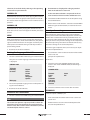
Press the “Setup” button to display the OSD menu. Select
the menu item AUDIO SETUP in the main menu. The following is displayed in the menu AUDIO SETUP:
•
the R-MONO option: You hear the second language on
the front left and right loudspeakers.
•
the MIX-MONO option: You hear both languages one
on the front left and one on the front right loudspeaker.
AUDIO SETUP
Audio Out
OP Mode
Dual Mono
Dynamic
LPCM Output
Analog
SPDIF/Raw
SPDIF/PCM
Main page
Setting audio output
1 Select the subitem AUDIO OUTPUT using the control
buttons.
2 Select the option
•
ANALOG, if you have not connected any digital audio
components to the combination unit.
•
SPDIF/RAW, if you have connected a multi-channel
digital audio component – e. g. a Dolby Digital or DTS
receiver – by means of a coaxial cable to the combination unit.
•
SPDIF/PCM, if you have connected a two-channel digital audio component by means of a coaxial cable to the
combination unit.
3 Return to the list of subitems.
Settings for mono VCDs/S-VCDs
Note
This subitem is only relevant when playing back VCDs/SVCDs. The sound on VCDs/S-VCDs can be available in
3 Return to the list of the subitems.
Dynamic range compression/Set
midnight mode
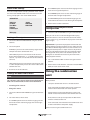
1 Select the subitem DYNAMIC using the control buttons.
Here you can set the so-called midnight mode to play
back DVDs with 5.1 channel surround sound. This mode
can be useful if e. g. you would like to play back a DVD during the night.
Explanation: If you lower the playback volume with the
volume buttons/volume control then all 6 audio channels
are affected. Both background noises and also music and
dialogue become quieter in equal measures. By contrast,
in the case of midnight mode, only the playback volume
of background noises, music etc. becomes quieter. The
dialogues can therefore be heard very well even with a
lower playback volume.
2 Set a value between OFF and FULL using the control
buttons.
3 Return to the list of subitems. Select the subitem MAIN
PAGE, to return to the main menu.
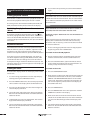
Using the combination
unit
After you have
•
set up the combination unit in a suitable location
•
have connected the combination unit to a television
with one of the described connection options
1 Select the subitem DUAL MONO using the control buttons.
•
positioned the surround loudspeakers and the subwoofer and connected them to the combination unit
2 For mono VCDs/S-VCDs select
•
know, how one calls up and operates the OSD menu
with the remote control and
•
have connected and switched on the combination unit
and the subwoofer to the power supply
•
monolingual in stereo or
•
bilingual in mono.
•
the STEREO option: You hear the first language on the
front left and the second language on the front right
loudspeaker.
you can start using the combination unit.
KH 2370
19