1
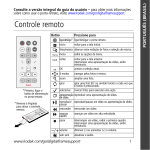
Remote control
Button
back
menu
OK
* First, turn on the
power switch on the
frame.
*Remove tab to
activate the
remote.
Press to
power*
turn on/off the picture frame.
home
return to the home screen.
pics/music
toggle between viewing pictures and selecting music.
menu
display menu choices.
back
return to the previous screen.
stop a slide show, display thumbnails.
OK
accept the current selection.
4-way
navigate through pictures or menus.
zoom
magnify the picture.
rotate
rotate the picture, 90° clockwise each press.
select
mark pictures for an operation.
slide show
play a slide show.
play/pause
play/pause a video or slide show.
rewind
rewind a video.
fast forward fast forward a video.
stop
stop a video, display the first frame.
stop a slide show, display thumbnails.
volume
decrease (-) or increase (+) the volume.
mute
mute audio.
www.kodak.com/go/digitalframesupport
1
ENGLISH
See your extended user’s guide – for more information about using your frame,
visit www.kodak.com/go/digitalframesupport.
ENGLISH
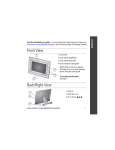
Front View
1 LCD screen
1
2 Faceplate
2
3 Remote control sensor
3
Back/Left Side View
2
1
1
4
2
5
6
3
2
Slide the holder 7
into slots.
1
Speakers
5
Memory card slot - SD, MS, xD, MMC
2
Wall mount hangers
6
On/Off switch
3
Frame stand
7
Remote control holder (removable)
4
Memory card slot - CF, MD
www.kodak.com/go/easysharecenter
ENGLISH
Top/Right Side View
1 2 3
4 5 6 7
8
9
10
11
12
1
Picture/music toggle
8
USB connector (connect to computer, also connect
camera/USB device - with adapter cable.)
2
Play/Pause
3
Stop/Back
9
Volume control
4
Menu
10 Headphone jack
5
OK
11 DC-In (12 V)
6
Down
12 Reset button
7
Up
www.kodak.com/go/digitalframesupport
3
ENGLISH
� Setting up your wireless network
See the Wireless Setup Guide
Follow the directions in the Wireless Setup Guide to:
■
Install the software on your computer.
■
Set up your frame and wireless network.
■
View pictures over your wireless network.
CD packaged
with your frame.
� Connecting the power cable
Your power cable (included with the frame) may be
different from the one pictured. Use the plug that
accommodates your type of power outlet.
4
www.kodak.com/go/easysharecenter
ENGLISH
� Turning on the frame
1. Press the switch
to On.
2. Then use the remote control
to turn the power off and
on.
back
menu
OK
� Setting your language
The language
setup screen
appears the first
time you turn on
the frame.
back
1.
to change.
menu
OK
2. OK to accept.
A slide show starts from sample
pictures pre-loaded in internal
memory.
www.kodak.com/go/digitalframesupport
5
ENGLISH
� Viewing your first pictures
To play a slide show from a memory card or USB device, insert the card or
device (see step 6 on the next page).
If a slide show is already playing (for example,
from the pre-loaded sample pictures), your slide
show starts automatically.
If you are at the Home screen (page 8), press
on the remote control to highlight your
picture source, then press
to start the slide
show.
— To play music with your pictures or slide
shows, see page 12.
To view pictures from your computer over your wireless network, see the
Wireless Setup Guide and your extended user’s guide.
6
www.kodak.com/go/easysharecenter
Memory card
(sold separately)
CompactFlash/
MicroDrive
Secure Digital/
Memory Stick/
xD/
MultiMediaCard
USB device
(digital camera, flash drive, card reader, etc.—sold separately)
b)
a) USB cable included with your USB
device.
b) USB adapter cable included with
your EX model picture frame.
a)
www.kodak.com/go/digitalframesupport
7
ENGLISH
� Inserting memory card/USB device
1
Doing more
All buttons and controls described are on the remote control unless otherwise specified.
For supported picture, video, and music file formats, see the extended user’s guide.
Home screen—picture sources and settings
1 Press
.
All connected sources and the Settings icon are
displayed.
2 Press
to highlight a picture source, then:
■
Press
to start a slide show.
■
Or, press OK to display thumbnails, folders,
albums.
Home screen options:
My Frame—the frame’s internal memory. Copy your special pictures to internal
memory from a memory card or other device (page 13).
Memory card—appears when you insert a card (page 7). The label and icon indicate
the type of card.
Camera—appears when you connect a digital camera via USB cable (page 7).
USB drive—appears when you insert a USB flash drive (page 7).
8
www.kodak.com/go/easysharecenter
Doing more
Network computer—appears if you are connected to a wireless network computer.
Display pictures that are stored on the computer. See your Wireless Setup Guide.
KODAK Gallery—appears if you have set up your Gallery account and are connected
to a wireless network. Display your albums and My Friends’ Albums from the Gallery.
See your Wireless Setup Guide.
KODAK Gallery, with new picture notification
with you at the Gallery! See page 11.
—someone has shared pictures
Settings—customize your frame settings. For example, set slide show durations and
transitions, viewing options, clock and timer, etc. For more information, see your
extended user’s guide at www.kodak.com/go/digitalframesupport.
Viewing pictures and videos
The viewing methods described here apply to pictures and videos from any picture
source: internal memory (My Frame), a memory card, camera or other USB device, or
wirelessly from your network computer or Gallery account.
Thumbnails view
■
To view your pictures as thumbnails,
press
when a slide show is playing.
■
To navigate through the thumbnails, press
■
To play a video (
■
To view a different folder, highlight it and press OK.
www.kodak.com/go/digitalframesupport
.
), highlight it and press OK.
9
Doing more
Single view
■
To view a single, full-screen picture, highlight it in thumbnails view and press OK.
■
To magnify a picture up to 8X, press . To view other parts of the picture, press
. Continue pressing
to return to full view.
■
To rotate a picture, press
.
Slide show
■
To start a slide show from any selected picture (thumbnail or single view), press
■
To start a slide show from the Home screen
source, then press .
■
To change the slide duration or choose a different transition type, go to Home
Settings
, Viewing Options.
, press
.
to highlight a picture
,
Arrange by date or filename
By default, the pictures on your frame are arranged by date, starting with the oldest.
You can change the arrangement, or sort order, of your pictures by date or
alphabetically.
To change the sort order, press
press OK.
10
, then select Sort by → OK. Select a sort order, then
www.kodak.com/go/easysharecenter
Doing more
Automatically receive My Friends’ Albums
Your wireless frame automatically notifies you when a friend shares pictures with you at
the Gallery. Play a slide show of the new pictures, right on your frame, even before you
see the email on your computer!
NOTE: The email icon
means you have new pictures that you haven’t viewed yet.
To see the pictures right away:
1 When the notice
appears on the frame screen,
press
to highlight View.
2 Press OK.
A slide show of the new pictures plays on your frame.
If there are multiple albums you haven’t viewed yet,
from the list and press OK.
select a marked album
To see the pictures later:
1 When the notice appears on the frame screen,
highlight Dismiss, then press OK.
2 When you want to see the new pictures, press Home
( ), highlight KODAK Gallery (
), then press OK.
3 With My Friends’ Albums highlighted, press OK.
4 Highlight a marked album
, then press OK.
To change your notification settings, see your extended user’s guide.
www.kodak.com/go/digitalframesupport
11
Doing more
Playing music
Play your MP3 files (from any connected device or source) to accompany your pictures,
videos, and slide shows.
1 Press
2 Press
to interrupt your picture or slide show and display the Audio screen.
to locate your music files. Then press OK.
3 Press to select Play All Songs or to go to the next
or previous song. Then press OK.
Your music starts playing.
4 Press
to return to your picture or slide show.
Your selected music continues to play as the slide show
resumes. Videos play without their related audio (default
setting).
5 To turn off music, press
, then
.
6 Press
again to return to your pictures.
NOTE: To copy audio files to internal memory, drag and drop them from your computer via the included USB
cable. See your extended user’s guide.
12
www.kodak.com/go/easysharecenter
Doing more
Deleting pictures
1 Display a picture in single view, then press
2 Press
.
to highlight Delete, then press OK.
3 Highlight Delete and press OK again to confirm.
(To cancel the deletion, highlight Exit, then press OK.)
The picture/video is deleted.
To delete multiple pictures/videos, see page 14.
NOTE: You can delete pictures/videos from a card, internal memory, or some connected USB devices.
You cannot delete from remote locations over the wireless network.
Copying pictures
Copy pictures/videos from your current viewing location to internal memory or other
connected devices. To copy pictures/videos to your computer in connected or wireless
mode, see your extended user’s guide.
1 Display a picture in single view, then press
2 Press
.
to highlight Copy, then press OK.
3 Press
to highlight the location you want to copy
to, then press OK.
To copy multiple pictures/videos, see page 14.
www.kodak.com/go/digitalframesupport
13
Doing more
Selecting multiple pictures
Use the multi-select feature to copy or delete two or more pictures/videos; or to play a
slide show of selected pictures/videos.
Selecting one at a time
1 In thumbnails view, press
to find a picture/ video.
2 Press
to select a picture/video. Repeat to select additional pictures/videos.
A check mark appears on the picture. Press
again to remove a check mark.
3 Press
to view a slide show of the selected pictures. Press menu to copy or delete
them.
Selecting all at once
1 Press
whenever pictures/videos are displayed
(slide show, video, single picture).
2 Press
to highlight Select All, then press OK.
A check mark appears on all pictures/videos in your
current location.
3 To remove the check marks, press
, then
Select/Unselect All → OK → Unselect All → OK.
14
www.kodak.com/go/easysharecenter
Doing more
Printing pictures
For printing to a PictBridge enabled printer, see your extended user’s guide.
Learning more about your frame
www.kodak.com/go/digitalframes
Frame accessories, including fashion faceplates
www.kodak.com/go/digitalframesupport Extended user’s guide
Interactive troubleshooting and repairs
Interactive tutorials
FAQs
Downloads
Product registration
For package contents, see your product package.
www.kodak.com/go/digitalframesupport
15
2
Appendix
Important safety instructions
CAUTION:
Do not disassemble this product; there are no user-serviceable parts inside. Refer servicing to qualified
service personnel. Do not expose this product to liquid, moisture, or extreme temperatures. The use of
controls, adjustments, or procedures other than those specified herein may result in exposure to shock and/or
electrical or mechanical hazards. If the LCD breaks, do not touch the glass or liquid. Contact Kodak customer
support.
■ The use of an accessory that is not recommended by Kodak may cause fire, electric shock, or injury. For
approved accessories, visit www.kodak.com/go/accessories.
■ Use only a USB-certified computer equipped with a current-limiting motherboard. Contact your computer
manufacturer if you have questions.
■ When removing the battery from the remote, allow it to cool; it may be hot.
■ Follow all warnings and instructions supplied by the battery manufacturer.
■ Use only batteries approved for this product to avoid risk of explosion.
■ Keep batteries out of the reach of children.
■ Do not allow batteries to touch metal objects, including coins. Otherwise, a battery may short circuit,
discharge energy, become hot, or leak.
■ Do not disassemble, install backward, or expose batteries to liquid, moisture, fire, or extreme temperature.
■ Remove the battery when the remote control is stored for an extended period of time. In the unlikely event
that battery fluid leaks inside the product, contact Kodak customer support.
■ Dispose of batteries according to local and national regulations. Visit www.kodak.com/go/kes.
■ Do not charge non-rechargeable batteries.
For more information on batteries, visit www.kodak.com/go/batterytypes.
■ Internal digital picture frame battery (not removable or replaceable)and remote control battery may include
16
www.kodak.com/go/easysharecenter
Appendix
perchlorate material. Special handling may apply in California.
■ Read and follow all warnings and instructions supplied by the battery manufacturer.
CAUTION:
EX models only: When using this product, it should be installed and operated with a minimum distance of 7.9
in. (20 cm) for 2.4 GHz operations between the radiator and your body. This transmitter must not be
collocated or operated in conjunction with any other antenna or transmitter.
Upgrading your software and firmware
Download the latest versions of the software and frame firmware (the software that runs on the frame). See
www.kodak.com/go/digitalframedownloads.
Additional care and maintenance
■ Wipe the frame and the LCD gently with a soft, lint-free cloth or an untreated lens-cleaning tissue. Do not
use cleaning solutions unless designed specifically for LCD screens. Do not allow chemicals, such as suntan
lotion, to contact painted surfaces.
■ Service agreements are available in some countries. Contact a dealer of Kodak products for more
information.
■ For digital frame disposal or recycling information, contact your local authorities. In the US, visit the
Electronics Industry Alliance Web site at www.eiae.org or visit www.kodak.com/go/digitalframesupport.
Limited warranty
Kodak warrants Kodak consumer electronic products and accessories (“Products”), excluding batteries, to be
free from malfunctions and defects in both materials and workmanship for one year from the date of purchase.
Retain the original dated sales receipt. Proof of the date of purchase will be required with any request for
warranty repair.
Limited warranty coverage
Warranty service is only available from within the country where the Products were originally purchased. You
may be required to ship Products, at your expense, to the authorized service facility for the country where the
Products were purchased. Kodak will repair or replace Products if they fail to function properly during the
warranty period, subject to any conditions and/or limitations stated herein. Warranty service will include all
labor as well as any necessary adjustments and/or replacement parts. If Kodak is unable to repair or replace a
www.kodak.com/go/digitalframesupport
17
Appendix
Product, Kodak will, at its option, refund the purchase price paid for the Product provided the Product has been
returned to Kodak along with proof of the purchase price paid. Repair, replacement, or refund of the purchase
price are the sole remedies under the warranty. If replacement parts are used in making repairs, those parts may
be remanufactured, or may contain remanufactured materials. If it is necessary to replace the entire Product, it
may be replaced with a remanufactured Product. Remanufactured Products, parts and materials are warranted
for the remaining warranty term of the original Product, or 90 days after the date of repair or replacement,
whichever is longer.
Limitations
This warranty does not cover circumstances beyond Kodak's control. This warranty does not apply when failure
is due to shipping damage, accident, alteration, modification, unauthorized service, misuse, abuse, use with
incompatible accessories or attachments (such as third party ink or ink tanks), failure to follow Kodak's
operation, maintenance or repacking instructions, failure to use items supplied by Kodak (such as adapters and
cables), or claims made after the duration of this warranty. Kodak makes no other express or implied warranty
for this product, and disclaims the implied warranties of merchantability and fitness for a particular purpose. In
the event that the exclusion of any implied warranty is ineffective under the law, the duration of the implied
warranty will be one year from the purchase date or such longer period as required by law. The option of repair,
replacement, or refund is Kodak's only obligation. Kodak will not be responsible for any special, consequential
or incidental damages resulting from the sale, purchase, or use of this product regardless of the cause. Liability
for any special, consequential or incidental damages (including but not limited to loss of revenue or profit,
downtime costs, loss of the use of the equipment, cost of substitute equipment, facilities or services, or claims
of your customers for such damages resulting from the purchase use or failure of the Product), regardless of
cause or for breach of any written or implied warranty is expressly disclaimed.
Your rights
Some states or jurisdictions do not allow exclusion or limitation of incidental or consequential damages, so the
above limitation or exclusion may not apply to you. Some states or jurisdictions do not allow limitations on how
long an implied warranty lasts, so the above limitation may not apply to you. This warranty gives you specific
rights, and you may have other rights which vary from state to state or by jurisdiction.
Outside the United States and Canada
In countries other than the United States and Canada, the terms and conditions of this warranty may be
different. Unless a specific Kodak warranty is communicated to the purchaser in writing by a Kodak company,
no warranty or liability exists beyond any minimum requirements imposed by law, even though defect, damage,
or loss may be by negligence or other act.
18
www.kodak.com/go/easysharecenter
Appendix
FCC compliance and advisory
Kodak EasyShare digital picture frame
This equipment has been tested and found to comply with the limits for a Class B digital device, pursuant to
Part 15 of the FCC Rules. These limits are designed to provide reasonable protection against harmful
interference in a residential installation.
This equipment generates, uses, and can radiate radio frequency energy and, if not installed or used in
accordance with the instructions, may cause harmful interference to radio communications. However, there is
no guarantee that interference will not occur in a particular installation.
If this equipment does cause harmful interference to radio or television reception, which can be determined by
turning the equipment off and on, the user is encouraged to try to correct the interference by one or more of the
following measures: 1) reorient or relocate the receiving antenna; 2) increase the separation between the
equipment and the receiver; 3) connect the equipment to an outlet on a circuit different from that to which the
receiver is connected; 4) consult the dealer or an experienced radio/TV technician for additional suggestions.
Any changes or modifications not expressly approved by the party responsible for compliance could void the
user’s authority to operate the equipment. Where shielded interface cables have been provided with the
product or specified additional components or accessories elsewhere defined to be used with the installation of
the product, they must be used in order to ensure compliance with FCC regulation.
FCC and Industry Canada
This device complies with Industry Canada RSS-210 and FCC Rules. Operation is subject to the following two
conditions: (1) this device may not cause harmful interference, and (2) this device must accept any interference
received, including interference that may cause undesired operation.
CE
Hereby, Eastman Kodak Company declares that this Kodak product is in compliance with the essential
requirements and other relevant provisions of Directive 1999/5/EC.
This digital picture frame EX811 and EX1011 transmits in 10 dBm. In France, the power level is limited to
10dBm in outdoor environments, per regulations. When in France, use the wireless functions of this device
indoors only.
www.kodak.com/go/digitalframesupport
19
Appendix
Canadian DOC statement
DOC Class B Compliance—This Class B digital apparatus complies with Canadian ICES-003.
Observation des normes-Classe B—Cet appareil numérique de la classe B est conforme à la norme
NMB-003 du Canada.
Waste Electrical and Electronic Equipment labeling
EU: It is the final user's responsibility to discard this equipment into an approved, segregated
collection scheme to enable its suitable treatment/disposal and to improve human/environmental
protection. For more information, see your retailer, local authority, or www.kodak.com/go/recycle.
(Product weight: EX811 – 794 g.; EX1011 – 830 g.)
Australian C-Tick
N137
MPEG-4
Use of this product in any manner that complies with the MPEG-4 visual standard is prohibited, except for use
by a consumer engaging in personal and non-commercial activities.
Russian GOST-R
Eastman Kodak Company
Rochester, New York 14650
Korean Class B ITE
20
www.kodak.com/go/easysharecenter
Appendix
China RoHS
www.kodak.com/go/digitalframesupport
21
Appendix
Eastman Kodak Company
Rochester, New York 14650
© Eastman Kodak Company, 2007
Kodak and EasyShare are trademarks of Eastman Kodak Company.
Eastman Kodak Company is an authorized licensee of the CompactFlash trademark.
2F6847_en
22
www.kodak.com/go/easysharecenter