1
Oven Controls
Important note:
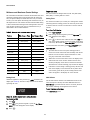
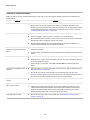
Minimum and Maximum Control Settings
The clock cannot be changed when a Cook Time, Self Clean,
Delay Start, or cooking feature is active.
All of the features listed have minimum and maximum time and
temperature settings that may be entered into the control. An
entry acceptance beep will sound each time a key is touched.
An entry error tone (three short beeps) will sound if the entry of
the temperature or time is below the minimum allowable setting
or above the maximum setting for the cooking feature. The error
tone will also sound any time a key is pressed if the entry is
determined to be an invalid selection.
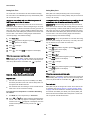
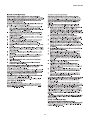
Setting Timer
The minute timer allows you to track your cooking times without
interfering with the cooking process. The timer may be set from
a minimum time of 1 minute to a maximum of 11 hours and 59
minutes.
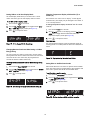
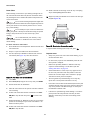
To set timer for 5 minutes:
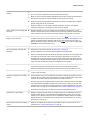
Table 3: Minimum and maximum control settings
Feature
1.
2. Enter 5 using numeric keypad or press the Up arrow key
until 5 appears in the display.
Min. Temp or Time Max. Temp or Time
Bake
170°F (77°C)
550°F (288°C)
Broil
400°F (205°C)
550°F (288°C)
Timer
1 minute
11 hrs. 59 mins.
Self Clean
2 Hours
4 Hours
170°F (77°C)
3 Hours
1 Minute
11:59
Delay Time 12 Hr.
1:00
12:59
Delay Time 24 Hr.
0:00
23:59
Convec Bake
170°F (77°C)
550°F (288°C)
Convec Convert
170°F (77°C)
550°F (288°C)
Convec Roast
170°F (77°C)
550°F (288°C)
Clock 12 Hr.
1:00
12:59
Clock 24 Hr.
0:00
23:59
LO 225°F (108°C)
HI 275°F (134°C)
Warm & Hold
Cook Time
Slow Cook
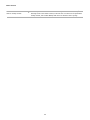
Press Timer ON/OFF.
3. Press
to start the timer. When set time ends, END will
show in the display and the control will sound a beep three
times every 30 seconds until Timer ON/OFF key is pressed.
To cancel the timer when active, press Timer ON/OFF again.
Important note:
•
The timer does not start or stop the cooking process. It
serves as an extra minute timer that will beep when the set
time has run out. The timer may be used alone or while
using any of the other oven functions.
•
When timer is set for more than 1 hour it will display hours
and minutes until 1 hour remains. When less than 1 hour
remains, the display counts down in minutes and seconds.
With less than 1 minute remaining, only seconds will display.
•
If the timer is active during a cooking process, the timer will
show in the display. To view the status of any other active
oven function, press the key of the cooking function once
and it will appear in the display for a few seconds.
Setting Clock
Add 1 Minute
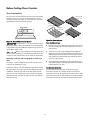
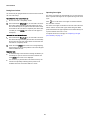
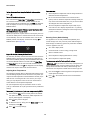
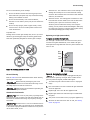
When the appliance is first powered up, 12:00 will flash in the
display (See Table 16). The time of day must first be set before
operating the oven.
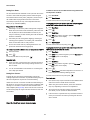
Use the Add 1 Minute feature to set additional minutes to the
timer. Each press of the key will add 1 additional minute. If
Add 1 Minute is pressed when the timer is not active, the timer
will activate and begin counting down from 1 minute.
To add 2 minutes to the timer:
Press Add 1 Minute twice.
Figure 16: 12:00 in display before setting the clock
To set clock to 1:30:
1.
Press
.
2. Enter 1 3 0 using numeric keypad or press the Up / Down
arrow keys until 130 appears in the display.
3. Press
.
18