1
KD-R80BT
Bluetooth® Wireless Technology
Dual USB/CD Receiver with AUX
Headunits
Separated
Variable-Color
MP3/WMA
WAV*
MOS-FET
50W x 4
20W x 4
RMS
2 Connections
for
iPod/iPhone
Application Mode
for
iPod/iPhone
2 Phones
Full-Time
Connection
AUX (Rear)
iPod
Headunit
2-Way Control
for iPod/iPhone
1.0A
Full Digital Support
Full Speed Charging
Dual USB Ports
1A
Drive
Change
Mode
Radio Broadcast
Data System
* Not Available on CD
Recommended Features
Bluetooth®
Wireless
Technology
Phone Book
Access Profile
Audio
Streaming
& Control
AUDIO
USB G3
iPod/iPhone
3 Pre-Output
SAT
Radio Ready
(Front+Rear+Subwoofer)
Key Benefits
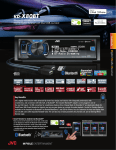
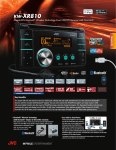
The unit comes with dual USB inputs and a USB Bluetooth® adapter, providing audio entertainment and full-time Bluetooth®
connection for two phones. 1A USB connection for smartphones features Drive Change Mode for BlackBerry® and
Application Mode for iPod/iPhone. Smart Remote for Android lets you use your Android device as a remote for audio
playback, while the headunit allows control for Pandora Radio via Bluetooth® for Android/BlackBerry®, and USB for iPhone. You can
customize the keys and display from over 30,000 colors with Separated Variable-Color and Separated Brightness Control. The unit
also has TI/Burr-Brown 24-bit DAC, 3-band parametric iEQ, 4.8V pre-out terminals, full dot LCD, and is ready for HD Radio™,
SAT Radio and Steering Wheel Remote Control with optional devices.
✹Smart Remote for Android via Bluetooth®
Music sources on the headunit such as CD, radio, or USB audio
can be displayed on Android with Bluetooth® Serial Port Profile.
The Android phone becomes a remote control with headunit
information shown on the screen, operable with finger gestures
– providing safe and easy operation without looking at the
headunit’s monitor.
Operation Examples
Play
Bluetooth® Serial Port Profile
EQ
Repeat
Forward Up
KD-R80BT
Bluetooth® Wireless Technology Dual USB/CD Receiver with AUX
So Many Features!
✹Bluetooth® Compatible Functions
In addition to hands-free calling, voice recognition dialing,
audio streaming/control, and remote control features with
your smartphone, you can transfer up to 400 contact
numbers to the headunit. With PBAP compatible cell
phones, you can access your phone book without
transferring to the headunit. Two phones
can remain connected continuously.
The features are also available for
Bluetooth Adapter Wired MIC
smartphones.
included included
✔ Hands-Free Calls
✔ Audio Streaming
& Control
✔ Phone Book
Access
✔ Phone Book
Transfer
✔ 2 Phones
Full-Time Connection
®
✹Application Mode for iPod/iPhone
You can enjoy updated features of the JVC Auto Drive Router app for Drive Data and
Here I am, as well as play the sound from other apps including Pandora, with high
current power supply.
Auto Drive Router
Pandora
JVC-original
iPod/iPhone
Apps
✹Pandora via Bluetooth® (for Android/BlackBerry®)
Download the Pandora app on to your Android/BlackBerry® and make
Bluetooth® connection to the headunit. The Serial Port Profile (SPP)
lets you control as well as listen to
Pandora Radio on the headunit.
✹Drive Change Mode for BlackBerry®
Listen to music from either internal (built-in memory) or external (SD) sources on a
compatible BlackBerry®, via USB connection. Some Android devices are also
compatible.
* Phone stays charged while connected
* Switch between external and internal memory from receiver’s controls
* Play/Pause/Skip tracks from receiver or wireless remote control
Built-in Memory
Selectable
BlackBerry
External Memory (SD)
✹Customizable LCD with Dot Matrix
Key Specifications
Song information display and
certain control features are
available on the headunit for some
apps, when the app is launched
during iPod Mode.
Now, Turn to the Left
iPod Mode
✹Dual 1A USB for iPod/iPhone
and Smartphones
2 USBs at once
1A Support
Connect your iPod/iPhone or other
smartphones to the unit’s 1A USB port,
and enjoy music in clear, digital sound with
full-speed transfer. Your device’s battery
will be charged during connection. With dual USB, you can use both front and rear
ports to connect a USB Bluetooth® adapter and another device, or even two
players/smartphones at the same time. The audio files in your USB device can be
easily accessed by PC-like folder structure.
Connections
Maximum Power Output
Continuous Power Output (RMS)
50W x 4
20W RMS x 4 Channels at 4Ω ;
1.0% THD*1 + N
off/100/120/150Hz (-12 dB/oct)
off/55/85/120Hz (-12dB/oct)
3 (Front + Rear + Subwoofer)
Android*
BlackBerry®*
iPhone
Mass Storage
Audio Streaming
AVRCP
Mass Storage
Drive Change Mode
Audio Streaming
AVRCP
Application Mode
Audio Streaming
AVRCP
AUX-IN
4.8V
4.8V
INF - 0dB*3
4Ω (4 - 8Ω allowable)
; 600Ω
7 3/16” x 2 1/16” x 6 5/16”
7 7/16” x 2 3/8” x 9/16”
6 11/16” x 1 13/16” x 13/16”
* Compatibility
depends on model
Rear
✔
*1 Total Harmonic Distortion *2 Set according to LPF figures
*3 MUTE / -14dB / -12dB / -10dB / -8dB / -6dB / -4dB / -2dB / 0dB
Dimensions (W x H x D)
Installation Size
Panel Size
Detachable Face Plate
✹Apps Control for iPod Mode
* USB playback not supported for NTFS formatted devices. When partitions are created, only the first partition can
be read.
In addition to positive/negative display and
Variable-Color Illumination, you can customize
the display format to you taste.
HPF*2 (Front/Rear)
LPF (Subwoofer)
Line Pre-Output Terminals
Subwoofer Output with
Level/Frequency Control
Line Output Level
Subwoofer Output Level
Subwoofer Gain Control
Load Impedance
Line Output Impedance
Don’t miss the details! Go to the feature page for JVC original app content
Rear
Portable
iPod
Audio Players
USB Cable
USB
USB Memory
HDD*
* Not compatible with NTFS format.
Rear Panel
181.6 x 51.6 x 159.2 mm
188 x 58.5 x 12.8 mm
169 x 44.5 x 19.7 mm
NTK-0884-07