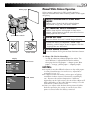
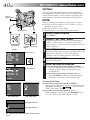
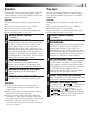
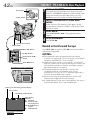
1
COMPACT VHS CAMCORDER
GR-FXM75
ENGLISH
INSTRUCTIONS
LYT0361-001A
EN
2
EN
Dear Customer,
Thank you for purchasing the JVC Compact VHS
camcorder. Before use, please read the safety
information and precautions contained in the
following pages to ensure safe use of this product.
Using This Instruction Manual
• All major sections and subsections are listed in the
Table Of Contents (Z pg. 4, 5).
• Notes appear after most subsections. Be sure to read
these as well.
• Basic and advanced features/operation are separated
for easier reference.
It is recommended that you . . .
..... refer to the Index (Z pgs. 68 – 71) and familiarize
yourself with button locations, etc. before use.
..... read thoroughly the Safety Precautions. They
contain extremely important information regarding
the safe use of this product.
You are recommended to carefully read the cautions
on pages 72 – 74 before use.
SAFETY
PRECAUTIONS
WARNING:
TO PREVENT FIRE OR SHOCK
HAZARD, DO NOT EXPOSE
THIS UNIT TO RAIN OR
MOISTURE.
Warning on lithium cell battery (for clock
operation and remote control unit)
The battery used in this device may present a fire or
chemical burn hazard if mistreated. Do not
recharge, disassemble, heat above 100°C or
incinerate.
Replace the battery with Maxell, Panasonic
(Matsushita Electric), Sanyo or Sony CR2025; use of
another battery may present a risk of fire or
explosion.
n Dispose of used battery promptly.
n Keep away from children.
n Do not disassemble and do not dispose of in fire.
NOTES:
● The rating plate (serial number plate) and safety
caution are on the bottom and/or the back of the
main unit.
● The rating plate (serial number plate) of the AC
Power Adapter/Charger is on its bottom.
CAUTIONS:
n If you notice smoke or a peculiar smell coming
from the camcorder or AC adapter/charger, shut it
down and unplug it immediately. Continue using
the camcorder or AC adapter/charger under these
conditions could lead to fire or electric shock.
Contact your JVC dealer. Do not attempt to repair
the malfunction yourself.
n To prevent shock, do not open the cabinet. No
user serviceable parts inside. Refer servicing to
qualified personnel.
n When you are not using the AC Power Adapter/
Charger for a long period of time, it is recommended that you disconnect the power cord from
AC outlet.
This camcorder is designed to be used with PALtype colour television signals. It cannot be used for
playback with a television of a different standard.
However, live recording and LCD monitor/
viewfinder playback are possible anywhere. Use the
BN-V12U/V20U battery packs and, to recharge
them, the provided multi-voltage AC Power
Adapter/Charger. (An appropriate conversion
adapter may be necessary to accommodate different
designs of AC outlets in different countries.)
This unit is produced to comply with Standard IEC
Publ. 65.
IMPORTANT
Connection to the mains supply in the United
Kingdom.
DO NOT cut off the mains plug from this equipment.
If the plug fitted is not suitable for the power points in
your home or the cable is too short to reach a power
point, then obtain an appropriate safety approved
extension lead or consult your dealer.
BE SURE to replace the fuse only with an identical
approved type, as originally fitted, and to replace the
fuse cover.
If nonetheless the mains plug is cut off ensure to
remove the fuse and dispose of the plug immediately,
to avoid a possible shock hazard by inadvertent
connection to the mains supply.
If this product is not supplied fitted with a mains plug
then follow the instructions given below:
DO NOT make any connection to the Larger Terminal
coded E or Green.
The wires in the mains lead are coloured in accordance with the following code:
Blue to N (Neutral) or Black
Brown to L (Live) or Red
If these colours do not correspond with the terminal
identifications of your plug, connect as follows:
Blue wire to terminal coded N (Neutral) or coloured
black.
Brown wire to terminal coded L (Live) or coloured Red.
If in doubt — consult a competent electrician.
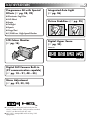
MAJOR FEATURES
Programme AE with Special
Effects (Z pg. 28, 29)
n Electronic Fog Filter
n ND Effect
n Sepia
n Twilight
n Sports
n Nega/Posi
n 1/2000 sec. High Speed Shutter
LCD Colour Monitor
(Z pg. 16)
EN
Integrated Auto Light
(Z pg. 26)
Picture Stabilizer (Z pg. 25)
Digital Hyper Zoom
(Z pg. 24)
Zoom in
Zoom out
Digital Still Camera Built-in
(PC communication capable)
(Z pg. 18 – 21, 48 – 55)
Menu Adjustment
(Z pg. 32, 33, 34)
n Camcorder is designed exclusively for the
VHS-C video cassette. Only cassettes marked
VHS-C can be used with this unit.
n HQ VHS is compatible with existing VHS
equipment.
3
4
EN
GETTING STARTED
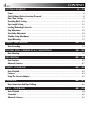
CONTENTS
6 – 13
Power ............................................................................................................ 6
Clock (Lithium) Battery Insertion/Removal ................................................................ 8
Date/Time Settings ............................................................................................ 9
Recording Mode Setting ..................................................................................... 10
Tape Length Setting .......................................................................................... 10
Loading/Unloading A Cassette............................................................................. 11
Grip Adjustment .............................................................................................. 12
Viewfinder Adjustment ..................................................................................... 12
Shoulder Strap Attachment ................................................................................. 13
Tripod Mounting .............................................................................................. 13
VIDEO RECORDING
14 – 17
Basic Recording ............................................................................................... 14
DIGITAL STILL CAMERA (D.S.C.) SHOOTING
18 – 21
Basic Shooting ................................................................................................ 18
RECORDING
22 – 41
Basic Features ................................................................................................ 22
Advanced Features ........................................................................................... 27
VIDEO PLAYBACK
42 – 45
Basic Playback ................................................................................................ 42
Features ....................................................................................................... 43
Using The Cassette Adapter ................................................................................ 45
PLAYBACK
46 – 47
Basic Connections And Tape Dubbing ...................................................................... 46
D.S.C. PLAYBACK
48 – 55
Basic Playback ................................................................................................ 48
Connection .................................................................................................... 49
Advanced Features ........................................................................................... 50
EN
USING THE REMOTE CONTROL UNIT
5
56 – 64
Random Assemble Editing .................................................................................. 58
Insert Editing (VIDEO) ....................................................................................... 62
Insert Editing (Insert A Still Image From The Built-in Memory Onto A Tape) ....................... 63
Audio Dubbing ................................................................................................ 64
TROUBLESHOOTING
65 – 67
INDEX
68 – 71
Controls, Connectors And Indicators ...................................................................... 68
Indications ..................................................................................................... 70
CAUTIONS
72 – 74
SPECIFICATIONS
75
OPTIONAL ACCESSORIES
75
PROVIDED ACCESSORIES
•AC Power Adapter/
Charger AA-V15EK
•Cassette Adapter C-P7U
•Battery Pack BN-V12U
•Lithium Battery CR2025 x 2
(for clock operation and
remote control unit)
•Remote Control
Unit RM-V709U
•Shoulder Strap
•Audio/Video (A/V) cable
•Editing cable
•DC Cord
•PC Connection Cable x 1
(for
Windows®)
•CD-ROM including two
software programmes
6
GETTING STARTED
EN
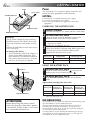
Power
Marks
To AC outlet
CHARGE indicator
This camcorder’s 3-way power supply system lets you
choose the most appropriate source of power.
NOTES:
● No function is available without power supply.
● Use only the specified power supply.
● Do not use provided power supply units with other
equipment.
CHARGING THE BATTERY PACK
REFRESH switch
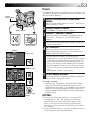
1 SUPPLY POWER
2 ATTACH BATTERY PACK
Connect the charger’s AC power cord to a wall outlet.
REFRESH indicator
REFRESH
The AC Power Adapter/Charger features a
REFRESH function that allows you to fully
discharge the battery pack before recharging.
Perform the REFRESH function after no less
than 5 chargings.
To discharge the battery . . .
.... attach the battery pack to the adapter as
shown in the above illustration. Then
push REFRESH. The REFRESH indicator
lights when discharging starts, and goes
out when discharging is complete.
Align the marks and slide the battery pack in the
direction of the arrow until it locks in place.
•The CHARGE indicator begins blinking to indicate
charging has started.
3 DETACH BATTERY PACK
When the CHARGE indicator stops blinking but stays
lit, charging is finished. Slide the battery pack
opposite the direction of the arrow.
Battery pack
Charging time
Discharging time
BN-V12U
approx. 1 hr. 10 min.
approx. 3 hrs. 30 min.
BN-V20U
approx. 1 hr. 50 min
approx. 6 hrs. 40 min.
USING THE BATTERY PACK
A Hook on.
B Push in.
1 ATTACH BATTERY PACK
Hook its end to the camcorder ( ) and push the
battery pack in until it locks in place ( ) .
2 DETACH BATTERY PACK
Slide BATTERY RELEASE and pull out the battery
pack.
Approximate recording time (unit: min.)
LCD
monitor on/
Viewfinder off
LCD
monitor off/
Viewfinder on
LCD
monitor on/
Viewfinder on
BN-V12U
50 (35)
55 (35)
45 (30)
BN-V20U
85 (55)
90 (55)
75 (50)
Battery pack
BATTERY RELEASE
( ) : when the video light is on.
ATTENTION:
Before detaching the power source,
make sure that the camcorder’s power
is turned off. Failure to do so can result
in a camcorder malfunction.
INFORMATION:
VU-V856KIT is a set composed of the BN-V856U battery pack
and AA-V80EG AC Power Adapter/Charger.
The BN-V856U battery pack provides approx. 7 hours of
recording time when the viewfinder is on and the LCD
monitor and the video light are off. Also read thoroughly the
VU-V856KIT’s instruction manuals.
It is impossible to charge the BN-V856U battery pack using
the provided AC Power Adapter/Charger. Use the optional
AA-V80EG AC Power Adapter/Charger.
EN
7
Charge Marker
Charge marker
A charge marker is provided on the battery pack to
help you remember whether it has been charged or
not. Two colours are provided (red and black)—you
choose which one means charged and which means
discharged.
NOTES:
● The recording time per charge is affected by such factors as the time spent in Record-Standby mode and the
frequency of zooming. It is safer to have spare battery packs to cover 3 times the planned shooting time.
● Charging times noted on page 6 are for a fully discharged battery pack, and discharging times are for a fully
charged battery pack.
● Charging and discharging times vary according to the ambient temperature and the status of the battery pack.
● Remember to set the charge marker after charging a battery pack or after detaching a discharged one from
your camcorder.
● Perform the REFRESH function after no less than 5 chargings.
● While the AC Power Adapter/Charger’s power cord is disconnected from the AC outlet, it is possible to
discharge the battery by pressing the REFRESH switch. During that time, the AC Power Adapter/Charger does
not charge the battery. When discharging is complete, detach the battery from the AC Power Adapter/
Charger to store it.
● High temperatures can damage the battery pack, so use only where good ventilation is available. Do not
allow it to discharge in a container, such as a bag.
● If you stop recharging or discharging part way through, make sure to remove the battery pack before
unplugging the adapter’s AC cord.
● Remove the battery pack from the adapter immediately after discharging.
● To avoid interference with reception, do not use the AC Power Adapter/Charger near a radio.
● Make sure you unplug the DC cord before charging or discharging the battery pack.
● The CHARGE indicator may not light properly with a brand new battery pack, or with one that has been
stored for an extended period. In this case, remove and reattach the battery pack and recharge it. The
CHARGE indicator should blink during recharging. If it doesn’t, contact your nearest JVC dealer.
To AC outlet
To DC IN jack
DC OUT
terminal
DC Cord
AC Power
Adapter/Charger
AA-V15EK
USING AC POWER
Use the AC Power Adapter/Charger (connect as
shown in the illustration).
NOTES:
● The provided AC Power Adapter/Charger features
automatic voltage selection in the AC range from
110 V to 240 V.
● When using the DC cord, make sure you connect
the end of the cord with the core filter to the
camcorder. The core filter reduces interference.
USING A CAR BATTERY
To car’s cigarette
lighter socket
Car Battery
Charger/Adapter
BH-V3E (optional)
Use the optional Car Battery Charger/Adapter
(connect as shown in the illustration).
NOTES:
● When using the car battery, leave the engine
idling.
● The optional Car Battery Charger/Adapter (BH-V3E)
can also be used to charge the battery pack (except
BN-V20U/V856U).
● When using the optional Car Battery Charger/
Adapter, refer to the respective instruction booklet.
8
GETTING STARTED (cont.)
EN
Slot
Clock (Lithium) Battery Insertion/Removal
This battery is necessary for clock operation and to
perform date/time settings.
1 SWITCH OFF POWER
Switch off the unit’s power and remove the power
supply unit (battery pack, AC Power Adapter/Battery
Charger, etc.).
2 REMOVE BATTERY HOLDER
3 INSERT BATTERY IN HOLDER
Pull out the battery holder.
Battery holder
Insert the battery in the holder, and be sure to have
the “+” mark visible.
4 RE-INSERT HOLDER
Slide the holder back into the slot until you hear a
click.
NOTES:
● See “SAFETY PRECAUTIONS” ( Z pg. 2) for information
on safe handling of lithium batteries.
● To avoid losing the battery and/or battery holder, place
the camcorder with the grip side up as shown in the
illustration when inserting/removing the battery.
EN
9
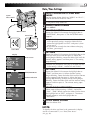
Date/Time Settings
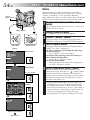
OPERATION SYSTEM AND
1 SELECT
MODE
System
Select Switch
Set the System Select Switch to “VIDEO” or “D.S.C.” ,
and set the Power Switch to “PRO.”.
•The power lamp comes on.
2 ACCESS MENU SCREEN
3 SELECT FUNCTION
Press MENU.
MENU Button
Power lamp
Select Dial
Power Switch
M .W. B .
D . ZOOM
TELE MACRO
DATE TIME
TAPE LENGTH
PICTURE
SNAPSHOT
AUTO
ON
OFF
Menu Screen
T45
FINE
FULL
DATE TIME
1999
1
1
22 : 50
EXIT
4NEXT
M .W. B .
D . ZOOM
TELE MACRO
DATE TIME
TAPE LENGTH
PICTURE
SNAPSHOT
4RETURN
AUTO
ON
OFF
T45
FINE
FULL
Rotate the Select Dial to move the highlight bar to the
item you want to set and then press it. When the
setting begins blinking, rotate the Select Dial until the
correct setting appears and then press it. The setting
stops blinking.
•Repeat this procedure until you’re satisfied with the
Date settings (“YEAR”, “MONTH” and “DAY”).
4RETURN
YEAR
MONTH
DAY
TIME
•If you decide you want to return the date and time
to the previous settings, rotate the Select Dial to
move the highlight bar to “EXIT” and press it, then
go to step 7.
•If you want to set only the time without changing
the date, go to step 5.
4 SET DATE
Display
4NEXT
Rotate the Select Dial to move the highlight bar to
“DATE/TIME”, then press it. The DATE/TIME Menu
appears.
DATE/TIME Menu
24-hour indication
5 SET TIME
Rotate the Select Dial to move the highlight bar to
“TIME” and then press it. When the hour setting
begins blinking, rotate the Select Dial until the correct
setting appears and then press it. When the hour
setting stops blinking and the minute setting begins
blinking, rotate the Select Dial until the correct setting
appears and then press it. The minute setting stops
blinking.
6 START CLOCK OPERATION
When none of these settings (“YEAR”, “MONTH”,
“DAY”, “TIME”) blinks, rotate the Select Dial to move
the highlight bar to “EXIT”, and press it. The Menu
Screen reappears with the highlight bar on
“RETURN”.
7 CLOSE MENU SCREEN
Press the Select Dial.
NOTE:
To display the date and time in the camcorder’s display
and on a connected TV, see “Date/Time Insert”
( Z pg. 30).
10
GETTING STARTED (cont.)
EN
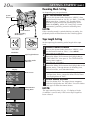
Recording Mode Setting
Set depending on your preference.
1 SET RECORDING MODE
System
Select Switch
First set the System Select Switch to “VIDEO”, then
set the Power Switch to “AUTO” or “PRO.”. Press SP/
LP for more than 1 second. “SP” (Standard Play)
provides higher picture and sound quality and is
better for dubbing, while “LP” (Long Play) is more
economical, providing twice the recording time.
MENU Button
SP/LP Recording
Mode Button
NOTE:
If the recording mode is switched during recording, the
playback picture will be blurred at the switching point.
Tape Length Setting
Set the tape length according to the length of the tape
used.
Select Dial
Power Switch
Viewfinder
T45
SP
Tape length indicator
Recording mode
indicator
M .W. B .
D . ZOOM
TELE MACRO
DATE TIME
TAPE LENGTH
PICTURE
SNAPSHOT
Menu Screen
AUTO
ON
OFF
T45
FINE
FULL
TAPE LENGTH
EXIT
4NEXT
M .W. B .
D . ZOOM
TELE MACRO
DATE TIME
TAPE LENGTH
PICTURE
SNAPSHOT
4RETURN
AUTO
ON
OFF
T60
FINE
FULL
2 SELECT FUNCTION
Rotate the Select Dial to move the highlight bar to
“TAPE LENGTH”, then press it. The TAPE LENGTH
Setting Menu appears.
3 SET TAPE LENGTH
•If you decide you want to return the tape length to
the previous setting, rotate the Select Dial to move
the highlight bar to “EXIT”.
4 CLOSE MENU SCREEN
Press the Select Dial. The Menu Screen reappears
with the highlight bar on “RETURN”. Press the Select
Dial again to close the Menu Screen.
4RETURN
T30
T45
T60
First set the System Select Switch to “VIDEO”, then
set the Power Switch to “PRO.”. Press MENU.
Rotate the Select Dial to move the highlight bar to the
correct setting. T30=30 minutes of recording time,
T45=45 minutes, and T60=60 minutes.
Display
4NEXT
1 ACCESS MENU SCREEN
TAPE LENGTH
Setting Menu
NOTE:
The tape remaining time ( Z pg. 15) displayed in the
viewfinder is correct only if the correct tape length has
been selected.
EN
Cassette holder
11
Loading/Unloading A Cassette
1 OPEN LCD MONITOR
Open the LCD monitor to an angle of over 60
degrees.
2 OPEN CASSETTE HOLDER
Slide EJECT until the holder opens. Do not use force
to open.
3 INSERT/REMOVE CASSETTE
4 CLOSE CASSETTE HOLDER
Make sure the label is facing outward.
PUSH Button
EJECT Switch
Press PUSH and make sure the holder is closed and
locked.
5 CLOSE LCD MONITOR
First make sure the holder is closed. Then close the
LCD monitor.
Turn to take
up slack.
Erase Protection
Gear
NOTES:
● Closing the LCD monitor while the cassette holder is still
open may cause damage to the LCD monitor.
● The cassette holder can’t be opened unless a power
supply is attached.
● Make sure that the tape is not slack when loading the
cassette. If there is any slack, turn the gear on the
cassette in the direction of the arrow to take up the
slack.
● Make sure the Erase Protection tab is in the position that
allows recording. If not, slide the tab. Some cassettes
have removable tabs. If the tab has been removed, cover
the hole with adhesive tape.
● The cassette holder cannot be opened while the
camcorder is in the record mode.
12
GETTING STARTED (cont.)
EN
Power Zoom Lever
Grip Adjustment
1 EXPAND LOOP
2 INSERT HAND
Separate the Velcro strip.
Pass your right hand through the loop and grasp the
grip.
3 ADJUST STRAP LENGTH
Adjust so your thumb and fingers can easily operate
the Recording Start/Stop Button and Power Zoom
Lever. Refasten the Velcro strip.
Recording Start/Stop Button
Viewfinder Adjustment
3
1 SELECT OPERATION MODE
2
2 POSITION VIEWFINDER
Set the Power Switch to “CAMERA” (“AUTO” or
“PRO.”).
180°
Adjust the viewfinder manually for best viewability
(see illustration on left).
3 ADJUST DIOPTRE
1
Set “POWER” to
“CAMERA”
(“AUTO” or “PRO.”)
PAUSE
Turn the Dioptre Adjustment Control until the
indications in the viewfinder are clearly focused.
EN
13
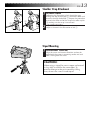
Shoulder Strap Attachment
1 ATTACH STRAP
1
2
3
4
Following the illustration at left, thread the strap
through the top of the eyelet 1, then fold it back and
thread it through the buckle 2. Repeat the procedure
to attach the other end of the strap to the other eyelet
3, making sure the strap is not twisted.
2 ADJUST LENGTH
Adjust as shown in the illustration at left 4.
Tripod Mounting
1 ALIGN AND TIGHTEN
Align the screw and camera direction stud on the
tripod with the camera’s mounting socket and stud
hole. Then tighten the screw.
CAUTION:
When using a tripod, be sure to open and extend
its legs fully to stabilise the camcorder. To
prevent damage to the unit caused by falling
over, do not use a small-sized tripod.
14
VIDEO RECORDING Basic Recording
EN
System Select Switch
LENS COVER
Open/Close Ring
NOTE:
You should already have performed the procedures listed
below. If not, do so before continuing.
● Power ( Z pg. 6)
● Recording Mode Setting ( Z pg. 10)
● Tape Length Setting ( Z pg. 10)
● Grip Adjustment ( Z pg. 12)
● Viewfinder Adjustment ( Z pg. 12)
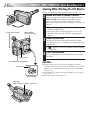
1 LOAD A CASSETTE
EJECT Switch
First open the LCD monitor to an angle of over 60
degrees.
Slide EJECT to open the cassette holder, then insert
the cassette with the label facing out. Press PUSH to
ensure the holder is closed and locked.
Power Switch
Recording Start/Stop Button
Shooting While Watching The Viewfinder
2 ENTER RECORD-STANDBY MODE
Power lamp
Power Switch
Tally lamp
(lights while recording is in progress)
Make sure the LCD monitor is closed and locked.
Turn the LENS COVER Open/Close Ring to open the
lens cover. Set the System Select Switch to “VIDEO”,
then set the Power Switch to “CAMERA” (“AUTO” or
“PRO.”).
•The power lamp lights and the camcorder enters the
Record-Standby mode.
•The scene you are aimed at appears on the
viewfinder screen, with the word “PAUSE”
superimposed upon it.
3 START SHOOTING
Press the Recording Start/Stop Button.
•“
” appears in the viewfinder while recording is
in progress.
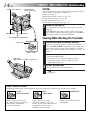
Power Switch Position
According to the Power Switch position you have selected, the following functions are available:
AUTO
(Full Auto mode):
Allows you to record using
NO special effects or manual
adjustments. Suitable for
standard recording.
PRO.
(PRO. mode):
Allows you to set various
recording functions using the
menus. If you want more creative
capabilities than full auto
recording, try this mode.
POWER OFF:
Allows you to switch off the
camcorder.
EN
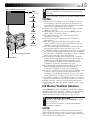
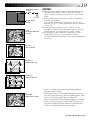
Tape remaining time indicator
MIN
25MIN
(Now calculating)
120MIN
15
4 STOP RECORDING
Press the Recording Start/Stop Button again to stop
recording.
•The camcorder re-enters the Record-Standby mode.
NOTES:
119MIN
3MIN
2MIN
(Blinking)
1MIN
(Blinking)
0MIN
(Blinking)
Recording Start/Stop Button
DISPLAY Button
● When the Power Switch is set to “CAMERA” and the
LCD monitor is opened at an angle of 60 degrees or
more, the LCD monitor switches on and the viewfinder
switches off automatically to save power.
● The cassette holder cannot be opened unless a power
supply is attached.
● There may be a delay after you slide EJECT until the
holder opens. Do not use force.
● The tape remaining time is only displayed in the
viewfinder as shown.
● The remaining time indicated in the viewfinder is
approximate.
● The time required to calculate the remaining tape
length, and the accuracy of the calculation, may vary
according to the type of tape used.
● The tape remaining time indicator is correct only if the
correct tape length has been selected ( Z pg. 10).
● “TAPE END” appears when the tape reaches its end, and
the power goes off automatically if left in this condition
for 5 minutes. “TAPE END” also appears when a cassette
whose tape is already at its end is loaded.
● If the Record–Standby mode continues for 5 minutes
without performing Zoom or any other operations, the
camcorder’s power shuts off automatically. Set the
Power Switch to “POWER OFF”, and then back to
“CAMERA” to turn the camcorder on again.
● If the Recording Start/Stop button is pressed after the
Record-Standby mode has continued for over
5 minutes, recording may not start immediately.
● If you are recording on a cassette from the middle (such
as when a tape is removed and re-inserted during
recording), use the Retake function ( Z pg. 25) to find
the end of the last recording so you don’t erase any of it.
● The LENS COVER warning blinks for about 5 seconds
when the camcorder is turned on with the cover closed.
● While shooting, sound is not heard from the speaker.
● To turn the tally lamp off during recording, refer to pgs.
32 and 34.
LCD Monitor/Viewfinder Indications
Press DISPLAY to make the following indications appear/
disappear from the camcorder’s display: cassette warning,
tape remaining time, battery pack remaining power
indicator and tape length indicator (Z pg. 70, 71).
1 PRESS DISPLAY BUTTON
To turn off the indications, press DISPLAY for more
than 1 second.
Press again for more than 1 second to make the
indications reappear.
NOTE:
Even if the indications are off, the tape remaining time
appears blinking when the tape is near its end, and the
battery pack remaining power indicator appears blinking
when the power is almost gone.
16
VIDEO RECORDING Basic Recording (cont.)
EN
Shooting While Watching The LCD Monitor
Before the following steps, perform step 1 (Z pg. 14).
180°
90°
2 ENTER RECORD–STANDBY MODE
Make sure the LCD monitor is fully open. Turn the
LENS COVER Open/Close Ring to open the lens
cover. Set the System Select Switch to “VIDEO”,
then set the Power Switch to “CAMERA” (“AUTO” or
“PRO.”).
System Select Switch
LENS COVER
Open/Close Ring
•The power lamp lights and the camcorder enters the
Record-Standby mode.
•The scene you are aimed at appears in the LCD
monitor, with the word “PAUSE” superimposed
upon it.
3 START SHOOTING
Z
Tilt the LCD monitor upward/downward for best
viewability ( pg. 17) and press the Recording Start/
Stop Button.
•“
” appears in the LCD monitor while recording
is in progress.
4 STOP RECORDING
Power Switch
Press the Recording Start/Stop Button again to stop
recording.
•The camcorder re-enters the Record-Standby mode.
Recording Start/Stop Button
Power lamp
Power Switch
Tally lamp
(lights while recording is in progress)
NOTES:
● When you use the LCD monitor outdoors in direct
sunlight, the LCD monitor may be difficult to see. If this
happens, we recommend that you use the viewfinder
( Z pg. 14).
● To turn the tally lamp off during recording, refer to pgs.
32 and 34.
● For other notes, refer to pg. 15.
EN
17
Journalistic Shooting
In some situations different angles of shooting may be
required for more dramatic results.
1 OPEN LCD MONITOR
2 TILT LCD MONITOR
Make sure the LCD monitor is fully open.
Tilt the LCD monitor in the most convenient
direction.
•The LCD monitor can rotate almost full circle (270°:
90° downward, 180° upward).
Interface Shooting
The person you shoot can view himself/herself in the
LCD monitor, and you can even shoot yourself while
viewing your own image in the LCD monitor.
1 TILT LCD MONITOR UPWARD
Open the LCD monitor and tilt it upward to 180
degrees so that it faces forward.
•When the LCD monitor is tilted upward to an angle
of over approx. 105 degrees, the monitor image is
inverted vertically, and the viewfinder also switches
on.
2 START RECORDING
Point the lens toward the subject (yourself when selfrecording) and start recording.
•During Interface Shooting, the monitor image and
indications do not appear inverted as they would
when viewing a mirror.
Self-recording
NOTE:
The monitored image can be viewed on the LCD monitor
and in the viewfinder.
Brightness Control
You can adjust the brightness of the LCD monitor by
turning the BRIGHT Dial.
1 ADJUST BRIGHTNESS
If you want to brighten the image . . .
Turn the Dial towards “+”.
If you want to darken the image . . .
Turn the Dial towards “–”.
BRIGHT Dial
18
DIGITAL STILL CAMERA (D.S.C.) SHOOTING
EN
SNAPSHOT Button
LENS COVER
Open/Close Ring
System
Select
Switch
Basic Shooting
When shooting a still image, it is not recorded onto the
tape, but it is stored in the camcorder's built-in memory in
the selected Picture Mode. A stored still image data can be
transferred to a PC, saved, and processed using a Paint
Software programme (Z pg. 49).
A still image processed on the PC can be also inserted
onto a tape (Z pg. 49, 63).
MODE SELECTION
OPERATION SYSTEM AND
1 SELECT
MODE
MENU Button
Power lamp
Turn the LENS COVER Open/Close Ring to open the
lens cover, then set the System Select Switch to
“D.S.C.”. Set the Power Switch to “PRO.”.
• The power lamp lights and an image appears.
2 SELECT PICTURE MODE
Select Dial
Power Switch
Display
4NEXT
M .W. B .
D . ZOOM
TELE MACRO
DATE TIME
TAPE LENGTH
PICTURE
SNAPSHOT
AUTO
ON
OFF
Menu Screen
4RETURN
SNAPSHOT
•There are two modes: FINE allows you to shoot up
to approx. 30 still images with higher resolution,
and STANDARD allows you to shoot up to approx.
60 still images with lower resolution.
3 SELECT SNAPSHOT MODE
T45
FINE
FULL
SNAPSHOT Menu
FULL
PIN UP
MULTI 4
MULTI 9
M . DRIVE
Do steps 2 and 3 of “OPERATION” on pg. 20.
Set “PICTURE” to “FINE” or “STANDARD” in the
Menu Screen as required.
Rotate the Select Dial to move the highlight bar to
“SNAPSHOT”, and press it. The SNAPSHOT Menu
appears.
Rotate the Select Dial to move the highlight bar to the
appropriate mode among the 5 Snapshot modes
(Z pg. 19), and press it. Selection is complete.
4 CLOSE MENU SCREEN
The Menu Screen reappears with the highlight bar on
“RETURN”. Press the Select Dial again to close the
Menu Screen.
EXIT
STILL IMAGE STORAGE
4NEXT
M .W. B .
D . ZOOM
TELE MACRO
DATE TIME
TAPE LENGTH
PICTURE
SNAPSHOT
AUTO
ON
OFF
Menu Screen
1 TAKE SNAPSHOT
Press SNAPSHOT.
T45
FINE
PIN-UP
4RETURN
Normal Screen
During Snapshot mode
P
No display
(PIN-UP)
(FULL)
P
MD (M.DRIVE)
M4 (MULTI-4)
M9 (MULTI-9)
•Regardless of the Power Switch position (“AUTO”
or “PRO.”), Snapshot recording takes place using
the selected Snapshot mode.
•A still image is stored in the built-in memory and
displayed for approx. 2 seconds. While the still
image remains displayed, that image is in the
process of being stored in memory, and it is
therefore impossible to take another shot during that
time. When the still image disappears and the scene
you are currently aimed at appears on the screen,
you may take another shot.
•The remaining number of shots available is
displayed.
EN
FINE 12
Remaining number
of shots
30 29
1
0
(Blinking)
,,,,,
,,,,
,,,,,
,,,,
,,,,
,,,,,
,,,,
,,,
,,,,
,,,
Pictrue mode
display
FULL*
(Snapshot mode with
no frame)
19
NOTES:
● The remaining number of shots varies according to the
selected Picture Mode. In the “STANDARD” mode,
twice as many still images can be shot as in the “FINE”
mode.
● Some sample images have been stored in the built-in
memory at the factory.
If you wish to delete them, first remove the “Protect”
function ( Z pg. 53), then perform the “Delete” function
( Z pg. 54).
● When the Power Switch is set to “AUTO”, it is not
possible to select the Snapshot mode. You can use the
Snapshot mode you selected in the “PRO.” mode.
● If a Snapshot is taken while the camcorder is in the
WIDE mode ( Z pg. 33), the Snapshot image is
recorded without the black bars at the top and bottom of
the screen.
PIN-UP*
(Pin-Up mode)
MULTI-4 **
(Multi-Analyzer 4)
MULTI-9**
(Multi-Analyzer 9)
,,,,,
,,,,
,,,,,
,,,,
,,,,
,,,,,
M. DRIVE u
(Motor Drive mode)
* There is a momentary camera shutter-type blackout
together with the image.
** Continuous camera shutter-type blackout takes place 4
or 9 times with the image, like serial photography, then
the 4 or 9 still images you took are displayed.
u Stores 4 still images continuously for approx. 2 seconds.
During still image storage, “MD” blinks and the 4 still
images are displayed in the order that you took them.
There is no sound effect of a shutter closing.
CONTINUED ON NEXT PAGE
20
D.S.C. SHOOTING (cont.)
EN
SNAPSHOT Button
FEATURE: Picture Mode Setting
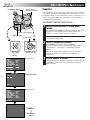
PURPOSE:
There are two image settings you can choose from
when storing in the camcorder's memory: FINE and
STANDARD. FINE allows you to shoot up to approx.
30 still images in a format based on JPEG (Joint
Photographic Experts Group). Since the quality of
image is better than “STANDARD”, “FINE” is more
suitable for post-production on a PC. “STANDARD”
allows you to shoot up to approx. 60 still images in a
format based on JPEG (Joint Photographic Experts
Group). Since in this mode, twice as many still images
can be shot as in the “FINE” mode, select this mode
when you wish to shoot many still images.
System
Select Switch
MENU Button
Power lamp
OPERATION:
Select Dial
1) Turn the LENS COVER Open/Close Ring to open the
lens cover, and set the System Select Switch to
“D.S.C.”. Set the Power Switch to “PRO.”.
2) Press MENU. The Menu Screen appears.
n If you wish the Picture Mode to return to the previous
setting, rotate the Select Dial to move the highlight
bar to “RETURN”.
3) Rotate the Select Dial to move the highlight bar to
“PICTURE”, and press it. The PICTURE Menu
appears.
Rotate the Select Dial to move the highlight bar to
“FINE” or “STANDARD”, and press it. Selection is
complete.
4) The Menu Screen reappears with the highlight bar
on “RETURN”. Press the Select Dial again to close
the Menu Screen.
Power Switch
Display
4NEXT
M .W. B .
D . ZOOM
TELE MACRO
DATE TIME
TAPE LENGTH
PICTURE
SNAPSHOT
AUTO
ON
OFF
Menu Screen
T45
FINE
FULL
4RETURN
PICTURE
FINE
STANDARD
PICTURE Menu
EXIT
4NEXT
M .W. B .
D . ZOOM
TELE MACRO
DATE TIME
TAPE LENGTH
PICTURE
SNAPSHOT
AUTO
ON
OFF
Menu Screen
T45
STD
FULL
4RETURN
Normal Screen
STD 12
Remaining number
of shots
60
59
1
0
(Blinking)
Picture mode display
STD
FINE
EN
NOTES:
21
● The picture mode’s factory-preset is FINE.
● Some sample images have been stored in the built-in memory at the factory.
If you wish to delete them, first remove the “Protect” function (Z pg. 53), then perform the “DELETE”
function (Z pg. 54).
● To store the still images you shot, we recommend that you transfer them to a computer and save them on
disk (Z pg. 49), or transfer them to a VCR connected to the camcorder and record them onto a tape.
● When the Power Switch is set to “CAMERA” (“AUTO” or “PRO.”) and the LCD monitor is opened at an
angle of 60 degrees or more, the LCD monitor switches on and the viewfinder switches off automatically
to save power. When you use the LCD monitor outdoors in direct sunlight, the LCD monitor may be
difficult to see. If this happens, we recommend that you use the viewfinder.
● When the remaining number indicator displays “0” (blinking), it is not possible to continue storing pictures
until you delete some shots to make room for new ones. Perform “DELETE” function in the Menu Screen
to remove pictures you do not need (Zpg. 54).
● The Picture Mode can be switched to either “FINE”or “STANDARD”. Since the remaining number of shots
available depends on the selected Picture Mode, switching the Picture Mode will vary this number.
● The LENS COVER warning blinks for approx. 5 seconds when the camcorder is turned on with the cover
closed.
● When SNAPSHOT is pressed with the System Select Switch set to “VIDEO”, the picture is stored in the
camcorder's built-in memory (in the Snapshot mode selected in the “VIDEO” system) and also onto the tape
(if a tape is in the camcorder) (Z pg. 22).
● When you shoot in a dark environment, the still image will become coarse and its true colours will be lost.
22
RECORDING Basic Features
EN
LENS COVER
Open/Close Ring
SNAPSHOT Button
Snapshot
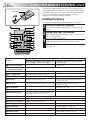
This interesting feature lets you record two types of digital
still images that look like photographs onto a tape, as well
as keeping them in the camcorder’s built-in memory. It is a
great way to spice up footage of events such as parties,
weddings and graduations.
SNAPSHOT MODE SELECTION
OPERATION SYSTEM AND
1 SELECT
MODE
System Select Switch
MENU Button
Power lamp
Turn the LENS COVER Open/Close Ring to open the
lens cover, and set the System Select Switch to
“VIDEO”. Set the Power Switch to “PRO.”.
•The power lamp lights and the camcorder enters
Record-Standby mode.
2 SELECT SNAPSHOT MODE
Power Switch
Select Dial
Display
4NEXT
M .W. B .
D . ZOOM
TELE MACRO
DATE TIME
TAPE LENGTH
PICTURE
SNAPSHOT
Menu Screen
AUTO
ON
OFF
T45
FINE
FULL
4RETURN
SNAPSHOT
SNAPSHOT Menu
FULL
PIN UP
EXIT
4NEXT
M .W. B .
D . ZOOM
TELE MACRO
DATE TIME
TAPE LENGTH
PICTURE
SNAPSHOT
Menu Screen
AUTO
ON
OFF
T45
FINE
PIN-UP
4RETURN
P
P
(PIN-UP)
No display
(FULL)
Press MENU. The Menu Screen appears.
Rotate the Select Dial to move the highlight bar to
“SNAPSHOT”, and press it. SNAPSHOT Menu
appears.
Rotate the Select Dial to move the highlight bar to
“FULL” or “PIN-UP”, and press it. Selection is
complete.
3 CLOSE MENU SCREEN
The Menu Screen reappears with the highlight bar on
“RETURN”. Then press the Select Dial to close the
Menu Screen.
EN
23
SNAPSHOT RECORDING
SNAPSHOT
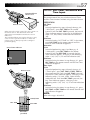
1 TAKE SNAPSHOT
Press SNAPSHOT.
Display (ex. PIN-UP)
1
2
3
•Regardless of the Power Switch position (“AUTO”
or “PRO.”), Snapshot recording takes place using
the selected Snapshot mode.
•A still image is recorded onto the tape and into the
camcorder’s built-in memory.
•First there is a momentary camera shutter-type
blackout together with the sound effect of a shutter
closing, then a still image appears. The scene you
are currently aimed at starts in the centre of a black
screen and wipes in toward the corners.
The screen changes as shown in the illustrations 1
to 5 and the screens 1 to 5 are recorded onto the
tape in the selected mode. Only the still image 3 is
stored in the built-in memory in the selected mode,
then the camcorder resumes normal recording.
If you press during Record-Standby mode . . .
.... the screens 1 to 3 are recorded onto the tape in
the selected mode. Then the camcorder re-enters
the Record-Standby mode.
NOTES:
4
5
,,,,,
,,,,
,,,,,
,,,,
,,,,
,,,,,
,,,,
,,,
,,,,
,,,
FULL
(Snapshot mode with
no frame)
PIN-UP
(Pin-Up mode)
● When the remaining number indicator displays “0”
(blinking), the still image will be recorded onto the
tape but not in the built-in memory. If you wish to store
a still image in the built-in memory, Z pg. 54.
● The Picture Mode can be switched to either “FINE” or
“STANDARD”. Since the remaining number of shots
available depends on the selected Picture Mode,
switching the Picture Mode will vary this number.
● If SNAPSHOT is pressed with the System Select Switch
set to “D.S.C.”, Z pg. 18.
● Image data stored in the camcorder’s built-in memory
can be transferred to a Windows® PC and saved using
the provided image transfer software, Picture Navigator
( Z pg. 49). The image data transferred to a Windows®
PC can also be further processed using Mr. Photo Gold.
● If a snapshot is taken while the camcorder is in the
WIDE mode ( Z pg. 33), the snapshot image is
recorded without the black bars at the top and bottom
of the screen.
● When a Snapshot is taken in a dark environment, the
still image recorded onto the tape and stored in
memory will become coarse and its true colours will
be lost.
24
RECORDING Basic Features (cont.)
EN
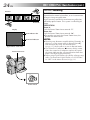
FEATURE: Zooming
Zoom in
PURPOSE:
Zoom out
To produce the zoom in/out effect, or an instantaneous
change in image magnification.
Digital circuitry extends the maximum magnification
offered by optical zoom. This system is called Digital
Zoom.
OPERATION:
Display
Zoom indicator bar
1X
Zoom level indicator
Zoom In
Push the Power Zoom Lever towards “T”.
Zoom Out
Push the Power Zoom Lever towards “W”.
n The quicker you push the Power Zoom Lever, the
quicker the zoom action.
NOTES:
● Focusing may become unstable during Zooming. In
this case, set the zoom while in Record–Standby,
lock the focus by using the manual focus
( Z pg. 37), then zoom in or out in Record mode.
● The zoom level indicator ( 5) moves during zoom.
Once the zoom level indicator reaches the top of
the zoom indicator bar, all magnification from that
point is through digital processing.
● When using Digital Zoom, the quality of image may
suffer. To deactivate Digital Zoom, set “D.ZOOM”
to “OFF” in the Menu Screen ( Z pg. 33).
Approximate zoom ratio
Power Zoom Lever
Power Switch
EN
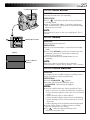
P. STABILIZER Button
25
FEATURE: Quick Review
PURPOSE:
To check the end of the last recording.
OPERATION:
1) Press “ ” and release quickly during the Record–
Standby mode.
n Tape is rewound for about 2 seconds and played
back automatically, then pauses in Record–Standby
mode for the next shot.
NOTE:
Distortion may occur at the start of playback. This is
normal.
RETAKE (R/F) Button
FEATURE: Retake
PURPOSE:
To re-record certain segments.
OPERATION:
1) Make sure the camcorder is in the Record–Standby
mode.
2) Press either RETAKE to reach the start point for new
recording. Pressing “F” forwards the tape and
pressing “R” reverses it.
3) Press the Recording Start/Stop Button to start
recording.
Display
Picture stabilizer
indicator
NOTE:
Noise bars appear and pictures may become
monochrome or darken during Retake. This is normal.
FEATURE: Picture Stabilizer
PURPOSE:
To compensate for unstable images caused by camerashake, particularly at high magnification.
OPERATION:
1) Press P. STABILIZER. “
”appears.
n To switch off the Picture Stabilizer, press
P. STABILISER. The indicator disappears.
NOTES:
● Accurate stabilisation may not be possible if hand
shake is excessive, or under the following conditions:
• When shooting subjects with vertical or horizontal
stripes.
• When shooting dark or dim subjects.
• When shooting subjects with excessive backlighting.
• When shooting scenes with movement in various
directions.
• When shooting scenes with low-contrast backgrounds.
● Switch off the Picture Stabilizer when recording
with the camcorder on a tripod.
● The “
” indicator appears blinking if the
Stabilizer cannot be used.
26
EN
RECORDING Basic Features (cont.)
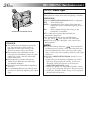
FEATURE: Video Light
PURPOSE:
To brighten the scene when natural lighting is too dim.
OPERATION:
LIGHT OFF/AUTO/ON Switch
DANGER
n The video light can become extremely
hot. Do not touch it either while in
operation or soon after turning it off,
otherwise serious injury may result.
n Do not place the camcorder into the
carrying case immediately after using the
video light, since it remains extremely
hot for some time.
n When operating, keep a distance of
about 30 cm. between the video light
and people or objects.
n Do not use near flammable or explosive
materials.
n It is recommended that you consult your
nearest JVC dealer for replacing the video
light.
1) Set the LIGHT OFF/AUTO/ON Switch as required:
OFF : Turns off the light.
AUTO : Automatically turns on the light when the
camcorder senses insufficient lighting on the
subject.
ON
: Always keeps the light on as long as the
camcorder is turned on.
n The video light can only be used with the
camcorder’s power on.
n It is recommended to set the white balance
(Z pg. 38) to
when you use the video light.
n When not using the video light, turn it off to save
battery power.
NOTES:
● Even if the battery indicator (
) does not blink if
the battery pack’s charge is low, the camcorder may
turn off automatically when you turn on the video
light, or when you start recording with the video light
turned on.
● When the LIGHT OFF/AUTO/ON Switch is set to
“AUTO”:
• Depending on the lighting conditions, the video
light may keep turning on and off. In this case,
manually switch the light on or off using the
LIGHT OFF/AUTO/ON switch.
• While the “Sports” or “High Speed Shutter” mode
( Z pg. 29) is engaged, the light is likely to stay on.
• While the “Twilight” mode ( Z pg. 29) is engaged,
the light will not activate.
RECORDING Advanced Features
EN
27
Fade/Wipe
[Ex.: Fader]
Fade in
These effects let you make pro-style scene transitions.
Fade- or wipe-in works at recording start, and fade- or
wipe-out works at recording end or when you enter
Record–Standby mode.
Fade out
Display
EFFECT
After 2 sec.
MOSAIC
EFFECT
MOSAIC
OPERATION SYSTEM AND
1 SELECT
MODE
Set the System Select Switch to “VIDEO”, and set the
Power Switch to “PRO.”.
FADE- OR WIPE-STANDBY
2 ENGAGE
MODE
Press EFFECT to cycle through the modes as shown at
left. Once the desired mode appears, it is selected
and reserved.
•The selected mode’s name and its indication are
displayed for approx. 2 seconds. Then the name
disappears, and only the indication remains.
3 START OR END RECORDING
FADER
MOSAIC
SHUTTER
CANCEL FADE- OR WIPE-STANDBY
4 TO
MODE
Press EFFECT repeatedly until “OFF” appears.
SLIDE
OFF
(No indication)
Press the Recording Start/Stop Button to activate fadein/out or wipe-in/out.
•“OFF” is displayed for approx. 2 seconds and the
fade/wipe standby mode is canceled.
OFF
FADER
Fades in/out to a black screen.
System Select Switch
MOSAIC (Fader)
Gradually turns/returns the picture into/from a mosaic
pattern.
EFFECT Button
SHUTTER (Wipe)
A black screen moves in from the top and bottom, closing
over the image like a shutter, or a new image pushes open
the black screen vertically from the centre.
SLIDE (Wipe)
A black screen moves in from the left to gradually cover
the image, or a new image moves in from right to left.
Recording Start/Stop
Button
Power Switch
NOTES:
● Pressing and holding the Recording Start/Stop Button
allows you to vary the length for the image during fade
in/out or wipe in/out.
● The screen becomes slightly reddish when the Fade/
Wipe is used with Sepia ( Z pg. 29).
● With the Electronic fog filter mode ( Z pg. 29) engaged,
the image fades in/out to a white screen.
● Even if you start shooting with the Fade/Wipe indication
displayed during Digital Still Camera Shooting, the Fade/
Wipe does not function.
28
RECORDING Advanced Features (cont.)
EN
Programme AE With Special Effects
Display
P.AE
After 2 sec.
:SEPIA
P.AE
:SEPIA
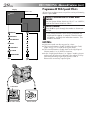
All you have to do to access any of the variety of shooting
effects is press P.AE.
OPERATION SYSTEM AND
1 SELECT
MODE
Set the System Select Switch to “D.S.C.” or “VIDEO”,
and set the Power Switch to “PRO.”.
2 SELECT MODE
Press P.AE to cycle through the modes as shown on
the left.
SEPIA
SPORTS
ND: ND EFFECT
ND
FG: FOG
FG
TWILIGHT
S1/2000
NEGA/POSI
OFF
OFF
(No indication)
P.AE Button
System Select Switch
Power Switch
•The selected mode’s name and its indication are
displayed for approx. 2 seconds. Then the name
disappears, and only the indication remains. The
mode is activated.
NOTES:
● Only one mode can be engaged at a time.
● The screen becomes slightly reddish when the Fade/
Wipe ( Z pg. 27) is used in the Sepia mode.
● The screen becomes slightly dark in the High Speed
Shutter mode. Use in well-lit situations.
● In the “High Speed Shutter” or “Sports” modes, picture
colour may be adversely affected if the subject is lit by
alternating discharge-type light sources such as
flourescent or mercury-vapour lights.
EN
Display
SEPIA
Mode
Display
TWILIGHT
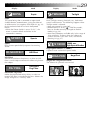
Sepia
29
Mode
Twilight
Sepia
Twilight
The scene being shot is recorded in sepia-tinted
(reddish-brown) monochrome, giving the effect of
an older movie. Use together with Wide (Z pg. 33)
for the authentic look of a classic Hollywood
movie.
•When the Power Switch is set to “D.S.C.”, the
scene is stored in black-and-white in the
camcorder’s memory.
Dusk, twilight scenery, fireworks, etc., look more
natural and dramatic. The following happens when
Twilight mode is selected:
•Auto gain control is turned off.
•White Balance is set to “
” (FINE day mode),
but can also be manually changed to another
mode (Z pg. 38).
•Auto Focus becomes available only in the range of
10 m to infinity. To focus when the subject-tocamera distance is less than 10 m, use manual
focusing (Z pg. 37).
SPORTS
Sports
Sports
High shutter speed clearly captures fast-moving
action.
37
.)
S 1/2000
1/2000 sec.
High Speed Shutter
High-Speed Shutter (1/2000s.)
ND:ND EFFECT
Captures faster action than Sports mode.
ND Effect
NEGA POSI
ND Effect
A black mist darkens the picture, as when an ND
filter is used. Helps to counter the effects of glare on
the subject.
FG : FOG
Nega/Posi
Nega/Posi (Negative/Positive)
The colours of a picture are reversed.
Electronic
Fog Filter
Electronic Fog Filter
Makes the picture look misty white, as when an
external fog filter is attached to the lens. Softens the
image and gives it a “fantasy” look.
NEGA POSI mode
30
RECORDING Advanced Features (cont.)
EN
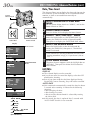
Date/Time Insert
This feature allows you to display the date and time on the
LCD monitor, in the viewfinder, or on a connected colour
monitor, as well as to record them manually or
automatically.
System
Select Switch
OPERATION SYSTEM AND
1 SELECT
MODE
Set the System Select Switch to “VIDEO”, and set the
Power Switch to “PRO.”.
2 ACCESS MENU SCREEN
3 ACCESS “DATE/TIME DISP.” MENU
Press the Select Dial to display the Menu Screen.
Select Dial
Power Switch
Display
FOCUS
AUTO
EXPOSURE
AUTO
WIDE
OFF
S . LX
OFF
TITLE
DATE TIME DISP.
Menu Screen
AUTO DATE
DATE
TIME
DATE&TIME
OFF
4 SELECT THE DESIRED MODE
Move the highlight bar to the desired mode by
rotating the Select Dial, then press it. The desired
mode is activated.
•You should have already performed the Date/Time
Setting procedure (Z pg. 9). If you haven’t, do so
first.
4RETURN
DATE TIME DISP.
Move the highlight bar to “DATE/TIME DISP.” by
rotating the Select Dial while in Record-Standby.
Then press it to display the DATE/TIME DISP. Menu.
DATE/TIME DISP.
Menu
5 CLOSE MENU SCREEN
The Menu Screen reappears with the highlight bar on
“RETURN”. Then press the Select Dial to close the
Menu Screen.
NOTES:
DISPLAY
EXIT
FOCUS
AUTO
EXPOSURE
AUTO
WIDE
OFF
S . LX
OFF
TITLE
DATE TIME DISP.
4RETURN
25 . 12 . 99
AUTO DATE
25 . 12 . 99
(DATE)
22 : 50 : 00
(TIME)
22 : 50 : 00
25 . 12 . 99
(DATE&TIME)
OFF
(No indication)
● The selected display can be recorded.
● If you do not want to record the display, select the OFF
mode before shooting.
● Even if you shoot with the date/time displayed during
Digital Still Camera Shooting, they will not be recorded.
AUTO DATE
● Your camcorder automatically records the date for about
5 seconds after recording is initiated in the following
situations:
• After changing the date.
• After loading a cassette.
• After Auto Date Record mode is selected by rotating
the Select Dial.
● In this mode, the date is replaced after 5 seconds with
“AUTO DATE” but this is not recorded.
EN
31
Instant Titles
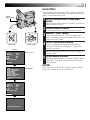
The camcorder has eight preset titles in memory. You can
superimpose one of them above a previously stored title as
shown in the illustration on left.
System
Select Switch
OPERATION SYSTEM AND
1 SELECT
MODE
Set the System Select Switch to “VIDEO”, and set the
Power Switch to “PRO.”.
2 ACCESS MENU SCREEN
3 ACCESS “TITLE” MENU
Press the Select Dial to display the Menu Screen.
Move the highlight bar to “TITLE” by rotating the
Select Dial while in Record-Standby. Then press it to
display the TITLE Menu.
Select Dial
Power Switch
Display
FOCUS
AUTO
EXPOSURE
AUTO
WIDE
OFF
S . LX
OFF
TITLE
DATE TIME DISP.
Menu Screen
AUTO
FOCUS
AUTO
EXPOSURE
OFF
WIDE
OFF
S . LX
TITLE
DATE TIME DISP.
4RETURN
CONGRATULATIONS
Move the highlight bar to the desired mode by
rotating the Select Dial, then press it. The desired
mode is activated.
•If you wish to make the title indication disappear,
select “OFF”.
5 CLOSE MENU SCREEN
The Menu Screen reappears with the highlight bar on
“RETURN”. Then press the Select Dial to close the
Menu Screen.
4RETURN
TITLE
OFF
HAPPY BIRTHDAY
HAPPY HOLIDAYS
OUR FAMILY
MOVIE STAR
PARTY TIME
MERRY CHRISTMAS
WEDDING DAY
CONGRATULATIONS
EXIT
4 SELECT THE DESIRED MODE
NOTE:
TITLE Menu
Even if you shoot with the Title displayed during Digital
Still Camera Shooting, this is not recorded.
32
RECORDING Advanced Features (cont.)
EN
Using Menu For Detailed Adjustment
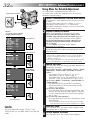
This camcorder is equipped with an easy-to-use,
on-screen menu system that simplifies many of the more
detailed camcorder settings.
System Select Switch
1 SELECT OPERATION SYSTEM AND MODE
Select Dial
MENU Button
2 ACCESS MENU SCREEN
Display
(ex. Menu Screen available
using the MENU Button)
4NEXT
M .W. B .
D . ZOOM
TELE MACRO
DATE TIME
TAPE LENGTH
PICTURE
SNAPSHOT
AUTO
ON
OFF
Menu Screen 1
T45
FINE
FULL
Menu Screen 2
REC. TIME
INT. TIME
TALLY LAMP
JLIP ID NO
DEMO MODE
4 MAKE SETTING
REC TIME
OFF
1 4S
1 2S
1 S
5 S
Setting Menu
(ex. REC TIME)
EXIT
REC. TIME
INT. TIME
TALLY LAMP
JLIP ID NO
DEMO MODE
Rotate the Select Dial to place the highlight bar on the
desired function.
• To go from Menu Screen 1 to Menu Screen 2, rotate the
Select Dial to “NEXT” and press it. To go back to Menu
Screen 1 from Menu Screen 2, rotate the Select Dial to
“BACK”, and press it.
• If the setting you want cannot be found in the Menu Screen,
place the highlight bar on “RETURN”, then go to step 6.
OFF
OFF
ON
06
OFF
4RETURN
4BACK
Menu access depends on the function you select.
If you select the functions from the “Menu Screen
Available Using The Select Dial” described on pg. 33 . . .
.... press the Select Dial. The Menu Screen appears.
If you select the functions from the “Menu Screen
Available Using The MENU Button” described on
pg. 33 and 34 . . .
.... press MENU. The Menu Screen appears.
3 SELECT FUNCTION
4RETURN
4BACK
The operation system depends on the function you wish
to select.
Set the System Select Switch to “VIDEO” or “D.S.C.”
according to each function's “*/**” explanation
described at the bottom of pages 33 and 34, and set the
Power Switch to “PRO.”.
1S
OFF
ON
06
OFF
4RETURN
Normal Screen
Press the Select Dial. The setting procedure depends on
the function you select.
If you select “FOCUS”, “EXPOSURE”, “TITLE”, “DATE/
TIME DISP.”, “DATE/ TIME”, “PICTURE” or "SNAPSHOT". . .
.... see respective pages (FOCUS: Z pg. 36, 37,
EXPOSURE: Z pg. 35, TITLE: Z pg. 31,
DATE/TIME DISP.: Z pg. 30, DATE/TIME: Z pg. 9,
PICTURE: Z pg. 20, SNAPSHOT: Z pg. 18, 23).
If you select “WIDE”, “D.ZOOM”, “TELE MACRO” or
“DEMO MODE” . . .
.... the selected function’s parameter starts blinking.
Rotate the Select Dial until the desired parameter
appears. Go to step 5.
If you select “JLIP ID NO.” . . .
.... press the Select Dial so that the number blinks, then
rotate it until the desired number appears, and press
it. Then rotate the Select Dial to move the highlight
bar to “EXIT”.
If you select any other functions . . .
.... rotate the Select Dial to move the highlight bar to the
desired setting.
• If you decide you want to return to the previous setting,
rotate the Select Dial to move the highlight bar to “EXIT”.
NOTE:
No menu functions except “FOCUS” and
“EXPOSURE” are available while in the Record
mode.
5 END SETTING
6 CLOSE MENU SCREEN
Press the Select Dial. The Menu Screen reappears with
the highlight bar on “RETURN”.
Press the Select Dial. The normal screen reappears.
EN
33
MENU SCREEN EXPLANATIONS
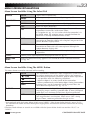
Menu Screen Available Using The Select Dial
FOCUS
EXPOSURE
WIDE
S.LX
AUTO
Adjusts focus automatically.
MANU
Allows you to adjust focus manually (Z pg. 36, 37).
AUTO
Adjusts exposure automatically.
MANU
Allows you to adjust exposure manually (Z pg. 35).
OFF
Does not display black bars.
ON
Allows you to record black bars at the top and bottom of the screen
to produce a cinema-like “wide-screen” effect.
If a snapshot (Z pg. 18, 22) is taken while the camcorder is in
the WIDE mode, the snapshot image is recorded without the
black bars at the top and bottom of the screen.
MAX
To record a subject in a darkly lit environment, it is more
convenient to shoot the subject with a brighter image even if the
picture becomes slightly coarse.
NORMAL
To record a subject in a dimly lit environment, it is more
convenient to shoot with a less coarse picture although the
subject becomes slightly dark.
OFF
Allows you to shoot dark scenes with no picture brightness
adjustment.
TITLE*
Allows you to superimpose one of eight preset titles (Z pg. 31).
DATE/TIME
DISP.*
Makes the date/time settings appear in the camcorder or on a connected monitor
(Z pg. 30).
Menu Screen Available Using The MENU Button
This Menu Screen cannot be accessed while recording.
M.W.B.
AUTO
: FINE
: CLOUD
: HALOGEN
MWB
D. ZOOM
This camcorder’s Automatic Colour Temperature system senses
the colour temperature of the ambient lighting for automatic
white balance adjustment. However, precise colour adjustment
is not possible under the following conditions:
• When an object is in various shades of the same colour.
• When a predominantly red or brown object is being shot outdoors.
In these cases, use the camcorder’s built-in preset filters for
white balance adjustment (Z pg. 38, 39).
ON
Allows you to use the Digital Zoom. By digitally processing and
magnifying images, zooming is possible from 16 times (the optical
zoom limit), to a maximum of 320 times digital magnification.
OFF
Digital Zoom is not available. Only optical zoom (maximum
16x magnification) can function. When set to “OFF” during
Digital Zoom, zoom magnification changes to 16x.
* Activated only with the System Select Switch set to “VIDEO”. If the System Select Switch is set to “D.S.C.”,
this function will not be activated although the highlight bar will move on the Menu Screen like the setting
procedure.
Functions listed without an asterisk are available with the System Select Switch set to either “D.S.C.” or
“VIDEO”.
: Factory-preset
CONTINUED ON NEXT PAGE
34
RECORDING
EN
Menu Screen Available Using The MENU Button (cont.)
TELE MACRO
OFF
ON
Advanced Features (cont.)
Usually the distance to a subject where the lens is in focus
depends on the zoom magnification. Unless there is a distance of
more than 1m to the subject, the lens is out of focus at the
maximum telephoto setting. When set to “ON”, you can shoot a
subject as large as possible at a distance of approx. 60 cm.
•Depending on the zoom position, the lens may go out of focus.
DATE/TIME
Allows you to set the current date and time (Z pg. 9).
TAPE LENGTH*
Allows you to set the tape length depending on the tape used (Z pg. 10).
PICTURE**
Allows you to select the image setting “FINE” or “STD” when storing in the
camcorder's memory (Z pg. 20).
SNAPSHOT
FULL
PIN-UP
MULTI-4
MULTI-9
M.DRIVE
Displayed with the System Select Switch set to either “VIDEO”
(Z pg. 22) or “D.S.C.” (Z pg. 19).
Displayed only with the System Select Switch set to “D.S.C.”
(Z pg. 19).
REC TIME*
This feature allows you to set the parameters for Animation and Time-Lapse
recording (Z pg. 41).
INT. TIME
This feature allows you to set the parameters for Self-Timer (Z pg. 40) and TimeLapse recording (Z pg. 41).
TALLY LAMP*
OFF
The tally lamp remains off at all times.
ON
The tally lamp comes on to signal the start of recording.
JLIP ID NO.
This number is necessary when connecting the camcorder to a device such as a computer
using the J terminal (JLIP). The numbers range from 01 to 99. Factory setting is 06.
DEMO MODE*
OFF
Automatic demonstration will not take place.
ON
Demonstrates certain functions such as Fade/Wipe, etc. When
“DEMO MODE” is set to “ON” and the Menu Screen is closed,
the demonstration starts.
NOTES:
● When a tape whose Erase Protection tab is in the position that
allows recording is loaded in the camcorder, demonstration is
not available.
● By turning off the camcorder or inserting a tape whose Erase
Protection tab is in the position that allows recording into it,
“DEMO MODE” is set to “OFF” automatically.
● During the demonstration, all functions except zoom are
disabled.
* Activated only with the System Select Switch set to “VIDEO”. If the System Select Switch is set to “D.S.C.”,
this function will not be activated although the highlight bar will move on the Menu Screen like the setting
procedure.
** Activated only with the System Select Switch set to “D.S.C.”. If the System Select Switch is set to “VIDEO”,
this function will not be activated although the highlight bar will move on the Menu Screen like the setting
procedure.
Functions listed without an asterisk are available with the System Select Switch set to either “D.S.C.” or
“VIDEO”.
: Factory-preset
EN
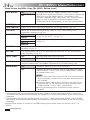
35
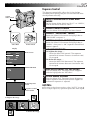
Exposure Control
This feature automatically adjusts the iris for the best
available picture quality, but you can override and make
the adjustment manually.
System
Select Switch
OPERATION SYSTEM AND
1 SELECT
MODE
Set the System Select Switch to “D.S.C.” or “VIDEO”,
and set the Power Switch to “PRO.”.
2 ACCESS MENU SCREEN
3 ACCESS “EXPOSURE” MENU
Press the Select Dial to display the Menu Screen.
Rotate the Select Dial to move the highlight bar to
“EXPOSURE” and press it.
Select Dial
4 ACCESS MANUAL EXPOSURE
Rotate the Select Dial to move the highlight bar to
“MANU”, then press it. “00” (exposure control level
counter) appears.
Power Switch
Display
5 ADJUST EXPOSURE
To brighten the image . . .
.... rotate the Select Dial upward. The exposure
control level counter increases (maximum +06).
Go to step 6.
To darken the image . . .
.... rotate the Select Dial downward. The exposure
control level counter decreases (maximum –06).
Go to step 6.
Menu Screen
FOCUS
AUTO
EXPOSURE
AUTO
WIDE
OFF
S . LX
OFF
TITLE
DATE TIME DISP.
4RETURN
EXPOSURE
EXPOSURE Menu
AUTO
MANU
6 END ADJUSTMENT OF EXPOSURE
Press the Select Dial. The Menu Screen reappears
with the highlight bar on “RETURN”.
7 CLOSE MENU SCREEN
Press the Select Dial. The Menu Screen disappears
and the exposure control level counter reappers to
indicate the exposure is adjusted.
EXIT
00
Manual Exposure
Screen
NOTES:
Exposure control
level counter
To brighten the image
–06
–06
+06
To darken the image
● To return to the factory setting, select “AUTO” in step 4.
● To re-adjust exposure, repeat the procedure from step 2.
36
RECORDING Advanced Features (cont.)
EN
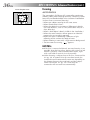
Focus detection zone
Focusing
AUTO FOCUS
The camcorder’s Full Range AF system offers continuous
shooting ability from close-up to infinity. However, correct
focus may not be obtainable in the situations listed below
(in these cases use manual focusing):
•When two subjects overlap in the same scene.
•When illumination is low.*
•When the subject has no contrast (difference in brightness and darkness), such as a flat, one-colour wall, or a
clear, blue sky.*
•When a dark object is barely visible in the viewfinder.*
•When the scene contains minute patterns or identical
patterns that are regularly repeated.
•When the scene is affected by sunbeams or light
reflecting off the surface of a body of water.
•When shooting a scene with a high-contrast background.
* The low-contrast warning “
” appears.
NOTES:
● If the lens is smeared or blurred, accurate focusing is not
possible. Keep the lens clean, wiping with a piece of soft
cloth if it gets dirty. When condensation occurs, wipe
with a soft cloth or wait for it to dry naturally.
● When shooting a subject close to the lens, zoom out first
(Z pg. 24). If zoomed in in the auto focus mode, the
camcorder could automatically zoom out depending on
the distance between the camcorder and the subject.
When Tele Macro (Z pg. 34) is activated, the
camcorder will not zoom out automatically.
EN
37
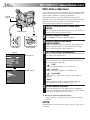
MANUAL FOCUS
NOTE:
You should already have made the necessary viewfinder
adjustments (Z pg. 12). If you haven’t, do so before
continuing.
System
Select Switch
OPERATION SYSTEM AND
1 SELECT
MODE
Set the System Select Switch to “D.S.C.” or “VIDEO”,
and set the Power Switch to “PRO.”.
2 ACCESS MENU SCREEN
3 ACCESS “FOCUS” MENU
Press the Select Dial to display the Menu Screen.
Move the highlight bar to “FOCUS” by rotating the
Select Dial, then press it.
Select Dial
Power Switch
Display
FOCUS
AUTO
EXPOSURE
AUTO
WIDE
OFF
S . LX
OFF
TITLE
DATE TIME DISP.
Menu Screen
4RETURN
FOCUS
FOCUS Menu
AUTO
MANU
4 ACCESS MANUAL FOCUS
Rotate the Select Dial to move the highlight bar to
“MANU”, then press it. “ ” and “ ” appear. The
focus is locked at this point.
5 ADJUST FOCUS
To farther subject . . .
.... rotate the Select Dial upward. “ ” appears and
blinks.
Go to step 6.
To nearer subject . . .
.... rotate the Select Dial downward. “ ” appears
and blinks.
Go to step 6.
6 END ADJUSTMENT OF FOCUS
Press the Select Dial. The Menu Screen reappears
with the highlight bar on “RETURN”.
7 CLOSE MENU SCREEN
EXIT
Manual Focus Screen
Press the Select Dial. The Menu Screen disppears and
“
” reappears to indicate the focus is locked.
NOTES:
● To return to Auto Focus, select “AUTO” in step 4.
● To re-adjust Manual Focus, repeat the procedure from
step 2.
● Be sure to focus the lens in the maximum telephoto
position when you use the Manual Focus mode. If you
focus in on a certain subject in the wide-angle position,
sharply focused images cannot be obtained when
zoomed in because the depth-of-field is reduced at
longer focal lengths.
● When the focus level cannot be adjusted any farther or
closer, “ ” or “ ” will blink.
38
RECORDING Advanced Features (cont.)
EN
White Balance Adjustment
A term that refers to the correctness of colour reproduction
under various lighting. If the white balance is correct, all
other colours will be accurately reproduced.
The white balance is usually adjusted automatically.
However, the more advanced camcorder operator would
prefer to control this function manually and achieve a
more professional colour/tint reproduction.
System
Select Switch
OPERATION SYSTEM AND
1 SELECT
MODE
MENU Button
Set the System Select Switch to “D.S.C.” or “VIDEO”,
and set the Power Switch to “PRO.”.
2 ACCESS MENU SCREEN
WHITE BALANCE
3 ACCESS
ADJUSTMENT
Press MENU. The Menu Screen appears.
Select Dial
Power Switch
Display
Menu Screen
4NEXT
M .W. B .
D . ZOOM
TELE MACRO
DATE TIME
TAPE LENGTH
PICTURE
SNAPSHOT
AUTO
ON
OFF
T45
FINE
FULL
4RETURN
M.W.B.
AUTO
: FINE
: CLOUD
: HALOGEN
MWB
EXIT
M.W.B. Menu
Move the highlight bar to “M.W.B.” by rotating the
Select Dial, then press it. The Menu Screen disappears and the M.W.B. Menu appears.
4 SET FUNCTION PARAMETERS
Move the highlight bar to the required white balance
by rotating the Select Dial.
“AUTO”
The white balance is adjusted automatically. This is
the factory preset position.
“
: FINE”
When shooting outdoors on a sunny day.
“
: CLOUD”
When shooting outdoors on a cloudy day.
“
: HALOGEN”
When using a video light or other similar type of
lighting.
“MWB”
When shooting with the white balance already
having been set on the subject (Z pg. 39).
5 CLOSE MENU SCREEN
Press the Select Dial. The Menu Screen reappears
with the highlight bar on “RETURN”. Press the Select
Dial again to close the Menu Screen.
To Return To Automatic White Balance . . .
.... select “AUTO” in step 4. Or set the Power Switch to
“AUTO”.
NOTE:
White balance cannot be used when Sepia ( Z pg. 29) is
activated.
EN
White paper
39
Manual White Balance Operation
If the camera is operating in PRO. mode, perform a
Manual White Balance when shooting under various types
of lighting.
OPERATION SYSTEM AND
1 SELECT
MODE
Follow steps 1 through 4 of the white balance
adjustment (Z pg. 38), and select “MWB”.
2 SET MANUAL WHITE BALANCE
Hold a sheet of plain white paper in front of the
subject. Adjust zoom or position yourself so that the
white paper fills the screen.
System Select Switch
3 ENTER SETTING
Press the Select Dial until “MWB” begins blinking.
•When the setting is completed, “MWB” stops
blinking, and the Menu Screen reappears with the
highlight bar on “RETURN”.
Select Dial
Power Switch
Display
4NEXT
M .W. B .
D . ZOOM
TELE MACRO
DATE TIME
TAPE LENGTH
PICTURE
SNAPSHOT
AUTO
ON
OFF
Menu Screen
M.W.B.
EXIT
Press the Select Dial again to close the Menu Screen.
To Change The Tint For Recording . . .
.... in step 2, substitute coloured paper for white. The
white balance is adjusted based on the colour,
changing the tint. Red paper — deeper green; blue
paper — orange; yellow paper — deeper purple.
NOTES:
T45
FINE
FULL
4RETURN
AUTO
: FINE
: CLOUD
: HALOGEN
MWB
4 CLOSE MENU SCREEN
M.W.B. Menu
● In step 2, it may be difficult to focus on the white paper
in some circumstances. In such a case, adjust focus
manually ( Z pg. 37).
● A subject can be shot under various types of lighting
conditions indoors (natural, flourescent, candlelight,
etc.). Because the colour temperature is different
depending on the light source, the tint of the subject will
differ depending on the white balance settings. Use this
function for a more natural result.
● Once you adjust white balance during Manual White
Balance operation, the setting is retained even if the
power is turned off or the battery removed.
40
RECORDING Advanced Features (cont.)
EN
Self-Timer
You can set the delay between pressing the Recording
Start/Stop button and the actual start of recording. If you
secure the camcorder, you (or whoever is operating the
camcorder) can enter the scene before recording starts.
System
Select Switch
NOTE:
Before performing the following steps, make sure that:
● The System Select Switch is set to “VIDEO” or “D.S.C.”
according to your needs.
● The Power Switch is set to “PRO.”.
● The camcorder is in the Record-Standby mode.
MENU Button
1 ACCESS MENU SCREEN
2 ACCESS “INT. TIME” MENU
Press MENU.
Select Dial
Recording Start/Stop
Button
Display
4NEXT
M .W. B .
D . ZOOM
TELE MACRO
DATE TIME
TAPE LENGTH
PICTURE
SNAPSHOT
AUTO
ON
OFF
Menu Screen 1
REC. TIME
INT. TIME
TALLY LAMP
JLIP ID NO
DEMO MODE
OFF
OFF
ON
06
OFF
3 SET INTERVAL TIME
Rotate the Select Dial to move the highlight bar to the
desired time, then press it. The Menu Screen
reappears with the highlight bar on “RETURN”.
4 CLOSE MENU SCREEN
5 START DELAYED RECORDING
T45
FINE
FULL
Press the Select Dial.
4RETURN
4BACK
Rotate the Select Dial to move the highlight bar to
“NEXT” in Menu Screen 1 and press it to display
Menu Screen 2. Then, move the highlight bar to “INT.
TIME” and press it.
Menu Screen 2
4RETURN
If you set the System Select Switch to “VIDEO” . . .
.... press the Recording Start/Stop Button. When the
selected time has elapsed, recording begins
automatically.
If you set the System Select Switch to “D.S.C.”. . .
.... press SNAPSHOT. When the selected time has
elapsed, a still image is shot automatically.
To Cancel Self-Timer . . .
INT. TIME
REC TIME
OFF
15S
30S
1 MIN
5 MIN
OFF
1 4S
1 2S
1 S
5 S
EXIT
EXIT
INT. TIME Menu
REC TIME Menu
INT. TIME indicator
15S
1S
REC TIME indicator
INT. TIME and REC TIME indications on the normal
screen
If you set the System Select Switch to “VIDEO” . . .
.... before the recording begins, press the Recording Start/
Stop Button to display “
”, then set “INT.
TIME” in the Menu Screen to “OFF”.
If you set the System Select Switch to “D.S.C.” . . .
.... before shooting a still image, press SNAPSHOT, then
set “INT. TIME” in the Menu Screen to “OFF”.
EN
41
Animation
Time-Lapse
You can give stationary scenes or objects an illusion
of movement. This function allows you to shoot a
series of pictures, each slightly different, of the same
object for a brief period of time.
You can record sequentially at preset time spans.
Leaving the camcorder aimed at a specific subject,
you can record subtle changes over an extended
period of time.
NOTE:
NOTE:
Before performing the following steps, make sure
that:
● The System Select Switch is set to “VIDEO”.
● The Power Switch is set to “PRO.”.
● The camcorder is in the Record-Standby mode.
● The recording mode is set to “SP”.
Before performing the following steps, make sure
that:
● The System Select Switch is set to “VIDEO”.
● The Power Switch is set to “PRO.”.
● The camcorder is in the Record-Standby mode.
● The recording mode is set to “SP”.
1 ACCESS MENU SCREEN
2 SET RECORDING TIME
1 ACCESS MENU SCREEN
INTERVAL BETWEEN
2 SET
RECORDINGS
3
3 SET RECORDING TIME
Press MENU.
Rotate the Select Dial to move the highlight bar
to “NEXT” in Menu Screen 1 and press it to
display Menu Screen 2. Then, move the
highlight bar to “REC TIME” and press it. The
REC TIME Menu appears. Rotate the Select Dial
to move the highlight bar to the desired time,
then press it. The Menu Screen reappears with
the highlight bar on “RETURN”. Press the Select
Dial again to close the Menu Screen.
START RECORDING
Press the Recording Start/Stop Button after
focusing on the subject. The recording stops
automatically after the selected period of time.
4 ASSEMBLE SERIES OF PICTURES
Repeat step 3 for the desired number of
pictures.
5
RELEASE ANIMATION MODE
Set “REC TIME” in the Menu screen to “OFF”.
NOTES:
● For best results, make sure the camcorder is
secured when shooting in Animation or TimeLapse mode.
● Fade- or wipe-in/out cannot be performed during
Animation or Time-Lapse shooting.
● Before performing other operations following
Animation or Time-Lapse recording, make sure
the Animation or Time-Lapse mode is deactivated.
● Self-Timer, Animation and Time-Lapse are
canceled when the power is shut off or when the
cassette is ejected.
Press MENU.
Rotate the Select Dial to move the highlight bar
to “NEXT” in Menu Screen 1 and press it to
display Menu Screen 2. Then, move the
highlight bar to “INT. TIME” and press it. The
INT. TIME Menu appears. Rotate the Select Dial
to move the highlight bar to the desired time,
then press it. The Menu Screen reappears.
Rotate the Select Dial to move the highlight bar
to “REC TIME”, then press it. The REC TIME
Menu appears. Rotate the Select Dial to move
the highlight bar to the desired time, then press
it. The Menu Screen reappears with the
highlight bar on “RETURN”. Press the Select
Dial again to close the Menu Screen.
4 START TIME-LAPSE RECORDING
Press the Recording Start/Stop Button. Recording
and intervals alternate automatically.
5 RELEASE TIME-LAPSE MODE
To release when “
” is displayed, set
“REC TIME” and “INT. TIME” in the Menu
Screen to “OFF”. To release when
“
” and “
” are not displayed,
press the Recording Start/Stop Button to display
“
”, then set “REC TIME” and “INT.
TIME” in the Menu Screen to “OFF”.
42
VIDEO PLAYBACK Basic Playback
EN
1 LOAD A CASSETTE
Power lamp
Power Switch
First open the LCD monitor to an angle of over 60
degrees. Slide EJECT to open the cassette holder, then
insert the cassette with the label facing out. Press
PUSH to ensure the holder is closed and locked.
OPERATION SYSTEM AND
2 SELECT
MODE
Make sure the LCD monitor is fully open. Set the
System Select Switch to “VIDEO”, and set the Power
Switch to “PLAY”.
3 PLAY BACK
Press PLAY/PAUSE (4/6). The playback picture
appears.
4 STOP PLAYBACK
Press STOP (5).
System Select Switch
Rewind or Fast-Forward the tape
EJECT Switch
REW (2) Button
Press REW (2) to rewind, or FF (3) to fast-forward the
tape during Stop mode.
FF (3) Button
NOTES:
PLAY/PAUSE (4/6)
Button
STOP (5) Button
LCD Monitor in Retracted Position
Battery pack remaining power indicator
Tape counter
Recording mode indicator
S ET SP
M 1 : 23 : 45
AT
TAPE END
VOLUNE
LCD monitor/viewfinder
indications
Tape running
indicator
4 : Playback
3 : Fast-Forward/
Forward Search
2 : Rewind/Reverse
Search
6 : Still Playback
● The camcorder shuts off automatically after about
5 minutes in Stop mode. To turn on again, set the Power
Switch to “POWER OFF”, then to “PLAY”.
● When the Power Switch is set to “PLAY” and the LCD
monitor is opened at an angle of 60 degrees or more, the
LCD monitor switches on and the viewfinder switches
off automatically to save power.
● The playback picture can also be viewed in the
viewfinder (with the LCD monitor shut) or on a
connected TV ( Z pg. 46, 47). Camcorder operation is
the same as described in this section.
● You can also view the playback picture on the LCD
monitor with it flipped over and retracted.
● If a blank portion on the tape is played back, the screen
may become black. This is not a malfunction.
VIDEO PLAYBACK Features
EN
43
Adjust the brightness of the LCD monitor
Speaker
P.AE Button
EFFECT Button
Power Zoom Lever
To brighten the image, turn the BRIGHT Dial towards “+”.
To darken the image, turn the Dial towards “–”.
Speaker Volume Control
You can adjust the speaker volume by pushing the Power
Zoom Lever.
1 ADJUST VOLUME
If you want to turn up the volume . . .
.... push the Power Zoom Lever towards “T”.
If you want to turn down the volume . . .
.... push the Power Zoom Lever towards “W”.
Tracking
BRIGHT Dial
This function can be used to eliminate noise bars that
appear on-screen during playback. Initial setting is Auto
Tracking. Manual Tracking is also available.
1 ACTIVATE MANUAL TRACKING
Set to “VIDEO”.
Display
Press P.AE and EFFECT simultaneously. Then, press
P.AE or EFFECT as many times as necessary until the
noise bars disappear.
•To return to Auto Tracking, press P.AE and EFFECT
simultaneously. “AT” blinks. When Auto Tracking
finishes, the indication disappears.
NOTES:
BRIGHT
BRIGHT
VOLUME
● When noise bars appear during playback, the
camcorder enters the Auto Tracking mode and “AT” is
displayed.
● Manual Tracking may not work with tapes recorded on
other VCRs or camcorders.
44
VIDEO PLAYBACK Features (cont.)
EN
Power Switch
FEATURE: Still Playback
PURPOSE:
To pause during playback.
OPERATION:
1) Press PLAY/PAUSE (4/6) during playback.
2) To resume normal playback, press PLAY/PAUSE
(4/6) again.
Set to “VIDEO”.
NOTE:
Noise bars appear and pictures may become
monochrome during Still Playback. This is normal.
FEATURE: Shuttle Search
PURPOSE:
To allow high-speed search in either direction.
OPERATION:
REW (2) Button
FF (3) Button
PLAY/PAUSE (4/6)
Button
STOP (5) Button
COUNTER R/M Button
1) Press FF (3) to search forward or press REW (2)
to reverse during playback.
2) To resume normal playback, press PLAY/PAUSE
(4/6).
NOTES:
● During playback, press and hold REW (2) or
FF ( 3). The search continues as long as you hold
the button. Once you release it, normal playback
resumes.
● Noise bars appear and pictures may become
monochrome or darken during Shuttle Search. This
is normal.
FEATURE: Counter Memory Function
PURPOSE:
To make it easier to locate a specific tape segment.
OPERATION:
1) Press COUNTER R/M and hold for more than
1 second. The counter resets to “0:00:00”.
2) Press COUNTER R/M for less than 1 second. “M”
appears.
3) After recording or playback, press STOP (5), then
REW (2). The tape automatically stops at or close
to 0:00:00.
4) Press PLAY/PAUSE (4/6) to start playback.
NOTES:
● The counter memory functions in the Fast-Forward
and Rewind modes.
● To disable the Counter Memory Function, press
COUNTER R/M for less than 1 second so that “M”
disappears.
VIDEO PLAYBACK Using The Cassette Adapter
EN
45
Cassette Adapter
Use this to play back a VHS-C video cassette recorded
with this camcorder on a VHS VCR. It is fully compatible
with any VHS video cassette recorder. The C-P7U adapter
is battery powered and automatically performs tape
loading and unloading.
1 INSERT BATTERY
Slide the battery cover up to remove it, and install
one “R6 (AA)” size battery as shown in the
illustration on left, then reattach the cover.
VCR
2 INSERT CASSETTE IN ADAPTER
Compartment door
Slide the latch to open the adapter compartment
door, then insert the cassette and close the
compartment door.
3 PLAY BACK ON CONNECTED VCR
Load the cassette adapter into the VCR and play the
tape back as you would any other.
4 REMOVE CASSETTE FROM ADAPTER
Sliding latch
Compact video cassette
Reels
Recording safety hole
Slide the latch and the compartment door opens
automatically. This may take around 10 seconds. Do
not attempt to force the adapter open. Then, insert
your finger in the hole on the underside of the
adapter as shown in the illustration at left, and push
up and remove the cassette.
NOTES:
● During tape loading and unloading, do not touch the
reels for safety and tape protection.
● During special-effect playback (slow motion, still frame,
etc.), the picture may vibrate or noise bars may appear
on the screen.
● To record on a VCR using a compact cassette and the
adapter, cover the adapter’s recording safety hole with
adhesive tape.
46
PLAYBACK Basic Connections And Tape Dubbing
EN
These are some basic types of connections. When making connections, refer also to your VCR and TV
instruction manuals.
Basic Connections
Use the provided Video and Audio cables.
To Video Output
TV
To VIDEO IN
Video cable (provided)
To TV or VCR
Audio cable (provided)
To Audio Output
VCR
To AUDIO IN
Connector cover*
Connection For Tape Dubbing
Use the provided Video and Audio cables.
Power Switch
PLAY/PAUSE (4/6) Button
To Video
Output
To
VIDEO IN
Video cable
(provided)
Audio cable (provided)
To Audio Output
Connector cover*
* When connecting the cables, open this cover.
TV
To AUDIO IN
VCR (Recording deck)
EN
Basic Connections
47
Tape Dubbing
1 CONFIRM POWER-OFF STATUS
1 CONNECT EQUIPMENT
CAMCORDER TO TV OR
2 CONNECT
VCR
2 PREPARE FOR DUBBING
Make sure the camcorder’s power is off.
Following the illustration on pg. 46, connect the
camcorder and the VCR.
Pull out the connector cover and open it.
Connect as shown in the illustration (Z pg. 46).
Set the camcorder’s Power Switch to “PLAY”,
turn on the VCR’s power, and insert the
appropriate cassettes in the camcorder and the
VCR.
If using a VCR . . . go to step 3.
If not . . . go to step 4.
3
CONNECT VCR OUTPUT TO TV
INPUT
Refer to your VCR’s instruction manual.
4
5 SELECT MODE
SUPPLY POWER
Turn on the camcorder, the VCR and the TV.
Set the VCR to its AUX input mode, and set the
TV to its VIDEO mode.
NOTES:
● It is recommended to use the AC Power Adapter/
Charger as the power supply instead of the battery
pack ( Z pg. 7).
● To monitor the picture and sound from the
camcorder without inserting a tape, set the
camcorder’s Power Switch to “CAMERA” (“AUTO”
or “PRO.”), then set your TV to the appropriate
input mode.
● Make sure you adjust the TV sound volume to its
minimum level to avoid a sudden burst of sound
when the camcorder is turned on.
● If you have a TV or speakers that are not specially
shielded, do not place the speakers adjacent to the
TV as interference will occur in the camcorder
playback picture.
3 SELECT VCR MODE
Engage the VCR’s AUX and Record-Pause
modes.
4 FIND EDIT-IN POINT
Engage the camcorder’s Play mode to find a spot
just before the edit-in point. Once it is reached,
press PLAY/PAUSE (4/6) on the camcorder.
5 START EDITING
Press PLAY/PAUSE (4/6) on the camcorder and
engage the VCR’s Record mode.
6 STOP EDITING TEMPORARILY
Engage the VCR’s Record-Pause mode and press
PLAY/PAUSE (4/6) on the camcorder.
7 EDIT MORE SEGMENTS
Repeat steps 4 through 6 for additional editing,
then stop the VCR and camcorder when
finished.
NOTE:
If you wish to dub still images recorded with the
System Select Switch set to “D.S.C.”, play back the
still images (Z pg. 48 – 52) instead of doing the
above steps 4 through 6, engage the VCR's Record
mode and record them onto a tape.
48
D.S.C. PLAYBACK Basic Playback
EN
Still images shot using this camcoder are automatically
numbered, then stored in numerical order in the built-in
memory. You can view the still images stored in memory,
one at a time, much like flipping through a photo album.
OPERATION SYSTEM AND
1 SELECT
MODE
Set the System Select Switch to “D.S.C.”, and set the
Power Switch to “PLAY”.
•The power lamp lights.
•The still image stored in memory is displayed.
•When no still image is stored in memory, the screen
becomes blue.
System Select Switch
2 PLAY BACK
Power lamp
Press FF (3/PAGE+) or REW (2/PAGE–) to select
the still image you want to view.
Power Switch
To move
the page next
Display
•Each time REW (2/PAGE–) is pressed, the page
goes back, while each time FF (3/PAGE+) is
pressed, the page goes next.
•Even if you shoot a new picture after playing back a
still image with a low number, this will not
overwrite the existing picture because new pictures
are automatically stored after the still image most
recently stored in memory.
NOTES:
● When the Power Switch is set to “PLAY” and the LCD
monitor is opened at an angle of 60 degrees or more, the
LCD monitor switches on and the viewfinder switches
off automatically to save power.
● The playback picture can also be viewed in the
viewfinder (with the LCD monitor shut) or on a
connected TV ( Z pg. 46, 47). Camcorder operation is
the same as described in this section.
● When viewing a playback picture on a connected TV, it
may jitter slightly.
● You can also view the playback picture on the LCD
monitor with it flipped over and retracted.
To move
the page back
D.S.C. PLAYBACK Connection
EN
49
®
Connection to a Windows PC
Image data stored in the camcorder’s built-in memory can
be transferred to a Windows® PC and saved using the
provided image transfer software, Picture Navigator. The
image data transferred to a Windows® PC can also be
further processed using Mr. Photo Gold, and the still image
processed on the PC can be inserted onto a tape
(Z pg. 63).
To assure safety, make sure all units are turned off before
making any connection.
System
Select Switch
To DIGITAL
connector
TO PERSONAL
1 CONNECT
COMPUTER
PC connection cable
(provided)
For Windows®:
To COM Port
(RS-232C)
Connect the camcorder’s DIGITAL connector to the
COM Port (RS-232C) on a Windows® PC, using the
provided PC connection cable.
OPERATION SYSTEM AND
2 SELECT
MODE
Set the System Select Switch to “D.S.C.”, then set the
Power Switch to “PLAY”.
•A still image stored in memory appears.
•When transferring still images to a computer, be
sure that a still image is displayed on the screen.
3 RUN IMAGE TRANSFER SOFTWARE
Launch the provided software on your Windows® PC.
Transfer the still images stored in the camcorder’s
memory to the Windows® PC. Refer to the software’s
instruction manual on the provided CD-ROM for
details.
Display
PC MODE
NOTES:
•During transfer of the still image, the camcorder’s
screen becomes blue and “
” is displayed. After transferring is finished, the screen
displays the same still image as in step 2.
4 END TRANSFERRING
Close the software, then switch off the camcorder.
● Before transferring still images from your personal computer to the camcorder’s built-in memory, perform the
camcorder’s Picture Mode Setting ( Z pg. 20). The still images will be transferred from the personal
computer in the selected Picture Mode.
● When transferring still images from your personal computer to the camcorder, make sure the number of
images to be transferred is smaller than the camcorder's remaining number of shots available.
● Use the AC Power Adapter/Charger as the power supply instead of the battery pack.
● The still images stored in the camcorder’s memory are not automatically removed after being transferred to
the PC. If you wish to remove those still images from the camcorder's memory, delete them ( Z pg. 54, 55).
● Windows® are trademarks of Microsoft Corporation, registered in the U.S.A. and other countries.
50
D.S.C. PLAYBACK Advanced Features
EN
Using Menu For Detailed Adjustment
This camcorder is equipped with an easy-to-use,
on-screen menu system that simplifies many of the more
detailed camcorder settings.
System
Select Switch
OPERATION SYSTEM AND
1 SELECT
MODE
Set the System Select Switch to “D.S.C.”, and set the
Power Switch to “PLAY”.
2 ACCESS MENU SCREEN
3 SELECT FUNCTION
Press MENU. The Menu Screen appears.
MENU Button
Rotate the Select Dial to place the highlight bar on
the desired function.
•If the setting you want cannot be found in the Menu
Screen, place the highlight bar on “RETURN”, then
press the Select Dial.
Select Dial
Power Switch
Display
MENU
Menu Screen
INDEX
SLIDE SHOW 1
SLIDE SHOW 2
PROTECT
DELETE
4RETURN
EXIT
< PROTECT >
01
02
03
04
05
06
MENU
INDEX
SLIDE SHOW 1
SLIDE SHOW 2
PROTECT
DELETE
4RETURN
Normal Screen
Setting Menu
(ex. PROTECT)
4 MAKE SETTING
Press the Select Dial. The setting menu of the selected
function appears. The setting procedure depends on
the function you select.
If you select “SLIDE SHOW 1” or “SLIDE SHOW 2” . . .
.... a slide-show will start (Z pg. 51).
If you select any other functions . . .
.... see respective pages (INDEX: Z pg. 52,
PROTECT: Z pg. 53, DELETE: Z pg. 54, 55)
and do each procedure from step 4.
EN
51
Menu Screen Explanations
Mode
Effect
INDEX
All still images stored in memory can be displayed six at a time. This mode is a
convenient way to look for the still image you want to view and to check the still
images you shot beforehand (Z pg. 52).
SLIDE SHOW 1
After doing steps 1 through 4 on pg. 50, you can run through all the still images
stored in memory automatically in numerical order. Each still image is displayed.
This mode is like a regular slide-show. If you wish to stop the slide-show, press the
Select Dial twice.
SLIDE SHOW 2
After doing steps 1 through 4 on pg. 50, you can run through all the still images
stored in memory automatically in numerical order. The still image wipes in over
the last one from the bottom of the screen to the top. If you wish to stop the slideshow, press the Select Dial twice.
PROTECT
Lets you protect selected still images from accidental erasure. Select a still image for
which you want to perform “Protect” to put a padlock mark next to it. A still image
with a padlock mark cannot be deleted. When selecting a still image to protect, you
can check six still images stored in memory at a time (Z pg. 53).
DELETE
Allows you to delete some still images already stored in memory (Z pg. 54).
CAUTION:
While “ENTER” is selected on the Delete Execute Menu and it is blinking, switching
off the camcorder or removing the power supply unit (battery pack or AC Power
Adapter/Charger) may cause the camcorder’s built-in memory to become corrupt.
Never remove the power supply unit at this stage.
SELECT
Allows you to check 6 still images stored in memory at a time, to select
the still images you want to delete.
ALL
Allows you to delete all the still images at once except protected
images.
52
D.S.C. PLAYBACK Advanced Features (cont.)
EN
Index
You can view all still images stored in memory six at a
time. Use this mode when looking for a still image you
want to view and when checking the still images you shot
beforehand.
System
Select Switch
OPERATION SYSTEM AND
1 SELECT
MODE
Set the System Select Switch to “D.S.C.”, and set the
Power Switch to “PLAY”.
2 ACCESS MENU SCREEN
3 ACCESS “INDEX” MENU
MENU Button
Press MENU. The Menu Screen appears.
Rotate the Select Dial to move the highlight bar to
“INDEX” and press it. The “INDEX” Menu appears.
Select Dial
Power Switch
Display
MENU
Menu Screen
INDEX
SLIDE SHOW 1
SLIDE SHOW 2
PROTECT
DELETE
4RETURN
EXIT
< INDEX >
01
02
03
04
05
06
INDEX Menu
4 VIEW INDEX IMAGES
Rotate the Select Dial to move the frame to the
desired still image, then press it. The one you selected
is displayed on the whole screen, then the screen
enters normal playback.
•On the INDEX Menu, 6 still images are displayed at
a time. When viewing the still images that follow
the 6th one, rotate the Select Dial to move the
frame from Index No. 1 to No. 6, and then rotate it
further downward. The frame is placed on the 7th
still image automatically. Images after the 7th one
can also be accessed in the same way.
•If the desired still image cannot be found, place the
highlight bar on “EXIT”, then press the Select Dial
twice to exit the Menu.
NOTES:
Playback Screen
● When moving the frame from the 7th still image back to
the 6th, rotate the Select Dial upward to place the
highlight bar on “EXIT”, then rotate it further upward.
The frame is moved to the 6th still image. Perform the
same procedure for the 13th image.
● On the INDEX Menu, a star mark is displayed next to a
still image you shot in the FINE mode.
EN
53
Protect
This mode helps prevent accidental erasure of images. Put
a padlock mark next to the desired still image, and that still
image cannot be deleted.
System
Select Switch
OPERATION SYSTEM AND
1 SELECT
MODE
Set the System Select Switch to “D.S.C.”, and set the
Power Switch to “PLAY”.
2 ACCESS MENU SCREEN
3 ACCESS “PROTECT” MENU
Press MENU. The Menu Screen appears.
MENU Button
Rotate the Select Dial to move the highlight bar to
“PROTECT”, and press it. The PROTECT Menu
appears.
Select Dial
Power Switch
Display
MENU
Menu Screen
INDEX
SLIDE SHOW 1
SLIDE SHOW 2
PROTECT
DELETE
4RETURN
EXIT
< PROTECT >
01
02
03
04
05
06
EXIT
PROTECT Menu
02
03
04
05
06
4 SET PROTECT
Rotate the Select Dial to move the frame to the
desired still image, then press it. The padlock mark
appears above the selected image.
•On the PROTECT Menu, all still images are
displayed six at a time. To perform “Protect” for the
still images that come after the 6th one, rotate the
Select Dial to move the frame from Index No. 1 to
No. 6, then rotate it further downward. The frame is
placed automatically on the 7th still image. Images
after the 7th one can also be accessed in the same
way.
•To complete “Protect”, go to step 5.
5 CLOSE MENU SCREEN
Rotate the Select Dial upward to place the highlight
bar on “EXIT”, then press it twice.
< PROTECT >
01
•If you do not want to perform “Protect” for any still
image, go to step 5.
A padlock mark
appears.
To remove “Protect” . . .
.... perform steps 1 through 3, rotate the Select Dial to
move the frame to the desired still image with the
padlock mark, then press it. The padlock mark located
above the still image disappears and the image is no
longer protected. When finished removing protection,
perform step 5.
NOTES:
● To move the frame from Index No. 7 to 6, place the
highlight bar on “EXIT” by rotating the Select Dial
upward. Rotate the Select Dial further upward. The
frame is moved to the 6th still image automatically.
Perform the same procedure for still images that follow
the 13th one.
● On the PROTECT Menu, a star mark is displayed next to
a still image you shot in the FINE mode.
54
D.S.C. PLAYBACK Advanced Features (cont.)
EN
Delete
When the memory in which still images are stored
becomes full, the number of remaining shots available
reaches “0” (blinking). In this situation it becomes
impossible to take your next shot. Delete some still images
already stored in memory to make room for new shots.
System
Select Switch
OPERATION SYSTEM AND
1 SELECT
MODE
Set the System Select Switch to “D.S.C.”, and set the
Power Switch to “PLAY”.
MENU Button
2 ACCESS MENU SCREEN
3 ACCESS “DELETE” MENU
Press MENU. The Menu Screen appears.
Rotate the Select Dial to move the highlight bar to
“DELETE”, and press it. The DELETE Menu appears.
Select Dial
Power Switch
Display
MENU
Menu Screen
INDEX
SLIDE SHOW 1
SLIDE SHOW 2
PROTECT
DELETE
4RETURN
DELETE
DELETE Menu
SELECT
ALL
In case of “ALL”
EXIT
NEXT
< DELETE >
01
02
03
04
05
06
Delete Select Menu
DELETE
CANCEL
ENTER
Delete Execute Menu
Menu Screen
In case of
“SELECT”
4 SELECT DELETE MODE
Rotate the Select Dial to move the highlight bar to
“SELECT” or “ALL”, then press it.
To select a still image by checking the still images
stored in memory . . .
.... select “SELECT”, then go to step 5.
To delete all the still images stored in memory at
once without checking them . . .
.... select “ALL”, then go to step 6.
To quit the Delete Mode . . .
.... rotate the Select Dial to place the highlight bar
on “EXIT”, then press it twice.
5 SELECT ON DELETE SELECT MENU
Rotate the Select Dial to move the frame to the
desired still image, then press it. “ ” appears above
the selected still image. When you have finished
selecting all the desired still images, rotate the Select
Dial upward to place the highlight bar on “NEXT”,
then press the Select Dial.
•On the Delete Select Menu, the still images are
displayed six at a time. To delete the still images
that follow the 6th one, rotate the Select Dial to
move the frame from No. 1 to No. 6, then rotate it
further downward. The frame is moved to the 7th
still image automatically. Perform the same
procedure for still images that follow the 7th one.
EN
6 ACCESS DELETE EXECUTE MENU
In case of “SELECT”
NE X T
55
Rotate the Select Dial to move the highlight bar to
“CANCEL” or “ENTER”, then press it.
< DELETE >
01
02
03
04
05
06
•“CANCEL” does not delete the selected still images
and the screen returns to the Menu Screen.
•“ENTER” deletes the selected still images. While
“ENTER” blinks, they are in the process of being
deleted from memory. After deleting is finished, the
screen returns to the Menu Screen.
7 CLOSE MENU SCREEN
Press the Select Dial again to exit the Menu Screen.
CAUTION:
If you check the remaining still images on
INDEX Menu after deleting...
EX IT
< INDEX >
01
02
03
04
05
06
While “ENTER” is selected on the Delete
Execute Menu and it is blinking, switching off
the camcorder or removing the power supply
unit (battery pack or AC Power Adapter/Charger)
may cause the camcorder’s built-in memory to
become corrupt. Never remove the power
supply unit at this stage.
NOTES:
● Before deleting some still images stored in memory,
perform “Protect” for the necessary ones (Z pg. 53) or
save them on a PC so that you do not lose them
accidentally (Z pg. 49).
● Even if “ALL” is selected on the DELETE Menu, it is not
possible to delete a still image with a padlock mark.
“ALL” only deletes all still images that are not protected.
After images are deleted from memory, the remaining
images are automatically moved up to fill in any gaps in
the numerical sequence. The Index No. for images
protected (with the padlock mark) may therefore change.
● When selecting the desired still image in step 5, to move
the frame from No. 7 to 6, place the highlight bar on
“EXIT” by rotating the Select Dial upward. Rotate it
further upward to move the frame to No. 6. Perform the
same procedure for still images that follow the 13th one.
● On the Delete Select Menu, a star mark is displayed next
to a still image you shot in the FINE mode.
● If the remaining number of shots is not 30 in the FINE
mode or 60 in the STANDARD mode when “ALL” is
selected on the DELETE Menu, initialize the camcorder’s
memory ( Z pg. 67).
56
USING THE REMOTE CONTROL UNIT
EN
The Full-Function Remote Control Unit can operate this
camcorder from a distance as well as the basic operations
(Playback, Stop, Pause, Fast-Forward and Rewind) of your
VCR. The RM-V709U remote control unit makes
additional recording functions possible.
Lock hole
2
1
Installing The Battery
3
The remote control uses one lithium battery (CR2025).
1 PULL OUT BATTERY HOLDER
Pull out the battery holder while sliding the lock
hole.
2
1
0
!
@
#
3
4
5
6
7
8
9
2 INSERT BATTERY IN HOLDER
Insert the battery in the holder, and be sure to have
the “+” mark visible.
3 RE-INSERT HOLDER
$
%
^
&
*
Slide the holder back in until you hear a click.
•Read the caution concerning lithium batteries
(Z pg. 2).
RM-V709U (provided)
Functions
Buttons
1 PAUSE IN Connector
2 Infrared beam
With the camcorder’s Power Switch set
to “CAMERA” (“AUTO” or “PRO.”).
—
With the camcorder’s Power Switch
set to “PLAY”.
Z pg. 59
Transmits the beam signal.
transmitting window
3 MBR SET Button
4 INT. TIME Button
5 REC TIME Button
6 FF Button
7 REW Button
8 PAUSE Button
9 PLAY Button
0 SNAPSHOT Button
! START/STOP Button
@ VISS Button
# ZOOM (T/W) Buttons
$ VCR CTL Button
% A.DUB Button
^ STOP Button
& INSERT Button
* R.A.EDIT Buttons
—
Z pg. 58
Self-Timer/Time-Lapse (Z pg. 57)
—
Animation/Time-Lapse (Z pg. 57)
Retake (forward) (Z pg. 25)
Retake (rewind)/Quick Review (Z pg. 25)
—
—
—
Fast-Forward, Forward Shuttle Search
(Z pg. 42, 44)
Rewind, Reverse Shuttle Search
(Z pg. 42, 44)
Pause (Z pg. 44)
Playback start (Z pg. 42)
Functions same as snapshot button on
the camcorder. (Z pg. 18, 22)
—
Functions the same as the Recording Start/Stop Button on the camcorder.
Ineffective
Zoom in and out (Z pg. 24)
—
—
Z pg. 58
—
Audio dubbing (Z pg. 64)
—
Stop (Z pg. 42)
—
—
Insert Editing (Z pg. 62, 63)
Z pg. 60
EN
57
FEATURE: Self-Timer, Animation and
Transmitted beam
effective area
Time-Lapse
PURPOSE:
The remote control lets you set/release Interval Timer
and Rec Time functions without using the Menu Screen.
OPERATION:
Remote sensor
When using the remote control, be sure to point it at
the remote sensor. The illustration shows the
approximate transmitted beam effective area for
indoor use.
The transmitted beam may not be effective or may
cause incorrect operation outdoors or when the
remote sensor is directly exposed to sunlight or
powerful lighting.
Interval timer indicator
1MIN
1 2S
INDEX
Rec time indicator
Remote sensor
Self-Timer
1) Set
Instead of performing steps 1 through 4 on pg. 40
(“Self-Timer”), press INT. TIME on the remote
control. Each time INT. TIME is pressed, the Interval
Timer indicator appears, changing in the following
order: 15S, 30S, 1MIN, 5MIN and No indication
(off).
2) Release
Instead of setting “INT. TIME” to “OFF” in the Menu,
press INT. TIME on the remote control until the
Interval Timer indicator disappears.
Animation
1) Set
Instead of performing steps 1 and 2 on pg. 41
(“Animation”), press REC TIME on the remote
control. Each time REC TIME is pressed, the Rec
Time indicator appears, changing in the following
order: 1/4S, 1/2S, 1S, 5S and No indication (off).
2) Release
Instead of using the Menu in step 5 on pg. 41, press
REC TIME on the remote control until the Rec Time
indicator disappears.
Time-Lapse
1) Set
Instead of performing steps 1 through 3 on pg. 41
(“Time-Lapse”), press INT. TIME and REC TIME on
the remote control. Each time INT. TIME is pressed,
the Interval Timer indicator appears, changing in the
following order: 15S, 30S, 1MIN, 5MIN and No
indication (off). Each time REC TIME is pressed, the
Rec Time indicator appears, changing in the
following order: 1/4S, 1/2S, 1S, 5S and No indication
(off).
2) Release
Instead of using the Menu in step 5 on pg. 41, press
INT. TIME and REC TIME on the remote control until
the indicators disappear.
NOTE:
Also refer to pgs. 40 and 41.
START/STOP
REC TIME
INT. TIME
RM-V709U
(provided)
58
USING THE REMOTE CONTROL UNIT (cont.)
EN
Random Assemble Editing [R.A.Edit]
Create edited videos easily using your camcorder as
the source player. You can select up to 8 “cuts” for
automatic editing, in any order you like. R.A.Edit is
more easily performed when the RM-V709U MBR
(Multi-Brand Remote, Z pg. 56) is set to operate
with your brand of VCR (see VCR CODE LIST), but
can also be performed by operating the VCR
manually.
Before operation, make sure the lithium battery is
installed in the remote control RM-V709U
(Z pg. 56).
VCR (Recording deck)
SET REMOTE/VCR CODE
MBR SET
1
2
3
4
5
6
7
8
9
VCR CTL
0
RM-V709U
(provided)
2 OPERATE VCR
BUTTONS
(A) (B)
AKAI
6 2
6 4
7 7
BLAUPUNKT
1 3
FERGUSON
9 7
9 8
3 2
GRUNDIG
Turn off the power to the VCR and point the
remote towards the VCR’s infrared sensor. Then,
referring to the VCR CODE LIST on the left,
press and hold MBR SET, and press button (A)
and then (B).
•The code is automatically set once you release
MBR SET, and the VCR’s power comes on.
VCR CODE LIST
VCR BRAND
NAME
1 SET REMOTE TO OPERATE VCR
1 4
3 4
HITACHI
6 6
6 3
JVC A
B
C
9 1
9 6
9 3
MITSUBISHI
6 7
6 8
NEC
3 7
3 8
PANASONIC
1
1
1
9
1
3
7
1
4
8
VCR BRAND
NAME
PHILIPS
SANYO
SELECO,
REX
SHARP
SONY
THOMSON,
TELEFUNKEN,
SABA,
NORDMENDE
TOSHIBA
BUTTONS
(A) (B)
1 9
9 5
1 1
9 4
9 1
9 6
1 2
3 3
7 2
3 6
3 5
9 1
9 6
1 5
1 `
6 5
6 `
3 9
3 1
9 1
9 6
9 7
3 2
6 9
6 1
Make sure the VCR’s power is on. Then, while
holding VCR CTL, press the button on the
remote for the desired function. The functions
the remote can control are PLAY, STOP, PAUSE,
FF, REW and VCR REC STBY (you do not need
to press VCR CTL for this one).
You are now ready to try Random Assemble
Editing.
IMPORTANT
Although the MBR is compatible with JVC VCRs and
those of many other makers, it may not work with
yours or may offer limited functions.
NOTES:
● If the VCR’s power does not come on in step 1, try
another code from the VCR CODE LIST.
● Some brands of VCR do not come on automatically. In this case, turn the power on manually and
try step 2.
● If the remote control is not able to control the VCR,
use the controls on the VCR.
● When the remote control’s battery runs out, the
VCR brand you have set will be erased.
In that case, replace the old battery with a new one
and reset the VCR brand.
EN
59
MAKE CONNECTIONS
TO . . .
1 CONNECT
JVC VCR EQUIPPED WITH REMOTE
PAUSE TERMINAL
Connect the editing cable to the Remote PAUSE
terminal.
Open
the cover.
Open the cover.
To J terminal
(JLIP)
To Audio
Output
To Video
Output
JVC VCR NOT EQUIPPED WITH REMOTE
PAUSE TERMINAL BUT EQUIPPED WITH
R.A. EDIT CONNECTOR
Connect the editing cable to the R.A.EDIT
connector.
VCR OTHER THAN TYPE
OR
Connect the editing cable to the RM-V709U’s
PAUSE-IN connector.
2 PREPARE CAMCORDER
Audio cable
(provided)
Video cable
(provided)
Insert a recorded tape. Set the System Select Switch to
“VIDEO”, and set the Power Switch to “PLAY”.
3 PREPARE VCR
Turn the power on, insert a recordable tape and
engage the AUX mode (refer to the VCR’s instructions).
Editing cable
(provided, ø3.5
mini-plug cable)
To
VIDEO IN
To
AUDIO IN
To Remote
PAUSE
VCR
To PAUSE-IN
TV
RM-V709U
(provided)
CONTINUED ON NEXT PAGE
60
USING THE REMOTE CONTROL UNIT (cont.)
EN
SELECT SCENES
Remote sensor
4 START SOURCE PLAYBACK
Press PLAY, then press ON/OFF on the remote
control. Make sure to point the remote control at the
camcorder’s remote sensor.
•The R.A. Edit counter display appears.
5 REGISTER BEGINNING OF SCENE
Press REW or FF to locate the beginning of the scene
you want, then press IN/OUT to register that point.
•The data appears under “IN” on the display.
6 REGISTER END OF SCENE
Press REW or FF to locate the end of the scene and
press IN/OUT to register it.
Power Switch
FF
PAUSE
CANCEL
ON/OFF
REW
PLAY
IN/OUT
RM-V709U
(provided)
IN
0:00:25
1
2
3
4
5
6
7
8
COUNTER
TOTAL
OUT
- - :- - :- -
0:00:25
0:00:00
OUT
IN
0:01:05
0:00:25
1
0:03:31
0:03:18
2
0:02:53
0:02:33
3
- - :- - :- 0:04:11
4
5
6
7
8
COUNTER
0:04:11
TOTAL
0:01:13
•The data appears under “OUT” on the display.
•The total time of the registered scene(s) is displayed
at the bottom of the screen.
7 REGISTER ADDITIONAL SCENES
Repeat steps 5 and 6 for each additional scene
(as many as 8).
8 MAKE CORRECTIONS (IF NECESSARY)
Press CANCEL during steps 5 and 6 to erase the most
recently registered point.
NOTES:
● There must be at least one second between an in-point
and its corresponding out-point.
● To ensure correct operation, there should be at least
15 seconds between an out-point and the next in-point.
● Blank portions of a tape cannot be registered as in-points
or out-points.
● If it takes more than 5 minutes to search for an in-point,
the VCR’s Record-Pause mode is cancelled and editing
does not take place.
● Pressing ON/OFF clears all in- and out-points from
memory.
● Leave a small margin for error around each in-point to
ensure the scene is recorded in its entirety.
● Turning off the camcorder’s power erases all registered
in- and out-points.
EN
AUTOMATIC EDITING TO VCR
Original tape (camcorder)
1
IN
3
IN OUT
OUT
61
2
IN
OUT
9 PREPARE SOURCE TAPE
Rewind the tape in the camcorder to the beginning of
the scene you want to edit and press PAUSE.
10 ENGAGE VCR’S RECORD-PAUSE MODE
Point the remote control towards the VCR’s infrared
sensor and press VCR REC STBY, or manually engage
the VCR’s Record-Pause mode.
Edited tape (VCR)
STOP (5) Button
11 BEGIN AUTOMATIC EDITING
REW (2) Button
PAUSE (6) Button
Remote Sensor
Press MENU/DISPLAY on the camcorder, and the
previously selected scenes are copied to the VCR in
the specified order.
While editing, the R.A. Edit counter of the scene
which is being copied is shown with a blinking
highlight.
•Pressing START/STOP on the remote control does
not start editing.
MENU/DISPLAY
Button
12 END AUTOMATIC EDITING
When all selected scenes have been copied, the
camcorder and VCR enter the Still or Pause mode.
Press STOP on both units. To make the R.A. Edit
counter display disappear, press ON/OFF.
Power
Switch
•When finished editing, be sure to disconnect the
editing cable and the audio/video cable.
Recording
Start/Stop Button
NOTES:
● If you performed step 1
on page 59 (“MAKE CONNECTIONS”), keep the remote control pointed at the VCR during
editing.
● The on-screen display only appears while the camcorder
searches for each scene.
● There may be noise at in- or out-points on the edited tape
with certain VCRs.
ON/OFF
VCR REC STBY
RM-V709U (provided)
SUPPLEMENTAL INFORMATION ON THE REMOTE CONTROL
AV OUT
Player (JVC VCR)
To R.A. EDIT Editing cable
(provided)
AV IN
Recording deck
To PAUSE IN
Using the RM-V709U, it is also possible to perform deck-to-deck
Random Assemble Editing. The playback deck must be an R.A. Editcapable JVC VCR. The recording deck can be...
n a VCR other than JVC, or
n a JVC VCR which has neither a Remote PAUSE nor an R.A. EDIT
connector
How to use:
— Connect the playback deck and RM-V709U as shown on the left.
— Set the RM-709U to correspond to the brand of the recording
deck. (Z pg. 58)
— For Random Assemble Editing procedure, please refer to the
instruction manual of the JVC VCR you are using as the playback
deck.
Notes:
n RM-V709U cannot be used to control the playback deck.
n RM-V709U is capable of controlling basic operations of the
RM-V709U
(provided)
recording deck. While pressing VCR CTL, press PLAY, STOP,
PAUSE, FF or REW for these functions. (Not possible with some
brands and models). Other buttons cannot be used.
n To put the recording deck in the Record-Pause mode, use the
controls on the recording deck itself.
62
USING THE REMOTE CONTROL UNIT (cont.)
EN
Insert Editing (VIDEO)
Power Switch
You can record a new scene onto a previously recorded
tape, replacing a section of the original recording with
minimal picture distortion at the in- and out-points. The
original audio remains unchanged.
System Select Switch
NOTE:
Use the RM-V709U remote control unit to perform this
procedure.
OPERATION SYSTEM AND
1 SELECT
MODE
Set the System Select Switch to “VIDEO”, and set the
Power Switch to “PLAY”.
REW (2) Button
FF (3) Button
PLAY/PAUSE (4/6) Button
STOP (5) Button
COUNTER R/M Button
Display
Insert editing
indicator
M 0 : 12 : 34
Tape counter
Remote sensor
2 FIND EDIT-OUT POINT
Play back the tape, locate the point and press PAUSE
on the camcorder or the remote control.
3 RESET COUNTER
Press and hold COUNTER R/M for more than
1 second to reset the tape counter, then press again
for less than 1 second so that “M” appears.
4 FIND EDIT-IN POINT
Press REW to go a little beyond the beginning of the
scene you want to replace, press PLAY to view the
recorded tape, and press PAUSE exactly at the
point where the new scene should start.
5 ENGAGE INSERT EDITING MODE
Press and hold INSERT, and without releasing
INSERT, press and release PAUSE. The Insert Editing
mode is engaged. When the scene the camcorder is
aimed at appears on the screen, go to the next step.
6 BEGIN INSERT EDITING
Press START/STOP. When the counter reaches
“0:00:00”, editing stops automatically and the
camcorder enters the Insert-Pause mode.
7 END INSERT EDITING
Press STOP.
NOTES:
START/STOP
PAUSE
REW
STOP
PLAY
INSERT
RM-V709U
(provided)
● During Insert Editing, the original audio will be heard
from the speaker.
● After step 5, Retake ( Z pg. 25) can be performed.
● The tape may stop slightly before or after the designated
end point, and noise bars may appear. Neither indicates
a defect in the unit.
● Only the video signal is recorded in the Insert Editing
mode.
EN
63
Insert Editing (Insert A Still Image From
The Built-in Memory Onto A Tape)
Power Switch
You can insert a still image stored in the camcorder's builtin memory into a previously recorded tape, replacing a
section of the original recording with minimal picture
distortion at the in- and out-points. The original audio
remains unchanged.
Perform steps 1 through 5 in Insert Editing (VIDEO)
(Z pg. 62) before the following procedure.
System Select Switch
NOTE:
Use the RM-V709U remote control unit to perform this
procedure.
REW (2/PAGE–) Button
FF (3/PAGE+) Button
PLAY/PAUSE (4/6) Button
STOP (5) Button
COUNTER R/M Button
Display
Insert editing
indicator
Tape counter
M 0 : 12 : 34
Remote sensor
1 SELECT STILL IMAGE
First set the System Select Switch to “D.S.C.”. Press
REW (2/PAGE–) or FF (3/PAGE+) to select the
still image you wish to insert.
2 BEGIN INSERT EDITING
Press START/STOP. When the counter reaches
“0:00:00”, editing stops automatically and the
camcorder enters the Insert-Pause mode.
To insert still images in sequential order onto the
tape . . .
... press REW (2/PAGE–) or FF (3/PAGE+) to
move the page forward.
To insert still images at random onto the tape . . .
... first record the still image you selected in step 1
onto the tape, then press START/STOP to engage
the Insert-Pause mode. To select another still
image, press REW (2/PAGE–) or FF (3/
PAGE+) again, then press START/STOP. InsertEditing begins.
3 END INSERT EDITING
Press STOP.
NOTES:
● The tape may stop slightly before or after the designated
end point, and noise bars may appear. Neither indicates
a defect in the unit.
● Only video signal is recorded in the Insert Editing mode.
START/STOP
PAUSE
REW
STOP
PLAY
INSERT
RM-V709U
(provided)
64
USING THE REMOTE CONTROL UNIT (cont.)
EN
Audio Dubbing
Display
e4
M 0 : 05 : 20
Audio dubbing
indicator
You can record a new soundtrack on a prerecorded tape
(normal audio only).
Perform steps 1, 2 and 3 of the Insert Editing (VIDEO)
procedure (Z pg. 62) before continuing.
•The sound comes from the built-in microphone.
1 FIND EDIT-IN POINT
Remote sensor
Press REW to go a little beyond the beginning of the
scene onto which you want to dub the new audio,
press PLAY to view the recorded tape, then press
PAUSE at exactly the point where dubbing should
start.
2 ENGAGE AUDIO DUB-STANDBY MODE
Press and hold A. DUB, and without releasing
A. DUB, press and release PAUSE.
3 BEGIN AUDIO DUBBING
Microphone
Press PLAY. When the counter reaches “0:00:00”,
Audio Dubbing stops automatically and the
camcorder enters the Audio Dub-Standby mode.
4 END AUDIO DUBBING
Press STOP.
NOTES:
Set to “VIDEO”
PAUSE
A. DUB
STOP
REW
PLAY
RM-V709U
(provided)
● Do not press FF or REW during Audio Dub-Standby, or
the edit points will not be accurate.
● If the microphone is too close to the TV, or if the TV’s
volume is too high, whistling or howling may occur.
NOTES (for Insert Editing and
Audio Dubbing):
● Insert Editing and Audio Dubbing may not work
correctly if the tape contains blank segments, or if the
recording speed was changed during the original
recording.
● To edit/dub onto a tape, make sure the Erase Protection
tab is in the position that allows recording. If not, slide
the tab. Some cassettes have removable tabs. If the tab
has been removed, cover the hole with adhesive tape.
● Do not press STOP during Insert Editing or Audio
Dubbing, or the edit points will not be accurate.
● During Insert Editing and Audio Dubbing, when InsertPause or Audio Dub-Standby is engaged, the counter
may go slightly past “0:00:00”. Recording, however,
stops at exactly 0:00:00.
TROUBLESHOOTING
EN
65
If, after following the steps in the chart below, the problem still exists, please consult your JVC dealer.
The camcorder is a microcomputer-controlled device. External noise and interference (from a TV, a radio, etc.) might
prevent it from functioning properly. In such cases, first disconnect its power supply unit (battery pack, AC Power
Adapter/Battery Charger, etc.) and clock battery; and then re-connect it and proceed as usual from the beginning.
SYMPTOM
POSSIBLE CAUSE(S)
POWER
No power is supplied.
● The battery pack has not been attached correctly (Z pg. 6).
● The battery pack is not charged (Z pg. 6).
● The power supply has not been correctly connected (Z pg. 7).
The power suddenly goes off and does
not come back on by itself.
● The battery pack has completely discharged.
● Remove the cassette and disconnect the power source, then
after a few minutes, try turning the power back on. If it still
doesn’t come on, consult your nearest JVC dealer.
OTHER
Some functions are not available.
● The Power Switch is set to “AUTO”.
● Certain combinations of modes or effects are not possible to use.
During recording, the indications do
not appear.
● Press DISPLAY for longer than 1 second to make the indications appear (Z pg. 15).
Vertical white lines appear when
shooting a very bright object.
● This sometimes occurs when the contrast between the back-ground
and the object is great. It is not a defect of the camcorder.
Bright, crystal-shaped spots appear in
the LCD monitor and the viewfinder.
● Sunlight is directly entering the lens. This is not a defect of the
camcorder.
The rear of the LCD monitor is hot.
● The light used to illuminate the LCD monitor causes it to be
hot. Close the LCD monitor to turn it off or set the power
switch to “OFF”, and let the unit cool down.
Coloured bright spots appear all over
the LCD monitor or the viewfinder.
● The LCD monitor and the viewfinder are made with high-precision
technology. However, black spots or bright spots of light (red, green
or blue) may appear constantly on the LCD monitor or in the
viewfinder. These spots are not recorded on the tape. This is not
due to any defect of the unit. (Effective dots: more than 99.99 %.)
The indicators and the picture colour
on the LCD monitor are not clear.
● This may occur when the surface or the edge of the LCD
monitor is pressed.
The LCD monitor, the viewfinder and
the lens have become dirty (ex.
fingerprints).
● Wipe them gently with soft cloth. Gently wipe the LCD monitor
in a semicircle because wiping strongly spreads the stain and it
won’t come out easily.
An error number (i.e. E03) appears.
● Turn the camcorder’s power off, then disconnect the power
source. After a few minutes, try turning the power on again. If the
error number still appears, consult your nearest JVC dealer.
The image is out of focus.
● The dioptre needs to be adjusted (Z pg. 12).
● The scene being shot is adversely affecting the operation of
Auto Focus (Z pg. 36).
The picture is blurred in the Quick
Review or Retake mode.
● This is normal while recording in the LP mode. Some noise
may be present while recording in the SP mode (Z pg. 10).
Even though the Lens Cover is open, the
Lens Cover Warning indicator blinks.
● The Lens Cover Warning indicator may blink when the camcorder
is used in dark areas, regardless of the position of the Lens Cover.
66
TROUBLESHOOTING (cont.)
EN
When the System Select Switch is set to “VIDEO”:
SYMPTOM
POSSIBLE CAUSE(S)
RECORDING
Recording cannot be performed.
● Make sure the Erase Protection tab is in the position that
allows recording. If not, slide the tab. Some cassettes have
removable tabs. If the tab has been removed, cover the
hole with adhesive tape (Z pg. 11).
● If the System Select Switch is set to “D.S.C.”, it is not
possible to record onto the tape. Change the Switch
position to “VIDEO” (Z pg. 14).
Recording does not start.
● The camcorder Power Switch has not been set to
“CAMERA” (“AUTO” or “PRO.”) (Z pg. 14).
Animation or Time-Lapse is not
available.
● Before recording in the Animation mode at the very
beginning of a tape, set the camcorder to the Recording
mode for about 5 seconds, so that the tape runs smoothly.
Using the Fade-in function at this point is a good way to
begin an animated program (Z pg. 41, 57).
PLAYBACK
The tape is running, but there is no
playback picture.
● The TV has not been set to its VIDEO mode or channel.
● If A/V connection is used, the TV’s VIDEO/TV Switch has
not been set to VIDEO.
Playback cannot be performed.
● If the System Select Switch is set to “D.S.C.”, it is not
possible to play back a tape. Change the Switch position to
“VIDEO” (Z pg. 42).
Playback picture is blurred or
interrupted.
● The video heads are dirty or worn out. Consult your nearest
JVC dealer for head cleaning or replacement.
The counter indication is blurred
during Still playback.
● This is normal.
TAPE TRANSPORT
The tape stops during fast-forward or
rewind.
● The Counter Memory Function has been activated
(Z pg. 44).
Rewinding or fast-forwarding cannot
be performed.
● The tape is already fully wound on one reel or the other.
OTHER
The date and time displays
disappear.
● If you remove the power source from the camcorder while
the power is on, all settings and selections are erased. Make
sure to turn the camcorder’s power off before disconnecting
the power source.
The wrong date and time are
displayed/recorded.
● If you have not performed Date/Time Setting (Z pg. 9),
the date and time are not displayed/recorded correctly. Be
sure that Date/Time setting is carried out.
The tape will not eject.
● The battery pack is running low.
● If the LCD monitor is not open over 60 degrees, EJECT
switch does not function.
EN
67
When the System Select Switch is set to “D.S.C.”:
SYMPTOM
POSSIBLE CAUSE(S)
SHOOTING
Although the SNAPSHOT Button is
pressed, a still image is not stored in
the built-in memory.
● When the number of remaining shots available reaches “0”
(blinking), it becomes impossible to take your next shot.
Perform “DELETE” function to remove some still images
already stored in memory (Z pg. 54).
Self-Timer Shooting is not available.
● Pressing the Recording Start/Stop Button does not start
recording in the Self-Timer Shooting procedure. Press the
SNAPSHOT Button (Z pg. 40).
It is not possible to shoot in
sucession.
● A still image is in the process of being stored in memory for
approx. 2 seconds after the SNAPSHOT Button is pressed.
During that time, it is impossible to take another shot. When
the still image disappears and the scene you are currently
aimed at appears on the screen, take another shot (Z pg. 18).
PLAYBACK
Although “ALL” is selected in the
DELETE Menu Screen, all still images
cannot be deleted.
● The “Protect” function is in effect for some still images. If
they are not necessary, cancel the “Protect” function, then
try deleting all still images again (Z pg. 53).
OTHER
Date/Time Insert is not performed
while shooting a still image.
● It is not possible to display the date/time on a still image.
Instant Titles are not displayed while
shooting a still image.
● It is not possible to display the Instant Titles on a still image.
Some settings cannot be changed in
the Menu Screen.
● It is not possible to set “REC TIME” in the Menu Screen.
Since the camcorder is a microcomputer-controlled device, external noise and interference (from a TV, a
radio, etc.) might prevent it from functioning properly. For example, when a still image you shot is stored
in the camcorder's built-in memory, the above may cause the following: Although the remaining number
of shots indicator shows that shooting is possible, a still image cannot be stored in memory after shooting.
In such a case, initialize the memory by following steps 1 through 3 below. Please note that initialization
deletes all the still images (including ones for which you performed the “Protect” function) stored in the
camcorder’s memory. If you wish to keep any of the still images that are stored in memory, before
initialization first transfer them to a PC and save them. If image data is corrupt, transfer is impossible.
FORMAT
CANCEL
ENTER
FORMAT Menu
1. Set the System Select Switch to “D.S.C.”, then set the Power Switch to
“PLAY”.
2. Press COUNTER R/M for more than 2 seconds. The FORMAT Menu
Screen appears.
3. Rotate the Select Dial to move the highlight bar to “CANCEL” or
“ENTER”, then press it.
•“CANCEL” does not initialize the memory.
•“ENTER” initializes the memory. During initialization, “ENTER” blinks.
When initialization is complete, the screen becomes blue back.
CAUTION:
While “ENTER” is selected and it is blinking, switching off the camcorder or removing the power supply
unit (battery pack or AC Power Adapter/Charger) may cause the camcorder’s built-in memory to become
corrupt. Never remove the power supply unit at this stage.
68
INDEX Controls, Connectors And Indicators
EN
o
1
u2
p
w
W
E
R
Q
er
U
q
7
9
0
@
8
$
%
^
!
#
&
3 456
T
Y
I
t y* ( i)
O
P
EN
69
Controls
Connectors
1 Dioptre Adjustment Control ................. Z pg. 12
2 Lens Cover Open/Close Ring
w DC IN Jack ............................................ Z pg. 7
The connectors e to y are located beneath the
[LENS COVER] ....................................
Z pg. 14
3 Video Light Switch
[LIGHT OFF/AUTO/ON] ...................... Z pg. 26
4 Snapshot Button [SNAPSHOT] ....... Z pg. 18, 22
5 •Power Zoom Lever [T/W] .................. Z pg. 24
•Speaker Volume Control [VOL.] ........ Z pg. 43
6 Picture Stabilizer Button
[P.STABILIZER] ..................................... Z pg. 25
7 Programme AE Button [P.AE] ................ Z pg. 28
8 Fade/Wipe Button [EFFECT] ................. Z pg. 27
9 System Select Switch
[D.S.C./VIDEO] ................
0 •Rewind Button
!
@
#
$
%
^
&
*
(
)
q
Z pg. 14, 18, 42, 48
[2, REW/PAGE–] ...................... Z pg. 42, 48
•Retake Rewind Button [RETAKE R] ..... Z pg. 25
•Quick Review Button [ R] ............. Z pg. 25
•Fast-Forward Button
[3, FF/PAGE+] .......................... Z pg. 42, 48
•Retake Forward Button [RETAKE F] .... Z pg. 25
Stop Button [5, STOP] ......................... Z pg. 42
Play/Pause Button
[4/6, PLAY/PAUSE] ............................. Z pg. 42
•Select Dial [+, –, PUSH] ................ Z pg. 9, 32
•Bright Dial [BRIGHT] ........................ Z pg. 17
MENU/DISPLAY Button ................. Z pg. 15, 32
•Counter Reset/Memory Button
[COUNTER R/M] .............................. Z pg. 44
•Recording Mode Button [SP/LP] ......... Z pg. 10
EJECT Switch ....................................... Z pg. 11
Recording Start/Stop Button .................. Z pg. 14
Power Switch .................... Z pg. 14, 18, 42, 48
Battery Release Switch
[BATTERY RELEASE] .............................. Z pg. 6
PUSH Button ....................................... Z pg. 11
cover.
e Video Output Connector ...................... Z pg. 46
r Audio Output Connector ..................... Z pg. 46
t J Terminal [JLIP (Joint Level Interface Protocol)
Connector]
•Connect the editing cable when performing
Random Assemble Editing (Z 58 – 61).
•It is used to connect the camcorder to a device
such as a personal computer.
For further details consult your nearest JVC
dealer.
•JLIP-controlled editing from camcorder to VCR
is not possible if the VCR is not equipped with a
J terminal.
y Digital Connector ............................... Z pg. 49
Indicators
u Tally Lamp ........................................... Z pg. 14
i Power Lamp ........................................ Z pg. 14
Other Parts
o
p
Q
W
E
R
T
Y
U
I
O
P
Battery Pack Mount ............................... Z pg. 6
Viewfinder ........................................... Z pg. 12
Grip Strap ............................................ Z pg. 12
•Camera sensor
Be careful not to cover this area; a sensor
necessary for shooting is built-in here.
•Remote Sensor .................................. Z pg. 57
Video Light .......................................... Z pg. 26
Microphone ......................................... Z pg. 64
Eyepiece .............................................. Z pg. 74
Speaker ............................................... Z pg. 43
LCD Monitor ....................................... Z pg. 17
Shoulder Strap Eyelets .......................... Z pg. 13
Clock Battery Slot .................................. Z pg. 8
Tripod Mounting Socket ....................... Z pg. 13
70
INDEX Indications
EN
1
2 3
4
5
6
7
8
0
@
$
9
!
#
30MIN
S T45
REC SP
FINE 12
FADER
NORM
01
2
LENS COVER
PAUSE
20X
INDEX
15S
TAPE END
5S
MERRY CHRISTMAS
22 : 50 : 00
25. 12. 99
BRIGHT
%
&
(
^
*
1X
)
a
q
b
EN
1 Cassette Warning/
Tape Remaining Time .......................... Z pg. 15
When no cassette is inserted: the cassette (
)
warning blinks.
When the Erase Protection tab is not in the position
that allows recording: the cassette (
) warning
lights. Otherwise, the tape remaining time is
displayed and the tape remaining time warning
blinks when the tape is about to reach its end.
When the Power Switch is set to “PLAY” and a
tape is loaded: the cassette (
) mark is displayed
regardless of the Erase Protection tab’s position.
2 Recording Mode (SP/LP) Indicator ........ Z pg. 10
3, 8 Programme AE Indicator ................. Z pg. 28
Displayed at 3 for approx. 2 seconds when
Programme AE with special effects is switched
from one mode to another by pressing P.AE., then
only the indicator remains at 8.
3, 9 Fade/Wipe-Standby Indicator .......... Z pg. 27
Displayed at 3 for approx. 2 seconds when the
Fade/Wipe is switched from one effect to another
by pressing EFFECT, then only the indicator
remains at 9.
4 •Picture Mode Display ................. Z pg. 19, 20
•Remaining Number Of Shots
Indicator ..................................... Z pg. 19, 20
5 Tape Length Indicator .......................... Z pg. 10
6 Zoom Indicator Bar ............................. Z pg. 24
Zoom Level Indicator
Approximate Zoom Ratio
7 Recording Indicator ............................. Z pg. 14
0 Picture Stabilizer Indicator ................... Z pg. 25
! Interval Timer/Recording Time
Indicator ....................................... Z pg. 40, 57
@ Instant Title Display ............................. Z pg. 31
# Date/Time Display ............................... Z pg. 30
$ •Bright Level Indicator ........................ Z pg. 43
•Speaker Volume Indicator ................. Z pg. 43
71
% Battery Pack Remaining Power Indicator
Changes as follows according to the battery
pack’s remaining power level:
“
”. When the power is
almost gone, the indicator “
” blinks (battery
power warning), then the unit shuts off. Replace
the battery pack with a fully charged one.
Note: The symbol containing 3 darkened squares —
— does not necessarily mean that the battery
pack is fully charged.
Focus Indicator .................................... Z pg. 36
Exposure Control Level Counter ........... Z pg. 35
White Balance Mode Indicator ............ Z pg. 38
•Record–Standby Mode Indicator ....... Z pg. 14
•Lens Cover Warning:
LENS COVER .................................... Z pg. 15
) Clock Battery Warning
Blinks for approx. 10 seconds when the power is
turned on. This display also blinks when the clock
(lithium) battery is either not installed or has
discharged. Install or replace the old battery with
a new one (Z pg. 8).
q •Tape End Display: TAPE END ............ Z pg. 15
Appears when the end of the tape is reached
during playback, recording or fast-forward.
•Condensation Warning:
When this indication appears, all functions
except tape eject and power on/off are disabled.
Turn the unit off (without removing the power
source) for a few hours, and when you turn it on
again the indication should disappear.
•Head Clog Warning:
Appears if dirty heads are detected during
recording. In such a case, use the optional
Cleaning Cassette. If, after using it, the problems
still exist, consult your nearest JVC dealer.
^
&
*
(
72
CAUTIONS
EN
DANGER:
Video Light
•The video light becomes extremely hot. Do not
touch it either while in operation or soon after
turning it off, otherwise serious injury may result.
•Do not place the camcorder into the carrying case
immediately after using the video light, since it
remains extremely hot for some time.
•When operating, keep a distance of about 30 cm
between the video light and people or object.
•Do not use near flammable or explosive materials.
•It is recommended that you consult your nearest
JVC dealer for replacing the video light.
General Battery Precautions
•When the C-P6U or C-P7U (cassette adapter) is not
functioning even when correctly operated, the
battery is exhausted. Replace it with a fresh one.
•Use only the following battery:
C-P6U or C-P7U ..................... R6 (AA) size
Please make note of the following rules for battery
use. When misused, battery can leak or explode.
1. Refer to the C-P6U/C-P7U instructions when
replacing the battery.
2. Do not expose the battery to excessive heat as it
can leak or explode.
3. Do not dispose of battery in a fire.
4. Remove battery from the unit if it is to be stored for
an extended period to avoid battery leakage which
can cause malfunctions.
Battery Packs
The battery packs are nickel-cadmium
or nickel metal-hydride batteries.
Before using the supplied battery pack
or an optional battery pack, be sure to
read the following cautions:
1. To avoid hazard . . .
... do not burn.
... do not short-circuit the terminals.
... do not modify or disassemble.
... use only specified chargers.
Terminals
2. To prevent damage and prolong service life . . .
... do not subject to unnecessary shock.
... avoid repeated charging without fully discharging.
... charge in an environment where temperatures
are within the tolerances shown in the chart
below. This is a chemical reaction type
battery—cooler temperatures impede chemical
reaction, while warmer temperatures can
prevent complete charging.
... store in a cool, dry place. Extended exposure to
high temperatures will increase natural
discharge and shorten service life.
... avoid prolonged uncharged storage.
... remove from charger or powered unit when
not in use, as some machines use current even
when switched off.
NOTES:
● It is normal for the battery pack to be warm after
charging, or after use.
Temperature Range Specifications
Charging .............................. 10°C to 35°C
Operation ............................ 0°C to 40°C
Storage ................................ –10°C to 30°C
● Recharging time is based on room temperature of
20°C.
● The lower the temperature, the longer recharging
takes.
EN
Cassettes
Main Unit
To properly use and store your cassettes, be sure to
read the following cautions:
1. For safety, DO NOT . . .
1. During use . . .
... make sure the cassette bears the VHS-C mark.
... be aware that recording onto prerecorded tapes
automatically erases the previously recorded
video and audio signals.
... make sure the cassette is positioned properly
when inserting.
... do not load and unload the cassette
repeatedly without allowing the tape to run at
all. This slackens the tape and can result in
damage.
... do not open the front tape cover. This exposes
the tape to fingerprints and dust.
2. Store cassettes . . .
... away from heaters or other heat sources.
... out of direct sunlight.
... where they won’t be subject to unnecessary
shock or vibration.
... where they won’t be exposed to strong
magnetic fields (such as those generated by
motors, transformers or magnets).
... vertically, in their original cases.
73
... open the camcorder’s chassis.
... disassemble or modify the unit.
... short-circuit the terminals of the battery pack.
Keep it away from metallic objects when not in
use.
... allow inflammables, water or metallic objects
to enter the unit.
... remove the battery pack or disconnect the
power supply while the power is on.
... leave the battery pack attached when the
camcorder is not in use.
2. Avoid using the unit . . .
... in places subject to excessive humidity or dust.
... in places subject to soot or steam such as near
a cooking stove.
... in places subject to excessive shock or
vibration.
... near a television set.
... near appliances generating strong magnetic or
electric fields (speakers, broadcasting antennas,
etc.).
... in places subject to extremely high (over 40°C )
or extremely low (under 0°C) temperatures.
3. DO NOT leave the unit . . .
... in places of over 50°C.
... in places where humidity is extremely low
(below 35%) or extremely high (above 80%).
... in direct sunlight.
... in a closed car in summer.
... near a heater.
4. To protect the unit, DO NOT . . .
... allow it to become wet.
... drop the unit or strike it against hard objects.
... subject it to shock or excessive vibration during
transportation.
... keep the lens directed at extremely bright
objects for long periods.
... direct the eyepiece of the viewfinder at the sun.
... carry it by holding the viewfinder or the LCD
monitor. Be sure to hold the main unit with
both hands or use the grip.
... swing it excessively when using the shoulder
strap.
74
CAUTIONS (cont.)
EN
LCD Monitor
For Your Maintenance
1. To prevent damage to the LCD monitor, DO
NOT . . .
1. After Use
1 Set the Power Switch to “POWER OFF” to turn off
... push it strongly or apply any shocks.
... place the camcorder with the LCD monitor on
the bottom.
the camcorder.
2 Open the LCD monitor to an angle of over 60
2. To prolong service life . . .
... avoid rubbing it with coarse cloth.
3. Be aware of the following phenomena for
LCD monitor use. These are not malfunctions . . .
•While using the camcorder, the surface around the
LCD monitor and/or the back of the LCD monitor
may heat up.
•If you leave power on for a long time, the surface
around the LCD monitor becomes hot.
3
4
5
6
2. Cleaning The Camcorder
1 CLEAN EXTERIOR
How to handle a CD-ROM
•Take care not to soil or scratch the mirror surface
(opposite to the printed surface). Do not write
anything or put a sticker on either the front or back
surface. If the CD-ROM gets dirty, gently wipe it
with a soft cloth outward from the centre hole using
a circular motion.
•Do not use conventional disc cleaners or cleaning
spray.
•Do not bend the CD-ROM or touch its mirror
surface.
•Do not store your CD-ROM in a dusty, hot or
humid environment. Keep it away from direct
sunlight.
2
3
4
5
6
About moisture condensation . . .
● You may have observed that pouring a cold
liquid into a glass will cause drops of water to
form on the glass’ outer surface. This same
phenomenon occurs on the head drum of a
camcorder when it is moved from a cool place
to a warm place, after heating a cold room,
under extremely humid conditions or in a
place directly subjected to the cool air from an
air conditioner.
● Moisture on the head drum can cause severe
damage to the video tape, and can lead to
internal damage to the camcorder itself.
Serious malfunctioning
If malfunctioning occurs, stop using the unit
immediately and consult your local JVC dealer.
degrees. Slide EJECT to open the cassette holder,
then remove the cassette.
Close and lock the cassette holder by pressing
PUSH.
Close and lock the LCD monitor.
Slide BATTERY RELEASE to remove the battery
pack.
Turn the LENS COVER Open/Close Ring to close
the lens cover.
Wipe gently with a soft cloth.
•Put cloth in diluted mild soap and wring it well
to wipe off heavy dirt, then wipe again with a
dry cloth.
CLEAN LCD MONITOR
Open the LCD monitor and wipe it gently with a
soft cloth. Be careful not to damage the monitor.
Close the LCD monitor.
CLEAN LENS
Blow it with a blower brush, then wipe it gently
with lens cleaning paper.
REMOVE EYEPIECE
Turn the eyepiece counterclockwise and pull it
out.
CLEAN VIEWFINDER
Remove dust using a blower brush.
RE-ATTACH EYEPIECE
Re-attach the eyepiece and turn it clockwise.
NOTES:
● Avoid using strong cleaning agents such as benzine
or alcohol.
● Cleaning should be done only after the battery
pack has been removed or other power units have
been disconnected.
● Mould may form if the lens is left dirty.
● When using a cleaner or chemically treated cloth,
refer to the cautions that came with it.
● When removing the eyepiece, be sure to hold the
viewfinder securely.
SPECIFICATIONS
EN
75
Camcorder
General
Format
:
Power source
:
Power consumption
LCD monitor off,
viewfinder on
:
LCD monitor on,
viewfinder off
:
LCD monitor on,
viewfinder on
:
Video light
:
Signal system
:
Video recording system
Luminance
:
Colour
:
VHS PAL standard
DC 6.0 V
6.5 W
7.0 W
7.6 W
2.9 W
PAL-type
FM recording
Converted sub-carrier
direct recording
Conforms to VHS standard
:
cassette
Cassette
Tape speed
SP
:
LP
:
Recording time (max.)
SP
:
LP
:
23.39 mm/sec.
11.70 mm/sec.
60 minutes
120 minutes
(with EC-60 cassette)
D.S.C. format
Recording format
: Digital data storage (based on
JPEG)
Recording medium : Built-in flash memory,
2 Mbyte
Number of storable
shots
: FINE mode:
approx. 30 shots
STANDARD mode:
approx. 60 shots
AC Power Adapter/Charger AA-V15EK
Power requirement
Power consumption
Output
Charge
VTR
Charging system
Dimensions
Weight
: AC 110 V to 240 V`,
50/60 Hz
: 23 W
: DC 8.5 V
, 1.3 A
: DC 6.3 V
, 1.8 A
: Constant current, peak
detection, timer controlled
: 140 (W) x 42 (H) x 68 (D) mm
: Approx. 350 g
Cassette Adapter C-P7U
Dimensions
Weight
Accessory
: 188 (W) x 25 (H) x 104 (D) mm
: Approx. 240 g
: “R6 (AA)”-size battery x 1
Image size
:
(when captured
on a PC)
Operating temperature:
Operating humidity :
Storage temperature :
Weight
:
Dimensions
:
Pickup
Lens
Viewfinder
White balance
adjustment
LCD monitor
Speaker
640 x 480 pixels
0°C to 40°C
35% to 80%
–20°C to 50°C
Approx. 890 g
99 (W) x 119 (H) x 198 (D) mm
(with the LCD monitor closed
and with the viewfinder fully
tilted downward)
: 1/4” format CCD
: F1.6, f = 3.9 to 62.4 mm, 16:1
power zoom lens with auto iris
and macro control, filter
diameter 40.5 mm
: Electronic viewfinder with 0.5”
black/white CRT
: Auto/Manual adjustment
: 2.5” diagonally measured, LCD
panel/TFT active matrix system
: Monaural
Connectors
JLIP
Video
Audio
Digital
: ø3.5 mm, 4-pole, mini-head
jack
(compatible with RC-5325 plug)
: 1 Vp-p, 75 Ω unbalanced,
analogue output
(via Video output connector)
: –8 dBs, 1 kΩ analogue output
(via Audio output connector)
: ø2.5 mm, 4-pole,
mini-head jack
Provided Accessories ..................
Z pg. 5
Optional Accessories
• Battery Packs BN-V12U, BN-V20U, BN-V856U
• Car Battery Charger BH-V3E
• Compact VHS-C (
) Cassettes EC-60/45/30
• Active Carrying Bag CB-V7U
• Remote Control Unit RM-V700U
Some accessories are not available in some areas. Please
consult your nearest JVC dealer for details on accessories
and their availability.
E & O.E. Design and specifications subject to change
without notice.
EN
GR-FXM75
VICTOR COMPANY OF JAPAN, LIMITED
®Registered Trademark owned by VICTOR COMPANY OF JAPAN, LTD.
COPYRIGHT© 1999 VICTOR COMPANY OF JAPAN, LTD.
SH
Printed in Japan
0299FOV UN SN
* *