1
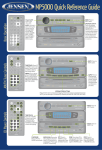
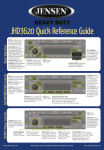
CD/MP3 Player Controls*
AM/FM/RBDS/WB Tuner Controls
Basic Operation
MSR7007 Quick Reference Guide
DISP/SCROLL: (Turn vehicle
ignition on and radio off.)
Press and hold until time
flashes on screen. Use
TUNE/TRK to set the
hours and minutes.
Power On/Off:
Push to turn power
ON or OFF.
TUNE/TRK: Press << to
adjust the HOURS and >> to
adjust the MINUTES. “AM” or
“PM” will appear on display.
After no adjustment has
been made for five seconds,
the time will be set.
MUTE: Press to
MUTE audio.
MODE: With each
press of the button the
radio will change through
the following modes:
TUNER (AM/FM selected
through BAND button),
*SAT, CD, AUX and *iPOD.
AUDIO MENU: With each press of the button
EQ/LOUD: Press to choose one of the
choose from the following AUDIO ADJUSTMENT predefined bass and treble curves.
options: BASS, TREBLE, BALANCE (left to right), Press and hold to turn loudness ON/OFF.
& FADER (front to back). Press and hold to access
the SYSTEM MENU.
PTY: Press to get program
list type. Use VOLUME buttons to select. Press SEEK
< or > to tune to selected
program type station.
TUNE: Press > to tune
UP in frequency. Press <
to tune DOWN in frequency.
Press and hold to fast search.
STATION STORE BUTTONS:
Press & hold to store current channel playing.
Momentarily press to recall stored channel.
NOTE: you can store up to 18 channels
(6 channels per band FM1, FM2, FM3, AM1, AM2).
AS/PS: Press to SCAN
through currently stored
presets. Press & hold to
STORE strongest broadcast stations in your area.
BAND: Press to select preset
group FM1, FM2, FM3, AM1,
or AM2 each with 6 channel
memory locations.
WB: Press and hold to
listen to WEATHERBAND.
EJECT: Slide to the right to
open door and EJECT CD.
(See backside for details).
TUNE/TRK: Press to tune
to next track. Press and hold
to FAST FORWARD or REWIND current track playing.
PLAY/PAUSE:
INTRO SCAN: Press when
Press to PLAY or
CD is playing to play each
PAUSE current audio. track for 10 seconds in sequential order. Press again
to SELECT current song.
RPT: Press to
REPEAT current
playing track. Press
to release function.
RDM: Press when CD is DN: Press when
UP: Press when
playing to play each track in MP3 mode to
in MP3 mode to
in RANDOM order. Press select folder DOWN. select folder UP.
again for NORMAL play.
*Some features may not be available depending on installed factory options.
MODE: Press and
hold to enter CHANNEL
LOCK function.
STATION STORE BUTTONS:
Press & hold to store current channel playing.
Momentarily press to recall stored channel.
NOTE: you can store up to 18 channels
(6 channels per band SIR1, SIR2, SIR3).
BAND: Press to select
preset group SR1, SR2, or
SR3 each with 6 channel
memory locations.
DISP/SCROLL: Press
to change display info
between single and
dual line text display.
iPod® Controls*
SIRIUS® Radio Controls*
DISP/SCROLL: Press
to change display info
between single and
dual line text display.
PTY: Press and hold to
change channel lock code.
INFO: Press to access
category mode and confirm
selection. Press and hold to
return to channel tuning mode.
TUNER: Press >> to tune
UP in frequency. Press <<
to tune DOWN in frequency.
Press and hold to fast search.
AS/PS: Press to scan
through currently stored
presets. Press and hold to
access preset tuning mode.
INFO: Press to access
PLAYLIST selection mode.
TUNE/TRK: Press to tune
to next track. Press and hold
to FAST FORWARD or REWIND current track playing.
CD Player Slot
PLAY/PAUSE:
RPT: Press to
Press to PLAY or
REPEAT current
PAUSE current audio. playing song. Press
to release function.
RDM: Press to play
DN: Scroll DOWN
each song in RANDOM playlists in playlist
order. Press again for selection mode.
NORMAL play.
UP: Scroll UP
playlists in playlist
selection mode.
DISC SLOT: Insert
disc label-side up.
Disc will automatically
begin playing.
EJECT: Press to stop disc
play and EJECT. Unit does
not have to be on to eject disc.
FRONT PANEL DOOR ALARM: To prevent damage of water or debris through the CD opening, the front panel door should only be opened for a short period of time during CD loading
or ejecting. If the front panel door is left open for longer than 30 seconds, the current playback audio will mute and a beep tone will sound. Close the door to resume normal playback.
Activating your SIRIUS® Subscription —
Before you can listen to Sirius Satellite Radio, you must subscribe to the service.
1. With the radio power ON, press the MODE button to enter Sirius Ready mode. After displaying the SIRIUS logo, the Receiver will update all the SIRIUS channels.
NOTE: Don’t push any buttons or perform any operations until updating has been completed.
2. Once updated and the SIRIUS channels are received, the display will change to “Call 1-888-539-SIRIUS to Subscribe” and will place you in SIRIUS Satellite Radio’s
Preview Channel. Channel 184 is the SIRIUS preview channel. You will not be able to tune to any other Sirius Radio channels until you activate your subscription.
3. You will need to access your Sirius ID, which is displayed on channel 000. Press the INFO button on the radio to enter Direct Tuning mode. Using the
Tune Adjust UP/DN knob, select digits 000. Press the INFO button to enter your selection. This will display your unit’s unique 12-digit SIRIUS ID Number.
4. Write the Sirius ID number down and have your credit card handy.
5. Contact SIRIUS on the Internet: https://activate.siriusradio.com/
Follow the prompts to activate your subscription. You can also call SIRIUS toll-free at: 1-888-539-SIRIUS (1-888-539-7474)
©Copyright 2007 ASA, LLC
JEN5000 - 707