1
P930.book Page i Monday, September 9, 2002 12:20 PM
User’s Guide
P930 Monitor
Document Part Number: 305776-001
September 2002
P930.book Page ii Monday, September 9, 2002 12:20 PM
© 2002 Hewlett-Packard Company
Microsoft, MS-DOS, Windows, Windows NT are trademarks of Microsoft
Corporation in the U.S. and other countries.
All other product names mentioned herein may be trademarks of their
respective companies.
Hewlett-Packard Company shall not be liable for technical or editorial
errors or omissions contained herein or for incidental or consequential
damages in connection with the furnishing, performance, or use of this
material. The information in this document is provided “as is” without
warranty of any kind, including, but not limited to, the implied warranties
of merchantability and fitness for a particular purpose, and is subject to
change without notice. The warranties for HP products are set forth in the
express limited warranty statements accompanying such products. Nothing
herein should be construed as constituting an additional warranty.
This document contains proprietary information that is protected by
copyright. No part of this document may be photocopied, reproduced, or
translated to another language without the prior written consent of
Hewlett-Packard Company.
Å
WARNING: Text set off in this manner indicates that failure to
follow directions could result in bodily harm or loss of life.
Ä
CAUTION: Text set off in this manner indicates that failure to follow
directions could result in damage to equipment or loss of information.
User’s Guide
P930 Monitorr
First Edition September 2002
Document Part Number: 305776-001
P930.book Page iii Monday, September 9, 2002 12:20 PM
Contents
1 Product Features
2 Safety and Maintenance Guidelines
Important safety information . . . . . . . . . . . . . . . . . . . . . . 2–1
Maintenance guidelines . . . . . . . . . . . . . . . . . . . . . . . . . . 2–2
3 Setting Up the Monitor
Attaching and removing the base. . . . . . . . . . . . . . . . . . . 3–1
Connecting the monitor . . . . . . . . . . . . . . . . . . . . . . . . . . 3–3
4 Operating the Monitor
Installing information files. . . . . . . . . . . . . . . . . . . . . . . . 4–1
Front panel components . . . . . . . . . . . . . . . . . . . . . . . . . . 4–2
Rear components . . . . . . . . . . . . . . . . . . . . . . . . . . . . . . . 4–4
Using the on-screen display . . . . . . . . . . . . . . . . . . . . . . . 4–5
Viewing the OSD menu. . . . . . . . . . . . . . . . . . . . . . . 4–6
Monitor messages. . . . . . . . . . . . . . . . . . . . . . . . . . . . . . 4–16
Energy saver feature. . . . . . . . . . . . . . . . . . . . . . . . . . . . 4–16
User modes. . . . . . . . . . . . . . . . . . . . . . . . . . . . . . . . . . . 4–17
A Troubleshooting
Solving common problems . . . . . . . . . . . . . . . . . . . . . . . A–1
Using the worldwide Web . . . . . . . . . . . . . . . . . . . . . . . . A–2
Preparing to call technical support. . . . . . . . . . . . . . . . . . A–3
User’s Guide
iii
P930.book Page iv Monday, September 9, 2002 12:20 PM
B Technical Specifications
P930 Monitor . . . . . . . . . . . . . . . . . . . . . . . . . . . . . . . . . . B–1
Display Resolutions . . . . . . . . . . . . . . . . . . . . . . . . . . . . . B–3
C Agency Regulatory Notices
Federal Communications Commission Notice. . . . . . . . .
Modifications. . . . . . . . . . . . . . . . . . . . . . . . . . . . . . .
Cables . . . . . . . . . . . . . . . . . . . . . . . . . . . . . . . . . . . .
Declaration of Conformity for Products
Marked with FCC Logo, United States Only . . . . . .
Canadian Notice . . . . . . . . . . . . . . . . . . . . . . . . . . . .
Avis Canadien . . . . . . . . . . . . . . . . . . . . . . . . . . . . . .
European Union Notice . . . . . . . . . . . . . . . . . . . . . . .
Japanese Notice . . . . . . . . . . . . . . . . . . . . . . . . . . . . .
EPA Energy Star Compliance . . . . . . . . . . . . . . . . . .
Power Cord Set Requirements. . . . . . . . . . . . . . . . . .
C–1
C–2
C–2
C–2
C–3
C–3
C–3
C–3
C–4
C–4
D TCO ‘99 Requirements
Environmental Requirements. . . . . . . . . . . . . . . . . . . . . . D–3
Flame Retardants . . . . . . . . . . . . . . . . . . . . . . . . . . . . D–3
Cadmium . . . . . . . . . . . . . . . . . . . . . . . . . . . . . . . . . . D–4
Mercury . . . . . . . . . . . . . . . . . . . . . . . . . . . . . . . . . . . D–4
CFCs (Freons) . . . . . . . . . . . . . . . . . . . . . . . . . . . . . . D–5
Lead . . . . . . . . . . . . . . . . . . . . . . . . . . . . . . . . . . . . . . D–5
iv
User’s Guide
P930.book Page 1 Monday, September 9, 2002 12:20 PM
1
Product Features
Your color monitor is an easy to use microprocessor-based,
digitally controlled, high performance product. The monitor
features include:
■
18-inch (45.7 cm) viewable area display.
■
1600 dots and 1200 lines flicker free display resolution.
■
Built-in pedestal that allows monitor tilt and swivel.
■
Plug and play capability if supported by your system.
■
On-Screen Display (OSD) adjustments in ten different
languages: English, French, German, Italian, Swedish and
Spanish, Portuguese, Russian, Polish and Magyar for ease of
set-up and screen optimization.
■
Software and Reference Library CD that comes with your
monitor includes an information file (INF) and Image Color
Matching file (ICM) software.
■
Energy Saver feature for Energy Star compliance.
■
Compliant with the following regulated specifications:
User’s Guide
❏
EPA ENERGY STAR
❏
European Union CE Directives (on select models)
❏
Swedish MPR II 1990
❏
Swedish TCO '99
1–1
P930.book Page 1 Monday, September 9, 2002 12:20 PM
2
Safety and Maintenance
Guidelines
Important safety information
A power cord is included with your monitor. If another cord is
used, use only a power source and connection appropriate for this
monitor. For information on the correct power cord set to use with
your monitor, refer to the “Power Cord Set Requirements” section
in Appendix C.
Å
WARNING: To reduce the risk of electric shock or damage to your
equipment, do not disable the power cord grounding feature. This
equipment is designed to be connected to a grounded (earthed)
power outlet that is easily accessible to the operator. The grounding
plug is an important safety feature.
Å
WARNING: For your safety, be sure that the power outlet you plug
the power cord into is easily accessible and located as close to the
equipment as possible. When you need to disconnect the power to
the equipment, unplug the power cord from the power outlet by
grasping the plug firmly. Never pull on the cord.
User’s Guide
2–1
P930.book Page 2 Monday, September 9, 2002 12:20 PM
Safety and Maintenance Guidelines
Ä
CAUTION: For the protection of your monitor, as well as your
computer, connect all power cords for your computer and its
peripheral devices (such as a monitor, printer, scanner) to some form
of surge protection device such as a power strip or Uninterruptible
Power Supply (UPS). Not all power strips provide surge protection;
the power strips must be specifically labeled as having this ability.
Use a power strip whose manufacturer offers a Damage Replacement
Policy so you can replace your equipment if surge protection fails.
Maintenance guidelines
To enhance the performance and extend the life of your monitor:
2–2
■
Do not open your monitor cabinet or attempt to service this
product yourself. Adjust only those controls that are covered
in the operating instructions. If your monitor is not operating
properly or has been dropped or damaged, contact your HP
authorized dealer, reseller, or service provider.
■
Adjust only those controls that are discussed in the operating
instructions.
■
Place your monitor at least 3 inches (76 mm) away from
walls or other enclosures.
■
Use only a power source and connection appropriate for this
monitor, as indicated on the label/back plate of the monitor.
■
Be sure the total ampere rating of the products connected to
the outlet does not exceed the current rating of the electrical
outlet, and the total ampere rating of the products connected
to the cord does not exceed the rating of the cord. Look on the
power label to determine the ampere rating (AMPS or A) for
each device.
■
Install your monitor near an outlet that you can easily reach.
Disconnect the monitor by grasping the plug firmly and
pulling it from the outlet. Never disconnect the monitor by
pulling the cord.
User’s Guide
P930.book Page 3 Monday, September 9, 2002 12:20 PM
Safety and Maintenance Guidelines
Ä
■
Turn your monitor off when not in use. You can substantially
increase the life expectancy of your monitor by using a screen
saver program and turning off the monitor when not in use.
■
Unplug your monitor from the wall outlet before cleaning.
Do not use liquid cleaners or aerosol cleaners. Use a damp
cloth for cleaning. If the screen requires additional cleaning,
use an antistatic screen cleaner.
CAUTION: Do not use benzene, thinner, ammonia, or any other
volatile substances to clean your monitor or the screen. These
chemicals may damage the cabinet finish as well as the screen.
■
Slots and openings in the cabinet are provided for ventilation.
These openings must not be blocked or covered. Never push
objects of any kind into cabinet slots or other openings.
■
Do not place plants on top of your monitor. Water or dirt from
the plant may get into the vents.
■
Do not drop your monitor or place it on an unstable surface.
■
Do not allow anything to rest on the power cord. Do not walk
on the cord.
■
Keep your monitor in a well-ventilated area, away from
excessive light, heat or moisture. Keep your monitor away
from high-capacity transformers, electric motors, and other
devices with strong magnetic fields.
■
In a two-monitor system, place your monitors as far
apart from one another as possible to lessen interference
between them.
■
Do not place the monitor face down. Damage could result to
the front panel controls or the monitor screen.
User’s Guide
2–3
P930.book Page 1 Monday, September 9, 2002 12:20 PM
3
Setting Up the Monitor
Before setting up the monitor, ensure that power is turned off to
the monitor, computer system, and other attached devices.
Attaching and removing the base
On some monitors, the base must be attached prior to setting up
the monitor. To attach the base:
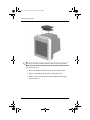
1. Place the monitor bottom side up on a flat work surface.
2. Align the tabs on the base with the corresponding slots on the
bottom of the monitor.
3. Press the base onto the monitor until the tabs are fully
engaged in the slots.
4. Push the base toward the front of the monitor until the release
latch clicks into the locked position.
Ä
CAUTION: Do not bend the snap.
User’s Guide
3–1
P930.book Page 2 Monday, September 9, 2002 12:20 PM
Setting Up the Monitor
✎ The base will align with the monitor slots in only one position.
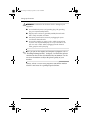
To remove the base:
1. Please the monitor bottom side up on a flat work surface.
2. Squeeze and pull up on the release latch on the base.
3. Push the base toward the back of the monitor and lift up to
remove the base.
3–2
User’s Guide
P930.book Page 3 Monday, September 9, 2002 12:20 PM
Setting Up the Monitor
Connecting the monitor
To connect the monitor to the computer system:
1. Place the monitor in a convenient, well ventilated location
near your computer.
2. Connect the power cord for your monitor to the power port on
the back of the monitor. Plug the power cord for the monitor
into a nearby electrical outlet.
3. Connect the monitor signal cable to your computer’s video
port, video board, video card or graphics card.
4. Connect the computer’s power cord to an electrical outlet.
5. Turn on your computer and monitor. If you monitor displays
an image, installation is complete.
User’s Guide
3–3
P930.book Page 4 Monday, September 9, 2002 12:20 PM
Setting Up the Monitor
Å
WARNING: To reduce the risk of electric shock or damage to your
equipment:
■
Do not disable the power cord grounding plug. The grounding
plug is an important safety feature.
■
Plug the power cord into a grounded (earthed) electrical outlet
that is easily accessible at all times.
■
Disconnect power from the monitor by unplugging the power
cord from the electrical outlet.
■
Do not place anything on power cords or cables. Arrange them
so that no one may accidentally step on or trip over them. Do not
pull on a cord or cable. When unplugging from the electrical
outlet, grasp the cord by the plug.
you turn on the monitor and computer equipment, refer to
✎ After
“Installing Information Files” in chapter 4 to install the software
contained on the CD that is included with your monitor. Use the
on-screen instructions to adjust the picture quality of your
monitor.
Always activate a screen saver program or turn off the monitor
when it is not in use for a prolonged period of time.
3–4
User’s Guide
P930.book Page 1 Monday, September 9, 2002 12:20 PM
4
Operating the Monitor
Installing information files
The Software and Reference Library CD-ROM included with
your monitor contains two information files to be installed onto
your computer; an .INF file and an .ICM file.
The .INF file defines monitor resources and provides
specifications used by most operating systems to install support
software for certain hardware devices. The .INF file ensures
monitor compatibility and optimization with your computer’s
graphics adapter. The .INF files are also downloadable from the
Internet by clicking on www.hp.com/go/support and selecting
your monitor model.
The .ICM file provides color matching consistency from monitor
screen to printer and is activated from within graphics programs
that have this feature.
To install these files on your computer:
1. Insert the Software and Reference Library CD-ROM in your
computer's optical drive.
2. When the CD-ROM menu launches, select Install INF and
ICM Files and follow the on-screen instructions.
.INF and .ICM files, download them from the HP
✎ ToWebgetsitetheatlatest
www.hp.com/go/support, then select your monitor
model to download the appropriate files.
User’s Guide
4–1
P930.book Page 2 Monday, September 9, 2002 12:20 PM
Operating the Monitor
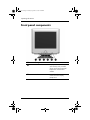
Front panel components
4–2
No.
Component
Function
1
Information button
Displays information about
your monitor, such as model
name, vertical and horizontal
frequencies and the serial
number.
2
Exit button
Use to close the active menu
or the On-screen display
(OSD) menu.
User’s Guide
P930.book Page 3 Monday, September 9, 2002 12:20 PM
Operating the Monitor
No.
Component
Function
3
Adjust buttons
Allows you to highlight and
adjust items in the menu.
4
Menu button
Use to open the OSD and
activate a highlighted menu
item.
5
Power indicator
Illuminates green during normal
operation and blinks green
when the monitor is in sleep
mode.
6
Power button
Use to turn the monitor on and
off.
For energy conservation, turn your monitor off when it is not
needed or when leaving it unattended for long periods. Refer to
your computer manual for instructions on setting energy saver
features (sometimes called power management features).
User’s Guide
4–3
P930.book Page 4 Monday, September 9, 2002 12:20 PM
Operating the Monitor
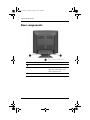
Rear components
4–4
No.
Component
Function
1
Power port connector
Connects the monitor power cord.
2
Signal cable
Connects to the computer’s video
video port, video board, video
card or graphics card.
3
Tilt/Swivel Base
Can be removed from the monitor.
User’s Guide
P930.book Page 5 Monday, September 9, 2002 12:20 PM
Operating the Monitor
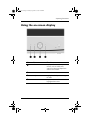
Using the on-screen display
No.
Button
Function
1
Information
Displays information about your
monitor, such as model name,
vertical and horizontal frequencies
and the serial number.
2
Exit
Closes the active menu or OSD.
3
Adjust
Highlights and adjust items using
the OSD.
4
Menu
Opens the OSD and activates a
highlighted menu item.
User’s Guide
4–5
P930.book Page 6 Monday, September 9, 2002 12:20 PM
Operating the Monitor
The On-Screen Display (OSD) adjusts the screen image based on
your viewing preferences. To access the OSD:
1. Press the Power button to turn on the monitor, if the monitor
is not already on.
2. Press the Menu button to open the On-Screen Display menu.
3. To move to a menu screen, press the Adjust buttons until the
menu is highlighted.
4. When your menu screen is displayed, press the Adjust
buttons - left arrow, right arrow, up arrow, or down arrow - to
adjust or change your preferred OSD setting.
5. Press the Exit button to close the active menu or OSD.
4–6
User’s Guide
P930.book Page 7 Monday, September 9, 2002 12:20 PM
Operating the Monitor
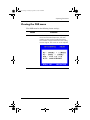
Viewing the OSD menu
Your OSD menu has the following feature settings:
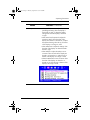
Menu
Information
User’s Guide
Function
Provides information on monitor model name,
vertical and horizontal frequencies, and serial
number. You may need to provide the monitor
serial number to support technicians when calling
customer support. This screen can not be adjusted.
4–7
P930.book Page 8 Monday, September 9, 2002 12:20 PM
Operating the Monitor
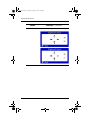
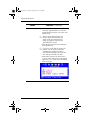
Menu
Brightness/Contrast
4–8
Function Continued
Adjusts the screen brightness and contrast.
User’s Guide
P930.book Page 9 Monday, September 9, 2002 12:20 PM
Operating the Monitor
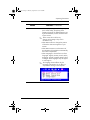
Menu
Control Lock
User’s Guide
Function Continued
Allows you to lock or unlock the OSD. To lock
or unlock the OSD, press the menu button for
10 seconds.
4–9
P930.book Page 10 Monday, September 9, 2002 12:20 PM
Operating the Monitor
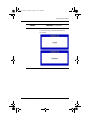
Menu
Position/Size
Function Continued
• Select Position to change the vertical or
horizontal position of the monitor’s entire
viewing area.
• Select Size to change the vertical or
horizontal size of the monitor’s entire
viewing area.
• Select Zoom to get a close-up or a longshot
view of the monitor’s viewing area. You can
decrease or enlarge the screen viewing area.
4–10
User’s Guide
P930.book Page 11 Monday, September 9, 2002 12:20 PM
Operating the Monitor
Menu
Geometry
Function Continued
• Select Parallel/Rotation to adjust the
parallelogram setting when the display is
leaning left or right, or adjust the rotation
setting when the entire dipslay is tilted left
or right.
• Select Pincushion/Trapezoid to adjust the
pincushion setting when the sides of the
display are bowed in or bowed out, or adjust
the trapezoid setting when the top or bottom
of the display is too large or small.
• Select Pinbalance to adjust the settings when
the sides of the display are bowed towards
the left or right.
• Select Sidepin to adjust the sidepin corner
correction when the sides of the display are
bowed in or bowed out, or when the top or
bottom of the display is too large or small.
• Select the Pinbalance Corner correction when
the sides of the display are bowed in or
bowed out, or when the top or bottom of the
display is too large or small.
User’s Guide
4–11
P930.book Page 12 Monday, September 9, 2002 12:20 PM
Operating the Monitor
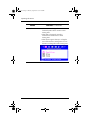
Menu
Color
Function Continued
Use to select Color 1, Color 2, or Color 3 to
change the color temperature and adjust
individual red, green and blue color control. Color
temperature is a measure of the “warmth” of the
image colors. The available range is between
5000 to 9300K.
✎
4–12
If you select recall to reset your monitor
setting, the Color settings will not reset.
User’s Guide
P930.book Page 13 Monday, September 9, 2002 12:20 PM
Operating the Monitor
Menu
Screen
Function Continued
• Select Clear Moire when a moire pattern,
which looks like a series of concentric circles
or arcs, appears on your screen.
• Select Linearity to adjust the settings when the
display image is compressed at the left, right
or top, bottom.
• Select Focus when the image displayed on
the screen is not sharp in all areas.
• Select Convergence to adjust the horizontal or
vertical convergence to properly align the
color dots that make up the image.
Convergence affects picture clarity.
User’s Guide
4–13
P930.book Page 14 Monday, September 9, 2002 12:20 PM
Operating the Monitor
Menu
Advanced
Function Continued
• Select Degauss to remove color impurities
caused by magnetic fields. Do not use the
degauss feature more than once within a 30
minute period.
✎
After using the degauss feature, the
monitor may buzz momentarily, the
image colors may change and the
image will jiggle for a few seconds.
These effects are normal.
• Select Recall to reset the monitor settings to
their original levels.
✎
If you press Yes to reset the monitor, the
position, size, pincushion, trapezoid,
parallelogram, pinbalance, rotation,
and clear moire settings will be reset. All
other settings will remain the same.
• Select Video Input Level to set the level to
1.0 V for video cards that use video signals
higher than 1.0 V, which causes the display
to be very bright.
4–14
User’s Guide
P930.book Page 15 Monday, September 9, 2002 12:20 PM
Operating the Monitor
Menu
Menu
Function Continued
• Select Display Timing to see the frequency
(user control mode), the polarity of the
operational signals, the default frequency set
by the manufacturer, and the resolution level
of your monitor.
✎
These screens do not allow any
changes to the settings. They are for
information only.
• Select Menu Position to change the position
of where the OSD menu appears on your
monitor.
• Select Menu Duration to set the amount of
time the menu will wait before it automatically
turns off if no adjustments.
• Select Languages to choose from one of ten
languages: English, German, French, Italian,
Portuguese, Spanish, Swedish, Russian, Polish
or Magyar. Some languages may not appear
in some regions.
✎
User’s Guide
The language chosen affects only the
language of the OSD. It has no affect on
any software running on the computer.
4–15
P930.book Page 16 Monday, September 9, 2002 12:20 PM
Operating the Monitor
Monitor messages
Special messages will appear on the monitor screen to identify
the following monitor conditions:
■
Video mode not supported - If there is something wrong with
the input signal, a message appears on the screen or the
screen goes blank although the power indicator light is still
on. This message indicates the monitor is out of scan range or
that you need to check the signal cable.
■
No Connection, check signal cable - Indicates the video cable
may not be plugged into the computer or the computer may
not be turned on.
Energy saver feature
When the monitor is in its normal operating mode, the monitor
uses 120 watts maximum of power and the Power light is green.
The monitor also supports a reduced power state. The reduced
power state will be entered into if the monitor detects the absence
of either the horizontal sync signal and/or the vertical sync signal.
Upon detecting the absence of these signals, the monitor screen is
blanked and the power light flashes green. When the monitor is in
the reduced power state, the monitor will use 3 watts maximum of
power. There is a brief warm up period before the monitor will
return to its normal operating mode.
Refer to your computer manual for instructions on setting energy
saver features (sometimes called power management features).
above energy saver feature only works when connected to
✎ The
computers that have energy saver features.
4–16
User’s Guide
P930.book Page 17 Monday, September 9, 2002 12:20 PM
Operating the Monitor
User modes
The video controller signal may occasionally call for a mode that
is not preset and preload mode if:
■
You are not using a Compaq standard graphics adapter.
■
You are not using preset and preload modes.
If this occurs, you may need to readjust the parameters of the
monitor screen by using the on-screen display. User changes can
be made to any or all of these modes and saved in memory. The
monitor automatically stores the new setting, then recognizes the
new mode just as it does the preset and preload modes. In
addition to the 10 factory preset and preload modes, there are 10
user modes that can be entered and stored.
User’s Guide
4–17
P930.book Page 1 Monday, September 9, 2002 12:20 PM
A
Troubleshooting
Solving common problems
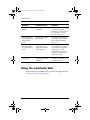
The following table lists possible problems, the possible cause of
each problem, and the recommended solutions.
Problem
Possible Cause
Solution
Screen is blank.
Power cord is
disconnected.
Connect the power cord.
Power switch is off.
Turn on power.
Video cable is
improperly connected.
Connect video cable
properly.
Screen blanking utility is
active.
Depress any key on the
keyboard or move the
mouse.
Brightness and contrast
are too low.
Press one of the Adjust
buttons to access the
brightness/contrast OSD
menu. Adjust the screen as
needed.
Image appears
blurred, indistinct, or
too dark.
User’s Guide
A–1
P930.book Page 2 Monday, September 9, 2002 12:20 PM
Troubleshooting
Problem
Possible Cause
Solution
Image is not
centered.
Position may need
adjustment.
Press the Menu button to
access the OSD menu.
Select Position/Size to adjust
the horizontal or vertical
position of the image.
“No Connection,
Check Signal Cable”
is displayed on
screen.
Monitor video cable is
disconnected.
Connect the 15-pin monitor
video cable to the computer.
Be sure that the computer
power is on.
“Sync. Out of Range,
68.77kHz 168Hz
PP” is displayed on
screen.
Video resolution and/or
refresh rate are set
higher than what your
monitor supports.
Restart your computer and
enter Safe Mode. Change
your settings to a supported
setting (see “Technical
Specifications”). Restart your
computer so that the new
settings take effect.
Monitor is
overheating.
There is not enough air
space to allow proper
ventilation.
Leave at least 3 inches
(76 mm) of ventilation space
around the monitor.
Using the worldwide Web
Before contacting customer services, refer to the support web site
at: http://www.hp.com/go/support
A–2
User’s Guide
P930.book Page 3 Monday, September 9, 2002 12:20 PM
Troubleshooting
Preparing to call technical support
If you cannot solve a problem using the troubleshooting tips in
this section, you may need to call technical support. Have the
following information available when you call:
■
The monitor
■
Monitor model number
■
Serial number for the monitor
■
Purchase date on invoice
■
Conditions under which the problem occurred
■
Error messages received
■
Hardware configuration
■
Hardware and software you are using
User’s Guide
A–3
P930.book Page 1 Monday, September 9, 2002 12:20 PM
B
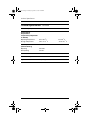
Technical Specifications
P930 Monitor
Technical Specifications
Display
Type
19 inches
Natural Flat
48 cm
Viewable Image Size
18.0 inch diagonal
45.7 cm
Face Treatment
Aluminized tri-color phosphor
dot trio with black matrix.
Anti-doming invar shadow mask.
Multilayer coated with anti-static.
Maximum Weight
(Unpacked)
55.11 lbs
25.0 kg
Dimensions (with stand)
Height
Depth
Width
19.3 in
18.6 in
18.4 in
490.7 mm
472.8 mm
469 mm
Maximum Graphics
Resolution
1920 x 1440, 60Hz
Screen Pitch
0.24 mm
Dot Pitch
0.25 mm (Horizontal)
Horizontal Frequency
30 to 110 kHz
User’s Guide
B–1
P930.book Page 2 Monday, September 9, 2002 12:20 PM
Technical Specifications
Technical Specifications Continued
Vertical Frequency
50 to 160 Hz
Environmental
Requirements
Temperature (Independent
of Altitude)
Operating Temperature
Storage Temperature
32 to 104 o F
-04 to +113 o F
Humidity
(Noncondensing)
Operating
Nonoperating
10 to 80%
5 to 95%
Power Source
100 - 240 VAC, 50/60 +/-3 Hz
Power Consumption
120 watts
Input Terminals
15-pin D-type cable
B–2
0 to 40 o C
-20 to +45 o C
User’s Guide
P930.book Page 3 Monday, September 9, 2002 12:20 PM
Technical Specifications
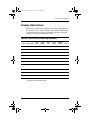
Display Resolutions
The display resolutions listed below are the most commonly used
modes and are set as factory defaults. This monitor automatically
recognizes these preset and preload modes and they will appear
properly sized and centered on the screen.
Factory Preset and Preload Display Modes
Horz
Polarity
Vert
Freq
(Hz)
Vert
Polarity
Pixel Clk
(MHz)
Source
-
25.175
VGA
36.00
VESA
Mode
Pixel Format
Horz
Freq
(kHz)
1
640 x 480
31.47
-
60.0
2
640 x 480
43.27
-
85.0
3
720 x 400
31.47
-
70.0
+
28.322
VGA
4*
800 x 600
53.67
+
85.0
+
56.25
VESA
5*
1024 x 786
68.68
+
84.99
+
94.50
VESA
6
1280 x 1024
79.98
+
75.0
+
135.00
VESA
7*
1280 x 1024
91.15
+
85.0
157.50
VESA
8
1600 x 1200
93.750
+
75.000
+
202.50
VESA
9*
1600 x 1200
106.25
+
85.0
+
229.50
VESA
10
1920 x 1440
90.00
_
60.0
234.00
VESA
Primary
* Indicates preset timing mode.
User’s Guide
B–3
P930.book Page 1 Monday, September 9, 2002 12:20 PM
C
Agency Regulatory Notices
Federal Communications
Commission Notice
This equipment has been tested and found to comply with the
limits for a Class B digital device, pursuant to Part 15 of the
FCC Rules. These limits are designed to provide reasonable
protection against harmful interference in a residential
installation. This equipment generates, uses, and can radiate radio
frequency energy and, if not installed and used in accordance
with the instructions, may cause harmful interference to radio
communications. However, there is no guarantee that interference
will not occur in a particular installation. If this equipment does
cause harmful interference to radio or television reception, which
can be determined by turning the equipment off and on, the user
is encouraged to try to correct the interference by one or more of
the following measures:
■
Reorient or relocate the receiving antenna.
■
Increase the separation between the equipment and the
receiver.
■
Connect the equipment into an outlet on a circuit different
from that to which the receiver is connected.
■
Consult the dealer or an experienced radio or television
technician for help.
User’s Guide
C–1
P930.book Page 2 Monday, September 9, 2002 12:20 PM
Agency Regulatory Notices
Modifications
The FCC requires the user to be notified that any changes or
modifications made to this device that are not expressly approved
by Hewlett-Packard Company may void the user's authority to
operate the equipment.
Cables
Connections to this device must be made with shielded cables
with metallic RFI/EMI connector hoods to maintain compliance
with FCC Rules and Regulations.
Declaration of Conformity for Products
Marked with FCC Logo, United States Only
This device complies with Part 15 of the FCC Rules. Operation is
subject to the following two conditions: (1) this device may not
cause harmful interference, and (2) this device must accept any
interference received, including interference that may cause
undesired operation.
For questions regarding your product, contact:
Hewlett-Packard Company
P. O. Box 692000, Mail Stop 530113
Houston, Texas 77269-2000
Or, call
1-800- 652-6672
For questions regarding this FCC declaration, contact:
Hewlett-Packard Company
P. O. Box 692000, Mail Stop 510101
Houston, Texas 77269-2000
Or, call
(281) 514-3333
To identify this product, refer to the Part, Series, or Model
number found on the product.
C–2
User’s Guide
P930.book Page 3 Monday, September 9, 2002 12:20 PM
Agency Regulatory Notices
Canadian Notice
This Class B digital apparatus meets all requirements of the
Canadian Interference-Causing Equipment Regulations.
Avis Canadien
Cet appareil numérique de la classe B respecte toutes les
exigences du Règlement sur le matériel brouilleur du Canada.
European Union Notice
Products with the CE Marking comply with both the EMC
Directive (89/336/EEC) and the Low Voltage Directive
(73/23/EEC) issued by the Commission of the European
Community.
Compliance with these directives implies conformity to the
following European norms (in brackets are the equivalent
international standards):
■
EN55022 (CISPR 22) - Electromagnetic Interference
■
EN55024 (IEC61000-4-2,3,4,5,6,8,11) - Electromagnetic
Immunity
■
EN61000-3-2 (IEC61000-3-2) - Power Line Harmonics
■
EN61000-3-3 (IEC61000-3-3) - Power Line Flicker
■
EN60950 (IEC950) - Product Safety
Japanese Notice
User’s Guide
C–3
P930.book Page 4 Monday, September 9, 2002 12:20 PM
Agency Regulatory Notices
EPA Energy Star Compliance
Monitors that are marked with the Energy Star Logo meet the
requirements of the EPA Energy Star program. As an Energy Star
Partner, Hewlett-Packard Company has determined that this
product meets the Energy Star guidelines for energy efficiency.
Specific details on using the Energy Saving features can be found
in the energy saver or power management section of the computer
manual.
Power Cord Set Requirements
The monitor power supply is provided with Automatic Line
Switching (ALS). This feature allows the monitor to operate on
input voltages between 100-120V or 200-240V.
The power cord set (flexible cord or wall plug) received with the
monitor meets the requirements for use in the country where you
purchased the equipment.
If you need to obtain a power cord for a different country, you
should purchase a power cord that is approved for use in that
country.
The power cord must be rated for the product and for the voltage
and current marked on the product's electrical ratings label. The
voltage and current rating of the cord should be greater than the
voltage and current rating marked on the product. In addition, the
cross-sectional area of the wire must be a minimum of 0.75 mm²
or 18AWG, and the length of the cord must be between 6 feet
(1.8 m) and 12 feet (3.6 m). If you have questions about the type
of power cord to use, contact your HP authorized service
provider.
A power cord should be routed so that it is not likely to be walked
on or pinched by items placed upon it or against it. Particular
attention should be paid to the plug, electrical outlet, and the
point where the cord exits from the product.
C–4
User’s Guide
P930.book Page 1 Monday, September 9, 2002 12:20 PM
D
TCO ‘99 Requirements
You have just purchased a TCO'99 approved and labelled
product! Your choice has provided you with a product developed
for professional use. Your purchase has also contributed to
reducing the burden on the environment and also to the further
development of environmentally adapted electronics products.
Why do we have environmentally labelled computers?
In many countries, environmental labelling has become an
established method for encouraging the adaptation of goods and
services to the environment. The main problem, as far as
computers and other electronics equipment are concerned, is that
environmentally harmful substances are used both in the products
and during their manufacture. Since it is not so far possible to
satisfactorily recycle the majority of electronics equipment, most
of these potentially damaging substances sooner or later enter
nature.
User’s Guide
D–1
P930.book Page 2 Monday, September 9, 2002 12:20 PM
TCO ‘99 Requirements
There are also other characteristics of a computer, such as energy
consumption levels, that are important from the viewpoints of
both the work (internal) and natural (external) environments.
Since all methods of electricity generation have a negative effect
on the environment (e.g. acidic and climate-influencing
emissions, radioactive waste), it is vital to save energy.
Electronics equipment in offices is often left running
continuously and thereby consumes a lot of energy.
What does labelling involve?
This product meets the requirements for the TCO'99 scheme
which provides for international and environmental labelling of
personal computers. The labelling scheme was developed as a
joint effort by the TCO (The Swedish Confederation of
Professional Employees), Svenska Naturskyddsforeningen (The
Swedish Society for Nature Conservation) and Statens
Energimyndighet (The Swedish National Energy
Administration).
Approval requirements cover a wide range of issues:
environment, ergonomics, usability, emission of electric and
magnetic fields, energy consumption and electrical and fire
safety.
The environmental demands impose restrictions on the presence
and use of heavy metals, brominated and chlorinated flame
retardants, CFCs (freons) and chlorinated solvents, among other
things. The product must be prepared for recycling and the
manufacturer is obliged to have an environmental policy which
must be adhered to in each country where the company
implements its operational policy.
The energy requirements include a demand that the computer
and/or display, after a certain period of inactivity, shall reduce its
power consumption to a lower level in one or more stages. The
length of time to reactivate the computer shall be reasonable for
the user.
D–2
User’s Guide
P930.book Page 3 Monday, September 9, 2002 12:20 PM
TCO ‘99 Requirements
Labelled products must meet strict environmental demands, for
example, in respect of the reduction of electric and magnetic
fields, physical and visual ergonomics and good usability.
Below you will find a brief summary of the environmental
requirements met by this product. The complete environmental
criteria document may be ordered from:
TCO Development
SE-114 94 Stockholm, Sweden
Fax: +46 8 782 92 07
Email (Internet): [email protected]
Current information regarding TCO'99 approved and labelled
products may also be obtained via the Internet, using the address:
http://www.tco-info.com/
Environmental Requirements
Flame Retardants
Flame retardants are present in printed circuit boards, cables,
wires, casings and housings. Their purpose is to prevent, or at
least to delay the spread of fire. Up to 30% of the plastic in a
computer casing can consist of flame retardant substances. Most
flame retardants contain bromine or chloride, and those flame
retardants are chemically related to another group of
environmental toxins, PCBs. Both the flame retardants
containing bromine or chloride and the PCBs are suspected of
giving rise to severe health effects, including reproductive
damage in fish-eating birds and mammals, due to the
bioaccumulative* processes. Flame retardants have been found in
human blood and researchers fear that disturbances in foetus
development may occur.
User’s Guide
D–3
P930.book Page 4 Monday, September 9, 2002 12:20 PM
TCO ‘99 Requirements
The relevant TCO'99 demand requires that plastic components
weighing more than 25 grams must not contain flame retardants
with organically bound bromine or chlorine. Flame retardants are
allowed in the printed circuit boards since no substitutes are
available.
is defined as substances which accumulate
✎ Bioaccumulative
within living organisms.
Cadmium
Cadmium is present in rechargeable batteries and in the
colour-generating layers of certain computer displays.
Cadmium damages the nervous system and is toxic in high doses.
The relevant TCO'99 requirement states that batteries, the
colour-generating layers of display screens and the electrical or
electronics components must not contain any cadmium.
✎ Cadmium is a heavy metal that is Bioaccumulative.
Mercury
Mercury is sometimes found in batteries, relays and switches. It
damages the nervous system and is toxic in high doses. The
relevant TCO'99 requirement states that batteries may not contain
any mercury. It also demands that mercury is not present in any of
the electrical or electronics components associated with the
labelled unit. There is however one exception. Mercury is, for the
time being, permitted in the back light system of flat panel
monitors as there today is no commercially available alternative.
TCO aims on removing this exception when a mercury free
alternative is available.
✎Mercury is a heavy metal that is Bioaccumulative.
D–4
User’s Guide
P930.book Page 5 Monday, September 9, 2002 12:20 PM
TCO ‘99 Requirements
CFCs (Freons)
The relevant TCO'99 requirement states that neither CFCs nor
HCFCs may be used during the manufacture and assembly of the
product. CFCs (freons) are sometimes used for washing printed
circuit boards. CFCs break down ozone and thereby damage the
ozone layer in the stratosphere, causing increased reception on
earth of ultraviolet light with e.g. increased risks of skin cancer
(malignant melanoma) as a consequence.
Lead
Lead can be found in picture tubes, display screens, solders and
capacitors. Lead damages the nervous system and in higher
doses, causes lead poisoning. The relevant TCO´99 requirement
permits the inclusion of lead since no replacement has yet been
developed.
✎Lead is a heavy metal that is Bioaccumulative.
User’s Guide
D–5