1
Product Overview
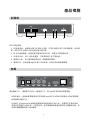
Front Panel
1
2
3
4
5
LED/button/connector:
1. USB port: These two USB 2.0 type A sockets can be used to connect an external
USB Flash Drive, USB Hard Drive, USB DVD-ROM, or USB Flash Card Reader.
2. IR sensor: This is the port that receives commands from the remote control. Please
make sure not to block the port.
3. USB indicator: When plugging in a USB device, it may take up to 5 seconds for it
to become ready.
4. Power indicator: Lights up when the power is plugged in, and the device is turned
on.
5. POWER STANDBY: Press this button to put the mp200 into standby or to wake it
up from standby.
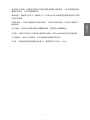
Back Panel
Video connection: Please select one of the following connections in order to connect
the mp200 video to your TV set.
HDMI output: This high definition port can be used to connect the mp200 with your
4