1
5830_CIB_1ATT
8/14/02
9:46 PM
Page II
USER’S MANUAL
Part 2
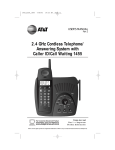
5.8 GHz Cordless Telephone
5830 with Talking
Caller ID/Call Waiting
DRAFT
8/14/02b
Please also read
Part 1 — Important
Product Information
© 2002 Advanced American Telephones. All Rights Reserved.
AT&T and the Globe Symbol are trademarks of AT&T Corp., licensed to Advanced American Telephones.
5830_CIB_1ATT
8/14/02
9:46 PM
Page III
Visit us at www.telephones.att.com
© 2002 Advanced American Telephones.
All Rights Reserved.
AT&T and the Globe Design are
trademarks of AT&T Corp., licensed to
Advanced American Telephones.
Printed in China. Issue 1AT&T 08/02
5830_CIB_1ATT
8/14/02
9:46 PM
Page V
BEFORE YOU BEGIN .................. 1
INTERCOM OPERATION............. 33
Parts List ...........................................
About Caller Identification
(Caller ID) ....................................
About the Calls Log.........................
About Adding Handsets ..................
Intercom Calls ................................
Answering Intercom ......................
End Intercom .................................
Answer an Incoming Call While
on an Intercom Call...................
Blind Call Transfer.........................
Announced Call Transfer...............
Conference Calling ........................
1
2
2
2
INSTALLATION ......................... 3
Table/Desktop Installation ..............
Wall Installation ...............................
Spare Battery/
Power Failure Backup .................
Belt Clip ...........................................
Headset ............................................
3
5
34
35
35
36
PHONE BOOK......................... 37
6
7
7
FEATURE SETUP – HANDSET........ 8
Feature Setup Menu ........................ 8
Set Time ........................................... 8
Clock Mode...................................... 9
Sound Select................................... 10
Ringer Volume ............................... 11
Ringer Melody................................ 12
Vibrate Control............................... 13
Low Batt Tone ............................... 14
Range Tone .................................... 15
Keypad Tone.................................. 16
Set Contrast .................................... 17
Language Setting............................ 18
FEATURE SETUP – BASE ........... 19
Ringer Volume ............................... 19
Ringer Melody................................ 20
Dial Mode (Tone/Pulse)................ 21
TELEPHONE OPERATION ........... 22
Make a Call ...................................
Answer a Call.................................
Volume ...........................................
Handset Speakerphone .................
Redial..............................................
Flash/Call Waiting ..........................
Mute................................................
Hold................................................
Temporary Tone Dialing ...............
Display Screen Messages ..............
Handset Icons ................................
Base Lights .....................................
Tones and What They Mean.........
33
34
34
22
22
23
24
25
26
27
28
29
30
31
32
32
Store a Number and Name in
Phone Book ............................... 37
Keypad Characters ..........................38
Dial a Number in Phone Book..... 39
Edit a Number/Name in
Phone Book ............................... 40
Delete a Number/Name in
Phone Book ............................... 41
CALLER ID OPERATION ............. 42
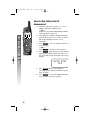
Setup Talking Caller ID................. 43
Record a New Talking Caller ID
Announcement........................... 44
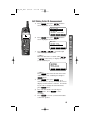
Edit Talking Caller ID
Announcement........................... 45
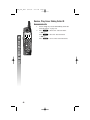
Review, Play, Erase Talking
Caller ID Announcement........... 46
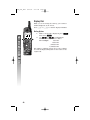
Review Calls Log ........................... 47
Store Record in Phone book ........ 47
Display Dial.....................................48
Remove Call Records..................... 49
BATTERIES............................ 50
Battery Life .....................................
Battery Indicator ............................
Charge the Handset
Battery Pack ...............................
Spare Battery/
Power Failure Backup ...............
Replace the Handset
Battery Pack ...............................
50
50
50
51
52
IN CASE OF DIFFICULTY............ 53
DEFAULT SETTINGS ................. 57
TECHNICAL SPECIFICATIONS ...... 58
INDEX.................................. 59
CONTENTS
CONTENTS
5830_CIB_1ATT
8/14/02
9:47 PM
Page 1
BEFORE YOU BEGIN
BEFORE YOU BEGIN
Parts List
Your box should include:
Quick
Start
Guide
This User’s
Manual
Base unit
Handset
NiMH
battery
pack
Telephone
line cord
Power cord
Wall mounting adapter
1
5830_CIB_1ATT
8/14/02
9:47 PM
Page 2
BEFORE YOU BEGIN
About Caller Identification (Caller ID)
This product has a Caller ID with Call Waiting feature that works with
service from your local phone service provider.
Caller ID with Call Waiting lets you see who’s calling before you answer
the phone, even when you’re on another call.
You may need to change your phone service to use this feature.
Contact your phone service provider if:
• You have both Caller ID and Call Waiting, but as separate
services (you may need combined service)
• You have only Caller ID service, or only Call Waiting service
• You don’t subscribe to any Caller ID or Call Waiting services.
You can use this product with regular Caller ID service, and you can
use this product’s other features without subscribing to either Caller ID
or combined Caller ID with Call Waiting service.
There are fees for Caller ID services, and they may not be available in
all areas.
This product can provide information only if both you and the caller
are in areas offering Caller ID service, and if both telephone companies
use compatible equipment.
About the Calls Log
This phone assigns each incoming call a number from 1 to 50 at the
handset. The most recent call will have the lowest number. When the
memory is full, the oldest call information is deleted to make room for
new incoming call information. See CALLER ID OPERATION, beginning
on page 42, for more details.
If you answer a call before call information appears on the screen, it will
not appear in the calls log.
About Adding Handsets
This product is compatible with the AT&T 5800 Expansion Handset.
You may add up to five additional 5800 units (purchased separately)
to this phone. Follow the instructions provided with the additional
handset(s) for installation and registration.
Although you can register up to six handsets, only four
¥NOTE:
can be used at one time.
2
5830_CIB_1ATT
8/14/02
9:47 PM
Page 3
INSTALLATION
Table/Desktop Installation
INSTALLATION
Install this telephone away from electronic equipment,
¥NOTE:
such as personal computers, television sets or microwave ovens.
Avoid excessive heat, cold, dust or moisture.
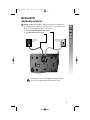
1
2
Connect the telephone line cord.
Connect the power cord.
Standard
electrical
outlet
Modular
telephone
jack
Use only the power cord supplied with this product.
If you need a replacement, call 1 800 222–3111.
3
5830_CIB_1ATT
9:47 PM
Page 4
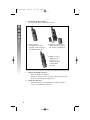
Install the handset battery.
Use only AT&T Battery 2401, SKU# 91077.
INSTALLATION
3
8/14/02
a) Remove battery
compartment cover by
pressing on the raised spot
and sliding downward.
b) Align the contacts and
place the battery pack in
the battery compartment.
c) Replace cover by
sliding it on its
track up over
battery case until
it snaps firmly
into place.
4
5
4
Charge the handset battery.
• Place the handset in the base.
• Charge the battery at least 12 hours. After the first charge,
the battery will charge in eight hours.
Check for dial tone.
• After the batteries are charged, lift the handset and press
P; you should hear a dial tone.
5830_CIB_1ATT
8/14/02
9:47 PM
Page 5
1
2
figure a
3
4
figure b
5
6
figure c
7
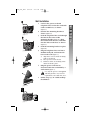
Connect the power cord and
telephone line cord to the underside
of the corded base, as shown
(figure a).
Position the mounting bracket as
shown (figure b).
Feed the telephone line cord through
the hole in the center of the
mounting bracket (figure b), align
the bracket with the base, and slide
into the hole on the base as shown
(figure c).
Lock the mounting bracket in place
(figure d).
Plug the telephone line cord into a
modular wall jack, and mount the
base on the wall (figure e).
a) Align holes on base with mounting
studs on wall jack.
b) Place power cord as shown.
c) Pull base down on mounting studs
until it locks into place.
Plug the power cord into an
electrical outlet not controlled by a
wall switch (figure e).
Use only the power cord supplied
with this product. If you need a
replacement, call 1 800 222–3111.
Follow Steps 3–5 in “Table/Desktop
Installation.”
figure d
figure e
5
INSTALLATION
Wall Installation
5830_CIB_1ATT
8/14/02
9:47 PM
Page 6
INSTALLATION
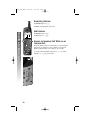
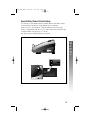
Spare Battery/Power Failure Backup
You can buy a spare handset battery (AT&T Battery 2401, SKU# 91077,
sold separately) and keep it charged in the base at all times.
In the event of a power failure, a fully charged battery in the spare
battery compartment will allow you to make and receive calls from the
cordless handset only for up to 21/2 hours.
The spare battery will fully charge in 24 hours.
6
5830_CIB_1ATT
8/14/02
9:47 PM
Page 7
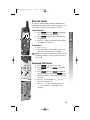
Belt Clip
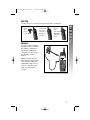
a) Slide
down
into
grooves
to attach.
b) Press tabs
on belt clip
into slots
on back of
handset to
reattach.
INSTALLATION
You may choose to use the optional belt clip with your handset.
c) To remove,
lift one
side
with your
thumbnail
and push
back.
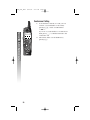
Headset
You can use this telephone
hands-free when you install
any industry standard 2.5
mm headset (purchased
separately). For best results
use an AT&T 2.5 mm
headset.
Plug the headset into the
jack located on the left side
of the handset (under the
small rubber flap). Do not
force the connection, but
make sure the plug fits
securely.
7
5830_CIB_1ATT
8/14/02
9:47 PM
Page 8
FEATURE SETUP – HANDSET
Feature Setup Menu
FEATURE SETUP – HANDSET
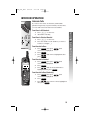
Press the softkey under MENU to enter the Feature
Setup menu. Use
or
to choose
features, then select
to save your choice.
OK
If you wait more than 20 seconds
¥NOTE:
without pressing a key, the handset returns to
the idle screen.
If you receive an incoming call while in
¥NOTE:
feature setup, the phone automatically exits the
menu to take the call.
iii
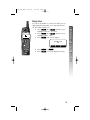
Set Time
You can choose to set the time manually, or you
can allow it to be set automatically with incoming
Caller ID information.
1 Press MENU .
2 Press
until the screen displays
VOICE ANNOUNCE
INTERCOM
HANDSET SETTINGS
SET TIME
▲
3
4
8
OK
▼
OK . The screen displays the
Press
current time setting. Use
to move
the cursor, and use the keypad to change a
digit. Select AM/PM .
Press SAVE to save the displayed time.
5830_CIB_1ATT
8/14/02
9:47 PM
Page 9
Clock Mode
iii
FEATURE SETUP – HANDSET
You can choose to display the time when the phone
is idle, or you can turn this feature off. The default
setting is ON.
1 Press MENU .
2 Press
until the screen highlights
INTERCOM
HANDSET SETTINGS
SET TIME
CLOCK MODE
▲
3
Press
OK
OK
▼
. The screen displays
CLOCK ENABLE
ON
OFF
4
5
Press
Press
OFF
OK
OK
ON
ON .
or
to save the displayed setting.
9
5830_CIB_1ATT
8/14/02
9:47 PM
Page 10
Sound Select
FEATURE SETUP – HANDSET
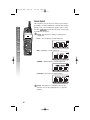
This telephone uses the latest acoustic receiver design,
providing you with four different sound quality settings.
During a call, you can adjust the quality of the sound.
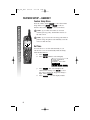
Pressing
repeatedly will cycle you through
four different responses.
The mid-boost setting is hearing-aid
¥NOTE:
compatible.
BASS – Low frequency sounds enhanced.
p
MID – Mid-range sounds enhanced.
TREBLE – High frequency sounds enhanced.
NATURAL – No frequency enhancement.
This feature is available only on the
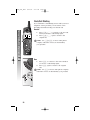
¥NOTE:
handset, not on the speakerphone or optional
headset.
10
5830_CIB_1ATT
8/14/02
9:47 PM
Page 11
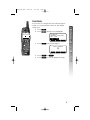
Adjust the volume of the handset ringer. Setting the
volume so that no bars show on the graph turns the
ringer off.
1 Press MENU , then
until the screen
highlights HANDSET SETTINGS.
OK .
2 Press
OK
3 Press
when RINGER VOLUME is
highlighted. The screen displays
iii
RINGER
VOLUME
OK
4
5
Press
or
to hear samples of
ring volumes.
OK
Press
to save the displayed setting.
Ringer Volume and Vibrate settings are
¥NOTE:
independent. Adjusting Ringer Volume does not
affect Vibrate.
11
FEATURE SETUP – HANDSET
Ringer Volume
5830_CIB_1ATT
8/14/02
9:47 PM
Page 12
FEATURE SETUP – HANDSET
Ringer Melody
The Ringer Melody sets which ringer you hear when
you have an outside call. The Ringer Melody default
setting is #01; there are eight Ringer Melody selections.
1 Press MENU , then
until the screen
highlights HANDSET SETTINGS.
OK , then
2 Press
until the screen
highlights RINGER MELODY.
OK . The screen displays
3 Press
iii
RINGER #01
▲
4
5
12
OK
▼
Press
or
to display desired
setting. A sample of the displayed setting is
played briefly.
OK
Press
to save the displayed setting.
You will hear a confirmation tone.
5830_CIB_1ATT
8/14/02
9:47 PM
Page 13
When this feature is on, the handset vibrates when you
have an incoming call. The default setting is OFF.
1 Press MENU , then
until the screen
highlights HANDSET SETTINGS.
OK , then
2 Press
until the screen
highlights VIBRATE CONTROL.
OK . The screen displays
3 Press
VIBRATE
iii
OFF
OFF
4
5
Press
Press
OFF
OK
OK
ON
ON .
or
to save the displayed setting.
Vibrate and Ringer Volume settings are
¥NOTE:
independent. Adjusting Vibrate does not affect
Ringer Volume.
13
FEATURE SETUP – HANDSET
Vibrate Control
5830_CIB_1ATT
8/14/02
9:47 PM
Page 14
FEATURE SETUP – HANDSET
Low Batt Tone
You can set the handset to sound a tone when battery
power is low, or you can turn the tone off. Default
setting is ON.
1 Press MENU , then
until the screen
highlights HANDSET SETTINGS.
OK , then
2 Press
until the screen
highlights LOW BATT TONE.
OK . The screen displays
3 Press
iii
LOW BATTERY TONE
ON
OFF
4
5
14
Press
Press
OFF
OK
OK
ON
ON .
or
to save the displayed setting.
5830_CIB_1ATT
8/14/02
9:47 PM
Page 15
Range Tone
iii
FEATURE SETUP – HANDSET
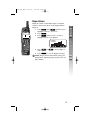
You can set the handset to sound a tone when you are
approaching the range limit, or you can turn this tone
off. The default setting is ON.
1 Press MENU , then
until the screen
highlights HANDSET SETTINGS.
OK , then
2 Press
until the screen
highlights RANGE TONE.
OK . The screen displays
3 Press
RANGE TONE
ON
OFF
4
5
Press
Press
OFF
OK
OK
ON
ON .
or
to save the displayed setting.
15
5830_CIB_1ATT
8/14/02
9:47 PM
Page 16
FEATURE SETUP – HANDSET
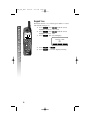
Keypad Tone
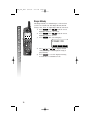
When this feature is on, each key press makes a sound.
The default setting is ON.
1 Press MENU , then
until the screen
highlights HANDSET SETTINGS.
OK , then
2 Press
until the screen
highlights KEYPAD TONE.
OK . The screen displays
3 Press
KEYPAD TONE
iii
ON
OFF
4
5
16
Press
Press
OFF
OK
OK
ON
ON .
or
to save the displayed setting.
5830_CIB_1ATT
8/14/02
9:47 PM
Page 17
Set Contrast
FEATURE SETUP – HANDSET
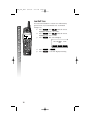
You can adjust the screen contrast for easy viewing.
1 Press MENU , then
until the screen
highlights HANDSET SETTINGS.
OK , then
2 Press
until the screen
highlights CONTRAST.
OK . The screen displays
3 Press
CONTRAST
iii
OK
4
5
Press
or
to increase or
decrease contrast.
OK
Press
to save the displayed setting.
17
5830_CIB_1ATT
8/14/02
9:47 PM
Page 18
FEATURE SETUP – HANDSET
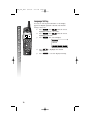
Language Setting
You can set each registered handset so the display
appears in English, Spanish or French. The default
setting is ENGLISH.
1 Press MENU , then
until the screen
highlights HANDSET SETTINGS.
OK , then
2 Press
until the screen
highlights LANGUAGE.
OK . The screen displays
3 Press
iii
ENGLISH
SPANISH
FRENCH
▲
4
5
18
Press
language.
OK
Press
OK
▼
to highlight the desired
to save the displayed setting.
5830_CIB_1ATT
8/14/02
9:47 PM
Page 19
FEATURE SETUP – BASE
1
2
l
j
Make sure the base is not in use.
Press VOL + or VOL - to adjust the ringer
volume. Each time you press + or - you will
hear how loud the setting is.
To turn the ringer off, press - until you hear
no tone.
19
FEATURE SETUP – BASE
Ringer Volume
5830_CIB_1ATT
8/14/02
9:47 PM
Page 20
Ringer Melody
FEATURE SETUP – BASE
1
2
3
j
j
j
20
p
p
4
Make sure the handset is off.
Press * * *. You will hear a tone and the
IN USE light will flash.
Press 1, 2, 3, 4, 5, 6, 7, or 8 to select a
ringer melody. Each time you press a key,
you’ll hear a sample of the melody.
Press # to save your selection
— OR —
Press * to exit without saving.
5830_CIB_1ATT
8/14/02
9:47 PM
Page 21
1
2
3
4
jj
p
Make sure the handset is off.
Press * * *. You will hear a tone and the
IN USE light will flash.
Press 0. If the IN USE light goes on, you have
selected TONE. If the light goes off, you have
selected PULSE. Press 0 again to change your
selection.
Press # to save your selection
— OR —
Press * to exit without saving.
j
21
FEATURE SETUP – BASE
Dial Mode (Tone/Pulse)
5830_CIB_1ATT
8/14/02
9:47 PM
Page 22
TELEPHONE OPERATION
Make a Call
At the Handset
TELEPHONE OPERATION
1
2
Press P, then dial the number
— OR —
Dial the number, then press P.
To end the call, press O or place the handset
in the base.
At the Base
j p
1
2
Press K, then dial the number.
To end the call, press K again.
Answer a Call
At the Handset
1
2
Press P to answer a call.
To end the call, press O or place the handset
in the base.
At the Base
1
2
j
22
Press K to answer a call.
To end the call, press K again.
5830_CIB_1ATT
8/14/02
9:47 PM
Page 23
Volume
You can adjust the volume of what you hear through
the handset during a conversation by pressing + or on the right side of the handset. You will hear a
special tone when you reach the highest or lowest
setting.
Speaker
During a conversation, press VOL + or VOL - to
adjust the base speaker volume. You will hear a special
tone when you reach the highest or lowest setting.
l
j
23
TELEPHONE OPERATION
Handset
5830_CIB_1ATT
8/14/02
9:47 PM
Page 24
TELEPHONE OPERATION
Handset Speakerphone
When the handset speakerphone is activated, you
can use the phone hands-free. Stand the handset on
a flat surface (not in the base) and continue your
conversation.
For best performance, use the handset
¥NOTE:
speakerphone in a quiet location with the handset
facing you from no more than four feet away.
j p
Make a Call
1
2
j
Press K, then dial the number
— OR —
Dial the number, then press K.
To end the call, press O
— OR —
Place the handset in the base.
Answer a Call
1
2
Press K to answer a call.
To end the call, press O
— OR —
Place the handset in the base.
Switch Between Handset and Speakerphone
While on a call you can press K to switch to
speakerphone. While on a speakerphone call, press
K to return to the handset.
If you press P while you are on the
¥NOTE:
speakerphone, you will flash the call and switch
to the handset earpiece.
24
5830_CIB_1ATT
8/14/02
9:47 PM
Page 25
Redial
Handset
1
2
k
o
kio
3
Save a Redial Number
1 Press REDIAL .
2
j
3
4
5
j
j
Press REDIAL then press
or
to scroll through the numbers in Redial
Memory.
Press P or K to dial the highlighted
number.
Press O to end the call.
Press
or
until the screen
displays the number you want to dial, then
press SELECT .
Press SAVE . The screen displays ENTER
NAME.
Using the chart on page 38, enter the name
associated with the redial number, then press
SAVE . The screen displays ENTRY HAS
BEEN SAVED! and gives a confirmation tone.
Screen displays RECORD VOICE ANNOUNCE?
Press YES to record an announcement to
be played when you receive a call from this
number (then follow directions on page 44)
— OR —
NO
Press
to exit without recording an
announcement.
Delete a Redial Number
1 Press REDIAL .
2
3
4
Press
or
until the screen
displays the number you want to delete.
Press SELECT .
Press ERASE . You will hear a confirmation
tone.
Base
1
2
3
Press K.
Press R to dial the last number called
from the base.
Press K to end the call.
25
TELEPHONE OPERATION
The last ten phone numbers dialed at the handset
are stored in redial memory.
5830_CIB_1ATT
8/14/02
9:47 PM
Page 26
Flash/Call Waiting
TELEPHONE OPERATION
If you subscribe to Call Waiting service with your local
telephone service provider, you can answer a new
incoming call without losing your current call.
Handset
1
2
k
Press P/F to connect to the new call
when you receive a call-waiting signal.
Press P/F again to return to the
original call.
NOTE: Use P/F to access other phone
¥company
subscriber services, as described by
your provider.
Base
1
2
Press F to connect to the new call when
you receive a call-waiting signal.
Press F again to return to the original
call.
NOTE: Use F to access other phone company
¥subscriber
services, as described by your provider.
j
26
5830_CIB_1ATT
8/14/02
9:47 PM
Page 27
Mute
1
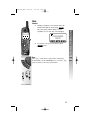
During a telephone conversation, mute the
handset microphone by pressing MUTE .
The other party will be unable to hear
anything on your end. The screen displays
MICROPHONE
MUTED
o
2
To return to two-way conversation, press
MUTE again.
Base
Press M on the base to prevent the other party
from hearing you, the MUTE light goes on. Press M
again to return to two-way conversation.
i
27
TELEPHONE OPERATION
Handset
5830_CIB_1ATT
8/14/02
9:47 PM
Page 28
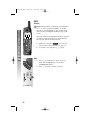
Hold
Handset
TELEPHONE OPERATION
When a call is on hold, the screen displays
¥NOTE:
CALL ON HOLD. If the clock feature is on, this
message will be displayed for five seconds, then
return to the clock display with H on top of the
screen.
After five minutes, the handset will ring to remind
you there’s a call on hold. If you do not answer
the ring, the call will be disconnected.
ji
1
2
While on a call, press HOLD . You can now
use the intercom if you wish (see page 33).
To return to the call, press P again.
Base
1
2
p
28
Press H on the base to place a call on
hold. The IN USE light goes on and the
SPEAKER light flashes.
Press H again to return to the call.
5830_CIB_1ATT
8/14/02
9:47 PM
Page 29
If you have dial pulse (rotary) service, you can change
from dial pulse to touch tone dialing during a call.
1 Make the call, and wait until it is connected.
2 Press t. Keys pressed after this send
touch tone signals.
3 After you hang up, the phone automatically
returns to dial pulse (rotary) service.
j
j
29
TELEPHONE OPERATION
Temporary Tone Dialing
5830_CIB_1ATT
8/14/02
9:47 PM
Page 30
DISPLAY SCREEN MESSAGES
TELEPHONE OPERATION
SCREEN DISPLAYS:
WHEN:
INCOMING OUTSIDE CALL You have an incoming phone call (without
Caller ID).
INTERCOM FROM
[PARTY NAME]
You have an intercom call from [PARTY
NAME], for example HANDSET 2. Once an
intercom call is underway, the handsets
will show the icons of the participating
parties.
LOW BATTERY
The handset battery is low.
EXTENSION IN USE
Another phone on this line is in use.
PARALLEL SET IN USE
Both this phone and another phone on this
line are in use.
SEARCHING FOR BASE
The handset is out of range.
REJECTED BY BASE
The base refused to accept the handset,
either because it is in use by six handsets,
or the handset registrations on the base
have been deleted.
FOUND BASE
The handset has finished SEARCHING FOR
BASE and has made the link.
LINE IN USE
Another device of the phone system is
using the telephone line; for example, if
the base is using the line, the handsets will
all show this message.
[XX] NEW CALLS
The number of distinct unanswered calls
with caller ID which have not been viewed
in the calls log.
CALL ON HOLD
RINGBACK!
A call has been on hold for five minutes;
pick up the call again.
CHECK AC POWER
The base is being powered by the spare
battery rather than by AC from a wall
outlet; check that the base is properly
plugged in to a working electrical outlet.
30
5830_CIB_1ATT
8/14/02
9:47 PM
Page 31
HANDSET ICONS
INDICATES
Line In Use indicator
On steady with no number next to it when another
phone on this line is in use.
On steady with one or more numbers next to it,
indicating which extensions are using the line.
For example,
12 indicates that Handset 1 and
Handset 2 are on an outside call.
Intercom indicator
On steady with the extension numbers currently on
an intercom call. For example, 02 indicates that the
Base and Handset 2 are on an intercom call.
Battery indicator
When the handset is removed from the charger, this
lets you know the level of charge in the battery pack,
from FULL (
) to EMPTY (
).
Cycles (Low, Medium, and Full) when handset battery
is charging.
Flashes when a low battery condition is detected.
Ringer Off indicator
is displayed when the ringer is turned off.
E
Enhanced Mode indicator
On steady when active handset is in Enhanced Mode.
The handset will enter Enhanced Mode automatically
when in an area with interference.
M
Mute indicator
On steady when the handset microphone is muted.
H
Hold indicator
On steady when the line is on hold.
R
Handset Registration indicator
R is displayed when a handset is either not registered,
or searching for the base unit.
0–6
Handset indicator
Number is displayed to show which set is in use.
31
TELEPHONE OPERATION
THIS ICON:
5830_CIB_1ATT
8/14/02
9:47 PM
Page 32
BASE LIGHTS
TELEPHONE OPERATION
LIGHT
STATUS:
INDICATES:
MESSAGE WAITING flashing
There are new messages in your
voicemail. Service must be
subscribed to through your
local telephone company.
IN USE
on
Base or handset is on a call.
IN USE
flashing
Extension is in use.
CHARGING
on
Handset is in the base charging.
MUTE
on
Base microphone is muted.
SPEAKER
flashing
HOLD function is activated.
SPEAKER
on
Base speakerphone is in use.
TONES AND WHAT THEY MEAN
TONE:
INDICATES:
Two quick beeps
Handset is out of range of the base.
Three quick beeps
Battery charge is low.
One beep
Handset registration is complete
— OR —
A programming command is successfully
completed.
One long beep
Indicates an error in programming.
32
5830_CIB_1ATT
8/14/02
9:47 PM
Page 33
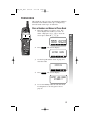
INTERCOM OPERATION
Intercom Calls
If you have more than one handset (AT&T 5800,
purchased separately) registered with your 5830 base,
you can make intercom calls between handsets.
1
2
Press I on the base.
All handsets will ring.
From Base to Selected Handset
j
1
2
Press I on the base.
Press the number of the handset you want to
reach (for example 3).
From Handset to Base
1
2
3
Press MENU , then press
until
INTERCOM is highlighted.
OK .
Press
Press
until BASE is highlighted, then
OK .
press
From Handset to Handset
1
iii
2
3
Press MENU , then press
until
INTERCOM is highlighted.
OK .
Press
Press
until the desired handset is
OK .
highlighted, then press
From Handset to Base/Handset(s)
1
2
3
Press MENU , then press
until
INTERCOM is highlighted.
OK .
Press
Press
until GLOBAL PAGE is highlighted
OK .
then press
33
INTERCOM OPERATION
From Base to All Handsets
5830_CIB_1ATT
8/14/02
9:47 PM
Page 34
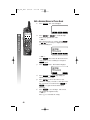
Answering Intercom
INTERCOM OPERATION
At handset, press P.
At base, automatically answered.
End Intercom
At handset, press O.
At base, press K.
k
o
j
j
34
Answer an Incoming Call While on an
Intercom Call
If an incoming call is received while you are using the
intercom, you will hear a beep and the screen will
display call information as usual for 15 seconds.
To answer the incoming call, press P on either
handset or K on the base.
5830_CIB_1ATT
8/14/02
9:47 PM
Page 35
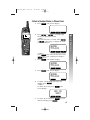
Blind Call Transfer
If you have installed additional AT&T 5800 handsets
(purchased separately) with your 5830 telephone, you
can transfer a call from one handset to another.
1
k
o
i
j p
2
3
From the Base
1
2
j
Press XFER , then use
to highlight
were you want the call transferred.
OK
Press
when the desired destination
is highlighted.
Press O or place the handset in the charger
to complete the transfer.
Press I.
Press the number of the handset where you
want the call transferred (for example, 2).
An unanswered call will ring back to the
¥NOTE:
originating handset or base if not answered in
30 seconds.
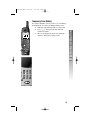
Announced Call Transfer
1
2
j
3
4
5
6
Press HOLD to put the call on hold.
Press MENU , then use
to highlight
INTERCOM.
OK , then use
Press
to highlight
OK
the call destination, then press
again.
When the handset or base answers, announce
the caller.
Press O on the handset or K on
the base to end the call.
Press P (on the receiving handset) or
K on the base to pick up the call
on hold.
j
35
INTERCOM OPERATION
From the Handset
5830_CIB_1ATT
8/14/02
9:47 PM
Page 36
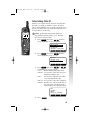
Conference Calling
INTERCOM OPERATION
1
2
j p
36
If one handset is already on a call, you can
connect a second handset to the call by
pressing P on the second handset
— OR —
If you are on a call and have a second call on
hold, press P to add the held call to the
conference call.
Disconnect either or both handsets by
pressing O.
5830_CIB_1ATT
8/14/02
9:47 PM
Page 37
PHONE BOOK
This telephone can store up to 50 telephone numbers
and names. Each number can be up to 32 digits long
and each name can be up to 16 characters.
1
Enter the number you want to store. The
screen displays the number you enter. To
delete a digit, press O/C; to clear the
screen press and hold O/C.
k
o
i
p
555 0123
PAUSE
2
Press
MEM
MENU
MEM
. The screen displays
ENTER NAME
CLEAR
3
SAVE
Use the keypad and the chart on page 38 to
enter the name
OFFICE
CLEAR
4
Press
SAVE
SAVE . The screen displays
ENTRY HAS BEEN
STORED!!
5
To record a Talking Caller ID announcement
for this phone book entry, please turn to
page 44
37
PHONE BOOK
Store a Number and Name in Phone Book
5830_CIB_1ATT
8/14/02
9:47 PM
Page 38
PHONE BOOK
Keypad Characters
38
Dial
Key
1
2
3
Presses
4
5
1
&
’
,
.
1
2
A
B
C
a
3
D
E
F
4
G
H
5
J
6
6
7
b
c
2
d
e
f
3
I
g
h
i
4
K
L
j
k
l
5
M
N
O
m
n
o
6
7
P
Q
R
S
p
q
r
8
T
U
V
t
u
v
8
9
W
X
Y
Z
w
x
y
0
0
*
*
#
#
8
9
s
7
z
9
5830_CIB_1ATT
8/14/02
9:47 PM
Page 39
Dial a Number in Phone Book
Press
MEM
. The screen displays
▲
2
k
o
i
j
FIND
▼
PHONE BOOK
1
Press
or
to scroll through
memory in alphabetical order
— OR —
Enter the first letter of a name (then
or
, if necessary) to display the name
you’re searching for
GEORGE
555-0123
j
▲
3
EDIT
▼
— OR —
Press FIND , then enter the first few letters
of the name you’re searching for and press
FIND again.
Press P or K to dial the displayed
number.
39
5830_CIB_1ATT
8/14/02
9:47 PM
Page 40
Edit a Number/Name in Phone Book
1
Press
MEM
. The screen displays
PHONE BOOK
▲
2
iii
FIND
Press
or
to scroll through
memory in alphabetical order
— OR —
Enter the first letter of a name (then
or
, if necessary) to display the name
you’re searching for
GEORGE
555-0123
▲
3
▼
EDIT
▼
— OR —
Press FIND , then enter the first few letters
of the name you’re searching for and press
FIND again.
Press EDIT twice. The handset displays
GEORGE
555-0123
NAME
4
5
6
40
NUMBER
Press NAME or NUMBER , depending on
which you want to edit.
Press
to move the cursor to the
character or digit you want to edit, then enter
the corrections as needed. Press MORE or
BACK to toggle between functions if
necessary.
Press SAVE to save changes. The screen
will display the updated entry.
— OR —
Press O to exit without saving.
5830_CIB_1ATT
8/14/02
10:08 PM
Page 41
Delete a Number/Name in Phone Book
Press
MEM
. The screen displays
▲
2
iii
▼
FIND
PHONE BOOK
1
Press
or
to scroll through
memory in alphabetical order
— OR —
Enter the first letter of a name (then
or
, if necessary) to display the name
you’re searching for
GEORGE
555-0123
▲
3
▼
EDIT
— OR —
Press FIND , then enter the first few letters
of the name you’re searching for and press
FIND again.
Press EDIT . The handset displays
GEORGE
555-0123
DEL
4
Press
DEL
EDIT
. The screen displays
GEORGE
555-0123
THIS
5
ALL
To delete only the displayed name and
number, press THIS
— OR —
To delete all records, press ALL . The
screen displays
ARE YOU
SURE?
NO
6
YES
To delete all records, press YES
NO .
without deleting, press
. To exit
41
5830_CIB_1ATT
8/14/02
9:47 PM
Page 42
CALLER ID OPERATION
CALLER ID OPERATION
If you subscribe to Caller ID service with your local phone service
provider, this phone stores all incoming calls (up to 50 at the handset)
with valid Caller ID information in the calls log. Name, number, time
and date information can all be stored, if they are sent with the call.
Calls are automatically stored in the order they are received, with call “1”
stored as the most recent call. The calls log number appears next to the
phone number on the screen display.
JOHNSON THOMAS
908-555-0123 3
10:30P Oct12 #02
The number of new calls displayed on each handset and
¥NOTE:
the base may not be the same. For example, if you answer a call
on Handset 2, it will not consider that call information as new,
but the base and other handsets will.
If Caller ID information has been received you can see a summary of
the calls log on the idle screen. After you review all new call records,
the NEW CALLS indicator will go off.
5 NEW CALLS
42
5830_CIB_1ATT
8/14/02
9:47 PM
Page 43
Setup Talking Caller ID
When you set up this feature, the base can announce
the name or telephone number of up to 50 callers
whose names/numbers are stored in your phone book
before you answer the call. Each announcement can
be up to three seconds long.
CALLER ID OPERATION
If the caller has blocked Caller ID
¥NOTE:
information and this feature is on, the base
announces “Private Caller.”
iii
1
Press MENU , then press
until the
screen highlights VOICE ANNOUNCE.
CALLS LOG
VOICE ANNOUNCE
INTERCOM
HANDSET SETTINGS
▲
2
OK
▼
OK , then press
Press
until the
screen highlights SELECT TYPE.
REVIEW
RECORD NEW
SELECT TYPE
▲
3
OK
▼
OK , then press
Press
or
to highlight one of four options.
OFF:
Disable Talking Caller ID feature.
NUMBER: Sets system to announce received
telephone numbers only.
NAME:
Set system to announce recorded
voice announcements only.
NAME OR Sets system to announce telephone
NUMBER: numbers (for calls received that are
not entered in your phone book)
and recorded voice announcements.
OFF
NUMBER
NAME
NAME OR NUMBER
▲
4
Press
OK
OK
▼
.
43
5830_CIB_1ATT
8/14/02
9:47 PM
Page 44
Record a New Talking Caller ID
Announcement
CALLER ID OPERATION
1
2
iii
3
4
Follow the directions on page 37 to “Store a
Number and Name in Phone Book”
— OR —
Follow the steps under “Edit Talking Caller ID
Announcement” on page 45.
After Step 4 in “Storing a Number and Name
in Phone Book” (ENTRY HAS BEEN STORED!)
the screen prompts RECORD VOICE
ANNOUNCE?
NO
Press
to store the number without an
announcement
— OR —
Press YES to record an announcement.
Press RECORD . Speak directly into the handset
microphone holding it directly in front of you,
about 12 inches from your mouth. The screen
displays
RECORD AFTER
TONE
5
6
44
Press STOP when you are finished
recording (system will automatically stop after
three seconds).
Press PLAY to review the Talking Caller ID
announcement at the base speaker.
5830_CIB_1ATT
8/14/02
9:47 PM
Page 45
Edit Talking Caller ID Announcement
1
Press MENU , then press
until the
screen highlights VOICE ANNOUNCE.
CALLS LOG
VOICE ANNOUNCE
INTERCOM
HANDSET SETTINGS
2
iii
▼
OK
OK , then press
Press
screen highlights RECORD NEW.
CALLER ID OPERATION
▲
until the
REVIEW
RECORD NEW
SELECT TYPE
▲
3
OK
▼
Press
or
to scroll through
memory in alphabetical order
— OR —
Enter the first letter of a name (then
or
, if necessary) to display the name
you’re searching for
GEORGE
555-0123
▲
4
5
6
EDIT
▼
— OR —
Press FIND , then enter the first few letters
of the name you’re searching for and press
FIND again.
VA . If an
Press EDIT , then press
announcement is already recorded, the screen
displays ANNOUNCEMENT ALREADY RECORDED.
If you want to change the announcement,
press RECORD twice.
If no announcement is recorded, press
RECORD once. Press STOP to end
recording.
Press PLAY to review your announcement
at the base speaker.
45
5830_CIB_1ATT
8/14/02
9:47 PM
Page 46
Review, Play, Erase Talking Caller ID
Announcements
1
CALLER ID OPERATION
2
iii
46
Follow Steps 1–3 under “Edit Talking Caller ID
Announcement” on page 45.
Press ERASE to delete the announcement
— OR —
Press PLAY to hear the announcement
— OR —
Press RECORD to re-record an announcement.
5830_CIB_1ATT
8/14/02
9:47 PM
Page 47
Review Calls Log
1
OK . The screen
Press MENU , then press
displays the most recent call in the calls log.
k
i
o
2
Press
records.
or
to scroll through call
Store Record in Phone book
1
p
3
4
5
While the call information is displayed, press
CID , then use # to scroll through dialing
options.
For example:
555-1212
1-555-1212
908-555-1212
1-908-555-1212
— OR —
While the call information is displayed, press
# to scroll through dialing options, then press
CID .
For example:
555-1212
1-555-1212
908-555-1212
1-908-555-1212
Press SAVE .
The screen displays ENTRY HAS BEEN STORED.
To record a Talking Caller ID announcement
for this phone book entry, please turn to
page 44.
47
CALLER ID OPERATION
JOHNSON THOMAS
908-555-0123 1
10:30P Oct12 #02
5830_CIB_1ATT
8/14/02
9:47 PM
Page 48
Display Dial
While you are reviewing the calls log, you can dial a
number displayed on the screen.
Press P or K to dial the displayed number.
Dialing Options
CALLER ID OPERATION
1
k
o
i
j
j
48
While a call record is displayed, press CID ,
then select OPT# .
2 Use
or
to highlight the
number the way you want to dial it.
For example:
555-1212
1-555-1212
908-555-1212
1-908-555-1212
The number of dialing options (up to four) available
for each call displayed depends on the format of the
original call.
5830_CIB_1ATT
8/14/02
9:47 PM
Page 49
Remove Call Records
Removing a Specific Call Record
iii
OK .
Press MENU , then press
Press
or
to scroll through call
records until the call you want to delete is
displayed.
JOHNSON THOMAS
908-555-0123
10:30P Oct25 #06
3
Press CID
displays
, then press
DEL
. The screen
JOHNSON THOMAS
908-555-0123
10:30P Oct25 #06
THIS
4
ALL
Press THIS . The call record is deleted and
you hear a confirmation tone.
Removing All Records
1
2
OK .
Press MENU , then press
Press CID , then press DEL . The screen
displays the most recent call record.
JOHNSON THOMAS
908-555-0123
10:30P Oct25 #06
THIS
3
Press
ALL
ALL
. The screen displays
ARE YOU
SURE?
NO
4
Press
press
YES
NO
YES
to delete all call records or
to exit without deleting.
49
CALLER ID OPERATION
1
2
5830_CIB_1ATT
8/14/02
9:47 PM
Page 50
BATTERIES
Battery Life
A fully charged battery provides an average talk time of about eight
hours, or standby time of five days.
Talk time and standby time may vary depending on
¥NOTE:
operating conditions.
BATTERIES
Battery Indicator
Ten to fifteen minutes before the battery charge gets too low to operate
the handset, an empty battery icon (
) will flash on the screen, you’ll
hear three short tones, and the screen will display LOW BATTERY.
If you continue to use the handset without charging the battery or
replacing it (you can purchase a spare battery separately), the handset
will turn off automatically when there is no longer sufficient power.
Monitor the battery icon to make sure your battery is
¥NOTE:
sufficiently charged.
Charge the Handset Battery Pack
•
•
•
After a low battery indicator, the handset battery needs to be
charged.
Place the handset in the base so the CHARGING light goes on.The
battery pack is typically charged in eight hours.
If you repeatedly get a low battery indicator, even after eight hours
of charging, the battery should be replaced. Use only AT&T Battery
2401, SKU# 91077.
CAUTION: Charge the battery provided with or identified for
use with this product only in accordance with the instructions
and limitations specified in the User’s Manual, Part 1.
50
5830_CIB_1ATT
8/14/02
9:47 PM
Page 51
Spare Battery/Power Failure Backup
You can buy a spare handset battery (AT&T Battery 2401, SKU# 91077,
sold separately) and keep it charged in the base at all times.
In the event of a power failure, a fully charged battery in the spare
battery compartment will allow you to make and receive calls from the
cordless handset only for up to 2 1/2 hours.
BATTERIES
The spare battery will fully charge in 24 hours.
51
5830_CIB_1ATT
8/14/02
9:47 PM
Page 52
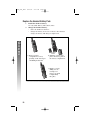
Replace the Handset Battery Pack
1
BATTERIES
2
Install the handset battery.
Use only AT&T Battery 2401, SKU# 91077.
Charge the handset battery.
• Place the handset in the base.
• Charge the battery for at least 12 hours. After the first
charge, the battery will charge in eight hours.
a) Remove battery
compartment cover by
pressing on the raised spot
and sliding downward.
b) Align the contacts and
place the battery pack in
the battery compartment.
c) Replace cover by
sliding it on its
track up over
battery case until
it snaps firmly
into place.
52
5830_CIB_1ATT
8/14/02
9:47 PM
Page 53
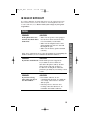
IN CASE OF DIFFICULTY
If you have difficulty operating this phone, try the suggestions below.
For Customer Service, visit our website at www.telephones.att.com
or call 1 800 222–3111. Please retain your receipt as your proof
of purchase.
PHONE
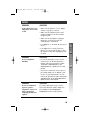
SOLUTION
If the phone does not
• Make sure the power cord is plugged
work at all, check these
into the base and an electrical outlet
items first:
not controlled by a wall switch.
• Make sure the telephone line cord is
plugged firmly into the base unit and
the telephone jack.
• Make sure the battery pack is installed
correctly.
If the above suggestions do not solve the problem, try re-initializing the
handset and base (see “To re-initialize the handset and base”).
PROBLEM
SOLUTION
If you have no dial tone: Check all the previous suggestions.
If you still do not hear a dial tone,
disconnect the phone and try another
phone in the same jack. If there is
no dial tone on that phone either, the
problem is probably in your wiring or local
service.
PROBLEM
SOLUTION
If you hear a long
tone when you try to
use the handset:
• The handset and base are not
communicating properly. You might be
out of range. Move closer to the base
and try again.
• If moving closer to the base does
not help, follow the directions “To
re-initialize the handset and base.” PH
53
IN CASE OF DIFFICULTY
PROBLEM
5830_CIB_1ATT
8/14/02
9:47 PM
Page 54
IN CASE OF DIFFICULTY
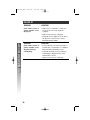
PHONE
PROBLEM
SOLUTION
To re-initialize the
handset and base:
1 Disconnect the power to the base.
2 Remove spare battery pack (if installed).
3 Remove the handset battery pack.
4 Wait at least 15 seconds.
5 Insert the handset battery pack.
6 Connect the power to the base.
PROBLEM
SOLUTION
If you hear noise or
interference when
using the phone:
• You may be out of range. Move closer to
the base.
• Household appliances plugged into the
same circuit as the base can sometimes
cause interference. Try moving the
appliance or the base to another outlet.
• The layout of your home or office may
be limiting the operating range. Try
moving the base to another location,
preferably on an upper floor.
• Using the handset near household
appliances (microwaves, computers,
televisions, stereos, etc.) can sometimes
cause interference. Move away from
appliances while using the handset.
54
5830_CIB_1ATT
8/14/02
9:47 PM
Page 55
PROBLEM
SOLUTION
If the phone does not
ring when you receive
a call:
• Make sure the ringer is on (see “Ringer
Volume” on pages 11 and 19).
• Make sure the telephone line cord is
connected firmly to the base and the
telephone jack.
• Make sure the AC adapter is plugged
firmly into an electrical outlet not
controlled by a wall switch.
• You might be too far from the base; move
closer.
• You might have too many extension
phones on your telephone line to allow
all of them to ring. Try unplugging some
of them.
PROBLEM
SOLUTION
If your telephone
misdials:
• If you have dial pulse (rotary) service,
you’ll need to set the dial method to
PULSE. Follow the instructions under
“Dial Mode (TONE/PULSE)” in the
FEATURE SETUP – BASE section of this
manual.
• If you have touch tone service and you
hear clicks while you are dialing, you’ll
need to set the dial method to PULSE.
Follow the instructions under “Dial Mode
(TONE/PULSE)” in the FEATURE SETUP –
BASE section of this manual.
PROBLEM
SOLUTION
If you are unable to
operate special
telephone services or
other equipment
requiring touch tone
signals:
If you have dial pulse (rotary) service,
follow the directions under “Temporary
Tone Dialing” in the TELEPHONE
OPERATION section of this manual.
55
IN CASE OF DIFFICULTY
PHONE
5830_CIB_1ATT
8/14/02
9:47 PM
Page 56
IN CASE OF DIFFICULTY
CALLER ID
PROBLEM
SOLUTION
If the caller’s name or
phone number is not
displayed:
• Make sure you subscribe to Caller ID
service from your local telephone
company.
• Make sure the battery is charged.
• Caller ID service might not work when
the phone is connected to a Private
Branch Exchange (PBX).
PROBLEM
SOLUTION
If the caller’s name or
phone number is not
displayed during
Call Waiting:
• You should call your service provider to
confirm that you subscribe to combined
Caller ID with Call Waiting service.
• Caller ID information received during
Call Waiting is displayed only on the
handset that is in use.
• Make sure the battery is charged.
56
5830_CIB_1ATT
8/14/02
9:47 PM
Page 57
DEFAULT SETTINGS
FUNCTION:
DEFAULT SETTING:
Dial Method
Tone
Handset Volume
2
Ringer Volume
2
Ringer Melody
1
Key Tone
ON
Clock
ON
Vibrate
OFF
DEFAULT SETTINGS
DEFAULT SETTINGS
57
5830_CIB_1ATT
8/14/02
9:47 PM
Page 58
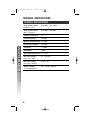
TECHNICAL SPECIFICATIONS
TECHNICAL SPECIFICATIONS
RF Frequency Band
(Handset to base)
2400 MHz – 2483.5 MHz
RF Frequency Band
(Base to handset)
5725 MHz – 5850 MHz
Number of Channels
95
Channel Spacing
864 kHz
TECHNICAL SPECIFICATIONS
Handset Transmit Power +23 dBm
Base Transmit Power
+29 dBm
Sensitivity
–93 dBm
Modulation
GFSK
Operating Temperature 0°C – 50°C
Base Unit Voltage
(AC Voltage, 60Hz)
96 – 144 Vrms
Base Unit Voltage
(DC Adapter Output)
7 Vdc @ 1A
Handset Voltage
(2-Cell NiMH Battery)
2.0 – 3.0 Vdc, 1400mAh
58
5830_CIB_1ATT
8/14/02
9:47 PM
Page 59
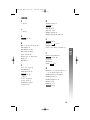
INDEX
#
D
# 20, 21
default settings 1
DEL
41
Dial Mode 21
dial tone 4, 53
dialing options 48
Display Screen Messages 30
A
ALL
41, 49
B
Base 1, 22, 27, 34, 35, 54, 58
Base lights 32
Base Ringer 19, 20
Base unit. See Base
BASS BOOST 10
battery 4, 6, 31, 50–52, 58
Beeps 32
Belt Clip 7
E
EDIT 40, 41
EMPTY (
) 31, 50
English 18
ENTRY HAS BEEN STORED! 37
F
Feature Setup Menu 8
FIND 39–41, 45
F 26
French 18
FULL (
) 31
C
CALL ON HOLD 28
Call Waiting 2
Caller ID 2, 30, 42
CID
48, 49
C 37
CLOCK ENABLE 9
CLOCK MODE 9
conference call 36
CONTRAST 17
H
Handset 1, 2, 7, 10, 22–24, 27, 31,
33–36, 50, 53, 54, 57, 58
Handset battery. See battery
Handset Icons 31
Handset ringer 11–13
Headset 7, 10
Hold 28, 31, 36
HOLD 28, 35
59
INDEX
** 20, 21
5830_CIB_1ATT
8/14/02
9:47 PM
I
O
Idle Screen 8
IN USE light 20, 21, 32
I 33, 35
interference 54
O 22, 24, 25, 34–36
OK
8
K
KEYPAD TONE 16
L
INDEX
Page 60
language 18
long tone 53
low batt tone 14
low battery 31, 50
LOW BATTERY 50
M
MEM
37
8
MID BOOST 10
mute 27
M 27
MENU
N
NAME 37
NAME
40
NATURAL BOOST 10
NEW CALLS 42
NiMH battery pack 1
noise or interference 54
NUMBER 40
60
P
P 22, 24, 25, 34, 39, 48
Power cord 1, 3, 5, 53
Power Failure Backup 6
PULSE 55
pulse (rotary) 29, 55
R
Range limit 15
range tone 15
re-initialize 54
redial 25
R 25
REDIAL 25
RINGER #01 12
Ringer Melody 12, 20, 57
RINGER MELODY 12
Ringer Volume 11, 13, 19, 57
RINGER VOLUME 11
S
SAVE 8, 37, 40
SET TIME 8
sound quality settings 10
10
Spanish 18
Spare Battery 6, 50
Speaker 23
K 22, 24, 25, 34, 35, 39, 48
Speakerphone 10, 24
standby time 50
subscriber services 26
5830_CIB_1ATT
8/14/02
9:47 PM
Page 61
T
talk time 50
Talking Caller ID 43–46
Technical Specifications 58
Telephone line cord 1, 3
THIS 41
Time 9
t 29
TONE/PULSE 21
touch tone 29, 55
TREBLE BOOST 10
INDEX
V
VA
45
Vibrate 11, 13, 57
VIBRATE CONTROL 13
VOL + 19, 23
VOL - [9555 -] 19, 23
Volume 11, 23, 57
X
XFER
35
61
QUICK START GUIDE
Draft
8/14/02a
5.8 GHz Cordless Telephone 5830
with Talking Caller ID/Call Waiting
INSTALLATION
Install this telephone away from electronic
¥ NOTE:
equipment, such as personal computers, television sets
or microwave ovens. Avoid excessive heat, cold, dust
or moisture.
1
2
Connect the telephone line cord. (figure a)
Connect the power cord to the base and an electrical outlet
not controlled by a wall switch. (figure a) The ANSWER
ON/OFF light goes on, and CL flashes in the message window.
Use only the power cord supplied with this product.
If you need a replacement, call 1 800 222–3111.
3
4
5
Install the handset battery. Use only AT&T Battery 2401,
SKU# 91077. (figure b)
Charge the handset battery.
•
Place the handset in the base.
•
Charge the battery at least 12 hours. After the first charge,
the battery will charge in eight hours.
Check for dial tone.
•
After the batteries are charged, lift the handset and press
P; you should hear a dial tone.
For detailed installation instructions, to use the belt clip, or to
use a headset with this phone please refer to the INSTALLATION
section of your User’s Manual.
Standard
electrical
outlet
Power cord
Modular
telephone
jack
a) Remove battery b) Align the
c) Replace cover
compartment
contacts and
by sliding it on
cover by pressing
place the battery
its track up over
on the raised
pack in the
battery case until
spot and sliding
battery
it snaps firmly
downward.
compartment
into place.
figure b
FEATURE SETUP
Dial Mode (Tone/Pulse)
This phone comes set for touch tone dialing. If you have dial pulse
(rotary) service, you must set the dial mode to PULSE.
1 Make sure the handset is off.
2 Press * * * on the base. You will hear a tone and the LINE
IN USE light will flash.
3 Press 0. If the IN USE light goes on, you have selected TONE.
If the light goes off, you have selected PULSE. Press 0 again
to change your selection.
4 Press # to save your selection
— OR —
Press * to exit without saving.
Line cord
Set Time
You can choose to set the time manually, or you can allow it to be
set automatically with incoming Caller ID information.
1 Press MENU on the handset.
2 Press
until the screen displays
CALLS LOG
INTERCOM
HANDSET SETTINGS
SET TIME
▲
figure a
3
4
OK
▼
OK . The screen displays the current time setting.
Press
Use
to move the cursor, and use the keypad to
change a digit. Select AM/PM .
Press SAVE to save the displayed time.
FEATURE SETUP (continued)
CALLER ID
Clock Mode
Setup Talking Caller ID
You can choose to display the time when the phone is idle, or you
can turn this feature off. The default setting is ON.
1 Press MENU on the handset.
2 Press
until the screen highlights
When you set up this feature, the base can announce the name or
telephone number of up to 50 callers whose names/numbers are
stored in your phone book before you answer the call. Each
announcement can be up to three seconds long.
INTERCOM
HANDSET SETTINGS
SET TIME
CLOCK MODE
▲
3
Press
OK
OK
If the caller has blocked Caller ID information and
¥ NOTE:
this feature is on, the base announces “Private Caller.”
1
Press
MENU , then press
▼
CALLS LOG
VOICE ANNOUNCE
INTERCOM
HANDSET SETTINGS
. The screen displays
CLOCK ENABLE
ON
OFF
4
5
Press
Press
OFF
OK
OK
ON
▲
2
Press
OK
, then press
until the screen highlights
REVIEW
RECORD NEW
SELECT TYPE
Sound Select
▲
3
During a call, you can adjust the quality of the sound. Pressing
repeatedly will cycle you through four different
responses.
¥ NOTE:
▼
OK
SELECT TYPE.
ON .
or
to save the displayed setting.
This telephone uses the latest acoustic receiver design, providing
you with four different sound quality settings.
until the screen highlights
VOICE ANNOUNCE.
OK , then press
Press
one of four options.
▼
OK
or
to highlight
OFF:
Disable Talking Caller ID feature.
NUMBER: Sets system to announce received telephone
numbers only.
NAME:
Set system to announce recorded voice
announcements only.
NAME OR Sets system to announce telephone
NUMBER: numbers (for calls received that are not
entered in your phone book) and recorded
voice announcements.
The mid-boost setting is hearing-aid compatible.
BASS – Low frequency sounds enhanced.
OFF
NUMBER
NAME
NAME OR NUMBER
MID – Mid-range sounds enhanced.
▲
4
Press
OK
OK
▼
.
TREBLE – High frequency sounds enhanced.
NATURAL – No frequency enhancement.
This feature is available only on the handset, not on
¥ NOTE:
the speakerphone or optional headset.
© 2002 Advanced American Telephones. All Rights Reserved.
AT&T and the Globe Design are trademarks of AT&T Corp,.
licensed to Advanced American Telephone
Printed in China. Issue 1AT&T 08/02
Need Help Insert
8/6/02
8:25 AM
Page 1
Congratulations on your purchase
of this AT&T product.
NEED HELP?
Our representatives are here
to help you with any questions
concerning the operation of this
product, available accessories,
or any other related issues.
Call Toll Free
1 (800) 360-4121
or visit our website at
www.telephones.att.com