1
4.2.2
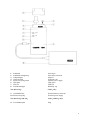
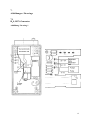
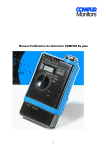
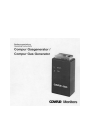
CO, Cl2 and NO2 Generator (see Picture 2)
The CO, Cl2 and NO2 generator cells contain an internal fan. When replacing, please proceed
as follows:
1
2
3
4
5
6
7
8
9
10
Loosen the 4 screws on the backside of the instrument and seperate the two halves. (Use
caution as the LED’s are attached to the top case)
Remove the battery.
Unsolder the 3 wires from the old generator cell.
Unscrew the 4 screws securing the PCB and remove the PCB.
Unscrew the 3 screws of the generator cell , which secure it to the bottom case, and
remove the old generator cell. Insert the new generator cell and tighten the 3 screws.
Reinsert the PCB and tighten the screws. Please make sure that the switch pin has not
moved and that it easily activates the switch on the PCB.
Reconnect the battery.
If required, readjust the generator current to the following specifications:
- Connect current meter to PCB pin 4 (center pin) and pin 7 (left pin).
- Press switch S101 and adjust generator current with potentiometer R114 to the
applicable current:
CO = 13 mA; Cl2 = 0,3 mA; NO2 = 5 mA
Solder the wires of the generator cell and the fan to the PCB pins:
- black cable to pin 4 (center pin)
- yellow cable to pin 7 (left pin)
- red cable to pin 3 (right pin)
Close the housing of the generator and tighten the screws in the back.
Note:
) Whenever you have done maintenance work on a gas generator, test the function with a
working gas detector. The detector should give an alarm within 10 seconds.
12