Transcript
BATTERY OPERATION (BATTERIES NOT INCLUDED)
Hearing experts advise against the constant use of personal stereos played
at high volume. Constant high volume use can lead to hearing loss. If you
experience ringing in the ears or hearing loss, discontinue use and seek
medical advice.
Your unit operates on two(2)AA size alkaline batteries. Open the
CD cover and insert the batteries in the battery compartment
following the polarity diagram located inside.
PORTABLE CD PLAYER
CX-CD331
. o remove the disc from its storage case, press down on the center of
T
the case and lift the disc out. Hold it carefully by the edges as shown
below.
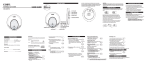
Headphone
jack
Volume
control
Insert the disc into the unit with the label of the disc facing UP.
Gently wipe the disc using a soft cloth from the center to the outer
direction to remove dust, fingerprints or any other particles on the
Function
Switch
disc surface. Never use chemicals, such as record sprays , anti-static
sprays, benzene or thinners to clean the CD. These chemicals can
Open door lock
FF
REW
damage the disc surface permanently.
To avoid serious scratches on CD, keep them in the cases after each
button
use. Scratches can cause the laser pick-up skip in the future play.
Do not place stickers or write anything on the disc.
button
Stop button
Play/Pause button
Tuning Control
LCD Display
CD OPERATION
The CD mechanism and the sensitive circuitry may cause interference
to a radio tuner nearby. Do not operate this unit while operating other
radio devices.
Danger
Caution
(2)LCD screen will display"
radiation. Avoid direct exposure to
the beam.
(3)LCD screen will display " no diSC" if CD is not
in the unit.
Use of controls, adjustments or procedures not listed in
(4)LCD screen will display "Er" if the unit cannot
General
Maximum Output (Stereo Headphone..15mW+15mW(32ohm)
Do not expose the unit to high temperature or humidity.
Radio Frequecy
FM..................................................88-108MHz
C OM PA C T
Only compact discs identified with this mark can
be used with this player.
DC.................................................. 3V with 2 size "AA" Batteries
Consult your dealer if you are ever in doubt about the
installation, operation or safety of your equipment
".
read CD track data.
REW
(1) Press FF
(or REW
(or
) button to fast forward (or
fast reverse) the current track.
)button to set the
desired track# . Press PLAY/PAUSE
button to play. Press FF
(or REW
)
button to change the track # during the play
Press FF button
POWER OFF
Press STOP button to get to the stop mode.
The player will shut off automatically after a few seconds.
mode.
(5)When CD track data has been read, LCD
Read the instruction manual before operating this unit.
detergent or solvent to clean the unit.
)button to turn
This product utilizes invisible laser
this manual may result in hazardous radiation exposure.
Use dampened soft cloth to clean the unit. Do not use strong
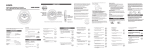
During play, press and hold FF
(1)Press PLAY/PAUSE (
the power on.
5.1"x 1.1"x 5.9"(WHD)
DIGITAL AUDIO
RADIO OPERATION
RADIO OPERATION
screen will display the last track number
with the total play time.
(6)Unit will start playing from track No.1
automatically.
(2) During play, press REW
button to play
previous track.
(1)
Press REW button at the head of NO.4
(2) When the voltage is too low, the unit will
Press STOP(
)button to stop play,
automatically turn off.
and the last track Number will display.
(1)Slide the FUNCTION switch to FM position to turn
the power on.
Press PLAY/PAUSE(
)button to pause
(3) During pause mode, press FF
(or REW
)
(2)Get to the desired station by tuning knob.
on/off alternately.
button to play the next track (or previous track).
(3)Set a proper listening level by volume control.
Time display will flash on pause mode.
The unit will keep in pause mode and time
(4)To turn off the radio, slide the FUNCTION switch to CD.
is displayed when the battery voltage
reaches low.
display will flash.