1
CXT225C_MANL_ENG:PR270-C_Eng 12/3/09 2:52 PM Page 2
Operation
Using Your Radio
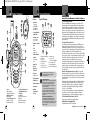
Speaker/Microphone/Charge Jack
•
Speaker/Microphone/ To attach a speaker/microphone:
Charge Jack
1. Open the speaker/microphone/charge
tab on top of your microTALK® radio.
2. Insert the speaker/microphone accessory
plug into the speaker/microphone/charge jack.
To connect a wall charger/adapter:
1. Open the speaker/microphone/charge
tab on top of your microTALK® radio.
2. Insert the wall charger/adapter plug
into the speaker/microphone/charge jack.
Quick Start
1. Press and hold the Mode/Power button
to turn on your radio.
2. Press the Channel Up or Channel Down
button to select a channel.
Both radios must be tuned to the same
channel/privacy code to communicate.
3. Press and hold the Talk button while
speaking into the microphone.
4. When finished talking, release the Talk
button and listen for a response.
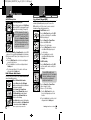
Turning on Your microTALK Radio
•
Press and hold the Mode/Power button until you
Mode/Power
hear a series of audible tones indicating the radio
is on.
Your microTALK® radio is now in Standby mode,
ready to receive transmissions. The radio is
always in Standby mode except when the Talk,
Call or Mode/Power buttons are pressed.
®
Introduction
Battery Low
Battery Low
Operation
Customer Assistance
Warranty
•
When battery power is low, the Battery Low icon
will blink. Your batteries should be replaced or
recharged, if using rechargeable batteries.
Auto Battery Save
•
If there are no transmissions within 10 seconds,
Battery Save Mode
the radio will automatically switch to Battery
Save mode and the Power Saver icon will flash
in the display. This will not affect the radio’s
ability to receive incoming transmissions.
Communicating with Another Person
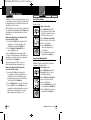
1. Press and hold the Talk button.
Talk Button
2. With the microphone about two inches
(5 cm) from your mouth, speak in a
normal voice.
3. Release the Talk button when you are
Two Inches (5 cm)
finished talking and listen for a response.
from Mouth
You cannot receive incoming calls while
pressing the Talk button.
•
Both radios must be tuned to the same
channel/privacy code to communicate.
To Select a Channel
With the radio on, select any of the
Channel Button
22 channels by pressing the Channel Up
or Channel Down button.
Channel Number
•
Both radios must be tuned to the same
channel/privacy code to communicate.
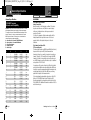
Channels 1 through 7 are shared with FRS/
GMRS. Channels 8 through 14 are FRS only.
Channels 15 through 22 are GMRS only.
See page 14 for FRS/GMRS frequency
allocations and compatibility charts.
2
English
Nothing Comes Close to a Cobra®
3