1
Operation Guide 3043
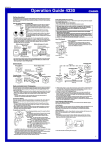
Charging Precautions
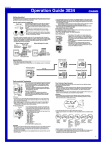
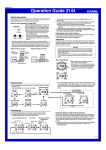
To set the time and date manually
Certain charging conditions can cause the watch to become very hot. Avoid
leaving the watch in the areas described below whenever charging its
rechargeable battery.
Also note that allowing the watch to become very hot can cause its liquid
crystal display to black out. The appearance of the LCD should become
normal again when the watch returns to a lower temperature.
1. In the Timekeeping Mode, hold down E until the city code starts to flash,
which indicates the setting screen.
2. Use C and A to select the city code you want.
• Make sure you select your Home City code before changing any other
setting.
• For full information on city codes, see the “City Code Table”.
3. Press D to move the flashing in the sequence shown below to select the
other settings.
Warning!
Leaving the watch in bright light to charge its rechargeable battery can
cause it to become quite hot. Take care when handling the watch to
avoid burn injury. The watch can become particularly hot when exposed
to the following conditions for long periods.
• On the dashboard of a car parked in direct sunlight
• Too close to an incandescent lamp
• Under direct sunlight
Charging Guide
After a full charge, timekeeping remains enabled for up to about five months.
• The following table shows the amount of time the watch needs to be
exposed to light each day in order to generate enough power for normal
daily operations.
▲
▲
▲
13 hours
6 hours
Sunlight Through a
Window (10,000 lux)
4 hours
63 hours
29 hours
Daylight Through a
Window on a Cloudy
Day (5,000 lux)
8 hours
128 hours
58 hours
80 hours
--------
--------
• The above exposure time values are all for reference only. Actual required
exposure times depend on lighting conditions.
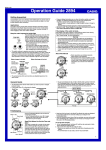
Timekeeping
Use the Timekeeping Mode to set and view the
current time and date.
• In the Timekeeping Mode, press E to toggle
between the month–day and the day of the
week at the top of the display.
Read This Before You Set the Time and
Date!
Seconds
Hour : Minutes
Screen
Power
Saving
Day
Year
Month
To do this:
Change the city code
Do this:
Use C (east) and
A(west).
Cycle between Auto DST (AT),
Daylight Saving Time (ON) and
Standard Time (OFF).
Press C.
Toggle between 12-hour (12H) Press C.
and 24-hour (24H) timekeeping.
Reset the seconds to 00
Press C.
Change the hour or minutes
Use C(+) and A(–).
This watch is preset with a number of city codes,
each of which represents the time zone where
that city is located. When setting the time, it is
important that you select the correct city code for
your Home City (the city where you normally use
the watch). If your location is not included in the
preset city codes, select the preset city code that
is in the same time zone as your location.
• Note that all of the times for the World Time Mode city codes are displayed
in accordance with the time and date settings you configure in the
Timekeeping Mode.
• After you set your Home City time and date correctly, you can set the watch
up for timekeeping with a different city code simply by changing the Home
City code in the Timekeeping Mode.
Note
• Auto DST (AT) can be selected only while LON, PAR, BER, ATH,
NYC, CHI, DEN, LAX, ANC, HNL, TYO, SEL, or HKG is
selected as the Home City code. For more information, see “Daylight
Saving Time (DST)” below.
• You also need to enter the Timekeeping Mode in order to configure the
following settings.
Display illumination duration (“To specify the illumination duration”)
Power saving on/off (“To turn Power Saving on and off”)
Temperature, barometric pressure, and altitude units (“To select the
temperature, barometric pressure, and altitude units”)
Daylight Saving Time (DST)
Daylight Saving Time (summer time) advances the time setting by one hour
from Standard Time. Remember that not all countries or even local areas use
Daylight Saving Time.
The time calibration signals transmitted from Mainflingen (Germany), Rugby
(England), or Fort Collins (the United States) include both Standard Time and
DST data. When the Auto DST setting is turned on, the watch switches
between Standard Time and DST (summer time) automatically in accordance
with the signals.
• The time calibration signals transmitted from Fukushima and Fukuoka/Saga
(Japan) do not include summer time data.
• The default DST setting is Auto DST (AT) whenever you select LON,
PAR, BER, ATH, NYC, CHI, DEN, LAX, ANC, HNL, or TYO
as your Home City code.
• If you experience problems receiving the time calibration signal in your
area, it is probably best to switch between Standard Time and Daylight
Saving Time (summer time) manually.
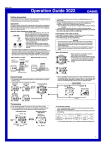
To change the Daylight Saving Time (summer time) setting
l
lllll
PM indicator
Minutes
Change the month or day
2 hours
Day of week
Temperature
Unit
Hour
5. Press E to exit the setting screen.
Outdoor Sunlight
(50,000 lux)
Press E.
Altitude Unit
Seconds
Change the year
Recovery Times
The table below shows the amount exposure that is required to take the
battery from one level to the next.
Approximate Exposure Time
Exposure Level
(Brightness)
Level 5 Level 4 Level 3
Level 2
Level 1
Month – Day
12/24-Hour
Format
• The following steps explain how to configure timekeeping settings only.
4. When the timekeeping setting you want to change is flashing, use C and/
or A to change it as described below.
Approximate
Exposure Time
5 minutes
24 minutes
48 minutes
8 hours
• Since these are the specs, we can include all the technical details.
• Watch not exposed to light
• Internal timekeeping
• Display on 18 hours per day, sleep state 6 hours per day
• 1 illumination operation (1.5 seconds) per day
• 10 seconds of alarm operation per day
• 10 digital compass operations per week
• 10 hours of altimeter measurements, once per month
• 6 minutes of signal reception per day
• Stable operation is promoted by frequent exposure to light.
Indoor Fluorescent
Lighting (500 lux)
Barometric
Pressure Unit
lllll
Outdoor Sunlight (50,000 lux)
Sunlight Through a Window (10,000 lux)
Daylight Through a Window on a Cloudy Day (5,000 lux)
Indoor Fluorescent Lighting (500 lux)
DST
lll llll
Exposure Level (Brightness)
City Code
1. In the Timekeeping Mode, hold down E until
the city code starts to flash, which indicates
the setting screen.
2. Press D and the DST setting screen appears.
3. Use C to cycle through the DST settings in
the sequence shown below.
Auto DST (AT)
DST off (OFF)
DST on (ON)
• If you change your Home City to one that is within the same transmitter
area, the current DST setting will be retained. If you change to a city that
is outside your current transmitter area, DST will be turned off
automatically.
Transmitter area city codes
• HKG, SEL, and TYO
• LAX, DEN, CHI, NYC, ANC, and HNL
• LON, PAR, BER, and ATH
• All other city codes
11