1
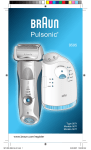
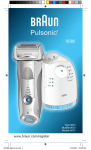
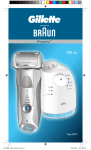
Prosonic
9795
washable
rt cleaning
sta
clean
eco
l
norma
f a s t cl e a n
tensive
in
high
elect
trimmer
auto s
low
A ctivePow
9795
off
er
on
empty
reset
BS 9795
www.braun.co.jp
5671474_BS9795_Japan.indd 1
08.05.2007 15:53:24 Uhr
2
5671474_BS9795_Japan.indd 2
08.05.2007 15:53:25 Uhr
STOP
3
5671474_BS9795_Japan.indd 3
08.05.2007 15:53:26 Uhr
4
5671474_BS9795_Japan.indd 4
08.05.2007 15:53:27 Uhr
5
5671474_BS9795_Japan.indd 5
08.05.2007 15:53:27 Uhr
6
5671474_BS9795_Japan.indd 6
08.05.2007 15:53:28 Uhr
7
5671474_BS9795_Japan.indd 7
08.05.2007 15:53:28 Uhr
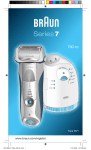
9795
9000
8
Series
9
3
10
4 4a
trimmer
11
s ta
rt cleaning
clean
eco
5
normal
fast clean
e
intensiv
high
ct
auto sele
on
low
6
empty
12
off
2
1
13
reset
14
7
15
18
16
was
hab
le
17
reset
trim
me
r
8
5671474_BS9795_Japan.indd 8
08.05.2007 15:53:29 Uhr
9
5671474_BS9795_Japan.indd 9
08.05.2007 15:53:29 Uhr
10
5671474_BS9795_Japan.indd 10
08.05.2007 15:53:30 Uhr
11
5671474_BS9795_Japan.indd 11
08.05.2007 15:53:31 Uhr
tr
on
lo
ck
off
reset
2
trimmer
lock
k
loc
1
off
on
lock
release
reset
trimm
er
wash
able
s ta
rt cleaning
clean
eco
norma
fast clea
n
intensi
l
ve
high
auto select
low
empty
12
5671474_BS9795_Japan.indd 12
08.05.2007 15:53:31 Uhr
clean
eco
norma
l
intensi
ve
auto sele
ct
cleaning
clean
st
a rt
eco
al
norm
fast clea
inten
n
high
auto
sive
selec
t
low
1
empty
2
new
fast clean
cleaning
clean
st
a rt
eco
l
a rt
cleaning
clean
st
norma
ive
intens
n
fast clea
high
auto
eco
l
select
norma
low
n
fast clea
high
empty
intensi
auto
ve
select
low
empty
fast clean
fast clean
high
high
low
low
high
low
empty
empty
empty
reset
er
trimm
able
wash
st
a rt
cleaning
clean
eco
normal
fast clea
n
intensive
high
auto select
low
empty
s ta
rt cleaning
clean
eco
normal
f a st c le a n
intensive
auto select
13
5671474_BS9795_Japan.indd 13
08.05.2007 15:53:32 Uhr
ble
washa
st
a rt
cleaning
clean
eco
normal
a
f a st cle
n
intensive
high
ct
auto sele
low
s ta
rt cleaning
clean
eco
normal
f a st c le a n
intensive
auto select
14
5671474_BS9795_Japan.indd 14
08.05.2007 15:53:33 Uhr
ble
washa
st
a rt
cleaning
clean
eco
normal
f a st cle
an
intensive
high
ct
auto sele
low
empty
15
5671474_BS9795_Japan.indd 15
08.05.2007 15:53:34 Uhr
r
me
trim
on
le
ab
sh
wa
release
er
washable
oil
release
washable
click!
trimmer
release
release
washable
release
release
washable
washable
16
5671474_BS9795_Japan.indd 16
08.05.2007 15:53:35 Uhr
17
5671474_BS9795_Japan.indd 17
08.05.2007 15:53:36 Uhr
new
old
18
5671474_BS9795_Japan.indd 18
08.05.2007 15:53:36 Uhr
9000
9000
Series
Series
release
mer
washable
360°Complete
19
5671474_BS9795_Japan.indd 19
08.05.2007 15:53:37 Uhr
9000
Series
9000
Series
360°Complete
20
5671474_BS9795_Japan.indd 20
08.05.2007 15:53:38 Uhr
21
5671474_BS9795_Japan.indd 21
08.05.2007 15:53:39 Uhr
22
5671474_BS9795_Japan.indd 22
08.05.2007 15:53:39 Uhr
Our products are designed to meet the highest
standards of quality, functionality and design.
We hope you enjoy your new Braun Shaver.
Warning
Your Prosonic shaving system is provided with
a special cord set, which has an integrated
Safety Extra Low Voltage power supply. Do not
exchange or tamper with any part of it, otherwise
there is risk of an electric shock.
STOP
To prevent the cleaning fluid from leaking, ensure
that the Clean&Renew station is placed on a flat
surface. When a cleaning cartridge is installed,
do not tip, move suddenly or transport the
station in any way as cleaning fluid might spill
out of the cartridge. Do not place the station
inside a mirror cabinet, nor place it on a polished
or lacquered surface.
The cleaning cartridge contains a highly
flammable liquid so keep it away from sources
of ignition. Do not expose to direct sunlight and
cigarette smoking nor store it over a radiator.
Keep it out of reach of children.
Do not refill the cartridge and use only original
Braun refill cartridges.
Description
Clean&Renew station
1 Cleaning fluid display
2 Lift button for cartridge exchange
3 Station-to-shaver contacts
4 «start cleaning» button
D «fast clean» button
5 Cleaning program diodes
6 Station power socket
7 Cleaning cartridge
Shaver
8 Foil & cutter cassette
9 Cassette release button
0 Shaver head «lock» switch
q Pop-out long hair trimmer
w On/off switch
e Reset button
r Shaver display
t Shaver-to-station contacts
z Shaver power socket
u Travel case
i Special cord set
23
5671474_BS9795_Japan.indd 23
08.05.2007 15:53:40 Uhr
Before shaving
Prior to first use you must connect the shaver to
an electrical outlet using the special cord set i
or alternatively proceed as below.
clean
eco
norm
al
intens
ive
auto sel
ect
Installing the Clean&Renew station
• Using the special cord set i, connect the
station power socket 6 to an electrical outlet.
cleaning
• Press the lift button 2 to open the housing.
clean
st
a rt
eco
norm
fast clea
high
n
al
sive
inten
auto
ct
sele
• Hold the cleaning cartridge 7 down on a flat,
stable surface (e.g. table).
low
1
empty
2
new
fast clean
cleaning
clean
st
a rt
• Carefully remove the lid from the cartridge.
eco
al
a rt
cleaning
clean
st
norm
n
fast clea
ive
intens
eco
t
high
auto
selec
norm
low
al
ive
intens
n
fast clea
high
empty
auto
selec
t
• Slide the cartridge into the base of the station
as far as it will go.
low
empty
• Slowly close the housing by pushing it down
until it locks.
fast clean
fast clean
The cleaning fluid display 1 will show how much
fluid is in the cartridge:
high
high
high
low
low
low
empty
empty
empty
Charging and cleaning the shaver
Insert the shaver head down into the cleaning
station. (The contacts t on the back of the
shaver will align with the contacts 3 in the
cleaning station).
reset
trimm
er
wash
able
st
a rt
cleaning
clean
eco
normal
fast clea
n
ve
intensi
high
auto select
low
empty
s ta
rt cleaning
clean
eco
normal
intensive
f a st c le a n
«high» up to 30 cleaning cycles available
«low»
up to 7 cleaning cycles remaining
«empty» new cartridge required
If required, the Clean&Renew station will now
charge the shaver. The hygiene status of the
shaver will also be analyzed and one of the
following cleaning program diodes 5 will light
up:
«clean»
«eco»
«normal»
«intensive»
shaver is clean
short economical cleaning required
normal level of cleaning required
high intensive cleaning required
auto select
ble
washa
st
a rt
cleaning
clean
eco
normal
f a st cle
an
intensive
high
ct
auto sele
low
If the station selects one of the required cleaning
programs, it will not start unless you press the
«start cleaning» button 4. For best shaving
results, we recommend cleaning after each
shave.
24
5671474_BS9795_Japan.indd 24
08.05.2007 15:53:41 Uhr
Whilst cleaning is in progress, the respective
cleaning program diode will blink. Each cleaning
program consists of several cycles, where
cleaning fluid is flushed through the shaver head
and a heat drying process dries the shaver.
Depending on the program selected the total
cleaning time will range from 32 to 43 minutes.
The cleaning programs should not be
interrupted. Please note that whilst the shaver is
drying, the shaving head may be hot and wet.
When the program is finished, the blue «clean»
diode will light up. Your shaver is now clean and
ready for use.
s ta
rt cleaning
clean
eco
normal
f a st c le a n
intensive
auto select
ble
washa
Fast cleaning
Push the «fast clean» button D to activate
the fast clean program without drying. This
program takes about 25 seconds only and is
recommended when you do not have time to
wait for one of the automatic cleaning programs.
If you remove the shaver just after the program
has finished, wipe off the shaver head with a
tissue to avoid dripping.
st
a rt
cleaning
clean
eco
normal
f a st cle
an
intensive
high
ct
auto sele
low
empty
Stand-by mode
10 minutes after completing the charging or
cleaning session, the Clean&Renew station
switches to the stand-by mode: The diodes of
the Clean&Renew station turn off.
Shaver display
The shaver display r shows the charge status of
the battery on the left, and the hygiene status on
the right. (6 dark segments are shown on each
side when the battery is fully charged and the
shaver is hygienically clean).
Battery segments:
During charging or when using the shaver, the
respective battery segments will blink. When
fully charged all 6 segments are shown. With
decreasing charge the segments gradually
disappear.
Low charge indicator:
The low charge segment provided with a red
frame blinks to indicate that the charge has
dropped below 20%. The remaining capacity is
sufficient for 2 to 3 shaves.
25
5671474_BS9795_Japan.indd 25
08.05.2007 15:53:41 Uhr
Hygiene segments:
All 6 hygiene segments will appear after the
shaver has been cleaned in the Clean&Renew
station. When the shaver is being used, the
hygiene segments will gradually disappear.
Once the shaver is returned to the station, the
system will automatically select the appropriate
cleaning program and restore the segments
to maximum hygiene. Given that rinsing the
shaver under tap water is not as hygienic as the
cleaning station, the hygiene segments will only
restore themselves when the shaver has been
cleaned in the Clean&Renew station.
Charging information
• A full charge provides up to 50 minutes
of cordless shaving time. This may vary
according to your beard growth.
• The best environmental temperature for
charging is between 5 °C to 35 °C. Do not
expose the shaver to temperatures higher than
50 °C for extended periods of time.
Shaving
• The pivoting shaver head and floating foils
automatically adjust to every contour of your
face.
lo
ck
off
on
tr
Press the on/off switch w to operate the shaver:
reset
2
• To shave hard to reach areas (e.g. under the
nose) slide the shaver head «lock» switch 0 to
the back position to lock the pivoting head at
an angle.
lock
k
loc
1
trimmer
• To trim sideburns, moustache or beard, slide
the pop-out long hair trimmer upwards.
off
on
lock
release
Tips for the perfect shave
For best shaving results, Braun recommends you
follow 3 simple steps:
1. Always shave before washing your face.
2. At all times, hold the shaver at right angles
(90°) to your skin.
3. Stretch your skin and shave against the
direction of your beard growth.
Shaving with the cord
If the shaver has run out of power (discharged),
and you do not have the time to recharge it in the
Clean&Renew station, you may also shave with
the shaver connected to an electrical outlet via
the special cord set.
26
5671474_BS9795_Japan.indd 26
08.05.2007 15:53:42 Uhr
Cleaning
Automatic cleaning
After each shave, return the shaver to the
Clean&Renew station and proceed as described
above in the section «Before shaving».
All charging and cleaning needs are then
automatically taken care of. With daily use, a
cleaning cartridge should be sufficient for about
30 cleaning cycles.
The hygienic cleaning cartridge contains alcohol,
which once opened will naturally evaporate
slowly into the surrounding air. Each cartridge,
if not used daily, should be replaced after
approximately 8 weeks.
The cleaning cartridge also contains lubricates,
which may leave residual marks on the outer foil
frame after cleaning. However, these marks can
be removed easily by wiping gently with a cloth
or soft tissue paper.
reset
er
trimm
e
washabl
s ta
rt cleaning
clean
eco
norma
fast clea
n
l
ive
intens
high
auto select
low
empty
Manual cleaning
The shaver head is suitable for cleaning
under running tap water.
Warning: Detach the shaver from the
power supply before cleaning the shaver
head in water.
r
me
trim
Rinsing the shaving head under running water
is an alternative way to keep the shaver clean,
especially when travelling:
wa
sh
ab
le
on
• Switch the shaver on (cordless) w and rinse
the shaving head under hot running water.
You may use liquid soap without abrasive
substances. Rinse off all foam and let the
shaver run for a few more seconds.
release
• Next, switch off the shaver, press the release
button 9 to remove the foil and cutter cassette
8 and let it dry.
er
washable
oil
release
washable
click!
trimmer
• If you regularly clean the shaver under water,
apply a drop of the light machine oil, included
with the shaver, onto the shaver foil and
long hair trimmer. This is critical for proper
functioning of the shaver as washing under
water can lead to removal of lubricants from
the shaver’s cutting parts leading to higher
friction in the shaver. This may result in the
battery running out faster than normal. Even
if this happens – indicated by low charge
indicator lighting up earlier, your Braun shaver
will run for at least 5 more minutes enabling
you to complete your current shave.
release
27
5671474_BS9795_Japan.indd 27
08.05.2007 15:53:42 Uhr
Alternatively, you may clean the shaver using the
brush provided:
• Switch off the shaver. Remove the foil and
cutter cassette 8 and tap it out on a flat
surface. Using the brush, clean the inner area
of the pivoting head. However, do not clean the
cassette with the brush as this may damage it.
release
washable
release
release
washable
washable
old
new
Cleaning the housing
From time to time clean the housing of the
shaver and the Clean&Renew station with a
damp cloth, especially inside the cleaning
chamber where the shaver rests.
Replacing the cleaning cartridge
After having pressed the lift button 2 to open the
housing, wait for a few seconds before removing
the used cartridge to avoid any dripping.
Before discarding the used cartridge, make sure
to close the openings using the lid of the new
cartridge, since the used cartridge will contain
contaminated cleaning solution.
Keeping your shaver in top shape
Replacing the foil and cutter cassette / reset
To maintain 100% shaving performance,
replace the foil and cutter cassette 8, when
the replacement symbol lights up on the shaver
display r (after about 18 months) or when
cassette is worn.
The replacement symbol will remind you during
the next 7 shaves to replace the foil and cutter
cassette. Then the shaver will automatically reset
the display.
9000
Series
release
mer
washable
360°Complete
9000
Series
After you have replaced the foil and cutter
cassette, use a ball-pen to push the reset button
e for at least 3 seconds to reset the counter.
While doing so, the replacement light blinks and
goes off when the reset is complete. The manual
reset can be done at any time.
Accessories
9000
Series
9000
Series
Available at your dealer or Braun Service
Centres:
• Foil & cutter cassette No. 9000
• Cleaning cartridge Clean&Renew CCR
360°Complete
28
5671474_BS9795_Japan.indd 28
08.05.2007 15:53:43 Uhr
Environmental notice
This product contains rechargeable
batteries. In the interest of protecting the
environment, please do not dispose of the
product in household waste at the end of
its useful life. Disposal can take place at a
Braun Repair Centre or at appropriate
collection points provided in your country.
The cleaning cartridge can be disposed with
regular household waste.
Subject to change without notice.
This product conforms to the European
Directives EMC 89/336/EEC and Low
Voltage 73/23/EEC.
For electric specifications, see printing on the
special cord set.
Guarantee
We grant 1 year guarantee on the product
commencing on the date of purchase. Within
the guarantee period we will eliminate, free of
charge, any defects in the appliance resulting
from faults in materials or workmanship, either
by repairing or replacing the complete appliance
as we may choose.
This guarantee extends to every country where
this appliance is supplied by Braun or its
appointed distributor.
This guarantee does not cover: damage due
to improper use, normal wear and tear (e.g. foil
& cutter cassette) as well as defects that have
a negligible effect on the value or operation of
the appliance. The guarantee becomes void if
repairs are undertaken by unauthorised persons
and if original Braun parts are not used.
To obtain service within the guarantee period,
hand in or send the complete appliance with
your sales receipt to an authorised Braun
Customer Service Centre.
For UK only:
This guarantee in no way affects your rights
under statutory law.
29
5671474_BS9795_Japan.indd 29
08.05.2007 15:53:43 Uhr
31
5671474_BS9795_Japan.indd 31
08.05.2007 15:53:44 Uhr
5-671-474/01/V-07
5671474_BS9795_Japan.indd 32
08.05.2007 15:53:45 Uhr