1
Radio / CD / MP3
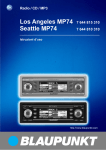
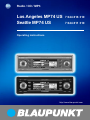
Los Angeles MP74 US
Seattle MP74 US
7 644 816 310
7 644 811 310
Operating instructions
http://www.blaupunkt.com
Caution:
The device’s tuner is already configured at the factory for the North/South America region (“AREA USA”). If you are outside North/South America, please select
the “AREA EUR” setting. For further details, please read the section entitled “Adjusting the tuner settings” in the “Radio mode” chapter.
Attention :
Le récepteur de l’autoradio est réglé par défaut sur la région Amérique du Nord /
Amérique latine (« AREA USA »). Quand vous vous trouvez en dehors de
l’Amérique du nord ou de l’Amérique latine, sélectionnez l’option « AREA EUR ».
Pour plus d’informations, reportez-vous à la section « Réglage du tuner » du
chapitre « Mode RADIO ».
Atención:
El sintonizador del equipo sale de fábrica programado para la región de Norteamérica / Sudamérica (“AREA USA”). Si se encuentra fuera de la región de Norteamérica / Sudamérica, seleccione la opción “AREA EUR”. Para más detalles, lea el
punto “Ajustar el sintonizador” en el capítulo “Modo de radio”.
Atenção:
O receptor do aparelho foi originalmente configurado para uso na região da América do Norte e Sul (“AREA USA”). Quando abandonar a área da América do
Norte/Sul, escolha a configuração “AREA EUR”. Para tal, leia o parágrafo “Configurar o sintonizador” no capítulo “Rádio”.
Open here
Ouvrir s.v.p.
Por favor, abrir
Favor abrir
2
ITALIANO
6
7
13
12
11
10
9
FRANÇAIS
5
8
SVENSKA
NEDERLANDS
4
ESPAÑOL
3
PORTUGUÊS
1
DANSK
2
3
ENGLISH
DEUTSCH
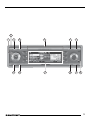
CONTROLS
1
2
3
4
5
6
7
8
4
Button, to switch the device on/
off,
and mute the device’s volume
Volume control
button, to unlatch the detachable control panel
NEXT button to display the next
pages of a menu,
and switch memory banks in radio mode
Softkeys, the function of the
softkeys depends on what is currently being displayed
DIS•ESC button to change the
display content and close menus
button to open the detachable
control panel (flip-release panel)
Joystick and OK button
9
:
;
<
=
MENU button to open the basic
settings menu (short press)
Activate/deactivate demo mode
(long press)
AUDIO button to adjust the
bass, treble, balance, fader and
X-BASS (short press)
To access the DEQ+ equalizer
(long press).
Display
SOURCE button to start CD or
CD-changer playback or play the
Compact Drive MP3 (only if connected)
or
To play an external audio source
(only if connected)
TUNER button, to activate radio
mode
To access the radio functions
menu (only possible in radio
mode)
Adjusting the volume ............. 10
Setting the power-on volume ......... 10
Volume mute ................................. 10
Telephone audio / navigation audio .. 10
Automatic sound ........................... 11
Sound and volume
distribution settings ............... 12
Adjusting the bass ......................... 12
Adjusting the treble ....................... 12
Adjusting the right/left volume
distribution (balance) ..................... 12
Adjusting the front/back volume
distribution (fader) ......................... 12
X-BASS .................................. 13
Adjusting the display settings . 13
Adjusting the viewing angle ........... 13
Adjusting the display brightness ..... 13
Setting the button illumination
colour ............................................ 14
Setting the display illumination
colour (only Los Angeles MP74) .... 14
Configuring the spectrum analyser 15
CD mode ................................ 22
Switching to CD mode and
inserting a CD ............................... 22
Ejecting a CD ................................ 22
Selecting tracks ............................ 22
Fast searching (audible) ................ 23
Random track play (MIX) ............... 23
Repeating tracks (REPEAT) ........... 23
Scanning tracks (SCAN) ............... 23
Displaying CD text ......................... 23
Setting scrolling text ...................... 24
ENGLISH
FRANÇAIS
ITALIANO
Switching on/off using button 1 ..... 9
Switching on/off using the vehicle
ignition ............................................ 9
NEDERLANDS
Switching on/off ...................... 9
Adjusting the tuner settings ........... 16
Switching to radio mode ................ 17
RDS function ................................. 17
Selecting the waveband /
memory bank ................................. 17
Tuning into a station ....................... 18
Setting the sensitivity of station
seek tuning .................................... 18
Scanning receivable stations
(SCAN) ......................................... 18
Setting the scanning time .............. 19
Storing stations ............................. 19
Storing stations automatically
(Travelstore) .................................. 19
Listening to stored stations ............ 19
Programme type (PTY) .................. 20
Optimising radio reception ............. 21
Activating/deactivating the radio
text display .................................... 21
SVENSKA
Detachable control panel ................. 8
Detaching the control panel ............. 8
Attaching the control panel .............. 9
Radio mode ............................ 16
ESPAÑOL
Theft protection ....................... 8
Inverting the appearance of the
display content .............................. 16
PORTUGUÊS
Road safety ..................................... 7
Safety notice ................................... 7
Installation ....................................... 7
Accessories .................................... 7
Activating /
deactivating demo mode .................. 8
DANSK
Notes and accessories ............ 7
DEUTSCH
CONTENTS
5
CONTENTS
MP3 mode .............................. 24
Amplifier/sub-out ................... 38
Preparing an MP3-CD ................... 24
Switching to MP3 mode ................ 25
Selecting a directory ...................... 26
Selecting tracks ............................ 26
Fast searching (audible) ................ 27
Scanning tracks (SCAN) ............... 27
Random track play (MIX) ............... 27
Repeating individual tracks or
whole directories (REPEAT) ........... 27
Configuring the display .................. 28
Switching the internal amplifier
on/off ............................................ 38
CD-changer mode (optional) . 29
Switching to CD-changer mode ..... 29
Selecting CDs ............................... 29
Selecting tracks ............................ 29
Fast searching (audible) ................ 29
Scanning tracks (SCAN) ............... 30
Repeating individual tracks or
whole CDs (REPEAT) .................... 30
Random track play (MIX) ............... 30
Naming CDs ................................. 31
CLOCK time ........................... 32
Setting the clock time .................... 32
Displaying the clock time
continuously .................................. 33
Equalizer ................................ 33
Switching the equalizer on/off ........ 34
Automatically calibrating the
equalizer ........................................ 34
Selecting an equalizer ................... 35
Selecting sound presets ................ 35
Manually adjusting the equalizer ..... 35
Help adjusting the equalizer ........... 37
6
External audio sources .......... 38
Switching the AUX input on/off ...... 38
Naming the AUX input ................... 39
Entering the power-on
message ................................ 40
Displaying the serial number . 40
Resetting the device .............. 41
Specifications ........................ 41
Amplifier ........................................ 41
Tuner ............................................. 41
CD ................................................ 41
Pre-amp out .................................. 41
AUX input ...................................... 41
NOTES AND ACCESSORIES
Road safety has absolute priority. Only operate your car sound system if the road and traffic conditions
allow you to do so. Familiarise yourself with the device before setting off
on your journey.
You should always be able to hear
police, fire and ambulance sirens in
good time from inside your vehicle.
DEUTSCH
ENGLISH
The car sound system and the
device’s control panel (flip-release
panel) heat up during use.
Accessories
Only use accessories approved by Blaupunkt.
Remote control
The RC 08, RC 10 or RC 10H remote
controls (available as optional accessories) allow you to access most of the
main functions of your car sound system safely and conveniently.
You cannot switch the device on/off using the remote control.
Amplifiers
You can use all Blaupunkt and Velocity
amplifiers.
NEDERLANDS
If you want to install your car sound system yourself, please read the installation and connection instructions that
follow these operating instructions.
SVENSKA
Installation
ITALIANO
FRANÇAIS
Therefore, when removing the fliprelease panel, only hold it by its nonmetallic surfaces. Allow the car
sound system to cool down first if you
want to uninstall the whole unit.
ESPAÑOL
Road safety
Safety notice
PORTUGUÊS
Thank you for choosing a Blaupunkt
product. We hope you enjoy using this
new piece of equipment.
Please read these operating instructions before using the equipment for
the first time.
The Blaupunkt editors are constantly
working on making the operating instructions clearer and easier to understand. However, if you still have any
questions on how to operate the device,
please contact your dealer or the telephone hotline for your country. You will
find the telephone number printed at the
back of this booklet.
We provide a manufacturer guarantee
for our products bought within the European Union. You can view the guarantee conditions at www.blaupunkt.de
or ask for them directly at:
Blaupunkt GmbH
Hotline
Robert Bosch Str. 200
31139 Hildesheim
Germany
For this reason, listen to your car
sound system at a suitable volume
level during your journey.
DANSK
Notes and accessories
7
NOTES AND ACCESSORIES
CD changers
You can obtain the following CD changers from accessory retailers for connection to this device: CDC A 03, CDC A 08
and IDC A 09.
Compact Drive MP3
You can connect the Compact Drive
MP3 instead of a CD-changer in order
to play MP3 music tracks. If you decide
to connect a Compact Drive MP3, you
will first need to use a computer to store
the MP3 music tracks on the Microdrive™ hard disk that is inside the Compact Drive MP3. Then, when the Compact Drive MP3 is connected to the car
sound system, you can play the tracks
like normal CD music tracks.
The Compact Drive MP3 is operated in
a similar way to a CD-changer. Most of
the CD-changer functions can also be
used with the Compact Drive MP3.
Activating / deactivating demo
mode
The device is supplied from the factory
with demo mode activated. The various
functions of the device are displayed
graphically as animations in the display
during demo mode. You can also deactivate demo mode.
THEFT PROTECTION
Theft protection
Detachable control panel
Your device is equipped with a detachable control panel (flip-release panel) as
a theft protection measure.
The device is worthless to a thief without this control panel. Protect your device against theft by taking the control
panel with you whenever you leave your
vehicle. Do not leave the control panel
inside your vehicle - not even in a hiding place. The control panel has been
designed to be easy to use.
Note:
● Never drop the control panel.
● Never expose the control panel to
direct sunlight or other heat sources.
● Store the control panel in the supplied case.
● Avoid direct skin contact with the
control panel’s electrical contacts. If
necessary, clean the contacts with
a lint-free cloth and some alcohol.
Detaching the control panel
3
➮ Press and hold down the MENU
button 9 for longer than four seconds to activate/deactivate demo
mode.
➮ Press the
button 3.
The control panel latch mechanism
opens.
8
➮ Press the left edge of the control
panel into the device until it clicks
into place.
Note:
● When attaching the control panel,
make sure you do not press the
display.
➮ To switch off the device, press and
hold down button 1 for longer
than two seconds.
The device switches off.
DEUTSCH
ENGLISH
FRANÇAIS
right into the device’s guide.
ton 1.
The device switches on.
ITALIANO
Attaching the control panel
➮ Slide the control panel from left to
Switching on/off using button
1
➮ To switch on the device, press but-
Switching on/off using the
vehicle ignition
The device will switch on and off simultaneously with the ignition if it is connected correctly to the vehicle’s ignition
and if it was not previously switched off
using button 1.
You can switch the device on even if
the ignition is off.
➮ Press button 1.
Note:
To protect the vehicle battery, the device will switch off automatically after
one hour if the ignition is off.
NEDERLANDS
●
There are various ways of switching the
device on/off.
SVENSKA
●
Switching on/off
ESPAÑOL
●
off the device and then out towards
the left.
The device switches off after the
control panel is detached.
All the current settings are saved.
Any CD already inserted in the device remains there.
PORTUGUÊS
➮ First, pull the control panel straight
SWITCHING ON/OFF
DANSK
THEFT PROTECTION
9
ADJUSTING THE VOLUME
Adjusting the volume
You can adjust the volume in steps from
0 (off) to 50 (maximum).
➮ To increase the volume, turn the
volume control 2 clockwise.
➮ To decrease the volume, turn the
volume control 2 anticlockwise.
Setting the power-on volume
You can set the default volume level at
which the device plays when it is
switched on.
➮ Press the MENU button 9.
➮ Press the softkey 5 assigned to
the “VOLUME” display item.
➮ Press the softkey 5 assigned to
the “ON VOL” display item.
➮ Set the volume level that you want
using the volume control 2.
➮ Press the joystick OK 8 or the
Risk of injury! If the power-on
volume is set to maximum, the volume level can be very high when the
device is switched on.
If the volume was set to maximum
before the device was switched off
and the power-on volume is set to
“LAST VOL”, the volume level can
be very high when the device is
switched on again.
Severe damage to your hearing can
be caused in both cases!
Volume mute
You can instantaneously reduce the
volume (mute).
➮ Briefly press button 1.
“MUTE” appears in the display.
Cancelling mute
➮ Briefly press button 1 again.
or
MENU button 9 to close the
menu.
The settings are saved.
➮ turn the volume control 2.
Note:
You can also set the power-on volume
to be the same as the volume level that
was active before you switched off the
device. To do so, press the softkey assigned to the “LAST VOL” display item
in the volume menu.
If your car sound system is connected
to a mobile telephone and/or a navigation system, the sound system’s volume
will be muted as soon as you “pick up”
the phone or as soon as a navigation
announcement is made. You will then
hear the caller or navigation announcement over the car sound system’s loudspeakers. In order for this feature to
work, the mobile telephone and the navigation system must be connected to the
car sound system as described in the
installation instructions.
10
Telephone audio / navigation
audio
➮ Press the joystick OK 8 or the
MENU button 9 to close the
menu.
The settings are saved.
Note:
You can also adjust the volume during
the telephone call or navigation announcement using the volume control
2.
➮ Press the softkey 5 assigned to
the “AUTO SND” display item.
➮ Move the joystick 8 up or down to
select the setting that you want.
➮ Press the joystick OK 8 or the
ENGLISH
FRANÇAIS
ITALIANO
using the volume control 2.
NEDERLANDS
➮ Set the volume level that you want
SVENSKA
the “PHONE” display item in order
to adjust the volume.
AUDIO button : to close the
menu.
The settings are saved.
Note:
The optimum setting for the speed-dependent volume adjustment feature
depends on how noise levels develop
in your particular vehicle. You will need
to test various settings in order to find
out which is best suited to your vehicle.
ESPAÑOL
the “VOLUME” display item.
➮ Press the softkey 5 assigned to
This feature automatically adjusts the
volume of the car sound system to suit
the speed at which the vehicle is travelling.
In order for this to work, your car sound
system must be connected as described
in the installation instructions.
The automatic volume boost can be set
to six levels (0-5). “0” means no boost
and “5” means maximum boost.
➮ Press and hold down the AUDIO
button : for longer than two seconds.
“DEQ+ MENU” is displayed in the top
line of the display.
PORTUGUÊS
➮ Press the MENU button 9.
➮ Press the softkey 5 assigned to
Automatic sound
DANSK
You can find out from your Blaupunkt
dealer which navigation systems can be
used with your car sound system.
You can set the volume level at which
telephone calls or navigation announcements will first be heard.
DEUTSCH
ADJUSTING THE VOLUME
11
SOUND AND VOLUME DISTRIBUTION SETTINGS
Sound and volume
distribution settings
Note:
You can adjust the bass and treble individually for each audio source.
Adjusting the bass
➮ Press the AUDIO button :.
“AUDIO MENU” appears in the display.
➮ Press the softkey 5 assigned to
the “BASS” display item.
➮ Move the joystick 8 up/right to
boost the bass or move it down/left
to reduce the bass.
When you have finished making your
changes,
➮ press the joystick OK 8 or the
AUDIO button :.
Adjusting the treble
➮ Press the AUDIO button :.
“AUDIO MENU” appears in the display.
➮ Press the softkey 5 assigned to
the “TREBLE” display item.
➮ Move the joystick 8 up/right to
boost the treble or move it down/
left to reduce the treble.
When you have finished making your
changes,
➮ press the joystick OK 8 or the
AUDIO button :.
12
Adjusting the right/left volume
distribution (balance)
➮ To adjust the balance, press the
AUDIO button :.
“AUDIO MENU” appears in the display.
➮ Press the softkey 5 assigned to
the “BALANCE” display item.
➮ Move the joystick 8 up/right or
down/left to adjust the right/left volume distribution.
When you have finished making your
changes,
➮ press the joystick OK 8 or the
AUDIO button :.
Adjusting the front/back volume
distribution (fader)
➮ To adjust the fader, press the AUDIO button :.
“AUDIO MENU” appears in the display.
➮ Press the softkey 5 assigned to
the “FADER” display item.
➮ Move the joystick 8 up/right or
down/left to adjust the front/back
volume distribution.
When you have finished making your
changes,
➮ press the joystick OK 8 or the
AUDIO button :.
➮ Move the joystick 8 left or right to
select the frequency that you want
to boost.
the “ANGLE” display item.
➮ Move the joystick 8 up/right or
down/left to adjust the viewing angle.
➮ Move the joystick 8 up to boost
➮ Press the joystick OK 8 or the
the X-BASS or move it down to reduce the X-BASS.
When you have finished making your
changes,
MENU button 9 to close the
menu.
The settings are saved.
➮ press the joystick OK 8 or the
AUDIO button :.
ENGLISH
DEUTSCH
➮ Press the softkey 5 assigned to
FRANÇAIS
the “DISPLAY” display item.
ITALIANO
the “X-BASS” display item.
Adjusting the viewing angle
➮ Press the MENU button 9.
➮ Press the softkey 5 assigned to
NEDERLANDS
➮ Press the softkey 5 assigned to
You can adjust the display settings to
suit the installation position in your vehicle and your own preferences.
Adjusting the display brightness
If your car sound system is connected
as described in the installation instructions, the display brightness will change
when the headlights are turned on/off.
The display brightness can be adjusted
separately for night and day in steps
ranging from 1-16.
Daytime display brightness
➮ Press the MENU button 9.
➮ Press the softkey 5 assigned to
SVENSKA
➮ Press the AUDIO button :.
“AUDIO MENU” appears in the display.
Adjusting the display
settings
ESPAÑOL
The X-BASS feature can be used to
boost the bass at low volume levels. You
can set the X-Bass boost for one of the
following frequencies: 32 Hz, 40 Hz, 50
Hz, 63 Hz or 80 Hz in steps from 0 - 6. If
you select the 0 setting, the X-Bass
function will be deactivated.
PORTUGUÊS
X-BASS
ADJUSTING THE
DISPLAY SETTINGS
the “DISPLAY” display item.
➮ Press the softkey 5 assigned to
the “BRIGHT” display item.
13
DANSK
X-BASS
ADJUSTING THE DISPLAY SETTINGS
DAY and NIGHT are displayed in the
top display line together with the currently set values.
➮ Move the flashing selection marker
behind DAY or NIGHT by pressing
the joystick 8 to the left or right.
➮ Set the value that you want. To do
so, move the joystick 8 down or
up.
Setting the display illumination
colour (only Los Angeles MP74)
When setting the display illumination,
you can choose one of four preset colours or mix a colour yourself from the
RGB spectrum (red-green-blue) or select a colour during a colour scan.
MENU button 9 to close the
menu.
The settings are saved.
Selecting a preset colour
Four different colours are already stored
in the device. “Ocean” (blue), “Amber”,
“Sunset” (red-orange) and “Nature”
(green) are available. Select a colour
that best suits your vehicle interior.
Setting the button illumination
colour
➮ Press the MENU button 9.
➮ Press the softkey 5 assigned to
➮ Press the joystick OK 8 or the
You can choose the colour of the device’s button illumination.
You can choose from 16 colours on the
Los Angeles and 3 on the Seattle.
➮ Press the MENU button 9.
➮ Press the softkey 5 assigned to
the “DISPLAY” display item.
➮ Press the softkey 5 assigned to
the “KEYCOLOR” display item.
➮ Move the joystick 8 up/right or
down/left to adjust the colour.
A different colour is selected every
time you move the joystick.
➮ Press the joystick OK 8 or the
MENU button 9 to close the
menu.
The settings are saved.
the “DISPLAY” display item.
➮ Press the softkey 5 assigned to
the “COLOR” display item.
➮ Press the softkey 5 assigned to
the display item of the colour that
you want.
➮ Press the joystick OK 8 or the
MENU button 9 to close the
menu.
The settings are saved.
Mixing a colour for the display
illumination
To customise the display illumination to
suit your tastes you can mix a colour
yourself using the three primary colours
red, blue and green.
➮ Press the MENU button 9.
➮ Press the softkey 5 assigned to
the “DISPLAY” display item.
14
ADJUSTING THE DISPLAY SETTINGS
MENU button 9 to close the
menu.
The settings are saved.
Selecting a display illumination
colour during a colour scan
➮ Press the MENU button 9.
➮ Press the softkey 5 assigned to
the “DISPLAY” display item.
➮ Press the softkey 5 assigned to
the “COLOR” display item.
➮ Press the softkey 5 assigned to
the “COL-SCAN” display item.
The device starts changing the display
illumination colour.
➮ If you want to select one of the colours, press the softkey 5 assigned to the “SAVE” display item.
➮ If you want to switch back to the
previous menu without changing
the colour, press the softkey 5 assigned to the “BREAK” display
item.
DEUTSCH
Switching the spectrum analyser
on/off
➮ Press the MENU button 9.
➮ Press the softkey 5 assigned to
the “DISPLAY” display item.
➮ Repeatedly press the softkey 5
assigned to the “SPECTRUM” display item until the “SPECTRUM
OFF” or “SPECTRUM ON” setting
that you want is displayed in the
top display line.
➮ Press the joystick OK 8 or the
MENU button 9 to close the
menu.
The settings are saved.
ENGLISH
The spectrum analyser in your display
provides a symbolic representation of
the sound system’s output level. If the
spectrum analyser is switch on, it will
appear automatically after a short time
if you refrain from pressing a button
whilst an audio source is playing.
You can also choose to deactivate the
spectrum analyser.
FRANÇAIS
➮ Press the joystick OK 8 or the
Configuring the spectrum
analyser
ITALIANO
the red, blue and green colour
components yourself. To do so,
press the appropriate softkey 5
repeatedly until the displayed colour suits your tastes.
NEDERLANDS
➮ In the following menu you can set
SVENSKA
the “USER” display item.
MENU button 9 to close the
menu.
The settings are saved.
ESPAÑOL
➮ Press the softkey 5 assigned to
➮ Press the joystick OK 8 or the
PORTUGUÊS
the “COLOR” display item.
DANSK
➮ Press the softkey 5 assigned to
15
ADJUSTING THE
DISPLAY SETTINGS
Inverting the appearance of the
display content
You can invert the appearance of the
display content.
➮ Press the MENU button 9.
➮ Press the softkey 5 assigned to
the “DISPLAY” display item.
➮ Press the softkey 5 assigned to
the “INVERT” display item.
➮ Press the joystick OK 8 or the
MENU button 9 to close the
menu.
The settings are saved.
RADIO MODE
Radio mode
This device is equipped with an RDS
radio receiver. Many of the receivable
FM stations broadcast a signal that not
only carries the programme but also
additional information such as the station name and programme type (PTY).
The station name appears in the display as soon as the tuner receives it.
You can optionally display the programme type. For further details, please
read the section entitled “Programme
type (PTY)”.
Adjusting the tuner settings
To ensure that the tuner works properly, the device must be configured for the
region in which you are using it. You can
choose between Europe/ Asia/ Gulf
States (AREA EUR) and North/South
America (AREA USA). If you experience
problems with radio reception, please
check this setting.
➮ Press the MENU button 9.
➮ Press the softkey 5 assigned to
the “TUNER” display item.
➮ Press the softkey 5 assigned to
the display item of the region that
you want: “AREA EUR” or “AREA
USA”.
➮ Press the joystick OK 8 or the
MENU button 9 to close the
menu.
The settings are saved.
16
in radio mode.
The radio functions menu appears in the
display.
Switching the RDS function on/off
To use the RDS function,
➮ Press the softkey 5 assigned to
➮ press the TUNER button = while
in radio mode.
The radio functions menu appears in the
display.
➮ Repeatedly press the softkey 5
assigned to the “RDS” display item
until the “RDS ON” or “RDS OFF”
setting that you want is displayed.
To return to the main radio menu,
➮ press the TUNER button = or the
joystick OK 8.
The settings are saved.
➮ Press the softkey 5 assigned to
the “BAND” display item.
the “FM” display item for the FM
waveband.
➮ Press the softkey 5 assigned to
the “AM” display item for the AM
waveband.
The main radio menu for the selected
waveband is displayed.
Selecting the memory bank
To switch between the memory banks
FM1, FM2, FM3, FMT or AM1, AM2,
AMT,
➮ press the NEXT button 4 repeatedly until the memory bank that
you want is displayed.
The memory banks are accessed in the
following order: FM1, FM2, FM3, FMT
or AM1, AM2, AMT.
17
ENGLISH
FRANÇAIS
ITALIANO
➮ press the TUNER button = while
The RDS function extends your radio’s
range of functions (only in FM radio
mode). If the RDS function is activated,
the device automatically tunes into the
best receivable frequency for the station that is currently set.
NEDERLANDS
Selecting the waveband
To select the FM or AM waveband,
SVENSKA
RDS function
You can use this device to receive programmes broadcast over the FM and
AM wavebands. There are four memory banks for the FM waveband and three
memory banks for the AM waveband.
Six stations can be stored in each memory bank.
ESPAÑOL
➮ press the TUNER button =.
The main radio menu for tuning into a
station is displayed. You can control the
radio-mode functions in the radio functions menu. You can open the radio
functions menu by pressing the TUNER button = again while in radio mode.
Selecting the waveband /
memory bank
PORTUGUÊS
If you are in CD/MP3 mode or CDchanger/Compact Drive MP3 mode,
DANSK
Switching to radio mode
DEUTSCH
RADIO MODE
RADIO MODE
Tuning into a station
There are various ways of tuning into a
station.
Automatic station seek tuning
➮ Move the joystick 8 down or up.
The radio tunes into the next receivable station.
Tuning into stations manually
You can also tune into stations manually.
Note:
You can only tune into stations manually if the RDS function is deactivated.
➮ Move the joystick 8 left or right.
Setting the sensitivity of station
seek tuning
You can choose whether the radio
should only tune into stations providing
good reception or whether it can also
tune into those with a weak reception.
➮ Press the TUNER button = while
in radio mode.
The radio functions menu appears in the
display.
➮ Press the NEXT button 4.
Note:
If you open the radio functions menu
while in AM radio mode, the softkey
assigned to the “SENS” display item will
appear on the first page.
➮ Press the softkey 5 assigned to
the “SENS” display item.
18
➮ Press the softkey 5 assigned to
the “FM” or “AM” display item to
adjust the sensitivity for “FM” or
“AM”.
➮ Move the joystick 8 up/right or
down/left to adjust the sensitivity.
You can adjust the sensitivity in steps
from 1 to 6. “SENSITIVITY 1” is the lowest setting and “SENSITIVITY 6” is the
highest sensitivity setting for distant stations.
➮ Press the joystick OK 8 or the
MENU button 9 to close the
menu.
The settings are saved.
Scanning receivable stations
(SCAN)
You can use the scan function to briefly
play all the receivable stations.
You can set the scanning time to between 5 and 30 seconds in the menu.
Starting SCAN
➮ Press and hold down the joystick
OK 8 for longer than two seconds.
Scanning begins. “SCAN” appears
briefly in the display followed by the
current station name or frequency of the
station.
Cancelling SCAN and continuing
listening to a station
➮ Press the joystick OK 8.
Scanning stops and the radio continues
playing the station that it tuned into last.
Note:
● The scanning time that you set is
also applied by the system to scanning carried out in CD/MP3 mode
and CD-changer mode.
Storing stations
Storing stations manually
➮ Select the memory bank that you
want: FM1, FM2, FM3, FMT or
AM1, AM2, AMT.
➮ Tune into the station that you want
as described in the section entitled
“Tuning into a station”.
➮ Press one of the six softkeys for
longer than two seconds to assign
the station to that softkey.
Starting the Travelstore function
➮ Press the TUNER button = while
in radio mode.
The radio functions menu appears in the
display.
➮ Press the softkey 5 assigned to
the “T-STORE” display item.
The storing procedure begins. “TRAVEL STORE” appears in the display.
After the process is completed, the radio will play the station that is stored in
location 1 of the FMT (or AMT) memory
bank.
Listening to stored stations
➮ Select the memory bank or waveband.
➮ Press the softkey 5 that is assigned to the station name or frequency of the station that you want
to listen to.
ENGLISH
FRANÇAIS
MENU button 9 to close the
menu.
The settings are saved.
ITALIANO
➮ Press the joystick OK 8 or the
NEDERLANDS
down/left to adjust the scanning
time.
Note:
Any stations that were previously stored
in this memory bank are deleted in the
process.
SVENSKA
the “SCANTIME” display item.
➮ Move the joystick 8 up/right or
ESPAÑOL
➮ Press the softkey 5 assigned to
You can automatically store the six stations offering the best reception in the
region. The stations are stored in the
FMT or AMT memory bank.
PORTUGUÊS
the “VARIOUS” display item.
Storing stations automatically
(Travelstore)
DANSK
Setting the scanning time
➮ Press the MENU button 9.
➮ Press the softkey 5 assigned to
DEUTSCH
RADIO MODE
19
RADIO MODE
Programme type (PTY)
Besides transmitting the station name,
some FM stations also provide information on the type of programme that they
are broadcasting. Your car radio can
receive and display this information.
For example, the programme types can
be:
CULTURE
TRAVEL
JAZZ
SPORT
NEWS
POP
ROCK
CLASSICS
You can use the PTY function to select
stations of a particular programme type.
Note:
If the tuner does not find a station that
corresponds to the selected programme
type, you will hear a beep and “NO PTY”
appears briefly in the display. The radio
will then retune to the station that it received last.
Activating PTY
To use the PTY function,
➮ press the TUNER button = while
in radio mode.
The radio functions menu appears in the
display.
➮ Press the NEXT button 4.
➮ Press the softkey 5 assigned to
the “PROG TYP” display item.
If PTY is activated, the display shows
the current programme type. PTY lights
up in the display. The programme types
are displayed alongside the softkeys 5.
20
Deactivating PTY
To switch off the PTY function,
➮ Whilst the programme types are
being displayed, press the softkey
5 assigned to the “PTY OFF” display item.
Selecting a programme type and
starting seek tuning
The PTY menu comprises several pages on which the known programme
types are displayed. To browse through
the PTY menu’s pages,
➮ press the NEXT button 4 repeatedly until the programme type that
you want appears alongside one of
the softkeys.
➮ Press the softkey 5 assigned to
the programme type that you want.
➮ Move the joystick 8 up/right or
down/left to start seek tuning.
The next receivable station corresponding to your selected programme type will
then be tuned into.
If the tuner does not find a station that
corresponds to the selected programme
type, you will hear a beep and “NO PTY”
appears briefly in the display. The radio
will then retune to the station that it received last.
Note:
If you want to switch back to the programme types display,
➮ open the second page of the radio
functions menu again and press
the softkey 5 assigned to the
“PROG TYP” display item.
➮ Press the TUNER button = while
Setting HiCut
in radio mode.
The radio functions menu appears in the
display.
➮ Press the TUNER button = while
➮ Repeatedly press the softkey 5
assigned to the “HIGH CUT” display item until the setting that you
want appears in the display.
“HICUT 0” means that no automatic reduction of the treble and interference
level will be made; “HICUT 2” means
that a maximum reduction will be made.
➮ Press the TUNER button = or the
joystick OK 8.
The settings are saved.
NEDERLANDS
➮ Press the NEXT button 4.
➮ Repeatedly press the softkey 5
assigned to the “R-TEXT” display
item until the “RADIO TEXT ON” or
“RADIO TEXT OFF” setting that
you want is displayed.
SVENSKA
in radio mode.
The first page of the radio functions
menu is displayed.
ENGLISH
Some stations use the RDS signal to
broadcast scrolling texts known as radio texts. You can allow radio texts to
be displayed or you can block them.
FRANÇAIS
Treble reduction feature during
interference (HiCut)
The HiCut function has the effect of reducing interference noise during poor
radio reception. If interference occurs,
the system automatically reduces the
treble thus reducing the interference level.
Activating/deactivating the radio
text display
ITALIANO
Optimising radio reception
DEUTSCH
RADIO MODE
➮ Press the joystick OK 8 or the
DANSK
PORTUGUÊS
ESPAÑOL
TUNER button = to close the
menu.
The settings are saved.
21
CD MODE
CD mode
You can use this device to play standard CDs with a diameter of 12 cm. CDRs and CD-RWs (CDs that you have
“burned” yourself) can generally also be
played. Due to the varying quality of CD
blanks, Blaupunkt cannot guarantee
that this will work properly. To avoid
problems when playing CDs, you should
not burn CDs at speeds greater than
16-speed.
To ensure the system functions properly, only use CDs labelled with the compact disc logo. Problems might be experienced when trying to play copy-protected CDs. Blaupunkt cannot guarantee the proper functioning of copy-protected CDs!
Risk of severe damage to the
CD drive! CD singles with a diameter of 8 cm and non-circular contoured CDs (shape CDs) must not
be used. We accept no responsibility for any damage to the CD drive
that may occur as a result of the use
of unsuitable CDs.
Switching to CD mode and
inserting a CD
●
If there is no CD inserted in the device yet,
➮ press the
button 7.
The control panel opens out towards
you.
➮ Insert the CD with the printed side
uppermost into the CD compartment.
The drive draws in the CD.
22
You must not hinder or assist the drive
as it draws in the CD.
The control panel closes automatically.
The CD menu appears and the CD
starts playing.
● If a CD is already inserted in the
device,
➮ press the SOURCE button < repeatedly until CD mode is displayed.
The CD menu appears and playback
begins from the point at which it was
last interrupted.
Ejecting a CD
➮ press the button 7.
The control panel opens out towards
you and the CD is ejected.
➮ Carefully remove the CD.
➮ Press the button 7.
The control panel closes.
Selecting tracks
➮ Move the joystick 8 in one direction (up or right for the next track or
down or left for the previous track)
until the number of the track that
you want appears in the display.
If you press the joystick 8 downwards
once or to the left once, the current track
will be played again from the beginning.
Fast searching (audible)
Scanning tracks (SCAN)
To fast search backwards or forwards,
You can briefly play (scan) all the tracks
on the CD.
the “MIX” display item again.
“MIX OFF” appears briefly in the display.
Repeating tracks (REPEAT)
➮ Press the softkey 5 assigned to
the “REPEAT” display item.
“REPEAT TRACK” appears briefly in the
display. The track is repeated continuously until you deactivate REPEAT.
Cancelling REPEAT
➮ Press the softkey 5 assigned to
the “REPEAT” display item again.
“REPEAT OFF” appears briefly in the
display.
Normal playback is then resumed.
ENGLISH
FRANÇAIS
ITALIANO
➮ Press the softkey 5 assigned to
Cancelling SCAN and continuing
listening to a track
To cancel scanning,
➮ press the joystick OK 8.
The currently scanned track will then
continue to be played normally.
Displaying CD text
Some CDs include CD text. The CD text
might contain the names of the artist,
album and tracks.
You can allow the CD text to be displayed as scrolling text in the bottom line
of the display every time you switch to
another track.
If the inserted CD does not contain any
CD text, “NO TEXT” will appear briefly
in the display if the CD text feature is
activated.
NEDERLANDS
Cancelling MIX
Note:
● You can set the scanning time. For
further details, please read the section entitled “Setting the scanning
time” in the “Radio mode” chapter.
SVENSKA
the “MIX” display item.
“MIX CD” appears briefly in the display.
The next track to be played will be
picked at random.
OK 8 for longer than two seconds.
The subsequent tracks on the CD are
briefly played in ascending order.
ESPAÑOL
Random track play (MIX)
➮ Press the softkey 5 assigned to
➮ Press and hold down the joystick
PORTUGUÊS
8 in one direction (up or right for
forwards or down or left for backwards) until fast searching begins.
DANSK
➮ press and hold down the joystick
DEUTSCH
CD MODE
23
CD MODE
MP3 MODE
Switching CD text on/off
MP3 mode
➮ Repeatedly press the softkey 5
You can also use this car sound system to play CD-Rs and CD-RWs that
contain MP3 music files.
assigned to the “TEXT” display
item until “CD TEXT ON” or “CD
TEXT OFF” is displayed.
Setting scrolling text
You can allow the CD text to be displayed as scrolling text in the bottom line
of the display.
Switching CD scrolling text on/off
➮ Repeatedly press the softkey 5
assigned to the “SCROLL” display
item until “SCROLL ON” or
“SCROLL OFF” is displayed.
24
Preparing an MP3-CD
The various combinations of CD burners, CD burning software and CD blanks
may lead to problems arising with the
device’s ability to play certain CDs. If
problems occur with your own burned
CDs, you should try another brand of
CD blank or choose another colour of
CD blank. To avoid problems when playing CDs, you should not burn CDs at
speeds greater than 16-speed.
The format of the CD must be ISO 9660
Level 1 or Level 2 or Joliet. Other formats cannot be played reliably.
Avoid multi-sessions. If you write more
than one session to the CD, only the
first session will be detected.
You can create a maximum of 127 directories on a CD. You can use this device to access each of these directories.
Each directory can in turn contain up to
254 tracks and subdirectories that can
also be accessed. A maximum of 8 levels of directories are allowed.
D05
T001
T002
T003
T004
T005
T006
T007
D04
T001
T002
T003
T004
T005
T006
T007
T008
T009
T010
T011
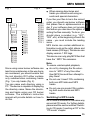
Since using some burner software can
lead to inconsistencies in the way items
are numbered, you should ensure that
the root directory D01 either contains
only subdirectories containing tracks
(Fig. 1) or only tracks (Fig. 2).
You can name each directory using a
PC. The device is capable of displaying
the directory name. Name the directories and tracks using your CD burner
software. The software’s instruction
manual will provide details on how to
do this.
Note:
To ensure uninterrupted playback,
● do not try changing the file extension to “.MP3” of any files other
than MP3 files and then attempt to
play them!
● Do not use “mixed” CDs containing
both non-MP3 data and MP3
tracks.
● Do not use mix-mode CDs containing both audio tracks and MP3
tracks.
Switching to MP3 mode
MP3 mode is activated in the same way
as normal CD mode. For further details,
please read the section entitled “Switching to CD mode / Inserting a CD” in the
“CD mode” chapter.
25
ENGLISH
FRANÇAIS
T001
T002
T003
T004
T005
ITALIANO
D03
T001
T002
T003
T004
T005
T006
T007
T008
T009
T010
T011
NEDERLANDS
D02
SVENSKA
D01
ESPAÑOL
D01
Note:
● When naming directories and
tracks you should avoid using accents and special characters.
If you like your files to be in the correct
order, you should use burner software
that places files in alphanumerical order. If your software does not provide
this feature you also have the option of
sorting the files manually. To do so, you
should place a number (e.g. “001”,
“002”, etc.) at the beginning of each file
name - you must include the leading
zeros.
MP3 tracks can contain additional information such as the artist, album and
track names (ID3 tags). This device can
display version 1 ID3 tags.
This device can only play MP3 files that
have the “.MP3” file extension.
PORTUGUÊS
Fig. 2
DANSK
Fig. 1
DEUTSCH
MP3 MODE
MP3 MODE
Selecting a directory
Selecting from the directory list
You can display a list of all the directories on the inserted CD and then conveniently select a directory from it. The
directories are displayed with the names
that you created when burning the CD.
➮ Press the NEXT button 4 whilst
an MP3 is playing.
The track list is displayed for the current directory.
➮ Move the joystick 8 to the left or
right to switch to the directory list.
➮ Press the joystick 8 up or down to
browse through the list.
➮ If you want to select a directory
from the list, move the selection
marker to the directory that you
want and press the joystick OK 8.
The list of tracks in the selected directory is displayed.
➮ Move the selection marker to the
track that you want and press the
joystick OK 8.
➮ Press the NEXT button 4 to display the main MP3 menu again.
Note:
● Any directories not containing MP3
files will be skipped automatically.
If, for instance, you are listening to
tracks in directory D01 and you select the next directory by pressing
the joystick 8, directory D02
(which does not contain any MP3
tracks) will be skipped and D03 will
be played (see diagram). The display will then automatically switch
from “D02” to “D03”.
Selecting tracks
Selecting tracks from a track list
You can display a list of all the tracks in
the current directory and then conveniently select a track from it.
➮ To display the track list, press the
NEXT button 4.
➮ Press the joystick 8 up or down to
browse through the track list.
➮ If you want to select a track from
the list, move the selection marker
to the track that you want and
press the joystick OK 8.
➮ Press the NEXT button 4 to display the main MP3 menu again.
Selecting a directory using the
joystick
To move up or down to another directory,
Selecting tracks using the joystick
➮ repeatedly press the joystick 8 up
the next track or to the left for the
previous track until the number of
the track that you want appears in
the display.
or down until the number of the directory that you want appears at
the very beginning of the top line of
the display.
26
To move up or down to another track in
the current directory,
➮ move the joystick 8 to the right for
If you press the joystick 8 to the left
once, the current track will be played
again from the beginning.
To play the tracks contained in all the
directories on the inserted MP3-CD in
random order,
Fast searching (audible)
➮ press the softkey 5 assigned to
➮ Press and hold down the joystick
OK 8 for longer than two seconds.
The subsequent tracks on the CD are
briefly played in ascending order.
Note:
● You can set the scanning time. For
further details, please read the section entitled “Setting the scanning
time” in the “Radio mode” chapter.
Cancelling SCAN and continuing
listening to a track
To cancel scanning,
➮ press the joystick OK 8.
The currently scanned track will then
continue to be played normally.
Random track play (MIX)
To play the tracks in the current directory in random order,
ENGLISH
FRANÇAIS
signed to the “MIX” display item until “MIX OFF” appears in the display.
Repeating individual tracks or
whole directories (REPEAT)
➮ Press the softkey 5 assigned to
ITALIANO
You can briefly play (scan) all the tracks
on the CD.
➮ repeatedly press the softkey 5 as-
the “REPEAT” display item.
“REPEAT TRACK” appears briefly in the
display.
To repeat the whole directory,
NEDERLANDS
Scanning tracks (SCAN)
Cancelling MIX
To cancel MIX,
➮ press the softkey 5 assigned to
the “REPEAT” display item again.
“REPEAT DIR” appears briefly in the
display.
Cancelling REPEAT
To stop the current track or current directory from being repeated,
➮ repeatedly press the softkey 5
that is assigned to the “REPEAT”
display item until “REPEAT OFF”
appears briefly in the display.
DANSK
➮ press the softkey 5 assigned to
SVENSKA
8 to the left or right until fast
searching backwards/forwards begins.
ESPAÑOL
➮ press and hold down the joystick
the “MIX” display item again.
“MIX CD” appears in the display.
PORTUGUÊS
To fast search backwards or forwards,
DEUTSCH
MP3 MODE
the “MIX” display item.
“MIX DIR” appears in the display.
27
MP3 MODE
Configuring the display
There are various options available for
displaying the name of the artist, track
and album (ID3 tag) or the directory and
file name. The information contained in
the ID3 tag (album, artist and track) can
only be displayed if it was saved when
the CD and MP3 file were created.
The track name is always displayed in
the top line of the display during playback. The track name appears once as
scrolling text after a track change and
is then abbreviated to 16 characters and
displayed.
Note:
If the track name is not available in the
ID3 tag, the system will display the file
name instead.
You can choose between different items
of information to be displayed in the
bottom line of the display (info line).
Selecting information in the info line
In the bottom line of the display (info
line) you can choose between displaying the various items of MP3 information such as track, artist, album or directory number (DIR) / file name.
➮ Repeatedly press the softkey 5
assigned to the “INFO” display item
until the display that you want appears in the bottom line of the display.
Note:
If the information on the artist, track and
album is not available in the form of an
ID3 tag, you will not be able to select it.
28
Displaying all of the information for
a file once
To display all of the available information for a track as well as the directory
name and file name (info displayed once
as scrolling text),
➮ press the softkey 5 assigned to
the “SHOW ALL” display item.
If available, the information is displayed
once as scrolling text in the info line.
“SHOW ALL” flashes in the display
whilst the information is being shown.
Setting scrolling text
You can choose whether you want the
display that you set under “Selecting
information in the info line” to appear
as scrolling text (“SCROLL ON”) or only
once (“SCROLL OFF”).
➮ Repeatedly press the softkey 5
assigned to the “SCROLL” display
item until the setting that you want
appears.
peatedly until the CD-changer
menu is displayed.
Playback continues from the point at
which it was last interrupted.
If the magazine was removed from the
CD changer and then replaced, the CD
magazine will first be scanned, and playback will begin from the first track on
the first CD that the CD changer detects.
or down until the number of the CD
that you want appears in the display.
Selecting tracks
To move down or up to another track
on the current CD,
➮ repeatedly press the joystick 8 to
the left or right until the number of
the track that you want is displayed.
If you press the joystick 8 once to the
left, the current track will be played again
from the beginning.
Fast searching (audible)
To fast search forwards or backwards,
ENGLISH
FRANÇAIS
➮ repeatedly press the joystick 8 up
➮ press and hold down the joystick
8 to the left or right until fast
searching backwards/forwards begins.
PORTUGUÊS
Switching to CD-changer mode
➮ Press the SOURCE button < re-
or
DANSK
Note:
Information on handling CDs, inserting
CDs and operating the CD changer can
be found in the operating instructions
supplied with your CD changer.
Information on using the Compact Drive
MP3 and recording music tracks onto
the Compact Drive MP3’s Microdrive™
hard disk can be found in the operating
instructions supplied with the Compact
Drive MP3.
the display item of the CD that you
want (CD1 - CD10). To do so you
might need to switch “pages” in the
main CD-changer menu by pressing the softkey 5 assigned to the
“NEXT” or “PREVIOUS” display
item.
ITALIANO
➮ press the softkey 5 assigned to
NEDERLANDS
To find out which CD changers / Compact Drive MP3 can be used with this
device, please refer to the “Accessories”
chapter in these instructions or contact
your Blaupunkt dealer.
To move up or down to another CD,
SVENSKA
Selecting CDs
ESPAÑOL
CD-changer mode
(optional)
DEUTSCH
CD-CHANGER MODE
29
CD-CHANGER MODE
Scanning tracks (SCAN)
You can briefly play (scan) all the tracks
on the CD.
➮ Press and hold down the joystick
OK 8 for longer than two seconds.
The subsequent tracks on the CD are
briefly played in ascending order.
Note:
● You can set the scanning time. For
further details, please read the section entitled “Setting the scanning
time” in the “Radio mode” chapter.
Cancelling SCAN and continuing
listening to a track
To cancel scanning,
➮ press the joystick OK 8.
The currently scanned track will then
continue to be played normally.
Repeating individual tracks or
whole CDs (REPEAT)
To repeat the current track,
➮ press the NEXT button 4.
The CD-changer functions menu appears.
➮ Press the softkey 5 assigned to
the “REPEAT” display item.
“REPEAT TRACK” appears briefly in the
display.
To repeat the whole CD,
➮ press the softkey 5 assigned to
the “REPEAT” display item again
whilst the CD-changer functions
menu is being displayed.
30
“REPEAT CD” appears briefly in the display.
Cancelling REPEAT
To stop the current track or current CD
from being repeated,
➮ repeatedly press the softkey 5 assigned to the “REPEAT” display
item again (whilst the CD-changer
functions menu is being displayed)
until “REPEAT OFF” appears briefly in the display.
Random track play (MIX)
To play the tracks on the current CD in
random order,
➮ press the NEXT button 4.
The CD-changer functions menu appears.
➮ Press the softkey 5 assigned to
the “MIX” display item.
“MIX CD” appears in the display.
To play the all the tracks on all inserted
CDs in random order,
➮ press the softkey 5 assigned to
the “MIX” display item again.
“MIX ALL” appears in the display.
Cancelling MIX
To cancel MIX,
➮ repeatedly press the softkey 5 assigned to the “MIX” display item until “MIX OFF” appears briefly in the
display.
Naming CDs
Deleting a CD name
The car sound system allows you to
assign names for up to 99 CDs (not with
the Compact Drive MP3) so that you can
recognise them more easily. The names
can be a maximum of seven characters long.
“FULL” will appear in the display if you
try assigning more than 99 names.
➮ Listen to the CD whose name you
➮ Press the softkey 5 assigned to
the “CD NAME” display item.
The current name of the CD is displayed
in the top line of the display. If the CD
has not been named yet, seven underscores “_” will be displayed instead.
➮ Press the softkey 5 assigned to
the “EDIT” display item.
You will now enter edit mode. The first
input position flashes.
➮ Move the joystick 8 up or down to
select the character that you want.
If you want an empty space, simply
select the underscore.
➮ Move the joystick 8 to the left or
right to change the input position.
➮ To save the name, press the joystick OK 8.
ENGLISH
FRANÇAIS
ITALIANO
5 assigned to the “CLEAR CD”
display item for longer than two
seconds.
The CD name will be deleted.
Deleting all CD names
➮ Listen to a CD.
➮ Press the NEXT button 4.
The CD-changer functions menu appears.
➮ Press the softkey 5 assigned to
the “CD NAME” display item.
➮ Press and hold down the softkey
5 assigned to the “CLEAR ALL”
display item for longer than two
seconds.
The CD names will be deleted.
Note:
This function is not available for the
Compact Drive MP3. If you use this
function with the Compact Drive MP3,
“CDC CLEAR” is displayed for 45 seconds. You will not be able operate the
device during this time period.
NEDERLANDS
The CD-changer functions menu appears.
➮ Press and hold down the softkey
SVENSKA
➮ Press the NEXT button 4.
the “CD NAME” display item.
ESPAÑOL
name.
➮ Press the softkey 5 assigned to
PORTUGUÊS
➮ Listen to the CD that you want to
➮ Press the NEXT button 4.
The CD-changer functions menu appears.
DANSK
Entering/editing CD names
want to delete.
DEUTSCH
CD-CHANGER MODE
31
CLOCK TIME
CLOCK time
Setting the clock time
➮ Adjust the minutes by moving the
joystick 8 up or down.
➮ Press the joystick OK 8 or the
The clock can be set automatically using the RDS signal. You can also set
the clock manually if you cannot receive
a radio station that supports this feature.
MENU button 9 to close the
menu.
The settings are saved.
Setting the clock automatically
To set the clock automatically,
Setting the date
To set the date,
➮ press the MENU button 9.
➮ Press the softkey 5 assigned to
the “CLOCK” display item.
➮ Repeatedly press the softkey 5
assigned to the “AUTOSYNC” display item until “AUTOSYNC ON”
appears in the display.
“AUTOSYNC ON” means that the clock
is set automatically using the RDS signal.
Setting the clock manually
➮ To set the clock, press the MENU
button 9.
➮ Press the softkey 5 assigned to
the “CLOCK” display item.
➮ Press the softkey 5 assigned to
the “TIME” display item.
The hours and minutes are displayed
in the top line of the display. The hours
flash.
➮ Adjust the hours by moving the joystick 8 up or down.
To adjust the minutes,
➮ press the joystick 8 to the right.
The minutes flash.
32
➮ press the MENU button 9.
➮ Press the softkey 5 assigned to
the “CLOCK” display item.
➮ Press the softkey 5 assigned to
the “DATE” display item.
The year (YY), month (MM) and day
(DD) appear in the top line of the display.
The input position for year flashes.
➮ Set the year (e.g. “04” for 2004) by
moving the joystick 8 up or down.
➮ Move the joystick 8 to the right to
switch the input position to month.
➮ Set the month by moving the joystick 8 up or down.
➮ Press the joystick 8 to the right to
switch the input position to day.
➮ Set the day by moving the joystick
8 up or down.
➮ Press the joystick OK 8 or the
MENU button 9 to close the
menu.
The settings are saved.
DEUTSCH
ENGLISH
FRANÇAIS
ITALIANO
the “OFFCLOCK” display item.
“SHOW CLOCK” means that the clock
time will be displayed; “HIDE CLOCK”
means it will not be displayed.
NEDERLANDS
the “CLOCK” display item.
➮ Press the softkey 5 assigned to
ESPAÑOL
➮ Press the MENU button 9.
➮ Press the softkey 5 assigned to
This device is equipped with a DEQ Max
digital equalizer. It provides you with
three self-calibrating 5-band equalizers
and five sound presets.
The EQ1 - EQ3 equalizers can be calibrated automatically with the help of the
special calibration microphone (only included with the Los Angeles MP74). If
you like, you can then adjust the automatically ascertained values manually.
Furthermore, you can also configure all
of the equalizer settings manually.
The following bands are available:
● LOW 1
20 - 250 Hz
● LOW 2
20 - 250 Hz
● HIGH 1
315 - 20 000 Hz
● HIGH 2
315 - 20 000 Hz
● HIGH 3
315 - 20 000 Hz
You can adjust the level for one frequency of a band in steps of 25 ranging from
-12 dB to +12 dB. In addition, you can
set the quality factor “Q” in three steps
ranging from 1 to 3.
PORTUGUÊS
You can make the system display the
clock time when the device is off and
the vehicle ignition is on.
Equalizer
DANSK
Displaying the clock time
continuously
EQUALIZER
SVENSKA
CLOCK TIME
33
EQUALIZER
Switching the equalizer on/off
To switch the equalizer on/off,
➮ press and hold down the AUDIO
button : for longer than two seconds.
The equalizer menu appears in the display.
To activate the equalizer,
➮ press the softkey 5 assigned to
the “USER” or “PRESET” display
item and select an equalizer.
To deactivate the equalizer,
➮ press the softkey 5 assigned to
the “OFF” display item.
Automatically calibrating the
equalizer
You can electronically calibrate and
store values for three different situations.
EQ 1 for the driver only
EQ 2 for the driver and front passenger
EQ 3 for the front and rear occupants
Hold the calibration microphone in the
appropriate position whilst calibration is
taking place.
The position of the calibration microphone for situation 1 (e.g. for the driver
alone) is at the height of the driver’s
head.
For situation 2, the calibration microphone should be positioned between
the driver and the front passenger.
For Situation 3, it should be placed at
the centre of the vehicle interior (left/
right, front/back).
Really quiet surroundings are required
for the calibration. Any extraneous noise
will distort the measured values.
Note:
During calibration, the temperature inside the vehicle must not exceed 55 °C
since this could lead to falsified measurements.
The sound radiating from the loudspeakers must not be obstructed by any
objects. All the loudspeakers must be
connected. The microphone must be
connected to the device.
The microphone that you need is supplied with the Los Angeles MP74. If you
have a Seattle MP74, you can obtain
the microphone from retailers.
To calibrate an equalizer,
➮ press and hold down the AUDIO
button : for longer than two seconds.
➮ Press the softkey 5 assigned to
the “USER EQ” display item.
➮ Press the softkey 5 assigned to
the display item of the equalizer
(“EQ-1”, “EQ-2” or “EQ-3”) that you
want to set up.
➮ Press the softkey 5 assigned to
the “AUTO” display item.
A countdown is shown in the display.
Afterwards you will hear a test sound
and calibration begins.
Note:
Follow the instructions shown in the display during calibration!
➮ Proceed as described for all the
equalizers.
34
the “USER EQ” display item.
➮ Select one of the equalizers
(“EQ1”, “EQ2” or “EQ3”) using the
corresponding softkeys 5.
➮ Press the joystick OK 8 or the
AUDIO button : to close the
menu.
The settings are saved.
Selecting sound presets
You can select sound presets for the
following music types.
● VOCAL
● DISCO
● ROCK
● JAZZ
● CLASSIC
The settings for these music styles have
already been programmed.
Manually adjusting the equalizer
Notes on adjusting the settings
We recommend you use a CD that you
are familiar with for making changes to
the settings.
Before adjusting the equalizer, set the
sound and volume distribution settings
to zero and deactivate X-BASS. For further details, refer to the chapter entitled
“Sound and volume distribution”.
➮ Listen to a CD.
➮ What kind of impression does the
sound make?
➮ Now refer to the “Sound impression” column in the table entitled
“Help adjusting the equalizer”.
➮ Adjust the equalizer values as de-
ENGLISH
➮ Press the softkey 5 assigned to
FRANÇAIS
button : for longer than two seconds.
AUDIO button : to close the
menu.
The settings are saved.
scribed in the “Measures” column.
ESPAÑOL
➮ press and hold down the AUDIO
corresponding softkeys 5.
ITALIANO
➮ Press the joystick OK 8 or the
NEDERLANDS
➮ Select one of the presets using the
After calibration has taken place or after you have finished making manual
adjustments,
SVENSKA
Selecting an equalizer
DEUTSCH
EQUALIZER
➮ Press and hold down the AUDIO
PORTUGUÊS
button : for longer than two seconds.
➮ Press the softkey 5 assigned to
DANSK
the “PRESET” display item.
35
EQUALIZER
Making adjustments
➮ Press and hold down the AUDIO
button : for longer than two seconds.
➮ Press the softkey 5 assigned to
the “USER” display item.
➮ Press the softkey 5 assigned to
the display item of the equalizer
(“EQ-1”, “EQ-2” or “EQ-3”) whose
settings you want to change.
➮ Press the softkey 5 assigned to
the display item of the equalizer
band (“LOW1”, “LOW2”, “HIGH1”,
“HIGH2” or “HIGH3”) whose setting
you want to change.
The top line displays the frequency in
Hz, the level in dB and the quality factor
“Q”.
To select the frequency,
➮ repeatedly press the joystick 8 to
the left or right until the frequency
flashes.
➮ Adjust the frequency that you want
to change by pressing the joystick
8 up or down.
To adjust the level,
➮ repeatedly press the joystick 8 to
the left or right until the level displayed in front of “dB” flashes.
➮ Adjust the level for the frequency
by pressing the joystick 8 up or
down.
36
You can use the quality factor to adjust
the width of the filter. The higher you
set the value for the quality factor the
more directly the filter will be applied to
the selected frequency.
To adjust the quality factor,
➮ repeatedly press the joystick 8 to
the left or right until the quality factor displayed after “Q” flashes.
➮ Adjust the quality factor by pressing the joystick 8 up or down.
Note:
Proceed in the same way with all the
frequencies that you want to adjust.
➮ Press the joystick OK 8 or the
AUDIO button : to close the
menu.
The settings are saved.
EQUALIZER
Dull sound
Little clarity
No brilliance to the instruments
Boost the treble range with
Frequency: 6300 to 10000 Hz
Level: +2 to +4 dB
ENGLISH
Reduce the mid level with
Frequency: 1000 to 2500 Hz
Level: -4 to -6 dB
FRANÇAIS
Sound very much in the foreground,
aggressive, no stereo effect.
ITALIANO
Reduce the lower mid level with
Frequency: 400 Hz
Level: approx. -4 dB
NEDERLANDS
Dirty bass
Booming sound
Unpleasant pressure
SVENSKA
Increase bass with
Frequency: 32 to 160 Hz
Level: +4 to +6 dB
ESPAÑOL
Bass sound is too weak
PORTUGUÊS
Measures
DANSK
Sound Impression / problem
DEUTSCH
Help adjusting the equalizer
37
AMPLIFIER/SUB-OUT
EXTERNAL AUDIO SOURCES
Amplifier/sub-out
External audio sources
The car sound system provides connections that allow you to connect external
amplifiers. You can also connect a subwoofer to the device’s integrated lowpass filter. In order for this to work, the
amplifier and subwoofer must be connected in the manner described in the
installation instructions. We recommend
you use well-matched products from the
Blaupunkt or Velocity product ranges.
You can connect up to two external audio sources to the device. Audio sources can, for example, be portable CD
players, MiniDisc players or MP3 players.
You can connect the first external audio source (AUX1) instead of a CD
changer.
You can connect the second external
audio source (AUX2) in addition to the
CD changer or AUX1.
In order to be able to use the AUX inputs, you must activate them in the setup menu.
If you want to connect an external audio source, you will need an adapter
cable. You can obtain this cable from a
Blaupunkt dealer.
Switching the internal amplifier
on/off
If you use external amplifiers, you can
switch off the device’s internal amplifier
(“INTERNAL AMP OFF” setting).
Note:
● Please check this setting if the
loudspeakers do not emit any
sound.
➮ Press the MENU button 9.
➮ Press the softkey 5 assigned to
the “VARIOUS” display item.
➮ Repeatedly press the softkey 5
assigned to the “AMP ON” display
item until the “INTERNAL AMP ON”
or “INTERNAL AMP OFF” setting
that you want is displayed. The
“AMP ON” softkey will be displayed
with a dark background if the internal amplifier is switched on.
➮ Press the joystick OK 8 or the
MENU button 9 to close the
menu.
The settings are saved.
38
Switching the AUX input on/off
➮ Press the MENU button 9.
➮ Press the softkey 5 assigned to
the “AUX” display item.
The AUX menu is displayed.
➮ Press the softkey 5 assigned to
the “AUX1” display item if no CD
changer is connected and you
want to connect an external audio
source.
By pressing the “AUX1” softkey
you can switch between the “AUXILIARY 1 ON” and “AUXILIARY 1
OFF” settings.
➮ Press the joystick OK 8 or the
MENU button 9 to close the
menu.
The settings are saved.
➮ press the joystick 8 to the left or
right to move the input marker.
➮ Enter the letter that you want by
pressing the joystick 8 up or
down.
ENGLISH
Note:
● If a CD changer is connected, you
cannot change the “AUX1” input.
To enter a name,
➮ Once you have finished entering
the name, press the joystick OK
8 or the MENU button 9 to close
the menu.
The settings are saved.
FRANÇAIS
the “AUX2” display item. By pressing the “AUX2” softkey you can
switch between the “AUXILIARY 2
ON” and “AUXILIARY 2 OFF” settings.
ITALIANO
➮ Press the softkey 5 assigned to
DEUTSCH
EXTERNAL AUDIO SOURCES
NEDERLANDS
Note:
● If the AUX inputs are activated, you
can select them by pressing the
SOURCE button <.
Naming the AUX input
SVENSKA
You can give each AUX input a name
so you can recognise them more easily
when selecting them using the
SOURCE button < (e.g. you can give
them the device names that they are
connected to).
ESPAÑOL
➮ Press the MENU button 9.
➮ Press the softkey 5 assigned to
the “AUX” display item.
The AUX menu is displayed.
PORTUGUÊS
➮ Press the softkey 5 assigned to
DANSK
the “EDIT” display item under
“AUX1” or “AUX2”.
The default text for the selected input
appears in the display. The text input
marker flashes at the beginning of the
line.
39
POWER-ON MESSAGE
SERIAL NUMBER
Entering the power-on
message
Displaying the serial
number
After you switch on your device, the
system displays a scrolling message in
the display. The factory default for this
text is “BLAUPUNKT-THE ADVANTAGE IN YOUR CAR”. Instead of this
you can enter your own text up to 35
characters long.
You can display the device’s serial
number.
➮ Press the MENU button 9.
➮ Press the softkey 5 assigned to
the “SER NUM” display item.
The device’s serial number will be displayed in the top line of the display.
the “VARIOUS” display item.
➮ Press the softkey 5 assigned to
the “ON MSG” display item.
The default text for the power-on message appears in the display. The text
input marker flashes at the beginning
of the line.
To enter a different text,
➮ press the joystick 8 to the left or
right to move the input marker.
➮ Enter the letter that you want by
pressing the joystick 8 up or
down.
➮ Once you have finished entering
the message, press the joystick
OK 8 or the MENU button 9 to
close the menu.
The settings are saved.
40
➮ Press the MENU button 9.
➮ Press the softkey 5 assigned to
the “VARIOUS” display item.
➮ Press the softkey 5 assigned to
➮ Press the joystick OK 8 or the
MENU button 9 to close the
menu.
Amplifier
Output power:
➮ Press the MENU button 9.
➮ Press the softkey 5 assigned to
the “VARIOUS” display item.
➮ Press and hold down the softkey
5 assigned to the “NORMSET”
display item for longer than two
seconds.
The device will switch off and then back
on again automatically.
4 x 18 watts sine
at 14.4 V and 1%
distortion factor at
4 ohms.
4 x 26 watts sine
in accordance
with DIN 45324
at 14.4 V at 4
ohms.
4 x 50 watts max.
power
Tuner
Wavebands:
FM :
AM :
87.7 – 107.9 MHz
530 – 1 710 kHz
SVENSKA
FM frequency response:
20 - 16,000 Hz
CD
ESPAÑOL
Frequency response:
15 - 20,000 Hz
Pre-amp out
4 V / < 1 kΩ
PORTUGUÊS
4 channels:
AUX input
1.2 V / 10 kΩ
DANSK
Input sensitivity:
ENGLISH
You can reset the device to its factory
default settings. All custom settings will
then be cleared.
FRANÇAIS
Specifications
ITALIANO
Resetting the device
DEUTSCH
SPECIFICATIONS
NEDERLANDS
RESETTING
Subject to changes!
41
Service numbers / Numéros du service après-vente /
Números de servicio / Número de serviço
Country:
Phone:
Fax:
WWW:
http://www.blaupunkt.com
Germany
(D)
0180-5000225
05121-49 4002
Austria
Belgium
Denmark
Finland
France
Great Britain
Greece
Ireland
Italy
Luxembourg
Netherlands
Norway
Portugal
Spain
Sweden
Switzerland
(A)
(B)
(DK)
(FIN)
(F)
(GB)
(GR)
(IRL)
(I)
(L)
(NL)
(N)
(P)
(E)
(S)
(CH)
01-610 390
02-525 5454
44 898 360
09-435 991
01-4010 7007
01-89583 8880
0030-210 94 27 337
01-4149400
02-369 62331
40 4078
023-565 6348
66-817 000
01-2185 00144
902-120234
08-7501500
01-8471644
01-610 393 91
02-525 5263
44-898 644
09-435 99236
01-4010 7320
01-89583 8394
0030-210 94 12 711
01-4598830
02-369 62464
40 2085
023-565 6331
66-817 157
01-2185 11111
916-467952
08-7501810
01-8471650
Czech. Rep. (CZ)
Hungary
(H)
Poland
(PL)
02-6130 0441
01-333 9575
0800-118922
02-6130 0514
01-324 8756
022-8771260
Turkey
(TR)
0212-3350677
0212-3460040
USA
(USA) 800-2662528
708-6817188
Brasil
(Mercosur)
(BR)
+55-19 3745 2773
+55-19 3745 2769
Malaysia
(Asia Pacific) (MAL) +604-6382 474
+604-6413 640
Blaupunkt GmbH
03/04 TRO
CM/PSS 8 622 404 052