1
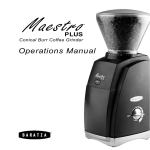
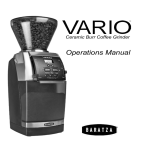
Conical Burr Coffee Grinder
Operations Manual
Skilled in the art of grinding
Operations manuals are available in the following languages at
www.baratza.com
English .pdf
Spanish .pdf
French .pdf
T
hank you for purchasing the Maestro Conical Burr Coffee
Grinder. Below are detailed descriptions of the features that
make the Maestro stand out from other grinders in its class.
Precise, conical burrs:
The slow rotating conical burrs of the Maestro Plus preserve
the aroma and flavor of the freshly ground beans. Forty steps of
adjustment provide the fine tuning needed for Espresso, Drip, and
French Press Coffee.
Innovative burr calibration system:
The range of grind and the accuracy of the settings is truly impressive. The Maestro Plus has 40 distinct settings of grind from
Espresso to French Press. An innovative calibration system allows all the manufacturing tolerances of the grinder to be eliminated, resulting in identical, accurate performance from each
grinder. Furthermore the Maestro Plus ring burr is supported
on three points, providing a stable platform for a more accurate
grind.
Efficient motor:
The Maestro uses a 240 watt DC motor. The motor spins at less
than one-third the speed of the AC motors used in most home
grinders, making it much quieter and lower in pitch. In addition,
it possesses a thermal safety device that protects the motor from
overheating and automatically resets once the motor cools.
Table of Contents
Introduction ............................................................................................. 1
Table of Contents .................................................................................... 2
Parts Identification .................................................................................. 3
Safety Information.................................................................................... 4
Initial Operation ....................................................................................... 5
Setting the Grind Control ........................................................................ 5
On/Off Switch.......................................................... 6
Care and Cleaning .................................................................................. 7
Cleaning the Housing and Hopper .............................................. 7
Cleaning the Burrs ...................................................................... 7
Remove the Ring Burr ................................................................ 7
Replacing the Ring Burr ............................................................. 8
Cleaning the Discharge Chute ................................................ 8
Replacing the Bean Hopper ....................................................... 8
Automatic Cleaning .................................................................... 9
Troubleshooting .................................................................................... 10
Warranty and Service ........................................................................... 11
Notes .....................................................................................................12
BEFORE USING YOUR GRINDER
Prior to using your Maestro Plus grinder for the first time you should
wash the bean hopper and ground coffee bin in warm soapy water. See
the section on Care and Cleaning for instruction on how to remove and
reinstall these parts.
Parts Identification
Hopper Lid
•
Whole Bean Hopper
• •
Grind Setting Indicator
Grind Adjustment Scale
•
•
On Off Switch
Ground Coffee Bin
•
Grind Adjustment Ring
Grind Adjustment Tab
Center Cone Burr
• •
•
•
•
• •
•
Silicone Seal (cutaway)
Removable Ring Burr
Burr Alignment and Lifting Tabs
Important Information
�
Please read the information below very carefully. It contains im
portant tips for the use, the safety and the maintenance and care of this appliance. Please keep these operating instructions for future reference.
•
•
•
•
•
Use only with 120-Volt current. Use only on alternating current
(AC).
Only clean the grinder housing with a dry or slightly damp cloth.
Do not use this grinder for anything other than its intended use (i.e. grinding whole roasted coffee beans).
Disassemble your grinder only as directed in the care and clean ing section of this manual. If you cannot remedy a malfunction check www.baratza.com and visit our FAQ page. If you need fur
ther assistance e-mail us at [email protected] or call us at
877-701-2021.
Baratza will not accept any liability for damage or injury if the grinder is used other than for its intended purpose or is
improperly operated or repaired. All warranty claims will be void.
For Your Safety
•
•
•
•
•
•
Do not operate the grinder with a damaged cord or plug, or if the grinder malfunctions.
Do not leave your grinder unattended while turned ON.
Shut off and unplug the grinder from the electrical outlet when not in use and before cleaning.
To unplug, grasp plug and remove from the outlet-never pull on cord.
Keep your grinder out of the reach of children.
Do not immerse the grinder, plug or cord in water or any other liquid.
Caution
Always unplug the electrical supply cord prior to cleaning.
Initial Operation
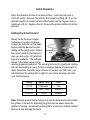
Place the Maestro Grinder on a level surface. Insert the plug into a
120V AC outlet. Remove the lid from the hopper by lifting off. Pour the
desired quantity of roasted whole coffee beans into the hopper up to a
maximum of 8 oz. Replace the lid. Ensure the ground coffee bin is fully
inserted.
Setting the Grind Control
Slowly rotate the bean hopper
clockwise or counter clockwise
to align the indicator on the bean
hopper with the desired number
setting on the grind scale. Select
the correct grind for the brew process you are using. 40 grind settings are available. The settings
shown in the table below can be
used as a general guideline. The actual grind size for a particular setting
will vary depending on many factors, including: degree of roast (light vs.
dark), freshness, humidity, type of bean, oil content, etc. With use, you
will determine the setting that is right for your taste, brewing style and
your favorite beans.
Setting
Type of Coffee
Grind
1 to 14
Espresso
Fine
16 to 32
Filter / Drip
Medium
34 to 40
Press
Coarse
Note: Partially ground coffee beans may remain between the burrs after
the grinder is turned off, adjusting the grind may be easier when the
grinder is running. Avoid running the grinder at very fine settings without
bean as it can damage the burrs.
Switch Operation
The Maestro is equipped with a specially
designed On/Off switch. You may rotate the
switch clockwise or counter clockwise from
any position without damaging it.
The quantity of ground coffee you need
depends on the type of bean, coarseness of
the grind, brewing method and personal taste.
With use, you will determine the amount of time it takes to grind the
quantity of coffee you need.
Grinding into an espresso-basket
Remove the grounds bin and position the
espresso-basket inside the grinder directly
below the discharge chute. Turn the switch on
until you have the desired quantity of coffee.
Note: It is important that the
espresso basket is held below
the discharge chute so the coffee
powder can free fall into the basket.
Holding the basket up tight to the
discharge chute will cause coffee to
back up and jam your grinder.
Care and Cleaning
Cleaning the Housing and Hoppers
Switch the grinder off and remove the plug
from the power supply. Remove any remaining
beans from the bean hopper (it may be easiest
to tip the grinder over and pour the beans into
a bowl.). Remove the hopper by twisting it in a
counterclockwise direction as far as it will turn,
and then lift the bean hopper from the housing.
Wash the hopper, hopper lid, and ground coffee
bin in warm soapy water, rinse and dry.
Caution
Do not put the bean hopper, hopper lid, or
ground coffee bin in the dishwasher. Hand wash
only. Do not immerse the grinder housing in
water.
Cleaning the Burrs
If the grinder is used daily, the burrs should be
cleaned every few weeks. Cleaning enables the
burrs to achieve the most consistent grind possible. Cleaning also removes coffee oils, which
can degrade the flavor of the ground coffee. Do
not wash the burr.
Remove the Ring Burr
Pull the silicone seal off the top of the ring Burr.
Remove the ring burr by lifting it straight up out
of the grinder by the lifting tabs. If the burr does
not lift out, ensure that the grind adjustment tab
is turned fully counterclockwise.
Cleaning the Ring Burr
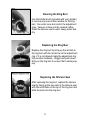
Use the bristle brush (included with your grinder)
to remove any loose coffee residue on the ring
burr, the center cone burr and in the adjustment
area. Vacuum or blow out the residual coffee.
Wash the silicone seal in warm soapy water and
dry.
Replacing the Ring Burr
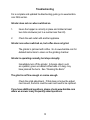
Replace the ring burr by lining up the red tab on
the ring burr with the red arrow on the adjustment
ring, if it is not aligned rotate the adjustment ring
fully counter clockwise. Wiggle and push down
firmly on the ring burr to ensure that it seats properly.
Replacing the Silicone Seal
After replacing the ring burr, replace the silicone
seal by lining up the two slots in the silicone seal
with the small tabs on the top of the ring burr and
slide the seal onto the ring burr.
Clean the Coffee-Dispensing Chute
Remove the grounds bin. Using your bristle
brush, clean out any coffee grounds that may
be accumulating in the coffee-dispensing chute.
Clean out any ground coffee that has fallen in the
bin area. Replace the the grounds bin.
Replacing the Bean Hopper
To replace the bean hopper, line up the two tabs
on the base of the hopper (with the small tab on
the right side) with their respective slots in the
top of the grinder housing and insert the hopper into the grinder. Once the hopper is in place
rotate it clockwise to your desired grind setting.
Automatic Cleaning
A thorough, fast, and easy cleaning can be accomplished using Grindz™ grinder cleaner. Grindz™ is a product
designed to dislodge coffee particles and absorb and remove odors and
coffee oil residue. Simply place the recommended amount of Grindz™
(2 Tbs. ) into the empty grinder hopper. Adjust grind setting to 20, and
operate as if grinding coffee beans until all
of the Grindz™ has been ground. Once
complete, we recommend passing twice
as much coffee (4 Tbs.) through to remove
any Grindz™ residue. Discard the ground
coffee. For information on Grindz™ go to
www.urnex.com.
Grindz™ can be purchased at www.
baratza.com
Troubleshooting
For a complete and updated troubleshooting guide go to www.baratza.
com FAQ section.
Grinder does not run when switched on.
1. Insure the hopper is correctly in place and rotated at least two clicks clockwise (set to a number less than 40).
2. Check the wall outlet with another appliance
Grinder runs when switched on, but coffee does not grind.
The grinder is jammed with coffee. Go to www.baratza.com for detailed instructions to clean out the grinding chamber.
Grinder is operating normally, but stops abruptly.
Immediately turn off the grinder. A foreign object, such as a pebble, green unroasted coffee bean or a twig, may have jammed the burrs. See “Cleaning the Burrs”.
The grind is not fine enough or coarse enough.
Check the grind adjustment. If that does not solve the adjust
ment issues, the burrs could be warn and need to be replaced.
If you have additional questions, please check www.baratza.com
where we answer many frequently asked questions.
10
Warranty and Service
Length of Warranty: One-year from date of purchase.
United States and Canada Warranty Information
If your grinder fails within one year: e-mail: [email protected] or call
877-701-2021. Baratza will deliver an identical or comparable replacement grinder to your door, free of charge, and arrange to have your
“failed” grinder returned to us.
When you receive your replacement grinder, please use the carton and
packing material and the return shipping label supplied to return the
“failed” grinder to us. Also, please include your name, address and telephone number.
International Warranty Information
Go to: www.baratza.com or call 425-641-1245 for international warranty
information.
Proof of Purchase and Product Registration
You can register your grinder at www.baratza.com. Registration will enable us to contact you in the unlikely event of a product safety notification
and assist us in complying with the provisions of the Consumer Product
Safety Act. The serial number is located on the bottom of the grinder.
Please keep your sales receipt that shows the date of purchase and
complete the following for your personal records:
Serial Number (located on bottom of grinder): ____________________
Date Purchased: _____________Store:__________________________
For repairs or parts contact
Baratza LLC
3923-120th Ave. S.E.
Bellevue, WA. 98006
877-701-2021
e-mail: support@baratza. com
Parts: www.baratza.com
11
Notes:
© 2006
Baratza, LLC
3923-120th Ave. S.E.
Bellevue, WA. 98006
www.baratza.com
rev: 11/2607
12