1
BayRS Version 14.00
Part No. 308653-14.00 Rev 00
September 1999
4401 Great America Parkway
Santa Clara, CA 95054
Managing Routers
Using the HTTP Server
Copyright © 1999 Nortel Networks
All rights reserved. Printed in the USA. September 1999.
The information in this document is subject to change without notice. The statements, configurations, technical data,
and recommendations in this document are believed to be accurate and reliable, but are presented without express or
implied warranty. Users must take full responsibility for their applications of any products specified in this document.
The information in this document is proprietary to Nortel Networks NA Inc.
The software described in this document is furnished under a license agreement and may only be used in accordance
with the terms of that license. A summary of the Software License is included in this document.
Trademarks
NORTEL NETWORKS is a trademark of Nortel Networks.
Bay Networks is a registered trademark and BayRS and BCC are trademarks of Nortel Networks.
Internet Explorer, Microsoft, MS, MS-DOS, Win32, Windows, and Windows NT are registered trademarks of
Microsoft Corporation.
Netscape is a registered trademark of Netscape Communications Corporation in the united States and other countries.
All other trademarks and registered trademarks are the property of their respective owners.
Restricted Rights Legend
Use, duplication, or disclosure by the United States Government is subject to restrictions as set forth in subparagraph
(c)(1)(ii) of the Rights in Technical Data and Computer Software clause at DFARS 252.227-7013.
Notwithstanding any other license agreement that may pertain to, or accompany the delivery of, this computer
software, the rights of the United States Government regarding its use, reproduction, and disclosure are as set forth in
the Commercial Computer Software-Restricted Rights clause at FAR 52.227-19.
Statement of Conditions
In the interest of improving internal design, operational function, and/or reliability, Nortel Networks NA Inc. reserves
the right to make changes to the products described in this document without notice.
Nortel Networks NA Inc. does not assume any liability that may occur due to the use or application of the product(s)
or circuit layout(s) described herein.
Portions of the code in this software product may be Copyright © 1988, Regents of the University of California. All
rights reserved. Redistribution and use in source and binary forms of such portions are permitted, provided that the
above copyright notice and this paragraph are duplicated in all such forms and that any documentation, advertising
materials, and other materials related to such distribution and use acknowledge that such portions of the software were
developed by the University of California, Berkeley. The name of the University may not be used to endorse or
promote products derived from such portions of the software without specific prior written permission.
SUCH PORTIONS OF THE SOFTWARE ARE PROVIDED “AS IS” AND WITHOUT ANY EXPRESS OR
IMPLIED WARRANTIES, INCLUDING, WITHOUT LIMITATION, THE IMPLIED WARRANTIES OF
MERCHANTABILITY AND FITNESS FOR A PARTICULAR PURPOSE.
In addition, the program and information contained herein are licensed only pursuant to a license agreement that
contains restrictions on use and disclosure (that may incorporate by reference certain limitations and notices imposed
by third parties).
ii
308653-14.00 Rev 00
Nortel Networks NA Inc. Software License Agreement
NOTICE: Please carefully read this license agreement before copying or using the accompanying software or
installing the hardware unit with pre-enabled software (each of which is referred to as “Software” in this Agreement).
BY COPYING OR USING THE SOFTWARE, YOU ACCEPT ALL OF THE TERMS AND CONDITIONS OF
THIS LICENSE AGREEMENT. THE TERMS EXPRESSED IN THIS AGREEMENT ARE THE ONLY TERMS
UNDER WHICH NORTEL NETWORKS WILL PERMIT YOU TO USE THE SOFTWARE. If you do not accept
these terms and conditions, return the product, unused and in the original shipping container, within 30 days of
purchase to obtain a credit for the full purchase price.
1. License Grant. Nortel Networks NA Inc. (“Nortel Networks”) grants the end user of the Software (“Licensee”) a
personal, nonexclusive, nontransferable license: a) to use the Software either on a single computer or, if applicable, on
a single authorized device identified by host ID, for which it was originally acquired; b) to copy the Software solely
for backup purposes in support of authorized use of the Software; and c) to use and copy the associated user manual
solely in support of authorized use of the Software by Licensee. This license applies to the Software only and does not
extend to Nortel Networks Agent software or other Nortel Networks software products. Nortel Networks Agent
software or other Nortel Networks software products are licensed for use under the terms of the applicable Nortel
Networks NA Inc. Software License Agreement that accompanies such software and upon payment by the end user of
the applicable license fees for such software.
2. Restrictions on use; reservation of rights. The Software and user manuals are protected under copyright laws.
Nortel Networks and/or its licensors retain all title and ownership in both the Software and user manuals, including
any revisions made by Nortel Networks or its licensors. The copyright notice must be reproduced and included with
any copy of any portion of the Software or user manuals. Licensee may not modify, translate, decompile, disassemble,
use for any competitive analysis, reverse engineer, distribute, or create derivative works from the Software or user
manuals or any copy, in whole or in part. Except as expressly provided in this Agreement, Licensee may not copy or
transfer the Software or user manuals, in whole or in part. The Software and user manuals embody Nortel Networks’
and its licensors’ confidential and proprietary intellectual property. Licensee shall not sublicense, assign, or otherwise
disclose to any third party the Software, or any information about the operation, design, performance, or
implementation of the Software and user manuals that is confidential to Nortel Networks and its licensors; however,
Licensee may grant permission to its consultants, subcontractors, and agents to use the Software at Licensee’s facility,
provided they have agreed to use the Software only in accordance with the terms of this license.
3. Limited warranty. Nortel Networks warrants each item of Software, as delivered by Nortel Networks and properly
installed and operated on Nortel Networks hardware or other equipment it is originally licensed for, to function
substantially as described in its accompanying user manual during its warranty period, which begins on the date
Software is first shipped to Licensee. If any item of Software fails to so function during its warranty period, as the sole
remedy Nortel Networks will at its discretion provide a suitable fix, patch, or workaround for the problem that may be
included in a future Software release. Nortel Networks further warrants to Licensee that the media on which the
Software is provided will be free from defects in materials and workmanship under normal use for a period of 90 days
from the date Software is first shipped to Licensee. Nortel Networks will replace defective media at no charge if it is
returned to Nortel Networks during the warranty period along with proof of the date of shipment. This warranty does
not apply if the media has been damaged as a result of accident, misuse, or abuse. The Licensee assumes all
responsibility for selection of the Software to achieve Licensee’s intended results and for the installation, use, and
results obtained from the Software. Nortel Networks does not warrant a) that the functions contained in the software
will meet the Licensee’s requirements, b) that the Software will operate in the hardware or software combinations that
the Licensee may select, c) that the operation of the Software will be uninterrupted or error free, or d) that all defects
in the operation of the Software will be corrected. Nortel Networks is not obligated to remedy any Software defect that
cannot be reproduced with the latest Software release. These warranties do not apply to the Software if it has been (i)
altered, except by Nortel Networks or in accordance with its instructions; (ii) used in conjunction with another
vendor’s product, resulting in the defect; or (iii) damaged by improper environment, abuse, misuse, accident, or
negligence. THE FOREGOING WARRANTIES AND LIMITATIONS ARE EXCLUSIVE REMEDIES AND ARE
IN LIEU OF ALL OTHER WARRANTIES EXPRESS OR IMPLIED, INCLUDING WITHOUT LIMITATION ANY
WARRANTY OF MERCHANTABILITY OR FITNESS FOR A PARTICULAR PURPOSE. Licensee is responsible
308653-14.00 Rev 00
iii
for the security of its own data and information and for maintaining adequate procedures apart from the Software to
reconstruct lost or altered files, data, or programs.
4. Limitation of liability. IN NO EVENT WILL NORTEL NETWORKS OR ITS LICENSORS BE LIABLE FOR
ANY COST OF SUBSTITUTE PROCUREMENT; SPECIAL, INDIRECT, INCIDENTAL, OR CONSEQUENTIAL
DAMAGES; OR ANY DAMAGES RESULTING FROM INACCURATE OR LOST DATA OR LOSS OF USE OR
PROFITS ARISING OUT OF OR IN CONNECTION WITH THE PERFORMANCE OF THE SOFTWARE, EVEN
IF NORTEL NETWORKS HAS BEEN ADVISED OF THE POSSIBILITY OF SUCH DAMAGES. IN NO EVENT
SHALL THE LIABILITY OF NORTEL NETWORKS RELATING TO THE SOFTWARE OR THIS AGREEMENT
EXCEED THE PRICE PAID TO NORTEL NETWORKS FOR THE SOFTWARE LICENSE.
5. Government Licensees. This provision applies to all Software and documentation acquired directly or indirectly by
or on behalf of the United States Government. The Software and documentation are commercial products, licensed on
the open market at market prices, and were developed entirely at private expense and without the use of any U.S.
Government funds. The license to the U.S. Government is granted only with restricted rights, and use, duplication, or
disclosure by the U.S. Government is subject to the restrictions set forth in subparagraph (c)(1) of the Commercial
Computer Software––Restricted Rights clause of FAR 52.227-19 and the limitations set out in this license for civilian
agencies, and subparagraph (c)(1)(ii) of the Rights in Technical Data and Computer Software clause of DFARS
252.227-7013, for agencies of the Department of Defense or their successors, whichever is applicable.
6. Use of Software in the European Community. This provision applies to all Software acquired for use within the
European Community. If Licensee uses the Software within a country in the European Community, the Software
Directive enacted by the Council of European Communities Directive dated 14 May, 1991, will apply to the
examination of the Software to facilitate interoperability. Licensee agrees to notify Nortel Networks of any such
intended examination of the Software and may procure support and assistance from Nortel Networks.
7. Term and termination. This license is effective until terminated; however, all of the restrictions with respect to
Nortel Networks’ copyright in the Software and user manuals will cease being effective at the date of expiration of the
Nortel Networks copyright; those restrictions relating to use and disclosure of Nortel Networks’ confidential
information shall continue in effect. Licensee may terminate this license at any time. The license will automatically
terminate if Licensee fails to comply with any of the terms and conditions of the license. Upon termination for any
reason, Licensee will immediately destroy or return to Nortel Networks the Software, user manuals, and all copies.
Nortel Networks is not liable to Licensee for damages in any form solely by reason of the termination of this license.
8. Export and Re-export. Licensee agrees not to export, directly or indirectly, the Software or related technical data
or information without first obtaining any required export licenses or other governmental approvals. Without limiting
the foregoing, Licensee, on behalf of itself and its subsidiaries and affiliates, agrees that it will not, without first
obtaining all export licenses and approvals required by the U.S. Government: (i) export, re-export, transfer, or divert
any such Software or technical data, or any direct product thereof, to any country to which such exports or re-exports
are restricted or embargoed under United States export control laws and regulations, or to any national or resident of
such restricted or embargoed countries; or (ii) provide the Software or related technical data or information to any
military end user or for any military end use, including the design, development, or production of any chemical,
nuclear, or biological weapons.
9. General. If any provision of this Agreement is held to be invalid or unenforceable by a court of competent
jurisdiction, the remainder of the provisions of this Agreement shall remain in full force and effect. This Agreement
will be governed by the laws of the state of California.
Should you have any questions concerning this Agreement, contact Nortel Networks, 4401 Great America Parkway,
P.O. Box 58185, Santa Clara, California 95054-8185.
LICENSEE ACKNOWLEDGES THAT LICENSEE HAS READ THIS AGREEMENT, UNDERSTANDS IT, AND
AGREES TO BE BOUND BY ITS TERMS AND CONDITIONS. LICENSEE FURTHER AGREES THAT THIS
AGREEMENT IS THE ENTIRE AND EXCLUSIVE AGREEMENT BETWEEN NORTEL NETWORKS AND
LICENSEE, WHICH SUPERSEDES ALL PRIOR ORAL AND WRITTEN AGREEMENTS AND
COMMUNICATIONS BETWEEN THE PARTIES PERTAINING TO THE SUBJECT MATTER OF THIS
AGREEMENT. NO DIFFERENT OR ADDITIONAL TERMS WILL BE ENFORCEABLE AGAINST NORTEL
NETWORKS UNLESS NORTEL NETWORKS GIVES ITS EXPRESS WRITTEN CONSENT, INCLUDING AN
EXPRESS WAIVER OF THE TERMS OF THIS AGREEMENT.
iv
308653-14.00 Rev 00
Contents
Preface
Before You Begin .............................................................................................................xiii
Text Conventions .............................................................................................................xiv
Acronyms ......................................................................................................................... xv
Hard-Copy Technical Manuals .........................................................................................xvi
How to Get Help ..............................................................................................................xvi
Chapter 1
Starting and Configuring the HTTP Server
Browser Requirements ...................................................................................................1-1
Starting the HTTP Server Using install.bat .....................................................................1-2
Starting the HTTP Server Using the BCC or Site Manager ............................................1-3
Setting HTTP Server Security ........................................................................................1-4
User Name/Password Security Concepts ................................................................1-5
Basic Access Authentication ....................................................................................1-8
Digest Authentication ...............................................................................................1-9
Filtering Network Addresses ...........................................................................................1-9
Using a Domain Name Instead of an IP Address ...........................................................1-9
Relocating HTTP Server Help Information ...................................................................1-10
Customizing HTTP Parameters ....................................................................................1-10
Chapter 2
HTTP Server Concepts
What the HTTP Server Does ..........................................................................................2-1
Navigating the HTTP Server Interface ............................................................................2-3
Data Display Formats .....................................................................................................2-4
Enabling and Disabling Connections ..............................................................................2-4
What the Administration Functions Do ...........................................................................2-4
308653-14.00 Rev 00
v
Chapter 3
Monitoring Routers Using the HTTP Server
Getting Help ....................................................................................................................3-1
Specifying a Router to Monitor .......................................................................................3-2
Viewing Overall System Status .......................................................................................3-2
Chapter 4
Troubleshooting Router Operation
Troubleshooting Icon .......................................................................................................4-1
Displaying Circuit Alerts ..................................................................................................4-2
Viewing the Event Log ....................................................................................................4-2
Filtering What the Event Log Shows ........................................................................4-3
Interpreting Event Messages ...................................................................................4-3
Saving and Clearing the Event Log ..........................................................................4-4
Saving the Event Log .........................................................................................4-4
Clearing the Event Log ......................................................................................4-5
Getting Help on the Event Log Window ...................................................................4-5
Pinging Devices ..............................................................................................................4-5
Ping IP ......................................................................................................................4-6
Ping IPX ...................................................................................................................4-6
Ping AppleTalk .........................................................................................................4-7
Chapter 5
Viewing Router Services Statistics
Router Services Statistics ..............................................................................................5-1
Using the HTTP Server to View HTTP Statistics ............................................................5-3
HTTP Configuration Statistics ..................................................................................5-3
HTTP Counters ........................................................................................................5-3
HTTP Request Statistics ..........................................................................................5-4
HTTP Response Statistics .......................................................................................5-4
Using the Statistics Manager to View HTTP Server Statistics ........................................5-5
Selecting the Windows to Display ............................................................................5-5
Starting the Statistics Launch Facility ......................................................................5-5
Viewing HTTP Statistics ...........................................................................................5-6
vi
308653-14.00 Rev 00
Chapter 6
Viewing Router Port Statistics
Changing the Administrative Status of a Port .................................................................6-2
Viewing Traffic Statistics for All Ports ..............................................................................6-2
Viewing Ethernet Port Statistics .....................................................................................6-3
Viewing Serial Port Statistics ..........................................................................................6-3
Viewing FDDI Port Statistics ...........................................................................................6-3
Viewing HSSI Port Statistics ...........................................................................................6-4
Viewing Token Ring Port Statistics .................................................................................6-4
Chapter 7
Viewing Router Protocol Statistics
Changing the Administrative Status of an Interface ........................................................7-1
Viewing IP Statistics .......................................................................................................7-2
Viewing IPX Statistics .....................................................................................................7-3
Viewing AppleTalk Statistics ...........................................................................................7-3
Chapter 8
Support and Administration
What Administration Functions Do .................................................................................8-1
Using Date and Time Functions .....................................................................................8-2
Using the Reset and Boot Functions ..............................................................................8-3
Resetting a Slot ........................................................................................................8-3
Booting the Router ...................................................................................................8-3
File Manager Functions ..................................................................................................8-4
Files Function ...........................................................................................................8-4
Volumes Function .....................................................................................................8-5
Appendix A
Site Manager Parameters
Accessing HTTP Site Manager Parameters .................................................................. A-2
Appendix B
BCC show Commands
Sample show Command Output .................................................................................... B-2
Online Help for show Commands .................................................................................. B-3
Show Commands for the HTTP Server ......................................................................... B-3
show http summary ................................................................................................. B-3
308653-14.00 Rev 00
vii
show http requests .................................................................................................. B-4
show http responses ............................................................................................... B-4
Index
viii
308653-14.00 Rev 00
Figure
Figure 2-1.
HTTP Server Interface Components ........................................................2-2
308653-14.00 Rev 00
ix
Tables
Table 1-1.
Access Privilege Levels and Associated Functions .................................1-6
Table 4-1.
Event Message Severity Levels ...............................................................4-4
308653-14.00 Rev 00
xi
Preface
This guide describes how to configure and use the Nortel Networks™ HTTP
Server, an embedded Web-based router management tool included with the Nortel
Networks router operating system software (BayRS™) and accessible from any
standard Web browser. Using HTTP Server software, you can monitor network
devices, viewing summary, fault, and statistical information on a device-by-device
basis.
You can use the Bay Command Console (BCC™) or Site Manager to configure the
HTTP Server software on a router. In this guide, you will find configuration
instructions for both the BCC and Site Manager.
Before You Begin
Before using this guide, you must complete the following procedures. For a new
router:
•
Install the router (see the installation guide that came with your router).
•
Connect the router to the network and create a pilot configuration file (see
Quick-Starting Routers).
•
Configure IP on the router (see Configuring IP Multicasting and Multimedia
Services; Configuring IP, ARP, RIP, and OSPF Services; and Configuring
GRE, NAT, RIPSO and BFE Services).
Make sure that you are running the latest version of Nortel Networks BayRS™ and
Site Manager software. For information about upgrading BayRS and Site
Manager, see the upgrading guide for your version of BayRS.
308653-14.00 Rev 00
xiii
Managing Routers Using the HTTP Server
Text Conventions
This guide uses the following text conventions::
angle brackets (< >)
Indicate that you choose the text to enter based on the
description inside the brackets. Do not type the
brackets when entering the command.
Example: If the command syntax is:
ping <ip_address>, you enter:
ping 192.32.10.12
bold text
Indicates command names and options and text that
you need to enter.
Example: Enter show ip {alerts | routes}.
Example: Use the dinfo command.
italic text
Indicates file and directory names, new terms, book
titles, and variables in command syntax descriptions.
Where a variable is two or more words, the words are
connected by an underscore.
Example: If the command syntax is:
show at <valid_route>
valid_route is one variable and you substitute one value
for it.
screen text
Indicates system output, for example, prompts and
system messages.
Example: Set Trap Monitor Filters
xiv
308653-14.00 Rev 00
Preface
separator ( > )
Shows menu paths.
Example: Protocols > IP identifies the IP option on the
Protocols menu.
vertical line ( | )
Separates choices for command keywords and
arguments. Enter only one of the choices. Do not type
the vertical line when entering the command.
Example: If the command syntax is:
show ip {alerts | routes}, you enter either:
show ip alerts or show ip routes, but not both.
Acronyms
This guide uses the following acronyms:
ARP
Address Resolution Protocol
BootP
Bootstrap Protocol
FDDI
Fiber Distributed Data Interface
FTP
File Transfer Protocol
HSSI
High-Speed Serial Interface
HTTP
Hypertext Transfer Protocol
ICMP
Internet Control Message protocol
IP
Internet Protocol
IPX
Internet Packet Exchange
MAC
media access control
RIP
Routing Information Protocol
SAP
Service Advertising Protocol
SMDS
Switched Multimegabit Data Service
SNMP
Simple Network Management Protocol
TCP
Transaction Control Protocol
URL
uniform resource locator
308653-14.00 Rev 00
xv
Managing Routers Using the HTTP Server
Hard-Copy Technical Manuals
You can print selected technical manuals and release notes free, directly from the
Internet. Go to support.baynetworks.com/library/tpubs/. Find the product for
which you need documentation. Then locate the specific category and model or
version for your hardware or software product. Using Adobe Acrobat Reader, you
can open the manuals and release notes, search for the sections you need, and print
them on most standard printers. You can download Acrobat Reader free from the
Adobe Systems Web site, www.adobe.com.
You can purchase selected documentation sets, CDs, and technical publications
through the collateral catalog. The catalog is located on the World Wide Web at
support.baynetworks.com/catalog.html and is divided into sections arranged
alphabetically:
•
The “CD ROMs” section lists available CDs.
•
The “Guides/Books” section lists books on technical topics.
•
The “Technical Manuals” section lists available printed documentation sets.
How to Get Help
If you purchased a service contract for your Nortel Networks product from a
distributor or authorized reseller, contact the technical support staff for that
distributor or reseller for assistance.
If you purchased a Nortel Networks service program, contact one of the following
Nortel Networks Technical Solutions Centers:
xvi
Technical Solutions Center
Telephone Number
Billerica, MA
800-2LANWAN (800-252-6926)
Santa Clara, CA
800-2LANWAN (800-252-6926)
Valbonne, France
33-4-92-96-69-68
Sydney, Australia
61-2-9927-8800
Tokyo, Japan
81-3-5402-7041
308653-14.00 Rev 00
Chapter 1
Starting and Configuring the HTTP Server
The Nortel Networks HTTP Server is an embedded Web-based router
management tool included with BayRS and accessible from any standard Web
browser. Using the HTTP Server software, you can monitor network devices,
viewing summary, fault, and statistical information on a device-by-device basis.
Before you can use the HTTP Server to monitor a router, you must configure and
enable the HTTP Server software on the router using the Quick-Start installation
script install.bat, the Bay Command Console (BCC), or Site Manager.
The following sections describe how to get started.
Browser Requirements
Starting the HTTP Server Using install.bat
Starting the HTTP Server Using the BCC
Starting the HTTP Server Using Site Manager
Setting HTTP Server Security
Using a Domain Name Instead of an IP Address
Relocating HTTP Server Help Information
Customizing HTTP Parameters
Browser Requirements
Your Web browser must support the following:
•
Frames
•
JavaScript 1.2 or later
•
Java applets
•
Cascading style sheets
308653-14.00 Rev 00
1-1
Managing Routers Using the HTTP Server
For example, the browsers Netscape® 4.0 and later and Microsoft® Internet
Explorer® 4.0 and later offer these features.
If you have changed the default settings for these browsers, you must ensure that
Java is enabled and that your browser is configured to accept cookies. To
configure digest authentication, you must use a browser that supports this feature.
Caution: Internet Explorer lets you store your browser password. For
security reasons, Nortel Networks strongly recommends that you do not store
your password.
If you are upgrading from an earlier version of the HTTP Server and want to
access Web pages that require digest authentication, you must reenter or change
your password when upgrading to the HTTP Server in BayRS Version 13.20.
Starting the HTTP Server Using install.bat
A new router comes with a flash memory card containing the software image for
the router, two configuration files (config and ti.cfg), and the Quick-Start script
install.bat.
The Quick-Start installation script install.bat creates an initial IP network
interface on the router so that your router can communicate with the configuration
workstation from which you will manage the router. The install.bat script prompts
you to enter the network information that dynamically configures the initial IP
interface.
As the following example shows, the script asks whether you want to enable
HTTP. Answer yes to this question. (The default is no.)
Step 7. Enable HTTP
Enable the HTTP (Web) Server
---------------------------Do you want to enable the HTTP (Web) server? (y/n)[n]: y
HTTP server enabled.
1-2
308653-14.00 Rev 00
Starting and Configuring the HTTP Server
Note: For complete instructions on running the install.bat script and verifying
that the installation is successful, see Quick-Starting Routers.
When you enable the HTTP Server during the Quick-Start procedure, you can use
the HTTP Server with its default configuration settings after completing the
install.bat procedure. For information on modifying the default HTTP Server
settings, see “Customizing HTTP Parameters.”
After you run the install.bat script, you can install Site Manager software, as
described in Quick-Starting Routers.
Starting the HTTP Server Using the BCC or Site Manager
If you did not use the Quick-Start procedure to start the HTTP Server, you can
start it using the BCC or Site Manager. When you complete this procedure, the
HTTP Server software is configured on the router. Before you start the HTTP
Server, verify that you have configured IP on an interface.
You can start the HTTP Server using default values for all parameters. For
information about modifying the default HTTP Server settings, see “Customizing
HTTP Parameters.”
Using the BCC
Adding the HTTP Server to a router automatically loads TCP on all slots. To add
the HTTP Server to a router, navigate to the box prompt and enter:
http
For example, the following command adds HTTP Server to a router:
box# http
http#
308653-14.00 Rev 00
1-3
Managing Routers Using the HTTP Server
Using Site Manager
You can configure the HTTP Server software in any Configuration Manager
mode. To start the HTTP Server software, complete the following tasks:
Site Manager Procedure
You do this
System responds
1. In the Configuration Manager window,
choose Protocols.
The Protocols menu opens.
2. Choose Global Protocols.
The Global Protocols menu opens.
3. Choose TCP.
The TCP menu opens.
4. Choose Create TCP.
You return to the Configuration Manager
window.
5. Choose Protocols.
The Protocols menu opens.
6. Choose Global Protocols.
The Global Protocols menu opens.
7. Choose HTTP.
The HTTP menu opens.
8. Choose Create HTTP.
You return to the Configuration Manager
window.
Setting HTTP Server Security
The HTTP Server allows access to device information from anywhere in the
network. To protect your network information, you can implement security
controls. The HTTP Server offers access control through: user name/password
security, basic access or digest authentication, and network address filtering, as
described in the following sections.
User Name/Password Security Concepts
Basic Access Authentication
Digest Authentication
1-4
308653-14.00 Rev 00
Starting and Configuring the HTTP Server
User Name/Password Security Concepts
The HTTP Server controls access to network device information by grouping that
information into collections, called realms, that share the same security attributes.
The HTTP Server defines three security realms on the router: user, operator, and
manager. A user name/password authorization mechanism controls access to each
realm.
•
The user access privileges let you view device information and ping a router.
•
The operator access privileges additionally let you make temporary changes
to the router configuration; for example, enabling and disabling an interface,
setting and clearing the event log, setting the date and time, resetting a slot on
the router, and rebooting the router using a file that a person with manager
access privilege has loaded on the router.
•
The manager access privileges add complete read-write access to the router,
letting you, for example, format and compact volumes and load files onto the
router’s flash memory. A person with manager access privileges can also view
SNMP communities and SNMP manager information.
Note: Setting the user access privileges, assigning passwords, and related
activities are not part of the HTTP Server, but your level of privilege
determines what you can do in the HTTP Server.
The nonvolatile RAM (NVRAM) standard Manager and User login accounts are
similar to the Manager and User logins for the Technician Interface. BayRS also
supports custom logins, such as chris, lee, and operations. The access privilege
levels for custom logins are manager (same privileges as for the Manager login),
user (same privileges as for the User login) and operator, as previously listed.
Note: In this guide, the word “Manager” or “User” with an initial capital letter
(other than at the start of a sentence) refers to the the actual NVRAM login.
The word “manager,” “user,” or “operator” (all lowercase) refers to a privilege
level.
The system administrator can also create groups of user login accounts with the
same access privilege levels. For example, users with the logins chris and lee can
be members of the group support, which could have operator-level access
privileges. For information about how to configure custom logins and associated
access privileges, see Using the Bay Command Console (BCC).
308653-14.00 Rev 00
1-5
Managing Routers Using the HTTP Server
Privileges are cumulative. An operator can do all that a user can, plus the
functions listed for the operator privilege level. A manager can do everything an
operator can, plus those functions that are exclusively available to the manager
privilege level. Table 1-1 summarizes the privilege levels and the functions
available to each.
Table 1-1.
A user with
at least this
privilege
level
User
Access Privilege Levels and Associated Functions
Can perform this function
By clicking on this path in the navigation
frame
Display router summary
information.
Summary
View circuit alerts and the event
log.
Trouble Shooting > Circuit Alerts
Trouble Shooting > Event Log
Ping a router.
Trouble Shooting > Ping - IP
Trouble Shooting > Ping - IPX
Trouble Shooting > Ping - AppleTalk
Display router statistics for
services, ports, and protocols
(except SNMP communities and
SNMP manager statistics).
Statistics > Services
Statistics > Ports
Statistics > Protocols
Get help on the HTTP Server
interface, view the release notes,
link to online manuals, and
contact the Nortel Networks
Technical Solutions Center.
Support > Help
Support > Release notes
Support > Manuals
Support > Support
Display file status.
Administration > File Manager
View the date and time.
Administration > Date
(continued)
1-6
308653-14.00 Rev 00
Starting and Configuring the HTTP Server
Table 1-1.
A user with
at least this
privilege
level
Operator
Manager
Access Privilege Levels and Associated Functions (continued)
Can perform this function
By clicking on this path in the navigation
frame
Enable or disable a connection to
a router.
Statistics > Ports > Ethernet > Summary
Statistics > Ports > Serial > Summary
Statistics > Ports > FDDI > Summary
Statistics > Ports > HSSI > Summary
Statistics > Ports > Token Ring > Summary
Reset a slot.
Boot a router.
Administration > Reset & Boot
Save or clear the event log.
Troubleshooting > Event Log > Save Log
Troubleshooting > Event Log > Clear Log
Set the date and time.
Administration > Date
Copy, delete, get, or put a file.
Administration > File Manager > Files
Compact a volume.
Format a volume.
Create or delete a partition on a
volume.
Administration > File Manager > Volumes
The system administrator sets the privilege level and assigns a password for each
user or group of users. The manager password cannot be an empty (null) string. To
perform manager functions on a device, you must enter the appropriate login
name and password.
A password is optional for a user or operator login account. If the system
administrator does not set a user or operator password, the HTTP Server accepts
an empty (null) string as the password. Generally, the system administrator sets
passwords using Technician Interface or BCC commands, just as for console
access.
308653-14.00 Rev 00
1-7
Managing Routers Using the HTTP Server
If you have user or operator privileges and attempt to access information requiring
manager or operator privileges (or, if you attempt to use the manager login with a
null password), the HTTP Server prompts you for the manager password. If you
do not provide the appropriate password, an error message appears, and you
cannot perform that operation.
Note: The BCC and Technician Interface provide two default user login
accounts, User and Manager. Information about these access privilege levels is
stored in nonvolatile RAM (NVRAM) on the router.
A system administrator can define multiple-user groups, names, passwords,
and access privileges for other users.
The operator privilege level can be assigned to any user login account other
than one of the default login names. Information about these other configured
users is stored in the device configuration file. Only one system administrator
at a time can change the configuration file.
For specific information about creating login names and passwords and assigning
access privileges, see Using the Bay Command Console (BCC) or Using
Technician Interface Software. For information about securing a router as part of
the Quick-Start procedure, see Quick-Starting Routers.
Basic Access Authentication
In basic access authentication, the user name and password are passed over the
network as encoded but unencrypted text. While this serves to verify the identity
of the user, the information is less secure than with digest authentication. Even in
basic access authentication, the information is not visible to anyone with a sniffer
or similar device. If your browser does not support digest authentication, you must
leave authentication set to the default value of basic; otherwise, you cannot access
the device.
1-8
308653-14.00 Rev 00
Starting and Configuring the HTTP Server
Digest Authentication
Digest authentication, based on RFC 2069, uses an encrypted password to verify a
user’s identity. Like basic access authentication, digest authentication uses a
challenge-response model, but the authentication information is encrypted. To use
digest authentication, your browser must be capable of supporting digest
authentication, and you must explicitly set the HTTP server Authentication
parameter to digest. If your browser supports digest authentication, but the server
is set to basic authentication, the browser uses basic authentication. If your
browser does not support digest authentication, you must set authentication to
basic; otherwise, you cannot access the device.
Filtering Network Addresses
For additional security, you can implement IP access control filters when you
configure IP on the router. These filters further restrict access to the router,
limiting access to specific IP addresses or IP address ranges.
You must also ensure that IP is appropriately configured to support HTTP. To do
this, you must ensure that the appropriate access policy filters are configured for
HTTP.
To specify these requirements as part of the IP configuration process, use the
BCC. For additional information about IP access policy filters and how to
configure them, see Configuring IP Utilities. For general instructions about using
the BCC, see Using the Bay Command Console (BCC).
Using a Domain Name Instead of an IP Address
By default, you access a server using its IP address. However, you can let the
server be accessible by a domain name, rather than by IP address, by specifying
the HTTP Server Domain Name parameter. The value of the HTTP Server
Domain Name parameter must be a domain name that a DNS lookup would return
for the router. The name can consist of any valid string of characters.
308653-14.00 Rev 00
1-9
Managing Routers Using the HTTP Server
Relocating HTTP Server Help Information
When you click on Help in an HTTP Server window, a secondary window
displays Help information for that window. By default, these Help pages reside on
the server. If the available space is limited, or if you want to place the Help files
on a different server, you can locally relocate the Help files. If you do this, you
must tell the HTTP Server where to find the help files by providing a base uniform
resource locator (URL) to the start of those files. This base URL, combined with a
relative URL for each window, points to the detailed Help information for that
window.
To see the current value of the Help Base URL parameter, choose the following
path in the navigation frame: Statistics > Services > HTTP > Configuration. You
can accept the default value for the Help Base URL parameter or specify a new
help base URL.
Customizing HTTP Parameters
Adding the HTTP Server to a router automatically configures HTTP with all
default values. You can change these settings using either the BCC or Site
Manager.
Using the BCC
To change these parameter settings, first navigate to the http prompt.
To disable http on the router, enter:
disable
For example:
http# disable
To change the port number, enter:
port <port_number>
For example:
http# port 81
To specify access authentication level, enter:
authentication digest or authentication basic
1-10
308653-14.00 Rev 00
Starting and Configuring the HTTP Server
For example, the following command configures digest authentication:
box# http
http# authentication digest
http#
To specify the use of a domain name for the router, enter:
domain-name <domain_name>
For example, the following command allows the use of the domain name
“myrouter”:
http# domain-name myrouter
To specify the base uniform resource locator (URL) of the location at which the
HTTP Server Help files are stored, enter:
help-base-url <url>
For example, the following command sets the HTTP Server Help base URL to
library.mycompany.com/helpfiles/:
http# help-base-url library.mycompany.com/helpfiles/
Using Site Manager
To configure or change the HTTP Server parameters, first create HTTP on the
router, then complete the following tasks:
Site Manager Procedure
You do this
System responds
1. In the Configuration Manager window,
choose Protocols > Global Protocols >
HTTP > Global.
The Edit HTTP Global Parameters
window opens.
2. Set the Enable/Disable parameter to
Enabled to enable the HTTP Server or to
Disabled to disable the HTTP Server.
Click on Help or see the parameter
description on page A-2.
3. Set the Port parameter to the port number
on which you enabled the HTTP Server.
Click on Help or see the parameter
description on page A-3.
(continued)
308653-14.00 Rev 00
1-11
Managing Routers Using the HTTP Server
Site Manager Procedure (continued)
You do this
System responds
4. Set the Authentication parameter to
Basic or Digest. Click on Help or see the
parameter description on page A-3.
5. Set the Domain Name parameter to the
domain name to use for the router. To use
the IP address instead of a domain name,
leave this parameter value blank. Click on
Help or see the parameter description on
page A-3.
6. Set the Help Base URL parameter for the
help files if you put them in a different
location from the default. Click on Help or
see the parameter description on
page A-4.
7. Click on OK.
1-12
You return to the Configuration Manager
window.
308653-14.00 Rev 00
Chapter 2
HTTP Server Concepts
HTTP Server software lets you access device information from anywhere in the
network using any standard Web browser that conforms to HTTP and HTML
specifications. The HTTP Server is part of the BayRS software. This chapter
provides an overview of the HTTP Server.
What the HTTP Server Does
Navigating the HTTP Server Interface
Enabling and Disabling Connections
What the Administration Functions Do
To obtain Web-accessible data, you must configure the HTTP Server software on
the router. Chapter 1, “Starting and Configuring the HTTP Server,” summarizes
the configuration procedure.
What the HTTP Server Does
The HTTP Server is a graphical user interface (GUI) that lets you view real-time
device summaries, events, alerts, and statistics. Users with appropriate privileges
can also save or clear the event log, enable and disable connections, and perform
administrative functions such as resetting a slot, rebooting the router, managing
files and volumes, and setting the date and time. The HTTP Server graphically
displays information similar to (and a superset of) the text-only information
available through the BCC show, enable, and disable commands. Through this
point-and-click interface, you also have direct access to online documentation and
Nortel Networks technical support.
308653-14.00 Rev 00
2-1
Managing Routers Using the HTTP Server
The information that you gather through the HTTP Server interface can help you
monitor and manage your network’s performance on a device-by-device basis.
You can see, for example, where congestion is occurring or where transmission or
reception problems exist. For detailed information about interpreting this
information, refer to Troubleshooting Routers and the description of the event log
in Chapter 4, “Troubleshooting Router Operation.”
To start the HTTP server, specify a device in your browser’s location field and
press Enter. You see a multiframe window, like that in Figure 2-1.
Banner frame
Display frame
Navigation frame
Figure 2-1.
HTTP Server Interface Components
This window has the following components:
•
2-2
Banner -- The top frame shows the Nortel Networks logo and the device type.
The banner specifies the device’s IP address or its domain name and, if
defined, identifies the device by name and physical location, and lists the
name of the contact person responsible for that device. If Telnet server service
is configured, you can click on the IP address or domain name to establish a
Telnet connection to the device.
308653-14.00 Rev 00
HTTP Server Concepts
•
Navigational frame -- The frame on the left contains links to each monitored
function. Initially, these links are all folders. The folders (and the documents
they contain) in the navigational frame are active links to device information.
•
Display frame -- The large frame on the lower right side displays the retrieved
Web data.
Navigating the HTTP Server Interface
The navigational frame contains the following expandable folder icons:
•
Summary -- System information, hardware informaation, PROM information,
software image information, system resource information, and system task
information
•
Trouble Shooting -- Circuit alerts, the event log, and Ping functions
•
Statistics -- Services, ports, and protocols
•
Support -- Help, release notes, technical manuals, and customer support links
•
Administration -- Router date and time, slot reset and router boot, and file and
volume management information
Click on each folder in turn to display the information for the device you are
monitoring.
•
To show the types of data a folder contains, click on the folder icon. The
folder opens, revealing document icons for the data within that folder.
•
To view a specific data type within a folder, click on its document icon.
•
To close (that is, collapse) a folder’s contents, click again on the folder icon.
Some windows contain fields in which you can enter data. The browser ensures
that the type of data you enter is appropriate for the function requested; for
example, it ensures that data you enter in a numeric field is, in fact, numeric. If
you enter invalid data, a dialog box appears listing the fields containing the
invalid data.
When you try to perform a function that would cause a permanent change to the
router, a dialog box opens asking you to confirm this action.
308653-14.00 Rev 00
2-3
Managing Routers Using the HTTP Server
Data Display Formats
The HTTP Server displays data either in tables, as for summary statistics, or in a
cumulative list, as for the event log. If a table continues on a subsequent window,
the HTTP Server provides a set of buttons that let you navigate to the next,
previous, or top portion of the table. An end of table indicator shows that you have
reached the last entry in a table.
Enabling and Disabling Connections
If you have either operator or manager access privileges, you can disable or
enable the connection to the router you are managing. Be particularly careful
when disabling a connection. If you disable the connection that the HTTP Server
is using to communicate with the router, then the HTTP Server can no longer
monitor or manage that device.
To disable or enable a connection, do the following steps.
1.
Choose Statistics > Ports.
2.
Select the type of port (Ethernet, serial, and so on).
3.
Select Summary and click on Enable or Disable in the row corresponding
to the connection you want to disable or enable.
The HTTP Server requires a confirmation before allowing you to disable a
connection.
Note: If you disable the connection through which you are connecting, you
must access the device and use either Site Manager or the BCC to reenable the
interface.
What the Administration Functions Do
The administration functions let any user view the system date, time, and time
zone information, and information about the files on each volume.
A person with operator access privileges can also change the date and time, reset a
slot, and reboot the router using an image that is already loaded on a volume.
2-4
308653-14.00 Rev 00
HTTP Server Concepts
A person with manager access privileges can load, copy, or delete files on the
router and format and compact volumes.
See Chapter 8, “Support and Administration,” for a detailed description of the
administration functions.
308653-14.00 Rev 00
2-5
Chapter 3
Monitoring Routers Using the HTTP Server
This chapter describes how to use the Web Server to monitor the operation of
individual routers on your network. For specific descriptions of how to use the
information from the HTTP (Web) Server to troubleshoot the devices in your
network, refer to Troubleshooting Routers.
Getting Help
Specifying a Router to Monitor
Viewing Overall System Status
Info
Hardware
PROMs
Software
Resources
Tasks
Getting Help
HTTP Server windows that offer interactive features also offer a Help button.
When you click on Help, you see a secondary window containing detailed
information about the elements in that window.
308653-14.00 Rev 00
3-1
Managing Routers Using the HTTP Server
In addition, other types of online Help are available from the Support folder, as
the following table shows.
For this information
Click on Support, then on
HTTP Server interface help
Help icon
Release Notes
Release Notes icon
Nortel Networks documentation
Manuals icon
Nortel Networks technical support
Support document icon
After opening one of these links, choose File > Close to return to the HTTP Server
page on the Web browser. Choosing File > Exit shuts down the browser. The Back
button may not be available on linked pages.
Specifying a Router to Monitor
To specify a router to monitor, complete the following steps:
1.
Start your Web browser.
2.
In the Location field, enter:
http://<router_IP_address> or http://<domain-name>
router_IP_address is an IP address on the device that you want to monitor; for
example:
http://192.168.12.54
domain-name is the fully qualified path to the domain name of the device you
want to monitor; for example:
http://myrouter
The browser displays a summary window for the specified device.
Viewing Overall System Status
To get an overall picture of the operational state of the router, use the summary
information. The summary provides hardware and software information including
this router’s configuration and its internal resource usage. To see the types of
summary information available, click on the Summary folder icon in the
navigational frame.
3-2
308653-14.00 Rev 00
Monitoring Routers Using the HTTP Server
The following table lists the icons within the Summary folder and the information
that each displays when you click on it.
Icon
Shows
information for
Displayed summary information
Info
System
•
•
•
•
•
•
Device name -- the mnemonic name that the
system administrator assigns
Location -- the location, as defined by the system
administrator
Contact person responsible for that device, as
defined by the system administrator
Up time -- the time elapsed since the last device
reset
MIB version -- the version number of the
management information base (MIB) for the router
software
Software version -- the version number and creation
date and time of the router software image
Hardware
Specific device
•
•
Model name and serial number
Type, revision, and serial number of the processor
and link module in each slot and, for platforms that
support it, the link module number.
PROMs
PROM modules
in the device
For the Boot PROM and for the Diagnostic PROM in
each slot:
• Revision number
• Date and time of PROM information
Software
Software image
on the specified
device
For each router slot:
• Name of the software image file and the volume
number from which it loads
• Source of that image
• Date and time the image was created
• Name of the configuration file
Resources
System
resources on the
specified
hardware device
For each router slot, usage data for:
• CPU
• Memory
• Buffers
Tasks
System tasks on
the specified
hardware device
For each active task:
• Name of each task
• Usage data for the CPU, memory, and buffers
• Slots on which the task is running
For detailed information about interpreting the information obtained through the
HTTP Server, refer to Troubleshooting Routers.
308653-14.00 Rev 00
3-3
Chapter 4
Troubleshooting Router Operation
With the HTTP Server, you can view the events and alerts generated by the
entities on the router. When you click on the troubleshooting icon, the folder
opens and displays document icons that invoke the following functions:
•
View all circuit alerts on the router
•
View all, or a selection of, event log messages
•
Determine whether a device is operational (ping a device)
You must first have configured and enabled the HTTP Server on your router, as
described in Chapter 1, “Starting and Configuring the HTTP Server.” For a
detailed description of how to isolate and correct problems with a specific device,
refer to Troubleshooting Routers. The following sections describe the
troubleshooting features.
Troubleshooting Icon
Displaying Circuit Alerts
Viewing the Event Log
Troubleshooting Icon
Clicking on the troubleshooting folder icon in the navigational frame reveals five
additional choices:
•
Circuit Alerts
•
Event Log
•
Ping - IP
•
Ping - IPX
•
Ping - AppleTalk
308653-14.00 Rev 00
4-1
Managing Routers Using the HTTP Server
Displaying Circuit Alerts
A circuit alert indicates a condition, such as a port/interface that has been brought
down unexpectedly, that requires your immediate attention. To view any
exceptional status conditions for any interface on the router, choose
Trouble Shooting > Circuit Alert in the navigational frame.
For each index item, the circuit alerts display shows:
•
Index number
•
Circuit name
•
Administrative state (usually up)
•
Operational state (usually down)
•
Type
•
MAC address
•
Maximum transmission unit (MTU)
•
Line speed
Viewing the Event Log
An event is something that happens to the operating status of a router. The router
stores each event as a single entry in a memory-resident log file. The event log for
a router is the composite of all events that occur for all the processors in the router.
An event message briefly describes an event and reports the event code associated
with that event. Use the entity identifier together with the event code to look up
the meaning of the message in the events database.
To view the events for a router, choose Trouble Shooting > Event Log in the
navigational frame.
Filtering What the Event Log Shows
Interpreting Event Messages
Note: Event code numbers are not unique among entities.
4-2
308653-14.00 Rev 00
Troubleshooting Router Operation
Filtering What the Event Log Shows
By default, the event log display shows Fault, Warning, and Info event messages.
•
To show other event messages, click on the check boxes to select the
appropriate Event Message Severity Levels.
•
To restrict the display to one or more specific slots or entities and to show
only events that happen after a specific date and time, fill in the fields in the
Event Log window, separating individual entries with spaces.
Entity names are not case-sensitive. If the entity name contains a space character,
you must enclose the name in double quotes. For a list of entity names, refer to the
events database. The default URL for the events database is:
http://support.baynetworks.com/library/tpubs/events/
If you specify a date filter, the event log displays events that occur on or after the
specified date. You can specify the date as month, day, and year; for example,
01:22:99 or 01:22:1999. If you specify a time filter, use one of the formats shown
on the Event Log window; for example, hh:mm:ss. The event log display shows
only events logged after the given hour, minute, and second. The current date is
assumed.
Interpreting Event Messages
Each event in the event log has a hot link to the corresponding description in the
events database. To view the detailed information for an event, click on the hot
link. The description appears in a secondary window.
Most messages document routine occurrences that do not require you to do
anything. Table 4-1 lists and briefly describes the severity levels.
308653-14.00 Rev 00
4-3
Managing Routers Using the HTTP Server
Table 4-1.
Event Message Severity Levels
Severity
Description
Fault
Major service disruption, usually caused by a configuration, network,
or hardware problem. The entities involved keep restarting until the
problem is resolved either by the router itself or by you.
Warning
Service acted in an unexpected manner.
Info
Routine event. Usually, no action is required.
Trace
Detailed history of everything that happens on the router. Because of
the amount of information that the trace function records, Nortel
Networks recommends viewing this type of message only when
diagnosing specific network problems.
Debug
Information that Nortel Networks Customer Support uses. Because of
the amount of information that the Debug function records, Nortel
Networks recommends viewing this type of message only at the
direction of Nortel Networks Customer Support.
Saving and Clearing the Event Log
To save or clear the event log, you must have either operator or manager access
privilege. If a person with user access privileges attempts one of these operations,
the HTTP Server opens a secondary window with an Authorization failed
message. To log in at a higher privilege level, click on Retry, then enter an
appropriate login name and password.
Saving the Event Log
To save the event log to a file, do the following steps.
1.
Click on Save Log.
A secondary window opens, listing the filters that you selected in the Event
Log window (slot, date, and time information). The save log function saves
event messages of all severity levels in the log file, regardless of the severity
level filters.
4-4
2.
Select a volume where you want to save the file.
3.
Scroll through the list of files on that volume and select a file name to use,
or specify a new file name in the File field.
308653-14.00 Rev 00
Troubleshooting Router Operation
4.
Click on Save to store the current contents of the event log as a file on the
indicated volume.
Click on Cancel to exit the Save Log window without saving the file.
Note: Although the router does not require it, Nortel Networks recommends
that files saved in flash memory follow the 8.3 file naming convention; for
example, savelog1.log.
Clearing the Event Log
To clear the event log, do the following steps.
1.
Click on Clear Log. A secondary window opens, asking you to select the
slot (or all slots) for which you want to clear the event log.
2.
Make your selection, then click on Clear to clear the log or Cancel to end
the operation without clearing the log.
If you click on Clear, another secondary window replaces the previous one,
confirming your slot selection and asking you to confirm that you really want
to clear the log for the selected slot or slots.
3.
Click on OK to confirm and complete the operation.
Getting Help on the Event Log Window
Click on Help to open a secondary window that explains the fields and functions
available in the Event Log window.
Pinging Devices
To determine whether a router or host on a network is operational, any user can
send a PING packet using the Ping icon appropriate for that protocol and device.
The PING command sends an echo packet to the specified device, waits for a
response, and reports success or failure and statistics about its operation.
To ping a device, do the following steps.
1.
308653-14.00 Rev 00
Navigate to the Ping window for IP, IPX, or AppleTalk by selecting
Trouble Shooting and clicking on the Ping icon for the appropriate
protocol.
4-5
Managing Routers Using the HTTP Server
2.
Fill in the fields in the Ping window.
Click on Help in the Ping window for a complete description of these fields.
Specify the device from which you are sending the PING, the device to
receive the PING, the packet size, the number of times to issue the PING, how
long to wait for a response, and various options about the contents of the
report. The exact set of fields depends on the protocol you select.
3.
Click on PING to issue the PING command.
The following sections give specific information about pinging devices on IP,
IPX, and AppleTalk networks.
Ping IP
Choosing Trouble Shooting > Ping-IP opens the Ping IP window. For a device on
an IP network, you can specify either the IP address or the domain name for the
source and destination devices.
Clicking on PING after you fill in these fields executes an ICMP Echo
Request/Reply handshake with the specified IP Address. The result appears in the
Ping IP window. PING statistics and any error information are logged.
Ping IPX
Choosing Trouble Shooting > Ping-IPX opens the Ping IPX window. For a device
on an IPX network, the address of the device that you are pinging consists of the
network address concatenated with the host address on that network; that is, an
address of the format: 0xnnnnnnnn.0xhhhhhhhhhhhh. Network or host addresses
of 0 or broadcast are invalid. If an IPX interface on this router is pinged, no packet
is sent on the wire; however, the interface itself is pinged internally.
Clicking on PING after you fill in these fields executes an IPX Echo Request/
Reply handshake with the specified IPX address. The result appears in the
Ping IPX window. PING statistics and any error information are logged.
4-6
308653-14.00 Rev 00
Troubleshooting Router Operation
Ping AppleTalk
Choosing Trouble Shooting > Ping-AppleTalk opens the Ping AppleTalk window.
For a device on an AppleTalk network, specify the device address as
<network>.<nodeID>, where <network> and <nodeID> can be in either decimal
(ddddd) or hexadecimal (0xhhhh) format; that is, both must be in decimal or both
in hexadecimal format. Broadcast addresses are invalid.
Clicking on PING after you fill in these fields executes an AppleTalk Echo
Protocol Request/Response handshake with the specified AppleTalk address. The
result appears in the Ping AppleTalk window. PING statistics and any error
information are logged.
308653-14.00 Rev 00
4-7
Chapter 5
Viewing Router Services Statistics
Examining the router’s statistics along with the event log can give you a picture of
how well a router is working. When you choose Statistics in the navigational
frame, the folder opens to show the Services, Ports, and Protocols folders, each
containing subordinate links. This chapter shows the Services statistics. For Port
statistics, go to Chapter 6, “Viewing Router Port Statistics,” and for Protocol
statistics, go to Chapter 7, “Viewing Router Protocol Statistics.”
Note: This guide presents the details of the HTTP statistics. Detailed
descriptions of statistics for the other services are in the guides for each
service.
Router Services Statistics
Using the HTTP Server to View HTTP Statistics
Using the Statistics Manager to View HTTP Server Statistics
Router Services Statistics
You can display router services statistics either through the Web interface, by
choosing Statistics > Services in the navigational frame, or by using the Site
Manager Statistics Manager. For information about using the Statistics Manager,
see “Using the Statistics Manager to View HTTP Server Statistics.” You can also
use BCC show commands to view router services statistics, as described in
Appendix B, “BCC show Commands.”
308653-14.00 Rev 00
5-1
Managing Routers Using the HTTP Server
Using the Web interface, choosing Statistics > Services displays links to the
statistics for each service.
To see these
statistics
Use this path
TFTP
Statistics > Services > TFTP
TCP
Statistics > Services > TCP
FTP
Statistics > Services > FTP
Telnet
Statistics > Services > Telnet
BootP
Statistics > Services > Bootp
This reveals several subordinate links: Traffic, Interfaces, Clients,
Preferred Srv (Servers), and Relay Agents.
•
•
•
•
•
Statistics > Services > Bootp > Traffic
Statistics > Services > Bootp > Interfaces
Statistics > Services > Bootp > Clients
Statistics > Services > Bootp > Preferred Srv
Statistics > Services > Bootp > Relay Agents
Traffic
Interfaces
Clients
Preferred servers
Relay agents
SNMP
Statistics > Services > SNMP
This reveals the following subordinate links: Counters,
Communities, Entity Traps, and Exceptions.
•
•
•
•
Statistics > Services > SNMP > Counters
Statistics > Services > SNMP > Communities*
Statistics > Services > SNMP > Trap Entity
Statistics > Services > SNMP > Trap Events
Counters
Communities
Trap Entity
Trap Events
HTTP
Statistics > Services > HTTP
This reveals the following subordinate links: Configuration,
Counters, Requests, and Responses.
•
•
•
•
Statistics > Services > HTTP > Configuration
Statistics > Services > HTTP > Counters
Statistics > Services > HTTP > Requests
Statistics > Services > HTTP > Responses
Configuration
Counters
Requests
Responses
* You must have operator or manager access privileges to view the statistics for SNMP communities.
If you logged in with user privileges, HTTP prompts you to enter the operator or manager login
name and password.
5-2
308653-14.00 Rev 00
Viewing Router Services Statistics
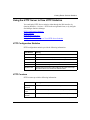
Using the HTTP Server to View HTTP Statistics
You can display HTTP Server statistics either through the Web interface, by
choosing Statistics > Services > HTTP in the navigational frame, or by using the
Site Manager Statistics Manager.
HTTP Configuration Statistics
HTTP Counters
HTTP Request Statistics
HTTP Response Statistics
Using the Statistics Manager to View HTTP Server Statistics
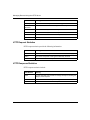
HTTP Configuration Statistics
HTTP configuration statistics provide the following information:
HTTP Statistic
Meaning
State
Whether the server is set to be enabled or disabled
Status
Whether the server is currently up, down, initializing, or not present
Port
The port number on which this server listens to requests
Authentication
The level of access authentication security in use
Domain Name
The domain name, if any, that can be used to access this router
Help Base URL
The base uniform resource locator (URL) for the HTTP Server Help
files if those files do not reside at the default location
HTTP Counters
HTTP counters provide the following information:
HTTP Statistic
Meaning
Total Requests
Received
The total number of requests that this entity received
Total Request
Errors
The total number of request errors that this entity detected (as server)
Total Request
Discards
The total number of requests that this entity discarded (as server)
(continued)
308653-14.00 Rev 00
5-3
Managing Routers Using the HTTP Server
HTTP Statistic
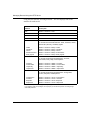
Meaning
Total Responses The total number of responses that this entity generated or received
Total In
Unknowns
The total number of unknown messages that this entity received
Total Rx Octets
The total number of bytes that this entity received
Total Tx Octets
The total number of bytes that this entity transmitted
Total Time Outs
The total number of timeouts for this entity
Start Time
The date and time that the HTTP services were enabled
HTTP Request Statistics
HTTP request statistics provide the following information:
HTTP Statistic
Meaning
Method
The HTTP standard request method to which these statistics apply
Total In
The number of requests of this type that this entity received
In Last Time
The date and time the last request was received
HTTP Response Statistics
HTTP response statistics include:
5-4
HTTP Statistic
Meaning
Status
An HTTP standard code and status message description indicating the
category of the response
Total Out
The number of times this response was generated
Out Last Time
The date and time the most recent response was sent
308653-14.00 Rev 00
Viewing Router Services Statistics
Using the Statistics Manager to View HTTP Server Statistics
To use the Site Manager Statistics Manager tool to view statistical information for
the HTTP Server, select the router that you want to monitor. Choose Statistics on
the tool bar or, from the Site Manager menu, choose Tools > Statistics Manager.
The Statistics Manager window opens, showing the device IP address and, for
each circuit on that device, showing the slot, connector, type, and protocols.
Selecting the Windows to Display
Starting the Statistics Launch Facility
Viewing HTTP Statistics
Selecting the Windows to Display
Use the Screen Manager tool to select the windows to display. In the Statistics
Manager window, choose Tools > Screen Manager. Add the HTTP windows to the
list of those to display, then exit the Screen Manager.
Starting the Statistics Launch Facility
In the Statistics Manager window, choose Tools > Launch Facility to display the
Statistics Launch Facility window, which lets you choose the type of statistical
information that you want to view for this device.
Select the line that indicates the type of information you want to display, then
click on Launch. To return to this window, choose File > Exit in the resulting
window.
308653-14.00 Rev 00
5-5
Managing Routers Using the HTTP Server
Viewing HTTP Statistics
Each statistical window shows the window name (in the format name.dat), window
description, SNMP agent IP address, and number of elements in the display.
To see these
statistics
Choose this option
What the window shows for each element
HTTP requests
httpreq.dat
HTTP request statistics:
• Methods
• Total requests (Total In) for each method
HTTP responses httpresp.dat
HTTP server
configuration
HTTP summary
statistics
5-6
HTTP response statistics:
• Status (description)
• Number of times the server responds for
each status type (TotalOut)
httpsrv.dat
HTTP server configuration statistics:
• State (enabled or disabled)
• Operational status
• Port number
httpsrv2.dat
HTTP server configuration statistics:
• Access authorization level
• Domain name
httpsum.dat
HTTP summary statistics (overview of the
router’s current state):
• Total requests received
• Total request errors
• Total discarded requests
• Total responses
• Total unknown inputs
• Total bytes received
• Total bytes sent
• Total timeouts
• Start time
308653-14.00 Rev 00
Chapter 6
Viewing Router Port Statistics
Choosing Statistics > Ports displays the following folders in the navigational
frame:
•
•
•
•
•
•
Summary
Ethernet
Serial
FDDI
HSSI
Token Ring
Choosing Statistics > Ports > Summary opens a window that lists the port traffic
(number of packets transmitted and received) for all configured interfaces,
regardless of media type. For each interface, the Summary window shows the
interface description, administrative state, operational state, and type. It also
shows the number of octets, errors, and discards received and transmitted.
To get statistical information about any port type, choose the appropriate link.
Each port-type folder contains links to summary statistics, traffic statistics,
receive error statistics, and transmit error statistics. All but Ethernet also display
system error statistics. The following sections summarize these displays.
Changing the Administrative Status of a Port
Viewing Traffic Statistics for All Ports
Viewing Ethernet Port Statistics
Viewing Serial Port Statistics
Viewing FDDI Port Statistics
Viewing HSSI Port Statistics
Viewing Token Ring Port Statistics
308653-14.00 Rev 00
6-1
Managing Routers Using the HTTP Server
Changing the Administrative Status of a Port
If you have operator or manager access privileges, you can enable or disable (that
is, change the administrative setting of) a port. To do this, click on the radio
buttons in the Enable/Disable column of the table in the summary statistics
window for any port type. The HTTP Server requires a confirmation before
allowing you to disable a connection.
If you attempt to access information requiring a higher level of access privileges
than your current login allows (or, if you attempt to use the manager login with a
null password), the HTTP Server prompts you for the appropriate login and
password. If you do not provide the appropriate login and password, an error
message appears, and you cannot perform that operation.
Caution: If you disable the IP interface through which your Web browser is
communicating with a router, you will no longer be able to monitor that
router’s operation with the HTTP Server.
The State column shows the operational state of the port (up or down). If the port
is enabled, but the State column shows that the port is down, there is a problem
with the port.
Viewing Traffic Statistics for All Ports
To view traffic statistics for all ports, regardless of media types, choose
Statistics > Ports > Summary. You cannot change the administrative state of a port
from the Port Traffic summary statistics window.
6-2
308653-14.00 Rev 00
Viewing Router Port Statistics
Viewing Ethernet Port Statistics
The following table lists the Ethernet port statistics and the paths to them.
To see these
statistics
Use this path
Summary
Statistics > Ports > Ethernet > Summary
Traffic
Statistics > Ports > Ethernet > Traffic
Rx Errors
Statistics > Ports > Ethernet > Rx Errors
Tx Errors
Statistics > Ports > Ethernet > Tx Errors
Viewing Serial Port Statistics
The following table lists the serial port statistics and the paths to them.
To see these
statistics
Use this path
Summary
Statistics > Ports > Serial > Summary
Traffic
Statistics > Ports > Serial > Traffic
Rx Errors
Statistics > Ports > Serial > Rx Errors
Tx Errors
Statistics > Ports > Serial > Tx Errors
Sys Errors
Statistics > Ports > Serial > Sys Errors
Viewing FDDI Port Statistics
The following table lists the FDDI port statistics and the paths to them.
To see these
statistics
Use this path
Summary
Statistics > Ports > FDDI > Summary
Traffic
Statistics > Ports > FDDI > Traffic
Rx Errors
Statistics > Ports > FDDI > Rx Errors
Tx Errors
Statistics > Ports > FDDI > Tx Errors
Sys Errors
Statistics > Ports > FDDI > Sys Errors
308653-14.00 Rev 00
6-3
Managing Routers Using the HTTP Server
Viewing HSSI Port Statistics
The following table lists the HSSI port statistics and the paths to them.
To see these
statistics
Use this path
Summary
Statistics > Ports > HSSI > Summary
Traffic
Statistics > Ports > HSSI > Traffic
Rx Errors
Statistics > Ports > HSSI > Rx Errors
Tx Errors
Statistics > Ports > HSSI > Tx Errors
Sys Errors
Statistics > Ports > HSSI > Sys Errors
Viewing Token Ring Port Statistics
The following table lists the token ring port statistics and the paths to them.
6-4
To see these
statistics
Use this path
Summary
Statistics > Ports > Token Ring > Summary
Traffic
Statistics > Ports > Token Ring > Traffic
Rx Errors
Statistics > Ports > Token Ring > Rx Errors
Tx Errors
Statistics > Ports > Token Ring > Tx Errors
Sys Errors
Statistics > Ports > Token Ring > Sys Errors
308653-14.00 Rev 00
Chapter 7
Viewing Router Protocol Statistics
Choosing Statistics > Protocols displays the following folders in the navigational
frame:
•
•
•
IP
IPX
AppleTalk
To get statistical information about any protocol type, choose the appropriate link.
Each protocol folder contains links to summary statistics, traffic statistics (number
of packets transmitted and received), and interface statistics, as well as to other
statistics specific to that protocol. The following sections show and briefly
describe these displays.
Changing the Administrative Status of an Interface
Viewing IP Statistics
Viewing IPX Statistics
Viewing AppleTalk Statistics
Changing the Administrative Status of an Interface
A person who has manager or operator access privileges can enable or disable
(that is, change the administrative setting of) the interface.
1.
Choose Statistics > Protocols and choose a specific protocol from the list.
2.
Open the folder for the chosen protocol by double-clicking its icon.
3.
Display the interface statistics by double-clicking the Interfaces icon.
4.
Click on the Enable or Disable radio button in the first column of the
table in the interface statistics window.
308653-14.00 Rev 00
7-1
Managing Routers Using the HTTP Server
5.
Click on Submit to submit the change or on Reset to cancel the operation.
A secondary window opens asking you to confirm the submit operation.
6.
Click on OK to confirm to complete the operation or on Cancel to
terminate the operation.
Caution: If you disable the IP interface through which your Web browser is
communicating with a router, you will no longer be able to monitor that
router’s operation with the HTTP Server.
The State column shows the operational state of the interface (up or down). If the
interface is enabled, but the State column shows that the interface is down, there is
a problem with the interface.
Viewing IP Statistics
The following table lists the available IP statistics and the paths to them.
7-2
To see these
statistics
Use this path
Global
Statistics > Protocols > IP > Global
Traffic
Statistics > Protocols > IP > Traffic
Interfaces
Statistics > Protocols > IP > Interfaces
Routes
Statistics > Protocols > IP > Routes
ARP Cache
Statistics > Protocols > IP > ARP Cache
RIP
Statistics > Protocols > IP > RIP
ICMP
Statistics > Protocols > IP > ICMP
This reveals the following subordinate links: Server and Client,
Received, and Transmitted.
•
•
•
Statistics > Protocols > IP > ICMP > Server
Statistics > Protocols > IP > ICMP > Client
Statistics > Protocols > IP > ICMP > Received
Statistics > Protocols > IP > ICMP > Transmitted
Counters
Received
Transmitted
308653-14.00 Rev 00
Viewing Router Protocol Statistics
Viewing IPX Statistics
The following table lists the available IPX statistics and the paths to them.
To see these
statistics
Use this path
Global
Statistics > Protocols > IPX > Global
Traffic
Statistics > Protocols > IPX > Traffic
Interfaces
Statistics > Protocols > IPX > Interfaces
Forwarding
Statistics > Protocols > IPX > Forwarding
Hosts
Statistics > Protocols > IPX > Hosts
Routes
Statistics > Protocols > IPX > Routes
Services
Statistics > Protocols > IPX > Services
RIP
Statistics > Protocols > IPX > RIP
SAP
Statistics > Protocols > IPX > SAP
Viewing AppleTalk Statistics
The following table lists the available AppleTalk statistics and the paths to them.
To see these
statistics
Use this path
Global
Statistics > Protocols > AppleTalk > Global
Traffic
Statistics > Protocols > AppleTalk > Traffic
Interfaces
Statistics > Protocols > AppleTalk > Interfaces
Routes
Statistics > Protocols > AppleTalk > Routes
ARP Cache
Statistics > Protocols > AppleTalk > ARP Cache
Zones
Statistics > Protocols > AppleTalk > Zones
308653-14.00 Rev 00
7-3
Chapter 8
Support and Administration
In addition to the function-specific Help available for windows that offer
interactive features, you can get other types of online Help from the Support
folder, as the following table shows.
For this information
Choose Support, then click on
HTTP Server window description
Help icon
Release notes
Release Notes icon
Nortel Networks documentation
Manuals icon
Nortel Networks technical support
Support icon
After opening one of these links, choose File > Close to return to the HTTP Server
page on the Web browser. Choosing File > Exit shuts down the browser. The Back
button may not be available on linked pages.
What Administration Functions Do
The administration functions include:
•
“Using Date and Time Functions”
•
“Using the Reset and Boot Functions”
•
“File Manager Functions”
-- “Files Function”
-- “Volumes Function”
The administration functions let you monitor (and, with the appropriate access
privileges, change) the administrative status of the router.
308653-14.00 Rev 00
8-1
Managing Routers Using the HTTP Server
•
With user access privileges, you can view the system date, time, and time
zone information and information about the files on each volume.
•
With operator access privileges, you can also change the date and time, reset a
slot, and reboot the router, using an image that is already loaded on a volume.
•
With manager access privileges, you can also change the router configuration,
including loading, copying, or deleting files on the router and formatting and
compacting volumes.
If you attempt a privileged operation without having the appropriate access
privileges, the HTTP Server displays an “Authorization Failed” message and asks
whether you want to retry the operation. It then lets you enter a login name and
password with the appropriate privilege level.
Using Date and Time Functions
Choosing Administration > Date opens the Date & Time window. With user
privileges, you can view the router’s current date and time settings and get Help
on the window’s contents. A user with operator or manager access privileges can
set the date, time, and time zone. The time zone field is an offset from Greenwich
Mean Time (GMT), also known as Universal Time (UT).
Note: When setting the date, you must specify all four digits for the year; for
example, 1999.
To set the date, time, and time zone, enter the appropriate data in the following
fields:
8-2
•
Date -- The system date that you want to set, in the format mm/dd/yyyy; for
example, 03/31/1999. The default value is the current date.
•
Time -- The system time that you want to set, in the format hh:mm:ss; for
example, 09:45:00. The default value is the current time of day for the
specified time zone.
•
Time Zone -- The system time zone that you want to set, in the format,
<+->hh:mm.
308653-14.00 Rev 00
Support and Administration
The time zone is displayed as the offset in hours and minutes from Greenwich
Mean Time (GMT). For example, the Eastern Standard Time Zone is 5 hours
behind GMT and is represented as GMT-5. For Eastern Standard Time (EST),
enter -5:00:00. No confirmation is required for these changes.
Using the Reset and Boot Functions
Selecting Administration > Reset & Boot opens a window showing the slots on
the router and the contents of the various volumes on the router. With user access
privileges, you can view this information and also view the Help information. You
must have operator or manager access privileges to perform reset and boot
functions.
Resetting a Slot
The slot reset function reboots the image on the selected slot. This function
occupies the upper part of the Reset & Boot window. To reset a slot:
1.
Select a slot.
2.
Click on Reset Slot.
A secondary window opens displaying your choice and asking you to confirm
it.
3.
Click on Reset to reset the specified slot. Click on Cancel to terminate the
operation without resetting the slot.
Booting the Router
The boot function reboots the router with the selected image and configuration
files. To reboot the router:
1.
Select the volume number and file name for both the image and
configuration files.
You can limit the display of file names by selecting a filter in the Filter field
below the File field.
2.
Click on Reboot.
A secondary window opens displaying your choices and asking you to
confirm them.
308653-14.00 Rev 00
8-3
Managing Routers Using the HTTP Server
3.
Click on Boot to reboot the router as specified. Click on Cancel to
terminate the operation without rebooting.
The following table shows the fields that you can select for the Boot function.
Field
Specifies
Example
Volume
The volume where the configuration and image
files reside
4:
File
The name of the file or files that match the filter
criteria on the specified volume
bn.exe
Filter
The filter to apply in selecting files on the
specified volume to display in the file window
*.exe
File Manager Functions
The File Manager functions let a person with user or operator access privileges
view the contents of the volumes and files in the router’s flash memory. If you
have manager access privileges, you can also manage the router file system by
performing operations such as copying, deleting, transferring files to and from the
flash, and compacting files on a selected volume.
Files Function
Choosing Administration > File Manager > Files opens the Files window. Use this
window to get information about and perform some management functions on the
files on a specified volume. When you select a volume from the list in the upper
part of the window, the HTTP Server displays information about the files on that
volume in the lower part of the window, including:
•
Total size of the volume
•
Available free space
•
Contiguous free space
To increase the contiguous free space on the volume, click on Compact. This
collects all the space from files that have been deleted and forms a single
contiguous block of usable free space for new files. If the contiguous free space
equals the available free space, no compacting is necessary.
8-4
308653-14.00 Rev 00
Support and Administration
For each file on the specified volume, the display also lists the file name, size,
creation date, and creation time. You can select each listed file.
To manipulate the file using the buttons on the right side of the frame, you must
have manager access privileges. First select the file by choosing its underlined
link or on the check box that precedes the file name.
The following table lists the file functions a person with manager access
privileges can perform. In each instance, you can transfer or delete only one file at
a time.
Button
Function
Copy
Copies the contents of the source file to the destination file. Displays a Copy
dialog box in which you choose a destination volume and name the
destination file. You must confirm this operation.
Delete
Permanently removes a file from the volume. Once a file is removed, it
cannot be recovered. You must confirm this operation.
Put
Transfers a file from the host to the router. Displays a File Put dialog box in
which you can:
• Choose a destination volume.
• Specify or locate (browse to) a file to load to that volume.
• Rename that file on the volume.
You must confirm this operation. A status monitor displays the progress of
the operation.
Get
Transfers a selected file from the router to the host.
Caution: Interrupting the file put process may corrupt the volume.
Volumes Function
Choosing Administration > File Manager > Volumes opens the Volumes window.
Use this window to get information about and perform management functions on
the volumes on a router.
308653-14.00 Rev 00
8-5
Managing Routers Using the HTTP Server
The following information about the volumes on the router appears in the lower
part of the display frame:
•
Volume number
•
Volume state
•
Total size of the volume
•
Available free space
•
Contiguous free space
You can select each listed volume. To choose a list item for use with the function
buttons on the right side of the frame, click on the underlined link or on the check
box that precedes it.
The following table lists the volume functions that a person with manager access
privileges can perform.
8-6
Button
Function
Create Partition
Creates a partition on the router's file system.
Delete Partition
Permanently removes a partition from the router's file system.
Compact
Increases the contiguous free space on the volume, if necessary, by
collecting all the space from files that have been deleted to form a
single contiguous block of usable free space for new files.
Format
Reinitializes the specified volume, removing all data from that volume.
308653-14.00 Rev 00
Appendix A
Site Manager Parameters
This appendix contains the Site Manager parameter descriptions for the HTTP
Server. You can display the same information using Site Manager or the BCC
online Help.
For each parameter, this appendix provides the following information:
•
Parameter name
•
Configuration Manager menu path
•
Default setting
•
Valid parameter options
•
Parameter function
•
Instructions for setting the parameter
•
Management information base (MIB) object ID
The Technician Interface allows you to modify parameters by issuing set and
commit commands with the MIB object ID. This process is equivalent to
modifying parameters using Site Manager. For more information about using the
Technician Interface to access the MIB, see Using Technician Interface Software.
Caution: The Technician Interface does not verify the validity of your
parameter values. Entering an invalid value can corrupt your configuration.
308653-14.00 Rev 00
A-1
Managing Routers Using the HTTP Server
Accessing HTTP Site Manager Parameters
The Edit HTTP Global Parameters window contains the parameters that you can
configure for the HTTP Server. To access the Edit HTTP Global Parameters
window, complete the following tasks:
Site Manager Procedure
You do this
System responds
1. In the Configuration Manager window,
choose Protocols.
The Protocols menu opens.
2. Choose Global Protocols.
The Global Protocols menu opens.
3. Choose HTTP.
The HTTP menu opens.
4. Choose Global.
The Edit HTTP Global Parameters
window opens.
The parameter descriptions follow.
Parameter: Enable/Disable
Path: Configuration Manager > Protocols > Global Protocols > HTTP > Global
Default: When you enable the HTTP Server, this parameter is automatically set to
Enabled.
Options: Enabled | Disabled
Function: Enables or disables the HTTP Server.
Instructions: To prohibit the use of the HTTP Server on this interface, set this parameter
to Disabled.
MIB Object ID: 1.3.6.1.4.1.18.3.5.3.22.1.1.2
A-2
308653-14.00 Rev 00
Site Manager Parameters
Parameter: Port
Path:
Default:
Options:
Function:
Instructions:
Configuration Manager > Protocols > Global Protocols > HTTP > Global
80
0 to 4096
Specifies the port number on which this server listens to requests.
Accept the default value, 80, or specify a value from 0 to 4096. This must be a
unique TCP port number.
MIB Object ID: 1.3.6.1.4.1.18.3.5.3.22.1.1.4
Parameter: Authentication
Path:
Default:
Options:
Function:
Configuration Manager > Protocols > Global Protocols > HTTP > Global
Basic
Basic | Digest
Specifies the type of authentication to use on this interface: basic or digest.
Basic authentication verifies the user’s identity using the user name and
password passed over the network as clear text. Digest authentication uses an
encrypted password. If your browser does not support digest authentication, you
must set authentication to basic; otherwise, you cannot access the device.
Instructions: Accept the default value Basic, or specify Digest.
MIB Object ID: 1.3.6.1.4.1.18.3.5.3.22.1.1.7
Parameter: Domain Name
Path:
Default:
Options:
Function:
Configuration Manager > Protocols > Global Protocols > HTTP > Global
None
Any valid string of characters constituting a domain name
Lets the server be accessible by a domain name, rather than by IP address. The
Domain Name parameter must be set to the domain name that a DNS lookup
would return for the router.
Instructions: Accept the default value, no domain name, to indicate that the server is
accessible only by an IP address; or specify a domain name to use instead of an
IP address.
MIB Object ID: 1.3.6.1.4.1.18.3.5.3.22.1.1.8
308653-14.00 Rev 00
A-3
Managing Routers Using the HTTP Server
Parameter: Help Base URL
Path:
Default:
Options:
Function:
Configuration Manager > Protocols > Global Protocols > HTTP > Global
http://support.baynetworks.com/library/tpubs/
Any valid uniform resource locator (URL) or -1
Lets you specify the base URL for the HTTP Server Help files. This base URL,
combined with a relative URL, points to more detailed information too large for
storage on the router.
A value of -1 disables the generation of Help links and prevents the display of a
“broken links” message.
Instructions: Accept the default value unless the Help files reside at a different location, in
which case you would specify that location as the base URL. To disable this
feature, specify -1.
MIB Object ID: 1.3.6.1.4.1.18.3.5.3.22.1.1.9
A-4
308653-14.00 Rev 00
Appendix B
BCC show Commands
Use the BCC show command to display statistical information about the HTTP
Server on the router. See Using the Bay Command Console (BCC) for information
about show scripts command syntax.
This chapter contains the following information about show commands:
•
•
•
308653-14.00 Rev 00
Sample show Command Output
Online Help for show Commands
Show Commands for the HTTP Server
• show http summary
• show http requests
• show http responses
B-1
Managing Routers Using the HTTP Server
Sample show Command Output
The show command displays summary information about the HTTP Server on
the router. For example, if you enter the command:
bcc> show http summary
you see this type of output:
show http summary
Mar 24, 1999 17:34:53 [GMT-5]
State
:
Status
:
Port
:
Authentication Type
:
Domain Name
:
Total Requests Received:
Total Request Errors
:
Total Request Discards :
Total Responses
:
Total In Unknowns
:
Total In Bytes
:
Total Out Bytes
:
Total Timeouts
:
Start Time
:
enabled
up
80
basic
116
4
0
238
0
24988087
328595
0
Mar 22 1999 16:57:24
To display a specific type of statistics, enter the BCC command for that statistic;
for example, if you enter the command:
bcc> show http requests
you see this type of output:
show http requests
Method Total In
------ -------get
186
head
0
trace
0
post
0
options
0
put
0
delete
0
B-2
Mar 21, 1999 11:48:04 [EDT]
In Last Time
---------------------------Mar 21 1999 14:20:57 [GMT-5]
308653-14.00 Rev 00
BCC show Commands
Online Help for show Commands
To display a list of available command options, enter show or show <option>
without additional options or with a question mark as an option. For example,
entering show or show http ? at the BCC prompt displays the list of all show or
show http keyword (subcommand) options.
Show Commands for the HTTP Server
The show http or show http ? command lists the keywords (also called
subcommands) available with this command. These keywords are:
•
summary
•
requests
•
responses
The show http <keyword> command displays information about the HTTP
Server activity on the router.
The HTTP Server show http commands have no command arguments, filter
flags, or filter arguments. The router shows information for all applicable entries.
show http summary
The show http summary command displays summary statistics about HTTP
services on the router. The output contains the following information:
Total Requests
Received
The total number of requests the router received
Total Request Errors The number of received requests that were in error
Total Request
Discards
The number of received requests that were discarded
Total Responses
The number of router responses
Total In Unknowns
The number of unrecognizable requests received
Total Rx Octets
The number of received octets
Total Tx Octets
The number of transmitted octets
Total Time Outs
The number of time outs that occurred since the last reset
Start Time
The time of the last router reset
308653-14.00 Rev 00
B-3
Managing Routers Using the HTTP Server
show http requests
The show http requests command displays HTTP request statistics for the
router. The output contains the following information:
Method
An HTTP keyword indicating a type of request
Total In
The number of requests received for each method
In Last Time
The time the most recent request was received for each method
show http responses
The show http requests command displays HTTP response statistics for the
router. The output contains the following information:
B-4
Status
A numeric status code and a brief interpretation for a response
category
Total Out
The number of responses sent for each response category
Out Last Time
The time the most recent response was sent for each response
category
308653-14.00 Rev 00
Index
A
access control filtering, 1-9
acronyms, xv
administration folder icon, 2-3
administration functions, 8-1
administrative status of a port, changing, 7-1
alert, circuit, 4-2
conventions, text, xiv
counters, HTTP, 5-3
customer support, xvi
customizing HTTP parameters, 1-10
D
AppleTalk statistics, 7-3
date and time, setting, 8-2
authentication
basic, 1-8
configured, 5-3
digest, 1-9
debug event, meaning, 4-4
Authentication parameter, A-3
B
device monitoring, 3-1
digest authentication, 1-9
DNS, 1-9
documentation, 8-1
domain name
configured, 5-3
basic access authentication, 1-8
domain name instead of IP address, 1-9
BCC show command, B-1
Domain Name parameter, 1-9, A-3
BCC, using to start the HTTP Server, 1-3
boot function, 8-3
BootP statistics, 5-2
browser requirements, 1-1
E
Edit HTTP Global Parameters window, A-2
Enable/Disable parameter, A-2
C
enabling HTTP Server, 1-1
cascading style sheets, 1-1
event
viewing, 4-2
changing HTTP parameters, 1-10
circuit alert
displaying, 4-2
compact volume, 8-4
configuration files, initial, 1-2
configuration statistics, HTTP, 5-3
Ethernet port statistics, 6-3
event log
filtering, 4-3
interpreting, 4-3
severity levels, 4-4
Events icon, 4-2
contiguous space, 8-4
308653-14.00 Rev 00
Index-1
F
fault event, meaning, 4-4
FDDI port statistics, 6-3
File Manager functions, 8-4
Files function, 8-4
filtering the event log, 4-3
flash memory card, 1-2
folder icon, 2-3
frames, 1-1
FTP statistics, 5-2
G
HTTP Server
concepts, 2-1
starting, 1-1
starting and configuring, 1-1
statistics, 5-3
HTTP server configuration statistics, 5-6
HTTP Site Manager parameter
Authentication, A-3
Domain Name, A-3
Enable/Disable, A-2
Help Base URL, A-4
HTTP state, 5-3
HTTP statistics, 5-2
viewing, 5-6
HTTP status, 5-3
getting help, 3-1
HTTP summary statistics, 5-6
Greenwich Mean Time (GMT), 8-2, 8-3
http summary, show command, B-3
H
httpreq.dat, 5-6
httpresp.dat, 5-6
hardware icon, 3-3
httpsrv.dat, 5-6
Help Base URL, 5-3
httpsum.dat, 5-6
Help Base URL parameter, A-4
help for show commands, B-3
I
Help icon, 8-1
ICMP statistics, 7-2
help, getting, 3-1
HTTP port, 5-3
icon
administration folder, 2-3
Circuit Alert, 4-2
Events, 4-2
Hardware, 3-3
help, 8-1
Info, 3-3
Manuals, 8-1
Release Notes, 8-1
Support, 8-1
support folder, 2-3
tasks, 3-3
HTTP request statistics, 5-4
in last time, HTTP statistic, 5-4
HTTP requests, 5-6
info event, meaning, 4-4
http requests, B-4
Info icon, 3-3
HTTP response statistics, 5-4
install.bat script, 1-2
HTTP responses, 5-6
IP access control filter, 1-9
HSSI port statistics, 6-4
HTTP authentication, configured, 5-3
HTTP configuration statistics, 5-3
HTTP counters, 5-3
HTTP domain name, 5-3
HTTP parameters, customizing
BCC, 1-10
Site Manager, 1-11
http responses, show command, B-4
Index-2
308653-14.00 Rev 00
IP address
replacing with domain name, 1-9
Q
IP statistics, 7-2
Quick-Start procedure, 1-2
IPX statistics, 7-3
J
Java applets, 1-1
R
reboot router, 8-3
received (rx) octets, HTTP statistic, 5-4
Release Notes icon, 8-1
M
Manuals icon, 8-1
method, HTTP statistic, 5-4
modifying HTTP parameters, 1-10
monitoring device operation, 3-1
N
request discards, HTTP statistic, 5-3
request errors, HTTP statistic, 5-3
request statistics, 5-6
requests received, HTTP statistic, 5-3
requests, show, B-4
requirements, browser, 1-1
reset slot, 8-3
response (status) code, 5-4
network address filtering, 1-9
O
online help for show commands, B-3
out last time, HTTP statistic, 5-4
P
parameters
Site Manager, A-1
response statistics, 5-6
responses
HTTP statistic, 5-4
show command, B-4
router
specifying, 3-2
router monitoring, 3-1
router protocol statistics, 7-1
router reboot, 8-3
router statistics, 5-1
Port parameter, A-3
port statistics, 6-1
Ethernet, 6-3
FDDI port, 6-3
HSSI, 6-4
serial, 6-3
traffic (all), 6-2
port status, changing, 7-1
port, HTTP, 5-3
port, troubleshooting, 6-2, 7-2
product support, xvi
protocol statistics, 7-1
publications
hard copy, xvi
308653-14.00 Rev 00
S
security, setting, 1-4
serial port statistics, 6-3
server configuration statistics, 5-6
severity levels, events, 4-4
show command, BCC, B-1
show commands
command syntax, B-2
config, B-2
online Help for, B-3
show commands, help, B-3
show http requests, B-4
Index-3
show http responses command, B-4
show http summary command, B-3
Site Manager
parameter descriptions, A-1
Statistics Manager, 5-5
using to start the HTTP Server, 1-4, 1-11
slot reset, 8-3
summary
http show command, B-3
system status, 3-2
summary statistics, 5-6
support features, 8-1
support folder icon, 2-3
Support icon, 8-1
SNMP statistics, 5-2
support, Nortel Networks, xvi
space on the volume, 8-4
system status, summary, 3-2
specifying a router to monitor, 3-2
start time, HTTP statistic, 5-4
T
starting HTTP Server, 1-1
BCC, 1-3
Site Manager, 1-4
Tasks icon, 3-3
state, HTTP, 5-3
technical publications, xvi
statistics
AppleTalk, 7-3
Ethernet port, 6-3
FDDI port, 6-3
HSSI port, 6-4
HTTP, 5-3
HTTP configuration, 5-3
HTTP request, 5-4
HTTP requests, 5-6
HTTP response, 5-4
HTTP responses, 5-6
HTTP server configuration, 5-6
HTTP summary, 5-6
ICMP, 7-2
IP, 7-2
IPX, 7-3
port, 6-1
router protocol, 7-1
serial port, 6-3
token ring portport statistics
token ring, 6-4
traffic, all ports, 6-2
viewing, 5-1
technical support, xvi, 8-1
Statistics Launch Facility, 5-5
Statistics Manager, 5-1, 5-3, 5-5
statistics, available, 5-1
status of a port, changing, 7-1
TCP statistics, 5-2
Telnet statistics, 5-2
text conventions, xiv
TFTP statistics, 5-2
time and date, setting, 8-2
time outs, HTTP statistic, 5-4
token ring port statistics, 6-4
total in unknowns, HTTP statistic, 5-4
total in, HTTP statistic, 5-4
total out, HTTP statistic, 5-4
total request discards, HTTP statistic, 5-3
total request errors, HTTP statistic, 5-3
total requests received, HTTP statistic, 5-3
total responses, HTTP statistic, 5-4
total rx octets, HTTP statistic, 5-4
total time outs, HTTP statistic, 5-4
total tx octets, HTTP statistic, 5-4
trace event, meaning, 4-4
traffic statistics for all ports, 6-2
transmitted (tx) octets, HTTP statistic, 5-4
Trouble Shooting folder, 2-3
troubleshooting a port, 6-2, 7-2
status, HTTP, 5-3
status, HTTP statistic, 5-4
Index-4
308653-14.00 Rev 00
U
Universal Time (UT), 8-2
unknowns, HTTP statistic, 5-4
URL, help base, 5-3
V
volume
compact, 8-4
space used and available, 8-4
Volumes function, 8-5
W
warning event, meaning, 4-4
308653-14.00 Rev 00
Index-5