1
Chapter 7 Custom Call Routing
83
Sub-menu
A sub-menu is any menu that callers hear after the Home node. Sub-menus can lead to other
sub-menus.
A sub-menu is a prompt that provides callers with another list of options. For example, from the
Home node a caller can press ‹to reach the Sales department and hear the sub-menu options:
To place an order press ⁄. To add your name to our mailing list, press ¤. To speak with a
Customer Service Representative press ‹. To speak with the receptionist press ‚.
Mailbox node
Create mailbox nodes to give callers a mailbox where they can leave a message.
For example:
You have reached the Ideal Office Machines Order Desk mailbox. After the tone, leave your name,
address, telephone number, and the number of the item you want to order. Thank you.
Transfer node
A Transfer node transfers callers to an extension or an external number.
Destination
The destination is where callers go after they listen to an Information node or leave a message in a
mailbox. Each Information node and Mailbox node must have a destination:
•
•
•
Previous: returns the caller to the previous menu
Home: returns the caller to the Home node
Disconnect: disconnects the call
You can assign destinations only to Information nodes and Mailbox nodes. To see how
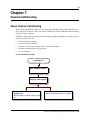
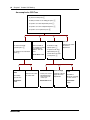
destinations are used in a CCR Tree, refer to “An example of a CCR Tree” on page 84.
Path
A Path can be a series of menus, Information nodes, Mailboxes or Transfers. A Path number is the
digit that callers press to go to the next level in a CCR Tree. To see how paths route callers through
a CCR Tree, refer to “An example of a CCR Tree” on page 84.
Park and Page node
A Park and Page node parks a call and announces it to a paging zone, overhead paging system or
both. Depending on the configuration you select, the page can be repeated until the parked call is
answered. An unanswered call returns to the CCR Tree.
Avaya Call Pilot Manager Set Up and Operation Guide