Transcript
AAS55
AudioAccess Loudspeaker Troubleshooting/Repair Tips
Most customers prefer to do simple loudspeaker repairs themselves. By following the steps below, a majority of loudspeakers can be returned to
their original factory performance with minimum effort. Choose the example that best describes the problem you are experiencing.
Problem 1: No sound or distorted sound from one loudspeaker in a pair (or set)
Connect the dead/distorting loudspeaker to a different amplifier channel (one that had a functioning loudspeaker connected to it). If it functions
normally, the problem is not loudspeaker-related. If the loudspeaker still makes no sound or sounds distorted, a wire may have become loose
or disconnected, the network (also known as a crossover) may be defective, the drivers (woofer, tweeter, etc.) may be defective or, in very rare
cases, all may be defective.
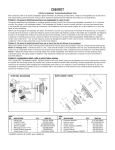
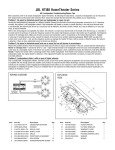
Refer to the wiring diagram and exploded view below. The network is a small circuit board found on the inside of the terminal cup, or mounted to
an inside wall of the enclosure. It sends low-frequency sounds to the woofer, high-frequency sounds to the tweeter and, if applicable, mid-frequency
sounds to the midrange driver. Make sure all wires are secure and connected. Look for components on the network that look burnt, “bulged,”
or abnormal. If everything looks normal, connect the network to the drivers from another matching loudspeaker. MAKE SURE you attach the
correct wires to each driver – mid- and low-frequency sounds can damage the tweeter! If there is still no sound or distorted sound, the network
is defective. If there is clean undistorted sound, the drivers are defective.
Problem 2: No sound or distorted sound from one or more (but not all) drivers in an enclosure
Remove the problem driver(s) from the enclosure and make sure all wires are secure and connected. If they are, proceed with the following test:
Woofer or midrange driver – Connect the driver’s + and – input terminals directly to the loudspeaker wires from your receiver/amplifier and play
some music at a reasonable volume. If the driver now sounds normal (produces a clean, undistorted sound), the network is most likely defective.
Tweeter – Replace the tweeter with a functioning tweeter from another loudspeaker. If the tweeter now functions normally (produces clean,
undistorted sound), the original tweeter is defective. If the replacement tweeter also sounds distorted or produces no sound, the network is
most likely defective.
Problem 3: Loudspeakers distort, rattle or pop at higher volumes
This is usually NOT a loudspeaker problem. Common causes are too much power (playing the loudspeakers too loud and causing them to distort),
an amplifier with not enough power (the amplifier can’t produce the required volume without distorting), excessive equalization (turning the tone
controls too far clockwise, and/or engaging the loudness/bass boost button on your receiver) or some combination of the above. If only one
loudspeaker is exhibiting the problem, and you’re confident that it’s not caused by too little power/too much power/excessive equalization, see
solutions for Problems 1 and 2.
YEL/BLK –
YEL +
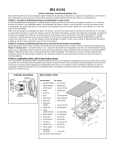
WIRING DIAGRAM
EXPLODED VIEW
1
3
HIGH-FREQUENCY
TRANSDUCER
95DM25BF-FT03-P
4
LOW-FREQUENCY
TRANSDUCERS
13PR85BQ-JW01-P
5
11
GRN +
WHT
–
GRN +
AAS55
CROSSOVER
NETWORK
013-7600-01007-P
2
6
WHT
7
–
17
8
9
10
ITEM
NO.
1
2
3
4
PART NO.
329-050-00781-0WA
352-CM04010D388
95DM25BF-FT03-P
352-BM04062D387
DESCRIPTION
GRILLE ASSEMBLY
TWEETER SCREW 4*10MM
TWEETER
DOG SCREW #8-AB x 2.25"
PHL FLT STL ZNC
5
242-050-05102-0WBE FRONT BAFFLE ASSEMBLY
6
325-ABS-00446-0BA ABS DOG EAR 33.7*17*10
7
13PR85BQ-JW01-P 5" WOOFER
8
352-FM04010D462
WOOFER SCREW T4*10
AAS55 ROUGH-IN FRAME part # AARIF55
QTY.
1
4
1
6
1
6
2
8
ITEM
NO.
9
10
11
17
PART NO.
DESCRIPTION
013-7600-01007-P
352-CM04010D388
316-PVC-05045-2TA
402-000-05314-E
403-000-05005
405-000-05074
406-000-05208
431-000-05055
336-EVA-05020-0BA
CROSSOVER NETWORK
NETWORK SCREW 4*10MM
AUDIOACCESS GRILLE LOGO
OUTER CARTON
CUTTING TEMPLATE
AUDIOACCESS WARRANTY CARD
AAS55 OWNER’S MANUAL
PACKING MATERIAL (Set)
TWEETER GASKET
QTY.
1
4
1
1
1
1
1
1
1