1
ATD-80113 Instructions
1.
Operating Instructions
•
•
•
•
2.
Operating Environment
•
•
•
•
3.
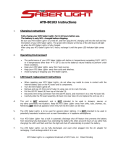
Take your ATD Saber Light® out of it’s box.
Plug the AC adapter into any 110-volt AC power source.
Turn unit on and off with the red pushbutton switch in the end of the unit.
Avoid bumping or dropping your ATD Saber Light®.
Keep your ATD Saber Light® away from water.
Keep your ATD Saber Light® away from heat sources.
Keep your ATD Saber Light® away from acids and alkalines.
Avoid bumping or dropping your ATD Saber Light®.
LED board replacement instructions
•
•
•
•
•
•
Because of the high voltage and special techniques needed to repair the ATD Saber Light®, we
recommend having a qualified technician perform the repairs for you. Should you decide to repair
this unit yourself, please read the following tips.
When repairing your ATD Saber Light®, do not allow any metal to come in contact with the the
switch or the PC board and its components.
Turn the ATD Saber Light® off, and disconnect from the power source.
Do not attempt repairs while the unit is still connected to the power source.
Repair unit in a clean and dry environment.
Use care when operating soldering irons, as they are hot.
4.
This unit is NOT waterproof, and is NOT intended to be used in showers, saunas, or
any other potentially wet locations. Keep the ATD Saber Light® away from sinks, tubs, showers, etc.
Retrieving ANY electrical appliance when they fall into the water can be fatal.
5.
The ATD Saber Light® is to be used for general indoor lighting. It is NOT intended to be used in
potentially hazardous locations such as near flammables or in explosive atmospheres.
ATD Saber Light® is a registered trademark of ATD Tools, Inc. Patent Pending