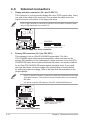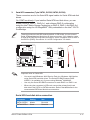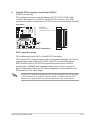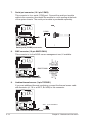
1
TS300-E3/PA4 & PS4
Intel® Pentium® 4/Pentium® D LGA775
Pedestal/5U Rackmount Server
1066/800 MHz Front Side Bus
E2369
Revised Edition V2
January 2006
Copyright © 2006 ASUSTeK COMPUTER INC. All Rights Reserved.
No part of this manual, including the products and software described in it, may be reproduced,
transmitted, transcribed, stored in a retrieval system, or translated into any language in any form or by any
means, except documentation kept by the purchaser for backup purposes, without the express written
permission of ASUSTeK COMPUTER INC. (“ASUS”).
ASUS provides this manual “as is” without warranty of any kind, either express or implied, including but not
limited to the implied warranties or conditions of merchantability or fitness for a particular purpose. In no
event shall ASUS, its directors, officers, employees, or agents be liable for any indirect, special, incidental,
or consequential damages (including damages for loss of profits, loss of business, loss of use or data,
interruption of business and the like), even if ASUS has been advised of the possibility of such damages
arising from any defect or error in this manual or product.
Specifications and information contained in this manual ae furnished for informational use only, and are
subject to change at any time without notice, and should not be construed as a commitment by ASUS.
ASUS assumes no responsibility or liability for any errors or inaccuracies that may appear in this manual,
including the products and software described in it.
Product warranty or service will not be extended if: (1) the product is repaired, modified or altered, unless
such repair, modification of alteration is authorized in writing by ASUS; or (2) the serial number of the
product is defaced or missing.
Products and corporate names appearing in this manual may or may not be registered trademarks or
copyrights of their respective companies, and are used only for identification or explanation and to the
ownersʼ benefit, without intent to infringe.
ii
Contents
Notices ........................................................................................................ vii
Safety information .................................................................................... viii
About this guide ......................................................................................... ix
Chapter 1: Product introduction
1.1
System package contents ........................................................... 1-2
1.2
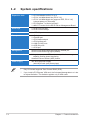
System specifications ................................................................. 1-3
1.2
System specifications ................................................................. 1-4
1.3
Front panel features..................................................................... 1-5
1.4
Rear panel features ...................................................................... 1-6
1.5
Internal features ........................................................................... 1-7
1.6
LED information ........................................................................... 1-9
Chapter 2: Hardware setup
2.1
2.2
2.3
2.4
2.5
2.6
2.7
2.8
Chassis cover ............................................................................... 2-2
2.1.1
Removing the side cover ................................................ 2-2
2.1.2
Reinstalling the side cover .............................................. 2-3
Motherboard overview ................................................................. 2-4
Central Processing Unit (CPU) ................................................... 2-5
2.3.1
Installing the CPU ........................................................... 2-5
2.3.2
Installing the CPU heatsink and airduct assembly .......... 2-8
System memory ......................................................................... 2-10
2.4.1
Overview ....................................................................... 2-10
2.4.2
Memory configurations.................................................. 2-10
2.4.3
Installing a DIMM ...........................................................2-11
2.4.4
Removing a DIMM .........................................................2-11
Front panel assembly ................................................................ 2-12
2.5.1
Removing the front panel assembly.............................. 2-12
2.5.2
Reinstalling the front panel assembly ........................... 2-14
5.25-inch drives .......................................................................... 2-15
Hard disk drives ......................................................................... 2-18
2.7.1
Installing a hot-swap SATA/SCSI HDD ......................... 2-18
2.7.2
Installing an HDD dummy cover ................................... 2-20
Expansion cards ........................................................................ 2-21
2.8.1
Installing an expansion card ......................................... 2-21
2.8.2
Removing an expansion card ....................................... 2-22
iii
Contents
2.9
2.10
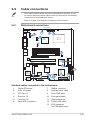
Cable connections ..................................................................... 2-23
2.9.1
Motherboard connections ............................................. 2-23
2.9.2
SATA backplane connections ....................................... 2-24
2.9.3
SCSI backplane connections ........................................ 2-27
Removable components............................................................ 2-30
2.10.1
Chassis fan ................................................................... 2-30
2.10.2
HDD blower ................................................................... 2-32
2.10.3
SATA/SCSI backplane .................................................. 2-35
2.10.4
Floppy disk drive ........................................................... 2-37
2.10.5
Front I/O board.............................................................. 2-39
2.10.6
Chassis footpads and roller wheels .............................. 2-41
2.10.7
Power supply unit.......................................................... 2-43
Chapter 3:
Installation option
Chapter 4:
Motherboard info
Preparing the system for rack mounting................................................ 3-2
4.1
Motherboard layouts.................................................................... 4-2
4.2
Jumpers ........................................................................................ 4-5
4.3
Internal connectors .................................................................... 4-10
Chapter 5:
5.1
5.2
iv
BIOS information
Managing and updating your BIOS ............................................ 5-2
5.1.1
Creating a bootable floppy disk....................................... 5-2
5.1.2
AFUDOS utility ................................................................ 5-3
5.1.3
ASUS CrashFree BIOS 2 utility ...................................... 5-6
5.1.4
ASUS Update utility ........................................................ 5-8
BIOS setup program .................................................................. 5-11
5.2.1
BIOS menu screen........................................................ 5-12
5.2.2
Menu bar ....................................................................... 5-12
5.2.3
Navigation keys............................................................. 5-12
5.2.4
Menu items ................................................................... 5-13
5.2.5
Sub-menu items ............................................................ 5-13
5.2.6
Configuration fields ....................................................... 5-13
5.2.7
Pop-up window ............................................................. 5-13
5.2.8
Scroll bar ....................................................................... 5-13
5.2.9
General help ................................................................. 5-13
Contents
5.3
5.4
5.5
5.6
5.7
5.8
Main menu .................................................................................. 5-14
5.3.1
System Time ................................................................ 5-14
5.3.2
System Date ............................................................... 5-14
5.3.3
Legacy Diskette A ........................................................ 5-14
5.3.4
IDE Configuration.......................................................... 5-15
5.3.5
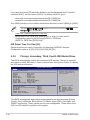
Primary, Secondary, Third, Fourth IDE Master/Slave ... 5-16
5.3.6
System Information ....................................................... 5-18
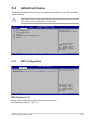
Advanced menu ......................................................................... 5-19
5.4.1
MPS Configuration ........................................................ 5-19
5.4.2
CPU Configuration ........................................................ 5-20
5.4.3
Chipset Configuration ................................................... 5-22
5.4.4
Onboard Devices Configuration .................................... 5-26
5.4.5
PCI PnP ........................................................................ 5-27
Power Configuration .................................................................. 5-28
5.5.1
ACPI APIC support ....................................................... 5-28
5.5.2
APM configuration......................................................... 5-28
5.5.3
Hardware Monitor ......................................................... 5-31
Server menu ............................................................................... 5-33
Remote Access Configuration ...................................................... 5-33
Boot menu .................................................................................. 5-35
5.7.1
Boot Device Priority ...................................................... 5-35
5.7.2
Boot Settings Configuration .......................................... 5-36
5.7.3
Security ......................................................................... 5-37
Exit menu .................................................................................... 5-40
Chapter 6:
6.1
6.2
RAID Configuration
Setting up RAID ............................................................................ 6-2
6.1.1
RAID definitions .............................................................. 6-2
6.1.2
Installing hard disk drives................................................ 6-3
6.1.3
Setting the RAID item in BIOS ........................................ 6-3
6.1.4
RAID configuration utilities .............................................. 6-4
LSI Logic Embedded SATA RAID Setup Utility.......................... 6-5
6.2.1
Creating a RAID 0 or RAID 1 set .................................... 6-6
6.2.2
Creating a RAID 10 set ..................................................6-11
6.2.3
Adding or viewing a RAID configuration ....................... 6-15
6.2.4
Initializing the logical drives .......................................... 6-18
6.2.5
Rebuilding failed drives ................................................. 6-23
6.2.6
Checking the drives for data consistency ..................... 6-25
v
Contents
6.3
6.4
6.2.7
Deleting a RAID configuration....................................... 6-28
6.2.8
Selecting the boot drive from a RAID set ...................... 6-29
6.2.9
Enabling the WriteCache .............................................. 6-30
Global Array Manager ................................................................ 6-30
Adaptec SCSISelect(TM) Utility! (P5MT-S model only) ........... 6-31
6.4.1
Configuring the SCSI controller .................................... 6-32
6.4.2
Enabling the HostRAID controller ................................. 6-33
6.4.3
Creating a RAID 0 set (Stripe) ...................................... 6-34
6.4.4
Creating a RAID 1 set (Mirror) ...................................... 6-37
6.4.5
Creating a RAID 10 set (Stripe+Mirror) ......................... 6-41
6.4.6
Adding a spare drive to a RAID 10 set.......................... 6-45
6.4.7
Deleting a RAID 10 set spare drive............................... 6-46
6.4.8
Deleting a RAID set ...................................................... 6-48
6.4.9
Rebuilding a RAID set................................................... 6-49
6.4.10 Verifying a RAID set hard disk drive ............................. 6-50
6.4.11 Making a RAID set bootable ......................................... 6-51
Chapter 7:
7.1
7.2
7.3
7.4
RAID driver installation ............................................................... 7-2
7.1.1
Creating a RAID driver disk ............................................ 7-2
7.1.2
Installing the RAID controller driver ................................ 7-3
LAN driver installation ............................................................... 7-12
7.2.1
Windows® 2000/2003 Server ........................................ 7-12
7.2.2
Red Hat® Enterprise ver. 3.0 ......................................... 7-13
VGA driver installation .............................................................. 7-14
7.3.1
Windows® 2000 Server ................................................. 7-14
7.3.2
Windows® 2003 Server ................................................. 7-15
7.3.3
Red Hat® Enterprise ver. 3.0 ......................................... 7-15
Management applications and utilities installation ................ 7-16
7.4.1
Running the support CD ............................................... 7-16
7.4.2
Drivers menu................................................................. 7-16
7.4.3
Management Software menu ........................................ 7-17
7.4.4
Utilities menu ................................................................ 7-17
7.4.5
Contact information ....................................................... 7-17
Appendix:
A.1
A.2
vi
Driver installation
Reference information
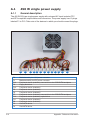
450 W single power supply .........................................................A-2
A.1.1
General description .........................................................A-2
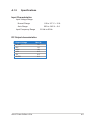
A.1.2
Specifications ..................................................................A-3
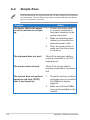
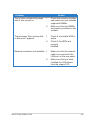
Simple fixes ..................................................................................A-4
Notices
Federal Communications Commission Statement
This device complies with Part 15 of the FCC Rules. Operation is subject to the
following two conditions:
•
This device may not cause harmful interference, and
•
This device must accept any interference received including interference that
may cause undesired operation.
This equipment has been tested and found to comply with the limits for a
Class B digital device, pursuant to Part 15 of the FCC Rules. These limits are
designed to provide reasonable protection against harmful interference in a
residential installation. This equipment generates, uses and can radiate radio
frequency energy and, if not installed and used in accordance with manufacturerʼs
instructions, may cause harmful interference to radio communications. However,
there is no guarantee that interference will not occur in a particular installation. If
this equipment does cause harmful interference to radio or television reception,
which can be determined by turning the equipment off and on, the user is
encouraged to try to correct the interference by one or more of the following
measures:
•
Reorient or relocate the receiving antenna.
•
Increase the separation between the equipment and receiver.
•
Connect the equipment to an outlet on a circuit different from that to which the
receiver is connected.
•
Consult the dealer or an experienced radio/TV technician for help.
WARNING! The use of shielded cables for connection of the monitor to the
graphics card is required to assure compliance with FCC regulations. Changes
or modifications to this unit not expressly approved by the party responsible for
compliance could void the userʼs authority to operate this equipment.
Canadian Department of Communications Statement
This digital apparatus does not exceed the Class B limits for radio noise emissions
from digital apparatus set out in the Radio Interference Regulations of the
Canadian Department of Communications.
This class B digital apparatus complies with Canadian ICES-003.
vii
Safety information
Electrical Safety
•
Before installing or removing signal cables, ensure that the power cables for
the system unit and all attached devices are unplugged.
•
To prevent electrical shock hazard, disconnect the power cable from the
electrical outlet before relocating the system.
•
When adding or removing any additional devices to or from the system, ensure
that the power cables for the devices are unplugged before the signal cables
are connected. If possible, disconnect all power cables from the existing
system before you add a device.
•
If the power supply is broken, do not try to fix it by yourself. Contact a qualified
service technician or your dealer.
Operation Safety
•
Any mechanical operation on this server must be conducted by certified or
experienced engineers.
•
Before operating the server, carefully read all the manuals included with the
server package.
•
Before using the server, make sure all cables are correctly connected and the
power cables are not damaged. If any damage is detected, contact your dealer
as soon as possible.
•
To avoid short circuits, keep paper clips, screws, and staples away from
connectors, slots, sockets and circuitry.
•
Avoid dust, humidity, and temperature extremes. Place the server on a stable
surface.
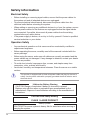
This product is equipped with a three-wire power cable and plug for the userʼs
safety. Use the power cable with a properly grounded electrical outlet to avoid
electrical shock.
Lithium-Ion Battery Warning
CAUTION! Danger of explosion if battery is incorrectly replaced.
Replace only with the same or equivalent type recommended by the
manufacturer. Dispose of used batteries according to the manufacturerʼs
instructions.
CD-ROM Drive Safety Warning
CLASS 1 LASER PRODUCT
Heavy System
CAUTION! This server system is heavy. Ask for assistance when moving or
carrying the system.
viii
About this guide
Audience
This user guide is intended for system integrators and experienced users with at
least basic knowledge of configuring a server.
Contents
This guide contains the following parts:
1.
Chapter 1: Product Introduction
This chapter describes the general features of the server, including sections
on front panel and rear panel specifications.
2.
Chapter 2: Hardware setup
This chapter lists the hardware setup procedures that you have to perform
when installing or removing system components.
3.
Chapter 3: Installation options
This chapter describes how to install optional components into the barebone
server.
4.
Chapter 4: Motherboard information
This chapter gives information about the motherboard that comes with the
server. This chapter includes the motherboard layout, jumper settings, and
connector locations.
5.
Chapter 5: BIOS information
This chapter tells how to change system settings through the BIOS Setup
menus and describes the BIOS parameters.
6.
Chapter 6: RAID configuration
This chapter provides information on how toconfigure your hard disk drives
as RAID sets.
7.
Chapter 7: Driver installation
This chapter provides information on how to create a RAID set and how to
install the drivers for system components. This chapter also describes the
software applications that the barebone server supports.
8.
Appendix: Reference information
This section provides information about the power supply unit and a
troubleshooting guide for solving common problems when using the
barebone server.
ix
Conventions
To make sure that you perform certain tasks properly, take note of the following
symbols used throughout this manual.
WARNING: Information to prevent injury to yourself when trying to
complete a task.
CAUTION: Information to prevent damage to the components when trying
to complete a task.
IMPORTANT: Instructions that you MUST follow to complete a task.
NOTE: Tips and information to aid in completing a task.
Reference
Visit the ASUS websites worldwide that provide updated information for all ASUS
hardware and software products. Refer to the ASUS contact information for details.
x
This chapter describes the general
features of the barebone server,
including sections on the front panel
and rear panel specifications.
ASUS TS300-E3/PA4 & PS4
Product introduction
Chapter 1
1-
1.1
System package contents
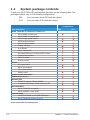
Check your ASUS TS300-E3 package with the items on the following table. The
package contents vary for the following configurations:
•
PA4
(four hot-swap Serial ATA hard disk drives)
•
PS4
(four hot-swap SCSI hard disk drives)
Configuration
Item description
ASUS TS300-E3 5U rackmount chassis with:
• ASUS P5MT motherboard
• ASUS P5MT-S motherboard
• 450 W single power supply
• SATA backplane board
• SCSI backplane board
• Floppy disk drive
• 9 cm Blower
• 12 cm Chassis fan
• Hot-swap HDD trays (including HDD screws)
• Chassis roller wheels
• Front I/O board
• Dummy covers
Cables
• AC power cable
• SATA signal cables
• SCSI signal cables
• SMBus cable
System screws and cables
System keys ( 2 pcs.)
Bundled CDs
• TS300-E3 support CD with ASWM*
• Computer Associates® eTrust™ anti-virus CD
Documentation
• ASUS TS300-E3 user guide
• ASUS ASWM 2.0 user guide
Optional items
• 52x IDE CD-ROM or 16X DVD-ROM drive
• ASUS TS300-E3 rackmount rail kit
PA4
PS4
4
4
4
4
*ASUS System Web-based Management
1-2
Chapter 1: Product introduction
1.2
System specifications
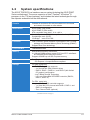
The ASUS TS300-E3 is a barebone server system featuring the ASUS P5MT
Series motherboard. The server supports an Intel® Pentium® 4/Pentium® D
processor in the 775-land package, and includes the latest technologies through
the chipsets embedded on the motherboard.
Chassis
Pedestal or rackmount 5U with removable front door bezel
and chassis foot stand or roller-wheels.
Motherboard
ASUS P5MT (PA4 model)
ASUS P5MT-S (PS4 model)
ATX compatible form factor: 12 in x 9.6 in
Chipset
Northbridge: Intel® E7230 Memory Controller Hub (MCH)
Southbridge: Intel® ICH7R
I/O Bridge: Intel® 6702 PXH
Processor
Intel® Pentium® 4/Intel® Pentium® D processor in the 775-land
package with Extended Memory 64-bit Technology (EM64T)
Supports Dual Core technology
Front Side Bus
1066/800/533 MHz
Memory
Dual-channel memory architecture
4 x 240-pin DIMM sockets support ECC/non-ECC unbuffered
667/533 MHz DDR2 memory modules
Supports 256 MB up to 8 GB of system memory
LAN
Dual Broadcom® BCM5721 Gigabit LAN controllers
- PCI Express 1.0a specifications compliant
Storage
For PA4 model only
Intel® ICH7R Southbridge supports:
- 4 x Serial ATA 3 Gb/s hard disk drives
- RAID 0, RAID 1, RAID 0+1, and RAID 5 (with limited
OS support) configuration
- Intel® Matrix Storage Technology
- LSI Logic Embedded SATA RAID controller (RAID 0,
RAID 1, RAID 10)
For PS4 model only
Adaptec AIC-7901 SCSI controller supports:
- 1 x Ultra 320 SCSI channel with RAID 0, RAID 1, and
RAID 10 configuration
- Zero-Channel RAID (optional)
(continued on the next page)
ASUS TS300-E3/PA4 & PS4
1-3
1.2
1-4
System specifications
Expansion slots
1 x PCI 33 MHz/32-bit/5V (PCI 2.3)
1 x PCI-X 100 MHz/64-bit slot (PCI-X 1.0)
1 x PCI-X 100 MHz/64-bit slot (supports ZCR, PCI-X 1.0)*
(colored green on PS4 model)
1 x PCI Express™ x16 slot (x8 Link)**
1 x Mini-PCI socket for the ASUS Server Management Board
Drive bays
1 x 3.25-inch FDD bay
3 x 5.25-inch drive bays
Front panel
2 x USB 2.0 ports
Rear panel
1 x Serial port
1 x Parallel port
1 x PS/2 keyboard port
1 x PS/2 mouse port
2 x LAN (RJ-45) ports
2 x USB 2.0 ports
1 x VGA port
Management
ASUS Server Web-based Management (ASWM) 2.0
ASUS Server Monitoring Agent (ASMA)
Hardware monitors
Voltage, temperature, CPU and memory utilization, storage
capacity, and fan speed monitoring
Automatic Server Restart (ASR) feature
Power supply
450 W single power supply
(with 24-pin and 4-pin power plugs)
*
Only PS4 model supports Zero Channel RAID (ZCR).
**
If you install a PCI Express VGA card, the link speed downgrades to x1 due
to chipset limitation. This limitation applies only to VGA cards.
Chapter 1: Product introduction
1.3
Front panel features
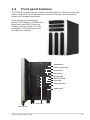
The TS300-E3 chassis displays a stylish front bezel with lock. The bezel covers the
system components on the front panel and serves as security. Open the bezel to
access the front panel components.
The drive bays, power and reset
buttons, LED indicators, CD-ROM drive,
floppy drive, and USB 2.0 ports are
located on the front panel. For future
installation of 5.25-inch devices, two
drive bays are available.
CD-ROM drive
Empty 5.25-inch bays
Power button
Reset button
Message LED
HDD access LED
Power LED
Floppy disk drive
USB 2.0 ports
Drive bays
Security lock
ASUS TS300-E3/PA4 & PS4
1-5
1.4
Rear panel features
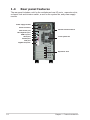
The rear panel includes a slot for the motherboard rear I/O ports, expansion slots,
a chassis lock and intrusion switch, a vent for the system fan, and power supply
module.
Power supply module
Power connector
PS/2 mouse port
PS/2 keyboard port
USB 2.0 ports
Serial port
Parallel port
VGA port
Chassis intrusion switch
12 cm system fan
Gigabit LAN ports
Expansion slots
1-6
Chapter 1: Product introduction
1.5
Internal features
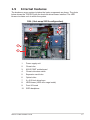
The barebone server system includes the basic components as shown. The photo
below shows the TS300-E3 with the hard disk drive blower installed. The HDD
blower circulates cool air within the system.
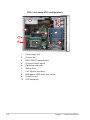
PA4 (4 hot-swap SATA configuration)
6
1
•
•
7
2
3
4
10
•
•
•
•
•
•
5
8
9
1.
Power supply unit
2.
Chassis fan
3.
ASUS P5MT motherboard
4.
Chassis intrusion switch
5.
Expansion card locks
6.
Optical drive
7.
2 x 5.25-inch drive bays
8.
HDD blower (HDD drive cage inside)
9.
Front I/0 board
10. SATA backplane
ASUS TS300-E3/PA4 & PS4
1-7
PS4 (4 hot-swap SCSI configuration)
6
1
•
•
7
2
3
4
8
10
•
•
•
•
•
•
5
9
1.
Power supply unit
2.
Chassis fan
3.
ASUS P5MT-S motherboard
4.
Chassis intrusion switch
5.
Expansion card locks
6.
Optical drive
7.
2 x 5.25-inch drive bays
8.
HDD blower (HDD drive cage inside)
9.
Front I/0 board
10. SCSI backplane
1-8
Chapter 1: Product introduction
1.6
LED information
The barebone system comes with five LED indicators. Refer to the following table
for the LED status description.
System and HDD LED
Power LED (blue)
HDD Access LED (green)
Message LED (red)
!
Drive Status LED (green/red)
Drive Activity LED (green)
LED
System
Icon
Power LED
HDD Access LED
Message LED
Hard disk drives
Drive Status LED
Drive Activity LED
Display status
Description
ON
Blinking
OFF
Blinking
OFF
Blinking
System power ON
System is in suspend mode
No activity
Read/write data into the HDD
System is normal; no incoming event
ASMS indicates a HW monitor event
Green
Bridge board connected to backplane
Installed HDD is in good condition
Red
HDD failure
Green/Red - Blinking HDD rebuilding using the RAID card
SAF-TE* function
Blinking
Read/write data into the HDD
*SCSI Access Fault-Tolerant Enclosure (on PS4 model only)
The Power, HDD Access, and Message LEDs are visible even if the system
front bezel is closed.
ASUS TS300-E3/PA4 & PS4
1-9
1-10
Chapter 1: Product introduction
This chapter lists the hardware setup procedures
that you have to perform when installing or
removing system components.
ASUS TS300-E3/PA4 & PS4
Hardware setup
Chapter 2
2-
2.1
Chassis cover
The chassis features a “screwless design” that allows convenient assembly and
disassembly. You can simply push or slide mechanical bolts and locks to remove
the cover.
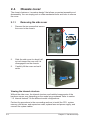
2.1.1
1.
Removing the side cover
Remove the two screws that secure
the cover to the chassis.
1
1
2.
Slide the side cover for about half
an inch toward the rear until it is
disengaged from the chassis.
3.
Carefully lift the cover and set it
aside.
2
Viewing the internal structure
Without the side cover, the internal structure and installed components of the
barebone server vary depending on the model you purchased. Refer to section
“1.5 Internal features” for the different model configurations.
Perform the procedures in the succeeding sections to install the CPU, system
memory, disk drives, and expansion cards; replace fans and power supply; and
connect the system cables.
2-2
Chapter 2: Hardware setup
You may need to remove some of the installed components to access the
DIMM sockets and internal connectors. Refer to section “2.10 Removable
components” for instructions.
2.1.2
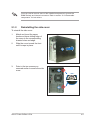
Reinstalling the side cover
To reinstall the side cover:
1.
Match and insert the upper
hooks and lower sliding edge of
the cover to the corresponding
chassis holes and edge.
2.
Slide the cover toward the front
until it snaps in place.
2
3.
Drive in the two screws you
removed earlier to secure the side
cover.
3
3
ASUS TS300-E3/PA4 & PS4
2-3
2.2
Motherboard overview
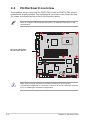
The barebone server comes with the P5MT (PA4 model) or P5MT-S (PS4 model)
motherboard already installed. The motherboard is secured to the chassis by nine
(9) screws as indicated by the circles in the illustration below.
®
Refer to “Chapter 4 Motherboard information” for detailed information on the
motherboard.
Place this side towards
the rear of the chassis
LAN2
Make sure to unplug the power cord before installing or removing any
motherboard component or connection. Failure to do so can cause you physical
injury and damage motherboard components.
2-4
Chapter 2: Hardware setup
2.3
Central Processing Unit (CPU)
The motherboard comes with a surface mount LGA775 socket designed for the
Intel® Pentium® 4 processor in the 775-land package
2.3.1
Installing the CPU
To install a CPU:
Locate the CPU socket on the motherboard.
®
1.
LAN2
P5MT Series CPU Socket 775
Before installing the CPU, make sure that the socket box is facing towards you
and the load lever is on your left.
2.
Press the load lever with your thumb (A), then move it to the left (B) until it is
released from the retention tab.
Retention tab
A
PnP cap
Load lever
B
This side of the socket
box should face you.
To prevent damage to the socket pins, do not remove the PnP cap unless you
are installing a CPU.
ASUS TS300-E3/PA4 & PS4
2-5
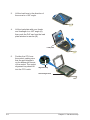
3.
Lift the load lever in the direction of
the arrow to a 135º angle.
4.
Lift the load plate with your thumb
and forefinger to a 100º angle (A),
then push the PnP cap from the load
plate window to remove (B).
B
A
Load plate
5.
Position the CPU over
the socket, making sure
that the gold triangle is
on the bottom-left corner
of the socket. The socket
alignment key should fit
into the CPU notch.
Alignment key
Gold triangle mark
2-6
Chapter 2: Hardware setup
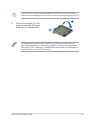
The CPU fits in only one correct orientation. DO NOT force the CPU into the
socket to prevent bending the connectors on the socket and damaging the CPU!
6.
Close the load plate (A), then
push the load lever (B) until it
snaps into the retention tab.
A
B
The motherboard supports Intel® Pentium® 4 LGA775 processors with the
Intel® Enhanced Memory 64 Technology (EM64T), Enhanced Intel SpeedStep®
Technology (EIST), and Hyper-Threading Technology. Refer to the Appendix for
more information on these CPU features.
ASUS TS300-E3/PA4 & PS4
2-7
2.3.2
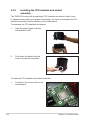
Installing the CPU heatsink and airduct
assembly
The TS300-E3 comes with a proprietary CPU heatsink and airduct, which come
in separate boxes when you receive the package. You have to assemble the CPU
heatsink and airduct before installing to the motherboard.
To assemble the CPU heatsink and airduct:
1.
Align the airduct pegs to the fan
and heatsink holes.
2.
Push down the airduct into the
holes to secure the assembly.
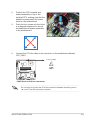
To install the CPU heatsink and airduct assembly:
1.
2-8
Locate the four screw holes on the
motherboard.
Chapter 2: Hardware setup
3.
4.
Position the CPU heatsink and
airduct assembly on top of the
installed CPU, making sure that the
heatsink screws match the screw
holes on the motherboard.
Drive the four screws into the holes
in a diagonal sequence to secure
the heatsink and airduct assembly
to the motherboard.
A
B
B
A
3
3
2
3
3
Connect the CPU fan cable to the connector on the motherboard labeled
CPU_FAN1.
®
CPU_FAN1
CPU_FAN1
GND
FANPWR
ROTATION
PWM
2.
LAN2
P5MT Series CPU fan connector
Do not forget to connect the CPU fan connector! Hardware monitoring errors
can occur if you fail to plug the connector.
ASUS TS300-E3/PA4 & PS4
2-9
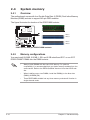
2.4
System memory
2.4.1
Overview
The motherboard comes with four Double Data Rate II (DDR2) Dual Inline Memory
Modules (DIMM) sockets to support 240-pin DDR modules.
®
The figure illustrates the location of the DDR DIMM sockets:
128 Pins
112 Pins
DIMM_A1
LAN2
DIMM_A2
DIMM_B1
DIMM_B2
P5MT Series 240-pin DDR2 DIMM sockets
2.4.2
Memory configurations
You may install 256 MB, 512 MB, 1 GB, and 2 GB unbuffered ECC or non-ECC
DDR2-533/667 DIMMs into the DIMM sockets.
2-10
•
Always install DIMMs with the same CAS latency. For optimum
compatibility, it is recommended that you obtain memory modules from the
same vendor. Refer to the DDR2 Qualified Vendors List at the ASUS web
site.
•
When installing one or two DIMMs, install the DIMM(s) to the blue slots
(DIMM_A2/DIMM_B2).
•
Three DDR DIMMs intalled into any three memory sockets will function in
single-channel mode.
Chapter 2: Hardware setup
2.4.3
Installing a DIMM
Unplug the power supply before adding or removing DIMMs or other
system components. Failure to do so can cause severe damage to both the
motherboard and the components.
2
To install a DIMM:
1.
Unlock a DIMM socket by pressing
the retaining clips outward.
2.
Align a DIMM on the socket
such that the notch on the DIMM
matches the break on the socket.
3.
Firmly insert the DIMM into the
socket until the retaining clips snap
back in place and the DIMM is
properly seated.
3
DDR2 DIMM notch
1
Unlocked retaining clip
2.4.4
•
A DDR2 DIMM is keyed with a notch so that it fits in only one direction. Do
not force a DIMM into a socket to avoid damaging the DIMM.
•
The DDR2 DIMM sockets do not support DDR DIMMs. DO not install DDR
DIMMs to the DDR2 DIMM sockets.
Removing a DIMM
To remove a DIMM:
1.
Support the DIMM lightly with
your fingers when pressing the
retaining clips. The DIMM might
get damaged when it flips out
with extra force.
2.
2
Simultaneously press the retaining
clips outward to unlock the DIMM.
1
1
DDR2 DIMM notch
Remove the DIMM from the socket.
ASUS TS300-E3/PA4 & PS4
2-11
2.5
Front panel assembly
2.5.1
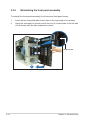
Removing the front panel assembly
Before you can install a 5.25-inch drive, you should first remove the front
panel assembly (front bezel and front panel cover). The front panel assembly
is attached to the chassis through three hooked tabs on the left side and four
hinge-like tabs on the right side.
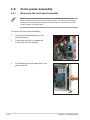
To remove the front panel assembly:
2-12
1.
Locate the four hooked tabs on the
chassis side rail.
2.
Press each lock tab to release the
front panel from the chassis.
3.
Pull and swing the left edge of the front
panel outward.
Chapter 2: Hardware setup
4.
Unhook the hinge-like tabs from the holes on the right side of the front panel
to completely detach the front panel assembly from the chassis.
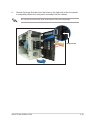
Do not use too much force when removing the front panel assembly.
Hinge-like tab
ASUS TS300-E3/PA4 & PS4
2-13
2.5.2
Reinstalling the front panel assembly
To reinstall the front panel assembly (front bezel and front panel cover):
1.
Insert the four hinge-like tabs to the holes on the right edge of the chassis.
2.
Swing the front panel to the left and fit the four (4) hooked tabs to the left side
of the chassis until the tabs snap back in place.
1
1
Hinge-like tab
1
1
2
2-14
Chapter 2: Hardware setup
2.6
5.25-inch drives
If you have previously used and powered up the system, and that it may be
connected to an AC power source, make sure to unplug the power cable before
installing or removing any system components. Failure to do so may cause
damage to the motherboard and other system components!
Three 5.25-inch drive bays are located
on the upper front part of the chassis.
A CD-ROM drive that comes standard
with the system package occupies
the uppermost bay (labeled 1). The
two lower bays (labeled 2 and 3)
are available for additional 5.25-inch
devices.
1
2
3
To install a 5.25-inch drive:
1.
Use a Phillips (cross) screwdriver
to remove the screws that secure
the metal cover of the bay where
you want to install the drive.
2.
Insert the optical drive into the
5.25-inch drive bay.
ASUS TS300-E3/PA4 & PS4
2-15
3.
Make sure that the drive and bay
hole align as shown. When in
place, the drive protrudes about an
inch from the front panel.
4.
Secure the drive with a screw.
5.
Connect the IDE cable to the IDE
connector on the back of the drive.
6.
Connect a 4-pin plug from the
power supply to the power
connector on the back of the drive.
IDE cable
Power plug
2-16
Chapter 2: Hardware setup
7.
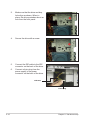
On the front panel assembly, detach the plastic bay cover opposite the
5.25-inch drive that you installed by pressing the two hooked tabs on each
side of the bay cover.
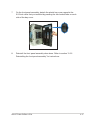
8.
Reinstall the front panel assembly when done. Refer to section “2.5.2
Reinstalling the front panel assembly” for instructions.
ASUS TS300-E3/PA4 & PS4
2-17
2.7
Hard disk drives
2.7.1
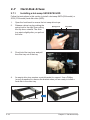
Installing a hot-swap SATA/SCSI HDD
Follow the instructions in this section to install a hot-swap SATA (PA4 model) or
SCSI (PS4 model) hard disk drive (HDD).
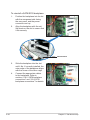
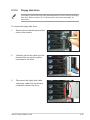
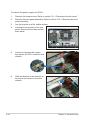
1.
Open the front bezel to access the hot-swap drive trays.
2.
Release a drive tray by pushing the
spring lock to the right, then pulling
the tray lever outward. The drive
tray ejects slightly after you pull out
the lever.
3.
Firmly hold the tray lever and pull
the drive tray out of the bay.
4.
An empty drive tray requires a metal bracket for support. Use a Phillips
(cross) screwdriver to remove the bracket when you are ready to install a
hard disk in the drive tray.
Spring lock
Tray lever
Metal bracket
2-18
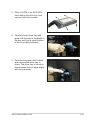
Chapter 2: Hardware setup
5. Place a SATA or an SCA SCSI
hard disk to the drive tray, and
secure it with four screws.
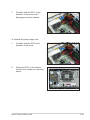
6. Carefully insert drive tray and
push it all the way to the depth of
the bay until just a small fraction
of the tray edge protrudes.
7. Push the tray lever until it clicks,
and secures the drive tray in
place. The drive tray is correctly
placed when its front edge aligns
with the bay edge.
ASUS TS300-E3/PA4 & PS4
2-19
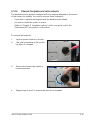
2.7.2
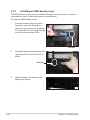
Installing an HDD dummy cover
The HDD dummy covers come pre-installed on the front panel bezel. In case you
removed the covers, follow these steps to re-install them.
To install an HDD dummy cover:
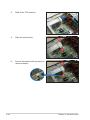
1.
From the inside of the front panel
assembly, insert the flat end of a
dummy cover into the slot as shown.
The end with the hook tab should be
close to the front panel LEDs.
Flat end
2.
Press the dummy cover into the slot
opening until the hook tab clicks in
place.
Hook tab
3.
2-20
When installed, the dummy cover
appears as shown.
Chapter 2: Hardware setup
2.8
Expansion cards
Refer to this section when installing expansion cards.
Make sure to unplug the power cord before installing or removing expansion
cards. Failure to do so may cause physical injury, and damage to the card and
motheboard components!
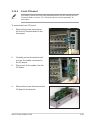
2.8.1
Installing an expansion card
To install an expansion card:
1.
Lay the chassis on its side.
2.
Locate the metal bracket opposite
the slot you want to use.
Remove the screw that secures the
metal bracket to the chassis. Set
aside the metal bracket for future
use.
3.
Align the card golden fingers to the
slot and its metal bracket to the slot
opening on the chassis.
4.
Press the card firmly until it is
properly seated on the slot.
5.
Secure the card to the chassis with
the bracket screw you removed
earlier.
ASUS TS300-E3/PA4 & PS4
2-21
2.8.2
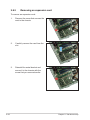
Removing an expansion card
To remove an expansion card:
2-22
1.
Remove the screw that secures the
card to the chassis.
2.
Carefully remove the card from the
slot.
3.
Reinstall the metal bracket and
secure it to the chassis with the
screw that you removed earlier.
Chapter 2: Hardware setup
2.9
2.9.1
Cable connections
•
The bundled system cables are pre-connected before shipment. You do
not need to disconnect these cables unless you will remove pre-installed
components to install additional devices.
•
Refer to Chapter 4 for detailed information on the connectors.
Motherboard connections
25cm (9.8in)
KBPWR1
PS/2KBMS
T: Mouse
B: Keyboard
ATXPWR1
PSUSMB1
USB12
REAR_FAN1
COM1
4
3
REAR_FAN2
®
FM_CPU2
P5MT-S
CPU_FAN2
PARALLEL PORT
FM_CPU1
ATX12V1
1
USBPW12
CPU_FAN1
2 3
LGA775
Intel
E7230
VGA1
DDR2 DIMM_A1 (64 bit,240-pin module)
LAN1
DDR2 DIMM_A2 (64 bit,240-pin module)
DDR2 DIMM_B2 (64 bit,240-pin module)
PCIE1
FRNT_FAN1
SATA4
Broadcom
BCM5721
SATA2
PCIX2
Intel
ICH7R
PCIX3
Broadcom
BCM5721
SB_PWR1
BMCSOCKET1
Super
I/O
PCI4
8Mbit
Flash
BIOS
RECOVERY1
Adaptec
AIC-7901
7
BPSMB1
TRPWR1
BMCCONN1 HDLED1
8
6
5
SCSI_EN1
VGA_EN1
LAN_EN1
LAN_EN2
COM2
ATI
RAGE XL
VGA
Controller
30.5cm (12in)
5
DDR2 DIMM_B1 (64 bit,240-pin module)
LAN2
9
CLRTC1
CR2032 3V
Lithium Cell
CMOS Power
10
BUZZ1
SATA3
SATA1
SCSIA1
FRNT_FAN2
13
Intel
6702
PXH
11
USBPW34
AUX_PANEL1
12
FLOPPY1
PANEL1
PRI_IDE1
USB34
Standard cables connected to the motherboard
1.
24-pin ATX power
7.
SMBus connector
2.
4-pin 12V power
8.
Auxiliary panel cable
3.
CPU fan 1/2
9.
Front USB cable
4.
Rear fan 1/2
10. Front panel cable
5.
Front fan 1/2
11.
6.
Serial ATA connectors
12. Primary IDE cable
Floppy disk drive
13. SCSI connector
(for PS4 Model only)
ASUS TS300-E3/PA4 & PS4
2-23
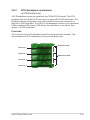
2.9.2
SATA backplane connections
(in PA4 model only)
A SATA backplane comes pre-installed in the TS300-E3 PA4 model. The SATA
backplane has four 15-pin SATA connectors to support Serial ATA hard disk drives.
The backplane design incorporates a hot swap feature to allow easy connection or
removal of SATA hard disks. The LED on the backplane connect to the front panel
LED to indicate HDD status. See section “1.6 LED information” for details.
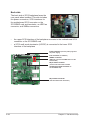
Front side
The front side of the SATA backplane faces the front panel when installed. This
side includes four SATA connectors for the hot swap drive trays.
CON1
CON3
Drive status LEDs
CON5
CON7
Each SATA connector is labeled (CON1,
CON3, CON5, CON7) so you can easily
determine their counterpart connectors
at the back side of the backplane. Refer
to the table for reference.
HDD
device
2-24
Front side
connector
Back side
connector
HDD 1
CON1
CON2
HDD 2
CON3
CON4
HDD 3
CON5
CON6
HDD 4
CON7
CON8
Chapter 2: Hardware setup
Back side
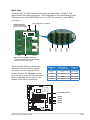
The back side of SATA backplane faces the rear panel when installed. This
side includes the power connectors, SATA interfaces for the motherboard Serial
ATA connectors or the SATA/RAID card, an HDD fan connector, and SMBus
connectors.
Fan connector (for HDD fan)
Power connectors
CON8
CON6
CON4
CON2
(connect power plugs
from the power supply)
Upper 6-1 pins: SMBus connector
(connects the SMB cable from the BPSMB1
connector on the motherboard)
The back side SATA connectors are
attached to the motherboard SATA
connectors via the supplied SATA
cables. Refer to the illustration below
for the location of the SATA connectors.
Refer to the table on the right for the
default SATA cable connections.
Backplane
ID
Connected to
(on motherboard)
Controlled
by
CON2
SATA1
Intel® ICH7R
CON4
SATA2
Intel® ICH7R
CON6
SATA3
Intel® ICH7R
CON8
SATA4
Intel® ICH7R
25cm (9.8in)
KBPWR1
PS/2KBMS
T: Mouse
B: Keyboard
ATXPWR1
PSUSMB1
FM_CPU1
ATX12V1
CPU_FAN1
USBPW12
USB12
REAR_FAN1
COM1
LGA775
REAR_FAN2
PARALLEL PORT
CPU_FAN2
Intel
E7230
®
VGA1
P5MT
FM_CPU2
SATA RAID controller
DDR2 DIMM_A1 (64 bit,240-pin module)
LAN1
DDR2 DIMM_B1 (64 bit,240-pin module)
LAN2
DDR2 DIMM_B2 (64 bit,240-pin module)
PCIE1
FRNT_FAN1
SATA4
Broadcom
BCM5721
SATA2
PCIX2
Intel
ICH7R
PCIX3
SATA3
SATA1
FRNT_FAN2
Super
I/O
CLRTC1
CR2032 3V
Lithium Cell
CMOS Power
PCI4
8Mbit
Flash
BIOS
RECOVERY1
RAID_SEL1
BMCSOCKET1
ATI
RAGE XL
VGA
Controller
VGA_EN1
LAN_EN1
LAN_EN2
COM2
Broadcom
BCM5721
SB_PWR1
30.5cm (12in)
DDR2 DIMM_A2 (64 bit,240-pin module)
BPSMB1
TRPWR1
BMCCONN1 HDLED1
ASUS TS300-E3/PA4 & PS4
SATA4
SATA2
SATA1
SATA3
Intel
6702
PXH
BUZZ1
FLOPPY1
USBPW34
AUX_PANEL1
PANEL1
PRI_IDE1
USB34
2-25
SATA backplane jumper settings and HDD ID assignments
The 6-pin jumper J3 allows you to define your desired SATA configuration. The
picture below shows the location of jumper J3 with pins 1-3 and 2-4 shorted.
Refer to the table for the jumper settings
and the appropriate ID# for each SATA
HDD bay.
2-26
J3 setting
(1-3 shorted, 2-4 shorted)
Device
SATA ID#
Drive Bay 1
ID0
Drive Bay 2
ID1
Drive Bay 3
ID2
Drive Bay 4
ID3
Chapter 2: Hardware setup
2.9.3
SCSI backplane connections
(in PS4 model only)
A SCSI backplane comes pre-installed in the TS300-E3 PS4 model. The SCSI
backplane has four 68-pin SCSI connectors to support SCA SCSI hard disks. The
backplane design incorporates a hot swap feature to allow easy connection or
removal of SCSI hard disks. The LEDs on the backplane connect to the front panel
LEDs to indicate HDD access, HDD failure, thermal failure, or fan failure. See
section “1.6 LED information.”
Front side
The front side of the SCSI backplane faces the front panel when installed. This
side includes four SCSI connectors for the hot swap drive trays.
HDD status LEDs
Disk drive 1
Disk drive 2
HDD activity LEDs
Disk drive 3
Disk drive 4
ASUS TS300-E3/PA4 & PS4
2-27
Back side
The back side of SCSI backplane faces the
rear panel when installed. This side includes
the power connectors, SCSI interfaces for
the motherboard SCSI connector or the
SCSI/RAID card and terminator, an HDD fan
connector, and SMBus connectors.
•
the upper SCSI interface of the backplane connects to the motherboard SCSI
connector or the SCSI/RAID card
•
a SCSI multi-mode terminator (LVD/SE) is connected to the lower SCSI
interface of the backplane
Power connectors (connect power plugs from
the power supply)
Fan connector (for HDD fan)
SMBus connector
[SMB_IN1] (connects the SMB cable from the
motherboard)
68-pin SCSI connector
(connects the SCSI cable from the
motherboard SCSI connector or
the SCSI/RAID card)
68-pin SCSI connector
(with SCSI multi-mode terminator)
2-28
Chapter 2: Hardware setup
SCSI backplane jumper settings and HDD ID assignments
The 6-pin jumper J1 on each of the SCSI backplanes allows you to define your
desired SCSI configuration.
The picture below shows the location of jumper J1 with pins 1-3 and 2-4 shorted.
Refer to the following tables for the jumper settings and the appropriate ID# for
each SCSI HDD bay.
J1 setting
(1-3 shorted, 2-4 shorted)
Device
SCSI ID#
Drive Bay 1
ID0
Drive Bay 2
ID1
Drive Bay 3
ID2
Drive Bay 4
ID3
GEM SAF-TE
ID15 (SCSI channel-0)
ASUS TS300-E3/PA4 & PS4
2-29
2.10
Removable components
You may need to remove previously installed system components when installing
or removing system devices, or when you need to replace defective components.
This section tells how to remove the following components:
1.
Chassis fan
5.
Front I/O board
2.
HDD blowers
6.
3.
SATA/SCSI backplanes
Chassis footpads and roller
wheels
4.
Floppy disk drive module
7.
Power supply unit
2.10.1
Chassis fan
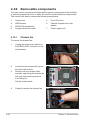
To remove the chassis fan:
1.
Unplug the chassis fan cable fron
the REAR_FAN1 connector on the
motherboard.
2.
Locate the four screws that secure
the fan to the chassis.
3.
Remove the four screws while
carefully supporting the chassis fan
with your free hand to prevent it
from falling off.
Set the screws aside.
4.
2-30
Carefully remove the chassis fan.
Chapter 2: Hardware setup
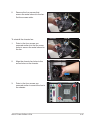
5.
Remove the four screws that
secure the metal shroud to the fan.
Set the screws aside.
To reinstall the chassis fan:
1.
Drive in the four screws you
removed earlier into the fan screw
holes to secure the metal shroud to
the fan.
2.
Align the chassis fan holes to the
screw holes on the chassis.
3.
Drive in the four screws you
removed earlier to secure the fan to
the chassis.
ASUS TS300-E3/PA4 & PS4
2-31
4.
Plug the chassis fan cable to the
connector on the motherboard.
2.10.2
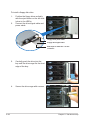
HDD blower
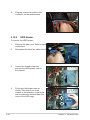
To remove the HDD blower:
2-32
1.
Remove the side cover. Refer to section “2.1.1 Removing the side cover” for
instructions.
2.
Disconnect the 3-pin fan cable from the fan connector on the backplane.
3.
Loosen the thumb screw that
secures the HDD blower case to
the chassis.
4.
Firmly grip the blower case as
shown, then slide it out of the
chassis in the direction of the arrow
until the tabs are released from the
holes of the HDD cage.
3
Chapter 2: Hardware setup
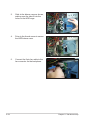
5.
Remove the two screws on the
blower case using a Phillips
screwdriver. Set the screws aside.
6.
Remove the blower from the case.
To reinstall the HDD blower:
1.
Replace the blower into the case.
2.
Secure the blower to the case
with the two screws you removed
earlier.
ASUS TS300-E3/PA4 & PS4
2-33
2-34
3.
Slide in the blower case as shown,
making sure the tabs fit into the
holes on the HDD cage.
4.
Drive in the thumb screw to secure
the HDD blower case.
5.
Connect the 3-pin fan cable to the
fan connector on the backplane.
Chapter 2: Hardware setup
2.10.3
SATA/SCSI backplane
To remove the SATA/SCSI backplane:
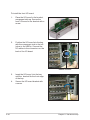
1.
Remove the HDD blower case.
Refer to section “2.10.2 HDD
blowers” for instructions.
2.
Disconnect all cables from the
SATA/SCSI backplane.
When disconnecting a cable,
hold and firmly pull the cable
plug. DO NOT pull the cable
itself. Doing so may damage the
cable!
3.
From the inner edge, push the
backplane outward so that the outer
edge protrudes slightly from the
slot.
4.
From the outer edge, firmly hold the
backplane and carefully slide it out.
ASUS TS300-E3/PA4 & PS4
2-35
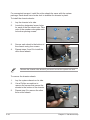
To reinstall a SATA/SCSI backplane:
1.
Position the backplane into its slot
with the component side facing
the rear panel, and the power
connectors on top.
2.
Align the backplane with the raillike dents on the slot to ensure that
it fits securely.
Rail-like dents
2-36
3.
Slide the backplane into the slot
until it fits. If correctly installed, the
outer edge of the backplane aligns
with the corner of the drive cage.
4.
Connect the appropriate cables
to the backplane. Refer to
sections “2.9.2 SATA backplane
connections” and “2.9.3 SCSI
backplane connections” for details.
Chapter 2: Hardware setup
2.10.4
Floppy disk drive
You need to remove the front panel assembly before you can remove the floppy
disk drive. Refer to section “2.5.1 Removing the front panel assembly” for
instructions.
To remove the floppy disk drive:
1.
Remove the screw that secures the
drive to the chassis.
2.
Carefully pull out the drive from the
chassis until you see the cables
connected to the drive.
3.
Disconnect the floppy disk cable
and power cable from the drive to
completely release the drive.
ASUS TS300-E3/PA4 & PS4
2-37
To install a floppy disk drive:
1.
Position the floppy drive vertically
with the eject button on the left side
(close to the HDDs).
2.
Connect the drive signal cable and
power cable.
Floppy drive power cable
Floppy drive signal cable
Red stripe to match Pin 1 on the
connector
2-38
3.
Carefully push the drive into the
bay until the drive cage fits the front
edge of the bay.
4.
Secure the drive cage with a screw.
Chapter 2: Hardware setup
2.10.5
Front I/O board
You need to remove the front panel assembly before you can remove the front
I/O board. Refer to section “2.5.1 Removing the front panel assembly” for
instructions.
To remove the front I/O board:
1.
Remove the screw that secures
the front I/O board bracket to the
front panel.
2.
Carefully pull out the bracket until
you see the cables connected to
the I/O board.
3.
Disconnect all the cables from the
I/O board.
4.
Remove the screw that secures the
I/O board to the bracket.
ASUS TS300-E3/PA4 & PS4
2-39
To install the front I/O board:
1.
Place the I/O board in the bracket,
component side up. Secure the
front I/O board to the bracket with a
screw.
2.
Position the I/O board into the bay
with the component side to the left
(close to the HDDs). Connect the
I/O cables to the connectors on the
back of the I/O board.
USB 2.0 connector
2-40
3.
Insert the I/O board into the bay
until the bracket fits the front edge
of the bay.
4.
Secure the I/O board bracket with
a screw.
Chapter 2: Hardware setup
2.10.6
Chassis footpads and roller wheels
The barebone server system is shipped with four footpads attached to the bottom
of the chassis for stability. You need to remove these footpads if:
•
if you want to replace the footpads with the bundled roller wheels
•
you wish to install the system to a rack
(Refer to “Chapter 3 Installation options” of this user guide, and to the
“Rackmount Kit” user guide for instructions)
To remove the footpads:
1.
Lay the system chassis on its side.
2.
Use a flat screwdriver to flip out the
top layer of a footpad.
3.
Remove the footpad by rotating it
counterclockwise.
4.
Repeat steps 2 and 3 to remove the other three footpads.
ASUS TS300-E3/PA4 & PS4
2-41
For convenient transport, install the roller wheels the came with the system
package. Each wheel has a brake lock to stabilize the chassis in place.
To install the chassis wheels:
1.
Lay the chassis in its side.
2.
Locate the designated screw holes
for each of the four wheel sets. Take
note of the numbers alongside each
hole when placing screws.
3.
Secure each wheel to the bottom of
the chassis using four screws.
4.
Repeat steps 2 and 3 to install the
other three wheels.
3
1
2
4
Remove the chassis roller wheels if you wish to mount the system to a rack.
To remove the chassis wheels:
2-42
1.
Lay the system chassis on its side.
2.
Use a Phillips screwdriver to
remove the screws that secure the
wheels to the bottom of the chassis.
3.
Repeat step 2 to remove the other
three roller wheels.
Chapter 2: Hardware setup
2.10.7
Power supply unit
Refer to this section when removing or installing a power supply unit to the
barebone system.
You MUST disconnect all power cable plugs from the motherboard and other
installed devices before removing the power supply unit.
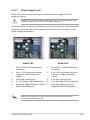
The picture below shows the motherboard and device connectors where the power
plugs are connected. Refer to the Appendix at the end of this document for the
power supply specifications.
1
2
4
3
1
5
2.
3.
4.
5.
24-pin ATX (motherboard power
connector)
4-pin +12V (motherboard power
connector, hidden behind the
cables)
4-pin plug (optical drive)
2 x 4-pin plugs (SATA backplane)
4-pin plug (floppy disk drive, hidden
behind the backplane)
3
5
Model PA4
1.
2
4
Model PS4
1.
2.
3.
4.
5.
24-pin ATX (motherboard power
connector)
4-pin +12V (motherboard power
connector, hidden behind the
cables)
4-pin plug (optical drive)
2 x 4-pin plugs (SCSI backplane)
4-pin plug (floppy disk drive,
hidden behind the backplane)
Make sure to unplug ALL power cables from the system devices before
removing the power supply unit.
ASUS TS300-E3/PA4 & PS4
2-43
To remove the power supply unit (PSU):
2-44
1.
Remove the chassis cover. Refer to section “2.1.1 Removing the side cover.”
2.
Remove the front panel assembly. Refer to section “2.5.1 Removing the front
panel assembly.
3.
Lay the chassis on a flat, stable surface.
4.
Locate the four screws on the rear
panel. Remove the screws and set
them aside.
5.
Locate and remove the screws
that secure the PSU bracket to the
chassis.
6.
Slide the bracket in the direction of
the arrow and remove it from the
chassis.
Chapter 2: Hardware setup
7.
Carefully slide the PSU in the
direction of the arrow until it
disengages from the chassis.
To reinstall the power supply unit:
1.
Carefully slide the PSU in the
direction of the arrow.
2.
Secure the PSU to the chassis
with the four screws you removed
earlier.
ASUS TS300-E3/PA4 & PS4
2-45
2-46
3.
Slide in the PSU bracket.
4.
Align the screw holes.
5.
Secure the bracket with screws you
removed earlier.
Chapter 2: Hardware setup
This chapter describes how to install
optional components into the barebone
server.
ASUS TS300-E3/PA4 & PS4
Installation option
Chapter 3
3-
The items required for the optional configurations described in this chapter
are not included in the standard barebone system package. These items are
purchased separately.
Preparing the system for rack mounting
Removing the footpads or roller wheels
Refer to section “2.10.6 Chassis footpads and roller wheels” for instructions on
removing the footpads or roller wheels.
Removing the top cover
To remove the top cover:
1.
Remove the chassis cover. Refer
to section “2.1.1 Removing the side
cover.”
2.
Remove the front panel assembly.
Refer to section “2.5.1 Removing
the front panel assembly.
3.
Carefully slide out the protruding
portion of the top cover as shown.
4.
Locate two round mylars on top
cover.
5.
Carefully remove each mylar using
a sharp, flat object such as the
edge of a cutter.
3
Attaching the rack rails
Refer to the installation guide that came with the Rackmount Rail Kit for
instructions on how to attach the rails and on the barebone server system and the
corresponding rails on the industrial rack.
We recommend that you allot at least 1U space above the server system to
ensure optimal thermal performance.
3-2
Chapter 3: Installation option
This chapter gives information about
the motherboard that comes with
the server. This chapter includes the
motherboard layout, jumper settings,
and connector locations.
ASUS TS300-E3/PA4 & PS4
Motherboard info
Chapter 4
3-
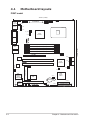
4.1
Motherboard layouts
P5MT model
25cm (9.8in)
KBPWR1
PS/2KBMS
T: Mouse
B: Keyboard
ATXPWR1
PSUSMB1
FM_CPU1
ATX12V1
CPU_FAN1
USBPW12
USB12
REAR_FAN1
COM1
LGA775
REAR_FAN2
PARALLEL PORT
CPU_FAN2
Intel
E7230
®
VGA1
P5MT
FM_CPU2
DDR2 DIMM_A1 (64 bit,240-pin module)
LAN1
DDR2 DIMM_B1 (64 bit,240-pin module)
LAN2
DDR2 DIMM_B2 (64 bit,240-pin module)
PCIE1
FRNT_FAN1
SATA4
Broadcom
BCM5721
SATA2
PCIX2
Intel
ICH7R
PCIX3
Broadcom
BCM5721
SATA1
8Mbit
Flash
BIOS
RECOVERY1
RAID_SEL1
BMCSOCKET1
ATI
RAGE XL
VGA
Controller
SB_PWR1
SATA3
FRNT_FAN2
VGA_EN1
LAN_EN1
LAN_EN2
COM2
4-2
30.5cm (12in)
DDR2 DIMM_A2 (64 bit,240-pin module)
Super
I/O
CLRTC1
CR2032 3V
Lithium Cell
CMOS Power
PCI4
BPSMB1
TRPWR1
BMCCONN1 HDLED1
Intel
6702
PXH
BUZZ1
FLOPPY1
USBPW34
AUX_PANEL1
PANEL1
PRI_IDE1
USB34
Chapter 4: Motherboard information
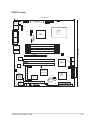
P5MT-S model
25cm (9.8in)
KBPWR1
PS/2KBMS
T: Mouse
B: Keyboard
ATXPWR1
PSUSMB1
FM_CPU1
ATX12V1
CPU_FAN1
USBPW12
USB12
REAR_FAN1
COM1
LGA775
REAR_FAN2
PARALLEL PORT
CPU_FAN2
Intel
E7230
®
P5MT-S
FM_CPU2
VGA1
DDR2 DIMM_A1 (64 bit,240-pin module)
LAN1
DDR2 DIMM_B1 (64 bit,240-pin module)
LAN2
DDR2 DIMM_B2 (64 bit,240-pin module)
PCIE1
FRNT_FAN1
SATA4
Broadcom
BCM5721
SATA2
PCIX2
Intel
ICH7R
PCIX3
Broadcom
BCM5721
8Mbit
Flash
BIOS
RECOVERY1
BMCSOCKET1
ATI
RAGE XL
VGA
Controller
SATA3
SATA1
SCSIA1
SCSI_EN1
VGA_EN1
LAN_EN1
LAN_EN2
COM2
SB_PWR1
30.5cm (12in)
DDR2 DIMM_A2 (64 bit,240-pin module)
FRNT_FAN2
Adaptec
AIC-7901
Super
I/O
CLRTC1
CR2032 3V
Lithium Cell
CMOS Power
PCI4
BPSMB1
TRPWR1
BMCCONN1 HDLED1
ASUS TS300-E3/PA4 & PS4
Intel
6702
PXH
BUZZ1
FLOPPY1
USBPW34
AUX_PANEL1
PANEL1
PRI_IDE1
USB34
4-3
Layout contents
Jumpers
1.
2.
3.
4.
5.
6.
7.
8.
9.
Clear RTC RAM (CLRTC1)
CPU fan pin selection (3-pin FM_CPU1, FM_CPU2)
USB device wake-up (3-pin USBPW12, USBPW34)
Keyboard power (3-pin KBPWR1)
VGA controller setting (3-pin VGA_EN1)
Gigabit LAN controller setting (3-pin LAN_EN1; LAN_EN2)
RAID controller selection (3-pin RAID_SEL1)
(P5MT model only)
SCSI controller setting (3-pin SCSI_EN1)
(P5MT-S model only)
Force BIOS recovery setting (3-pin RECOVERY1)
Internal connectors
1.
Floppy disk drive connector (34-1 pin FLOPPY1)
2.
Primary IDE connectors (40-1 pin PRI_IDE1)
3.
Serial ATA connectors (7-pin SATA1, SATA2, SATA3, SATA4)
4.
Hard disk activity LED connector (4-pin HDLED1)
5.
USB connector (10-1 pin USB34)
6.
Ultra320 SCSI connectors (one 68-pin SCSIA1)
(P5MT-S model only)
7.
Serial port connector (10-1 pin COM2)
8.
BMC connector (16-pin BMCCONN1)
9.
Ambient thermal sensor (2-pin TRPWR1)
10.
CPU and system fan connectors (3-pin CPU_FAN1/2,
REAR_FAN1/2, FRNT_FAN1/2)
11.
Backplane SMBus connector (6-1 pin BPSMB1)
12.
Power supply SMBus connector (5-pin PSUSMB1)
13.
ATX power connectors (24-pin ATXPWR1, 8-pin ATX12V2)
14.
System panel connector (20-pin PANEL1)
15.
Auxiliary panel connector (20-pin AUX_PANEL1)
4-4
Page
4-5
4-6
4-6
4-7
4-7
4-8
4-8
4-9
4-9
Page
4-10
4-10
4-11
4-12
4-12
4-13
4-14
4-14
4-14
4-15
4-15
4-16
4-16
4-17
4-18
Chapter 4: Motherboard information
4.2
Jumpers
The grayed out components in the illustrations may not be present in certain
models.
1.
Clear RTC RAM (CLRTC1)
This jumper allows you to clear the Real Time Clock (RTC) RAM in
CMOS. You can clear the CMOS memory of date, time, and system setup
parameters by erasing the CMOS RTC RAM data. The onboard button
cell battery powers the RAM data in CMOS, which include system setup
information such as system passwords.
To erase the RTC RAM:
1. Turn OFF the computer and unplug the power cord.
2. Remove the onboard battery.
3. Move the jumper cap from pins 1-2 (default) to pins 2-3. Keep the cap on
pins 2-3 for about 5~10 seconds, then move the cap back to pins 1-2.
4. Re-install the battery.
5. Plug the power cord and turn ON the computer.
6. Hold down the <Del> key during the boot process and enter BIOS setup
to re-enter data.
®
Except when clearing the RTC RAM, never remove the cap on CLRTC jumper
default position. Removing the cap will cause system boot failure!
LAN2
CLRTC1
1 2
P5MT Series Clear RTC RAM
ASUS TS300-E3/PA4 & PS4
Normal
(Default)
2 3
Clear CMOS
4-5
2.
CPU fan pin selection (3-pin FM_CPU1, FM_CPU2)
These jumpers allow you to connect either a 3-pin or a 4-pin fan cable plug
to the CPU fan connectors (CPU_FAN1, CPU_FAN2). Set these jumpers to
pins 1-2 if you are using a 3-pin fan cable plug, or to pins 2-3 if you are using
a 4-pin plug.
FM_CPU1
1 2
2 3
®
3-pin fan
4-pin fan
(Default)
LAN2
FM_CPU2
1
2
2
3
3-pin fan
4-pin fan
(Default)
P5MT Series FM CPU Setting
3.
USB device wake-up (3-pin USBPW12, USBPW34)
Set these jumpers to +5V to wake up the computer from S1 sleep mode
(CPU stopped, DRAM refreshed, system running in low power mode) using
the connected USB devices. Set to +5VSB to wake up from S4 sleep mode
(no power to CPU, DRAM in slow refresh, power supply in reduced power
mode).
USBPW12
1 2
®
2 3
+5V
(Default)
LAN2
+5VSB
USBPW34
1 2
+5V
(Default)
2 3
+5VSB
P5MT Series USB device wake-up
4-6
•
The USB device wake-up feature requires a power supply that can
provide 500mA on the +5VSB lead for each USB port; otherwise, the
system would not power up.
•
If you are using Windows 2000, you need to install Service Pack 4 to wake
up the system from S4 sleep mode.
•
The total current consumed must NOT exceed the power supply capability
(+5VSB) whether under normal condition or in sleep mode.
Chapter 4: Motherboard information
4.
Keyboard/Mouse power (3-pin KBPWR1)
This jumper allows you to enable or disable the keyboard/mouse wake-up
feature. Set this jumper to pins 2-3 (+5VSB) to wake up the computer when
you press any key on the keyboard (the default is the Space Bar) or click the
mouse. This feature requires an ATX power supply that can supply at least 1A
on the +5VSB lead, and a corresponding setting in the BIOS.
KBPWR1
®
1 2
2 3
+5V
(Default)
LAN2
+5VSB
P5MT Series Keyboard power setting
5.
VGA controller setting (3-pin VGA_EN1)
®
These jumpers allow you to enable or disable the onboard ATI® RAGE-XL
PCI VGA controller. Set to pins 1-2 to activate the VGA feature.
LAN2
VGA_EN1
2
1
P5MT Series VGA setting
ASUS TS300-E3/PA4 & PS4
Enable
(Default)
3
2
Disable
4-7
6.
Gigabit LAN controller setting (3-pin LAN_EN1, LAN_EN2)
®
These jumpers allow you to enable or disable the onboard Broadcom®
BCM5721 Gigabit LAN1 or LAN2 controller. Set to pins 1-2 to activate the
Gigabit LAN controller.
LAN2
LAN_EN1
3
2
Disable
®
P5MT Series LAN_EN1 setting
2
1
Enable
(Default)
LAN2
LAN_EN2
3
2
2
1
Enable
(Default)
Disable
P5MT Series LAN_EN2 setting
7.
RAID controller selection (3-pin RAID_SEL1) [P5MT model only]
®
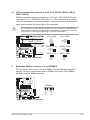
This jumper allows you to select the RAID configuration utility to use when you
create disk arrays. Place the jumper caps over pins 1-2 if you want to use the LSI
Logic Embedded SATA RAID Setup Utility (default); otherwise, place the
jumper caps to pins 2-3 to use the Intel® Matrix Storage Manager.
RAID_SEL1
LAN2
1
2
LSI RAID ROM
(Default)
2
3
INTEL RAID ROM
P5MT Series RAID_SEL1 setting
4-8
Chapter 4: Motherboard information
8.
SCSI controller setting (3-pin SCSI_EN1) [P5MT-S model only]
®
This jumper allows you to enable or disable the onboard Adaptec AIC-7901
PCI-X SCSI controller. Set to pins 1-2 to activate the SCSI feature, and
support RAID configurations.
LAN2
SCSI_EN1
1
2
P5MT Series SCSI_EN1 setting
9.
Enable
(Default)
2
3
Disable
Force BIOS recovery setting (3-pin RECOVERY1)
This jumper allows you to quickly update or recover the BIOS settings when it
becomes corrupted.
To update the BIOS:
Prepare a floppy disk that contains the latest BIOS for the motherboard
(xxxx-xxx.ROM) and the AFUDOS.EXE utility.
2.
Set the jumper to pins 2-3.
3.
Insert the floppy disk then turn on the system to update the BIOS.
4.
Shut down the system.
5.
Set the jumper back to pins 1-2.
6.
Turn on the system.
®
1.
RECOVERY1
LAN2
1
2
Normal
(Default)
2
3
BIOS recovery
P5MT Series BIOS recovery setting
ASUS TS300-E3/PA4 & PS4
4-9
4.3
1.
Internal connectors
Floppy disk drive connector (34-1 pin FLOPPY1)
This connector is for the provided floppy disk drive (FDD) signal cable. Insert
one end of the cable to this connector, then connect the other end to the
signal connector at the back of the floppy disk drive.
®
Pin 5 on the connector is removed to prevent incorrect cable connection when
using a FDD cable with a covered Pin 5.
LAN2
FLOPPY1
PIN 1
NOTE: Orient the red markings on
the floppy ribbon cable to PIN 1.
P5MT Series Floppy disk drive connector
2.
Primary IDE connector (40-1 pin PRI_IDE1)
This connector is for an Ultra ATA100/66/33 signal cable. The Ultra
ATA 100/66/33 signal cable has three connectors: a blue connector for the
primary IDE connector on the motherboard, a black connector for an Ultra ATA
100/66/33 IDE slave device (optical drive/hard disk drive), and a gray connector
for an Ultra ATA 100/66/33 IDE master device (hard disk drive). If you install
two hard disk drives, you must configure the second drive as a slave device
by setting its jumper accordingly. Refer to the hard disk documentation for the
jumper settings.
Pin 20 on the IDE connector is removed to match the covered hole on the Ultra
ATA cable connector. This prevents incorrect insertion when you connect the
IDE cable.
•
Use the 80-conductor IDE cable for Ultra ATA 100/66/33 IDE devices.
®
•
LAN2
PRI_IDE1
PIN 1
NOTE: Orient the red markings
(usually zigzag) on the IDE
ribbon cable to PIN 1.
P5MT Series IDE connector
4-10
Chapter 4: Motherboard information
3.
Serial ATA connectors (7-pin SATA1, SATA2, SATA3, SATA4)
These connectors are for the Serial ATA signal cables for Serial ATA hard disk
drives.
For P5MT model only: If you installed Serial ATA hard disk drives, you can
create a RAID 0, RAID 1, RAID 0+1, and software RAID 5 configuration
using the Intel® Matrix Storage Technology or RAID 0, RAID 1 and RAID 0+1
configuration using the LSI MegaRAID® utility embedded on the Intel® ICH7R
Southbridge.
These connectors are set IDE mode by default. In IDE mode, you can connect
Serial ATA boot/data hard disk drives to these connectors. If you intend to create
a Serial ATA RAID set using these connectors, set the Configure SATA as item in
the BIOS to [RAID]. See section “4.3.4 IDE Configuration” for details.
SATA2
®
SATA4
GND
RSATA_TXP4
RSATA_TXN4
GND
RSATA_RXP4
RSATA_RXN4
GND
LAN2
SATA3
P5MT Series SATA connectors
GND
RSATA_TXP3
RSATA_TXN3
GND
RSATA_RXP3
RSATA_RXN3
GND
GND
RSATA_TXP2
RSATA_TXN2
GND
RSATA_RXP2
RSATA_RXN2
GND
SATA1
GND
RSATA_TXP1
RSATA_TXN1
GND
RSATA_RXP1
RSATA_RXN1
GND
Important notes on Serial ATA
•
You must install Windows® 2000 Service Pack 4 or Windows® 2003 before
using Serial ATA hard disk drives. The Serial ATA RAID feature (RAID
0/RAID 1) is available only if you are using Windows® 2000/2003.
•
Use only two Serial ATA RAID connectors for each RAID 0 or RAID 1 set.
•
When using the connectors in IDE mode, connect the primary (boot) hard
disk drive to the SATA1 or SATA2 connector. Refer to the table below for the
recommended SATA hard disk drive connections.
Serial ATA hard disk drive connection
Connector
Setting
Use
SATA1/SATA2
Master
Boot disk
SATA3/SATA4
Slave
Data disk
ASUS TS300-E3/PA4 & PS4
4-11
4.
Hard disk activity LED connector (4-pin HDLED1)
This connector supplies power to the hard disk activity LED. The read or
write activities of any device connected to the SCSI connectors or the SATA
connectors cause this LED to light up.
®
HDLED1
NC
ADD_IN_CARD_ACT#
ADD_IN_CARD_ACT#
NC
1
LAN2
P5MT Series SCSI/SATA card activity LED connector
5.
USB connector (10-1 pin USB34)
USB+5V
USB_P3USB_P3+
GND
NC
®
This connector is for USB 2.0 ports. Connect the USB module cable to
this connector, then install the module to a slot opening at the back of the
system chassis. This USB connector complies with USB 2.0 specification that
supports up to 480 Mbps connection speed.
LAN2
P5MT Series USB 2.0 connector
USB+5V
USB_P2USB_P2+
GND
USB34
The USB port module is purchased separately.
4-12
Chapter 4: Motherboard information
6.
Ultra320 SCSI connectors (one 68-pin SCSIA1)
[P5MT-S model only]
This motherboard comes with the Adaptec AIC-7901 PCI-X SCSI U320
controller that supports one 68-Pin Ultra320 SCSI connector. The SCSI
channel can support a maximum of 15 SCSI devices as specified by Ultra320
standards.
SCSIA1
1 35
®
68-Pin Ultra320/
Ultra2-Wide SCSI Connector
LAN2
34 68
P5MT Series Onboard SCSI connectors
SCSI connection notes
This motherboard has a 68-Pin Ultra320 SCSI connector.
The onboard SCSI chipset incorporates an advanced multimode I/O cell that
supports both single-ended (SE), Ultra2, Ultra160, and Ultra320 devices.
With Ultra320 devices, the SCSI bus platform performs at full Ultra320
speeds (up to 320MB/s) and extended cabling 12m (or 25m in a point-topoint configuration). When an SE device is attached, the bus defaults to an
SE speed and 1.5m cable length.
Connect SCSI devices as specified. A SCSI channel should have only one type
of SCSI standard (e.g. Ultra320, Ultra160, Ultra2, Ultra-Wide). Mixing SCSI
devices on a single channel decreases performance of the slower device.
ASUS TS300-E3/PA4 & PS4
4-13
7.
Serial port connector (10-1 pin COM2)
®
This connector is for a serial (COM) port. Connect the serial port module
cable to this connector, then install the module to a slot opening at the back
of the system chassis. The serial port module is purchased separately.
COM2
LAN2
PIN 1
P5MT Series
Serial port2 (COM2) connector
8.
BMC connector (16-pin BMCCONN1)
®
+5VSB
+5VSB
BMC SMBCLK
12CCLK1
PSON#
BMC_RST#
PWROK
PSONEN#
This connector is for the ASUS server management card, if available.
LAN2
+5VSB
+5VSB
BMC SMBDATA
12CDATA1
FP_PWRBTN#
BMC_PRESENT#
BMC_SMI#
GND
BMCCONN1
P5MT Series BMC connector
9.
Ambient thermal sensor (2-pin TRPWR1)
®
If you want additional thermal monitoring, connect the thermal sensor cable
with thermistor (of 1ºK or at 25ºC, B=3435) to this connector.
LAN2
GND
SYS-THEAMAL2
TRPWR1
P5MT Series TRPWR connector
4-14
Chapter 4: Motherboard information
10. CPU and system fan connectors (3-pin CPU_FAN1/2, REAR_FAN1/2,
FRNT_FAN1/2)
The fan connectors support cooling fans of 350 mA ~ 740 mA (8.88 W max.)
or a total of 2.1 A ~ 4.44 A (53.28 W max.) at +12V. Connect the fan cables
to the fan connectors on the motherboard, making sure that the black wire of
each cable matches the ground pin of the connector.
Do not forget to connect the fan cables to the fan connectors. Insufficient air
flow inside the system may damage the motherboard components. These are
not jumpers! Do not place jumper caps on the fan connectors!
CPU_FAN1
CPU_FAN1
GND
FANPWR
ROTATION
PWM
®
CPU_FAN2
REAR_FAN1
REAR_FAN2
PWM
ROTATION
FANPWR
GND
FRNT_FAN1
LAN2
REAR_FAN1
Rotation
FANPWR
GND
FRNT_FAN1
FRNT_FAN2
Rotation
FANPWR
GND
FRNT_FAN2
REAR_FAN2
Rotation
FANPWR
GND
Rotation
FANPWR
GND
P5MT Series Fan connectors
11.
CPU_FAN2
Backplane SMBus connector (6-1 pin BPSMB1)
®
This connector allows you to connect SMBus (System Management Bus)
devices. Devices communicate with an SMBus host and/or other SMBus
devices using the SMBus interface.
BPSMB1
GND
I2C_DATA
+5V
1
FANOUT
I2C_CLK
LAN2
P5MT Series SMBus connector
ASUS TS300-E3/PA4 & PS4
4-15
12. Power supply SMBus connector (5-pin PSUSMB1)
®
PSU_I2CCLK
PSU_I2CDATA
NC
GND
+3.3V Remote Sense
This connector is for the power supply SMB cable, if your power supply
supports the SMBus function.
LAN2
PSUSMB1
P5MT Series Power supply SMBus connector
13. SSI power connectors (24-pin ATXPWR1, 8-pin ATX12V2)
These connectors are for SSI power supply plugs. The power supply plugs are
designed to fit these connectors in only one orientation. Find the proper orientation
and push down firmly until the connectors completely fit.
•
Use of an SSI 12 V Specification 2.0-compliant power supply unit (PSU)
that provides a minimum power of 450 W is recommended for a fullyconfigured system.
•
By default, four ATX12V2 connector pins are covered to prevent incorrent
insertion of a 4-pin ATX +12V power plug. Remove this cover when using a
PSU with an 8-pin ATX +12V power plug.
•
Do not forget to connect the 4-pin or 8-pin ATX +12 V power plug;
otherwise, the system will not boot up.
•
Use of a PSU with a higher power output is recommended when configuring
a system with more power consuming devices. The system may become
unstable or may not boot up if the power is inadequate.
•
You must install a PSU with a higher power rating if you intend to install
additional devices.
ATXPWR1
P5MT Series ATX power connectors
4-16
GND
GND
GND
GND
+12V DC
+12V DC
+12V DC
+12V DC
1
+3 Volts
+3 Volts
Ground
+5 Volts
Ground
+5 Volts
Ground
Power OK
+5V Standby
+12 Volts
+12 Volts
+3 Volts
LAN2
ATX12V2
+3 Volts
-12 Volts
Ground
PSON#
Ground
Ground
Ground
-5 Volts
+5 Volts
+5 Volts
+5 Volts
Ground
®
24-pin Power Connector
Chapter 4: Motherboard information
14. System panel connector (20-pin PANEL1)
This connector supports several chassis-mounted functions.
•
System power LED (Green 3-pin PLED)
This 3-pin connector is for the system power LED. Connect the chassis
power LED cable to this connector. The system power LED lights up when
you turn on the system power, and blinks when the system is in sleep mode.
•
Hard disk drive activity LED (Red 2-pin IDE_LED)
This 2-pin connector is for the HDD Activity LED. Connect the HDD Activity
LED cable to this connector. The IDE LED lights up or flashes when data is
read from or written to the HDD.
•
System warning speaker (Orange 4-pin SPEAKER)
This 4-pin connector is for the chassis-mounted system warning speaker. The
speaker allows you to hear system beeps and warnings.
•
ATX power button/soft-off button (Light Green 2-pin PWRSW)
This connector is for the system power button. Pressing the power button
turns the system on or puts the system in sleep or soft-off mode depending
on the BIOS settings. Pressing the power switch for more than four seconds
while the system is ON turns the system OFF.
•
Reset button (Blue 2-pin RESET)
This 2-pin connector is for the chassis-mounted reset button for system
reboot without turning off the system power.
•
Message LED (Brown 2-pin MLED)
POWERLED+
GND
POWERLEDMLED+
MLEDNC
+5V
GND
GND
SPKROUT
®
This connector is for the message LED cable that connects to the front panel
message LED. The message LED indicates the booting status. The LED
blinks when the system is in the boot process until the oprating system in
loaded.
LAN2
P5MT Series System panel connector
NMIBTN#
GND
POWERBTN#
GND
NC
RESETBTN#
GND
HDLED+
HDLED-
PANEL1
The system panel connector is color-coded for easy connection.
ASUS TS300-E3/PA4 & PS4
4-17
15. Auxiliary panel connector (20-pin AUX_PANEL1)
This connector is for additional front panel features including front panel
SMB, locator LED and switch, chassis intrusion, and LAN LEDs.
•
Front panel SMB (6-1 pin FPSMB)
These leads connect the front panel SMBus cable.
•
LAN activity LED (2-pin LAN1_LED, LAN2_LED)
These leads are for Gigabit LAN activity LEDs on the front panel.
•
Chassis intrusion (2-pin CHASSIS)
These leads are for the intrusion detection feature for chassis with intrusion
sensor or microswitch. When you remove any chassis component, the sensor
triggers and sends a high-level signal to these leads to record a chassis
intrusion event.
•
Locator LED (6-pin LOCATOR)
These leads are for the locator switch and LED on the front panel.
LAN2
LAN activity LED
GND
I2C_4_DATA#
+5VSB
LAN1_LINKACTLEDLAN1_LINKACTLED+
LAN2_LINKACTLED+
LAN2_LINKACTLED-
NC
I2C_4_CLK#
®
Front panel SMB
P5MT Series Auxiliary panel connector
+5VSB
PIN1
CASEOPEN
GND
LOCATORLED1+
LOCATORLED1LOCATORBTN#
GND
LOCATORLED2LOCATORLED2+
AUX_PANEL1
Chassis
intrusion
4-18
Locator LED and
switch
Chapter 4: Motherboard information
This chapter tells how to change
system settings through the BIOS
Setup menus and describes the BIOS
parameters.
ASUS TS300-E3/PA4 & PS4
BIOS information
Chapter 5
3-
5.1
Managing and updating your BIOS
The following utilities allow you to manage and update the motherboard Basic
Input/Output System (BIOS) setup.
1.
ASUS AFUDOS (Updates the BIOS in DOS mode using a bootable floppy
disk.)
2.
ASUS CrashFree BIOS 2 (Updates the BIOS using a bootable floppy disk or
the motherboard support CD when the BIOS file fails or gets corrupted.)
3.
ASUS Update (Updates the BIOS in Windows® environment.)
Refer to the corresponding sections for details on these utilities.
Save a copy of the original motherboard BIOS file to a bootable floppy disk in
case you need to restore the BIOS in the future. Copy the original motherboard
BIOS using the ASUS Update or AFUDOS utilities.
5.1.1
1.
Creating a bootable floppy disk
Do either one of the following to create a bootable floppy disk.
DOS environment
a. Insert a 1.44MB floppy disk into the drive.
b. At the DOS prompt, type format A:/S then press <Enter>.
Windows® XP environment
a. Insert a 1.44 MB floppy disk to the floppy disk drive.
b. Click Start from the Windows® desktop, then select My Computer.
c. Select the 3 1/2 Floppy Drive icon.
d. Click File from the menu, then select Format. A Format 3 1/2 Floppy Disk
window appears.
e. Windows® XP users: Select Create an MS-DOS startup disk from the
format options field, then click Start.
2.
5-2
Copy the original or the latest motherboard BIOS file to the bootable floppy
disk.
Chapter 5: Motherboard information
5.1.2
AFUDOS utility
The AFUDOS utility allows you to update the BIOS file in DOS environment using
a bootable floppy disk with the updated BIOS file. This utility also allows you to
copy the current BIOS file that you can use as backup when the BIOS fails or gets
corrupted during the updating process.
Copying the current BIOS
To copy the current BIOS file using the AFUDOS utility:
•
Make sure that the floppy disk is not write-protected and has at least 1024
KB free space to save the file.
•
The succeeding BIOS screens are for reference only. The actual BIOS
screen displays may not be the same as shown.
1.
Copy the AFUDOS utility (afudos.exe) from the motherboard support CD to
the bootable floppy disk you created earlier.
2.
Boot the system in DOS mode, then at the prompt type:
afudos /o[filename]
where the [filename] is any user-assigned filename not more than eight
alphanumeric characters for the main filename and three alphanumeric
characters for the extension name.
A:\>afudos /oOLDBIOS1.rom
Main filename
3.
Extension name
Press <Enter>. The utility copies the current BIOS file to the floppy disk.
A:\>afudos /oOLDBIOS1.rom
AMI Firmware Update Utility - Version 1.19(ASUS V2.07(03.11.24BB))
Copyright (C) 2002 American Megatrends, Inc. All rights reserved.
Reading flash ..... done
Write to file...... ok
A:\>
The utility returns to the DOS prompt after copying the current BIOS file.
ASUS TS300-E3/PA4 & PS4
5-3
Updating the BIOS file
To update the BIOS file using the AFUDOS utility:
1.
Visit the ASUS website (www.asus.com) and download the latest BIOS file for
the motherboard. Save the BIOS file to a bootable floppy disk.
Write the BIOS filename on a piece of paper. You need to type the exact BIOS
filename at the DOS prompt.
2.
Copy the AFUDOS utility (afudos.exe) from the motherboard support CD to
the bootable floppy disk you created earlier.
3.
Boot the system in DOS mode, then at the prompt type:
afudos /i[filename]
where [filename] is the latest or the original BIOS file on the bootable floppy
disk.
A:\>afudos /iP5MT.rom
Use the appropriate BIOS file depending on your motherboard model
(e.g. P5MT.ROM or P5MTS.ROM)
4.
The utility verifies the file and starts updating the BIOS.
A:\>afudos /iP5MT.ROM
AMI Firmware Update Utility - Version 1.19(ASUS V2.07(03.11.24BB))
Copyright (C) 2002 American Megatrends, Inc. All rights reserved.
WARNING!! Do not turn off power during flash BIOS
Reading file ....... done
Reading flash ...... done
Advance Check ......
Erasing flash ...... done
Writing flash ...... 0x0008CC00 (9%)
Do not shut down or reset the system while updating the BIOS to prevent
system boot failure!
5-4
Chapter 5: Motherboard information
5.
The utility returns to the DOS prompt after the BIOS update process is
completed. Reboot the system from the hard disk drive.
A:\>afudos /iP5MT.ROM
AMI Firmware Update Utility - Version 1.19(ASUS V2.07(03.11.24BB))
Copyright (C) 2002 American Megatrends, Inc. All rights reserved.
WARNING!! Do not turn off power during flash BIOS
Reading file ....... done
Reading flash ...... done
Advance Check ......
Erasing flash ...... done
Writing flash ...... done
Verifying flash .... done
Please restart your computer
A:\>
ASUS TS300-E3/PA4 & PS4
5-5
5.1.3
ASUS CrashFree BIOS 2 utility
The ASUS CrashFree BIOS 2 is an auto recovery tool that allows you to restore
the BIOS file when it fails or gets corrupted during the updating process. You can
update a corrupted BIOS file using the motherboard support CD or the floppy disk
that contains the updated BIOS file.
•
Prepare the motherboard support CD or the floppy disk containing the
updated motherboard BIOS before using this utility.
•
Make sure that you rename the original or updated BIOS file in the floppy
disk according the exact name of your motherboard, e.g. P5MT.ROM or
P5MTS.ROM.
Recovering the BIOS from a floppy disk
To recover the BIOS from a floppy disk:
1.
Turn on the system.
2.
Insert the floppy disk with the original or updated BIOS file to the floppy disk
drive.
3.
The utility displays the following message and automatically checks the
floppy disk for the original or updated BIOS file.
Bad BIOS checksum. Starting BIOS recovery...
Checking for floppy...
When found, the utility reads the BIOS file and starts flashing the corrupted
BIOS file.
Bad BIOS checksum. Starting BIOS recovery...
Checking for floppy...
Floppy found!
Reading file “P5MT.ROM”. Completed.
Start flashing...
DO NOT shut down or reset the system while updating the BIOS! Doing so can
cause system boot failure!
4.
5-6
Restart the system after the utility completes the updating process.
Chapter 5: Motherboard information
Recovering the BIOS from the support CD
To recover the BIOS from the support CD:
1.
Remove any floppy disk from the floppy disk drive, then turn on the system.
2.
Insert the support CD to the optical drive.
3.
The utility displays the following message and automatically checks the
floppy disk for the original or updated BIOS file.
Bad BIOS checksum. Starting BIOS recovery...
Checking for floppy...
When no floppy disk is found, the utility automatically checks the optical drive
for the original or updated BIOS file. The utility then updates the corrupted
BIOS file.
Bad BIOS checksum. Starting BIOS recovery...
Checking for floppy...
Floppy not found!
Checking for CD-ROM...
CD-ROM found!
Reading file “P5MT.ROM”. Completed.
Start flashing...
DO NOT shut down or reset the system while updating the BIOS! Doing so can
cause system boot failure!
4.
Restart the system after the utility completes the updating process.
The recovered BIOS may not be the latest BIOS version for this motherboard.
Visit the ASUS website (www.asus.com) to download the latest BIOS file.
ASUS TS300-E3/PA4 & PS4
5-7
5.1.4
ASUS Update utility
The ASUS Update is a utility that allows you to manage, save, and update the
motherboard BIOS in Windows® environment. The ASUS Update utility allows you
to:
•
Save the current BIOS file
•
Download the latest BIOS file from the Internet
•
Update the BIOS from an updated BIOS file
•
Update the BIOS directly from the Internet, and
•
View the BIOS version information.
This utility is available in the support CD that comes with the motherboard
package.
ASUS Update requires an Internet connection either through a network or an
Internet Service Provider (ISP).
Installing ASUS Update
To install ASUS Update:
1.
Place the support CD in the optical drive. The Drivers menu appears.
2.
Click the Utilities tab, then click Install ASUS Update VX.XX.XX.
3.
The ASUS Update utility is copied to your system.
Quit all Microsoft® Windows® applications before you update the BIOS using this
utility.
5-8
Chapter 5: Motherboard information
Updating the BIOS through the Internet
To update the BIOS through the Internet:
1.
Launch the ASUS Update utility from the Windows® desktop by clicking
Start > Programs > ASUS > ASUSUpdate > ASUSUpdate. The ASUS
Update main window appears.
2.
Select Update BIOS from the
Internet option from the drop-down
menu, then click Next.
ASUS TS300-E3/PA4 & PS4
3.
Select the ASUS FTP site nearest
you to avoid network traffic, or
click Auto Select. Click Next.
5-9
4.
From the FTP site, select the BIOS
version that you wish to download.
Click Next.
5.
Follow the screen instructions to
complete the update process.
The ASUS Update utility is
capable of updating itself
through the Internet. Always
update the utility to avail all its
features.
Updating the BIOS through a BIOS file
To update the BIOS through a BIOS file:
5-10
1.
Launch the ASUS Update utility from the Windows® desktop by clicking
Start > Programs > ASUS > ASUSUpdate > ASUSUpdate. The ASUS
Update main window appears.
2.
Select Update BIOS from a file
option from the drop-down menu,
then click Next.
3.
Locate the BIOS file from the Open window, then click Save.
4.
Follow the screen instructions to complete the update process.
Chapter 5: Motherboard information
5.2
BIOS setup program
This motherboard supports a programmable firmware chip that you can update
using the provided utility described in section “5.1 Managing and updating your
BIOS.”
Use the BIOS Setup program when you are installing a motherboard, reconfiguring
your system, or prompted to “Run Setup”. This section explains how to configure
your system using this utility.
Even if you are not prompted to use the Setup program, you can change the
configuration of your computer in the future. For example, you can enable the
security password feature or change the power management settings. This
requires you to reconfigure your system using the BIOS Setup program so that the
computer can recognize these changes and record them in the CMOS RAM of the
firmware hub.
The firmware hub on the motherboard stores the Setup utility. When you start up
the computer, the system provides you with the opportunity to run this program.
Press <Del> during the Power-On-Self-Test (POST) to enter the Setup utility;
otherwise, POST continues with its test routines.
If you wish to enter Setup after POST, restart the system by pressing
<Ctrl+Alt+Delete>, or by pressing the reset button on the system chassis. You can
also restart by turning the system off and then back on. Do this last option only if
the first two failed.
The Setup program is designed to make it as easy to use as possible. Being a
menu-driven program, it lets you scroll through the various sub-menus and make
your selections from the available options using the navigation keys.
•
The default BIOS settings for this motherboard apply for most conditions
to ensure optimum performance. If the system becomes unstable after
changing any BIOS settings, load the default settings to ensure system
compatibility and stability. Select the Load Setup Defaults item under the
Exit Menu. See section “5.8 Exit Menu.”
•
The BIOS setup screens shown in this section are for reference purposes
only, and may not exactly match what you see on your screen.
•
Visit the ASUS website (www.asus.com) to download the latest BIOS file for
this motherboard.
ASUS TS300-E3/PA4 & PS4
5-11
5.2.1
BIOS menu screen
Menu items
Main
Menu bar
Advanced
Power
System Time
System Date
Legacy Diskette A
Configuration fields
General help
BIOS SETUP UTILITY
Boot
Exit
[11:10:19]
[Thu 06/17/2005]
[1.44M, 3.5 in]
IDE Configuration
System Information
Use [ENTER]. [TAB],
or [SHIFT-TAB] to
select a field.
Use [+] or [-] to
configure system time.
+F1
F10
ESC
Select Screen
Select Item
Change Option
General Help
Save and Exit
Exit
v02.57 (C)Copyright 1985-2004, American Megatrends, Inc.
Sub-menu items
5.2.2
Navigation keys
Menu bar
The menu bar on top of the screen has the following main items:
Main
For changing the basic system configuration
Advanced For changing the advanced system settings
Power
For changing the advanced power management (APM)
configuration
Boot
For changing the system boot configuration
Exit
For selecting the exit options and loading default settings
To select an item on the menu bar, press the right or left arrow key on the keyboard
until the desired item is highlighted.
5.2.3
Navigation keys
At the bottom right corner of a menu screen are the navigation keys for that
particular menu. Use the navigation keys to select items in the menu and change
the settings.
Some of the navigation keys differ from one screen to another.
5-12
Chapter 4: BIOS setup
5.2.4
Menu items
The highlighted item on the menu bar
displays the specific items for that menu.
For example, selecting Main shows the
Main menu items.
The other items (Advanced, Power,
Boot, and Exit) on the menu bar have
their respective menu items.
5.2.5
Main
Advanced
Server
System Time
System Date
BIOS SETUP UTILITY
Security
Boot
Exit
[11:10:19]
[Thu 06/17/2005]
Legacy Diskette A[1.44M, 3.5 in]
Use [ENTER], [TAB],
or [SHIFT-TAB] to
select a field.
Use [+] or [-] to
configure system
time.
IDE Configuration
System Information
Select Screen
Select Item
Change Option
General Help
Save and Exit
Exit
+F1
F10
ESC
Main menu items
Sub-menu items
A solid triangle before each item on any menu screen means that the iteam has a
sub-menu. To display the sub-menu, select the item and press <Enter>.
5.2.6
Configuration fields
These fields show the values for the menu items. If an item is user- configurable,
you can change the value of the field opposite the item. You cannot select an item
that is not user-configurable.
A configurable field is enclosed in brackets, and is highlighted when selected. To
change the value of a field, select it then press <Enter> to display a list of options.
Refer to “5.2.7 Pop-up window.”
5.2.7
Pop-up window
Select a menu item then press <Enter> to display a pop-up window with the
configuration options for that item.
Advanced
BIOS SETUP UTILITY
APM Configuration
5.2.8
Scroll bar
A scroll bar appears on the right side of
a menu screen when there are items that
do not fit on the screen. Press the Up/
Down arrow keys or <Page Up> /<Page
Down> keys to display the other items on
the screen.
5.2.9
Power Management/APM
Video Power Down Mode
Hard Disk Power Down Mode
Suspend Time Out(Minute)
Throttle Slow Clock Ratio
[Enabled]
[Suspend]
[Suspend]
[Disabled]
[50%]
Power Button Function
Restore on AC Power Loss
[On/Off]
[Power Off]
Power
Power
Power
Power
Power
[Disabled]
[Disabled]
[Disabled]
[Disabled]
[Disabled]
On
On
On
On
On
by PS/2 Keyboard
by PS/2 Mouse
Ring
PME#
RTC Alarm
Use [ENTER], [TAB],
or [SHIFT-TAB] to
select a field.
Use [+] or [-] to
configure system
time.
+F1
F10
ESC
Select Screen
Select Item
Change Option
General Help
Save and Exit
Exit
Pop-up window
Scroll bar
General help
At the top right corner of the menu screen is a brief description of the selected
item.
ASUS TS300-E3/PA4 & PS4
5-13
5.3
Main menu
When you enter the BIOS Setup program, the Main menu screen appears, giving
you an overview of the basic system information.
Refer to section “5.2.1 BIOS menu screen” for information on the menu screen
items and how to navigate through them.
Main
Advanced
Power
BIOS SETUP UTILITY
Server
Boot
Exit
System Time
System Date
[11:10:19]
[Mon 05/27/2005]
Legacy Diskette A
[1.44M, 3.5 in]
IDE Configuration
Use [ENTER]. [TAB],
or [SHIFT-TAB] to
select a field.
Use [+] or [-] to
configure system time.
System Information
+F1
F10
ESC
Select Screen
Select Item
Change Option
General Help
Save and Exit
Exit
v02.58 (C)Copyright 1985-2004, American Megatrends, Inc.
5.3.1
System Time [xx:xx:xx]
Allows you to set the system time.
5.3.2
System Date [Day xx/xx/xxxx]
Allows you to set the system date.
5.3.3
Legacy Diskette A [1.44M, 3.5 in.]
Sets the type of floppy drive installed. Configuration options: [Disabled]
[360K, 5.25 in.] [1.2M , 5.25 in.] [720K , 3.5 in.] [1.44M, 3.5 in.] [2.88M, 3.5 in.]
5-14
Chapter 4: BIOS setup
5.3.4
IDE Configuration
The items in this menu allow you to set or change the configurations for the IDE
devices installed in the system. Select an item then press <Enter> if you wish to
configure the item.
BIOS SETUP UTILITY
Main
IDE Configuration
ATA/IDE Configuration
Configure SATA as
Primary IDE Master
Primary IDE Slave
Secondary IDE Master
Secondary IDE Slave
Third IDE Master
Third IDE Slave
Fourth IDE Master
Fourth IDE Slave
IDE Detect Time Out (Sec)
:
:
:
:
:
:
:
:
[Enhanced]
[IDE]
[Not Detected]
[Not Detected]
[Not Detected]
[Not Detected]
[Not Detected]
[Not Detected]
[Not Detected]
[Not Detected]
Set [Compatible Mode]
when Legacy OS (i.e.
WIN ME, 98, NT4.0, MS
DOS)is used.
Set [Enhanced Mode]
when Native OS (i.e.
WIN2000, WIN XP) is
used.
[35]
+F1
F10
ESC
Select Screen
Select Item
Change Option
General Help
Save and Exit
Exit
v02.58 (C)Copyright 1985-2004, American Megatrends, Inc.
ATA/IDE Configuration [Enhanced]
Allows selection of the IDE operation mode depending on the installed operating
system (OS). Set to [Enhanced] if you are using native OS, e.g. Windows® 2000/
XP. Set to [Compatible] if you are using legacy OS, e.g. Windows ME/98/NT, MSDOS. Configuration options: [Disabled] [Compatible] [Enhanced]
The items Configure SATA as and Third, Fourth IDE Master/Slave options
appear only when you set the ATA/IDE Configuration to [Enhanced].
Configure SATA As [IDE]
Sets the configuration for the Serial ATA connectors supported by the
Southbridge chip.
If you want to use the Serial ATA hard disk drives as Parallel ATA physical
storage devices, set this item to [IDE].
Set this item to [RAID], if you want to create a RAID 0, RAID 1, RAID 0+1, or
software RAID 5 configurations using the Intel® Matrix Storage Manager or if
you want to create a RAID 0, RAID 1, RAID 0+1 configurations using the LSI
Logic Embedded SATA RAID Setup Utility.
The AHCI allows the onboard storage driver to enable advanced Serial ATA
features that enhance storage performance on random workloads by allowing
the drive to internally optimize the order of commands.
ASUS TS300-E3/PA4 & PS4
5-15
If you want the Serial ATA hard disk drives to use the Advanced Host Controller
Interface (AHCI), set this item to [AHCI]. For details on AHCI, go to:
www.intel.com/support/chipsets/imst/sb/CS-012304.htm
www.intel.com/support/chipsets/imst/sb/CS-012305.htm
The SATA controller is set to Native mode when this item is set to [RAID] or [AHCI].
The item Legacy IDE Channels appears only when you set the ATA/IDE
Configuration to [Compatible].
Legacy IDE Channels [SATA Pri, PATA Sec]
Allows you to set Serial ATA, Parallel ATA, or both, to native mode.
Configuration options: [SATA Only] [PATA Pri, SATA Sec]
[SATA Pri, PATA Sec] [PATA Only]
IDE Detect Time Out (Sec) [35]
Selects the time our value (in seconds) for detecting ATA/ATAPI devices.
Configuration options: [0] [5] [10] [15] [20] [25] [30] [35]
5.3.5
Primary, Secondary, Third, Fourth IDE Master/Slave
The BIOS automatically detects the connected IDE devices. There is a separate
sub-menu for each IDE device. Select a device item, then press <Enter> to display
the IDE device information.
BIOS SETUP UTILITY
Main
Primary IDE Master
Device
: Hard Disk
Vendor
: ST32122A
Size
: 2.1GB
LBA Mode
: Supported
Block Mode
: 16 Sectors
PIO Mode
: Supported
Async DMA
: MultiWord DMA-2
Ultra DMA
: Ultra DMA-5
SMART Monitoring: Supported
Type
LBA/Large Mode
Block(Multi-sector Transfer)
PIO Mode
DMA Mode
SMART Monitoring
32Bit Data Transfer
[Auto]
[Auto]
[Auto]
[Auto]
[Auto]
[Auto]
[Disabled]
Select the type of
device connected to
the system.
+F1
F10
ESC
Select Screen
Select Item
Change Option
General Help
Save and Exit
Exit
v02.58 (C)Copyright 1985-2004, American Megatrends, Inc.
The BIOS automatically detects the values opposite the dimmed items (Device,
Vendor, Size, LBA Mode, Block Mode, PIO Mode, Async DMA, Ultra DMA, and
SMART monitoring). These values are not user-configurable. These items show
N/A if no IDE device is installed in the system.
5-16
Chapter 4: BIOS setup
Type [Auto]
Selects the type of IDE drive. Setting to [Auto] allows automatic selection of the
appropriate IDE device type. Select [CDROM] if you are specifically configuring a
CD-ROM drive. Select [ARMD] (ATAPI Removable Media Device) if your device
is either a ZIP, LS-120, or MO drive. Configuration options: [Not Installed] [Auto]
[CDROM] [ARMD]
LBA/Large Mode [Auto]
Enables or disables the LBA mode. Setting to [Auto] enables the LBA mode if the
device supports this mode, and if the device was not previously formatted with LBA
mode disabled. Configuration options: [Disabled] [Auto]
Block (Multi-sector Transfer) [Auto]
Enables or disables data multi-sectors transfers. When set to [Auto], the data
transfer from and to the device occurs multiple sectors at a time if the device
supports multi-sector transfer feature. When set to [Disabled], the data transfer
from and to the device occurs one sector at a time.
Configuration options: [Disabled] [Auto]
PIO Mode [Auto]
Selects the PIO mode.
Configuration options: [Auto] [0] [1] [2] [3] [4]
DMA Mode [Auto]
Selects the DMA mode. Configuration options: [Auto] [SWDMA0] [SWDMA1]
[SWDMA2] [MWDMA0] [MWDMA1] [MWDMA2] [UDMA0] [UDMA1] [UDMA2]
SMART Monitoring [Auto]
Sets the Smart Monitoring, Analysis, and Reporting Technology.
Configuration options: [Auto] [Disabled] [Enabled]
32Bit Data Transfer [Disabled]
Enables or disables 32-bit data transfer.
Configuration options: [Disabled] [Enabled]
ASUS TS300-E3/PA4 & PS4
5-17
5.3.6
System Information
This menu gives you an overview of the general system specifications. The BIOS
automatically detects the items in this menu.
BIOS SETUP UTILITY
Main
AMIBIOS
Version
Build Date
: 08.00.11
: 12/01/05
Processor
Type
Speed
Count
: Genuine Intel(R) CPU 3.20GHz
: 3200 MHz
: 1
System Memory
Total
: 1024MB
+F1
F10
ESC
Select Screen
Select Item
Change Option
General Help
Save and Exit
Exit
v02.58 (C)Copyright 1985-2004, American Megatrends, Inc.
AMI BIOS
Displays the auto-detected BIOS information.
Processor
Displays the auto-detected CPU specification.
System Memory
Displays the auto-detected total system memory.
5-18
Chapter 4: BIOS setup
5.4
Advanced menu
The Advanced menu items allow you to change the settings for the CPU and other
system devices.
Take caution when changing the settings of the Advanced menu items. Incorrect
field values can cause the system to malfunction.
Main
Advanced
Power
BIOS SETUP UTILITY
Server
Boot
Exit
Configure the
Multi-Processor Table.
MPS Configuration
CPU Configuration
Chipset
Onboard Devices Configuration
PCIPnP
+F1
F10
ESC
Select Screen
Select Item
Change Option
General Help
Save and Exit
Exit
v02.58 (C)Copyright 1985-2004, American Megatrends, Inc.
5.4.1
MPS Configuration
Advanced
BIOS SETUP UTILITY
MPS Configuration
MPS Revision
Select MPS Revision.
[1.4]
+F1
F10
ESC
Select Screen
Select Item
Change Option
General Help
Save and Exit
Exit
v02.58 (C)Copyright 1985-2004, American Megatrends, Inc.
MPS Revision [1.4]
Allows you to select the multi-processor system version.
Configuration options: [1.1] [1.4]
ASUS TS300-E3/PA4 & PS4
5-19
5.4.2
CPU Configuration
The items in this menu show the CPU-related information that the BIOS
automatically detects.
Advanced
BIOS SETUP UTILITY
Configure Advanced CPU settings
Module Version: 3C.0B
Manufacturer: Intel
Brand String: Genuine Intel(R) CPU 3.20GHz
Frequency
: 3.40 GHz
FSB Speed
: 800 MHz
Cache L1
: 16 KB
Cache L2
: 1024 KB
Ratio Status: Unlocked (Max:17, Min:14)
Ratio Actual Value: 17
Ratio CMOS Setting
Max CPUID Value Limit:
Execute Disable Bit
Hyper Threading Technology
[ 16]
[Disabled]
[Enabled]
[Enabled]
Sets the ratio
between CPU Core
Clock and the FSB
Frequency.
NOTE: If an invalid
ratio is set in CMOS
then actual and
setpoint values may
differ.
+F1
F10
ESC
Select Screen
Select Item
Change Option
General Help
Save and Exit
Exit
v02.58 (C)Copyright 1985-2004, American Megatrends, Inc.
Ratio CMOS Setting [ 16]
Sets the ratio between the CPU Core Clock and the Front Side Bus frequency. The
default value of this item is auto-detected by the BIOS. Use the <+> or <-> keys to
adjust the values. Configuration options: [8]...[28]
You can only adjust the Ratio CMOS Setting if you installed an unlocked CPU.
Refer to the CPU documentation for details.
Max CPUID Value Limit [Disabled]
Setting this item to [Enabled] allows legacy operating systems to boot even without
support for CPUs with extended CPUID functions.
Configuration options: [Disabled] [Enabled]
Execute Disable Bit [Enabled]
When this item is set to [Disabled], the BIOS forces the XD feature flag to always
return to (0). Configuration options: [Disabled] [Enabled]
The Hyper-Threading Technology item appears only when you installed an
Intel® Pentium® 4 CPU that supports the Hyper-Threading Technology. HyperThreading is not supported when you installed a dual-core CPU.
Hyper-Threading Technology [Enabled]
Allows you to enable or disable the processor Hyper-Threading Technology.
Configuration options: [Disabled] [Enabled]
5-20
Chapter 4: BIOS setup
The following items appear only when you installed an Intel® Pentium® 4 dualcore CPU.
C1E Support [Disabled]
When set to [Enabled], BIOS automatically checks the CPU capability to enable
C1E support. In C1E mode, the CPU has lower power consumption when idle.
Configuration options: [Enabled] [Disabled]
Single Logical Processor Mode [Disabled]
Allows you to enable or disable the single logical processor mode for dual-core
CPUs. Configuration options: [Disabled] [Enabled]
Intel(R) SpeedStep Technology [Automatic]
Allows you to use the Enhanced Intel SpeedStep® Technology. When set to
[Automatic], you can adjust the system power settings in the operating system to
use the EIST feature.
Set this item to [Disabled] if you do not want to use the EIST.
Configuration options: [Automatic] [Disabled]
The motherboard comes with a BIOS file that supports EIST.
ASUS TS300-E3/PA4 & PS4
5-21
5.4.3
Chipset Configuration
The Chipset Configuration menu allows you to change the advanced chipset
settings. Select an item then press <Enter> to display the sub-menu.
Advanced
BIOS SETUP UTILITY
Advanced Chipset Settings
WARNING: Setting wrong values in below sections
may cause system to malfunction.
Configure North Bridge
feature
North Bridge Configuration
South Bridge Configuration
Intel PCI-X Hub Configuration
Onboard LAN Boot ROM
Onboard SCSI Boot ROM
[Enabled]
[Enabled]
+F1
F10
ESC
Select Screen
Select Item
Change Option
General Help
Save and Exit
Exit
v02.58 (C)Copyright 1985-2004, American Megatrends, Inc.
Onboard LAN Boot ROM [Enabled]
Allows you to enable or disable the option ROM in the onboard LAN controller.
Configuration options: [Disabled] [Enabled]
Onboard SCSI Boot ROM [Enabled]
Allows you to enable or disable the option ROM in the onboard SCSI controller.
Configuration options: [Disabled] [Enabled]
5-22
Chapter 4: BIOS setup
NorthBridge Configuration
The NorthBridge Configuration menu allows you to change the Northbridge related
settings.
Advanced
BIOS SETUP UTILITY
North Bridge Chipset Configuration
Memory Remap Feature
DRAM Frequency
Configure DRAM Timing by SPD
[Enabled]
[Auto]
[Enabled]
Boot Graphics Adapter Priority[PEG/PCI]
PEG Port Configuration
PEG Port
ENABLE: Allow
remapping of
overlapped PCI memory
above the total
physical memory.
DISABLE: Do not allow
remapping of memory.
[Auto]
+F1
F10
ESC
Select Screen
Select Item
Change Option
General Help
Save and Exit
Exit
v02.58 (C)Copyright 1985-2004, American Megatrends, Inc.
Memory Remap Feature [Enabled]
Allows you to remap the overlap PCI memory over the total physical memory.
Configuration options: [Disabled] [Enabled]
DRAM Frequency [Auto]
Allows you to set the DDR operating frequency.
Configuration options: [Auto] [533 MHz] [667 MHz]
Configure DRAM Timing by SPD [Enabled]
When this item is enabled, the DRAM timing parameters are set according to the
DRAM SPD (Serial Presence Detect). When disabled, you can manually set the
DRAM timing parameters through the DRAM sub-items. The following sub-items
appear when this item is disabled. Configuration options: [Disabled] [Enabled]
DRAM CAS# Latency [5]
Controls the latency between the SDRAM read command and the time the
data actually becomes available. Configuration options: [5] [4] [3]
DRAM RAS# to CAS# Delay [6 DRAM Clocks]
Controls the latency between the DDR SDRAM active command and the
read/write command. Configuration options: [2 DRAM Clocks]
[3 DRAM Clocks] [4 DRAM Clocks] [5 DRAM Clocks] [6 DRAM Clocks]
DRAM RAS# Precharge [6 DRAM Clocks]
Controls the idle clocks after issuing a precharge command to the DDR
SDRAM. Configuration options: [2 DRAM Clocks] [3 DRAM Clocks]
[4 DRAM Clocks] [5 DRAM Clocks] [6 DRAM Clocks]
ASUS TS300-E3/PA4 & PS4
5-23
DRAM RAS# Activate to Precharge Delay [15 DRAM Clocks]
Configuration options: [4 DRAM Clocks] [5 DRAM Clocks] ~ [15 DRAM
Clocks]
Boot Graphic Adapter Priority [PEG/PCI]
Allows selection of the graphics controller to use as primary boot device.
Configuration options: [PEG/PCI] [PCI/PEG]
PEG Port Configuration
PEG Port [Auto]
Allows you to set or disable the PCI Express Graphic port.
Configuration options: [Auto] [Disabled]
SouthBridge Configuration
The SouthBridge Configuration menu allows you to change the Southbridge
related settings.
Advanced
BIOS SETUP UTILITY
South Bridge Chipset Configuration
USB Function
USB 2.0 Controller
[4 USB Ports]
[Enabled]
PCIE Ports Configuration
PCI Express Port 0
PCI Express Port 4
PCI Express Port 5
[Auto]
[Auto]
[Auto]
To select number of
UHCI USB Ports (USB
1.1) to be enabled.
+F1
F10
ESC
Select Screen
Select Item
Change Option
General Help
Save and Exit
Exit
v02.58 (C)Copyright 1985-2004, American Megatrends, Inc.
USB Function [4 USB Ports]
Allows you to enable a specific number of USB ports, or disable the USB function.
Configuration options: [Disabled] [2 USB Ports] [4 USB Ports]
USB 2.0 Controller [Enabled]
Allows you to enable or disable the USB 2.0 controller.
Configuration options: [Enabled] [Disabled]
5-24
Chapter 4: BIOS setup
PCIE Port Configuration
PCI Express Port 0 [Auto]
Allows you to set or disable the PCI Express Port 0.
Configuration options: [Auto] [Disabled]
PCI Express Port 4 [Auto]
Allows you to set or disable the PCI Express Port 4.
Configuration options: [Auto] [Disabled]
PCI Express Port 5 [Auto]
Allows you to set or disable the PCI Express Port 5.
Configuration options: [Auto] [Disabled]
Intel PCI-X Hub Configuration
The Intel PCI-X Hub Configuration menu allows you to change the Intel PCI
Express controller related settings.
Advanced
BIOS SETUP UTILITY
Configure advanced settings for PCI-X Hub
I/O Port Decode
VGA 16-Bit Decode
[4K Decode]
[Enabled]
Select the decode
range for IO.
+F1
F10
ESC
Select Screen
Select Item
Change Option
General Help
Save and Exit
Exit
v02.58 (C)Copyright 1985-2004, American Megatrends, Inc.
I/O Port Decode [4K Decode]
Allows you to set the decode range for the I/O controller.
Configuration options: [4K Decode] [1K Decode]
VGA 16-Bit Decode [Enabled]
Allows you to enable or disable the decode for the VGA controller.
Configuration options: [Disabled] [Enabled]
ASUS TS300-E3/PA4 & PS4
5-25
5.4.4
Onboard Devices Configuration
Advanced
BIOS SETUP UTILITY
Configure W83627EHF-A Super IO Chipset
Onboard Floppy Controller
Serial Port1 Address
Serial Port2 Address
Serial Port2 Mode
Parallel Port Address
Parallel Port Mode
Parallel Port IRQ
[Enabled]
[3FB/IRQ4]
[2FB/IRQ3]
[Normal]
[378]
[Normal]
[IRQ7]
Allows BIOS to Enable
or Disable Floppy
Controller.
+F1
F10
ESC
Select Screen
Select Item
Change Option
General Help
Save and Exit
Exit
v02.58 (C)Copyright 1985-2004, American Megatrends, Inc.
Onboard Floppy Controller [Enabled]
Allows you to enable the onboard floppy disk drive controller.
Configuration options: [Disabled] [Enabled]
Serial Port1 Address [3F8/IRQ4]
Allows you to select the Serial Port1 base address.
Configuration options: [Disabled] [3F8/IRQ4] [3E8/IRQ4] [2E8/IRQ3]
Serial Port2 Address [2F8/IRQ3]
Allows you to select the Serial Port2 base address.
Configuration options: [Disabled] [2F8/IRQ3] [3E8/IRQ4] [2E8/IRQ3]
Serial Port2 Mode [Normal]
Allows you to select the Serial Port2 mode.
Configuration options: [Normal] [IrDA] [ASK IR]
Parallel Port Address [378]
Allows you to select the Parallel Port base addresses.
Configuration options: [Disabled] [378] [278] [3BC]
Parallel Port Mode [Normal]
Allows you to select the Parallel Port mode.
Configuration options: [Normal] [Bi-directional] [ECP] [EPP] [ECP & EPP]
Parallel Port IRQ [IRQ7]
Configuration options: [IRQ5] [IRQ7]
5-26
Chapter 4: BIOS setup
5.4.5
PCI PnP
The PCI PnP menu items allow you to change the advanced settings for PCI/PnP
devices. The menu includes setting IRQ and DMA channel resources for either
PCI/PnP or legacy ISA devices, and setting the memory size block for legacy ISA
devices.
Take caution when changing the settings of the PCI PnP menu items. Incorrect
field values can cause the system to malfunction.
Advanced
BIOS SETUP UTILITY
Advanced PCI/PnP Settings
WARNING: Setting wrong values in below sections may
cause system to malfunction.
Plug And Play O/S
[No]
PCI Latency Timer
[64]
Allocate IRQ to PCI VGA
[Yes]
Palette Snooping
[Disabled]
IRQ-3 assigned to
IRQ-4 assigned to
IRQ-5 assigned to
IRQ-7 assigned to
IRQ-9 assigned to
IRQ-10 assigned to
IRQ-11 assigned to
IRQ-14 assigned to
IRQ-15 assigned to
[PCI
[PCI
[PCI
[PCI
[PCI
[PCI
[PCI
[PCI
[PCI
Device]
Device]
Device]
Device]
Device]
Device]
Device]
Device]
Device]
NO: Lets the BIOS
configue all the
devices in the system.
YES: Lets the
operating system
configure Plug and Play
(PnP) devices not
required for boot if
your system has a Plug
and Play operating
system.
+F1
F10
ESC
Select Screen
Select Item
Change Option
General Help
Save and Exit
Exit
v02.58 (C)Copyright 1985-2004, American Megatrends, Inc.
Plug And Play O/S [No]
When set to [No], BIOS configures all the devices in the system. When set to
[Yes] and if you install a Plug and Play operating system, the operating system
configures the Plug and Play devices not required for boot. Configuration options:
[No] [Yes]
PCI Latency Timer [64]
Allows you to select the value in units of PCI clocks for the PCI device latency
timer register. Configuration options: [32] [64] [96] [128] [160] [192] [224] [248]
Allocate IRQ to PCI VGA [Yes]
When set to [Yes], BIOS assigns an IRQ to PCI VGA card if the card requests for
an IRQ. When set to [No], BIOS does not assign an IRQ to the PCI VGA card even
if requested. Configuration options: [No] [Yes]
Palette Snooping [Disabled]
When set to [Enabled], the pallete snooping feature informs the PCI devices that
an ISA graphics device is installed in the system so that the latter can function
correctly. Configuration options: [Disabled] [Enabled]
IRQ-xx assigned to [PCI Device]
When set to [PCI Device], the specific IRQ is free for use of PCI/PnP devices.
When set to [Reserved], the IRQ is reserved for legacy ISA devices. Configuration
options: [PCI Device] [Reserved]
ASUS TS300-E3/PA4 & PS4
5-27
5.5
Power Configuration
The Power Configuration menu items allow you to change the settings for the ACPI
and Advanced Power Management (APM) features. Select an item then press
<Enter> to display the configuration options.
Main
Advanced
Power
ACPI APIC Support
BIOS SETUP UTILITY
Sever
Boot
Exit
[Enabled]
APM Configuration
Include ACPI APIC
table pointer to RSDT
pointer list.
Hardware Monitor
+F1
F10
ESC
Select Screen
Select Item
Change Option
General Help
Save and Exit
Exit
v02.58 (C)Copyright 1985-2004, American Megatrends, Inc.
5.5.1
ACPI APIC Support [Enabled]
5.5.2
APM Configuration
Allows you to enable or disable the Advanced Configuration and Power Interface
(ACPI) support in the Advanced Programmable Interrupt Controller (APIC). When
set to Enabled, the ACPI APIC table pointer is included in the RSDT pointer list.
Configuration options: [Disabled] [Enabled]
Power
BIOS SETUP UTILITY
APM Configuration
Power Management/APM
Video Power Down Mode
Hard Disk Power Down Mode
Standby Time Out
Suspend Time Out
Throttle Slow Clock Ratio
[Enabled]
[Suspend]
[Suspend]
[Disabled]
[Disabled]
[50%]
System Thermal
[Disabled]
Power Button Mode
Restore on AC Power Loss
[On/Off]
[Last State]
Resume On Ring
Resume On LAN
Resume By PME#
Resume By RTC Alarm
Resume By PS/2 Keyboard
Power On By PS/2 Mouse
[Disabled]
[Disabled]
[Disabled]
[Disabled]
[Disabled]
[Disabled]
Enable or disable APM.
+F1
F10
ESC
Select Screen
Select Item
Change Option
General Help
Save and Exit
Exit
v02.58 (C)Copyright 1985-2004, American Megatrends, Inc.
Power Management [Enabled]
Allows you to enable or disable the motherboard Advance Power Management
(APM) feature. Configuration options: [Enabled] [Disabled]
5-28
Chapter 4: BIOS setup
Video Power Down Mode [Suspend]
Allows you to select the video power down mode
Configuration options: [Disabled] [Standby] [Suspend]
Hard Disk Power Down Mode [Suspend]
Allows you to select the hard disk power down mode
Configuration options: [Disabled] [Standby] [Suspend]
Standby Time Out [Disabled]
Allows you to select the specified time at which the system goes on standy mode.
Configuration options: [Disabled] [1 Min] [2 Min] [4 Min]
[8 Min] [10 Min] [20 Min] [30 Min] [40 Min] [50 Min] [60 Min]
Suspend Time Out [Disabled]
Allows you to select the specified time at which the system goes on suspend
mode. Configuration options: [Disabled] [1 Min] [2 Min] [4 Min]
[8 Min] [10 Min] [20 Min] [30 Min] [40 Min] [50 Min] [60 Min]
Throttle Slow Clock Ratio [50%]
Allows you to select duty cycle in throttle mode.
Configuration options: [87.5%] [75.0%] [62.5%] [50.0%] [37.5%] [25.0%] [12.5%]
System Thermal [Disabled]
Allows you to enable or disable the system thermal control feature.
Configuration options: [Disabled] [Enabled]
The Thermal Active Temperature and Thermal Slow Clock Ratio items appear
only when the System Thermal item is set to Enabled.
Thermal Active Temperature [60ºC/140ºF]
Allows you to specify the system thermal control activating temperature.
Configuration options: [40ºC/104ºF] [45ºC/113ºF] [50ºC/122ºF] [55ºC/131ºF]
[60ºC/140ºF] [65ºC/149ºF] [70ºC/158ºF] [75ºC/167ºF]
Thermal Slow Clock Ratio [50%]
Allows you to select the duty cycle in the throttle when a thermal override condition
occurs. Configuration options: [87.5%] [75.0%] [62.5%] [50%] [37.5%] [25%]
[12.5%]
Power Button Function [On/Off]
Allows the system to go into On/Off mode or suspend mode when the power
button is pressed. Configuration options: [On/Off] [Suspend]
ASUS TS300-E3/PA4 & PS4
5-29
Restore on AC Power Loss [Last State]
When set to Power Off, the system goes into off state after an AC power loss.
When set to Power On, the system goes on after an AC power loss. When set to
Last State, the system goes into either off or on state, whatever the system state
was before the AC power loss.
Configuration options: [Power Off] [Power On] [Last State]
Resume On Ring [Disabled]
When set to [Enabled], the system enables the RI to generate a wake event while
the computer is in Soft-off mode. Configuration options: [Disabled] [Enabled]
Resume On LAN [Disabled]
When set to [Enabled], the system enables the LAN to generate a wake event
while the computer is in Soft-off mode. Configuration options: [Disabled] [Enabled]
Resume By PME# [Disabled]
When set to [Enabled], the system enables the PME to generate a wake event
while the computer is in Soft-off mode.
Configuration options: [Disabled] [Enabled]
Resume By RTC Alarm [Disabled]
Allows you to enable or disable RTC to generate a wake event. When this item is
set to [Enabled], the items RTC Alarm Date, RTC Alarm Hour, RTC Alarm Minute,
and RTC Alarm Second appear with set values.
Configuration options: [Disabled] [Enabled]
The following items appear only when the Power On RTC Alarm item is set to
Enabled.
RTC Alarm Date (Days) [15]
To set the alarm date, highlight this item and press the <+> or <-> key to
make the selection. Configuration options: [Everyday] [1] [2] [3]...[31]
System Time [12:30:30]
To set the alarm time, highlight this item and press the <+> or <-> key to
make the selection.
5-30
Chapter 4: BIOS setup
Resume By PS/2 Keyboard [Disabled]
Allows you to use specific keys on the keyboard to turn on the system. This
feature requires an ATX power supply that provides at least 1A on the +5VSB lead.
Configuration options: [Disabled] [Enabled]
Power On By PS/2 Mouse [Disabled]
When set to [Enabled], this parameter allows you to use the PS/2 mouse to turn on
the system. This feature requires an ATX power supply that provides at least 1A on
the +5VSB lead. Configuration options: [Disabled] [Enabled]
5.5.3
Hardware Monitor
Power
Hardware Monitor
CPU1 Temperature
MB Temperature
CPU Fan1 Speed
CPU Fan2 Speed
Front Fan1 Speed
Front Fan2 Speed
Rear Fan1 Speed
Rear Fan2 Speed
Smart Fan Control
CPU1 Temperature
MB Temperature
VCORE1 Voltage
VCORE2 Voltage
3.3V Voltage
5V Voltage
BIOS SETUP UTILITY
CPU1 Temperature
[49ºC/120ºF]
[47ºC/114ºF]
[3884RPM]
[N/A]
[N/A]
[N/A]
[N/A]
[N/A]
[Smart Fan II]
[061]
[050]
[ 1.320V]
[ 1.258V]
[ 3.345V]
[ 5.094V]
+F1
F10
ESC
Select Screen
Select Item
Change Option
General Help
Save and Exit
Exit
v02.58 (C)Copyright 1985-2004, American Megatrends, Inc.
Use the down arrow key to display additional items.
5VSB Voltage
VBAT Voltage
12V Voltage
[ 4.980V]
[ 3.120V]
[12.053V]
F1 General Help
F10 Save and Exit
ESC Exit
v02.58 (C)Copyright 1985-2004, American Megatrends, Inc.
CPU1Temperature [xxxºC/xxxºF]
MB Temperature [xxxºC/xxxºF]
The onboard hardware monitor automatically detects and displays the motherboard
and CPU temperatures. Select [Disabled] if you do not wish to display the detected
temperatures.
ASUS TS300-E3/PA4 & PS4
5-31
CPU Fan1/2 Speed [xxxxRPM] or [N/A]
Front Fan1/2 Speed [xxxxRPM] or [N/A]
Rear Fan1/2 Speed [xxxxRPM] or [N/A]
The onboard hardware monitor automatically detects and displays the CPU, front,
and rear fan speed in rotations per minute (RPM). If the fan is not connected to the
motherboard, the field shows N/A.
Smart Fan Control [Smart Fan II]
Allows you to enable or disable the ASUS Smart Fan feature that smartly adjusts
the fan speeds for more efficient system operation. Configuration options:
[Disabled] [Smart Fan] [Smart Fan II]
The CPU1 Temperature and MB Temperature items appear when you set the
Smart Fan Control item to [Smart Fan] or [Smart Fan II].
CPU1 Temperature [XXX]
MB Temperature [XXX]
Displays the detected CPU and system threshold temperature when the Smart Fan
Control is enabled.
VCORE1 Voltage, VCORE2 Voltage, 3.3V Voltage, 5V Voltage, 5VSB
Voltage, VBAT Voltage, 12V Voltage
The onboard hardware monitor automatically detects the voltage outputs through
the onboard voltage regulators.
5-32
Chapter 4: BIOS setup
5.6
Server menu
The Server menu items allow you to customize the server features.
Main
Advanced
BIOS SETUP UTILITY
Sever
Boot
Exit
Power
Server Features
Configure Remote
Access.
Remote Access Configuration
+F1
F10
ESC
Select Screen
Select Item
Change Option
General Help
Save and Exit
Exit
v02.58 (C)Copyright 1985-2004, American Megatrends, Inc.
Remote Access Configuration
The items in this menu allows you to configure the Remote Access features. Select
an item then press <Enter> to display the configuration options.
BIOS SETUP UTILITY
Server
Configure Remote Access type and parameters
Remote Access
[Enabled]
Serial port number
Baudrate
Flow Control
Redirection After BIOS POST
[COM1]
[19200]
[None]
[Always]
Terminal Type
VT-UTFB Combo Key Support
Media Type
[ANSI]
[Disabled]
[Serial]
Select Remote Access
type.
+F1
F10
ESC
Select Screen
Select Item
Change Option
General Help
Save and Exit
Exit
v02.58 (C)Copyright 1985-2004, American Megatrends, Inc.
Remote Access [Enabled]
Enables or disables the remote access feature.
Configuration options: [Disabled] [Enabled]
The following items appear only when the Remote Access item is set to
[Enabled].
ASUS TS300-E3/PA4 & PS4
5-33
Serial port number [COM1]
Allows you to select serial port for console redirection.
Configuration options: [COM1] [COM2]
Baudrate [19200]
Sets the Serial port settings.
Configuration options: [115200] [57600] [38400] [19200] [9600]
Flow Control [None]
Allows you to select the flow control for console redirection.
Configuration options: [None] [Hardware] [Software]
Redirection After BIOS POST [Always]
Sets the redirection mode after the BIOS Power-On Self-Test (POST). Some
operating systems may not work when this item is set to Always.
Configuration options: [Disabled] [Boot Loader] [Always]
Terminal Type [ANSI]
Allows you to select the target terminal type.
Configuration options: [ANSI] [VT100] [VT-UTF8]
VT-UTF8 Combo Key Support [Disabled]
Enables or disables the VT-UTF8 combo key support for ANSI or VT100 terminals.
Configuration options: [Disabled] [Enabled]
Media Type [Serial]
Selects the media for console redirection. Configuration options: [Serial]
[LAN] [Serial + LAN]
5-34
Chapter 4: BIOS setup
5.7
Boot menu
The Boot menu items allow you to change the system boot options. Select an item
then press <Enter> to display the sub-menu.
Main
Advanced
Power
BIOS SETUP UTILITY
Server
Boot
Exit
Boot Settings
Specifies the Boot
Device Priority
sequence.
Boot Priority
A virtual floppy disk
drive (Floppy Drive
B:) may appear when
you set the CD-ROM
drive as the first boot
device.
Boot Settings Configuration
Security
+F1
F10
ESC
Select Screen
Select Item
Change Option
General Help
Save and Exit
Exit
v02.58 (C)Copyright 1985-2004, American Megatrends, Inc.
5.7.1
Boot Device Priority
BIOS SETUP UTILITY
Boot
Boot Device Priority
1st Boot Device
2nd Boot Device
3rd Boot Device
[ATAPI CD-ROM]
[Network: MBA v7.7.5]
[Network: MBA v7.7.5]
Specifies the boot
sequence from the
available devices.
A device enclosed
in parenthesis has
been disabled in the
corresponding menu.
+F1
F10
ESC
Select Screen
Select Item
Change Option
General Help
Save and Exit
Exit
v02.58 (C)Copyright 1985-2004, American Megatrends, Inc.
1st Boot Device [ATAPI CD-ROM]
2nd Boot Device [Network: MBA v7.7.5]
3rd Boot Device [Network: MBA v7.7.5]
These items specify the boot device priority sequence from the available devices.
Configuration options: [1st FLOPPY Drive] [Network: MBA v7.7.5 Slot 0400]
[Network: MBA v7.7.5 Slot 0300] [Disabled]
ASUS TS300-E3/PA4 & PS4
5-35
5.7.2
Boot Settings Configuration
BIOS SETUP UTILITY
Boot
Boot Settings Configuration
Quick Boot
Full Screen Logo
Bootup Num-Lock
PS/2 Mouse Support
Wait For ‘F1’ If Error
Hit ‘DEL’ Message Display
Interrupt 19 Capture
[Enabled]
[Enabled]
[On]
[Auto]
[Enabled]
[Enabled]
[Enabled]
Allows BIOS to skip
certain tests while
booting. This will
decrease the time
needed to boot the
system.
+F1
F10
ESC
Select Screen
Select Item
Change Option
General Help
Save and Exit
Exit
v02.58 (C)Copyright 1985-2004, American Megatrends, Inc.
Quick Boot [Enabled]
Enabling this item allows the BIOS to skip some power on self tests (POST) while
booting to decrease the time needed to boot the system. When set to [Disabled],
BIOS performs all the POST items.
Configuration options: [Disabled] [Enabled]
Full Screen Logo [Enabled]
Allows you to enable or disable the full screen logo display feature. Configuration
options: [Disabled] [Enabled]
Set this item to [Enabled] to use the ASUS MyLogo2™ feature.
Bootup Num-Lock [On]
Allows you to select the power-on state for the NumLock.
Configuration options: [Off] [On]
PS/2 Mouse Support [Auto]
Allows you to enable or disable support for PS/2 mouse.
Configuration options: [Disabled] [Enabled] [Auto]
Wait for ʻF1ʼ If Error [Enabled]
When set to Enabled, the system waits for the F1 key to be pressed when error
occurs. Configuration options: [Disabled] [Enabled]
Hit ʻDELʼ Message Display [Enabled]
When set to Enabled, the system displays the message “Press DEL to run Setup”
during POST. Configuration options: [Disabled] [Enabled]
Interrupt 19 Capture [Enabled]
When set to [Enabled], this function allows the option ROMs to trap Interrupt 19.
Configuration options: [Disabled] [Enabled]
5-36
Chapter 4: BIOS setup
5.7.3
Security
The Security menu items allow you to change the system security settings. Select
an item then press <Enter> to display the configuration options.
BIOS SETUP UTILITY
Boot
Security Settings
Supervisor Password
User Password
: Not Installed
: Not Installed
Change Supervisor Password
Change User Password
<Enter> to change
password.
<Enter> again to
disable password.
+F1
F10
ESC
Select Screen
Select Item
Change Option
General Help
Save and Exit
Exit
v02.58 (C)Copyright 1985-2004, American Megatrends, Inc.
Change Supervisor Password
Select this item to set or change the supervisor password. The Supervisor
Password item on top of the screen shows the default Not Installed. After you set a
password, this item shows Installed.
To set a Supervisor Password:
1.
Select the Change Supervisor Password item, then press <Enter>.
2.
From the password box, type a password composed of at least six letters
and/or numbers, then press <Enter>.
3.
Confirm the password when prompted.
The message “Password Installed” appears after you successfully set your
password.
To change the supervisor password, follow the same steps as in setting a user
password.
To clear the supervisor password, select the Change Supervisor Password then press
<Enter>. The message “Password Uninstalled” appears.
If you forget your BIOS password, you can clear clear it by erasing the CMOS
Real Time Clock (RTC) RAM. See section “4.2 Jumpers” for information on how
to erase the RTC RAM.
ASUS TS300-E3/PA4 & PS4
5-37
After you have set a supervisor password, the other items appear to allow you to
change other security settings.
BIOS SETUP UTILITY
Boot
Security Settings
Supervisor Password
User Password
: Installed
: Not Installed
Change Supervisor Password
User Access Level
Change User Password
Clear User Password
Password Check
<Enter> to change
password.
<Enter> again to
disable password.
[Full Access]
[Setup]
+F1
F10
ESC
Select Screen
Select Item
Change Option
General Help
Save and Exit
Exit
v02.58 (C)Copyright 1985-2004, American Megatrends, Inc.
User Access Level [Full Access]
This item allows you to select the access restriction to the Setup items.
Configuration options: [No Access] [View Only] [Limited] [Full Access]
No Access prevents user access to the Setup utility.
View Only allows access but does not allow change to any field.
Limited allows changes only to selected fields, such as Date and Time.
Full Access allows viewing and changing all the fields in the Setup utility.
Change User Password
Select this item to set or change the user password. The User Password item on
top of the screen shows the default Not Installed. After you set a password, this
item shows Installed.
To set a User Password:
1.
Select the Change User Password item and press <Enter>.
2.
On the password box that appears, type a password composed of at least six
letters and/or numbers, then press <Enter>.
3.
Confirm the password when prompted.
The message “Password Installed” appears after you set your password
successfully.
To change the user password, follow the same steps as in setting a user password.
5-38
Chapter 4: BIOS setup
Clear User Password
Select this item to clear the user password.
Password Check [Setup]
When set to [Setup], BIOS checks for user password when accessing the Setup
utility. When set to [Always], BIOS checks for user password both when accessing
Setup and booting the system.
Configuration options: [Setup] [Always]
ASUS TS300-E3/PA4 & PS4
5-39
5.8
Exit menu
The Exit menu items allow you to load the optimal or failsafe default values for the
BIOS items, and save or discard your changes to the BIOS items.
Main
Advanced
Power
Exit Options
Exit & Save Changes
Exit & Discard Changes
Discard Changes
Load Setup Defaults
BIOS SETUP UTILITY
Sever
Boot
Exit
Exit system setup
after saving the
changes.
F10 key can be used
for this operation.
+F1
F10
ESC
Select Screen
Select Item
Change Option
General Help
Save and Exit
Exit
If you made changes to any of the settings in the menus, pressing <Esc> does
not immediately exit this menu. A confirmation window appears and prompts
you to either save your changes or cancel the command. Select one of the
options from this menu to exit.
Exit & Save Changes
Select this option then press <Enter>, or simply press <F10>, to save your
changes to CMOS before exiting the Setup utility.
When a confirmation window appears, select [OK] then press <Enter> to save your
changes and exit Setup. If you wish to cancel the command, select [Cancel] then
press <Enter> to return to the Exit menu.
Exit & Discard Changes
Select this option then press <Enter> to exit the Setup utility without saving your
changes.
When a confirmation window appears, select [OK] then press <Enter> to discard
your changes and exit Setup. If you wish to cancel the command, select [Cancel]
then press <Enter> to return to the Exit menu.
Discard Changes
Select this option then press <Enter> to discard the changes that you made, and
restore the previously saved settings.
When a confirmation window appears, select [OK] then press <Enter> to discard
the changes, and load the previously saved settings. If you wish to cancel the
command, select [Cancel] then press <Enter> to return to the Exit menu.
5-40
Chapter 4: BIOS setup
Load Setup Defaults
Select this option then press <Enter> to load the optimized settings for each of the
Setup menu items.
When a confirmation window appears, select [OK] then press <Enter> to load the
default settings. If you wish to cancel the command, select [Cancel] then press
<Enter> to return to the Exit menu.
ASUS TS300-E3/PA4 & PS4
5-41
5-42
Chapter 4: BIOS setup
This chapter provides information on
how toconfigure your hard disk drives
as RAID sets.
ASUS TS300-E3/PA4 & PS4
RAID Configuration
Chapter 6
3-
6.1
Setting up RAID
The motherboard comes with the following RAID solutions:
P5MT model
•
LSI Logic Embedded SATA RAID technology embedded in the Intel® ICH7R
Southbridge supports up to two SATA hard disk drives and RAID 0, RAID 1,
and RAID 10 configurations.
P5MT-S model
•
Adaptec AIC-7901 PCI-X SCSI controller supports SCSI hard disk drives and
RAID 0, RAID 1, and RAID 0+1 configurations.
6.1.1
RAID definitions
RAID 0 (Data striping) optimizes two identical hard disk drives to read and write
data in parallel, interleaved stacks. Two hard disks perform the same work as a
single drive but at a sustained data transfer rate, double that of a single disk alone,
thus improving data access and storage. Use of two new identical hard disk drives
is required for this setup.
RAID 1 (Data mirroring) copies and maintains an identical image of data from one
drive to a second drive. If one drive fails, the disk array management software
directs all applications to the surviving drive as it contains a complete copy of
the data in the other drive. This RAID configuration provides data protection and
increases fault tolerance to the entire system. Use two new drives or use an
existing drive and a new drive for this setup. The new drive must be of the same
size or larger than the existing drive.
RAID 0+1 is data striping and data mirroring combined without parity (redundancy
data) having to be calculated and written. With the RAID 0+1 configuration you get
all the benefits of both RAID 0 and RAID 1 configurations. Use four new hard disk
drives or use an existing drive and three new drives for this setup.
JBOD (Spanning) stands for Just a Bunch of Disks and refers to hard disk drives
that are not yet configured as a RAID set. This configuration stores the same
data redundantly on multiple disks that appear as a single disk on the operating
system. Spanning does not deliver any advantage over using separate disks
independently and does not provide fault tolerance or other RAID performance
benefits.
If you want to boot the system from a hard disk drive included in a created RAID
set, copy first the RAID driver from the support CD to a floppy disk before you
install an operating system to the selected hard disk drive. Refer to Chapter 6
for details.
6-2
Chapter 6: RAID configuration
6.1.2
Installing hard disk drives
The motherboard supports Serial ATA (both models) and SCSI hard disk drives
(P5MT-S model only) for RAID set configuration. For optimal performance, install
identical drives of the same model and capacity when creating a disk array.
To install the SATA hard disks for RAID configuration:
1.
Install the SATA hard disks into the drive bays following the instructions in the
system user guide.
2.
Connect a SATA signal cable to the signal connector at the back of each drive
and to the SATA connector on the motherboard.
3.
Connect a SATA power cable to the power connector on each drive.
To install the SCSI hard disks for RAID configuration:
1.
Install the SCSI hard disks into the drive bays following the instructions in the
system user guide.
2.
Connect the SCSI interface cable connectors at the back of the SCSI drives.
3.
Connect the other end of the SCSI interface cable to the SCSI connector on
the motherboard.
6.1.3
Setting the RAID item in BIOS
You must set the RAID item in the BIOS Setup before you can create a RAID set
from SATA hard disk drives attached to the SATA connectors supported by the
Intel® ICH7R Southbridge chip. To do this:
1.
Enter the BIOS Setup during POST.
2.
Go to the Main Menu, select IDE Configuration, then press <Enter>.
3.
Set the ATA/IDE Configuration item to [Enhanced Mode], then press
<Enter>.
4.
Set the Configure SATA As item to [RAID].
5.
Save your changes, then exit the BIOS Setup.
Refer to Chapter 5 for details on entering and navigating through the BIOS
Setup.
ASUS TS300-E3/PA4 & PS4
6-3
6.1.4
RAID configuration utilities
Depending on the RAID connectors that you use, you can create a RAID set using
the utilities embedded in each RAID controller. For example, for P5MT model, use
the LSI Logic Embedded SATA RAID Setup Utility if you installed SATA hard disk
drives on the SATA connectors supported by the Intel® ICH7R Southbridge.
For P5MT-S model, use the Adaptec SCSISelect™ Utility if you installed SCSI hard
disk drives to the SCSI connector(s) supported by the Adaptec AIC-7901 PCI-X
SCSI controller. Refer to the succeeding sections for details on how to use each
RAID configuration utility.
6-4
Chapter 6: RAID configuration
6.2
LSI Logic Embedded SATA RAID
Setup Utility
The LSI Logic Embedded SATA RAID Setup Utility allows you to create RAID 0, RAID
1, or RAID 10 set(s) from SATA hard disk drives connected to the SATA connectors
supported by the motherboard ICH7R Southbridge chip.
To enter the LSI Logic Embedded SATA RAID Setup Utility:
1.
Turn on the system after installing all the SATA hard disk drives.
2.
During POST, the LSI Logic Embedded SATA RAID Setup Utility
automatically detects the installed SATA hard disk drives and displays any
existing RAID set(s). Press <Ctrl> + <M> to enter the utility.
The LSI Logic Embedded SATA RAID auto configures to RAID 1 when the SATA
to RAID Mode is enabled.
3.
The utility main window appears. Use the arrow keys to select an option from
the Management Menu, then press <Enter>. Refer to the Management Menu
descriptions on the next page.
At the bottom of the screen is the legend box. The keys on the legend box
allow you to navigate through the setup menu options or execute commands.
The keys on the legend box vary according to the menu level.
ASUS TS300-E3/PA4 & PS4
6-5
Menu
Description
Configure
Allows you to create RAID 0 or RAID 1 set using the Easy Configuration
or the New Configuration command. This menu also allows you to view,
add, or clear RAID configurations or select the boot drive
Initialize
Allows you to initialize the logical drives of a created RAID set
Objects
Allows you to initialize logical drives or change the logical drive
parameters
Rebuild
Allows you to rebuild failed drives
Check
Consistency
Allows you to check the data consistency of the logical drives of a created
RAID set
6.2.1
Creating a RAID 0 or RAID 1 set
The LSI Logic Embedded SATA RAID Setup Utility allows you to create a RAID 0
or RAID 1 set using two types of configurations: Easy and New.
In Easy Configuration, the logical drive parameters are set automatically
including the size and stripe size (RAID 1 only).
In New Configuration, you manually set the logical drive parameters and assign
the set size and stripe size (RAID 1 only).
Using Easy Configuration
To create a RAID set using the Easy Configuration option:
6-6
1.
From the utility main menu, highlight Configure, then press <Enter>.
2.
Use the arrow keys to select Easy Configuration, then press <Enter>.
Chapter 6: RAID configuration
3.
The ARRAY SELECTION MENU displays the available drives connected to
the SATA ports. Select the drives you want to include in the RAID set, then
press <SpaceBar>. When selected, the drive indicator changes from READY
to ONLIN A[X]-[Y], where X is the array number, and Y is the drive number.
The information of the selected hard disk drive displays at the bottom of the
screen.
4.
Select all the drives required for the RAID set, then press <Enter>.
The configurable array appears on screen.
ASUS TS300-E3/PA4 & PS4
6-7
5.
Press <F10>, select the configurable array, then press <SpaceBar>.
The logical drive information appears including a Logical Drive menu that
allows you to change the logical drive parameters.
6-8
Chapter 6: RAID configuration
6.
Select RAID from the Logical Drive menu, then press <Enter>.
7.
Select the RAID level from the menu, then press <Enter>.
You need at least two identical hard disk drives when creating a RAID 1 set.
8.
When creating a RAID 1 set, select Stripe Size from the Logical Drive
menu, then press <Enter>.
9.
Key-in the stripe size, then press <Enter>.
When creating a RAID 0 set, proceed to step 10.
For server systems, we recommend that you use a lower array block size. For
multimedia computer systems used mainly for audio and video editing, we
recommend a higher array block size for optimum performance.
ASUS TS300-E3/PA4 & PS4
6-9
10. When finished setting the selected logical drive configuration, select Accept
from the menu, then press <Enter>.
11.
When finished setting the selected logical drive configuration, select Accept
from the menu, then press <Enter>.
12. Follow steps 5 to 10 to configure additional logical drives.
13. When prompted, save the configuration, then press <Esc> to return to the
Management Menu.
6-10
Chapter 6: RAID configuration
6.2.2
Creating a RAID 10 set
You can create a RAID 10 set using four identical hard disk drives.
To create a RAID 10 set using the Easy Configuration option:
1.
From the utility main menu, highlight Configure, then press <Enter>.
2.
Use the arrow keys to select Easy Configuration, then press <Enter>.
3.
The ARRAY SELECTION MENU displays the available drives connected
to the SATA ports. Select the drive(s) you want to include in the RAID set,
then press <SpaceBar>. When selected, the drive indicator changes from
READY to ONLIN A[X]-[Y], where X is the array number, and Y is the drive
number.
The information of the selected hard disk drive displays at the bottom of the
screen.
ASUS TS300-E3/PA4 & PS4
6-11
4.
Select all the drives required for the RAID 10 set, then press <Enter>. The
configurable array appears on screen.
5.
Press <F10>, select the configurable array, then press <SpaceBar>.
The logical drive information appears including a Logical Drive menu that
allows you to change the logical drive parameters.
6-12
Chapter 6: RAID configuration
6.
Select RAID from the Logical Drive menu, then press <Enter>.
7.
Select RAID 10 from the menu, then press <Enter>.
You need at least four identical hard disk drives when creating a RAID 10 set.
8.
Select Stripe Size from the Logical Drive menu, then press <Enter>.
9.
Key-in the stripe size, then press <Enter>.
For server systems, we recommend that you use a lower array block size. For
multimedia computer systems used mainly for audio and video editing, we
recommend a higher array block size for optimum performance.
ASUS TS300-E3/PA4 & PS4
6-13
10. When finished setting the selected logical drive configuration, select Accept
from the menu, then press <Enter>.
11.
6-14
When prompted, save the configuration, then press <Esc> to return to the
Management Menu.
Chapter 6: RAID configuration
6.2.3
Adding or viewing a RAID configuration
You can add a new RAID configuration or view an existing configuration using the
View/Add Configuration command.
Adding a new RAID configuration
To add a new RAID configuration:
1.
From the Management Menu, highlight Configure, then press <Enter>.
2.
Use the arrow keys to select View/Add Configuration, then press <Enter>.
3.
The ARRAY SELECTION MENU displays the available drives connected to
the SATA ports. Select the drive(s) you want to include in the RAID set, then
press <SpaceBar>. When selected, the drive indicator changes from READY
to ONLIN A[X]-[Y], where X is the array number, and Y is the drive number.
The information of the selected hard disk drive displays at the bottom of the
screen.
ASUS TS300-E3/PA4 & PS4
6-15
4.
Select all the drives required for the RAID set, then press <Enter>. The
configurable array appears on screen.
5.
Press <F10>, select the configurable array, then press <SpaceBar>.
The logical drive information appears including a Logical Drive menu that
allows you to change the logical drive parameters.
6-16
Chapter 6: RAID configuration
6.
Follow steps 6 to 7 of the Creating a RAID set: Using Easy Configuration
section.
7.
Select Size from the Logical Drive menu, then press <Enter>.
8.
Key-in the desired logical drive size, then press <Enter>.
9.
Follow steps 8 to 13 of the Creating a RAID set: Using Easy Configuration
section to add the new RAID configuration.
ASUS TS300-E3/PA4 & PS4
6-17
6.2.4
Initializing the logical drives
After creating the RAID set(s), you must initialize the logical drives. You may
initialize the logical drives of a RAID set(s) using the Initialize or Objects command
on the Management Menu.
Using the Initialize command
To initialize the logical drive using the Initialize command:
6-18
1.
From the Management Menu, highlight Initialize, then press <Enter>.
2.
The screen displays the available RAID set(s) and prompts you to select the
logical drive to initialize. Use the arrow keys to select the logical drive from
the Logical Drive selection, then press <Enter>.
Chapter 6: RAID configuration
3.
When prompted, press the <SpaceBar> to select Yes from the Initialize?
dialog box, then press <Enter>. You may also press <F10> to initialize the
drive without confirmation.
Initializing a logical drive(s) erases all data on the drive.
4.
A progress bar appears on screen. If desired, press <Esc> to abort
initialization.
ASUS TS300-E3/PA4 & PS4
6-19
5.
When initialization is completed, press <Esc>.
Using the Objects command
To initialize the logical drives using the Objects command:
1.
6-20
From the Management Menu, highlight Objects, then press <Enter>.
Chapter 6: RAID configuration
2.
Select Logical Drive from the Objects sub-menu, then press <Enter>.
3.
Select the logical drive to initialize from the Logical Drives sub-menu, then
press <Enter>.
4.
Select Initialize from the pop-up menu, then press <Enter> to start
initialization.
ASUS TS300-E3/PA4 & PS4
6-21
6-22
5.
When prompted, press the <SpaceBar> to select Yes from the Initialize?
dialog box, then press <Enter>. You may also press <F10> to initialize the
drive without confirmation.
6.
A progress bar appears on screen. If desired, press <Esc> to abort
initialization.
7.
When initialization is completed, press <Esc>.
Chapter 6: RAID configuration
6.2.5
Rebuilding failed drives
You can manually rebuild failed hard disk drives using the Rebuild command in the
Management Menu.
To rebuild a failed hard disk drive:
1.
From the Management Menu, highlight Rebuild, then press <Enter>.
2.
The PHYSICAL DRIVES SELECTION MENU displays the available drives
connected to the SATA ports. Select the drive you want to rebuild, then press
<SpaceBar>.
ASUS TS300-E3/PA4 & PS4
6-23
6-24
3.
After selecting the drive to rebuild, press <F10>. The indicator for the
selected drive now shows RBLD.
4.
When prompted, press <Y> to to rebuild the drive.
5.
When rebuild is complete, press any key to continue.
Chapter 6: RAID configuration
6.2.6
Checking the drives for data consistency
You can check and verify the accuracy of data redundancy in the selected logical
drive. The utility can automatically detect and/or detect and correct any differences
in data redundancy depending on the selected option in the Objects > Adapter
menu.
The Check Consistency command is available only for logical drives included in
a RAID 1 set.
Using the Check Consistency
To check data consistency using the Check Consistency command:
1.
From the Management Menu, select Check Consistency, then press <Enter>.
2.
The screen displays the available RAID set(s) and prompts you to select the
logical drive to check. Use the arrow keys to select the logical drive from the
Logical Drive selection, then press <Enter>.
ASUS TS300-E3/PA4 & PS4
6-25
3.
When prompted, press the <SpaceBar> to select Yes from the Consistency
Check dialog box, then press <Enter>. You may also press <F10> to check
the drive consistency.
A progress bar appears on screen.
4.
5.
6-26
While checking the disk consistency, press <Esc> to display the following
options.
•
Stop
•
Continue - Continues the consistency check.
•
Abort
- Stops the consistency check. The utility stores the
percentage of disk checked, When you restart checking, it
continues from the last percentage completed rather than
from zero percent.
- Aborts the consistency check. When you restart checking, it
continues from zero percent.
When checking is complete, press any key to continue.
Chapter 6: RAID configuration
Using the Objects command
To check data consistency using the Objects command:
1.
From the Management Menu, select Objects, then select Logical Drive from
the menu.
2.
Use the arrow keys to select the logical drive you want to check, then press
<Enter>.
3.
Select Check Consistency from the pop-up menu, then press <Enter>.
4.
When prompted, press <Y> to to check the drive.
5.
When checking is complete, press any key to continue.
ASUS TS300-E3/PA4 & PS4
6-27
6.2.7
Deleting a RAID configuration
To delete a RAID configuration:
1.
From the Management Menu, select Configure > Clear Configuration, then
press <Enter>.
2.
When prompted, press the <SpaceBar> to select Yes from the Clear
Configuration? dialog box, then press <Enter>.
3.
Press any key to continue.
The utility clears the current array.
6-28
Chapter 6: RAID configuration
6.2.8
Selecting the boot drive from a RAID set
You must have created a new RAID configuration before you can select the
boot drive from a RAID set. Refer to the Creating a RAID set: Using New
Configuration section for details.
To select the boot drive from a RAID set:
1.
From the Management Menu, select Configure > Select Boot Drive, then
press <Enter>.
2.
When prompted, press the <SpaceBar> to select the bootable logical drive
from the list, then press <Enter>.
3.
The logical drive is selected as boot drive. Press any key to continue.
ASUS TS300-E3/PA4 & PS4
6-29
6.2.9
Enabling the WriteCache
You may enable the RAID controllerʼs WriteCache option to improve the data
transmission performance.
When you enable WriteCache, you may lose data when a power interruption occurs
while transmitting or exchanging data among the drives.
To enable WriteCache:
1.
From the Management Menu, select Objects > Adapter, then press <Enter>
to display the adapter properties.
2.
Select WriteCache, then press <Enter> to turn the option On (enabled).
3.
When finished, press any key to continue.
6.3
Global Array Manager
You may also create a RAID set(s) in Windows® operating environment using the
Global Array Manager (GAM) application. The GAM application is available from
the motherboard support CD.
Refer to the GAM user guide in the motherboard support CD for details.
6-30
Chapter 6: RAID configuration
6.4
Adaptec SCSISelect(TM) Utility!
(P5MT-S model only)
The Adaptec SCSISelect(TM) Utility allows you to create RAID 0, 1, and 0+1 set(s)
from SCSI hard disk drives connected to the SCSI connector supported by the
Adaptec embedded SCSI controller.
To enter the Adaptec SCSISelect(TM) Utility!:
1.
Turn on the system after installing all the SCSI hard disk drives.
2.
During POST, the Adaptec SCSI BIOS automatically detects the installed
SCSI hard disk drives and displays any existing RAID set(s). Press <Ctrl>
<A> to enter the utility.
3.
The utility auto-detects the available SCSI channels. Select the SCSI
channel, then press <Enter>.
ASUS TS300-E3/PA4 & PS4
6-31
6.4.1
Configuring the SCSI controller
You need to configure the SCSI controller before creating a RAID set. After
selecting the SCSI channel to use, the utility prompts you to select from the
available options. Use the arrow keys to select Configure/View SCSI Controller
Settings, then press <Enter>.
6-32
Chapter 6: RAID configuration
6.4.2
Enabling the HostRAID controller
To enable the Adaptec HostRAID controller:
1.
Use the arrow keys to select the HostRAID item in the Configuration section.
2.
Press <Enter> to set the item to Enabled.
3.
Press <Esc> to exit.
4.
When the utility prompts you to
save the changes, select Yes, then
press <Enter>.
The screen returns to the options menu.
ASUS TS300-E3/PA4 & PS4
6-33
6.4.3
Creating a RAID 0 set (Stripe)
To create a RAID 0 set for Performance:
1.
After enabling the HostRAID, the utility returns to the initial menu. Use
the arrow keys to select Configure/View HostRAID Settings, then press
<Enter>.
2.
The utility displays the installed SCSI hard disk drives status and menu
options. When available, the HDD status shows Free. Press <C>.
The utility does not display an installed SCSI HDD(s) with an existing RAID
condiguration or is part of an existing RAID set. Use the SCSI Disk Utilities
to reformat the HDD(s), or use the previous RAID card to clear the RAID
configuration on the HDD(s).
6-34
Chapter 6: RAID configuration
3.
Select RAID-0 (High Performance, No Fault Tolerance) from the Select
RAID Type menu, then press <Enter>.
Refer to the Striping Requirements note at the bottom of the screen to
determine the number of hard disk drives required for the selected RAID type.
4.
Use the arrow keys to select a RAID set member, then press
<SpaceBar> to mark. An X mark appears after the selected HDD.
5.
Follow the step 4 to select the other members of the RAID set, then press
<Enter> when finished.
ASUS TS300-E3/PA4 & PS4
6-35
6.
Select the stripe size from the menu,
then press <Enter>.
For server systems, we recommend that you use a lower array block size. For
multimedia computer systems used mainly for audio and video editing, we
recommend a higher array block size for optimum performance.
7.
When prompted, use the keyboard to assign a name for the RAID 0 set, then
press <Enter>.
8.
If you want to make the array
bootable, select Yes from the menu,
then press <Enter>.
9.
When prompted to create the RAID 0
set, select Yes, then press <Enter>.
The utility erases all data from the selected hard disk drives. Make sure to
backup all important data before creating a RAID set.
A Build Complete message
appears to indicate that you have
successfully created the RAID 0 set.
6-36
Chapter 6: RAID configuration
10. The screen displays the information on the created RAID set.
Press <Esc> to exit the utility.
6.4.4
Creating a RAID 1 set (Mirror)
To create a RAID 1 set for Fault Tolerance:
1.
Follow steps 1 to 2 of the Creating a RAID 0 set section.
2.
Select RAID-1 (Fault Tolerance) from the Select RAID Type menu, then
press <Enter>.
Refer to the Mirroring Requirements note at the bottom of the screen to
determine the number of hard disk drives required for the selected RAID type.
ASUS TS300-E3/PA4 & PS4
6-37
3.
Use the arrow keys to select a RAID set member, then press
<SpaceBar> to mark. An X mark appears after the selected HDD.
4.
Follow step 3 to select the other members of the RAID set, then press
<Enter> when finished.
5.
Select Create new RAID-1 from the RAID-1 Build Option menu, then press
<Enter>. Refer to the options description below.
•
•
•
6-38
Create a New RAID-1 - The default option. Select this option when
creating a new RAID 1 set.
Copy from ( 0) to ( 1) - Select this option when you want to copy the
source drive contents to a target drive, provided that the source is equal to
or smaller than the target drive.
Copy from ( 1) to ( 0) - Select this option when you want to copy the
source drive contents to a target drive, provided that the source is larger
than the target drive.
Chapter 6: RAID configuration
6.
When prompted, use the keyboard to assign a name for the RAID 1 set, then
press <Enter>.
7.
If you want to make the array
bootable, select Yes from the menu,
then press <Enter>.
8.
When prompted to create the RAID 1
set, select Yes, then press <Enter>.
The utility erases all data from the selected hard disk drives. Make sure to
backup all important data before creating a RAID set.
9.
When a confirmation dialogue box
appears, select Yes, then press
<Enter>.
10. The utility builds the RAID 1 set and displays a progress bar at the center of
the screen. Press <Esc> if you want to stop the building process.
ASUS TS300-E3/PA4 & PS4
6-39
A Build Complete message
appears to indicate that you have
successfully created the RAID 1 set.
11.
6-40
The screen displays the information on the created RAID set.
Press <Esc> to exit the utility.
Chapter 6: RAID configuration
6.4.5
Creating a RAID 10 set (Stripe+Mirror)
To create a RAID 10 set for Fault Tolerance and Performance:
1.
After enabling the HostRAID, the utility returns to the initial menu. Use
the arrow keys to select Configure/View HostRAID Settings, then press
<Enter>.
2.
The utility displays the SCSI hard disk drives installed in your computer and
the menu options. Press <C>.
ASUS TS300-E3/PA4 & PS4
6-41
3.
Select RAID-10 (Fault Tolerance, High Performance) from the Select RAID
Type menu, then press <Enter>.
Refer to the Striping/Mirroring Requirements note at the bottom of the screen
to determine the number of hard disk drives required for the selected RAID type.
6-42
4.
Use the arrow keys to select a RAID set member, then press
<SpaceBar> to mark. An X mark appears after the selected HDD.
5.
Follow the step 4 to select the other members of the RAID set, then press
<Enter> when finished.
Chapter 6: RAID configuration
6.
Select the stripe size from the menu,
then press <Enter>.
For server systems, we recommend that you use a lower array block size. For
multimedia computer systems used mainly for audio and video editing, we
recommend a higher array block size for optimum performance.
7.
When prompted, use the keyboard to assign a name for the RAID 10 set,
then press <Enter>.
8.
If you want to make the array
bootable, select Yes from the menu,
then press <Enter>.
9.
When prompted to create the RAID
10 set, select <Yes>, then press
<Enter>.
The utility erases all data from the selected hard disk drives. Make sure to
backup all important data before creating a RAID set.
A Build Complete message
appears to indicate that you have
successfully created the RAID 10
set.
ASUS TS300-E3/PA4 & PS4
6-43
10. The screen displays the information on the created RAID set.
Press <Esc> to exit the utility.
6-44
Chapter 6: RAID configuration
6.4.6
Adding a spare drive to a RAID 10 set
To add a spare drive to a RAID 10 set:
1.
Press <S> from the Configure/View Host RAID Settings menu.
2.
Select Add Spare from the Options menu, then press <Enter>.
3.
Use the arrow keys to select the spare drive from the list, then press <Enter>.
4.
When a confirmation dialogue box
appears, select Yes, then press
<Enter>.
ASUS TS300-E3/PA4 & PS4
6-45
5.
The screen displays the information on the added spare drive.
Press <Esc> to exit the utility.
6.4.7
Deleting a RAID 10 set spare drive
To delete a RAID 10 set spare drive:
1.
6-46
From the utility main menu, press <S>, select Delete Spare from the Options
menu, then press <Enter>.
Chapter 6: RAID configuration
2.
The screen displays the available spare drive(s). Use the arrow keys to select
the spare drive you want to delete, then press <Enter>.
3.
When a confirmation dialogue box
appears, select Yes, then press
<Enter> to delete the spare drive.
4.
Press <ESC> to exit the utility.
ASUS TS300-E3/PA4 & PS4
6-47
6.4.8
Deleting a RAID set
To delete a RAID set:
1.
Press <D> from the Configure/View Host RAID Settings menu.
2.
For RAID 0 and RAID 10 set, go to step 3. For a RAID 1 set, select a delete
option from the menu (see below), then go to step 3.
3.
•
Drive ID 1 - Deletes all data on drive 1
•
Drive ID 2 - Deletes all data on drive 2
•
Drive ID 1 & 2 - Deletes all data on both drives
•
None - Breaks the array but keeps all existing data on both drives
When prompted, select Yes from
the Delete Array? menu, then press
<Enter>.
You lose all data on the hard disk drives when you delete a RAID set. Make
sure to back up all important data before deleting a RAID set.
4.
6-48
Press <ESC> to exit the utility.
Chapter 6: RAID configuration
6.4.9
Rebuilding a RAID set
The rebuild option is available only for RAID 1 and RAID 10 sets.
To rebuild a RAID set:
1.
From the main menu, select the RAID set you want to rebuild, then press
<Enter>.
2.
Press <R>.
While rebuilding the array, you can press <Esc> to stop. A pop-up menu
appears for confirmation. Select Yes to stop rebuilding and return to the main
menu.
A Build/Rebuild Completed message appears on screen to indicate that
you have successfully rebuilt the array.
3.
Press any key to return to the main menu.
ASUS TS300-E3/PA4 & PS4
6-49
6.4.10
Verifying a RAID set hard disk drive
To verify a RAID set hard disk drive:
6-50
1.
Select SCSI Disk Utilities from the main menu options, then press <Enter>.
2.
The screen displays the RAID set drives. Use the arrow keys to select the
hard disk drive you want to verify, then press <Enter>.
Chapter 6: RAID configuration
3.
Select Verify Disk Media from the menu, then press <Enter>.
You can also use the SCSI Disk Utilities to format the hard disk drive.
4.
After verifying the hard disk drive, press <Esc> to exit the utility.
6.4.11
Making a RAID set bootable
To make a RAID set bootable:
1.
Select SCSI Disk Utilities from the main menu options, then press <Enter>.
ASUS TS300-E3/PA4 & PS4
6-51
2.
Select the RAID set you want to make bootable, then press <Enter>.
3.
Press <B> when the RAID set information displays on screen.
4.
When prompted, select Mark
bootable, then press <Enter>.
The letter “B” appears before a bootable RAID set for easy identification.
6-52
Chapter 6: RAID configuration
This chapter provides information
on RAID configurations, RAID driver
installation, and LAN driver installation
for this motherboard.
ASUS TS300-E3/PA4 & PS4
Driver installation
Chapter 7
3-
7.1
RAID driver installation
After creating the RAID sets for your server system, you are now ready to install
an operating system to the independent hard disk drive or bootable array. This
part provides instructions on how to install the RAID controller drivers during OS
installation.
7.1.1
Creating a RAID driver disk
You may have to use another system to create the RAID driver disk from the
system/motherboard support CD or from the Internet.
A floppy disk with the RAID driver is required when installing Windows® 2000/XP
or Red Hat® Enterprise ver. 3.0/SuSE operating system on a hard disk drive that
is included in a RAID set. You can create a RAID driver disk in DOS (using the
Makedisk application in the support CD).
To create a RAID driver disk in DOS environment:
1.
Place the motherboard support CD in the optical drive.
2.
Restart the computer, then enter the BIOS Setup.
3.
Select the optical drive as the first boot priority to boot from the support CD.
Save your changes, then exit the BIOS Setup.
4.
Restart the computer.
5.
Press any key when prompted to boot from CD.
Loading FreeDOS FAT KERNEL GO!
Press any key to boot from CDROM...
The Makedisk menu appears.
6.
Place a blank, high-density floppy disk to the floppy disk drive, then select the
type of RAID driver disk you want to create by typing the number before the
option
7.
Press <Enter>.
8.
Follow screen instructions to create the driver disk.
For systems with Red Hat® Enterprise versions that are not listed in the
Makedisk menu, explore the support CD and copy the RAID driver disk from the
following path: \Drivers\Chipset\ICH\LSI\Driver\Linux.
7-2
Chapter 7: Driver installation
7.1.2
Installing the RAID controller driver
Windows® 2000/2003 Server OS
During Windows® 2000/2003 Server OS installation
To install the RAID controller driver when installing Windows® 2000/2003
Server OS:
1.
Boot the computer using the Windows® 2000/2003 Server installation CD.
The Windows® 2000/2003 Setup starts.
2.
Press <F6> when the message “Press F6 if you need to install a third
party SCSI or RAID driver...” appears at the bottom of the screen.
3.
When prompted, press <S> to specify an additional device.
ASUS TS300-E3/PA4 & PS4
7-3
7-4
4.
Insert the RAID driver disk you created earlier to the floppy disk drive, then
press <Enter>.
5.
Select the RAID controller driver from the list, then press <Enter>.
•
For Intel® ICH7R LSI Logic Embedded SATA RAID driver, select LSI
Logic Embedded SATA RAID.
•
For Adaptec® AIC-7901X SCSI RAID driver, select Adaptec HostRAID
U320 Diver ver. 1.02 for Windows 2000/XP/2003.
6.
The Windows® 2000/2003 Setup loads the RAID controller drivers from the
RAID driver disk. When prompted, press <Enter> to continue installation.
7.
Setup then proceeds with the OS installation. Follow screen instructions to
continue.
Chapter 7: Driver installation
To an existing Windows® 2000/2003 Server OS
To install the RAID controller driver on an existing Windows® 2000/2003
Server OS:
1.
Restart the computer, then log in with Administrator privileges.
2.
Windows® automatically detects the RAID controller and displays a New
Hardware Found window. Click Cancel.
3.
Right-click the My Computer icon on the Windows® desktop , then select
Properties from the menu.
4.
Click the Hardware tab, then click the Device Manager button to display the
list of devices installed in the system.
5.
Right-click the RAID controller item, then select Properties.
6.
Click the Driver tab, then click the Update Driver button.
7.
The Upgrade Device Driver Wizard window appears. Click Next.
8.
Insert the RAID driver disk you created earlier to the floppy disk drive.
9.
Select the option “Search for a suitable driver for my device
(recommended), then click Next.
10. The wizard searches the RAID
controller drivers. When found,
click Next to install the drivers.
11.
Click Finish after the driver
installation is done.
ASUS TS300-E3/PA4 & PS4
7-5
To verify the RAID controller driver installation:
7-6
1.
Right-click the My Computer icon on the Windows® desktop , then select
Properties from the menu.
2.
Click the Hardware tab, then click the Device Manager button.
3.
Click the “+” sign before the item SCSI and RAID controllers.
•
For P5MT model, the LSI Logic Embedded SATA RAID item should
appear.
•
For P5MT-S model, the Adaptec HostRAID U320 Diver ver. 1.02 for
Windows 2000/XP/2003 item should appear.
4.
Right-click the RAID controller driver item, then select Properties from the
menu.
5.
Click the Driver tab, then click the Driver Details button to display the RAID
controller drivers.
6.
Click OK when finished.
Chapter 7: Driver installation
Red Hat® Enterprise ver. 3.0
To install the Intel® ICH7R LSI Logic Embedded SATA RAID controller driver when
installing Red Hat® Enterprise ver. 3.0 OS:
1.
Boot the system from the Red Hat® Installation CD.
2.
At the boot:, type linux dd , then press <Enter>.
ASUS TS300-E3/PA4 & PS4
7-7
7-8
3.
Select Yes using the <Tab> key when asked if you have the driver disk.
Press <Enter>
4.
Select fd0 using the <Tab> key when asked to select the driver disk source.
Press <Tab> to move the cursor to OK, then press <Enter>.
Chapter 7: Driver installation
5.
When prompted, insert the Red Hat® Enterprise ver. 3.0 RAID driver disk to
the floppy disk drive, select OK, then press <Enter>.
The drivers for the RAID controller are installed to the system.
6.
7.
When asked if you will load additional RAID controller drivers:
•
For P5MT model, select No, then press <Enter>
•
For P5MT-S model, select Yes, then install the additional RAID controller
drivers (for Adaptec AIC-7901 PCI-X SCSI controller).
Follow screen instructions to continue the OS installation.
ASUS TS300-E3/PA4 & PS4
7-9
SuSE Linux
To install the RAID controller driver when installing SuSE Linux OS:
7-10
1.
Boot the system from the SuSE Installation CD.
2.
Select Installation from the Boot Options menu, then press <Enter>.
3.
A message instructs you to prepare the RAID driver disk. Press <F6>.
Chapter 7: Driver installation
4.
When prompted, insert the RAID driver disk to the floppy disk drive, then
press <Enter>.
5.
When prompted, select the floppy disk drive (fd0) as the driver update
medium, select OK, then press <Enter>.
The drivers for the RAID controller are installed to the system.
ASUS TS300-E3/PA4 & PS4
7-11
7.2
LAN driver installation
This section provides instructions on how to install the Broadcom® Gigabit LAN
controller drivers.
7.2.1
Windows® 2000/2003 Server
To install the Broadcom® Gigabit LAN controller driver on a Windows® 2000/2003
Server OS:
1.
Restart the computer, then log on with Administrator privileges.
2.
Insert the motherboard/system support CD to the optical drive. The CD
automatically displays the Drivers menu if Autorun is enabled in your
computer.
3.
7-12
•
Windows® automatically detects the LAN controllers and displays a New
Hardware Found window. Click Cancel to close this window.
•
If Autorun is NOT enabled in your computer, browse the contents of
the support CD to locate the file ASSETUP.EXE from the BIN folder.
Double-click the ASSETUP.EXE to run the CD.
Click the Broadcom Lan Driver option to begin installation.
Chapter 7: Driver installation
4.
Click Next when the InstallShield Wizard window appears. Follow screen
instructions to continue installation.
7.2.2
Red Hat® Enterprise ver. 3.0
Follow these instructions when installing the Broadcom® Gigabit LAN controller
base driver for the Red Hat® Enterprise ver. 3.0 operating system.
Building the driver from the TAR file
Install first the Kernel Development tools before building the driver from the TAR
file.
To build the driver from the TAR file:
1.
2.
3.
4.
5.
Create a directory and extract the TAR files:
tar xvzf bcm5700-<version>.tar.gz
Build the driver bcm5700.o as a loadable module for the running kernel:
cd bcm5700-<version>/src
make
Test the driver by loading it:
insmod bcm5700.o
Install the driver and main page:
make install
Refer to Red Hat distribution documentation to configure the network protocol
and address.
ASUS TS300-E3/PA4 & PS4
7-13
7.3
VGA driver installation
This section provides instructions on how to install the ATI® RAGE XL Video
Graphics Adapter (VGA) driver.
7.3.1
Windows® 2000 Server
You need to manually install the ATI® RAGE XL VGA driver on a Windows® 2000
Server operating system.
To install the ATI® RAGE XL VGA driver:
1.
Restart the computer, then log on with Administrator privileges.
2.
Insert the motherboard/system support CD to the optical drive. The support
CD automatically displays the Drivers menu if Autorun is enabled in your
computer.
Windows® automatically detects the LAN controller and displays a New
Hardware Found window. Click Cancel to close this window.
7-14
3.
Click the item ATI
Rage XL Display
Driver from the Drivers
menu.
4.
The ATI Windows
2000 Driver window
appears. Click
Next. Follow screen
instructions to
complete installation.
Chapter 7: Driver installation
7.3.2
Windows® 2003 Server
7.3.3
Red Hat® Enterprise ver. 3.0
The Windows® 2003 Server operating system automatically recognizes the ATI®
RAGE XL VGA driver during system installation. There is no need to install an
additional driver(s) to support the onboard VGA.
The Red Hat® Enterprise ver. 3.0 operating system automatically recognizes the
ATI® RAGE XL VGA driver during system installation. There is no need to install an
additional driver(s) to support the onboard VGA.
ASUS TS300-E3/PA4 & PS4
7-15
7.4
Management applications and
utilities installation
The support CD that came with the motherboard package contains the drivers,
management applications, and utilities that you can install to avail all motherboard
features.
The contents of the support CD are subject to change at any time without
notice. Visit the ASUS website (www.asus.com) for updates.
7.4.1
Running the support CD
Place the support CD to the optical drive. The CD automatically displays the
Drivers menu if Autorun is enabled in your computer.
If Autorun is NOT enabled in your computer, browse the contents of the
support CD to locate the file ASSETUP.EXE from the BIN folder. Double-click
the ASSETUP.EXE to run the CD.
7.4.2
Drivers menu
The Drivers menu shows the available device drivers if the system detects installed
devices. Install the necessary drivers to activate the devices.
The screen display and driver options vary under different operating system
versions.
7-16
Chapter 7: Driver installation
7.4.3
Management Software menu
The Management Software menu displays the available network and server
monitoring applications. Click on an item to install.
7.4.4
Utilities menu
The Utilities menu displays the software applications and utilities that the
motherboard supports. Click on an item to install.
7.4.5
Contact information
Click the Contact tab to display the ASUS contact information. You can also find
this information on the inside front cover of this user guide.
ASUS TS300-E3/PA4 & PS4
7-17
7-18
Chapter 7: Driver installation
This section provides information about the
power supply unit and a troubleshooting guide
for solving common problems when using the
barebone server.
ASUS TS300-E3/PA4 & PS4
Reference information
Appendix
3-
A.1
450 W single power supply
A.1.1
General description
The 450 W SSI-type single power supply with universal AC input includes PFC
and ATX-compliant output cables and connectors. The power supply has 13 plugs
labeled P1 to P13. Take note of the devices to which you should connect the plugs.
P2
P2
P1
P12
P9
P13
P5
P6
P7
P10
P11
P8
P3
P4
A-2
P1
P12 P9 P13 P5
P6
P7 P10 P11 P8
P3
P4
Motherboard 4-pin +12V power connector
Motherboard 24-pin ATX power connector
Peripheral device (available); connect this to the SCSI/SATA backplane
Floppy disk drive
Peripheral device (available)
Peripheral device (available)
Peripheral device (available)
Peripheral device (available); connect this to the SCSI/SATA backplane
Peripheral device (available); optical drive
Peripheral device (available)
Peripheral device (available)
Serial ATA device
Serial ATA device
Appendix: Reference information
A.1.2
Specifications
Input Characteristics
Input Voltage Range
Normal Range
110 to 127 V ~ 10 A
Auto Range
200 to 240 V ~ 5 A
Input Frequency Range
50 Hz to 60 Hz
DC Output characteristics
Output Voltage
+3.33V
+5V
+12V
-12V
-5V
+5VSB
ASUS TS300-E3/PA4 & PS4
Max (A)
24
24
43
0.5
0.5
2.0
A-3
A.2
Simple fixes
Some problems that you may encounter are not due to defects on the system or
the components. These problems only requires simple troubleshooting actions
that you can perform by yourself.
Problem
The power LED on the server
or on the monitor do not light
up
1.
2.
3.
The keyboard does not work
Check if the keyboard cable is
properly connected to the PS/2
keyboard port.
The mouse does not work
Check if the mouse cable is
properly connected to the mouse
port.
The system does not perform
power-on self tests (POST)
after it was turned on
1.
2.
A-4
Action
Check if the power cable
is properly connected to
the power connector in the
system rear panel.
Make sure that the power
cables are connected to a
grounded power outlet.
Press the power button to
make sure that the system
is turned on.
Check the memory modules
and make sure you installed
the DIMMs the system
supports.
Make sure that the DIMMs
are properly installed on the
sockets.
Appendix: Reference information
Problem
The system continuously beeps
after it was turned on.
1.
2.
The message “Non-system disk
or disk error” appears
1.
2.
Network connection not available 1.
2.
ASUS TS300-E3/PA4 & PS4
Action
Check the memory modules
and make sure you installed
supported DIMMs.
Make sure that the DIMMs
are properly installed on the
sockets.
Check if a bootable HDD is
active.
Check if the HDDs are
properly
installed.
Make sure that the network
cable is connected to the
LAN port on the rear panel.
Make sure that you have
installed the LAN drivers
from the support CD.
A-5
A-6
Appendix: Reference information