1
W6641/W6661
Washer Quick Start Guide
We know you’re excited about owning an ASKO washing machine and you’re anxious to get started, so here is a brief summary of the
operating procedures. To get the most of the features of your machine, we recommend that you read your Use and Care Guide.
THE CONTROL PANEL
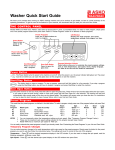
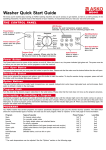
Models W6641 and W661 have ASKO’s state-of-the-art EasyControl™ panel, as illustrated below. To select a wash program, simply press
one of the preset program buttons then press Start. Refer to “Preset Programs” below for a definition of these programs.
Preset Programs
LCD Window
Press one of these buttons to
select a program.
Displays the wash program, spin speed,
temperature settings, and program run time.
Power Button
Press to turn on
power to the
machine.
Power Indicator Light
Glows when the power
is turned on.
Start/Stop Button
Door Open Button
Press to start or
stop a program.
Press to open the
glass door.
Program Selection Controls
These buttons allow you to customize the preset program settings,
such as wash temperatures, spin speed, rinses, display language,
etc. Refer to the Use and Care Guide for instructions.
Power Button
The Power button turns the power to the machine on and off. When the power is on, the power indicator light glows red. The power must be
on before you can open the glass door, set the programs or start the machine.
Start/Stop Button
This button starts or stops a program. To stop a program, press and hold this button for a few seconds. If you stop a program using the Start/
Stop button, you will have to reselect a program and press Start/Stop to restart the machine.
Doo r Open Button
If you need to open the door during a program, press and hold Door Open for a few seconds. The machine will stop and automatically drain
enough water so the door can be opened safely. The program will resume when you close the door. For instructions on how to open the door
manually in case of power failure, refer to your Use and Care Guide.
Preset Programs
This model has four preset programs, as defined in the table below. To select a program, simply press one of the program buttons then press Start.
Preset
Program
P1
P2
P3
P4
NOTES:
Wash Cycle
Light wash
Light wash
Quick wash
Hand wash
(1)
(2)
(3)
Types of Laundry
Normally soiled loads
Normally soiled perma press
Lightly soiled fabrics
Washable silks, nylon, etc.
Wash
Temp (1)
Spin
Speed (1) (2)
140° F
105° F
105° F
85° F
1600
1600
1600
800
rpm
rpm
rpm
rpm
(3)
(3)
(3)
# of
Rinses
Short
Spin
Long
Spin
5
5
3
3
2
2
0
1
yes
yes
yes
no
You can temporarily adjust the temperature settings and spin speed. (See “Temporary Program Changes” below.)
These are the maximum spin speed settings allowed for the program.
Model W640 has a maximum spin speed of 1400 rpm.
You can easily customize the preset programs to best fit your laundry needs. See “Customizing the Preset Programs” in your Use and Care Guide.
Temporary Program Changes
You can make temporary changes to the wash temperature and/or spin speed on the preset programs. Simply press the button for the preset
program you want to use then follow the instructions below. The settings will revert to normal at the end of the program.
Temperature – Press
until the desired temperature displays in the LCD window. (The options are 85°, 105°, 120°, 140°, 160°, 175°, and
205°.) If you also want to change the spin speed, read the following paragraph, otherwise, press Start.
Spin Speed – Press
until the desired spin speed displays in the LCD window then press Start. (The spin speeds advance in 200 rpm
increments.)
QUICK START PROCEDURES
W6641/W6661
1.
2.
3.
4.
Press the Power button to turn on the machine.
Press the Door Open button
to open the inner door and load the wash. (The door will open in a few seconds.)
Check that the door is clear of laundry then close it firmly. (The door won’t shut if it’s slammed.)
Pour the detergent and fabric softener into the proper compartments in the detergent drawer, as illustrated below.
(Don’t put detergent in the prewash compartment unless you plan to prewash.)
5. Close the detergent drawer securely. (Do not slam it closed.)
6. Press the button for the desired program. If desired, change the temperature and/or spin speed.
7. Press Start. The machine will start.
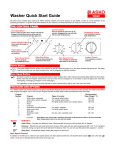
UNDERSTANDING THE LCD WINDOW
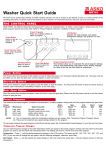
The LCD window is easy to read and understand. It displays the wash program selection along with the wash temperature, spin speed, and
program run time. The illustration below explains what each item on the LCD window is.
Door Open
Displays when you press
the Door Open button.
Temperature
Wash temperature for the
selected program.
rpm
Program
Spin speed for the selected program.
When you press the Power button,
the display toggles between the
program numbers and the wash
program names, (e.g., Normal,
Super quick, etc.)
Program Time
Preset Programs
Start
Displays the program that
is selected/running.
Indicates that you pressed Start
and the program is running.
When you start a program, the total time
the program runs is displayed. As the
program progresses, the time remaining
displays. The program time toggles
between the hours (e.g., 1h) and the
minutes (e.g., 22) .
Stop
Indicates that the program has ended
or that you pressed Stop.
THE DETERGENT DRAWER
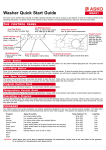
The detergent drawer on ASKO washers automatically dispenses the detergent and
fabric softener at the appropriate times. The drawer is located to the left of the control
panel. Simply pull the drawer out and pour the measured amounts of detergent and
softener into the proper compartments (as illustrated) and close the drawer.
Main wash
detergent
Fabric
softener
If you use liquid detergent, you will need to use the main wash compartment partition
packaged with your washer. (See your Use and Care Guide.)
NOTE: We recommend that you don’t use bleach in your ASKO washer.
The tumbling wash action, temperature control options and
extended wash times are sufficient to remove most stains.
Prewash detergent
The detergent drawer is equipped with an optional
child safety catch. (See your Use and Care Guide.)
DETERGENT AND FABRIC SOFTENER AMOUNTS
Because ASKO washers use less water than conventional top-loading washers, you need less detergent and fabric softener. We recommend
that you use a low-sudsing powder detergent only, preferably a high-efficiency (HE) detergent designed specifically for front-loading washers.
(Liquid detergents tend to suds more, which make them more difficult to rinse out.)
Detergent – The amount of detergent needed varies, depending on the detergent you use. For high-efficiency detergent specifically for
front-loading washers, you should use the amounts recommended by the manufacturer. For regular laundry detergent, 1 to 3 tablespoons of
detergent is all you need for a normal wash load. More heavily soiled items, however, may need slightly more detergent. Also, the amount
of detergent needed can vary due to differences in water hardness. (Refer to your Use and Care Guide for more details.) If you choose to use
a liquid detergent, start out with a very small amount, such as one or two tablespoons.
Fabric Softener – We recommend that you use only 2 tablespoons of fabric softener. If more softening is desired, try using slightly more
with the next load.
Refer to your Use and Care Guide for additional programming and operational information as well as care and cleaning instructions.
Art. no. 80 646 41 Rev. 02