1
Acer Altos R720 Series
User’s Guide
Copyright © 2006 Acer Incorporated
All Rights Reserved.
Acer Altos R720 Series
User’s Guide
Changes may be made periodically to the information in this publication without obligation
to notify any person of such revision or changes. Such changes will be incorporated in new
editions of this manual or supplementary documents and publications. This company makes
no representations or warranties, either expressed or implied, with respect to the contents
hereof and specifically disclaims the implied warranties of merchantability or fitness for a
particular purpose.
Record the model number, serial number, purchase date, and place of purchase information in
the space provided below. The serial number and model number are recorded on the label
affixed to your server. All correspondence concerning your unit should include the serial
number, model number, and purchase information.
No part of this publication may be reproduced, stored in a retrieval system, or transmitted, in
any form or by any means, electronic, mechanical, photocopy, recording, or otherwise,
without the prior written permission of Acer Incorporated.
Acer Altos R720
Model Name :
Part Number:
Purchase Date:
Place of Purchase:
Acer and the Acer logo are registered trademarks of Acer Inc. Other company’s product
names or trademarks are used herein for identification purposes only and belong to their
respective companies.
iii
Notices
FCC notice
Class A equipment
This device has been tested and found to comply with the limits for a Class A
digital device pursuant to Part 15 of the FCC Rules. These limits are designed to
provide reasonable protection against harmful interference when the
equipment is operated in a commercial environment. This equipment
generates, uses, and can radiate radio frequency energy, and if not installed
and used in accordance with the instructions, may cause harmful interference to
radio communications. Operation of this equipment in a residential area is
likely to cause harmful interference, in which case the user will be required to
correct the interference at personal expense.
However, there is no guarantee that interference will not occur in a particular
installation. If this device does cause harmful interference to radio or television
reception, which can be determined by turning the device off and on, the user
is encouraged to try to correct the interference by one or more of the following
measures:
•
Reorient or relocate the receiving antenna
•
Increase the separation between the device and receiver
•
Connect the device into an outlet on a circuit different from that to which
the receiver is connected
•
Consult the dealer or an experienced radio/television technician for help
Notice: Shielded cables
All connections to other computing devices must be made using shielded cables
to maintain compliance with FCC regulations.
Notice: Peripheral devices
Only peripherals (input/output devices, terminals, printers, etc.) certified to
comply with the Class A limits may be attached to this equipment. Operation
with noncertified peripherals is likely to result in interference to radio and TV
reception.
iv
Caution! Changes or modifications not expressly approved by the
manufacturer could void the user’s authority, which is granted by
the Federal Communications Commission, to operate this server.
Use conditions
This part complies with Part 15 of the FCC Rules. Operation is subject to the
following two conditions: (1) this device may not cause harmful interference,
and (2) this device must accept any interference received, including interference
that may cause undesired operation.
Notice Canadian users
This device does not exceed the Class A limits for radio noise emissions from
digital apparatus set out in the interference-causing equipment standard
entitled “Digital Apparatus” ICES-003 of the Canadian Deparmment of
Communications.
Laser compliance statement
The DVD-ROM drive in this server is a laser product. The optical drive’s
classification label (shown below) is located on the drive.
CLASS 1 LASER PRODUCT
CAUTION: INVISIBLE LASER RADIATION WHEN OPEN. AVOID EXPOSURE TO
BEAM.
v
Important safety instructions
Read these instructions carefully. Save these instructions for future reference.
1
Follow all warnings and instructions marked on the product.
2
Unplug this product from the wall outlet before cleaning. Do not use
liquid cleaners or aerosol cleaners. Use a damp cloth for cleaning.
3
Do not use this product near water.
4
Do not place this product on an unstable cart, stand, or table. The product
may fall, causing serious damage to the product.
5
Slots and openings on the back or bottom side of the chassis are provided
for ventilation; to ensure reliable operation of the product and to protect
it from overheating, these openings must not be blocked or covered. The
openings should never be blocked by placing the product on a bed, sofa,
rug, or other similar surface. This product should never be placed near or
over a radiator or heat register, or in a built-in installation unless proper
ventilation is provided.
6
This product should be operated from the type of power indicated on the
marking label. If you are not sure of the type of power available, consult
your dealer or local power company.
7
Do not allow anything to rest on the power cord. Do not locate this
product where persons will walk on the cord.
8
If an extension cord is used with this product, make sure that the total
ampere rating of the equipment plugged into the extension cord does not
exceed the extension cord ampere rating. Also, make sure that the total
rating of all products plugged into the wall outlet does not exceed the fuse
rating.
9
Never push objects of any kind into this product through the chassis slots as
they may touch dangerous voltage points or short out parts that could
result in a fire or electric shock. Never spill liquid of any kind on the
product.
10
Do not attempt to service this product yourself, as opening or removing
covers may expose you to dangerous voltage points or other risks. Refer all
servicing to qualified service personnel.
11
Unplug this product from the wall outlet and refer servicing to qualified
service personnel under the following conditions:
a
When the power cord or plug is damaged or frayed
b
If liquid has been spilled on the product
c
If the product has been exposed to rain or water
vi
d
If the product does not operate normally when the operating
instructions are followed. Adjust only those controls that are covered
by the operating instructions since improper adjustment of other
controls may result in damage and will often require extensive work
by a qualified technician to restore the product to normal condition.
e
If the product has been dropped or the chassis has been damaged
f
If the product exhibits a distinct change in performance, indicating a
need for service.
12
Replace the battery with the same type as the product's battery we
recommend. Use of another battery type may present a risk of fire or
explosion. Refer battery replacement to a qualified service technician.
13
Warning! Batteries may explode if not handled properly. Do not
disassemble or dispose of them in fire. Keep them away from children and
dispose of used batteries promptly.
iii
iii
iv
v
1 System tour
1
Features summary
External and internal structure
Front bezel
Front panel
Rear panel
Internal components
System boards
Mainboard
Backplane and mid-plane board
System diagnostic LEDs
System jumpers
2 System setup
Setting up the system
Pre-installation requirements
Connecting peripherals
Turning on the system
Power-on problems
Configuring the system OS
Turning off the system
3 System upgrade
Installation precautions
ESD precautions
Pre-installation instructions
Post-installation instructions
Opening the server
Unlocking the front bezel
Removing and installing the front bezel
Removing and installing the top cover
Removing and installing the CPU air duct
Removing the CPU air dam
Removing and installing the air baffles
Removing and installing storage devices
Removing and installing a hard disk drive
3
7
7
8
13
16
17
17
19
22
23
25
27
27
28
29
30
31
32
33
35
35
35
36
37
37
38
40
42
44
45
48
48
Contents
Notices
FCC notice
Laser compliance statement
Important safety instructions
viii
Removing and installing a slim-line optical drive
Installing and removing a FDD
Installing a tape drive
Installing a sixth HDD
Removing and installing a PCI card
Removing and installing the PCI riser assembly
Removing and installing the PCI riser board
Removing and installing a PCI card
Replacing a system fan
Upgrading the CPU
CPU upgrading guidelines
Upgrading the system memory
Memory module installation guidelines
DDR2 module population order
Installing and removing a power supply
Removing and installing an ARMC/3 module
Removing and installing the SAS
mid-plane board
Removing and installing the SAS/SATA backplane board
Configuring the integrated SAS hardware RAID
components
Removing and installing the RAID activation key
Removing and installing the RAID cache
Removing and installing the RAID BBU
51
56
60
62
65
65
67
69
72
74
74
77
77
78
81
84
87
89
91
91
92
94
4 BIOS setup
97
BIOS setup
Entering BIOS setup
Using the BIOS menus
Main
Advanced
Security
Server Management
Boot Options
Boot Manager
Error Manager
Exit
Upgrading the BIOS
99
100
102
102
104
119
121
125
128
129
130
132
5 Troubleshooting
Troubleshooting
Resetting the system
Problems following initial system installation
133
135
135
135
ix
First steps checklist
Hardware diagnostic testing
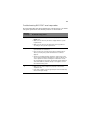
Verifying proper operation of key system lights
Specific problems and corrective actions
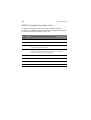
Error beep codes
BIOS POST error beep codes
ARMC/3 module error beep codes
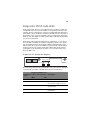
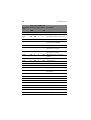
Diagnostic POST code LEDs
136
137
137
138
146
146
148
149
Appendix A: Acer Altos R720
rack installation guide
155
Setting up the system rack
System rack installation
Vertical mounting hole pattern
Installing the system into the rack
157
159
160
161
Appendix B: SAS hardware RAID
configuration
Configuring the integrated SAS hardware RAID
Index
169
171
173
x
1 System tour
The Acer Altos R720 is a 2U rack optimized server
that features single or dual-core Intel Xeon
processors, fully buffered DIMMs, integrated SAS
RAID, standard-based server management, and
server-oriented embedded I/O. Remote
monitoring and management functions are also
included, providing a new level of user tools for
server administration.
This chapter provides a brief overview of the
system hardware, including illustrations with
component identification.
3
Features summary
Listed below are the system’s key features:
Processor
•
Supports two dual-core Intel® Xeon™ processors 5000 sequence
with 2 x 2 MB L2 cache and 1066 MHz or 1333 MHz front side bus
speed
•
Extended Memory 64-bit Technology
•
Enhanced Intel SpeedStep Technology
•
Execute Disable Bit Technology
Chipset
•
Intel 5000P Memory Controller Hub (north bridge)
•
Intel ESB2-E (Enterprise South Bridge) I/O Controller (south bridge)
Memory
•
Quad memory channels
•
Eight DDR2 FBDIMM (fully buffered DIMM) slots
•
Supports 512 MB, 1 GB, and 2 GB DDR2-533/667 MHz FBDIMM
•
Memory reliability, availability, serviceability, usability, and
manageability (RASUM) features
•
•
Memory error detection and correction
•
Memory scrubbing
•
Retry on correctable errors
•
Memory built-in self test
x4 SDDC (Single Device Data Correction) for memory error
detection and correction
Media storage
•
Slim-line IDE CD-ROM drive
•
Slim-line 3.5-inch floppy disk drive (optional)
•
Supports one to six hot-plug SAS/SATA hard disk drives
•
Sixth drive bay can be configured to support either a:
- Hot-plug SAS/SATA hard disk drive
4
1 System tour
- 3.5-inch half-height tape drive
SAS controller
•
LSI SAS 1068 3Gb/s SAS controller
•
Supports integrated SAS RAID
•
Supports RAID levels 0, 1, 5, 10, and 50
•
Requires RAID activation key
•
Requires DDR2-400 registered ECC DIMM (mini DIMM) for RAID
cache
•
Supports RAID BBU (Battery Backup Unit). Available as an upgrade
option.
Note: After installing the RAID activation key and RAID cache
DIMM, the system BIOS setup allows you to enable the hardware
RAID solution. For detailed installation instructions, see
“Configuring the integrated SAS hardware RAID components”
section on page 91.
You can also install a RAID BBU to improve fault tolerance by
enhance by protecting data in the RAID cache in the event of
power failure. For more information on how to install a RAID BBU,
see “To install the RAID BBU” section on page 95.
Networking
•
Intel 82563EB Gigabit controller with dual ports
•
Supports Intel I/O Acceleration Technology
PCI I/O
•
Low profile riser slot
•
•
Two x8 PCI Express slots (with x4 throughput)
Full height riser slot
•
Option 1: One 64-bits/133 MHz/3.3 V PCI-X slot +
Two x8 PCI Express slots (with x4 throughput)
•
Option 2: Three 64-bits/133 MHz/3.3 V PCI-X slots
•
Option 3: Three 64-bits/66 MHz/100 MHz/133 MHz PCI-X slots
5
Graphic interface
•
ATI® ES1000 video controller with 16MB DDR SDRAM
Baseboard Management Controller
•
Integrated BMC
•
IPMI (Intelligent Platform Management Interface) 2.0 compliant
•
Supports ARMC/3 (Acer Remote Management Card/3) (optional)
Power supply
•
Supports one to two 750-watts hot-swap (1+1) redundant power
supply modules with dual AC line cord
System fan
•
Supports one to six hot-swap redundant system fans
I/O ports
•
•
Front
•
VGA/monitor port
•
USB 2.0 port
Rear
•
PS/2 keyboard port
•
PS/2 mouse port
•
Serial port (RJ-45)
•
Two Gigabit (10/100/1000 Mbps) LAN ports (RJ-45)
•
Server management port (10/100 Mbps) (RJ-45)1
•
VGA/monitor port
•
Two USB 2.0 ports
1 Reserved for remote management of server. This requires installation of an ARMC/3
module.
6
1 System tour
Operating system and utilities
•
Operating system options:
•
Microsoft® Windows® Server 2003, x64 edition
•
Microsoft Windows Server 2003
•
Microsoft Windows 2000 Advanced Server
•
Red Hat Enterprise Linux 4.0
•
Red Hat Enterprise Linux 4.0, EM64T
•
SUSE® Linux Enterprise Server 9.0
•
SUSE Linux Enterprise Server 9.0, EM64T
•
ASM (Acer Server Manager) 2
•
Easy Build 2
2 For more information on how to install and use ASM and Easy Build utilities, refer
to the manual on the EasyBUILD DVD.
7
External and internal structure
Front bezel
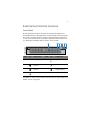
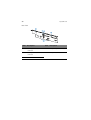
The front bezel provides an interface for system management via
status LED indicators. The light pipes on the backside of the front bezel
allow the system status LEDs to be monitored when the front bezel is
closed. A front bezel lock is provided to prevent unauthorized access
to hard drives, peripheral devices and the control panel.
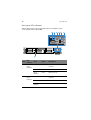
Item
Icon
Component
Item
Icon
Component
A
Security keylock
E
Status/fault indicator
B
LAN2 status
indicator
F
System ID indicator
C
LAN1 status
indicator
G
HDD (hard disk drive)
activity indicator
D
Power indicator
For details on how to remove the front bezel, see “To remove the front
bezel” section on page 38.
8
1 System tour
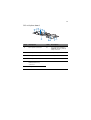
Front panel
Item
Icon
Component
Item
Icon
Component
A
Slim-line optical
drive or FDD bay
I
HDD activity
indicator
B
Tape drive filler
panel
J
System ID indicator
C
Tape drive or Sixth
hot-plug HDD bay
K
System ID button
D
VGA/monitor port
L
Reset button
E
LAN2 status
indicator
M
USB 2.0 ports
F
LAN1 status
indicator
N
NMI button
G
Power indicator
O
Power button
H
Status/fault
indicator
P
Hot-plug HDD bay
* The dual purpose drive bay is covered by two filler panels. To configure the drive bay to
support a sixth hot-plug SAS HDD see page 62 or a tape drive go to page 60.
9
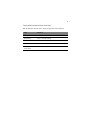
Front panel control button functions
Below table lists the functions of the front panel control buttons.
Item
Function
NMI button
Puts the server in a halt-state for diagnostic purposes.
Reset button
Press to reset the system.
Power button
Press to turn the system power on and off.
System ID button
Press to turn the system ID LED on and off.
Hot-plug HDD
carrier latch
Press to release the carrier lever.
10
1 System tour
Front panel LED indicators
The illustration below shows the LED indicators available on the
control panel and hot-plug HDD.
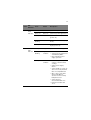
Item
A
B
LED
indicator
LAN2
status
indicator
LAN1
status
indicator
Color
Status
Description
Green, on
Link
Link between system and
network.
Green, off
Idle
Green,
blinking
Active
Network access
Green, on
Link
Link between system and
network.
Green, off
Idle
Green,
blinking
Active
Network access
11
Item
C
D
LED
indicator
Power/
Sleep
indicator
Status/
fault
indicator
Color
Status
Description
Green, off
Power off
System is not powered on.
Green, on
Power on
System has power applied to it.
Green, off
S4/S5
System is in ACPI S4 or S5 state
(power off).
Green,
blinking
S1
System is in ACPI S1 state (sleep
mode).
Green, on
S0
System is in ACPI S0 state
(legacy power on).
Green, on
Ready
System booted and ready.
Green,
blinking
Degraded
condition
• CPU disabled
• System memory mapped out
or disabled by BIOS.
• Non-redundant power
supply operation.
Amber, on
Critical
condition
• Critical temperature,
voltage, or fan threshold
crossing.
• Critical power supply
failure.
• System unable to power up
due to incorrectly installed
CPU or incompatible CPU.
• One or more of the drive
status fault LEDs are
asserted on the hot-swap
backplane board.
• System memory
uncorrectable ECC error.
• Fatal uncorrectable bus
errors.
12
Item
D
1 System tour
LED
indicator
Status/
fault
indicator
(cont.)
Color
Status
Description
Amber,
blinking
Noncritical
condition
• Non-critical temperature,
voltage, or fan threshold
crossing.
• Chassis intrusion
• Change in system memory
configuration.
• Change in CPU
configuration.
E
F
G
HDD
activity
indicator
System ID
indicator
Hot-plug
HDD
activity
indicator
Green,
blinking
HDD is active.
Green, off
No HDD activity.
Blue, on
System identification is active.
Blue, off
System identification is
disabled.
Amber,
flashing
HDD is active.
Amber +
Green,
alternate
flashing
• HDD is powered on and
rebuilding RAID.
• HDD is powered on and is in
a fault condition.
Amber,
flashing
HDD is not powered on and is
in a fault condition.
Off
• No HDD is installed.
• HDD is initiated but has no
current activity.
13
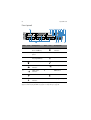
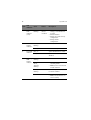
Rear panel
Item
Component
Item
Component
A
Low profile PCI expansion
slots
G
Diagnostic POST (power-on
self-test) code indicators
B
Full height PCI expansion
slots
H
USB 2.0 ports
Hot-swap redundant power
I
VGA/monitor port
C
supply module1
D
Hot-swap redundant power
supply module AC input
connector
J
Gigabit LAN ports (10/100/
1000 Mbps)
E
Power supply module bay
filler panel
K
DB9 serial port A
F
Server management port
(10/100 Mbps)
L
PS2 keyboard and mouse
ports
(RJ-45) cover 2
1 The system power can be configured to support non-redundant (1+0) configuration.
2 Reserved for remote management of server. This requires the installation of an ARMC/3
module.
14
1 System tour
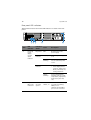
Rear panel LED indicators
The illustration below shows the LED indicators located on the rear
panel.
Item
A
LED
indicator
Function/
Status
Color
Description
Hot-swap
power
supply
module
status
indicator
No power
Off
No AC power to the
power supply.
AC OK
indicator
Green, on
System has power applied
to it.
Green,
blinking
AC power cord is plugged
into an active AC power
source.
Amber
• No AC power.
Fault
indicator
B
Diagnostic
POST code
indicators*
Troubleshooting
system
• Power supply critical
event (i.e, failure, fuse
blown, fan failed, etc.)
causing shutdown
Amber,
blinking
Power supply displays
warning event (i.e., high
temperature, high power,
high current, slow fan,
etc.)
Green/Red/
Amber, on
Assists in troubleshooting
a system hang during
POST process.
Identifies the last POST
process to be executed.
15
Item
C
D
LED
indicator
Function/
Status
Color
Description
System ID
indicator
ID
Blue, on
System identification is
active.
Blue, off
System identification is
disabled.
Ready
Green, on
System booted and ready.
Degraded
Green,
blinking
CPU or DIMM disabled.
Critical
condition
Amber, on
Critical power supply,
blower, voltage, or
temperature failure.
Noncritical
condition
Amber,
blinking
• Redundant power
supply or blower
failure.
System
status/fault
indicator
• Non-critical blower,
voltage, and
temperature failure.
E
LAN port
indicators
(left)
(right)
Speed
Status
Green/
Amber, Off
10 Mbps connection
Green, On
100 Mbps connection
Amber, On
1000 Mbps connection
Green, On
Network link is detected.
Green, Off
No network connection.
Green,
Blinking
Transmit or receive
activity.
* For more information on how to troubleshoot during a system hang, refer to the
Diagnostic POST Code table on page 149.
16
1 System tour
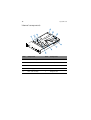
Internal components
Item
Component
Item
Component
A
SAS/SATA backplane board
F
Mainboard
B
Air baffles
G
Memory modules
C
Power distribution module
H
CPU air duct
D
Power supply module
I
System fans
E
Riser card assembly
J
Bridge board
17
System boards
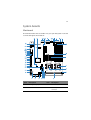
Mainboard
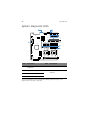
The mainboard becomes accessible once you open the system. It should
look like the figure shown below.
Item
Description
Item
Description
A
Rolling BIOS jumper
AA
USB connector
B
Intel ESB2-E I/O Controller
BB
Control panel board
connector
18
1 System tour
Item
Description
Item
Description
C
Diagnostic POST code
indicators
CC
SATA 0 connector
D
Full height riser slot
DD
SATA 1 connector
E
Low profile riser slot
EE
SATA 2 connector
F
USB ports
FF
SATA 3 connector
G
VGA/Monitor port
GG
SATA 4 connector
H
System ID indicator
HH
SATA 5 connector
I
System status indicator
II
Integrated SATA hardware
RAID activation key
connector
J
Gigabit LAN1 and LAN 2
ports
JJ
ARMC/3 module connector
K
Serial B port
KK
System recovery settings
jumper block
L
PS2 mouse (top) and
keyboard (bottom) port
LL
Chassis intrusion connector
M
Serial B configuration
jumper
MM
3-pin IPMB (Intelligent
Platform Management Bus)
header
N
DIMM slots
NN
4-in LCP (Link Control
Protocol)/AUX (Auxiliary)
IPMB header
O
Intel 5000P MCH
OO
Serial A header
P
CPU socket 1
PP
NIC module connector
Q
CPU socket 2
R
CPU fan 1 connector
S
CPU voltage regulator
T
CPU fan 2 connector
19
Item
Description
U
Bridge board connector
V
IDE optical drive connector
W
+12 V CPU power connector
X
AC power connector
Y
Battery
Z
Power supply signal
connector
Item
Description
* Reserved for remote management of server. This requires installation of an ARMC/3
module.
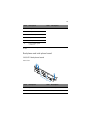
Backplane and mid-plane board
SAS/SATA backplane board
Front view
Item
Description
Item
Description
A
Optical drive connector
C
Control panel connector
B
USB connector
D
SAS/SATA connectors
20
1 System tour
Rear view
Item
Description
Item
Description
A
Flex bay power cable
connector
D
Backplane power connector
B
Flex bay data cable
connector
E
Mid-plane connectors
C
IDE connector
21
SAS mid-plane board
Item
Description
Item
Description
A
Fan 1 power connector
G
Integrated SAS hardware
RAID BBU (battery backup
unit) connector
B
Fan 2 power connector
H
Mid-plane power connector
C
Fan 3 power connector
I
Fan 6 power connector
D
Fan 4 power connector
J
Fan 5 power connector
E
Integrated SAS hardware
RAID activation key
connector
K
Thumbscrew
F
Bridge board connector
22
1 System tour
System diagnostic LEDs
Item
Description
Item
Description
A
Diagnostic POST code
indicators*
E, F
CPU error indicator
B
System ID indicator
G
5-volt standby present
indicator
C
System status indicator
D
DIMM error indicator
* For more information on how to troubleshoot during a system hang, refer to the
Diagnostic POST code table on page 149.
23
System jumpers
Jumper name
Settings
Function
J1D2
1-2 (default)
Password enabled
Password clear
2-3
Password disabled/cleared
J1D3
1-2 (default)
BIOS clear CMOS
Clear CMOS
2-3
Forced CMOS clear
J3H1
BIOS select
1-2
2-3 (default)
Force lower bank
Normal operation
J1D1
BMC force update mode
1-2 (default)
2-3
BMC force update disabled
BMC force update enabled
J8A3
1-2
DCD (Data Carrier Detect) to DTR
(Data Terminal Ready) signal
3-4 (default)
DSR (Data Set Ready) to DTR signal
Serial B port (RJ-45)
24
1 System tour
2 System setup
This chapter gives you instructions on how to set up
the system. Procedures on how to connect
peripherals are also explained.
27
Setting up the system
Pre-installation requirements
Selecting a site
Before unpacking and installing the system, select a suitable site for
the system for maximum efficiency. Consider the following factors
when choosing a site for the system:
•
Near a grounded power outlet
•
Clean and dust-free
•
Stable surface free from vibration
•
Well-ventilated and away from sources of heat
•
Secluded from electromagnetic fields produced by electrical
devices such as air conditioners, radio and TV transmitters, etc.
Checking the package contents
Check the following items from the package:
•
Acer Altos R720 system
•
Acer EasyBUILDTM
•
Acer Altos R720 accessory box
If any of the above items are damaged or missing, contact your dealer
immediately.
Save the boxes and packing materials for future use.
28
2 System setup
Connecting peripherals
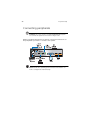
Caution! The server operates on 100-127/200-240 VAC only. Do
not connect the system to an incorrect voltage source.
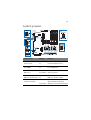
Refer to the illustration below for specific connection instructions on
the peripherals you want to connect to the system.
Note: Consult the operating system manual for information on
how to configure the network setup.
29
Turning on the system
After making sure that you have properly set up the system and
connected all the required cables, you can now power on the system.
Note: After plugging in the AC power cord, allow system to warm
up for 30 seconds or until the Status/fault LED on the control
panel stops blinking before turning on the system. Refer to “Front
panel LED indicators” on page 10 for the location of the Status/
fault LED.
To power on the system:
1
If the bezel is locked, unlock it. See “Unlocking the front bezel”
section on page 37.
2
Remove the front bezel. See “To remove the front bezel”section
on page 38.
3
Press the power button on the control panel.
The system starts up and displays a welcome message on the monitor.
After that, a series of POST messages appears.
Note: If the system does not turn on or boot after pressing the
power button, go to the next section for the possible causes of the
boot failure.
30
2 System setup
If the POST finds any problems, the system will emit a beep code
followed by an error message displayed on the monitor. Aside from the
POST messages, you can determine if the system is in good condition
by checking if the following occurred:
•
Power indicator on the front panel lights up (green)
•
Num Lock, Caps Lock, and Scroll Lock indicators on the keyboard
light up
Power-on problems
If the system does not boot after you have applied power, check the
following factors that might have caused the boot failure.
•
The external power cord may be loosely connected.
Check the power cord connection from the power source to the
power supply module AC input connector on the rear panel. Make
sure that the power cord is properly connected to the power
source and to the AC input connector.
•
No power comes from the grounded power outlet.
Have an electrician check your power outlet.
•
Loose or improperly connected internal power cables.
Check the internal cable connections. If you are not confident to
perform this step, ask a qualified technician to assist you.
Warning! Make sure all power cords are disconnected from
the electrical outlet before performing this task.
•
The ARMC/3 module is not installed in the server, or not properly
seated.
Check the ARMC/3 module connection. Make sure the ARMC/3
module is properly connected to the mainboard. For more
information on how to install the ARMC/3 module, see “To install
an ARMC/3 module” section on page 85.
Note: If you have gone through the preceding actions and the
system still fails to boot, ask your dealer or a qualified technician
for assistance.
31
Configuring the system OS
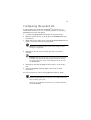
The Altos R720 comes with Acer EasyBUILDTM that allows you to
conveniently install your choice of operating system. To start using
EasyBUILD, follow the steps below.
1
Locate the EasyBUILD DVD included in the system package.
2
With the system turned on, gently press the CD-ROM drive Stop/
Eject button.
3
When the disc tray slides open, insert the EasyBUILD DVD with the
label or title side of the disc facing upward.
Note: When handling the disc, hold it by the edges to avoid
smudges or fingerprints.
4
Gently press the disc down to make sure that it is properly
inserted.
Caution! While pressing the disc, be careful not to bend the disc
tray. Make sure that the disc is properly inserted before closing
the disc tray. Improper insertion may damage both the disc and
the CD-ROM drive.
5
Gently press the drive Stop/Eject button again to close the disc
tray.
6
The Acer EasyBUILD sequence begins. Follow all onscreen
instructions.
For more information, refer to the EasyBUILD Installation guide.
Note: EasyBUILD DVD supports Windows Server 2003 and Red Hat
Linux operating system only.
Windows or Linux OS CD is needed when you install the OS with
the EasyBUILD DVD.
32
2 System setup
Turning off the system
There are two ways by which you can turn off the server. These include:
•
If you are using a Windows OS on your server, you can turn off the
server by clicking the Start button, point to Shut Down..., select
Shut down from the drop-down window then click on OK. You
can then turn off all peripherals connected to your server.
If you are using another OS, refer to the OS documentation for
instructions on how to shut down the OS.
•
If you cannot shut down the server, press the power button for at
least four seconds. Quickly pressing the button may put the server
in a Suspend mode only.
3 System upgrade
This chapter discusses the precautionary measures
and installation procedures you need to know to
upgrade the system.
35
Installation precautions
Before you install any server component, we recommend that you read
the following sections. These sections contain important ESD
precautions along with pre-installation and post-installation
instructions.
ESD precautions
Electrostatic discharge (ESD) can damage the processor, disk drives,
expansion boards, motherboard, memory modules and other server
components. Always observe the following precautions before you
install a server component:
1
Do not remove a component from its protective packaging until
you are ready to install it.
2
Wear a wrist grounding strap and attach it to a metal part of the
server before handling components. If a wrist strap is not
available, maintain contact with the server throughout any
procedure requiring ESD protection.
Pre-installation instructions
Perform the steps below before you open the server or before your
remove or replace any component:
1
Turn off the system and all the peripherals connected to it.
2
Unplug all cables from the power outlets.
3
Place the system unit on a flat, stable surface.
4
Open the system according to the instructions on page 37.
5
Follow the ESD precautions described in this section when
handling a server component.
6
Remove any hardware structure or cable that block access to the
component you must replace or upgrade.
See the following sections for specific installation instructions on the
component you want to install.
36
3 System upgrade
Warning! Failure to properly turn off the server before you
start installing components may cause serious damage. Do
not attempt the procedures described in the following
sections unless you are a qualified service technician.
Post-installation instructions
Perform the steps below after installing a server component.
1
See to it that all components are installed according to the
described step-by-step instructions.
2
Reinstall all components or cable that have been previously
removed.
3
Reinstall the top cover.
4
Reinstall the front bezel.
5
Connect the necessary cables.
6
Turn on the system.
37
Opening the server
Caution! Before you proceed, make sure that you have turned
off the system and all peripherals connected to it. Read the “Preinstallation instructions” on page 35.
You need to open the server before you can install additional
components. The front bezel and top cover are removable to allow
access to the system’s internal components. Refer to the following
sections for instructions.
Unlocking the front bezel
A security lock secures the front bezel to protect the system unit from
unauthorized access.
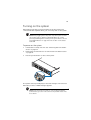
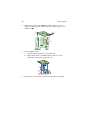
Insert the key into the lock and turn it clockwise.
38
3 System upgrade
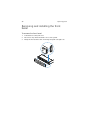
Removing and installing the front
bezel
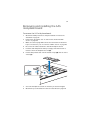
To remove the front bezel:
1
If the bezel is locked, unlock it.
2
Disconnect any cables attached to the control panel.
3
Grasp the front bezel at the outer edge and pull it straight out.
39
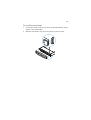
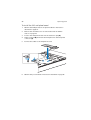
To install the front bezel:
1
Line up the center notch on both ends of the bezel with the center
guide on the rack handles.
2
Slide the front bezel onto the chassis until it clicks into place.
40
3 System upgrade
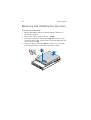
Removing and installing the top cover
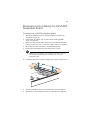
To remove the top cover:
1
Observe the ESD precautions and pre-installation instructions
described on page 35.
2
Remove the screw located on the top cover (A).
3
Press and hold the blue release button (B), then slide the cover
toward the back of the chassis until the cover disengage with the
slots on the chassis (C).
4
Insert your finger in the notch (D), then lift the top cover away
from the server and put it aside for reinstallation later.
41
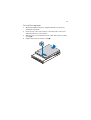
To install the top cover:
1
Observe the ESD precautions and pre-installation instructions
described on page 35.
2
Place the top cover on the chassis so that the tabs on the cover
align with the slots on the chassis .
3
Slide the top cover toward the front of the chassis until it is fully
closed (A).
4
Replace the screw on the top cover (B).
42
3 System upgrade
Removing and installing the CPU air duct
Caution! Always operate your server with the CPU air duct
installed to ensure reliable and continued operation.
To remove the CPU air duct:
You will need to remove the CPU air duct to perform the following
procedures:
•
Removing and installing a CPU air dam
•
Removing and installing the PCI riser assembly
•
Removing and installing the PCI riser board
•
Removing and installing the PCI card
•
Removing and installing a CPU
•
Removing and installing a memory module
•
Removing and installing an ARMC/3 module
1
Observe the ESD precautions and pre-installation instructions
described on page 35.
2
Lift the CPU air duct from the chassis.
43
To install the CPU air duct:
1
Observe the ESD precautions and pre-installation instructions
described on page 35.
2
Place the CPU air duct over the two processor sockets. The front
edge of the air duct should touch the front fan module and the
top of the installed air duct should be flush with the top of the
power supply.
Caution! Do not pinch or unplug cables that may be near or
under the air duct.
3
Observe the post-installation instructions described on page 36.
44
3 System upgrade
Removing the CPU air dam
To remove the CPU air dam:
Important: Do not remove the CPU air dam if only one processor
is installed. Do not remove the memory air deflector. If two
processors are installed, remove the CPU air dam. If installing fullheight DIMMs, remove the memory air deflector.
1
Observe the ESD precautions and pre-installation instructions
described on page 35.
2
Turn the CPU air duct over (A).
3
Slide the air dam’s slotted holes off the duct pins, then gently pull
the air dam from the air duct (B).
Memory air deflector
4
Store it in a protective packaging.
45
Removing and installing the air baffles
Caution! Always operate your server with both the air baffles
installed to ensure reliable and continued operation.
Your server is equipped with two air baffle, one small air baffle
attached to the drive cage area and one large air baffle attached
between the backplane board and the power supply. You will need to
remove the smaller air baffle to perform the following procedures.
•
Removing and installing the SAS mid-plane board
•
Removing and installing the SAS/SATA backplane board
•
Configuring the integrated SAS hardware RAID components
To remove the small air baffle:
1
Observe the ESD precautions and pre-installation instructions
described on page 35.
2
Detach the air baffle from the chassis.
46
3 System upgrade
To remove the large air baffle:
1
Observe the ESD precautions and pre-installation instructions
described on page 35.
2
Note how the cables are routed over and under the air baffle. You
will need to re-route these cables later.
3
Disengage the air baffle and pull it out of the chassis.
To install the small air baffle:
1
Observe the ESD precautions and pre-installation instructions
described on page 35.
2
Engage the air baffle into its chassis slot.
3
Observe the post-installation instructions described on page 36.
47
To install the large air baffle
1
Observe the ESD precautions and pre-installation instructions
described on page 35.
2
Lower the air baffle into the chassis and snap it into the
mainboard standoff.
3
While setting the baffle into place, route the cables beneath it
appropriately.
4
Observe the post-installation instructions described on page 36.
48
3 System upgrade
Removing and installing storage
devices
The system supports 3.5-inch and 5.25-inch storage devices. The system
comes pre-installed with one hot-plug SAS hard disk drive and an
optical drive. An optional floppy drive, tape drive, or sixth hot-plug
HDD can also be added to the server.
Caution! To maintain proper system cooling, filler panels must be
installed if a device is not replaced.
Removing and installing a hard disk drive
The server supports up to five hot-plug SAS drives (six with an optional
sixth drive board). Use only Acer-qualified SAS HDDs. To purchase a SAS
HDD, contact your local Acer representative.
Caution! To ensure proper airflow and server cooling, all drive
bays must contain either a carrier with a hard drive installed in it
or a hard disk carrier cover.
Determining drive status
Each HDD carrier features a bi-color LED indicator to display the hard
drive status. If you are replacing a failed HDD, determine which drive
has failed by checking the drive status LED. For more information on
how to determine the drive status, refer to “Front panel LED
indicators” on page 10.
To remove a HDD:
1
Observe the ESD precautions described on page 35.
2
If you are removing a failed HDD, determine which drive has failed
by checking the drive status LED.
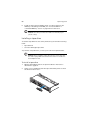
3
Press the green HDD carrier latch to open the drive (A).
49
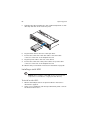
4
Pull out the lever and slide the carrier from the chassis (B).
5
Place the HDD carrier on a clean, static-free work surface.
6
If you are replacing a hard disk, remove the four screws that secure
the hard disk to the HDD carrier, then remove the disk from the
HDD carrier.
Keep the screws for later HDD installation.
To install a HDD:
Note: To puchase a HDD carrier, contact your local Acer
representative.
1
Perform steps 1 to 4 listed on the “To remove a HDD” section on
page 48.
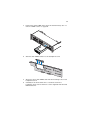
2
Remove the four screws that secure the air baffle to the HDD
carrier (A).
3
Remove the air baffle from the HDD carrier (B).
4
Save the air baffle and screws for later use.
5
Set any jumpers and/or switches on the drive according to the
drive manufacturer’s instructions.
50
3 System upgrade
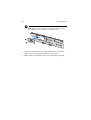
6
Install a hard disk on the HDD carrier, then secure it with the four
screws (A) that came with the HDD carrier (B).
7
With the lever still extended, slide the HDD carrier all the way into
the drive bay (A). Do not push on the lever until it begins to close
by itself.
8
When the lever begins to close by itself, push on it to lock the drive
assembly into place (B).
51
Removing and installing a slim-line optical drive
Note: The slim-line optical drive is not hot-swappable. Before
removing or replacing the drive, you must first power down the
server, unplug the AC power cord from the system, and turn off all
peripherals devices connected to the server.
Caution! To maintain proper system cooling, a filler panel must
be installed if a device is not installed in the bay.
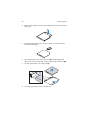
To remove a slim-line optical drive:
1
Observe the ESD precautions and pre-installation instructions
described on page 35.
2
Press the blue release lever to unlock the optical drive tray (A) and
remove the optical drive tray assembly from the server (B).
3
Slide the optical drive tray out through the front of the server (C).
52
4
3 System upgrade
Remove the screw that secures the interposer board to the optical
drive tray.
A
B
5
Pull the interposer board to remove it, then store the board in a
protective packaging.
A
6
Press downward on the side of the tray (A) and disengage the
drive from the two metal tabs on the opposite side of the tray (B).
7
Lift the optical drive out of the tray (C).
8
Store the optical drive tray for future use.
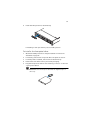
53
9
Install the filler panel into the drive bay.
If installing a new optical drive, see succeeding section.
To install a slim-line optical drive:
1
Observe the ESD precautions and pre-installation instructions
described on page 35.
2
If necessary, remove the old optical drive. See previous section.
3
If a filler panel is installed, remove it from the drive bay.
4
Remove the new drive from its protective packaging.
5
Plug the interposer board into the matching connector on the rear
of the optical device.
Note: Make sure the interposer board fits the alignment pin on
drive tray.
A
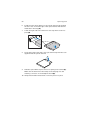
54
3 System upgrade
6
Install the new optical drive into the optical drive tray by aligning
the two holes on the left edge of the optical device with the two
metal tabs in the tray (A).
7
Lower the right side of the device into the tray until it clicks into
place (B).
8
Secure the interposer board to the optical drive tray with the scew
supplied with the optical drive kit.
B
A
9
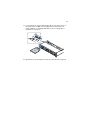
Slide the optical drive tray into the front opening in the server (A).
Make sure the back end of the interposer board plugs into the
matching connector on the backplane board (B).
10 Verify that the blue release lever on the tray locks into place.
55
11 For installing an optional USB floppy drive, note the location of
the USB connector (C) on the backplane board and refer “To
install a FDD in a converted HDD bay” section on page 56 for
installation instructions.
12 Observe the post-installation instructions described on page 36.
56
3 System upgrade
Installing and removing a FDD
You can choose to install a FDD into either the slim-line optical drive
bay or the top, left-hand HDD bay, directly beneath the slim-line drive
bay.
To install a FDD in the optical drive bay:
Note: Refer to the FDD documentation for additional installation
requirements.
1
Observe the ESD precautions and pre-installation instructions
described on page 35.
2
If necessary, remove the old FDD. See “To remove a FDD from the
optical drive bay” section on page 59.
3
If a filler panel is installed, remove it from the drive bay.
4
Remove the new FDD from its protective packaging.
5
Install the new FDD into the drive tray by aligning the two holes
on the left edge of the FDD with the two metal tabs in the tray.
6
Lower the right side of the FDD into the tray until it clicks into
place.
7
Slide the drive tray into the front opening in the server.
8
Verify that the blue release lever on the tray locks into place.
9
Plug the data cable into the USB connector on the backplane
board.
10 Observe the post-installation instructions described on page 36.
To install a FDD in a converted HDD bay
Caution! If you need to install a FDD into a converted HDD bay,
you must install the FDD in the top, left-hand HDD bay, directly
beneath the slim-line drive bay.
1
Observe the ESD precautions and pre-installation instructions
described on page 35.
2
If necessary, remove the hot-plug HDD carrier. See “To remove a
HDD” section on page 48.
57
3
Remove the slim-line optical drive. See “To remove a slim-line
optical drive” section on page 51.
4
If a drive carrier cover is installed, remove the cover from the drive
bay.
5
Place the diskette drive conversion carrier on a clean, static-free
work surface.
6
Remove the four screws that secure the rails to the diskette drive
conversion carrier kit.
7
Slide the new FDD into the drive carrier, inserting the rear of the
drive first, with the underside of the drive facing down.
8
Align the holes in the sides of the FDD with the holes in the drive
carrier (A).
58
9
3 System upgrade
Secure the FDD into the carrier with the two screws that came with
your diskette drive conversion kit.
10 Attach the slide rails to the sides of the carrier using the four
screws that you removed earlier.
11 Slide the carrier assembly into the upper-left HDD bay into the
front opening in the server (A).
12 Plug the data drive cable into the USB connector on the backplane
board (B).
59
13 Observe the post-installation instructions described on page 36.
To remove the FDD from the optical drive bay:
1
Observe the ESD precautions and pre-installation instructions
described on page 35.
2
Disconnect the data cable from the USB connector on the
backplane board.
3
Press the blue release lever to unlock the FDD tray and remove the
FDD tray assembly from the server.
4
Slide the tray out through the front of the server.
5
Press downward on the side of the tray and disengage the drive
from the two metal tabs on the opposite side of the tray.
6
Lift the FDD out of the tray.
7
Store the FDD tray for future use.
8
Install the filler panel into the drive bay. If installing a new FDD,
see “To install a FDD in the optical drive bay” section on page 56
for installation instructions.
To remove the FDD from a converted HDD bay:
1
Observe the ESD precautions and pre-installation instructions
described on page 35.
2
Disconnect the data cable from the USB connector on the
backplane board (A).
3
Press the blue release latch on the rear of the drive carrier.
4
Slide the drive carrier out through the front of the server (B).
5
Remove the four screws securing the two rails to the carrier, then
lift the rails from the carrier. .
60
6
3 System upgrade
Install an empty hot-plug HDD carrier or a filler panel into the
HDD bay. If installing a new FDD, see “To install a FDD in a
converted HDD bay” section on page 56 for instructions.
Caution! The filler panel must be installed to maintain proper
system cooling.
Installing a tape drive
To install a tape drive into the server, make sure you have the following
items:
•
Tape drive kit
•
3.5-inch half-height tape drive
To purchase a tape drive kit, contact your local Acer representative.
Caution! Before installing a tape drive into the server, make sure
the sixth hot-plug HDD or the sixth drive board is not installed on
the backplane board.
To install a tape drive
1
Observe the ESD precautions and pre-installation instructions
described on page 35.
2
Using a long screwdriver push the tape drive filler panel out from
the inside of the chassis.
61
3
Remove the empty HDD carrier from the sixth drive bay. See “To
remove a HDD” section on page 48.
4
Attach the tape drive to the tape drive carrier (A), then secure the
tape drive into the carrier with the four screws (B) that are
included in the tape drive carrier kit.
62
3 System upgrade
5
Slide the tape drive assembly into the combined tape drive or sixth
drive bay until the carrier clicks into place.
6
Plug the data cable to the rear of the tape drive.
7
Connect the other end of the data cable to the data cable
connector on the rear of the backplane board.
8
Plug the power cable to the rear of the device.
9
Connect the other end of the power cable to the power cable
connector on the rear of the backplane board.
10 Observe the post-installation instructions described on page 36.
Installing a sixth HDD
Caution! Before installing a sixth HDD into the server, make sure
a tape drive is not installed or occupying the sixth drive bay.
To install a sixth HDD:
1
Observe the ESD precautions and pre-installation instructions
described on page 35.
2
Using a long screwdriver, push the tape drive filler panel out from
the inside of the chassis.
63
3
Remove the empty HDD carrier from the sixth drive bay. See “ To
remove a HDD” section on page 48.
4
Slide the sixth HDD bracket into the backplane board.
5
Align the option sixth HDD board with the matching holes in the
backplane board.
6
Carefully move the board down to seat the board in the
backplane, then secure it with two screws supplied with the sixth
HDD bracket kit.
64
3 System upgrade
Note: Make sure the board seats securely into the plastic retainer
at the bottom of the opening in the backplane board.
7
Install a hot-plug HDD into the sixth HDD bay. See “To install a
HDD” section on page 49 for installation instructions.
8
Observe the post-installation instructions described on page 36.
65
Removing and installing a PCI card
Note: The PCI riser assembly includes an intrusion switch that
engages the system cover. The intrusion switch is provided to
allow server management software to monitor removal of the top
cover from the server.
Caution! The PCI riser assembly must be installed to maintain
proper airflow inside the server.
Removing and installing the PCI riser assembly
PCI riser boards are installed in a removable PCI riser assembly. This
section explains how to access the PCI riser assembly and remove and
install PCI cards.
To remove the PCI riser assembly:
1
Observe the ESD precautions and pre-installation instructions
described on page 35.
2
Remove the CPU air duct. Perform the instructions described in “To
remove the CPU air duct” section on page 42.
3
Diconnect any cables attached to an installed PCI card.
4
Grasp both riser latches with thumb and forefinger, then pull up to
release the riser assembly (A).
66
3 System upgrade
5
Lift the riser assembly from the chassis (B).
6
Place the riser assembly on a clean, static-free work surface.
7
Add or remove PCI cards.
8
Observe the post-installation instructions described on page 36.
67
To install the PCI riser assembly:
1
Observe the ESD precautions and pre-installation instructions
described on page 35.
2
Lower the PCI riser assembly (A), aligning the three hooks on the
back edge of the riser assembly with the matching slots on the rear
of the chassis (B).
3
Press down on the assembly until the three hooks on the rear of
the riser assembly engage the chassis back panel slots.
4
Connect the cables to the installed PCI card.
5
Observe the post-installation instructions described on page 36.
Removing and installing the PCI riser board
The PCI riser assembly has two PCI riser boards that supports five PCI
cards.
•
Low profile riser board- two PCI Express x8 slots (with x4
throughput)
•
Full height riser board- two PCI Express x8 slots (with x4
throughput) and one PCI-X 133 MHz slot
PCI riser boards can be replaced if it fails or if you require a different
option.
68
3 System upgrade
To remove a PCI riser board
1
Observe the ESD precautions and pre-installation instructions
described on page 35.
2
Remove the CPU air duct. Perform the instructions described in “To
remove the CPU air duct” section on page 42.
3
Remove the PCI riser assembly from the server. See “To remove the
PCI riser assembly” section on page 65.
4
Remove any installed PCI cards from the riser board. See “To
remove a PCI card” section on page 69.
5
Press the blue release lever at the end of the PCI riser board (A).
6
While holding the lever in, press firmly on the other end of the
board to disengage the board from the assembly (B)
7
Remove the riser board from the PCI riser assembly (C).
8
Store the riser board in an antistatic protective wrapper.
9
Repeat steps 4 through 7 to remove the other riser board.
10 Observe the post-installation instructions described on page 36.
To install a PCI riser board:
1
Observe the ESD precautions and pre-installation instructions
described on page 35.
2
Remove the CPU air duct. Perform the instructions described in “To
remove the CPU air duct” section on page 42.
69
3
Remove the PCI riser assembly from the server. See “To remove the
PCI riser assembly” section on page 65.
4
While holding the blue release lever in (A), align the holes in the
PCI riser board with the retention pins on the riser assembly.
5
Slide the riser board toward the left (B), then release the blue
lever to lock the board in place.
6
Observe the post-installation instructions described on page 36.
Removing and installing a PCI card
To remove a PCI card:
1
Observe the ESD precautions and pre-installation instructions
described on page 35.
2
Remove the CPU air duct. Perform the instructions described in “To
remove the CPU air duct” section on page 42.
3
Remove the PCI riser assembly from the server. See “To remove the
PCI riser assembly” section on page 65.
4
Open the rear retention clip by pushing the blue slide upward (A)
and rotating clip to the fully open position.
5
When removing a full height PCI riser board, open the full length
PCI card retention clip on the front of the riser assembly by
rotating it 90 degrees outward (B).
70
3 System upgrade
Note: The install sequence for low profile PCI cards on the
opposite side of the riser assembly is the same.
6
Pull up the card to remove it (C), then store the card in an
antistatic protective wrapper.
7
Observe the post-installation instructions described on page 36.
To install a PCI card
Note: When installing PCI-X cards into the full height riser board,
the cards must be installed starting with the top slot first,
followed by the middle and then the bottom. Any card populated
in the bottom PCI slot will cause the bus to operate at 66 MHz.
1
Observe the ESD precautions and pre-installation instructions
described on page 35.
2
Remove the CPU air duct. Perform the instructions described in “To
remove the CPU air duct” section on page 42.
3
Remove the PCI riser assembly from the server. See “To remove the
PCI riser assembly” section on page 65.
4
Open the rear retention clip by pushing the blue slide upward (A)
and rotating clip to the fully open position.
71
5
When removing a full height PCI riser board, open the full length
PCI card retention clip on the front of the riser assembly by
rotating it 90 degrees outward (B).
6
Remove the filler panel (C), if installed.
7
Insert the PCI card into the selected slot (D). Make sure the card is
properly seated.
8
Close both retention clips.
9
Observe the post-installation instructions described on page 36.
72
3 System upgrade
Replacing a system fan
The system fans on the server can be individually replaced or hotswapped in the event of failure. To provide adequate cooling in the
chassis, at least 3 fans must be installed to the server. Each fan is
equipped with an LED to indicate a fan failure condition. If the system
fan LED is on, the fan assembly needs to be replaced. The system fan
LED remains off during normal operation.
The system ships out with only three system fans installed. The server
allows for installation of 3 more additional system fans in the event of
a fan failure.
System fans must be installed in the following order:
•
First - Fan 2, fan 4, and fan 5
•
Second - Fan 1, fan 3, and fan 6
Warning! To ensure proper system cooling, the replacement
of a failed system fan should be completed within one
minute.
To replace the system fan
Caution! Hot-swap operations should be performed only if a
failure occurs in the system fan assembly.
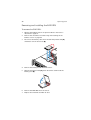
1
Observe the ESD precautions described on page 35.
2
Identify the defective fan. If a fan has failed the system fan LED
will be lit.
73
3
Grasp the defective fan and lift it up the fan bay.
4
Install the new fan by sliding the new fan into an empty fan
socket.
5
Observe the post-installation instructions described on page 36.
74
3 System upgrade
Upgrading the CPU
The server supports two dual-core Intel Xeon processors 5000 sequence
with 2 x 2 MB L2 cache and 1066 MHz or 1333 MHz FSB.
CPU upgrading guidelines
When installing CPUs the following must be observed:
•
Use only Acer-qualified CPUs.
•
Each CPU socket include a CPU and heat sink combination.
•
When two CPUs are installed, both should have identical revision,
core voltage, and speed values.
•
When only one CPU is installed, it must be installed in CPU 1
socket.
To remove a CPU:
If you are replacing a CPU on the system, the heat sink must first be
removed.
Important: Before removing a CPU from the mainboard, make
sure to create a backup file of all important data.
1
Observe the ESD precautions and pre-installation instructions
described on page 35.
Warning! The heat sink becomes very hot when the system
is on. NEVER touch the heat sink with any metal or with
your hands.
2
Remove the CPU air duct. Perform the instructions described in “To
remove the CPU air duct” section on page 42.
3
Locate the CPU you want to remove.
75
4
Loosen the four screws on the heat sink.
5
Lift the heat sink to remove it.
6
Place the heat sink upside down on a flat surface.
Note: Wipe off the thermal grease from both the heat sink and
processor using an alcohol pad.
7
Pull the CPU socket retainer lever handle down and away from the
socket to release it.
8
Lift the load plate.
9
Pull out the CPU from the socket, then store it in an anti-static bag.
To install a CPU:
1
Perform steps 1 to 3 of the “To remove a CPU:” section.
2
If a heat sink is installed, remove it.
76
3 System upgrade
3
Push the socket retainer lever handle down and away from the
socket to release it, then pull the lever to a fully open, upright
position.
4
Lift the load plate (A) and remove the protective socket cover (B).
5
Remove the CPU from its protective packaging.
6
Position the CPU over the socket (A), making sure the CPU cutouts
match the socket notches, then insert the CPU into the socket (B).
7
Close the load plate (A), then press the retainer lever down to lock
the load plate in place (B, C).
8
If the heat sink does not have thermal grease on the bottom, apply
thermal grease to the heat sink base.
9
Set the heat sink on the processor, aligning the four screws in the
heat sink with the screw sockets in the chassis.
10 Tighten the screws approximately one full turn at a time until each
is evenly tightened. Do not fully tighten one screw at a time.
11 Observe the post-installation instructions described on page 36.
77
Upgrading the system memory
Altos R720 supports eight DDR2 fully buffered DIMM slots. Each slot
supports 512 MB, 1 GB, and 2GB DDR2-533/667 FBDIMM. The maximum
memory capacity is 16 GB.
Memory module installation guidelines
The following rules apply when installing memory modules to the
server:
•
The system must have a minimum of one 512 MB FBDIMMs
installed. When installing additional memory, refer to the tables
on “DDR2 module population order” on page 78 for proper
population order.
•
Use only DDR2 FBDIMMs. Other DIMMs will not fit into the socket.
Attempts to force a non-DDR2 FBDIMM into a socket will damage
or the slot or the FBDIMM.
•
Hold FBDIMMs only by the edges. Do not touch the components or
gold edge connectors.
•
Install FBDIMMs with gold-plated edge connectors only.
78
3 System upgrade
DDR2 module population order
Branch 0
Channel A
DIMM A1
DIMM A2
Branch 1
Channel B
DIMM B1
DIMM B2
Channel C
DIMM C1
DIMM C2
Channel D
DIMM D1
DIMM D2
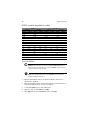
512 MB
512 MB
512 MB
512 MB
512 MB
512 MB
512 MB
512 MB
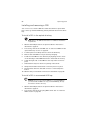
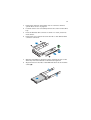
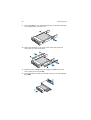
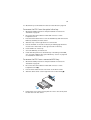
512 MB
512 MB
512 MB
512 MB
512 MB
512 MB
512 MB
512 MB
512 MB
512 MB
512 MB
512 MB
512 MB
1 GB
1 GB
1 GB
1 GB
1 GB
1 GB
1 GB
1 GB
1 GB
1 GB
1 GB
1 GB
1 GB
1 GB
1 GB
1 GB
1 GB
1 GB
1 GB
1 GB
1 GB
2 GB
2 GB
2 GB
2 GB
2 GB
2 GB
2 GB
2 GB
2 GB
2 GB
2 GB
2 GB
2 GB
2 GB
2 GB
2 GB
2 GB
2 GB
2 GB
2 GB
2 GB
To install DIMMs
Caution! Use extreme care when installing a DIMM. Applying too
much pressure can damage the connector. DIMMs are keyed and
can be inserted in only one way.
Note: The number labels next to the DIMM slots correspond to
proper installation sequence.
1
Observe the ESD precautions and pre-installation instructions
described on page 35.
2
Remove the CPU air duct. Perform the instructions described in “To
remove the CPU air duct” section on page 42.
3
Locate the DIMM slots on the mainboard.
4
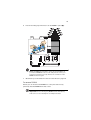
Open the clips on the DIMM slot(s) (A).
5
Align (B) then insert the DIMM into the socket (C).
79
6
Press the holding clips inward to lock the DIMM in place (D).
Note: The DIMM slot is slotted to ensure proper installation. If
you insert a DIMM but it does not fit easily into the socket, you
may have inserted it incorrectly. Reverse the orientation of the
DIMM and insert it again.
7
Observe the post-installation instructions described on page 36.
To remove DIMMs
Before you can install a new DIMM in a socket, first remove any
previously installed DIMM from that socket.
Important: Before removing any DIMM from the mainboard,
make sure to create a backup file of all important data.
80
3 System upgrade
Caution! Use extreme care when removing DIMMs. Too much
pressure can damage the connector. Apply only enough pressure
on the plastic levers to release the DIMM.
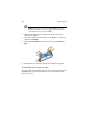
1
Observe the ESD precautions and pre-installation instructions
described on page 35.
2
Press the holding clips on both sides of the DIMM slot outward to
release the DIMM (A).
3
Gently pull the DIMM upward to remove it from the DIMM slot
(B).
4
Observe the post-installation instructions described on page 36.
To reconfigure the system memory:
The system automatically detects the amount of memory installed. Run
the BIOS setup to view the new value for total system memory and
make a note of it.
81
Installing and removing a power
supply
The server has two hot-swap power supply module bays on the rear
panel that accept hot-swap redundant power supply modules. The
system ships out with only a single power supply module installed. You
have the option to purchase an extra power supply module to provide
the system with a redundant power source. A redundant power
configuration enables a fully-configured system to continue running
even if one power supply module fails.
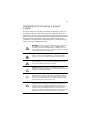
WARNING! To reduce the risk of personal injury or damage to
the equipment, the installation of power supply modules
should be referred to individuals who are qualified to service
server systems and are trained to deal with equipment capable
of generating hazardous energy levels.
WARNING! To reduce the risk of personal injury from hot
surfaces, observe the thermal labels on each power supply
module. You can also consider wearing protective gloves.
WARNING! To reduce the risk of personal injury from electric
shock hazards, do not open the power supply modules. There
are no serviceable parts inside the module.
Caution! Electrostatic discharge can damage electronic
components. Make sure that you are properly grounded before
handling a power supply module.
Caution! Due to chassis airflow disruption, a power supply bay
should never be vacant for more than two minutes when the
server is powered on. Exceeding five minutes might cause the
system to exceed the maximum acceptable temperature and
possibly damage the system components.
Caution! The power supply is only hot-swappable if you have a
redundant system with two power supplies installed. If you
only have one power supply installed, before removing or
replacing the power supply, you must first take the server out
of service, turn off all peripheral devices connected to the
system, turn off the system by pressing the power button, and
unplug the AC power cord from the system or wall outlet.
82
3 System upgrade
To install a power supply module
1
If a filler panel is installed, press the release lever (A) and use the
finger hole to remove the filler panel out of the bay (B).
2
Insert the power supply module into the power supply bay until it
locks into place.
3
Plug the power cord into the DC receptacle on the power supply.
4
Verify that the LED on the power supply are functioning. Refer to
the “Rear panel LED indicators” on page 14 for more information.
83
To remove a power supply module
Caution! Power supply hot-swap operations should be performed
only if a failure occurs in the power supply.
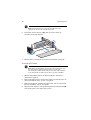
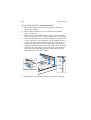
1
If there are more than one power supply modules installed,
determine which power supply module has failed. Refer to the
“Rear panel LED indicators” on page 14 for more information.
2
Remove the AC power cord from the power supply being replaced.
3
Press the power supply latch to release the power supply module
from the chassis (A).
4
Pull the power supply module out of the server (B).
5
Install a new power supply module or install a filler panel to the
empty bay.
84
3 System upgrade
Removing and installing an ARMC/3
module
The optional ARMC/3 module provides server management firmware
and functionality to the system.
To remove an ARMC/3 module:
1
Observe the ESD precautions and pre-installation instructions
described on page 35.
2
Remove the CPU air duct. Perform the instructions described in “To
remove the CPU air duct” section on page 42.
3
Remove the NIC module.
4
a
Pull up the module to remove it from the connector.
b
Remove the three standoffs from the mainboard, then keep
the standoffs for later NIC module installation.
Hold the module both by the finger grip loop and by the opposite
corner (A).
Caution: Do not bend or twist the module.
85
5
Pull up the module to remove it from the connector (B).
6
Observe the post-installation instructions described on page 36.
To install an ARMC/3 module:
Note: Prior to installing the ARMC/3 module module, you must
remove the server management port cover module cover on the
rear of the server.
1
Observe the ESD precautions and pre-installation instructions
described on page 35.
2
Remove the CPU air duct. Perform the instructions described in “To
remove the CPU air duct” section on page 42.
3
Insert the standoff into the hole in the ARMC/3 module. The
standoff installs on the bottom side of the module (A).
86
3 System upgrade
4
Attach the module to the ARMC/3 module connector on the
mainboard and snap the standoff into the matching hole on the
mainboard (B).
5
Install the NIC module.
6
a
Install the three standoffs to the mainboard.
b
Attach the module to the NIC module connector on the
mainboard and matching standoff holes.
Observe the post-installation instructions described on page 36.
87
Removing and installing the SAS
mid-plane board
To remove the SAS mid-plane board:
1
Observe the ESD precautions and pre-installation instructions
described on page 35.
2
Remove the air baffles. See “To remove the small air baffle”
section on page 45.
3
Make sure all hot-plug HDD carriers are removed from the drive
bay. For instructions, see “To remove a HDD” section on page 48.
4
Disconnect all cables attached to the SAS mid-plane board.
5
Hold the SAS mid-plane board by its edges, then slide it back to
release it from the backplane board (A).
6
Lift the mid-plane board over the retention clips (B) and out of the
chassis (C).
7
Store the mid-plane board in an antistatic protective wrapper.
8
Observe the post-installation instructions described on page 36.
88
3 System upgrade
To install the SAS mid-plane board
1
Observe the ESD precautions and pre-installation instructions
described on page 35.
2
Remove the air baffles. See “To remove the small air baffle”
section on page 48.
3
Position the mid-plane board over the retention clips (A).
4
Slide it forward (B) and insert the mid-plane into the backplane
connector (C).
5
Connect the cables to the mid-plane board.
6
Observe the post-installation instructions described on page 36.
89
Removing and installing the SAS/SATA
backplane board
To remove the SAS/SATA backplane board:
1
Observe the ESD precautions and pre-installation instructions
described on page 35.
2
Remove the air baffles. See “To remove the small air baffle”
section on page 45.
3
Make sure all hot-plug HDD carriers are removed from the drive
bay. For instructions, see “To remove a HDD” section on page 48.
4
Disconnect all cables attached to the backplane board.
5
Remove the SAS mid-plane board. See previous section.
Note: To prevent damage to your system, make sure to remove
the mid-plane board first before attempting to remove the
backplane board.
6
Hold the backplane board by its edges, then lift it from the chassis.
7
Store the backplane board in an antistatic protective wrapper.
8
Observe the post-installation instructions described on page 36.
90
3 System upgrade
To install the SAS/SATA backplane board:
1
Observe the ESD precautions and pre-installation instructions
described on page 35.
2
Remove the air baffles. See “To remove the small air baffle”
section on page 45.
3
Make sure all hot-plug HDD carriers are removed from the drive
bay. For instructions, see “To remove a HDD” section on page 48.
4
Hold the backplane board only by the edges. Do not push or pull
on any components on the backplane. Set the backplane in place
at the front of the server system, with the sides of the board
resting in the guides at the left and right sides of the server unit.
5
Slide the backplane board into the server system guides at the left
and right sides of the server system until the pins at the left and
right sides of the backplane bracket are fully inserted into the
matching holes in the server system.
6
Observe the post-installation instructions described on page 36.
91
Configuring the integrated SAS
hardware RAID components
The system supports hardware RAID through the SAS mid-plane and
backplane board. The server platform supports RAID 0, 1, 5, 10, and 50
levels. Functionality for hardware RAID is enabled by using the
following components:
•
RAID activation key
•
RAID cache
There is also an option to install the RAID BBU. If power to the storage
I/O processor drops below specifications, the RAID BBU maintains the
contents of the DIMM by keeping the DIMM in self-refresh mode until
power is restored. After power is restored, data can be safely written
to drives, maintaining the integrity of the disk array.
Removing and installing the RAID activation key
To remove the RAID activation key:
1
Observe the ESD precautions and pre-installation instructions
described on page 35.
2
Remove the air baffles. See “To remove the small air baffle”
section on page 45.
3
Insert the tip of a small flat-bladed screwdriver under the plastic
tab on the retainer holding the activation key to the SAS midplane board.
4
Gently push down to detach the activation key.
92
3 System upgrade
5
Store the activation key in an anti-static bag.
6
Observe the post-installation instructions described on page 36.
To install the RAID activation key:
1
Observe the ESD precautions and pre-installation instructions
described on page 35.
2
Remove the RAID activation key from its protective packaging.
3
Align then insert the activation key into the RAID activation key
connector on the SAS mid-plane board.
4
Observe the post-installation instructions described on page 36.
Removing and installing the RAID cache
To remove the RAID cache:
1
Observe the ESD precautions and pre-installation instructions
described on page 35.
2
Remove the air baffles. See “To remove the small air baffle”
section on page 45.
3
Press the holding clips on both sides of the slot outward to release
the RAID cache (A).
93
4
Gently pull the RAID cache upward to remove it from the slot (B).
5
Close the clips.
6
Replace the air baffles and CPU air duct.
7
Observe the post-installation instructions described on page 36.
To install the RAID cache:
1
Observe the ESD precautions and pre-installation instructions
described on page 35.
2
Remove the air baffles. See “To remove the small air baffle”
section on page 45.
3
Locate the RAID cache memory (DDR-2) slot on the SAS mid-plane
board.
4
Open the clips on the slot.
5
Align then insert the RAID cache into the slot (A).
6
Press the holding clips inward to lock the RAID cache in place (B).
Note: Both the RAID activation key and the RAID cache is required
to activate the hardware RAID. For instructions on installing the
RAID activation key, see page 92.
7
Observe the post-installation instructions described on page 36.
94
3 System upgrade
Removing and installing the RAID BBU
To remove the RAID BBU:
1
Observe the ESD precautions and pre-installation instructions
described on page 35.
2
Remove the air baffles. See “Removing and installing the air
baffles” section on page 42.
3
Disconnect the battery cable from the SAS mid-plane board (A)
and detach it from the chassis (B).
4
Remove the battery holder from the chassis.
5
Open the battery holder (A), then detach the cable inside the
battery pack (B).
6
Remove the RAID BBU from the chassis.
7
Replace the air baffles and CPU air duct.
95
8
Observe the post-installation instructions described on page 36.
To install the RAID BBU
1
Observe the ESD precautions and pre-installation instructions
described on page 35.
2
Remove the air baffles. See “To remove the small air baffle”
section on page 45.
3
Open the battery holder (A), then connect the cable inside the
battery pack (B).
4
Secure the battery cable to its chassis holder (A).
5
Attach the cable to the RAID BBU connector on the SAS mid-plane
board (B).
96
3 System upgrade
6
Engage the hooks on the back of the battery into the matching
chassis tabs, then slide it toward the power supply to lock into
place.
7
Connect the power cable between the BBU and the mid-plane
board.
8
Replace the air baffles and CPU air duct.
9
Observe the post-installation instructions described on page 36.
4 BIOS setup
This chapter gives information about the system
BIOS and discusses how to configure the system
by changing the settings of the BIOS parameters.
99
BIOS setup
BIOS setup is a hardware configuration program built into the system's
Basic Input/Output System (BIOS). Since most systems are already
properly configured and optimized, there is no need to run this utility.
The BIOS setup utility stores basic settings for your server. You will need
to run this utility under the following conditions:
•
When changing the system configuration
•
When a configuration error is detected by the system and you are
prompted ("Run Setup" message) to make changes to the BIOS
setup
Note: If you repeatedly receive Run Setup messages, the battery
may be bad. In this case, the system cannot retain configuration
values in CMOS. Ask a qualified technician for assistance.
•
When redefining the communication ports to prevent any conflicts
•
When changing the password or making other changes to the
security settings
BIOS setup loads the configuration values in a battery-backed
nonvolatile memory called CMOS RAM. This memory area is not part of
the system RAM which allows configuration data to be retained when
power is turned off.
Before you run BIOS setup, make sure that you have saved all open
files. The system reboots immediately after you close the setup.
100
4 BIOS setup
Entering BIOS setup
Power on the server to start the system POST process. During bootup,
press F2 to enter the BIOS setup screen.
Note: You must press F2 while the system is booting. This key
does not work during any other time.
There are several tabs on the setup screen corresponding to the eight
primary BIOS menus.
•
Main
•
Advanced
•
Security
•
Server Management
•
Boot Options
•
Boot Manager
•
Error Manager
•
Exit
The parameters on the screens shown in this User’s Guide display
default system values. These values may not be the same as those in
the system.
Note the following reminders when moving around the setup screen.
•
Use the Left and Right arrow keys to move to the next page or to
return to the previous screen.
•
Use the Up and Down arrow keys to select an item.
•
Use the + and - keys to select an option.
Note: You can configure a parameter that is enclosed in square
brackets. Grayed-out items have fixed settings and are not
user-configurable.
•
Use the Enter key to display a submenu screen.
Note: When a parameter is preceeded by a [>], it means that a
submenu screen is available.
101
•
Press F1 for General Help on using the BIOS setup.
•
Press F9 to load the default configuration.
•
Press F10 to save changes and close the BIOS setup.
•
Press Esc to close the BIOS setup.
In the descriptive table following each of the screen illustrations,
settings in boldface are the default and suggested parameter settings.
102
4 BIOS setup
Using the BIOS menus
Main
The Main menu displays basic and important information about the
system. These information are necessary for troubleshooting and may
be required when asking for technical support. These entries are for
your reference only and are not user-configurable.
The System Date and System Time parameters lets you define the
sytem’s time and date settings. The real-time clock keeps the system
date and time. After setting the date and time, you do not need to
enter them every time you turn on the system. As long as the internal
battery remains good and connected, the clock continues to keep the
date and time accurately even when the power is off.
Parameter
Description
BIOS Version
Version of the BIOS.
BIOS Build
Date
Date BIOS was created.
Option
103
Parameter
Description
Processor
Specification of the processor currently
installed in the server.
Total Memory
Indicates the size of the system memory.
Quiet Boot
When Enabled, the BIOS splash screen is
displayed during startup.
Option
Enabled
Disabled
When Disabled, the diagnostic messages
are displayed during startup.
POST Error
Pause
If Enabled, the system will pause if an error
is found during POST.
System Date
Sets the date following the month-day-year
format. Valid values for weekday, month,
day, and year are:
Month: Jan, Feb, Mar, Apr, May, Jun, Jul,
Aug, Sep, Oct, Nov, Dec
Day: 1 to 31
Year: 1998 to 2099
System Time
Sets the time following the hour-minutesecond format. Valid values for hour,
minute, and second are:
Hour: 00 to 23
Minute: 00 to 59
Second: 00 to 59
Enabled
Disabled
104
4 BIOS setup
Advanced
The Advanced menu contains parameter values that define how the
system behaves on startup.
Warning! Be cautious in setting parameter values in the
Advanced menu as any incorrect value may cause the
system to malfunction.
Press Enter to enter the submenu screen of the parameters shown in
the screen below.
105
Processor
The Processor submenu displays CPU settings such as type, actual
speed, cache size and other CPU related settings.
Parameter
Description
Option
Core Frequency
Indicates the processor clock speed.
System Bus
Frequency
Indicates the processor front side bus
speed.
Hyper
Threading
Technology
Enables or disables the Hyper-Threading
Technology function of the processor.
Enabled
Enhanced Intel
SpeedStep
Technology
When set to Auto, this feature allows
the OS to reduce power consumption.
When set to Disabled, the system
operates at maximum CPU speed.
Auto
Disabled
Dual Core
Enables or disables the secondary
processor core.
Enabled
Disabled
Disabled
106
4 BIOS setup
Parameter
Description
Option
Virtualization
Technology
Enables or disables the system to run
multiple operating systems and
applications in different partition.
Disabled
Enabled
Execute Disable
Bit
When Enabled, the processor disables
code execution when a worm attempts
to insert a code in the buffer preventing
damage and worm propagation.
Enabled
Disabled
When Disabled, the processor forces the
Execute Disable Bit feature flag to
always return to 0.
Note: This parameter is hidden if the
processor does not support this function.
Hardware
Prefetcher
Enables or disables the speculative
prefetch unit within the processor(s).
Enabled
Disabled
Note: Changing this feature may affect
system performance.
Adjacent Cache
Line Prefetch
When Enabled, cache lines are fetched
in pairs (even line + odd line)
When Disabled, only current cache line
required is fetched.
Enabled
Disabled
Note: Changing this feature may affect
system performance.
Processor
Re-Test
When Enabled, all processors will be
activated and retested on the next boot.
This option will be automatically reset to
disable on the next boot.
Processor #
Information
Press Enter to access the Processor #
Information submenu.
Disabled
Enabled
107
Processor # Information
The screen below appears when you select the Processor #1 or 2
Information menu.
108
4 BIOS setup
Memory
The Memory submenu displays the total amount of memory installed,
the number of memory modules installed, and the current memory
configuration.
Parameter
Description
Total Memory
Indicates the total amount of onboard memory. The
memory size is automatically detected by BIOS during
the POST. If you install additional mamory, the system
automatically adjusts this parameter to display the new
memory size.
Effective
Memory
Indicates the total effective memory installed in the
server.
Current
Configuration
Displays the current memory configuration.
Configure
Memory RAS and
Performance
Press Enter to access the Configure Memory RAS and
Performance submenu.
109
Parameter
Description
DIMM
information
Indicates the DIMM and DIMM slot status.
Configure Memory RAS and Performance
The screen below appears when you select the Configure Memory RAS
and Performance menu. This submenu allows you to view memory
configuration details and configure the memory modules in the server.
Parameter
Description
Option
DIMM Data
Transfer Rate
When set to Auto, the data transfer
rate for all DIMMs will be set to 533 (for
1066 MHz FSB CPU frequency) or 667
MHz (for 1333 MHz FSB CPU
frequency).
Auto
533
When set to 533, the data transfer rate
for all DIMMs will be forced to 533 MHz
regardless of FSB frequency.
When set to 667, the data transfer rate
for all DIMMs will be forced to 667 MHz
regardless of FSB frequency.
667
110
4 BIOS setup
Parameter
Description
Option
Thermal
Throttling
Enables or disables thermal throttling.
When disabled, the chipset and BIOS
will not perform any electrical
throttling on overheated DIMMs.
Enabled
Disabled
AMB Thermal
Sensor
Controls the operation of the thermal
sensors on the advanced memory
buffers. When disabled, thermal
throttling option will also be disabled.
Enabled
Disabled
ATA Controller
The ATA Controller submenu lets you define the parameter settings
related to the hard disk(s).
Parameter
Description
Option
Onboard PATA
Controller
Enables or disables the integrated
parallel ATA controller.
Enabled
Disabled
111
Parameter
Description
Option
Onboard SATA
Controller
Enables or disables the integrated Serial
ATA controller.
Enabled
Disabled
SATA Mode
When set to Enhanced, it will enable all
SATA connectors as individual
connectors.
Enhanced
Legacy
When set to Legacy, it will enable
primary and secondary channels on SATA
connectors.
AHCI Mode
Enables or disables access to all six SATA
connectors via the AHCI (Advanced Host
Controller Interface) Option ROM. AHCI
is an interface specification that allows
the storage driver to enable advanced
SATA features such as Native Command
Queuing and hot plug.
Note: Requires an AHCI aware OS.
Disabled
Configure SATA
as RAID
Enables or disables the software RAID
technology Option ROM within the
ESB2-E controller.
Disabled
Primary IDE
Master
Indicates the controller that is set as
primary master.
Primary IDE
Slave
Indicates the controller that is set as
primary slave.
SATA Port
0, 1, 2, 3
Indicates the SATA HDD connected to
the SATA connector.
Enabled
Enabled
112
4 BIOS setup
Mass Storage
The Mass Storage submenu displays the status of the mass storage
controller.
Parameter
Description
Option
SAS Controller
Enables or disables the SAS controller.
Enabled
Disabled
SAS Option
ROM
If enabled, initializes the the embedded
SAS device Option ROM.
Enabled
Configure SAS
as SW RAID
Enables or disables the Embedded Server
RAID Technology on the SAS connectors.
Disabled
ROMB setup
Indicates if integrated RAID is enabled
or not.
RAID
Activation Key
Indicates if the RAID activation key is
installed or not.
Disabled
Enabled
113
Serial Port
The Serial Port submenu lets you define the parameter settings for the
system’s serial port.
Parameter
Description
Option
Serial A Enable
Enables or disables the onboard serial A
port.
Enabled
Disabled
Address
Set the base I/O address for the serial B
port.
2F8
3E8
2E8
3F8
IRQ
Set the interrupt request line for the
serial B port.
3
4
114
4 BIOS setup
USB Confguration
The USB Configuration submenu allows you specify settings for USB
devices.
Parameter
Description
Option
USB Controller
Enables or disables the USB controller.
Enabled
If disabled, all the USB controllers will be
turned off and inaccessible to the OS.
Disabled
Legacy USB
Support
Enables or disables the support for
legacy USB devices.
Enabled
Port 60/64
Emulation
Enables or disables the I/O port 60/64h
emulation support.
Enabled
Disabled
Disabled
This parameter is enabled for complete
USB keyboard legacy support for nonUSB aware OS.
Device Reset
Timeout
Select the number of seconds POST waits
for the USB mass storage device after
the start unit command.
20 Sec
10 Sec
30 Sec
40 Sec
115
Parameter
Description
Option
Storage
Emulation
When set to Auto, USB mass storage
devices with less than 530 MB will be
emulated as a floppy and the remaining
as hard drives.
The Forced FDD option can be used to
force a formatted HDD to boot as a FDD.
Auto
Floppy
Sets the transfer rate at Hi Speed
(480 Mbps) or Full Speed (12 Mbps).
High Speed
Low Speed
USB 2.0
Controller
Mode
Forced FDD
CD-ROM
Hard Disk
116
4 BIOS setup
PCI
The PCI submenu lets you specify settings that are related to the
onboard controllers. enable or disable the ROM scan of a device
installed in the selected PCI slot. It also enables or disables posting of a
16-bit legacy ROM from the plug-in fiber channel card.
Parameter
Description
Option
PCI Memory
Mapped IO
Space
This selects the amount of memory that is
reserved for PCI address space below 4GB
for PCI devices.
2.5 GB
Onboard Video
Enables or disables the onboard VGA
controller.
Enabled
Disabled
Dual Monitor
Video
Select a graphic controller as a primary
boot device.
Disabled
Note: This parameter will be disabled
when the Onboard Video is set to
Disabled.
3.0 GB
3.5 GB
Enabled
117
Parameter
Description
Option
Onboard NIC
ROM
Enables or disables both channels of the
embedded LAN.
Note: If disabled, NIC1 and NIC2 cannot
be used to boot the system.
Enabled
Disabled
NIC 1 or 2 MAC
Address
Indicates the media access control of the
system’s LAN controller.
I/O
Acceleration
Technology
Enables or disables the onboard LAN’s
I/O Acceleration Technology.
Enabled
Disabled
118
4 BIOS setup
System Acoustic and Performance Configuration
The System Acoustic and Performance Configuration submenu lets you
set the system fan performance option.
Parameter
Description
Option
Set Fan
Profile
Select the Fan Control Profile that will
be used to cool the system.
Performance
Altitude
When set to less than 300 m
(<= 980 ft), it will provide the best
performance option for servers
operating at or near sea level.
When set to 301m - 900m (980 ft 2950 ft), it will provide the best
performance option for servers
operating at moderate altitudes
above sea level.
When set to higher than 900m (>2950
ft), it will provide the best
performance option for servers
operating at high elevations above
sea level.
301 m - 900 m
Less than 300 m
Higher than 900 m
119
Security
The Security menu allows you to safeguard and protect the system
from unauthorized use by setting up access passwords.
Parameter
Description
Option
Administrator
Password
Prevents unauthorized access to the
BIOS setup utility.
Not Installed
Installed
User Password
Secures the system against unauthorized
use. Once you set this password, you
have to type it whenever you boot the
system. User password is available only
when an Administrator password is set.
Not Installed
Administrator
Password
Press Enter to change the Administrator
password.
User
Password
Press Enter to change the User
password.
Installed
120
4 BIOS setup
Parameter
Description
Option
Front Panel
Lockout
When Enabled, the front panel power
and reset buttons will be locked. The
power and reset operation must be
controlled via system management
interface.
Disabled
Enabled
To set a Administrator/User password
1
Use the up/down keys to highlight a password parameter (Set
Administrator Password or Set User Password) then press Enter.
A password box will appear.
2
Type a password then press Enter.
The password may consist of up to seven alphanumeric characters
(A-Z, a-z, 0-9).
3
Retype the password to verify the first entry then press Enter
again.
After setting the password, the system automatically sets the
chosen password parameter to Installed.
To change the Administrator/User password
1
Use the up/down keys to highlight either change password
parameters (Change Administrator Password or Change User
Password) then press Enter.
2
Type the original password then press Enter.
3
Type a new password then press Enter.
4
Retype the password to verify the first entry then press Enter
again.
To remove the User password
1
Use the up/down keys to highlight the Clear User Password
parameter then press Enter.
2
Enter the current password then press Enter.
3
Press Enter twice without entering anything in the new and
confirm password fields.
After doing this, the system automatically sets the User password
parameter to Not Installed.
121
Server Management
The Server Management submenu lets you specify the appropriate
settings for the system’s event handling function.
The system event log enables you to record and monitor events that
occur in the system (eg., system temperature changes, fan stops, overtemperature, over-voltage, fan failures, etc.).
Parameter
Description
Option
Assert NMI on
SERR
Enables or disables the PCI bus SERR
(system error) support.
Enabled
Disabled
Assert NMI on
PERR
Enables or disables the PCI bus PERR
(parity error) support.
Note: This parameter is disabled when
the NMI on SERR is disabled.
Enabled
Disabled
122
4 BIOS setup
Parameter
Description
Option
Resume on
AC Power
Loss
Defines the mode of operation if a
power loss occurs.
When set to Stay Off, the system
remains off after power shutdown.
Stay Off
Last State
Reset
When set to Last State, the system
returns to the state it was prior to the
AC power loss.
When set to Reset, the system will turn
on after power is restored.
Clear System
Event Log
Deletes all events in the System Event
Log.
FRB-2 Enable
When Enabled, the BMC (Baseboard
Management Controller) will reset the
system if BIOS does not complete the
POST before the FRB-2 (Fault Resilient
Booting) timer expires.
Enabled
Disabled
O/S Boot
Watchdog
Timer
Enables or disables the BIOS timer. It
helps to determine if the OS has
loaded successfully or followed the OS
boot watchdog timer policy.
Disabled
The BIOS timer can only be shut off
using the management software after
the OS loads.
Console
Redirection
Press Enter to access the Console
Redirection submenu.
System
Information
Press Enter to access the System
Information submenu.
Enabled
123
Console Redirection
The Console Redirection submenu lets you enable or disable the
console redirection parameters for server management tasks over the
serial port.
124
4 BIOS setup
System Information
The System Information submenu displays basic information about the
server unit.
125
Boot Options
The Boot Options menu allows you to set the BEV device priority
during system bootup. It also displays information about the installed
storage devices.
Parameter
Description
BEV Device #
Sets the boot order of the Bootstrap
Entry Vector Devices. BEV devices are
devices which have a bootable Option
ROM such as a network card or onboard
network controller.
Press Enter to access the BEV Device #
submenu.
Option
126
4 BIOS setup
BEV Device #
The BEV Device # submenu lets you specify the preferred settings for
system bootup.
Parameter
Description
Option
Boot Timeout
Sets the automatic boot time-out value.
Note: A value ot 65535 will disable the
timeout completely.
10
1
Boot Option 1
Sets the device from which the system
will first attempt to boot up.
Boot Option 2
Sets the device from which the system
will attempt to boot up when the first
attempt failed.
Boot Option 3,
4, or 5
Sets the device from which the system
will attempt to boot up when the first,
second, third, and fourth attempts
failed.
127
Parameter
Description
CD-ROM Order
Specifies the boot device priority
sequence for available CD drives.
Floppy Order
Specifies the boot device priority
sequence for available FDD.
BEV Device
Order
Specifies the boot device priority
sequence for available BEV devices.
Option
128
4 BIOS setup
Boot Manager
The Boot Manager menu lets you set the device priority during system
bootup. The server will attempt to boot from the first device on the
list. If the first device is not available, it will continue down the list until
it reaches an available device. Select a boot option, then press Enter.
129
Error Manager
The Error Manager menu lets you view the system POST errors
detected by the system.
130
4 BIOS setup
Exit
The Exit menu displays the various options to quit from the BIOS setup.
Highlight any of the exit options then press Enter.
Parameter
Description
Save Changes and Exit
Saves changes made and close the BIOS setup.
Discard Changes and Exit
Discards changes made and close the BIOS setup.
Save Changes
Saves changes made in the BIOS setup.
Discard Changes
Discards all changes made in the BIOS setup.
Restore Defaults
Loads the default settings for all BIOS setup
parameters. Setup defaults are quite demanding
in terms of resources consumption. If you are
using low-speed memory chips or other kinds of
low-performance components and you choose to
load these settings, the system might not
function properly.
Save as User Default
Values
Saves current values to be restored later.
131
Parameter
Description
Restore User Default
Values
Restores previously saved user default values.
132
4 BIOS setup
Upgrading the BIOS
The upgrade utility allows you to upgrade the BIOS in the flash
memory. To prepare to upgrade the BIOS, you need to record the
current BIOS settings and download the BIOS image file to a temporary
folder on your hard drive or a USB flash memory device.
To record the current BIOS settings:
1
Run BIOS setup. See “Entering BIOS setup” on page 100.
2
Write down the current settings in the BIOS setup utility.
To download the BIOS image file:
Download the image file to a temporary folder on your hard drive or a
USB flash memory device.
Note: Review the instructions and release notes that are provided
in the Readme file distributed with the BIOS image file before
attempting a BIOS upgrade. The release notes contain critical
information regarding jumper settings, specific fixes, or other
information to complete the upgrade.
To upgrade the BIOS:
Follow the instructions in the Readme file that came with the BIOS
upgrade. When the update completes, remove the bootable media
from which you performed the upgrade.
Note: Do not power down the system during the BIOS update
process. The system will reset automatically when the BIOS update
process is completed. You may encounter a CMOS checksum error
or other problem after reboot. It this happens, shut down the
system and boot it again. CMOS checksum errors require that you
enter Setup, check your settings, save your settings, and exit
Setup.
5 Troubleshooting
This chapter provides possible solutions for specific
problems. If you cannot correct the problem, contact
your local Acer representative or authorized dealer
for assistance.
135
Troubleshooting
This chapter helps you identify and solve problems that might occur
while you are using the system.
For any issue, first ensure that you are using the latest firmware and
files. Firmware upgrades include updates for BIOS, the BMC, and the
hot-swap controller. In addition to the server firmware and files, make
sure to update any drivers used for components you have installed in
your system, such as video drivers, network drivers and SAS drivers.
If you are unable to resolve your server problems on your own, contact
your dealer or local Acer representative for assistance.
Resetting the system
Before going through in-depth troubleshooting, attempt first to reset
the system using one of the methods below.
To do this
Press
Soft boot reset to clear the system memory and reload the
operating system.
Ctrl+Alt+Del
Clear system memory, restart POST, and reload the OS.
Reset button
Cold boot reset. Turn the system power off and then on.
This clears system memory, restarts POST, reloads the OS
and halts power to all peripherals.
Power button
Problems following initial system installation
Problems that occur at initial system startup are usually caused by an
incorrect installation or configuration. Hardware failure is a less
frequent cause. If the problem you are experiencing is with a specific
software application, see "There is problem with the application
software" on page 143.
136
5 Troubleshooting
First steps checklist
•
AC power available at the wall outlet?
•
Are the power supplies plugged in? Check the AC cable(s) on the
back of the chassis and at the AC source.
•
Are all cables correctly connected and secured?
•
Is the processor fully seated in the socket on the mainboard?
•
Are all standoffs in the proper location and not touching any
components, causing a potential short?
•
Are all expansion boards fully seated in their slots on the PCI riser
assembly?
•
Are all jumper settings on the mainboard correct?
•
Are all jumper and switch settings on expansion boards and
peripheral devices correct? If applicable, ensure that there are no
conflicts - for example, two expansion boards sharing the same
interrupt.
•
Are all peripheral devices installed correctly?
•
Are all device drivers properly installed?
•
Are the configuration settings made in the BIOS setup correct?
•
Is the operating system properly loaded? Refer to the operating
system documentation.
•
Did you press the system power button on the front panel to turn
the server on (power indicator should be lit)?
•
Is the system power cord properly connected to the system and
plugged into an outlet for 100-127 V or 200-240 V?
•
Are all integrated components from the tested components lists?
Check the tested memory, and chassis lists, as well as the supported
hardware and operating system list.
137
Hardware diagnostic testing
This section provides a more detailed approach to identifying a
hardware problem and locating its source.
Caution! Before disconnecting any peripheral cables from the
system, turn off the system and any external peripheral devices.
Failure to do so can cause permanent damage to the system and/
or the peripheral device.
1
Turn off the system and all external peripheral devices. Disconnect
each of device from the system, except for the keyboard and the
video monitor.
2
Make sure the system power cord is plugged into a properly
grounded AC outlet.
3
Make sure your video display monitor and keyboard are correctly
connected to the system. Turn on the video monitor. Set its
brightness and contrast controls to at least two thirds of their
maximum ranges (see the documentation supplied with your video
display monitor).
4
If the operating system normally loads from the hard disk drive,
make sure there is no diskette in the FDD or disc in the optical
drive.
5
If the power indicator does light, attempt to boot from a diskette
or disc.
6
Turn on the system. If the power indicator does not light, see
“Power indicator does not light” on page 138.
Verifying proper operation of key system lights
As POST determines the system configuration, it tests for the presence
of each mass storage device installed in the system. As each device is
checked, its activity light should turn on briefly. Check if the HDD
activity indicator lights briefly? If not, see “HDD activity indicator does
not light.” on page 139.
138
5 Troubleshooting
Confirming loading of the OS
Once the system boots up, the operating system prompt appears on
the screen. The prompt varies according to the operating system. If the
operating system prompt does not appear, see "No Characters Appear
on Screen" on page 143.
Specific problems and corrective actions
The following contains specific problems that may arise during the use
of your server. Possible solutions are listed for each problem.
Power indicator does not light.
Do the following:
•
Make sure the power button on the control panel is turned on.
•
Make sure the power cord is connected correctly.
•
Make sure that the wall outlet has power. Test it by plugging
another device.
•
Remove all expansion cards and see if the system boots. If
successful, add the cards back in one at a time with a reboot
between each addition.
•
Make sure the memory modules comply with the system
requirements.
•
Make sure the memory modules have been populated according
to the system requirements.
•
Remove and reseat the memory modules.
•
Make sure the CPU comply with the system requirements.
•
Make sure the CPU is populated according to the system
requirements.
•
Remove and reseat the CPU.
•
Make sure the chassis standoffs are installed only below mounting
holes. Misplaced standoffs may have contact to the pins on the
bottom of the mainboard and cause a short.
139
Server boot does not complete POST
Do the following:
•
Make sure the CPU is properly seated.
•
Check the BIOS release notes to ensure the BIOS installed on the
platform supports the stepping and the family of processors
currently installed.
Server does not recognize all of the processors installed
Do the following:
•
Make sure the CPU is properly seated.
•
Make sure the CPU complies with the system requirements.
•
Make sure the CPU is populated according to the system
requirements.
•
Remove and reseat the CPU.
FDD activity indicator does not light.
Do the following:
•
Make sure the FDD and interposer board are properly connected.
•
Check that relevant switches and jumpers for the FDD are set
correctly.
•
Check that the FDD is properly configured.
HDD activity indicator does not light.
Do the following:
•
Make sure the drive is not disabled in the BIOS setup utility.
•
Make sure the drive is compatible.
•
Make sure you have not exceeded the power budget for the
server.
140
5 Troubleshooting
If you have installed one or more hard drives in the system, do the
following:
•
Make sure the power and signal cables are connected correctly.
•
If using a sixth HDD, make sure the sixth HDD board is properly
installed to the backplane board and HDD is plugged into
connectors on the sixth HDD board. Check that the relevant
switches and jumpers on the hard drive are set correctly. Refer to
drive documentation for more information.
ODD (optical disk drive) activity indicator does not light.
Do the following:
•
Make sure the ODD and interposer board are properly connected.
•
Check that relevant switches and jumpers on the drive are set
correctly.
•
Check that drive is properly configured.
•
Check that onboard IDE controller is enabled in the BIOS setup.
ODD tray cannot be ejected.
•
Insert the tip of a paperclip into the small hole on the ODD drive.
Slowly pull the tray out from the drive until the tray is fully
extended then remove the disc.
ODD drive cannot read a disc.
Do the following:
•
Make sure you are using the correct type of disc.
•
Make sure the disc is properly seated in the drive.
•
Make sure the disc is unscratched.
•
Make sure ODD and interposer board are properly connected.
141
Hard drives are not recognized.
Do the following:
•
Make sure the disk controller is not disabled in the BIOS setup.
•
Make sure the drive is compatible.
Bootable CD drive is not detected.
Make sure the Boot Options setting in the BIOS setup utility is
configured to allow the CD drive to be the first bootable device.
New memory modules installed are not detected.
Do the following:
•
Make sure the memory modules are properly seated on the DIMM
slots.
•
Make sure the memory modules comply with the system
requirements.
•
Make sure the memory modules have been populated according
to the system requirements.
External device connected to a USB connector does not work.
Do the following:
•
Reduce the number of external devices connected to a USB hub.
•
Refer to the documentation that came with the device.
Server cannot connect to a network
•
Make sure the network cable is securely attached to the correct
connector at the system rear panel.
•
Try a different network cable.
•
Make sure you are using the correct and the current drivers.
•
Make sure the driver is loaded and the protocols are bound.
142
5 Troubleshooting
Problems with the network
Network status indicator does not light.
Do the following:
•
Check the cabling and network equipment to make sure that all
cables are properly connected.
•
Reinstall the network drivers.
•
Try another port or hub on the switch.
Diagnostics pass but the connection fails.
Make sure the network cable is securely attached.
The controller stopped working when an adapter was installed.
•
Make sure the cable is connected to the port from the onboard
network controller.
•
Make sure the other adapter supports shared interrupts and your
OS supports shared interrupts.
•
Try reseating the adapter.
The adapter stopped working without apparent cause.
•
Try reseating the adapter first, then try a different slot if necessary.
•
The network files driver may be corrupt or deleted. Delete and
reinstall the drivers.
•
Run the diagnostics.
Network activity indicator does not light.
Do the following:
•
Make sure the correct network drivers are loaded on the system.
143
•
Network might be idle. Try accessing the server.
Server hangs when the drivers are loaded.
Change the PCI interrrupt settings.
There is problem with the application software.
Do the following:
•
Verify that the software is properly configured for the system.
Refer to the software installation and operation documentation
for instructions on setting up and using the software.
•
Try a different version of the software to see if the problem is with
the copy you are using.
•
Make sure all cables are properly connected.
•
If other software runs correctly on the system, contact your vendor
about the defective software.
No characters appear on the screen.
Check the following:
•
Is the keyboard functioning? Test it by turning the “Num Lock”
function on and off to make sure the Num Lock light is
functioning.
•
Is the video monitor plugged in and turned on? If you are using a
switch box, is it switched to the correct system?
•
Are the brightness and contrast controls on the video monitor
properly adjusted?
•
Is the video monitor signal cable properly installed?
•
Does this video monitor work correctly if plugged into a different
system?
•
Is the onboard video controller enabled in the BIOS setup?
•
Remove all expansion cards and see if the system boots. If
successful, add the cards back in one at a time with a reboot
between each addition.
144
5 Troubleshooting
•
Make sure the memory modules comply with the system
requirements.
•
Make sure the memory modules have been populated according
to the system requirements.
•
Remove and reseat the memory modules.
•
Make sure the CPU comply with the system requirements.
•
Make sure the CPU is populated according to the system
requirements.
If you are using a video controller board, do the following:
1
Verify that the video works using the onboard video controller.
2
Verify that the video controller board is fully seated in the
mainboard connector.
3
Reboot the system for changes to take effect.
4
If there are still no characters on the screen after you reboot the
system and POST emits a beep code, write down the beep code
you hear. This information is useful for your service representative.
5
If you do not receive a beep code and characters do not appear,
the video display monitor or video controller may have failed.
Contact your service representative or authorized dealer for help.
Characters are distorted or incorrect.
Check the following:
•
Are the brightness and contrast controls properly adjusted on the
video monitor? Refer to the documentation that came with the
video monitor.
•
Are the video monitor’s signal and power cords properly
connected.
•
Is the video monitor working correctly when plugged into a
different system?
System cooling fan do not rotate properly.
If the system cooling fan is not operating properly, it is an indication of
possible system component failure.
145
Check the following:
•
Is the power indicator lit? If not, see “Power indicator does not
light.” on page 138 .
•
Have any of the fan motors stopped? Use the server management
subsystem to check the fan status.
•
Have your fans speeded up in response to an overheating
situation?
•
Have your fans speeded up in response to a fan that has failed?
146
5 Troubleshooting
Error beep codes
BIOS POST error beep codes
The following table lists the POST error beep codes. Prior to system
video initialization, BIOS uses these beep codes to inform you of error
conditions. The beep code occurs only when a critical error occurs or
when the BIOS fails to boot to the operating system. Not all error
conditions are supported by the BIOS beep codes.
Number
of Beeps
Description
1, 2, or 3
Memory error
4 – 7 or
9 – 11
Fatal error indicating a possible serious system problem
8
Video error
147
Troubleshooting BIOS POST error beep codes
The following table lists the possible beep codes thay may occur while
using the system and is followed by solutions to the situation.
Number
of beeps
1, 2, or 3
Troubleshooting action
• Make sure the memory modules are properly seated on the
DIMM slots.
• Make sure the memory modules comply with the system
requirements.
• Make sure the memory modules have been populated
according to the system requirements.
4-7, 9-11
• Indicates a fatal error. Consult your dealer or local Acer
representative for assistance.
• If beep codes are generated even when all PCI cards are
absent, consult your system manufacturer’s technical
support.
• Check for a malfunctioning expansion card. If beep codes
are not generated when all expansion cards are absent, one
of the expansion cards is causing the malfunction. Insert
the cards back into the system, booting the system between
each card addition, until the beeps occur again to reveal
the malfunctioning card.
8
• Make sure the video adapter is properly seated on the
expansion slot.
• If the video adapter is an integrated part of the mainboard,
the board may be faulty.
148
5 Troubleshooting
ARMC/3 module error beep codes
In addition to the beep codes above, additional beep codes are
provided if an ARMC/3 module is installed. The management modules
provide the following additional beep codes.
Beep
Code
Reason for the beeps and action to take
1
Control panel CMOS clear has been initiated.
1-5-1-1
Processor failure. Reseat or replace the failed processor.
1-5-2-1
No processor is installed or the CPU 1 socket is empty. Reseat
or replace the failed processor.
1-5-2-3
Processor configuration error or CPU 1 socket is empty. Reseat
or replace the failed processor. In a two-processor system,
make sure the processors are identical.
1-5-2-4
Front side bus selects configuration error
1-5-4-2
AC power unexpectedly lost
1-5-4-3
Chipset control failure
1-5-4-4
Power control failure
149
Diagnostic POST code LEDs
During the system boot process, BIOS executes a number of platform
configuration processes, each of which is assigned a specific hex code
number. As each configuration routine is started, BIOS will display the
given POST code to the diagnostic POST code LEDs found on the rear of
the mainboard. To assist in troubleshooting a system hang during the
POST process, the diagnostic LEDs can be used to identify the last POST
process to be executed.
Each POST code will be represented by a combination of colors from
the four LEDs. The LEDs are capable of displaying three colors: green,
red, and amber. Each bit in the upper nibble is represented by a red
LED and each bit in the lower nibble is represented by a green LED. If
both bits are set in the upper and lower nibbles then both red and
green LEDs are lit, resulting in an amber color. If both bits are clear,
then the LED is off.
Diagnostic LED placement diagram
USB Port
Diagnostic LEDs
USB Port
Back edge of server board
MSB
LSB
The following table lists the possible POST codes that may be displayed
on the Diagnostic POST code LEDs during system initialization.
Diagnostic LED Decoder
Checkpoint
G=Green, R=Red, A=Amber
code
MSB
LSB
Description
Host Processor
0x10h
OFF
OFF
OFF
R
Power-on initialization of the host
processor (bootstrap processor)
0x11h
OFF
OFF
OFF
A
Host processor cache initialization
(including AP)
0x12h
OFF
OFF
G
R
Starting application processor
initialization
150
5 Troubleshooting
Diagnostic LED Decoder
Checkpoint
G=Green, R=Red, A=Amber
code
MSB
LSB
Description
0x13h
OFF
OFF
G
A
SMM initialization
OFF
OFF
R
G
Initializing a chipset component
0x22h
OFF
OFF
A
OFF
Reading configuration data from
memory (SPD on DIMM)
0x23h
OFF
OFF
A
G
Detecting presence of memory
0x24h
OFF
G
R
OFF
Programming timing parameters in
the memory controller
0x25h
OFF
G
R
G
Configuring memory parameters in
the memory controller
0x26h
OFF
G
A
OFF
Optimizing memory controller
settings
0x27h
OFF
G
A
G
Initializing memory, such as ECC init
0x28h
G
OFF
R
OFF
Testing memory
0x50h
OFF
R
OFF
R
Enumerating PCI busses
0x51h
OFF
R
OFF
A
Allocating resources to PCI busses
0x52h
OFF
R
G
R
Hot Plug PCI controller
initialization
0x53h
OFF
R
G
A
Reserved for PCI bus
0x54h
OFF
A
OFF
R
Reserved for PCI bus
0x55h
OFF
A
OFF
A
Reserved for PCI bus
0x56h
OFF
A
G
R
Reserved for PCI bus
0x57h
OFF
A
G
A
Reserved for PCI bus
0x58h
G
R
OFF
R
Resetting USB bus
0x59h
G
R
OFF
A
Reserved for USB devices
Chipset
0x21h
Memory
PCI Bus
USB
151
Diagnostic LED Decoder
Checkpoint
G=Green, R=Red, A=Amber
code
MSB
LSB
Description
ATA / ATAPI / SATA
0x5Ah
G
R
G
R
Resetting PATA / SATA bus and all
devices
0x5Bh
G
R
G
A
Reserved for ATA
0x5Ch
G
A
OFF
R
Resetting SMBUS
0x5Dh
G
A
OFF
A
Reserved for SMBUS
SMBUS
Local Console
0x70h
OFF
R
R
R
Resetting the video controller
0x71h
OFF
R
R
A
Disabling the video controller
0x72h
OFF
R
A
R
Enabling the video controller
Remote Console
0x78h
G
R
R
R
Resetting the console controller
0x79h
G
R
R
A
Disabling the console controller
0x7Ah
G
R
A
R
Enabling the console controller
Keyboard (PS/2 or USB)
0x90h
R
OFF
OFF
R
Resetting the keyboard
0x91h
R
OFF
OFF
A
Disabling the keyboard
0x92h
R
OFF
G
R
Detecting the presence of the
keyboard
0x93h
R
OFF
G
A
Enabling the keyboard
0x94h
R
G
OFF
R
Clearing keyboard input buffer
0x95h
R
G
OFF
A
Instructing keyboard controller to
run Self Test (PS/2 only)
Mouse (PS/2 or USB)
0x98h
A
OFF
OFF
R
Resetting the mouse
0x99h
A
OFF
OFF
A
Detecting the mouse
0x9Ah
A
OFF
G
R
Detecting the presence of mouse
152
5 Troubleshooting
Diagnostic LED Decoder
Checkpoint
G=Green, R=Red, A=Amber
code
MSB
LSB
Description
0x9Bh
A
OFF
G
A
Enabling the mouse
0xB0h
R
OFF
R
R
Resetting fixed media device
0xB1h
R
OFF
R
A
Disabling fixed media device
0xB2h
R
OFF
A
R
Detecting presence of a fixed
media device (IDE hard drive
detection, etc.)
0xB3h
R
OFF
A
A
Enabling / configuring a fixed
media device
Fixed Media
Removable Media
0xB8h
A
OFF
R
R
Resetting removable media device
0xB9h
A
OFF
R
A
Disabling removable media device
0xBAh
A
OFF
A
R
Detecting presence of a removable
media device (IDE CDROM
detection, etc.)
0xBCh
A
G
R
R
Enabling/configuring a removable
media device
Boot Device Selection
0xD0
R
R
OFF
R
Trying boot device selection
0xD1
R
R
OFF
A
Trying boot device selection
0xD2
R
R
G
R
Trying boot device selection
0xD3
R
R
G
A
Trying boot device selection
0xD4
R
A
OFF
R
Trying boot device selection
0xD5
R
A
OFF
A
Trying boot device selection
0xD6
R
A
G
R
Trying boot device selection
0xD7
R
A
G
A
Trying boot device selection
0xD8
A
R
OFF
R
Trying boot device selection
0xD9
A
R
OFF
A
Trying boot device selection
0XDA
A
R
G
R
Trying boot device selection
153
Diagnostic LED Decoder
Checkpoint
G=Green, R=Red, A=Amber
code
MSB
LSB
Description
0xDB
A
R
G
A
Trying boot device selection
0xDC
A
A
OFF
R
Trying boot device selection
0xDE
A
A
G
R
Trying boot device selection
0xDF
A
A
G
A
Trying boot device selection
Pre-EFI Initialization (PEI) Core
0xE0h
R
R
R
OFF
Started dispatching early
initialization modules (PEIM)
0xE2h
R
R
A
OFF
Initial memory found, configured,
and installed correctly
0xE1h
R
R
R
G
Reserved for initialization module
use (PEIM)
0xE3h
R
R
A
G
Reserved for initialization module
use (PEIM)
Driver Execution Environment (DXE) Core
0xE4h
R
A
R
OFF
Entered EFI driver execution phase
(DXE)
0xE5h
R
A
R
G
Started dispatching drivers
0xE6h
R
A
A
OFF
Started connecting drivers
0xE7h
R
A
A
G
Waiting for user input
0xE8h
A
R
R
OFF
Checking password
0xE9h
A
R
R
G
Entering BIOS setup
0xEAh
A
R
A
OFF
Flash update
0xEEh
A
A
A
OFF
Calling Int 19. One beep unless
silent boot is enabled.
0xEFh
A
A
A
G
Unrecoverable boot failure / S3
resume failure
DXE Drivers
Runtime Phase/EFI Operating System Boot
0xF4h
R
A
R
R
Entering Sleep state
0xF5h
R
A
R
A
Exiting Sleep state
154
5 Troubleshooting
Diagnostic LED Decoder
Checkpoint
G=Green, R=Red, A=Amber
code
MSB
LSB
Description
0xF8h
A
R
R
R
Operating system has requested EFI
to close boot services (Exit Boot
Services has been called)
0xF9h
A
R
R
A
Operating system has switched to
virtual address mode (Set Virtual
Address Map has been called)
0xFAh
A
R
A
R
Operating system has requested
the system to reset (Reset System
has been called)
Pre-EFI Initialization Module (PEIM)/Recovery
0x30h
OFF
OFF
R
R
Crisis recovery has been initiated
because of a user request
0x31h
OFF
OFF
R
A
Crisis recovery has been initiated by
software (corrupt flash)
0x34h
OFF
G
R
R
Loading crisis recovery capsule
0x35h
OFF
G
R
A
Handing off control to the crisis
recovery capsule
0x3Fh
G
G
A
A
Unable to complete crisis recovery.
Appendix A: Acer Altos R720
rack installation guide
This appendix shows you how to set up the
Altos R720 server in a rack mount configuration.
157
Setting up the system rack
Important! Observe the electrostatic discharge (ESD) precautions
indicated on page 35 when perfoming the following procedures.
Do not attempt the procedures described in the following sections
unless you are a qualified technician.
Equipment rack precautions
Follow the rack manufacturer's safety and installation instructions for
proper rack installation.
The following additional rack safety installation measures should be
considered:
•
Anchor the equipment rack
The equipment rack must be anchored to an unmovable suitable
support to prevent the rack from falling over when one or more
systems are fully extended out of the rack assembly. You must also
consider the weight of any other devices installed in the rack
assembly. The equipment rack must be installed according to the
manufacturer's instructions.
•
Main AC power disconnect
You are responsible for installing an AC power disconnect for the
entire rack unit. This main disconnect must be readily accessible,
and it must be labeled as controlling power to the entire unit, not
just to the system(s).
•
Earth ground the rack installation
To avoid the potential for an electrical shock hazard, the rack
assembly itself must be suitably earth grounded, according to your
local regional electrical codes. This typically will require the rack to
have its own separate earth ground. We recommend you consult
your local approved electrician.
158
•
Appendix A: Acer Altos R720 rack installation guide
Elevated operating ambient temperature
The maximum operating temperature of the system is 35 °C (95°F).
Careful consideration should be given to installing the system in
an environment compatible with the 35 °C (95°F) maximum
ambient temperature.
•
Reduced airflow
The amount of airflow required for the safe operation of the
equipment should not be compromised when installing the system
in a rack.
•
Mechanical loading
Exercise care when mounting the system in a rack to avoid any
accidents.
•
Circuit overloading
Appropriate consideration should be given when connecting the
supply circuit to the system to avoid any circuit overload. The
system name plate rating should be used when addressing
concerns about circuit overload.
159
System rack installation
The Altos R720 server system should be mounted into a rack. A toolless rack rail and CMA (cable management arm) kit is available for
installing system to a rack cabinet.
The figure below shows the Altos R720 server in a rack-mount position.
160
Appendix A: Acer Altos R720 rack installation guide
Vertical mounting hole pattern
The four vertical rails of the system rack contain mounting holes
arranged in a manner shown in the figure below:
The system occupies 2U in the rack. Count the U positions and hole
numbers from the bottom up.
The distance from the center of two holes with closer spacing to the
center of the next pair is equivalent to 1U.
Note: The unit of measurement used in this guide is "U"
(1U = 1.75 inches or 44.45 mm). The total sum of the heights of all
components in the rack measured in "U" cannot exceed the
height of the rack. For more information, refer to the
documentation that came with the system rack.
When installing components, you must start your measurement from
the center of the two holes with closer spacing. Otherwise, the screw
holes on the component may not match those on the rack.
161
Installing the system into the rack
Caution! To minimize the chances of injuries, make sure that two
or more people help in installing the server.
To install the system into a four-post rack
1
Remove the inner rails from the mounting rails.
(1) Extend the inner rail from the mounting rail until the rail
release latch clicks.
(2) Depress the release latch (A) and slip the inner rail out (B).
162
Appendix A: Acer Altos R720 rack installation guide
(3) Do the same thing to the other mounting rail.
Caution! To avoid personal injury, care should be taken when
pressing the inner rail release latches and sliding the component
into the rack.
2
Attach the inner rails to both sides of the server.
Align the screw holes of the inner rail to the server screws (A),
then slide rails to the left until the rails lock into place with an
audible click (B).
163
3
Install the mounting rails to the rack posts.
(1) Determine the vertical position in the rack. Refer to “Vertical
mounting hole pattern” on page 160 for more information.
(2) Align and insert the mounting rails into the rack posts’
mounting holes (A).
(3) Make certain the proper mounting holes on rack post are
selected.
(4) Use two metal screws supplied with the kit to secure the front
and rear mounting rail to the rack (B).
(5) Do the same thing to the other mounting rail.
164
Appendix A: Acer Altos R720 rack installation guide
(6) Fully extend the mounting rails on the rack.
165
4
Install the server into the rack.
Caution! To avoid personal injury, care should be taken when
pressing the inner rail release latches and sliding the component
into the rack.
(1) Carefully align the inner rails attached to the server with the
fully extended mounting rails on the rack.
(2) Press the release latch on both sides of the server (A).
(3) Insert the inner rails into the mounting rails, then push the
server into the rack until you hear a click sound (B).
(4) Secure the server to the rack using two metal screws (C).
166
5
Appendix A: Acer Altos R720 rack installation guide
Attach the CMA (cable management arm) to the rear of the server.
The CMA allows you to tie-wrap all cables to and from the system.
As you slide the system in and out of the rack, the CMA collapses
and extends, keeping the cables untangled and attached to the
system.
(1) Insert the smaller CMA extension into the rear of the left inner
rail (A1).
(2) Insert the larger CMA extension into the rear of left mounting
rail (A2).
(3) Insert the CMA extension connector into the rear of the right
mounting rail (B1).
(4) Insert the CMA arm connector into the blue plastic cutout on
the CMA extension connector (B2).
(5) Attach the cable clips into the appropriate mounting holes in
the CMA (C).
167
(6) Connect the power, peripheral and networking cables into
their appropriate ports.
Refer to “Connecting peripherals” on page 28 for detailed
instructions.
(7) Route all cables through the cable clips.
168
Appendix A: Acer Altos R720 rack installation guide
Appendix B: SAS hardware
RAID configuration
This appendix shows you how to create a RAID
volume with integrated SAS hardware RAID.
171
Configuring the integrated SAS
hardware RAID
This section briefly shows how to create RAID with integrated SAS
hardware RAID.
Starting integrated SAS hardware RAID configuration utility
To start Integrated SAS hardware RAID Configuration Utility, press
CTRL+G when you see the RAID BIOS during POST. After POST finished,
the Adapter Selection page will show on the screen. Click Start to
launch the configuration menu.
Loading factory default setting
1
In the Configuration menu, select Adapter Properties. The
current adapter settings appear.
2
Change the setting of Set Factory Defaults from No to Yes, then
click Submit.
3
Press <Ctrl+Alt+Del> to reboot the server.
Creating and Initialing a RAID Volume
1
Launch the Configuration menu.
2
Select Configuration Wizard.
3
Select Add Configuration (default) and click Next.
4
Select Custom Configuration (default) and click Next.
5
Select the drives that you want to add into the array using the
<Ctrl> key.
6
After you select the drives, click Accept Array then Next.
7
Select the RAID level you want to use, create the logical volume by
specifying the size at Select Size and click Accept to create the
logical volume.
8
After you create the logical volumes on all of the RAID volume,
click Accept and Yes to save the configuration.
172
9
Appendix B: SAS hardware RAID configuration
Click Yes to initialize the new logical drives. The logical drives will
be listed.
10 Click Home to go back to the configuration menu.
11 Now you can reboot the system and install the Operating System.
Select Exit and click Yes.
12 Press <Ctrl+Alt+Del> to reboot the system.
Assigning a hot spare disk
1
Launch the Configuration menu.
2
Select a free disk marked as Ready and listed under Physical Drives.
3
Select Make Hotspare and click Go.
4
Click Home to return to the Configuration menu. The disk will be
marked as Hotspare in pink and listed under Physical Drives.
173
Index
removing
43
D
DIMM module
installation guidelines
DIMMs
installing 78
removing 79
A
air baffles
installing
removing
ARMC/3 module
installing
removing
42,
45
45
77
F
85
84
B
BIOS menus
Advanced 104
ATA Controller 110
Mass Storage 112
Memory 108
Configure Memory RAS
and
Performance 109
PCI 116
Processor 105
Processor
Information
107
Serial Port 113
System Acoustic and Performance Configuration
118
USB Configuration 114
Boot Manager 128
Boot Options 125
BEV Device # 126
Devices
LAN 118
Error Manager 129
Exit 130
Main 102
Security 119
changing password 120
removing password 120
Supervisor password 119
User password 119
Server Management 121
Console Redirection 123
System Information 124
BIOS setup 99
entering 100
C
configuring the system OS
CPU
installing 75
removing 74
CPU air dam
removing 44
CPU air duct
installing 43
31
FDD in converted HDD bay
installing 56
removing 59
front bezel 7
installing 38
removing 38
front panel 7, 8
control buttons 9
LED indicators 10
front panel control button
function 9
H
hardware RAID components
HDD
installing 49
removing 48
hot-plug
power supply 81
91
I
installing
ARMC/3 module 85
CPU 75
CPU air duct 43
DIMMs 78
FDD in converted HDD bay
front bezel 39
HDD 49
interposer board 53
large air baffle 47
NIC module 86
optical drive 53
PCI card 70
PCI riser assembly 67
PCI riser board 68
power supply 82
RAID activation key 92
RAID BBU 95
SAS mid-plane board 88
SAS/SATA backplane board
sixth HDD 62
slim-line FDD 56
small air baffle 46
tape drive 60
top cover 41
internal components 16
interposer board
installing 53
56
90
174
removing
52
large air baffle
installing
removing
47
46
SAS hardware RAID utility
assign hot spare 172
create RAID Volume 171
using SAS hardware RAID utility
L
171
M
memory 81
reconfiguring
80
N
NIC module
installing
removing
86
84
O
opening the system 37
installing the front bezel 39
installing the top cover 41
removing the front bezel 38
removing the top cover 40
optical drive
installing 53
removing 51
P
PCI card
installing 70
removing 69
PCI riser assembly
installing 67
removing 65
PCI riser board
installing 68
removing 68
peripherals 28
power cord 29
power supply
installing 82
removing 83
processor
upgrade guidelines
rear panel 13
LED indicators 14
removing
ARMC/3 module 84
CPU 74
CPU air dam 44
CPU air duct 42
DIMMs 79
FDD in converted HDD bay
front bezel 38
HDD 48
interposer board 52
large air baffle 46
NIC module 84
optical drive 51
PCI card 69
PCI riser assembly 65
PCI riser board 68
power supply 83
RAID activation key 91
RAID BBU 94
RAID cache 92
SAS mid-plane board 87
SAS/SATA backplane board
slim-line FDD 59
small air baffle 45
top cover 40
replacing
system fan 72
59
89
S
74
R
rack
installing 161
rack installation 155
mounting pattern 160
precautions 157
RAID activation key
installing 92
removing 91
RAID BBU
installing 95
removing 94
RAID cache
removing 92
RAID configuration 169
SAS mid-plane board
installing 88
removing 87
SAS/SATA backplane board
installing 90
removing 89
setting up the system 27
preinstallation requirements
sixth HDD
installing 62
slim-line FDD
installing 56
removing 59
small air baffle
installing 46
removing 45
specification
BMC 5
chipset 3
graphic interface 5
I/O ports 5
media storage 3
memory subsystem 3
networking 4
27
175
OS 6
PCI I/O 4
power supply 5
processor 3
SAS mid-plane board 4
serial ATA port 4
system fan 5
system boards 17
backplane 19
SAS backplane board 19
mainboard 17
mid-plane board
SAS mid-plane board 21
system diagnostic LEDs 22
system fan
replacing 72
system features 3
system jumpers 23
system memory
reconfiguring 80
system tour 1
system upgrade 33
ESD precautions 35
installation precautions 35
post-installation instructions 36
preinstallation instructions 35
T
tape drive
installing 60
top cover
installing 41
removing 41
troubleshooting 133
confirming loading of the OS
hardware diagnostic testing 137
POST error codes 147
problems 138
adapter stopped working 142
cannot connect to a network
141
cannot detect bootable drive
141
cannot detect memory 141
cannot eject DVD/CD tray 140
cannot read DVD/CD 140
controller stopped working
142
DVD/CD drive no light 140
HDD LED no light 139
HDD not recognized 141
initial system installation 135
LAN LED no light 142
network connection fails 142
no characters on screen 143
no video 142
power indicator no light 138
Processors
not
recognized
139
server boot does not complete
POST 139
system fans do not rotate 144
resetting the system 135
verifying key system lights 137
turning off the system 32
turning on the system 29
power-on problems 30
U
138
upgrading the BIOS
132
176